Baby Mum RB102 - Baby monitors Rimax - Free user manual and instructions
Find the device manual for free Baby Mum RB102 Rimax in PDF.



| Product type | Baby audio monitor |
| Brand | Rimax |
| Model | Baby Mum RB102 |
| Transmitter power (baby unit) | 5 V DC 600 mA (via supplied AC adapter) |
| Receiver power (parent unit) | 5 V DC 600 mA (via adapter) or rechargeable 1.2 V NiMH 600 mAh battery |
| Initial battery charging time | Minimum 8 hours |
| Range | Up to 300 meters in open field (reduced indoors) |
| Operating frequency | 2.4 GHz |
| Receiver batteries | 2 AAA batteries (included) |
| Cry indicator | LED flashing according to sound intensity |
| Connection indicator | Fixed LED (connected) / flashing (out of range) |
| Volume control | VOL+ and VOL- buttons on the receiver |
| Intended use | Audio monitoring of the baby's room |
| Safety | Do not place the transmitter in the crib; keep at least 1 meter away from the baby |
| Maintenance | Clean with a dry cloth; do not use liquid products |
| Operating temperature | Avoid excessive exposure to heat, smoke, dust, etc. |
| Minimum distance from other devices | 1 meter (microwaves, hi-fi systems, etc.) |
| Electrical compatibility | Use exclusively the supplied adapter |
| Disposal | Do not dispose of with household waste; deposit at a recycling center or collection point |
| Dimensions | Not specified in the manual |
| Weight | Not specified in the manual |
Frequently Asked Questions - Baby Mum RB102 Rimax
User questions about Baby Mum RB102 Rimax
0 question about this device. Answer the ones you know or ask your own.
Ask a new question about this device
Download the instructions for your Baby monitors in PDF format for free! Find your manual Baby Mum RB102 - Rimax and take your electronic device back in hand. On this page are published all the documents necessary for the use of your device. Baby Mum RB102 by Rimax.
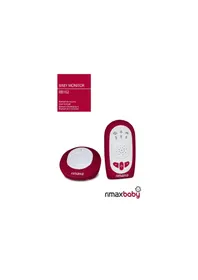
USER MANUAL Baby Mum RB102 Rimax
natural_image
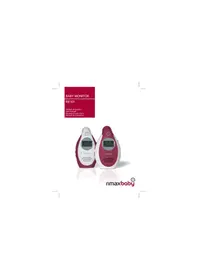
Red and white circular device with 'rimax' branding on the front face (no additional text or symbols visible)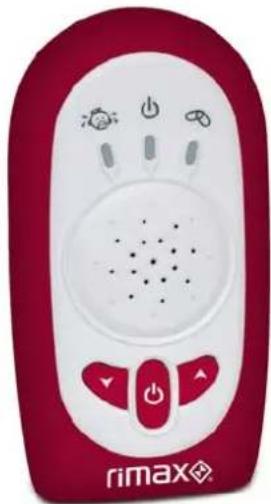
natural_image
Red and white remote control device with buttons and indicator lights (no readable text or symbols)rimaxbaby
Manual del usuario
ES
Baby MUM RB102
Please read this operating instruction manual thoroughly.
Intended use
The surveillance system has been developed to monitor rooms. The transmitter sends acoustic signals from its point of installation to the receiver. Any other use is considered unintended use.
- The use of this equipment does not substitute personal supervision, e.g. of a child. Users are not relieved of their personal liability. Unauthorized modification or reconstruction is not permitted. Under no circumstances open the device or complete any repair work yourself.
Installation location and safety information
Never lay the transmitter in a baby's/child's bed or playpen.
Ensure that the transmitter and power cable are out of reach of babies/children, i.e. they are at least one meter away.
Pay attention that the components are sufficiently well-ventilated when in operation. Do not lay a cushion, towel or such over the devices.
The devices are not intended for medical purposes. Warning and signal tones from respiratory or heartbeat monitoring equipment are not transmitted.
The installation location plays a decisive role in ensuring proper operation.
Therefore, maintain a distance of at least one meter from other electronic equipment, such as microwave ovens or hi-fi devices, otherwise they could cause mutual interference/faults.
Prevent excessive exposure to smoke, dust, vibration, chemicals, moisture, heat and direct sunlight. Do not use the equipment in potentially explosive areas.
Power adapter plug
- Attention: Only use the power adapter plugs contained in the material supplied since other power adapter plugs could damage the surveillance system. Ensure access to the power adapter plug is not obstructed by furniture or such.
When using the equipment with a power adapter plug, pay attention that the plug and cable are in perfect condition. Kinked or worn cable represents the risk of a fatal accident!.
Rechargeable batteries
- Attention!: Never throw batteries into a fi re. Only use batteries of the same type!. Pay attention to correct polarity
Power failure
In the event of a power failure, the devices only operate through battery power. Disconnect the power adapter plugs from the devices in this case.
Medical equipment
- Attention!: Never use the devices in the vicinity of medical equipment. Effects on such equipment cannot be fully ruled out.
Disposal
In order to dispose of your device, take it to a collection point provided by your local public waste authorities (e.g. recycling centre). According to laws on the disposal of electronic and electrical devices, owners are obliged to dispose of old electronic and electrical devices in a separate waste container. The adjacent symbol indicates that the device must not be disposed of in normal domestic waste!

Batteries represent a hazard to health and the environment!
Never open, damage or swallow batteries or allow them to pollute the environment.

They may contain toxic, ecologically hazardous heavy metals. You are legally obliged to dispose of power packs and batteries at the point of sale or in the corresponding containers provided at collection points provided by local public waste authorities.
Disposal is free of charge. The adjacent symbols indicate that the batteries must not be disposed of in normal domestic waste and must be brought to collection points provided by local public waste authorities.
Packaging materials must be disposed of according to local regulations.
2. Operating Elements and Indicators
The buttons in this operating manual are subsequently depicted with a uniform contour.
Therefore, slight deviations in the appearance of the symbols on the buttons compared to those depicted here are possible.
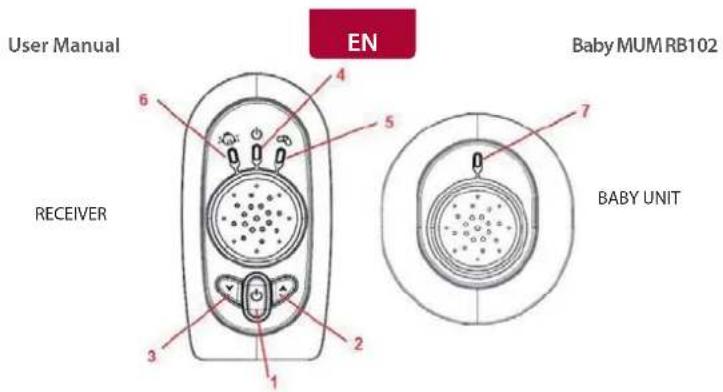
text_image
User Manual EN Baby MUM RB102 RECEIVER BABY UNITKey and LED functions:
- Power
Power On/Off button
- VOL+
Turn the unit power On or power Off by press and hold.
- VOL-
Volume Up button
- Power and Charge LED
Volume Down Button
- Link Indicator
Indicate Power On / Off and Charge Status
- Light up steady is power on. Flash is under charging
- Power LED
It blinks if the unit is out of range. Steady on is linking to baby unit
Cry louder then flash faster
Turns on as DC Power present
3. Operation
Power On / Off Parent Unit
After insert the battery into the parent unit, the unit will wake up immediately. If it has no response, it may be due to the battery power too low and need to charge up at least 8 hours. When battery is charged up, press and hold the power key, you can find the power LED light up, then release the key and wait for linking to baby. By press and hold the power key for two seconds, then the power LED turns off.
Power On / Off Baby Unit
There is no power key on baby unit, just insert DC power jack to turn the unit on and un-plug to off.
Crying Sound Level LED
Once you have set up your Baby Monitor, you will be able to hear the sounds in your baby's room through the Parent Unit. You will also be able to see the sound level LED, which flash rapidly, the louder the noise.
User Manual
EN
Baby MUM RB102
Link LED
If the connection between the Parent Unit and Baby Unit is broken at any time the green "Link" light on the Parent Unit will flash and the green. To re-establish the "Link", please make sure the Parent is in-range with the baby unit.
Volume
You can adjust the volume at which you hear your baby by using the Up/Down Keys on the side of the Parent Unit. This will not affect the sensitivity of your Baby Monitor, only the volume at which you hear those sounds through the Parent Unit.
Battery Charge indicator and battery low warning
The Parent Unit battery capacity level is indicated by power LED. If the charge becomes low, a battery low warning _beep" will sound and the Parent Unit's power LED will begin to flash. If this occurs you should plug in dc power into the Parent Unit to re-charge the batteries. During charging, the Power / BATT LED will slowly flash by every 5 seconds. You can still use your Parent Unit during charging. After the battery is fully charged, LED will stop blanking and turn on steadily.
4. Specifications
| Specifications Value | |
| Power supply (Baby unit) Switching | mode adaptor 5 V DC 600 mA |
| Power supply (Parent unit) Switching | mode adaptor 5 V DC 600 mA o recargable batteries (2 x AAA) 1.2V NiMH 600 mAh |
| Battery initial charging time Min 8 h | |
| Range Up to 300 meters under optimum conditions. Range is reduced in buildings through walls, doors etc. | |
| Frecuency range 2,4 GHz | |
5. Declaration of Conformity
Flamagas S.A. hereby certifies that the model Rimax Baby MUM RB102 complies with the basic requisites and other requirements of Directive 1999/5/EC.
A full copy of the statement of compliance can be found at:
www.electronicafl amagas.com