USER MANUAL P 126 QLIMA
For safety reasons, please read this manual carefully before operating. Persons who are not familiar with this manual must not use this air conditioner. We strongly recommend keeping this manual in a safe place for future reference.
A. Do not use a damaged cable. B. Do not clamp or bend the cable. C. Do not place unevenly. D. Do not place in front of an open window. E. Do not bring in contact with chemicals. F. Do not place near a heat source.
G. Do not immerse in water. H. Do not spill. I. Do not insert anything. J. Do not use an extension cord. K. Keep out of the reach of children. L. Do not repair.
SAFETY
DRAINING THE WATER TANK
WARRANTY CONDITIONS
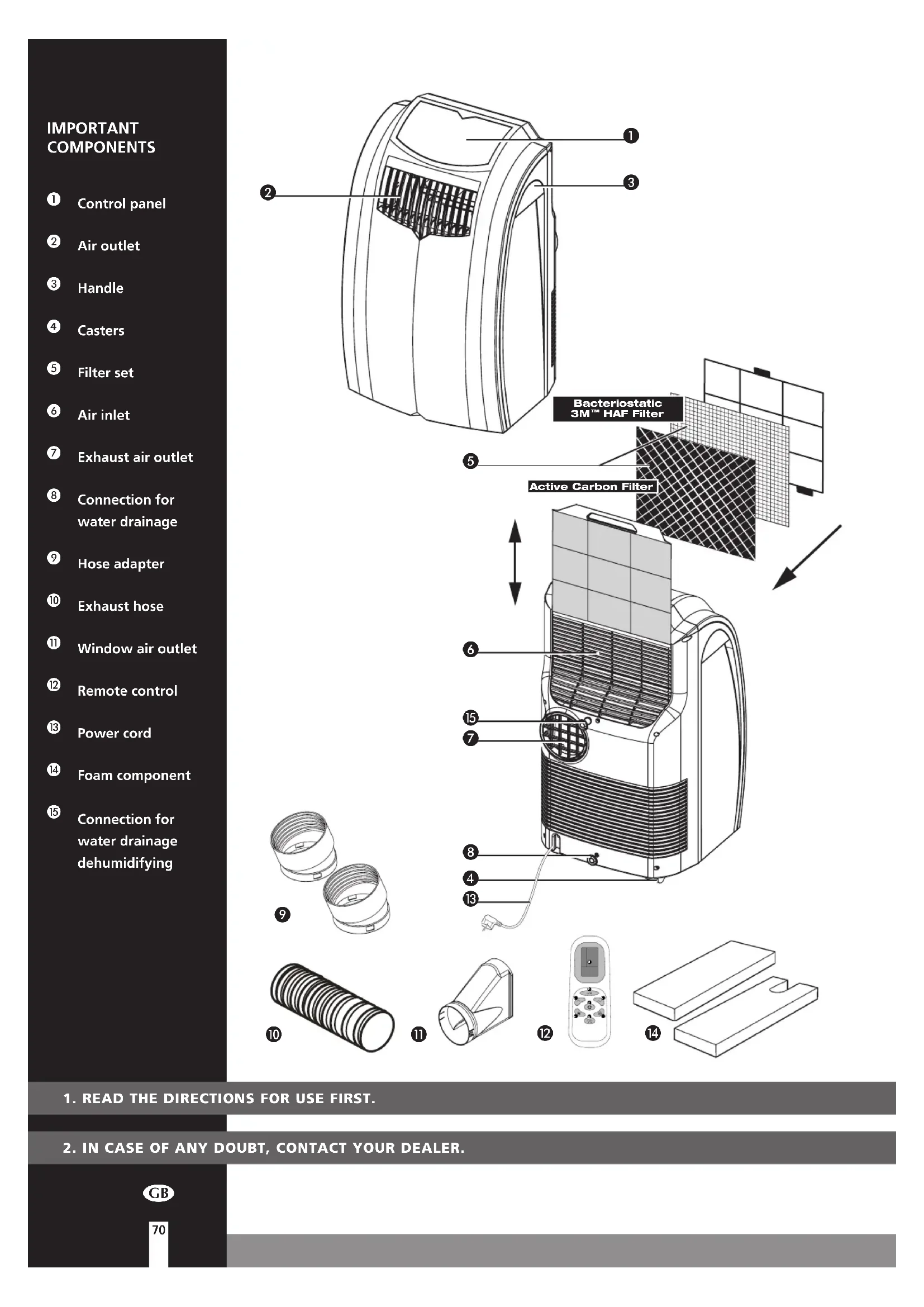
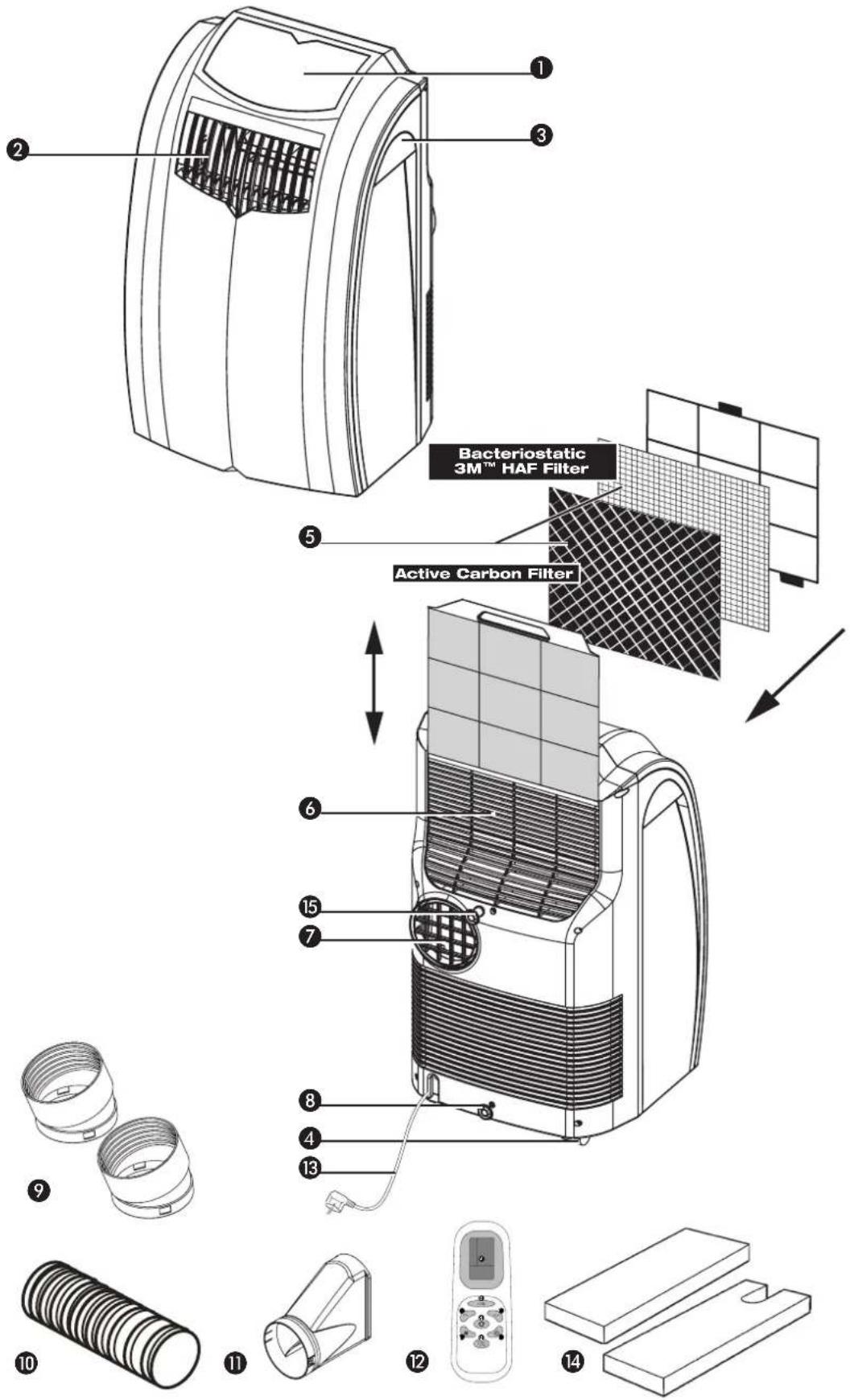
Control panel, Air outlet, 3 Handle, 4 Casters, 5 Filter set, 6 Air inlet, 7 Exhaust air outlet, 8 Connection for water drainage, 9 Hose adapter, 10 Exhaust hose, Window air outlet, Remote control, 13 Power cord, Foam component, 15 Connection for water drainage (dehumidifying)
- READ THE DIRECTIONS FOR USE FIRST.
- IN CASE OF ANY DOUBT, CONTACT YOUR DEALER.
GB
Dear Sir, Madam,
Congratulations on the purchase of your air conditioner. This air conditioner has three functions in addition to cooling the air, namely, air dehumidification, circulation and filtration. The mobile air conditioner is extremely easy to operate and move. You have acquired a high quality product that will provide you with many years of pleasure, on condition that you use it responsibly. Reading these instructions for use before operating your air conditioner will optimise its life span. We wish you coolness and comfort with your air conditioner.
Yours sincerely,
PVG Holding B.V.
Customer service department
A SAFETY INSTRUCTIONS
Read this user manual carefully before using the appliance and keep it for future reference. Install this device only when it complies with local/national legislation, ordinances and standards. This product is intended to be used as an air conditioner in residential houses and is only suitable for use in dry locations, in normal household conditions, indoors in living room, kitchen and garage.
IMPORTANT
- The installation must be completely in accordance with local regulations, ordinances and standards.
- The device is suitable exclusively for use in dry places, indoors.
- Check the mains voltage. This device is suitable exclusively for earthed sockets - connection voltage 230 Volt/ 50 Hz.
- The device MUST always have an earthed connection. You may absolutely not connect the device if the power supply is not earthed.
- The plug must always be easily accessible when the device is connected.
- Read these instructions carefully and follow the directions.
Before connecting the device, check that:
- The connection voltage corresponds to that on the type plate.
- The socket and power supply are suitable for the device.
- The plug on the cable fits the socket.
- The device is on a stable and flat surface.
Have the electrical installation checked by a recognised expert if you are not sure that everything is in order.
- The air conditioner is a safe device, manufactured in accordance with CE safety standards. Nevertheless, as with every electrical device, exercise caution when using it.
- Never cover the air inlets and outlets.
- Empty the water reservoir through the water drain ③ before moving it.
- Never allow the device to come into contact with chemicals.
- Do not insert objects into the openings of the device.
- Never allow the device to come into contact with water. Do not spray the device with water or submerge it as this may cause a short circuit.
- Always take the plug out of the socket before cleaning or replacing the device or a part of the device.
- NEVER connect the device with the aid of an extension cable. If a suitable, earthed socket is not available, have one fitted by a recognised electrician.
- Always consider the safety of children in the vicinity of this device, as with every electrical device.
- Always have any repairs - beyond regular maintenance - carried out by a recognised service engineer. Failure to do so may lead to invalidation of the guarantee.
- Always take the plug out of the socket when the device is not in use.
- A damaged electricity cable may only be replaced by the supplier or an authorised person/service point.

- This appliance is not intended for use by persons (including children) with reduced physical, sensory or mental capabilities, or lack of experience and knowledge, unless they have been given supervision or instruction concerning use of the appliance by a person responsible for their safety.
- Children should be supervised to ensure that they do not play with the appliance.
- This appliance can be used by children aged from 8 years and above and persons with reduced physical, sensory or mental capabilities or lack of experience and knowledge if they have been given supervision or instruction concerning use of the appliance in a safe way and understand the hazards involved. Children shall not play with the appliance.
- Cleaning and user maintenance shall not be made by children without supervision.
ATTENTION!
- Never use the device with a damaged power cord, plug, cabinet or control panel. Never trap the power cord or allow it to come into contact with sharp edges.
- Never seal the room - where this device will be used - completely airtight. This will prevent under pressure in this room. Under pressure can disrupt the safe operation of geysers, ventilation systems, ovens, etc.
- Failing to follow the instructions may lead to nullification of the guarantee on this device.
B
INSTALLATION
WARNING
Before using the air conditioner, it should be left in an upright position for at least 2 hours.
This unit is portable and can easily be moved from one room to another. In doing so, keep this in mind:

Ensure that the unit is positioned upright and on a level surface.

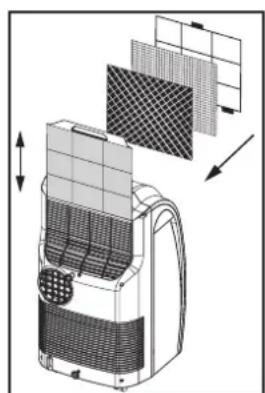
Place the loose filters in the filter holder.
- Take the filter holder out of the air conditioner.
- Open the filter holder and place the active carbon filter (black) and 3M HAF filter (white) in the filter holder.
- Place the filter fixing component back in the holder.
- Place the filter holder back in the air conditioner.

Do not operate the unit inside the bathroom, shower, or in any other very humid environment.
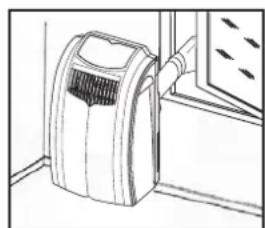
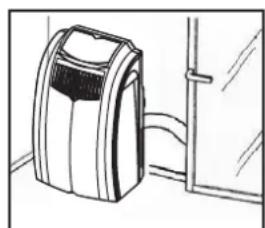
4. Please keep a distance of 50 cm between the unit and the wall or other objects to ensure proper air circulation. 5. Insert both ends of the air exhaust hose in the round connectors. Fasten the connectors by turning them clockwise onto the hose. 6. Insert one round connector 9 in the backside of the unit 7. Fasten the other connector 9 to the window air outlet 11. 7. Attach the hose connector 1 to air outlet 7 at the back of the unit. Lead the hose connector 1 outside and close the gap with the foam components supplied. These may have to be cut to size. 8. Keep windows and outside doors closed as much as possible in order to prevent the inflow of exterior air. The air that is intended to enter the room (specifically during the use of a single hose) in order to allow the air conditioner to function correctly must always be as cool as possible. Leading this air through a passage or adjacent room increases the comfort level.
IMPORTANT
The flexible air exhaust hose can be stretched to a length of approximately 1500 mm. The length of these hose(s) was calculated on the basis of the capacity of the device. The use of other hoses or extensions may cause faults in the device. The air must be able to flow unhindered. If this is not possible, this may lead to overheating or water condensation in the air exhaust hose. This is why you must ensure that there are no kinks or sharp corners in the air hose(s). To obtain an optimum result, the air hoses must be kept shorter than 1 metre while the air conditioner is in use.
C. OPERATION
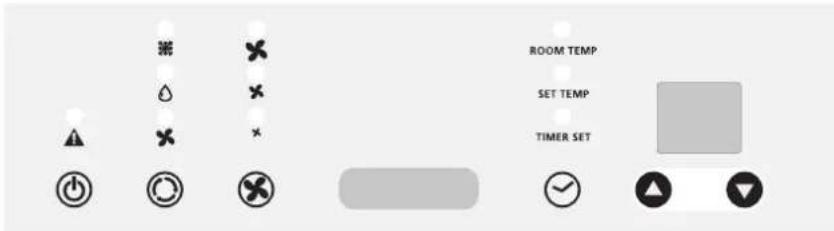
1. Insert the plug into the wall outlet.
Press the button to switch on the air conditioner.
3 With the button you can change the operating mode of the unit. By pressing the button, the following modes appear:
Cooling, the green light lights up. Dehumidifying, the orange light lights up. Air circulation, the yellow light lights up.
COOLING
When the unit is in the cooling mode, the following functions apply:
The fan speed can be adjusted by pressing the - button
Maximum setting.
Medium setting.
Lowest setting.
The temperature can be set by pressing the
buttons, anywhere
between 16°C and 32°C. The display will show the set temperature for 15 seconds and the "set temp" will light up. Fifteen seconds after setting the required temperature, the display will show the room temperature.
It depends on the environment whether the required temperature will be reached. It is not a malfunction of the air conditioner if the room temperature remains above the "set temp".
DEHUMIDIFYING
When the unit is primarily used as a dehumidifier, then please follow these instructions: Do not connect the air exhaust hose and let the warm air go back into the room. Connect a drainage hose onto the permanent drain connector on the back of the unit (refer to Chapter G). You must connect a drain tube to the water outlet ⑤.
Press the button on the remote or the MODE button on the control panel to select the dehumidifier mode. The fan will operate on low speed.
The dehumidifier indicator light will illuminate and stay solid while the unit is dehumidifying. When the humidity in the room is 50% or lower, the compressor will not run, the unit will not dehumidify, and the dehumidifier light will blink.
When the unit is in the dehumidifying mode, the fan speed cannot be adjusted when the temperature is below 25°C. The fan speed will be automatically set on 'Medium setting'. Adjusting of the temperature setting does not have any effect when in dehumidifying mode.
AIR CIRCULATION
In this mode the unit only circulates air; the unit will not cool or dehumidify.
The air entering the unit is not cooled or dehumidified, but is filtered.
When the unit is in this mode, the following functions apply:
- The fan speed can be adjusted by pressing the -button
Maximum setting.
Medium setting.
Lowest setting.
4 When the unit is switched off the most recent setting will be stored in memory.
5 The timer function allows you to switch the unit on or off at a certain time.
TO SWITCH ON THE UNIT AT A CERTAIN TIME
- Ensure that the unit is set in the required operating mode
- Switch off the unit by pressing the - button. Ensure that the plug is properly inserted into the wall outlet.
- Press the button. The light "Timer set" will flash.
- Use the a n b u t i n s to set a time between 1 and 24 hours.
- When the set time has expired the unit will switch on.
NOTE!
The compressor has been set so that it starts functioning three minutes after the (re)start of the air conditioner.
The cooling will switch off when the room temperature is lower than the set one. Air circulation will however continue to work on the set level. When the room temperature rises above the selected value, the cooling will work again.
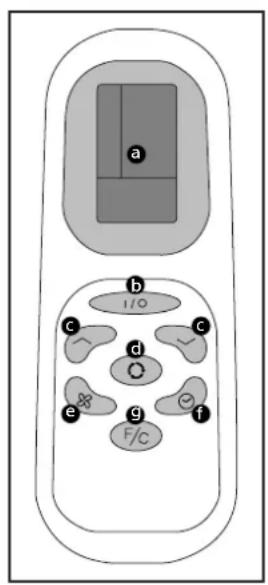
REMOTE CONTROL
a. LCD Screen b. Power on/off button c. Timer and thermostat setting buttons d. Mode button (select A/C, Fan or Dehumidifier) e. A/C Fan Speed button (High, Medium, Low) f. Timer ON/OFF button g. Celsius/Fahrenheit selector
The remote control works in combination with the control panel. Aim the front end of the remote control at the red window. The maximum operating distance from the air conditioner is approximately 5 metres. Place 2 pieces of AAA Batteries before use.
TIMER PROGRAMMING
1 Press the button on the remote or the "Timer Setting" button on the control panel to turn on the Timer Function. 2 Press the or buttons on the remote or the or button on the control panel to set the desired shut-off period. The unit will shut off when the set time elapses.
AIR FILTER
The air conditioner is equipped with a 3-layer filter package to clean the circulated room air. The filters are delivered with a separately packed 3MTM HAF filter and an active carbon filter. These filters must be placed according to instructions before operating the air conditioners.
- Screen filter; to remove bigger dust particles.
- 3MTM HAF filter to remove particles from the air such as pollen, animal dander and dust.
- Active carbon filter sheet; to remove odours.
The filter holder on the backside of the unit can be opened. Active carbon filter and 3MTM HAF filter can be removed. Screen filter is part of the filter holder.
- The screen filter has to be cleaned regularly with a vacuum cleaner to avoid blocking of the air flow.
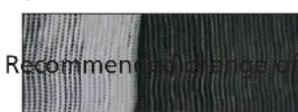
- The positive/negative electro statically charged 3MTM HAF filter is recommended to be changed every 3 months. Unusual dirt, construction work, pets, the presence of smokers and running the air-conditioning unit continuously can shorten the life time of the 3MTM HAF filter.
New filter
filter
- The active carbon sheet can be cleaned with a vacuum cleaner when dusty but has to be changed at the same time as the 3MTM HAF filter.
NOTE!
- Remove the 3MTM HAF filter and active carbon filter before seasonal storage and install new filters at the beginning of the new season. The old filters can be disposed in the 'Non-biological garbage container'.
- Never use the airconditioner without the air filter.
- Using the unit without the activated carbon filter and/or enzyme filter will not damage your air conditioner. In that case, airborne micro-organisms are not neutralised and unpleasant odours are not removed.
- Only use suitable Qlima filters. This will prevent any damage to your airconditioner. Using other than the original filters is entirely at the risk of the consumer. This may have a negative effect on the operation of the device and may result in damage. The device may also leak water subsequent to the formation of ice.
- Suitable filter packages are available at your dealer.
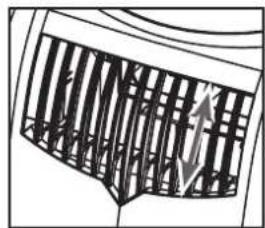
E AIR FLOW
Move the air vent directly to adjust the air flow direction of the horizontal louvres.
F EMPTY INTERNAL WATER CONTAINER
In extreme (environmental) circumstances it may be necessary to empty the internal water container regularly. When the internal water container is full the light will flash and the unit will beep continuously. The unit will switch off automatically. To empty the water container do the following:
1 Do not move the unit. Drastic movements can cause water leakage. Switch off the unit and remove the plug from the wall outlet. Place a pan or appropriate tray on the floor underneath the permanent drain tube. 4 Remove the rubber plug 8 from the drain tube and let the water run out. (± 0.5 litres). Replace the rubber plug, put the plug into the wall outlet, and switch on the unit. The warning light should be off.
NOTE!
When the air conditioner is in use, under normal circumstances the condensed water will be drained through the air outlet-tube.
G CONTINUOUS DRAINAGE
Switch off the unit and remove the plug from the mains. Place a pan or appropriate tray on the floor underneath the permanent drain tube to collect any water draining away. 3 Remove the rubber plug 8 from the drain tube. 4 Connect a drain hose (0 15 mm) into the water outlet and extend with extra water tube as needed. Place the other end of the drain tube at a location suitable for the purpose (a drain hole, for instance). In doing so, take care to ensure that the tube is not twisted and is free of kinks.

NOTE!
The tube must be placed so as to be declining along its entire length.
DEHUMIDIFICATION
If the unit will be used mainly as dehumidifier, do not connect the exhaust hose and let the warm air return in the room. Continuous drainage is then necessary and more efficient. You must, however, use a water drain tube 15, placing its discharge end at a suitable drainage point.
H MAINTENANCE
WARNING!
Switch off the unit and remove the plug from the mains before cleaning the appliance or filter, or before replacing the filters.
Clean the housing with a soft, damp cloth. Never use aggressive chemicals, petrol, detergents, or other cleansing solutions. For maintenance of the filters, refer to Chapter D "Air Filter".
NOTE!
Never use the air conditioner without the screen filter.
I STORAGE
1. Empty the internal water container (refer to Chapter F). 2. Clean and replace the mesh filter (see also Chapter D).
- Remove the active carbon filter and the 3M™ HAF filter at the end of the season and only place new filters at the beginning of the new season. The old filters do not constitute chemical waste and may be disposed of as regular waste (not organic waste).
- New filters are available at your dealer.
3. Put the unit in air circulation mode for a couple of hours to ensure that the inside becomes completely dry. Store the cable, protect the unit against dust, and store in a dry place not accessible to children.
| ProblemCauseSolution | |
| The unit does not function | No power supply | Connect to a functioning outlet and switch on |
| Water tank indicator is on | Empty the internal water container (refer to Chapter F) |
| The unit does not seem to perform | In direct sunlight Close curtains | |
| Windows or doors open, many people or heat source in room | Close doors and windows, or place an extra air conditioner |
| Dirty filter Clean or replace filter | |
| Air inlet or air outlet blocked Remove blockage | |
| Room temperature lower than selected value | Change temperature selection |
| The unit is noisy | Unit stands uneven | Place on even surface (less vibrations) |
| The compressor does not work | Overheat protection probably activated | Wait 3 minutes until the temperature has decreased, and turn on the unit again |
| Remote control does not function | Distance too great | Make sure the remote control is correctly aimed at the control panel |
| Remote control signal not detected by control panel |
| Batteries empty Replace the batteries |
Never attempt to disassemble or repair the device. Inexpert repairs invalidate the guarantee and can endanger the users of the device.
K GUARANTEE CONDITIONS
The air conditioner is supplied with a 24-month guarantee, commencing on the date of purchase. All material and manufacturing defects will be repaired or replaced free of charge within this period. The following rules apply:
- We expressly refuse all further damage claims, including claims for collateral damage.
- Repairs to or replacement of components within the guarantee period will not result in an extension of the guarantee.
- The guarantee is invalidated if any modifications have been made, non-genuine parts are fitted, or repairs are carried out by third parties.
- Components subject to normal wear, such as the filter, are not covered by the guarantee.
- The guarantee is valid only when you present the original, dated purchase invoice and if no modifications have been made.
- The guarantee is invalid for damage caused by neglect or by actions that deviate from those in this instruction booklet.
- Transportation costs and the risks involved during the transportation of the air conditioner or air conditioner components shall always be for the account of the purchaser.
- Damage caused by not using suitable Qlima filters is not covered by the guarantee.
To prevent unnecessary expense, we recommend that you always first carefully consult the instructions for use. Take the air conditioner to your dealer for repairs if these instructions do not provide a solution.
TECHNICAL DATA
To be used as indication, subject to modifications
| Model | P126 P129 | |
| Cooling capacity* W | | 2600 2900 | |
| EE Class* | | A | A |
| EER* | | 2.6 2.61 | |
| Power consumption kW | | 1.0 1.11 | |
| Power consumption Standby mode | W | <0.5 <0.5 | |
| Current nom. A | | 4.35 4.8 | |
| Mains V/Hz/PH | | 230 / 50 / 1 230 / 50 / 1 | |
| Air delivery max. m | 3/h | 295 312 | |
| Dehumidification max. ** L/24h | | 30 34 | |
| Room size m | 3 | 65 - 90 70 - 95 | |
| Compressor type | | rotary | rotary |
| Refrigerant | type/gr | R-410A / 540 | R-410A / 620 |
| Thermostat range | °C | 16 - 32 16 - 32 | |
| Fan speeds | | 3 | 3 |
| Max. Sound pressure level / power level | dB(A) | 52 / 65 | 52 / 65 |
| Dimensions (w x h x d) | mm | 435 x 770 x 430 | 435 x 770 x 430 |
| Weight | kg | 28 29 | |
| Unit protection | | IP X0 | IP X0 |
| Remote control | | yes | yes |
| \(3\text{M}^{\text{TM}}\) HAF filter | | yes | yes |
| Active carbon filter | | yes | yes |
| Fuse rating | | 3.15A / 250V | 3.15A / 250V |
- Conform EN 14511-2011 ** Moisture removal at 32°C , 80% RH
Environmental information: This equipment contains fluorinated greenhouse gases covered by the Kyoto Protocol. It should only be serviced or dismantled by professional trained personnel.
This equipment contains R410A refrigerant in the amount as stated in the table above. Do not vent R410A into atmosphere: R410A, is a fluorinated greenhouse gas with a Global Warming Potential (GWP) = 1975.
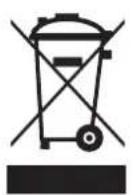
Waste electrical products should not be disposed with household waste. Please recycle where facilities exist. Check with your local authority or retailer for recycling advice.

Distributed in Europe by PVG Holding B.V.
For more information or if you encounter any problems, please visit our website at www.qlima.com or contact our customer service (phone numbers can be found on www.qlima.com). For all further information or if you have any problems with the device, please refer to www.qlima.com or the local customer service center (phone numbers can be found on www.qlima.com). If you need information or if you have a problem, please visit our website www.qlima.com, or contact our customer service (you will find the phone number on www.qlima.com). If you would like to obtain additional information or if you encounter a problem, please visit our website (www.qlima.com) or contact our customer service (you will find the address and phone number on www.qlima.com). If you need more information or if you have problems with the device, please visit our website at www.qlima.com or contact our customer service center (www.qlima.com). If you need information or if you have a problem, please visit our website (www.qlima.com) or contact our sales support (you will find its phone number on www.qlima.com). For information and in case of problems, please visit the website www.qlima.com or contact the Customer Service Center (to find out the phone number, please consult www.qlima.com). If you need information or if you have a problem with the product, you can visit the website www.qlima.com. Alternatively, you can contact PVG's consumer service (phone numbers are on www.qlima.com). If you need information or if you have a problem, please visit our website (www.qlima.com) or contact the sales support department (address and phone number on www.qlima.com). If you need information or if you have problems, please visit the website www.qlima.com or contact the Service Center (phone number on www.qlima.com). In case of problems and for detailed information, please visit the Qlima website at www.qlima.com or contact the Qlima contact center (www.qlima.com). If you need service or information or have problems with the device, you can visit www.qlima.com or contact Qlima customer service (you will find the phone number on www.qlima.com). For more information, please visit our website at www.qlima.com or call the phone number (www.qlima.com). If you need more information or if you encounter a problem, please visit the Qlima website at www.qlima.com or contact the Qlima customer service center in your country (phone number: www.qlima.com).