IMO25L63 - Microwave Oven Ices - Free user manual and instructions
Find the device manual for free IMO25L63 Ices in PDF.



| Product Type | Combination microwave oven (grill and convection) |
| Brand | Ices |
| Model | IMO25L63 |
| Capacity | 25 litres |
| External dimensions (H × W × D) | 281 × 483 × 424 mm |
| Net weight | Approximately 16 kg |
| Power supply | 230 V ~ 50 Hz |
| Power consumption | 1400 W (microwave), 1000 W (grill), 1950 W (convection) |
| Microwave output power | 900 W |
| Microwave frequency | 2450 MHz |
| Main functions | Microwave, Grill, Convection, Microwave+grill combination, Microwave+convection combination, Quick defrost, Auto cooking (7 programs), Quick start, Digital clock |
| Grill | 1000 W |
| Convection | 10 temperatures from 110°C to 200°C |
| Automatic programs | Popcorn, Milk/coffee, Fresh vegetables, Grilled chicken, Cake, Reheat, Potato |
| Defrost | Quick by time or weight |
| Multi-stage cooking | Up to 3 sequences |
| Display | Digital with clock |
| Child lock | Yes |
| Turntable | Yes, glass (diameter not specified) |
| Safety | Door lock, overheat protection (codes E01, E02, E03), earthing |
| Cleaning and maintenance | Dishwasher-safe glass tray, interior walls cleaned with a damp cloth, roller ring cleanable with warm water |
| Spare parts and repairability | Glass tray, roller ring, lamp (replacement by dealer); repair by qualified professional only |
| General information | Household use only; warranty and service according to European laws |
Frequently Asked Questions - IMO25L63 Ices
User questions about IMO25L63 Ices
0 question about this device. Answer the ones you know or ask your own.
Ask a new question about this device
Download the instructions for your Microwave Oven in PDF format for free! Find your manual IMO25L63 - Ices and take your electronic device back in hand. On this page are published all the documents necessary for the use of your device. IMO25L63 by Ices.
USER MANUAL IMO25L63 Ices
www.ices-electronics.com
The declaration of conformity may be consulted at http://www.stl.nl/supportfiles/ices/CE/5905gkjd813276fnh2.pdf
Microwave Oven Owner's Manual
www.ices-electronics.com
Please read these instructions carefully before installing and operating the oven.
Record in the space below the SERIAL NO. found on the nameplate on your oven and retain this information for future reference.
SERIAL NO.
PRECAUTIONS TO AVOID POSSIBLE EXPOSURE TO EXCESSIVE MICROWAVE ENERGY
- \Do not attempt to operate this oven with the door open since open door operation can result in harmful exposure to microwave energy. It is important not to defeat or tamper with the safety interlocks.
- Do not place any object between the oven front face and the door or allow soil or cleaner residue to accumulate on sealing surfaces.
- Do not operate the oven if it is damaged. It is particularly important that the oven door close properly and that there is no damage to the
a. Door (bent),
b. Hinges and latches (broken or loosened),
c. Door seals and sealing surfaces.
- The oven should not be adjusted or repaired by anyone except properly qualified service personnel.
CONTENTS
PRECAUTIONS TO AVOID POSSIBLE EXPOSURE TO EXCESSIVE MICROWAVE ENERGY -1
IMPORTANT SAFETY INSTRUCTIONS 2
SPECIFICATIONS* 3
INSTALLATION 3
RADIO INTERFERENCE 3
GROUNDING INSTRUCTIONS 4
MICROWAVE COOKING PRINCIPLES 4
BEFORE YOU CALL FOR SERVICE 4
UTENSILS GUIDE 5
PART NAMES- 5
CONTROL PANEL 6
HOW TO SET THE OVEN CONTROLS 7
Setting digital clock- 7
Quick Start- 7
Microwave cooking- 7
Grill cooking 7
Combination cooking 8
Convection 8
Microwave+Convection 8
Speed Defrost 9
Multi-Stage Cooking 9
Auto Cook -9
Child Lock 10
CLEANING AND CARE 11
Service and support 12
IMPORTANT SAFETY INSTRUCTIONS
When using electrical appliance basic safety precautions should be followed, including the following:
WARNING: To reduce the risk of burns, electric shock, fire, injury to persons or exposure to excessive microwave energy:
- Read all instructions before using the appliance.
-
Use this appliance only for its intended use as described in this manual. Do not use corrosive chemicals or vapors in this appliance. This type of oven is specifically designed to heat, cook or dry food. It is not designed for industrial or laboratory use.
-
Do not operate the oven when empty.
- Do not operate this appliance if it has a damaged cord or plug, if it is not working properly or if it has been damaged or dropped. If the supply cord is damaged, it must be replaced by the manufacturer or its service agent or a similarly qualified person in order to avoid a hazard.
- WARNING: Only allow children to use the oven without supervision when adequate instructions have been given so that the child is able to use the oven in a safe way and understands the hazards of improper use.
- Warning: When the appliance is operated in the combination mode, children should only use the oven under adult supervision due to the temperatures generated.
- To reduce the risk of fire in the oven cavity:
a. When heating food in plastic or paper container, keep an eye on the oven due to the possibility of ignition.
b. Remove wire twist-ties from paper or plastic bags before placing bag in oven.
c. If smoke is observed, switch off or unplug the appliance and keep the door closed in order to stifle any flames.
d. Do not use the cavity for storage purposes. Do not leave paper products, cooking utensils or food in the cavity when not in use.
- WARNING: Liquid or other food must not be heated in sealed containers since they are liable to explode.
- Microwave heating of beverage can result in delayed eruptive boiling, therefore care has to be taken when handle the container.
- Do not fry food in the oven. Hot oil can damage oven parts and utensils and even result in skin burns.
- Eggs in their shell and whole hard-boiled eggs should not be heated in microwave ovens since they may explode even after microwave heating has ended.
- Pierce foods with heavy skins such as potatoes, whole squashes, apples and chestnuts before cooking.
- The contents of feeding bottles and baby jars should be stirred or shaken and the temperature should be checked before serving in order to avoid burns.
- Cooking utensils may become hot because of heat transferred from the heated food. Potholders may be needed to handle the utensil.
- Utensils should be checked to ensure that they are suitable for use in microwave oven.
- WARNING: It is hazardous for anyone other than a trained person to carry out any service or repair operation which involves the removal of any cover which gives protection against exposure to microwave energy.
- This product is a Group 2 Class B ISM equipment. The definition of Group 2 which contains all ISM (Industrial, Scientific and Medical) equipment in which radio-frequency energy is intentionally generated and/or used in the form of electromagnetic radiation for the treatment of material, and spark erosion equipment. For Class B equipment is equipment suitable for use in domestic establishments and in establishments directly connected to a low voltage power supply network which supplies buildings used for
domestic purpose.
- This appliance is not intended for use by persons (including children) with reduced physical, sensory or mental capabilities, or lack of experience and knowledge, unless
they have been given supervision or instruction concerning use of the appliance by a person responsible for their safety.
- Children should be supervised to ensure that they do not play with the appliance.
SPECIFICATIONS*
| Power Consumption: | 230V~50Hz, 1400W(Microwave) |
| 1000W (Grill) | |
| 1950W (Convection) | |
| Rated Microwave Power Output: | 900W |
| Operation Frequency: | 2450MHz |
| Outside Dimensions: | 281mm(H)×483mm(W)×424mm(D) |
| Oven Cavity Dimensions: | 220mm(H)×340mm(W)×344mm(D) |
| Oven Capacity: | 25Litres |
| Cooking Uniformity: | Turntable System |
| Net Weight: | Approx.16kg |
INSTALLATION
- Make sure that all the packing materials are removed from the inside of the door.
- WARNING: Check the oven for any damage, such as misaligned or bent door, damaged door seals and sealing surface, broken or loose door hinges and latches and dents inside the cavity or on the door. If there is any damage, do not operate the oven and contact qualified service personnel.
- This microwave oven must be placed on a flat, stable surface to hold its weight and the heaviest food likely to be cooked in the oven.
-
Do not place the oven where heat, moisture, or high humidity are generated, or near combustible materials.
-
For correct operation, the oven must have sufficient airflow. Allow 20cm of space above the oven, 10cm at back and 5cm at both sides. Do not cover or block any openings on the appliance. Do not remove feet.
- Do not operate the oven without glass tray, roller support, and shaft in their proper positions.
- Make sure that the power supply cord is undamaged and does not run under the oven or over any hot or sharp surface.
- The socket must be readily accessible so that it can be easily unplugged in an emergency.
- Do not use the oven outdoors.
RADIO INTERFERENCE
Operation of the microwave oven can cause interference to your radio, TV, or similar equipment. When there is interference, it may be reduced or eliminated by taking the following measures:
- Clean door and sealing surface of the oven.
- Reorient the receiving antenna of radio or television.
- Relocate the microwave oven with respect to the receiver.
-
Move the microwave oven away from the receiver.
-
Plug the microwave oven into a different outlet so that microwave oven and receiver are on different branch circuits.
GROUNDING INSTRUCTIONS
This appliance must be grounded. This oven is equipped with a cord having a grounding wire with a grounding plug. It must be plugged into a wall receptacle that is properly installed and grounded. In the event of an electrical short circuit, grounding reduces risk of electric shock by providing an escape wire for the electric current. It is recommended that a separate circuit serving only the oven be provided. Using a high voltage is dangerous and may result in a fire or other accident causing oven damage.
WARNING Improper use of the grounding plug can result in a risk of electric shock.
Note
- If you have any questions about the grounding or electrical instructions, consult a qualified electrician or service person.
- Neither the manufacturer nor the dealer can accept any liability for damage to the oven or personal injury resulting from failure to observe the electrical connection procedures.
The wires in this cable main are colored in accordance with the following code:
Green and Yellow = EARTH
Blue = NEUTRAL
Brown = LIVE
MICROWAVE COOKING PRINCIPLES
- Arrange food carefully. Place thickest areas towards outside of dish.
- Watch cooking time. Cook for the shortest amount of time indicated and add more as needed. Food severely overcooked can smoke or ignite.
- Cover foods while cooking. Covers prevent spattering and help foods to cook evenly.
- Turn foods over once during microwaving to speed cooking of such foods as chicken and hamburgers. Large items like roasts must be turned over at least once.
- Rearrange foods such as meatballs halfway through cooking both from top to bottom and from the center of the dish to the outside.
BEFORE YOU CALL FOR SERVICE
If the oven fails to operate:
- Check to ensure that the oven is plugged in securely. If it is not, remove the plug from the outlet, wait 10 seconds, and plug it in again securely.
- Check for a blown circuit fuse or a tripped main circuit breaker. If these seem to be operating properly, test the outlet with another appliance.
- Check to ensure that the control panel is programmed correctly and the timer is set.
- Check to ensure that the door is securely closed engaging the door safety lock system. Otherwise, the microwave energy will not flow into the oven.
IF NONE OF THE ABOVE RECTIFIES THE SITUATION, THEN CONTACT A QUALIFIED TECHNICIAN.
DO NOT TRY TO ADJUST OR REPAIR THE OVEN YOURSELF.
UTENSILS GUIDE
- The ideal material for a microwave utensil is transparent to microwave, it allows energy to pass through the container and heat the food.
- Microwave can not penetrate metal, so metal utensils or dishes with metallic trim should not be used.
- Do not use recycled paper products when microwave cooking, as they may contain small metal fragments which may cause sparks and/or fires.
- Round /oval dishes rather than square/oblong ones are recommend, as food in corners tends to overcook.
- Narrow strips of aluminum foil may be used to prevent overcooking of exposed areas. But be careful don't use too much and keep a distance of 1 inch (2.54cm) between foil and cavity.
The list below is a general guide to help you select the correct utensils.
- Combination: applicable for both "microwave + grill", and "microwave + convection" cooking.
| Cookware | Microwave | Grill | Convection | Combination* |
| Heat-Resistant Glass | Yes | Yes | Yes | Yes |
| Non Heat-Resistant Glass | No | No | No | No |
| Heat-Resistant Ceramics | Yes | Yes | Yes | Yes |
| Microwave-Safe Plastic Dish | Yes | No | No | No |
| Kitchen Paper | Yes | No | No | No |
| Metal Tray | No | Yes | Yes | No |
| Metal Rack | No | Yes | Yes | No |
| Aluminum Foil & Foil Container | No | Yes | Yes | No |
PART NAMES
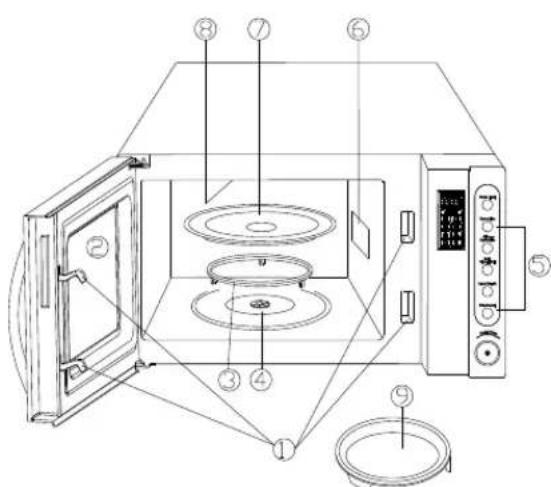
- Door Safety Lock System
- Oven Window
- Roller Ring
- Shaft
- Control Panel
- Wave Guide
- Glass Tray
- Grill Heater
- Baking Plate
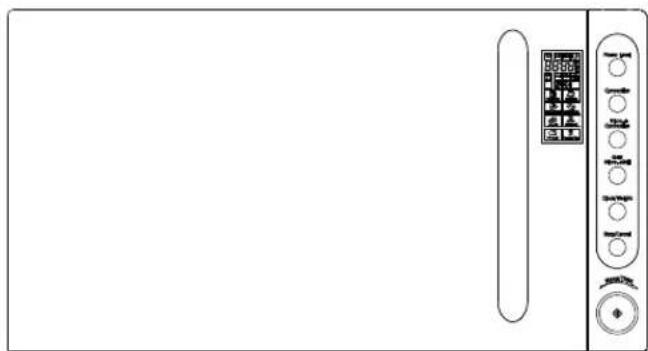
CONTROL PANEL
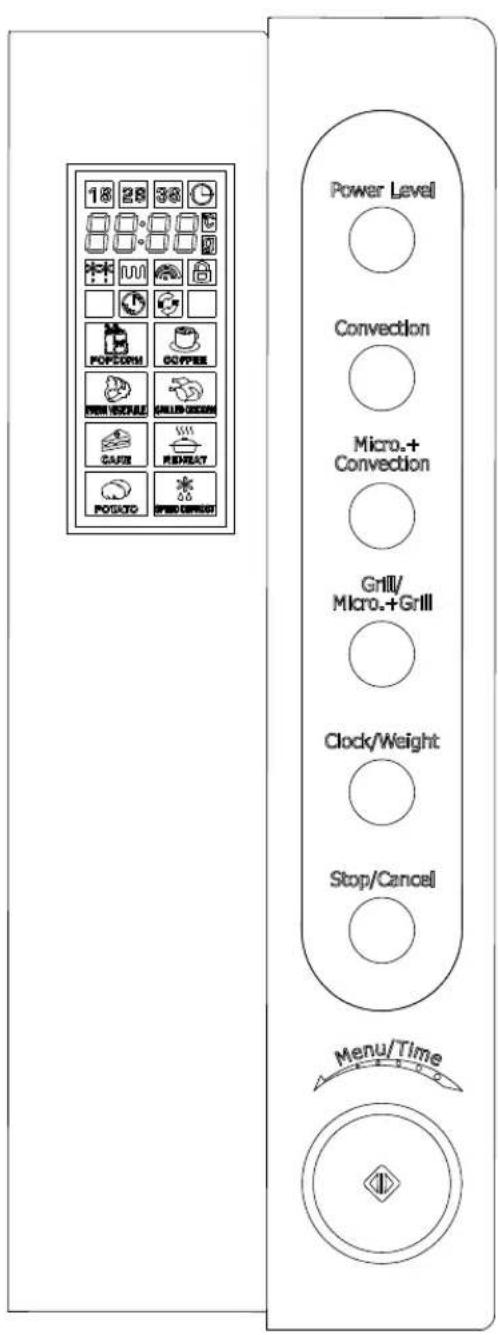
- MENU ACTION SCREEN
Cooking time, power, action indicators, and clock time are displayed.
Touch this button a number of times to set microwave cooking power level.
CLOCKWEIGHT
Press a number of times to specify weight or number of serving.
Press and hold to set the clock.
CONVECTION
Used to set a convection cooking program.
MICRO.+CONVECTION
Used to set a microwave and convection combination cooking program.
GRILLIMICRO.+GRILL
Use to set a grill or microwave and grill combination cooking program.
START/QUICK START(THEDIAL)
Touch to start a cooking program.
Simply touch it a number of times to set cooking time and the oven will cook immediately at full power level.
STOPICANCEL
Press to cancel setting or reset the oven before Stop setting a cooking program.
Press once to temporarily stop cooking, or twice to cancel cooking altogether.
It is also used for setting child lock.
- MENUTIME(DIAL)
Turn the dial to input cooking time,
Select the kind of food you want to cook.
HOW TO SET THE OVEN CONTROLS
Each time a button is touched, a beep will sound to acknowledge the touch.
After a cooking program has finished, beeps will sound and End appears on display. Press Stop/Cancel button or open door to clear END before starting another cooking function.
Setting digital clock
With the oven ready for input, touch the Clock/Weight button once to set the digital clock in 12-hour cycle or in 24-hour cycle.
FOR EXAMPLE: Suppose you want to set the oven clock time to 8:30.
- Press Clock/Weight button once or twice.
- Turn Menu/Time to indicate the hour digit 8.
- Press Clock/Weight button once.
- Turn Menu/Time dial to indicate the minute digits until the screen shows 8:30.
- Press Clock/Weight button once to confirm the setting.
Note: During cooking, press Clock/Weight button to check the clock time.
Quick Start
This feature allows you to start the oven quickly with full power level.
Press the Start/Quick Start button a number of times to set the cooking time (maximum 10 min.), the oven starts work at full power level immediately.
Microwave cooking
To cook with microwave, time and power level should be set. The longest cooking time to be set is 95 min.
Suppose you want to cook for 5 minutes at 60% of microwave power.
- Touch Power Level button to choose desired power.
- Use the Menu/Time to set cooking time 5:00.
- Touch Start/Quick Start button.
Note: During cooking, press Power Level to show power level.
| Press POWER LEVEL button to select cooking power | ||
| Press | Power | Showing |
| once | 100% | P100 |
| twice | 80% | P-80 |
| 3 times | 60% | P-60 |
| 4 times | 40% | P-40 |
| 5 times | 20% | P-20 |
| 6 times | 0% | P-00 |
Grill cooking
The longest cooking time is 95 minutes. The grill cooking is particularly useful for thin slices of meat, steaks, chops, kebabs, sausages of piece of chicken. It is also suitable for hot sandwiches and au gratin dishes.
For example, suppose you want to grill for 12 minutes.
- Press Grill/ Micro. +Grill button once.
- Turn the Menu/Time to 12:00.
- Press Start/Quick Start button.
Combination cooking
Combination1 (C 0-1):
The longest cooking time is 95 minutes.
Use for fish or au gratin.
FOR EXAMPLE: Suppose you want to set combination 1 cooking for 25 minutes.
- Press Grill/Micro. +Grill button twice.
- Turn Menu/Time to 25:00.
- Press Start/Quick Start button.
The longest cooking time is 95 minutes.
Use for puddings omelettes, baked potatoes and poultry.
FOR EXAMPLE: Suppose you want to set combination 2 cooking for 12 minutes.
- Press Grill/Micro. +Grill button thrice.
- Turn Menu/Time to 12:00.
- Press Start/Quick Start button.
Convection
During convection cooking, hot air is circulated throughout the oven cavity to brown and make crisp foods quickly and evenly. This oven can be programmed for ten different cooking temperatures. They are: 200^ 110^
To Cook with Convection
Press Convection button to set convection temperature.
Suppose you want to cook at 170^ for 40 minutes.
- Press Convection button to select cooking temperature.
- Rotate the Menu/Time dial until the correct cooking time is displayed.
- Press Start/Quick Start button.
NOTE:
- The maximum convection cooking time is 95 minutes.
- You can check the convection
temperature while cooking is in progress by pressing the Convection button.
To Preheat and Cook with Convection
Your oven can be programmed to combine preheating and convection cooking operations.
Suppose you want to preheat to 150^ and then cook 50 minutes.
- Press Convection button to select preheating temperature.
- Press Start/Quick Start. When the oven reaches the programmed temperature, one beep will sound every 5 seconds.
- Open the door and place container of food at the center of the turntable.
- Rotate the Menu/Time dial to program cooking time.
- Press Start/Quick Start button.
Note: When the temperature reaches the preheat temperature, the countdown stop with sound DE- every 5 seconds and keep the state for 30 minutes.
Microwave+Convection
This oven has four pre-programmed settings that make it easy to cook with both convection heat and microwave automatically.
Press Micro. +Convection button to select convection temperature:
| Oven temperature(℃) | |
| COMB1 | 200 |
| COMB2 | 170 |
| COMB3 | 140 |
| COMB4 | 110 |
Suppose you want to bake a cake for 24 minutes on COMB3.
- Press Micro. +Convection button to select cooking temperature.
-
Rotate the Menu/Time dial to program cooking time.
-
Press Start/Quick Start button to start.
NOTE:
The maximum cooking time is 95 minutes. You can check the temperature while cooking is in progress by pressing the Micro. +Convection button.
Speed Defrost
The oven can quickly defrost food according to the set time you entered.
FOR EXAMPLE: Suppose you want to defrost shrimp.
- Place the shrimp to be defrosted into the oven.
- Rotate Menu/Time anti-clockwise to select cooking code 8 for speed defrost.
- Press Clock/Weight once.
- Rotate the Menu/Time dial to program defrosting time.
- Press Start/Quick Start button.
Note: The maximum defrosting time you can enter is 95 minutes.
During defrosting, beeps will sound to remind user to turn food over for uniform defrosting.
Then press Start/Quick Start to continue the
next defrosting stage.
Multi-Stage Cooking
Your oven can be programmed for up to 3 automatic cooking sequences. Suppose you want to set the following cooking program.
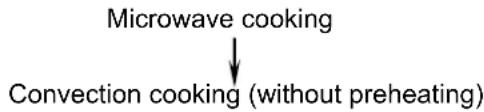
- Press Power Level button to set power level.
- Rotate the Menu/Time dial to program cooking time.
- Press Convection button to set convection temperature.
- Rotate the Menu/Time dial to program cooking time.
- Press Start/Quick Start button.
Note: The digital tube will display 1S, 2S, 3S according to different stage setting.
Speed Defrost, Quick Start and Auto Cook can not set in multi-stage cooking program.
Auto Cook
For food or the following cooking mode, it is not necessary to program the duration and the cooking power. It is sufficient to indicate the type of food that you wish to cook as well as the weight of this food. You may need to turn food over at the middle of cooking time to obtain uniform cooking.
For example, to cook 3 units of potato.
- In standby mode, turn Menu/Time anti-clockwise once and then continue turn the dial to select cooking code of potato 7.
- Press Clock/Weight to indicate potato's numbers you want to cook.
- Press Start/Quick Start button.
Auto Cook Menu
| Code | Food/cooking mode | NOTE |
| 1 | Popcorn(99g) | 1. As you press Clock/Weight button once or repeatedly, number of servings or weight parameters will appear on screen, select the one equal to the weight of food you have placed in the oven. |
| 2 | Coffee (200ml/cup) | |
| 3 | Fresh Vegetable(g) | 2. For grilled chicken, the user is required to turn food over when beep sound during cooking for uniform cooking. |
| 4 | Grilled Chicken(g) | |
| 5 | Cake(475g) | 3. For reheating, please use microwave special utensil or film to keep food fresh. |
| 6 | Reheat(g) | |
| 7 | Potato(230g/each) | 4. For cooking potato about 230g/a whole, please use microwave special cooking bag to keep food fresh. |
The result of auto cooking depends on factors such as voltage fluctuation, the shape and size of food, your personal preference as to the doneness of certain foods and even how well you happen to place food in the oven. If you find the result at any rate not quite satisfactory, please adjust the cooking time a little bit accordingly.
Child Lock
Use to prevent unsupervised operation of the oven by little children. The CHILD LOCK indicator will show up on display screen, and the oven cannot be operated while the CHILD LOCK is set.
To set the CHILD LOCK: Press and hold the Stop/Cancel button for 3 seconds, a beep sounds and LOCK indicator lights.
To cancel the CHILD LOCK: Press and hold the Stop/Cancel button for 3 seconds until lock indicator on display goes off.
AUTOMATIC PROTECTION MECHANISM
- When the system enters into super high temperature protection status, the digital display shows "E01" and continues to beep till the system comes back to normal condition and then press "Stop/Cancel".
- When the system enters into super low temperature protection status, the digital display shows "E02" and continues to beep till the system comes back to normal condition and then press "Stop/Cancel".
- The system enters into protection mode when the system sensor is Short Circuited. The display shows "E03" and continues to beep until pressing "Stop/Cancel" button. Call consumer service to check and replace the faulty sensor.
COOLING FEATURE—The controlling system of the microwave oven has the feature of cooling. As for any cooking mode which cooking time above 2 minutes, after finishing cooking, the oven fan will work about 3 minutes automatically to cool the oven for prolonging the life of the oven.
CLEANING AND CARE
- Turn off the oven and remove the power plug from the wall socket before cleaning.
- Keep the inside of the oven clean. When food splatters or spilled liquids adhere to oven walls, wipe with a damp cloth. Mild detergent may be used if the oven gets very dirty. Avoid the use of spray and other harsh cleaners as they may stain, streak or dull the door surface.
- The outside surfaces should be cleaned with a damp cloth. To prevent damage to the operating parts inside the oven, water should not be allowed to seep into the ventilation openings.
- Wipe the door and window on both sides, the door seals and adjacent parts frequently with a damp cloth to remove any spills or spatters. Do not use abrasive cleaner.
- Do not allow the control panel to become wet. Clean with a soft, damp cloth. When cleaning the control panel, leave oven door open to prevent oven from accidentally turning on.
- If steam accumulates inside or around the outside of the oven door, wipe with a soft cloth. This may occur when the microwave oven is operated under high humidity condition. And it is normal.
- It is occasionally necessary to remove the glass tray for cleaning. Wash the tray in warm sudsy water or in a dishwasher.
- The roller ring and oven floor should be cleaned regularly to avoid excessive noise. Simply wipe the bottom surface of the oven with mild detergent. The roller ring may be washed in mild sudsy water or dishwasher. When removing the roller ring from cavity floor for cleaning, be sure to replace in the proper position.
- Remove odors from your oven by combining a cup of water with the juice and skin of one lemon in a deep microwaveable bowl, microwave for 5 minutes. Wipe thoroughly and dry with a soft cloth.
- When it becomes necessary to replace the oven light, please consult a dealer to have it replaced.
- The oven should be cleaned regularly and any food deposits removed. Failure to maintain the oven in a clean condition could lead to deterioration of the surface that could adversely affect the life of the appliance and possibly result in a hazardous situation.
- Please do not dispose this appliance into the domestic rubbish bin; it should be disposed to the particular disposal center provided by the municipalities.
- When the microwave oven with grill function is first used, it may produce slight smoke and smell. This is a normal phenomenon, because the oven is made of a steel plate coated with lubricating oil, and the new oven will produce fumes and odor generated by burning the lubricating oil. This phenomenon will disappear after a period of using.
Service and support
For information: http://www.ices-electronics.com/
For support: http://icesupport.zendesk.com
ICES helpdesk:
Germany 0900-1520530 (Local charges)
The Netherlands 0900-23553626 (Local charges + 1ct P/min)
Belgium 02-6200115 (Local charges)
France 0170480005 (Local charges)
The helpdesk is accessible from Monday to Friday from 9 AM till 6 PM.
In case your device needs repair, our helpdesk will redirect you to your local dealer.
ICES offers service and warranty in accordance to European law, which means that in case of repair (both during and after the warranty period), you should contact your local dealer.
Please note: It is not possible to send products directly to ICES for repair.
Important note: If this unit will be opened, or accessed in any way by a non-official service center, the warranty expires immediately.
Important precautions
Please read carefully all these instructions
This appliance is not intended to be put in operation using an external timer or an external remote control system.
This appliance is not aimed to be used by persons (including children) whose physical, sensitive or mental abilities are reduced, or who don't have knowledge or experience of its use, unless they have been previously instructed about the use of this appliance, or are under surveillance of someone responsible for their safety.
This appliance can be used by children from 8 years old and the people with little experience or knowledge or whose physical, sensorial or mental abilities are reduced, if they have been trained and supervised regarding the safe use of this appliance and are aware of the risks. Children should not play with this appliance. The cleaning and maintenance by the user should not be made by children unless they are over 8 years old and under supervision.
Keep this appliance and the power cord away from children under 8 years old.
Your appliance was intended for domestic use only. It was not designed to be used in the following cases which are not covered by the warranty: -
- In kitchen spaces for the staff in shops, offices and other work environment,
- In farm houses
- By the guests in hotels, motels and other residential type environments,
- In environments such as Bed & Breakfasts.
If the power cable is damaged, it must be replaced by the producer, its support service center or persons with similar qualification so as to prevent any risk.
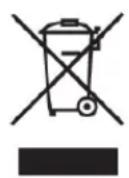
his symbol indicates that the relevant electrical product or battery should not be disposed of as general household waste in Europe. To ensure the correct waste treatment of the product and battery, please dispose them in accordance to any applicable local laws of requirement for disposal of electrical equipment or batteries. In so doing, you will help to conserve natural resources and improve standards of environmental protection in treatment and disposal of electrical waste (Waste Electrical and Electronic Equipment Directive).

Products with the CE marking comply with the EMC Directive (2004/108/EC) and the Low Voltage Directive (2006/95/EC) issued by the Commission of the European Community.
The declaration of conformity may be consulted at http://www.stl.nl/supportfiles/ices/CE/5905gkjd813276fnh2.pdf
All rights reserved
iCES®
MODELO: IMO-25L63R
www.ices-electronics.com
www.ices-electronics.com
INSTRUCTIONS RELATIVES A LA MISE A LA TERRE
Micro-onde +Convection
www.ices-electronics.com
- PRECAUTIONS TO AVOID POSSIBLE EXPOSURE TO EXCESSIVE MICROWAVE ENERGY
- CONTENTS
- IMPORTANT SAFETY INSTRUCTIONS
- SPECIFICATIONS*
- INSTALLATION
- RADIO INTERFERENCE
- GROUNDING INSTRUCTIONS
- Note
- MICROWAVE COOKING PRINCIPLES
- BEFORE YOU CALL FOR SERVICE
- UTENSILS GUIDE
- PART NAMES
- CONTROL PANEL
- - MENU ACTION SCREEN
- CLOCKWEIGHT
- CONVECTION
- MICRO.+CONVECTION
- GRILLIMICRO.+GRILL
- START/QUICK START(THEDIAL)
- STOPICANCEL
- - MENUTIME(DIAL)
- HOW TO SET THE OVEN CONTROLS
- Setting digital clock
- Quick Start
- Microwave cooking
- Grill cooking
- Combination cooking
- To Cook with Convection
- To Preheat and Cook with Convection
- Microwave+Convection
- NOTE:
- Speed Defrost
- Multi-Stage Cooking
- Auto Cook
- Auto Cook Menu
- Child Lock
- AUTOMATIC PROTECTION MECHANISM
- CLEANING AND CARE
- Service and support
- ICES helpdesk:
- iCES®
- INSTRUCTIONS RELATIVES A LA MISE A LA TERRE
- Micro-onde +Convection
Brand : Ices
Model : IMO25L63
Category : Microwave Oven