
K65303AW - Cooker GORENJE - Free user manual and instructions
Find the device manual for free K65303AW GORENJE in PDF.
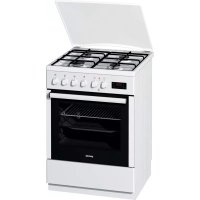



| Product type | Cooker with oven |
| Brand | Gorenje |
| Model | K65303AW |
| Programmer | Electronic, touch-sensitive (sensitive keys) |
| Display | Digital, time of day, cooking duration, end time, alarm |
| Available settings | Cooking duration (max 10 h), end of cooking time, programmed cooking end, audible alarm |
| Child safety function | Programmer lock (ON/OFF) |
| Audible signal volume | 4 adjustable levels |
| Cancellation of settings | By pressing keys B and C simultaneously for 3 s, or setting to 0.00 |
| Power supply | Connection to the electrical grid |
| Cleaning | Refer to the manual for recommendations |
| Repairability | Spare parts available through after-sales service |
| General information | Manual available in multiple languages, PDF format |
Frequently Asked Questions - K65303AW GORENJE
User questions about K65303AW GORENJE
0 question about this device. Answer the ones you know or ask your own.
Ask a new question about this device
Download the instructions for your Cooker in PDF format for free! Find your manual K65303AW - GORENJE and take your electronic device back in hand. On this page are published all the documents necessary for the use of your device. K65303AW by GORENJE.
USER MANUAL K65303AW GORENJE
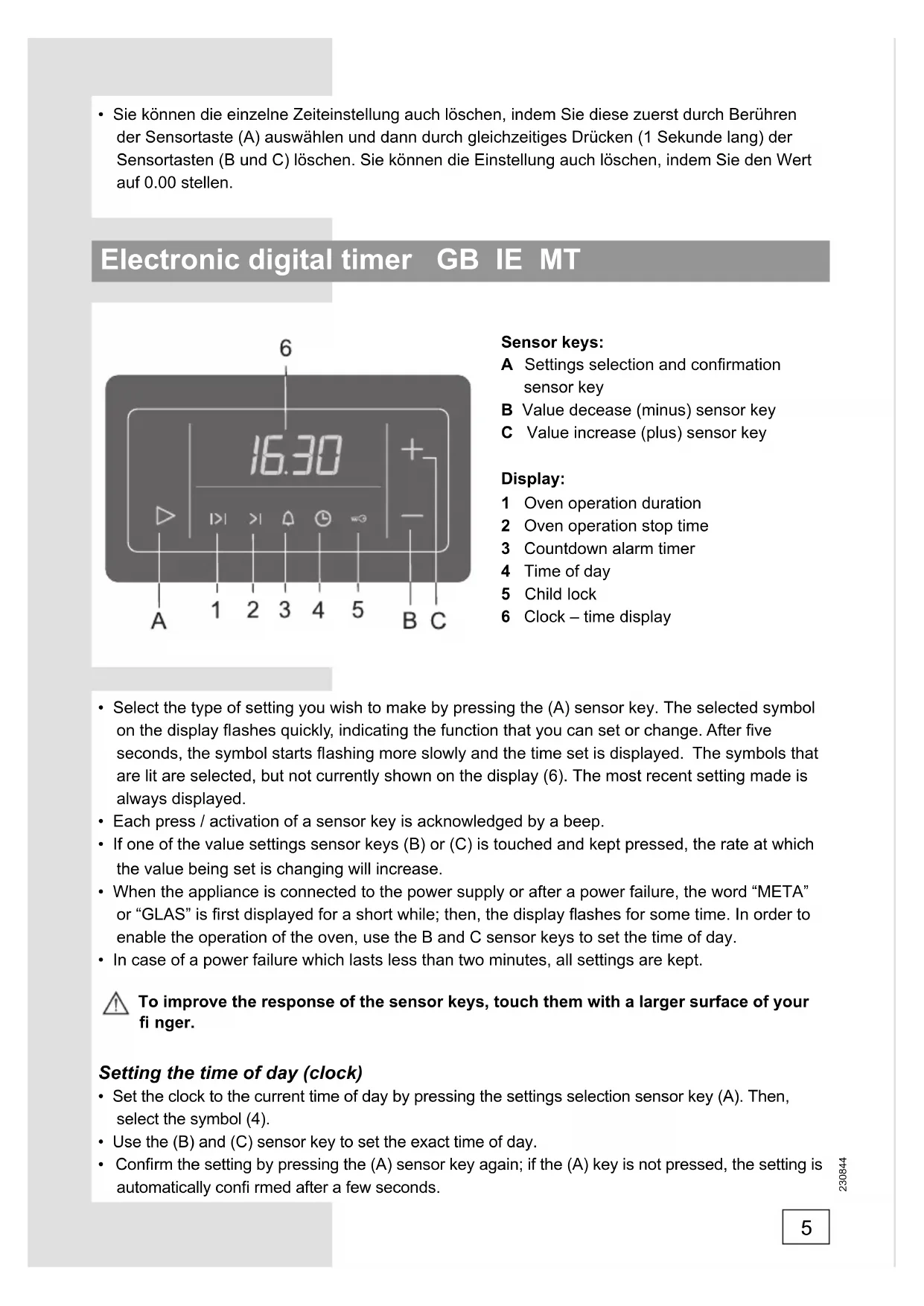
A Settings selection and confirmation sensor key B Value decrease (minus) sensor key C Value increase (plus) sensor key
Display:
1 Oven operation duration 2 Oven operation stop time 3 Countdown alarm timer 4 Time of day 5 Child lock 6 Clock-time display
- Select the type of setting you wish to make by pressing the (A) sensor key. The selected symbol on the display flashes quickly, indicating the function that you can set or change. After five seconds, the symbol starts flashing more slowly and the time set is displayed. The symbols that are lit are selected, but not currently shown on the display (6). The most recent setting made is always displayed. Each press / activation of a sensor key is acknowledged by a beep.
- If one of the value settings sensor keys (B) or (C) is touched and kept pressed, the rate at which the value being set is changing will increase.
- When the appliance is connected to the power supply or after a power failure, the word "META" or "GLAS" is first displayed for a short while; then, the display flashes for some time. In order to enable the operation of the oven, use the B and C sensor keys to set the time of day.
- In case of a power failure which lasts less than two minutes, all settings are kept.

To improve the response of the sensor keys, touch them with a larger surface of your finger.
Setting the time of day (clock)
- Set the clock to the current time of day by pressing the settings selection sensor key (A). Then, select the symbol (4).
- Use the (B) and (C) sensor key to set the exact time of day.
- Confirm the setting by pressing the (A) sensor key again; if the (A) key is not pressed, the setting is automatically confirmed after a few seconds.
The program timer can be used to program the oven operation in three ways:
- Cooking time setting - immediate start of oven operation; after a set period of time, the oven is turned off automatically.
- Cooking end time setting - the time at which oven operation is to end is set.
- Delayed start setting - automatic start and end of oven operation at a selected time.
Setting the cooking time
With this program mode, the duration of oven operation is set (cooking time). Maximum setting allowed is 10 hours.
- Press the (A) sensor key to select the symbol (1). Use the (B) and (C) sensor keys to set the duration / cooking time.
- Turn on the oven (use the corresponding oven knobs to set the operation mode and temperature). After the expiration of the set time, the oven will automatically stop operating (end of cooking time). An intermittent beep will sound, which can be stopped by pressing any key; if no key is pressed, the beep stops after one minute.
- The symbol (1) and the sign (_ _ _) will flash. If you wish to resume cooking, press the (A) sensor key and set a new duration if necessary.
Setting the cooking end time
This mode allows you to set the time at which the oven should stop operating. Maximum setting allowed is 10 hours relative to the current time of day.
- Make sure the current time of day is set correctly.
- Use the (A) sensor key and select the symbol (2). The current time of day is indicated on the display. Press the (B) and (C) sensor keys to set the cooking end time.
- Turn on the oven (use the corresponding oven knobs to set the operation mode and temperature). The oven starts to operate immediately and stops operation at the set time. An intermittent beep will sound, which can be stopped by pressing any key; if no key is pressed, the beep stops after one minute.
- The symbol (1) and the sign (_ :_ _ will flash. If you wish to resume cooking, press the (A) sensor key and set a new duration if necessary.
Setting the oven delayed start
With this operation mode, two settings have to be made: cooking time (duration of oven operation) and cooking end time (tie at which the operation should stop).
Cooking end time can be delayed by a maximum of 24 hours relative to the current time of day.
- Make sure the current time of day is set correctly.
- First, set the cooking time: Press the (A) sensor key to select the symbol (1). Use the (B) and (C) sensor keys to set the duration / cooking time.
- Then, set the cooking end time: Use the (A) sensor key and select the symbol (2). (A sum of the current time of day and the oven operation time is automatically shown on the display). Press the (B) and (C) sensor keys to set the cooking end time.
- The timer will wait for the start of the cooking - both symbols (1 and 2) are lit.
- Turn on the oven (use the corresponding oven knobs to set the operation mode and temperature). At the corresponding time, the oven starts operating automatically (the symbol (2) goes off upon the start of operation), and switches off when the set cooking time has elapsed. An intermittent beep will sound, which can be stopped by pressing any key; if no key is pressed, the beep stops after one minute.
- The symbol (1) and the sign (_ _ _) will flash. If you wish to resume cooking, press the (A) sensor key and set a new duration if necessary.
Setting the alarm timer
The clock can also be used independently of the oven operation, as an alarm timer that sounds an alarm after the expiration of a preset time.
- Use the (A) sensor key to select the symbol (3). Then, use the (B) and (C) sensor keys to set the time before the alarm sounds. Maximum setting allowed is 10 hours.
- When the set time has elapsed, an intermittent beep will sound, which can be stopped by pressing any key; if no key is pressed, the beep stops after one minute. The symbol (3) will go off.

The last minute of the timer countdown is displayed in second intervals.
Setting the beep volume (loudness)
The alarm volume can be set when no timer function is activated (only current time of day is displayed).
- Press the (B) sensor key and hold it for approximately three seconds; a volume indicator will appear, and the corresponding sample sound will sound. "ooo" indicates maximum volume, and "o" indicates minimum volume. Use the (B) sensor key to select among the four loudness levels.
- Confirm the selected volume level by pressing the (A) sensor key; if the (A) sensor key is not pressed, the setting will be confirmed and stored automatically after a few seconds.
Setting the child lock
The clock may be locked only after one of the time functions had been previously set (period of operation, end of operation, or alarm). The oven will function normally, but you will not be able to change settings.
Activation: Press the (A) sensor key to select the symbol (5). Use the (B) and (C) sensor keys to activate the child lock; the display will read "ON". Confirm the setting by pressing the (A) sensor key.
Deactivation: Press the (B) or (C) sensor to deactivate the child lock; "OFF" is displayed.
The setting must be confirmed by pressing the (A) sensor key.
Display dimmer
One minute after the appliance is turned off, the display will be dimmed.
Deleting the timer settings
- All timer settings can be deleted at any time by pressing the (B) and (C) sensor keys simultaneously and holding them for three seconds. The set programs are automatically interrupted and the timer switches to display of the current time of day.
- Any timer setting can also be deleted in the following way: selecting it using the (A) sensor key, then press the (B) and (C) sensor keys simultaneously. Another way to delete a setting is by setting the timer value to "0.00".
Sensors:
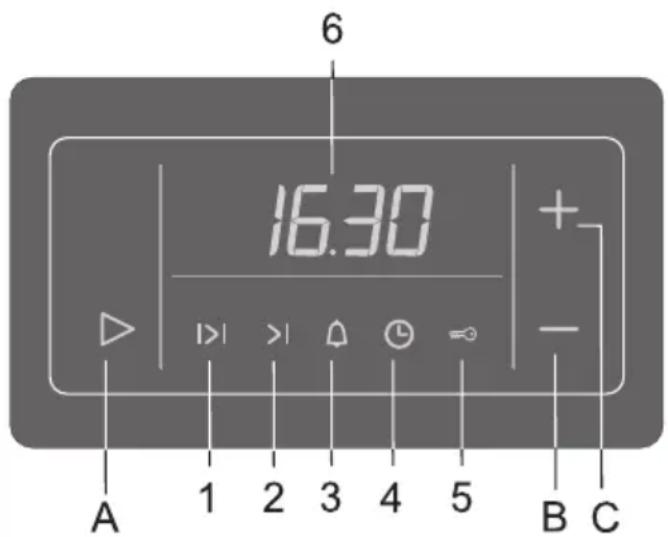
A Sensor key for selection and confirmation of settings B Sensor key for decreasing values (minus) C Sensor key for increasing values (plus)
Display:
1. Daily alarm operation 2. Alarm duration time 3. Time interval of automatic response µ Etpno 4. End time 5. Child safety lock 6. Clock - time display
Set delayed start
Symbol (1) and symbol ( ) to understand the display. If you need to repeat the cooking process, press the sensor (A) and set a new time interval.
Setting the timer
The timer can also be used independently of the oven, as a timer, to emit acoustic signals after the set time has elapsed.
- Press the sensor (A) and select the symbol (3). Then use the sensors (B) and (C) to set the timer duration. The maximum setting is 10 hours. When the set time has elapsed, acoustic signals will sound, which can be stopped by pressing any button. If no button is pressed, the acoustic signals will repeat every minute. Symbol (3) flashes.

The last minute of the countdown will be indicated by an interval of one second.
Setting the volume of the acoustic signal
The volume of the acoustic signal can be set whenever a timer function is not active (only the time is displayed).
Setting the child lock
The timer can be locked only after setting one of the timer functions (e.g., cooking time, end of cooking, or timer).
The oven operates normally, but you cannot change the settings.
Activation: Press the sensor (A) and select the symbol (5). Using the sensors (B) and (C), activate the lock for the oven; the display will show "ON". To confirm the setting, press the sensor (A).
Deactivation: To deactivate the lock, press the sensor (B) or (C); the display will show "OFF".
The setting must be confirmed by pressing the sensor (A).
After a few minutes, the display will turn off.
Setting the timer
- All settings will be set at any time if you press sensors (B) and (C) simultaneously and hold them for three seconds. The set program is automatically checked and the timer displays only the current time.
- Any timer setting can also be set in the following way: select it with sensor (A), then press sensors (B) and (C) simultaneously. To cancel a setting, set the timer to "0.00".
Electronic programmer
After the first connection of the appliance to the power supply and in the event of a power failure, it is necessary to set the current time.

Without setting the current time, using the oven is impossible.
Heating elements can operate with the oven door open if the appliance is not equipped with a built-in oven switch. Fire hazard!
Sensors:
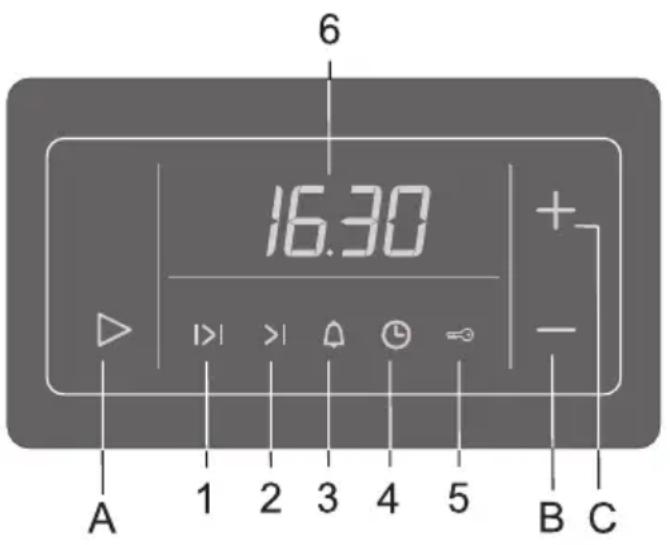
A Sensor for selecting and confirming functions - Sensor "-" + Sensor "+"
Indicators:
1 Cooking duration 2 End of cooking 3 Timer (minute minder) 4 Clock 5 Child lock 6 Digital display
- To select the desired function, press sensor A. The selected function symbol will flash quickly; now you can set or change the function parameter. After 5 seconds, the symbol will flash slowly, and the set time of the function will be displayed on the display. - The backlight indicates that the function is selected, but its time is not shown on the display. The last function you set is displayed on the display. Each press on the sensor is confirmed with a short sound signal. - If sensor "-" or "+" is held down, the value will change faster (increase or decrease accordingly). - After connecting the oven to the power supply or after a power failure, the inscription META or GLAS appears on the display for a few seconds, then the display flashes for some time. To operate the oven, it is necessary to set the current time with sensors B and C. - If the power failure lasts less than 2 minutes, all programmer settings are retained, and the oven automatically continues operation (if it was on).

For the sensors to work properly, the touch area must be larger.
Current time setting
To set the current time with the sensor A, select symbols 4. Use sensors "-" and "+" to set the exact time. Confirm the displayed time by pressing sensor A again; after a few seconds, the setting will be saved automatically.
Programming the cooking time
The programmer allows you to program the cooking time in three ways:
- Cooking duration: the oven starts working immediately and turns off after the set time.
- End of cooking: the oven turns off at the set time.
- Delayed start: at a specified time, the oven automatically turns on and off at the time you set.
Cooking duration
End of cooking
This function allows you to program the oven shutdown time (end of cooking).
The end of cooking can be programmed no later than 10 hours from the moment of setting this function!
- Turn the knob to set the exact shutdown time.
- Using sensor A, select symbol 2. The current time of day will be displayed. Use sensors "-" and "+" to set the end of cooking time. Turn on the oven (select heating mode and temperature). The oven will turn on immediately and turn off automatically at the set time. An intermittent sound signal sounds, which can be turned off by pressing any sensor or after 1 minute the signal turns off automatically. The display shows symbol 1 and the indicator ":_". If cooking needs to be continued, press sensor A and, if necessary, set a new cooking duration time.
Delayed start
The end of cooking can be programmed no later than 24 hours from the moment of setting this function!
- Check that the correct time of day is set.
- Set the cooking duration. Using sensor A, select symbol 1. Using sensors B «—» and C «+», set the cooking duration.
- Set the cooking end time. Using sensor A, select symbol 2. The display will show the sum of the current time of day and the cooking duration. Using sensors B «—» and C «+», set the cooking end time.
- The programmer will start cooking. The display shows symbols 1 and 2. Turn on the oven (select the heating mode and temperature). The oven will turn on automatically at the set time (symbol 2 flashes) and turn off at the set time. An intermittent audible signal sounds, which can be turned off by pressing any sensor, or after 1 minute the signal turns off automatically. The display shows symbol 1 and the indicator «:». If cooking needs to be continued, press sensor A and, if necessary, set a new cooking duration.
Manual mode
You can use the oven without setting the functions that program the oven operating time. To do this, place the food in the oven, close the door, set the heating mode and temperature, and the oven will start working.
To exit manual mode after one of the functions that program the oven operating time has finished, press sensor A.

In this mode, the oven does not turn off automatically. Watch the cooking!
Timer
The programmer is equipped with a timer function that alerts when the set time has elapsed and does not turn off the oven. The timer can be used independently of the oven operation.
The maximum time for the function is 10 hours!
- Using sensor A, select symbol 3. Using sensors B «—» and C «+», set the timer time.
- When the set time has elapsed, an intermittent audible signal sounds, which can be turned off by pressing any sensor, or after 1 minute the signal turns off automatically. Symbol 3 flashes.

During the last minute, seconds are displayed on the display.
Setting the volume of the audible signal
To adjust the volume, the functions that program the operating time of the oven must first be activated. Only the current time is displayed on the display.
- Press and hold the sensor for 3 seconds with «-», until the symbols «0000» (maximum volume) or «0» (minimum volume) appear on the display and a beep sounds. Press the sensor with «-» to adjust the volume level.
- Confirm the set volume level by pressing sensor A, or after a few seconds the setting will be saved automatically.
Child lock
The child lock can only be activated if one of the functions that program the operating time of the oven (cooking duration, end of cooking, or timer) is enabled. The oven will continue to operate, but it will be impossible to change the settings.
Activation
Select symbol 5 with sensor A. Use sensor B with «-» or C with «+» to activate the child lock. The display will show ON. Confirm the activation of the lock by pressing sensor A.
Deactivation
Use sensor B with «-» or C with «+» to deactivate the child lock. The display will show OFF. Confirm the deactivation of the lock by pressing sensor A.
Reducing display brightness
One minute after the appliance is switched off, the display brightness will decrease.
Canceling functions
To cancel all programmer functions, press and hold the sensors with «-» and C with «+» simultaneously for 3 seconds. The execution of the set programs and cooking will stop automatically. The current time will be displayed. - To cancel an individual function, select that function with sensor A and then press and hold the sensors with «-» and C with «+» simultaneously. The function can also be canceled by setting the value to «0.00».
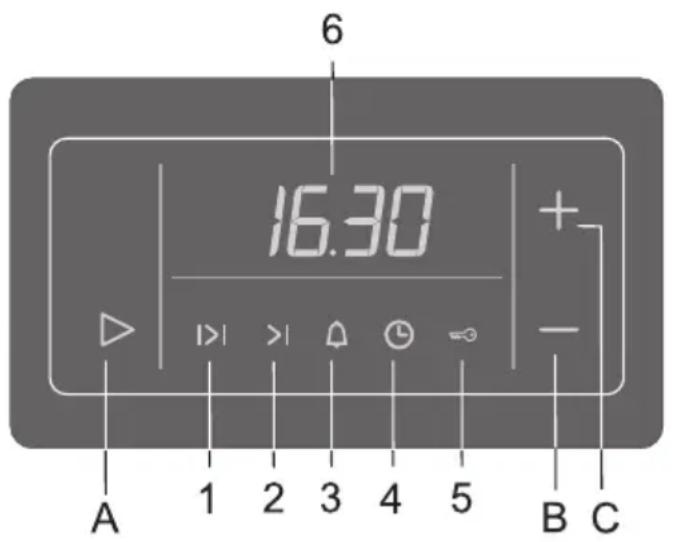
Sensors:
A Sensor for selection and confirmation B Sensor for decrease (minus) C Sensor for increase (plus)
1. Setting the oven to work 2. Time for setting the working time 3. Timer with countdown 4. Current time 5. End 6. Clock - current time display
- Select the function you want to set by touching the sensor (A). The selected symbol will flash quickly on the display. Then the symbol will light up and be displayed continuously. The current display will be visualized. The set adjustment will be visualized. Each touch of the sensor is confirmed with a sound.
- If you touch and hold the sensors (B) and (C), the speed at which the value changes is accelerated. When you activate the device in the menu and temporarily stop the flow, the display will alternately show "META" and "GLAS", after which the oven will start after a delay. To be able to operate the oven, you must set the current time. Use the sensors (B) and (C) to set the time. If the temporary stop of the flow lasts no more than a minute, all settings are saved.

For the sensors to work normally, touch them with a larger surface of your finger.
Setting the current time (Clock)
Set the current time by touching the sensor (A), then select the symbol (4). - Use the sensors (B) and (C) to set the time. - Confirm the setting by touching the sensor (A) again. If you do not touch the sensor (A), the setting is confirmed automatically after a few seconds.
The timer can be used for programming in three ways:
- Setting the working time - the oven starts immediately; after a period of time, the oven stops automatically.
- Setting the end of the oven's operation - setting the time at which the oven will stop working.
- Delayed start - the oven automatically starts at a defined time.
Setting the working time (period)
With this setting you set the duration of the oven's operation (cooking time). The maximum value is 10 hours.
Touch the sensor (A) and select the symbol (1). Touch the sensors (B) and (C) to set the cooking time. Turn on the oven (use the appropriate knobs to select the mode and temperature). After the set time has elapsed, the oven will automatically stop working (end of cooking). A beep will sound to remind you that the oven has stopped working; the sound can be turned off by touching the knob and the sensor; if you do not touch the sensor, the signal will stop after one minute. - Symbols (1) and (2) will light up. If you want to extend the cooking time, touch the sensor (A) and set a new extension, if necessary.
Setting the end of cooking time
With this function you can set the time at which the oven will stop working. The maximum time for selection is 10 hours from the current time.
- Make sure the clock is set to the correct current time.
- Use the sensor (A) and select the symbol (2). The current time is displayed on the display. Touch the sensors (B) and (C) to set the time at which the oven should stop working. Turn on the oven (use the appropriate knobs to select the mode and temperature). The oven will start working immediately and will stop at the set time. This is announced by a sound signal, which can be turned off by touching the knob and the sensor; if not, the signal will stop automatically after one minute. Symbols (1) and (2) will light up. If you want to extend the cooking time, touch the sensor (A) and set a new extension, if necessary.
Setting the delayed start
To use this function, two settings must be made: the cooking time setting and the end of cooking time setting.
The start of the oven's operation can be delayed by up to 24 hours from the corresponding current time at the moment of setting.
- Make sure the clock is set to the correct current time.
- First, set the cooking time: Touch the sensor (A) and select the symbol (1). Use (B) and (C) to select the duration - cooking time. After this, set the end of cooking time. Use the sensor (A) and select the symbol (2). The current time is displayed on the display. Touch the sensors (B) and (C) to set the time at which the oven should stop working. The timer will count down to the oven's switch-on - both symbols (1 and 2) light up. Turn on the oven (use the appropriate knobs to select the mode and temperature). At the corresponding time (the timer counts down to the time when the oven should switch on), the oven will switch on automatically (symbol (2) goes off at the moment of
starting) and will stop working at the previously set time. This is announced by a sound signal, which can be turned off by touching the knob and the sensor, if not. Symbols (1) and (2) will light up. If you want to extend the cooking time, touch the sensor (A) and set a new extension, if necessary.
Setting the alarm
The timer can be set regardless of the operation of the device, as an alarm that emits an audible signal after a certain period of time.
- Use sensor (A) to select the symbol (3). Then, use sensors (B) and (C) to select the period of time before the alarm is activated. The maximum time is 10 hours. When the set time has elapsed, an audible signal is emitted, which can be silenced by touching the sensor, or if not silenced, it will automatically stop after one minute. The symbol (3) disappears from the display.

The last minute of the time interval is visualized in the interval display.
Setting the volume of the audible signal
The volume of the audible signal can be adjusted only when other settings of the device are activated (only the current time is displayed).
- Touch sensor (B) and hold for about three seconds; the volume indicator for the sound will appear, and you will hear a test audible signal. "OOOO" indicates maximum sound volume, and "O" indicates minimum sound volume. Use sensor (B) to select among four levels of sound volume. - Confirm the selected sound volume level by touching sensor (A); if you do not touch it, the setting will be confirmed automatically after a few seconds.
Setting the lock
The timer can be locked only after the time settings have been set (sensitivity of the touch, touch duration, or alarm). The device will function normally, but you will not have the ability to change the settings.
Activate: touch sensor (A) and select symbol (5). Use sensors (B) and (C) to activate the lock, on the display it is visualized "ON". Confirm the setting by touching sensor (A)
- DISPLAY
- TO IMPROVE THE RESPONSE OF THE SENSOR KEYS, TOUCH THEM WITH A LARGER SURFACE OF YOUR FINGER
- SETTING THE TIME OF DAY (CLOCK)
- SETTING THE COOKING TIME
- SETTING THE COOKING END TIME
- SETTING THE OVEN DELAYED START
- SETTING THE ALARM TIMER
- THE LAST MINUTE OF THE TIMER COUNTDOWN IS DISPLAYED IN SECOND INTERVALS
- SETTING THE BEEP VOLUME (LOUDNESS)
- SETTING THE CHILD LOCK
- DISPLAY DIMMER
- DELETING THE TIMER SETTINGS
- SENSORS
- SET DELAYED START
- SETTING THE TIMER
- THE LAST MINUTE OF THE COUNTDOWN WILL BE INDICATED BY AN INTERVAL OF ONE SECOND
- SETTING THE VOLUME OF THE ACOUSTIC SIGNAL
- ELECTRONIC PROGRAMMER
- WITHOUT SETTING THE CURRENT TIME, USING THE OVEN IS IMPOSSIBLE
- INDICATORS
- FOR THE SENSORS TO WORK PROPERLY, THE TOUCH AREA MUST BE LARGER
- CURRENT TIME SETTING
- PROGRAMMING THE COOKING TIME
- COOKING DURATION
- END OF COOKING
- DELAYED START
- MANUAL MODE
- IN THIS MODE, THE OVEN DOES NOT TURN OFF AUTOMATICALLY. WATCH THE COOKING
- TIMER
- DURING THE LAST MINUTE, SECONDS ARE DISPLAYED ON THE DISPLAY
- SETTING THE VOLUME OF THE AUDIBLE SIGNAL
- CHILD LOCK
- ACTIVATION
- DEACTIVATION
- REDUCING DISPLAY BRIGHTNESS
- CANCELING FUNCTIONS
- FOR THE SENSORS TO WORK NORMALLY, TOUCH THEM WITH A LARGER SURFACE OF YOUR FINGER
- SETTING THE CURRENT TIME (CLOCK)
- SETTING THE WORKING TIME (PERIOD)
- SETTING THE END OF COOKING TIME
- SETTING THE DELAYED START
- SETTING THE ALARM
- THE LAST MINUTE OF THE TIME INTERVAL IS VISUALIZED IN THE INTERVAL DISPLAY
- SETTING THE LOCK
Brand : GORENJE
Model : K65303AW
Category : Cooker