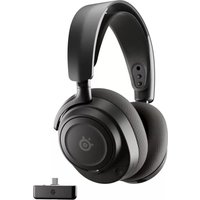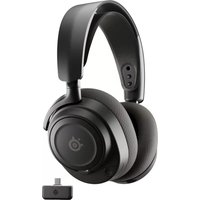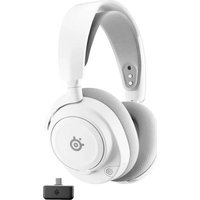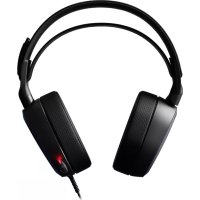
Arctis Pro - Headphones STEELSERIES - Free user manual and instructions
Find the device manual for free Arctis Pro STEELSERIES in PDF.



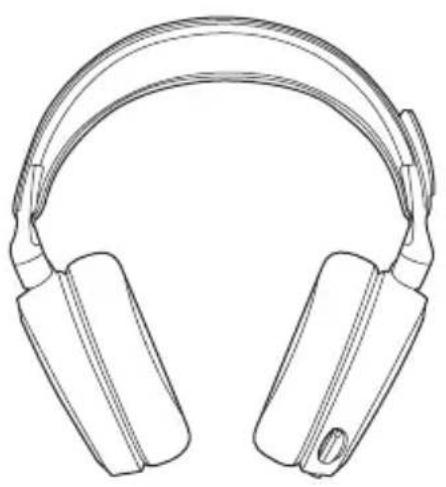
| Product type | Wireless headset with microphone |
| Brand | SteelSeries |
| Model | Arctis Pro |
| Compatibility | PC, Mac, PS4, PS4 Pro, PS4 Slim |
| Wireless connectivity | 2.4 GHz (wireless transmitter) + Bluetooth 5.0 |
| Wireless range | Up to 12 meters |
| Battery life | Approximately 20 hours (main battery) |
| Battery type | Rechargeable lithium-ion battery (removable) |
| Battery charging | Via micro-USB (headset) or charging slot on transmitter |
| Additional battery included | Yes, one spare battery |
| Frequency response | 10 Hz - 40,000 Hz (headset) |
| Impedance | 32 Ω |
| Sensitivity | 102 dB SPL |
| Microphone | Retractable microphone with noise reduction |
| Surround sound | SteelSeries 7.1 Surround Sound (Windows only) |
| OLED display | OLED display on the transmitter for settings |
| Software | SteelSeries Engine for customization |
| Headband material | Lightweight and adjustable steel |
| Ear cushion covering | Breathable synthetic leather |
| Weight | Approximately 320 g (with battery) |
| Included accessories | Wireless transmitter, spare battery, USB/optical/analog audio cables, mobile charging cable |
| Care and cleaning | Clean the ear cushions with a soft, dry cloth. Do not use chemical products. |
| Safety | Complies with CNR-2-6 standards and radiation exposure. Minimum distance of 70 cm. |
| Spare parts and repairability | Ear cushions, battery, cables available at steelseries.com |
| Warranty | 2-year manufacturer warranty |
Frequently Asked Questions - Arctis Pro STEELSERIES
User questions about Arctis Pro STEELSERIES
0 question about this device. Answer the ones you know or ask your own.
Ask a new question about this device
Download the instructions for your Headphones in PDF format for free! Find your manual Arctis Pro - STEELSERIES and take your electronic device back in hand. On this page are published all the documents necessary for the use of your device. Arctis Pro by STEELSERIES.
USER MANUAL Arctis Pro STEELSERIES
PRODUCT INFORMATION GUIDE
CONTENTS
Welcome 2
SteelSeries Engine 5
Productoverview5-8
Power On/Off 9
Bluetooth 10
Setup PS4 Pro/Original 11-12
Setup P54 Slim 13-16
Setup PC/Mac 17-18
Ski Goggle Headband 19
Battery 20
Speakerplate 21
Transmitter Operation 22
Translations
+spanc 28
同休中义 23
华中义 30
日本讲33
Deutsch 13
Pysckn 48
History showed us that gaming headsets rarely looked good and sounded worse, so we made Arctics and put all other headsets on notice. Next, the audiophiles said that a gaming headset could never stand up to dedicated headphones, so we made Arctics Pro and changed the game.
Like you, we are exports pros, pubstars, Sam ralders, Hip heroes, streamers and dreamers. Your Arctis Pro was forged out of our belief that gaming isn't your way to escape reality, it's your path to rewrite it.
steelseries
find help at support.steelseries.com
STEELSERIES ENGINE
Download SteelSeries Engine to cont
Wireless Transmitter from PC, and to integrate
with Engine Apps (like displaying Discord info on
the OLED screen). steelseries.com/engine
SOFTWARE REQUIREMENTS
Platforms
Windows7+
Mac OS X 10.8 +
120 MB of free hard drive space for installation
4 DTS Headphone:X 7.1 Surround available on
Windows only. Software installation required.
PACKAGE CONTENTS
Headset
Wireless Transmitter
Additional Battery
USB Audio Cable
Optical Audio Cable
Power Cable
Mobile Audio Cable
Mobile Charging Cable
SYSTEM REQUIREMENTS // COMPATIBILITY
PC
PS4 (Pro/Original/Slim)
STEELSERIES ENGINE
SOFTWARE REQUIREMENTS
Platforms
Windows7+
Mac OS X 10.8 +
120 MB of free hard drive space for installation
PRODUCT OVERVIEW
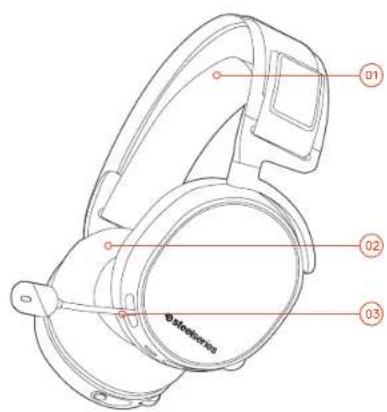
01 Ski goggle headband
02 Airweave ear cushions
03 ClearCast microphone
Find accessories and replacement parts at steelseries.com/gaming-accessories
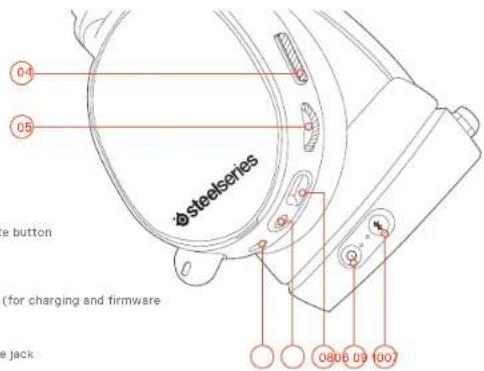
04 Microphone mute button
05 Control Wheel
06 Micro-USB jack (for charging and firmware updates)
07 Headphone share jack
08 Mobile audio cable jack
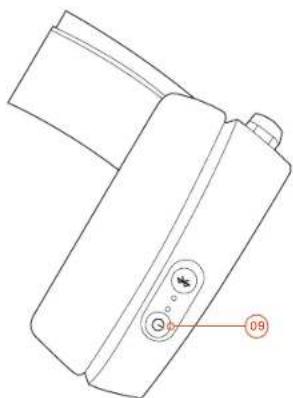
09 Power button
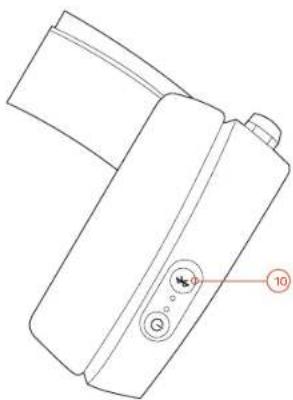
10 Bluetooth button
Find accessories and replacement parts at steelseries.com/gaming-accessories
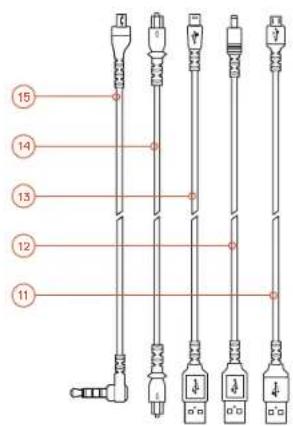
11 Mobile charging cable
12 Power Cable
15 USB Audio Cable
14 Optical Audio Cable
15 Mobile audio cable
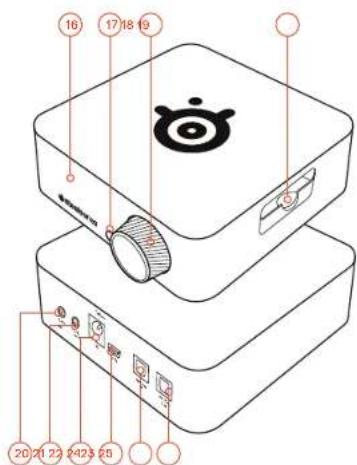
16 OLED screen
17 Secondary button
18 Contral knab
19 Battery charging slot
20 Line In jack
21 Line Out Jack
22 DC Jack
23 Mini USB jack
24 Optical In
25 Optical out
POWER ON/OFF
find help at support.steelseries.com
BLUETOOTH
POWERON
Power the headet on or off press and hold the power button for 2 seconds.
PAIRING
The headset is already paired to the transmitter when it arrives. In the event you need to re-pair, go into the pairing menu and follow the on-screen instructions
Option > System > Pairing
POWERON
To turn Bluetooth off, press and hold the Bluetooth button 10
PAIRING
With Bluetooth off, press and hold Bluetooth button (10) for 6 seconds.
CONTROL
ANSWER/END VOICE CALL single - press the Bluetooth button 10
II PLXYPAUSE MUSIC single·press the Bluetooth button 10
SKIP TRACK double·press Bluetooth button 10
SETUP PS4 PRO AND ORIGINAL
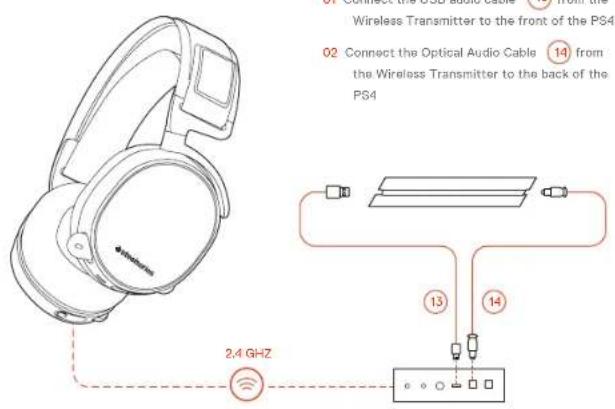
HARDWARE INSTALLATION
WIRELESS TRANSMITTER SETTINGS
Main Menu > Source > PS4
PS4 AUDIO SETTINGS
PS4 SETTING > SOUND AND SCREEN > AUDIO OUTPUT SETTING
Primary Output Port Digital Out (Optical)
Audio Format (Priority) Bitstream (Dolby)
DEVICES > AUDIO DEVICES
Output to Headphones Chat Audio
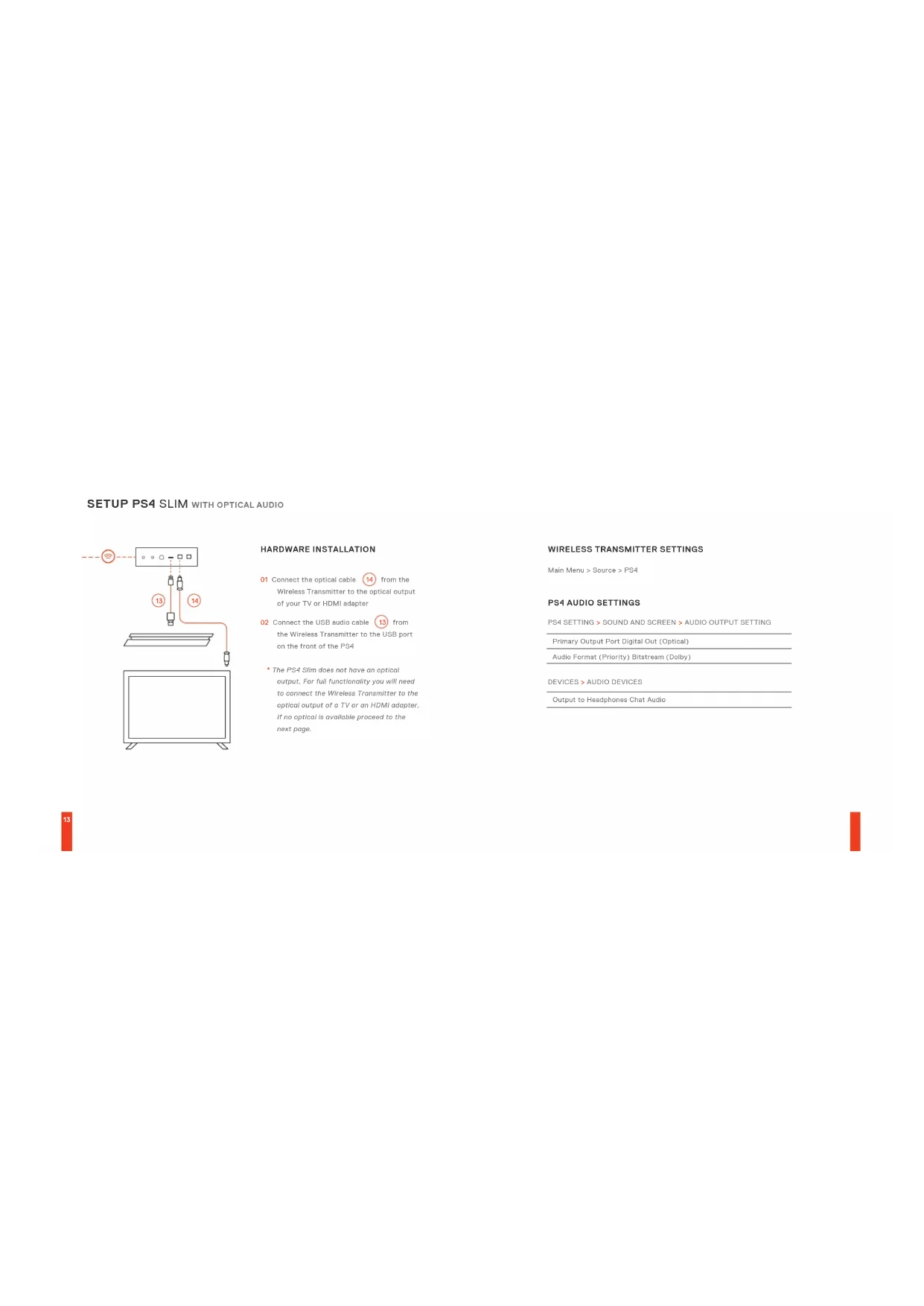
SETUP PS4 SLIM WITH OPTICAL AUDIO
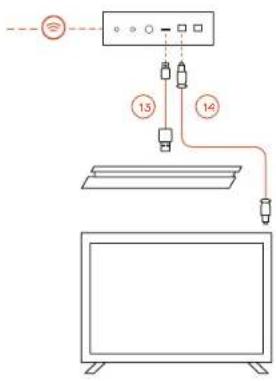
HARDWARE INSTALLATION
01 Connect the optical cable 14 from the Wireless Transmitter to the optical output of your TV or HDMI adapter
02. Connect the USB audio cable 13 from the Wireless Transmitter to the USB port on the front of the PS4
The PS4 Slim does not have an optical output. For full functionality you will need to connect the Wireless Transmitter to the optical output of a TV or on HDMI adapter, if no optical is available proceed to the next page.
WIRELESS TRANSMITTER SETTINGS
Main Menu > Source > PS4
PS4 AUDIO SETTINGS
PS4 SETTING > SOUND AND SCREEN > AUDIO OUTPUT SETTING
Primary Output Port Digital Out (Optical)
Audio Format (Priority) Bitstream (Dolby)
DEVICES > AUDIO DEVICES
Output to Headphones Chat Audio
SETUP PS4 SLIM WITHOUT OPTICAL AUDIO
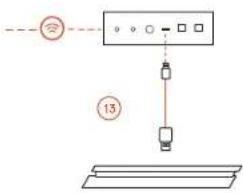
HARDWARE INSTALLATION
01 Connect the USB audio cable 13 from the Wireless Transmitter to the USB port on the front of the PS4
Without optical audio, surround sound and ChatMix features will be unavailable.
WIRELESS TRANSMITTER SETTINGS
Main Menu > Source > PS4
PS4 AUDIO SETTINGS
DEVICES > AUDIO DEVICES
Output to Headphones All Audio
SETUP PC/MAC find help at support.steeleries.com
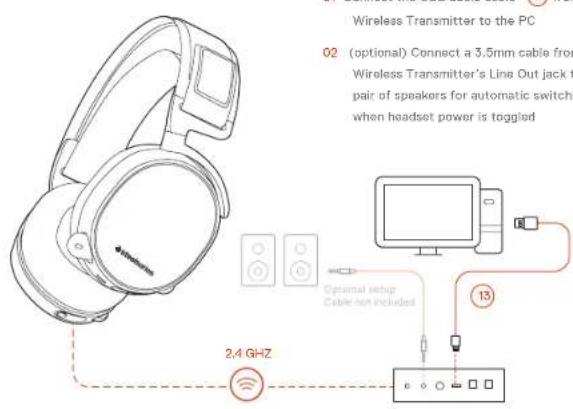
HARDWARE INSTALLATION
SETTINGS
Main Menu > Source > PC
WINDOWS SOUND SETTINGS
01 Under "Playback" highlight Arctis Pro Game Audio and select "Set Default"
02 Select Arctic Pro Chat Audio and select "Set Default Communications Device"
03 Under "Recording" highlight Arctic Pro Chat Audio and select "Set Default"
MAC SOUND SETTINGS
01 Go to System Preferences > Sound
02. Under 'Output' select Arctics Pro Game Audio
03 Under 'Input' select Arctis Pro Microphone
04 In your VoIP (chat) application select Arctis Pro Chat Audio as the default audio device
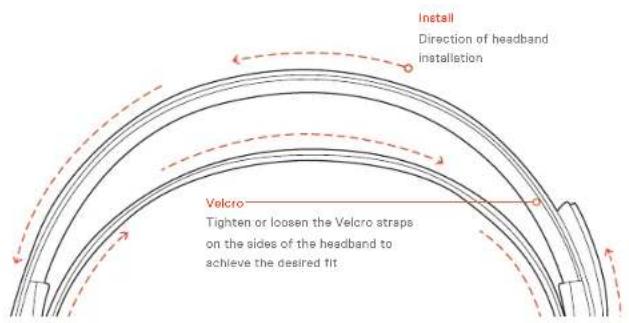
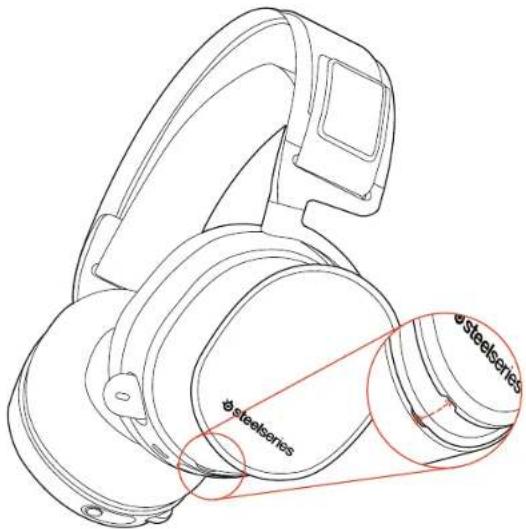
SKI GOGGLE HEADBAND
accessory headbands available at steeleries.com
BATTERY find help at support.steelseries.com
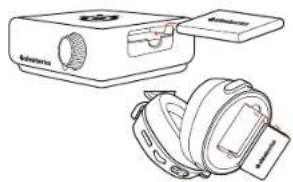
BATTERY SWAPPING
To charge additional battery, place the battery inside the charging slot on the transmitter
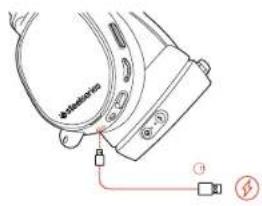
MOBILE CHARGING
To charge headset while using or on the go, connect the Mobile Charging Cable from the micro-USB port on the headset to any USB power source
SPEAKER PLATE
accessories available at steeleries.com
- Rotate the control knob 18 to adjust volume
- Presa and release the control knob to enter the menu (to adjust EG, set ChatMix, and customize settings)
- Press and hold the secondary button to toggle surround
MAIN MENU
- Rotate the control knob to scroll through the menu
Press and release the control knob to select menu items
Press and release the secondary button to go back one step
ESPANOL
STEELSERIES ENGINE
PSA (Po / Slim / Original)
DESCRIPICION GENERAL DEL PRODUCTO
01 Vincha de gafre des sel
02 Almondualas AirWuwo
03 Microfondo ClearCast
04 Botcnpera sienar micufore
05 Ruade de contro
08 Ceresenter micro-USB (para cargar y paraactualizaciones de Firmware)
07 Conotr paris comparir a. cules
05 Conector de cable principal
09Batin de anecdote
10 Boten de Bluetooth
11. Cable or cargo port toll
12 Cable de alimentacion
15 Cable de audio USB
M. Cable de audio optico
- Cable ce audio portaf
16 FantàOLED
- Boto n secundario
18 Fuede de control
18 Ramro de caro de botra
20 Conector de entradra
21 Corrobor de salida
22 Corrction du CG
28CorectormnUSB
24 Embed options
25 Salida optica
^ 念 Functume accessorio y requestos en statisico.com
ENCENDIDO
Para encender les utriculares, prescirca y marten presionado o boton de chondrole 08 durante 2 seguncios.
EMPAREJAMIENTO
PS4(Pro/Slim/Original)
產品概览
01.泛雪德瑞特*
02AirWine耳鼻
特此公告。
04.3.1.2.1
05.音量控制应用
SteelSeries71SurroundingWindows2000
用法及方法
Wireless Transmission
Zusätzlicher Akku
US-Audioibel
YcTpoNCTBa >3ByKObbIe yCToPoeCTBa
BxckHKHbHINVKM>SykHTA
YCTAHOBKA HAPS4 SLIM
OTTHN8CKMByckabeneM
BHHMHHCHCCTTMSPSIMHEOCHAJIHBA CHINHECKHM BEXOJCMDIAEPOCYKIAKHOHOMY CYKIOHKIAYI1100000IMO 320K404Vb
GamDAcKOTTHNCHOMKYBbXbYbTENHbOoA
ANHDW-ADAMnOe. Ecnrnnnrrnncnna Kabob
OCYCTCBY,NEPcNtIeK C cRyCNsC nCnBnA
C10IqKIOKIOOTTHTHO4A KABOBbOT CeippcBcHIOOIEpapdHnIKa HcNtckoxmy BDOyTOeTbHOoA AINHDM-ajartno
02 Pncknncny 32yckcnk USB-Kabok ot BeepcnoHnO nopepeyTnKu K USB-nopry Hn npocipier naienP54
HACTPOIKNBECNPOBOIDHO
TnBHeMEOHIO>HCIOHIO>PSI
HACTPOUKN 3BYKAPPS4
Hactrohkn Ps5>3yeknKpahan >Pamapetm73ykoBoro BxkoDa
IOTC CHOCIOFO BxDooa> LjXPOOOPB BxDOO (DTOH-CHOOH)
AyooooPOMT [PmOoPOT] > 5MTOH HIN TIOK (Dooy)
yctpoHCTBa >3BykoBbIe yctpoHCTBa
BxckK HbUHnKAM>3Byk 8NTA
YCTAHOBKA HA PS4 SLIM
0307H0X0aayok2
3HHHNNHBAE601111000C02A0D4B6B4aFyKJIN-50yKooOyT-N ChATMIX 10c0ctbYn
01 TopoiKIOIe 38KcHON USB-KaBbIOT o
6ecnpoBocIO KTO npedatmKu KUS-NOpy H
npedEBN INIePSI
HACTPOKNU3BYKAPS4
yctpoHCTBa >3dykoBHe yctpoHCTBa > BbxOcK
HAYUHKAMBCEHECTPOKNU3EYS
YCTAHOBKA HA KOMNBIOTEPE
102KHOHHTO 3YKOOP USKB KAOBTOCT
60CIOOOBHOHO NPODAPTHKA KCMBTOTOPY
10008370HIO TIOKIOHOHO 3.5MM
KABENI TO P3AHEV HUHBOHO BHXOJA
660000BHOHO NEPAETNA K PAPE KOCHOK
JUBI EOMNHECKO INEHPKCHHNH 38K BYK NPA
BKIOHOHHN BIKKIOHOHHKAYLHOHO
NapametpbBecnpoBodHoro nepedaTnka
03Bpa#ene
Audio Audio Comprise VONOTOPRAP No. 1000H-HEMID
HACTPOK3BYKAJIMAC
01OikpoIeYCTAHOBKCACTEMU>3Byk
02 B paaeB +BuaaHaeepn Acois Pro Game Audio
03 Ba paqepn · 5xoyu HbGaeine Arcils Pro Microphone
04 B npnoknnm VoP (vat) 165eprepe Acrs Pro
Chat Audio B kncctc soykoore yocovkta
no yomnnae
NbIXHOE OROJIOBBe HAYUHNKOB
NnK 100000000000000000000000000000000000000000000000
JOIOHOJIOHOHOOOHOHOHOHO HO
AKKYMЛТTOP
CMEHAAKKYMYBTOPA
DINABAPKJN JIHNHIMHTHEE KEEK YMMNTIEPTE NAMCTTTOO E S AHPN NO 11000 ROPDAAIAH
MOBnJIbHAR3APRAKA
"TocaraparibNTs HauyniHAI XaOHy, 202400100nptatrrnrt aepdriab Kae6bCTMkOo-USB TcRtB HauyniHAI KIOLOMY MHTNCHYK TIVIISIN C USB-CD3000X
BECNPOBOHON NPEDATNHK
TnabHbN 3KpAH
Pnoeepnre pnyk yrpasnehna npaenpyoepnck 386
Hakimite m O'ttmytme pyky npypanenhy, 0to5b Hoihi M Heo (Hui hienpcoh kiaaiaeaia
nnoocchk-1b-1234567890000000000000000000000000000000000000000000000000
HIMMIMI HYQNBOOYDAPTOBIOHOKNOY, YQOBb SKINOH4MbIKBKOHOBTB8BXKBOY
Mehko
PbOeHnBpyKyIpyaBbBbY,dyIpyckpykMgHI0
HOMMOTTO HOTCTTNO PNYVYPDQIOIINDB 845003PANTKOTMBHO
HOKIMITO HONGYITCHO TDOOYO KINOHYI DIAKOSHIPOH HUI HUJI HAIJU
FRANCAIS
STEELSERIES ENGINE
VUE D'ENSEMBLE DU PRODUIT
01 Sangic de linettes de skr
02 Coussreeta d'orelle AirWeave
03 Microphone ClearCast
Format audio (Pricii) > Bitstream (Doby)
Monoprincipal > Source > FS4
PARAMÉTRES AUDIO PS4
Parametres Ps4 > Son Et Écran > Parametres De Sortie Audio
Menur principal > Source > FC
PARAMETRES SON WINDOWS
Traumatotire wireless
Battera supplementare
Cayo public USB
Caveo
08Jack cavo principal
Ucith in cufia > Audio chet
Calegia cavo audio USB dial transmitterswireless at PC
odentha auda cm supportsteaberies.com
05 Pugue do tabo principal
C9 Botao de igar
10 Botapce Bluetooth
11 Cabo de recarga movel
12 Cabo de energia
13 Cao de audio US8
Cabo de audio cco
13 Cando de suito move
15 Teh OLE
17 Hidao securcado
- Hode de contrôle
19 Etnocdo cngda toteria
20 Luguee entnada
-
Pugua do sida
-
Fluguedcabe de energea
26 Fugue Mini LSH
24 Entada 0
25 Sardos
Faxas disponveis am steelaeries.com
BATERIA
TROCA DE BATERIA
Para camagre a baterna adiondo, comoque a bateria.
dontro do esponq de carngro transmisor
CARREGAMENTO MOVEL
Para carregar o headstartondrous use au creme calvier, como e cabo do recarga moleu da crtro de minu USB do headstart a quiescer fonte de energia USB
Pace de alto fainte disconivels en steoterie.com
TRANSMISSOR SEM FIO
Tela nicial
steelseries.com/engine
WYMAGANIA OPROGRAMOWANIA
Platform
W
Mac CSX 10.8-
Option > System > Pairing
BLUETOOTH
WJACZANIE
Aby wOzcyo Bluetooth, naSriu przyzymai
Przyckk Bluetooth
PAROWANIE
Federal Communication Commission Interference Statement
This device complies with Part 15 of the FOD Rules. Operation is subject to the following two conditions: (1) The device must be able to operate in a temperature-controlled environment; and (2) the device must accept any intermediate included. Including Interferences may cause undesired operation.
This equipment has been tested and found to comply with the limits for a Class E digital device, pursuant to Part 15 of the FCC Rules. These tests are designed to provide reasonable protection against harmful interference from electromagnetic radiation. The equipment is not intended to be used in any way other than for use in radio communications. However, there is no guarantee that interference will not occur in a particular installation. If this equipment does cause harmful interference to radio or television reception, which can be determined by the equipment owner and call center, the user is encouraged to try to correct the interference by one or more following actions.
Fecant or caksele the reolwing antenna.
Increase the perssation between the equipment and receiv
- Connect the equipment into an outlet on a outlet of different. From that to which the receiver is connected.
- Consult the driver or an experienced radio/TV technician for help.
FOC Statute: Any changes or modifications not expressly approved by the party responsible for compliance could hold the user's authority to operate the equipment.
This transmitter must not be co located or operating in conjunction with any other antenna or transmitter. Operations in the 50Hz products are restricted to indoor usage only.
Radiation Exposure Statement:
This equipment consists with RCC radiation exposure limits set forth for an uncontrolled environment. This equipment should be installed and operated with minimum distance 20cm between the radiator & your body Note: The country code selection is for non-US model only end is not available to all US model. Par RCC regulation, of which product marketed in US must belong to US operation change is only.
Industry Canada Statement:
This device complies with RSS 2.10 of the Industry Code Basis Rules. Option is subject to the following two conditions: (i) The device must be used in accordance with the Industry Code Basis Rules; (ii) The device must accept any interference assessed, including microstrip that may cause undesired operation.
Radiation Exposure Statement:
This equipment complies with IC radiation exposure limits set forth for an uncontrolled environment. This equipment should be suited and operated with minimum distance 20m between the radiator & your body.
This Case Bgnd Appealns comlcbs with Canadian (C) 003
Europe-EU Declaration of Conformity
Hired, Steve Serra Apa. describes that the equipment which is compliance with directive RoHS 2.0 (2015/833/EU, RLE D'2014/63/EU, 2016 Directive (2016/36)/EU, and LVD (2013/36)/EU when leased by a third party.
The "Full text of the EU disclosure of conformity is available at the following Internet address: https://stockexchange.com/
Stock Exchange, NY, currency conditions. To date, based on the forexbox from our suppliers indicates that our products shipping to the EU territory comply with REACH Registration, Evaluation, Authorization, and Postfix of Chemicals (I-G) (107/2070) compliance program. We are fully committed to ensuring REACH compliance on the products and posting accurate REACH compliance status for all of products.
WEEE
This product must not be disposed of with your other household waste or treat them in compliance with the law regulations or contact your local city office, your household waste disposal service or the shop where you are living.
Safety Guideline for Lithium Battery
Please keep follow all listed Important warnings and cautions below while using this battery pack to avoid any damage or hazard.
This product must not be disposed of with your office housewages or trust them in compliancy with the regulations of the law. Your local city office, your household waste disposal service or the shop where you purchased the product.
"CAUTION!" Risk of explosion if battery pack is not replace by same type as specified by the manufacturer.
-
the battery poorly i and i^ shall not be connected and charged reversely. Risk of explosion if the battery poorly i and i^ is reversed.
-
Please keep this battery pack away from fire and high heat sources due to explosion, right, happen. Do not place your battery pack close to any heater or hot liquid.
-
This battery pack shall not be in contact with any sharp or kink objects other.
-
This bery pck shall not be exposed to moxture, crisping or adening.
-
If any electrolyte flow out of the battery pack when touch the user's eyes and skin, please seek medical advice immediately.
Custom Union Compliance
(Russel/Bonin/Kazakhater)

Direct Current

ACMA Complence (Austanae New Zainr)

More information and support from https://steelseries.com
Model No. 10/2017/15/03
Hated(增:原:SV,100mM
Accessories Information:
learn more at steelseries.com