SUH 3.0 A1 - USB hub SILVERCREST - Free user manual and instructions
Find the device manual for free SUH 3.0 A1 SILVERCREST in PDF.


| Product Type | USB 3.0 Hub |
| Brand | SilverCrest |
| Model | SUH 3.0 A1 |
| Connectivity | 4 USB 3.0 ports (compatible with USB 2.0), 1 USB input port to computer |
| Power Supply | External power adapter 100-240 V AC, 50/60 Hz, output 5 V / 3 A (model TYTE150500300EU) |
| Maximum number of connected devices | 3 USB 3.0 devices simultaneously, or 4 USB 2.0 devices |
| Operating Temperature | +5 to +35 °C |
| Operating Humidity | < 85% RH |
| Dimensions (estimated) | Approximately 10 x 5 x 2 cm |
| Weight (estimated) | Approximately 50 g (excluding adapter) |
| Care and Cleaning | Clean with a slightly damp soft cloth; do not use solvents. Do not open the casing. |
| Safety | Disconnect during thunderstorms or prolonged non-use; do not expose to moisture; do not place liquid containers nearby. |
| Spare Parts and Repairability | No user-serviceable parts; in case of malfunction, contact an authorized service center. |
| Warranty | 3 years from date of purchase |
| General Information | For domestic use only; CE certification; manufacturer: TARGA GmbH |
Frequently Asked Questions - SUH 3.0 A1 SILVERCREST
User questions about SUH 3.0 A1 SILVERCREST
0 question about this device. Answer the ones you know or ask your own.
Ask a new question about this device
Download the instructions for your USB hub in PDF format for free! Find your manual SUH 3.0 A1 - SILVERCREST and take your electronic device back in hand. On this page are published all the documents necessary for the use of your device. SUH 3.0 A1 by SILVERCREST.
USER MANUAL SUH 3.0 A1 SILVERCREST
User manual and service information
TARGA GMBH
Lange Wende 41
D-59494 Soest
Version des informations - Datum nieuwste versie
natural_image
Coiled black USB cable with connector port, no visible text or symbolsCâble USB
Dimensions (L x H x P) 71 x 71 x 18 mm
Poids environ 50 g
Ports (nombre) 4*
Interface USB 3.0
natural_image
Symbol of a trash bin with crossed-out lines and a solid black rectangle below (no text or labels)natural_image
Coiled black USB cable with connector port, no visible text or symbolsUSB-kabel
natural_image
Symbol of a trash bin crossed with no text or numbers, accompanied by a solid black rectangle below (no text or symbols present)natural_image
Coiled black USB cable with connector port, no visible text or symbolsUSB Kabel
natural_image
Symbol of a trash bin with no text or numbers, crossed by diagonal lines and a solid rectangle below (no readable text or labels)Package Contents ....34
Technical Specifications....35
Safety Instructions....35
Getting Started 38
Maintenance / Cleaning....38
Environment and Recycling 39
Conformity Notes 39
Warranty and Service Information 39
Introduction
Thank you for purchasing this USB 3.0 hub SilverCrest SUH 3.0 A1. This USB 3.0 hub lets you expand the number of USB ports of your computer. Furthermore, this USB 3.0 hub includes its own external power supply.
Intended Use
This device has been designed to be connected to a computer with a USB port, offering additional USB ports to this computer system. The necessary power is supplied via the supplied power adapter. Any use other than that mentioned above does not correspond to the intended use.
The manufacturer accepts no liability if:
- the device is not used in accordance with the intended use;
- the device is damaged or operated when incomplete or modified;
- devices are connected which cannot be connected via USB. Check the documentation for the device you wish to connect.
This is an information technology device. It may only be used for private purposes, not for industrial or commercial purposes. Furthermore, the device may not be used outdoors or in tropical climates. This device fulfils all that relates to CE Conformity, relevant norms and standards. Any modifications to the device other than recommended changes by the manufacturer may result in these standards no longer being met. Only use the accessories recommended by the manufacturer. When connecting peripheral devices, make sure the cables are not too short and that they do not force the connectors mechanically!
Please observe the regulations and laws in the country of use.
Package Contents
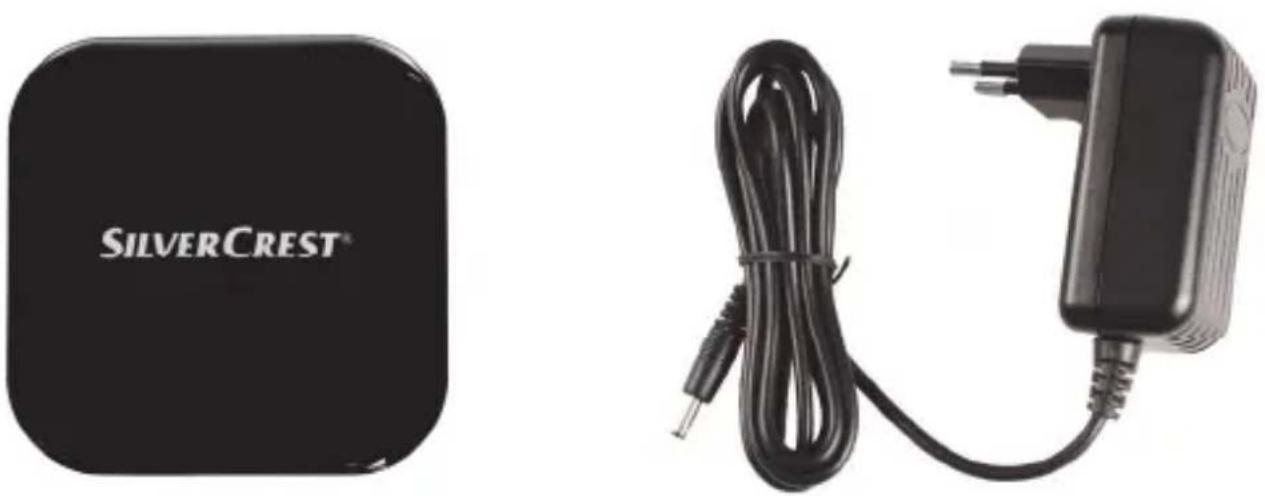
USB 3.0 hub SUH 3.0 A1 Power adapter TYTE150500300EU
natural_image
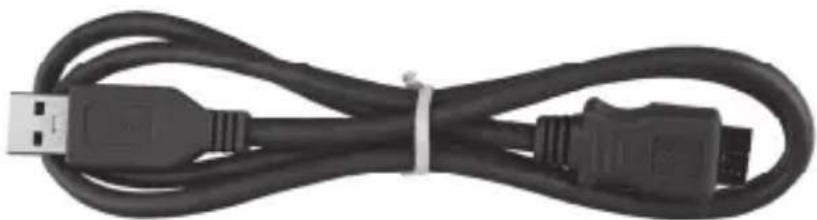
Coiled black USB cable with connector port, no visible text or symbolsUSB cable
If you find any items missing or damaged, please phone our Hotline. You will find the corresponding phone number in the last chapter "Warranty and Service Information".
Technical Specifications
SilverCrest USB 3.0 hub SUH 3.0 A1
Dimensions (W x H x D) 71 x 71 x 18 mm
Weight approx. 50 g
Ports (number) 4*
Interface USB 3.0
Operating temperature +5 °C to +35 °C
Storage temperature -20 °C to +60 °C
Operating humidity < 85 % RH
Current / voltage 3A / 5V
Integrated mains adapter TYTE150500300EU
Manufacturer Taiyiie
Input voltage 100 to 240 VAC
Frequency 50/60 Hz
Typical current 0.8A
Output voltage 5V
Output current 3A
Safety Class II
* Number of devices that can be connected simultaneously
USB 3.0 = 3
USB 2.0 =4
Safety Instructions
Before you use this device for the first time, please read the following notes in this manual and heed all warnings, even if you are familiar with handling electronic devices. Keep this manual in a safe place for future reference. If you sell the device or pass it on, it is essential that you also hand over this manual.

This icon denotes important information for the safe operation of the product and the user's safety.

General safety instructions
- Electrical devices should not be operated by children or people with mental or physical disabilities. Do not allow these people to use electrical devices when not under supervision. They may not understand that they can be dangerous.
- Small parts can represent choking hazards. Please also note that there is a risk of suffocation if airways are blocked by the packaging film.
- If smoke, unusual noises or smells are noticed, disconnect all cables immediately. If this occurs, the device should no longer be used and should be inspected by authorised service personnel.

Operating Environment/Environmental Conditions
- Position the device on a stable, even surface and do not place any heavy objects on the device.
- Keep the USB hub away from moisture. Do not place any recipients containing liquids (beverages, vases, etc.) next to or on the device. Avoid vibrations, heat and direct sunlight otherwise the device may be damaged.
- The device is not designed for use in environments with high temperatures or humidity (e.g. bathrooms), and must be kept free of dust. Operating temperature and operating humidity: 5 °C to 35 °C, max. 85 % RH.
- If the USB hub is exposed to broad temperature fluctuations, condensation can form and create moisture which can cause a short circuit. If this occurs, use the USB hub only after it has reached the ambient temperature.
- Make sure that no fire hazards (e.g. burning candles) are placed on or near the device.

Cables
- Never hold the power cord with wet hands as this may cause a short circuit or electric shock.
- Never place the device, heavy objects or furniture on the cable and take care that the cord does not become trapped, especially at the plug and sockets. Never tie knots in the cable and do not tie it together with other cables. All cables should be positioned so that nobody can trip over them or be obstructed by them.
- To disconnect a cable, pull on the plug of the USB hub, not the cable.
- A damaged power cord can cause fire or an electric shock. Inspect the power cord from time to time. Never use adapter plugs or extension cables that do not comply with the current safety regulations in your country, and do not modify any power cords or integrated mains adapters yourself!
Power supply
The device consumes electricity in the Standby mode. In order to completely disconnect the device from the mains, the integrated mains adapter must be pulled out from the wall outlet. For this reason, the device should be positioned in such a way that assures direct and unobstructed access to the wall outlet so that the integrated mains adapter can be immediately pulled out in an emergency situation. To avoid the danger of fire if the integrated mains adapter is not going to be used for a long while (e.g. during holidays) it should always be disconnected from the power socket. Before stormy weather when there is the danger of lightning, disconnect the device from the power supply.
Use only the supplied mains adapter TYTE150500300EU to avoid overheating, deformation of housing, fire, electric shock, explosions and other dangers. Never connect this power adapter to other devices.
Please note that a maximum of three USB 3.0 devices may be connected at the same time. When three USB 3.0 devices are connected simultaneously no additional USB 2.0 device may be connected, as this will overload the mains adapter.
Getting Started
- Plug the integrated mains adapter TYTE150500300EU into a wall outlet and connect the other end of the power cord to the "DC 5V" inlet of the USB hub (the labels of the ports are printed on the bottom of the USB hub).
- Insert the small plug of the supplied USB cable into the "USB IN" port of the USB hub.
- Insert the large plug of the supplied USB cable into a USB port on your computer.
- Your computer will detect the USB hub automatically (Microsoft Windows® XP or higher): it is now ready for use.
- You can now connect your USB devices to the "USB 1, USB 2, USB 3 and USB 4" ports on the USB hub and use them.
Maintenance / Cleaning
Warning! The device does not contain any parts that require user maintenance nor cleaning. Never open the housing of the device, to avoid any danger. Make sure that the components do not become dirty. Do not use any solvents, irritants or gaseous cleaners. Use only a slightly dampened, soft cloth for cleaning.
If you notice any smoke, unusual noise or strange smells, switch off the device immediately and pull the integrated mains adapter from the power supply. Should this happen, the device must not be used further.
Environment and Recycling
natural_image
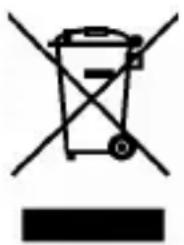
Symbol of a trash bin crossed with no text or numbers, accompanied by a solid black rectangle below (no text or symbols present)Devices marked with this symbol are subject to European Directive 2002/96/EC. All electric and electronic devices must be disposed of separately from household waste at official disposal centres. Proper disposal of old devices avoids damage to the environment and to your health. For further information about proper disposal, contact your local council, recycling centre or the shop where you bought the device.
Recycle the packaging material properly too. Cardboard packaging can be taken to paper recycling containers or public collection points for recycling. Any film or plastic contained in the packaging should be taken to your public collection points for disposal.
Conformity Notes

This device complies with the basic requirements of EMC Directive 2004/108/EC and the Directive for Low Voltage Devices 2006/95/EC. The corresponding Declaration of Conformity can be found at the end of this User's Manual.
Warranty and Service Information
Warranty of Targa GmbH
This device is sold with three years warranty from the date of purchase. Please keep the original receipt in a safe place as proof of purchase. Before using your product for the first time, please read the enclosed documentation or online help. Should any problems arise which cannot be solved in this way, please call our hotline. Please have the article number and, if available, the serial number to hand for all enquiries. If it is not possible to solve the problem on the phone, our hotline support staff will initiate further servicing procedures depending on the fault. Within the warranty period the product will be repaired or replaced free of charge as we deem appropriate. No new
warranty period commences if the product is repaired or replaced. Consumables such as batteries, rechargeable batteries and lamps are not covered by the warranty.
Your statutory rights towards the seller are not affected or restricted by this warranty.
Service
Phone: 0207 - 36 50 744
E-Mail: service.GB@targa-online.com

Phone: 01 - 242 15 83
E-Mail: service.IE@targa-online.com

Phone: 800 - 62 175
E-Mail: service.MT@targa-online.com
Phone: 800 - 92 496
E-Mail: service.CY@targa-online.com
IAN: 73769

Manufacturer
TARGA GmbH
Postfach 22 44
D-59482 Soest
www.targa.de
CE
EC-Declaration of Conformity
Address:
Targa GmbH
Lange Wende 41
59494 Soest, Germany
Product:
USB 3.0 Hub
Model:
Silvercrest SUH 3.0 A1
Year of CE marking:
2012
The product complies with the requirements of the following European directives:
2006/95/EC
Safety
2004/108/EC
Electromagnetic Compatibility
Compliance was proved by the application of the following standards:
EMC:
EN 55022:2006+A1:2007 (Limit class B)
EN 55024:1998+A1:2001+A2:2003
EN 61000-3-2:2006+A1:2009 +A2:2009
EN 61000-3-3:2008
Safety:
EN 60950-1:2006 +A11:2009
Soest, 26th of March
2012
Matthias Klauke, Managing Director