Galaxsee 46060675 - Telescope TASCO - Free user manual and instructions
Find the device manual for free Galaxsee 46060675 TASCO in PDF.


Frequently Asked Questions - Galaxsee 46060675 TASCO
User questions about Galaxsee 46060675 TASCO
0 question about this device. Answer the ones you know or ask your own.
Ask a new question about this device
Download the instructions for your Telescope in PDF format for free! Find your manual Galaxsee 46060675 - TASCO and take your electronic device back in hand. On this page are published all the documents necessary for the use of your device. Galaxsee 46060675 by TASCO.
USER MANUAL Galaxsee 46060675 TASCO
natural_image
Black-and-white line drawing of a telescope on a tripod, no text or symbols present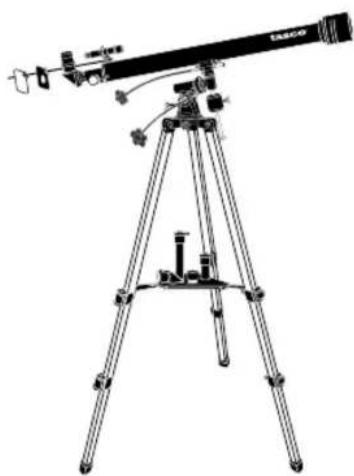
natural_image
Line drawing of a telescope mounted on a tripod, no text or symbols present40-060675
natural_image
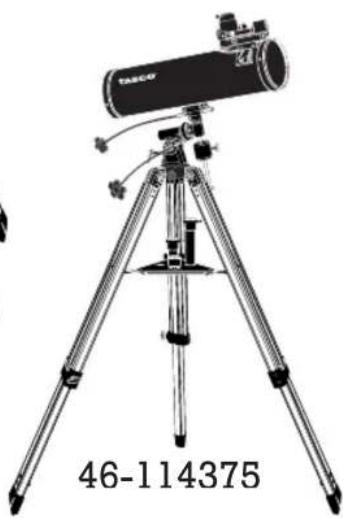
Illustration of a TACO telescope on a tripod, no text or symbols present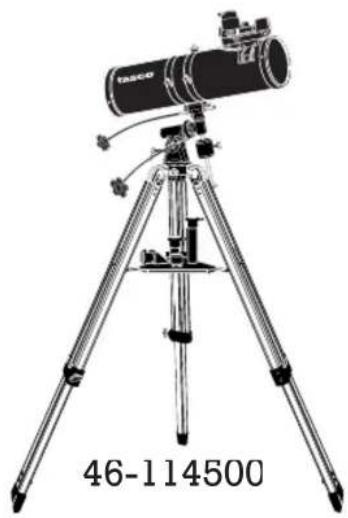
natural_image
Illustration of a TASC instrument on a tripod, no text or symbols present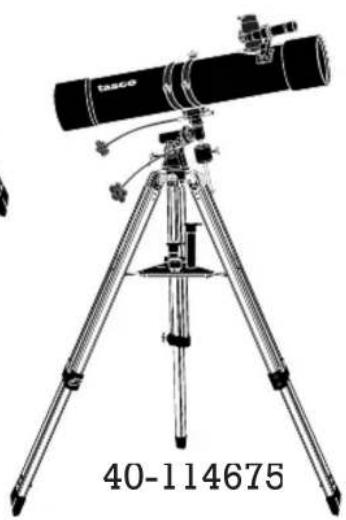
natural_image
Black-and-white illustration of a telescope on a tripod, no text or symbols visible in the image itself.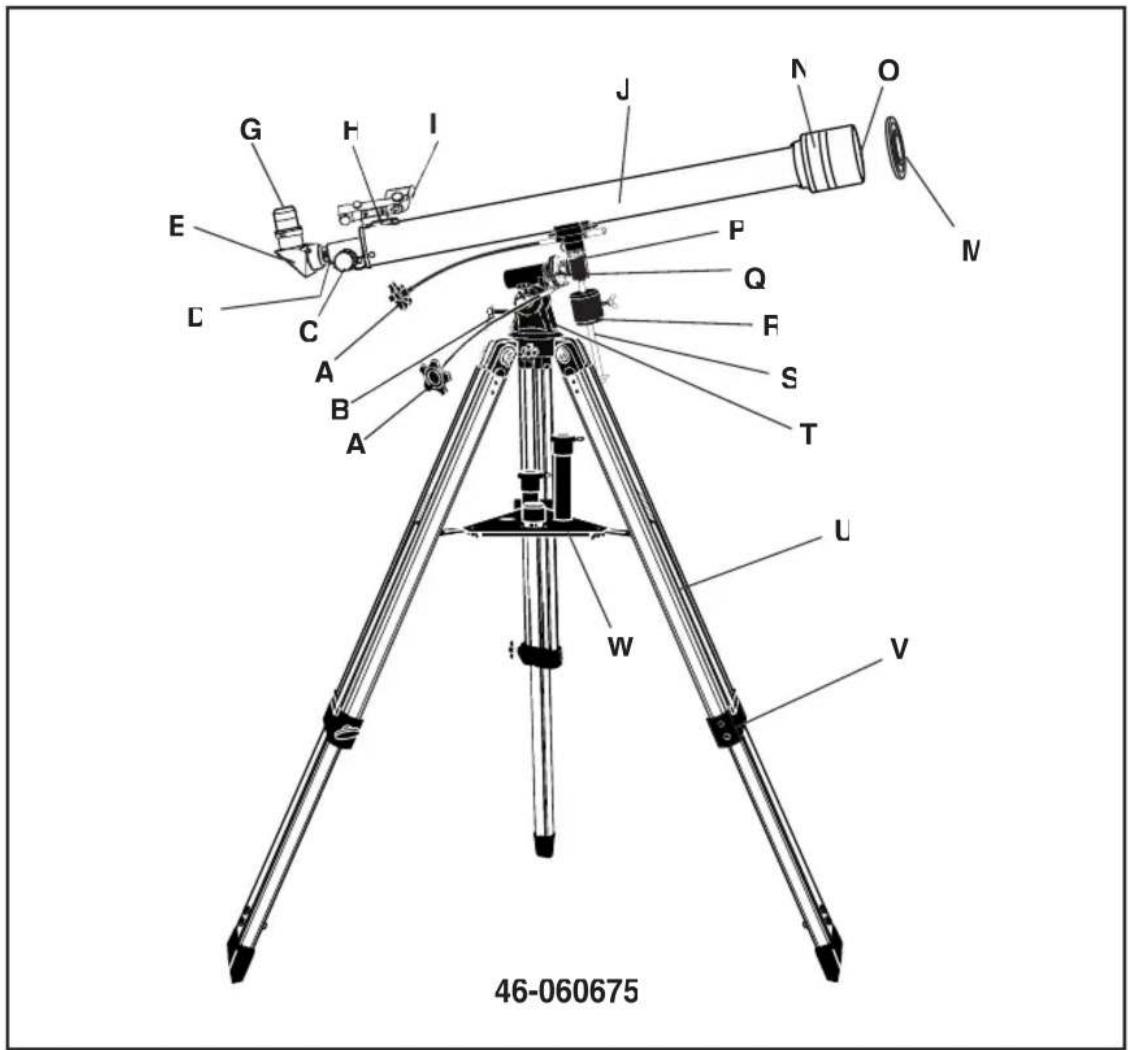
text_image
46-060675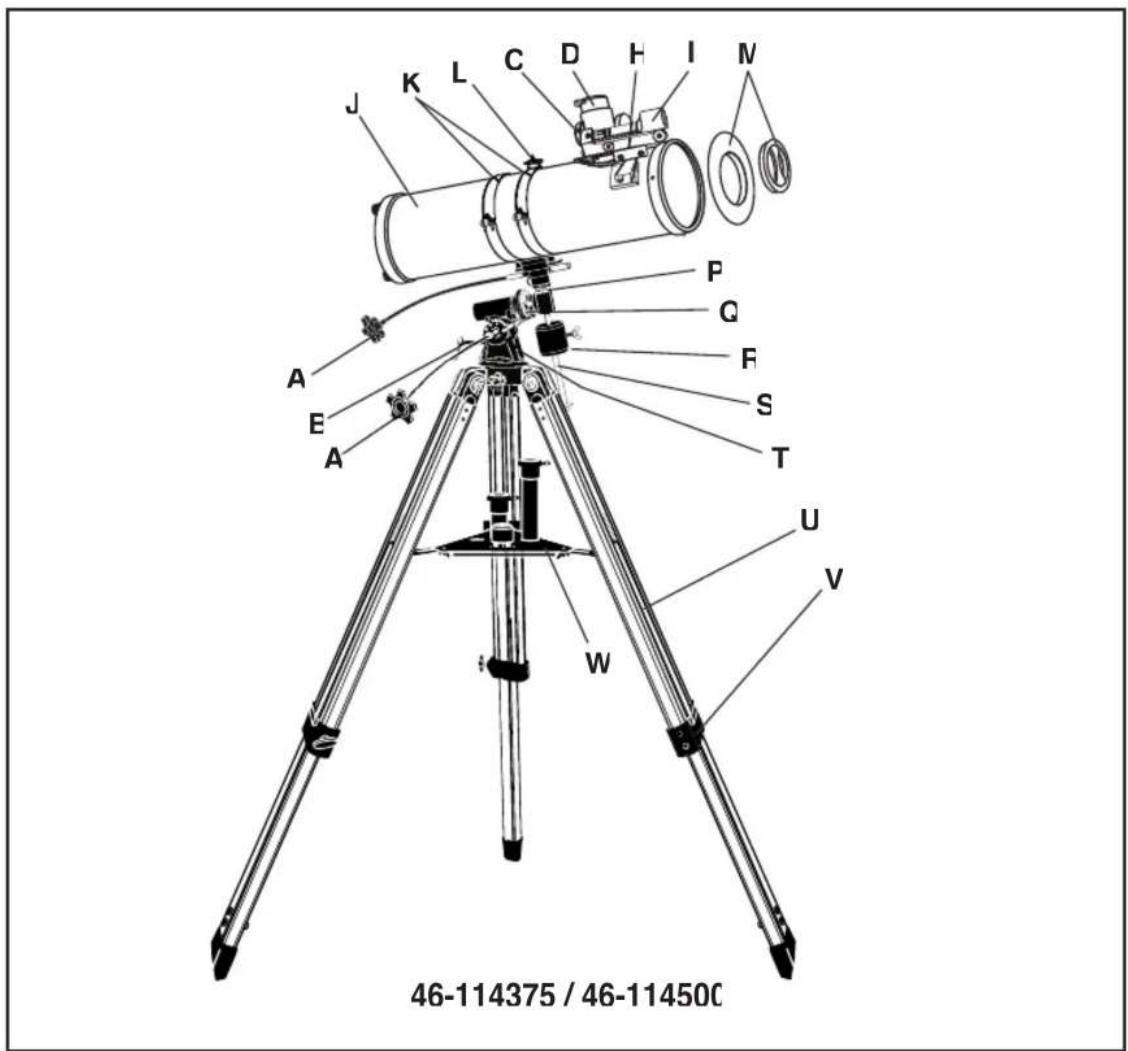
text_image
46-114375 / 46-11450C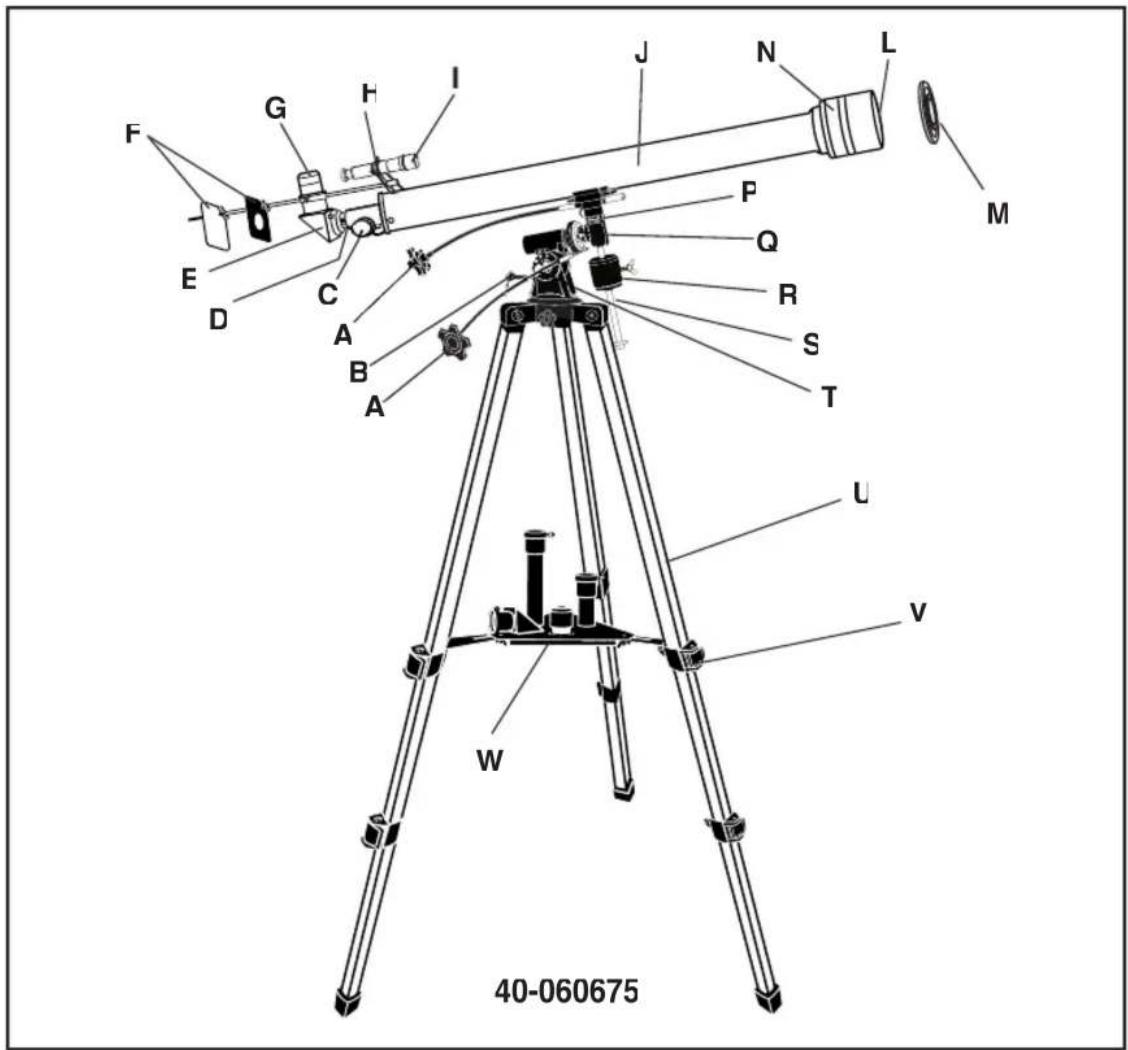
text_image
40-060675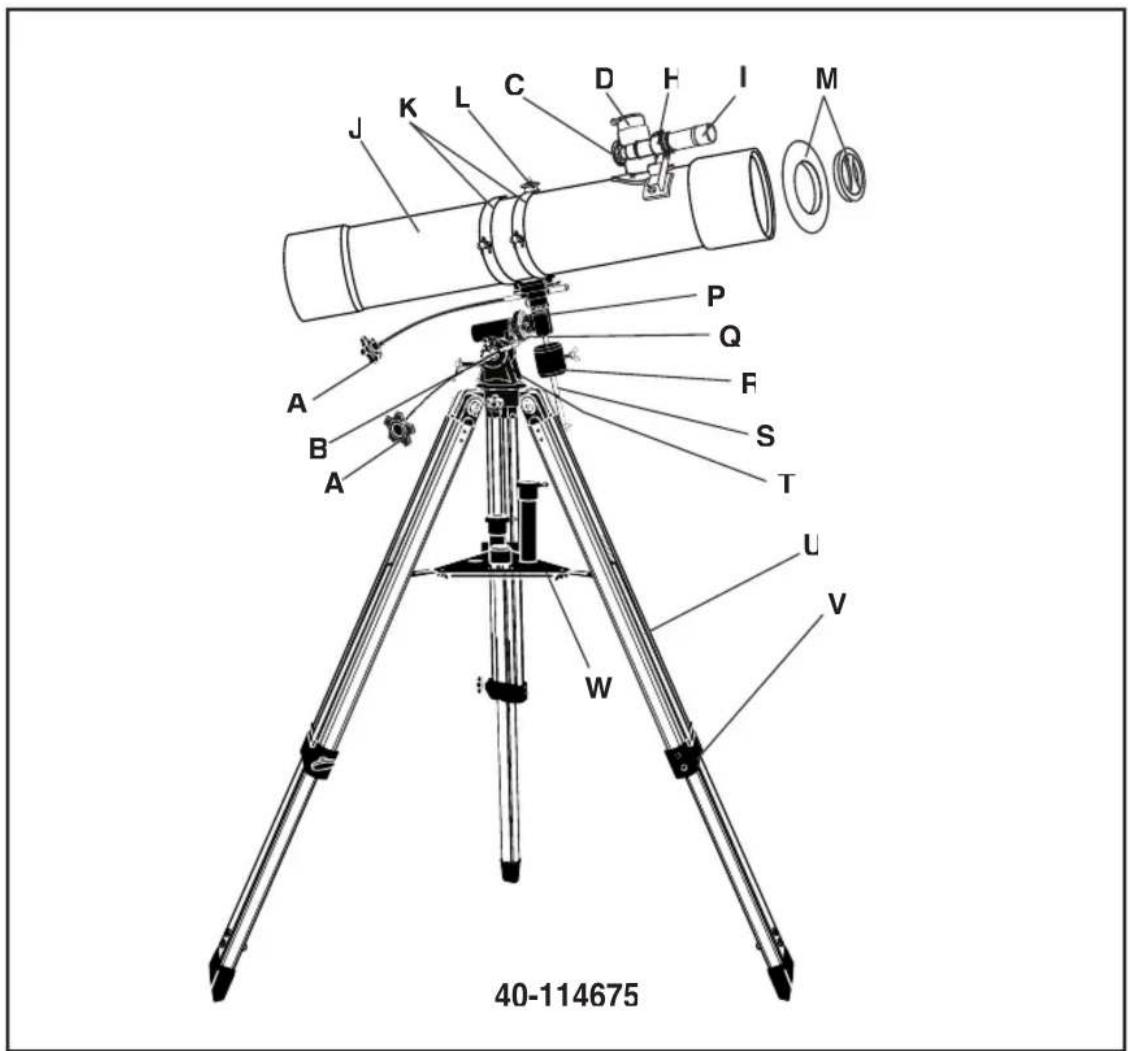
text_image
40-114675 W V L A B A P Q F S T M J K L C D H I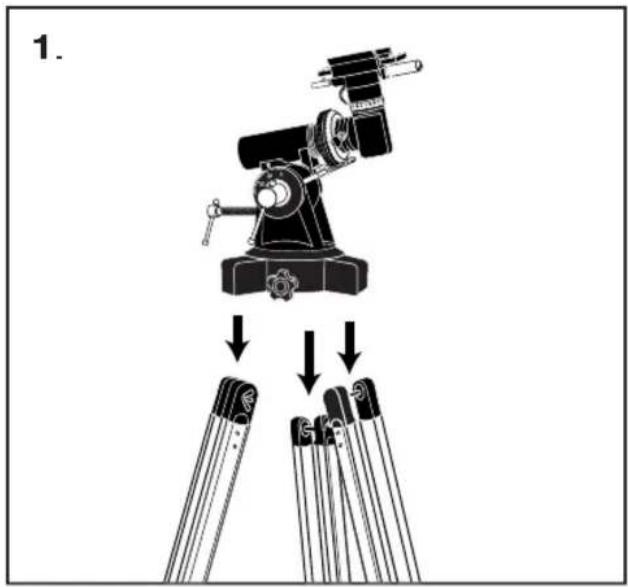
text_image
1.
natural_image
Line drawing of a tripod-mounted optical instrument with adjustable legs and base (no text or symbols)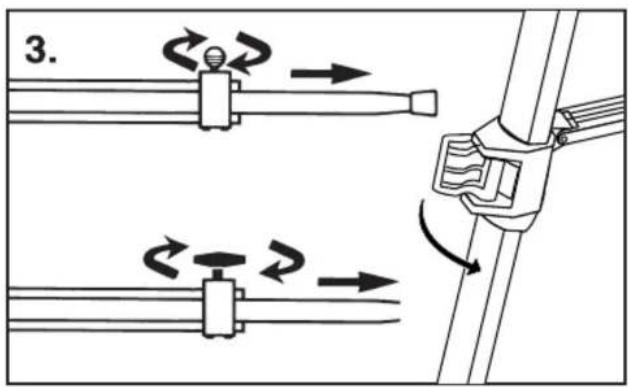
text_image
3.
natural_image
Technical line drawing of a mechanical assembly with no visible text or symbols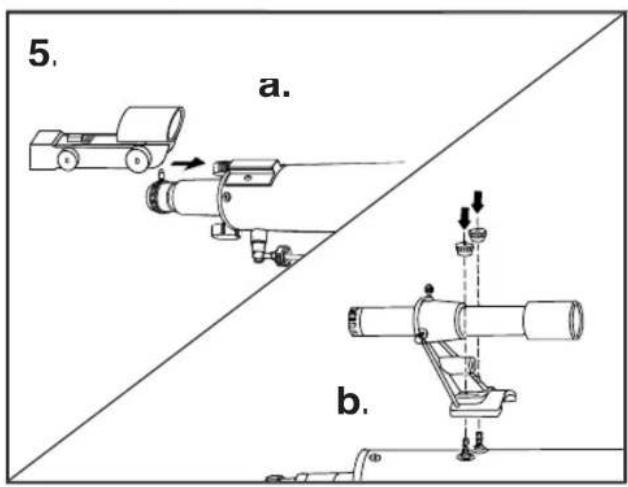
text_image
5. a. b.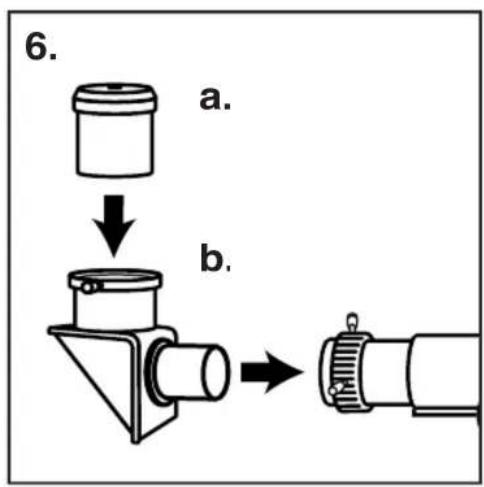
text_image
6. a. b.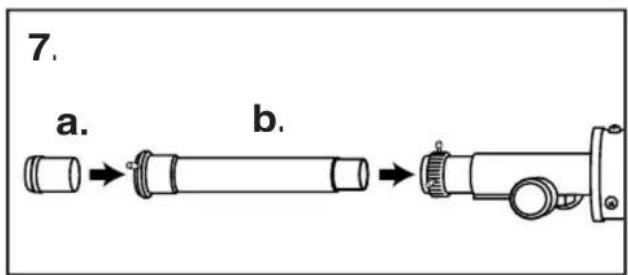
text_image
7. a. b.
natural_image
Two stopwatch diagrams showing mechanical components with arrows indicating motion (no text or symbols)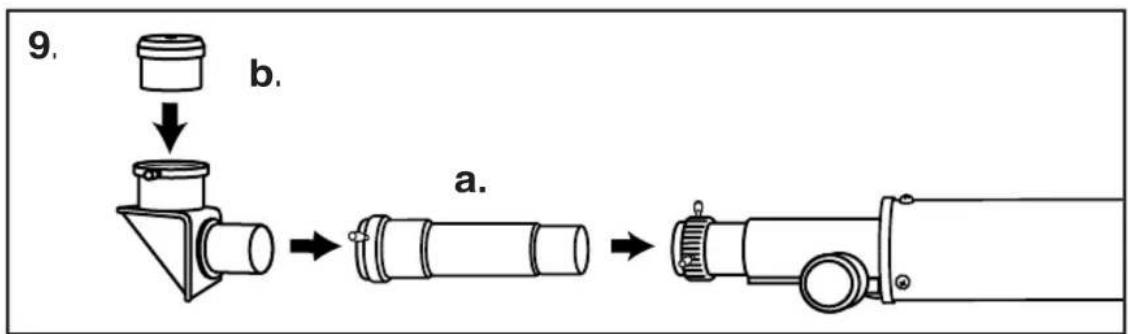
flowchart
graph TD
    A["9. Component"] --> B["b."]
    B --> C["a."]
text_image
10.
text_image
11. a. b.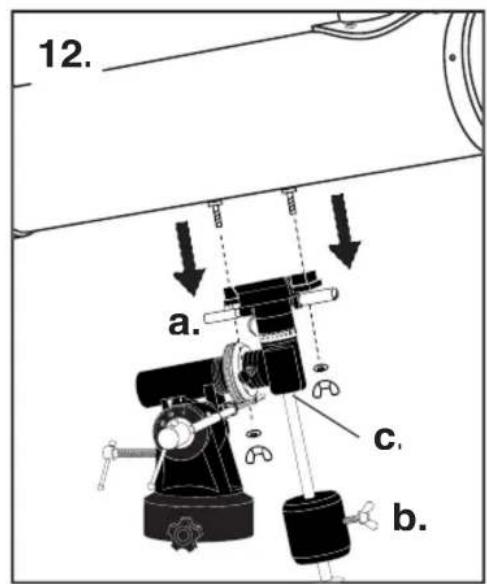
text_image
12. a. c. b.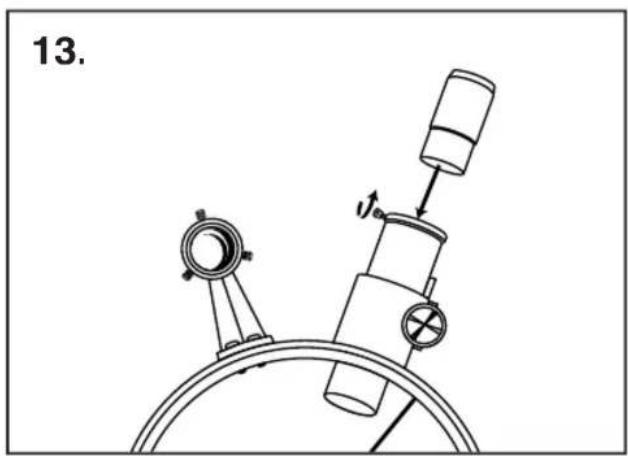
natural_image
Technical line drawing of a mechanical device with no visible text or symbols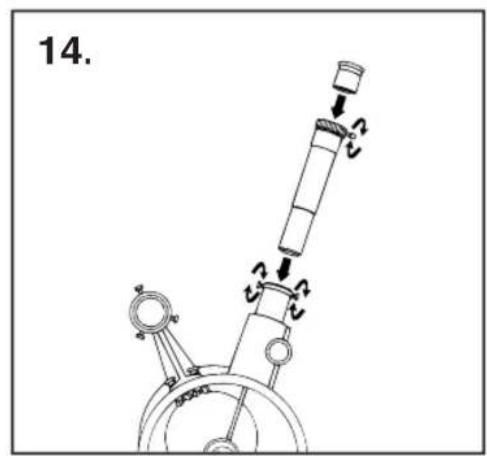
text_image
14.
natural_image
Line drawing of a tripod-mounted scientific instrument with labeled part '15' (no text or symbols on the instrument itself)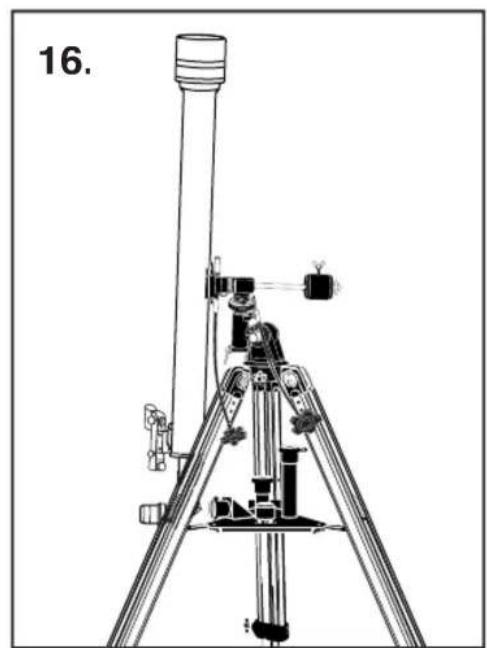
natural_image
Technical line drawing of a tripod-mounted scientific instrument with no visible text or symbols| A. Flexible Control CableB Polar Axis Micro Adjustment LeverC. Focus KnobD. Focus TubeE DiagonalF. Sun Projection ScreenG EyepieceH. Finderscope Bracket | I. FinderscopeJ. Telescope Main BodyK CradleL. Camera Set ScrewM Dust Caps (remove before viewing)N. Sun ShadeO Objective Lens (not shown)P Declination Axis Scale | Q. Hour Axis ScaleH. CounterweightS. Counterweight ShaftT. Polar Axis Locking LeverU Tripod LegV. Tripod Leg Adjusting Screw / ClampW. Accessory Tray |
| A. Câble de contrôle flexibleB Levier pour le réglage précis de l'axe polaireC. Bouton de focalisationD. Tube de focalisationE DiagonaleF. Ecran de projection du soleilG OculaireH. Support du télescope chercheur | I. Télescope chercheurJ. Corps principal du télescope K MontureL Vis de réglage caméraM Coiffes de protection (à enlever avant l'observation)N. Pare-soleilO. Lentille de l'objectif (pas sur le dessin) | P. Echelle de déclinaison de l'axeQ. Echelle horaireR ContrepoidsS Tige du contrepoidsT. Levier de verrouillage de l'axe polaireU. Pied du trépiedV. Vis de réglage pour le piedW Plateau pour accessoires |
| A. Cable de mando flexibleB Maniveia para el Ajuste del Eje PolarC. Botón de EnfoqueD. Tubo de EnfoqueE DiagonalF. Pantalla protectora contra el solG MirillaH. Abrazadera del Telescópico Buscador | I. Telescópico BuscadorJ. Cuerpo Principal del Telescópico BuscadorK Armazón portadorL Tornillo de Ajuste para la CámaraM Protecciones contra el Polvo (quitar antes de mirar)N. Protección contra el SolO. Lentilla de Objetivo (no se muestra) | P. Escala Eje de DeclinaciónQ. Escala Eje de la HoraR ContrapesoS Arbol del ContrapesoT. Manivela para el Bloqueo del Eje PolarU Pata del TripodeV. Tornillo de Ajuste de la Pata del TripodeW. Bandeja para los Accesorios |
| A. Cavo di controllo flessibileB Leva di microregolazione asse polareC. Manopola fuocoD. Tubo di messa a fuocoE DiagonaleF. Schermo di proiezione solareG Oculare | H. Supporto cercatoreI. CercatoreJ. Corpo principale telescopioK CullaL Vite settaggio cameraM Coperture antipolvere (togli-erle prima di operare)N. Protezione solareO. Lenti obiettivo (non visibili) | P. Scala asse declinazioneQ. Scala asse orariaR ContrappesoS Asta contrappesoT. Leva fermo asse polareU Gamba treppiediV. Vite regolazione gambe treppiediW. Scatola porta accessori |
| A. Biegsames SteuerkabelB Polaraxe-MikroeinstellhebelC. FokussierknopfD. FokussiertubusE DiagonalspiegelF. SonnenprojektionsschirmG OkularH. SucherklammerI. Sucher | J. TeleskopkörperK WiegeL Camera-StellschraubeM Staubkappen (vor dem Betrachten entfernen)N. SonnenblendeO Objektivlinse (nicht gezeigt)P. Skala der DeklinationsachseQ. Skala der Stundenachse | R. GegengewichtS. Schaft des GegengewichtsT. Polarachsen-SperrhebelU. StativbeinV. Stativbein-EinstellschraubeW. Zusatztablett |
| A. Flexibele controlekabelB Microafstelhendel van de poolasC. ScherpteregelaarD. ScherpstellingbuisE DiagonaalF. ZonneprojectieschermG OogstukH. Klem van de zoeklensI. Zoeklens | J. TelescoopbuisK WiegL Bevestigingsschroef van de cameraM Stofkapjes (verwijderen voor het kijken)N. ZonnekiepO. Objectieve lens (niet op de tekening)P. Schaalanduiding declinatie | Q. Schaalanduiding uurR. TegengewichtS. Staaf van het tegengewichtT. Grendelstaaf van de poolasU. DriepootV. Afstelschroef van de dri-epootW. Accessoirebakje |
| A. Cabo de comando flexívelB. Micro alavanca de ajuste do eixo polarC. Botão rotativo de focagemD. Tubo de focagemE Espelho diagonalF. Écran de projecção do solG. OcularH. Suporte do dispositivo FinderscopeI. Dispositivo Finderscope | J. Corpo principal do telescópioK ArmaçãoL Parafuso de fixação para máquina fotográficaM Tampas de protecção do pó (retire antes de efectuar observações)N. ParasoO. Lentes da objectiva (não ilustradas) | P. Escala do eixo de inclinaçãoQ. Escala do eixo horárioR. ContrapesoS. Eixo do contrapesoT. Alavanca de fixação do eixo polarU. Perna do tripéV. Parafuso de ajuste das pernas do tripéW. Tabuleiro de acessórios |
TELESCOPE ASSEMBLY INSTRUCTIONS
1 Remove the three tripod legs (U) from the box. To attach tripod legs to tripod head (N) align the holes of the tripod legs with those of the equatorial mount. Secure each leg by inserting a large (3") bolt with washer into the hole and secure with a wing nut and washer. Tighten bolts (Fig. 1).
NOTE: When attaching tripod legs to tripod head, be sure that hinge flange on each leg faces inward. The tripod accessory tray (W) will attach to these flanges.
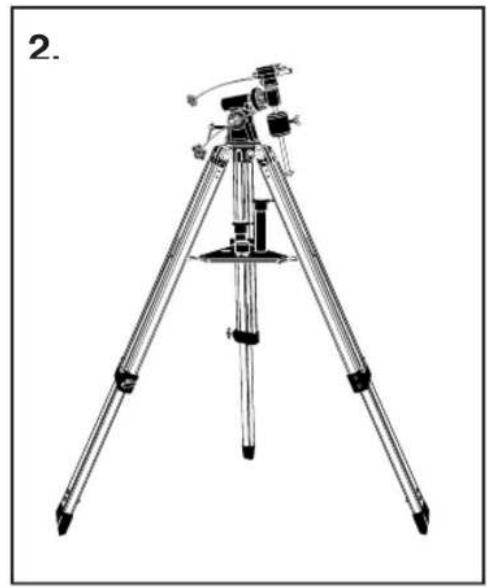
- Stand tripod and spread legs. Loosen the adjusting lock on each leg. Grab the equatorial mount and lift. Extend the tripod legs to the desired height (at equal lengths). In addition, tighten each leg's adjusting locks to hold them in position (Fig. 2).
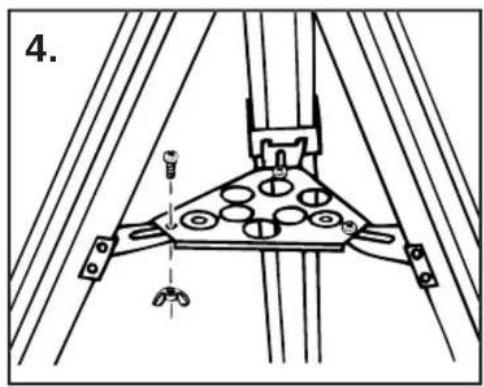
- Using the small machine screws and wing nuts provided, attach the accessory tray to each of the flanges on the tripod legs (Fig. 4).
NOTE: Flanges fit under accessory tray when attached.
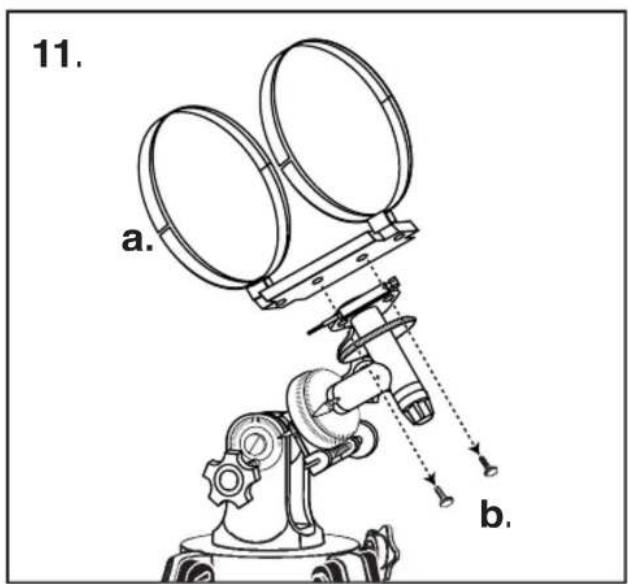
- Remove telescope main body (J), counterweight (R), counterweight rod (S), and the two flexible control cables (A) from the box. Carefully rest the telescope main body tube in the cradle (Fig. 11) Be sure the cradle is positioned at the center of the telescope main body tube for proper balancing. Tighten the cradle locking knobs (Fig. 11a). Attach the control cables to the declination (P) and hour axis (Q) cable studs. Loosen counterweight clamping screw (Fig. 12b). Slide weight into rod. Thread counterweight rod into the threaded hole located below the declination axis (Fig. 12c).
- Models 46-060675, 46-114375, 40-060675: Remove telescope main body (J), counterweight (R), counterweight rod (S), and the two flexible control cables (A) from the box. Remove the knurled nuts from the telescope mounting studs. Seat telescope main body in "V" block and secure with the nuts. Attach the control cables to the declination (P) and hour axis (Q) cable studs. Loosen counterweight clamping screw. Slide weight into rod. Thread counterweight rod into threaded hole located below the declination axis.
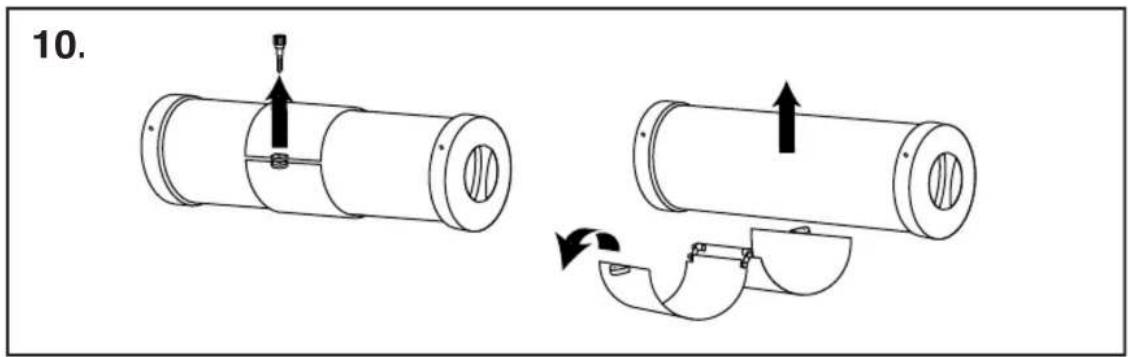
- Models 40-060675, 40-114675 Remove the finderscope with finderscope bracket (H) attached from the box. Remove the two knurled thumbscrews from the telescope main body. Position the finderscope bracket on the telescope main body so that the holes in the base of the bracket line up with the exposed holes in the telescope main body. Replace the two knurled thumbscrews and tighten securely (Fig. 4b).
- Models 46-060675, 46-114375, 46-114500 Remove the StarPointer finderscope with finder-scope bracket (H) attached from the box (only on models 46-060675, 46-114375 and 46-114500). Remove the two knurled thumbscrews from the telescope main body. Position the finderscope bracket on the telescope main body so that the holes in the base of the bracket line up with the exposed holes in the telescope main body. Replace the two knurled thumbscrews and tighten securely (Fig. 4a).
- Insert diagonal (E) into the focus tube (Fig. 5a). Secure by tightening small retaining screw.
NOTE: Diagonal is only to be used in combination with the eyepieces (oculars). Never use the diagonal and Barlow at the same time.
-
Insert eyepiece (G) into diagonal (Fig. 5b). Secure by tightening small retaining screw.
-
Insert Barlow (Fig. 7) into the focus tube. Secure by tightening small retaining screw. Insert eyepiece into open end of Barlow and secure (Fig. 6).
NOTE: In all astronomical telescopes, the image appears upside down. With the use of the diagonal in refractor models, the image appears erect but with a left to right inversion (mirror like). To use the telescope for terrestrial view and to correct the mirrored image, remove the diagonal and replace with the erecting eyepiece. We recommend the use of the low magnification eyepiece when the telescope is used for terrestrial viewing.
Refractor telescopes can be used for terrestrial viewing by using an erecting eyepiece. Reflectors are used mainly for astronomical purposes.
The telescope is now fully assembled and ready for use.
CAUTION! Viewing the sun can cause permanent eye damage. Do not view the sun with this telescope or even with the naked eye.
BALANCING YOUR TELESCOPE
Precise controls were built into your equatorial mount to hold the telescope steady. When viewing at high magnifications, even a slight breeze vibrating the body can impair your ability to see detail. So to stack the cards on your side as much as possible against the limitations of nature, it is important to balance your telescope (Fig. 15 and 16).
1 Level tripod by adjusting legs.
2. Loosen polar axis clamp and adjust polar axis to correspond to your observing latitude. If you do not know your latitude, consult a map or atlas. Retighten clamp screw.
3. Loosen declination clamp screw and rotate telescope about the declination axis so that "90°" on the declination scale is aligned with the fixed pointer. Retighten clamp screw.
4. Loosen hour axis clamp, rotate scope until the counter weight rod is in a horizontal position. Do not tighten clamp screws.
5. If telescope is balanced, it will remain in place.
6. If telescope is out of balance, loosen counter weight thumb screw and slide weight along roc until telescope remains in place. Tighten weight and hour axis screws.
TO USE THE FINDERSCOPE
The finderscope is a small low-powered and wide field of view telescope mounted alongside the main telescope and is used to search for the target and aim the main telescope at it (I). Before you can use the finderscope, you'll need to line it up with the telescope. This is a simple procedure once you know how and have practiced a little bit.
1 Install the lowest power eyepiece (20mm) into the eyepiece tube. Pick out an easily recognized, unmoving object no closer than a thousand yards away. The higher the object is from the horizon, the easier it will be to position the telescope. Aim your telescope toward your object until its image is centered in the eyepiece. Lock all the knobs on the equatorial mount so the telescope will not move.
2. Look through the finderscope. If the object you lined up in the telescope is not visible, loosen the adjustment screws and move the finderscope around until you see it. Once it gets within a range, tighten the adjustment screws while centering the object in the scope. You'll note that the image will shift toward the screw you are tightening (Fig. 8).
3. Adjust screws to center object on the finderscope cross hairs. Recheck your telescope to make certain it is still on target. If it moved, realign it and adjust your finderscope. If it hasn't, you're all set. Your finderscope is now operational.
TO USE THE STARPOINTER
1 The StarPointer is the quickest and easiest way to point your telescope exactly at a desired object in the sky. It's like having a laser pointer that you can shine directly into the night sky. The star pointer is a zero magnification pointing tool that uses a coated glass window to superimpose the image of a small red dot into the night sky. Like all finderscopes, the StarPointer must be properly aligned with the main telescope before it can be used.
2. To turn on the StarPointer, rotate the variable brightness control clockwise until you hear a "click." To increase the brightness level of the red dot, continue rotating the control knob about 180^ until it stops.
3. Locate a bright star or planet and center it in a low power eyepiece in the main telescope. If the StarPointer is perfectly aligned, you will see the red LED dot overlap the alignment star. If the StarPointer is not aligned, take notice of where the red dot is relative to the bright star.
Without moving the main telescope, turn the StarPointer's azimuth and altitude alignment controls until the red dot is directly over the alignment star.
If the LED dot is brighter than the alignment star, it may make it difficult to see the star. Turn the variable brightness control counterclockwise, until the red dot is the same brightness as the alignment star. This will make it easier to get an accurate alignment. The StarPointer is now ready to be used. Remember to always turn the power off after you have found an object. This will extend the life of both the battery and the LED.
FINDING OBJECTS
1 Look through the StarPointer finderscope and pan the telescope until the object appears in the field of view. Once it's in the field, tighten the altitude and azimuth locks.
2. To center the object with the red dot in the StarPointer, use the fine adjustment ring on the altitude slow motion rod assembly.
FOCUSING
1 Once you have found an object in the telescope, turn the focus knob until the image is sharp.
2. To focus on an object that is nearer than your current target, turn the focus knob toward the eyepiece (i.e., so that the focus tube moves away from the front of the telescope). For more distant objects, turn the focus knob in the opposite direction.
3. To achieve a truly sharp focus, never look through glass windows or across objects that produce heat waves, such as asphalt parking lots.
IMAGE ORIENTATION
1 When observing with a diagonal, the image will be right side up but reversed from left to right.
2. When observing straight through, with the eyepiece inserted directly into the telescope, the image will be inverted. Also, the image in the finderscope will be inverted.
MAGNIFICATION
The magnification (or power) of a telescope varies depending upon the focal length of the eye-piece being used and the focal length of the telescope.
To calculate magnification, use the following formula, in which FL = focal length:
$$ \text { Magnification } = \frac {\text { FL (telescope) in mm }}{\text { FL (eyepiece) in mm }} $$
SOLAR OBSERVATION
CAUTION! Viewing the sun can cause permanent eye damage. Do not view the sun with this product or even with the naked eye. Never leave a telescope unattended during the daytime; a child could look at the sun with it and suffer permanent damage to vision.
PREPARING THE TELESCOPE FOR PROJECTING THE SUN ON A SCREEN
CAUTION! Cover the objective lens so no one can look through it.
1 Insert the projection screen rod by sliding it through the opening in the finderscope bracket with the washer end of rod toward the objective. (The washer acts as a stop, preventing the sun screen assembly from slipping completely through the finderscope bracket.)
2. If the diagonal is in place, remove it. It will not be used for solar observation.
3. Select the lowest power eyepiece (the one with the highest numerical designation in millimeters) and insert it, without the diagonal, into the focus tube.
4. Select the black plate of the sun projection assembly. Slip it onto the rod, position it near the eyepiece so that the hole is centered with the lens of the eyepiece and lock it in place. This plate shades the white projection screen which will be put in place in a later step. The telescope is now ready to observe the sun.
OBSERVING THE SUN
1 Point the telescope in the general direction of the sun without looking through it or the finderscope. Looking at the shadow of the telescope on the ground will help in aiming it.
2. Hold the white plate a few inches behind the finderscope eyepiece and move the telescope gently until you see the sun projected on the white plate. You will see a round "picture" of the sky with the sun somewhere in the "picture". Move the telescope, using the flexible control cables until the sun is centered in this projected image of the sky.
3. Next, slip the white plate into place on the sun projection assembly rod. Position it directly in line with the telescope's eyepiece and lock it in place.
4. Use the flexible control cables to make any small corrections necessary to center the sun's image on the white screen.
5. Focus the sun's image on the white screen using the focus knob.
6. The projected image will show sunspots, the "rice-grain" structure of the solar disk, and that the sun is brighter at the center of the disk than at the edge.
THE MOON FILTER
A moon filter has been included with your telescope for removing glare and increasing contrast when viewing the moon. To attach it to the telescope eyepiece, screw the filter onto the threaded end of the eyepiece.
CAUTION! The moon filter should only be used to view the moon. It is not intended for viewing the sun. Viewing the sun through this telescope (with or without the filter), or even with the naked eye, can cause permanent eye damage.
| TECHNICAL SPECIFICATIONS | |||
| 46-060675 | 46-114375 | 46-11450C | |
| Objective Diameter: | 60mm (2.36") | N/A | N/A |
| Mirror Diameter: | N/A | 114mm (4.5", | 114mm (4.5" |
| Focal Length: | 900mm | 500mm | 1000mm |
| Eye Lenses: | K25mm (Low Power) | MA20mm (Low Power) | MA20mm (Low Power) |
| K10mm (Medium Power) | MA10mm (Medium Power) | MA10mm (Medium Power) | |
| SR4mm (High Power) | SR4mm (High Power) | SR4mm (High Power) | |
| Barlow: | 3X | 3X | 2X |
| Erecting Eyepiece: | 1.5X | N/A | N/A |
| Maximum Magnification: | 675X | 375X | 500X |
| Accessories: | Diagonal mirror; Moonfilter | Moonfilter | Moonfilter |
| 40-060675 | 40-114675 | ||
| Objective Diameter: | 60mm (2.36") | N/A | |
| Mirror Diameter: | N/A | 114mm (4.5" | |
| Focal Length: | 900mm | 900mm | |
| Eye Lenses: | H25mm (Low Power) | H20mm (Low Power) | |
| H12.5mm (Medium Power) | H12.5mm (Medium Power) | ||
| SR4mm (High Power) | SR4mm (High Power) | ||
| Barlow: | 3X | 3X | |
| Erecting Eyepiece: | 1.5X | N/A | |
| Maximum Magnification: | 675X | 675X | |
| Accessories: | Diagonal mirror; Moonfilter | Moonfilter | |
| EYE LENS CHART & THEORETICAL POWER LIMITS | |||||
| 46-060675 | 46-114375 | 46-114500 | 40-060675 | 40-114675 | |
| SR4mm Eye Lens Power: | 225X | 125X | 250X | 225X | 225X |
| H12.5mm Eye Lens Power: | N/A | N/A | N/A | 72X | 72X |
| H25mm Eye Lens Power: | N/A | N/A | N/A | 36X | N/A |
| K10mm Eye Lens Power: | 90X | N/A | N/A | N/A | N/A |
| K25mm Eye Lens Power: | 36X | N/A | N/A | N/A | N/A |
| MA20mm Eye Lens Power: | N/A | 25X | 50X | N/A | N/A |
| MA10mm Eye Lens Power: | N/A | 50X | 100X | N/A | N/A |
| H20mm Eye Lens Power: | N/A | N/A | N/A | N/A | 45X |
INSTRUCTIONS POUR L'ASSEMBLAGE DU TÉLESCOPE.
NOTE: Flanges fit under accessory tray when attached.