EasyManual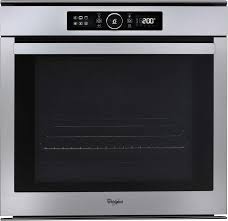
AKZM 8530 - Built-in oven WHIRLPOOL - Free user manual and instructions
Find the device manual for free AKZM 8530 WHIRLPOOL in PDF.


User questions about AKZM 8530 WHIRLPOOL
0 question about this device. Answer the ones you know or ask your own.
Ask a new question about this device
Download the instructions for your Built-in oven in PDF format for free! Find your manual AKZM 8530 - WHIRLPOOL and take your electronic device back in hand. On this page are published all the documents necessary for the use of your device. AKZM 8530 by WHIRLPOOL.
USER MANUAL AKZM 8530 WHIRLPOOL
User and maintenance manual

INSTRUCTIONS IMPORTANTES SUR LA SÉCURITÉ
VOTRE SECURITE AINSI QUE CELLE D'AUTRUI EST PARTICULIERÉMENT IMPORTANTE
ACCESSIONS NON FOURNIS
IMPORTANT SAFETY INSTRUCTIONS
YOUR SAFETY AND THAT OF OTHERS IS PARAMOUNT
This manual and the appliance itself provide important safety warnings, to be read and observed at all times.

This is the danger symbol, pertaining to safety, which alerts users to potential risks to themselves and others. All safety warnings are preceded by the danger symbol and the following terms:
DANGER
Indicates a hazardous situation which, if not avoided, will cause serious injury.
WARNING
Indicates a hazardous situation which, if not avoided, could cause serious injury.
All safety warnings give specific details of the potential risk present and indicate how to reduce risk of injury, damage and electric shock resulting from improper use of the appliance. Carefully observe the following instructions:
- The appliance must be disconnected from the power supply before carrying out any installation work.
- Installation and maintenance must be carried out by a qualified technician, in compliance with the manufacturer's instructions and local safety regulations. Do not repair or replace any part of the appliance unless specifically stated in the user manual.
Regulations require that the appliance is earthed. - The power cable must be long enough for connecting the appliance, once fitted in its housing, to the power supply socket.
- For installation to comply with current safety regulations, an all-pole disconnect switch with minimum contact gap of 3mm must be utilized.
- Do not use multiple plug adapters or extension leads.
- Do not pull the power supply cable in order to unplug the appliance.
- The electrical components must not be accessible to the user after installation.
- Do not touch the appliance with any wet part of the body and do not operate it when barefoot.
This appliance is designed solely for use as a domestic appliance for cooking food. No other type of use is permitted (e.g.: heating rooms). The Manufacturer declines all responsibility for inappropriate use or incorrect setting of the controls. - The appliance is not intended for use by persons (including children) with any physical, sensory or mental impairment, or without experience and knowledge of the appliance, unless supervised or previously instructed in its use by those responsible for their safety.
The accessible parts of the appliance may become very hot during use. Young children should be kept away from the appliance and supervised to ensure that they do not play with it.
During and after use, do not touch the heating elements or interior surfaces of the appliance - risk of burns. Do not allow the appliance to come into contact with cloths or other flammable materials until all the components have cooled sufficiently. - At the end of cooking, exercise caution when opening the appliance door, letting the hot air or steam exit gradually before accessing the oven. When the appliance door is shut, hot air is vented from the aperture above the control panel. Do not obstruct the vent apertures.
- Use oven gloves to remove pans and accessories, taking care not to touch the heating elements.
- Do not place flammable materials in or near the appliance: a fire may break out if the appliance is inadvertently switched on.
- Do not heat or cook sealed jars or containers in the appliance. The pressure that builds up inside might cause the jar to explode, damaging the appliance.
- Do not use containers made of synthetic materials.
Overheated oils and fats catch fire easily. Always remain vigilant when cooking foods rich in fat and oil. - Never leave the appliance unattended during food drying.
- If alcoholic beverages are used when cooking foods (e.g. rum, cognac, wine), remember that alcohol evaporates at high temperatures. As a result, there is a risk that vapours released by the alcohol may catch fire upon coming into contact with the electrical heating element.
Scrapping of household appliances
This appliance is manufactured with recyclable or reusable materials. Dispos of it in accordance with local waste disposal regulations. Before scrapping, cut off the power supply cable.
- For further information on the treatment, recovery and recycling of household electrical appliances, contact your competent local authority, the collection service for household waste or the store where you purchased the appliance.
INSTALLATION
After unpacking the oven, make sure that it has not been damaged during transport and that the oven door closes properly. In the event of problems, contact the dealer or your nearest After-sales Service. To prevent any damage, only remove the oven from its polystyrene foam base at the time of installation.
PREPARING THE HOUSING UNIT
Kitchen units in contact with the oven must be heat resistant (min 90^ ).
- Carry out all cabinet cutting work before fitting the oven in the housing and carefully remove all wood chips and sawdust.
After installation, the bottom of the oven must no longer be accessible.
For correct appliance operation, do not obstruct the minimum gap between the worktop and the upper edge of the oven.
ELECTRICAL CONNECTION
Make sure the power voltage specified on the appliance dataplate is the same as the mains voltage. The dataplate is on the front edge of the oven (visible when the door is open).
- Power cable replacement (type H05 RR-F 3 x 1.5 mm²) must be carried out by a qualified electrician. Contact an authorized service centre.
GENERAL RECOMMENDATIONS
Before use:
- Remove cardboard protection pieces, protective film and adhesive labels from accessories.
- Remove the accessories from the oven and heat it at 200^ for about an hour to eliminate the smell and fumes from the insulating materials and protective grease.
During use:
- Do not place heavy objects on the door as they could damage it.
- Do not cling to the door or hang anything from the handle.
- Do not cover the inside of the oven with aluminium foil.
- Never pour water into the inside of a hot oven; this could damage the enamel coating.
- Never drag pots or pans across the bottom of the oven as this could damage the enamel coating.
- Make sure that the electrical cables of other appliances do not touch hot parts of the oven or become trapped in the door.
- Do not expose the oven to atmospheric agents.
SAFEGUARDING THE ENVIRONMENT

Disposal of packing material
The packing material is 100% recyclable and is marked with the recycle symbol (_3) . The various parts of the packing must therefore be disposed of responsibly and in full compliance with local authority regulations governing waste disposal.
Scrapping the product
This appliance is marked in compliance with European Directive 2002/96/EC, Waste Electrical and Electronic Equipment (WEEE).
- By ensuring this product is disposed of correctly, you will help prevent potential negative consequences for the environment and human health, which could otherwise be caused by inappropriate waste handling of this product.
- The symbol on the product or on the accompanying documentation indicates that it should not be treated as domestic waste but must be taken to an appropriate collection centre for the recycling of electrical and electronic equipment.
Energy saving
- Only pre-heat the oven if specified in the cooking table or your recipe.
- Use dark lacquered or enamelled baking moulds as they absorb heat far better.
- Switch the oven off 10/15 minutes before the set cooking time. Food requiring prolonged cooking will continue to cook even once the oven is switched off.
DECLARATION OF CONFORMITY (C)
- This oven, which is intended to come into contact with foodstuffs, complies with European Regulation (€) n.1935/2004 and has been designed, manufactured and sold in conformity with the safety requirements of the "Low Voltage" directive 2006/95/CE (which replaces 73/23/CEE and subsequent amendments), the protection requirements of "EMC" 2004/108/CE.
TROUBLESHOOTING GUIDE
The oven does not work:
Check for the presence of mains electrical power and if the oven is connected to the electrical supply.
- Turn off the oven and restart it to see if the fault persists.
The electronic programmer does not work:
If the display shows the letter "F" followed by a number, contact your nearest After-sales Service. Specify in this case the number that follows the letter "F".
AFTER-SALES SERVICE
Before calling the After-Sales Service:
- See if you can solve the problem yourself with the help of the suggestions given in the "Troubleshooting guide".
- Switch the appliance off and back on again it to see if the fault persists.
If after the above checks the fault still occurs, get in touch with the nearest After-sales Service.
Always specify:
a brief description of the fault;
the type and exact model of the oven;
- the service number (number after the word Service on the rating plate), located on the right hand edge of the oven cavity (visible when the oven door is open). The service number is also indicated on the guarantee booklet;
- your full address;
- your telephone number.
SERVICE
0000 000 0000

If any repairs are required, please contact an authorised After-sales Service (to guarantee that original spare parts will be used and repairs carried out correctly).
CLEANING

WARNING

- Never use steam cleaning equipment.
- Only clean the oven when it is cool to the touch.
- Disconnect the appliance from the power supply.
Oven exterior
IMPORTANT: do not use corrosive or abrasive detergents. If any of these products accidentally comes into contact with the appliance, clean immediately with a damp cloth.
Clean the surfaces with a damp cloth. If it is very dirty, add a few drops of washing up detergent to the water. Finish off with a dry cloth.
Oven interior
IMPORTANT: do not use abrasive sponges or metallic scrapers or scourers. Over time, these can ruin enamelled surfaces and the oven door glass.
After every use, allow the oven to cool then clean it preferably while it is still warm in order to remove built-up dirt and stains caused by food residues (e.g. food with a high sugar content).
Use proprietary oven detergents and follow the manufacturer's instructions to the letter.
Clean the door glass with a suitable liquid detergent. The oven door can be removed to facilitate cleaning (see MAINTENANCE).
The top heating element of the grill (see MAINTENANCE) can be lowered (some models only) to clean the roof of the oven.
N.B.: during prolonged cooking of foods with a high water content (e.g. pizza, vegetables, etc.) condensation may form on the inside of the door and around the seal. When the oven is cold, dry the inside of the door with a cloth or sponge.
Accessories:
Soak the accessories in water with washing up detergent immediately after use, handling them with oven gloves if still hot.
- Food residues can be easily removed using a brush or sponge.
Cleaning the rear wall and catalytic side panels of the oven (if present):
IMPORTANT: do not use corrosive or abrasive detergents, coarse brushes, pot scourers or oven sprays which could damage the catalytic surface and ruin its self-cleaning properties.
- Operate the oven empty with the fan-assisted function at 200^ C for about one hour
- Next, leave the appliance to cool down before removing any food residue with a sponge.
Use protective gloves.
- Ensure the oven is cold before carrying out the following operations.
- Disconnect the appliance from the power supply.
REMOVING THE DOOR
To remove the door:
- Open the door fully.
- Lift the catches and push them forwards as far as they will go (Fig. 1).
- Close the door as far as it will go (A), lift it up (B) and turn it (C) until it is released (D) (Fig. 2).
To refit the door:
- Insert the hinges in their seats.
- Open the door fully.
- Lower the two catches.
- Close the door.
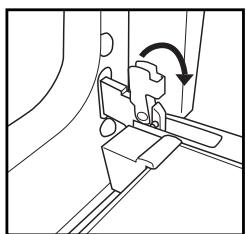
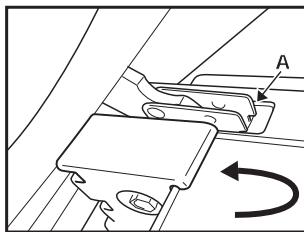
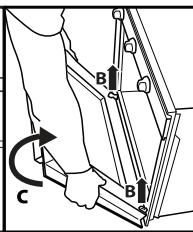
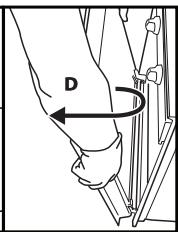
Fig. 1
Fig. 2
MOVING THE TOP HEATING ELEMENT (SOME MODELS ONLY)
- Remove the side accessory holder grilles (Fig. 3).
- Pull the heating element out a little (Fig. 4) and lower it (Fig. 5).
- To reposition the heating element, lift it up, pulling it slightly towards you, making sure it comes to rest on the lateral supports.
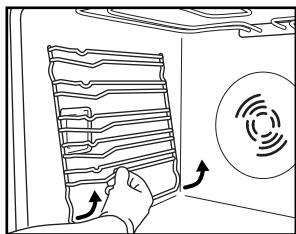
Fig. 3
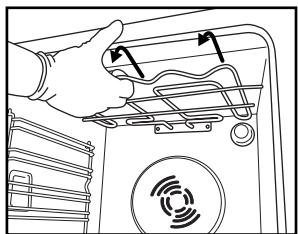
Fig. 4
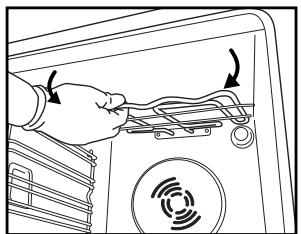
Fig. 5
REPLACING THE OVEN LAMP
To replace the rear lamp (if present):
- Disconnect the oven from the power supply.
- Unscrew the lamp cover (Fig. 6), replace the lamp (see note for lamp type) and screw the lamp cover back on.
- Reconnect the oven to the power supply.
To replace the side lamp (if present):
- Disconnect the oven from the power supply.
- Remove the side accessory holder grilles, if present (Fig. 3).
- Use a screwdriver to pry off the lamp cover (Fig. 7).
- Replace the lamp (see note for lamp type) (Fig. 8).
- Reposition the lamp cover, pushing it on firmly until it snaps into place (Fig. 9).
- Refit the side accessory holder grilles.
- Reconnect the oven to the power supply.
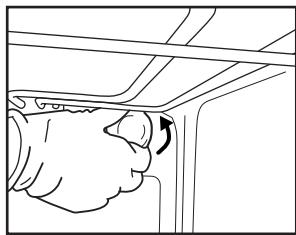
Fig. 6
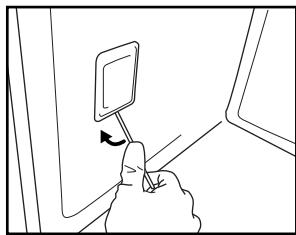
Fig. 7
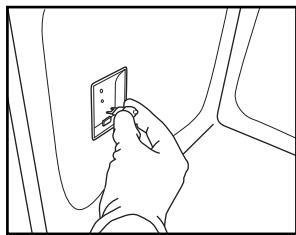
Fig. 8
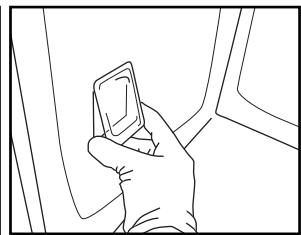
Fig. 9
N.B.:
- Only use 25-40W/230V type E-14, T300°C incandescent lamps, or 20-40W/230 V type G9, T300°C halogen lamps.
Lamps are available from our After-sales Service.
IMPORTANT:
If using halogen lamps, do not handle with bare hands since fingerprints can damage them.
- Do not use the oven until the lamp cover has been repositioned.
FOR ELECTRICAL CONNECTION, SEE THE PARAGRAPH ON INSTALLATION
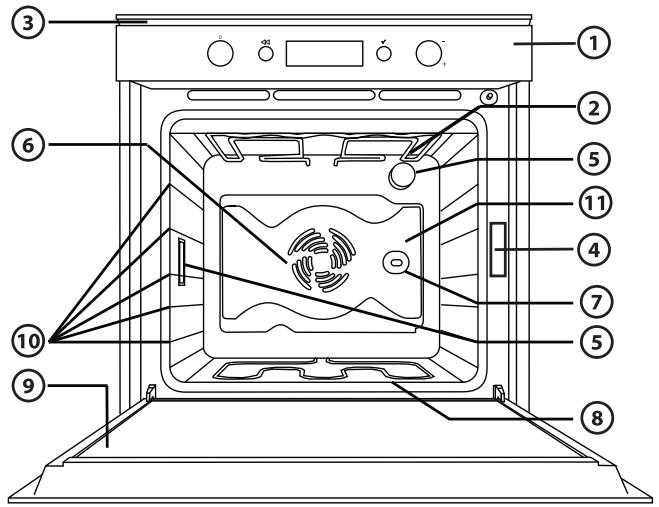
- Control panel
- Upper heating element/grill
- Cooling fan (not visible)
- Dataplate (not to be removed)
- Light
- Fan
- Turnspit (if present)
- Lower heating element (hidden)
- Door
- Position of shelves (the number of shelves is indicated on the front of the oven)
- Rear wall
N.B.:
During cooking, the cooling fan may switch on at intervals in order to minimise energy consumption.
- At the end of cooking, after the oven in switched off, the cooling fan may continue to run for a while.
- When the oven door is opened during cooking, the heating elements switch off.
ACCESSIONS SUPPLIED
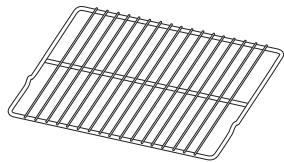
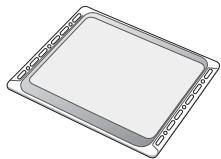
Fig. A
Fig. B
A. WIRE SHELF (2): the wire shelf can be used to grill food or as a support for pans, cake tins and other ovenproof cooking receptacles.
B. BAKING TRAY (1): the baking tray can be used to cook bread and pastry products, as well as roast meat, fish en papillote, etc.
ACCESSORIES NOT SUPPLIED
Other accessories can be purchased separately from the After-sales Service.
INSERTING WIRE SHELVES AND OTHER ACCESSORIES IN THE OVEN
- Insert the wire shelf horizontally, with the raised part "A" upwards (Fig. 1).
- The other accessories, like the drip tray and baking tray, are inserted with the raised part on the flat section "B" facing upwards (Fig. 2).
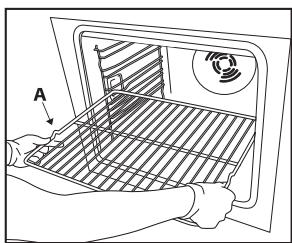
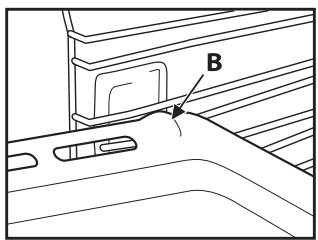
Fig. 1
Fig. 2

- FUNCTION SELECTOR KNOB: On/off and function selector knob
- BROWSE KNOB: for browsing the menu and adjusting pre-set values
- BUTTON: to return to the previous screen
- BUTTON : to select and confirm settings
LIST OF FUNCTIONS
Turn the "Functions" knob to any position and the oven switches on: the display shows the functions or the associated submenus.
The submenus are available and selectable by turning the knob to the functions GRILL, SPECIALS, SETTINGS, BREAD/PIZZA.
N.B.: for the list and description of functions, see the specific table at page 27.
DESCRIPTION OF DISPLAY
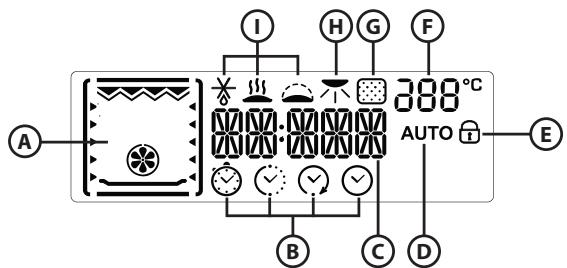
A. Display of heating elements activated during the various cooking functions
B. Time management symbols: timer, cooking time, end of cooking time, time
C. Information regarding selected functions
D. Automatic BREAD/PIZZA function selected
E. Indication of door locked during automatic cleaning cycle (not available on this model)
F. Internal oven temperature
G. Pyrolisis function (not available on this model)
H. Browning
I. Special functions: defrosting, warm keeping, rising
STARTING THE OVEN - SETTING THE TIME
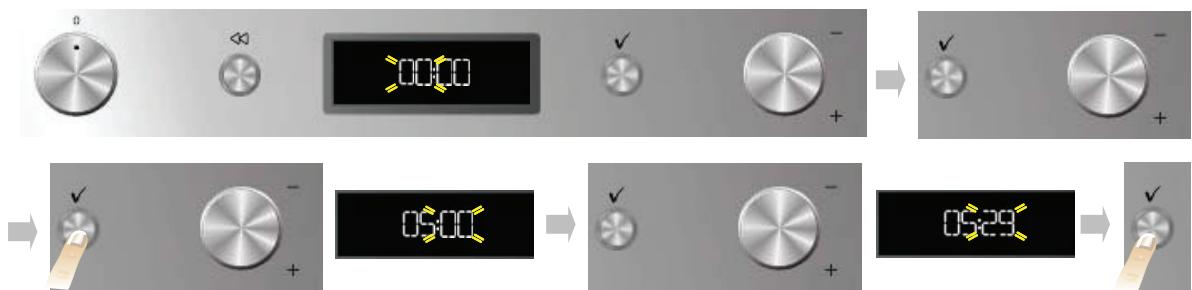
After connecting the oven to the mains power, the time must be set on the clock. The two hour digits flash on the display.
- Turn the "Browse" knob to display the correct hour.
- Press the button to confirm; the two minute digits flash on the display.
- Turn the "Browse" knob to display the correct minutes.
- Press button to confirm.
To change the time, for example following a power cut, see the next paragraph (SETTINGS).
SELECTING COOKING FUNCTIONS

- Turn the "Functions" knob to the desired function: the cooking settings are shown on the display.
- If the values shown are those desired, press . To change them, proceed as indicated below.
SETTING THE TEMPERATURE/OUTPUT OF THE GRILL
To change the temperature or output of the grill, proceed as follows:

- Turn the "Browse" knob to display the desired value.
- Press button to confirm.
The oven automatically confirms your selection 10 seconds after the last operation.
FAST PREHEATING
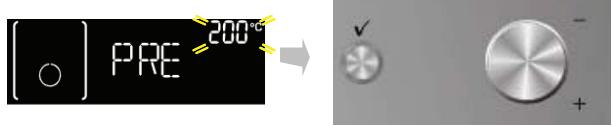
- Turn the "Functions" knob to the symbol _ to select the fast preheating function.
- Confirm by pressing : the settings are shown on the display.
- If the proposed temperature is that desired, press button . To change the temperature, proceed as described in previous paragraphs. The message PRE appears on the display. When the set temperature is reached, the corresponding value (e.g. 200^ ) appears on the display and the acoustic signal sounds. At the end of preheating, the oven automatically selects the conventional function .
At this point food can be placed in the oven for cooking.
- If you wish to set a different cooking function, turn the "Functions" knob and select the desired function.
SETTING COOKING TIME
This function can be used to cook food for a set length of time, from a minimum of 1 minute to the maximum time allowed by the selected function, after which the oven switches off automatically.

- Once the temperature is confirmed, the symbol () flashes.
- Turn the adjustment knob to display the desired cooking time.
- To confirm the cooking time, press button
The oven automatically confirms your selection 10 seconds after the last operation.
SETTING END OF COOKING TIME /START DELAYED
IMPORTANT: the start delayed setting is not available for the following functions: FAST PREHEATING, BREAD/PIZZA, GENTLE CONVECTION BAKE.
N.B.: with this setting, the selected temperature is reached in a more gradual way, so cooking times will be slightly longer than stated in the cooking table.
The end of cooking time can be set, delaying the start of cooking by up to a maximum of 23 hours and 59 minutes. This can only be done once cooking time has been set.
After setting cooking time, the display shows the end of cooking time (for example 15:45) and the symbol flashes.

To delay the end of cooking time, and thus also the cooking start time, proceed as follows:
- Turn the "Browse" knob to display the time you wish cooking to end (for example 16:00).
- Confirm the selected value by pressing button : the two dots of end of cooking time flash, indicating that the setting has been made correctly.
- The oven will automatically delay the start of cooking so as to finish cooking at the set time.
At any time, however, set values (temperature, grill setting, cooking time) can be changed using button to go back, followed by the "Browse" knob to change values and button to confirm.
INDICATION OF THE RESIDUAL HEAT INSIDE THE OVEN

If at the end of cooking, or when the oven is switched off, the temperature inside the oven is over 50^ , the display shows the word HOT and the current temperature. When the residual heat reaches 50^ , the display shows the current time again.
TIMER

This function can be used only with the oven switched off and is useful, for example, for monitoring the cooking time of pasta. The maximum time which can be set is 23 hours and 59 minutes.
- With the "Functions" knob at zero, turn the "Browse" knob to display the desired time.
- Press button to start the countdown. When the set time has elapsed, the display will show "00:00:00" and an acoustic signal will sound. To mute the acoustic signal, press button (the time of day appears on the display).
KEY-LOCK
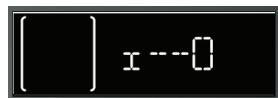
This function can be used to lock the buttons and knobs on the control panel.
To activate it, press and at the same time for at least 3 seconds. When activated, the functions associated with the buttons are locked and the display shows a key symbol. This function can also be activated during cooking. To deactivate it, repeat the above procedure. When the key-lock function is activated, the oven can be switched off by turning the knob to 0 (zero). In this case, however, the previously selected function will have to be set again.
SELECTING SPECIAL FUNCTIONS
Turn the "Functions" knob indicator to the symbol to access a submenu containing three special functions.
To browse, select and start one of these functions, proceed as follows:

- Turn the "Functions" knob to symbol : the display shows "DEFROST" along with this function's corresponding symbol.
- Turn the "Browse" knob to scroll the list of functions; the function names are in English: DEFROST, KEEP WARM, RISING.
- Press button to confirm.
BROWNING
At the end of cooking, with certain functions, the display indicates the possibility of browning. This function can only be used when cooking time has been set.

At the end of cooking time, the display shows: "PRESS TO BROWN". Press button , and the oven starts a 5 minute browning cycle. This function can be selected consecutively a maximum of twice.
BREAD/PIZZA FUNCTION SELECTION
Turn the "Function" knob pointer to the symbol to access a submenu containing the automatic baking functions for "bread" and "pizza".
Bread

- Turn the "Function" knob to the symbol : the display shows "BREAD" and AUTO alongside.
- Press to select the function.
- Turn the "Browse" knob to set the required temperature (between 180^ and 220^ ) and confirm with button .
- Turn the "Browse" knob to set the required cooking duration and press to start cooking.
Pizza

- Turn the Function knob to the symbol : the display shows "BREAD". To select the "PIZZA" function, proceed as follows:
- Turn the "Browse" knob: "PIZZA" appears on the display.
- Press to select the function.
- Turn the "Browse" knob to set the required temperature (between 220^ and 250^ ) and confirm with button .
- Turn the "Browse" knob to set the required cooking duration and press to start cooking.
SETTING
Turn the "Functions" knob indicator to the symbol to access a submenu containing four display settings which can be changed.
Clock
Turn the "Functions" knob to the symbol ; the word CLOCK appears on the display. To change the time of day, see the previous paragraph (SETTING THE TIME).
Eco
With the ECO mode selected (ON), the display switches off when the oven is on standby or 5 minutes after the end of cooking. To view information on the display, simply press a button or turn a knob.
- Turn the "Browse" knob to display "ECO".
- Press to access the setting (ON/OFF).
- Turn the "Browse" knob to select the desired setting and confirm by pressing button .
Acoustic signal
To activate or deactivate the acoustic signal, proceed as follows:
- Turn the "Browse" knob to display "SOUND".
- Press to access the setting (ON/OFF).
- Turn the "Browse" knob to select the desired setting and confirm by pressing button .
Brightness
To change the display brightness, proceed as follows:
- Turn the "Browse" knob to display "BRIGHTNESS".
- Press button : number 1 appears on the display.
- Turn the "Browse" knob to increase or decrease brightness and confirm by pressing
| FUNCTION SELECTOR KNOB | ||
| O | OFF | To stop cooking and switch off the oven. |
| LAMP | To switch the oven light on/off. | |
| SPECIALs | DEFROST | To speed up defrosting of food. Place food on the middle level. It is advisable to leave food in its packaging to prevent it from drying on the outside. |
| KEEP WARM | For keeping just-cooked food (e.g. meat, fried food, flans) hot and crisp. It is advisable to place food on the middle level. The function will not activate if the compartment temperature is above 65°C. | |
| RISING | For optimal proving of sweet or savoury dough. To safeguard the quality of proving, the function will not activate if the compartment temperature is above 40°C. Place dough on the 2nd level. The oven does not have to be preheated. | |
| CONVENTIONAL | To cook any kind of dish on one shelf only. Use the 3rd level. To bake pizzas, savoury pies and cakes with liquid fillings use the 1st or 2nd level. Preheat the oven before placing food inside. | |
| CONVECTION BAKE | For baking cakes with liquid filling (sweet or savoury) on a single shelf. This function can also be used for cooking on two shelves. Switch the position of the dishes to cook food more evenly. Use the 3rd shelf to cook on one shelf only, and the 1st and 4th to cook on two shelves. Preheat the oven before cooking. | |
| GENTLE CONVECTION BAKE | To cook food requiring medium/low cooking temperatures on a maximum of two shelves. This function is used to cook gently and slowly on two levels without having to switch the position of the dishes during the cooking process. Use the 3rd shelf to cook on one shelf only, and the 1st and 4th to cook on two shelves. Preheat the oven before cooking. | |
| GRILL | To grill steak, kebabs and sausages; to gratinate vegetables and toast bread. Place food on the 4th or 5th level. When grilling meat, it is advisable to use the drip-tray to collect the cooking juices. Position it on the 3rd/4th level, adding approx. half a litre of water. The oven does not have to be preheated. During cooking the oven door must remain closed. | |
| TURBO GRILL | To roast large cuts of meat (legs, roast beef, chicken). Position food on the middle levels. It is advisable to use the drip-tray to collect the cooking juices. Position it on the 1st/2nd level, adding approx. half a litre of water. The oven does not have to be preheated. During cooking the oven door must remain closed. With this function the spit can be used, if the relevant accessory is provided. | |
| SETTINGS | To set the display (time, brightness, buzzer volume, energy saving). | |
| BREAD/PIZZA | To bake different types and sizes of bread and pizza. This function has two programmes with predefined settings. Just indicate the required values (temperature and time) and the oven will automatically manage the optimum cooking cycle. Place the dough on the 2nd shelf after preheating the oven. | |
| FAST PREHEATING | To preheat the oven rapidly. | |
| Recipe | Function | Preheating | Shelf (from bottom) | Temperature (℃) | Time (min) | Accessories |
| Leavened cakes | GENTLE | Yes | 2 / 3 | 160 - 180 | 30 - 90 | Cake tin on wire shelf |
| Yes | 1 - 4 | 160 - 180 | 30 - 90 | Shelf 4: cake tin on wire shelf | ||
| Shelf 1: cake tin on wire shelf | ||||||
| Filled pies (cheesecake, strudel, apple pie) | GENTLE | Yes | 3 | 160 - 200 | 30 -85 | Drip-tray / baking tray or cake tin on wire shelf |
| Yes | 1 - 4 | 160 - 200 | 35 -90 | Shelf 4: cake tin on wire shelf (switch levels halfway through cooking) | ||
| Shelf 1: cake tin on wire shelf | ||||||
| Biscuits/Tartlets | GENTLE | Yes | 3 | 170 - 180 | 15 - 45 | Drip-tray / baking tray |
| Yes | 1 - 4 | 160 - 170 | 20 - 45 | Shelf 4: wire shelf | ||
| Shelf 1: drip-tray / baking tray | ||||||
| Choux pastry | GENTLE | Yes | 3 | 180 - 200 | 30 - 40 | Drip-tray / baking tray |
| Yes | 1 - 4 | 180 - 190 | 35 - 45 | Shelf 4: pan on wire shelf | ||
| Shelf 1: drip-tray / baking tray | ||||||
| Meringues | GENTLE | Yes | 3 | 90 | 110 -150 | Drip-tray / baking tray |
| Yes | 1 - 4 | 90 | 130 - 150 | Shelf 4: pan on wire shelf | ||
| Shelf 1: drip-tray / baking tray | ||||||
| Bread / Pizza / Focaccia | GENTLE | Yes | 1 / 2 | 190 - 250 | 15 - 50 | Drip-tray / baking tray |
| Yes | 1 - 4 | 190 - 250 | 25 - 45 | Shelf 4: pan on wire shelf (switch levels halfway through cooking) | ||
| Shelf 1: drip-tray / baking tray | ||||||
| Frozen pizzas | GENTLE | Yes | 3 | 250 | 10 -15 | Shelf 3: drip-tray / baking tray or wire shelf |
| Yes | 1 - 4 | 250 | 10 -20 | Shelf 4: pan on wire shelf (switch levels halfway through cooking) | ||
| Shelf 1: drip-tray / baking tray | ||||||
| Meat & potato pies (vegetable pie, quiche lorraine) | GENTLE | Yes | 3 | 180 - 190 | 40 - 55 | Cake tin on wire shelf |
| Yes | 1 - 4 | 180 - 190 | 40 - 55 | Shelf 4: cake tin on wire shelf (switch levels halfway through cooking) | ||
| Shelf 1: cake tin on wire shelf | ||||||
| Vols-au-vent / Puff pastry crackers | GENTLE | Yes | 3 | 190 - 200 | 20 - 30 | Drip-tray / baking tray |
| Yes | 1 - 4 | 180 - 190 | 20 - 40 | Shelf 4: pan on wire shelf | ||
| Shelf 1: drip-tray / baking tray | ||||||
| Lasagne / Baked pasta / Cannelloni / Flans | Yes | 3 | 190 - 200 | 45 - 55 | Pan on wire shelf | |
| Lamb / Veal / Beef / Pork 1 kg | Yes | 3 | 190 - 200 | 80 - 110 | Drip-tray or pan on wire shelf | |
| Chicken / Rabbit / Duck 1 kg | Yes | 3 | 200 - 230 | 50 - 100 | Drip-tray or pan on wire shelf | |
| Turkey / Goose 3 kg | Yes | 2 | 190 - 200 | 80 - 130 | Drip-tray or pan on wire shelf | |
| Baked fish / en papillote (fillet, whole) | Yes | 3 | 180 - 200 | 40 - 60 | Drip-tray or pan on wire shelf | |
| Stuffed vegetables (tomatoes, courgettes, aubergines) | Yes | 2 | 180 - 200 | 50 - 60 | Pan on wire shelf | |
| Toast | - | 5 | High | 3 - 5 | Wire shelf | |
| Fish fillets / steaks | - | 4 | Medium | 20 - 30 | Shelf 4: wire shelf (turn food halfway through cooking) | |
| 20 - 30 | Shelf 3: drip-tray with water | |||||
| Sausages / Kebabs / Spare ribs / Hamburgers | - | 5 | Medium - High | 15 - 30 | Shelf 5: wire shelf (turn food halfway through cooking) | |
| Shelf 4: drip-tray with water | ||||||
| Roast chicken 1-1.3 kg | - | 2 | Medium | 55 - 70 | Shelf 2: wire shelf (turn food two thirds of the way through cooking) | |
| - | 2 | High | 60 - 80 | Shelf 2: spit | ||
| Roast Beef rare 1 kg | - | 3 | Medium | 35 - 45 | Pan on wire shelf (if necessary, turn food two thirds of the way through cooking) | |
| Leg of lamb / Knuckle | - | 3 | Medium | 60 - 90 | Drip-tray or pan on wire shelf (if necessary, turn food two thirds of the way through cooking) | |
| Roast potatoes | - | 3 | Medium | 45 - 55 | Drip-tray / baking tray (if necessary, turn food two thirds of the way through cooking) | |
| Gratinated vegetables | - | 3 | High | 10 - 15 | Pan on wire shelf | |
| Lasagna & Meat | Yes | 1 - 4 | 200 | 50 - 100 | Shelf 4: pan on wire shelf (if necessary, turn food two thirds of the way through cooking) | |
| Shelf 1: drip-tray or pan on wire shelf | ||||||
| Carne & Potatoes | Yes | 1 - 4 | 200 | 45 - 100 | Shelf 4: pan on wire shelf (if necessary, turn food two thirds of the way through cooking) | |
| Shelf 1: drip-tray or pan on wire shelf | ||||||
| Fish & Vegetables | GENTLE | Yes | 1 - 4 | 180 | 30 - 50 | Shelf 4: pan on wire shelf |
| Shelf 1: drip-tray or pan on wire shelf |
Tested Recipes Table (in compliance with regulations IEC 60350:99+A1:05 +A2:08 and DIN 3360-12:07:07)
| Recipe | Function | Preheating | Shelf (from bottom) | Temperature (°C) | Time (min) | Accessories and notes |
| IEC 60350:99+A1:05+A2:08 § 8.4.1 | ||||||
| Shortbread biscuits | Yes | 3 | 170 | 15 - 25 | Drip-tray / baking tray | |
| Yes | 1 - 4 | 160 | 25 - 35 | Shelf 4: baking tray (switch levels halfway through cooking) | ||
| Shelf 1: drip-tray | ||||||
| IEC 60350:99+A1:05+A2:08 § 8.4.2 | ||||||
| Small cakes | Yes | 3 | 170 | 20 - 30 | Drip-tray / baking tray | |
| Yes | 1 - 4 | 160 | 20 - 30 | Shelf 4: baking tray (switch levels halfway through cooking) | ||
| Shelf 1: drip-tray | ||||||
| IEC 60350:99+A1:05+A2:08 § 8.5.1 | ||||||
| Fatless sponge cake | Yes | 2 | 170 | 25 - 35 | Cake tin on wire shelf | |
| IEC 60350:99+A1:05+A2:08 § 8.5.2 | ||||||
| Two apple pies | Yes | 2 / 3 | 185 | 55 - 75 | Cake tin on wire shelf | |
| Yes | 1 - 4 | 175 | 75 - 95 | Shelf 4: cake tin on wire shelf (switch levels halfway through cooking) | ||
| Shelf 1: cake tin on wire shelf | ||||||
| IEC 60350:99+A1:05+A2:08 § 9.1.1 | ||||||
| Toast | - | 5 | High | 3 - 5 | Wire shelf | |
| IEC 60350:99+A1:05+A2:08 § 9.2.1 | ||||||
| Burgers | - | 5 | High | 20 - 30 | Shelf 5: wire shelf (turn food halfway through cooking) | |
| - | 5 | High | 20 - 30 | Shelf 4: drip-tray with water | ||
| DIN 3360-12:07 § 6.5.2.3 | ||||||
| Apple cake, yeast tray cake | Yes | 3 | 180 | 30 - 40 | Drip-tray / baking tray | |
| Yes | 1 - 4 | 160 | 50 -60 | Shelf 4: baking tray (switch levels halfway through cooking) | ||
| Shelf 1: drip-tray | ||||||
| DIN 3360-12:07 § 6.6 | ||||||
| Roast pork | - | 3 | 190 | 150 -170 | Shelf 3: wire shelf | |
| Shelf 2: drip-tray with water (top-up when necessary) | ||||||
| DIN 3360-12:07 annex C | ||||||
| Flat cake | Yes | 3 | 170 | 35 - 45 | Drip-tray / baking tray | |
| Yes | 1 - 4 | 170 | 40 - 50 | Shelf 4: baking tray (switch levels halfway through cooking) | ||
| Shelf 1: drip-tray | ||||||
The cooking table suggests the functions and ideal temperatures for obtaining best results with any type of recipe. For hot air cooking on a single level, it is advisable to use the third shelf and the same temperature suggested for "CONVECTION BAKE" cooking on several levels.
When grilling, it is advisable to leave 3-4 cm free from the front edge of the grill to facilitate removal.
How to read the cooking table
The table indicates the best function to use for any given food, to be cooked on one or more shelves at the same time. Cooking times start from the moment food is placed in the oven, excluding pre-heating (where required). Cooking temperatures and times are purely for guidance and will depend on the amount of food and type of accessory used. Use the lowest recommended values to begin with and, if the food is not cooked enough, then move on to higher values. Use the accessories supplied and preferably dark coloured metal cake tins and oven trays. You can also use pans and accessories in pyrex or stoneware, but bear in mind that cooking times will be slightly longer. To obtain best results, carefully follow the advice given in the cooking table for the choice of accessories (supplied) to be placed on the various shelves.
Cooking different foods at the same time
Using the "GENTLE CONVECTION BAKE" function, you can cook different foods which require the same cooking temperature at the same time (for example: fish and vegetables), using different shelves. Remove the food which requires less cooking time and leave food which requires longer cooking time in the oven.
Desserts
- Cook delicate desserts with the conventional function on one shelf only. Use dark coloured metal cake tins and always position them on the wire shelf supplied. To cook on more than one shelf, select the forced air function and stagger the position of the cake tins on the shelves, aiding optimum circulation of the hot air.
- To check whether a raising cake is cooked, insert a wooden toothpick into the centre of the cake. If the toothpick comes out clean, the cake is ready.
If using non-stick cake tins, do not butter the edges as the cake may not rise evenly around the edges. - If the cake "sinks" during cooking, set a lower temperature the next time, perhaps reducing the amount of liquid in the mixture and mixing more gently.
- For sweets with moist fillings (cheesecake or fruit pies) use the "CONVECTION BAKE" function. If the base of the cake is soggy, lower the shelf and sprinkle the bottom of the cake with breadcrumbs or biscuit crumbs before adding the filling.
Meat
- Use any kind of oven tray or pyrex dish suited to the size of the piece of meat being cooked. For roast joints, it is best to add some stock to the bottom of the dish, basting the meat during cooking for added flavour. When the roast is ready, let it rest in the oven for another 10-15 minutes, or wrap it in aluminium foil.
- When you want to grill meat, choose cuts with an even thickness all over in order to achieve uniform cooking results. Very thick pieces of meat require longer cooking times. To prevent the meat from burning on the outside, lower the position of the wire shelf, keeping the food farther away from the grill. Turn the meat two thirds of the way through cooking.
To collect the cooking juices it is advisable to place a drip-tray with half a litre of water directly under the grill on which the meat is placed. Top-up when necessary.
Turnspit (only in some models)
Use this accessory to evenly roast large pieces of meat and poultry. Place the meat on the spit rod, tying it with string if chicken, and check that it is secure before inserting the rod in the seat located on the front wall of the oven and resting it on the respective support. To prevent smoke and to collect cooking juices, it is advisable to place a drip-tray with half a litre of water on the first level. The rod has a plastic handle which must be removed before starting to cook, and used at the end of cooking to avoid burns when taking the food out of the oven.
Pizza
Lightly grease the trays to ensure the pizza has a crispy base. Scatter the mozzarella over the pizza two thirds of the way through cooking.
Dough proving function
It is always best to cover the dough with a damp cloth before placing it in the oven. Dough proving time with this function is reduced by approximately one third compared to proving at room temperature (20 - 25^) . Proving time for a 1Kg batch of pizza dough is around one hour.
Printed in Italy
03/2011
5019 310 01244