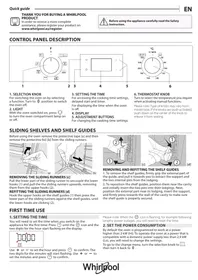
OMR556RR0X - Built-in oven WHIRLPOOL - Free user manual and instructions
Find the device manual for free OMR556RR0X WHIRLPOOL in PDF.



| Product type | Built-in oven |
| Brand | Whirlpool |
| Model | OMR556RR0X |
| Power supply | 220-240 V, 50-60 Hz |
| Maximum power | Greater than 3 kW (adjustable in "Lo" mode < 2.9 kW) |
| Number of functions | 9 cooking functions including cleaning |
| Cooking functions | Natural convection, Rising, Convection cooking, Pizza, Eco forced convection, Grill, Turbo grill |
| Cleaning functions | Smart Clean (steam), Automatic pyrolysis |
| Control type | Rotary knobs and buttons |
| Display | Digital screen with clock and timer |
| Capacity | Approximately 70 L (standard estimate) |
| Number of cooking levels | 5 shelf levels |
| Included accessories | Metal rack, drip tray, telescopic rails |
| Timer | Yes, programmable with delayed start |
| Door lock | Automatic during pyrolysis cycle |
| Interior lighting | Button-operated lamp |
| Maintenance | Smart Clean with steam and pyrolysis |
| Energy consumption | Adjustable Hi/Lo for grid adaptation |
| After-sales service | Codes on rating plate, telephone contact |
| Documentation | Manual downloadable at docs.whirlpool.eu |
Frequently Asked Questions - OMR556RR0X WHIRLPOOL
User questions about OMR556RR0X WHIRLPOOL
0 question about this device. Answer the ones you know or ask your own.
Ask a new question about this device
Download the instructions for your Built-in oven in PDF format for free! Find your manual OMR556RR0X - WHIRLPOOL and take your electronic device back in hand. On this page are published all the documents necessary for the use of your device. OMR556RR0X by WHIRLPOOL.
USER MANUAL OMR556RR0X WHIRLPOOL
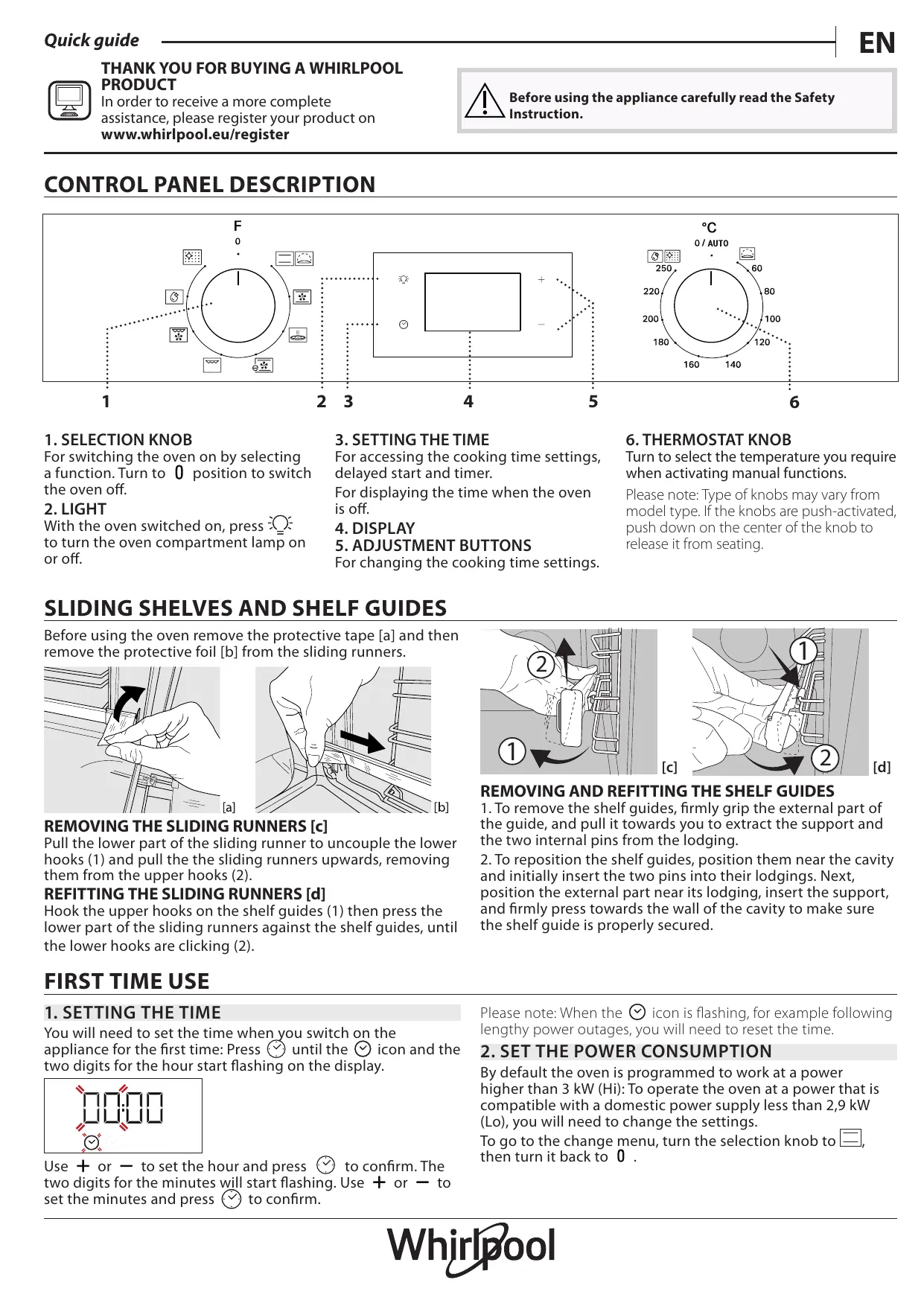
For switching the oven on by selecting a function. Turn to 0 position to switch the oven off.
2. LIGHT
With the oven switched on, press to turn the oven compartment lamp on or off.
3. SETTING THE TIME
For accessing the cooking time settings, delayed start and timer.
For displaying the time when the oven is off.
4. DISPLAY
- ADJUSTMENT BUTTONS
For changing the cooking time settings.
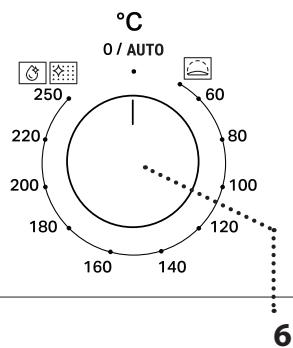
6. THERMOSTAT KNOB
Turn to select the temperature you require when activating manual functions.
Please note: Type of knobs may vary from model type. If the knobs are push-activated, push down on the center of the knob to release it from seating.
SLIDING SHELVES AND SHELF GUIDES
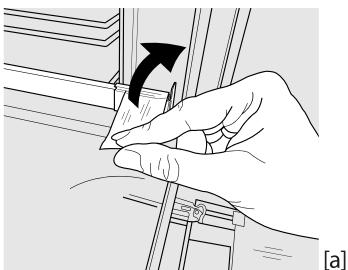
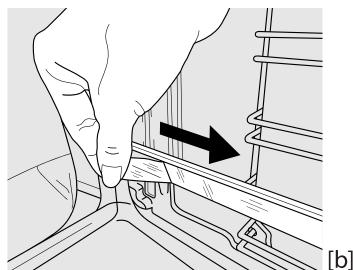
Before using the oven remove the protective tape [a] and then remove the protective foil [b] from the sliding runners.
REMOVING THE SLIDING RUNNERS [c]
Pull the lower part of the sliding runner to uncouple the lower hooks (1) and pull the the sliding runners upwards, removing them from the upper hooks (2).
REFITTING THE SLIDING RUNNERS [d]
Hook the upper hooks on the shelf guides (1) then press the lower part of the sliding runners against the shelf guides, until the lower hooks are clicking (2).
![WHIRLPOOL OMR556RR0X - REFITTING THE SLIDING RUNNERS [d] - 1](/content/2025/01/329923/images/cbda0d7021d042a17848649af6816527e47aa05b04363479192f53ba1df13c05.jpg)
![WHIRLPOOL OMR556RR0X - REFITTING THE SLIDING RUNNERS [d] - 2](/content/2025/01/329923/images/367021543bcc1b879fc17189f3146caaf590380060fc432e255923f442115844.jpg)
[d]
REMOVING AND REFITTING THE SHELF GUIDES
- To remove the shelf guides, firmly grip the external part of the guide, and pull it towards you to extract the support and the two internal pins from the lodging.
- To reposition the shelf guides, position them near the cavity and initially insert the two pins into their lodgings. Next, position the external part near its lodging, insert the support, and firmly press towards the wall of the cavity to make sure the shelf guide is properly secured.
FIRST TIME USE
1. SETTING THE TIME
You will need to set the time when you switch on the appliance for the first time: Press until the icon and the two digits for the hour start flashing on the display.
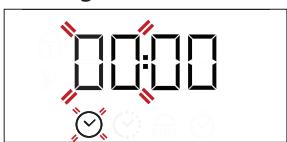
Use + or - to set the hour and press to confirm. The two digits for the minutes will start flashing. Use + or - to set the minutes and press to confirm.
Please note: When the icon is flashing, for example following lengthy power outages, you will need to reset the time.
2. SET THE POWER CONSUMPTION
By default the oven is programmed to work at a power higher than 3kW (Hi): To operate the oven at a power that is compatible with a domestic power supply less than 2,9kW (Lo), you will need to change the settings.
To go to the change menu, turn the selection knob to , then turn it back to 0.
Press and hold + and — for five seconds immediately afterwards.
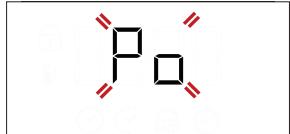
Use + or - to change the setting, then press and hold for at least two seconds to confirm.
FUNCTIONS & DAILY USE

CONVENTIONAL
For cooking any kind of dish on one shelf only.

RISING
For helping sweet or savoury dough to rise effectively. Turn the thermostat knob to the icon to activate this function.

CONVECTION BAKE
For cooking different foods that require the same cooking temperature on several shelves (maximum three) at the same time. This function can be used to cook different foods without odours being transferred from one food to another.

PIZZA
For baking different types and sizes of pizza and bread. It is a good idea to swap the position of the baking trays halfway through cooking.

ECO CONVECTION BAKE
For cooking roasts and stuffed roasting joints on a single shelf. Food is prevented from drying out excessively by gentle, intermittent air circulation.
When this ECO function is in use, the light will remain switched off during cooking but can be switched on again by pressing ≈

GRILL
For grilling steaks, kebabs and sausages, cooking vegetables au gratin or toasting bread.
When grilling meat, we recommend using a DRIP TRAY to collect the cooking juices: position the pan on any of the levels below the wire shelf and add 200ml of drinking water.
1. SELECT A FUNCTION
To select a function, turn the selection knob to the symbol for the function you require: the display will light up and an audible signal will sound.
2. ACTIVATE A FUNCTION
MANUAL
To start the function you have selected, turn the thermostat knob to set the temperature you require.
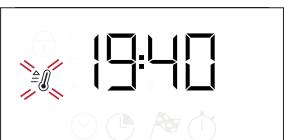
Please note: During cooking you can change the function by turning the selection knob or adjust the temperature by turning the thermostat knob. The function will not start if the thermostat knob will be on 0 / AUTO position. You can set the cooking time, cooking end time (only if you set a cooking time) and a timer.
3. HEAT THE OVEN
A new oven may release odours that have been left behind during manufacturing: this is completely normal.
Before starting to cook food, we therefore recommend heating the oven with it empty in order to remove any possible odours. Remove any protective cardboard or transparent film from the oven and remove any accessories from inside it. Heat the oven to 250^ for about one hour. The oven must be empty during this time.
Please note: It is recommended to ventilate the room after using the appliance for the first time.

TURBO GRILL
For roasting large joints of meat (legs, roast beef, chicken). We recommend using a DRIP TRAY to collect the cooking juices: position the pan on any of the levels below the wire shelf and add 200ml of drinking water.
FLEXI CLEAN PACK

SMARTCLEAN
The action of the steam released during this special low-temperature cleaning cycle allows dirt and food residues to be removed with ease. To activate the "Smart Clean" function, pour 100-120ml of drinking water on the bottom of the oven and only then turn the selection knob and the thermostat knob to the icon. Activate the function when the oven is cold. The position of the icon. Does not correspond to the temperature reached during the cleaning cycle.

AUTOMATIC CLEANING - PYRO
For eliminating cooking spatters using a cycle at very high temperature. To activate this function move thermostat knob to l
The position of the icon does not correspond to the real temperature reached during the cleaning cycle.
RISING
To start the "Rising" function, turn the thermostat knob to Rising position (40 deg) and put function knob in Conventional position; if the oven is set to a different temperature, the function will not start.
Please note: You can set the cooking time, cooking end time (only if you set a cooking time) and a timer.
3. PREHEATING AND RESIDUAL HEAT
Once the function starts, an audible signal and a flashing icon on the display indicate that the preheating phase has been activated.
At the end of this phase, an audible signal and the fixed icon on the display will indicate that the oven has reached the set temperature: at this point, place the food inside and proceed with cooking.
Please note: Placing the food in the oven before preheating has finished may have an adverse effect on the final cooking result.
After cooking and with the function deactivated, the icon may continue to remain visible on the display even after the cooling fan has switched off to indicate that there is residual heat in the compartment.
Please note: The time after which the icon switches off varies because it depends on a series of factors such as ambient temperature and function used. In any case, the product should be considered to be off when the pointer on the selection knob is at "0".
4. PROGRAMMING COOKING
You will need to select a function before you can start programming cooking.
DURATION
Keep pressing until the icon and "00:00" start flashing on the display.
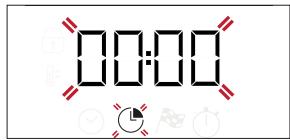
Use + or - to set the cooking time you require, then press to confirm.
Activate the function by turning the thermostat knob to the temperature you require: an audible signal will sound and the display will indicate that cooking is complete.
Please note: To cancel the cooking time you have set, keep pressing until the icon starts flashing on the display, then use to reset the cooking time to "00:00". This cooking time includes a preheating phase.
PROGRAMMING THE END COOKING TIME/ DELAYED START
After a cooking time has been set, starting the function can be delayed by programming its end time: press until the 空 icon and the current time start flashing on the display.
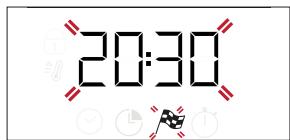
Use + or - to set the time you want cooking to end and press to confirm.
Activate the function by turning the thermostat knob to the temperature you require: the function will remain paused until it starts automatically in time calculated based on selected cooking end time.
Please note: To cancel the setting, switch the oven off by turning the selection knob to 0 position.
Delay to start functionality is not available for Grill and Turbo Grill functions.
END OF COOKING
An audible signal will sound and the display will indicate that the function has finished.
Turn the selection knob to select a different function or to 0 to switch the oven off.
Please note: If the timer is active, the display will show "END" alternately with the remaining time.
5. SETTING THE TIMER
This option does not interrupt or program cooking but allows you to use the display as a timer, either during while a function is active or when the oven is off.
Keep pressing until the icon and "00:00" start flashing on the display.
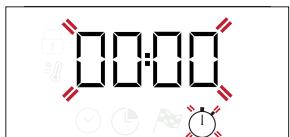
Use + or - to set the time you require and press to confirm. An audible signal will sound once the timer has finished counting down the selected time.
Notes: To cancel the timer, keep pressing until the icon starts flashing, then use - to reset the time to "00:00".
6. AUTOMATIC CLEANING FUNCTION - PYRO
Do not touch the oven during the Pyro cycle. Keep children and animals away from the oven during and after running the Pyro cycle, until the room has finished airing.
Remove all accessories - including shelf guides - from the oven before activating the function. If the oven is installed below a hob, make sure that all the burners or electric hotplates are switched off while running the selfcleaning cycle.
For optimum cleaning results, remove excessive residuals inside the cavity and clean the inner door glass before using the pyrolytic function.
Avoid activating the pyro cycle cleaning in the presence of limescale residues.
We recommend only running the Pyro function if the appliance contains heavy soiling or gives off bad odours during cooking.
To activate the automatic cleaning function, turn the selection knob and the thermostat knob to the icon. The function will be activated automatically, the door locked and the light inside the oven switched off: The display will show the time remaining to the end, alternating with "Pyro".
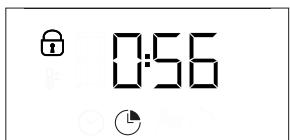

Once the cycle has been completed, the door remains locked until the temperature inside the oven has returned to a safe level. Air the room during and after running the Pyro cycle.
COOKING TABLE
| RECIPE | FUNCTION | PREHEAT | TEMPERATURE (℃) | DURATION(MIN) | LEVEL AND ACCESSORIES | |
| Leavened cakes | Yes | 170 | 30 - 50 | 2 | ||
| Yes | 160 | 30 - 50 | 2 | |||
| Yes | 160 | 40 - 60 | 4 1 | |||
| Biscuits / tartlets | Yes | 160 | 25 - 35 | 3 | ||
| Yes | 160 | 25 - 35 | 3 | |||
| Yes | 150 | 35 - 45 | 4 2 | |||
| Pizza / Focaccia | Yes | 190 - 250 | 15 - 50 | 1 / 2 | ||
| Yes | 190 - 250 | 20 - 50 | 4 2 | |||
| Lasagne / baked pasta /cannelloni / flans | Yes | 190 - 200 | 45 - 65 | 2 | ||
| Lamb / veal / beef / pork 1 kg | Yes | 190 - 200 | 80 - 110 | 3 | ||
| Chicken / rabbit / duck 1 kg | Yes | 200 - 230 | 50 - 100 | 2 | ||
| Toasted bread | 5' | 250 | 2 - 6 | 5 | ||
| Roast potatoes | Yes | 200 - 210 | 35 - 55** | 3 | ||
| ACCESSORIES | Wire shelf | Baking dish or cake tin on the wire shelf | Baking tray/Drip tray or Baking dish on the wire shelf | Drip tray / Baking tray | ||
** Turn food two thirds of the way through cooking (if necessary).
The level is indicated on the wall of the cooking compartment.
The time indicated does not include the preheating phase: we recommend placing the food in the oven and setting the cooking time only after the required temperature has been reached.
TROUBLESHOOTING
| Problem | Possible cause | Solution |
| The oven is not working. | Power cut. Disconnection from the mains. | Check for the presence of mains electrical power and whether the oven is connected to the electricity supply. Turn off the oven and restart it to see if the fault persists. |
| The display shows the letter “F” followed by a number or letter. | Oven failure. | Contact you nearest Client After-sales Service Centre and state the number following the letter “F”. |
| The display is showing the message “Hot” and the selected function will not start. | Temperature too high. | Allow the oven to cool down before activating the function. Select a different function. |
| Problem: The display shows unclear text and appears to be broken. | Another language set. | Contact your nearest Client After-sales Service Center. |

Download the complete Daily Reference Guide from docs.whirlpool.eu for more informations about your product

Policies, standard documentation and additional product information can be found by:
- Visiting our website docs.whirlpool.eu
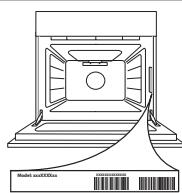
Using QR Code - Alternatively, contact our After-sales Service (See phone number in the warranty booklet). When contacting our After-sales Service, please state the codes provided on your product's identification plate.
DESCRIPTION DU PANNEAU DE COMMANDE
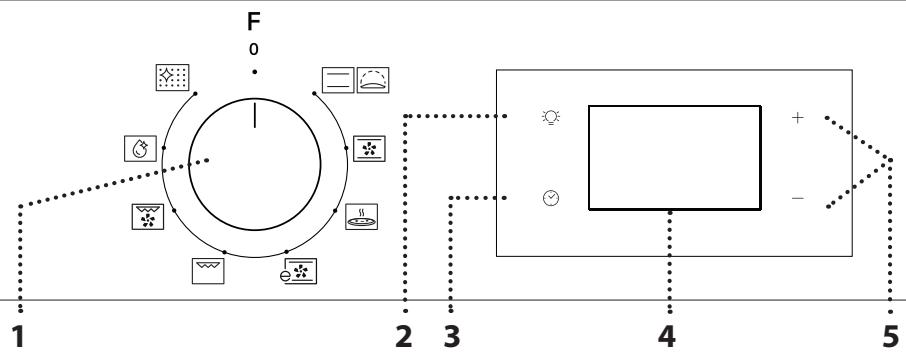
1. BOUTON DE SELECTION

- LIGHT
- SETTING THE TIME
- DISPLAY
- THERMOSTAT KNOB
- SLIDING SHELVES AND SHELF GUIDES
- REMOVING THE SLIDING RUNNERS [c]
- REFITTING THE SLIDING RUNNERS [d]
- REMOVING AND REFITTING THE SHELF GUIDES
- FIRST TIME USE
- SETTING THE TIME
- SET THE POWER CONSUMPTION
- FUNCTIONS & DAILY USE
- CONVENTIONAL
- RISING
- CONVECTION BAKE
- PIZZA
- ECO CONVECTION BAKE
- GRILL
- SELECT A FUNCTION
- ACTIVATE A FUNCTION
- MANUAL
- HEAT THE OVEN
- TURBO GRILL
- FLEXI CLEAN PACK
- SMARTCLEAN
- AUTOMATIC CLEANING - PYRO
- PREHEATING AND RESIDUAL HEAT
- PROGRAMMING COOKING
- DURATION
- PROGRAMMING THE END COOKING TIME/ DELAYED START
- END OF COOKING
- SETTING THE TIMER
- AUTOMATIC CLEANING FUNCTION - PYRO
- DESCRIPTION DU PANNEAU DE COMMANDE
- BOUTON DE SELECTION
Brand : WHIRLPOOL
Model : OMR556RR0X
Category : Built-in oven