Colorato - Watch Detomaso - Free user manual and instructions
Find the device manual for free Colorato Detomaso in PDF.


| Brand | Detomaso |
| Model | Colorato |
| Category | Watch |
| Product type | Analog bracelet watch |
| Water resistance | 5 ATM (hand washing, rain, no swimming or showering) |
| Power source | Battery (replacement recommended every 1 to 1.5 years) |
| Main functions | Time display, date, day of week, moon phase, chronograph (max 30 min) |
| Case dimensions | Approximately 40-45 mm (estimation) |
| Weight | Approximately 80-120 g (estimation) |
| Glass material | Mineral glass (estimation) |
| Case material | Stainless steel (estimation) |
| Strap material | Leather or steel (estimation) |
| Care and cleaning | Protect from shocks, magnetic fields, high heat, chemicals; check seals annually; replace battery regularly |
| Safety | Do not use for swimming, showering, bathing or diving; crown pushed in when wearing |
| Spare parts and repairability | Spare parts available for several years; long-term repair guaranteed |
| Warranty | 24 months on manufacturing defects (excluding batteries, wear, damage due to improper use) |
| General information | Manual available in PDF at notice-facile.com |
Frequently Asked Questions - Colorato Detomaso
User questions about Colorato Detomaso
0 question about this device. Answer the ones you know or ask your own.
Ask a new question about this device
Download the instructions for your Watch in PDF format for free! Find your manual Colorato - Detomaso and take your electronic device back in hand. On this page are published all the documents necessary for the use of your device. Colorato by Detomaso.
USER MANUAL Colorato Detomaso
Preface 19
Water resistance 20
Caring instructions 22
Setting the Standard Watch 23
Setting the Moon Phase Watch 24
Setting the Chronograph 27
Using the Chronograph 29
Calibration of the Chronograph 30
Warranty terms 31
Preface
Congratulations on the purchase of your new DETOMASO watch. Now you are the owner of a timepiece of maximum precision and innovative design.
For years we stock all important spare parts for each model to ensure professional repair service. Please read the following operating instructions carefully so we can guarantee proper functioning of your new watch for many years to come.
EN
Water resistance
The water resistance of your DETOMASO watch has been tested for 5 ATM. This means that you may wash your hands or take a bath with it and that it is spraywaterproof. However, swimming, taking a shower or diving is not suitable.
Water resistance is a non-lasting quality that requires annual check-ups, especially prior to exposition of external stress because the built-in sealing elements will decrease in their efficiency due to everyday use. Seals are used to guarantee the water resistance of a watch. These seals have a natural aging process and are prone to become porous due to the effects of sweat and acids.
The ISO 2281 regulates criteria and standards that new watches must meet. The resilience is stated in ATM on the base of the casing. Your DETOMAS0-watch has a designated water resistance of 5 ATM. The stated pressure of „5 ATM“ should not be mistaken for the diving depth. It is merely the definition of the test pressure. A test pressure of „5 ATM“ is reached at a water depth of 50 m.
EN
The guaranteed test pressure allowed to be imposed on the seals may suddenly be increased and surmounted during swimming or when jumping into water.
This is most likely to occur if one jumps into water after an extended period of sunbathing. Here the impact pressure and vacuum caused by cooling will add up and can cause damage.
Please check the seals every time you change the battery and renew them if necessary.
EN
Caring instructions
Your watch is a masterpiece of electronics and maximum precision mechanics. It should be a reliable time keeper for years. Protect your watch against impact, magnetic fields, high temperatures, water and chemicals as well as against mechanical wear. Watches should always be taken off during sleep.
If a battery-operated watch stops or a low battery status is indicated it should immediately be serviced at a specialist shop to avoid that the empty battery causes damage to the watch or to the environment.
In any way the battery should be changed regularly at intervals of 1 - 1 12 years. Here again please check the seals every time you change the battery and renew them if necessary.
If there is condensation, (fog under the glass), the watch must be taken to a specialist shop immediately to avoid that the humidity causes any damage. The crown should always be pushed in while wearing.
Setting the Standard Watch
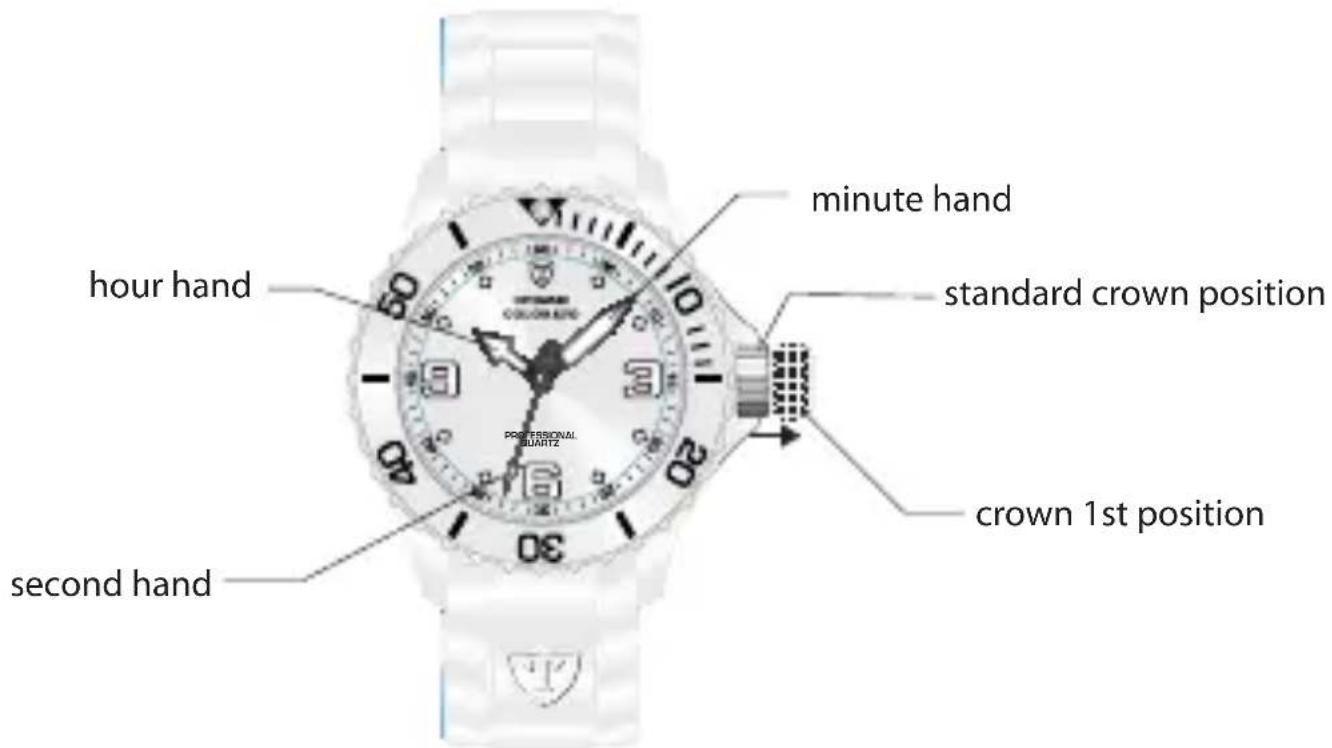
Setting the time
- Pull out the crown into the 1st position.
- Turn the crown to set the time.
- Push the crown back into the standard position.
EN
Setting the Moon Phase Watch
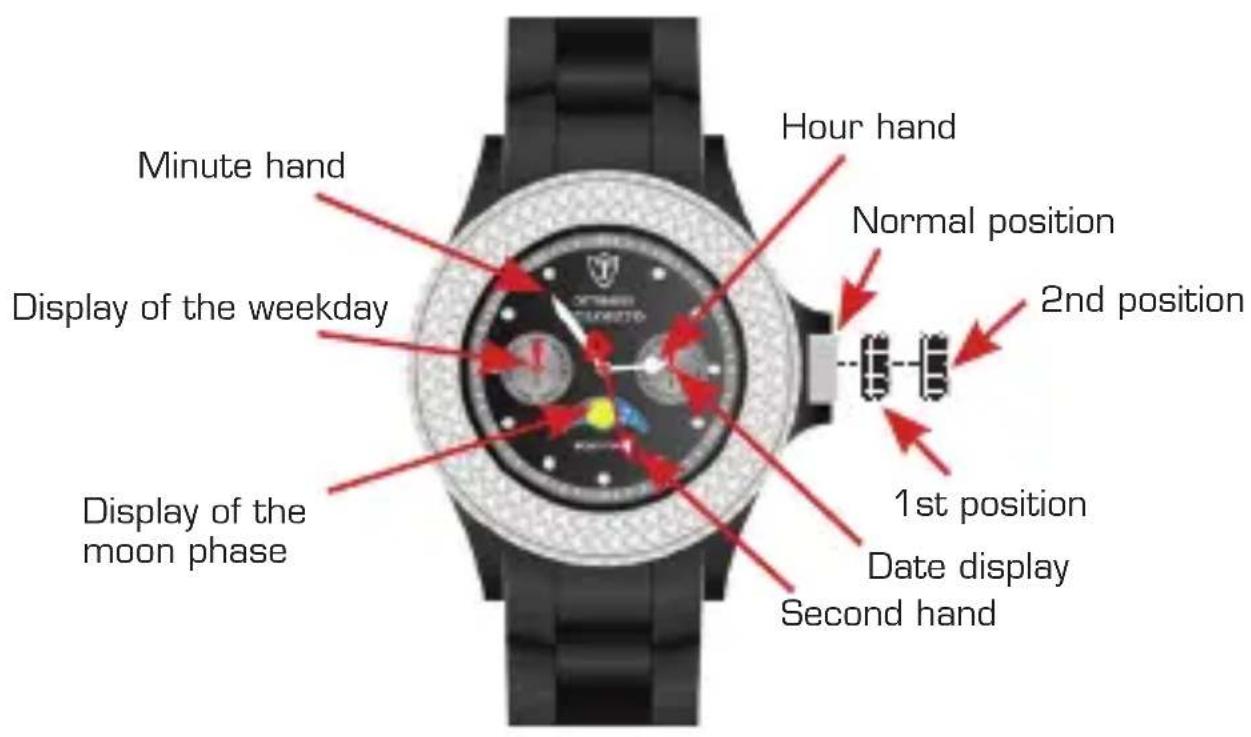
Setting the Moon Phase Watch
Setting the moon phase
Pull out the crown into the 1st position. Turn the crown clockwise to set the moon phase. In order to set the moon phase precisely it is recommended to set it either during the new moon phase (the moon is faded out in the display) or during a full moon phase (the moon is fully displayed).
The full moon phases for the next years are listed in the full moon table.
Setting the date
Pull out the crown into the 1st position. Turn the crown counter-clockwise for a quick setting of the date. Do not set the date between 9 pm and half past midnight. Otherwise the date might not change the next day. After setting the date push the crown back to its normal position.
EN
Setting the weekday and the time
- Pull out the crown into the 2nd position. Turn the minute hand clockwise to set the weekday.
- Turn the crown to set the time
- After setting the weekday and the time push the crown back to its normal position.
Full moon table
2012 2013 2014 2015
Setting the Chronograph
EN
EN
Setting the Chronograph
Setting the time
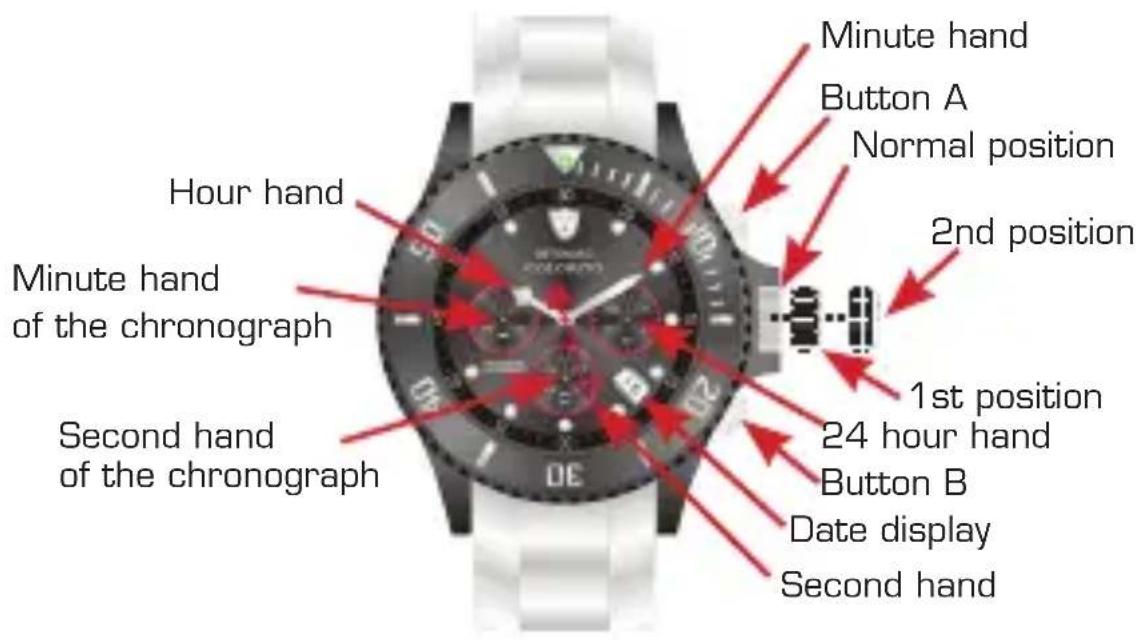
Pull out the crown into the 2nd position. Turn the crown clockwise to set the time. After setting the time push the crown back to its normal position.
Setting the date
Pull out the crown into the 1st position. Turn the crown clockwise to set the date. Do not set the date between 9 pm and 1 am. Otherwise the date might not change the next day. After setting the date push the crown back to its normal position.
Using the chronograph
The chronograph is taking time in second sequences and displays the taken time up 30 minutes. After 30 minutes the chronograph stops automatically.
Taking time with the chronograph
- Push button A to start the chronograph
- The chronograph can be started and stopped with each push of button A.
- Push button B to reset the chronograph. The minute hand and second hand will return to the zero position.
EN
Calibration of the Chronograph
This should be done if the minute hand and the second hand do not return to the zero position or after a battery change.
- Pull out the crown to position 2
- Press button "A" to advance the second hand of the chronograph, press button B to reset. The minute hand of the chronograph will be synchronized with the second hand of the chronograph. You may move the second hand of the chronograph in fast forward or fast reverse by holding button A or B in.
- Once the hands have been reset to zero position please reset the time and push back the crown in its normal position.
24 months warranty
We guarantee that your watch was made of high quality materials. Extensive quality controls guarantee that the watch was checked before being released by the manufacturer.
Nevertheless material defects cannot always be avoided. Should your new watch show any defects, please consult our customer service within the valid warranty period.
We provide a 24 months warranty on all material defects and production errors with proof of purchase.
This manufacturer's warranty applies regardless of legal warranty regulations. The warranty covers the function of the clockwork and the flawless workmanship of the watch.
Not covered are: Batteries, wear and tear of the casing, glass or watch strap as well as damage caused by improper use (accident, broken glass, water damage, pulled-out crown).
EN
Within the warranty period manufacturing defects will be repaired free of charge by us.
Should the watch be irreparable it will be replaced with a comparable model.
To obtain warranty services, please take or send the product, with a copy of your sales receipt or other proof of purchase that shows the date of purchase, to the store where purchased. Or send to the service center listed in the back of this booklet.
Table des matieres
Disposal of Waste Electrical & Electronic Equipment of products for Household use (Applicable in the European Union only)
The symbol (crossed out wheeled-bin) on your product indicates that the product shall not be mixed or disposed with your household waste at their end of use.
This product shall be handed over to your local community waste collection point for the recycling of theproduct. For more information, please contact your Government Waste-Disposal department in yourcountry. Incorrect waste handling could possibly have a bad effect on the environment and human healthdue to potential dangerous substances. With your cooperation in the correct disposal of this product,you contribute to reuse, recycle and recover the product and our environment will be protected.
Disposal of Waste Electrical & Electronic Equipment of products for business use (Applicable in the European Union only)
For further information regarding the disposal of products for business handling, please contact your dealer or distributor in your country. This product shall not be mixed or disposed with commercial waste.

DETOMASO
Service Center
MAX Trader GmbH