
ERGN30 - Electric mower PANASONIC - Free user manual and instructions
Find the device manual for free ERGN30 PANASONIC in PDF.
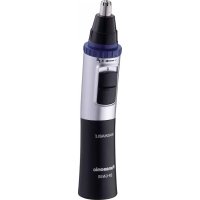


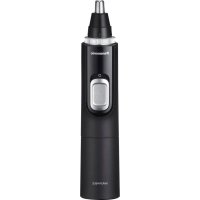
| Product type | Multi-use electric trimmer for nose, ear, eyebrow, mustache, and beard hair |
| Brand | Panasonic |
| Model | ER-GN300 |
| Power source | 2 AAA alkaline batteries (LR03) (not included) |
| Battery life | Approximately 6 months (use once a week, 90 seconds) |
| Noise level | 58 dB(A) |
| Washable under water | Yes, with water inlet for quick or thorough cleaning |
| Blade | Removable and replaceable inner and outer blades |
| Approximate weight | Approximately 100 g (with batteries) |
| Main functions | Trimming nose and ear hair, shaping eyebrows, mustache, and beard |
| Maintenance | Cleaning with soapy water or with the included brush |
| Safety | Do not use if blade is damaged, do not insert too deeply, keep out of reach of children |
| Replacement parts | Outer and inner blades available separately |
| Household use | Yes, designed for household use only |
| Included accessories | Cleaning brush, protective cap |
Frequently Asked Questions - ERGN30 PANASONIC
User questions about ERGN30 PANASONIC
0 question about this device. Answer the ones you know or ask your own.
Ask a new question about this device
Download the instructions for your Electric mower in PDF format for free! Find your manual ERGN30 - PANASONIC and take your electronic device back in hand. On this page are published all the documents necessary for the use of your device. ERGN30 by PANASONIC.
USER MANUAL ERGN30 PANASONIC
Operating Instructions
(Household) Nose & Facial Hair Trimmer
Model No. ER-GN300
English....3
Deutsch 19
Français....35
Italiano....51
Nederlands 67
Español.... 83
Dansk....99
Português....115
Norsk 131
Svenska....147
Suomi....163
Polski....179
Czech....195
Slovak....211
Hungarian....227
Romanian 245
Turkish......261
Panasonic
Operating Instructions
(Household) Nose & Facial Hair Trimmer
Model No. ER-GN300
Contents
Safety precautions ....5
Parts identification 8
Installing or replacing the alkaline batteries...... 9
Before use....9
Using....10
Cleaning 11
Opening and closing the water inlet....13
Installing or removing the blade 13
Installing or removing the trimmings box......15
Troubleshooting 16
Specifications 17
Thank you for purchasing this Panasonic product.
Before operating this unit, please read these instructions completely and save them for future use.
Warning
- This appliance can be used by children aged from 8 years and above and persons with reduced physical, sensory or mental capabilities or lack of experience and knowledge if they have been given supervision or instruction concerning use of the appliance in a safe way and understand the hazards involved. Children shall not play with the appliance.
Cleaning and user maintenance shall not be made by children without supervision.
- The following symbol means that this appliance can be cleaned under the water.
Safety precautions
To reduce the risk of injury, loss of life, electric shock, fire, and damage to property, always observe the following safety precautions.
Explanation of symbols
The following symbols are used to classify and describe the level of hazard, injury, and property damage caused when the denotation is disregarded and improper use is performed.

WARNING
Denotes a potential hazard that could result in serious injury or death.

CAUTION
Denotes a hazard that could result in minor injury or property damage.
The following symbols are used to classify and describe the type of instructions to be observed.

This symbol is used to alert users to a specific operating procedure that must not be performed.

This symbol is used to alert users to a specific operating procedure that must be followed in order to operate the unit safely.

WARNING
This product
Do not store within reach of children or infants. Do not let them use it.

- Putting parts or accessories in the mouth may cause an accident or injury. → Store with the protection cap attached after use.

Immediately stop using if there is an abnormality or malfunction. - Using it in such conditions may cause fire, or injury.

CAUTION
▶ To protect your skin
Do not press the blade with excessive force or insert it too deeply into your nostril or ear canal.

Do not press the blade with excessive force against your skin.
- Doing so may result in injury to your skin.

Do not touch the blade of the inner blade (metallic part) with your finger.
- Doing so may result in injury to your finger.

Check the blade for deformation or damage before use.
Use the trimmer to cut nose hair and ear hair and to outline eyebrows, moustache, or beard.
- Failure to do so may result in injury to your skin.

CAUTION
This product

Do not share with your family or others.
- Doing so may result in infection or inflammation.

Do not drop or subject to shock.
- Doing so may cause injury.

Never modify, disassemble, or repair.
- Doing so may cause an accident or injury.
→Contact an authorized service centre for repair.
The batteries

Do not throw into fire, short circuit or disassembly.
- Doing so may cause a burn or injury.
Always follow the precautions printed on the alkaline batteries.
Check the polarity of the alkaline batteries (⊕ and ⊖) and install them correctly.
Do not mix new and old alkaline batteries or different types of alkaline batteries.
Remove the alkaline batteries immediately and dispose of them safely when they are discharged.
Remove the alkaline batteries when not using the appliance for an extended period of time.
Please use the alkaline batteries by the recommended use-by date.
Non-rechargeable batteries are not to be recharged.
- Failure to do so may cause injury or surrounding contamination due to heat generation, bursting, or leakage of the alkaline batteries.

Parts identification
A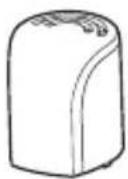
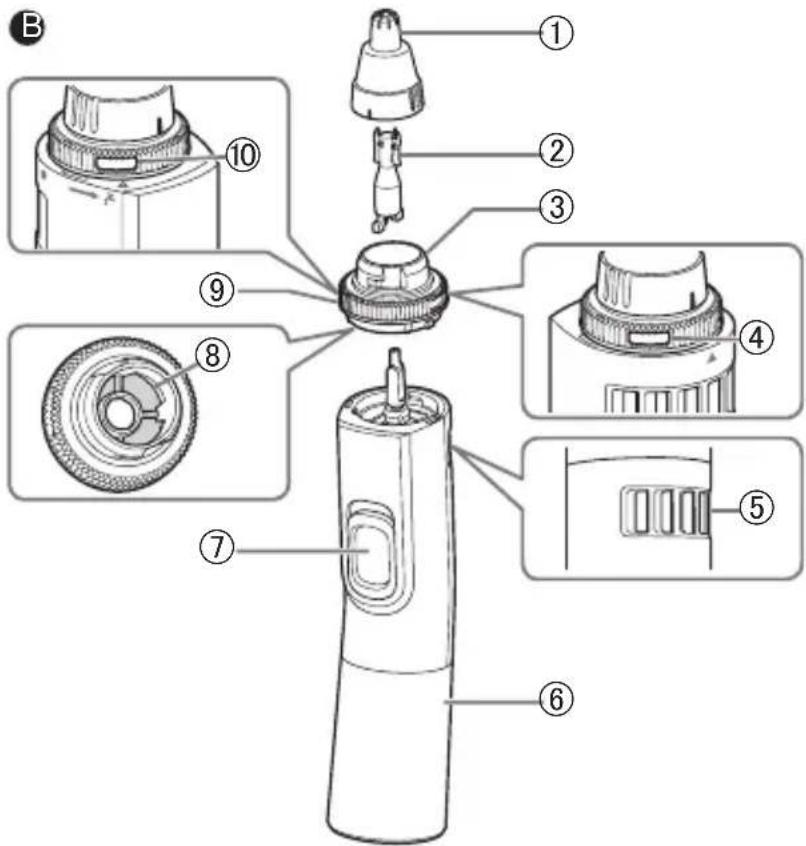
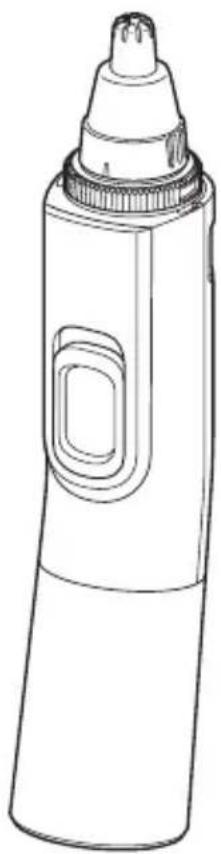
A Protective cap B Main body
① Outer blade ② Inner blade ③ Trimmings box ④ Water outlet ⑤ Exhaust hole ⑥ Battery cover ⑦ Power switch [O/I]
⑧ Filter ⑨ Wash switch ring ⑩ Water inlet
Accessory
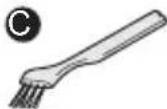
© Cleaning brush (Brush)
Alkaline batteries are not enclosed.
Installing or replacing the alkaline batteries
• Make sure that the power is off.
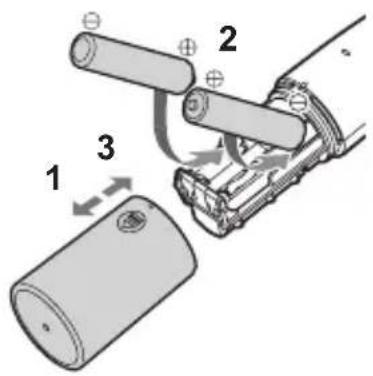
- Pull the battery cover straight to remove it.
- Check the polarity of the alkaline batteries (⊕ and ⊕) and install them.
- Insert the battery cover straight.
You can use the appliance for approximately 6 months with two Panasonic LR03 (AAA Alkaline
Batteries). (When using dry in an environment at a 20 °C room temperature, once a week, and 90 seconds at a time.)
Notes
- When inserting the alkaline batteries, wipe off the main body carefully to prevent water droplets from getting inside.
- Confirm nothing adheres to the terminals (⊕ and ⊕) of the alkaline batteries.
- Be sure to use LR03 (AAA Alkaline Batteries). If any batteries other than the specified ones are used, the power and the number of times of use will be different.
- Panasonic alkaline batteries are recommended.
- When replacing alkaline batteries, replace both of them with new ones.
Before use
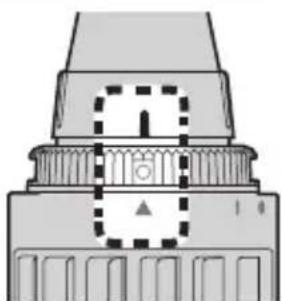
Be sure to close the water inlet of the wash switch ring during use. Otherwise, the main body cannot provide sufficient suction power.
→ Check that the marks of “↑”, “○” and “▲” align (as shown in right figure).
Using
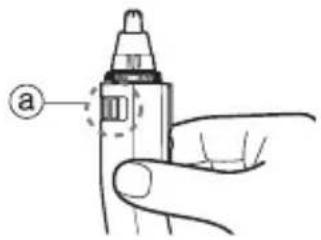
- Remove the protective cap and hold the main body so as not to block the exhaust hole ( ).
- Slide the power switch on the main body to the "O" position to turn on the power.
- The outer blade surface may get a little warm during use, but performance will not be affected.
3. Trim
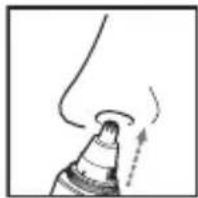
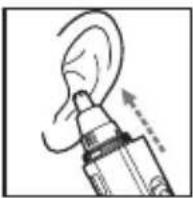
Trimming your nose hair and ear hair
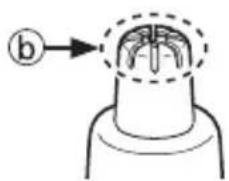
- Insert the tip (b) of the outer blade into your nostril or ear canal.
- Insert it slowly so as not to injure your nostril or ear canal.
- Cut the nose hair and ear hair by moving the main body.
- Cut hairs using the tip (b) of the outer blade (metallic part).
- Some trimmings may remain inside your nostril or ear canal after cutting, so remove them using a tissue or similar.
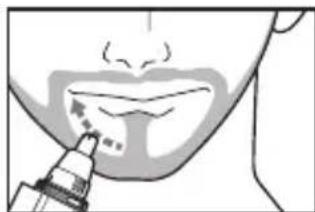
Outlining your eyebrows, moustache, or beard
- Apply the tip of the outer blade to the hair (eyebrow, moustache or beard) you would like to cut.
- Cut the hair by moving the appliance slowly against the direction of hair growth.
- You cannot trim the hair to length with this appliance.
- It is not suitable for the hair below 0.5 mm.
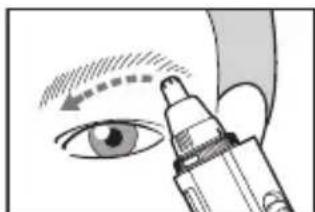
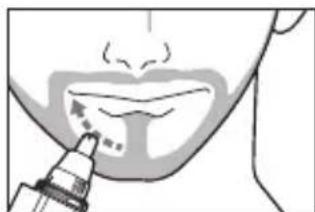
- After use, slide the power switch on the main body to the "I" position to turn off the power and clean it. (See page 11).
Cleaning
Wet cleaning
- Wet the outer blade with water, and apply some hand soap and some water to the outer foil.
- Slide the power switch to the "O" position, and let it foam for approximately 10 seconds.
- Turn off the power.
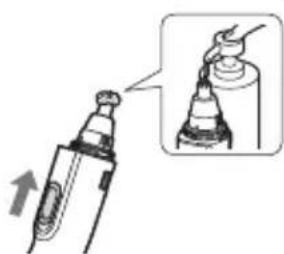
To clean lightly dirty parts To clean heavily dirty parts
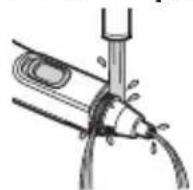
- Quick cleaning
- Open the water inlet (see page 13) and turn on the power again.
- If the trimmings box is removed, open the water inlet after attaching the trimmings box (see page 15).
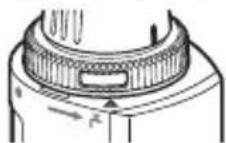
- Pour water through the water inlet at the “△” above the “♀” mark, rinse well and slide the power switch to the “I” position.
- Complete cleaning
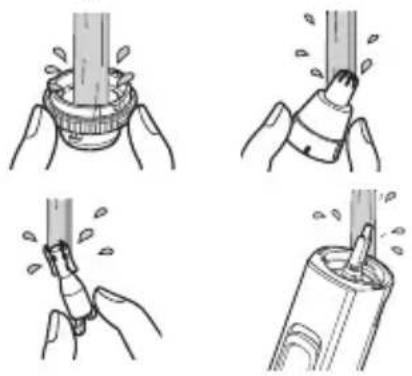
- Slide the power switch to the "l" position.
- Remove the blades and the trimmings box (see pages 13 and 15) and rinse under running water.
Cover the drainage outlet of the washbasin to prevent the inner blade from flowing away.
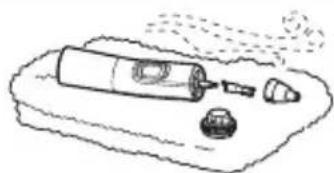
- Wipe off water with a towel or similar item, and let it dry naturally.
It will dry faster with the blades and the trimmings box removed (see pages 13 and 15).
Cleaning with the brush
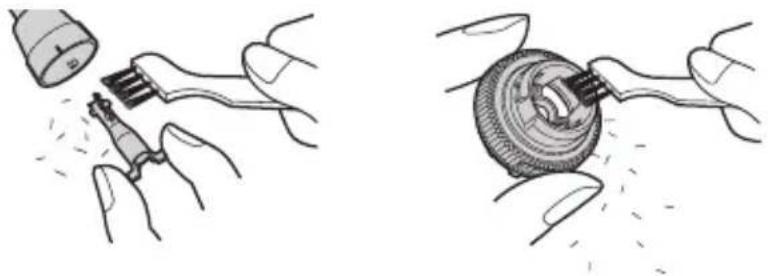
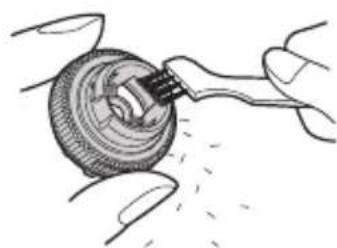
Remove the blades and the trimmings box (see pages 13 and 15) and lightly brush off the trimmings with the brush.
- Be careful not to deform the inner blade.
- Be careful not to damage the filter.
Notes
- The battery cover should not be removed from the main body as this can affect the watertight construction of the appliance.
- Do not use hot water or any detergents other than hand soap. Doing so may result in malfunction.
- In order to prevent malfunction, be careful not to hit the appliance against a washbasin.
- Do not use thinner, benzine, alcohol or other chemicals to clean the appliance. Doing so may result in malfunction, cracking or discoloring of the parts. Please use a cloth soaked with soapy water to wipe the dirt. After cleaning, be sure to attach the blades, the trimmings box and the protective cap. (See pages 14~15)
Opening and closing the water inlet
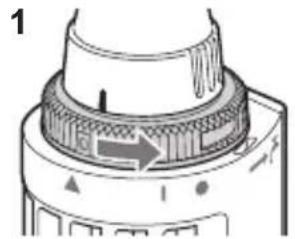
1 How to open
Rotate the wash switch ring until its “○” mark aligns with “●” mark of the main body to open the water inlet.
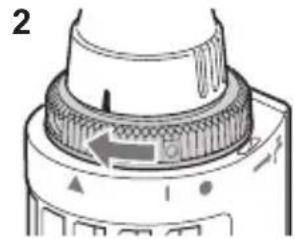
2 How to close
Rotate the wash switch ring until its “○” mark aligns with “▲” mark of the main body.
Installing or removing the blade
• Make sure that the power is off.
How to remove the blade
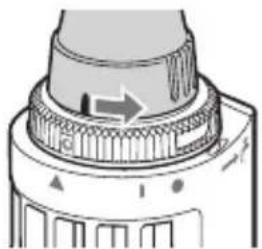
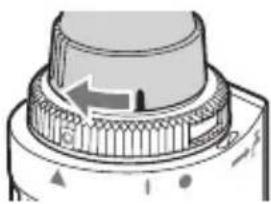
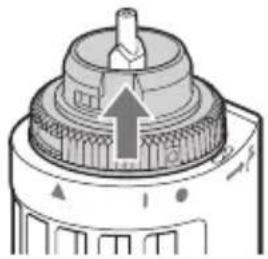
- Rotate the outer blade and remove it.
- Rotate the outer blade until its “☐” mark aligns with the “☐” mark of the main body.
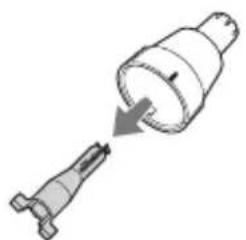
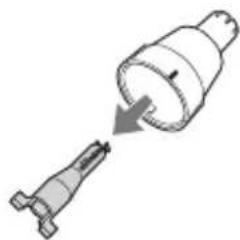
- Pull to remove the inner blade.
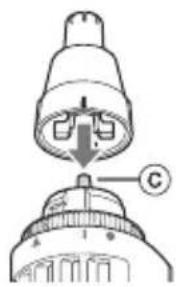
How to attach the blade
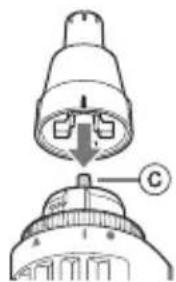
- Insert the inner blade straight along the inner surface of the outer blade.
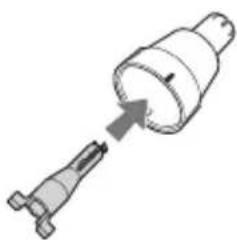
- Insert the main body's shaft (c) into the hole of the inner blade.
- Align the “1” mark of the outer blade with the “1” mark of the trimmer.
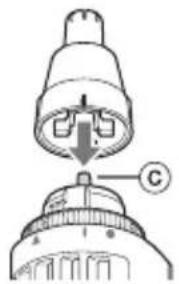
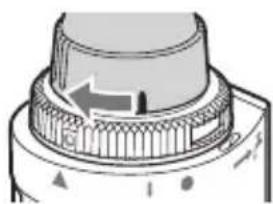
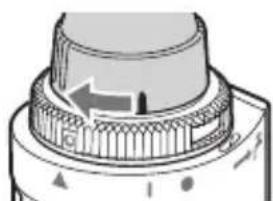
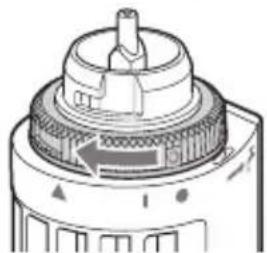
- Rotate to attach the outer blade.
- Rotate the outer blade to align its “!” mark with the “▲” mark of the main body.
Installing or removing the trimmings box
• Make sure that the power is off.
How to remove
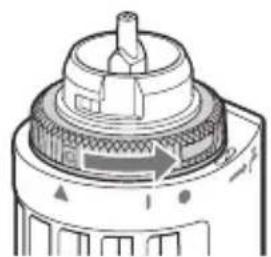
Rotate to remove the wash switch ring.
- Rotate the wash switch ring until its “○” mark aligns with “●” mark of the main body.
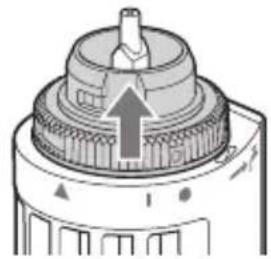
How to attach
1. Insert the trimmings box.
- Align the “○” mark of the wash switch ring with the “●” mark of the main body.
- Be careful not to damage the filter with the shaft (d)
2. Rotate to attach the wash switch ring.
- Rotate the wash switch ring to align its “○” mark and the “▲” mark of the main body.
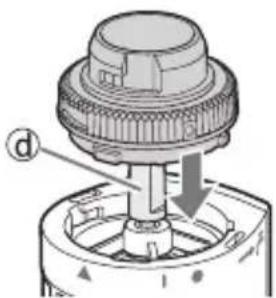

Troubleshooting
| Problem Action | |
| The cutting performance has reduced. | Replace the blade.(See pages 13~14) |
| Replace the alkaline batteries.(See page 9) | |
| There is an odd odour. | Clean the inner blade.(See pages 11~12) |
| Blade does not move/rotate smoothly. | |
| The suction power is low. | Clean the trimmings box.(See pages 11~12). |
| Close the water inlet.(See pages 9 and 13). | |
| The appliance is not turned on. | Place the alkaline batteries correctly.(See page 9). |
| Replace the alkaline batteries.(See page 9). |
If the problems still cannot be solved, contact the store where you purchased the appliance or a service centre authorized by Panasonic for repair.
Specifications
| Power supply Dry-cell battery | |
| Battery type | Two LR03 (AAA Alkaline Batteries) (Sold separately) |
| Airborne Acoustical Noise 58 | (dB (A) re 1 pW) |
This product is intended for household use only.
Disposal of Old Equipment
Only for European Union and countries with recycling systems
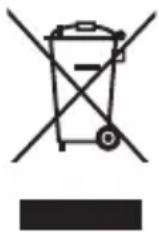
This symbol on the products, packaging, and/or accompanying documents means that used electrical and electronic products must not be mixed with general household waste.
For proper treatment, recovery and recycling of old products, please take them to applicable collection points in accordance with your national legislation. By disposing of them correctly, you will help to save valuable resources and prevent any potential negative effects on human health and the environment.
For more information about collection and recycling, please contact your local municipality.
Penalties may be applicable for incorrect disposal of this waste, in accordance with national legislation.
Panasonic
Operating Instructions
Notes
Use
▶ Notes

Mounting

A Protective cap
B Main unit
Remarks
Use
▶ Notes
How to attach the blade
How to attach
Troubleshooting

- PANASONIC
- CONTENTS
- SAFETY PRECAUTIONS
- WARNING
- EXPLANATION OF SYMBOLS
- CAUTION
- THIS PRODUCT
- TO PROTECT YOUR SKIN
- THE BATTERIES
- PARTS IDENTIFICATION
- INSTALLING OR REPLACING THE ALKALINE BATTERIES
- NOTES
- BEFORE USE
- USING
- TRIM
- TRIMMING YOUR NOSE HAIR AND EAR HAIR
- CLEANING
- WET CLEANING
- TO CLEAN LIGHTLY DIRTY PARTS TO CLEAN HEAVILY DIRTY PARTS
- CLEANING WITH THE BRUSH
- REMOVE THE BLADES AND THE TRIMMINGS BOX (SEE PAGES 13 AND 15) AND LIGHTLY BRUSH OFF THE TRIMMINGS WITH THE BRUSH
- OPENING AND CLOSING THE WATER INLET
- HOW TO OPEN
- HOW TO CLOSE
- INSTALLING OR REMOVING THE BLADE
- HOW TO REMOVE THE BLADE
- HOW TO ATTACH THE BLADE
- INSTALLING OR REMOVING THE TRIMMINGS BOX
- HOW TO REMOVE
- ROTATE TO REMOVE THE WASH SWITCH RING
- HOW TO ATTACH
- INSERT THE TRIMMINGS BOX
- ROTATE TO ATTACH THE WASH SWITCH RING
- DISPOSAL OF OLD EQUIPMENT
- ONLY FOR EUROPEAN UNION AND COUNTRIES WITH RECYCLING SYSTEMS
- USE
- MOUNTING
- A PROTECTIVE CAP
- B MAIN UNIT
- REMARKS
Brand : PANASONIC
Model : ERGN30
Category : Electric mower