DX 425 - Heating DIMPLEX - Free user manual and instructions
Find the device manual for free DX 425 DIMPLEX in PDF.

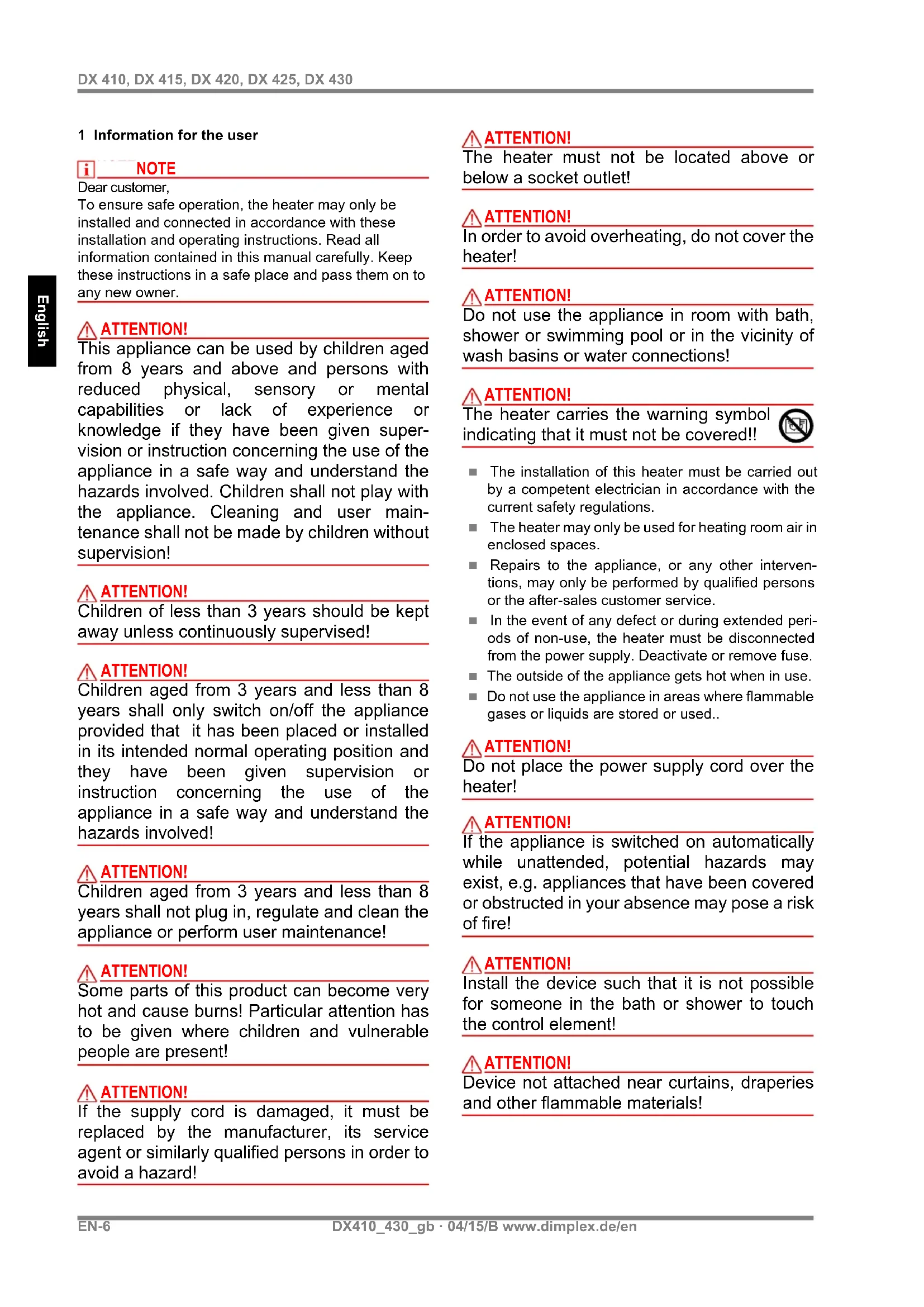


| Product type | Electric wall-mounted convector heater |
| Brand | Dimplex |
| Model | DX 425 |
| Maximum power | 2500 W |
| Heating levels | 2 (1000 W and 2000 W) |
| Power supply | 230 V / 50 Hz, single-phase |
| Dimensions (L x H x P) | 695 x 350 x 124 mm |
| Weight | 4.8 kg |
| Protection rating | IP20 |
| Protection class | I (with protective conductor) |
| Regulation type | Adjustable thermostat |
| Overheat protection | Yes, automatic shut-off |
| Installation | Horizontal wall mounting, brackets supplied |
| Minimum temperature | 5 °C (minimum setting) |
| Operating indicator | Red light when the appliance is heating |
| Cleaning and maintenance | Clean with a soft, damp cloth; do not use abrasive products; vacuum dust from the outside |
| Repairability | Repairs reserved for a qualified electrician or after-sales service |
| Warranty | Consult your dealer |
Frequently Asked Questions - DX 425 DIMPLEX
User questions about DX 425 DIMPLEX
0 question about this device. Answer the ones you know or ask your own.
Ask a new question about this device
Download the instructions for your Heating in PDF format for free! Find your manual DX 425 - DIMPLEX and take your electronic device back in hand. On this page are published all the documents necessary for the use of your device. DX 425 by DIMPLEX.
USER MANUAL DX 425 DIMPLEX
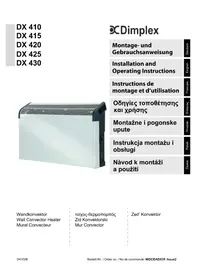
DX 410
DX 415
DX 420
DX 425
DX 430
DC dimplex
Installation and Operating Instructions
1 Information for the user
i NOTE
Dear customer,
To ensure safe operation, the heater may only be installed and connected in accordance with these installation and operating instructions. Read all information contained in this manual carefully. Keep these instructions in a safe place and pass them on to any new owner.
ATTENTION!
This appliance can be used by children aged from 8 years and above and persons with reduced physical, sensory or mental capabilities or lack of experience or knowledge if they have been given supervision or instruction concerning the use of the appliance in a safe way and understand the hazards involved. Children shall not play with the appliance. Cleaning and user maintenance shall not be made by children without supervision!
ATTENTION!
Children of less than 3 years should be kept away unless continuously supervised!
ATTENTION!
Children aged from 3 years and less than 8 years shall only switch on/off the appliance provided that it has been placed or installed in its intended normal operating position and they have been given supervision or instruction concerning the use of the appliance in a safe way and understand the hazards involved!
ATTENTION!
Children aged from 3 years and less than 8 years shall not plug in, regulate and clean the appliance or perform user maintenance!
ATTENTION!
Some parts of this product can become very hot and cause burns! Particular attention has to be given where children and vulnerable people are present!
ATTENTION!
If the supply cord is damaged, it must be replaced by the manufacturer, its service agent or similarly qualified persons in order to avoid a hazard!
ATTENTION!
The heater must not be located above or below a socket outlet!
ATTENTION!
In order to avoid overheating, do not cover the heater!
ATTENTION!
Do not use the appliance in room with bath, shower or swimming pool or in the vicinity of wash basins or water connections!
ATTENTION!
The heater carries the warning symbol indicating that it must not be covered!!

The installation of this heater must be carried out by a competent electrician in accordance with the current safety regulations.
The heater may only be used for heating room air in enclosed spaces.
Repairs to the appliance, or any other interventions, may only be performed by qualified persons or the after-sales customer service.
In the event of any defect or during extended periods of non-use, the heater must be disconnected from the power supply. Deactivate or remove fuse.
The outside of the appliance gets hot when in use.
- Do not use the appliance in areas where flammable gases or liquids are stored or used.
ATTENTION!
Do not place the power supply cord over the heater!
ATTENTION!
If the appliance is switched on automatically while unattended, potential hazards may exist, e.g. appliances that have been covered or obstructed in your absence may pose a risk of fire!
ATTENTION!
Install the device such that it is not possible for someone in the bath or shower to touch the control element!
ATTENTION!
Device not attached near curtains, draperies and other flammable materials!
ATTENTION!
In order to avoid a hazard due to inadvertent resetting of the thermal cutout, this appliance must not be supplied through an external switching device, such as a timer or connected to a circuit that is regularly switched on and off by the utility.
ATTENTION!
Connection only to fixed installed cables! The hardwired electrical installation must be provided with a disconnect device with a contact grap of at least 3mm at each pole (e.g. automatic circuit breaker)!
2 Technical data
Connection voltage: 1 / N / PE 230 V,50 Hz Protection type: IP20 Protection class: I (with protective conductor)
| Type Heat out-put (W) | Width(mm) | Height(mm) | Depth(mm) | Weight(kg) |
| DX 410 1 000 575 350 124 4,1 | ||||
| DX 415 1 500 575 350 124 4,1 | ||||
| DX 420 2 000 575 350 124 4,1 | ||||
| DX 425 2 500 695 350 124 4,8 | ||||
| DX 430 3 000 695 350 124 4,8 |
3 Mounting, Installation, Minimum Clearances
The heating device may only be installed as shown, i.e. on a horizontal, even surface. Using it on deep-pile carpets is not permitted. Please use caution when installing it in front of flammable objects. Installation below a wall socket is not permissible. Minimum clearances must be observed.
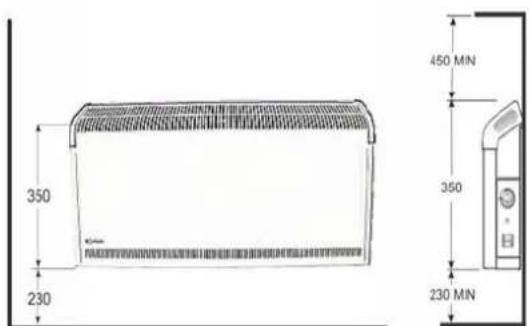
In addition, a minimum clearance of 500~mm between flammable objects e.g. curtains, towels or heat-sensitive plastics and the front of the unit must be maintained.
The heating device must be aligned horizontally and installed on a vertical wall (see illustration).
Make sure that the inflow and outflow of air at the top and bottom of the device are unimpeded. It is not permissible to install the device in protection zones as defined in VDE 0100 part 701.
3.1 Wall mounting
ATTENTION!
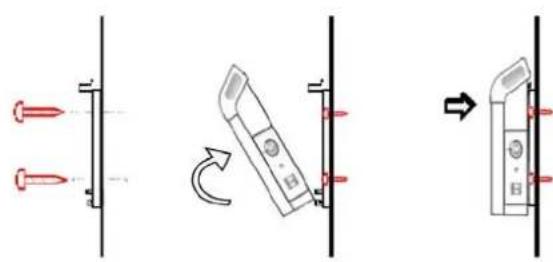
The original wall mounting bracket supplied, located at the back of the heater, must be used.

Remove the bracket from the back of the device by pressing the springs on each side.
Drill the fixing holes for the wall mounting bracket.
Firmly secure bracket to the wall using suitable screws.
Insert heater in wall bracket making use of the slots on the back of the heater. Snap heater in place at the top of the wall bracket.
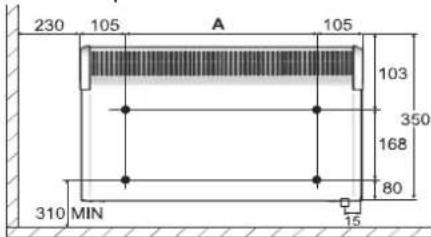
| Type Heat output (W) A (mm) | |
| DX 410 1000 | 354 |
| DX 415 1500 | 354 |
| DX 420 2000 | 354 |
| DX 425 2500 | 476 |
| DX 430 3000 | 476 |
4 Electrical Connection
The voltage specified on the type plate must match the local mains voltage.
The device plug must always be accessible.
The heaters are fitted with a power supply cable without plug. The supply cord must be connected to a connection box dedicated to the heater.
5 Operation
The room temperature is regulated using the infinitely adjustable thermostat (C). If the rotary knob is set to the lowest setting i.e. to the extreme left (see figure), the thermostat switches the heating device on at an ambient temperature of approx. 5^
The heating device is switched on and off using the power switch (D).
Two heating levels (I = 1000W or II = 2000W) can be selected using the operating mode switch (E).
The red light illuminates when the device is in heating operation.

ATTENTION!
Depending on the size of the room, heat requirement and thermostat setting, rooms may overheat if the heating is not controlled. This can be dangerous for people who are not able to leave the room as it gets too hot.
6 Protection Against Overheating
If the permissible temperature is exceeded, the heating device switches off automatically. If this occurs, pull the mains plug out and leave the device unplugged for a few minutes, so that the temperature limiter can switch back again.
Then remove the cause e.g. when the air grid is blocked or covered. When the device has cooled sufficiently, it can be started up again.
7 F a u l t s
If the heating device does not give off heat, check the following points:
Is the power switch (B) in the ON position?
Has the thermostat been set to the desired temperature?
Has the overheat protection been triggered? See chapter 6!
Is the fuse in the fuse box switched on?
If you cannot remedy the fault, please contact your electrical retailer. To process your order, please state the device type as well as its production number (E No.) and manufacturing date (FD). This information is listed on the type plate.
8 C l e a n i n g
To clean the device, first disconnect it from the mains and allow it to cool down. Clean the outside of the unit using a soft, damp cloth. Do not use scouring powder or furniture polish as this may damage the surface.
Dust which gathers inside the device can be removed from the outside using a vacuum cleaner.
9 Warranty
Please contact your local dealer for information on the warranty conditions. The warranty is not valid without a sales receipt marked with the date of purchase.
10 Note on Disposal
Do not dispose of the unit with general household waste. The device must be taken to a local waste disposal plant.

Subject to modifications without prior notice
Phone number: +49 9221 709-564
Fax: +49 9221 709589
E-Mail: 09221709589@dimplex.de
www.dimplex.de/en
3 Installation, montage
Brand : DIMPLEX
Model : DX 425
Category : Heating