HSMini - Mp3 player Hipstreet - Free user manual and instructions
Find the device manual for free HSMini Hipstreet in PDF.


Frequently Asked Questions - HSMini Hipstreet
User questions about HSMini Hipstreet
0 question about this device. Answer the ones you know or ask your own.
Ask a new question about this device
Download the instructions for your Mp3 player in PDF format for free! Find your manual HSMini - Hipstreet and take your electronic device back in hand. On this page are published all the documents necessary for the use of your device. HSMini by Hipstreet.
USER MANUAL HSMini Hipstreet
Thank you for purchasing a Hip Street product and we hope you enjoy using it.
Please visit our website at www.hipstreetonline.com. We have a Frequently Asked Questions FAQ section where you will find answers to most of your questions. If you do not find an answer there, please use the online option to contact our technical support department and kindly send us an email detailing your question and we will get back to you promptly.
Preface
Please read this user manual carefully before operating this player.
Precaution
- Keep the player away from humidity, dusty places or extreme temperature; Do not leave the product under direct sunshine.
- Prevent any physical shock to the player, which may damage the player's internal components.
- Re-Charge the battery when you encounter the following conditions:
a) The player turns OFF automatically, even after switching the player ON again.
b) You do not get a response to any buttons being pressed. - Do not use this player in extreme dry conditions to avoid static.
- Do not disconnect the player from your PC while transferring data or formatting the player, which will cause serious program failures or data error.
- When using the player as a removable disk through PC, please follow the instructions clearly outlined in this manual. We cannot accept any responsibility for loss of your data.
Contents
Preface 2
Player OVERVIEW 4
Basic Function and Operation....5
Trouble-shooting....8
Specifications....9
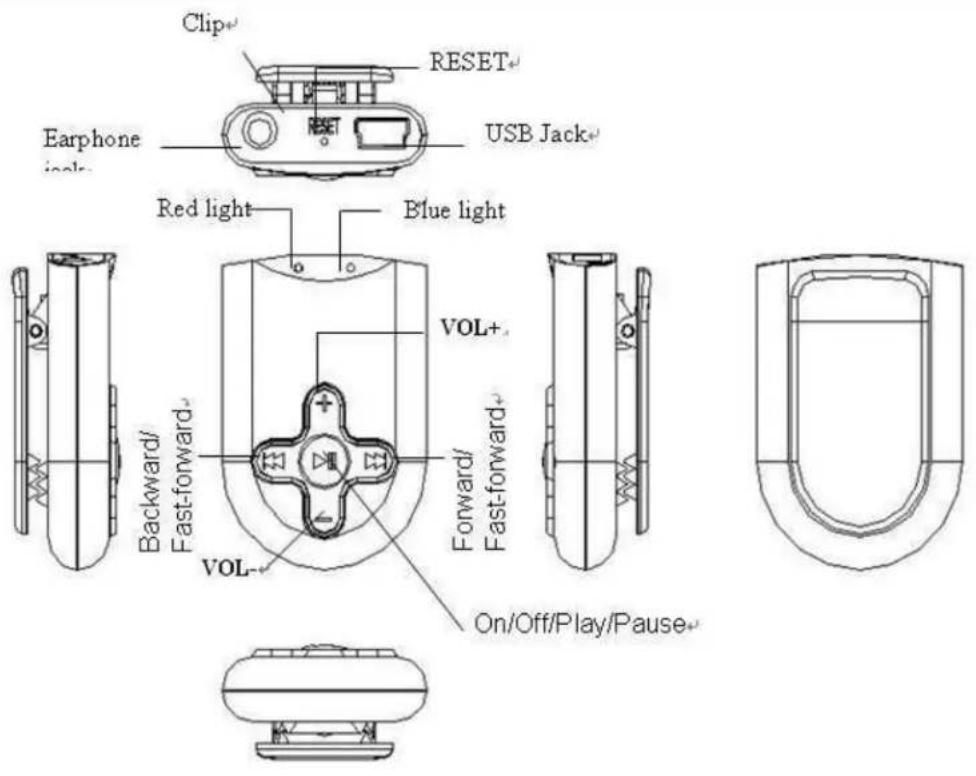
Player OVERVIEW
text_image
Clip+ RESET+ USB Jack+ Earphone jack- Red light Blue light VOL+ Backward/ Fast-forward- VOL- Forward/ Fast-forward- On/Off/Play/Pause-Basic Functions and Operation
- Turn on/off
When the player is OFF, long press ▶ button, release the button when the blue light comes on and flashes.
When the player is ON, long press 📄 button, release the button when the Blue light comes on. This will turn the player off.
HOLD: press "▶II" button and "button simultaneously to activate the HOLD function, press them again together to unlock.
Note: PLEASE ALWAYS DISABLE THE 'HOLD' position before turning OFF the player; otherwise, the player can not be turned back ON.
LED indication definition:
| Status | LED indication |
| The player is turned off. Both red and blue light go off. | |
| HOLD is on Red light keeps on. | |
| 1. When playing music, low power Red light blinking. | |
| 1. When playing music, goes to the previous or the next song.2. Link with PC, and start data transfer.3. When the player is being , fast-forward and fast-rewind. | Blue light blinking. |
| 1. When the player is on pause.2. Link with PC, not do transfer data.3. Connect with PC to charge the battery. | Blue light keeps on. |
| 1. The battery has been fully charged Blue | and red light keeps on |
- Play/Pause
The player will play music files directly after being turned ON.
When playing music, press the ▶II button to 'pause' the music.
When in 'pause' condition, press the ▶II button to resume playing music.
- RESET
When you find the player not response to any normal operation, then press RESET
button with a pin point to restart the player and restore all settings
- AUTO SHUT OFF
In ‘pause’ condition, if you do not resume playing for 3 minutes, then the player will automatically turn off to save power.
- Choose previous or next song to play.
In Play/Pause condition, press the >> button to choose the next file. In Play/Pause condition, press the <button to choose the previous file.
- Fast-forward/Fast-rewind
While playing music, long press the >> button to fast-forward. While playing music, long press the <button to fast-rewind.
- Volume control
In Play/Pause condition, press + button for volume increase. In Play/Pause condition, press _button for volume decrease.
- USB Storage Drive
When connected with PC's USB port, the player will enter USB mode, and you can find the removable disk on the PC's desktop, now read-write work can be conducted through the removable disk.
- Battery charging
The player can be charged by USB cable provided through your PC's USB port.
The charging time is around 40 minutes. This MP3 player has built-in over current protection. Your MP3 player will not get damaged if it is connected to the PC via the USB cable and the battery reaches its full charge. When charging, the blue light stays ON and the red light flashes. When the player is fully charged, both Red and blue lights stay ON. If you do not use the player when fully charged and later re-connect the fully charged player to your PC via the USB cable, the red light will start to flash again. This is normal and will not damaged the MP3 player's battery.
- Software & Driver Installation
- Start Windows operating system for PC, and insert compact disk into CD-ROM. The software driver will auto run on the operating system, and you can install it with wizard: Please note WIN98 only requires to be installed under the WIN98 operating system.
● Using this player as a Removable Disk
The player supports standard USB mass storage function, under Windows98SE ( driver needs to be installed, WindowsMe/2000/XP/Vista ) .
1. Connecting your MP3 Player
Option 1: MS Windows will auto-detect your new MP3 Player as a Removable Disk or Storage Device and will ask "What do you want Windows to do?"
Select the option: "Open folder to view files" to view the contents of your MP3 Player.
Option 2: Click on the "START" menu and select "My Computer" and then double-click on the "Removable Disk" icon to view the contents of your MP3 Player.
2. Transferring Files to Your MP3 Player
Read this section to learn about transferring music to MP3 and playing music.
Once you get music files into your computer, you can connect the MP3 player to your computer and transfer music to the MP3 player.
Audio File Formats Supported by the MP3 player
.MP3
.WMA
.WAV
A song encoded using MP3 or WMA formats has near CD-quality sound, but takes up much less space than a song encoded using WAV format.
If you need help with this section, please visit www.hipstreetonline.com and view our 'Support section.
You can now copy new music (.mp3,.wma) files into the "Removable Disk" Window by
either:
- Dragging and dropping selected files into the "Removable Disk" window or
- Copying and pasting selected files into the "Removable Disk" window.
1. Ejecting your MP3 Player from your computer
Click on the "START" menu and select "My Computer" and either:
Right-click on the "Removable Disk" icon and select "Eject" from the contextual menu or
Select the "Removable Disk" icon, click on the "File" menu and select "Eject"
Trouble-shooting
| Symptoms Solutions | |
| Can not boot | Turn ON the player again after charging the battery. |
| Unable to chargeCheck to | see the USB cable is damaged. |
| No sound heard from the earphone | Try playing the same files on your PCCheck whether your player is in pause mode.Please make sure the volume is not at 0.Check to ensure the earphone connection is snug. |
| Can not connect with PC ● Check whether the USB cable connection is plugged in.● Check if you can find the removable disk. |
Specifications
| USB specifications USB2.0 | ||
| Memory 2GB | ||
| Battery Power Maximum 3 hours playback time | ||
| MP3, WMA | Headphone maximum output | (L) 10mW + (R) 10mW(32Ohm) |
| MP3 bit rate 32K bps – 320K bps | ||
| WMA bit rate 64K bps – 192K bps | ||
Music
Mode:
HS Mini MP3 player user manual
| Frequency response 20Hz~20KHz | ||
| SNR 65dB | ||
| Music format MP3, WMA | ||
| Operating temperature | -10~40°C | |
| Supported operating systems | Windows98/SE/ME/2000/XP/Vista, Mac OS 10 or above | |
Note: To provide better service, the contents of this user manual and the specifications are subject to change for the improvement of this product without any prior notice.

text_image
HSHIP STREET®