LD300 - Rangefinder Stabila - Free user manual and instructions
Find the device manual for free LD300 Stabila in PDF.

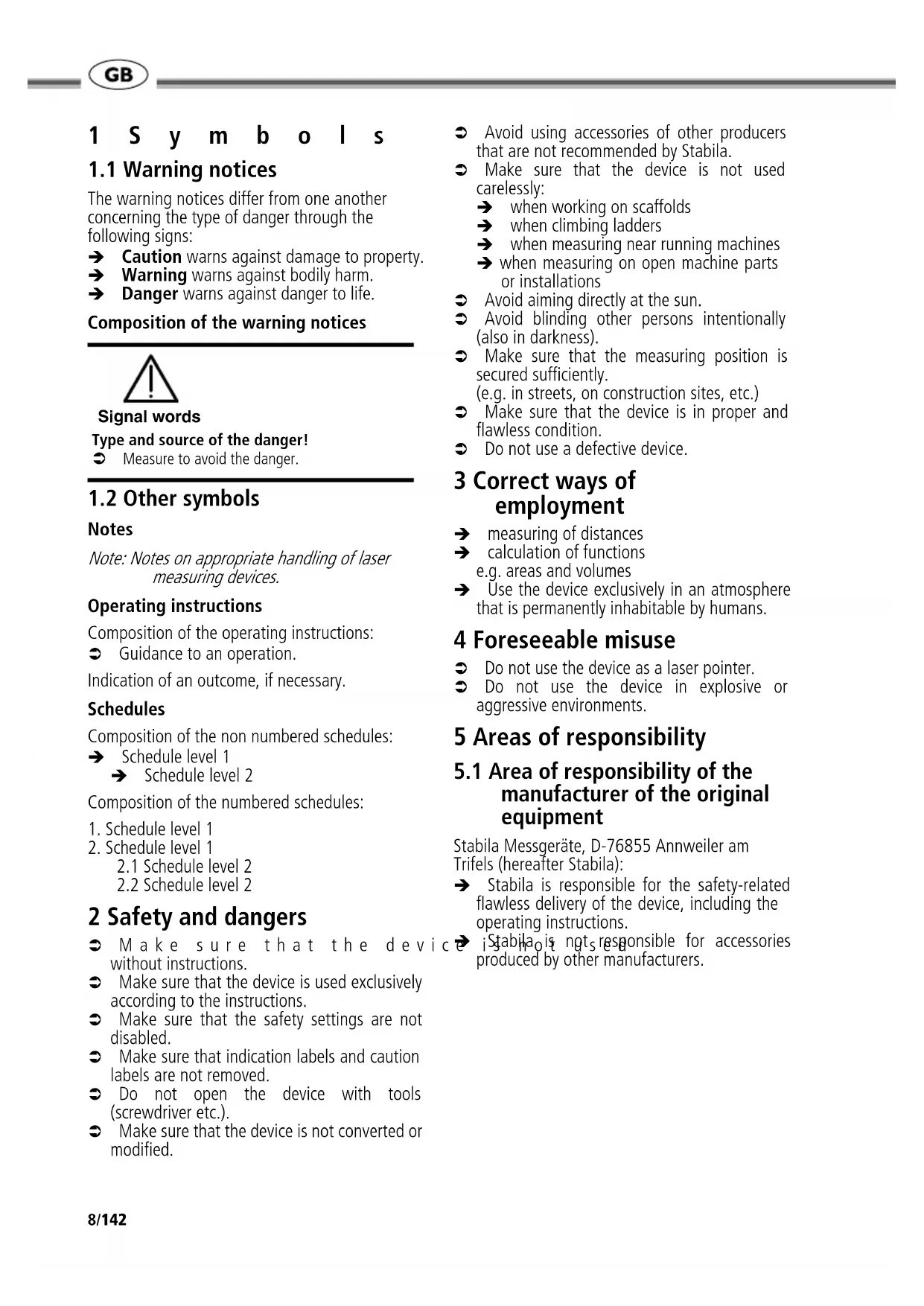


| Product type | Laser rangefinder |
| Brand | Stabila |
| Model | LD300 |
| Measuring range | 0.1 m to 30 m |
| Measurement accuracy (2 σ) | Typ. ± 2.0 mm |
| Smallest displayed unit | 1 mm |
| Laser class | 2 |
| Laser type | 635 nm, < 1 mW |
| Dimensions (H x W x D) | 116 x 51 x 26 mm |
| Weight | 110 g |
| Power supply | 2 AAA alkaline batteries |
| Battery life | Up to 3000 measurements |
| Auto power off | After 180 seconds |
| Main functions | Single measurement, continuous measurement, area, volume, Pythagoras, addition/subtraction |
| Unit setting | Meter, fractional feet/inches |
| Measurement reference | Front edge, rear edge |
| Display | LCD screen with icons and measurement lines |
| Temperature range (operation) | 0 °C to 40 °C |
| Temperature range (storage) | -25 °C to 70 °C |
| Maintenance | Clean with a soft, damp cloth; do not immerse in water |
| Warranty | 2 years |
| General information | Complies with IEC60825-1:2007 for laser safety |
Frequently Asked Questions - LD300 Stabila
User questions about LD300 Stabila
0 question about this device. Answer the ones you know or ask your own.
Ask a new question about this device
Download the instructions for your Rangefinder in PDF format for free! Find your manual LD300 - Stabila and take your electronic device back in hand. On this page are published all the documents necessary for the use of your device. LD300 by Stabila.
USER MANUAL LD300 Stabila
Laser Distancer LD 300

Operating instructions

Mode d'emploi

Información
1 S y m b o l s
1.1 Warning notices
The warning notices differ from one another concerning the type of danger through the following signs:
→ Caution warns against damage to property.
→ Warning warns against bodily harm.
→ Danger warns against danger to life.
Composition of the warning notices

Signal words
Type and source of the danger!
Measure to avoid the danger.
1.2 Other symbols
Notes
Note: Notes on appropriate handling of laser measuring devices.
Operating instructions
Composition of the operating instructions:
Guidance to an operation.
Indication of an outcome, if necessary.
Schedules
Composition of the non numbered schedules:
→ Schedule level 1
Schedule level 2
Composition of the numbered schedules:
- Schedule level 1
- Schedule level 1
2.1 Schedule level 2
2.2 Schedule level 2
2 Safety and dangers
Make sure that the device without instructions.
Make sure that the device is used exclusively according to the instructions.
Make sure that the safety settings are not disabled.
Make sure that indication labels and caution labels are not removed.
Do not open the device with tools (screwdriver etc.).
Make sure that the device is not converted or modified.
- Avoid using accessories of other producers that are not recommended by Stabila.
Make sure that the device is not used carelessly:
when working on scaffolds
when climbing ladders
when measuring near running machines
→ when measuring on open machine parts or installations
Avoid aiming directly at the sun.
Avoid blinding other persons intentionally (also in darkness).
Make sure that the measuring position is secured sufficiently. (e.g. in streets, on construction sites, etc.)
Make sure that the device is in proper and flawless condition.
Do not use a defective device.
3 Correct ways of employment
→ measuring of distances
→ calculation of functions e.g. areas and volumes
→ Use the device exclusively in an atmosphere that is permanently inhabitable by humans.
4 Foreseeable misuse
Do not use the device as a laser pointer.
Do not use the device in explosive or aggressive environments.
5 Areas of responsibility
5.1 Area of responsibility of the manufacturer of the original equipment
Stabila Messgerate, D-76855 Annweiler am Trifels (hereafter Stabila):
→ Stabila is responsible for the safety-related flawless delivery of the device, including the operating instructions.
Stabila is ngts responsible for accessories produced by other manufacturers.
5.2 Area of responsibility of the operator

Caution
Damage to property due to repairing!
In case of malfunctions, contact the dealer.
The operator is obliged to observe the following:
He understands the protection information on the device and the operating instruction.
He is familiar with the customary in-house accident control directives.
6 Overview
6.1 Keys
See drawing A:
- laser emitter
- receiver lens
- display
- on/measure
- clear/off
6.measuring plane/unit - area/room volume/Pythagoras
6.2 Display
See drawing D:
8.measuring plane
9. area/room volume/Pythagoras
10. battery symbol
11. second row
12. fractions/exponents
13. units
14. summary row
7 Initial operation
Insert the batteries
See drawing E:
To ensure a reliable use, use exclusively alkaline batteries.
Remove battery compartment cover.
Insert alkaline batteries (2 x AAA) pay attention to the correct polarity.
Close the battery compartment cover.
Changing the batteries
Change the batteries when the battery symbol is flashing permanently.
8 How to use
8.1 Measuring conditions
The quality of the measurement depends on the surfaces to which you are measuring.
Measurement errors

Caution
Damage to property due to use of wrong measuring results!
Avoid measuring errors due to unexpected events during distance measuring.
Perform a control measurement.
Measuring errors are possible in case of:
colourless fluids (e.g. water)
clean, translucent glass
→ styrofoam or similar semi-translucent surfaces
→ strongly reflecting targets that deflect the laserbeam
→ measurements aimed at moving objects
Causes:
Strongly reflecting targets deflect the laser beam and cause measuring errors.
Non-reflecting, dark surfaces increase the measuring time.
For constantly high-quality measurements
Perform control measurements periodically.
Perform control measurements before and after important measurements.
8.2 Switching on/off
Switch on the device by pressing key 4 briefly.
The device shows the battery symbol until another key is pressed.
Switch off the device by holding key 5 for several seconds.
If no key is pressed for 180 seconds, the device switches off automatically.
8.3 Clear key
Undo the most recent action by pressing key 5 briefly.
8.4 Adjusting the measuring plane
See drawing F-H:
Rear measuring plane is the standard setting.
For measurement from front edge, press key 6 briefly.
For measurement from rear edge, press key 6 briefly again.
8.5 Unit setting
Metric system is the standard setting.
To change the unit, hold key 6 for several seconds.
With every keypress, the device switches to the next unit.
Possible units:
meters with mm display
feet inch fractional summary row up to 1/16 inch
→ second row up to 1/8 inch
→ inch fractional → summary row up to 1/16 inch
→ second row up to 1/8 inch
9 Measuring
9.1 Measuring single distances
Press key 4 briefly.
Aim active laser at target area.
Press key 4 briefly. The device measures the distance.
The device displays the result immediately.
9.2 Continuous measuring
See drawing J:
This function enables distances to be staked out.
Hold key 4 for several seconds. Continuous measuring starts.
⇔ Press key 4 briefly. Continuous measuring stops.
The value last measured appears in the summary row.
10 Functions
10.1 Area
See drawing 1:
Press key 7 once. The area symbol appears on the display.
Press key 4 and measure the first distance. (e.g. length).
Press key 4 and measure the second distance. (e.g. width).
The device displays the result in the summary row and the respective measured distance to the next measurement in the second row.
10.2 Room volume
Press key 7 twice. The volume symbol appears on the display.
Press key 4 and measure the first distance (e.q. length).
Press key 4 and measure the second distance (e.g. width).
Press key 4 and measure the third distance (e.g. height).
The device displays the result in the summary row and the respective measured distance to the next measurement in the second row.
10.3 Pythagoras
See drawing K:
Press key 7 three times. The Pythagoras symbol appears on the display.
Press key 4 and measure the first distance (diagonal measurement).
Press key 4 and measure the second distance (horizontal measurement).
The device displays the result in the summary row and the respective measured distance to the next measurement in the second row.
11 Troubleshooting
If the message Error does not disappear after switching on the device repeatedly, please contact the dealer.
If the message InFo appears with a number, observe the instructions in the following table.
| No. | Cause Correction | |
| 204 | Calculation error Perform | measurement again. |
| 252 | Temperature too high Let | the device cool down. |
| 253 | Temperature too low Warm | m the device up. |
| 255 | Reception signal too weak, measuring time too long | Change target surface (e.g. white paper). |
| 256 | Input signal too high Change | range target surface (e.g. white paper). |
| 257 | Measuring error, too much background light | Shadow the target area. |
| 258 | Measurement outside of the measuring range | Mind the range. |
| 260 | Laser beam interrupted Repeat the measurement. | |
12 Technical data
| Range | 0.1 m to 30 m 0.33 ft to 98 ft |
| Measuring accuracy (2 σ) | typ.: ± 2.0 mm* ± 0.08 in* |
| Smallest unit displayed | 1 mm 0.08 in |
| Laser class | 2 |
| Laser type | 635 nm, < 1 mW |
| Automatic switch-off | after 180 s |
| Continuous measuring | yes |
| Addition/Subtraction | yes |
| Dimension (H x D x W) | 116 x 51 x 26 mm |
| Battery durability (2 x AAA) | up to 3000 measurements |
| Weight | 110 g |
| Temperature range: | |
| - Storage | -25 °C to 70 °C |
| -13 °F to 158 °F | |
| - Operation | 0 °C to 40 °C |
| 32°F to 104°F |
- under favourable conditions (good target surface, room temperature) up to 10 m (33 ft). Under unfavourable conditions such as bright sunlight, a very weakly reflecting target surface or large temperature fluctuations, the error can increase to ± 0.25 mm/m (± 0.003 in/ft) for distances over 10 m (33 ft).
12.1 Electromagnetic compatibility (EMC)

Warning
Possible disturbance of other devices (e.g. safety equipment, medical equipment) due to electromagnetic radiation!
Observe the safety instructions of the respective devices.
Despite the compliance with all requirements of the corresponding directives and norms, a disturbance of other devices is possible.
12.2 FCC statement (applic. in U.S.)
This equipment has been tested and found to comply with the limits for a Class B digital device, pursuant to part 15 of the FCC Rules. These limits are designed to provide reasonable protection against harmful interference in a residential installation. This equipment generates, uses and can radiate radio frequency energy and, if not installed and used in accordance with the instructions, may cause harmful interference to radio communications. However, there is no guarantee that interference will not occur in a particular installation. If this equipment does cause harmful interference to radio or television reception, which can be determined by turning the equipment off and on, the user is encouraged to try to correct the interference by one or more of the following measures:
Reorient or relocate the receiving antenna.
Increase the separation between the equipment and receiver.
Connect the equipment into an outlet on a circuit different from that to which the receiver is connected.
⇔ Consult the dealer or an experienced radio/ TV technician for help

Warning
Changes or modifications not expressly approved by Stabila for compliance could void the user's authority to operate the equipment. Position of the product label see first page!
Product labelling:
This device complies with part 15 of the FCC Rules.
Operation is subject to the following two conditions:
- This device may not cause harmful interference, and
- this device must accept any interference received, including interference that may cause undesired operation.
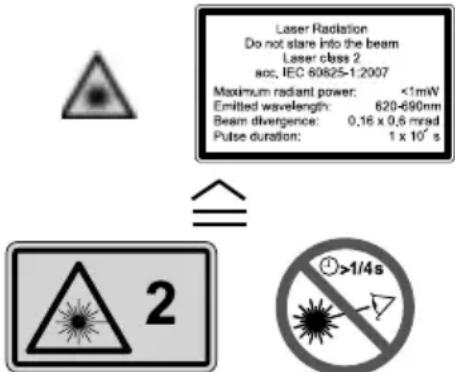
12.3 Laser classification
The Stabila LD 300 generates a visible laser beam that is emitted on the front of the device.
The device complies with laser class 2 according to:
→ IEC60825-1: 2007 Safety of laser products
Laser class 2 products
Do not look into the laser beam and do not unnecessarily aim at other persons. The eye is usually protected by preventive reactions such as the eyelid closure reflex.

Warning
Bodily harm due to laser beam!
Do not look directly into the laser beam.
Do not look directly into the laser beam with optical appliances (such as binoculars, telescopes).
Labels
Position of the type label see drawing C
13 Care
Clean the device with a damp, soft cloth.
Never immerse the device in water.
Never use aggressive cleaning agents or solvents.
14 Warranty
The Stabila LD 300 has a two-year warranty. For further information on this, contact your dealer.
Subject to change (drawings, descriptions and technical data).
15 Disposal

Damage to property due to inappropriate disposal!
- Dispose of the device and the batteries according to the national, country-specific disposal directives.
Protect the device and the batteries from access of unauthorised persons.

For disposal, observe the following:
Do not put the appliance and the batteries into the household waste.
Dispose of the device and the batteries appropriately.
Product-specific information on treatment and disposal can be downloaded from the Stabila homepage http://www.stabila.de or requested of your dealer.
F
1 Symboles
1.1 Avertissements
12.2 Classification laser



- LASER DISTANCER LD 300
- 1 S Y M B O L S
- 1.1 WARNING NOTICES
- COMPOSITION OF THE WARNING NOTICES
- 1.2 OTHER SYMBOLS
- NOTES
- OPERATING INSTRUCTIONS
- SCHEDULES
- 2 SAFETY AND DANGERS
- 3 CORRECT WAYS OF EMPLOYMENT
- 4 FORESEEABLE MISUSE
- 5 AREAS OF RESPONSIBILITY
- 5.1 AREA OF RESPONSIBILITY OF THE MANUFACTURER OF THE ORIGINAL EQUIPMENT
- 5.2 AREA OF RESPONSIBILITY OF THE OPERATOR
- 6 OVERVIEW
- 6.1 KEYS
- 6.2 DISPLAY
- 7 INITIAL OPERATION
- INSERT THE BATTERIES
- CHANGING THE BATTERIES
- 8 HOW TO USE
- 8.1 MEASURING CONDITIONS
- MEASUREMENT ERRORS
- FOR CONSTANTLY HIGH-QUALITY MEASUREMENTS
- 8.2 SWITCHING ON/OFF
- 8.3 CLEAR KEY
- 8.4 ADJUSTING THE MEASURING PLANE
- 8.5 UNIT SETTING
- 9 MEASURING
- 9.1 MEASURING SINGLE DISTANCES
- 9.2 CONTINUOUS MEASURING
- 10 FUNCTIONS
- 10.1 AREA
- 10.2 ROOM VOLUME
- 10.3 PYTHAGORAS
- 11 TROUBLESHOOTING
- 12 TECHNICAL DATA
- 12.1 ELECTROMAGNETIC COMPATIBILITY (EMC)
- WARNING
- 12.2 FCC STATEMENT (APPLIC. IN U.S.)
- PRODUCT LABELLING
- 12.3 LASER CLASSIFICATION
- LASER CLASS 2 PRODUCTS
- LABELS
- 13 CARE
- 14 WARRANTY
- 15 DISPOSAL
- DAMAGE TO PROPERTY DUE TO INAPPROPRIATE DISPOSAL
- F
- 1 SYMBOLES
- 1.1 AVERTISSEMENTS
- 12.2 CLASSIFICATION LASER
Brand : Stabila
Model : LD300
Category : Rangefinder