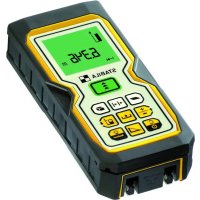
LD400 - Rangefinder Stabila - Free user manual and instructions
Find the device manual for free LD400 Stabila in PDF.



| Product type | Laser distance meter |
| Brand | Stabila |
| Model | LD400 |
| Dimensions | 113 x 50 x 25 mm |
| Weight | 110 g |
| Power supply | 2 AAA batteries (alkaline recommended) |
| Range | 0.05 m to 60 m |
| Measurement accuracy | ± 1.5 mm (typical) |
| Laser class | 2 |
| Laser type | 635 nm, < 1 mW |
| Protection | IP 54 (dust-proof and splash-proof) |
| Laser auto-off | 60 s |
| Instrument auto-off | 180 s |
| Backlit display | Yes, adjustable |
| Foldable end piece | Yes, for measurements from an edge or corner |
| Main functions | Distance, area, volume, indirect measurement (Pythagorean), stake-out, historical memory, timer, addition/subtraction, continuous measurement, min/max |
| Operating temperature | 0 °C to +40 °C |
| Storage temperature | -25 °C to +70 °C |
| Warranty | 2 years |
| Maintenance | Clean with a soft damp cloth; do not use aggressive solvents |
| Safety | Class 2 laser: do not look directly into the beam, do not direct at others. Use target plate in bright light. |
| Repairability | In case of persistent hardware error, contact the dealer. No spare parts listed. |
Frequently Asked Questions - LD400 Stabila
User questions about LD400 Stabila
0 question about this device. Answer the ones you know or ask your own.
Ask a new question about this device
Download the instructions for your Rangefinder in PDF format for free! Find your manual LD400 - Stabila and take your electronic device back in hand. On this page are published all the documents necessary for the use of your device. LD400 by Stabila.
USER MANUAL LD400 Stabila
Laser Distancer LD 400

Operating instructions

Mode d'emploi

Información
A
C
D
B
E
F
G
0
J
K
User Manual
English
Congratulations on the purchase of your Stabila LD 400.


The safety instructions and the user manual should be read through carefully before you use the product for the first time. The
person responsible for the product must ensure that all users understand these directions and adhere to them.
Symbols used in this manual
The symbols used have the following meaning:

WARNING
Indicates a potentially hazardous situation or an unintended use which, if not avoided, could result in death or serious injury.

CAUTION:
Indicates a potentially hazardous situation or an unintended use which, if not avoided, may result in minor injury and/or in appreciable material, financial and environmental damage.
Important paragraphs which must be adhered to in practice, as they enable the product to be used in a technically correct and efficient manner.
Intended Use
Permitted uses
- Measuring distances
- Computing functions, e.g. areas and volumes
Adverse uses
- Using the instrument without instructions
Using outside the stated limits - Deactivation of safety systems and removal of explanatory and hazard labels
- Opening of the equipment by using tools (screwdrivers etc.)
- Carrying out modification or conversion of the product
- Use of accessories from other manufacturers without the express approval of Stabila.
- Deliberate or irresponsible behaviour on scaffolding, when using ladders, when measuring near machines which are running, or near parts of machines or installations which are unprotected
Aiming directly into the sun - Deliberate dazzling of third parties; even in the dark
- Inadequate safeguards at the surveying site (e.g. when measuring on roads, construction sites, etc.)
Limits of use

Also see section "Technical data".
The Stabila LD 400 is designed for use in areas permanently habitable by humans, do not use the product in explosion hazardous areas or in aggressive environments.
Responsibilities
Responsibilities of the manufacturer of the original equipment Stabila Messgeräte, D-76855 Annweiler am Trifels (for short Stabila):
Stabila is responsible for supplying the product, including the User Manual and original accessories, in a completely safe condition.
Responsibilities of the manufacturer of non-Stabila accessories:
The manufacturers of non-Stabila accessories for the Stabila LD 400 are responsible for developing, implementing and communicating safety concepts for their products. They are also responsible for the effectiveness of these safety concepts in combination with the Stabila equipment.
Responsibilities of the person in charge of the instrument:

WARNING
The person responsible for the instrument must ensure that the equipment is used in accordance with the instructions. This person is also accountable for the deployment of personnel and for
their training and for the safety of the equipment when in use. The person in charge of the product has the following duties:
- To understand the safety instructions on the product and the instructions in the user manual.
- To be familiar with local safety regulations relating to accident prevention.
- To inform Stabila immediately if the equipment becomes unsafe.
Overview
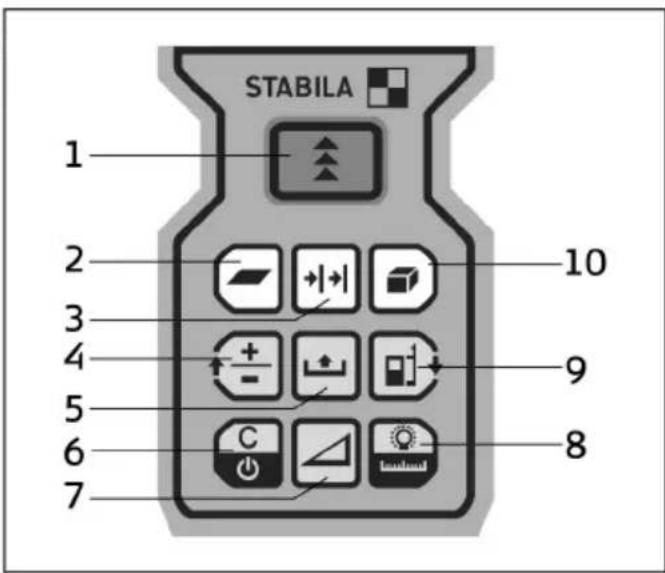
Keyboard
See drawing A
1 ON (ON / MEAS) - button
2 AREA function - button
3 STAKE OUT function - button
4 PLUS [+] / MINUS [-] - button
5 HISTORICAL MEMORY / TIMER - button
6 CLEAR / OFF - button
7 PHYTAGORAS (indirect measurement) - button
8 ILLUMINATION / UNITS - button
9 REFERENCE - button
10 VOLUME function - button
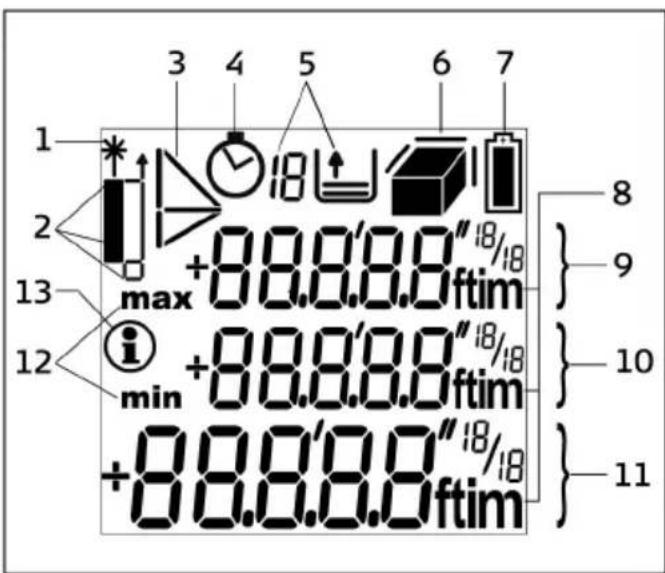
Display
See drawing B
1 L a s e r " O N "
2 Reference (front/rear/end piece)
3 Py t h a g o r a s
4 Timer (self-triggering)
5 Historical memory
6 A r e a / v o l u m e
7 Battery status
8 Units with exponents (2/3)
9 Intermediate line 2
10 Intermediate line 1
11 Main targets
12 min / max display
13 Info symbol
Start up
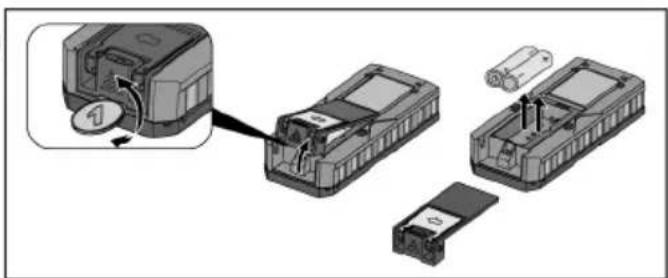
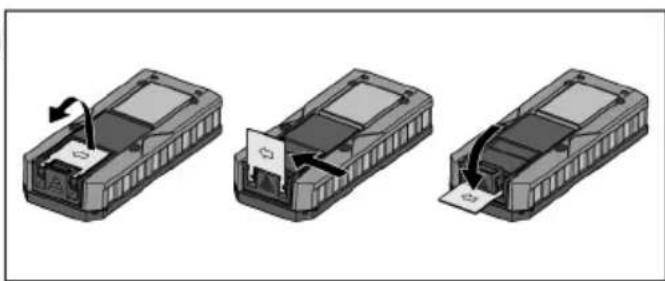
Inserting / Replacing Batteries
1 Remove battery compartment lid. See drawing
2 Insert batteries, observing correct polarity.
3 Close the battery compartment.
- Replace the batteries when the symbol flares permanently in the display.

Only use alkaline batteries.
If the instrument will not be used for a long time, remove the batteries as a protection against corrosion.
Operation
Measuring Conditions
Range
Range is limited to 60m
At night or dusk and if the target is in shadow the measuring range without target plate is increased. Use a target plate to increase the measurement range during daylight, or if the target has poor reflection properties!
Target Surfaces

CAUTION:
Measuring errors can occur when measuring toward colourless liquids (e.g. water) or dust free glass, Styrofoam or similar semi-permeable surfaces. Aiming at high gloss surfaces may deflect the laser-beam and lead to measurement errors.
Hazards of Use

CAUTION:
Watch out for erroneous distance measurements if the instrument is defective or if it has been dropped or has been misused or modified.
Precautions:
Carry out periodic test measurements.
Particularly after the instrument has been subject to
abnormal use, and before, during and after important measurements.
Make sure the Stabila LD 400 optic is kept clean and that there is no mechanical damage to the bumpers.

CAUTION:
In using the instrument for distance measurements or for positioning moving objects (e.g. cranes, building equipment, platforms, etc.) unforeseen events may cause erroneous measurements.
Precautions:
Only use this product as a measuring sensor, not as a control device. Your system must be configured and operated in such a way, that in case of an erroneous measurement, malfunction of the device or power failure due to installed safety measures (e.g. safety limit switch), it is assured that no damage will occur.
Switching on/off

1x briefly: the instrument and the laser are switched on.
The display shows the battery symbol until the next button is pressed.

Pressing this button for longer switches the instrument off.
The instrument switches off automatically after three minutes of inactivity.
Setting the instrument

Press long until the desired unit is displayed.
Possible units:
| Distance Area Volume | |||
| 1.0.00 | 0 m | 0.000 m2 | 0.000 m3 |
| 2.0'0" | 1/16 | 0.00 ft2 | 0.00 ft3 |
| 3.0 in | 1/16 | 0.00 ft2 | 0.00 ft3 |
| 4.0.00 | ft | 0.00 ft2 | 0.00 ft3 |
CLEAR-Key

1x briefly: the last action is cancelled.
Illumination

1x briefly: the display illumination is switched on or off.
Reference Setting
Default reference setting is from the rear of the instrument.
The instrument can be set for the following measurements:
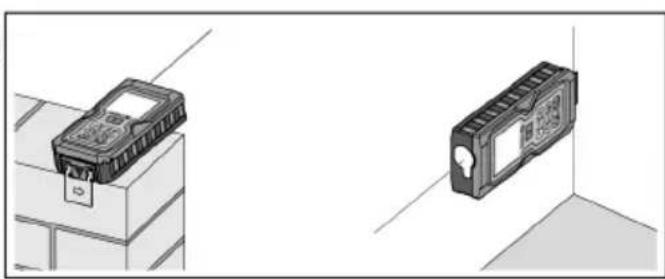
To measure from an edge (see drawing D )fold out the stop bracket until it snaps in for the first time. See drawing E
- To measure out of a corner (see drawing D ), fold out the stop bracket until it snaps in, push
the stop bracket with a little force to the right side; the stop bracket can now be completely unfolded. See drawing E

CAUTION:
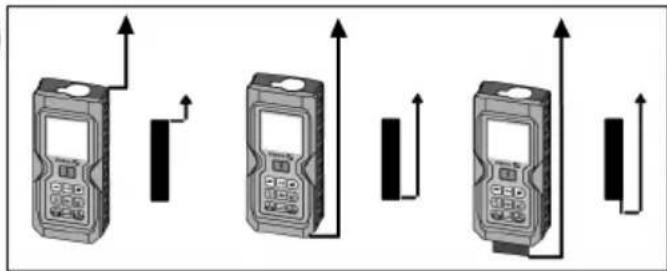
Make sure that when measuring from the unfolded endpiece, the measuring reference is set to "End piece"!

1x briefly: the next measurement is taken from the front edge.

2x briefly: the measurement is taken from the unfolded end piece.
After one measurement, the reference returns automatically to the default setting (rear reference).

1x long: the measurements are taken with the front as reference until a new measuring reference is set

2x long: the measurements are taken from the unfolded end piece until a new measuring reference is set.
See drawing F
Measuring
Single Distance Measurement
1x briefly: the laser is activated.
1x briefly: a distance measurement is taken.
The result is displayed immediately.
Continuous measurement
Distances can be measured with this function
1x long: a "beep" is sounded. A continuous measurement is started.
1x briefly: the continuous measurement is stopped.
The last measured value is displayed in the summary line.
Minimum-/Maximum-Measuring
This function enables determining the minimum or maximum distance from a specific measuring point, e.g. the determination of room diagonals (maximum value) or horizontal distance (minimum value).
Switching on continuous measurement (see above).
The corresponding maximum and minimum values are displayed.
Functions
Addition / Subtraction
Distance Measurement.

1x briefly: the next measurement is added to the previous one.

2x briefly: the next measurement is subtracted from the previous one.
Repeat this procedure for as many times as required. The result is displayed in the summary row, the previously measured value is displayed in intermediate line 2, the value to be added in intermediate line 1.

1x briefly: the last step is cancelled.
Area function

1x briefly: The symbol is displayed.

1x briefly: takes first distance measurement (e.g. length)

1x briefly: takes second distance measurement (e.g. width)
The result of the area measurement is displayed in the summary row, the individually measured values are displayed in intermediate lines 1 and 2.
Adding and subtracting areas
Calling up the area function and measuring areas.
Press 1x or 2x

1x briefly: takes first distance measurement (e.g. length)
1x briefly: takes second distance measurement (e.g. width)
The result of the second area measurement, "+" flashes.
1x briefly: confirms the addition; the added area results are displayed in the summary row.
Volume function

1x briefly: the symbol is displayed.
1x briefly: ta (e.g. length)
1x briefly: takes second distance measurement (e.g. width)
The result of the area measurement from the values already measured is displayed in the summary row.
1x briefly: takes the third distance measurement (e.g. height). The value is displayed in intermediate line 1.
The result of the area measurement is displayed in the summary row, the two previously measured
values in intermediate lines 1 and 2.
Indirect Measurement
The instrument can measure distances with the Pythagorean method. This procedure facilitates in measuring distances that are difficult to access.
Adhere to the prescribed sequence of measurements:
- All target points must be vertical or horizontal on the surface of the wall.
- The best results are achieved when the instrument is rotated around a fixed point (e.g. the stop bracket is fully extended and the instrument is placed against a wall).
To take the measurement, the minimum/ maximum function can be called up. The minimum value is used for measurements that must be at right-angles to the target; the maximum distance is used for all other measurements.
Make sure that the first measurement and the distance to be measured are at right angles. Use the minimum/maximum function.
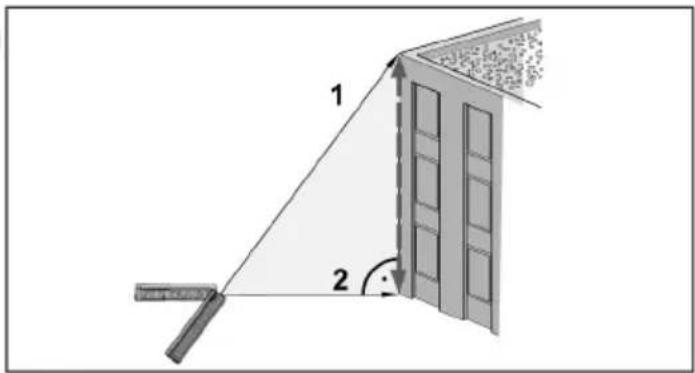
Indirect measurement - determining a distance using 2 auxiliary measurements
See drawing G
1x briefly: the symbol is displayed.
The distance to be measured flashes in the symbol.
1x briefly: takes a measurement of the distance
The second distance to be measured flashes in the symbol
1x briefly: takes a measurement of the horizontal distance
The result of the function is displayed in the summary row.
If the button is pressed for along time while measuring a distance, maximum or minimum continuous measuring is activated.
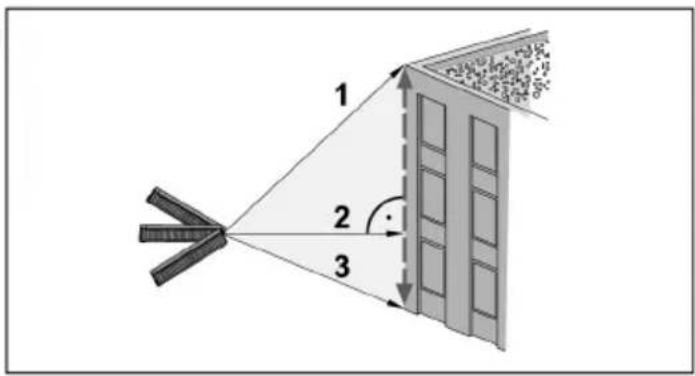
Indirect measurement - determining a distance using 3 auxiliary measurements
See drawing H
2x briefly: the symbol is displayed.
The distance to be measured flashes in the symbol.
1x briefly: takes a distance measuement
The second distance to be measured flashes in the symbol
1x briefly: takes a horizontal measurement. The third distance to be measured flashes in the symbol
1x briefly: takes a measurement of the distance
The result of the function is displayed in the summary row.
If the button is pressed for along time while measuring a distance, maximum or minimum continuous measuring is activated.

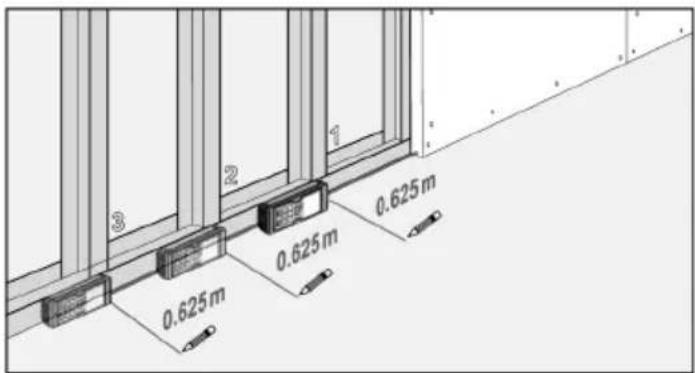
Stake out function
This function is helpful when staking out equal distances, e.g in the erection of wooden substructures. See drawing I
1x briefly: the symbol is displayed.
A value is displayed in the summary row (default value 1.000m ). This value can be adjusted to the desired stake out distance.
The value is increased.
The value is reduced.
Holding the button down accelerates the speed at which the value changes.
1x briefly: starts continuous measurement.
In intermediate line 1, the set distance or the next appropriate multiple thereof is displayed.
In the summary row, the distance to the next appropriate stake out point is displayed.
When approaching a stakeout point (to less than 0,10m ), the instrument starts to beep. When the point is reached, the beep sound changes and intermediate line 1 starts to flash.

1x briefly: distance measurement is interrupted and the instrument switches back to individual distance measuring mode.
Historical memory
1xbriefly:thesymboland thelastmeasured valuearedisplayed.
Use to navigate through the last 10 values. The values can also be used in functions.
Using stored values in functions
Using added distances in area functions (e.g. wall surfaces or painters):
Adding distances (see additions / subtractions)
Call up area function to e.g. measure the height of a room.
1x briefly: calls up the historical memory and to possibly search for the correct value.
1x long: the value is entered into the function and the result of the function (e.g. area) is displayed.
Timer (self-triggering)

1x long: The symbol is displayed.
The timer is preset to 5 seconds.

The value is increased.
Holding the buttons down increases the rate of change of the values.
The countdown starts automatically (if the laser is activated) and then triggers the measurement.
Switching off the beep

Press and hold simultaneously for 5 seconds:
The beep is switched off.
To reactivate it, press and hold for 5 seconds.
Appendix
Display Notices
All display notices are either displayed with

"Error". The following errors can be corrected:
| 1 | Cause Correction | tion |
| 204 | Calculation error Repet | eat procedure |
| 252 | Temperature too high | Let device cool down. |
| 253 | Temperature too low | Warm device up |
| 255 | Received signal too weak, time for a measurement too long. | Use a target plate |
| 256 | Received signal too strong | Use target plate (gray side) |
| 257 | Faulty measure-ment, too much background light | Use target plate (brown side) |
| 258 | Outside of the range of measurement | Select measurement distance within the range of measurement |
| Error Cause Correction | ||
| Error Hardware error Should | this message remain active after switching the instru-ment off and on several times, please contact the dealership. | |
Technical Specifications
| Range 0.05 m to 60 m* | |
| Measuring accuracy (2 σ) | typically ± 1.5 mm** |
| Smallest unit displayed 1 mm | |
| Laser class 2 | |
| Laser type 635 nm, < 1 mW | |
| Protection against splashes and dust | IP 54, dust-proof, splash-proof |
| Autom. power off: Laser Instrument | after 60 s after 180 s |
| Illumination | ✓ |
| Folding out endpiece | ✓ |
| Battery life, Type 2 x AAA | up to 5 000 measurements |
| Dimension 113 x 50 x 25 mm | |
| Weight 110 g | |
| Temperature range: Storage Operation | -25°C to +70°C 0°C to +40°C |
- Use a target plate to increase the measurement range during daylight or if the target has poor reflection properties! ** in favourable conditions (good target surface properties, room temperature) up to 10m . In unfavourable conditions, such as intense sunshine, poorly reflecting target surface or high temperature variations, the deviation over distances above 10m can increase by ± 0.15mm / m .
Electromagnetic Compatibility (EMC)
The term "electromagnetic compatibility" is taken to mean the capability of the product to function smoothly in an environment where electromagnetic radiation and electrostatic discharges are present, and without causing electromagnetic interference to other equipment.

WARNING
The Stabila LD 400 conforms to the most stringent requirements of the relevant standards and regulations.
Yet, the possibility of the product causing interference in other equipment cannot be fully excluded.
Laser classification
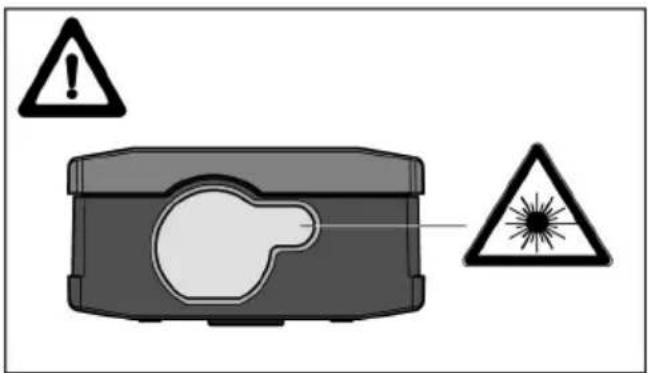
The Stabila LD 400 produces a visible laser beam which emerges from the front of the instrument. See drawing K
The product is a Class 2 Laser Product in accordance with:
- IEC60825-1:2007 "Radiation safety of laser products"
Class 2 Laser Products:
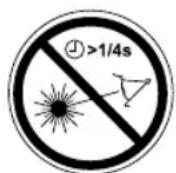
Do not stare into the beam or direct it unnecessarily at other persons. Eye protection is normally afforded by aversion responses including the blink reflex.

WARNING
Looking directly into the laser beam with a solid aids (e.g. binoculars, telescopes) can be tedious.
Precautions:
Do not look directly into the beam with optical aids.

CAUTION:
Looking into the laser beam may be hazardous to the eyes.
Precautions:
Do not stare into beam. Do not look into the laser beam. Make sure the laser is aimed above or below eye level (particularly with fixed installations, in machines, etc.).
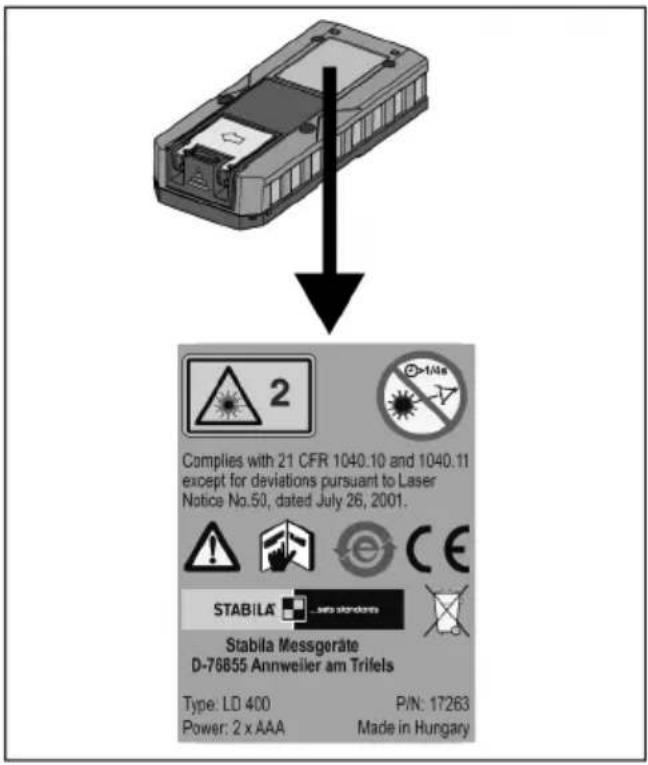
Labelling
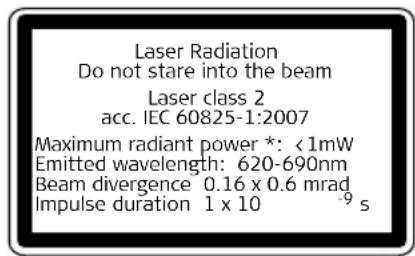

For the position of the type plate see drawing J
Care
Wipe off dirt with a damp, soft cloth. Do not immerse the instrument in water. Do not use aggressive cleaning agents or solutions.
Warranty
The Stabila LD 400 comes with a two year warranty from Stabila.
More detailed information can be found at:
www.stabila.de
Disposal

CAUTION:
Flat batteries must not be disposed of with household waste. Care for the environment and take them to the collection points provided in accordance with national or local regulations.

The product must not be disposed with household waste.
Dispose of the product appropriately in accordance with the national regulations in force in your country.
Adhere to the national and country specific regulations.
All right reserved for changes (drawings, descriptions and technical specifications).
Voir figure A
1 Touche ON (ON/MESURE)
2 Touche FONCTION SURFACE
3 Touche FONCTION DE PIQUETAGE
4 Touche PLUS [+] / MOINS [-]
5 Touche HISTORIQUE / MINUTERIE
6 Touche CLEAR / OFF
7 Touche FONCTION DE PYTHAGORE / MESURE INDIRECTE
8 Touche ECLAIRAGE / UNITES
9 Touche REFERENCE DE MESURE
10 Touche FONCTION VOLUME
Affichage
Voir figure B
Voir figure F
Mesure
Mesure Minimum/Maximum
Addition / Soustraction
Voir figure H
2x brievement: I'icone apparait.
Classification laser



- Laser Distancer LD 400
- User Manual
- English
- Symbols used in this manual
- WARNING
- CAUTION:
- Intended Use
- Permitted uses
- Adverse uses
- Limits of use
- Responsibilities
- Responsibilities of the manufacturer of the original equipment Stabila Messgeräte, D-76855 Annweiler am Trifels (for short Stabila):
- Responsibilities of the manufacturer of non-Stabila accessories:
- Responsibilities of the person in charge of the instrument:
- Overview
- Keyboard
- Display
- Start up
- Inserting / Replacing Batteries
- Operation
- Measuring Conditions
- Range
- Target Surfaces
- Hazards of Use
- Precautions:
- Switching on/off
- Setting the instrument
- CLEAR-Key
- Illumination
- Reference Setting
- Measuring
- Single Distance Measurement
- Continuous measurement
- Minimum-/Maximum-Measuring
- Functions
- Addition / Subtraction
- Area function
- Adding and subtracting areas
- Volume function
- Indirect Measurement
- Stake out function
- Historical memory
- Using stored values in functions
- Timer (self-triggering)
- Switching off the beep
- Appendix
- Display Notices
- Electromagnetic Compatibility (EMC)
- Laser classification
- Class 2 Laser Products:
- Labelling
- Care
- Warranty
- Disposal
- Affichage
- Mesure
- Mesure Minimum/Maximum
- Addition / Soustraction
- Classification laser
Brand : Stabila
Model : LD400
Category : Rangefinder