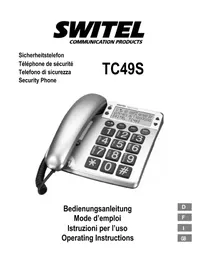
TC49S - Phone SWITEL - Free user manual and instructions
Find the device manual for free TC49S SWITEL in PDF.



| Product Type | Corded telephone with digital display |
| Power Supply | 4 AA alkaline 1.5 V batteries (included) |
| Display | Backlit LCD screen with date, time and caller ID |
| Caller ID | CLIP (Calling Line Identification Presentation) – displays number and call date/time |
| Memory | 64 numbers in call list, 10 numbers for speed dial, 3 direct dial keys (including one red for emergency number) |
| Phone Functions | Automatic last number redial, microphone mute, ringer and earpiece volume adjustment |
| Hearing Aid Compatibility | Compatible with most hearing aids (T position) |
| Technical Specifications | Tone dialing, flash time 100 ms, pause 3.6 s |
| Ambient Conditions | Temperature 10°C to 30°C, relative humidity 20% to 75% |
| Mounting | Wall mountable (bracket included) |
| Maintenance | Clean with a dry, soft, lint-free cloth. Do not use solvents. |
| Safety | Do not open the device, avoid smoke, dust, humidity and excessive heat. Use in accordance with instructions. |
| Warranty | 24 months from date of purchase against material and manufacturing defects |
| Standards | R&TTE Directive 1999/5/EC, CE marking |
Frequently Asked Questions - TC49S SWITEL
User questions about TC49S SWITEL
0 question about this device. Answer the ones you know or ask your own.
Ask a new question about this device
Download the instructions for your Phone in PDF format for free! Find your manual TC49S - SWITEL and take your electronic device back in hand. On this page are published all the documents necessary for the use of your device. TC49S by SWITEL.
USER MANUAL TC49S SWITEL
COMMUNICATIONPRODUCTS
Sicherheitstelefon
Operating Instructions
D
F
1
GB
SWITEL
Declaration of Conformity 60. . .
Crocket de suspension, 20
D
Date et heure, 19
1 Safety Information 47.
2 Putting the Telephone into Operation 48.
3 Operating Elements 50.
4 Telephoning 52.
5 Caller Number Display (CLIP) 54.
6 PABX / Supplementary Services 56.
7 Technical Properties / Troubleshooting 57
8 Maintenance/Guarantee 58
9 Index 59
1 Safety Information
Please read this operating instruction manual thoroughly.
Intended use
The telephone is suitable for telephoning within a public telephone network system. Any other use is considered unintended use. Unauthorized modification or reconstruction is not permitted. Under no circumstances open the device or complete any repair work yourself.
Installation location
Prevent excessive exposure to smoke, dust, vibration, chemicals, moisture, heat and direct sunlight. Do not use the telephone in potentially explosive areas.
Do not place the telephone in the direct vicinity of other electronic equipment, such as microwave ovens or hi-fi systems, since they could cause mutual disturbance. The installation location is a decisive factor to ensure trouble-free operation.
Place the telephone on a level, non-slip surface. Normally, the footpads do not leave any marks on the surface where it is located. However, due to the diverse types of paints and surfaces which come into question, it cannot be fully ruled out that the footpads will leave marks on the surface on which it is located.
Hearing aid compatibility
The telephone is compatible with most hearing aids available on the market. The telephone is equipped with an induction based special circuit for voice transmission to hearing aids. Please set your hearing aid to "T".
However, due to the wide range of hearing aids available, there is no guarantee that the telephone will function problem-free with every model.
Disposal
If your device has come to the end of its service life, bring it to a collection point provided by your local public waste authorities (e.g. recycling centre). The adjacent symbol indicates that the old device must be disposed of separate from domestic waste. According to laws on the disposal of electronic and electrical devices, owners are obliged to dispose of old electronic and electrical devices in a separate waste container.
Batteries must be disposed of at the point of sale or at the appropriate collection points provided by the public waste authorities.
Packaging materials must be disposed of according to local regulations.


Putting the Telephone into Operation
2 Putting the Telephone into Operation
Safety information

Caution: It is essential to read the Safety Information in Chapter 1 before starting up.
Checking the contents of the package
The package contains:
- a telephone (base unit) - four batteries (AA 1.5V alkaline)
- a receiver - a wall mounting bracket
- a helix cable - an operating manual
- a telephone connection cable
Connecting the receiver
Use the helix cable to connect the receiver to the telephone base unit. The helix cable has two identical connectors; plug one end of the cable into the socket at the bottom end of the receiver, plug the other end of the cable into the connection socket on the left-hand side of the telephone base unit. The plugs engage in the sockets audibly.
Inserting the batteries
The batteries are required for the display indicators and other telephone functions.

Prior to inserting or replacing the batteries, ensure that the telephone is disconnected from the telephone network.
The battery compartment is located on the underside of the telephone. Open the battery compartment using a pointed tool (e.g. ball-point pen) and insert four AA 1.5V alkaline batteries.
Pay attention to correct polarity of the batteries: Slide the minus pole of the battery (flat end) against the coiled spring and then press the plus pole down. The correct position of the batteries is also imprinted on the base of the battery compartment.
Only use batteries of the specified type.
Close the battery compartment properly; the cover locks audibly in place.
The batteries must be replaced by new ones when the battery icon appears in the telephone display.

The telephone's memory content is retained for 3 minutes when no batteries are installed.
Date and time
The date and time will be set automatically with the first CLIP call received.
Condition: Your network provider supports this feature.
Setting the display contrast
If you need to change the display contrast, press the and buttons simultaneously for 4 seconds. The message LCDCONTRAST appears in the display. Use the or buttons to adjust the contrast (1-5) and confirm the selection by pressing the button.
Connecting the telephone cable
Use the telephone connection cable supplied to connect the telephone to the telephone line socket. Plug the cable connector in the socket on the rear of the telephone until it audibly engages. Plug the other end of the telephone connection cable in the telephone line socket.
If the cable connector does not fit in the line socket, please contact your telephone network provider.
Wall installation
The telephone can also be mounted on a wall.
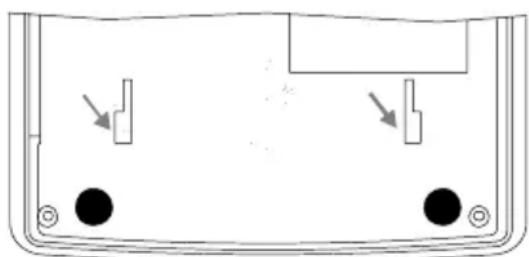
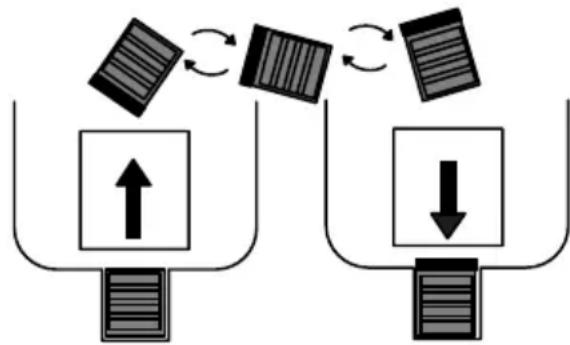
Before the telephone can be installed on a wall, the mounting bracket supplied must first be fixed to the bottom of the telephone. To do this, turn the telephone over and fix the mounting bracket in the slots in the housing, indicated below. Pay attention that the opening for the slot in the middle of the mounting bracket is at the bottom (refer to diagram). Then slide the bracket upwards until it audibly locks in place. A catch fixes the mounting bracket in position.
(In order to remove the mounting bracket again, press the catch down and pull the bracket over it and away to the front.)
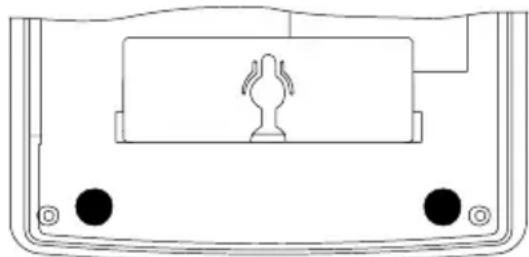
Insert two screws (not included in the material supplied) in the wall: the screws must be 83mm apart, be vertically one above the other and the heads project 5mm from the wall.
Mount the telephone, with one screw fitted in the hole in the underside of the telephone and the other in the bracket, and force the unit gently downwards to fix it.
In order to prevent the receiver slipping from the base unit when installed on a wall, you must now turn the hook on the telephone base. When the equipment leaves the factory, the hook is in a countersunk position (for positioning the telephone on a flat surface). Slide the hook up and out, turn it 180^ and slide it back into the recess while in this projected position until it audibly locks in place (refer to diagram).
Private branch exchanges
If you want to connect the telephone to a private branch exchange, more information is provided on Page 56.
Operating Elements
3 Operating Elements
Plan view
1 Visual call indicator
2 Scroll up button
3 Scroll down button
4 One-touch dialling buttons
M1 M2 M3
5 Memory button
6 Hash button #
7 Star button
8 Redalling
9 R-signal button R
10 Store button
11 Mute button
12 Index
13 Delete button
14 Dial from calls list
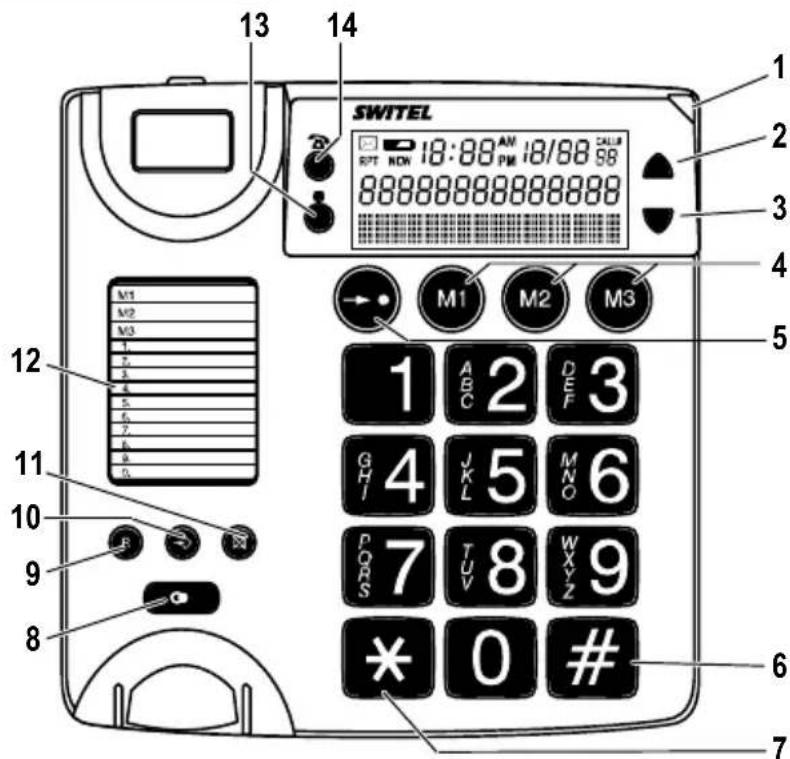
The buttons on the telephone are depicted with simplified icons throughout this operating manual (see above). Therefore, it is possible that the icons differ slightly from those actually provided on the telephone.
Display indicators
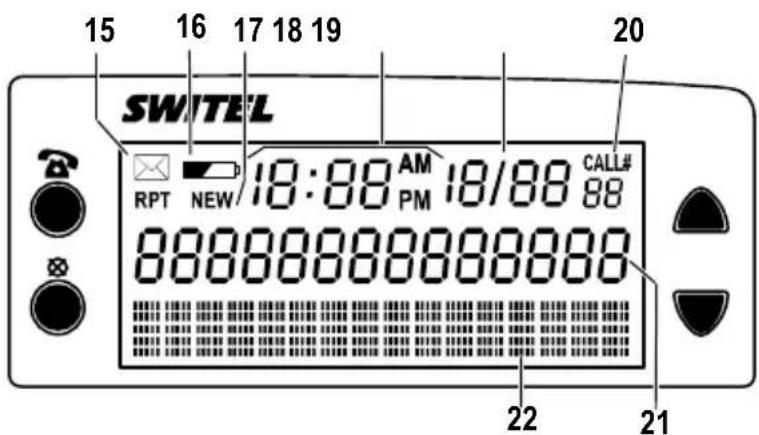
15 RPT: Indicates several calls have been received from the same caller
16 Battery capacity
17 Indicates new calls have been received
18 Time
19 Date
20 CALL#: Indicates the memory location currently selected in the calls list
21 Digit field
22 Text field
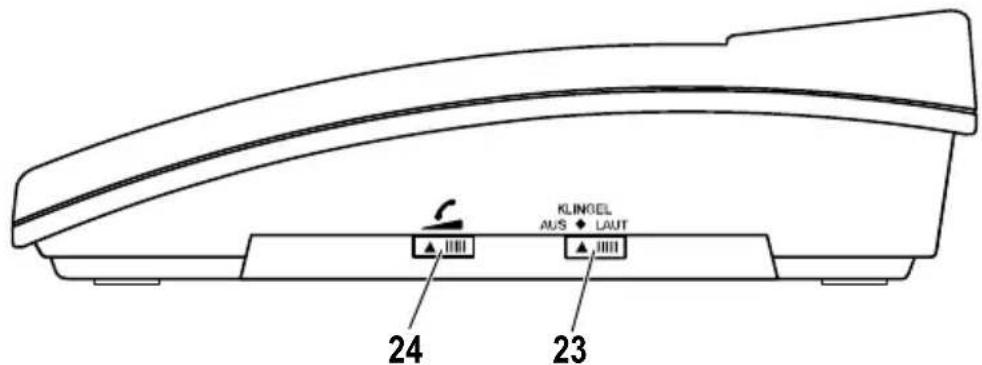
Side view
23 Ringer volume
24 Receiver volume
Display and explanation of operation sequences
Enter digits
* Press the button depicted briefly
2 sec Press the button depicted for 2 seconds
Press and hold Press and hold the button depicted
Release Release the button depicted
Telephone rings
Lift the receiver
Replace the receiver on-hook
NOCALLS or
Text or icon in the display
Telephoning
4 Telephoning
Taking a call
In addition to the ringing tone, the visual call indicator lights up when a call is received.
Lift the receiver / Take the call
Ending a call
Replace the receiver on-hook / End the call
Making a call
Lift the receiver
Enter the phone number
A connection is made automatically after you have entered the phone number.
The display can show a maximum of 14 digits. If the phone number has more digits, only the last 14 are displayed.

If your telephone is connected within a private branch exchange, refer to Page 56 for information on other things to be taken into account when making calls.
Redialling
Your telephone stores the last phone number dialled. If you want to dial this number again, e.g. because the connection was engaged or the call was not taken, use the redalling function:
Lift the receiver
Press the redialling button
The phone number stored is automatically dialled and a connection established.
One-touch dialling
It is possible to store three phone numbers so that they are dialled simply by pressing the respective button (one-touch dialling).
Three buttons, M1, M2 and M3, are provided for this. The M3 button is coloured red and is thus perfect, for example, for programming an emergency call number.
Programming one-touch dialling buttons
Lift the receiver
STORE Press the Store button
Enter the phone number (max. 16 digits)
STOREMEM Press the Store button
M1 Press the required one-touch dialling button
Replace the receiver on-hook / End programming
Making calls using the one-touch dialling buttons
Lift the receiver
M1 Press the required one-touch dialling button (e.g. M1)
The phone number stored is automatically dialled.
Quick dialling
It is possible to store 10 phone numbers so that they are dialled simply by pressing three buttons (quick dialling).
Programming quick dial buttons
Lift the receiver
STORE Press the Store button
Enter the phone number (max. 16 digits)
STOREMEM Press the Store button
0 Enter the required memory location number
(e.g. in this case for memory location 0)
Replace the receiver on-hook / End programming
Making calls using the quick dial buttons
Lift the receiver
Press the quick dial button
0 Enter the memory location number (e.g. in this case, memory
location 0)
The phone number stored is automatically dialled.
Talk time display
A few seconds after a call has begun, the current duration of the call appears in the display in minutes and seconds.
Increasing the receiver volume
If the caller's voice is too quiet, you can increase the receiver volume during the call simply by setting the receiver volume switch on the right-hand side of the telephone base
Setting the ringing tone volume
It is possible to change the volume of the ringing tone by adjusting the RING sliding switch on the right-hand side of the telephone base. The sliding switch has three positions:
For loud ringing, move the sliding switch to the right-hand side (LAUT). For normal ringing volume, move the sliding switch to the middle (KLINGEL). If you do not want to be disturbed, move the sliding switch to the left-hand side (AUS), the ringing tone is switched off.
Muting the receiver microphone
The microphone in the receiver can be activated and deactivated during a telephone conversation.
Press and hold the Mute button to activate the microphone,
release the Mute button to resume.
Caller Number Display (CLIP)
5 Caller Number Display (CLIP)
The caller number display (CLIP) and display of date and time are optional services offered by your telephone network provider. Contact them for any further information.
If the CLIP function is available for your telephone system (CLIP = Calling Line Identification Presentation), the number of the caller appears in the display when a call is received - as long as callers have agreed to transmission of their phone number.
- If the caller has suppressed transfer of his phone number, the number is not displayed. The message -WITHHELDCALL- appears in the display.
- If the message -UNIVAILABLE appears, no information on the caller is available; this could concern an international call, for example.
- If a phone number is only received in part or with errors, the message appears in the display.

If you do not take a call received, the information remains in the display for approx. 20 seconds before the current time and date reappear.
Calls list
All incoming calls received in your absence are recorded in a call list. The calls list can contain up to 64 phone numbers. The time and date of receipt are recorded for each call. When the calls list is full, the oldest phone number is deleted to make space for the new one received.
When incoming calls are registered during your absence, the display indicates the number of new phone numbers recorded. Example: 2 new calls received :02 .
In addition, the visual call indicator flashes.
The total number of phone numbers in the calls list is also displayed. Example: A total of 4 entries in the calls list TOTAL:04.
Viewing the calls list
Please proceed as follows to obtain more detailed information on the missed calls:
Open the calls list and display the last call missed

If the calls list is empty, the message No CALLS appears in the display.
View further calls in the calls list
On reaching the last memory location in the calls list, the message ENDOfList appears in the display.
The display provides various information on missed calls:
- The number below the CALL# indicator indicates which of the 64 memory locations available you are currently in.
The date and time the call was received.
If a caller has tried to contact you several times, the date and time relates to the last attempt received. The RPT appears in the left-hand corner.
The second line in the display shows the phone number of the caller, in cases where it was transmitted.
- Otherwise, a corresponding message appears in the third line (see above).

If no button is pressed for 20 seconds, the calls list is automatically closed and the display reverts to showing the current time, date, total number of phone numbers in the calls list and number of newly registered phone numbers.
When all the newly recorded phone numbers have been viewed, the display is automatically reset to zero and the visual call indicator goes out.
Dialling numbers in the calls list
You can dial / call back phone numbers directly from the calls list:
Lift the receiver
Open the calls list and select the required entry
Press the 'dial from calls list' button
A connection is established.
Or:
Open the calls list and select the required entry
PICKUPHANDSET Press the dial from calls list' button
Lift the receiver
A connection is established.
Deleting individual entries from the calls list
Open the calls list and select the required entry
Press the Delete button twice to clear the entry from the calls list
Deleting all entries from the calls list
or Open the calls list
4 sec Press the Delete button for 4 seconds. The message
ERASEALLCALLS appears in the display.
NOCALLS Press the Delete button. All the entries in the calls list are deleted.
Storing a phone number from the call log
A phone number stored in the call log can be stored directly.
Lift the receiver
or Open the call log and select an entry
Press twice the memory button
STOREMEM
Enter the required memory location number
(0-9 or M1-M3)
PABX / Supplementary Services
6 PABX / Supplementary Services
R button on private branch exchanges
The telephone can also be connected to a private branch exchange. The dealer where you purchased the exchange can provide information as to whether the telephone will work properly with the exchange.
If the telephone is connected to a private branch exchange, all the functions associated with the R-button, such as transferring calls, automatic call back, etc., can be used.
PABX access code (number for an outside line)
When using private branch exchanges, it is necessary to dial a specific number to obtain the dialling tone for an outside line. The number for an outside line is often "0" or "9". Dial this number first and wait for the dialling tone. You can then dial the actual phone number.
If one-touch and quick dial buttons are to be used for the telephone when connected to a private branch exchange, please take this into consideration and enter the access code before the actual phone number when programming the one-touch and quick dial buttons. It is also possible to program a dialling pause between the number for an outside line and the actual phone number. Section "Dialling pause"
Dialling pause
When using private branch exchanges, it is necessary to dial a specific number to obtain the dialling tone for an outside line. When using some older private branch exchanges, it takes a little time before the dialling tone becomes audible. In the case of such private branch exchanges, a dialling pause can be inserted after the number for an outside line in order to continue dialling directly without having to wait for the dialling tone.
Lift the receiver
Dial the number for an outside line
Insert the dialling pause
A P appears in the display for "Pause".
Dial the phone number
After dialling the number for the outside line, the telephone then waits 3 seconds before dialling the actual phone number.
The pause can also be stored when programming phone numbers as one-touch and quick dial numbers.
Answering machine in the telephone network
An answering machine in the telephone network is offered by many telephone network providers. This function can only be used when your telephone network provider actually offers the service. Contact them for any further information.
Call number display (CLIP)
If this function is available with your telephone line, the number of the caller appears in the display when the phone rings. Page 54
The caller number display function is an optional service offered by telephone network providers. Contact your network provider for further information.
Technical Properties / Troubleshooting
7 Technical Properties / Troubleshooting
Technical data
| Feature Value | |
| Batteries 4 x 1.5V Alkaline, size: AA | |
| Dialling mode Tone dialling mode | |
| Permissible ambient temperature 10°C to 30°C | |
| Permissible relative humidity 20% to 75% | |
| Recall time (Flash time) 100 ms | |
| Pause 3.6 sec |
Declaration of Conformity
This device fulfils the requirements stipulated in the EU directive:
1999/5/EU directive on radio equipment and telecommunications terminal equipment and the mutual recognition of their conformity. Conformity with the above mentioned directive is confirmed by the CE symbol on the device.

Troubleshooting
If you experience problems with the telephone, first check whether the cause of the problem is a defect telephone line or the telephone itself.
To do this, disconnect all additional telephone equipment from the telephone system and connect only the TC49S directly to the telephone line socket. If the problem prevails, plug another phone (if available) into the jack. If the fault continues to occur, the telephone line is probably defective. In this case, contact the Service Department of your telephone network provider who can provide more assistance on checking your system.
If the problem lies with the telephone itself, please contact the sales outlet where you purchased the telephone. To assert claims under the terms of guarantee, it is essential to produce the sales receipt.
8 Maintenance / Guarantee
Maintenance
Clean the housing surfaces with a soft, dry, fluff-free cloth.
- Do not use any cleaning agents or solvents.
Apart from occasionally cleaning the housing, no other upkeep is necessary.
Guarantee
SWITEL equipment is produced and tested according to the latest production methods. Carefully selected materials and highly developed technology ensure perfect functioning and a long service life. The terms of guarantee do not apply where the cause of equipment malfunction is the fault of the telephone network operator or any interposed private branch extension system. The terms of guarantee do not apply to the batteries used in the products. The period of guarantee is 24 months from the date of purchase.
All deficiencies related to material or manufacturing errors within the period of guarantee will be redressed free of charge. Rights to claims under the terms of guarantee are annulled following tampering by the purchaser or third parties. Damage caused as the result of improper handling or operation, incorrect positioning or storage, improper connection or installation or Acts of God and other external influences are excluded from the terms of guarantee. In the case of complaints, we reserve the right to repair or replace defect parts or provide a replacement device. Replaced parts or devices become our property. Claims for damages are excluded except in cases of intent or gross negligence on the part of the manufacturer.
If your device shows signs of defect during the period of guarantee, please return it to the sales outlet in which you purchased the SWITEL device together with the purchase receipt. All claims under the terms of guarantee in accordance with this agreement can only be asserted at the sales outlet. No claims under the terms of guarantee can be asserted after a period of two years from the date of purchase and hand-over of the product.
9 Index
A
Answering machine in the telephone network, 56
B
Button icons, 50
C
Call number display, 56
Caller number display (CLIP), 54
Calls list, 54
CLIP, 54
Connecting the receiver, 48
Connecting the telephone cable, 49
Contrast, 48
CONTRAST sliding switch, 48
D
Date and time, 48
Declaration of Conformity, 57
Deleting all entries from the calls list, 55
Deleting individual entries from the calls list, 55
Dialling numbers in the calls list, 55
Dialling pause, 56
Display, 51
Display indicators, 50
Disposal, 47
E
Editing the calls list, 55
Ending a call, 52
Explanation to the icons depicted on the buttons, 50
Explanations, 51
G
Guarantee, 58
H
Hearing aid compatibility, 47
Hooks, 49
1
Increasing the receiver volume, 53
Inserting the batteries, 48
Installation location, 47
Intended use, 47
M
Maintenance, 58
Making a call, 52
Mounting bracket, 49
Muting the receiver microphone, 53
N
Number for an outside line, 56
0
Operating elements, 50
P
PABX access code, 56
Package contents, 48
Private branch exchanges, 49, 56
Putting the telephone into operation, 48
R
R button on private branch exchanges, 56
Receiver volume, 53
Redialling, 52
RING sliding switch, 53
Ringing volume, 53
s
Safety information, 47
Setting the display contrast, 48
Setting the ringing tone volume, 53
Storing a phone number from the call log, 55
Supplementary services, 56
T
Taking a call, 52
Talk time, 53
Technical data, 57
Telephoning, 52
Troubleshooting, 57
V
View calls list, 54
W
Wall installation, 49
Declaration of Conformity
This equipment complies with the European R&TTE directive.
To view the complete Declaration of Conformity, please refer to the free download available at our web site: www.switel.com.
Service Hotline
In the event of technical problems, you can contact our hotline service, Tel. 0900 00 1675 within Switzerland (cost via Swisscom at time of going to print: CHF 2.60/min).