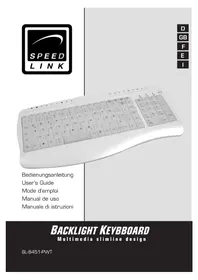
Backlight SL6451 - Keyboard Speedlink - Free user manual and instructions
Find the device manual for free Backlight SL6451 Speedlink in PDF.



| Product Type | Wired keyboard with backlight |
| Brand | Speedlink |
| Model | Backlight SL6451 |
| Dimensions (L x D x H) | 39 x 19.5 x 1.5 cm |
| Weight | Approximately 400 g |
| Interface | USB |
| Power supply | Via USB port (5 V) |
| Backlight | Yes, switchable (※ key) |
| Multimedia keys | Yes, many (volume, navigation, player, etc.) |
| Wrist rest | Integrated |
| Design | Compact, satin finish |
| Supported operating systems | Windows 98/ME/2000/XP |
| Plug & Play function | Yes (except Windows 95/NT) |
| Warranty | 2 years parts and labor |
| Care and cleaning | Clean with a soft, dry cloth; avoid water and abrasive products |
| Safety | Do not open or modify; avoid moisture and liquid spills |
| Spare parts and repairability | Not user-serviceable; contact technical support |
| Article number | SL-6451 |
Frequently Asked Questions - Backlight SL6451 Speedlink
User questions about Backlight SL6451 Speedlink
0 question about this device. Answer the ones you know or ask your own.
Ask a new question about this device
Download the instructions for your Keyboard in PDF format for free! Find your manual Backlight SL6451 - Speedlink and take your electronic device back in hand. On this page are published all the documents necessary for the use of your device. Backlight SL6451 by Speedlink.
USER MANUAL Backlight SL6451 Speedlink
Multimedia slimline design
SL-6451-PWT
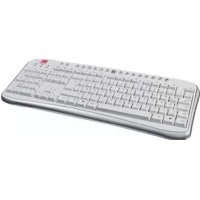
Thank you for purchasing the Backlight Keyboard. With its switchable background illumination, this keyboard is perfect for night owls and enables easy input of commands even in low light. Ideal for games in the dark!
Features
- Compact design with classy radiant pearl look
- Numerous multimedia keys
- Background illumination switches on/off
- Integrated wrist support
Package content:
- Keyboard
- User's guide
System requirements
- Windows 98/98SE/2000/ME/XP
- USB port
To ensure the multimedia buttons will work properly, we recommend that you download the necessary software from our website: http://www.speed-link.com
Software Installation for Windows XP/ME
For use with Windows XP there is no need to install software as the multimedia keys will function without software installation.
Hardware installation
USB connection
Note: Please note that Windows 95/NT do not support USB devices.
- Connect the USB cable to the corresponding USB port of your computer. The plug&play function of your computer will detect the new device automatically.
- Windows may ask you to insert the Windows Installation CD. Follow the instructions on the screen.
Hotkey function
| ↑ | Opens the home page in your Internet browser |
| Opens your default e-mail program (e.g. Outlook) | |
| ← | Changes to an earlier web page you have already visited in the Internet Browser |
| → | Changes to the next web page you have already visited in the Internet Browser. |
| Opens the search function in your Internet browser | |
| Updates the selected web page | |
| Opens your favourite sites in the Internet browser | |
| Stops the current web page loading | |
| Opens an installed media player (CD/MP3/DVD player, etc.) | |
| Reduces the volume | |
| Increases the volume | |
| Mutes the media playback | |
| Stops the media playback | |
| Changes to the previous track | |
| Starts reproduction of your CD/DVD/MP3 player | |
| Changes to the next track | |
| Opens “My Computer” on your PC | |
| Puts the PC into standby mode, pressing the button again reactivates the PC | |
| Switches the background illumination on and off |
GB
Important Advice

- Do not take the device apart.
- Do not attempt to service or repair the device yourself. Refer all servicing to qualified service personnel.
- Do not attempt to modify the device in any way. Doing so could invalidate your warranty. Do not use this apparatus near water (for example, sinks, baths, pools) or expose it to rain, moisture, or dripping or splashing liquids.
Specifications
Article n°: SL-6451
Dimensions: Height: 1,5cm
Width: 39cm
Depth: 19,5cm
Interface: USB
Guarantee
We guarantee this product in respect of workmanship and all built-in components for a period of two years from date of purchase.
If you need help...
In case of technical problems don't hesitate to contact our technical support. The hotline number is given on the back page of this manual.

Brand : Speedlink
Model : Backlight SL6451
Category : Keyboard