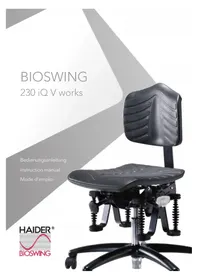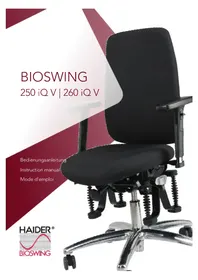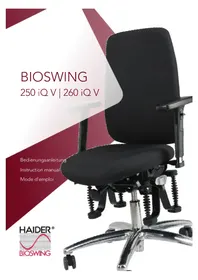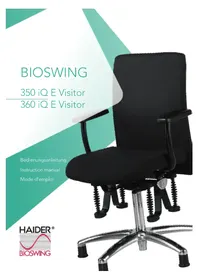
360 iQ S - Office chair Bioswing - Free user manual and instructions
Find the device manual for free 360 iQ S Bioswing in PDF.



Frequently Asked Questions - 360 iQ S Bioswing
User questions about 360 iQ S Bioswing
0 question about this device. Answer the ones you know or ask your own.
Ask a new question about this device
Download the instructions for your Office chair in PDF format for free! Find your manual 360 iQ S - Bioswing and take your electronic device back in hand. On this page are published all the documents necessary for the use of your device. 360 iQ S by Bioswing.
USER MANUAL 360 iQ S Bioswing
Congratulations on your new HAIDER BIOSWING!
HAIDER BIOSWING seating systems come with a unique technology: A multifunctional seat, which can be moved in multiple directions and is dampened in a controlled manner, dynamically reflecting the body's energy.
Your brain responds to this by sending constant impulses to your postural muscles. The body and mind achieve active balance. HAIDER BIOSWING seating systems significantly increase concentration, well-being, and performance.

The HAIDER BIOSWING Multifunctional Seat.
Please read the following instructions in order to be able to use all available settings.
We wish you great pleasure as soon as you take place in the new HAIDER BIOSWING experience.
Your HAIDER BIOSWING Team

- Customized settings for each individual's needs!
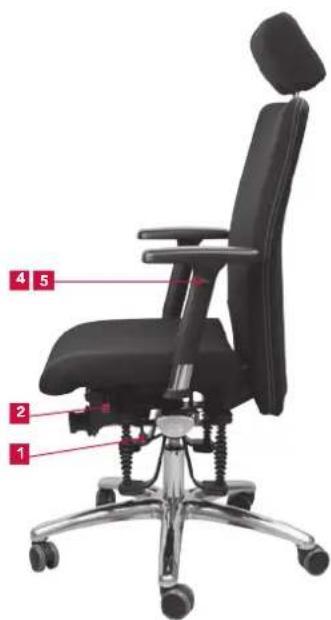
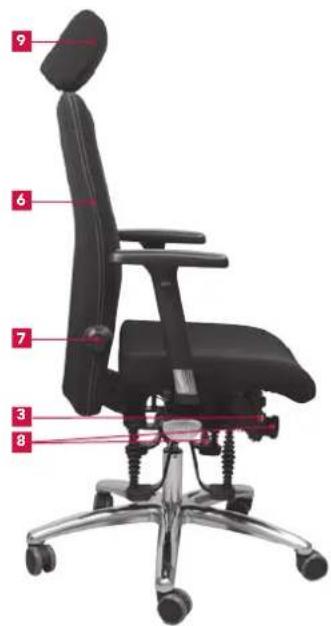
Summary of Operating Elements
1eat height
2 adjustment of seat tilt
3 adjustment of seat depth
4rm, height adjustable
5rm, multifunctional
*Note: Also the version without the shown operating elements allows individual adjustment in seat depth and seat tilt.
6 adjustment of backrest height
7. lumbar support
3 RainBackMatic (synchronous mechanism), backrest tilt/ pressure
9 Headrest
(Instructions included for each model!)
english|18 english
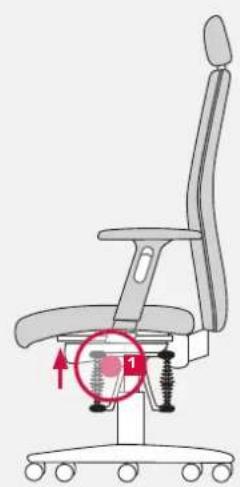
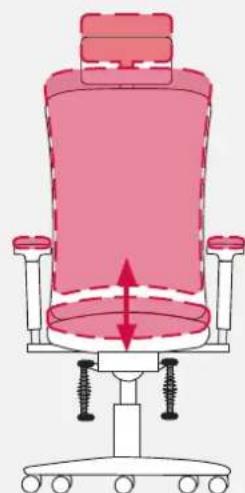
Seat Height
Adjust the height of the seat surface according to the height to the hollow parts of your knees. Your upper and lower leg form a right to slightly open angle. Your feet are flat on the floor - without pressure on the upper thighs.
Lowering the Seat
While sitting on the chair, pull the operating element upward and release it at the desired position. Please pay attention to the risk of getting trapped in the foot section.
Raising the Seat
Lightening the load on the seat, pull the operating element upward and release it at the desired position.
19
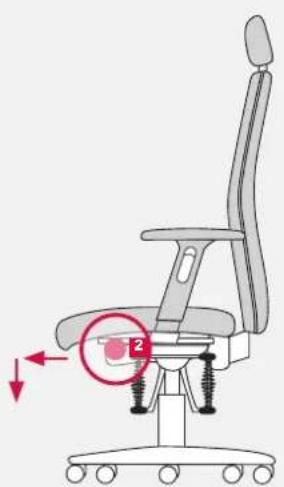
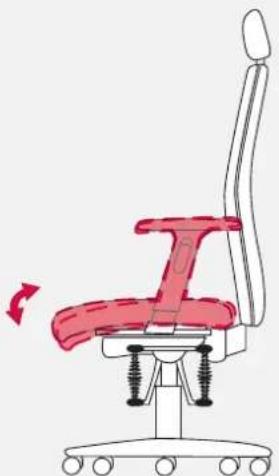
2 Adjustment of Seat Tilt
To support the physically correct tilt of the pelvis, you can adjust the seat surface either by utilizing the permanent-contact mechanism or by adjusting it for individually desired inclination. The seat tilt facilitates the straightening of the spinal column.
Seat Tilt with Permanent-contact Mechanism
While sitting on the chair, press the operating element toward the front and then downward. The whole seat surface reclines according to the shift of your body weight and the position of your upper leg. To deactivate the setting, pull the operating element upward again.
Individually Adjusted Seat Tilt
While sitting, push the operating element 2 toward the front and adjust the required tilt by shifting your body weight and upper leg and then release the operating element.
Version without Operating Handle: Seat tilt can be adjusted by turning the integrated adjusting screw, which is located in the middle of the bottom side of the seat cushion, clockwise or counterclockwise.
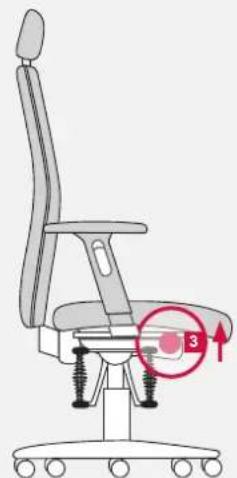
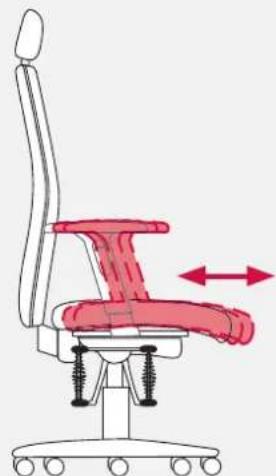
Adjustment of Seat Depth
The adjustment of the seat depth helps you to adjust the seat surface to the length of your upper leg. Make sure that the front edge of the seat is at a distance of six inches from the hollow part of the knee.
Individually Adjusted Seat Surface
While sitting, pull the operating element 3 upward and simultaneously shift the seat forward and backward by pushing the seat cushion. Then release the operating element.
Version without Operating Handle:
With the help of the integrated quick-release lever at the bottom side of the seat cushion (in the front at the right side of the seat support), the seat depth can be changed by about 2.5cm . Lift the quick-release lever, change the position of the seat cushion, and press the quick-release lever tightly on again. (Note: If the seat cushion cannot be moved, turn the loosened quick-release lever counterclockwise. If the seat cushion is not fixed tightly after its change of position, turn the loosened quick-release lever clockwise.)
english|20 english
21
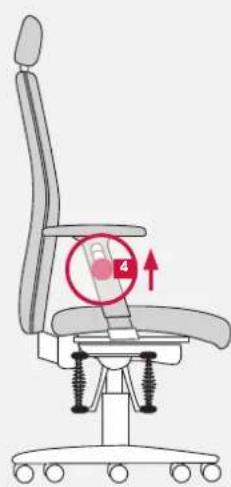
4 Arm, Height adjustable (1F)
To relieve the strain on shoulders and neck, the arms can be adjusted in height. Adapt the height so that you do not feel any tension in the shoulder area.
Adjustment of Arm in Height
Pull the operating element upward. At the same time, adjust the arms at the desired height and then release the cord-pull switch.
(Arms allow adjustment to the width by using the elongated guide with position holes at the beam holding the arms up. Loosen the screws at the bottom of the seat cushion. Adjust the width by pulling the arms outward or inward and then tighten the screws firmly.)
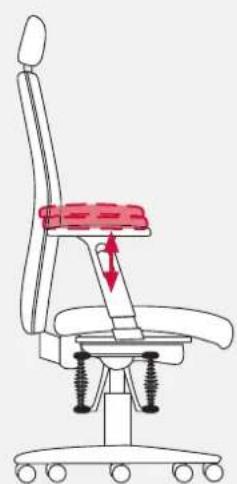
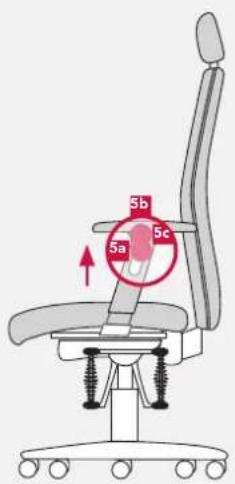
Multifunctional Armrest (4F)
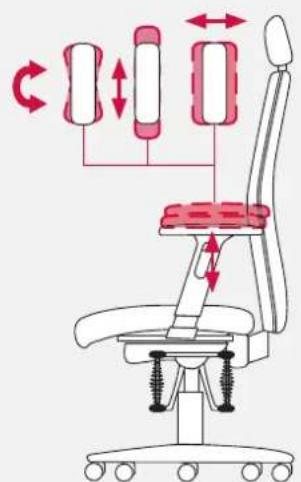
The arm rests may be adjusted in height, in order to relief the shoulder and neck musculature. Please adjust the height that way, so that you don't feel any tightness in the shoulder. Additionally you may align the supports of the arm rests in width and profundity in accordance with the particular proportions of the upper part of the body, and rotate them in respect to the position of the forearm.
To adjust the height of the armrest
Please, pullupwardsthekey 5a, and simultaneously adjust the supports at the desired height and subsequently loosen the key.
To adjust the width and profundity, or rotate the support of the armrest You may push by a noticeable locking resistance the supports of the armrest to the left/right or ahead/rear. By a previous pushing of the operation key below the support, may be adjusted the rotation of the support.
(The armrests may be adjusted in width by a long hole guiding in the bearing. Loosen the screws on the lower part of the seat upholstery, establish the width by pulling or pushing the armrest outwards or inwardly and subsequently tighten the screws again.)
english|22english
23
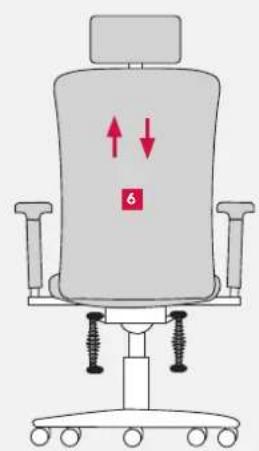
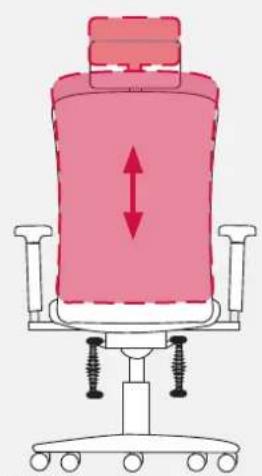
6 Adjustment of Backrest Height
The backrest height can be individually adjusted to the shape of your spinal column.
Adjustment of Backrest Height
While sitting, reach backward with both hands and adjust the backrest to the desired height by pushing it upward from the lowest point. Please note that the backrest can be lowered only from the highest position.
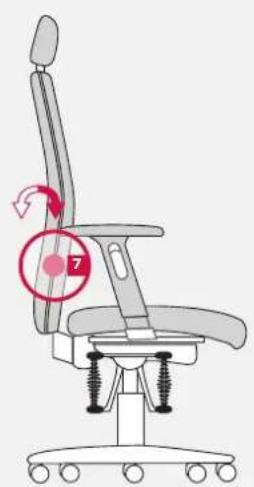
Lumbar Support
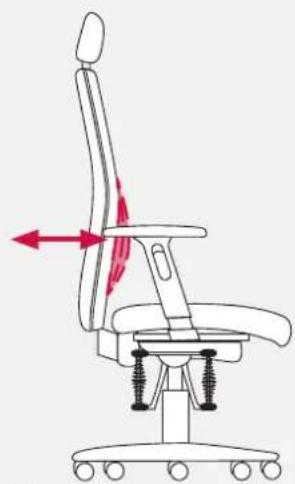
With the adjustable lumbar support mechanism, you can adapt the curvature in the area of the lumbar lordosis. Adjust the seat curvature approximately at belt height by adjusting the backrest that your spine receives optimal support.
Adjustment of Lumbar Support to Shape of Back
Operating the rotary control 7 the backrest forward increases the curvature of the spine. Operating backward reduces the curvature of the spine.
english|24english
25
8 TrainBackMatic (Synchronous Mechanism)
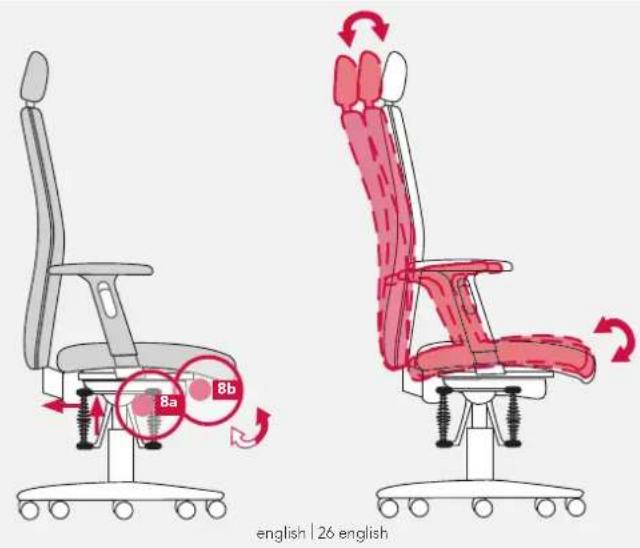
The TrainBackMatic responds to the backrest pressure and automatically synchronizes seat and backrest for a physically beneficial motion sequence. Try to adjust the backrest pressure level so that you never feel to have to apply too much force to lean back. In this way, you motivate yourself to change your sitting position frequently; thus, promoting positive lumbar effects.
Adjustment of Backrest Tilt: Individually or with Permanent Contact
While sitting, pull the operating element 8a upward. The backrest follows your movements. As soon as you release the lever, the backrest is fixed. You can activate the permanent-contact mechanism by pulling the operating element 8apward and subsequently pushing it backward.
Individually Adapted Back Pressure
While sitting, pull the operating element 出 upward and then push backward so that you can adjust the back of the seat's tilt. Turn the hand wheel 出 , which is located in the middle under the seat surface, clockwise to increase the back pressure. Meanwhile, turning the hand wheel counterclockwise decreases the back pressure.
Headrest
The headrest supports the relief of the cervical spine, especially in the backward tilted posture of relaxation. The headrest can individually be adjusted in height and tilt.
Individual Adjustment of Headrest
While noticing resistance from the catches, you can push the headrest upward or downward. To adjust the tilt, turn it forward or backward.
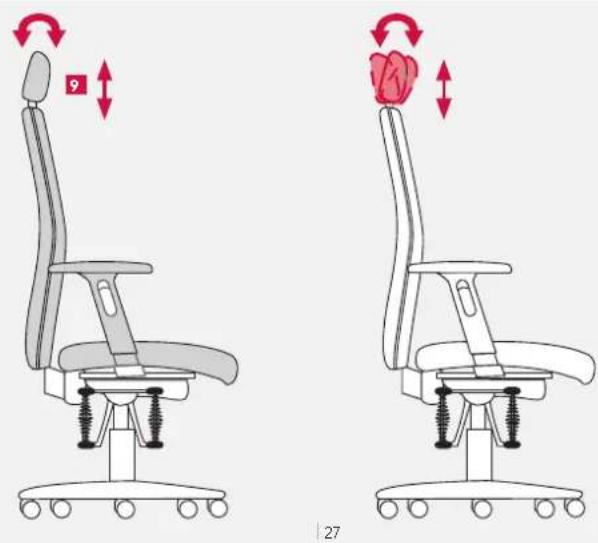
9

Special Notes
Use the office swivel chair only - as intended - to sit on it. Never stand on the chair.
Gas Spring
In order to adjust the height, only specialist staff is allowed to make changes and perform work in the area of the gas spring. Do not heat or open the pneumatic spring with force.
Castors
For your safety, the office swivel chair is equipped in series with self-braking castors in order to impede the movement of an empty chair.
Pay attention to the correct choice of castors according to the floor covering.
If the chair is used on a soft floor (e.g. carpet), it should be equipped with hard castors. Hard castors are single-colored.
If the chair is used on a hard floor (e.g. parquet, linoleum, tiles), it should be equipped with soft castors. Soft castors are two-colored, which means that the tread has a different color.
Maintenance and Care
If the office swivel chair is used as intended, it is maintenance-free. Clean paint/plastic and metal surfaces with a soft hand brush or cloth with mild detergent, soap, or grease-dissolving liquid. According to how much the chair is used, a regular cleaning of the upholstery cover is recommended. The fabric/micro-fiber cover can be made dirt free by vacuum-cleaning it or with the help of standard dry foam. Leather coverings can be kept smooth for years by using standard leather-care products (solar radiation). Stains should be treated immediately. Check the effect of cleaning products first at a place that is not visible. Otherwise, select cleaning-agents can cause color discrepancies when compared to the untreated areas.
This certificate guarantees regular and thorough quality inspections.
HAIDER BIOSWING GmbH guarantees perfect quality and full functionality of its products.
The warranty lasts five years in consideration of normal wear and tear involved in 8 hours use per day with a maximum weight load of 110kg
The warranty is valid from date of delivery/distribution of the product to our contracting partner.
(If you use the product continuously, contact us to request information about the time of the warranty and the warranty restrictions; the regulations can also be found on www.bioswing.de.)
This product has been carefully mounted and inspected by our employees.
Signature
In case of a complaint, please tell us the following serial number.
Serial number:

Your contracting partner:
Votre revendeur: