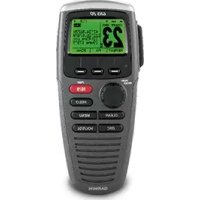
GHS 20 - Remote control GARMIN - Free user manual and instructions
Find the device manual for free GHS 20 GARMIN in PDF.



| Product Type | Remote control for marine VHF radio |
| Brand | Garmin |
| Model | GHS 20 / GHS 20i |
| Compatibility | VHF 200/200i or 300/300i (depending on model) |
| Dimensions (handset) | 16.1 × 7.2 × 4.28 cm |
| Dimensions (GWH 20 receiver) | 7.1 × 13.5 × 2.6 cm |
| Weight (handset) | 250 g |
| Weight (receiver) | 188 g |
| Power Supply | Rechargeable lithium-ion battery |
| Battery Life | Up to 18 hours |
| Charging Time | Up to 4 hours |
| Operating Temperature Range | -15 °C to 70 °C |
| Charging Temperature Range | 0 °C to 45 °C |
| Water Resistance | IPX7 (immersion 1 m, 30 min) |
| Safe Compass Distance | 60 cm |
| Maximum Range between Handset and Receiver | 100 m (depending on installation) |
| GWH 20 Cable Length | 1.5 m |
| Main Features | Wireless communication with the radio, pairing up to 3 handsets, charge status indicator |
| Box Contents | GHS 20 handset, GWH 20 receiver, charging cradle, belt clip, mounting hardware |
| Maintenance | Clean with a soft, dry cloth. Avoid harsh chemicals. |
| Safety | Use at least 60 cm from compasses. Do not expose to extreme temperatures outside range. |
| Repairability | Replaceable battery (consult a professional). Spare parts available (cradle, receiver, cables). |
Frequently Asked Questions - GHS 20 GARMIN
User questions about GHS 20 GARMIN
0 question about this device. Answer the ones you know or ask your own.
Ask a new question about this device
Download the instructions for your Remote control in PDF format for free! Find your manual GHS 20 - GARMIN and take your electronic device back in hand. On this page are published all the documents necessary for the use of your device. GHS 20 by GARMIN.
USER MANUAL GHS 20 GARMIN
These installation instructions are for the GHS 20 and GHS 20i handsets. The GHS 20 is for use with the Garmin VHF 200 or 300 radio and the GHS 20i is for use with the Garmin VHF 200i or 300i radio.
For additional information, refer to the installation instructions provided with your radio. For operational instructions, refer to the owner's manual provided with your radio.
Compatibility
Your existing VHF 200/200i or VHF 300/300i radio may need a software update to work with the GHS 20/GHS 20i. Consult your Garmin dealer or contact Garmin for information.
About the GHS 20/20i
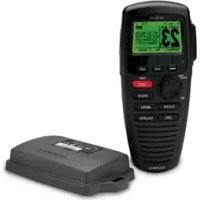
The GHS 20/20i handset 1 comes with a GWH^TM 20 receiver 2, a charging cradle 3, a belt clip, and the necessary mounting hardware.
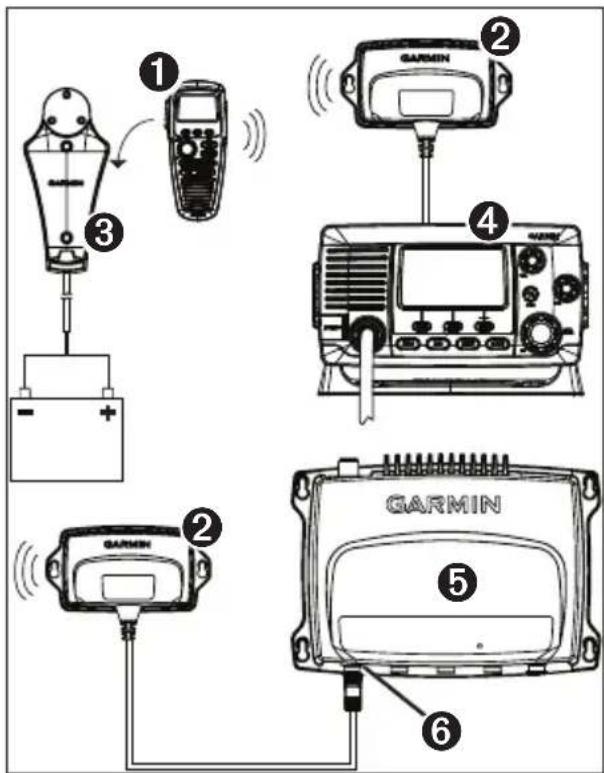
On a VHF 200/200i ④ the GWH 20 will only function correctly when connected to the microphone relocation port in the back.
On a VHF 300/300i, the GWH 20 will only function correctly when connected to the STATION 3 connector.
Both the GHS 20/20i handset and the GWH 20 receiver should be at least 23^5 / 8 in. (60~cm) from any compass to avoid interference.
About the GHS 20 Battery
The GHS 20 contains a Lithium-ion battery that charges when the handset is placed in the properly installed cradle.
An LED above the Channel knob on the GHS 20/20i indicates the charging status:
- Off—Not charging
Solid-Charging - Slow blink (1 blink/second)—The battery temperature is outside the safe charging temperature (page 7).
- Fast blink (6 blinks/second)—The battery cannot charge, and must be replaced.
Installing the GHS 20/20i Charging Cradle
- Determine a location to mount the charging cradle where the cradle can be connected to the boat battery.
- Using the cradle as a template, mark the two screw locations on the surface.
- Use a 1/8 in. (3mm) drill bit to drill the two pilot holes.
-
Use the included 25mm M4.2× 1.4 panhead screws to attach the cradle to the surface.
-
Route the power cable from the cradle to the boat battery or fuse block.
If it is necessary to extend the wires, use 18 AWG wire. - Connect the red wire to the positive terminal on the battery or fuse block, and connect the black wire to the negative terminal.
Installing the GWH 20
NOTE: Metal and other dense materials may inhibit communication between the GWH 20 and the GHS 20. Test the location to make sure the GWH 20 reliably communicates with the GHS 20 everywhere you plan to use it on the boat.
- Determine a location to mount the GWH 20.
If it is necessary to extend the GWH 20 cable, 5m and 10m extensions are available from your Garmin dealer.
-
Using the GWH 20 as a template, mark the two screw locations on the surface.
-
Use a 1/8 in. (3mm) drill bit to drill the two pilot holes.
- Use the included 25mmM4.2× 1.4 panhead screws to attach the GWH 20 to the surface.
- Route the GWH 20 cable to the VHF 200/200i or the VHF 300/300i.
-
Perform an action:
-
On a VHF 200/200i, connect the GWH 20 cable to the microphone relocation port on the rear of the radio.
- On a VHF 300/300i connect the GWH 20 to the STATION 3 port on the radio.
The GWH 20 cannot be connected to any other station on the VHF 300/300i.
Pairing GHS 20/20i
Up to three GHS 20/20i handsets can be paired with the GWH 20. You must pair a GHS 20/20i handset with the GWH 20 only once. The device and the handset automatically connect after they have been paired.
- Turn on all of the GHS 20/20i handsets you want to pair.
- Make sure the GWH 20 is connected to the VHF 200/200i or VHF 300/300i radio (page 4), and turn it on.
- On the VHF 200/200i or on a handset connected to the VHF 300/300i, select MENU > COMMUNICATIONS > PAIRING .
- Select OK to search for the GHS 20 handsets.
A list of IDs for found GHS 20/20i handsets is shown.
- Select a handset ID.
-
Select ACCEPT. A message is shown while the handset pairs with the GWH 20.
-
When the handset makes a sound, select OK on the handset to complete the pairing.
- Repeat steps 4-7 for each additional handset.
After a handset has been paired with the GWH 20, you do not need to pair it again. It will connect automatically when the handset and radio are both turned on.
Pairing Troubleshooting
If you are not able to pair a GHS 20/20i handset with the GWH 20, complete these steps.
- Make sure all the handsets you want to pair are turned on.
- Make sure the GWH 20 is connected to the microphone relocation port of the VHF 200/200i radio or to STATION 3 of the VHF 300/300i radio.
-
When pairing the handsets for the first time, make sure the handsets are close to the GWH 20 (within 3 ft (1m) if possible).
-
You can connect up to three GHS 20/20i handsets to the GWH 20. If you have three handsets paired with the GWH 20, and you are attempting to replace one of them, you must first disconnect the handset you are replacing (page 6).
Renaming a Paired GHS 20/20i
- On the VHF 200/200i or on a handset connected to the VHF 300/300i, select MENU > COMMUNICATIONS > CONNECTIONS > [Device Name] > NAME.
- Enter all the letters in the new name using the Channel knob (up to 12 letters).
- Select ACCEPT.
Disconnecting a GHS 20/20i From the GWH 20
If you must replace a GHS 20/20i handset because one is lost or damaged, for the best results, disconnect, or unpair, the handset you are replacing before pairing the replacement handset to the GWH 20 (page 5).
- On the VHF 200/200i or on the primary VHF 300/300i (STATION 1) GHS 10/10i handset, select MENU > COMMUNICATIONS > CONNECTIONs > [Device Name] > DISCONNECT.
- Select YES to confirm and disconnect the GHS 20/20i.
GHS 20/20i Specifications
| Specification | Measurement |
| Dimensions GHS 20/20i | 6 11/32 × 2 53/64 × 1 11/16 in. (16.1 × 7.2 × 4.28 cm) |
| Dimensions GWH 20 | 2 51/64 × 5 5/16 × 1 1/32 in. (7.1 × 13.5 × 2.6 cm) |
| Weight GHS 20/20i | 8.82 oz (250 g) |
| GWH 20 | 6.63 oz (188 g) |
| Operating temperature range | from 5°F to 158°F (from -15°C to 70°C) |
| Charging temperature range | from 32°F to 113°F (from -0°C to 45°C) |
| Compass-safe distance | 23 5/8 in. (60 cm) |
| Waterproof IEC 605 | 29 IPX7 (Immersion in 1 meter of water for 30 minutes) |
| Specification | Measurement |
| GHS 20/20i GWH 20 maximum transmission distance | 328 ft. (100 m), depending on installation location (page 4) |
| GWH 20 cable length | 59 in. (1.5 m) |
| Battery type Recharge | Chargeable lithium-ion |
| Battery life | Up to 18 hours |
| Charge time | Up to 4 hours |
© 2011 Garmin Ltd. or its subsidiaries

Garmin International, Inc.
1200 East 151st Street, Olathe, Kansas 66062, USA
Garmin (Europe) Ltd.
Liberty House, Hounsdown Business Park, Southampton, Hampshire, SO40 LR UK
Garmin Corporation
No. 68, Zhangshu 2^nd Rd., Xizhi Dist., New Taipei City 221, Taiwan (R.O.C.)
www.garmin.com
May 2011 Part Number 190-01098-05 Rev. A Printed in China