WP674 - Interdental brush Waterpik - Free user manual and instructions
Find the device manual for free WP674 Waterpik in PDF.



| Product type | Water flosser (interdental cleaner) |
| Brand | Waterpik |
| Model | WP674 (compatible with WP-650/655/660/670/672/676) |
| Main functions | Interdental cleaning, gum massage |
| Operating modes | Floss and Massage |
| Pressure adjustment | 10 adjustable pressure levels |
| Built-in timer | 30-second cycles (per arch) and 1 minute (recommended time), can be deactivated |
| Automatic shut-off | After 5 minutes of continuous use |
| Power supply | Standard mains plug (100-240 V ~ 50/60 Hz depending on model) |
| Included tips | Classic jet, orthodontic, Plaque Seeker®, toothbrush, tongue cleaner, Pik Pocket® (depending on model) |
| Rotating tip system | 360° rotation for easy access |
| Accessory storage | Under the reservoir lid (2 compartments) |
| Water reservoir | Removable and dishwasher-safe (top rack) |
| Care and cleaning | External cleaning with a soft cloth; descaling with white vinegar |
| Safety | Automatic shut-off, electrocution protections (do not immerse, unplug after use) |
| Spare parts and repairability | Replacement tips, hoses and handle available; no user-serviceable parts |
| Warranty | 2-year limited warranty (excluding accessories) |
| General information | Designed in USA, made in China; compatible with mouthwash (rinse after use) |
Frequently Asked Questions - WP674 Waterpik
User questions about WP674 Waterpik
0 question about this device. Answer the ones you know or ask your own.
Ask a new question about this device
Download the instructions for your Interdental brush in PDF format for free! Find your manual WP674 - Waterpik and take your electronic device back in hand. On this page are published all the documents necessary for the use of your device. WP674 by Waterpik.
USER MANUAL WP674 Waterpik
Important Safeguards 3
Product Description 5
Getting Started 6
Cleaning and Troubleshooting Your Waterpik® Water Flosser 9
Limited Two-Year Warranty 10
IMPORTANT SAFEGUARDS
When using electrical products, especially when children are present, basic safety precautions should always be followed, including the following:
READ ALL INSTRUCTIONS BEFORE USING.
DANGER:
To reduce the risk of electrocution:
• Always unplug product after using.
- Do not handle plug with wet hands.
- Do not place in or drop into water or other liquid.
- Do not use while bathing.
- Do not place or store product where it can fall or be pulled into a tub or sink.
- Do not reach for a product that has fallen into water. Unplug immediately.
- Check the power supply cord for damage before the first use and during the life of the product.
WARNING:
To reduce the risk of burns, electrocution, fire, or injury to persons:
- Do not plug this device into a voltage system that is different from the voltage system specified on the device or charger.
- Do not use this product if it has a damaged cord or plug, if it is not working properly, if it has been dropped or damaged, or dropped into water. Contact Waterpik International, Inc. or your local distributor which can be found at www.waterpik.com/intl.
- Do not direct water under the tongue, into the ear, nose or other delicate areas. This product is capable of producing pressures that may cause serious damage in these areas.
- Use this product only as indicated in these instructions or as recommended by your dental professional.
- Only use tips and accessories recommended by Water Pik, Inc.
- Do not drop or insert any foreign object into any opening or hose.
-
Keep electrical cord away from heated surfaces.
-
Do not use outdoors or operate where aerosol (spray) products are being used or where oxygen is being administered.
- Do not use iodine or water insoluble concentrated essential oils in this product. Use of these can reduce product performance and will shorten the life of the product.
- Remove any oral jewelry prior to use of this product.
- Do not use if you have an open wound on your tongue or in your mouth.
- If your physician or cardiologist has advised you to receive antibiotic premedication before dental procedures, you should consult your dentist before using this instrument or any other oral hygiene aid.
- If the Pik Pocket ^® tip (not included in all models) separates from the shaft for any reason, discard tip and shaft and replace with new Pik Pocket ^® tip (PP-100E).
- Do not use this product for more than 5 minutes in each two-hour period.
-
Unit will shut off automatically after 5 minutes of continuous usage.
-
Closely instruct and supervise children 8 years and above and individuals with special needs in the proper use of this product.
• Children should be supervised to ensure that they do not play with the appliance. - There are no consumer serviceable parts in this appliance and it does not require maintenance.
- Fill reservoir with water or other dental professional recommended solution only.
SAVE THESE INSTRUCTIONS
text_image
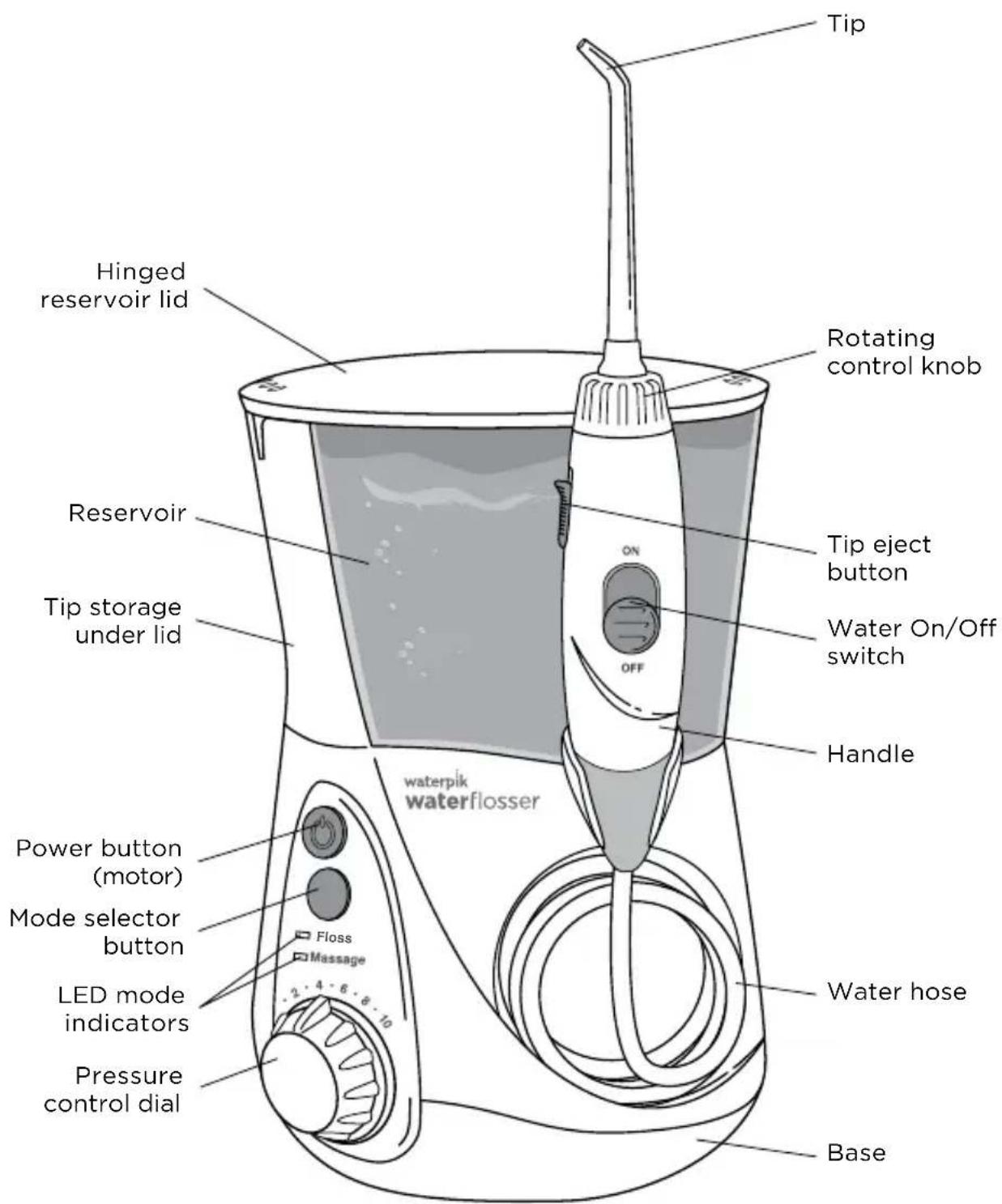
Tip Hinged reservoir lid Rotating control knob Reservoir Tip eject button Water On/Off switch Tip storage under lid OFF Handle waterpik waterflosser Power button (motor) Mode selector button LED mode indicators Pressure control dial Floss Massage 2 · 4 · 6 · 8 · 10 Water hose Base| Replace Every 3 Months | |
| BEST FOROrthodont | |
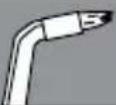 | BracesGeneral Use |
| ® Tip | BEST FORPik Pocket |
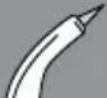 | Periodontal PocketsFurcations |
| Plaque Seeker® Tip | BEST FOR |
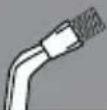 | ImplantsBridgesCrownsGeneral Use |
| Toothbrush Tip | BEST FOR |
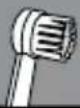 | General Use |
| Replace Every 6 Months | |
| Tip Classic Jet Tip | BEST FOR |
 | General Use |
| Tongue Cleaner BEST FOR | |
| Fresher Breath | |
Replacement tips/attachments may be purchased from your local distributor, which can be found at www.waterpik.com/intl.
NOTE: All tips not included in all models.
Powering the Unit
Plug the cord into an electrical outlet. If the outlet is controlled by a wall switch, be sure it is turned on.
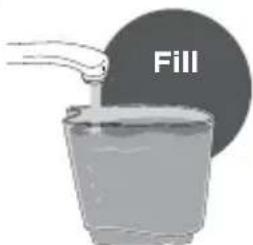
Prepare the Reservoir
Remove the reservoir and fill with lukewarm water. Replace the reservoir onto the base. There should be no gap between the reservoir and the base.
text_image
Fill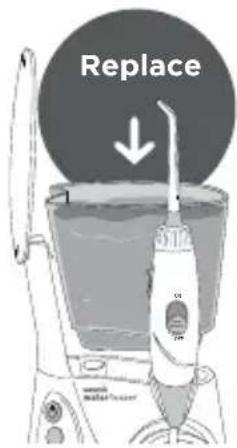
text_image
Replace ↓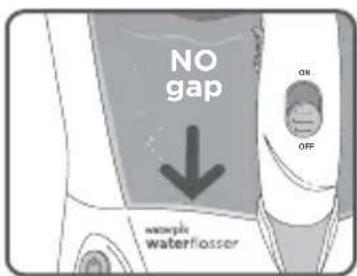
text_image
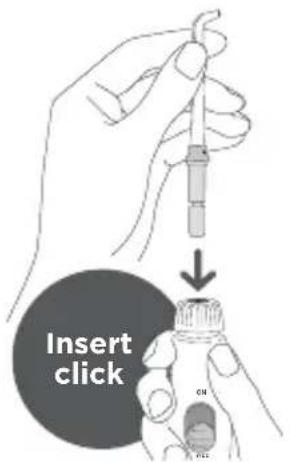
NO gap ON OFF waterflosserSelect and Insert Tip
Caution: Do not slide tip eject button while unit is running.
text_image
Insert click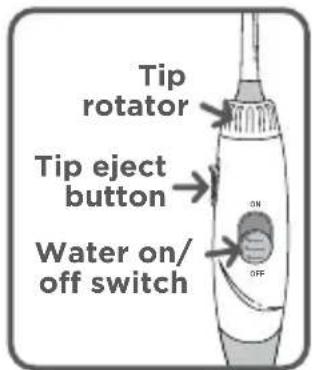
text_image
Tip rotator Tip eject button Water on/ off switchPrime Unit (First Time Use Only)
Prior to Very First Use
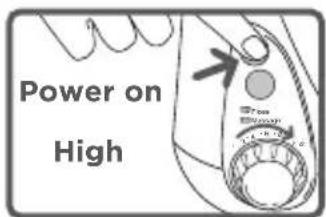
of Unit: Set pressure control dial to highest position, point the tip
text_image
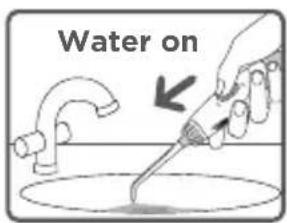
Power on Highinto sink. Turn power on. Slide water switch ON until water flows from the tip with substantial force. Turn power OFF.
text_image
Water onAdjust Pressure and Mode Selection
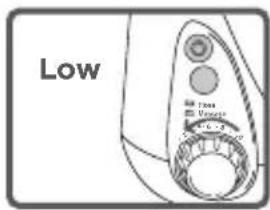
For first time users, adjust pressure control to lowest position. Gradually increase pressure to your liking. Press the mode button once and one LED will display current mode. Press mode button again to change modes. Floss Mode is suggested for first time use.
text_image
Low Time Voltage -0.5 -0.7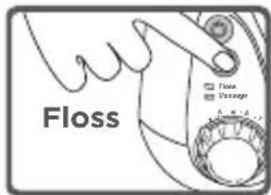
text_image
Floss Flow Usage A B C DUsing Your Waterpik® Waterflosser
Always place tip in mouth before turning water ON. With water switch on handle in OFF
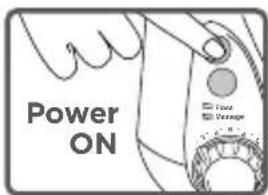
text_image
Power ON Fuse Drainposition, turn power on. Lean over sink and close lips enough to prevent splashing, while still allowing water to flow from mouth into the sink. Turn water switch ON. When finished, turn water switch and power OFF.
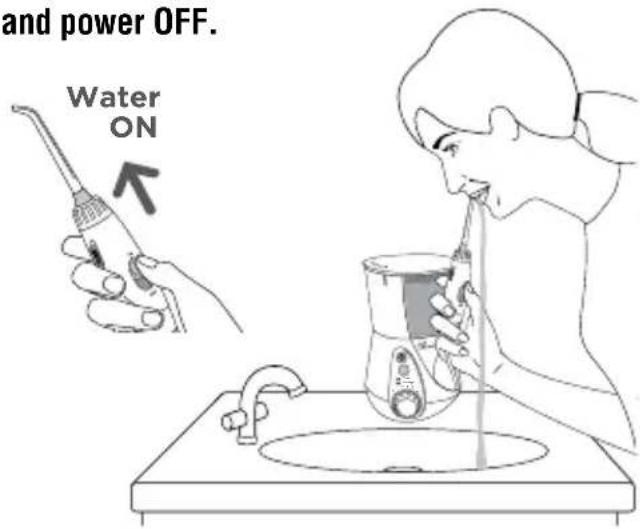
text_image
and power OFF. Water ONDuring use, you can stop water flow by sliding water switch on handle to the OFF position.
NOTE: Motor will continue to run.
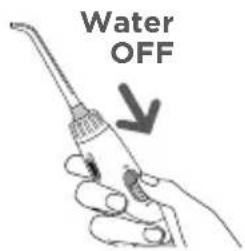
text_image
Water OFFTechnique Tips for Best Results
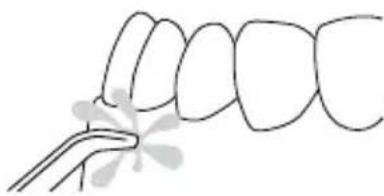
Aim the water stream just above the gumline at a 90 degree angle.

natural_image
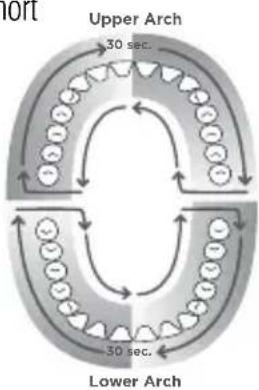
Diagram of human teeth with arrows indicating specific dental or tooth movement (no text or labels)Starting with the back teeth, follow the gumline and pause briefly between teeth. Continue until all areas around and between teeth have been cleaned.
One-Minute Timer/30-second Pacer (Floss Mode Only)
The Water Flosser will create a short pause at 30-seconds, to remind
you to move to the other arch of your mouth and another short pause at 1-minute to signal you have reached the recommended cleaning time. The unit will continue to run without pauses until the unit is turned off. Depending on the pressure setting, some water will remain in the reservoir after 1-minute.
flowchart
graph TD
    A["Upper Arch"] --> B["30 sec."]
    B --> C["Lower Arch"]
    C --> D["30 sec."]
    D --> E["Outer Ring"]
    style A fill:#f9f,stroke:#333
    style B fill:#ccf,stroke:#333
    style C fill:#cfc,stroke:#333
    style D fill:#fcc,stroke:#333
Timer may be deactivated if desired. Steps to deactivate:
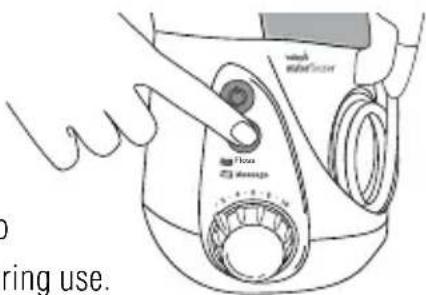
- While unit is off, press the mode button once to wake the unit up. One of the LEDs should light up.
- Press and hold the mode button for approximately 3-seconds until the Massage Mode light blinks. The timer is now deactivated.
If you wish to reactivate the timer:
-
While unit is off, press the mode button once to wake the unit up. One of the LEDs should light up.
-
Press and hold the mode button for approximately 3-seconds until the Floss Mode light blinks. The timer is now activated.
Or unplug unit to reset to factory settings.
Hydro-Pulse Massage Mode
Hydro-Pulse Massage offers a unique water pulsation pattern
natural_image
Simple line drawing of a tooth with a dental tool near the crown (no text or symbols)designed to enhance gum stimulation. For best results, use the Floss Mode as instructed. After using Floss Mode for 1-minute, switch the unit to Massage Mode, adjust pressure as desired, and aim the water stream at your gums and massage throughout your mouth.
To determine in which mode the unit is set while it is off simply press mode button and the LED light will indicate current mode. To change mode, press mode button again. You may also press the mode button while unit is on to change mode during use.
text_image
wash wash/cover Flow doussage ring use.When Finished
Turn the power OFF. Empty any liquid left in the reservoir.
NOTE: If you used mouthwash or other solution in the water, see "Using Mouthwash or Other Solutions" section.
TIP USAGE
Pik Pocket® Tip
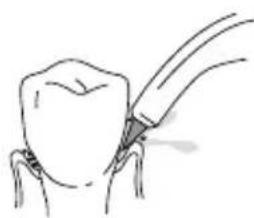
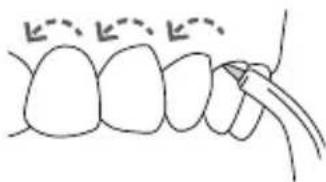
The Pik Pocket ^® tip is specifically designed to deliver water or anti-bacterial solutions deep into periodontal pockets.
To use the Pik Pocket ^® tip, set
natural_image
Simple line drawing of a dental procedure with a tool inserted (no text or symbols)the unit to the lowest
pressure setting. Turn the water switch OFF on the handle. Place the soft tip against a tooth at a 45-degree angle and gently place the tip under the gumline, into the pocket. Turn on power on base and water switch on handle ON.
natural_image
Simple line drawing of a tooth with two curved lines and dashed outlines, no text or symbols presentTongue Cleaner Tip
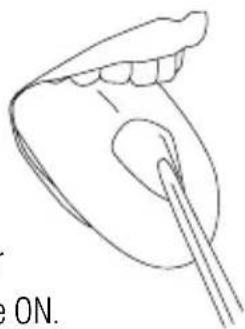
Turn the water switch OFF on the handle. Set to lowest pressure setting, place tip in the center/middle of your tongue about half way back. Turn on power on base and water switch on handle ON. Pull forward with light pressure. Increase pressure as you prefer.
natural_image
Line drawing of a human mouth with a brush applying powder (no text or symbols)Orthodontic Tip
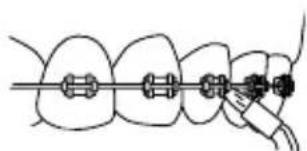
To use the orthodontic tip, gently glide tip along gumline, pausing briefly to lightly brush area between teeth and all around orthodontic bracket, before proceeding to the next tooth.
natural_image
Diagram of dental braces with a finger, showing alignment and alignment process (no text or symbols)CLEANING AND TROUBLESHOOTING YOUR WATERPIK® WATER FLOSSER
Toothbrush Tip
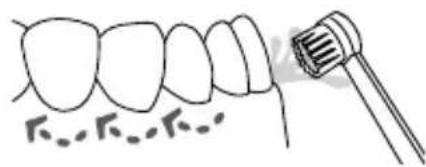
Place the
toothbrush tip in mouth with the brush head
text_image
Diagram showing dental alignment with a brush and tooth, labeled with Roman numerals and dotted lines indicating texture or density.on the tooth at the gumline. The toothbrush tip can be used with or without toothpaste. Using a light
pressure (bristles should not bend) massage the brush back and forth with very short strokes – much like you would with a manual toothbrush.
Plaque Seeker® Tip
To use the
Plaque Seeker® tip, place the tip close to the teeth
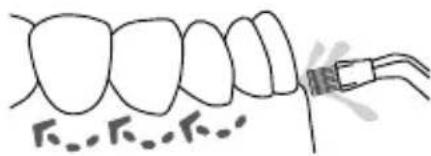
text_image
Diagram showing dental alignment with labeled tooth positions and a tool interacting with one toothso that the bristles are gently touching the teeth. Gently glide tip along gumline, pausing briefly between teeth to gently brush and allow the water to flow between the teeth.
Using Mouthwash and
Other Solutions
Your Waterpik ^® Water Flosser can be used to deliver mouthwash and antibacterial solutions. After using any special solution, rinse unit to prevent clogging by partially filling reservoir with warm water and running unit with tip pointed into sink until unit is empty.
Cleaning
Before cleaning, unplug from the electrical outlet. Clean the product when necessary by using a soft cloth and mild non-abrasive cleanser.
The water reservoir is removable for easy cleaning and is top rack dishwasher safe.
Removing Hard Water Deposits
Add 2 tablespoons of white vinegar to a full reservoir of warm water. Set pressure control dial to high and point the handle and tip into sink. Turn power and water switch ON and run until reservoir is empty. Rinse by repeating with a full reservoir of clean warm water.
Leakage
If leaking due to a damaged hose, replacement hoses and handles can be purchased from your local distributor, which can be found at waterpik.com/intl.
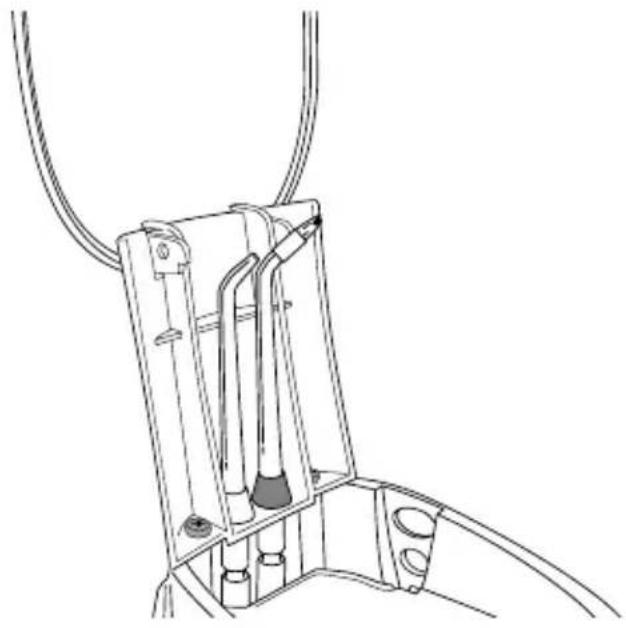
Accessory Storage
Accessory tip storage for your two most frequently used tips is under the reservoir lid and can be easily accessed by removing the reservoir.
natural_image
Technical line drawing of a mechanical device with hoses and components (no text or symbols)Service Maintenance
Waterpik® Water Flossers have no consumer-serviceable electrical items and do not require routine service maintenance. For all your service needs go to www.waterpik.com/intl to find your local distributor. Please do not ship product to Waterpik International, Inc. offices, this will delay service. Some replacement parts and accessories for the Water Flosser are also available from your local distributor which can be found at www.waterpik.com/intl.
Refer to the serial and model numbers in all correspondence. These numbers are located on the back of the handle and bottom of the reservoir respectively.
Still have questions? Go to www.waterpik.com/intl to find your local distributor.
Water Pik, Inc. warrants to the original purchaser/owner of this product that it is free from defects in materials and workmanship for two years from date of purchase. Save your receipt as your proof of purchase date. Water Pik, Inc. reserves the right to request the product to be returned for analysis to confirm the claim falls within our warranty policy. We will replace any part of the product, which in our opinion is defective, provided the product has not been abused, misused, altered or damaged after purchase and was used according to these instructions. Repair or replacement services provided for by the guarantee will be carried out by the local distributor, whose details may be found on [www.waterpik.com/intl]. Upon request of the consumer, a copy of the guarantee complete with the local distributor's information will be provided by email or mail. This limited warranty excludes accessories or consumable parts such as tips, etc. This warranty gives you specific legal rights. You may also have other rights that vary depending on the law in your place of residence. To locate your local distributor, go to www.waterpik.com/intl.
natural_image
Diagram of dental arch joint with tooth and surrounding structures (no text or labels)natural_image
Line drawing of a hand operating a washing machine with control knob (no text or symbols)Nach der Benutzung
natural_image
Simple line drawing of a medical procedure with a tool (no text or symbols)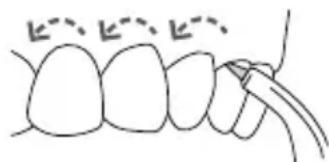
natural_image
Simple line drawing of teeth with a finger pointing to a tooth (no text or symbols)natural_image
Line drawing of a human mouth with teeth and a toothbrush (no text or symbols)Orthodontic-Düse
natural_image
Diagram of dental arching technique showing tooth alignment and finger placement (no text or labels)REINIGUNG UND PROBLEMLÖSUNG BEI IHREM WATERPIK® WATER FLOSSER
text_image
Hand-drawn diagram showing dental alignment with a toothbrush and dotted lines indicating gum tissuePlaque Seeker®-Düse
natural_image
Diagram of a dental procedure showing tooth alignment and root canal insertion (no text or labels)natural_image
Technical line drawing of a mechanical device with hoses and components (no text or symbols)Wartung
natural_image
Diagram of dental arches with tooth and surrounding wires, no text or symbols presentMode Massage hydro-pulsage
Le Massage hydro-pulsage
text_image
Technical diagram of a hair iron with labeled parts including 'Flow' and 'Message'Une fois terminé
natural_image
Simple line drawing of a dental procedure with a tool (no text or symbols)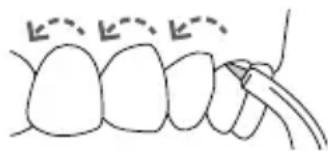
natural_image
Simple line drawing of a tooth with two dashed lines indicating specific points (no text or symbols)natural_image
Diagram of dental braces with a finger, showing alignment and alignment process (no text or symbols)NETTOYAGE ET DÉPANNAGE DE L'HYDROPULSEUR WATERPIK®
natural_image
Simple line drawing of a tooth with a brush applying material to the gum (no text or symbols)Embout Plaque Seeker®
natural_image
Simple line drawing of a tooth with a dental implant (no text or symbols)natural_image
Technical line drawing of a mechanical device with hoses and components (no text or symbols)natural_image
Diagram of dental arches with arrows indicating tooth movement (no text or labels)natural_image
Simple line drawing of a tooth with a dental tool inserted, no text or symbols presentnatural_image
Line drawing of a washing machine with handle and control knob (no text or symbols)A fine operazione
natural_image
Simple line drawing of a dental procedure with a tool (no text or symbols)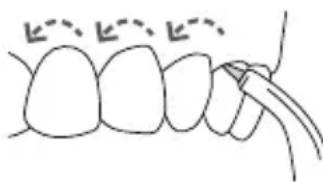
natural_image
Simple line drawing of a tooth with no text or symbolsnatural_image
Diagram of dental arching technique showing finger placement on tooth (no text or labels)PULIZIA DELL'IDROPULSORE WATERPIK® E RISOLUZIONE DEI PROBLEMI
natural_image
Illustration of a tooth with a brush applying material to the gum (no text or symbols)Beccuccio Plaque Seeker®
natural_image
Simple line drawing of a tooth with a dental tool inserted (no text or symbols)natural_image
Technical line drawing of a mechanical device with tubing and internal components (no text or symbols)Manutenzione
text_image
Water UITnatural_image
Diagram of human teeth with toothbrush and tooth alignment arrows (no text or labels)natural_image
Simple line drawing of a tooth with a dental tool near the base (no text or symbols)text_image
Flow Bottle/Boxnatural_image
Simple line drawing of a dental tool tip (no text or symbols)natural_image
Simple line drawing of a tooth with two curved lines and dashed arrows indicating alignment or measurement points (no text or symbols)natural_image
Line drawing of a human mouth with a toothbrush applying product (no text or symbols)Orthodontische Tip
natural_image
Diagram of dental arching technique showing tooth arrangement and alignment (no text or labels)natural_image
Illustration of a tooth with a brush and dotted line indicating texture or density (no text or symbols)natural_image
Diagram of human teeth with a dental tool inserted, showing tooth structure and alignment (no text or labels)natural_image
Technical line drawing of a mechanical assembly with pipes and components (no text or symbols)Onderhoud
1730 East Prospect Road
Fort Collins, CO 80553-0001 USA
www.waterpik.com
Waterpik ^® is a trademark of Water Pik, Inc. registered in Argentina, Australia, Benelux, Brazil, Canada, Chile, China, Czech Republic, Denmark, EU, Finland, France, Germany, Hong Kong, Hungary, India, Italy, Japan, Korea, Mexico, New Zealand, Norway, Pakistan, Poland, Russian Federation, Singapore, South Africa, Spain, Sweden, Switzerland, Taiwan, Turkey, Ukraine, United Kingdom, and the United States.
Waterpik ^® (stylized) is a trademark of Water Pik, Inc. registered in Australia, Brazil, Canada, China, EU, Hong Kong, Japan, Mexico, Korea, Russian Federation, Switzerland, Trinidad & Tobago, and the United States.
Pik Pocket ^® is a trademark of Water Pik, Inc. registered in Canada and the United States. Plaque Seeker ^® is a trademark of Water Pik, Inc. registered in Canada, China, EU, and the United States.
waterflosser® is a trademark of Water Pik, Inc. registered in Canada, China, Mexico, Switzerland, and the United States.
Designed in USA. Made in China.