ManualGo.com
WS 8009 - Clock Techno Line - Free user manual and instructions
Find the device manual for free WS 8009 Techno Line in PDF.



Frequently Asked Questions - WS 8009 Techno Line
Download the instructions for your Clock in PDF format for free! Find your manual WS 8009 - Techno Line and take your electronic device back in hand. On this page are published all the documents necessary for the use of your device. WS 8009 by Techno Line.
USER MANUAL WS 8009 Techno Line
Avoid placing the clock near interference sources/metal frames such as computer monitor or TV sets. Buttons will not function while scanning for DCF time signal unless they are well received or stopped manually. Never use the clock in bathroom or any other area with high humidity The clock loses its time information when the battery is removed. Manual time setting
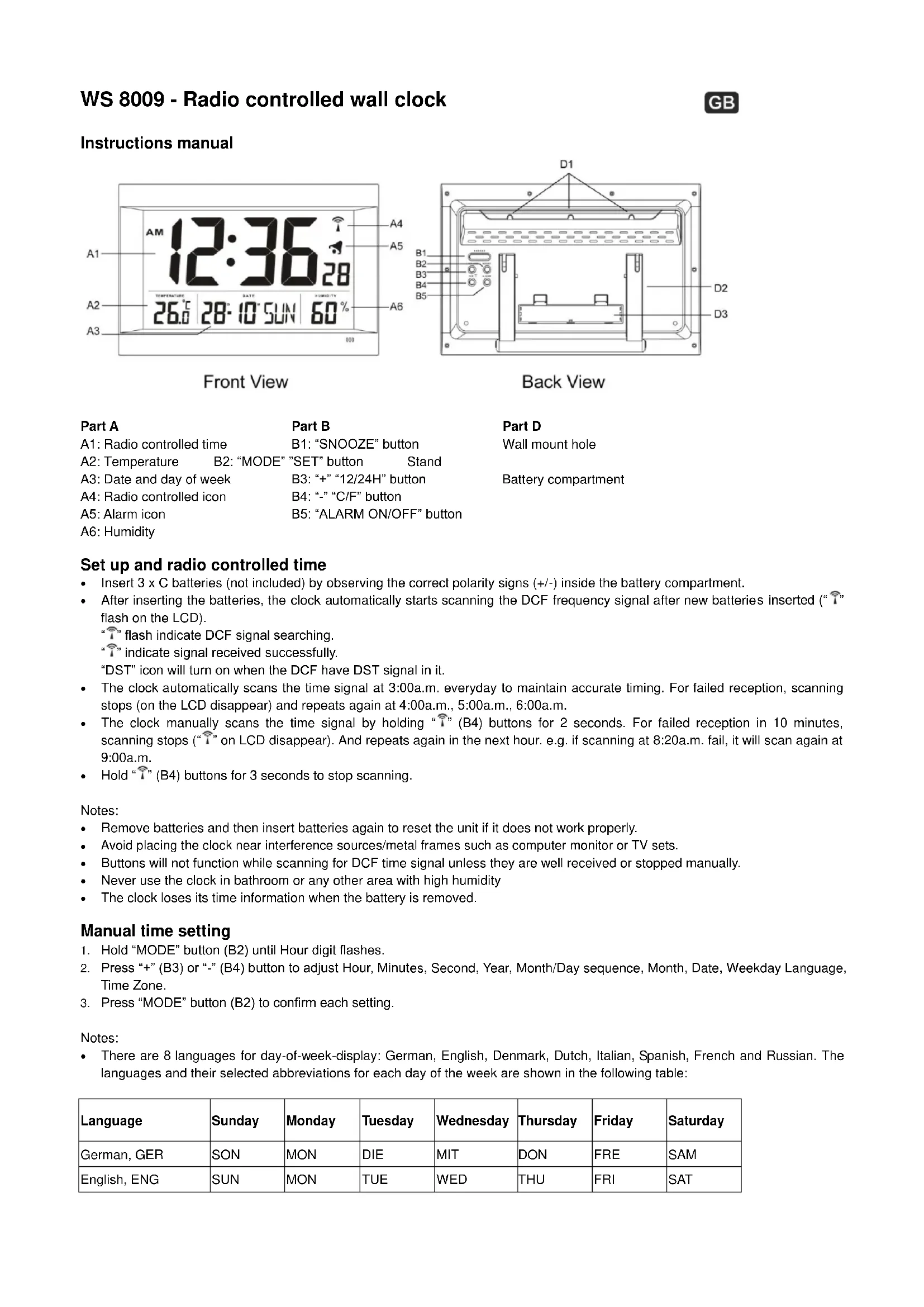
1. Hold “MODE” button (B2) until Hour digit flashes.
2. Press “+” (B3) or “-” (B4) button to adjust Hour, Minutes, Second, Year, Month/Day sequence, Month, Date, Weekday Language, Time Zone.
3. Press “MODE” button (B2) to confirm each setting.
Notes: There are 8 languages for day-of-week-display: German, English, Denmark, Dutch, Italian, Spanish, French and Russian. The languages and their selected abbreviations for each day of the week are shown in the following table: Language Sunday Monday Tuesday Wednesday Thursday Friday Saturday German, GER SON MON DIE MIT DON FRE SAM English, ENG SUN MON TUE WED THU FRI SATDenmark, DAN SON MAN TIR ONS TOR FRE LOR Dutch, NET ZON MAA DIN WOE DON VRI ZAT Italian, ITA DOM LUN MAR MER GIO VEN SAB Spanish, ESP DOM LUN MAR MIE JUE VIE SAB French, FRA DIM LUN MAR MER JEU VEN SAM Russian, RU
The Time zone is used for the countries that can receive the DCF time signal but the time zone is different from the German time. When the country time is faster than the German time for 1 hr, the zone should be set to +1. Then the clock will automatically set 1 hour faster from the signal time received. Second adjusted to zero only. Press “+”12/24 (B3) button to set the 12/24 hour format at time display mode. Daily alarm setting
1. Press “MODE”(B2) to select Alarm Time Display.
2. Hold “MODE”(B2) to Alarm Time setting mode, the hour digit will flash.
3. Press or hold “+“(B3) & “-“(B4) buttons to adjust the alarm time.
4. Press “MODE”(B2) to confirm each setting.
Alarm and snooze function
1. Press “ALARM ON/OFF” (B5) to switch alarm on/off. “ ” appears if the daily alarm turns on.
2. During alerting, press “SNOOZE” (B1) button to turn on the Snooze function and icon “Zz” flash. The alarm snoozes for 5 minutes, then it alerts again. You can press “SNOOZE” button to active the snooze function again when alerting.
3. Simply press other buttons to stop snooze alarm.
Thermometer Press “°C/°F” (B4) button to select temperature displayed in Celsius/ Fahrenheit. Hereby, Technotrade declares that this product WS8009 is in compliance with the essential requirements and other relevant provisions of Directive 2014/53/EU and ROHS 2011/65/EC. The original EU declaration of conformity may be found at: www.technoline.de/doc/4029665080093 Environmental reception effects The clock obtains the accurate time with wireless technology. Same as all wireless devices, the reception is maybe affected by the following circumstances: long transmitting distance nearby mountains and valleys near freeway, railway, airports, high voltage cable etc. near construction site among tall buildings inside concrete buildings near electrical appliances (computers, TV’s, etc) and metallic structures inside moving vehicles Place the clock at a location with optimal signal, i.e. close to a window and away from metal surfaces or electrical appliances. Precautions This main unit is intended to be used only indoors. Do not subject the unit to excessive force or shock. Do not expose the unit to extreme temperatures, direct sunlight, dust or humidity. Do not immerse in water. Avoid contact with any corrosive materials. Do not dispose this unit in a fire as it may explode. Do not open the inner back case or tamper with any components of this unit. Batteries safety warnings Use only alkaline batteries, not rechargeable batteries. Install batteries correctly by matching the polarities (+/-). Always replace a complete set of batteries. Never mix used and new batteries. Remove exhausted batteries immediately. Remove batteries when not in use. Do not recharge and do not dispose of batteries in fire as the batteries may explode. Ensure batteries are stored away from metal objects as contact may cause a short circuit. Avoid exposing batteries to extreme temperature or humidity or direct sunlight. Keep all batteries out of reach from children. They are a choking hazard. Use the product only for its intended purpose! Consideration of duty according to the battery law Old batteries do not belong to domestic waste because they could cause damages of health and environment. You can return used batteries free of charge to your dealer and collection points. As end-user you are committed by law to bring back needed batteries to distributors and other collecting points! Consideration of duty according to the law of electrical devices This symbol means that you must dispose of electrical devices separated from the General household waste when it reaches the end of its useful life. Take your unit to your local waste collection point or recycling centre. This applies to all countries of the European Union, and to other European countries with a separate waste collection system.WS 8009 - Horloge radio-pilotée Manuel d'instructions L’avant L'arrière Partie A Partie B Partie D A1: Heure radio-réveil B1: Bouton "SNOOZE" D1: Trous pour montage mural A2: Température B2: Bouton "MODE" "SET" D2: Piédestal A3: Date et jour de la semaine B3: Bouton "+" "12/24H" D3: Compartiment des piles A4: Icône radio-réveil B4: Bouton "-" "°C/°F" A5: Icône alarme B5: Bouton "ALARM ON/OFF" A6: Humidité Set up et heure radio-réveil