KCM1202OB - Coffee machine KITCHENAID - Free user manual and instructions
Find the device manual for free KCM1202OB KITCHENAID in PDF.


Frequently Asked Questions - KCM1202OB KITCHENAID
User questions about KCM1202OB KITCHENAID
0 question about this device. Answer the ones you know or ask your own.
Ask a new question about this device
Download the instructions for your Coffee machine in PDF format for free! Find your manual KCM1202OB - KITCHENAID and take your electronic device back in hand. On this page are published all the documents necessary for the use of your device. KCM1202OB by KITCHENAID.
USER MANUAL KCM1202OB KITCHENAID
natural_image
Exterior view of a KitchenAid air fryer with digital display and glass jar (no text or symbols on main body)KitchenAid
WELCOME TO THE WORLD OF KITCHENAID.
We're committed to helping you create a lifetime of delicious meals for family and friends. To help ensure the longevity and performance of your appliance, keep this guide handy. It will empower you with the best way to use and care for your product. Your satisfaction is our #1 goal. Remember to register your product online at www.kitchenaid.com or by mail using the attached Product Registration Card.
natural_image
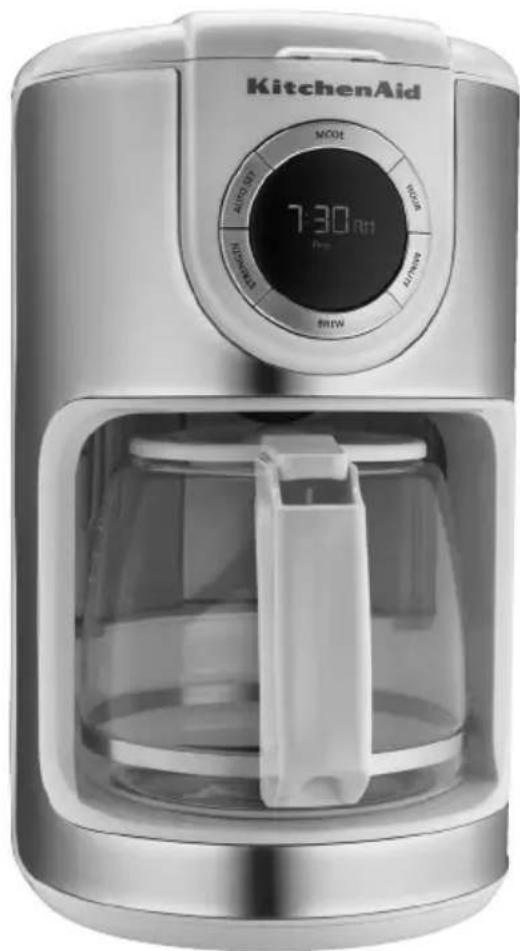
KitchenAid air fryer with digital display showing 7:30 AM, no visible text or symbols on device bodyJoin us in the kitchen at www.kitchenaid.com.
TABLE OF CONTENTS
COFFEE MAKER SAFETY
Important safeguards....4
Electrical requirements 5
PARTS AND FEATURES
Parts and accessories....6
ASSEMBLING THE COFFEE MAKER
Preparing the Coffee Maker for use....7
Installing the water filter....7
Setting up the clock 8
Setting brew strength....9
Filling the Coffee Maker with water for brewing.... 10
Filling the brew basket with coffee.... 11
Brewing coffee 12
1-4 cup brewing 13
Setting up the Automatic brew feature.... 14
Using previously programmed Automatic brew settings 15
TIPS FOR GREAT RESULTS
Quick tips 16
CARE AND CLEANING
Cleaning the Coffee Maker 17
TROUBLESHOOTING....19
WARRANTY 20
PROOF OF PURCHASE & PRODUCT REGISTRATION
Always keep a copy of the itemized sales receipt showing the date of purchase of your Coffee Maker. Proof of purchase will assure you of in-warranty service. Before you use your Coffee Maker, please fill out and mail your product registration card packed with the unit, or register on-line at www.kitchenaid.com. This card will enable us to contact you in the unlikely event of a product safety notification and assist us in complying with the provisions of the Consumer Product Safety Act. This card does not verify your warranty. Please complete the following for your personal records:
Model Number
Serial Number
Date Purchased
Store Name ____
Your safety and the safety of others are very important.
We have provided many important safety messages in this manual and on your appliance. Always read and obey all safety messages.

This is the safety alert symbol.
This symbol alerts you to potential hazards that can kill or hurt you and others.
All safety messages will follow the safety alert symbol and either the word "DANGER" or "WARNING." These words mean:
! DANGER
You can be killed or seriously injured if you don't immediately follow instructions.
WARNING
You can be killed or seriously injured if you don't follow instructions.
All safety messages will tell you what the potential hazard is, tell you how to reduce the chance of injury, and tell you what can happen if the instructions are not followed.
State of California Proposition 65 Warnings:
WARNING: This product contains one or more chemicals known to the State of California to cause cancer.
WARNING: This product contains one or more chemicals known to the State of California to cause birth defects or other reproductive harm.
IMPORTANT SAFEGUARDS
When using electrical appliances, basic safety precautions should always be followed to reduce the risk of fire, electric shock, and/or injury to persons, including the following:
I. Read all instructions.
2. Do not touch hot surfaces. Use handles or knobs.
3. To protect against electrical shock, do not immerse cord, plugs, or Coffee Maker in water or other liquid.
4. Close supervision is necessary when any appliance is used by or near children.
5. Unplug Coffee Maker from outlet when not in use and before cleaning. Allow to cool before putting on or taking off parts, and before cleaning the appliance.
6. Do not operate any appliance with a damaged cord or plug or after the appliance malfunctions or has been damaged in any manner. Return appliance to the nearest Authorized Service Facility for examination, repair or adjustment.
7. The use of accessory attachments not recommended by the appliance manufacturer may cause injuries.
8. Do not use outdoors.
9. Do not let cord hang over edge of table or counter, or touch hot surfaces.
10. Do not place on or near a hot gas or electric burner, or in a heated oven.
II. Do not use appliance for other than intended use.
- Do not use appliance without lid properly placed on carafe.
- The carafe is designed for use with this appliance. It must never be used on a range top or in a microwave oven.
- Do not set a hot carafe on a wet or cold surface.
- Do not use a cracked carafe or a carafe having a loose or weakened handle.
- Do not clean carafe with abrasive cleaners, steel wool pads, or other abrasive material.
- This product is designed for household use only.
- Scalding may occur if the brew basket lid is opened during the brew cycles.
SAVE THESE INSTRUCTIONS
Electrical requirements
WARNING

Electrical Shock Hazard
Plug into a grounded 3 prong outlet.
Do not remove ground prong.
Do not use an adapter.
Do not use an extension cord.
Failure to follow these instructions can result in death, fire, or electrical shock.
Voltage: 120 Volts A.C. only
Frequency: 60 Hz
NOTE: If the plug does not fit in the outlet, contact a qualified electrician. Do not modify the plug in any way. Do not use an adapter.
Do not use an extension cord. If the power supply cord is too short, have a qualified electrician or serviceman install an outlet near the appliance.
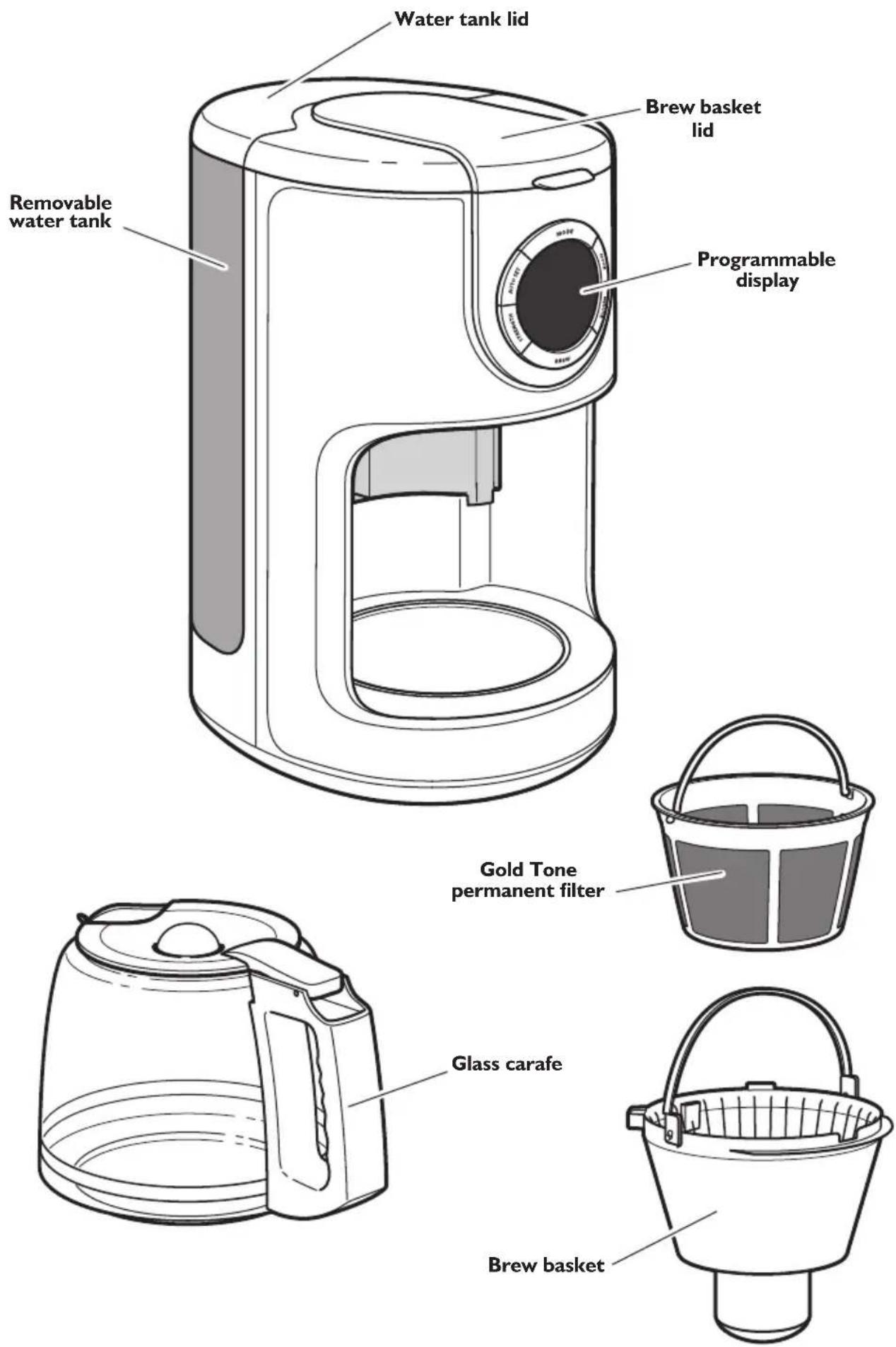
Parts and accessories
text_image
Water tank lid Brew basket lid Removable water tank Programmable display Gold Tone permanent filter Glass carafe Brew basketPreparing the Coffee Maker for use
Before First Use
Wash the brew basket, Gold Tone permanent filter, and carafe in hot, soapy water, then rinse with clean water and dry. Do not use abrasive cleansers or scouring pads.
NOTE: These parts can also be washed in the top rack of the dishwasher.
Installing the water filter
Use of the water filter is optional, but strongly recommended. The filter reduces contaminants which impair the coffee flavor. The Coffee Maker will operate normally without it.
The water filter is for use only with municipally treated tap water or well water that is regularly tested for contaminants; the filter is not intended to remove contaminants in water that is not suitable for drinking.
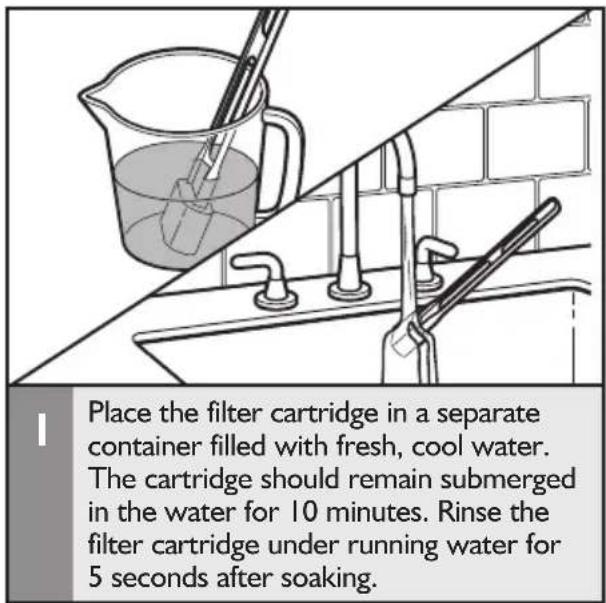
text_image
Place the filter cartridge in a separate container filled with fresh, cool water. The cartridge should remain submerged in the water for 10 minutes. Rinse the filter cartridge under running water for 5 seconds after soaking.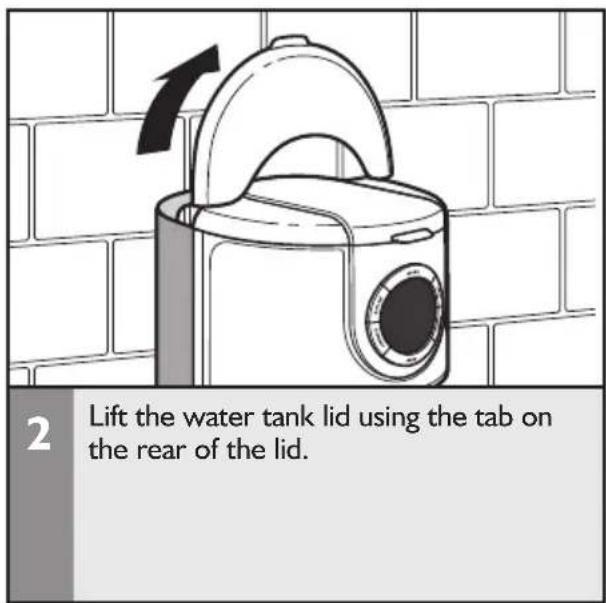
text_image
2 Lift the water tank lid using the tab on the rear of the lid.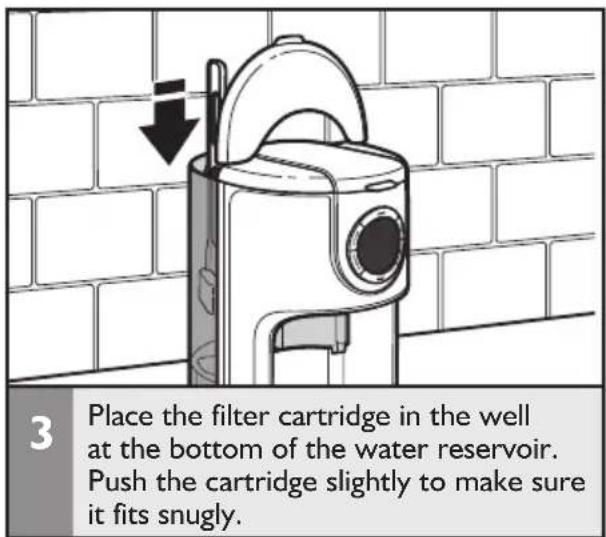
text_image
3 Place the filter cartridge in the well at the bottom of the water reservoir. Push the cartridge slightly to make sure it fits snugly.IMPORTANT: Every time you install a new water filter, run the Coffee Maker through a complete brew cycle without coffee. Use a full carafe of clean, cool water.
Setting up the clock
WARNING

Electrical Shock Hazard
Plug into a grounded 3 prong outlet.
Do not remove ground prong.
Do not use an adapter.
Do not use an extension cord.
Failure to follow these instructions can result in death, fire, or electrical shock.
natural_image
Line drawing of a hand inserting a plug into an electrical outlet (no text or symbols)I
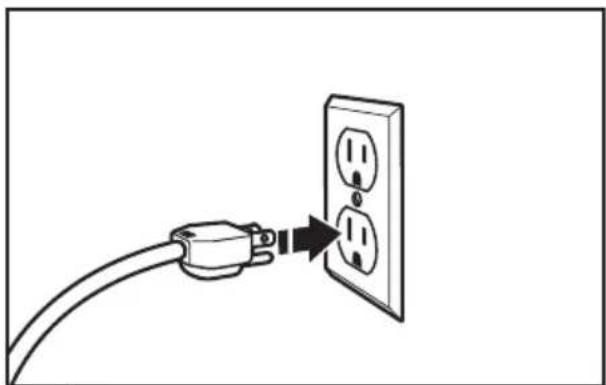
Plug into a grounded 3-prong outlet.
NOTE: When the Coffee Maker is first plugged in or when power is restored after an interruption, the brew timer display will initially show 12:00 AM.
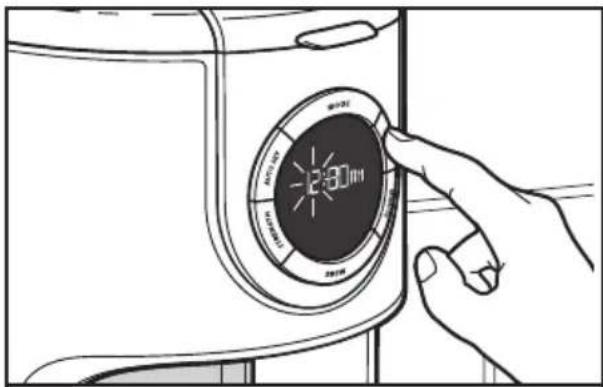
text_image
Diagram showing a hand pressing a circular device with a speed limit display and Chinese text labels2
To set the Hour: Press HOUR. The Hour setting will begin to blink. The Hour digits will change with each press; or PRESS AND HOLD and the Hour digits will scroll rapidly.
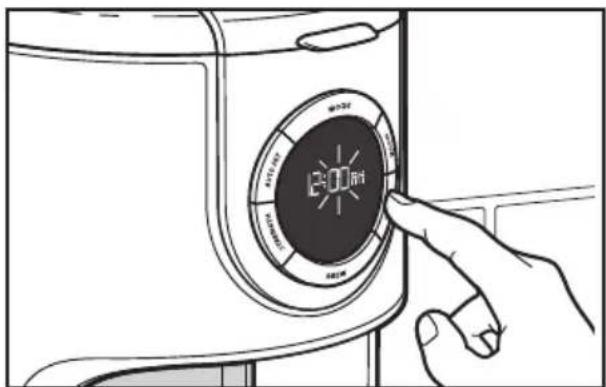
text_image
12:00 450V 450V 450V 450V3
To set the Minutes: Press MINUTE. The Hour setting will switch to a solid display and the Minute setting will begin to blink. The Minute digits will change with each press; or PRESS AND HOLD and the Minute digits will scroll rapidly.
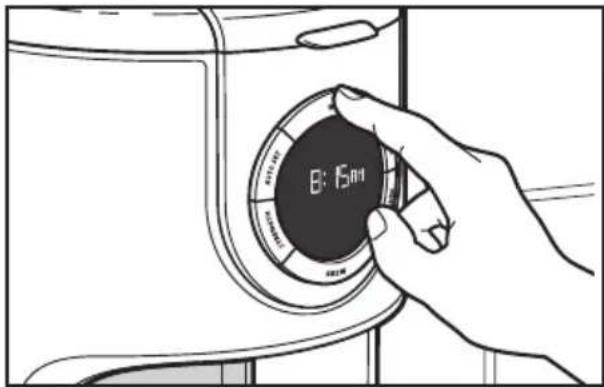
text_image
B: 15am4
To save the current displayed time and exit clock set up: Press ANY other button (Mode, Auto Set, Strength or Brew); or do not press any button for 10 seconds.
Setting brew strength
The Coffee Maker can be programmed to brew coffee at a Regular (REG) or Bold (BOLD) strength (the default brew strength is Regular).
To program and activate the "Bold" mode setting:
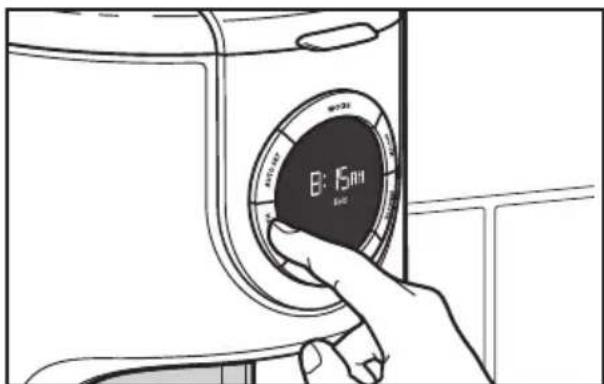
text_image
B: 15min B: 15minI
Press the STRENGTH button to select the "Bold" indicator.
The “Pause and pour” feature enables you to remove the carafe from the Coffee Maker and pour a cup of coffee before brewing is finished. When the carafe is removed, a special valve stops the flow of coffee from the brew basket. However, brewing does not stop. If the carafe is not placed back in the Coffee Maker within 30 seconds, water and coffee grounds will overflow the brew basket.
Filling the Coffee Maker with water for brewing
TIP: Brew one pot of fresh, cool water and discard before brewing the first pot of coffee (see the "Preparing the Coffee Maker for Use" section).
natural_image
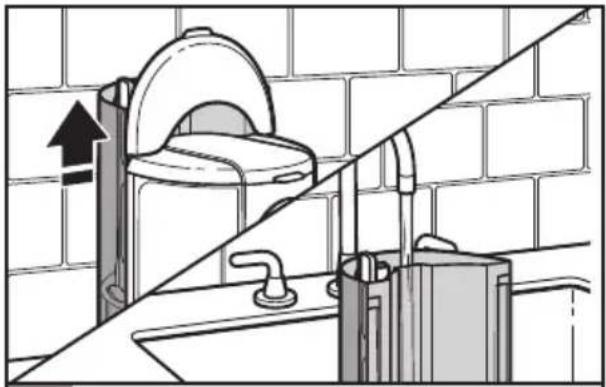
Diagram of a bathroom sink with toilet and sink, showing wall-mounted fixtures and a diagonal line (no text or symbols)Remove the water tank and fill with enough fresh, cool water to make the desired amount of coffee. A graduated scale on the water tank indicates the amount of water needed.
natural_image
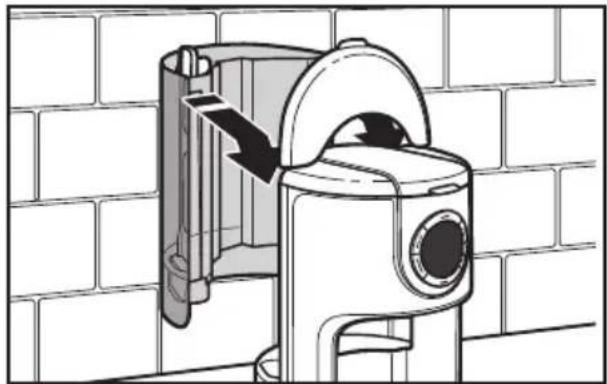
Technical illustration of a mechanical device with a directional arrow indicating movement, set against a brick wall background (no text or symbols)2 When replacing the tank, make sure to align the holes on the top of the tank with the tabs on the back of the Coffee Maker housing.
NOTE: The water tank does not need to be removed in order to be refilled; simply lift the tank lid and pour fresh, cool water into the tank. Water can also be poured directly into the reservoir at the back of the Coffee Maker.
natural_image
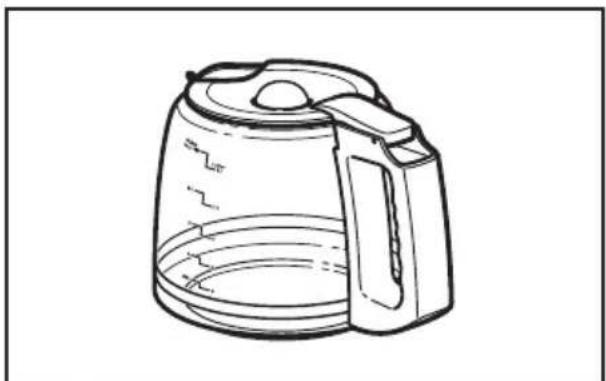
Line drawing of a modern coffee maker with lid and handle (no text or symbols)3 On the carafe: The right side of the scale (Coffee) is a measurement of coffee volume. The left side of the scale (Water) indicates the amount of water needed to produce a given number of cups.
natural_image
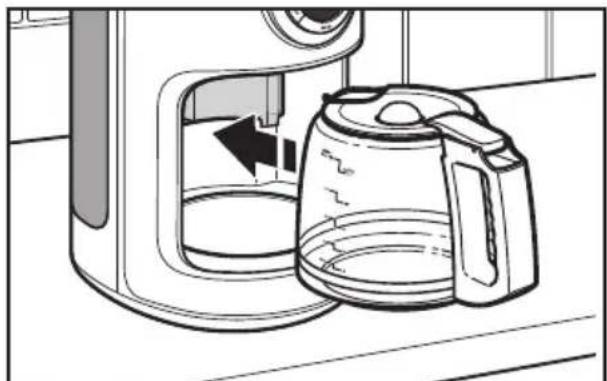
Line drawing of a kitchen toaster oven with a kettle and lid, showing the interior and exterior view (no text or symbols)4 Place the carafe in the Coffee Maker. Make sure the lid is securely in position and the bottom of the carafe is fully seated, or the Pause and pour feature may not engage, causing water and coffee to overflow the brew basket.
Filling the brew basket with coffee
TIP: The coffee filter can also be inserted and coffee grounds added without removing the brew basket from the Coffee Maker.
natural_image
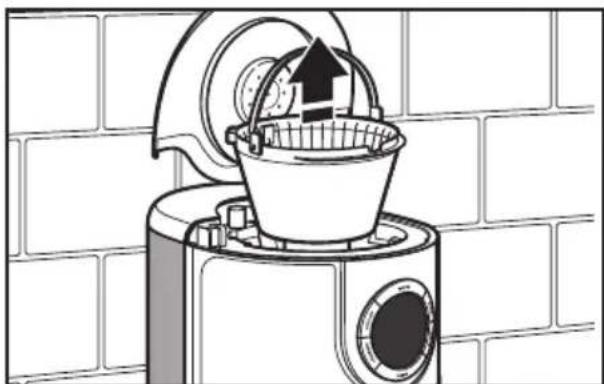
Line drawing of a kitchen appliance with a bucket and upward arrow, set against a brick wall background (no text or symbols)Remove the brew basket from the top of the Coffee Maker by grasping the locking handle on the basket.
natural_image
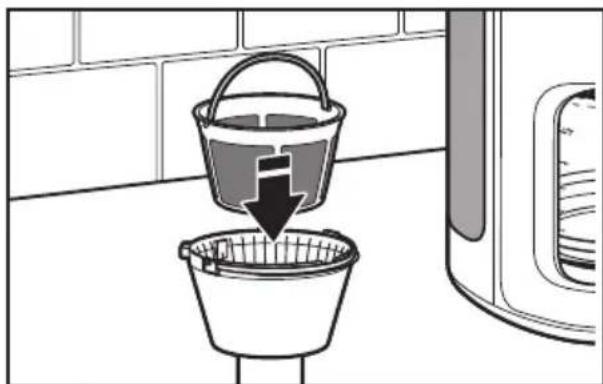
Illustration of a bucket being inserted into a filter, with a downward arrow indicating the process (no text or symbols present)2 Insert a 10–12 cup flat bottom paper filter or the Gold Tone permanent filter into the brew basket. Do not use both types of filters at the same time. Using both filters might cause water and coffee to overflow the brew basket.
NOTE: Do not operate the Coffee Maker without the brew basket in place.
natural_image
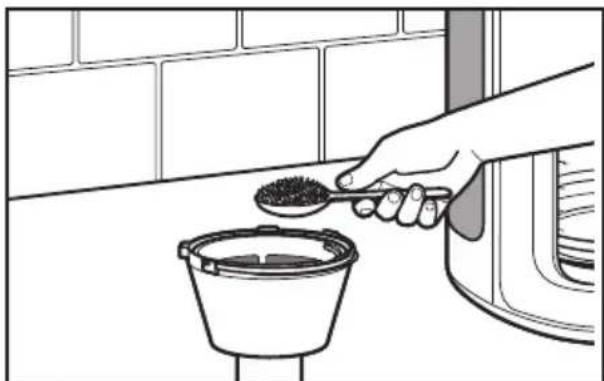
Line drawing of a hand pouring granular material into a bucket on a kitchen counter (no text or symbols)3 Fill the filter with one rounded tablespoon of ground coffee for each cup desired. Use a medium grind appropriate for automatic drip Coffee Makers. Too fine a grind will produce bitterness and may clog the coffee filter. Shake the brew basket slightly to even out the bed of coffee.
natural_image
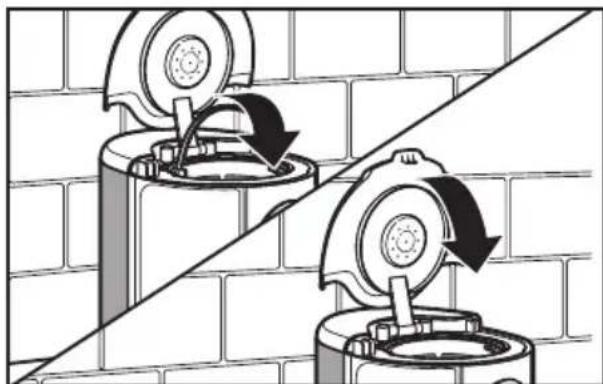
Diagram showing two circular components mounted on a brick wall, with directional arrows indicating motion or movement (no text or symbols present)4 Place the basket into the Coffee Maker and rotate the handle toward the front of the Coffee Maker to lock the brew basket in place. Be sure the brew basket lid is fully closed before brewing.
Brewing coffee
To brew 1–4 Cups only, see the "1–4 cup brewing" section.
NOTE: Brew one pot of fresh, cool water and discard before brewing the first pot of coffee (see the "Preparing the Coffee Maker for Use" section).
text_image
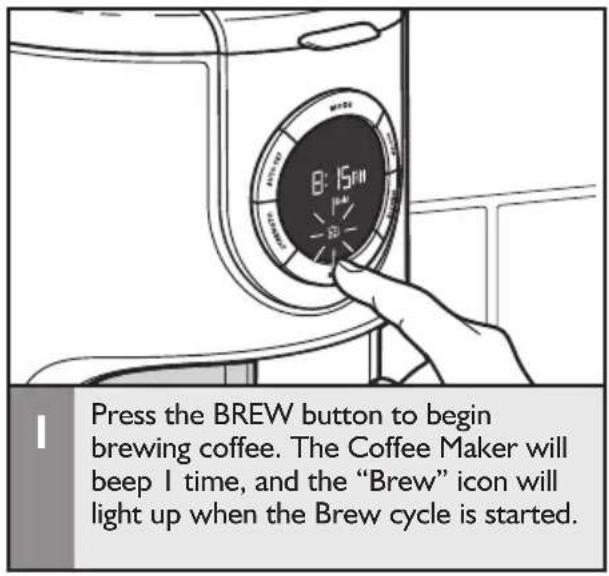
Press the BREW button to begin brewing coffee. The Coffee Maker will beep 1 time, and the "Brew" icon will light up when the Brew cycle is started.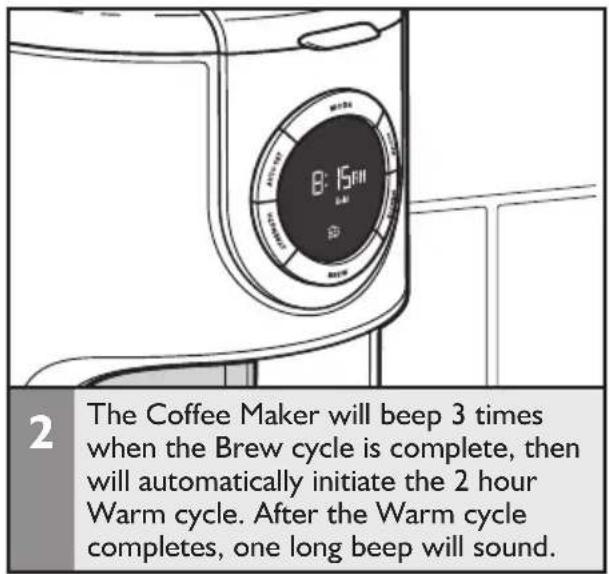
text_image
2 The Coffee Maker will beep 3 times when the Brew cycle is complete, then will automatically initiate the 2 hour Warm cycle. After the Warm cycle completes, one long beep will sound.NOTE: Opening the brew basket lid while coffee is brewing will interrupt the brew process and impair flavor.
text_image
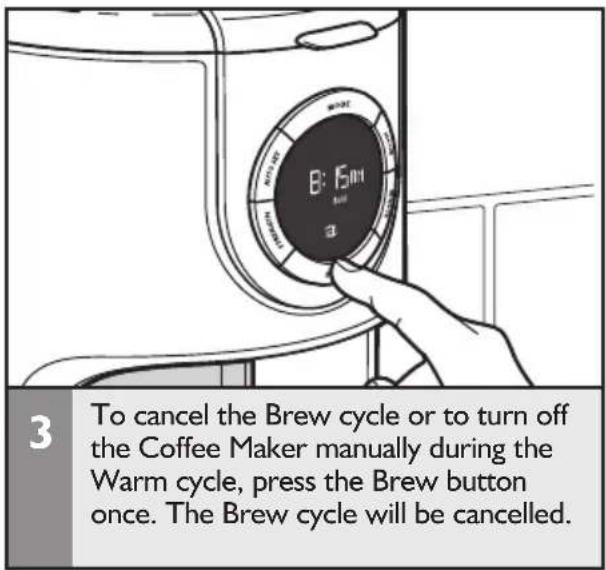
3 To cancel the Brew cycle or to turn off the Coffee Maker manually during the Warm cycle, press the Brew button once. The Brew cycle will be cancelled.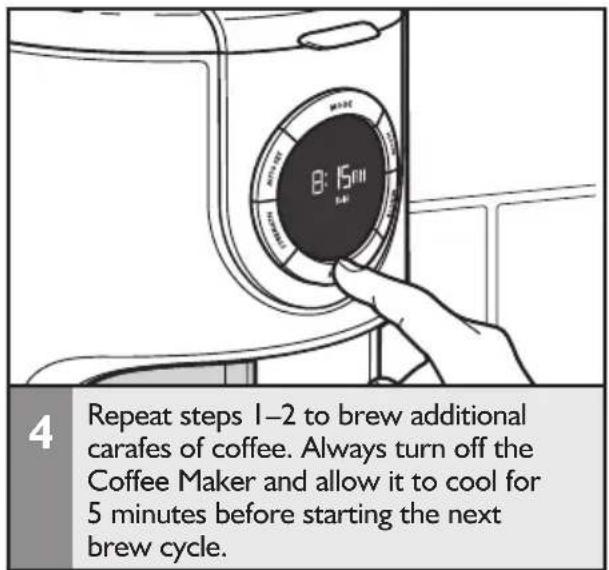
text_image
4 Repeat steps 1–2 to brew additional carafes of coffee. Always turn off the Coffee Maker and allow it to cool for 5 minutes before starting the next brew cycle.IMPORTANT: The outside of the carafe may be warm to the touch after brewing. Use discretion when placing the carafe on uncovered surfaces immediately after brewing.
1-4 cup brewing
NOTE: Brew one pot of fresh, cool water and discard before brewing the first pot of coffee (see the "Preparing the Coffee Maker for Use" section).
text_image
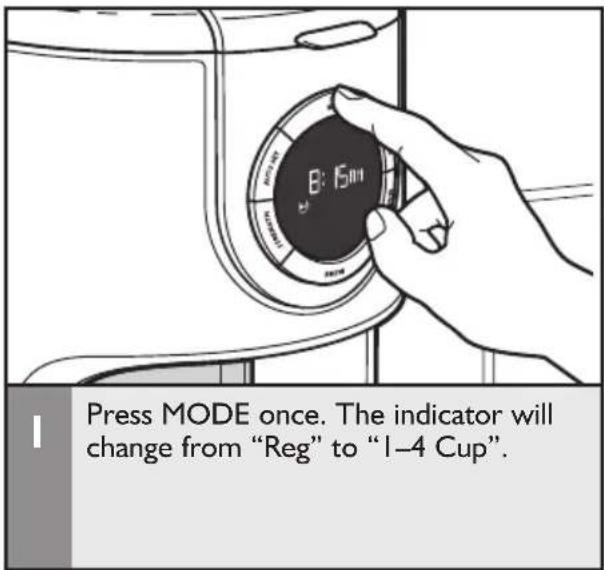
Press MODE once. The indicator will change from "Reg" to "I-4 Cup".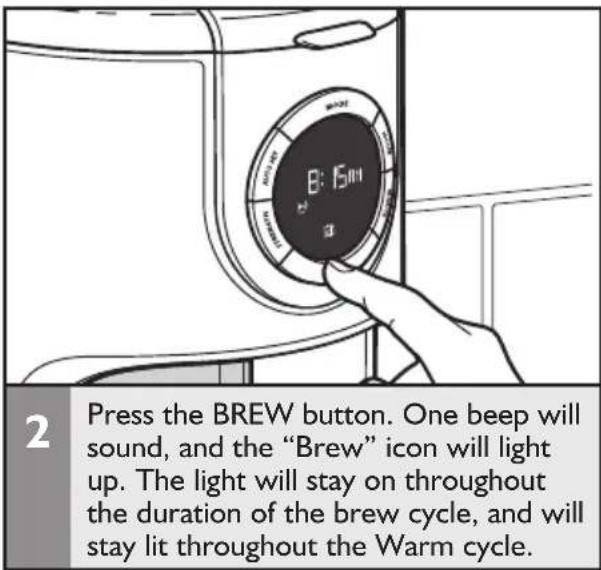
text_image
2 Press the BREW button. One beep will sound, and the "Brew" icon will light up. The light will stay on throughout the duration of the brew cycle, and will stay lit throughout the Warm cycle.English
text_image
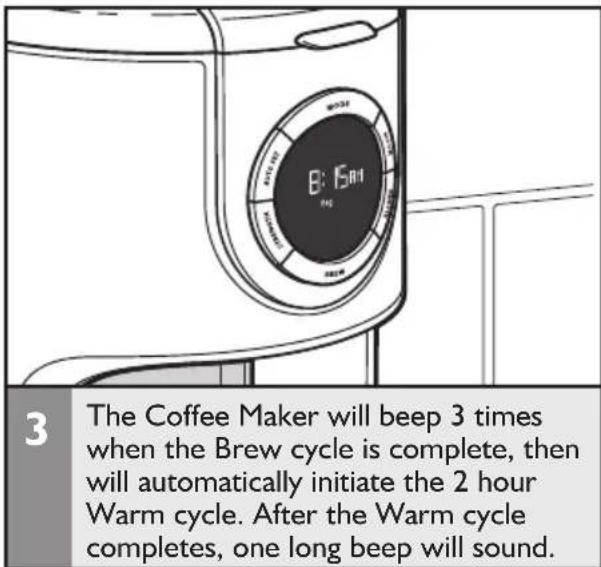
3 The Coffee Maker will beep 3 times when the Brew cycle is complete, then will automatically initiate the 2 hour Warm cycle. After the Warm cycle completes, one long beep will sound.NOTE: When the Brew cycle is complete the "1-4 Cup" icon will turn off and the Coffee Maker will change back to the "Reg" setting
text_image
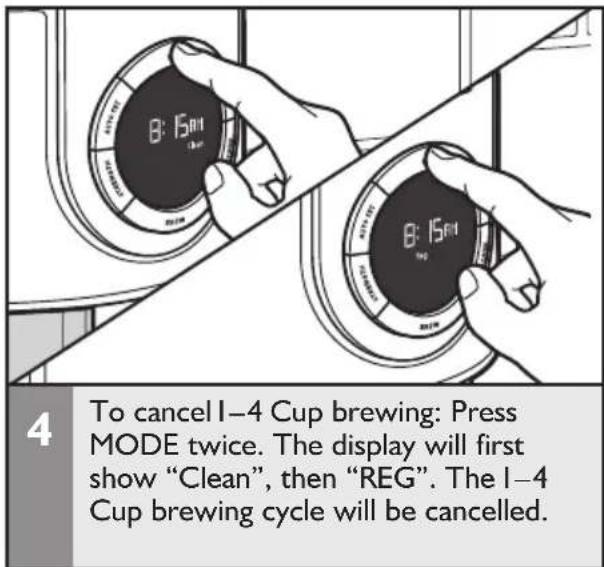
4 To cancel I-4 Cup brewing: Press MODE twice. The display will first show "Clean", then "REG". The I-4 Cup brewing cycle will be cancelled.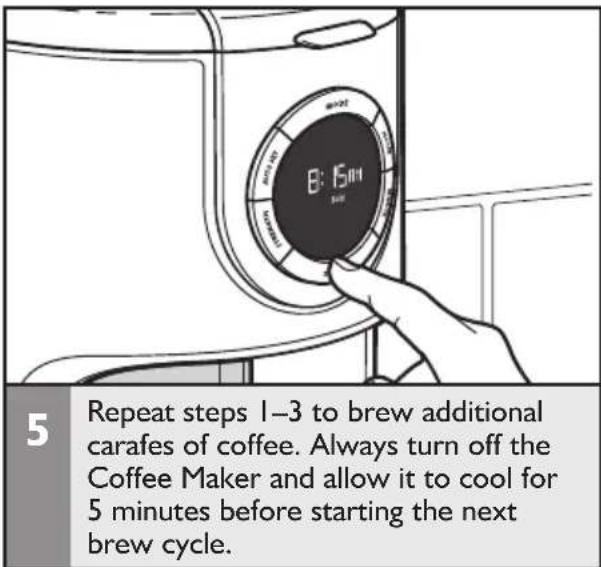
text_image
5 Repeat steps 1–3 to brew additional carafes of coffee. Always turn off the Coffee Maker and allow it to cool for 5 minutes before starting the next brew cycle.NOTE: If no button is pressed after "1-4 Cup" mode is selected, the 1-4 Cup brewing cycle will be cancelled after 10 seconds.
Setting up the Automatic brew feature
The Coffee Maker can be programmed to brew coffee at a preset time, making it easy to wake up to fresh coffee every morning. To program and activate the Automatic Brew Timer:
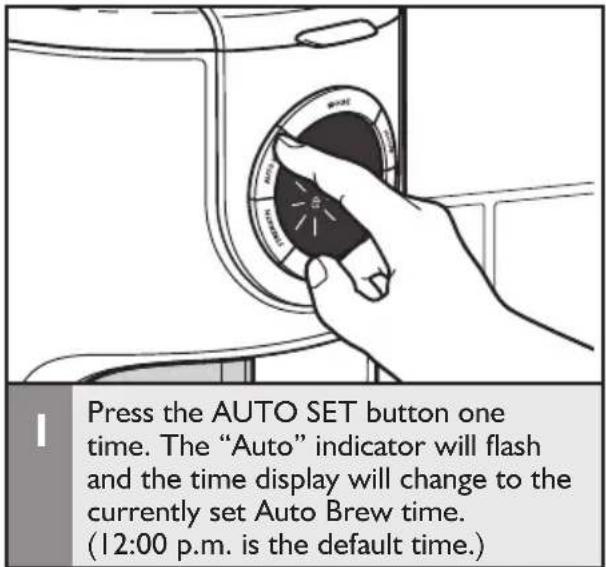
text_image
Press the AUTO SET button one time. The "Auto" indicator will flash and the time display will change to the currently set Auto Brew time. (12:00 p.m. is the default time.)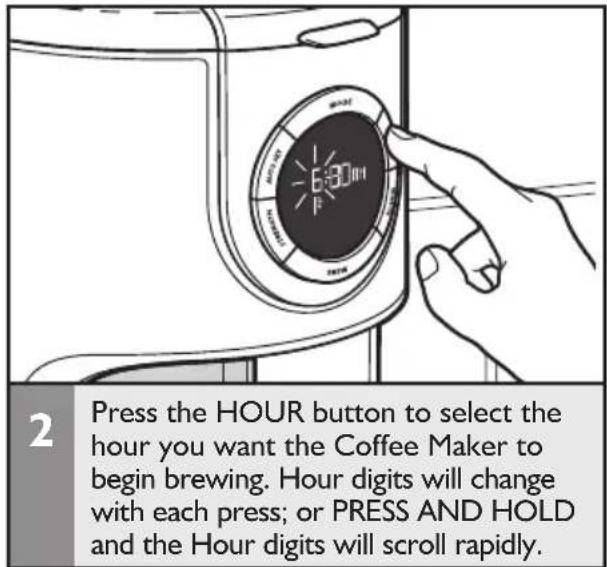
text_image
Press the HOUR button to select the hour you want the Coffee Maker to begin brewing. Hour digits will change with each press; or PRESS AND HOLD and the Hour digits will scroll rapidly.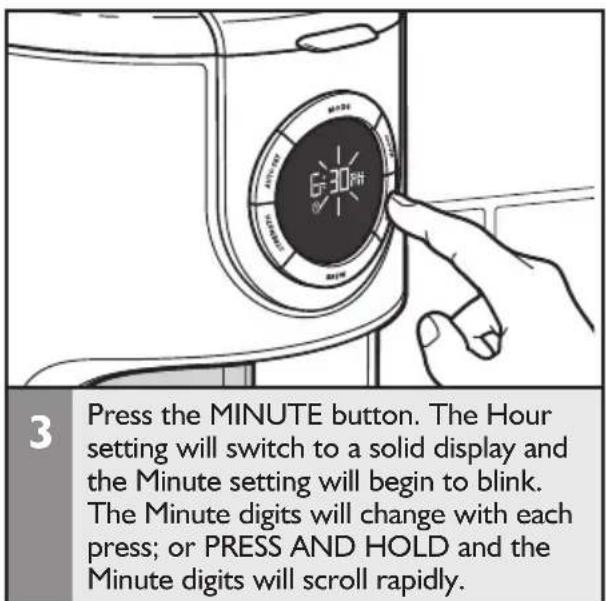
text_image
3 Press the MINUTE button. The Hour setting will switch to a solid display and the Minute setting will begin to blink. The Minute digits will change with each press; or PRESS AND HOLD and the Minute digits will scroll rapidly.NOTE: Auto Brew time may be saved in 2 different ways. After completing steps 1–3, either complete step 4 below to save the Auto Brew time and exit out of the feature, or go directly to step 1 of “Using previously programmed Automatic brew settings” to save the Auto Brew time and automatically start the Auto Brew cycle.
text_image
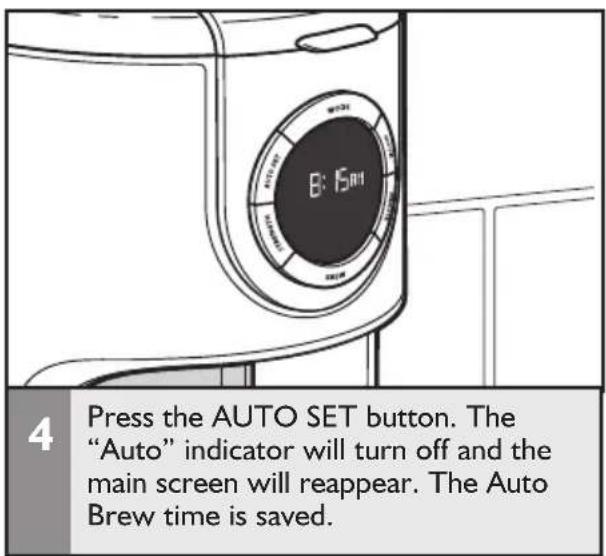
4 Press the AUTO SET button. The "Auto" indicator will turn off and the main screen will reappear. The Auto Brew time is saved.NOTE: During auto brew time setting, if there are no buttons pressed for 10 seconds after selecting the minute setting, the "Auto" indicator will turn off and the main screen will reappear.
Using previously programmed Automatic brew settings
These steps can also be followed to save the Auto Brew time after following steps 1–3 in the "Setting up the Automatic Brew feature" section.
text_image
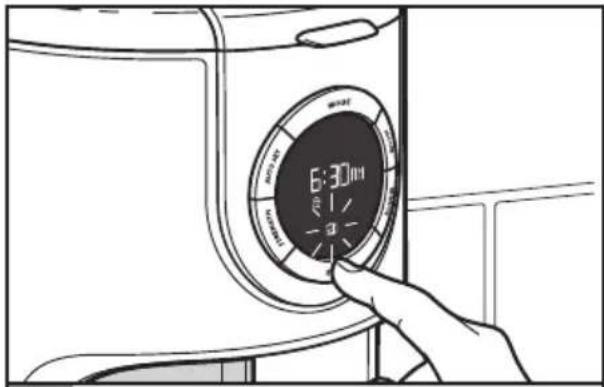
6:30 minPress and hold the BREW button for three seconds. Time display turns into current Auto Brew time. The "Auto" indicator will come on, and the "Brew" indicator will begin to flash.
natural_image
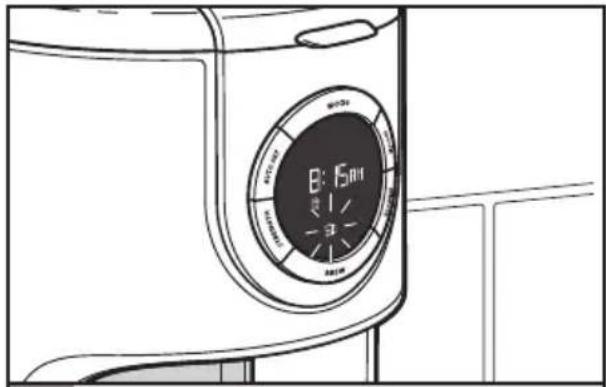
Line drawing of a washing machine front view with digital display (no text or symbols)2 After 5 seconds, the display will switch back to the main screen. The "Auto" indicator will stay on, and the "Brew" icon will continue to flash.
text_image
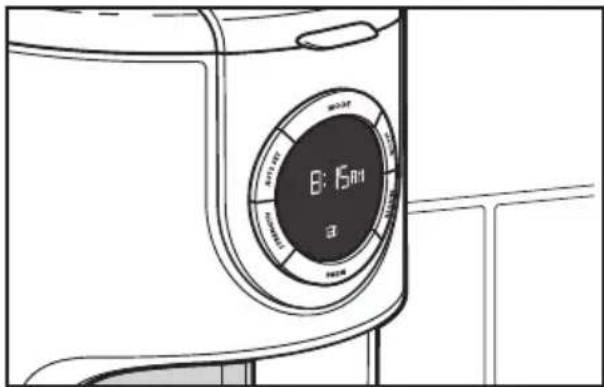
8:15时 B3 The Coffee Maker will begin the brew cycle at the auto brew time, beeping once when the cycle begins. The "BREW" indicator will stop flashing and remain lit up, and the "Auto" indicator will turn off.
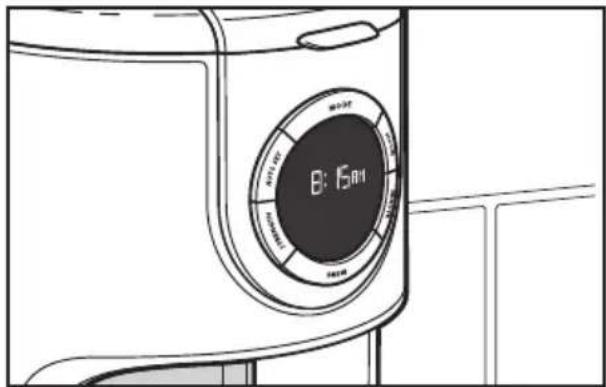
text_image
8:15:00 Control buttons Control buttons Control buttons Control buttons Control buttons Control buttons Control buttons Control buttons Control buttons Control buttons Control buttons Control buttons Control buttons Control buttons Control buttons Control buttons Control buttons Control buttons Control buttons Control buttons Control buttons Control buttons Control buttons Control buttons Control buttons Control buttons Control buttons Control buttons Control buttons Control buttons Control buttons Control buttons Control buttons Control buttons4 The Coffee Maker will beep 3 times when the Brew cycle is complete, then will automatically initiate the 2 hour Warm cycle. After the Warm cycle finishes, one long beep will sound.
Quick tips
Fresh Coffee Beans: Truly great coffee can only come from fresh coffee beans. To preserve the freshness of your beans, keep them in an opaque, airtight container and store in a cool, dry place. Refrigeration is not recommended since condensation tends to form on the beans whenever the container is opened. Freezing can help preserve beans stored for an extended period, but it will also impair flavor.
The Right Grind: The best cup of coffee comes from coffee beans that are properly ground just before brewing. When grinding, be sure to grind your coffee to a medium grind level, the appropriate grind for automatic drip Coffee Makers. Look for KitchenAid® Coffee Grinders at your local retailer or online at www.kitchenaid.com.
The Proper Amount of Ground Coffee:
A good starting point is 1 tablespoon of coffee for every cup of brew water marked on the glass carafe or the water tank. Finer grinds usually require less coffee but may also produce bitterness and clog the filter.
For weaker coffee, brew using the suggested ratio of coffee grounds and water, then dilute with hot water. This maximizes flavor and minimizes bitterness.
Brew Water Purity: Great tasting coffee starts with fresh water. The removable water tank is easy to fill with water to give you great tasting coffee every time. It's also easy to clean so you can always make your coffee with the freshest water. Where local water is extremely poor, you may wish to use bottled water. Do not use distilled water or mineral water since they can damage your Coffee Maker.
Coffee Maker Cleanliness: Since the coffee oils that build up on the brew basket and carafe can go stale and impair the flavor of the brewed coffee, it's important that these two items are cleaned daily in order to make the best tasting coffee.
Cleaning the Coffee Maker
Calcium deposits (scale) from water will build up in the Coffee Maker heat pump over time and impair brewing efficiency and coffee quality. If you notice that it takes longer than usual to brew, or that the Coffee Maker is making unusual noises, then it is time to descale. The “Clean” indicator will flash when the Coffee Maker has brewed 100 cups of coffee, or detects scale buildup. Descaling should be done as soon as possible to preserve the performance and life of your Coffee Maker.
NOTE: The Coffee Maker can be descaled using a vinegar and water solution, or by using a packaged descaling agent. Always mix the descaling solution using cool water.
When using vinegar, fill the carafe with a solution consisting of 12 vinegar and 12 water.
When using a descaling agent, follow the directions on the package for the recommended ratios of descaling agent and water to use.
The Coffee Maker should be run through a complete Clean cycle using a full tank of the descaling solution.
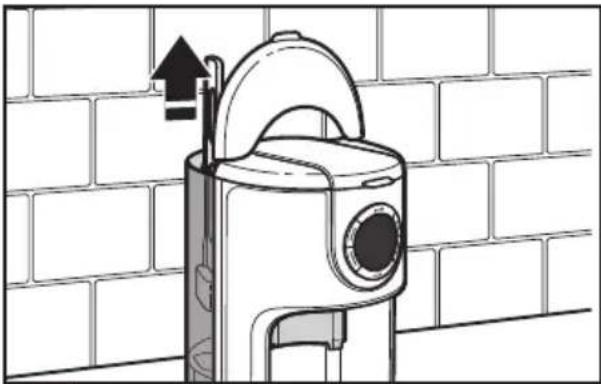
natural_image
Technical line drawing of a mechanical device mounted on a brick wall, with no visible text or symbols.Before descaling, always remove the water filter (see the “Installing the Water Filter” section) and make sure the brew basket contains no coffee or coffee filters.
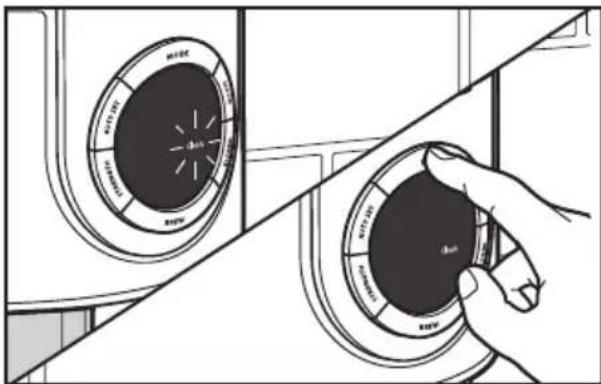
text_image
Diagram showing two circular gauges with labeled dimensions and a hand holding the center, illustrating a mechanical or electrical component.2 When the "Clean" indicator begins to flash: Press the MODE button 2 times. The "Reg" indicator will go off, and the "Clean" indicator will turn on.
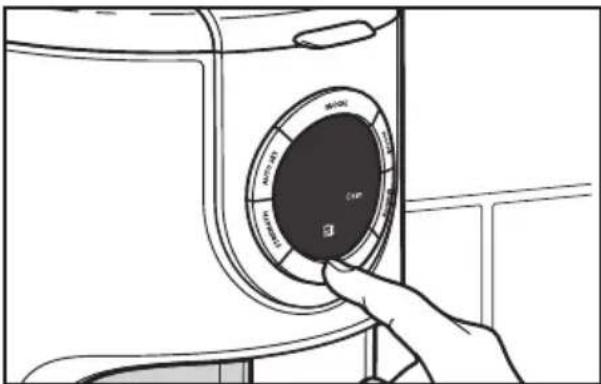
text_image
Camera Battery3 Press the BREW button. One beep will sound and the "Brew" indicator will light up. The "Clean" indicator will stay on and the Clean cycle will begin.
text_image
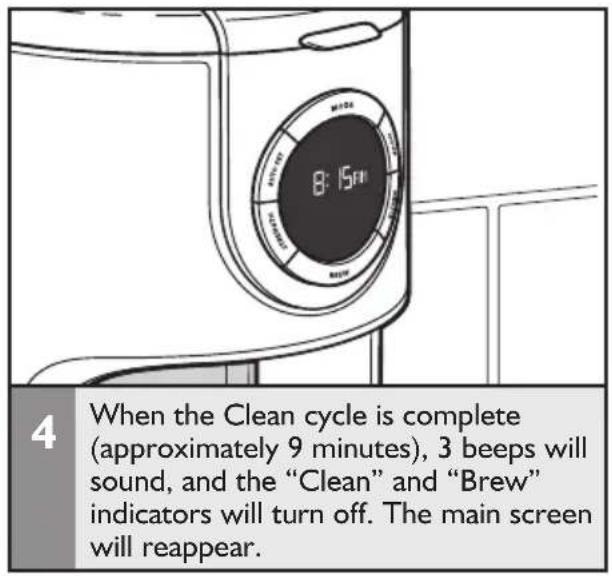
8:15"F 4 When the Clean cycle is complete (approximately 9 minutes), 3 beeps will sound, and the "Clean" and "Brew" indicators will turn off. The main screen will reappear.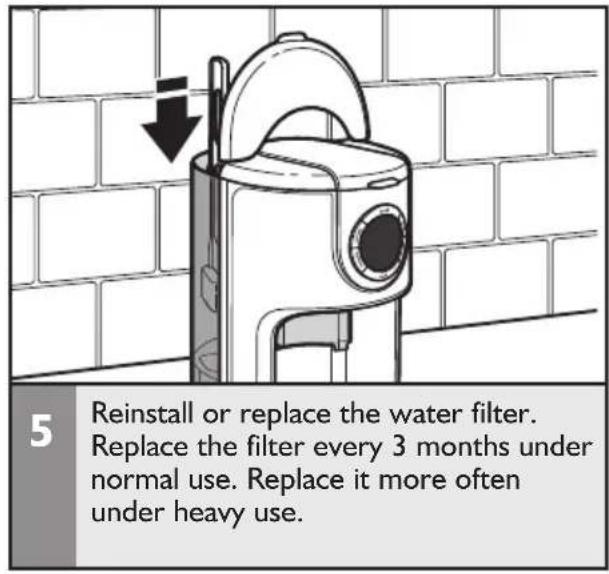
text_image
5 Reinstall or replace the water filter. Replace the filter every 3 months under normal use. Replace it more often under heavy use.NOTE: The Clean cycle can be completed at regular intervals, if desired, without the "Clean" indicator needing to light up. Follow these directions to clean the Coffee Maker whenever desired.
WARNING

Electrical Shock Hazard
Plug into a grounded 3 prong outlet.
Do not remove ground prong.
Do not use an adapter.
Do not use an extension cord.
Failure to follow these instructions can result in death, fire, or electrical shock.
I. If the brew timer display is not illuminated:
- Check to see whether the Coffee Maker is plugged into a grounded 3-prong outlet. If it is, check the fuse or circuit breaker on the electrical circuit the Coffee Maker is connected to and make sure the circuit is closed.
- If only a portion of the water added to the Coffee Maker actually brews:
- The Coffee Maker requires immediate descaling. Please refer to "Descaling the Coffee Maker" in the "Care and Cleaning" section.
- If "Erl" appears on the brew button timer display:
- A button may be jammed. Unplug the Coffee Maker and press each button several times.
- Plug the Coffee Maker into a grounded 3-prong outlet.
- If "Er1" appears again on the display, repeat this procedure.
- If the problem cannot be corrected:
- See the "Warranty" section. Do not return the Coffee Maker to the retailer; retailers do not provide service.
KitchenAid® Coffee Maker Warranty for the 50 United States, the District of Columbia, Puerto Rico, and Canada
This warranty extends to the purchaser and any succeeding owner for Coffee Makers operated in the 50 United States, the District of Columbia, Puerto Rico, and Canada.
Length of Warranty: One Year Full Warranty from date of purchase.
KitchenAid Will Pay Hassle-Free Replacement of your Coffee Maker.
for Your Choice of: See the next page for details on how to arrange for service, or call the Customer eXperience Center toll-free at
I-800-541-6390.
OR
The treatment parts and repair labor costs to correct defect in materials and workmanship. Service must be provided by an Authorized KitchenAid Service Center.
KitchenAid Will A. Repairs when Coffee Maker is used in other than
Not Pay for: normal single family home use.
B. Damage resulting from accident, alteration, misuse or abuse.
C. Any shipping or handling costs to deliver your Coffee Maker to an Authorized Service Center.
D. Replacement parts or repair labor costs for Coffee Maker operated outside the 50 United States, District of Columbia, Puerto Rico, and Canada.
DISCLAIMER OF IMPLIED WARRANTIES; LIMITATION OF REMEDIES
IMPLIED WARRANTIES, INCLUDING TO THE EXTENT APPLICABLE WARRANTIES OF MERCHANTABILITY OR FITNESS FOR A PARTICULAR PURPOSE, ARE EXCLUDED TO THE EXTENT LEGALLY PERMISSIBLE. ANY IMPLIED WARRANTIES THAT MAY BE IMPOSED BY LAW ARE LIMITED TO ONE YEAR, OR THE SHORTEST PERIOD ALLOWED BY LAW. SOME STATES AND PROVINCES DO NOT ALLOW LIMITATIONS OR EXCLUSIONS ON HOW LONG AN IMPLIED WARRANTY OF MERCHANTABILITY OR FITNESS LASTS, SO THE ABOVE LIMITATIONS OR EXCLUSIONS MAY NOT APPLY TO YOU.
IF THIS PRODUCT FAILS TO WORK AS WARRANTED, CUSTOMER'S SOLE AND EXCLUSIVE REMEDY SHALL BE REPAIR OR REPLACEMENT ACCORDING TO THE TERMS OF THIS LIMITED WARRANTY. KITCHENAID AND KITCHENAID CANADA DO NOT ASSUME ANY RESPONSIBILITY FOR INCIDENTAL OR CONSEQUENTIAL DAMAGES. This warranty gives you specific legal rights and you may also have other rights which vary from state to state or province to province.
Hassle-Free Replacement Warranty – 50 United States, District of Columbia, and Puerto Rico
We're so confident the quality of our products meets the exacting standards of KitchenAid that, if your Coffee Maker should fail within the first year of ownership, KitchenAid will arrange to deliver an identical or comparable replacement to your door free of charge and arrange to have your original Coffee Maker returned to us. Your replacement unit will also be covered by our one year limited warranty. Please follow these instructions to receive this quality service.
If your Coffee Maker should fail within the first year of ownership, simply call our toll-free Customer eXperience Center at 1-800-541-6390 Monday through Friday. Please have your original sales receipt available when you call. Proof of purchase will be required to initiate the claim. Give the consultant your complete shipping address. (No P.O. Box numbers, please.)
When you receive your replacement Coffee Maker, use the carton and packing materials to pack up your original Coffee Maker.
Hassle-Free Replacement Warranty – Canada
We're so confident the quality of our products meets the exacting standards of the KitchenAid brand that, if your Coffee Maker should fail within the first year of ownership, KitchenAid Canada will replace your Coffee Maker with an identical or comparable replacement. Your replacement unit will also be covered by our one year limited warranty. Please follow these instructions to receive this quality service.
If your Coffee Maker should fail within the first year of ownership, take the Coffee Maker or ship collect to an Authorized KitchenAid Service Centre. In the carton
include your name and complete shipping address along with a copy of the proof of purchase (register receipt, credit card slip, etc.). Your replacement Coffee Maker will be returned prepaid and insured. If you are unable to obtain satisfactory service in this manner call our toll-free Customer eXperience Centre at 1-800-807-6777.
Or write to us at: Customer eXperience Centre KitchenAid Canada 200 - 6750 Century Ave. Mississauga, ON L5N 0B7
Arranging for Service after the Warranty Expires, or Ordering Accessories and Replacement Parts
In the United States and Puerto Rico:
For service information, or to order accessories or replacement parts, call toll-free at 1-800-541-6390 or write to: Customer eXperience Center, KitchenAid Small Appliances, P.O. Box 218, St. Joseph, MI 49085-0218
Outside the United States and Puerto Rico:
Consult your local KitchenAid dealer or the store where you purchased the Coffee Maker for information on how to obtain service.
For service information in Canada:
Call toll-free I-800-807-6777.
Or write to:
Customer eXperience Centre
KitchenAid Canada
200 - 6750 Century Ave.
Mississauga, ON L5N 0B7
BIENVENUE DANS LE MONDE DE KITCHENAID.
natural_image
KitchenAid air fryer with digital display and glass jar (no visible text or symbols on device)natural_image
Line drawing of a kitchen sink with a beaker, pipe fittings, and buckets (no text or symbols)natural_image
Line drawing of a kitchen appliance with a curved lid and arrow indicating rotation (no text or symbols)natural_image
Technical line drawing of a mechanical device with a downward arrow indicating force or motion (no text or symbols present)natural_image
Line drawing of a hand inserting a plug into an electrical outlet (no text or symbols)text_image
MCC 12:00 R RATIOnatural_image
Diagram of a bathroom sink with toilet and sink, showing wall-mounted fixtures and a diagonal line (no text or symbols)natural_image
Technical illustration of a mechanical device with a directional arrow indicating movement, set against a brick wall background (no text or symbols)natural_image
Line drawing of a modern glass coffee maker with lid and handle (no text or symbols)natural_image
Line drawing of a kitchen toaster with an open kettle and a black arrow indicating the opening (no text or symbols)natural_image
Line drawing of a kitchen appliance with a bucket being inserted into a pan, set against a brick wall background (no text or symbols)natural_image
Illustration of a bucket being placed into a filter bucket, with a downward arrow indicating the drop (no text or symbols present)natural_image
Line drawing of a hand pouring granular material into a bucket on a kitchen counter (no text or symbols)natural_image
Diagram showing two mechanical components mounted on a brick wall, with directional arrows indicating motion (no text or symbols)natural_image
Hand inserting a circular device into a washing machine (no text or symbols visible)text_image
B: 15min Batterynatural_image
Line drawing of a washing machine front panel with digital clock (no text or symbols on the main body)natural_image
Technical line drawing of a mechanical device mounted on a brick wall, with an upward arrow indicating motion (no text or symbols present)text_image
Diagram showing two circular gauges with labels indicating 'AIR BOX' and 'AIR BAN' components, separated by a hand holding a black dial.2
natural_image
Technical line drawing of a mechanical device with a downward arrow indicating force or motion (no text or symbols present)5
text_image
KITCHENAIID HASSLE-FREE REPLACEMENT WARRANTY QUALITYOU
Customer Satisfaction Center, KitchenAid Small Appliances, P.O. Box 218, St. Joseph, MI 49085-0218
natural_image
KitchenAid air fryer with digital display showing time, speed, and control buttons (no text-heavy elements)Únase a nosotros en la cocina, visite www.kitchenaid.com.
ÍNDICE
SEGURIDAD DE LA CAFETERA
Salvaguardias importantes 43
natural_image
Simple line drawing of a bucket with handle and side panel (no text or symbols)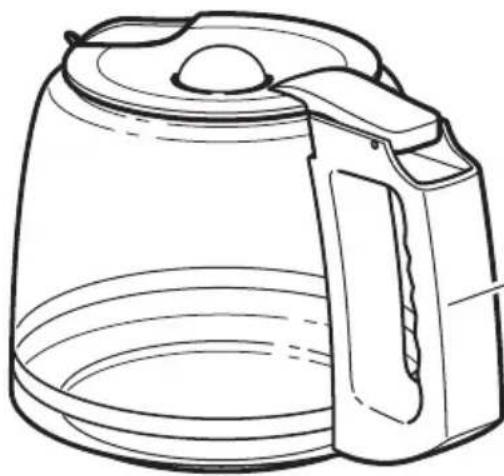
natural_image
Line drawing of a modern kettle with lid and handle (no text or symbols)Jarra de vidrio
natural_image
Line drawing of a bucket with handle and side panel (no text or symbols)natural_image
Illustration of a hand inserting a plug into an electrical outlet (no text or symbols)natural_image
Diagram of a kitchen sink with toilet and sink, showing a tiled wall and a diagonal line (no text or symbols)natural_image
Technical illustration of a mechanical device mounted on a brick wall, showing internal components and directional arrows (no text or symbols)natural_image
Line drawing of a modern glass coffee maker with lid and handle (no text or symbols)natural_image
Line drawing of a kitchen toaster oven with a kettle and lid, showing the interior and exterior view (no text or symbols)natural_image
Diagram of a kitchen appliance with a bucket being inserted into a pot, against a brick wall background (no text or symbols)natural_image
Illustration of a kitchen sink with a bucket and filter, showing a downward arrow indicating flow or discharge (no text or symbols)natural_image
Line drawing of a hand pouring granular material into a bucket on a kitchen counter (no text or symbols)natural_image
Diagram showing two mechanical components mounted on a brick wall, with directional arrows indicating motion (no text or symbols)natural_image
Line drawing of a hand inserting a fan into a washing machine (no text or symbols)|
text_image
8:15:01 3natural_image
Technical line drawing of a portable air purifier mounted on a brick wall, with no visible text or symbols.I
text_image
Diagram showing two circular air conditioner unit designs with labeled zones and a hand adjusting one panel, illustrating the process of cooling.2
text_image
KITCHENIAID HASSLE-FREE REPLACEMENT WARRANTY QUALITYHassle-Free Replacement Warranty – 50 United States, District of Columbia, and Puerto Rico
We're so confident the quality of our products meets the exacting standards of the KitchenAid brand that, if your Coffee Maker should fail within the first year of ownership, KitchenAid Canada will replace your Coffee Maker with an identical or comparable replacement. Your replacement unit will also be covered by our one year limited warranty. Please follow these instructions to receive this quality service.
If your Coffee Maker should fail within the first year of ownership, take the Coffee Maker or ship collect to an Authorized KitchenAid Service Centre. In the carton
include your name and complete shipping address along with a copy of the proof of purchase (register receipt, credit card slip, etc.). Your replacement Coffee Maker will be returned prepaid and insured. If you are unable to obtain satisfactory service in this manner call our toll-free Customer eXperience Centre at 1-800-807-6777.
Or write to us at:
Customer eXperience Centre
KitchenAid Canada
200 - 6750 Century Ave.
Mississauga, ON L5N 0B7
®/™ © 2014 KitchenAid. All rights reserved. Used under license in Canada.