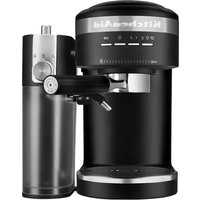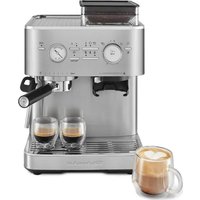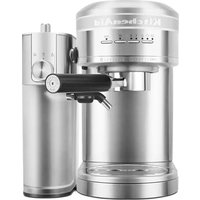
KES6504 - Coffee machine KITCHENAID - Free user manual and instructions
Find the device manual for free KES6504 KITCHENAID in PDF.


| Product type | Espresso machine with milk frother |
| Brand | KitchenAid |
| Model | KES6504 |
| Color | Not specified (generally silver or black) |
| Power supply | 120 V ~ 60 Hz, 1460 W |
| Water tank capacity | 1.4 L (47 oz) |
| Milk tank capacity | 0.5 L (17 oz) |
| Coffee type | Ground coffee or freshly ground beans |
| Pump pressure | 15 bars (estimated) |
| Portafilter | 58 mm, with single and double wall baskets (1 and 2 shots) |
| Main functions | Espresso, steam, hot water, milk frothing, hot milk |
| Programmable | Yes: espresso volume, water volume, temperature, water hardness |
| Cup warmer | Yes, built-in |
| Cleaning | Manual cleaning, automatic descaling program |
| Safety | Automatic shut-off, overheat protection, emergency stop |
| Dimensions (approx.) | 30 x 25 x 35 cm (estimated) |
| Weight (approx.) | 5 kg (estimated) |
| Maintenance | Regular cleaning of frother, descaling according to water hardness |
| Warranty | 1 year limited warranty (hassle-free replacement the first year) |
Frequently Asked Questions - KES6504 KITCHENAID
User questions about KES6504 KITCHENAID
0 question about this device. Answer the ones you know or ask your own.
Ask a new question about this device
Download the instructions for your Coffee machine in PDF format for free! Find your manual KES6504 - KITCHENAID and take your electronic device back in hand. On this page are published all the documents necessary for the use of your device. KES6504 by KITCHENAID.
USER MANUAL KES6504 KITCHENAID
natural_image
Exterior view of a KitchenAid coffee maker with various kitchen utensils and bowls (no visible text or symbols)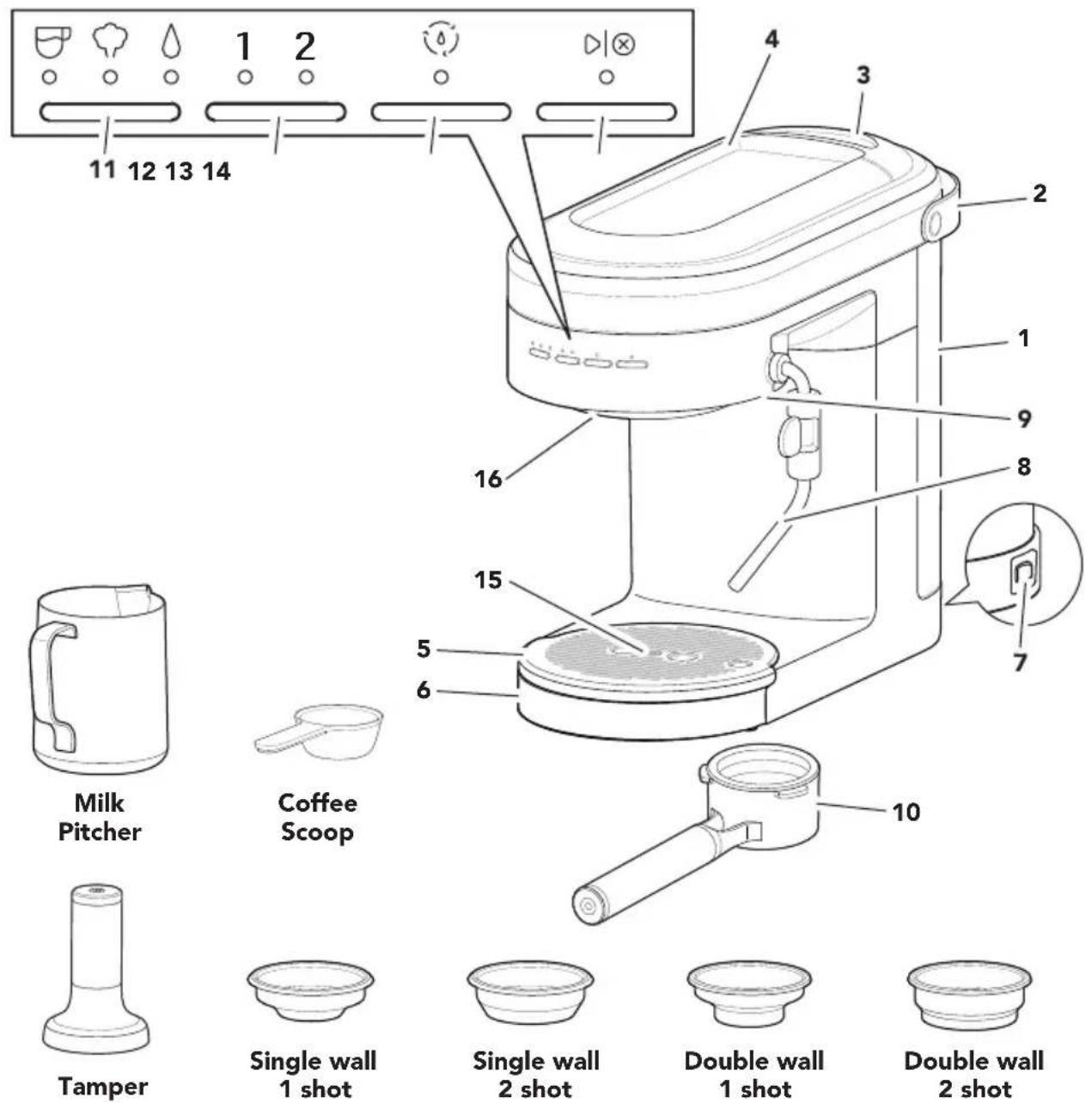
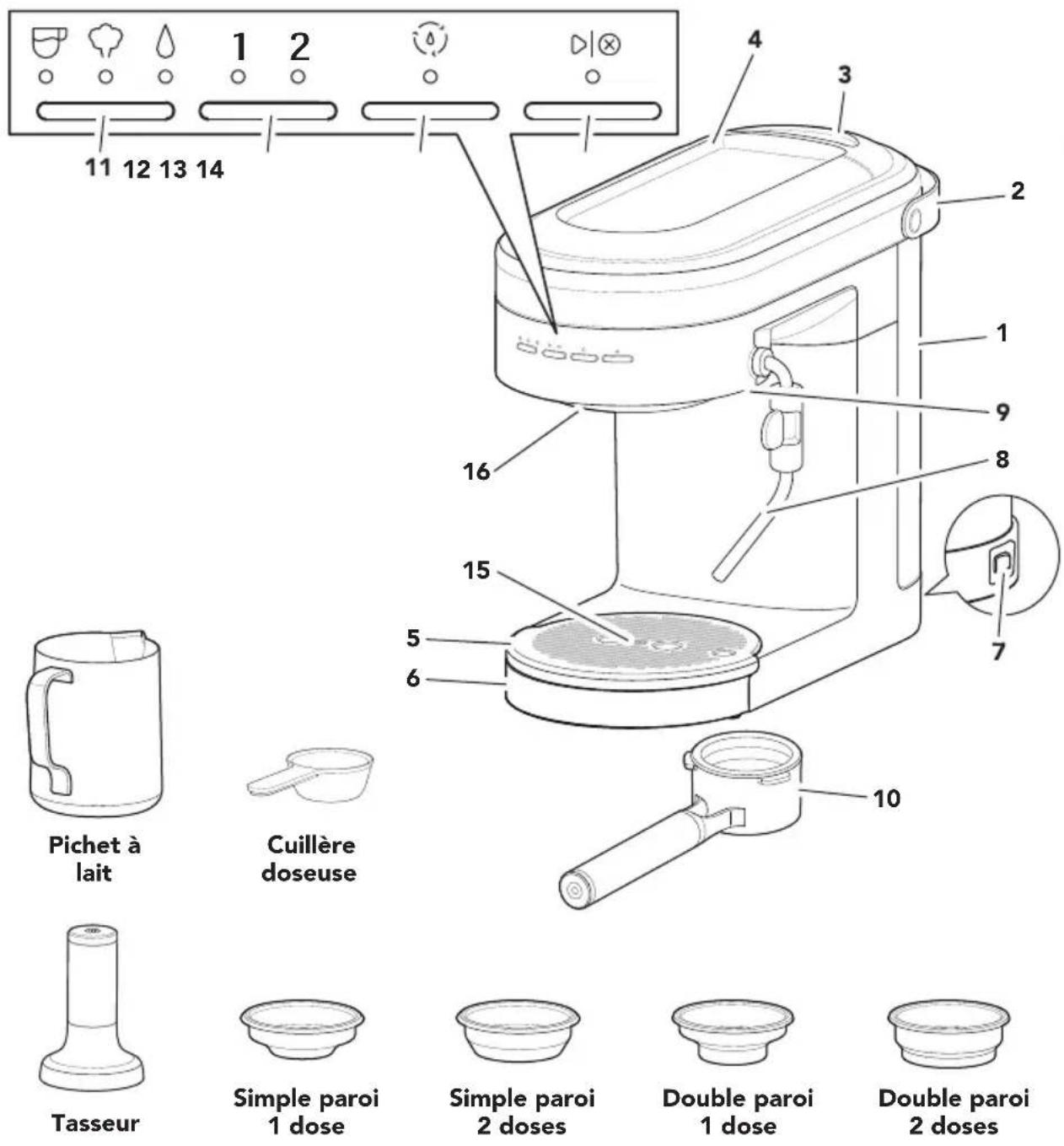
1 Water tank (Capacity: 47 ounces)
2 Water tank handle
3 Water tank lid
4 Cup warmer
5 Drip tray plate
6 Drip tray
7 Main power On/Off switch
8 Steam wand
9 Steam wand release button
10 Portafilter (58 mm)
11 Mode button : Espresso
:Steam
: Hot Water
12 Dose button : 1 (1 shot)
: 2 (2 shot)
13 Clean cycle button
14 Start/Cancel button
15 Empty drip tray indicator
16 Group head
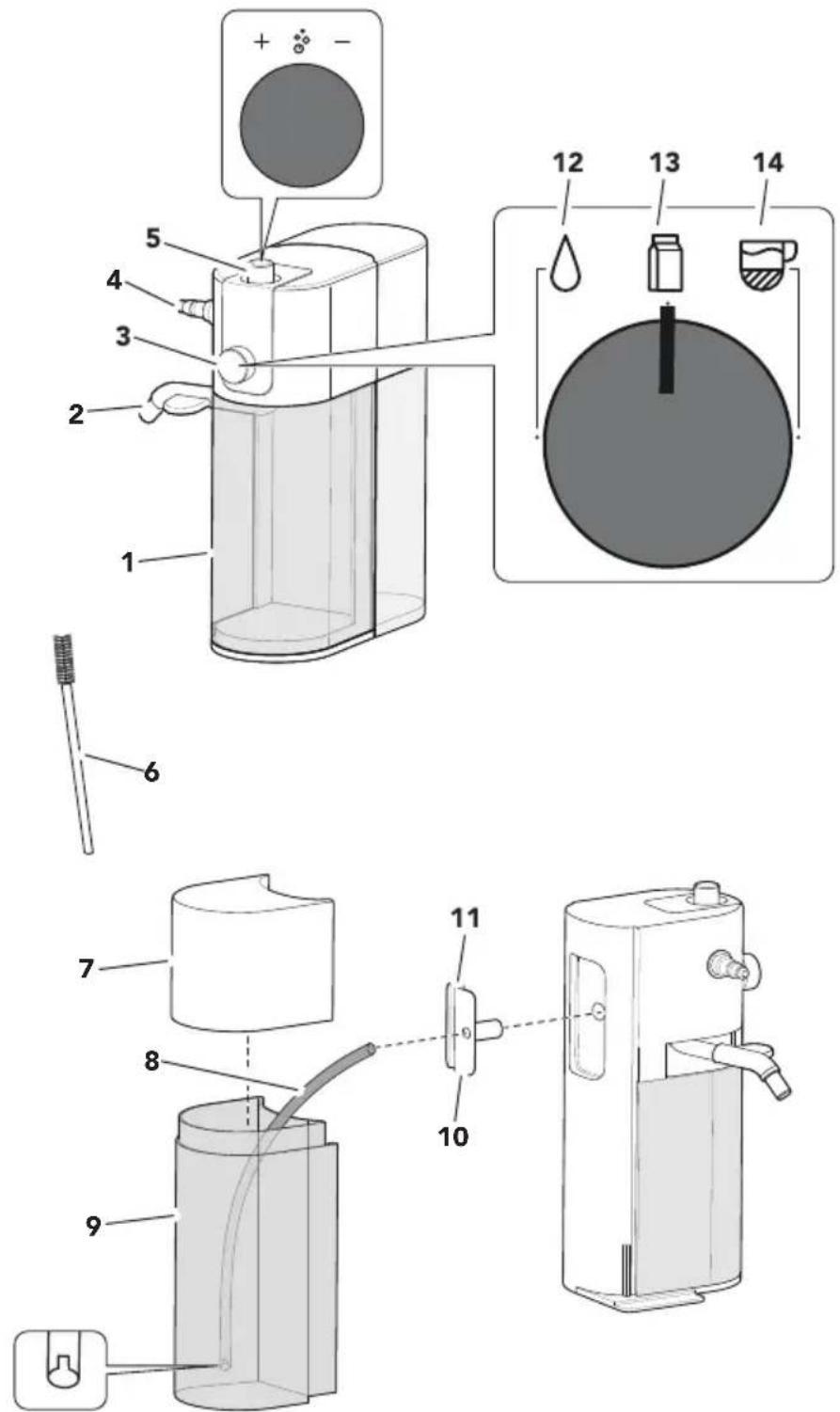
1 Storage container
2 Milk dispenser tube
3 Function knob
4 Steam port
5 Froth level adjustment knob
6 Brush
7 Milk tank lid
8 Milk hose
9 Milk tank
10 Milk hose connector
11 Milk hose clip
12 Hot water function
13 Hot milk function
14 Froth milk function
Your safety and the safety of others are very important.
We have provided many important safety messages in this manual and on your appliance. Always read and obey all safety messages.

This is the safety alert symbol.
This symbol alerts you to potential hazards that can kill or hurt you and others.
All safety messages will follow the safety alert symbol and either the word "DANGER" or "WARNING." These words mean:
! DANGER
You can be killed or seriously injured if you don't immediately follow instructions.
WARNING
You can be killed or seriously injured if you don't follow instructions.
All safety messages will tell you what the potential hazard is, tell you how to reduce the chance of injury, and tell you what can happen if the instructions are not followed.
IMPORTANT SAFEGUARDS
When using electrical appliances, basic safety precautions should always be followed, including the following:
- Read all instructions.
- Do not touch hot surfaces. Use handles or knobs.
- Close supervision is necessary when any appliance is used by or near children.
- To protect against fire, electric shock, and personal injury do not immerse cord, plugs, or appliance in water or other liquids.
-
Unplug from outlet when not in use and before cleaning. Allow to cool before putting on or taking off parts, and before cleaning.
-
Do not operate any appliance with a damaged cord or plug, or after the appliance malfunctions, or is dropped or damaged in any manner. Return appliance to the nearest Authorized Service Facility for examination, repair, or electrical or mechanical adjustment.
-
The use of accessory attachments not recommended by the appliance manufacturer may result in fire, electric shock, or personal injury.
-
Do not use the appliance outdoors.
-
Do not let cord hang over edge of table or counter, or touch hot surfaces.
-
Do not place on or near a hot gas or electric burner, or in a heated oven.
-
Always turn the appliance off, then plug cord into the wall outlet. To disconnect, turn the appliance off, then remove plug from wall outlet.
-
Do not clean the Espresso Machine or Milk Frother Attachment with abrasive cleaners, steel wool, or other abrasive materials.
-
Use extreme caution when using hot steam.
-
Do not use appliance for other than intended use.
-
Irritation to skin or eyes can occur if they come into contact with the descaling solution. Avoid skin and eye contact. Rinse off descaling solution with clean water. Obtain medical advice after eye contact.
PRODUCT SAFETY
- Damage to delicate surfaces can occur after contact with the descaling solution. Remove any splashes immediately.
- WARNING: To avoid the risk of injury, do not open the brew chamber during the brew process.
- Turn the Espresso Machine OFF (and detach the Milk Frother Attachment from the Espresso Machine) before cleaning. Make sure the steam/water flow stops completely before disassembling.
- This appliance is not intended for use by persons (including children) with reduced physical, sensory, or mental capabilities, or lack of experience or knowledge, unless they are closely supervised and instructed concerning use of the appliance by a person responsible for their safety. Close supervision is necessary when any appliance is used by or near children. Children should be supervised to ensure that they do not play with the appliance.
SAVE THESE INSTRUCTIONS
This product is designed for household use only.
ELECTRICAL REQUIREMENTS
Voltage: 120 V\~
Frequency: 60 Hz
Wattage: 1460 W
NOTE: If the plug does not fit in the outlet, contact a qualified electrician or service person. Do not modify the plug in any way. Do not use an adapter.
Do not use an extension cord. If the power supply cord is too short, have a qualified electrician or service person to install an outlet near the appliance.
The cord should be arranged so that it will not drape over the countertop or tabletop where it can be pulled on by children or tripped over unintentionally.
GETTING STARTED
First, clean all parts and accessories (See "Care and Cleaning" section).
Place the Espresso Machine on a dry, flat, level surface such as a countertop or table.
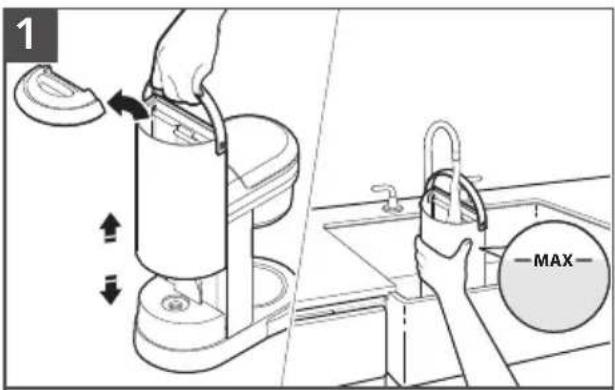
Fill the Water tank with fresh water (max. 47 ounces). Replace the Water tank lid.
natural_image
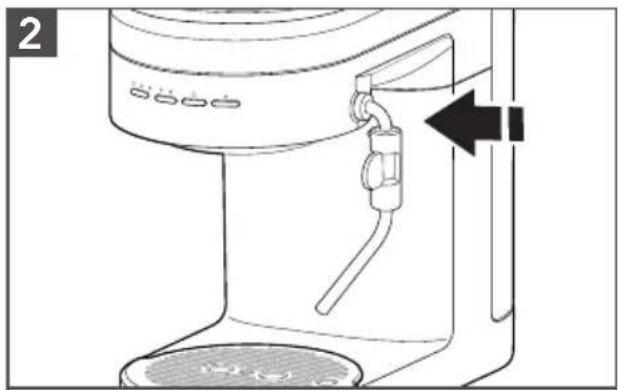
Line drawing of a hand pump device with control panel and outlet (no text or symbols)Insert the Steam wand until you hear a click.
IMPORTANT: Distilled water or mineral water can damage the Espresso Machine.
Do not use either to brew espresso.
natural_image
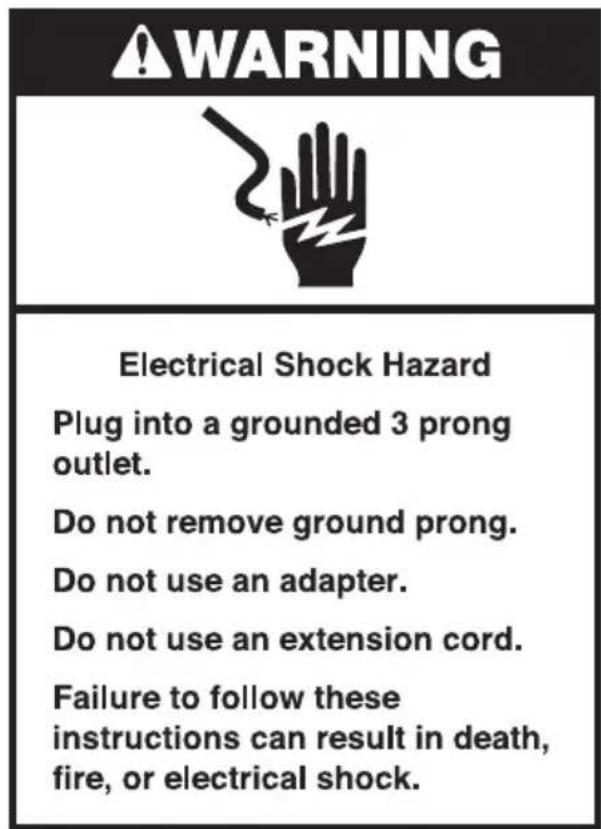
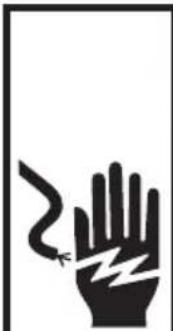
Black-and-white illustration of a hand with a lightning bolt symbol indicating electrical hazard (no text or labels)WARNING
Electrical Shock Hazard
Plug into a grounded 3 prong outlet.
Do not remove ground prong.
Do not use an adapter.
Do not use an extension cord.
Failure to follow these instructions can result in death, fire, or electrical shock.
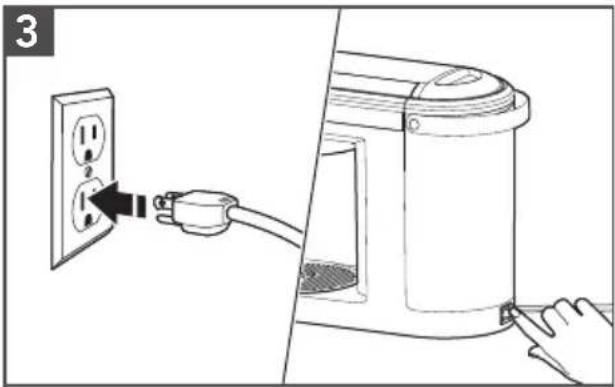
Plug into a grounded 3 prong outlet. Press the Main power switch to "ON (-)".
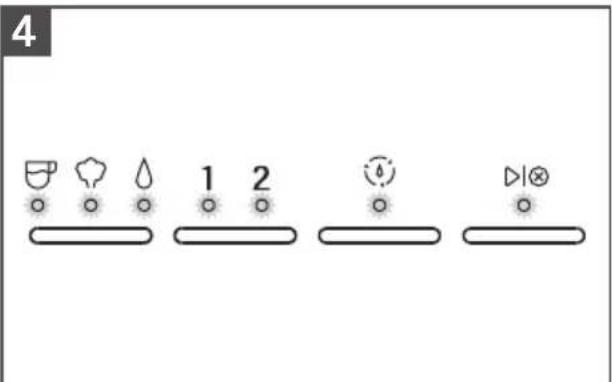
The machine automatically pumps water into the heater and starts heating. When lights stop blinking, the Espresso Machine is ready for use.
GETTING STARTED
5
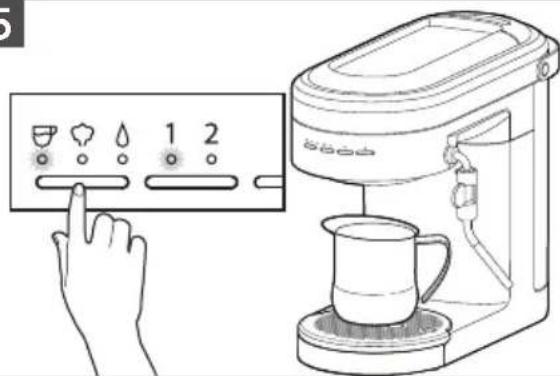
To rinse the Group head, place a container under the Group head. Toggle the Mode button to select Espresso. Toggle Dose button to 1 and press ▶ button.
The machine will flush water through the Group head and automatically stop when the cycle is complete.
6
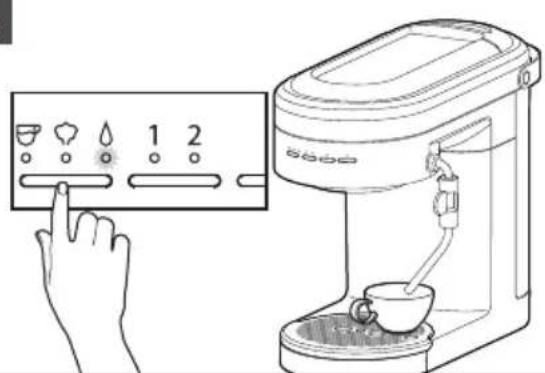
To rinse the Steam wand, direct the Steam wand towards the Drip tray or into a cup. Then, toggle the Mode button to select Hot Water and press ▶button to start.
Allow water to flow for 3 to 5 seconds then, press ▶ button to stop.
PRODUCT USAGE
BREWING ESPRESSO

natural_image
Line drawing of a kitchen sink with a bowl and handle, placed on a tiled wall (no text or symbols)Select desired Filter basket (see Basket selection chart). Press the Filter basket into the Portafilter until it clicks into place.
natural_image
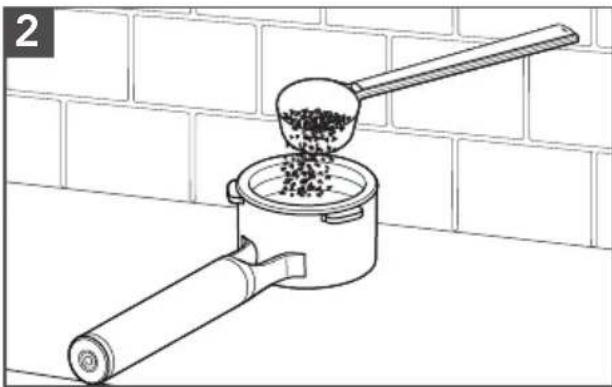
Line drawing of a manual grater with a ladle pouring granular material into a container, against a brick wall background (no text or symbols)Fill the Filter basket with fine Espresso coffee grounds (see Basket selection chart for dosing recommendations).
BASKET SELECTION CHART
| Basket type Shot Dose (gram) Use for | |||||
| Single wall |  | 1 shot |  | 10 - 12 Freshly ground whole bean coffee | |
| Single wall |  | 2 shot |  | 18 - 20 Freshly ground whole bean coffee | |
| Double wall |  | 1 shot |  | 10 - 12 Pre-ground coffee | |
| Double wall |  | 2 shot |  | 18 - 20 Pre-ground coffee | |
PRODUCT USAGE
natural_image
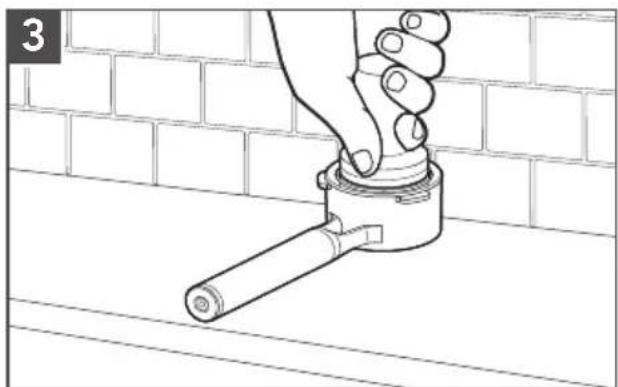
Line drawing of a hand adjusting a pipe fitting on a brick wall (no text or symbols)Tap the Portafilter to level the ground coffee bed and rest on a flat surface. Use the Tamper to tamp down the ground coffee. Sweep excess coffee grinds from the rim.
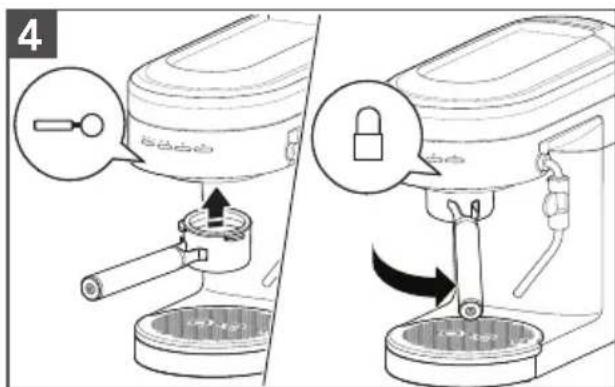
Position the Portafilter under the Group head with the handle align to unlock. Raise the Portafilter into the Group head and twist to the right side to lock.
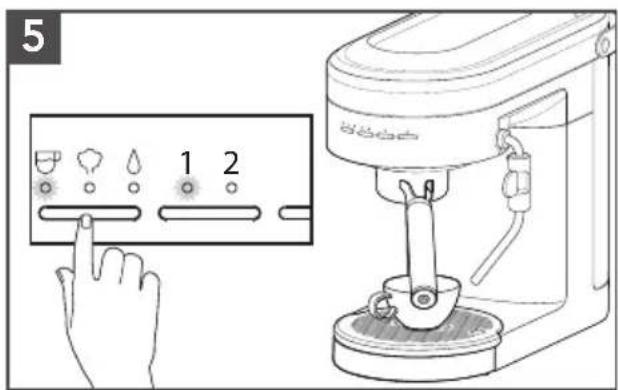
Toggle the Mode button to select Espresso. Toggle the Dose button to select desired number of shots 1 (\~ 1 ounce) or 2 (\~ 2 ounces).
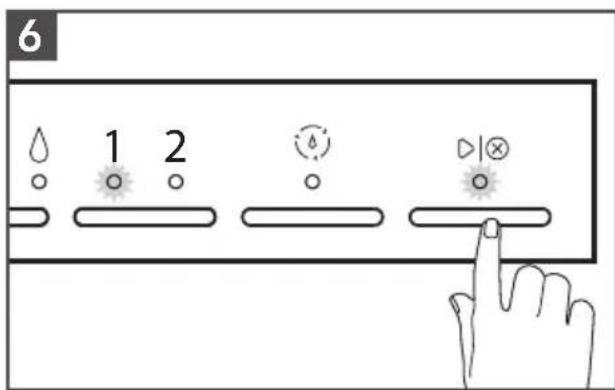
Press ▶ button to run selected Espresso cycle.
NOTE: Do not remove the Portafilter when brewing.
TIP: Shot duration should be between 20-30 seconds for 1 and 2 shot selections.
- If less than 20 seconds: decrease grind size and/or increase tamp pressure.
- If more than 30 seconds: increase grind size and/or reduce tamp pressure.
PRODUCT USAGE
USING THE STEAM MODE FOR MILK
1
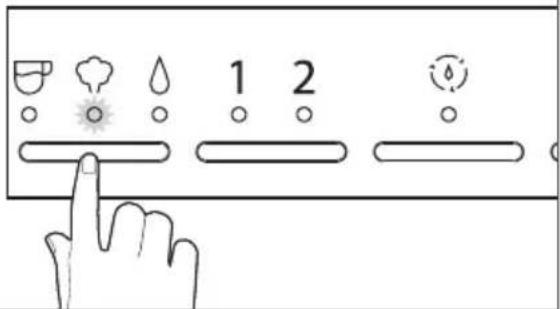
Toggle the Mode button to select Steam. The machine will automatically start heating, indicated by the flashing Steam light. The Steam light will go solid when machine is ready for steaming.
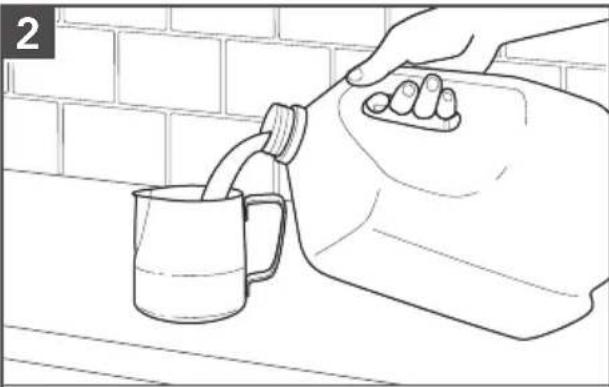
natural_image
Line drawing of a hand pouring liquid from a cup into a container, with brick wall background (no text or symbols)Fill the Milk pitcher with desired amount of cold milk.
TIP: Fill to bottom of the pour spout.
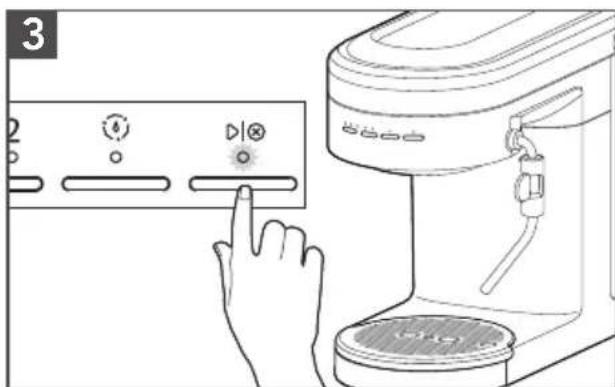
Angle the Steam wand towards the Drip tray or into a cup. Press button to start. Once water turns to steam, press button to stop.
4
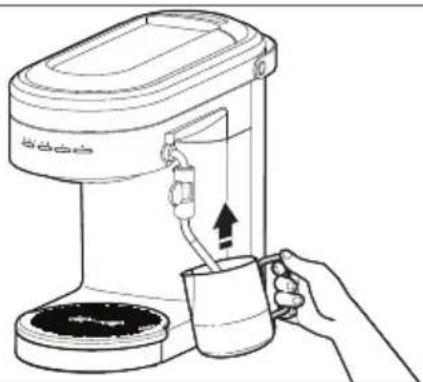
natural_image
Line drawing of a coffee maker with a hand holding a mug, showing the cup and handle (no text or symbols)Adjust the Steam wand to desirable position. Submerge the tip of the Steam wand just below the surface of milk in the Milk pitcher.
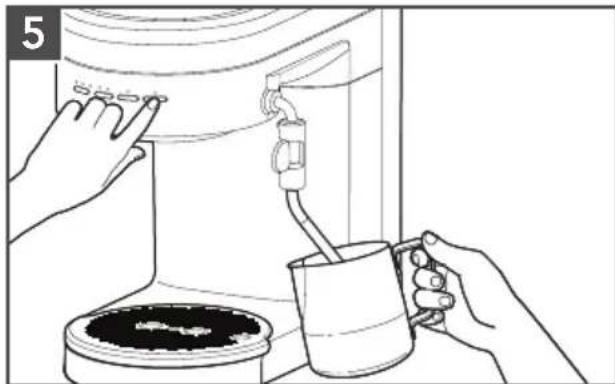
natural_image
Line drawing of hands using a water dispenser to clean a coffee pot (no text or symbols)Press ▶ion to initiate the steam.
Froth until desired level of foam and temperature is reached. To stop the steam, press ▶tion again.
To avoid splattering, wait until the steam stops before removing the Steam wand from the milk.
PRODUCT USAGE
USING HOT WATER FEATURE
The Steam wand can also dispense hot water which is great for an americano, tea, hot chocolate, etc. You can also use hot water to pre-heat cups.
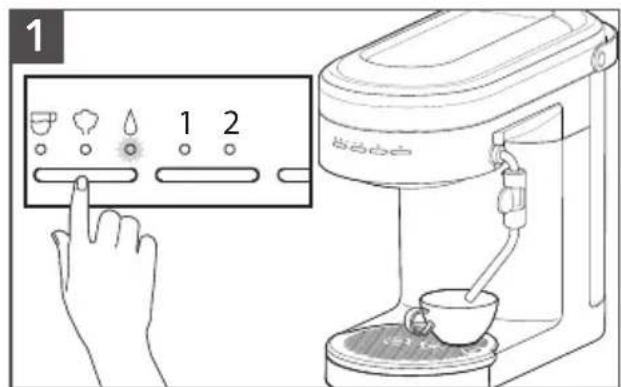
Toggle the Mode button to select Water. Place a cup under the Steam wand.
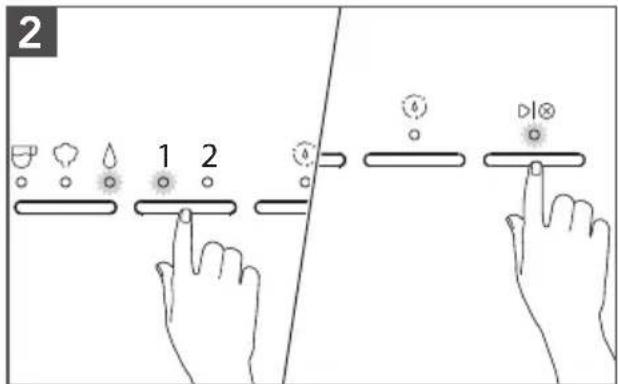
Press Dose button to select the volume of water 1 (\~ 4 ounces) or 2 (\~ 6 ounces). Press ▶ button to start water cycle. Water flows out from the Steam wand.
NOTE: You can pause the cycle by pressing ▶|⊗ button to stop the flow of water before the cycle complete.
PROGRAMING FUNCTION
The Espresso Machine is equipped with programing functionality. Any customized settings will be saved even in the event power is lost to the machine.
PROGRAMING THE ESPRESSO AND HOT WATER AMOUNT
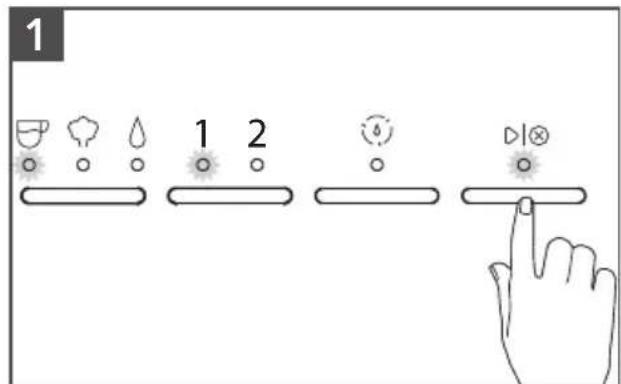
To change pre-programmed Espresso Volume for 1 or 2: Toggle the Mode button to select Espresso. Select the dose you desire to program (1 or 2). Press and hold ▶ button until desired espresso amount is reached in your cup.
While programing your selected dose, the dose and the ▶ button lights will blink. Lights will stop blinking when programing is complete.
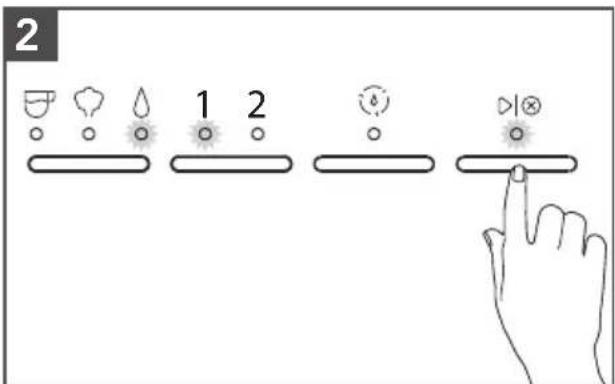
To change pre-programmed Water Volume for 1 or 2: Toggle the Mode button to select Water. Select the dose you desire to program (1 or 2). Press and hold ▶button until desired water amount is reached in your cup. While programing your selected dose, the dose and the ▶button light will blink. Lights will stop blinking when programing is complete.
PROGRAMING FUNCTION
TIP: To restore all factory settings, Press and Hold "Dose button" for 3 seconds. Changing the factory default Espresso or Water Volumes may impact the intended performance of the machine.
PROGRAMING THE WATER TEMPERATURE AND WATER HARDNESS
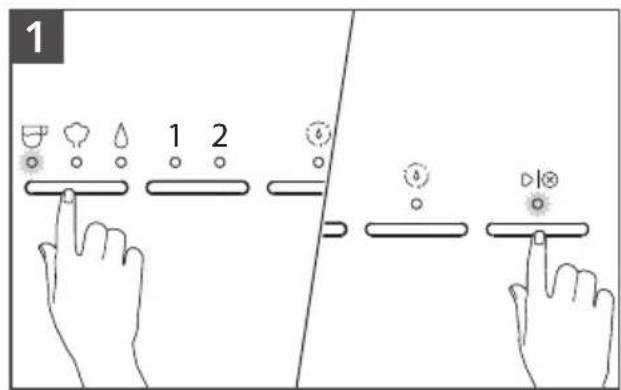
To change pre-programmed Water
Temperature: Toggle the Mode button to select Espresso, press and hold for 3 seconds.
The indicator lights will show the default factory setting or previous saved setting (see Indicator light chart for reference).
Toggle the Mode button between Low-Mid-High to select desired temperature.
To save your selection, press ▶ button or wait for 10 seconds.
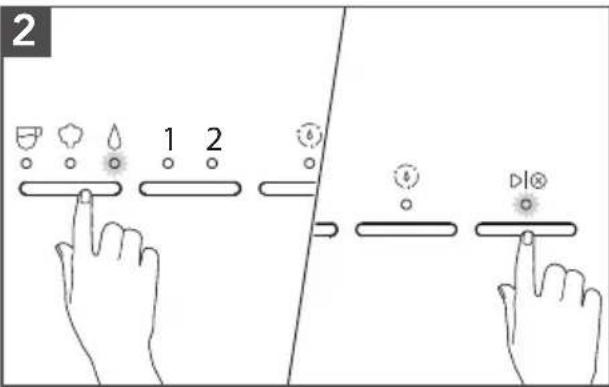
To change pre-programmed Water
Hardness: Toggle the Mode button to Water, Press and hold for 3 seconds.
The indicator lights will show the default factory setting or previous saved setting (see Indicator light chart for reference).
Toggle the Mode button between Low-Mid-High to select desired water hardness.
To save your selection, press ▶ button or wait for 10 seconds.
INDICATOR LIGHT CHART
| Water Temperature or Water Hardness |  |  | [down] |
| Low |  | ||
| Medium | |||
| High |
NOTE: Water Hardness - Low: 0 to 60 ppm
Medium: 60 to 120 ppm
High: more than 120 ppm
TIP: To restore all factory settings, Press and Hold "Dose button" for 3 seconds.
All indicator lights will blink indicating that all settings are restored.
CARE AND CLEANING
For best results, regularly clean the Espresso Machine and accessories.
IMPORTANT: Unplug the Espresso Machine before cleaning. Allow the Espresso Machine and accessories to cool down.
NOTE: Do not use abrasive cleansers or scouring pads when cleaning the Espresso Machine, parts, or accessories. Do not immerse the Espresso Machine or cord in water or other liquids.
natural_image
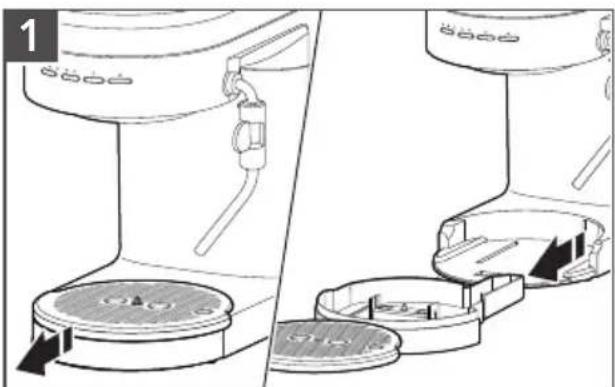
Diagram showing two views of a cleaning or cleaning device with circular components and arrows indicating movement (no text or symbols)When the Drip tray indicator rises and becomes visible above the surface of the Drip tray plate, empty the Drip tray and rinse with warm water.
natural_image
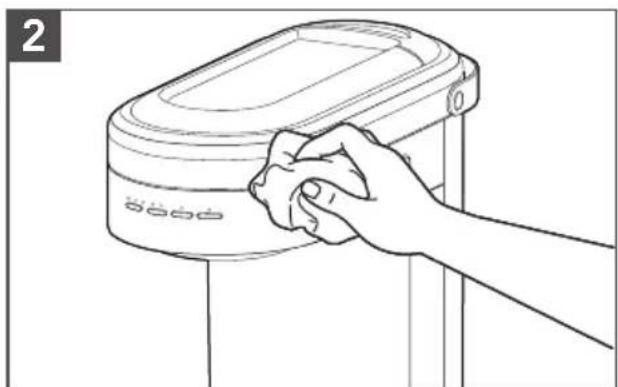
Line drawing of a hand cleaning a cylindrical device with a cloth (no text or symbols)Wipe the Espresso Machine housing and Group head with a clean soft damp cloth.
natural_image
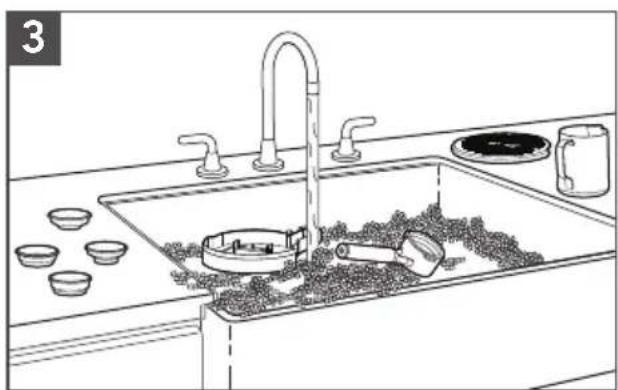
Line drawing of a modern kitchen sink with bowls, faucet, and a mug (no text or symbols)Wash the Drip tray, Portafilter, Filter baskets, Milk pitcher, and Drip tray plate in warm, soapy water and rinse with clean water. Dry with a soft cloth.
natural_image
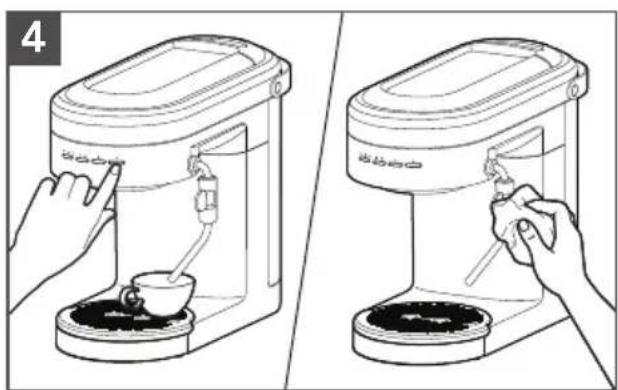
Two-step illustration showing a hand using a coffee maker to press or feed into a coffee cup, with no text or symbols present.Clean the Steam wand after every use. Toggle the Mode button to select Water. Position the Steam wand over Drip tray or into a cup. Press ▶ button, wait 3 to 5 seconds.
Press ▶ button to stop. Wipe down Steam wand exterior with a soft damp cloth.
NOTE: To remove the Steam wand press the Steam wand release button.
CARE AND CLEANING
DESCALING THE ESPRESSO MACHINE
The descaling program enables simple and effective descaling of your Espresso Machine. Descale the Espresso Machine regularly, but a minimum whenever the "Clean (☐) indicator is blinking. The frequency of descaling depends on the hardness of the water in your region. Therefore, it is important to program the Espresso Machine according to the water hardness level of your location.
NOTE: The descaling process runs in 4 phases, takes approximately 10 minutes and must be completed before next use. At any time during the descaling program you can pause the cycle by pressing ▶ button. And, resume too by pressing button.
IMPORTANT: Only use descaling solution intended for Espresso Machines.
SET UP OF GROUP HEAD DESCALING
1
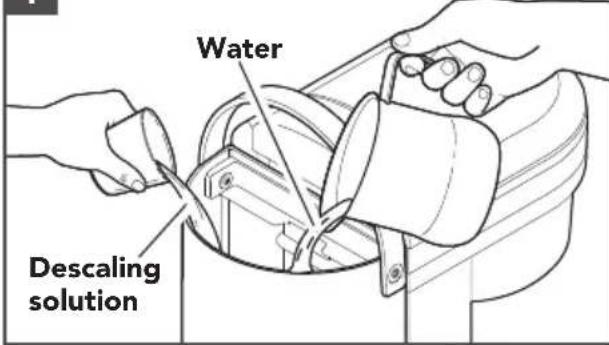
Fill 8.5 ounces water and 4.25 ounces descaling solution inside the Water tank.
NOTE: The clean cycle is designed to run as per the above mentioned water and descaling solution volumes.
The cycle cannot be completed with any less volume than mentioned above.
2
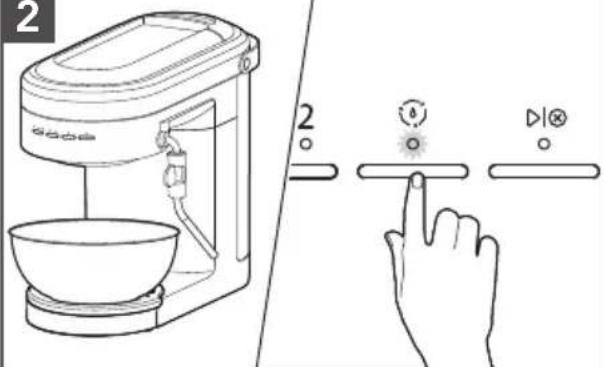
Phase 1: Place a container (\~ 17 ounces) on the Drip tray below the Group head. Press the Clean cycle (button for 3 seconds or until Clean light is solid. Then, press button to start first phase of decalcification cycle.
Start/Cancel (▶) will blink fast after the first phase is complete. Empty the container.
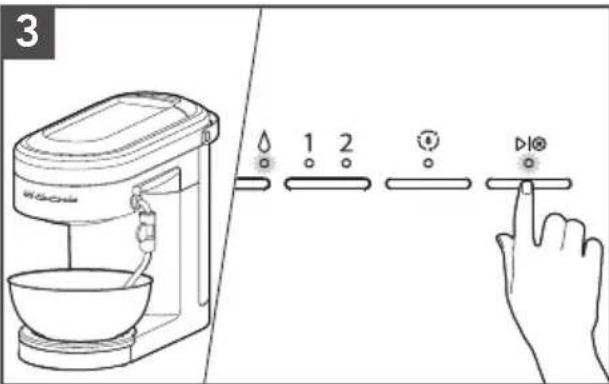
Phase 2: Place the container (\~ 17 ounces) below the Steam Wand. Then, press ▶I⊗ button. Start/Cancel (▶I⊗ and Water Mode lights will blink fast after the second phase is complete. Empty the container.
4
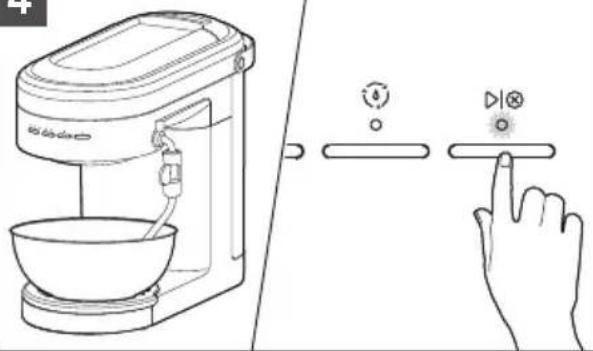
Phase 3: Place the container (\~ 17 ounces) below the Steam wand. Empty, rinse and refill the Water tank with fresh water to Max fill line. Replace the Water tank. Press ▶I⊗ button.
Start/Cancel (▶) blink fast after the third phase is complete. Empty the container.
CARE AND CLEANING
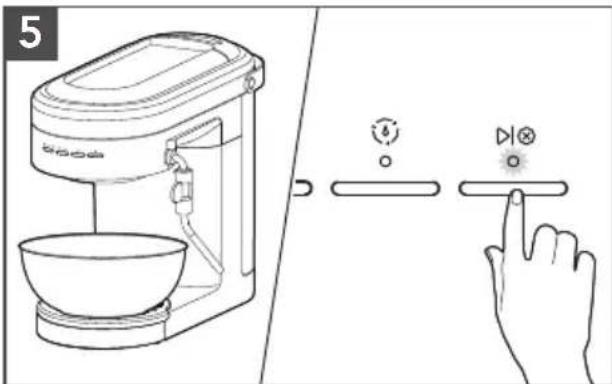
Phase 4: Place the container (\~ 17 ounces) on the Drip tray below Group head. Then, press ▶ button. Clean light and button light will blink fast after the fourth and final phase is complete. Empty the container. Press ▶ button to complete the Clean cycle. Machine will go back into heating mode.
WINTER STORAGE CARE
IMPORTANT: To avoid damage, use and store your Espresso Machine where it will not freeze. Because some water remains inside the unit, freezing can damage the product. If storing or moving during freezing weather, purge your Espresso Machine.
To purge the Espresso Machine, ensure Steam wand is attached and Water tank is at least half full.
- Place a cup under the Steam wand nozzle.
- Turn the Espresso Machine On, toggle the Mode button to Steam. Press ▶|⊗ button. Once steam exits the Steam wand for approximately 10 seconds, remove Water tank and allow remaining water in the machine to exit through the Steam wand.
- Purging cycle will be complete once Espresso Machine stops and the Water mode will blink.
- Turn the Main power On/Off (-) button to Off. Empty and re-install Water tank. Then, unplug the Espresso Machine.
ASSEMBLING THE MILK FROTHER ATTACHMENT
Before first use, clean all parts and accessories. (See "Care and Cleaning" section).
1
natural_image
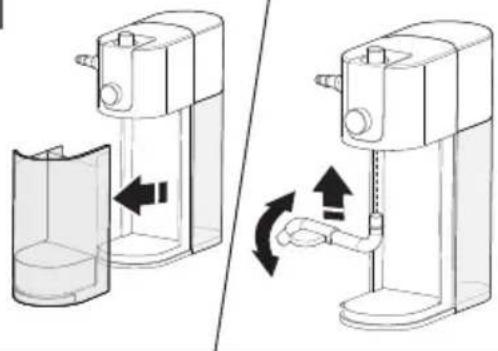
Diagram showing two types of household water purifiers with directional arrows indicating flow or movement (no text or symbols present)Assembling Milk dispenser: Remove the Storage container and insert the Milk dispenser tube. Then, replace the Storage container.
Tip: Wet end of Milk dispenser tube with fresh water to aid in assembly.
2
natural_image
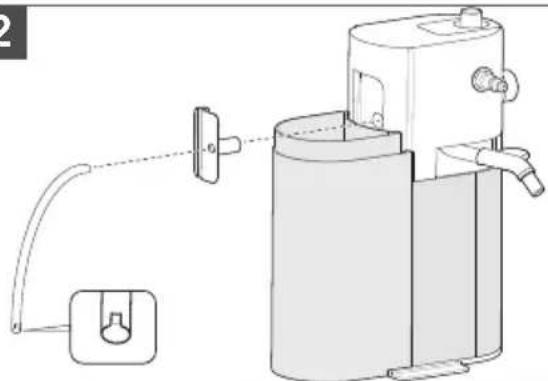
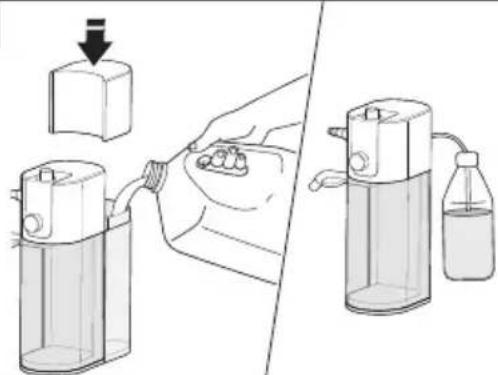
Technical line drawing of a water purifier or scrubber with attached pipe and outlet (no text or symbols)Remove the Milk tank lid. Insert the Milk hose connector in the Milk inlet hole. Firmly insert the Milk hose in the Milk hose connector. Immerse the Milk hose into the Milk tank.
3
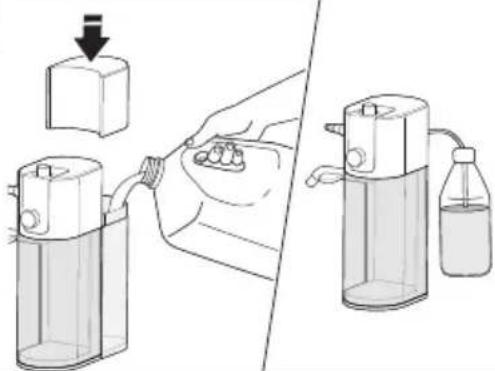
As desired, fill the Milk Tank (max. 17 oz) with the cold milk and replace the Milk tank lid.
Also, you can directly immerse the Milk hose in any milk container or milk bottle.
4
natural_image
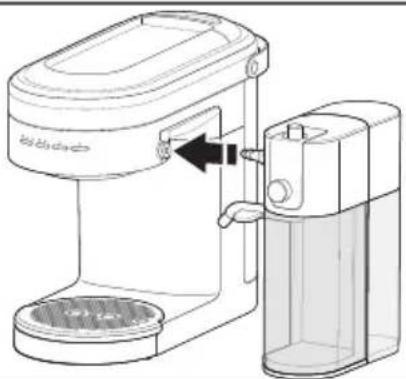
Line drawing of a coffee maker with a side arm and base, showing internal components (no text or symbols)On the Espresso Machine, press the Steam wand release button to remove the Steam wand.
Align Steam port to the machine, press together until you hear a click. Direct the Milk dispenser tube towards the cup.
5
natural_image
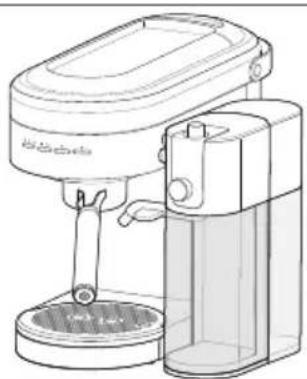
Line drawing of a coffee maker with a stand mixer and baseplate (no text or symbols)Your Espresso Machine with the Milk Frother Attachment is now ready to use.
USING THE MILK FROTHER ATTACHMENT
FOR FROTH MILK
1
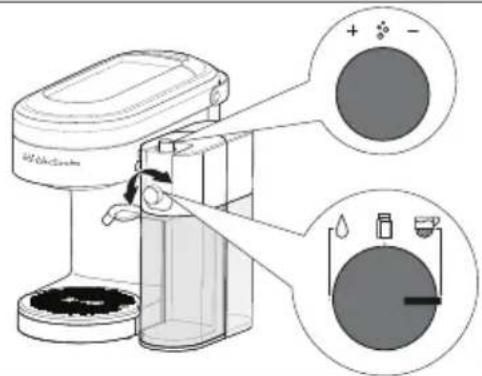
Align the Function knob to Froth milk function. Rotate the Froth level adjustment knob to desired level.
NOTE: For the Froth level adjustment knob, it is suggested to start with 90 Degrees rotation from the screwed down location.
2
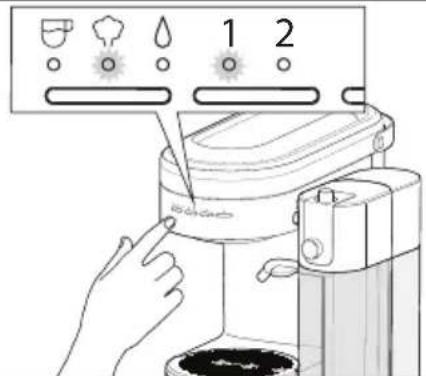
Turn On the Espresso Machine and toggle the Mode button to select Steam.
Toggle the Dose button to 1 or 2 (1 for less milk and 2 for more milk).
3
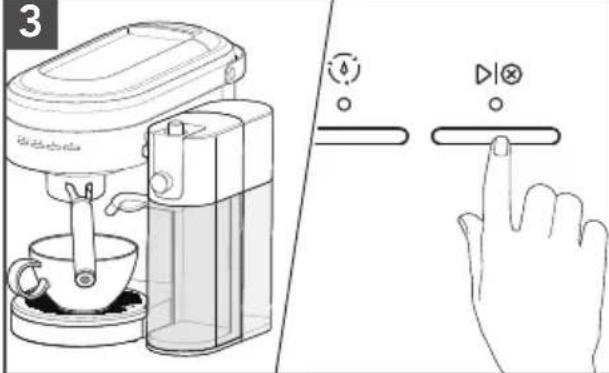
Place the desired cup below the Portafilter and Milk dispenser.
Press ▶ button on the Espresso Machine to start the cycle.
4
natural_image
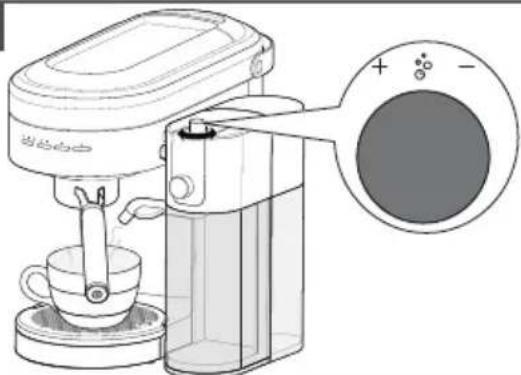
Line drawing of a coffee maker with a cup and stand, showing its lid and base (no text or symbols)Froth level can be adjusted throughout the automatic frothing cycle by rotating the Froth level adjustment knob.
FOR HOT MILK
1
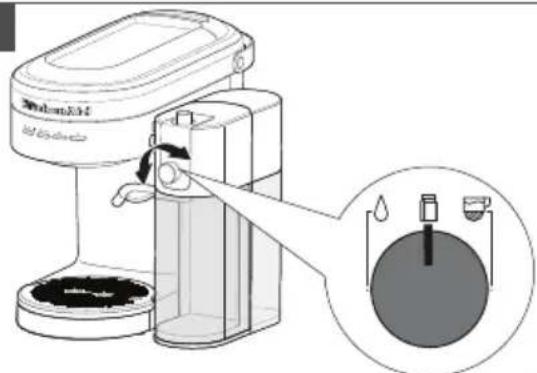
Align Function knob on Milk Frother Attachment to the Hot milk function.
2
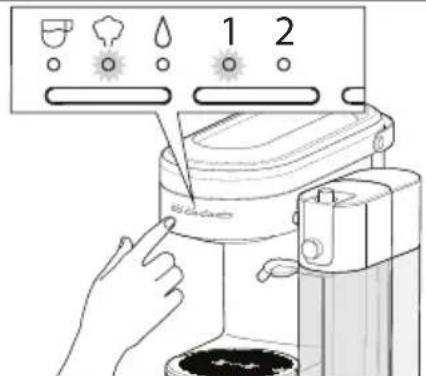
Turn On the Espresso Machine and toggle the Mode button to Steam. Toggle the Dose button mode to 1 or 2 (1 for less milk and 2 for more milk).
USING THE MILK FROTHER ATTACHMENT
3
natural_image
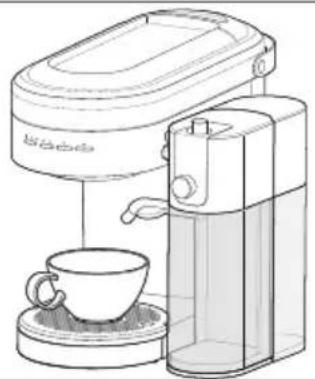
Line drawing of a coffee maker with a cup and saucer (no text or symbols)Place the desired cup below the Portafilter and Milk dispenser.
4
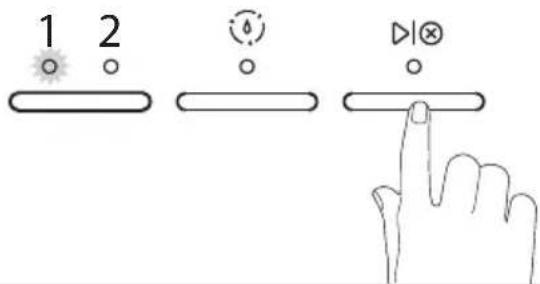
Press ▶ button on the Espresso Machine to start the cycle.
FOR HOT WATER
1
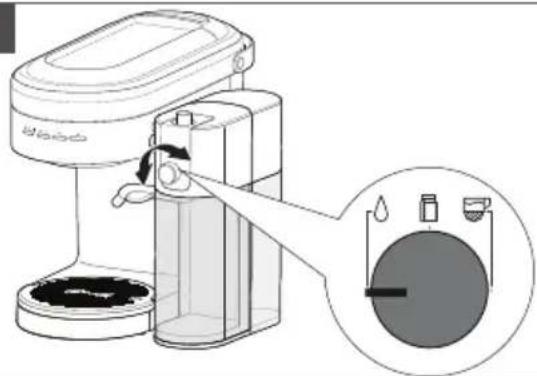
natural_image
Diagram of a coffee maker with a hand operating the machine, showing a circular container and water droplets (no text or symbols present)Align the Function knob on the Milk Frother Attachment to the Hot water function.
2
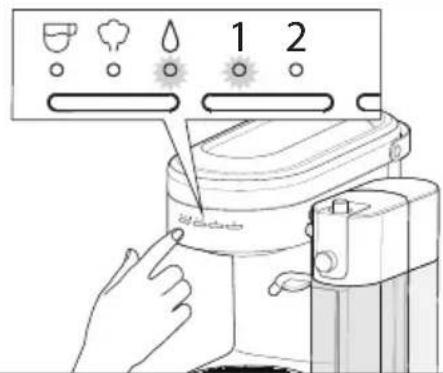
Turn On the Espresso Machine and toggle the Mode button to Water. Toggle the Dose button to 1 or 2 (1 for less water and 2 for more water).
3
natural_image
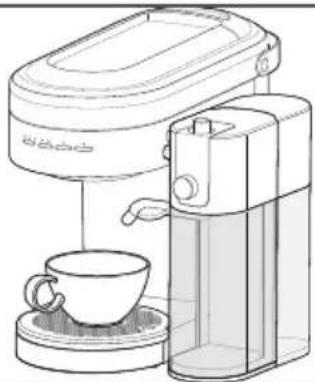
Line drawing of a coffee maker with a cup and saucer (no text or symbols)Place the desired cup below the Portafilter and Milk dispenser.
4
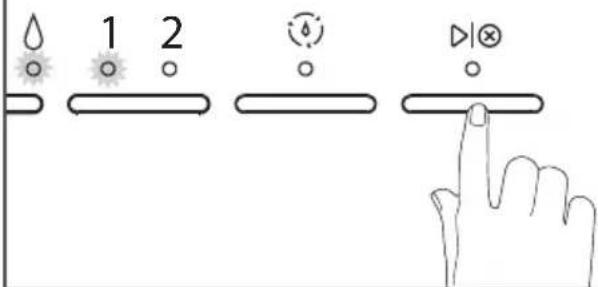
Press ▶ button on the Espresso Machine to start the cycle.
USING THE MILK FROTHER ATTACHMENT
PROGRAMMING FUNCTION
The Espresso Machine is equipped with programming functionality for customized milk and water doses (1 and 2).
NOTE: Milk Frother Attachment must be assembled to the Espresso Machine for any customized settings to be saved.
| Beverage S | Select Function Select Dose Preparation | ||
| Foam or Milk | Steam (∅) | 1 or 2 | Press and hold ▶ button on the Espresso Machine until desired volume is dispensed into your cup. |
| Hot Water | Water (∅) | 1 or 2 | |
CARE AND CLEANING
CLEANING THE MILK FROTHER ATTACHMENT AFTER EVERY USE
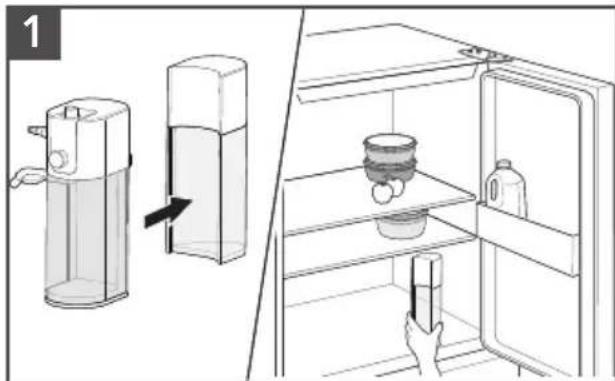
Remove the Milk tank and lid and store in a refrigerator.
natural_image
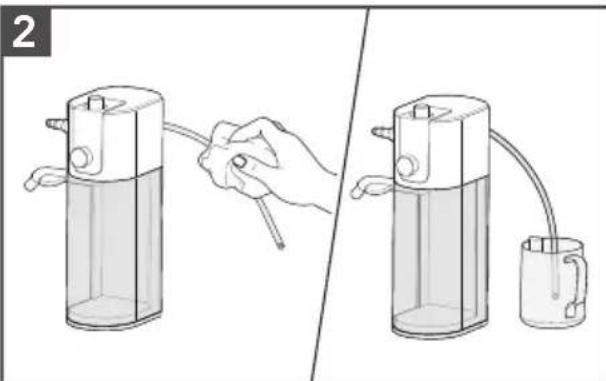
Illustration of two different methods for using a device, showing hand holding a tool and pouring liquid into a container (no text or symbols present)Wipe down the exterior of Milk hose with a damp soft cloth. Insert the Milk hose into a cup of clean water.
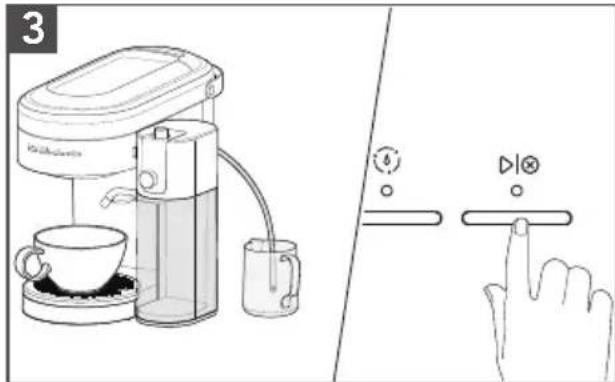
Place a cup beneath the Milk dispenser. Repeat the last used cycle(s) to flush the system with the clean water.
natural_image
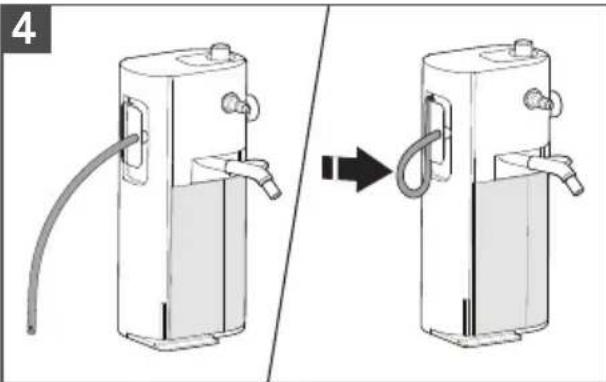
Diagram showing a device being connected via tubing, no text or symbols presentTo store the Milk hose, bend the Milk hose and attach it into the Milk hose clip.
CARE AND CLEANING
DEEP CLEANING THE MILK FROTHER ATTACHMENT
1
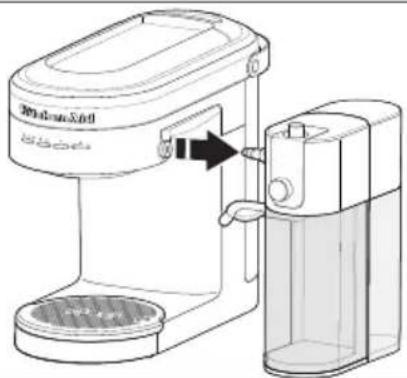
Press the Steam wand release button on Espresso Machine to release Milk Frother Attachment.
natural_image
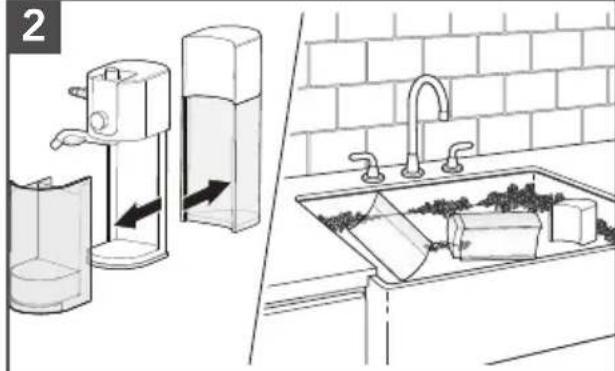
Illustration of a kitchen sink with water and a hand pump, showing interior components and airflow direction (no text or symbols)Remove the Milk tank and clean it with warm soapy water. Remove the Storage container.
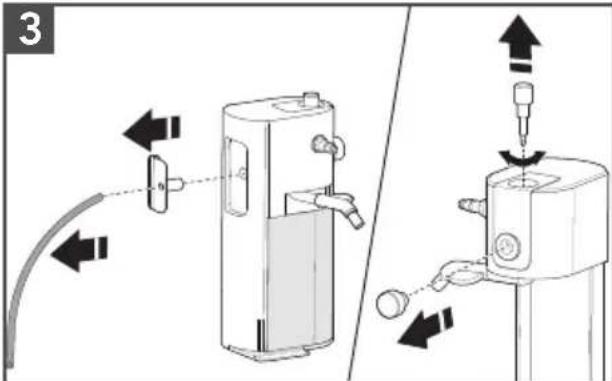
Remove the Milk hose and Hose connector.
Remove the Froth level adjustment knob by unscrewing it counterclockwise. Pull out the Function knob.
4
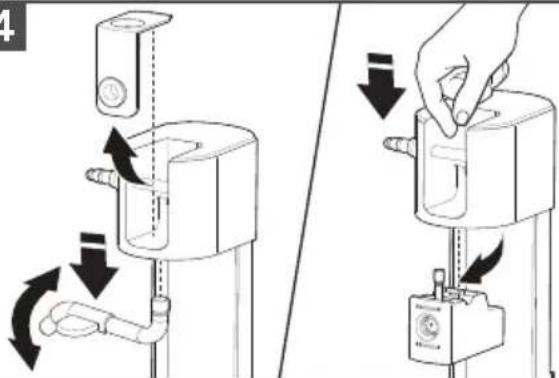
Remove the Decorative plate. Remove the Milk dispenser by pulling and twisting in a downward direction.
Remove the Black rubber frother component by pushing down from the top and pulling from the bottom.
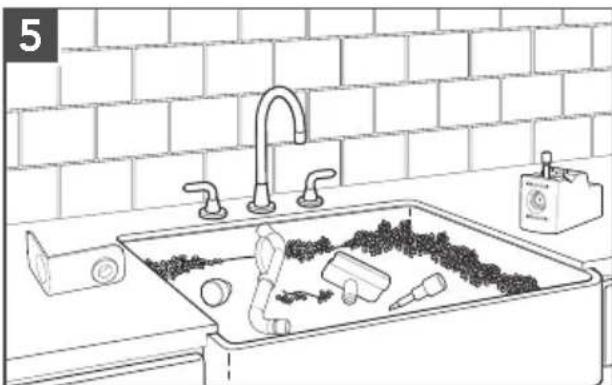
natural_image
Line drawing of a kitchen sink with cleaning tools and a water dispenser, against a brick wall background (no text or symbols)Wash the Froth level adjustment knob, Function knob, Milk hose connector, Milk hose, Milk dispenser, and the Black rubber frother component in warm, soapy water or cleaning solution designed for milk frothers. Thoroughly rinse with clean water and dry with a soft cloth.
NOTE: Use the provided cleaning brush to reach any small areas for through cleaning.
REASSEMBLING THE MILK FROTHER ATTACHMENT
1
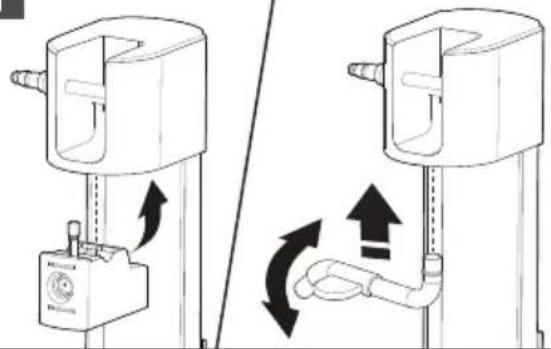
natural_image
Diagram showing two mechanical device configurations with directional arrows indicating motion or force (no text or symbols)Follow the steps of disassembly to assemble again. Press the Black rubber frother component into the main housing. Insert the Milk dispenser tube in place and push upward and rotate until it clicks.
2
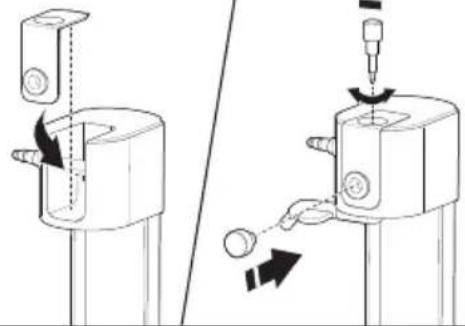
natural_image
Technical illustration of a mechanical assembly with arrows indicating motion or force direction (no text or symbols)Replace the Decorative plate.
Insert and rotate the Froth level adjustment knob in its place.
Replace the Function knob in its place.
TROUBLESHOOTING GUIDE
WARNING
Electrical Shock Hazard
Plug into a grounded 3 prong outlet.
Do not remove ground prong.
Do not use an adapter.
Do not use an extension cord.
Failure to follow these instructions can result in death, fire, or electrical shock.
| Problem Solution | |
| Espresso Machine will not start | Check if the Espresso Machine is securely plugged into a grounded 3 prong outlet. |
| Check to see if the Main power On/Off switch is turned on. | |
| If you have a circuit breaker box, then make sure the circuit is closed. | |
| Espresso flows slowly or only drips | Coffee is ground too finely. Use slightly coarser grind. |
| Coffee tamped too hard. Use slightly lighter tamp between 30-40 lb or 15-20 kg of force. | |
| Filter basket can be blocked. Use a pin to unblock the hole(s). | |
| Machine might need to be descaled. Refer to the “Descaling the Espresso Machine” section. | |
| All Mode/Dose lights are blinking | Machine is in protection mode to avoid the pump from over heating. Turn Off the machine for 7.5 minutes. |
TROUBLESHOOTING GUIDE
| Problem Solution | |
| Espresso flows too quickly | Coffee is ground too coarsely. Use slightly finer grind. |
| Not sufficient coffee in the filter basket. Increase dose of coffee. Refer to the “Basket selection chart” section. | |
| Coffee tamped too softly. Use slightly firmer tamp between 30-40 lb or 15-20 kg of force. | |
| Espresso flows over the edge of the Portafilter | Portafilter is not inserted in the Group head properly. Ensure the Portafilter is completely inserted and rotated until the handle is aligned to the lock icon. |
| There are coffee grounds around the rim of the filter basket. Swipe excess coffee to ensure proper seal in the Group head. | |
| Too much coffee in the filter basket. Use lower dose of coffee. Refer to the “Basket selection chart” section. | |
| Steam wand is not producing hot water/steam | Operating temperature has not been reached. Allow the machine to reach to the operating temperature. |
| Steam/hot water flows slowly from Steam wand | Steam wand is partially blocked. Remove Steam wand from Espresso Machine. Soak in cleaning solution and use a pin to clear out the hole and rinse with clear water. |
| Machine might need to be descaled. Refer to the “Descaling the Espresso Machine” section. | |
| No Crema is being produced | Coffee is ground too coarsely. Use slightly finer grind. |
| Coffee tamped too softly. Use slightly firmer tamp between 30-40 lb or 15-20 kg of force. | |
| Single wall filter basket might have been used with pre-ground coffee. Please see the “Basket selection chart” section. | |
| Knocking/pumping sound occurs during espresso, steam, or hot water cycle | The Espresso Machine is going through a normal operation, therefore no action is required. |
| The Steam light and all Dose lights are blinking | Machine is in the protection mode to avoid from overheating. Turn Off the machine for 10 minutes. |
| Water light continuously blinks | Ensure water is in the Water tank and ensure Water tank is properly assembled. |
| Steam wand is blocked. Remove it from Espresso Machine and thoroughly clean it. | |
| Coffee puck is too dense, adjust to larger grind size. If using a Double wall basket, then clean exit hole with a pin. | |
| All lights are blinking at the same time | Turn off the Espresso Machine and unplug for approximately 10 mintues. Then, plug back in and restart the machine. If problem persist call service. |
| All lights are continuously on | If the problem occurs again, unplug the machine for approx. 5 minutes, plug back in and restart the machine and then run 1 complete clean cycle. |
| If Steam and Hot water is not getting selected: | The Milk Frother Attachment may not be correctly attached in place. Please refer to the “Product Assembly” section. |
| If the problem is not due to one of the above items: | See the “Arranging for Service” chapter in the “Warranty and Service” section. Do not return the Espresso Machine to the retailer as they do not provide service. |
| If milk is not being dispensed: | The Milk hose and Milk hose connector may not be properly assembled. Please refer to the “Assembling the Milk Frother Attachment” section. |
WARRANTY AND SERVICE
KITCHENAID® ESPRESSO MACHINE & MILK FROTHER ATTACHMENT WARRANTY FOR THE 50 UNITED STATES, THE DISTRICT OF COLUMBIA, PUERTO RICO, AND CANADA
This warranty extends to the purchaser and any succeeding owner for KitchenAid Espresso Machine & Milk Frother Attachment operated in the 50 United States, the District of Columbia, Puerto Rico, and Canada.
| Length of Warranty: | One Year Full Warranty from date of purchase. |
KitchenAid Will Pay for Your Choice of: | Hassle-Free Replacement of your Espresso Machine & Milk Frother Attachment.See the next page for details on how to arrange for service, or call the Customer eXperience Center toll-free at 1-800-541-6390.ORThe replacement parts and repair labor costs to correct defects in materials and workmanship.Service must be provided by an Authorized KitchenAid Service Center. |
| KitchenAid Will Not Pay for: | A. Repairs when your Espresso Machine & Milk Frother Attachment is used in other than normal single family home use.B. Damage resulting from accident, alteration, misuse or abuse.C. Any shipping or handling costs to deliver your Espresso Machine & Milk Frother Attachment to an Authorized Service Center.D. Replacement parts or repair labor costs for Espresso Machine & Milk Frother Attachment operated outside the 50 United States, District of Columbia, Puerto Rico, and Canada. |
| DISCLAIMER OF IMPLIED WARRANTIES; LIMITATION OF REMEDIESIMPLIED WARRANTIES, INCLUDING TO THE EXTENT APPLICABLE WARRANTIES OF MERCHANTABILITY OR FITNESS FOR A PARTICULAR PURPOSE, ARE EXCLUDED TO THE EXTENT LEGALLY PERMISSIBLE. ANY IMPLIED WARRANTIES THAT MAY BE IMPOSED BY LAW ARE LIMITED TO TWO YEAR, OR THE SHORTEST PERIOD ALLOWED BY LAW. SOME STATES AND PROVINCES DO NOT ALLOW LIMITATIONS OR EXCLUSIONS ON HOW LONG AN IMPLIED WARRANTY OF MERCHANTABILITY OR FITNESS LASTS, SO THE ABOVE LIMITATIONS OR EXCLUSIONS MAY NOT APPLY TO YOU.IF THIS PRODUCT FAILS TO WORK AS WARRANTED, CUSTOMER'S SOLE AND EXCLUSIVE REMEDY SHALL BE REPAIR OR REPLACEMENT ACCORDING TO THE TERMS OF THIS LIMITED WARRANTY. KITCHENAID AND KITCHENAID CANADA DO NOT ASSUME ANY RESPONSIBILITY FOR INCIDENTAL OR CONSEQUENTIAL DAMAGES. This warranty gives you specific legal rights and you may also have other rights which vary from state to state or province to province. | |
WARRANTY AND SERVICE
HASSLE-FREE REPLACEMENT WARRANTY – 50 UNITED STATES, DISTRICT OF COLUMBIA, AND PUERTO RICO
We're so confident the quality of our products meets the exacting standards of KitchenAid that, if your Espresso Machine & Milk Frother Attachment should fail within the first year of ownership, KitchenAid will arrange to deliver an identical or comparable replacement to your door free of charge and arrange to have your original Espresso Machine & Milk Frother Attachment returned to us. Your replacement unit will also be covered by our one year limited warranty. If your Espresso Machine & Milk Frother Attachment should fail within the first year of ownership, simply call our toll-free
Customer eXperience Center at 1-800-541-6390 Monday through Friday. Please have your original sales receipt available when you call. Proof of purchase will be required to initiate the claim. Give the consultant your complete shipping address. (No P.O. Box numbers, please.)
When you receive your replacement Espresso Machine & Milk Frother Attachment, use the carton, packing materials, and prepaid shipping label to pack up your original Espresso Machine & Milk Frother Attachment and send it back to KitchenAid.
HASSLE-FREE REPLACEMENT WARRANTY – CANADA
We're so confident the quality of our products meets the exacting standards of the KitchenAid brand that, if your Espresso Machine & Milk Frother Attachment should fail within the first year of ownership, we will replace your Espresso Machine & Milk Frother Attachment with an identical or comparable replacement. Your replacement unit will also be covered by our one year limited warranty.
If your Espresso Machine & Milk Frother Attachment should fail within the first year of ownership, simply call our toll-free Customer eXperience Center
at 1-800-807-6777 Monday through Friday. Please have your original sales receipt available when you call. Proof of purchase will be required to initiate the claim. Give the consultant your complete shipping address.
When you receive your replacement Espresso Machine & Milk Frother Attachment, use the carton, packing materials, and prepaid shipping label to pack up your original Espresso Machine & Milk Frother Attachment and send it back to KitchenAid.
ARRANGING FOR SERVICE AFTER THE WARRANTY EXPIRES, OR ORDERING ACCESSORIES AND REPLACEMENT PARTS
In the United States and Puerto Rico:
For service information, or to order accessories or replacement parts, call toll-free at 1-800-541-6390 or write to: Customer eXperience Center, KitchenAid Small Appliances, P.O. Box 218, St. Joseph, MI 49085-0218
Outside the United States and Puerto Rico:
Consult your local KitchenAid dealer or the store where you purchased the Espresso Machine & Milk Frother Attachment for information on how to obtain service.
For service information in Canada: Call toll-free 1-800-807-6777.
For service information in Mexico: Call toll-free 01-800-0022-767.
PIÈCES ET CARACTÉRISTIQUES
natural_image
Line drawing of a coffee maker with a handle and base, showing no text or symbolsnatural_image
Black-and-white illustration of a hand with a lightning bolt symbol, no text or labels presentAVERTISSEMENT
natural_image
Line drawing of a kitchen sink with a bowl and handle, against a brick wall background (no text or symbols)natural_image
Line drawing of a manual grater with a ladle pouring granular material into a container, against a brick wall background (no text or symbols)natural_image
Line drawing of a hand adjusting a pipe fitting on a brick wall (no text or symbols)natural_image
Line drawing of a hand pouring liquid from a mug into a container, with brick wall background (no text or symbols)natural_image
Line drawing of a coffee maker with a hand holding a cup, showing the process (no text or symbols)natural_image
Illustration of hands using a water dispenser to clean a coffee machine with a mug, no text or symbols presentnatural_image
Diagram showing two views of a cleaning or cleaning device with circular components and arrows indicating movement (no text or symbols)natural_image
Line drawing of a hand cleaning a cylindrical device (no text or symbols)natural_image
Line drawing of a modern kitchen sink with buckets, faucet, and a water dispenser (no text or symbols)natural_image
Two-step line drawing showing a hand using a coffee maker to press or feed into a coffee cup, with no text or symbols present.Phase 2 :
ASSEMBLAGE DU PRODUIT
natural_image
Technical line drawing of a water purifier system with pipe connection and control panel (no text or symbols)ASSEMBLAGE DU PRODUIT
3
natural_image
Line drawing of a coffee maker with a side arm and base, showing no text or symbolsnatural_image
Line drawing of a coffee maker with a stand mixer and baseplate (no text or symbols)natural_image
Line drawing of a coffee maker with a cup and stand, showing its internal components and a circular dial (no text or symbols)natural_image
Line drawing of a coffee maker with a cup and saucer (no text or symbols)natural_image
Diagram of a coffee maker with a water dispenser and a close-up view of its internal components (no text or symbols)natural_image
Line drawing of a coffee maker with a cup and lid, no text or symbols presentnatural_image
Illustration of a hand holding a tool next to a transparent container, with another empty mug partially visible (no text or symbols)natural_image
Diagram showing a device being connected to a hose, with no visible text or symbolsnatural_image
Illustration of a kitchen sink with a handbag and a spray can, alongside an open refrigerator with arrows indicating flow direction (no text or symbols)natural_image
Line drawing of a kitchen sink with cleaning tools and a water dispenser, against a brick wall background (no text or symbols)natural_image
Black-and-white illustration of a hand with a lightning bolt symbol indicating electrical hazard (no text or labels)AVERTISSEMENT
natural_image
Line drawing of a coffee maker with a handle and base, showing no text or symbolsnatural_image
Black-and-white illustration of a hand with a lightning bolt symbol indicating electrical hazard (no text or labels)ADVERTENCIA
natural_image
Line drawing of a kitchen sink with a bowl and handle, against a brick wall background (no text or symbols)natural_image
Line drawing of a grater with a ladle pouring granular material into a container, against a brick wall background (no text or symbols)natural_image
Illustration of a hand holding a pipe fitting against a brick wall (no text or symbols)natural_image
Line drawing of a hand pouring liquid from a mug into a container, with brick wall background (no text or symbols)natural_image
Line drawing of a coffee maker with a hand holding a cup, showing liquid level and handle (no text or symbols)natural_image
Line drawing of hands using a water dispenser to clean a coffee cup on a stove (no text or symbols)natural_image
Diagram showing two views of a kitchen sink with labeled components, no text or symbols presentnatural_image
Line drawing of a hand cleaning a cylindrical device with a cloth (no text or symbols)natural_image
Line drawing of a kitchen sink with bowls, a faucet, and a mug (no text or symbols)natural_image
Diagram showing two types of handwashing devices with arrows indicating movement (no text or symbols present)natural_image
Technical line drawing of a mechanical device with tubing and a plug, no text or symbols presentnatural_image
Line drawing of a coffee maker with a side view showing the base and handle (no text or symbols)natural_image
Line drawing of a coffee maker with a stand mixer and baseplate (no text or symbols)natural_image
Line drawing of a coffee maker with a cup and lid, showing no text or symbolsnatural_image
Line drawing of a coffee maker with a cup and saucer (no text or symbols)natural_image
Line drawing of a modern coffee maker with a cup and saucer (no text or symbols)natural_image
Illustration of two laboratory apparatus setups: one with a hand holding a tube, the other with a beaker and tubing (no text or symbols)natural_image
Diagram showing a device being connected via tubing, no text or symbols presentnatural_image
Illustration of a kitchen sink with a water dispenser and a brick wall, showing water flow direction (no text or symbols)natural_image
Line drawing of a kitchen sink with cleaning tools and a water dispenser, against a brick wall background (no text or symbols)natural_image
Black-and-white illustration of a hand with a lightning bolt symbol indicating electrical hazard (no text or labels)ADVERTENCIA
Customer eXperience Center, KitchenAid Small Appliances, P.O. Box 218, St. Joseph, MI 49085-0218
www.kitchenaid.com.mx
www.kitchenaid-ca.com
Colombia
web: www.kitchenaid.com.do
DISCOVER MORE. DÉCOUVREZ PLUS. DESCUBRA MÁS. KITCHENAID.COM/QUICKSTART
natural_image
White telephone handset icon on black background (no text or symbols)PRODUCT QUESTIONS OR RETURNS
QUESTIONS SUR LE PRODUIT OU LES RETOURS
MEXICO: KitchenAid.com.mx
LATIN AMERICA: KitchenAid-Latam.com
KitchenAid®
®/TM ©2021 KitchenAid. All rights reserved. Used under license in Canada.