Table Top RR510 - Juke box Ricatech - Free user manual and instructions
Find the device manual for free Table Top RR510 Ricatech in PDF.



| Product type | Table top jukebox (Table Top) |
| Brand and model | Ricatech Table Top RR510 |
| Dimensions (L x H x D) | 275 mm x 400 mm x 170 mm (approx.) |
| Weight | 3.5 kg (approx.) |
| Power supply | 220-240 V, 50 Hz |
| Power consumption | 19 W |
| Output power | 1.5 W + 1.5 W |
| Frequency response (amplifier) | 60 to 20,000 Hz |
| Frequency response (CD player) | 60 to 20,000 Hz ±4 dB |
| Signal-to-noise ratio (CD) | 55 dB (IEC-A) |
| FM range | 87.5 to 108 MHz |
| AM range | 530 to 1,600 kHz |
| CD player | Plays standard audio CDs (78 min max) |
| USB / SD/MMC playback | Plays MP3 files via USB port or SD/MMC card |
| Radio functions | AM/FM with FM wire antenna and built-in AM antenna |
| LED lighting | Yes, indicator ON/OFF switch |
| Maintenance and cleaning | Unplug before cleaning; use a damp cloth; do not use solvents |
| Safety | Class 1 laser; avoid exposure to rain/moisture; do not open the casing |
| Spare parts and repairability | Contact a qualified technician; use parts specified by the manufacturer |
| General information | Supplied accessory: instruction manual booklet. Consumer service: support@ricatech.com |
Frequently Asked Questions - Table Top RR510 Ricatech
User questions about Table Top RR510 Ricatech
0 question about this device. Answer the ones you know or ask your own.
Ask a new question about this device
Download the instructions for your Juke box in PDF format for free! Find your manual Table Top RR510 - Ricatech and take your electronic device back in hand. On this page are published all the documents necessary for the use of your device. Table Top RR510 by Ricatech.
USER MANUAL Table Top RR510 Ricatech
IMPORTANT SAFETY INSTRUCTIONS
When using electrical products, basic precautions should always be followed including:
- Read Instructions-All the safety and operating instructions should be read before the product is operated.
- Retain Instructions-The safety and operating instructions should be retained for future reference.
- Heed Instructions-All warnings on the product and in the operating instructions should be adhered to.
- Follow Instructions-All operating and user instructions should be followed.
- Cleaning-Unplug this product from the wall outlet before cleaning. Do not use liquid cleaners or aerosol cleaners. Use a damp cloth for cleaning.
- Attachments-Do not use attachments not recommended by the product manufacturer as they may be hazardous.
- Water and Moisture-Do not use this product near water-for example, near a bath tub, wash bowl, kitchen sink, or laundry tub, in a wet basement, or near a swimming pool, etc.
- Accessories-Do not places this product on an unstable stand, tripod, bracket or table.
- Ventilation-Slots and openings in the cabinet are provided for ventilation, to ensure reliable operation of the product and to protect it from overheating. These openings must not be blocked or covered. The openings should never be blocked by placing the product on a bed, sofa, rug, or similar surface. This product should not be placed in a built-in installation such as a bookcase or rack unless proper ventilation is provided or the manufacturer's instructions have been adhered to.
- Power Sources-This product should be operated only from the type of power source indicated on the marking label. If you are not sure of the type of power supply to your home, consult your product dealer or local power company. For products intended to operate from battery power, or other sources, refer to the operating instructions.
- Mains Plug- The mains plug is used as the disconnect device. The disconnect device should remain readily accessible.
- Power Cord Protection- Power-supply cords should be routed so that they are not likely to be walked on or by items placed upon or against them, paying particular attention to cords at plugs, convenience receptacles, and the point where they exit from the product.
-
Lightning-For added protection for this product during a lightning storm, or when it is left unattended and unused for long periods of time, unplug it from the wall outlet and disconnect the antenna or cable system. This will prevent damage to the product due to lightning and power-line surges.
-
Power Lines-An outside antenna system should not be located in the vicinity of overhead power lines or other electric light or power circuits, or where it can fall into such power lines or circuits. When installing an outside antenna system, extreme care should be taken to keep from touching such power lines or circuits as contact with them might be fatal.
- Overloading-Do not overloads wall outlets, extension cords, or integral convenience receptacles as this can result in a risk of fire or electric shock.
- Object and Liquid Entry-Never push objects of any kind into this product through openings as they may touch dangerous voltage points or short-out parts that could result in a fire or electric shock. The apparatus should not be exposed to dripping or splashing, and no objects filled with liquids such as vases, should be placed on the apparatus.
- Servicing-Do not attempt to service this product yourself as opening or removing covers may expose you to dangerous voltage or other hazards. Refer all servicing to qualified service personnel.
- Damage Requiring Service-Unplug this product from the wall outlet and refer servicing to qualified service personnel under the following conditions:
a. If the power-supply cord or plug is damaged.
b. If liquid has spilled, or objects have fallen into the product.
c. If the product has been exposed to rain or water.
d. If the product does not operate normally by following the operating instructions. Adjust only those controls that are covered by the operating instructions, as an improper adjustment of other controls may result in damage and will often require extensive work by a qualified technician to restore the product to its normal operation.
e. If the product has been dropped or damaged in any way, and the product exhibits a distinct change in performance—this indicates a need for service.
- Replacement Parts-When replacement parts are required, be sure the service technician has used replacement parts specified by the manufacturer or have the same characteristics as the original part. Unauthorized substitutions may result in fire, electric shock, or other hazards.
- Safety Check-Upon completion of any service or repairs to this product, ask the service technician to perform safety checks to determine that the product is in proper operating condition.
- Heat-The product should be situated away from heat sources such as radiators, stoves or other products (including amplifiers) that produce heat.
CAUTION:
- Use of controls and adjustments or performance of procedures other than those specified herein may result in hazardous radiation exposure.
- If this product develops trouble, contact a qualified service centre, and do not use the product in a defective state.
- To prevent electric shock, match wide blade of plug to wide slot, fully insert.
Safety Precautions
| WARNING: To reduce the risk of fire or electric shock, do not expose this appliance to rain or moisture. | |
| CAUTION: RISKS OF ELECTRIC SHOCK- DO NOT OPEN!To reduce the risk of electric shock, do not remove cover or back.No user serviceable parts inside. Refer servicing to qualified service personnel. | |
| The light flash with arrowhead symbol, within an equilateral triangle, is intended to alert user to the presence of non-insulated “dangerous voltage” within the product’s enclosure that may be of sufficient magnitude to constitute risk of electric shock to persons. | |
| The exclamation point within an equilateral triangle is intended to alert user to the presence of important operating and maintenance (servicing) instructions in the literature accompanying the appliance. | |
| CAUTION: Invisible laser radiation when open and interlock failed or defeated. Avoid direct exposure to laser beam.(See markings on the back of the unit) | |
Before Use
- Choose unit installation location carefully. Avoid placing it in direct sunlight or close to a source of heat. Also avoid locations subject to vibrations and excessive dust, cold or moisture. Keep away from sources that hum, such as transformers or motors.
- Do not open the cabinet as this might result in damage to the circuitry or electrical shock. If a foreign object should get into the set, contact your dealer.
- Be sure not to handle discs with dirty fingers. Never insert a disc that has a crack on the surface.
- When removing the power plug from the wall outlet, always pull directly on the plug, never pull the cord.
- To keep the laser pickup clean, do not touch it, and do not forget to close the disc tray.
- Do not attempt to clean the unit with chemical solvents as this might damage the finish. Use a clean, dry cloth.
- In order to shut off the power to this product completely, unplug the power cord from the wall outlet. Be sure to unplug the unit if you do not intend to use it for an extended period of time, such as while on vacation.
- Keep this manual in a safe place for future reference.
Beware of Condensation
When the player (or a compact disc) is moved from a cold to a warm place or is used after a sudden temperature change, there is a danger of condensation. Water vapor in the air could condense on the mechanism or the laser pickup. If droplets of water form on these parts, correct playback will be impossible because the laser cannot read the information from the disc correctly. To prevent this, if you are going to use the player in a condition where condensation could occur, you should leave the player for 1 or 2 hours after plugging it into an AC outlet depending on the amount of condensation. If this is done, the player will stabilize at the temperature of its surroundings.
LOCATION OF PARTS
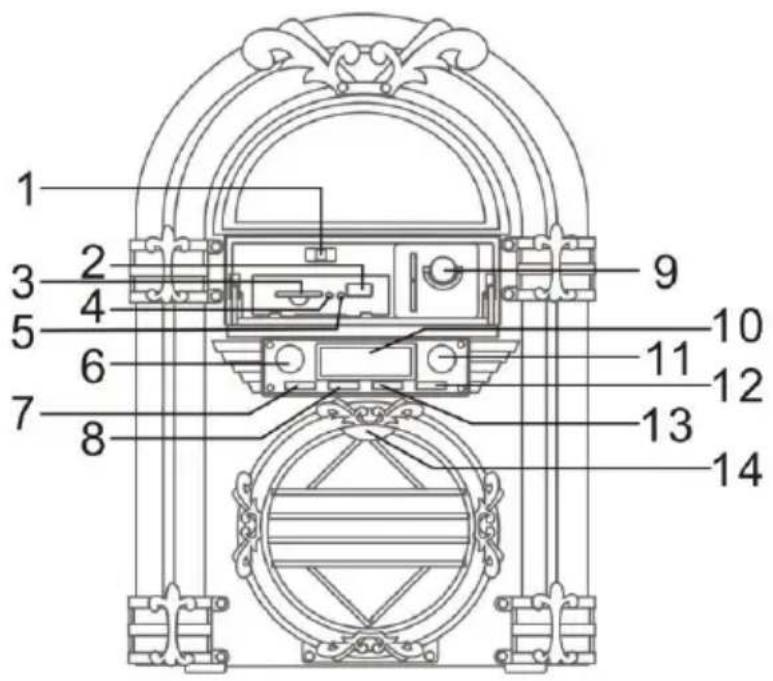
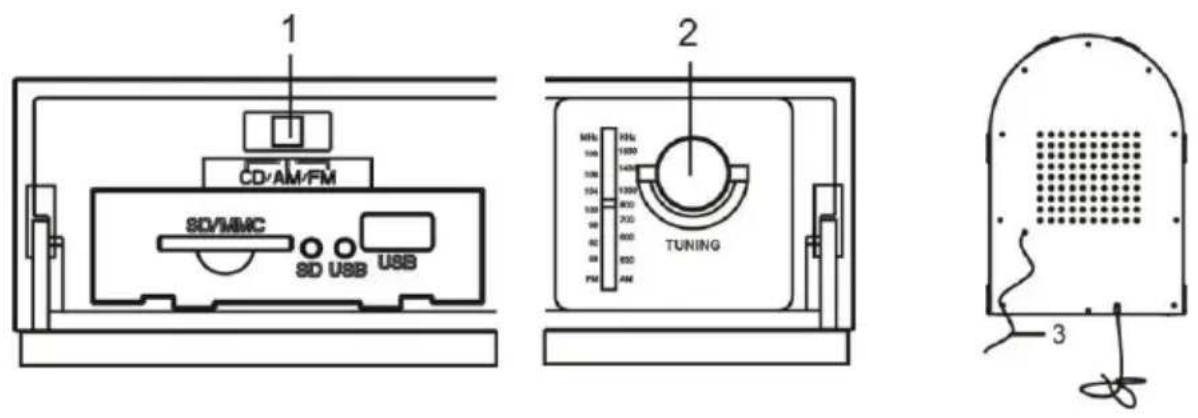
- CD/AM/FM Switch
- USB Jack
- SD/MMC Jack
- SD Indicator
- USB Indicator
- VOLUME Knob
- PLAY/PAUSE Button/CD/USB/SD Switch
- STOP Button
-
TUNING Knob
-
LCD Display
- LIGHT ON/OFF Button
- Fast Forward Button
- Fast Reverse Button
- CD Door Open/Close Touch
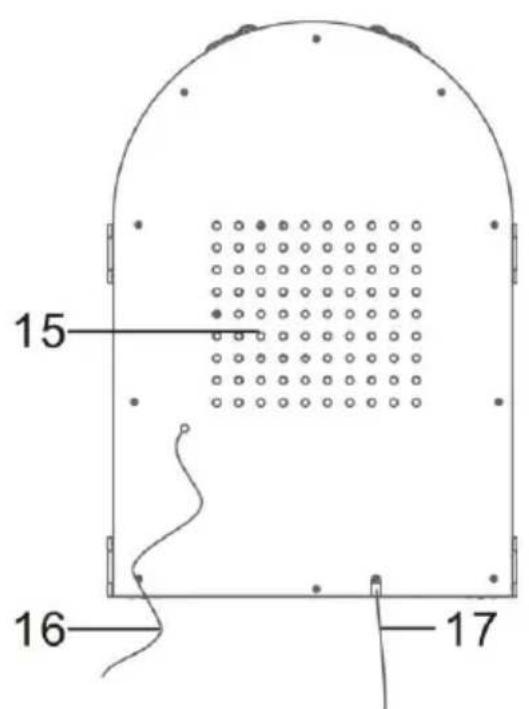
- Speaker
- Antenna
- AC Cord
LISTENING TO A COMPACT DISC
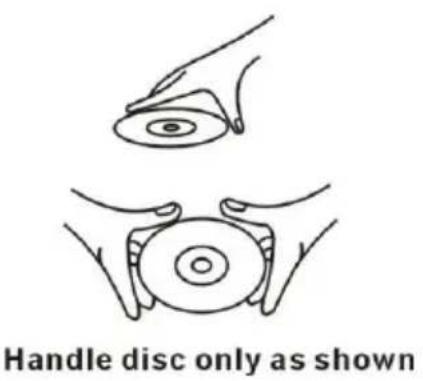
Handing Compact Discs:
This unit has been designed specifically for sound reproduction from compact discs bearing the mark. No other discs can be used.
Always place the compact disc in the disc tray with the label facing upward. (Compact discs can be played only on one side.)
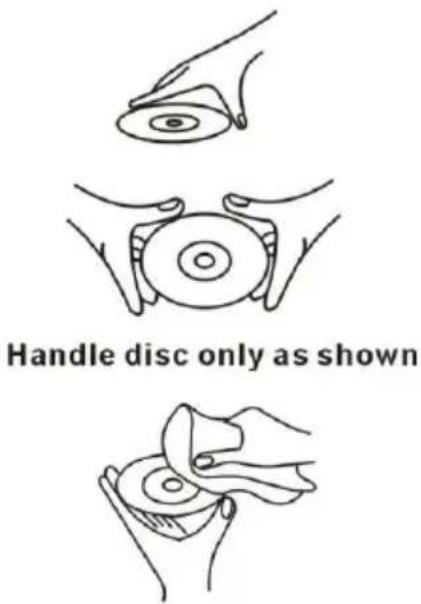
- To remove a disc from its storage case, press down on the centre of the case and lift the disc out, holding it carefully by the edge.
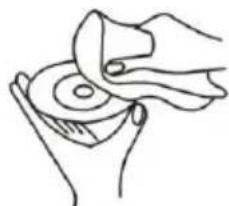
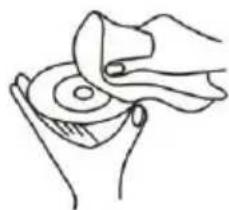
- Fingersprints and dust should be carefully wiped off the disc recorded surface with a clean cloth (not included).
- Never use chemicals such as: record sprays, anti-static sprays or fluid, benzene or thinner to clean compact discs. Such chemicals will do irreparable damage to the disc's plastic surface.
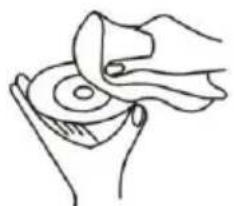
CLEAN FROM CENTRE TO EDGE
- Discs should be returned to their cases after use to avoid serious scratches that could cause the laser pick up to skip.
- Do not expose discs to direct sunlight or high humidity and temperature for extended periods. Long exposure to high temperature can warp the disc.
- Do not stick paper or write anything with a ballpoint pen on the surface of the label side.
- Do not use irregular shaped CD's (octagonal, heart-shape, etc.), all of which can damage the unit.
BASIC OPERATION
-
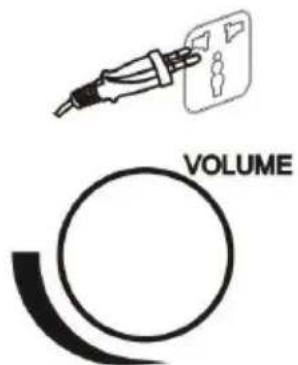
Prepare for use connect the power plug into the wall outlet.
-
Rotate the VOLUME + / - knob clockwise to turn the radio on and adjust to desired sound level.
LISTENING TO A CD
- Push the CD/AM/FM button to the CD position. Push to open the CD door and place the CD in the tray.
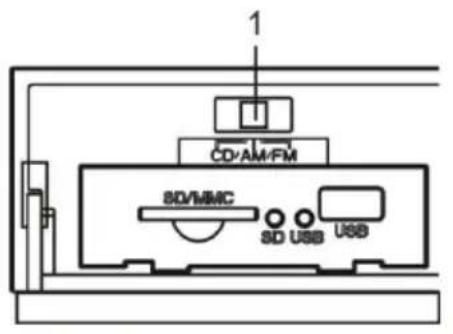
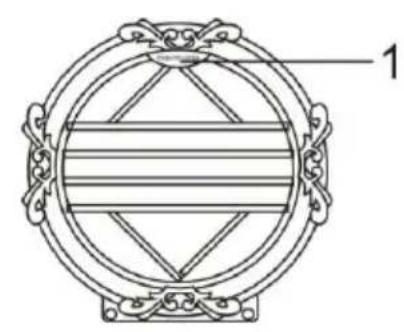
If you want to switch from SD to CD function, long press the PLAY/PAUSE button / CD/USB/SD switch the third time.
-
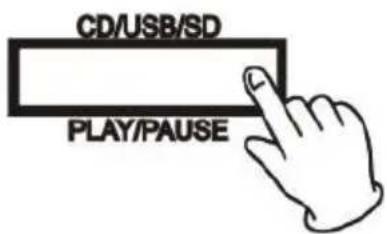
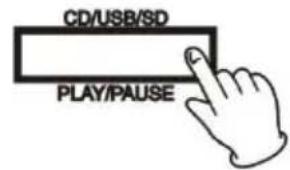
Close the tray and press the PLAY/PAUSE button / CD/USB/SD switch to start playing the CD. The CD will start playing from the first track.
-
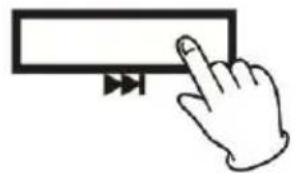
Press the F.F button once to go to the start of the next track.
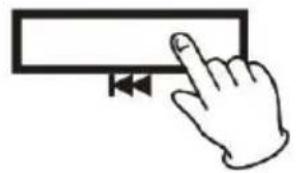
- Press the F.R button once to skip to the start of the current track. Press the F.R button twice to skip to the start of the previous track.
Fast Reverse (F.R) and Fast Forward (F.F)
You can reverse or forward to any point in a selected track by pushing and holding the F.R or F.F button.
NOTE: Do not push both buttons together as this may damage the unit.
As the unit is tracking quickly, forward or backward you will hear your selection playing at a distorted speed. Simply release the depressed button to continue playing at normal speed at the desired position in the selected track.
- Pause the CD playing.
Pressing the PLAY/PAUSE button / CD/USB/SD switch will restart the CD where it was paused.
Do not switch the unit off while playing a CD as this will damage the unit.
-
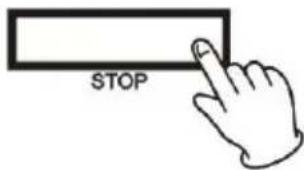
Stop the CD playing.
-
LIGHT
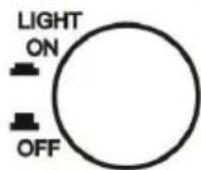
Press the LIGHT ON/OFF button to turn on the light. The light will light up all the times around the unit. Press the LIGHT ON/OFF button again to turn off the light.
PLAY A USB AUDIO PRODUCT OR MMC/SD CARD
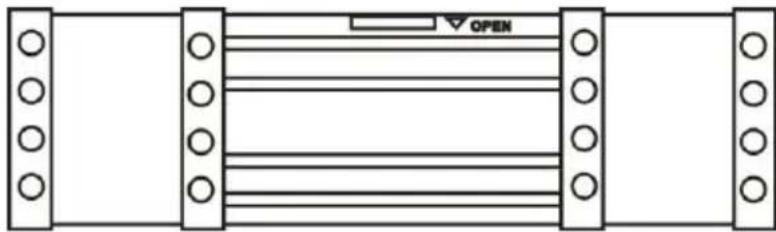
- Open the cover.
-
Connect an external audio source.
-
Insert a USB audio product (i.e. a MP3 player) into the USB device jack. Long press the PLAY/PAUSE button / CD/USB/SD switch twice to USB function and the USB indicator will light up.
-
Insert a MMC/SD card into the MMC/SD jack. Long press the PLAY/PAUSE button / CD/USB/SD switch third time to SD function and the SD indicator will light up.
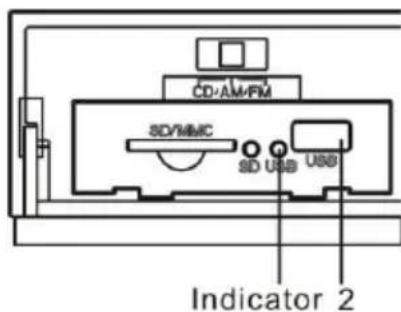
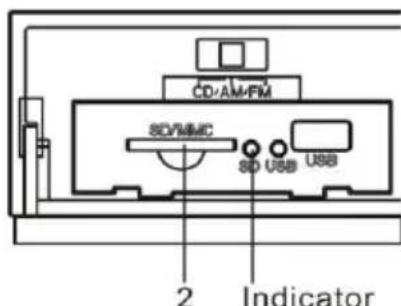
NOTE: When both jacks are connected, USB jack will get the priority to be played. If you want to play a MMC/SD card, disconnect your external audio source from the USB jack.
-
Total tracks will be shown on the LCD display.
-
Press PLAY/PAUSE button / CD/USB/SD switch and the music file will start playing.
-
Press the FF button to skip to the start of the next track.
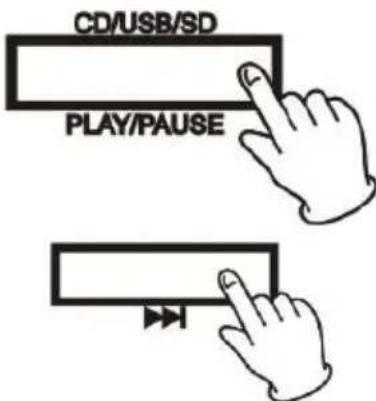
- Press the FR button once to skip to the start of the current track. Press the FR button twice to skip to the start of the previous track.
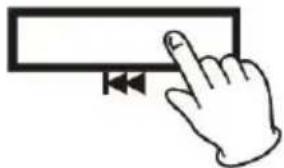
Fast Reverse (FR) and Fast Forward (FF)
You can reverse or forward to any point in a selected track by pushing and holding the F.R or F.F button.
NOTE: Do not push both buttons together as this may damage the unit.
As the unit is tracking quickly, forward or backward you will hear your selection playing at a distorted speed. Simply release the depressed button to continue playing at normal speed at the desired position in the selected track.
- Pause the CD playing.
Pressing the PLAY/PAUSE button / CD/USB/SD switch will restart the CD where it was paused. Do not switch the unit off while playing a CD as this will damage the unit.
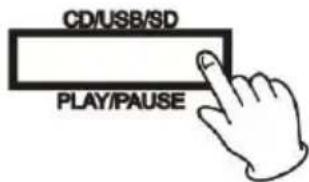
- Stop the CD playing.
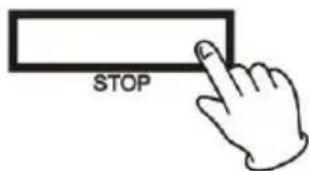
NOTE:
If the MMC/SD card becomes dirty, wipe the surface with a soft dry cloth.
- Cards should be returned to their cases after use to avoid dust.
- Check the side of the MMC/SD card to see if the switch is pushed into "lock" position.
- Push the CD/AM/FM button to the AM or FM position.
- Tune to the desired frequency.
- Antenna
-
For optimal FM reception, be sure to stretch the built-in FM antenna wire located at the lower back of the unit and move it around until the station you have tuned in is being received clearly.
-
The AM antenna is inside the unit, changing the location of the unit may greatly improve signal quality.
SPECIFICATIONS
AMPLIFIER section
Output Power. 1.5 W +1.5 W
Frequency Response. 60 to 20, 000 Hz
TUNER section
FM Section
Frequency Range. 87.5 to 108 MHz
AM Section
Frequency Range. 530 to 1600 KHz
CD PLAYER section
Frequency Response. 60 to 20, 000Hz + / - 4 dB
Signal-to-Noise Ratio. 55 dB (IEC-A)
SPEAKER SYSTEM section
Type. 1-way
Impedance. 8 ohms
Input Power. Max. 3 W
GENERAL
Power Requirements. 220-240 V 50 Hz
Power Consumption. 19 W
Dimensions (WxHxD) 275 mm x 400mm x 170 mm (approx.)
Weight. 3.5 kg. (approx.)
Standard Accessories. Operating Instruction Booklet
TROUBLESHOOTING GUIDE
In case of trouble with the unit, please look through the problems and see if you can solve them yourself before calling your dealer.
| Problem | Cause | Solution | |
| GENERAL | •Power does not come on when the power switch is pressed. | •Unit is unplugged. | •Connect the unit to the AC power supply. |
| •No sound comes out of the speakers | •The volume is turned down (to MIN). •The input selector does not match the playback source. | •Adjust the volume. •Re-select the desired input source. | |
| •The sound is noisy. | •The unit is too close to a TV set or another similar appliance. | •Turn off the TV or other appliance, and relocate the unit. | |
| •The unit does not act as expected. | •The unit needs to reboot. | •Remove the power cord from the AC outlet then after one minute re-plug the power cord. | |
| CD PLAYER | •CD stops immediately after starting, or unit pauses or stops during play. | •The CD is inserted upside down. •The CD is dusty or dirty or there is condensation on the CD. | •Insert the CD with the printed side right-side up. •Carefully clean and dry the CD. |
| •No sound. | •The CD player is paused. | •Press the Play/Pause button. | |
| •Specific CD is noisy, or playback stops or skips. | •The CD is scratched, damaged or warped. •The disc is very dirty. | •The CD should be changed. •Carefully clean the CD. | |
| •“nod” is shown on the CD display. | •The CD is created, damage or warped. •The disc is very dirty. | •The CD should be changed. •Carefully clean the CD. | |
| RADIO | Cannot listen to any station, or signal appears weak. | The station is not tuned in properly. A TV set is being used nearby and is interfering with the radio reception. | Properly tune-in the desired station. Turn off the interfering TV set. |
| The sound is distorted. | The antenna is not oriented properly. | Reposition the antenna until reception improves. | |
| USB FLASH DEVICE & CARD | Cannot read the USB flash device or the card. | The format of the USB flash device or the card is not correct. The MMC/SD card is locked. The USB flash device or the card may be damaged. | Change to another format of the USB flash device or the card. Take the card out and push the switch to “unlock” position. Change another USB flash device or the card and try. |
| No sound. | The PLAY/PAUSE button / CD/USB/SD switch is pressed down. | Press the PLAY/PAUSE button / CD/USB/SD switch. | |
RECYCLE
This marking indicates that this product should not be disposed with other household wastes throughout the EU. To prevent possible harm to the environment or human health from uncontrolled waste disposal, recycle it responsibly to promote the sustainable reuse of material resources. To return your used device, please use the return and collection systems or
contact the retailer where the product was purchased. They can take this product for environmental safe recycling.
Customer support
You can contact the Ricatech customer service when you have a question or a problem with your Ricatech product. You can contact us by telephone and email.
For customer support by email, please sent a email to
support@ricatech.com Please make sure that you mention the model number and serial
number of the product, mention your name & address and describe your question or
problem clearly.
Telephone
For customer support by telephone, please dial +32 3 3265694. One of our service staff will be ready to serve you. For full procedure please visit the website of Ricatech at:
www.ricatech.com
Ricatech B.V.
Cornusbaan 1
2908 KB Capelle a/d IJssel
The Netherlands
BELANGRIJKE VEILIGHEIDSINSTRUCTIES
CLEAN FROM CENTRE TO EDGE
BASISBEDIENING
CLEAN FROM CENTRE TO EDGE
CLEAN FROM CENTRE TO EDGE
GRUNDBEDIENUNG



- IMPORTANT SAFETY INSTRUCTIONS
- CAUTION
- SAFETY PRECAUTIONS
- BEFORE USE
- BEWARE OF CONDENSATION
- LOCATION OF PARTS
- LISTENING TO A COMPACT DISC
- HANDING COMPACT DISCS
- BASIC OPERATION
- LISTENING TO A CD
- FAST REVERSE (F.R) AND FAST FORWARD (F.F)
- PLAY A USB AUDIO PRODUCT OR MMC/SD CARD
- FAST REVERSE (FR) AND FAST FORWARD (FF)
- NOTE
- SPECIFICATIONS
- AMPLIFIER SECTION
- TUNER SECTION
- FM SECTION
- AM SECTION
- CD PLAYER SECTION
- SPEAKER SYSTEM SECTION
- GENERAL
- TROUBLESHOOTING GUIDE
- RECYCLE
- CUSTOMER SUPPORT
- TELEPHONE
- RICATECH B.V
- BELANGRIJKE VEILIGHEIDSINSTRUCTIES
- BASISBEDIENING
- GRUNDBEDIENUNG
Brand : Ricatech
Model : Table Top RR510
Category : Juke box