Air Mouse Elite - Mouse Gyration - Free user manual and instructions
Find the device manual for free Air Mouse Elite Gyration in PDF.


Frequently Asked Questions - Air Mouse Elite Gyration
User questions about Air Mouse Elite Gyration
0 question about this device. Answer the ones you know or ask your own.
Ask a new question about this device
Download the instructions for your Mouse in PDF format for free! Find your manual Air Mouse Elite - Gyration and take your electronic device back in hand. On this page are published all the documents necessary for the use of your device. Air Mouse Elite by Gyration.
USER MANUAL Air Mouse Elite Gyration
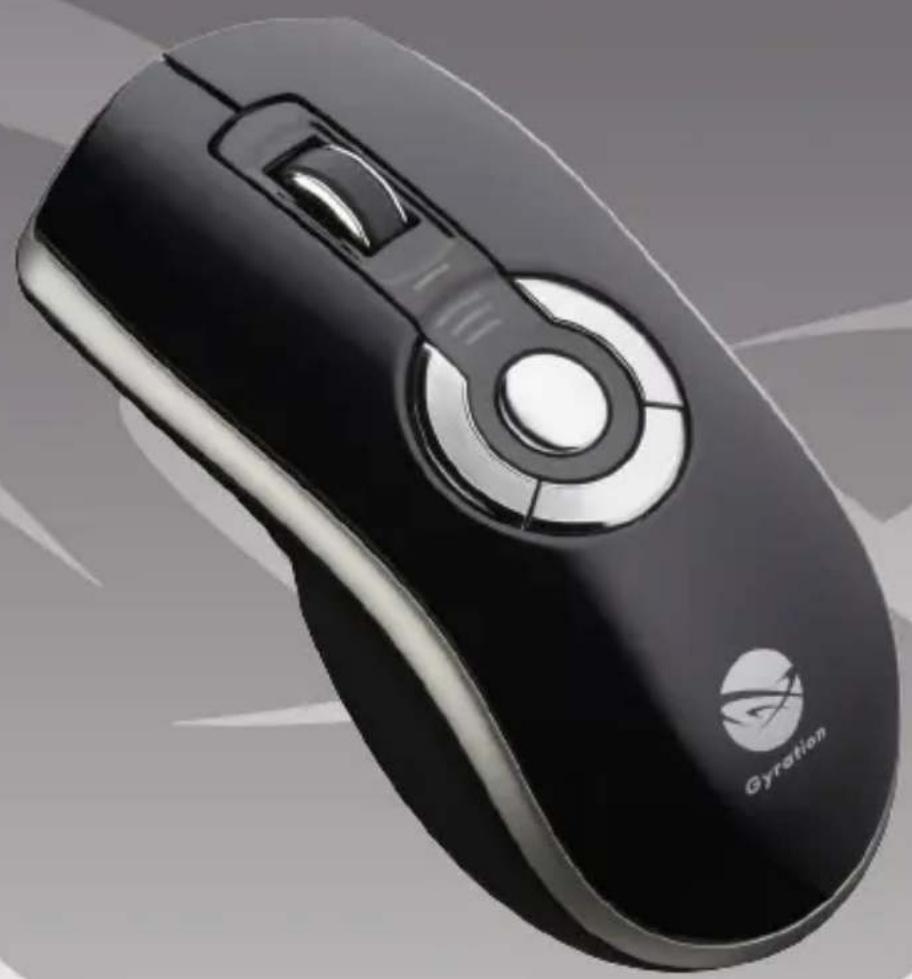
Gyration Air Mouse Elite
User's Guide

www.gyration.com
Gyration

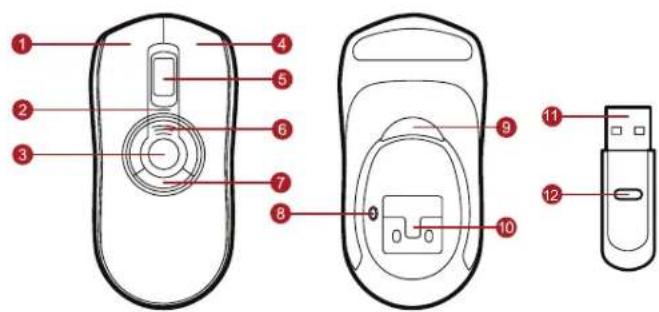
Overview
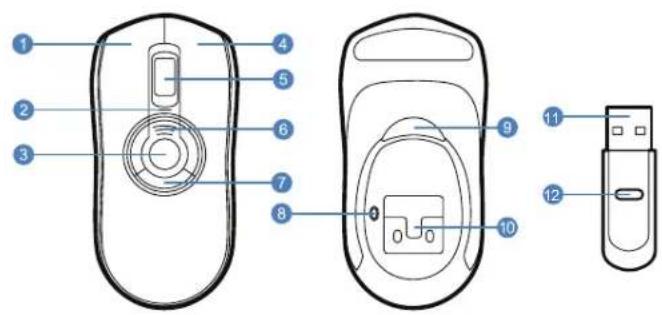
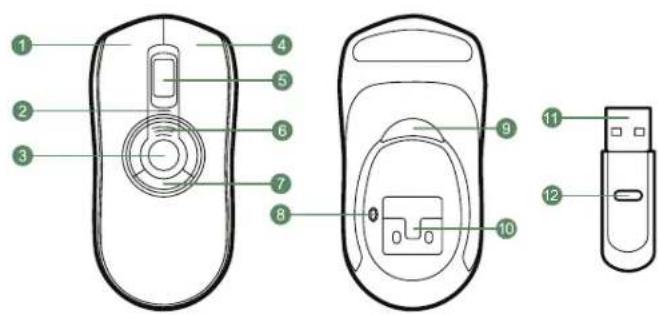
Left Mouse Button
Status LED
Gesture Button
Right Mouse Button
Scroll Wheel
Battery Indication LED's
7 Programmable Mouse Buttons (3)
Mouse Connect Button
In-Air Activation Trigger
Internal lithium-ion battery
12.4 GHz USB Receiver
USB Receiver Connect Button
Getting Started
1 Press the mouse connect button to turn on the mouse. The blue LED should flash.
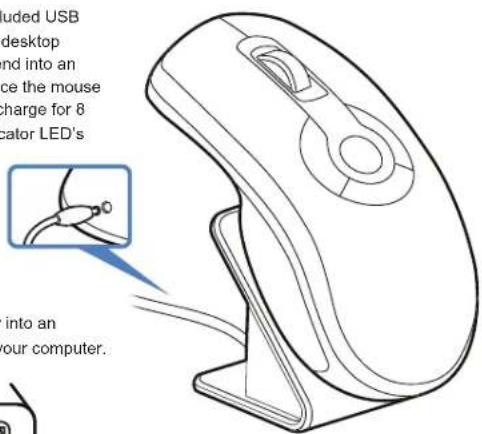
Plug one end of the included USB charging cable into the desktop charger and the other end into an available USB port. Place the mouse on cradle charger and charge for 8 hours. The Battery Indicator LED's will progressively flash while charging. When all three amber LED's are solid the battery is fully charged.
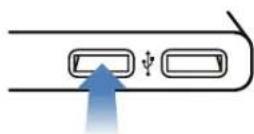
2 Insert the USB receiver into an available USB port on your computer.

3 Press the connect button on the USB receiver.
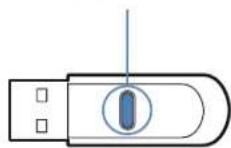
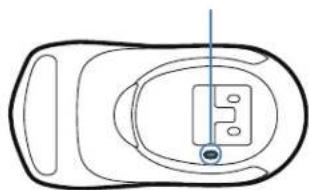
4 Press the connect button on the bottom of the mouse.
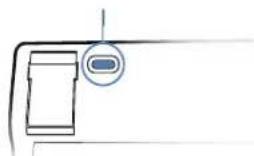
5 If your product includes the low profile keyboard, turn the keyboard over, insert the 2AAA batteries and tum on the keyboard. Repeat step 3 then press the connect button on the back of the keyboard.
6 Download MotionTools - www.gyration.com/motiontools
The computer will automatically detect and configure the Air Mouse.
In-Air Operation
Hold the mouse using a comfortable handshake position. Use your index finger to access the in-air activation trigger and your thumb to access the top mouse buttons.
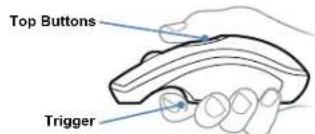
Press and hold the in-air activation trigger and move the cursor by flexing only your wrist while keeping your arm and body stationary.
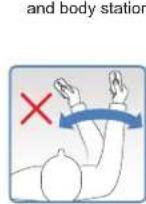
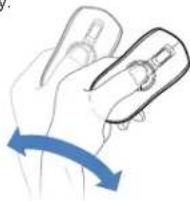
10 Tip: Click and hold the in-air activation trigger then move the cursor over a target and release the trigger before clicking. This parks the cursor over the target and allows you to click more accurately.
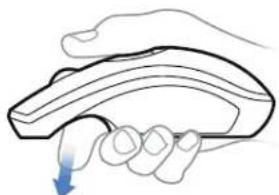
11 Double-clicking the in-air activation trigger puts the Air Mouse in motion mode where you can move the cursor without holding the trigger.
Gyration - www.gyration.com
Regulatory Information
Notice to Users:
This equipment has been tested and found to comply with the limits for Class B digital device, pursuant to Part 15 of the FCC rules. These limits are designed to provide reasonable protection against harmful interference in a residential installation. This equipment generates, uses and can radiate radio frequency energy and, if not installed and used in accordance with the instructions, may cause harmful interference to radio communications. However, there is no guarantee that interference will not occur in a particular installation. If the equipment does cause harmful interference to radio or television reception, which can be determined by turning the equipment off and on, the user is encouraged to try to correct the interference by one or more of the following measures:
- Reorient or relocate the receiving antenna.
- Increase the separation between the equipment and the receiver.
- Plug the equipment into an outlet on a circuit different from that which the receiver is plugged.
- Consult the dealer or an experienced radio/TC technician for help. This product works using a radio frequency, so use on an airplane may be restricted due to interference.
FCC Statement:
This device complies with part 15 of the FCC Rules. Operation is subject to the following two conditions: (1) This device may not cause harmful interference,
and (2) this device must accept any interference received, including interference that may cause undesired operation. Changes or modifications not expressly approved by the party responsible for compliance could void the user's authority to operate the equipment. The antenna(s) used for this transmitter must not be co-located or operating in conjunction with any other antenna or transmitter.
CE
This equipment has been tested and found to comply with the limits of the European Council Directive on the approximation of the law of the member states relating to electromagnetic compatibility (89/336/EEC) according to EN 55022 Class B.
Industry Canada Equipment Notice
The Industry Canada certification identifies certified equipment. This certification means that the equipment meets certain telecommunications network protective, operational and safety requirements as prescribed in the appropriate Terminal Equipment Technical Document(s). The Department does not guarantee the equipment will operate to the user's satisfaction. Before installing this equipment, users should ensure that it is permissible to be connected to the facilities of the local telecommunications company. The equipment must also be installed using an acceptable method of connection. The customer should be aware that compliance with the above conditions may not prevent degradation of service in some situations. Repairs to certified equipment should be coordinated by a representative designated by the supplier. Any repairs or alterations made by the user to this equipment, or equipment malfunctions, may give the telecommunications company cause to request the user to disconnect the equipment. Users should ensure, for their own protection, that the electrical ground connectors of the power utility, telephone lines and internal metallic water pipe system, if present, are connected together. This presentation may be particularly important in rural areas.
Caution: Users should not attempt to make such connections themselves, but should contact the appropriate electric inspection authority or electrician, as appropriate.
Warranty Information
LIMITED TWO YEAR WARRANTY
We warrant to the original purchaser that this product (hardware or software) shall be free from defects in material and workmanship for a period of two years from the date of purchase ("warranty period"). Proof of purchase in the form of a legible sales receipt indicating that the product is within the warranty period must be presented for warranty service. If this product is determined to be defective during the warranty period, we will either repair or replace the product with a current equivalent, at our option.
For further information contact:
Gyration
www.gyration.com
North America: 1888340-0033
This repair/replacement is our sole obligation under this warranty. We will not be responsible for any incidental or consequential damages or for any loss arising in connection with the use or inability to use this product. Some states/provinces do not allow the exclusion or limitation of incidental or consequential damages, so the above limitation or exclusion may not apply to you. This warranty excludes defects or damage due to misuse, abuse, or neglect. This warranty gives you specific legal rights, and you may also have other rights, which vary from state to state/province to province.
Class 1 Laser Product
This optical device complies with International Standard IEC 60825-1 (also known as EN 60825-1:2001) Class 1 Laser Product Invisible and also comp
with 21 CFR 1040 Laser Notice 50. Low risk to eyes, no risk to skin.
Class 1 products are defined to be safe under all conditions including optical instruments.
Caution: Use of controls or adjustments or performance of procedures other than those herein specified may result in hazardous radiation exposure.
Gyration Air Mouse Elite
Gyration - www.gyration.com
Gyration Air Mouse Elite
Bedienungsanleitung
www.gyration.com

Gyration

Ubersicht
Link Maustaste
Status-LED
Gestentaste
Rechte Maustaste
Scrollrad
Batteriestatus-LED
Gyration - www.gyration.com
Gyration Air Mouse Elite
Manual de usuario

www.gyration.com
Gyration

Componentes