
Air Mouse Mobile GYM2200 - Mouse Gyration - Free user manual and instructions
Find the device manual for free Air Mouse Mobile GYM2200 Gyration in PDF.


User questions about Air Mouse Mobile GYM2200 Gyration
0 question about this device. Answer the ones you know or ask your own.
Ask a new question about this device
Download the instructions for your Mouse in PDF format for free! Find your manual Air Mouse Mobile GYM2200 - Gyration and take your electronic device back in hand. On this page are published all the documents necessary for the use of your device. Air Mouse Mobile GYM2200 by Gyration.
USER MANUAL Air Mouse Mobile GYM2200 Gyration
natural_image
Close-up of a black computer mouse with 'Gyration' branding on the cover (no additional text or symbols visible)
natural_image
Illustration of a U.S. flag with a blue and orange layered background, no text or symbols present.Overview
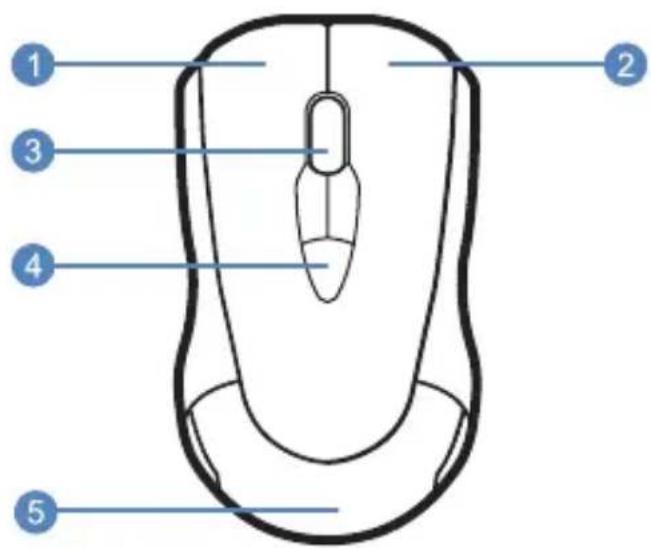
text_image
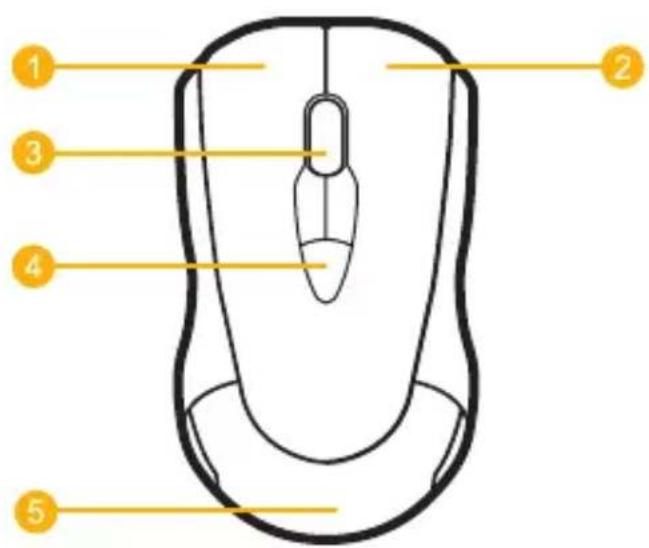
Diagram of a computer mouse with numbered labels pointing to different parts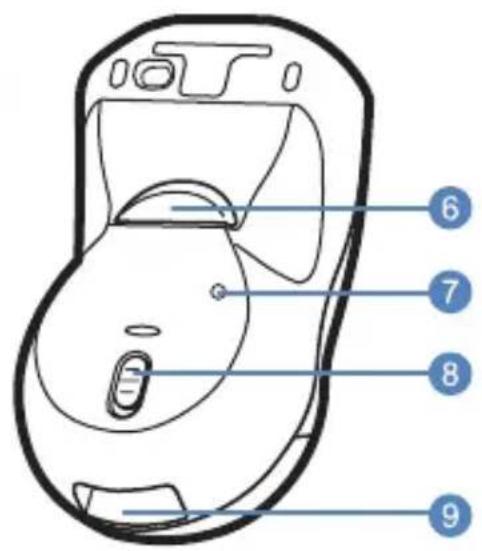
text_image
Diagram of a device with numbered labels pointing to different parts of the body.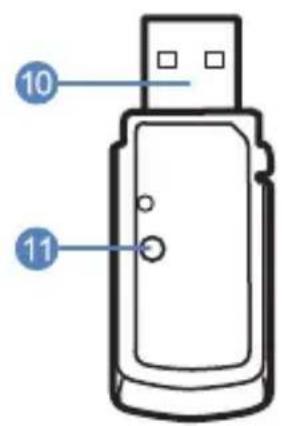
text_image
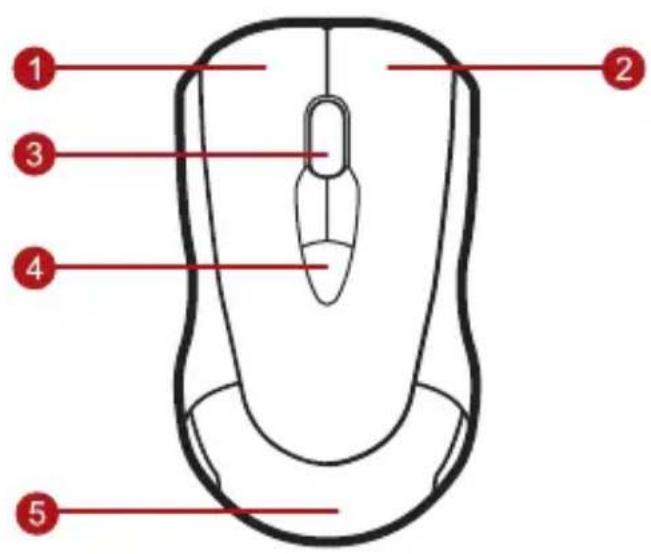
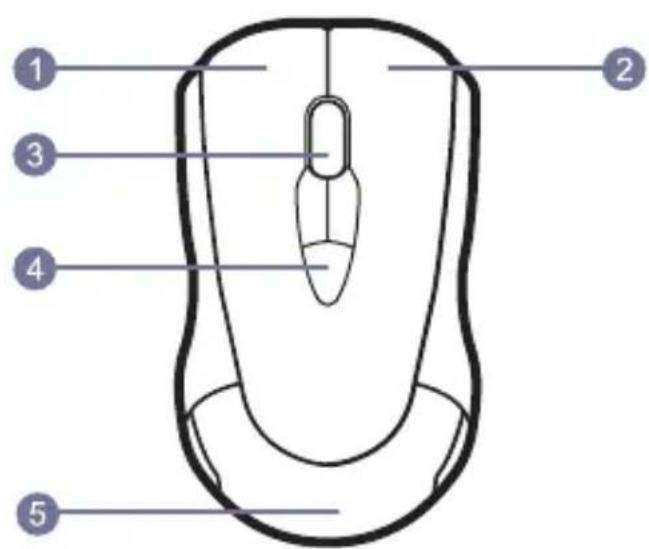
10 111 Left Mouse Button
2 Right Mouse Button
3 Scroll Wheel
4 Programmable Mouse Buttons (3)
5 Battery Compartment Cover
6 In-Air Activation Trigger
7 Mouse Connect Button
8 On / Off Switch
9 USB Receiver Storage
10 2.4 GHz USB Receiver
11 USB Receiver Connect Button
Getting Started
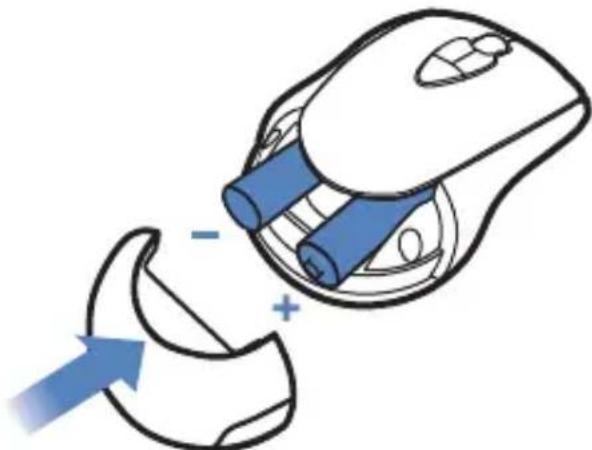
1 Remove Batter Compartment Cover.
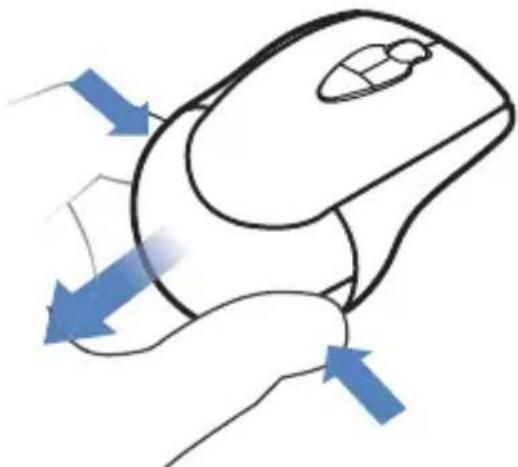
natural_image
Illustration of a computer mouse with blue directional arrows indicating movement or force (no text or symbols)2 Insert 2 AAA Batteries as shown.
natural_image
Illustration of a computer mouse with blue components and a blue arrow pointing to a damaged part (no text or symbols)3 Replace Battery Compartment Cover.
4 Slide Switch to On.

natural_image
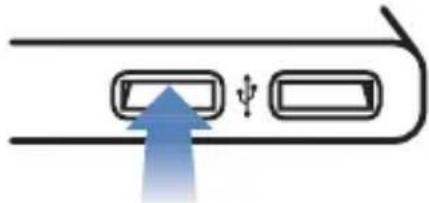
Diagram of a computer mouse with a blue arrow pointing to the internal body area (no text or symbols)5 Insert the USB receiver into an available USB port on your computer.
natural_image
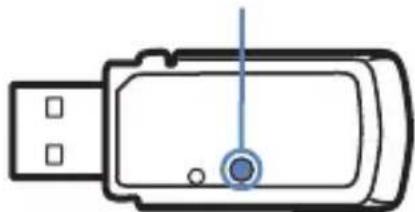
Diagram showing a blue arrow pointing upward through a rectangular panel with a small symbol (no text or labels)6 Press the connect button on the USB receiver.
natural_image
Simple line drawing of a USB flash drive with a blue indicator light (no text or symbols)
natural_image
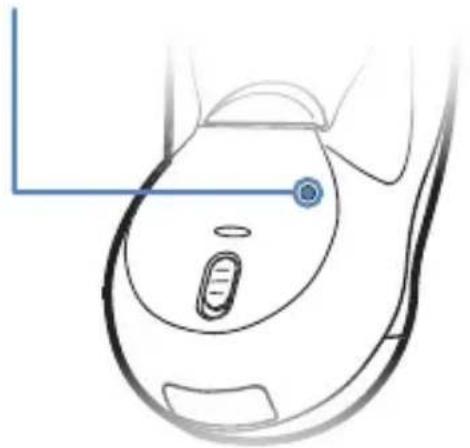
Abstract graphic with a U.S. flag and layered colored bands (no text or symbols)7 Press the connect button on the Mouse.
natural_image
Line drawing of a medical device's head and neck (no text or symbols)8 The computer will automatically detect and configure the Air Mouse.
9 Download MotionTools from www.gyration.com/motiontools
In-Air Operation
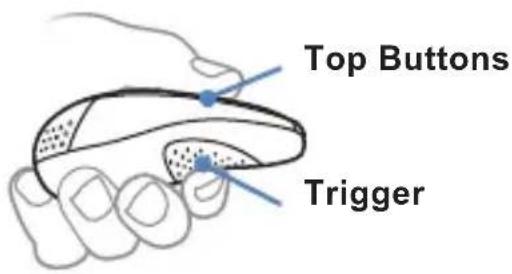
10 Hold the mouse using a comfortable handshake position. Use your index finger to access the in-air activation trigger and your thumb to access the top mouse buttons.
text_image
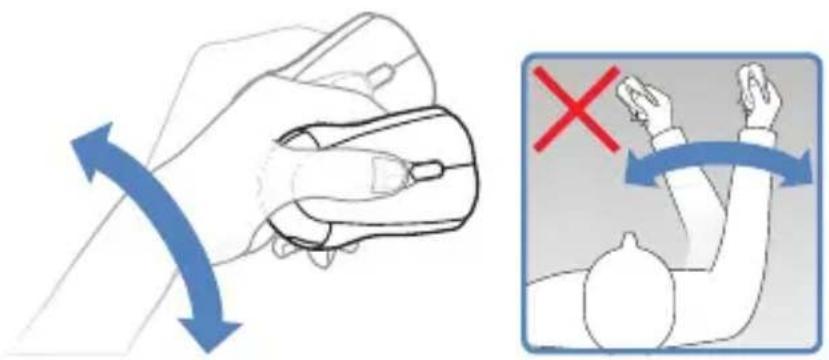
Top Buttons Trigger11 Press and hold the in-air activation trigger and move the cursor by flexing only your wrist while keeping your arm and body stationary.
text_image
Diagram showing a hand holding a device with blue arrows indicating left-hand rule and a red 'X' symbol indicating right-hand rule.Storing the Air Mouse
12 Tip: Click and hold the in-air activation trigger then move the cursor over a target and release the trigger before clicking. This parks the cursor over the target and allows you to click more accurately.
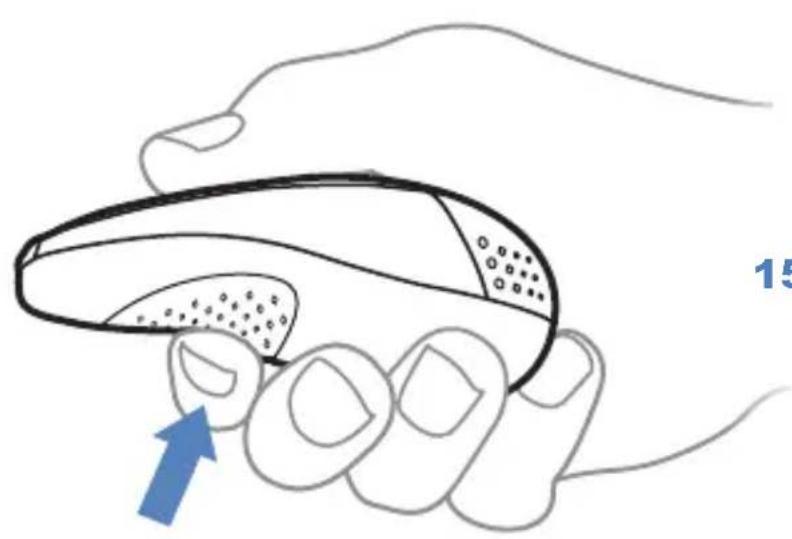
13 Double-clicking the in-air activation trigger puts the Air Mouse in motion mode where you can move the cursor without holding the trigger.
natural_image
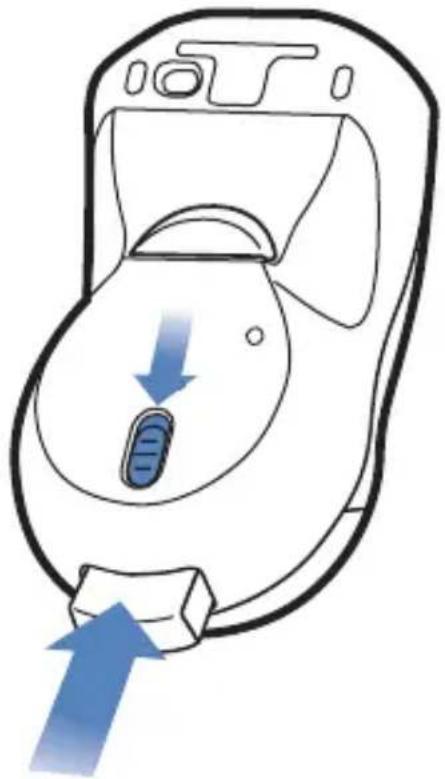
Illustration of a hand holding a small object with a blue arrow pointing to it, no text or symbols present.14 Slide switch to Off.
natural_image
Line drawing of a medical device with blue arrows indicating movement or force (no text or symbols)15 Insert the USB Receiver into the USB storage compartment. Push gently until it clicks in place. Push gently again to release.
Gyration – www.gyration.com
Regulatory Information
Notice to Users:
This equipment has been tested and found to comply with the limits for Class B digital device, pursuant to Part 15 of the FCC rules. These limits are designed to provide reasonable protection against harmful interference in a residential installation. This equipment generates, uses and can radiate radio frequency energy and, if not installed and used in accordance with the instructions, may cause harmful interference to radio communications. However, there is no guarantee that interference will not occur in a particular installation. If the equipment does cause harmful interference to radio or television reception, which can be determined by turning the equipment off and on, the user is encouraged to try to correct the interference by one or more of the following measures:
- Reorient or relocate the receiving antenna.
- Increase the separation between the equipment and the receiver.
- Connect the equipment into an outlet on a circuit different from that which the receiver is connected.
- Consult the dealer or an experienced radio/TC technician for help.
The user is cautioned that changes and modifications made to the equipment without the approval of manufacturer could void the user's authority to operate this equipment.
FCC Statement:
This device complies with part 15 of the FCC Rules. Operation is subject to the following two conditions: (1) This device may not cause harmful interference, and (2) this device must accept any interference received, including interference that may cause undesired operation. Changes or modifications not expressly approved by the party responsible for compliance could void the user's authority to operate the equipment. The antenna(s) used for this transmitter must not be co-located or operating in conjunction with any other antenna or transmitter.
CE
This equipment has been tested and found to comply with the limits of the European Council Directive on the approximation of the law of the member states relating to electromagnetic compatibility (89/336/EEC) according to EN 55022 Class B.
Industry Canada Equipment Notice
Under Industry Canada regulations, this radio transmitter may only operate using an antenna of a type and maximum (or lesser) gain approved for the transmitter by Industry Canada. To reduce potential radio interference to other users, the antenna type and its gain should be so chosen that the equivalent isotropically radiated power (e.i.r.p.) is not more than that necessary for successful communication.
This device complies with Industry Canada licence-exempt RSS standard(s). Operation is subject to the following two conditions: (1) this device may not cause interference, and (2) this device must accept any interference, including interference that may cause undesired operation of the device.
Warranty Information
LIMITED TWO YEAR WARRANTY
We warrant to the original purchaser that this product (hardware or software) shall be free from defects in material and workmanship for a period of two years from the date of purchase (“warranty period”). Proof of purchase in the form of a legible sales receipt indicating that the product is within the warranty period must be presented for warranty service. If this product is determined to be defective during the warranty period, we will either repair or replace the product with a current equivalent, at our option.
For further information contact:
Gyration
www.gyration.com
North America: 1 888 340-0033
This repair/replacement is our sole obligation under this warranty. We will not be responsible for any incidental or consequential damages or for any loss arising in connection with the use or inability to use this product. Some states/provinces do not allow the exclusion or limitation of incidental or consequential damages, so the above limitation or exclusion may not apply to you. This warranty excludes defects or damage due to misuse, abuse, or neglect. This warranty gives you specific legal rights, and you may also have other rights, which vary from state to state/province to province.
Class 1 Laser Product
This optical device complies with International Standard IEC 60825-1 (also known as EN 60825-1:2001) Class 1 Laser Product Invisible and also complies with 21 CFR 1040 Laser Notice 50. Low risk to eyes, no risk to skin.
Class 1 products are defined to be safe under all conditions including optical instruments.
Caution: Use of controls or adjustments or performance of procedures other than those herein specified may result in hazardous radiation exposure.
Gyration Air Mouse
natural_image
Close-up of a black computer mouse with 'Gyrafjien' branding on the cover (no additional text or symbols visible)www.gyration.com

Gyration

natural_image
Illustration of France flag on a stylized yellow-orange arc against a dark background (no text or symbols)Présentation
text_image
Diagram of a computer mouse with numbered labels pointing to different parts on the body.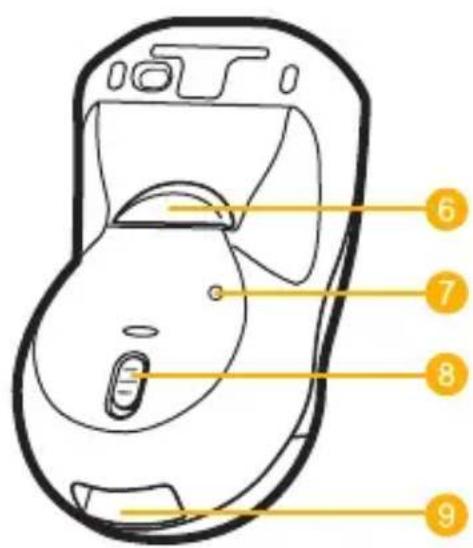
text_image
Diagram of a device with numbered labels pointing to internal components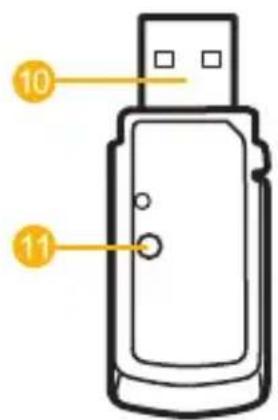
text_image
10 11natural_image
Abstract graphic with a dark gray background and an orange-yellow diagonal stripe at the bottom (no text or symbols)Mise en route
natural_image
Illustration of a computer mouse with yellow directional arrows indicating motion or movement (no text or symbols)natural_image
Simple line drawing of a human pelvic anatomy with a highlighted region and an arrow pointing to it (no text or symbols)natural_image
Diagram showing a device with two ports and an arrow indicating direction (no text or symbols)natural_image
Simple line drawing of a USB flash drive with a central indicator light (no text or symbols)
natural_image
Illustration of a French flag with red and blue stripes against a dark background (no text or symbols)natural_image
Anatomical line drawing of a human abdomen with a highlighted internal structure (no text or labels)text_image
Top Buttons Triggertext_image
Diagram showing a hand holding a computer mouse with an orange arrow indicating leftward movement and a red X mark highlighting the right arm.
natural_image
Abstract graphic with a dark gray background and a yellow-orange diagonal stripe at the bottom (no text or symbols)natural_image
Illustration of a hand holding a computer mouse with an arrow pointing to the mouse (no text or symbols present)natural_image
Line drawing of a device with a lightning bolt and yellow arrows indicating action or notification (no text or symbols)Gyration – www.gyration.com
natural_image
Close-up of a black computer mouse with 'Gyretjen' branding on the cover (no additional text or symbols visible)www.gyration.com

Gyration

natural_image
Illustration of a stylized landscape with layered green and orange bands against a dark background, featuring a German flag icon (no text or symbols)Übersicht
text_image
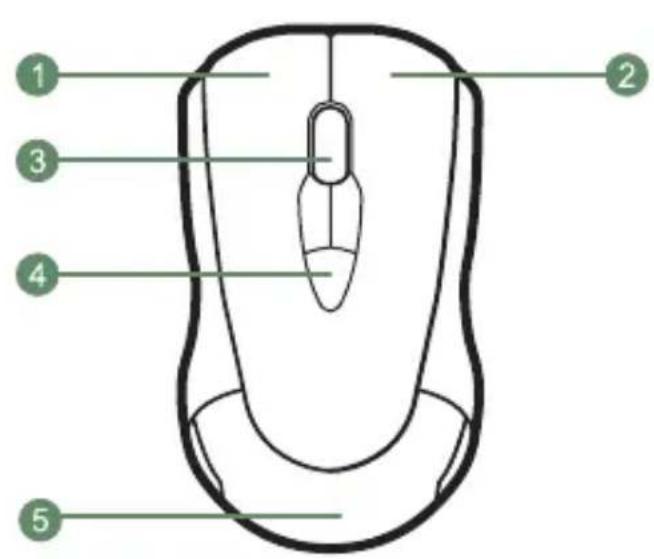
Diagram of a computer mouse with numbered parts labeled 1 to 5 for identification.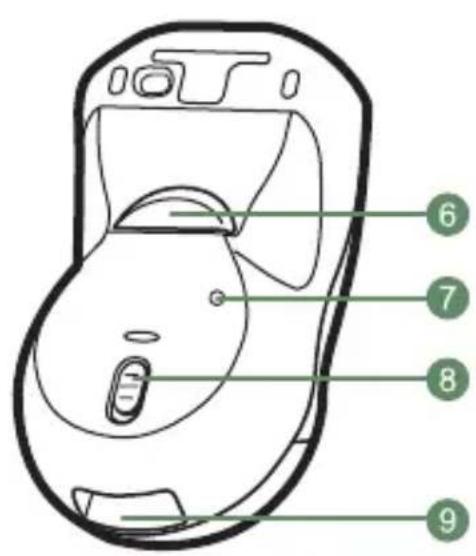
text_image
Diagram of a mobile phone with numbered labels pointing to key components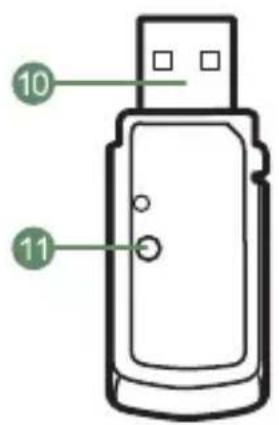
text_image
10 11natural_image
Illustration of a computer mouse with battery and disc components, showing no text or symbolsnatural_image
Simple line drawing of a human abdomen with a green arrow pointing to a small cell or structure (no text or symbols)natural_image
Pure electrical circuit lines without any symbolsnatural_image
Simple line drawing of a USB flash drive (no text or symbols)
natural_image
Illustration of a layered geological strata with a German flag marker, no text or symbols presentnatural_image
Medical illustration of a human pelvic region with a medical device and measurement markings (no text or symbols)9 MotionTools download www.gyration.com/motiontools
text_image
Top Buttons Triggertext_image
Diagram showing a hand holding a mouse with green directional arrows and a red 'X' indicating a specific point or condition.
natural_image
Abstract geometric shape with layered color bands (orange, green, white) against a dark background, no text or symbols present.natural_image
Illustration of a hand holding a computer mouse with a green arrow pointing to the mouse (no text or symbols present)natural_image
Line drawing of a medical device with a green arrow indicating downward pressure or force, no text or symbols present.Gyration – www.gyration.com
natural_image
Close-up of a black computer mouse with 'Gyration' branding on the cover (no additional text or symbols visible)
natural_image
Abstract graphic with a red and orange diagonal stripe against a dark gray background (no text or symbols)Visión general
text_image
Diagram of a computer mouse with numbered labels pointing to different parts on the body.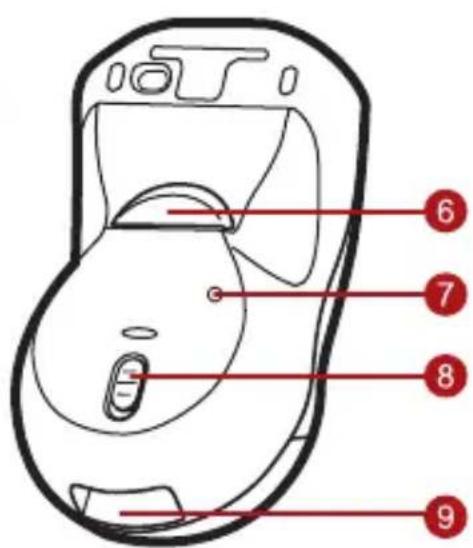
text_image
Diagram of a device with numbered labels pointing to internal components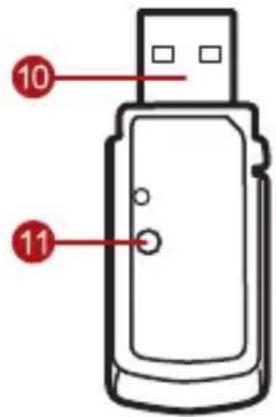
text_image
10 11natural_image
Abstract graphic with a red-orange chevron and Spanish flag on dark background (no text or symbols)Inicio
natural_image
Illustration of a computer mouse with red arrows indicating motion or force direction (no text or symbols)natural_image
Illustration of a computer mouse with red battery and battery pad, showing a drop in the shell (no text or symbols)natural_image
Illustration of a pregnant woman's abdomen with a red arrow pointing to the lower abdomen area (no text or symbols)natural_image
Diagram showing a device with two ports and a red arrow pointing to the port (no text or symbols)natural_image
Simple line drawing of a USB flash drive with a red circular indicator on the left port (no text or symbols)
natural_image
Abstract geometric shape with red, orange, and white layers against a dark gray background (no text or symbols)natural_image
Anatomical line drawing of a human abdomen with a red arrow and circular marker (no text or labels)text_image
Top Buttons Triggertext_image
Diagram showing a hand holding a device with red directional arrows and a warning sign indicating blocked or uncontrolled actions.
natural_image
Abstract graphic with a red and orange striped background and a Spanish flag symbol (no text or symbols present)natural_image
Illustration of a hand holding a computer mouse with a red arrow pointing to the mouse (no text or symbols present)natural_image
Diagram of a medical device with red arrows indicating pressure or force direction (no text or symbols)natural_image
Abstract graphic with red and orange horizontal stripes on a dark gray background (no text or symbols)natural_image
Close-up of a black Gyratian computer mouse with a silver bezel and logo (no text or symbols on the device itself)Overzicht
text_image
Diagram of a computer mouse with numbered parts labeled 1 to 5 for identification.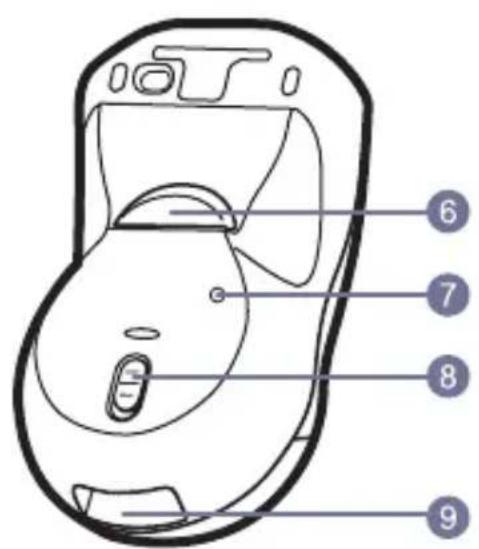
text_image
Diagram of a mobile phone receiver with numbered labels pointing to key components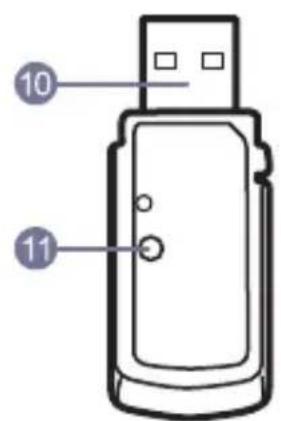
text_image
10 111 Linkermuisknop
2 Rechtermuisknop
3 Scrollwiel
4 Programmeerbare muisknoppen (3)
5 Deksel batterijcompartiment
natural_image
Abstract graphic with a red, white, and orange horizontal bands over a dark background, featuring a Dutch flag motif (no text or symbols)Aan de slag
text_image
rijcompartment.natural_image
Simple line drawing of a medical device inside a body cavity, with an arrow pointing to the device (no text or symbols)natural_image
Pure electrical circuit lines without any symbolsnatural_image
Simple line drawing of a USB flash drive (no text or symbols)
natural_image
Abstract geometric shape with orange and gray layers on dark background (no text or symbols)natural_image
Medical illustration of a human pelvic region with measurement markings (no text or symbols)8 De computerz al de Air Mouse automatisch vinden en configureren.
9 MotionTools download www.gyration.com/motiontools
In-Air werking
text_image
Top Buttons Triggertext_image
Medical illustration showing a hand holding a device with directional arrows and a close-up of hands performing a manual grip or manipulation technique.
natural_image
Abstract graphic with a red and white flag on dark background, no text or symbols presentnatural_image
Illustration of a hand holding a computer mouse with an arrow pointing to the mouse (no text or symbols present)natural_image
Line drawing of a medical device with a button and arrow indicator (no text or symbols)Gyration – www.gyration.com
Kennisgevingen
natural_image
Abstract orange circular logo with white abstract swirls (no text or symbols)Gyration
www.gyration.com
North America: 1 888 340-0033
DL03508-002