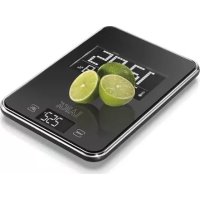
KS3009 - Kitchen scales LAICA - Free user manual and instructions
Find the device manual for free KS3009 LAICA in PDF.



| Product Type | Electronic Kitchen Scale |
| Brand | LAICA |
| Model | KS3009 |
| Power Supply | 3 AAA alkaline 1.5 V batteries |
| Displays | 2 LCD screens: weighing (backlit) and multifunction (date/time/temperature/humidity) |
| Precision | ±1% |
| Measurement Units | kg / lb (selectable) |
| Tare Function | Yes (zero reset for successive weighings) |
| Clock Function | Date, time, 12/24 h format |
| Alarm Function | Sound alarm with Snooze function (8 min) |
| Ambient Temperature Range | +10 °C to +40 °C (+40 °F to +104 °F) |
| Ambient Humidity Range | 20% to 90% RH |
| Backlight | Yes (temporary, during use) |
| Warranty | 2 years (manufacturing defects) |
| Cleaning | Damp cloth, without acidic, abrasive or solvent products |
| Precautions | Do not immerse, avoid shocks and extreme temperatures |
| Use | Domestic only |
| Maximum Capacity | Approximately 5 kg (estimate, not specified) |
| Dimensions (approx.) | Not specified |
Frequently Asked Questions - KS3009 LAICA
User questions about KS3009 LAICA
0 question about this device. Answer the ones you know or ask your own.
Ask a new question about this device
Download the instructions for your Kitchen scales in PDF format for free! Find your manual KS3009 - LAICA and take your electronic device back in hand. On this page are published all the documents necessary for the use of your device. KS3009 by LAICA.
USER MANUAL KS3009 LAICA
ELECTRONIC KITCHEN SCALE WITH DATE AND TIME, ALARM CLOCK, TEMPERATURE AND ROOM HUMIDITY DETECTION FUNCTIONS
Peso Poids Weight Pesada Coweight

Temperature (^ / ^) Temperature (^ / ^) Temperature (^ / ^) Temperature (^ / ^)


Italiano
BILANCIA ELETTRONICA DA CUCINA CON DATA E ORA, FUNZIONI SVEGLIA, RILEVAZIONE TEMPERATUREA E UMIDITA' AMBIENTALE
ELECTRONIC KITCHEN SCALE WITH DATE AND TIME, ALARM CLOCK, TEMPERATURE AND ROOM HUMIDITY DETECTION FUNCTIONS
Your new kitchen scale by LAICA is extremely reliable and precise and does not require any maintenance. Equipped with 2 LCD-displays to show weighing, date/time, room temperature (^,^) , humidity percentage and alarm clock function.
It is necessary to follow a healthy and balanced diet and it becomes essential to follow a therapeutic diet.
To work normally human body needs to be nourished regularly. Drastic and unbalanced diets not including all types of foodstuffs should be absolutely avoided. One of the essential assumptions for a correct feeding is that it meets the energy requirement of the involved person. Moreover, it is important to consider the variety of foods since diets involving always the same type of food can lack of some nutrient principles. While assessing the total quantity of food to take in a day, it is useful to calculate first of all the energy requirement of the involved person. On average, the daily energy requirement, represented by the weight and the physical activity carried out by the involved person, is equal to about 40 calories per kilogram a day (kg/die) for people performing a heavy work; 30 cal/kg/die for the ones performing a medium heavy work; and 25 cal/kg/die for the ones performing little physical activity. The one exceeding the necessary amount of calories needed to meet his/her daily energy requirement is quite surely subject to overweight, above all if he/she does not carry out a proper physical activity. Should one be underweight, it is necessary to seek medical advice and perform the correct amount of physical activity supported concurrently by a varied and balanced diet. Always try to weigh food in order to take the right daily ration: taking too much or too few quantities of a given type of food means following an unbalanced diet. In any case, it is essential to remember that any change in terms of quality and quantity to one's own diet, especially if carried out for therapeutic purposes, must always be discussed and established previously together with a doctor.
Hints for a healthy feeding and to control weight:
- To follow a balanced diet it is necessary not to exceed in the consumption of the same types of food neglecting the essential elements contained in other types of food, as well as not eating more than needed. Always weigh the food to take the right daily ration of the same.
-
A healthy diet includes suitable quantities of proteins, carbohydrates, fats, fibers, vitamins and minerals, as well as, obviously, water.
-
Having a complete meal only once a day is a bad habit. It is better to have many small meals instead of just an abundant one. Three meals a day and a sneak in the middle of the morning or of the afternoon represent the basis for a correct feeding.
- It is suggested to sit down and relax when eating. Select a comfortable environment can be relevant.
- Do not eat when you are focused on doing other activities, i.e. when you are watching TV or working, in order to avoid eating too much without even noticing it.
To support the digestion process it is recommended to eat slowly and chew well, enjoying the color, taste and consistency of the food. - Combining a correct feeding to physical activity is an essential condition to allow increasing the metabolism, consuming more calories and remaining in good shape.
- It is important to remember that with age human body seems to need less energy due to still not so clear reasons (maybe due to the fact that one leads a less active life): however, many aged people do not reduce their consumption of food and tend to grow fat.
- To try to obtain a balanced diet, follow these simple suggestions: limit the consumption of animal fat, simple sugars and salt; moderate the consumption of alcohol; avoid deli meat, cream ice-creams, chocolate or cream and sweets with cream; select lean meat; prefer olive oil or seed oil to butter; take a great deal of fresh vegetables and fruits.
IT IS IMPORTANT TO READ THE IN-STRUCTIONS AND WARNINGS IN THIS HANDBOOK BEFORE USE AND KEEP IT IN A SAFE PLACE.
WARNING
This scale does not need any maintenance.
- Use the scale carefully, it is a precision instrument.
Take care to avoid to subject the scale to temperature extremes, humidity, impacts, dust and direct sunlight.
Do not drop or knock the unit.
- Keep the unit far from heat.
- Clean your scale with a damp cloth, do not use abrasive and corrosive materials or solvents.
Instructions and guarantee
English
GB
- Do not overload the scale.
- Do not open the scale. In the event of opening or tampering the guarantee becomes invalid.
- Go to the retailer for any maintenance.
- Do not let any liquid penetrate into the body of the scale. This appliance is not waterproof. Do not leave or use the scale in very humid places; humidity higher than 90% or the contact with water or any other liquid can cause corrosion and jeopardise the correct operation of the scale.
- Keep the appliance out of the reach of children.
Scale for domestic use. - This scale can be hung up (fig. 4). Before weighing, place the scale on a flat and rigid surface.
- Caution! The display positioned in the middle of the scale is back-lit. To extend the duration of the batteries, it lights up only when the scale is ON.
Caution!!!
- Never follow diets autonomously, always refer to a doctor or dietician.
- Self-measurement means control, not diagnosis or treatment. Unusual values have always to be discussed with one's own physician. Under no circumstances must you change the dose of medicines prescribed by your Doctor.
BATTERY INSTALLATION / REPLACEMENT
This scale operates with replaceable batteries.
1) Insert three 1,5 V AAA alkaline batteries in the battery compartment at the bottom of the scale, bearing in mind the polarity indicated. At this point, the scale emits an acoustic signal; the clock/alarm clock display shows "0.00", the temperature, and the room humidity percentage. To set the clock, see paragraph "Date, time and alarm setting".
2) When the batteries are discharged the display will show either "LO" or the battery symbol.
Remove the batteries if the scale are not to be used for a prolonged period of time. Always dispose of the batteries in the special containers.
INSTRUCTIONS FOR USE
1) Place the scale on a flat and stiff surface.
2) Press the "ON/OFF" key (TOUCH SCREEN key). When the display shows 0g / lb0:0.0oz , the scale is ready for weighing.
3) Perform the weighing.
4) Automatic switching-off after 1 minute, if it is not used.
To extend the battery life duration, switch off the scale by pressing the "ON/OFF" key.
TARE FUNCTION
The TARE function allows to set the scale to zero at any moment and to weigh different ingredients without removing the ones already weighed.
1) Press the "ON/OFF" key (TOUCH SCREEN key). Wait for few seconds and when the display shows 0g / lb 0:0.0 oz the scale is ready for weighing.
2) Weigh the first ingredient.
3) Press the "TARE" key to zero the display (0 g / lb 0:0.0 oz).
4) Weigh the second ingredient.
KG/LB KEY
This key positioned on the bottom of the scale, allows selecting the measurement unit for the weighing: kg or lb. Switch on the scale by pressing the "ON/OFF" key (TOUCH SCREEN key). Select the wished measurement unit using the kg/lb key. The display shows "0 g" or "lb 0 : 0.0 oz". Switch from one measurement unit to the other by selecting again the wished measurement unit using the kg/lb key. When the display shows the selected measurement unit, proceed with the weighing. Moreover, it is possible to switch from one measurement unit to the other by gently touching the "ON/OFF" key while the display shows "8888" (before "0 g" or "0 lb : 0.00 oz" appears on the display).
ROOM TEMPERATURE
This scale can show the room temperature in ^ C or ^ F by means of the display positioned in the middle of the scale itself. To select the measurement unit, press the key "▼" positioned on the bottom of the scale. The display shows "...°C" or "...°F". Switch from one measurement unit to the other by pressing the key "▼" again, until the display shows the selected measurement unit.
GB
English
ELECTRONIC KITCHEN SCALE WITH DATE AND TIME, ALARM CLOCK, TEMPERATURE AND ROOM HUMIDITY DETECTION FUNCTIONS
DATE, TIME, AND ALARM SETTING
This scale is equipped with calendar (fig. 1), clock function (fig. 2), and alarm clock function (fig. 3).
Calendar - Date setting (fig. 1):
1) Press the MODE key positioned on the bottom of the scale; the display shows "1M 1D". Keep the MODE key pressed for some seconds. When the numbers on the display 2) start to blink it means that it is possible to set the date.
3) Set the year by pressing "▼" and "▲". Keeping the keys pressed, the scrolling of the numbers becomes faster. Press the MODE key to confirm the set year. At this point, on the display blinks the message "1M"; set the month by pressing the 4 keys "▼" and "▲" and confirm by pressing the MODE key.
5) Finally, set the day ("1D") by pressing the keys "▼" and "▲" and confirm by pressing the MODE key.
The calendar has now been set; after few seconds, the display shows the time.6) While setting the date, if no key is pressed within 10 seconds, the display stops blinking. Then, repeat the procedure from point 1.
Clock function - Time setting (fig. 2):
Keep the MODE key pressed for some seconds. When the numbers on the display 1) start to blink it means that it is possible to set the time.
2) Press the keys “▼” and “▲” to set the hours and confirm by pressing the MODE key.
3) At this point, press the keys "▼" and "▲" to set the minutes. Keeping the keys pressed, the scrolling of the numbers becomes faster. Press the MODE key to confirm the set time.
It is possible to select the 12/24-hour format. If the 24-hour format is selected (1 to 4, 12 and 1 to 12 p.m.), the display shows the icon "PM" when the indicated time refers to the afternoon. To select the 12-hour format, keep the key "▲" pressed till the display shows PM. To display the 24-hour format again, keep the key "▲" pressed till the "PM" message disappears from the display.
While setting the time, if no key is pressed within 10 seconds, the display stops blinking. Then, repeat the procedure from point 1.
Alarm clock function (fig. 3):
By setting the alarm clock function, the scale emits a long acoustic signal (alarm clock) when the pre-set time is reached.
1) Press the MODE key to select the alarm clock function (fig. 3). Keep the MODE key pressed for some seconds. When the numbers on the display 2) start to blink it means that it is possible to set the alarm clock time.
3) Press the keys "▼" and "▲" to set the hours and confirm by pressing the MODE key. The scale keeps displaying the 12/24-hour format previously selected during time setting. Should the 12-hour format be selected, the icon "PM" appears when the indicated time refers to the afternoon.
4) At this point, press the keys "▼" and "▲" to set the minutes.
Keeping the keys pressed, the scrolling of the numbers becomes faster. Press the MODE key to confirm the set time of the alarm clock.
After few seconds, the display shows the previously set time (fig. 2).
5) To enable the alarm clock function, press the key "▲" once; the display shows the icon (▲). To disable the alarm clock function, press the key "▲" again; the icon disappears from the display (▲).
If during the alarm clock time setting no key is pressed within 1 minute, the numbers on the display stop blinking and the display shows the previously set time (fig. 2). Then, repeat the procedure from point 1.
When the alarm clock set time is reached, the scale emits a long acoustic signal. Press any key to stop it.
Moreover, it is possible to enable the "Snooze" function: When the set time for the alarm clock is reached, stop the acoustic signal by pressing the "SNZ" key positioned on the bottom of the scale. After 8 minutes, the scale emits the acoustic signal again. Press any key among the ones positioned on the bottom of the sale to stop it or press the key "SNZ" once again to delay the alarm clock by further 8 minutes. During the SNOOZE function, the icon ( ) and the colon between hours and minutes blink on the display.
Caution! The set alarm clock time remains stored. The display shows the bell icon on the left side of the display near to the time indication. To disable the alarm clock function, press the key "▲"; the icon (▼) disappears from the display. By pressing the key "▲" once again, the alarm clock function is enabled again for the time already set.
Instructions and guarantee
English GB
OVERLOAD
The message "Err", "EEE" or "0-Ld" indicate an overload.
TECHNICAL FEATURES
Room temperature measurement range: +10°C and +40°C (+40°F and +104°F) Thermometer resolution: 0.1°C
Room humidity measurement range: 20% and 90%
Storage environmental requirements: +10^ ÷ +50^ ; RH 90%
Operating environmental requirements: +10^ ÷ +40^ ; RH 90%

Important! Read the instructions carefully
CE This product is meant for domestic use. The conformity, certified by the CE-marking on the device, refers to the EEC Directive 2004/108 on electromagnetic compatibility. This product is an electronic device that was tested to assure, according to the current technical knowledge, that it does not interfere with other nearby located equipment (electromagnetic compatibility) and that it is safe if used according to the advices given in the instructions for use. In case of operation anomalies, do not keep using the device and, if necessary, refer to the manufacturer directly.
DISPOSAL PROCEDURE (DIR. 2002/96/EC - WEEE)

The symbol on the bottom of the device indicates the separated collection of electric and electronic equipment. At the end of life of the device, do not dispose it as mixed solid municipal waste, but dispose it referring to a specific collection centre located in your area or returning it to the distributor, when buying a new device of the same type to be used with the same functions. This
procedure of separated collection of electric and electronic devices is carried out forecasting a European environmental policy aiming at safeguarding, protecting and improving environment quality, as well as avoiding potential effects on human health due to the presence of hazardous substances in such equipment or to an improper use
of the same or of parts of the same. Caution! The wrong disposal of electric and electronic equipment may involve sanctions.
WARRANTY
This equipment is covered by a 2-year warranty elapsing from the purchase date, which has to be proven by means of the stamp or signature of the dealer and by the fiscal payment receipt that shall be kept enclosed to this document. This warranty period complies with the laws in force (Italian legislative decree No. 24 dated Feb. 02, 2002 and following "Consumers' Act" Italian legislative decree No. 206 dated Sep. 03, 2005) and applies only in case the consumer is a private entity. Laica products are designed for domestic use; therefore, their use in public businesses is forbidden. The warranty covers only production defects and is void, if the damage is caused by accidental events, wrong use, negligence or improper use of the product. Use the supplied accessories only; the use of other accessories may lead to warranty voidness. Do not open the equipment for any reason whatsoever; in case of opening or tampering of the equipment, warranty decays definitively. Warranty does not apply to parts subject to tear and wear along the use, as well as to batteries, when they are standard supplied. Warranty decays after 2 years from the purchase date. In this case, technical service interventions will be carried out against payment. Information on technical service interventions, under warranty terms or against payment, may be requested by writing at info@laica.com. Nothing shall be owed for the repairing or replacement of products covered by the warranty terms. In case of faults, refer to a dealer; DO NOT send anything directly to LAICA. All interventions covered by warranty (including product replacement or the replacement of any of its parts) shall not be meant to extend the duration of the original warranty period of the replaced product. The manufacturer cannot be made liable for any damages that may be caused, directly or indirectly, to people, things and pets resulting from the inobservance of the provisions contained in the suitable user manual, especially with reference to the warnings related to installation, use and maintenance of the equipment. Being constantly involved in improving its own products, Laica reserves the right to modify its product, totally or partially, with reference to any production need, without that this involves any responsibility whatsoever by Laica or its dealers.
Resolutie thermometer: 0.1^

- Italiano
- BILANCIA ELETTRONICA DA CUCINA CON DATA E ORA, FUNZIONI SVEGLIA, RILEVAZIONE TEMPERATUREA E UMIDITA' AMBIENTALE
- ELECTRONIC KITCHEN SCALE WITH DATE AND TIME, ALARM CLOCK, TEMPERATURE AND ROOM HUMIDITY DETECTION FUNCTIONS
- It is necessary to follow a healthy and balanced diet and it becomes essential to follow a therapeutic diet.
- Hints for a healthy feeding and to control weight:
- IT IS IMPORTANT TO READ THE IN-STRUCTIONS AND WARNINGS IN THIS HANDBOOK BEFORE USE AND KEEP IT IN A SAFE PLACE.
- WARNING
- Instructions and guarantee
- English
- GB
- Caution!!!
- BATTERY INSTALLATION / REPLACEMENT
- INSTRUCTIONS FOR USE
- TARE FUNCTION
- KG/LB KEY
- ROOM TEMPERATURE
- DATE, TIME, AND ALARM SETTING
- Calendar - Date setting (fig. 1):
- Clock function - Time setting (fig. 2):
- Alarm clock function (fig. 3):
- English GB
- OVERLOAD
- TECHNICAL FEATURES
- DISPOSAL PROCEDURE (DIR. 2002/96/EC - WEEE)
- WARRANTY
Brand : LAICA
Model : KS3009
Category : Kitchen scales