Pure F 8.1 - Elliptical bike TUNTURI - Free user manual and instructions
Find the device manual for free Pure F 8.1 TUNTURI in PDF.


Frequently Asked Questions - Pure F 8.1 TUNTURI
User questions about Pure F 8.1 TUNTURI
0 question about this device. Answer the ones you know or ask your own.
Ask a new question about this device
Download the instructions for your Elliptical bike in PDF format for free! Find your manual Pure F 8.1 - TUNTURI and take your electronic device back in hand. On this page are published all the documents necessary for the use of your device. Pure F 8.1 by TUNTURI.
USER MANUAL Pure F 8.1 TUNTURI
General assembly information. 5
Assembly steps 5
USE 10
Adjusting the support feet. 10
WORKOUTS 10
Pulse rate measurement 10
Heart rate measurement 10
Maximum heart rate. 11
USER INTERFACE 12
Power on 12
Main function bar 12
Information bar 12
Main display region 13
Home button 13
DISPLAY FUNCTIONS 13
Multi language support 13
PROGRAMS 13
Workout Program 13
Setting your workout goal 14
Workout Trip 15
Own Training 16
Scenery Tour 16
Heart Rate Control. 17
Fitness Test 17
Watt Control. 18
Web Athletics. 18
User preferences 18
System preferences. 19
Programs 19
CHANGE USER 21
Create User 21
EDIT USER 21
Clear Log 21
Edit User. 22
Delete User 22
Rename 22
WEB BROWSER 22
MEDIA PLAYER 22
SETTINGs 23
Wi-Fi 23
Date Time 24
Brightness 24
Volume 25
Shutdown 25
About 25
Power Management 25
Touch Calibrate. 25
QUICK START 26
CLEANING AND MAINTENANCE .... 26
TRANSPORT AND STORAGE. 26
DISCLAIMER 27
WARRANTY 27
SPECIFICATIONS. 107
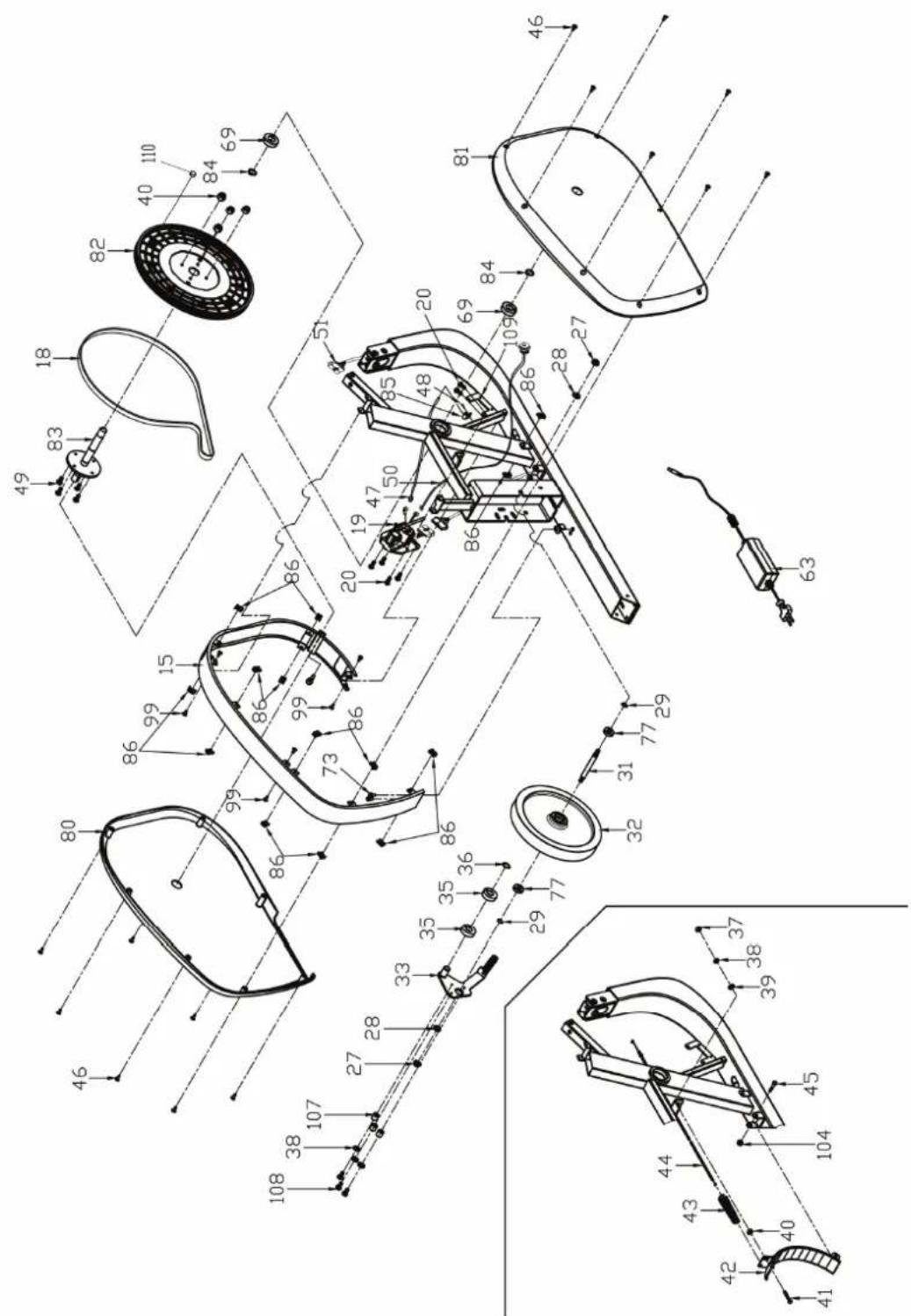
Parts list. 107
Exploded view 109
Welcome
Welcome to the world of Tunturi New Fitness!
Thank you for purchasing this piece of Tunturi equipment. Tunturi offers a wide range of professional fitness equipment, including cross trainers, treadmills, exercise bikes, and rowers. The Tunturi equipment is suitable for the entire family, no matter what fitness level.
For more information, please visit our website www.tunturi.com
Safety warnings

WARNING
Read the safety warnings and the instructions. Failure to follow the safety warnings and the instructions can cause personal injury or damage to the equipment. Keep the safety warnings and the instructions for future reference.

WARNING
Heart rate monitoring systems may be inaccurate. Over exercise may result in serious injury or death. If you feel faint stop exercising immediately.
- The equipment is suitable for home use only. Max. usage is limited to 3 hrs a day. The equipment is not suitable for full commercial use (e.g. large gyms).
- The use of this equipment by children or persons with a physical, sensory,
- mental or motorial disability, or lack of experience and knowledge can give cause to hazards. Persons responsible for their safety must give explicit instructions or supervise the use of the equipment.
- Before starting your workout, consult a physician to check your health.
If you experience nausea, dizziness or other abnormal symptoms, immediately stop your workout and consult a physician. - To avoid muscular pain and strain start each workout by warming up and finish each workout by cooling down. Remember to stretch at the end of the workout.
- The equipment is suitable for indoor use only. The equipment is not suitable for outdoor use.
- Only use the equipment in environments with adequate ventilation. Do not use the equipment in draughty environments in order not to catch a cold.
- Only use the equipment in environments with ambient temperatures between 10^ and 35^ . Only store the equipment in environments with ambient temperatures between 5^ and 45^ .
- Do not use or store the equipment in humid surroundings. The air humidity must never be more than 80% .
- Only use the equipment for its intended purpose. Do not use the equipment for other purposes than described in the manual.
- Do not use the equipment if any part is damaged or defective. If a part is damaged or defective, contact your dealer.
- Keep your hands, feet and other body parts away from the moving parts.
-
Keep your hair away from the moving parts.
-
Wear appropriate clothing and shoes.
- Keep clothing, jewellery and other objects away from the moving parts.
Make sure that only one person uses the equipment at a time. The equipment must not be used by persons weighing more than 150kg (330 lbs). - Do not open equipment without consulting your dealer.
Electrical safety
(only for equipment with electric power)
- Before use, always check that the mains voltage is the same as the voltage on the rating plate of the equipment.
- Do not use an extension cable.
- Keep the mains cable away from heat, oil and sharp edges.
- Do not alter or modify the mains cable or the mains plug.
- Do not use the equipment if the mains cable or the mains plug is damaged or defective. If the mains cable or the mains plug is damaged or defective, contact your dealer.
- Always fully unwind the mains cable.
- Do not run the mains cable underneath the equipment. Do not run the mains cable underneath a carpet. Do not place any objects on the mains cable.
- Make sure that the mains cable does not hang over the edge of a table. Make sure that the mains cable cannot be caught accidentally or tripped over.
- Do not leave the equipment unattended when the mains plug is inserted into the wall socket.
- Do not pull the mains cable to remove the mains plug from the wall socket.
- Remove the mains plug from the wall socket when the equipment is not in use, before assembly or disassembly and before cleaning and maintenance.
Assembly
Parts out of box
| 1 | M8*25 SCREW | 2 | |||
| M8*25 SCREW | 4 | ||||
| M8*20 SCREW | 12 | ||||
| M8*15 SCREW | 4 | ||||
| M8*56 SCREW | 6 | ||||
| M5*15 SCREW | 2 | ||||
| M5*12 SCREW | 10 | ||||
| M8*38*2.0 WASHER | 2 | ||||
| 1 | M8*28*2.0 WASHER | 2 | |||
| M8*16*1.2 WASHER | 26 | ||||
| M5*1.5 WASHER | 8 | ||||
| M8 SPRING WASHER | 22 | ||||
| 1/1 | M5 SPRING WASHER | 8 | |||
| M8*41.7*5 | 2 | ||||
| M8*16*16.9*4 | 4 | ||||
| 1/1 | |||||
| 1/1 | |||||
| 1/1 | |||||
The package contains the parts as shown in figure.
If a part is missing, contact your dealer.
Hardware kit
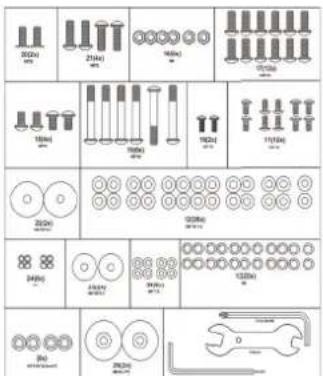
The package contains the fasteners as shown in figure.
If a part is missing, contact your dealer.
General assembly information
WARNING
- Assemble the equipment in the given order.
- Carry and move the equipment with at least two persons.
CAUTION
- Place the equipment on a firm, level surface.
- Place the equipment on a protective base to prevent damage to the floor surface.
- Allow at least 100cm of clearance around the equipment.
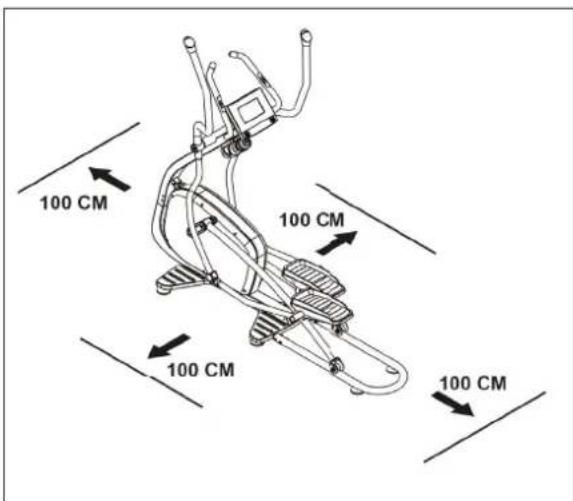
Refer to the illustrations for the correct assembly of the equipment.
Assembly steps
Assembly step A
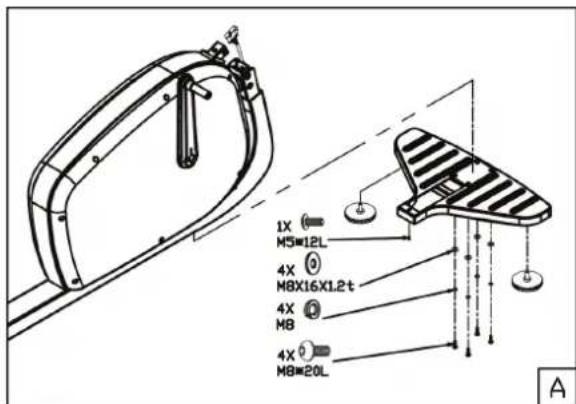
-
Fit height adjustment pads to the front stabilizer.
-
Fit front stabilizer by using the shown hardware.
Remark:
First put all screws/ bolts in correct place before tightening them fully.
Assembly step B
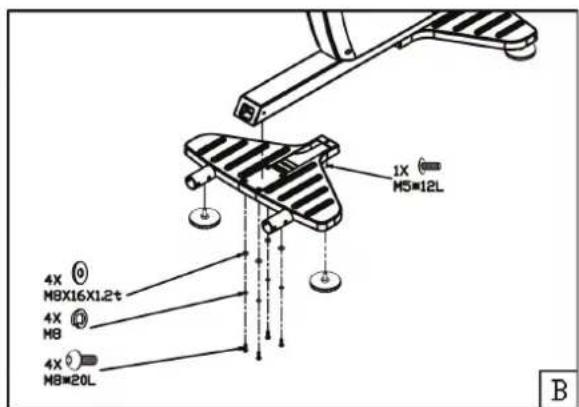
- Fit height adjustment pads to the rear stabilizer.
- Fit rear stabilizer by using the shown hardware.
Remark:
First put all screws/ bolts in correct place before tightening them fully.
Assembly step C
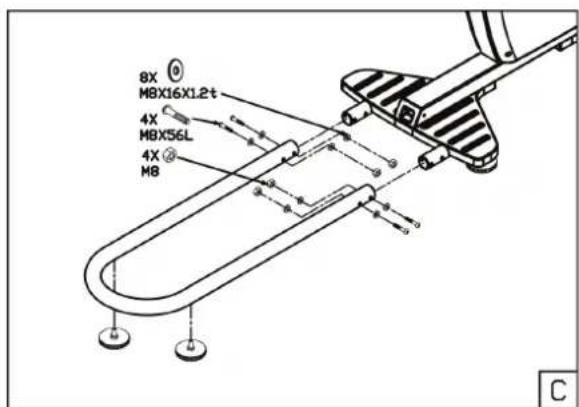
Fix height adjustment pads to the U shape rail
Fix U shape rail with the rear stabilizer.
Remark:
First tighten all 4 bolts hand tight before tightening them fully. This to avoid miss alignment
Assembly step D
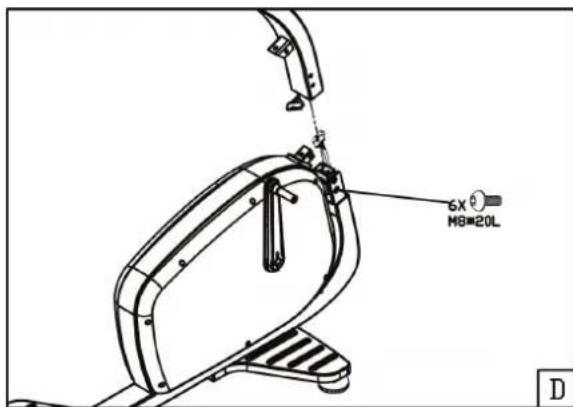
- Connect the wires from upright tube and main frame before sliding the upright tube in position.
Remark:
Do not remove screws from the frame before siding the upright tube in position.
- Use the enclosed Allen key to tighten both fastening screws through the holes in the tube from inside out.
- Tighten the fastening screws by turning them counter-clockwise.
Remark:
First tighten all 6 bolts hand tight before tightening them fully. This to avoid miss alignment
Assembly step E
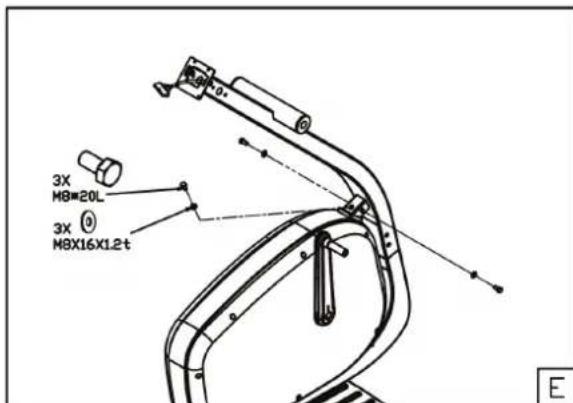
- Stabilize the upright tube as shown in picture.
Assembly step F
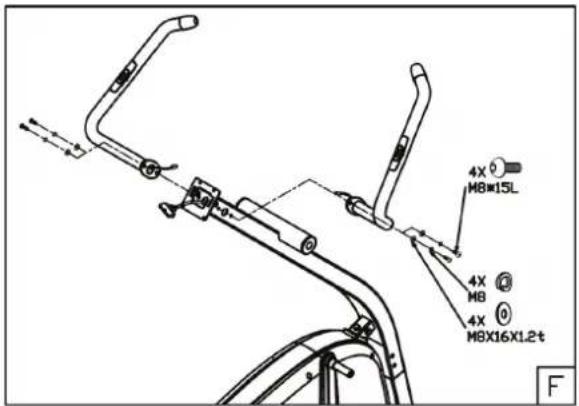
Fix both fixed handle bar tubes as shown in picture.
Remark:
First put all screws/ bolts in correct place before tightening them fully.
Assembly step G
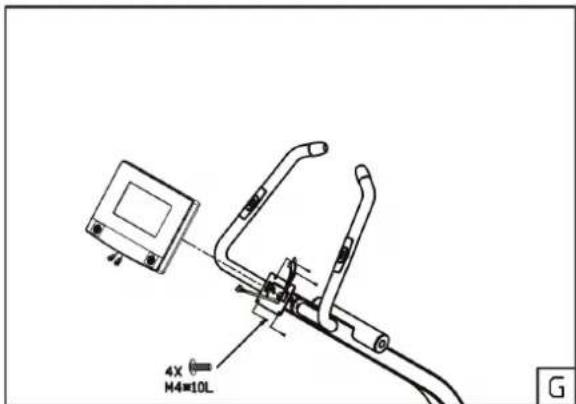
- Guide the hand pulse wires coming from the handlebar and data cable coming form upright tube through the console bracket hole.
- remove the 4 assembly screws from the consoles rear cover.
- Connect the hand pulse wires and data cable with the console.
Fix the console to the console bracket.
Remark:
Avoid the wires to damage during assembly
Assembly step H
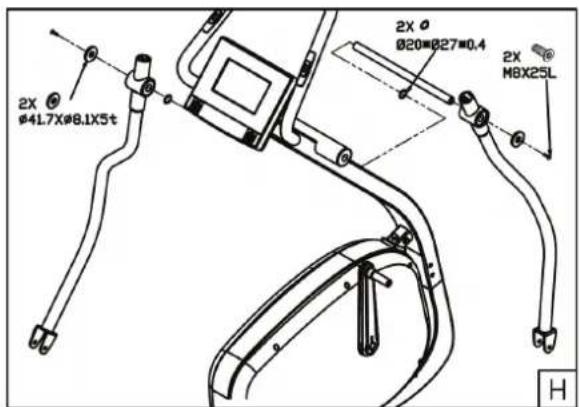
- Push the metal shaft through the bracket housing of the left arm. Attach now the left arm to the front frame tube by pushing the metal shaft through the opening in the tube. Push the right arm on the shaft and lock it by tightening a large washer, and a screw to the both ends of the shaft. Tighten the arms using two Allen keys.
Remark:
A think shim washer is in between both swivel arms and front frame tube..
Fix the bottle holder to the upright tube.
Assembly step I
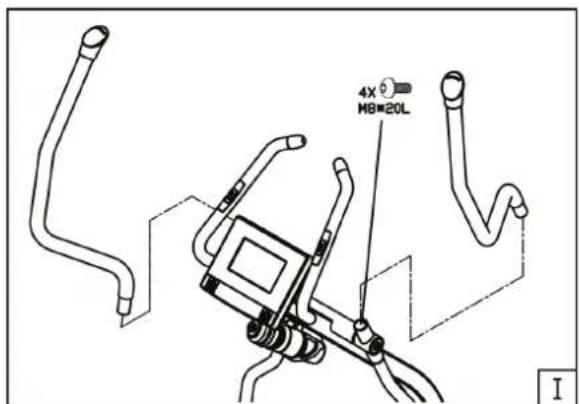
Fix upper moving handle bars as shown in picture.
Assembly step J
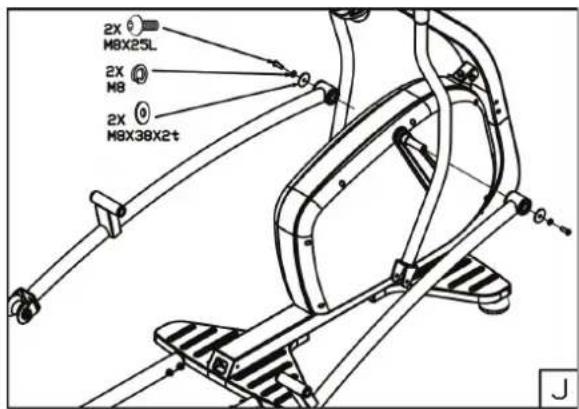
Fix both fixed pedal posts with the both crank arms as shown in picture.
Remark:
Pedal posts are marked with "L" and "R" label.
L = Left hand side pedal post
R = Right hand side pedal post.
Assembly step K
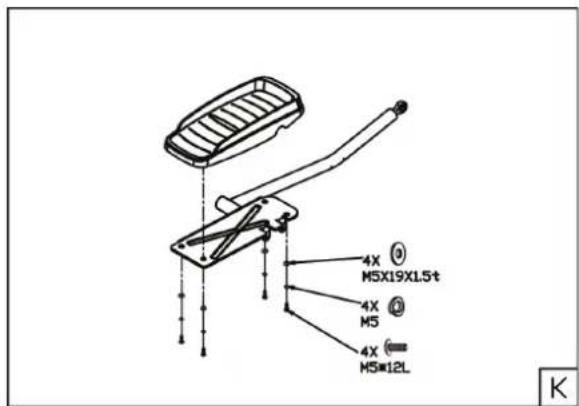
Fix foot rest to the left hand side outer pedal post as shown in picture. Left hand outer pedal post is marked with an "L" label
Remark:
First put all screws/ bolts in correct place before tightening them fully.
Assembly step L
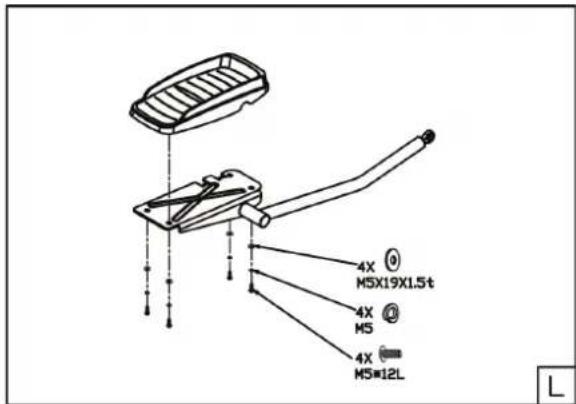
Fix foot rest to the right hand side outer pedal post as shown in picture. Left hand outer pedal post is marked with an "R" label
Remark:
First put all screws/ bolts in correct place before tightening them fully.
Assembly step M
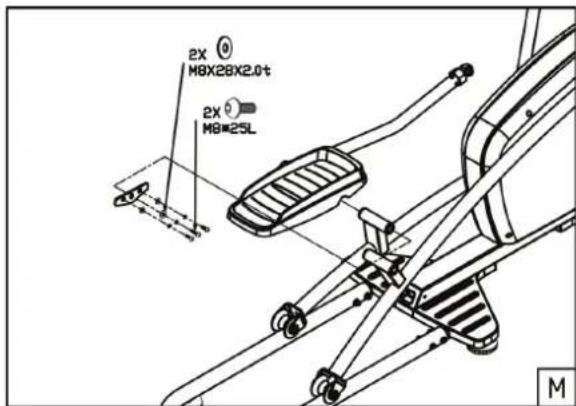
- Connect pedal left outer pedal post with the left pedal tube as shown in picture.
Remark:
First put all screws/ bolts in correct place before tightening them fully.
Assembly step N
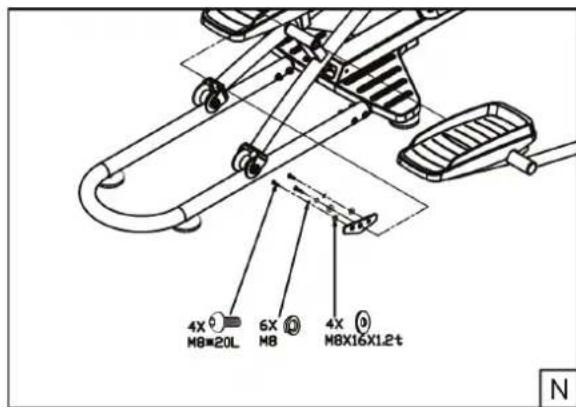
- Connect pedal right outer pedal post with the right pedal tube as shown in picture.
Remark:
First put all screws/ bolts in correct place before tightening them fully.
Assembly step O
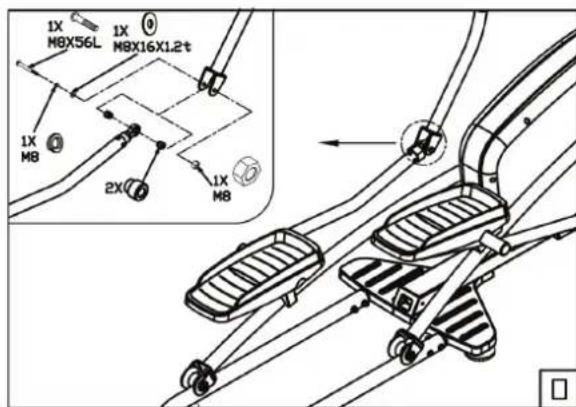
Fix left outer pedal post to left lower swivel handle bar shown in picture.
Assembly step P
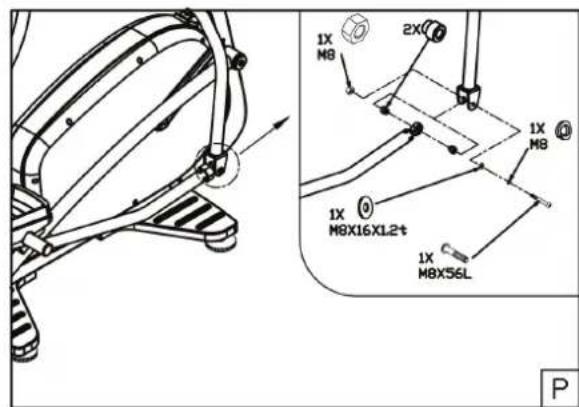
Fix right outer pedal post to right lower swivel handle bar shown in picture.
Assembly step Q
The power cord input can be found on the front side of the trainer
Use
Adjusting the support feet
The equipment is equipped with 4 support feet. If the equipment is not stable, the support feet can be adjusted.
- Turn the support feet as required to put the equipment in a stable position.
- Tighten the locknuts to lock the support feet.

NOTE
The machine is the most stable when all support feet are turned fully in. Therefore start to level the machine by turning all support feet fully in, before turning out the required support feet to stable the machine.
Workouts
The workout must be suitably light, but of long duration. Aerobic exercise is based on improving the body's maximum oxygen uptake, which in turn improves endurance and fitness. You should perspire, but you should not get out of breath during the workout.
To reach and maintain a basic fitness level, exercise at least three times a week, 30 minutes at a time. Increase the number of exercise sessions to improve your fitness level. It is worthwhile to combine regular exercise with a healthy diet. A person committed to dieting should exercise daily, at first 30 minutes or less at a time, gradually increasing the daily workout time to one hour.
Start your workout at low speed and low resistance to prevent the cardiovascular system from being subjected to excessive strain. As the fitness level improves, speed and resistance can be increased gradually. The efficiency of your exercise can be measured by monitoring your heart rate and your pulse rate.
Pulse rate measurement
(hand pulse sensors)
The pulse rate is measured by sensors in the handlebars when the user is touching both sensors at the same time.

WARNING
Heart rate monitoring systems may be inaccurate. Over exercise may result in serious injury or death. If you feel faint stop exercising immediately.
Most accurate pulse measurement is achieved when the skin is slightly moist and constantly touching the hand pulse sensors. If the skin is too dry or too moist, the pulse rate measurement might become less accurate.

NOTE
Do not use the hand pulse sensors in combination with a heart rate chest belt. If you set a heart rate limit for your workout, an alarm will sound when it is exceeded.
Heart rate measurement
(heart rate chest belt)
The most accurate heart rate measurement is achieved with a heart rate chest belt. The heart rate is measured by a heart rate receiver in combination with a heart rate transmitter belt. Accurate heart measurement requires that the electrodes on the transmitter belt are slight moist and constantly touching the skin. If the electrodes are too dry or too moist, the heart rate measurement might become less accurate.

WARNING
If you have a pacemaker, consult a physician before using a heart rate chest belt.

CAUTION
If there are several heart rate measurement devices next to each other, make sure that the distance between them is at least 2 meter.
If there is only one heart rate receiver and several heart rate transmitters, make sure that only one person with a transmitter is within transmission range.

NOTE
- Do not use a heart rate chest belt in combination with the hand pulse sensors.
Always wear the heart rate chest belt under your clothes directly in contact with your skin. Do not wear the heart rate chest belt above your clothes. If you wear the heart rate chest belt above your clothes, there will be no signal.
If you set a heart rate limit for your workout, an alarm will sound when it is exceeded.
The transmitter transmits the heart rate to the console up to a distance of 1,5 meter. If the electrodes are not moist, the heart rate will not appear on the display. - Some fibres in clothes (e.g. polyester, polyamide) create static electricity which can prevent accurate heart rate measurement.
- Mobile phones, televisions and other electrical appliances create an electromagnetic field which can prevent accurate heart rate measurement.
Maximum heart rate
(during training)
The maximum heart rate is the highest heart rate a person can safely achieve through exercise stress. The following formula is used to calculate the average maximum heart rate: 220 - AGE. The maximum heart rate varies from person to person.

WARNING
Make sure that you do not exceed your maximum heart rate during your workout. If you belong to a risk group, consult a physician.
Beginner: (50-60% of max. heart rate)
Suitable for beginners, weight-watchers, convalescents and persons who have not exercised for a long time. Exercise at least three times a week, 30 minutes at a time.
Advance: (60-70% or max. heart rate)
Suitable for persons who want to improve and maintain fitness. Exercise at least three times a week, 30 minutes at a time.
Expert: (70-80% or max. heart rate)
Suitable for the fittest of persons who are used to long-endurance workouts.
User interface
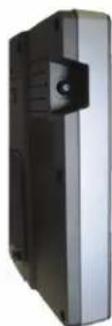
Buttons:
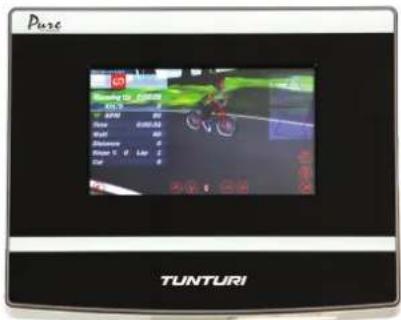
The Pure 8.1 display is a full colour touch screen type and thus no buttons to operate the console can be found.
Only button available is on the left hand side and is used to Turn machine on when in off mode.
To shut down the console see:
Settings "shut down" menu
Connectors:
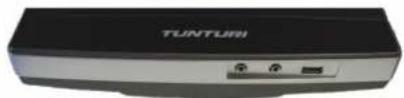
The Pure 8.1 is equipped with 2 × 3,5 mm jack sockets.
Right hand Jack near USB is for Line out Left hand side Jack is for Line in
The Pure 8.1 is equipped with 1 USB socket for storage device connection.
The USB socket can only read FAT32 formatted format.
Remark:
FAT32 environment is limited to 4GB file size.
Power on
Display will show at power on, a window as a screen saver to inform you the display software is preparing the application.
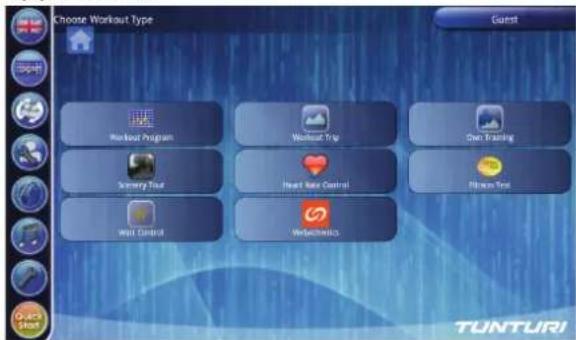
When display has started you will see the above window
The display can be divided in 3 sections.
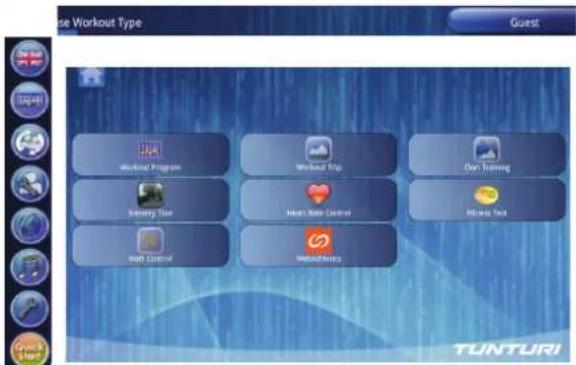
Main function bar
(Left)
Main function bar is showing main function buttons to access different mode options. Main function bar is visible in any exercise mode, and buttons can be pressed at all times.
Information bar
(upper)
Information bar is showing:
In right upper corner the selected user profile at all times.
In left upper corner program mode information.
Information bar is not active as touch screen region.
Main display region
(Centre)
Main display region is changing in every program mode.
In active mode it shows the progress of your program, and in programming mode it shows buttons and selection tools to set required data for your workout. It is also your main window for web browser mode, and multimedia play back.
Home button

Home button is shown at all can be pressed rapidly two times to go back to main window when function bar is not shown.
When touch and holding the button you can drag it to any location you like and release button to make this the new position.
Display functions
Multi language support

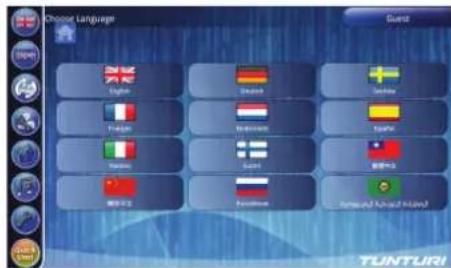
The user manual can be preset in multi languages. When setting a language most of the user interface content will change into selected language.
Note: Engineer mode related text will not change into selected language, as this is only available in English.

Select your language by pressing the matching flag button and user text will change into selected language directly.
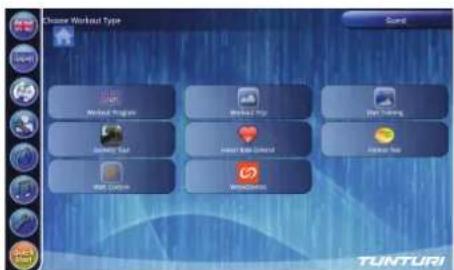
You can select another display function by selecting a button from the main function bar
Programs
Select Programs by pressing the workout selection button.
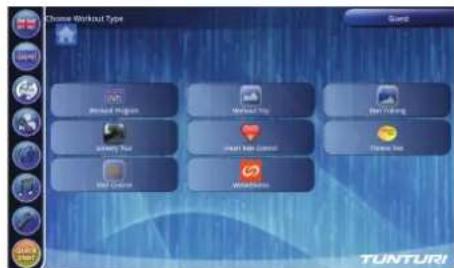
Exercise Program
The "Workout Program" programs contain preset incline and speed pattern. User could select distance or time as workout goal. There are 6 preset programs:
Manual, P01 Stamina 1, P02 Stamina 2, P03 Cross Country, P04 Hill Climb, P05 Interval.
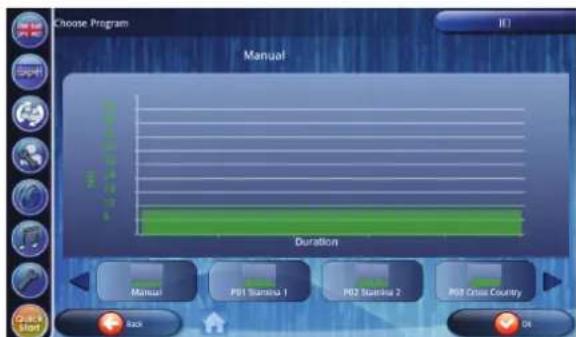
Select your program and the goal selection window appears. Set your work out goal to start your selected program.
You will see below program profile when set limit for distance.
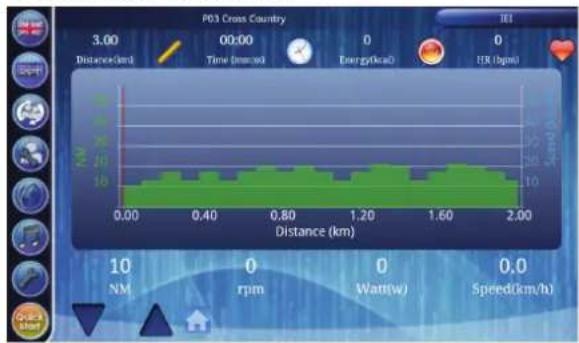
You will see below program profile when set limit for distance.
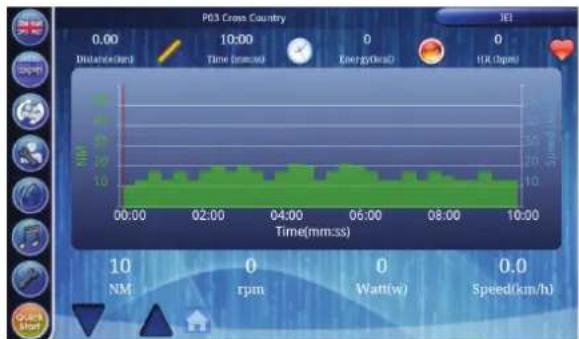
Chart display shows:
Y-Axis left side: NM meter
- Y-axis. right side: Speed meter
- X-axis: Distance when in distance mode. Time when in time mode Window size is 2KM for distance unit and 10 Min for time unit.
You can use the arrows in left lower corner at all times to adjust your workout intensity.
Setting your workout goal
Depending on your workout type you can set your workout goal in different ways.
Setting your goal for distance.
When your program allows you to set your workout goal for a distance you will see the below window after selecting your workout program.
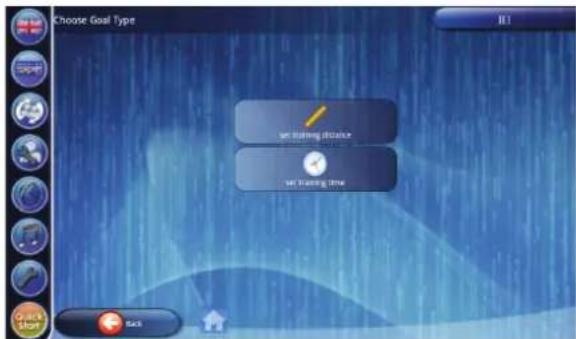
To set a distance you need to select the "set Training distance" button to got to the next step in programming.
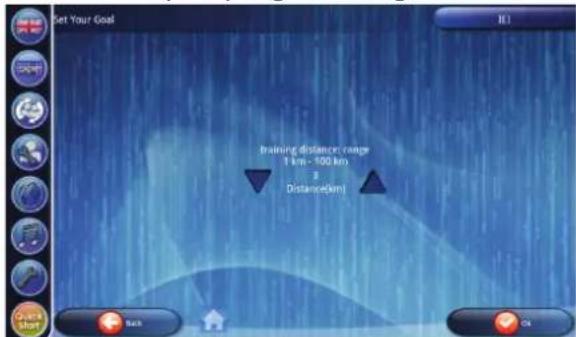
Use the arrow buttons to upper or lower your goal. The goal limits are shown in window too. (this image shows the limits in metric settings) Press "OK" button to confirm. You will go to your ready to go program you have selected.
Setting your goal for time.
When your program allows you to set your workout goal for a time you will see the below window after selecting your workout program.
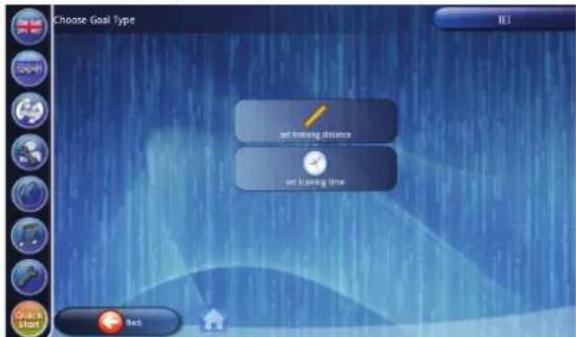
To set a time you need to select the "set Training time" button to got to the next step in programming.
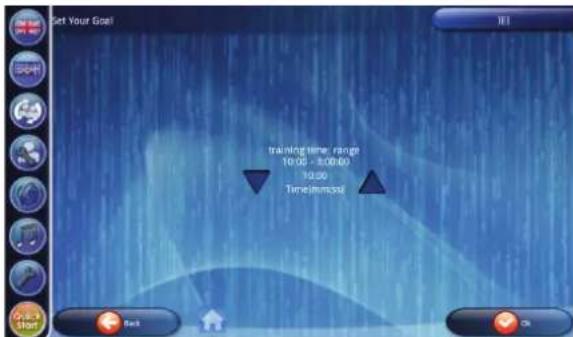
Use the arrow buttons to upper or lower your goal. The goal limits are shown in window too. Press "OK" button to confirm. You will go to your ready to go program you have selected.
Setting your goal for heart rate.
When your program allows you to set a heart rate limit to control your workout intensity, see the below window after selecting your heart rate controlled workout program.
(Note: you may need to set a goal for distance and time too to set a duration / distance limit still.)
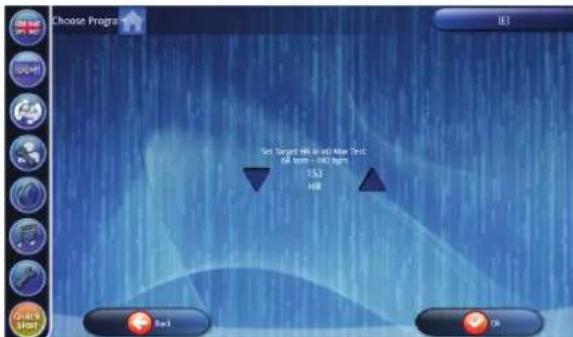
Use the arrow buttons to upper or lower your goal. The goal limits are shown in window too. Press "OK" button to confirm. You will go to your ready to go program you have selected.
Workout Trip
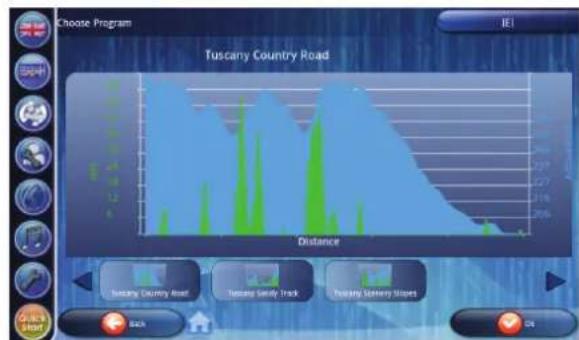
The "Workout Trip" programs contain real geometric data, like position, altitude, and incline. Therefore, these programs only contain preset incline. The default speed is 0.8KM / h . However, user still could adjust NM when running. There are 3 preset programs:
A: Tuscany Country road
B: Tuscany Sandy Track
C: Tuscany Scenery Slopes
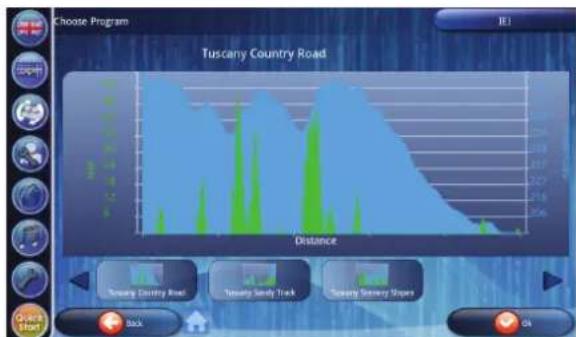
Select your program and the goal selection window appears. Set your work out goal to start your selected program.
You will see below program profile.
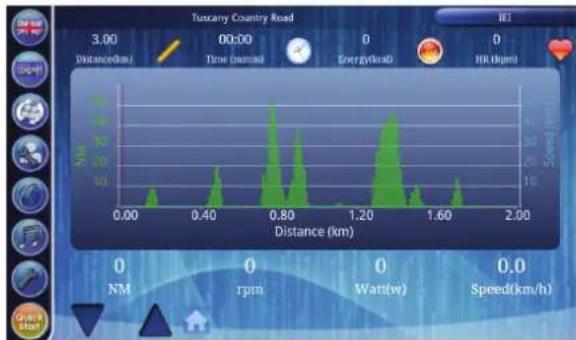
Chart display shows:
- Y-Axis left side: NM meter
- Y-axis.right side: Speed meter
X-axis: Distance Window size is 2KM for distance unit
You can use the arrows in left lower corner at all times to adjust your workout intensity.
Own Training
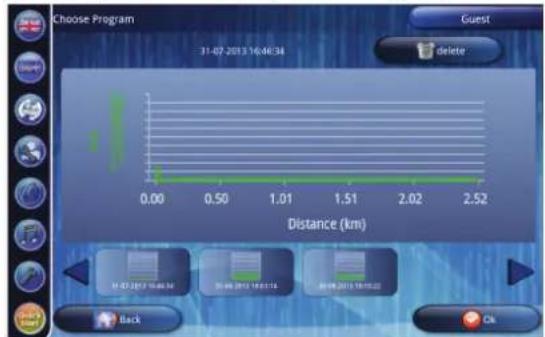
User could save workout as his/her "Own Training" in following criteria:
- Workout type is one of Workout Program, Workout Trip, Scenery Tour, and Heart Rate Control.
- Workout ran exceeds 0.1KM and 5Min.
Select a stored training if there are any by using the arrows (Left/Right)
When selected your program you can choose between Rerun mode and Racing mode.
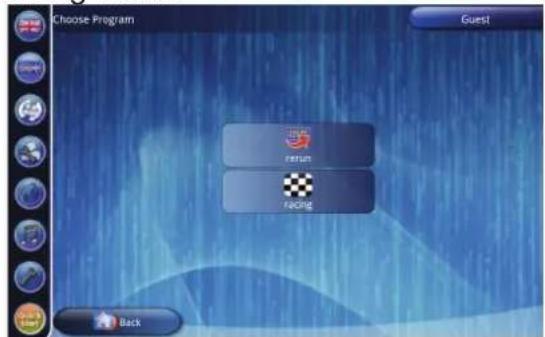
When select Rerun mode: Before workout, setup distance or time as goal. Default distance and time is set to max value depends on each own training.
When select Racing mode:
Workout always uses the distance or time as goal in previous workout. After workout, result will show on chart region.
The workout screen outlook depends on workout mode type.
Scenery Tour
"Scenery Tour" uses the same workout profiles as in "Workout Trip", except it has the video playback. The video was recorded the scene in the local site. The video playback speed will be adjusted automatically depends on treadmill speed: The programs contain real geometric data, like position, altitude, and incline. Therefore, these programs only contain preset incline. The default speed is 0.8 KM/h. However, user still could adjust NM when running. There are 3 preset programs:
A: Tuscany Country road B: Tuscany Sandy Track C: Tuscany Scenery Slopes
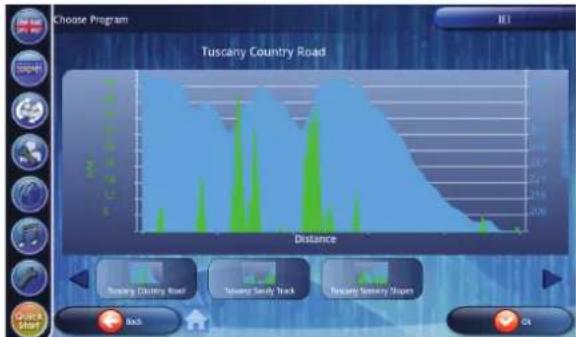
Select your program and the goal selection window appears. Set your work out goal to start your selected program.
You will see below program profile.
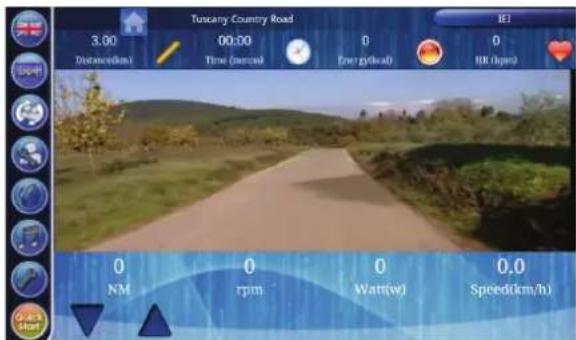
You can use the arrows in left lower corner at all times to adjust your workout intensity.
Heart Rate Control
The "Heart Rate Control" programs are designed to control user heart rate by resistance adjustments. So, heart rate transmitter is required for the workout. There are 6 preset programs
A: HRC
B: P06 Fat Burner 1
C: P07 Fat Burner 2
D: P08 Cardio Strength
E: P09 Cardio Climb
F: P10 Cardio Interval
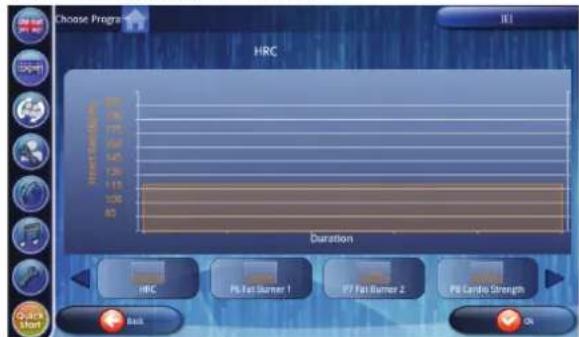
Select your program and the goal selection window appears. Set your work out goal to start your selected program.
You will see below program profile.
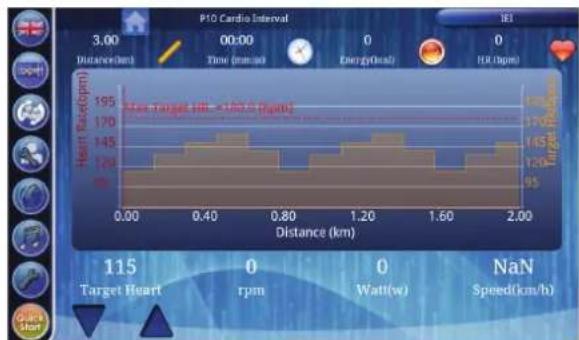
Chart display shows:
Y-Axis left side: Heart rate (BMP)
- Y-axis.right side: Target heart rate
- X-axis: Distance when in distance mode. Time when in time mode Window size is 2KM for distance unit and 10 Min for time unit.
You can use the arrows in left lower corner at all times to adjust your heart rate goal.
Fitness Test
Fitness test measure users fitness by and show the result after test. This Fitness test is VO2 Max test.
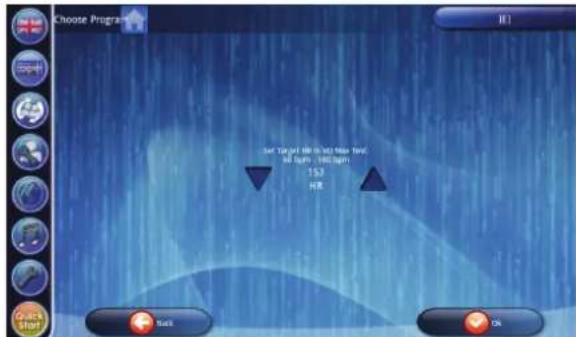
Set your work out goal to start your selected program.
You will see below program profile.
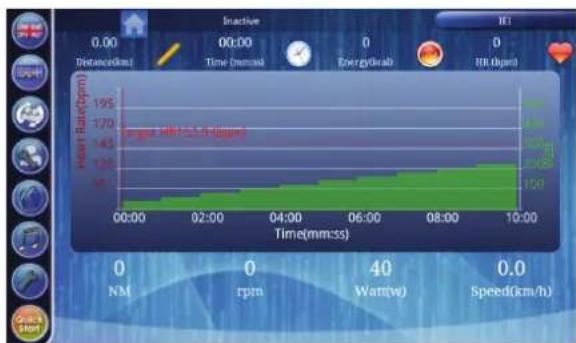
Chart display shows:
Y-Axis left side: Heart Rate (BMP)
Y-axis.right side: Watt
X-axis: Time Window size is 10 minutes for time unit
Watt Control
The "Watt Control" programs are designed to control user power output in watts by resistance adjustments. There are 6 preset programs
A: Manual
B: P01 Rolling Hills
C: P02 Hill Climb
D: P03 Cross Country
E: P04 Stamina
F: P05 Power Interval
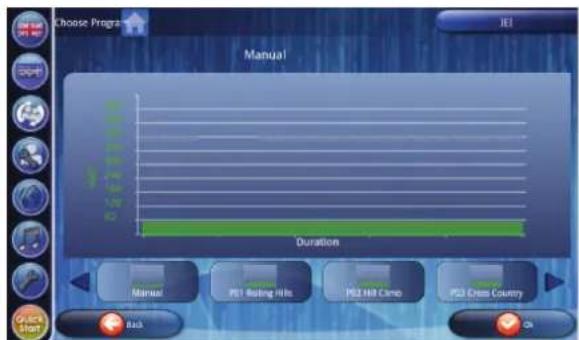
Select your program and the goal selection window appears. Set your work out goal to start your selected program.
You will see below program profile.
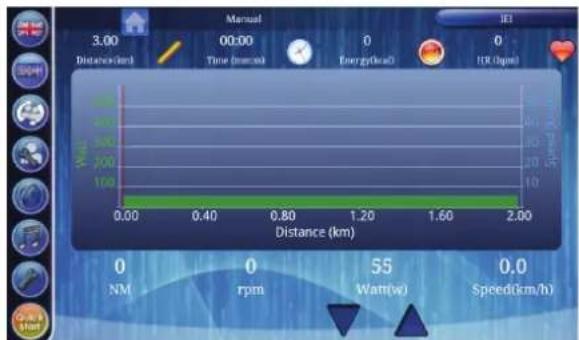
Chart display shows:
Y-Axis left side: Watt
- Y-axis.right side: Speed
- X-axis: Distance when in distance mode. Time when in time mode Window size is 2KM for distance unit and 10 Min for time unit.
You can use the arrows in right lower corner at all times to adjust your Watt goal.

Web Athletics
Webathletics is a program allowing user be able to do exercise with friends / strangers on line by internet. To use Webathletics you need to be connected to Internet.
When pressing "Web Athletics" button it opens power management window.
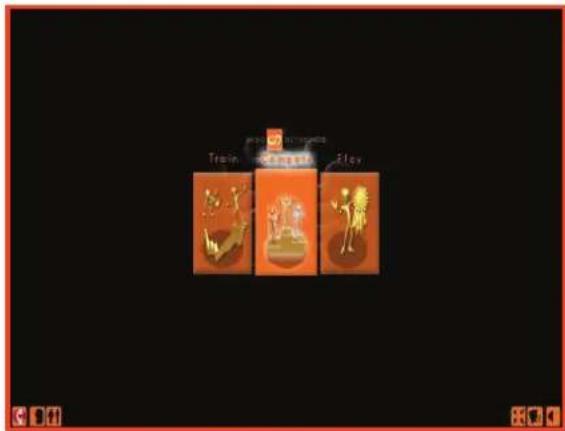
The Display is divided in 3 sections.
User preferences
In the lower left corner you can find the user preferences buttons.
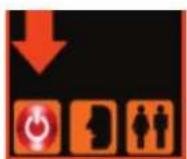
Shut down
Press Shut down button to exit webathletics program and go back to programs window.
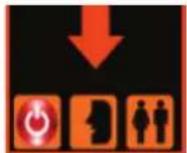
Register / Sign in
Press register and sign up button to register a new user or log in with an existing account.
Register
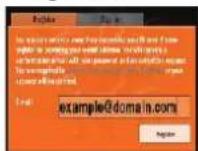
Fill out your email address to register you as a new user and create your own webathletics account.
After pressing the register you need to follow the steps as shown in the register
window.
Sing in
Use your email address and received pass word to sign in with our personal account.
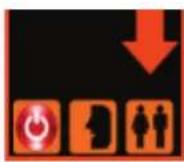
User settings
Press user settings button to change your personal account data and avatar look.
The following window will appear.

In the left upper corner you can set your personal data as: Name, Age, length, weight and language.
In the lower left corner you can set your avatars appearance as: Gender, colour of the eyes, hair, shirt, trousers, shoes and bike.
Save and go back to main menu by pressing in lower left corner.
System preferences
Window size
Press this button to re size the window.
Coach voice
Press button to enable or disable the coach's voice.
Back ground music
Press button to enable or disable the music playing in the background.
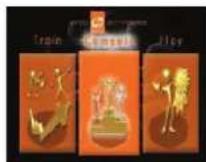
Programs
Train with a coach
When training with a coach you are guided by a coach advising you and stimulating you to make your workout more fun.
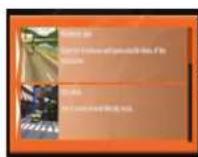
Select your track type.
Use the slider to see more tracks (if available)
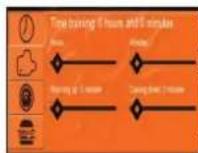
Set your goal by selecting your goal type first.
You can choose: Time, laps, distance or calories.
After setting your goal you can also choose to set a warming up and or cooling down time. The warming up and cooling down will be excluded from your actual goal setting.
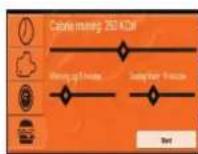
After setting a goal and optional warming up and or cooling down goal you will see the "start" button appear. Press "start to
start your set workout.
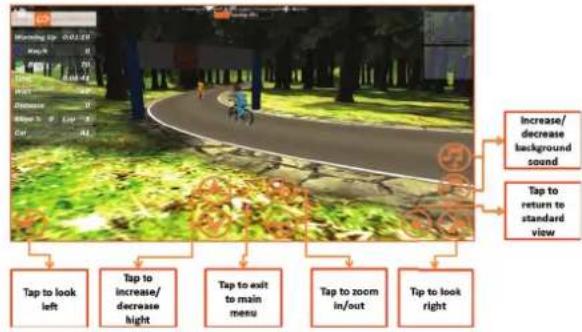
Your training will start. Follow the advice given by the coach during your workout.

Compete to others.
In compete mode you "join" a race against others or "host" your own.
Join needs to be selected when you want to join a race and compete against others.
Select the track you want to join. Use the slider to see more tracks (if available)
Press "ready" and wait till other players are ready to before training starts.

Host needs to be selected when you want to start and invite others to join this race and compete against them.
Select your track type. Use the slider to see more tracks (if available)
Press "ready" and wait till other players are ready to before training starts.
You can use the help of social media to see when rides starts, of invite others to join your race.

Play mode.
When training with in play you will workout in cardio mode.
Select your track type. Use the slider to see more tracks (if available)
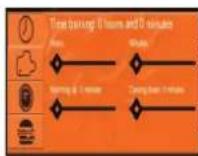
Set your goal by selecting your goal type first. You can choose: Time, laps, distance or calories.
After setting your goal you can also choose to set a warming up and or cooling down time. The warming up and cooling down will be excluded from your actual goal setting.
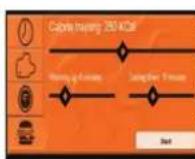
After setting a goal and optional warming up and or cooling down goal you will see the "start" button appear. Press "start to
start your set workout.
Your training will start.
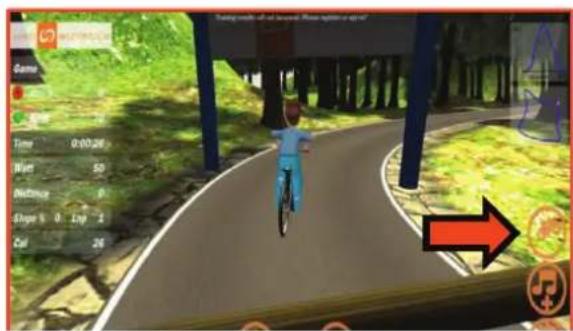
Press the "Jump" button to jump over the obstacles.
The coach will inform you when to increase, or decrease your speed in order to keep your hart rate within target level.
The heart icon in your workout window can be shown in 3 different colours.
Blue : Heart rate under target range.
Green : Heart rate in target range
Red : Heart rate over target range.
Change user
Open Change user menu by pressing "Change user" button in main function bar.
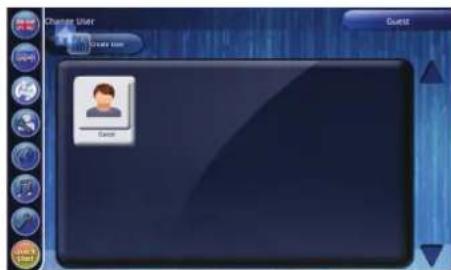
You can change a user in the same way as you would create a user.
Select a user you want to change or press "Create User" button and create/modify as below:
Create User
To create a new user you press the "Create User" button. Below window will appear.
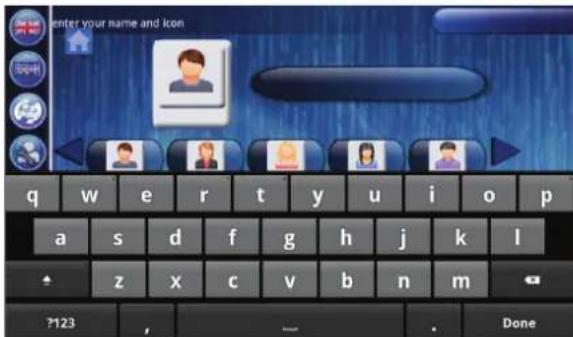
In here you can use the digital keyboard to write your name. and select an avatar to use as your personal icon. Press the "OK" key on the digital key board when
you have set up your name and avatar right.
Your user is created with the standard user settings. Continue the setup of the user profile by "Change User" details in "Edit User" chapter.
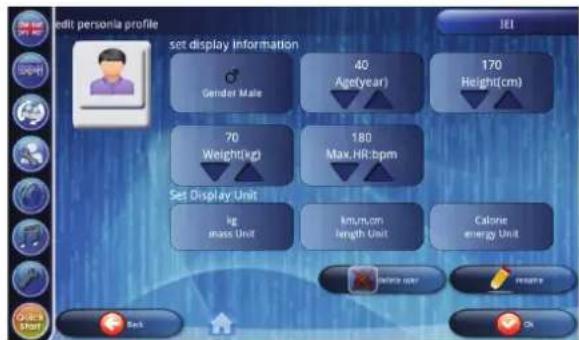
Edit User
Open Change user menu by pressing "Edit User" button in main function bar.

This menu shows in the upper section the total workout log of the user. The lower section shows the workout log of latest workout.
Clear Log
"Clear Log" button can be pressed to delete aswell total valeu as latest workout valeu.
Note: Display will not prompt to confirm.
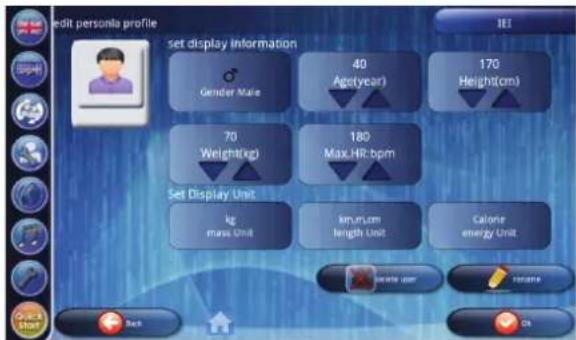
Edit User
"Edit User" button can be pressed to change user preferences/ settings.
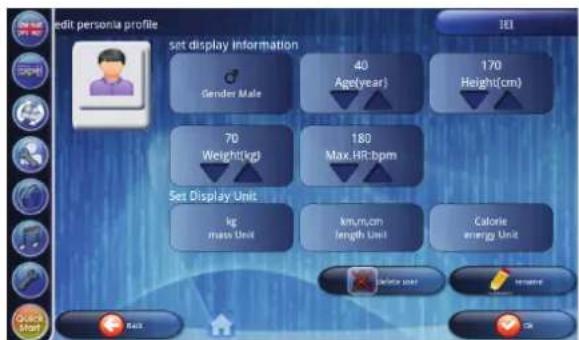
User details:
- Gender
Age
Heigth
Weight
Max HR ( will be set automatically by selecting gender and age. But can be changed if wanted
Unit details:
Mass unit (KG/LBS)
Length unit (Metric/ Imperial)
- Energy unit (Calorie/ Jouls)
When all filled out correctly, press "OK" button to confirm.
Delete User
When button pressed the user interface will ask to confirm your action to delete user and it's data completely.
Rename
When button is pressed you can change user name, and keep the stored by the new given name.
See "Create User" for details.
Web browser
Open "Web browser" by pressing the "Internet" button in main function bar.
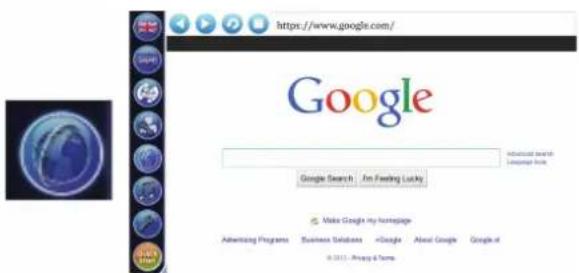
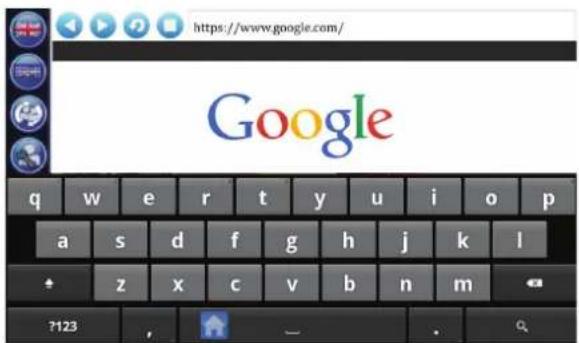
When touching the URL bar you will automatically see a software keyboard appear.
Remark:
possibly not all websites will be displayed correctly.
Remark:
Browsing the internet requires Wi-fi connection. (See chapter "Settings")
Media Player
Open "Media Player" by pressing the "Media" button in main function bar.
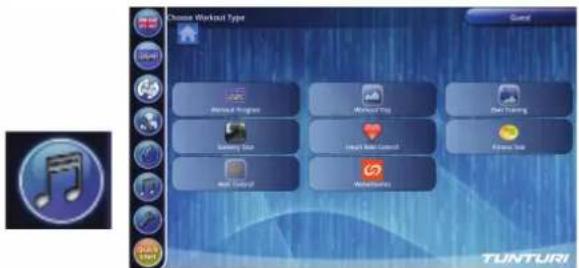
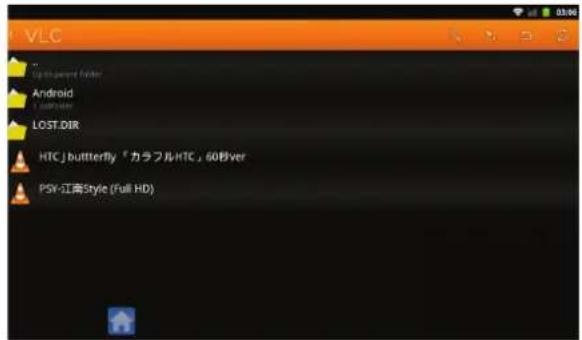
The file search window will appear in where you can brows your storage directions for files you like to play .
Remark:
Best you can store your files on an USB drive, and put this in one of the available USB slots. USB drive must be formatted in FAT32 format.
Remark:
possibly not all files will be able to play.
When selected your file, you will see the media player window open in where you can find the playback control buttons, knowing: File back, File play/ Pause, Stop and file forward buttons.
You will also see a playback time counter showing the already ran time in the left corner. As well as the remaining time in the right corner.
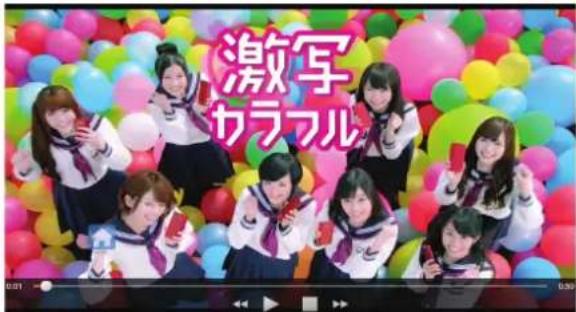
You can go back to program mode by rapidly pressing the "home button"
If you haven't stopped the music from playing it will continue to play in most program modes.
Note: When the selected program/ display function requires music and or movie function the media player will stop playing.
Settings
Open Settings menu by pressing the "Settings" button in main function bar.
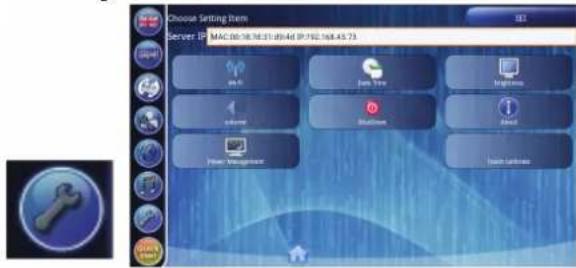
The settings window will appear.
Wi-Fi
When pressing "Wi-Fi" button it opens Wi-Fi settings window.
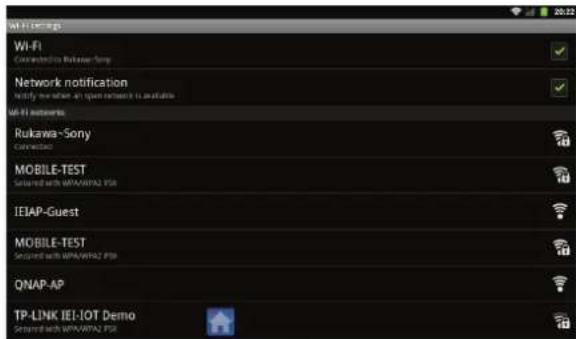
Wi-Fi Settings:
In Wi-Fi function you find a check box to turn Wi-Fi on when checked, or off when un checked.
When connected it will show to what Wi-Fi access point you are connected to.
In Network notification function you can choose to show available networks when check box is checked or hide the available networks when un checked.
Wi-Fi networks:
Lists the available networks. It shows authentication and signal strength sign.
Press the network you like to connect to once to open the connection window
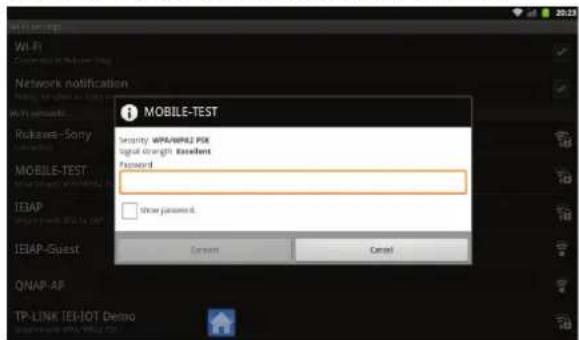
Touch the Password bar and the software keyboard will appear automatically. Enter the pass word and press connect button to establish connection.
Use "Add Wi-Fi network" button, always on the bottom of your list to add a network when SSID is hidden. You might need to swipe to the bottom of the list when many available networks are listed.
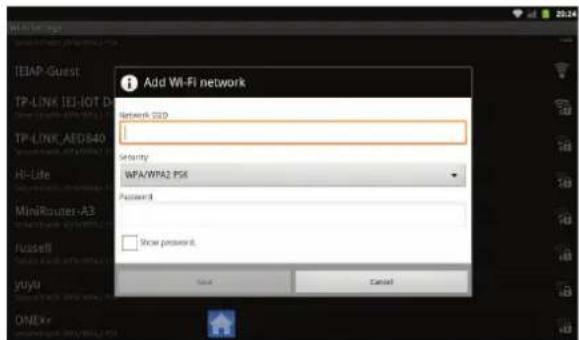
Touch the Network SSID bar and the software keyboard will appear automatically.
- Enter the network name
- Select Security mode
- Fill out Password and press connect button to establish connection.
Remark:
to establish a Wi-Fi connection it might be required to set date and time correct.
Date Time
When pressing "Date Time" button it opens Date Time settings window.
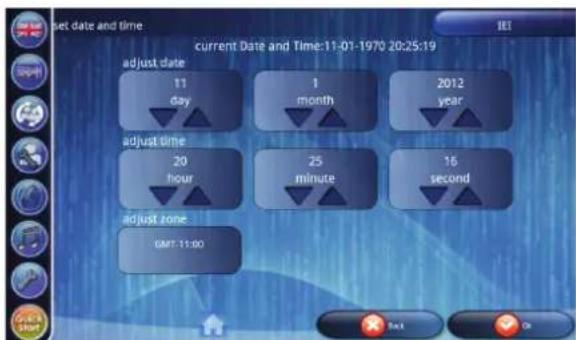
In here you can set date and time correct. You can also set correct time zone if required.
Use arrow up or down buttons to adjust. Press OK button to confirm, and go back to setting menu.
Press Back button to go back to settings menu without change.

Brightness
When pressing "brightness" button it opens brightness settings window.
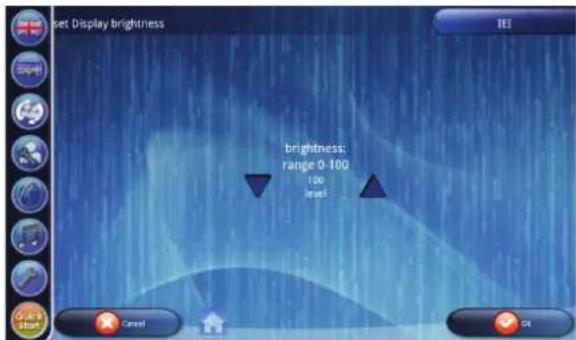
In here you can adjust brightness in range between 0 (darker) and 100 (lighter).
Use arrow up or down buttons to adjust.. Press OK button to confirm, and go back to setting menu.
Press Back button to go back to settings menu without change.
Volume
When pressing "Volume" button it opens master volume settings window.
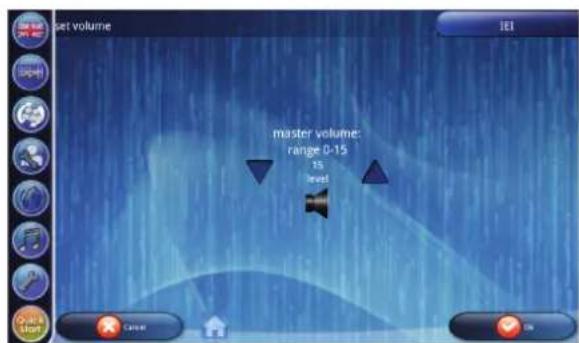
In here you can set the master volume for web and media player volume in range between 0 and 15(max). Use arrow up or down buttons to adjust. Press OK button to confirm, and go back to setting menu. Press Back button to go back to settings menu without change.
Shutdown
When pressing "Shutdown" button it will show a prompt message to confirm you want to shut down the display. Select "Yes" and window will shut down. When select "No" you will return to settings window.

About
When pressing "About" button it opens about information window.
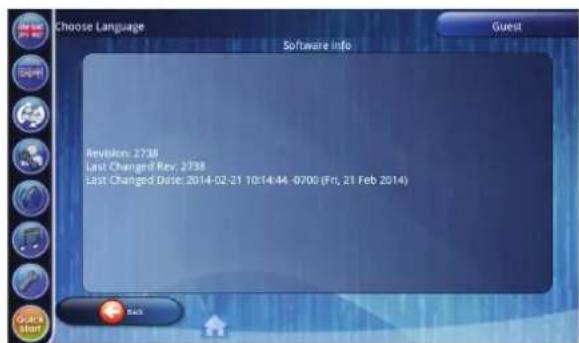
In here you can see the currently installed software information only. Press Back button to go back to settings menu.

Power Management
When pressing "Power Management" button it opens power management window.
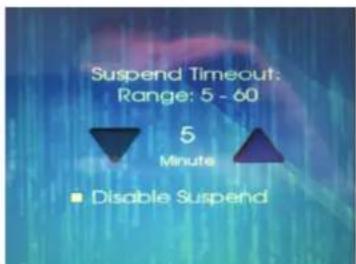
In factory mode the display will shut in standby mode after 10 minutes being idle. In power management mode you can suspend this by plus/ minus 5 minutes. Range 5/60 min. Use arrow up or down buttons to adjust. Press OK button to confirm, and go back to setting menu. Press Back button to go back to settings menu without change.
Remark:
you also find a check box to Disable/ enable suspend. When suspend has been disabled, the display will not shut into standby mode.
Touch Calibrate
When pressing "Touch Calibrate" button it start Touch Calibrate function
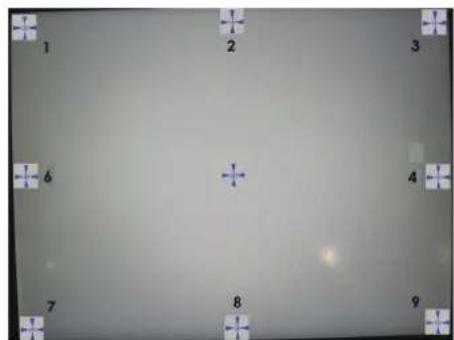
Touch each appearing gun sight as accurate as possible in the centre to accomplish the calibration procedure. After finish the calibration procedure you will automatically return to setting window.
Remark:
you cannot go back to setting menu without accomplishing the calibration procedure first.
Quick Start
Open Quick Start by pressing the "Quick start" button in main function bar.
Quick start will start a workout without any preset settings as in Manual mode.
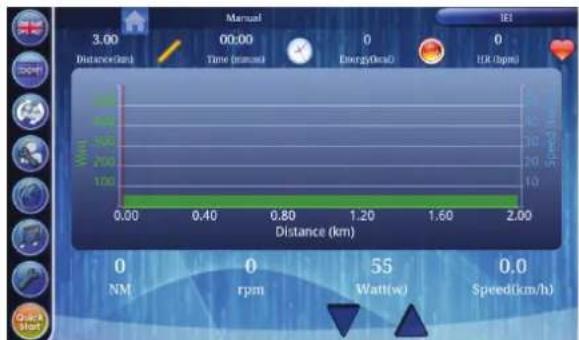
Adjusting tension levels needs to be done manually, and there is no time limit and ore heart rate limit set.
Cleaning and maintenance
Defects and malfunctions Despite continuous quality control, defects and malfunctions caused by individual parts can occur in the equipment. In most cases, it will be sufficient to replace the defective part.
- If the equipment does not function properly, immediately contact the dealer.
- Provide the model number and the serial number of the equipment to the dealer. State the nature of the problem, conditions of use and purchase date.
Transport and storage

WARNING
Carry and move the equipment with at least two persons.
- Remain standing in front of the equipment on each side and take a sturdy grip at the handlebars. Lift the front of the equipment so as to lift the rear of the equipment on the wheels. Move the equipment and carefully put the equipment down. Place the equipment on a protective base to prevent damage to the floor surface.
- Move the equipment carefully over uneven surfaces. Do not move the equipment upstairs using the wheels, but carry the equipment by the handlebars.
- Store the equipment in a dry place with as little temperature variation as possible.
Disclaimer
2014 Tunturi New Fitness BV. All rights reserved
The product and the manual are subject to change. Specifications can be changed without further notice
Warranty
The product has a warranty from the date of delivery (to be documented by invoice or delivery note). Further information on warranty terms can be obtained from your local dealer. The warranty terms may vary from one country to another. Damages caused by normal wear, overloading or improper handling are excluded from the warranty. Damages caused by material or manufacturing faults are covered by the warranty and will be repaired or replaced at no cost.
Index
WILLKOMMEN 29
A: Tuscany Country road
B: Tuscany Sandy Track
C: Tuscany Scenery Slopes
"Edit User" button can be pressed to change user preferences/ settings.
VEILIGHEIDS WAARSCHUWINGEN 82
MONTAGE 83
DISPLAY FUNCTIONS 91
Meerdere talen 91
PROGRAMMA'S 91
WorkoutProgramma 91
Training doel instellen. 92
Workout Trip 93
Eigen Training. 94
Scenery Tour 94
Hartslag Control. 95
Fitness Test 96
Watt Control. 96
Web Athletics 97
A: Tuscany Country road
B: Tuscany Sandy Track
C: Tuscany Scenery Slopes
A: Tuscany Country road
B: Tuscany Sandy Track
C: Tuscany Scenery Slopes

"Edit User" button can be pressed to change user preferences/ settings.
Operating system ....EMS T-GEN
Resistance levels 60
Flywheel weight 9 kg
Rotating mass 37 kg
Power output @ 60 rpm ......... 440 Watt
Power output @100 rpm 600 Watt
Power supply 26V DC / 3,46A
Height 186 cm
Length 198 cm
Width 62 cm
Weight 74 kg / 136 lbs
Max user weight 150 kg / 330 lbs
MONITOR
Program display ..7" full colour TFT-LCD
Languages. 12
Programs total 128
Pre-set programs 10
User programs 100
Watt program 1 (0 - 600 Watt)
Hrc programs 6
T-Ride 5
T-Road. 3
T-Trainer 1
Quick start/ manual 1
Body fat ^+ bmi 1
User register 20
Fitness test .......Multi step VO2 Max
Control buttons....... Touchscreen
ERGONOMICS
HR chest belt .......Yes (2,4GHz ANT+)
HR hand sensor. Yes
QUALITY
Operating environment .Home &
Light-Commercial
En-957 class .HA
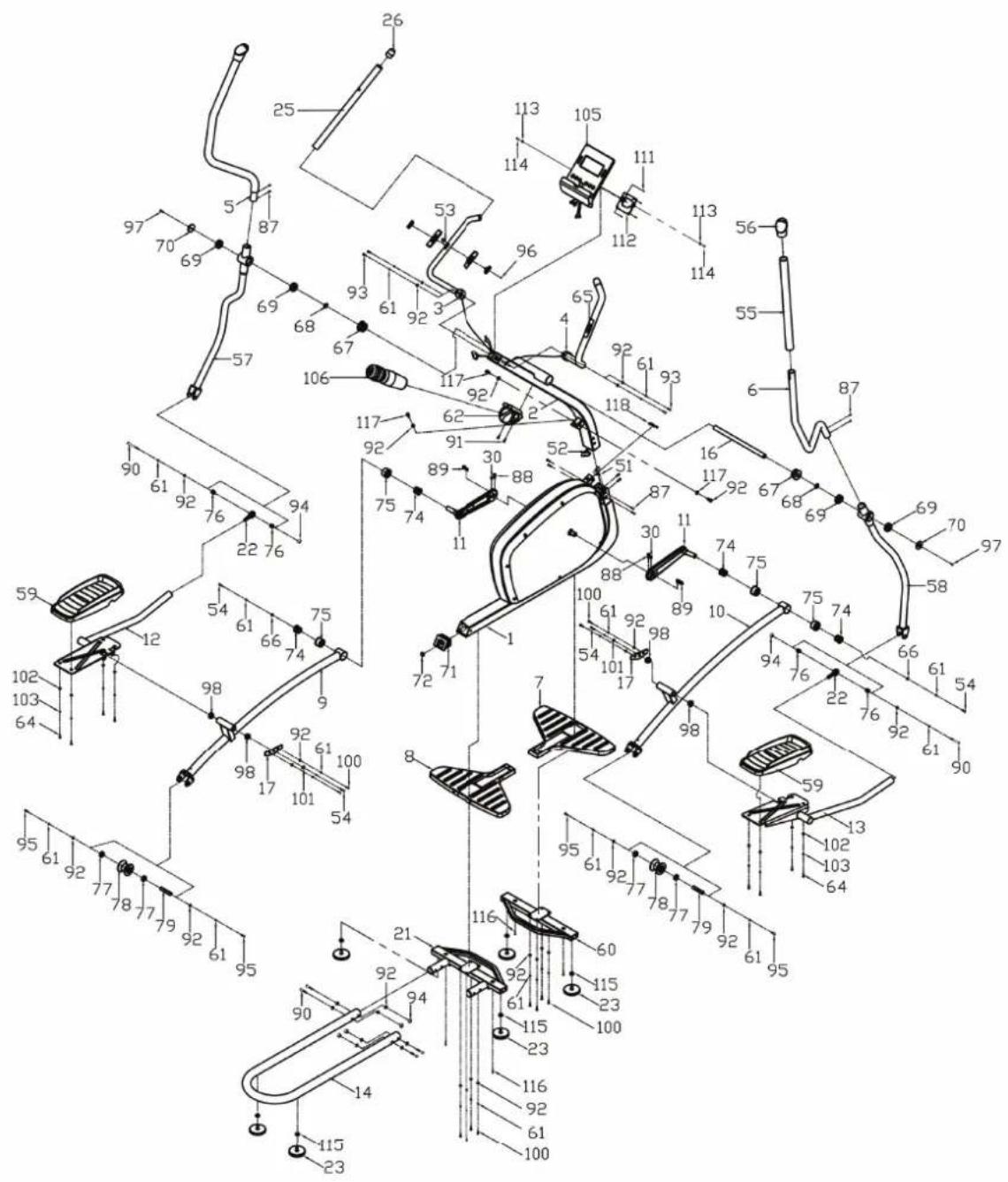
| NO. | Description Q'TY | |
| 1 | Base frame 1 | |
| 2 | Front post 1 | |
| 3 | Fix handlebar (LH) 1 | |
| 4 | Fix handlebar (RH) 1 | |
| 5 | Upper swivel handlebar (LH) 1 | |
| 6 | Upper swivel handlebar (RH) 1 | |
| 7 | Front stabilizer cover 1 | |
| 8 | Rear stabilizer cover 1 | |
| 9 | Pedal post (LH) 1 | |
| 10 | Pedal post (RH) 1 | |
| 11 | Crank arm 2 | |
| 12 | Outer pedal post (LH) 1 | |
| 13 | Outer pedal post (RH) 1 | |
| 14 | U shape rail 1 | |
| 15 | Side cover metal strip 1 | |
| 16 | Pivot shaft 1 | |
| 17 | Pedal fix bracket 2 | |
| 18 | Rear stabilzier 1 | |
| 19 | Self-align bearing 2 | |
| 20 | Height adjust foot 6 | |
| 22 | Fix handlebar foam grip 2 | |
| 23 | Fix handbar end cap 2 | |
| 24 | Upper U.I. wire 1 | |
| 25 | Lower U.I. wire 1 | |
| 26 | PH machine screw (M4x20) 14 | |
| 27 | PH machine screw (M4x12) 1 | |
| 28 | PH self tapping screw 1 | |
| 29 | Hex head bolt (M6x16) 4 | |
| 30 | Sw handlebar foam grip 2 | |
| 31 | Handlebar end cap 2 | |
| 32 | Lower swivel handlebar (LH) 1 | |
| 33 | Lower swivel handlebar (RH) 1 | |
| 34 | Pedal 2 | |
| 35 | Front stabilizer 1 | |
| 36 | User interface 1 | |
| 37 | Water bottle holder 1 | |
| 38 | Nylon nut (M6) 4 | |
| 39 | PH machine screw (M5x12) 10 | |
| 40 | Hand pulse sensor set w/o wire 2 | |
| 41 | Spring (M6) 4 |
| 42 Plug axle support 2 |
| 43 Wave washer (ø20xø27x0.4) 2 |
| 44 Bearing (6004zz) 6 |
| 45 Metal plate for sw handlebar 2 |
| 46 Dc cover 1 |
| 47 Cap of dc cover 1 |
| 48 Round allen head bolt (M8x15) 4 |
| 49 Plug axle support (inner) 4 |
| 50 Plug axle support 4 |
| 51 Self-align-bearing bush 4 |
| 52 Bearing (6001zz) 4 |
| 53 Roller 2 |
| 54 Roller shaft 2 |
| 55 Side cover (LH) 1 |
| 56 Side cover (RH) 1 |
| 57 Pulley (ø350) 1 |
| 58 Pulley shaft 1 |
| 59 Retaining ring C20 2 |
| 60 T-gen control board 1 |
| 61 Sensor bracket 1 |
| 62 Cover clip (M4) 14 |
| 63 Allen head bolt (M8x20) 10 |
| 64 Screw (M6x15) 6 |
| 65 Hex head bolt (M8x32) 2 |
| 66 Flat washer (M6x16x1.2t) 4 |
| 67 PH machine screw (M5x15) 2 |
| 68 Magnet 9 |
| 69 Flat washer (M8x16x1.2t) 35 |
| 70 M8 spring washer nickel 28 |
| 71 Flywheel shaft fix bracket 2 |
| 72 PH self tapping screw (M4x5) 2 |
| 73 Dc wire 1 |
| 74 Screw (M8x25) 2 |
| 75 Round allen head bolt (M8x56) 6 |
| 76 Nylon nut (M8) 6 |
| 77 Sw handlebar bushing 4 |
| 79 Allen head bolt (M8x15) 12 |
| 80 Flat wahser (M8xø28x2.0t) 2 |
| 81 Allen head bolt (M8x25) 4 |
| 82 Flat wahser (M5xø19x1.5t) 8 |
| 83 Spring washer (M5) 8 |
| 84 PH machine screw (M5x12) 6 |
| 85 Plastic spacer 2 | |
| 86 Plastic spacer - control board 1 | |
| 87 Bush for control board 1 | |
| 88 Allen head bolt (M8x20) 4 | |
| 89 Billet (8x8x28l) 2 | |
| 90 Screw (M10x30) 2 | |
| 91 Ems strength plate 1 | |
| 92 Sensor wire 1 | |
| 93 Flat washer (M8xø38x2t) 2 | |
| 94 Hand pulse wire (700mm) 2 | |
| 95 EMS flywheel set 1 | |
| 96 Water bottle 1 | |
| 97 Grub screw (M6x15) 2 | |
| 98 | 1 |
| 99 Adaptor 1 | |
| 100 | Large spring 1 |
| 101 | Drive belt ( poly-v 6pj1321) 1 |
| 102 | Ac power cable 1 |
| 103 | 4 |
| 104 | 1 |
| 105 | 2 |
| 106 | 2 |
| 107 | 6 |
| 108 | PH Self Tapping Screw (M4x6mm) 4 |
| 109 | 3 |
| 110 | 1 |
Owner's manual. Pure 8.1
TUNTURI
Tunturi New Fitness B.V.
P.O.Box 60001
1320 AA
The Netherlands
www.tunturi.com
20141028
