Style+ - Shredder Swingline - Free user manual and instructions
Find the device manual for free Style+ Swingline in PDF.


| Product Type | Document shredder (cross-cut) |
| Brand | Swingline |
| Model | Style+ |
| Cut Type | Cross-cut |
| Particle Size | 4 x 23 mm |
| Sheet Capacity | 7 sheets (80 g/m²) or 7 sheets (75 g/m²) |
| Throat Width | 230 mm |
| Dimensions (W x D x H) | 378 x 203 x 360 mm |
| Power Supply | 120 V AC, 60 Hz, 3.0 A |
| Max Continuous Run Time | 3 minutes (then 30 min cool down) |
| Auto Shut-off | Yes |
| Reverse Function | Yes (to clear jams) |
| Thermal Protection | Yes (auto shut-off in case of overheating) |
| Bin Emptying | Removable bin with fill-level window |
| Safety | Safety symbols, auto shut-off, keep out of reach of children |
| Maintenance | Clean with a damp cloth; do not lubricate |
| Warranty | 2 years on cutters and 2 years on other parts |
Frequently Asked Questions - Style+ Swingline
User questions about Style+ Swingline
0 question about this device. Answer the ones you know or ask your own.
Ask a new question about this device
Download the instructions for your Shredder in PDF format for free! Find your manual Style+ - Swingline and take your electronic device back in hand. On this page are published all the documents necessary for the use of your device. Style+ by Swingline.
USER MANUAL Style+ Swingline
Do not shred more than the stated sheet capacity at a time. Do not attempt to shred more than one credit card at a time.
Please read this instruction manual carefully before use.
Introduction
Thank you for choosing this Shredder from Swingline. We are sure it will serve you well, but please take a little time to read these instructions to ensure you get the best out of your machine.
Safety First
- Please store this instruction manual in a safe place for future reference.
- Please pay close attention to the safety symbols on the top of the shredder and operate the machine accordingly.
- If the shredder needs cleaning, unplug the unit from the power socket and use a damp cloth. NOTE: Don't use any cleaning products to clean the unit.
- Do not position the unit near to an object that radiates heat.
- Do not place the unit in a damp environment.
- Take care not to splash any liquid onto the machine.
-
Return the product and proof of purchase with receipt to the store at which it was purchased if...
-
The power cable or plug is broken.
- The machine malfunctions because liquid was accidentally spilt onto the machine.
-
The shredder doesn't operate despite following the guidelines in the manual.
-
Make sure the power cable isn't a trip hazard.
- Please ensure the power supply is compatible with the requirements of the machine (120Vac~60Hz).
- To avoid risk of injury, do not open the machine's casing to attempt DIY repair. Any attempted repair by an unqualified person will invalidate the warranty.
Description of product parts (fig 1)
A Power cable
B Viewing window
C Paper entry slot
Preparation before use
How to use the shredder correctly:
- Take care not to insert fingers, ties or other objects into the entry slot of the shredder.
- Try to avoid paper clips, staples, laminating materials, plastic bags etc. from being passed through the shredder. This will prevent damage to the cutters.
- Do not shred wet paper as it can tangle in the cutters.
- Do not shred more than the stated sheet capacity in one pass.
- Do not shred continuously for more than 3 minutes at a time. Running the unit for too long may make the motor overheat. If the motor overheats, allow it to cool down for at least 30 minutes before resuming use.
- Do not use the "REV" (reverse) function if it's not necessary. Over use of the "REV" (function can result in shredded paper becoming jammed in the entry slot, which will adversely affect the performance of the shredder.
Correct operating procedure (fig 2)
- Insert plug into the AC power socket.
- Check the shredder bin is fully closed.
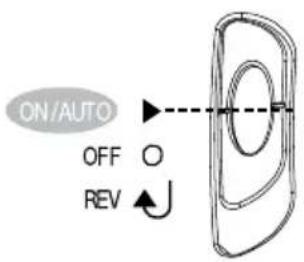
- Push the switch to the ON/AUTO position (standby mode)
- When not in use, push the switch to the O (off position)
Auto shred and stop
- Place the paper or credit card into the centre of the entry slot - shredding will start automatically (fig 3).
- Paper smaller than A4 in width should be placed in the middle of the entry slot to ensure the shredder works automatically.
- The cutters will stop rotating automatically after finishing shredding
- Do not shred more than the stated sheet capacity at a time.
- If too many sheets are inserted at a time, the shredder can become jammed. If the shredder becomes jammed, switch the button to REV position to clear the jam by reversing the paper. If the paper has become so entangled in the cutter that it can't be reversed, turn off the power and pull out the paper by hand. Restart with fewer sheets and feed the non-shredded end of the paper in first.
Register this product online at www.swingline.com
Control Panel

Safety First
The warning notices on the shredder should absolutely be observed.

This means you should be careful because long hair can become entangled in the cutting head. This could hurt you.

This means don't reach into the feed opening of the cutting head. This could hurt you.

This means be careful of ties and other loose clothing which could become entangled in the cutting head. This could hurt you.

This means be careful of hanging jewelry and other loose items which could become entangled in the cutting head. This could hurt you.

This means keep children away from shredder.

This means do not use aerosol sprays anywhere near the unit.

The shredder mechanism is a maintenance - and servicing-free and need not to be oiled

This means paper including paper clips or staples should not be fed into the machine

When introducing CDs or DVDs into the feeder opening, only hold by the extreme outer edge. Keep fingers away from the central drive hole of CDs and DVDs to prevent hands being drawn into to shredder and subsequent injury.
The appliance should be installed close to a fused electric supply socket outlet. The fused electric supply socket must be easily accessible.
The waste collector bins for paper and plastic credit cards as well as for CDs and DVDs should be emptied regularly. When the bins are over-filled, there is a hazard, that waste can be drawn into the shredder mechanism from below. Before emptying the bins, detach the electrical connector plug from the electrical supply outlet socket. Danger of accident!
To ensure undisruptive operation, any remnants of paper, plastic credit cards, CDs and DVDs should be regularly removed from the underside of the appliance by using a suitable tool (e.g. a stiff brush). For this purpose, the appliance should be switched off and unplugged beforehand. Danger of accident!
Caution! After lifting the shredder mechanism off the waste collector bins, the sharp pointed parts of the shredder mechanism will be exposed to touch. Danger of injury!
The applicane should never be operated continuously for longer than 3 minutes at a time (short time operation = KB = 3 minutes; see the manufacturer's identification plate). Allow the appliance to cool down to room temperature before re-operating.
CAUTION:
Do not shred continuously for more than 3 minutes. When the motor has overheated, the thermal safety switch will start working automatically. If the thermal switch trips, do not use the machine for about 30 minutes while the thermal sensitive safety switch cools down so the shredder can be safely used again.
Emptying the pull-out waste bin (fig 4)
Empty the shredder bin when the shredder paper is visible through the viewing window on the side of the pullout bin.
- Pull out the shredder bin (fully).
- Empty the shredder bin into a waste sack.
- Push the shredder bin back in ensuring it is fully closed.
CAUTION:
This machine is not a toy. Keep away from children and pets.
For indoor use only.
- Never insert fingers into the entry slot of the shredder.
- Turn the power off immediately if your hair, tie or sleeve becomes entangled in the shredder.
- The shredder bin must be fully pushed closed for the machine to operate.
- Empty the shredder bin when it is full otherwise the shredder's performance will be adversely affected. Operating the shredder with a full shredder bin can result in paper jamming in the cutters, which will increase the machine's noise level.
- Do not force down shredder paper in the bin using your feet.
Technical data
| Model | Swingline™ Style+™ |
| Cutting Type Cross Cut | |
| Shred Size 4 x 23mm | |
| Sheet Capacity @ 80 gsm paper 7 sheets | |
| Sheet Capacity @ 75 gsm paper* 7 sheets | |
| Entry Width 230mm | |
| Product Dimensions 378 x 203 x 360mm | |
| Rated Voltage/Frequency 120Vac~60Hz | |
| Rated Current 3.0 A | |
- 8.5" × 11", 20lb., (75g) paper at 120V, 60Hz, 3 Amps; heavier paper, humidity or other than rated voltage my reduce capacity.
If the paper shredder will not start, please check the following:
- Is the machine plugged in correctly?
- Is the switch pushed to the 'ON/AUTO' position?
- Is the machine jammed with paper?
- Has the motor overheated?
- Is the shredder bin fully pushed in?
In case of jammed paper, please follow the procedure below:
- Check if the bin is too full with paper - the bin should be emptied regularly to avoid paper becoming jammed in the cutters.
- Slide the switch to the 'REV' position to reverse the jammed paper.
- If the paper is so jammed that it will not come out in reverse function, slowly push the switch between 'REV' ( ) and ON/AUTO. Do not do this too quickly as this can damage the shredder.
- WARNING - Do not under any circumstances use any metal objects (scissors, letter openers etc.) in an attempt to clear the entry - this model has mains voltage inside the casing, which could cause serious injury.
This machine does not require lubricant. ACCO Brands accepts no liability for product performance or safety should any lubricant be used on any part(s) of this machine.
Register this product online at www.swingline.com
Specifications techniques
Modèle
SwinglineTM Style+TM
Limited 2 year Cutter Warranty for Style+ Shredder and Limited 2 Year Warranty for all other Parts
ACCO Brands USA LLC, 300 Tower Parkway, Lincolnshire, IL 60069 (in Canada, ACCO Brands Canada Inc., 5 Precedio Court, Brampton, ON L6S-6B7; and in Mexico, ACCO Mexicana, S.A. de C.V. Av. Circuito Industrial Norte #6 Parque Industrial Lerma 52000, Lerma Edo, De Mexico) (each, respectively, "ACCO Brands") warrants to the original purchaser that the cutters of this SwinglineTM Shredder Style+ are free from defects in workmanship and material under normal use and service for a period of 2 years after purchase and all other parts are free from defects in workmanship and material under normal use and service for a period of 2 years after purchase.
ACCO Brands' obligation under this warranty is limited to replacement or repair, at ACCO Brands' option, of any warranted part found defective by ACCO Brands without charge for material or labor. Any replacement, at ACCO Brands' option, may be the same product or a substantially similar product that may contain remanufactured or refurbished parts. This warranty shall be void in the following circumstances:
if the product has been misused,
(ii) if the product has been damaged by negligence or accident, or
(iii) if the product has been altered by anyone other than ACCO Brands or ACCO Brands' authorized agents.
For warranty execution, please call:
1-800-541-0094 in the USA
1-800-263-1063 in Canada
1-800-758-6825 in Mexico
Or go to www.swingline.com.
TO THE EXTENT ALLOWED BY APPLICABLE LAW, THIS WARRANTY IS IN LIEU OF ALL OTHER EXPRESSED WARRANTYES, REPRESENTATIONS OR PROMISSES INCONSISTENT WITH OR IN ADDITION TO THIS WARRANTY ARE UNAUTHORIZED AND SHALL NOT BE BINDING ON ACCO BRANDS. TO THE EXTENT PERMITTED BY APPLICABLE LAWS, ANY IMPLIED WARRANTYES (IF APPLICABLE) ARE LIMITED IN DURATION TO THE DURATION OF THIS WARRANTY, SOME STATES AND JURISDICTIONS DO NOT ALLOW LIMITATIONS ON HOW LONG AN IMPLIED WARRANTY LASTS, SO THE ABOVE LIMITATION MAY NOT APPLY TO YOU. TO THE EXTENT PERMITTED BY APPLICABLE LAW, IN NO EVENT SHALL ACCO BRANDS BE LIABLE FOR ANY SPECIAL, INCIDENTAL, PUNITIVE, EXEMPLARY, CONSEQUENTIAL OR SIMILAR DAMAGES, WHETHER OR NOT FORSEABLE. SOME STATES AND JURISDICTIONS DO NOT ALLOW THE EXCLUSION OR LIMITATION OF SPECIAL, INCIDENTAL, PUNITIVE, EXEMPLARY, CONSEQUENTIAL, OR SIMILAR DAMAGES, SO THE ABOVE EXCLUSION OR LIMITATION MAY NOT APPLY TO YOU.
FOR CONSUMERS WHO HAVE THE BENEFIT OF CONSUMER PROTECTION LAWS OR REGULATIONS IN THEIR JURISDICTION OF PURCHASE OR, IF DIFFERENT, IN THEIR JURISDICTION OF RESIDENCE, THE BENEFITS CONFERRED BY THIS WARRANTY ARE IN ADDITION TO ALL RIGHTS AND REMEDIES CONVEYED BY SUCH CONSUMER PROTECTION LAWS AND REGULATIONS.
To the extent permitted by law, this warranty is not transferable and will automatically terminate if the original product purchaser sells or otherwise disposes of the product.
This warranty gives you specific legal rights. Other rights, which vary from jurisdiction to jurisdiction, may exist. In addition some jurisdictions do not allow (i) the exclusion of certain warranties, (ii) limitations on how long an implied warranty lasts and/or (iii) the exclusion or limitation of certain types of costs and/or damages, so the above limitations may not apply.