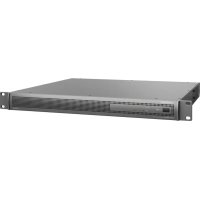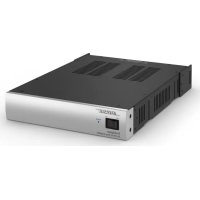
FreeSpace ZA 250LZ - Audio Receiver BOSE - Free user manual and instructions
Find the device manual for free FreeSpace ZA 250LZ BOSE in PDF.



| Product type | Professional audio amplifier |
| Brand | Bose |
| Model | FreeSpace ZA 250LZ |
| Category | Audio receiver |
| Power supply | 120 V / 230 V, 50/60 Hz |
| Inrush current (230V) | 13.9 A |
| Inrush current (120V) | 7.6 A |
| Main functions | Audio amplification for professional speaker systems |
| Installation | 19-inch rack mount, 1U (leave 1U free above and below) |
| Ventilation | Rubber feet for use on flat surface; convection ventilation |
| Operating temperature | Max 40 °C (104 °F) |
| Maintenance and cleaning | Use a dry cloth only |
| Safety | Mandatory grounding; do not expose to water or humidity |
| Spare parts and repairability | Entrust any repair to qualified personnel; use only specified accessories |
| General information | Compliant with EC directives; FCC class A; indoor use only |
Frequently Asked Questions - FreeSpace ZA 250LZ BOSE
User questions about FreeSpace ZA 250LZ BOSE
0 question about this device. Answer the ones you know or ask your own.
Ask a new question about this device
Download the instructions for your Audio Receiver in PDF format for free! Find your manual FreeSpace ZA 250LZ - BOSE and take your electronic device back in hand. On this page are published all the documents necessary for the use of your device. FreeSpace ZA 250LZ by BOSE.
USER MANUAL FreeSpace ZA 250LZ BOSE
Integrated Zone Amplifier/Zone Amplifier
- For use by professional installers only
- Kun beregnet til at anvendes af professionelle installeratorer
- Nur zur Verwendung durch einen fachkundigen Monteur
- Solo apto para instaladores profesionales
- Réservé à un technicien professionnel
- L'utilizzo è riservatoagli installatori professionisti
- Uitsluitend bestemd voor professionele installateurs
- Endast für professionella användare
Installation and Operating Guide
Contents 20
Front-panel 20
Rear-panel 21
Loudspeaker connections 21
Making loudspeaker connections (IZA 190-HZ) 21
Making loudspeaker connections (IZA 250-LZ) 22
Input connections 23
RCA input connections 23
Page input connections 23
Mic/Line input connections (Front-panel) 24
Aux input (Front-panel) 24
Remote Control connections 25
Remote volume and source selection control 25
Mute with standard contact closure 25
AC power connection 25
Setup - Rear-panel controls 26
Operation - Front-panel controls and indicators 27
FreeSpace ZA 190-HZ/250-LZ zone amplifier. 28
Contents 28
Front-panel controls and indicators 28
Rear-panel controls 28
Expanding an IZA system with a ZA amplifier 29
System operation 29
Input connections 29
Connecting the IZA 190-HZ/250-LZ amplifier to the ZA 190-HZ/250-LZ amplifier. 29
Connecting the zone amplifier with other products 29
Line input connections 29
Loudspeaker connections 29
Installation and Placement 30
Importance of proper ventilation 30
Placing on a flat surface 30
30
Stacking units 30
Mounting in standard rack with Rack Mount Kit Accessory 31
Mounting a single amplifier 31
Mounting two amplifiers 32
Using the rear rack ears for strain relief 33
Spacing requirements for rack-mounted amplifiers 33
Troubleshooting 34
AC Current Draw and Thermal Dissipation Information 35
Specifications 36
Additional Resources 43

This product is intended for installation by professional installers only! This document is intended to provide professional installers with basic installation and safety guidelines for Bose® FreeSpace® amplifiers in typical fixed-installation systems. Please read this document before attempting installation.

Warning: All Bose products must be used in accordance with local, state, federal and industry regulations. It is the installer's responsibility to ensure installation of the amplifier is performed in accordance with all applicable codes, including local building codes and regulations. Consult the local authority having jurisdiction before installing this product.

Warning: To reduce the risk of fire or electrical shock, do not expose the product to rain or moisture.

Caution: Do not mount the chassis in locations where condensation may occur.

Warning: Do not expose this apparatus to dripping or splashing, and do not place objects filled with liquids such as vases, on or near the apparatus. As with any electronic products, use care not to spill liquids into any part of the system. Liquids can cause a failure and/or a fire hazard.
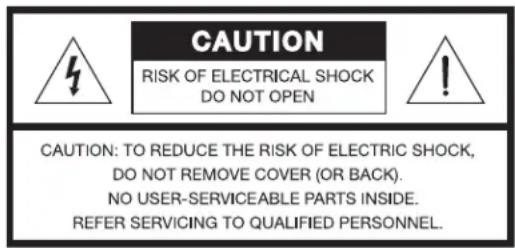

The lightning flash with arrowhead symbol, within an equilateral triangle, is intended to alert the user to the presence of uninsulated dangerous voltage within the system enclosure that may be of sufficient magnitude to constitute a risk of electrical shock. Do not touch the output terminals while amplifier power is ON. Make all connections with amplifier OFF.

The exclamation point within an equilateral triangle, as marked on the system, is intended to alert the user to the presence of important operating and maintenance instructions in this installation guide.

Caution: This product shall be connected to an AC mains socket outlet with a protective earthing (grounding) connection.

Caution: Do not place any naked flame sources, such as lighted candles, on or near the apparatus.

Warning: Contains small parts which may be a choking hazard. Not suitable for children under age 3.
Note: The product label is located on the bottom of the product.
Note: Where the mains plug or appliance coupler is used as the disconnect device, such disconnect device shall remain readily operable.
Note: The product must be used indoors. It is neither designed nor tested for use outdoors, in recreational vehicles, or on boats.
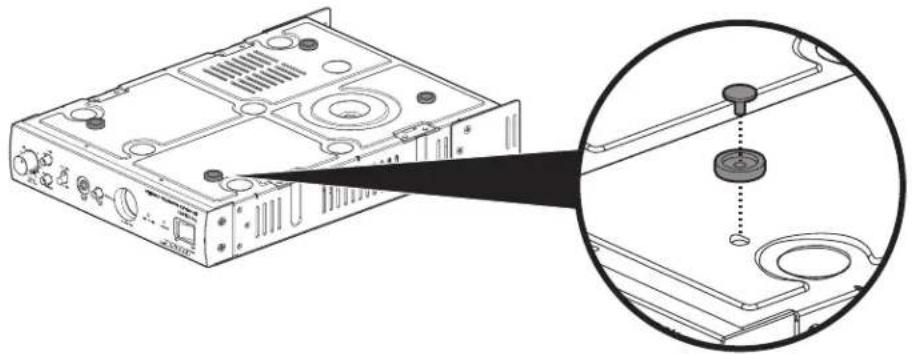
Note: When placing the amplifier on a flat surface, use the included feet to ensure proper ventilation. One amplifier can be stacked on top of another when feet are installed on both amplifiers. To install feet, place amplifier upside-down, insert the four feet into the four holes on the bottom of the chassis. To lock each foot into place, press a locking pin into each foot hole.
Note: Allow 1RU spacing above and below rack-mounted amplifiers to ensure sufficient spacing for ventilation. Additionally, the temperature of the rack should be controlled to ensure that amplifiers are not exposed to temperatures exceeding 40^ (104°F).
- Read these instructions.
- Keep these instructions - for future reference.
- Heed all warnings - on the product and in all product documentation.
- Follow all instructions.
- Do not use this apparatus near water.
- Clean only with a dry cloth.
- Do not block any ventilation openings. Install in accordance with the manufacturer's instructions. To ensure reliable operation of the product and to protect it from overheating put the product in a position and location that will not interfere with its proper ventilation.
- Do not install near any heat sources, such as radiators, heat registers, stoves, or other apparatus (including amplifiers) that produce heat.
- Do not defeat the safety purpose of the polarized or grounding-type plug. A polarized plug has two blades with one wider than the other. A grounding-type plug has two blades and a third grounding prong. The wider blade or third prong is provided for your safety. If the provided plug does not fit in your outlet, consult an electrician for replacement of the obsolete outlet.
- Protect the power cord from being walked on or pinched, particularly at plugs, convenience receptacles, and the point where they exit from the apparatus.
- Only use attachments/accessories specified by the manufacturer.
- Use only with the cart, stand, tripod, bracket, or table specified by the manufacturer or sold with the apparatus. When a cart is used, use caution when moving the cart/apparatus combination to avoid injury from tip-over.
- Unplug this apparatus during lightning storms or when unused for long periods of time to prevent damage to this product.
- Refer all servicing to qualified service personnel. Servicing is required when the apparatus has been damaged in any way such as power-supply cord or plug is damaged; liquid has been spilled or objects have fallen into the apparatus; the apparatus has been exposed to rain or moisture, does not operate normally, or has been dropped. Do not attempt to service this product yourself. Opening or removing covers may expose you to dangerous voltages or other hazards. Please call Bose to be referred to an authorized service center near you.
- To prevent risk of fire or electric shock, avoid overloading wall outlets, extension cords, or integral convenience receptacles.
- Do not let objects or liquids enter the product - as they may touch dangerous voltage points or short-out parts that could result in a fire or electric shock.
- Do not allow the unit to exceed the maximum operating ambient temperature of 40^ . Be aware of conditions in an enclosed rack that may increase the temperature above room ambient conditions.
This product conforms to all applicable EU directive requirements. The complete Declaration of Conformity can be found at www.Bose.com/compliance.
This Product meets the immunity requirements for the E2 class EN55103-2 directive.
Initial turn on inrush current: 13.9 Amps (230V/50 Hz), 7.6 Amps (120V/60 Hz)
Inrush current after 5 seconds AC mains interruption: 13.9 Amps (230V/50 Hz), 7.5 Amps (120V/60 Hz)
Information About Products That Generate Electrical Noise (FCC Compliance Notice for US)
Note: This equipment has been tested and found to comply with the limits for a Class A digital device, pursuant to part 15 of the FCC Rules. These limits are designed to provide reasonable protection against harmful interference when the equipment is operated in a commercial environment. This equipment generates, uses, and can radiate radio frequency energy and, if not installed and used in accordance with the instruction manual, may cause harmful interference to radio communications. Operation of this equipment in a residential area is likely to cause harmful interference in which case the user will be required to correct the interference at one's own expense.
This product complies with the Canadian ICES-003 Class A specifications.

This guide describes the installation and operating procedures for the following:
FreeSpace IZA 190-HZ integrated zone amplifier
FreeSpace IZA 250-LZ integrated zone amplifier
FreeSpace ZA 190-HZ zone amplifier
FreeSpace ZA 250-LZ zone amplifier
FreeSpace® IZA 190-HZ/IZA 250-LZ integrated zone amplifier
Contents
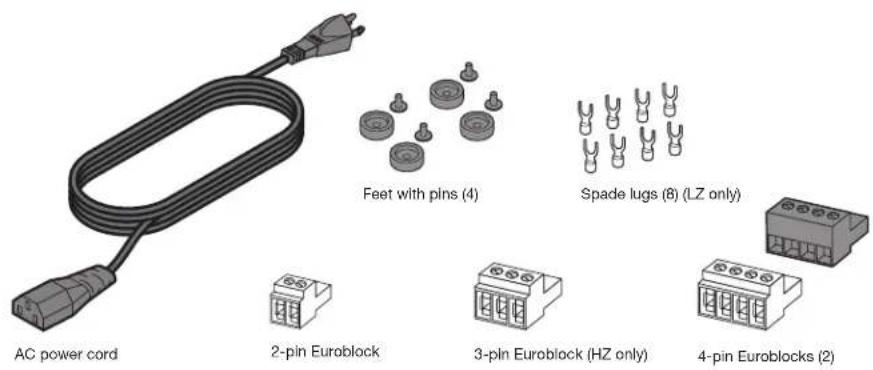
(1) Power cord
(4) Feet with pins
(1) 4-pin Euroblock for PAGE input
(1) 4-pin Euroblock for REMOTE connections
(1) 2-pin Euroblock for MUTE connection
(8) Spade lugs for OUTPUT connections (LZ only)
(1) 3-pin Euroblock for OUTPUT connection (HZ only)
Front-panel
Note: Front-panel controls and indicators are identical on the FreeSpace IZA 190-HZ amplifier.
FreeSpace IZA 250-LZ
Rear-panel
FreeSpace ^® IZA 190-HZ
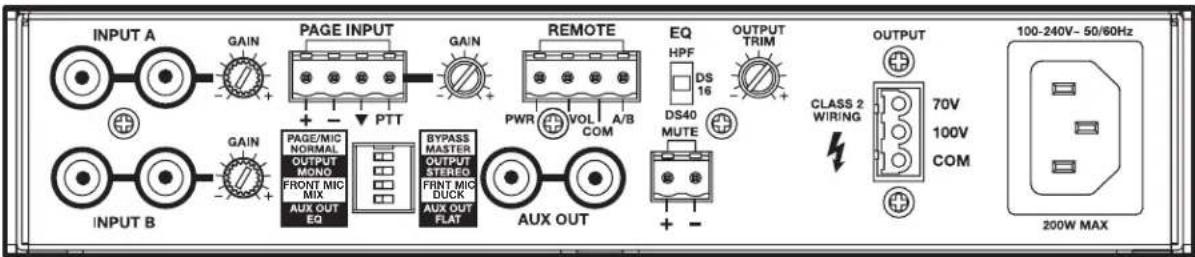
FreeSpace IZA 250-LZ
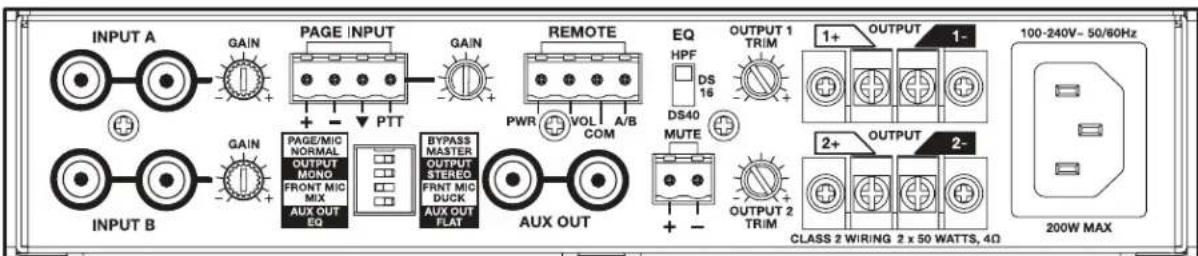
Loudspeaker connections
Use 22 AWG (0.3mm^2) to 14 AWG (2.0mm^2) size wire only.
Making loudspeaker connections (IZA 190-HZ)
Note: Loudspeaker connections are the same for the ZA 190-HZ amplifier.
Wire the 3-pin Euroblock:
Use pins 1 (70V) and 3 (COM) for 70V operation.
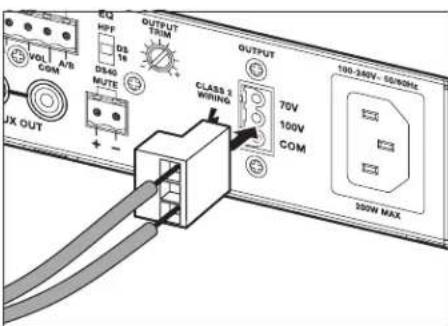
Use pins 2 (100V) and 3 (COM) for 100V operation
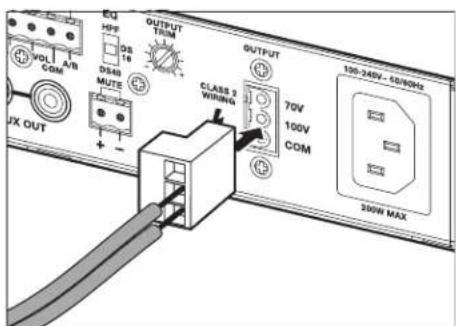
Making loudspeaker connections (IZA 250-LZ)
Note: Loudspeaker connections are the same for the ZA 250-LZ amplifier.
- Attach included crimp-on spade lug connectors to loudspeaker wiring. Blue spade lug connectors are compatible with 16-14 AWG wire. Red spade lug connectors are compatible with 22-16 AWG wire.
Note: You may need to bend the spade lugs to fit.
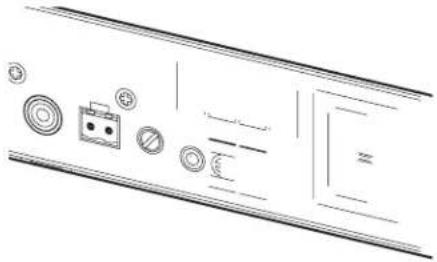
Input connections
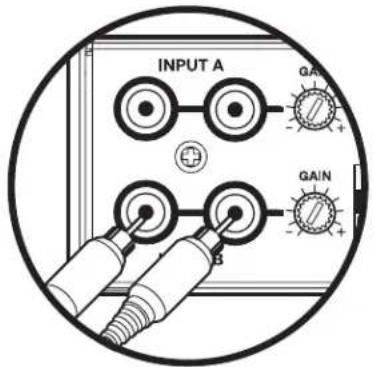
RCA input connections
Insert the RCA plugs into the INPUT A or INPUT B connectors.
Page input connections
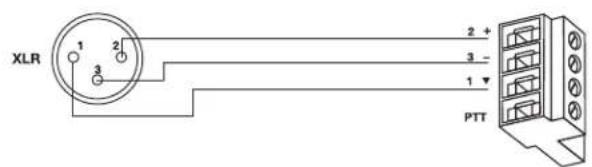
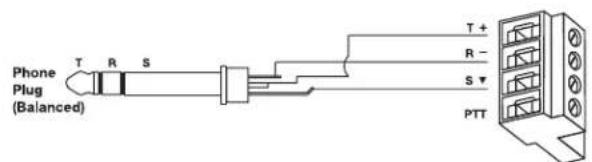
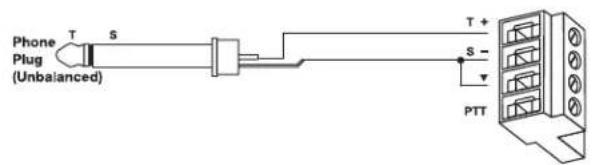
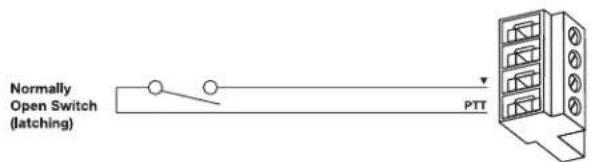
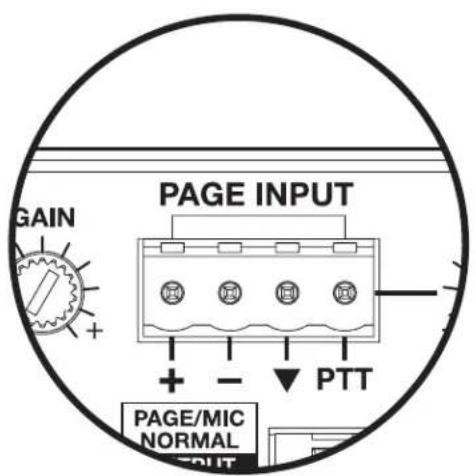
The PAGE INPUT is a mic/line input with a trigger contact closure. This input signal is routed to all outputs (including AUX OUT) when the trigger is detected. This is designed for push-to-talk paging microphones and telephone paging systems. See the diagrams below for input wiring configurations. Use the included 4-pin Euroblock.

PAGE INPUT
Mic/Line input connections (Front-panel)
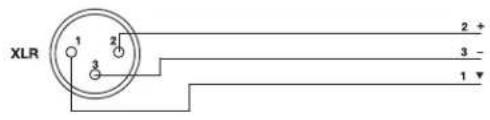
The MIC/LINE INPUT connector is designed for use with handheld dynamic microphones and XLR, TRS, or TS 1/4 " microphone cables. Line-level sources also can be used with this input. See the diagrams below for input wiring configurations.
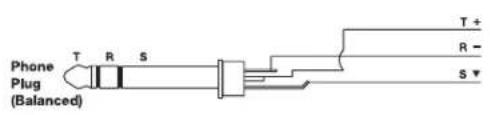

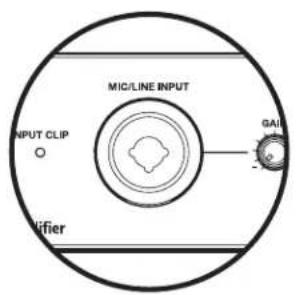
Aux input (Front-panel)
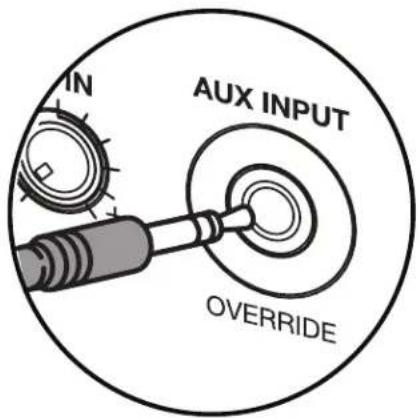
The front panel auxiliary stereo line input connector is designed for connecting portable audio devices like MP3 players and laptops. When a 1/8'' (3.5 mm) TRS input jack is connected to the AUX INPUT, the selected INPUT A/B is automatically overridden, even if the audio source connected to AUX INPUT is not playing.
Remote Control connections
Remote volume and source selection control
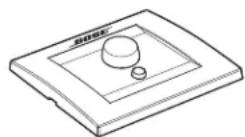
The amplifier is designed to work with the Volume Control with A/B Select User Interface (PC 041967) accessory. The REMOTE connector on the rear panel of the amplifier is labeled to match the connector on the user interface. Use the included 4-pin Euroblock.
Volume Control with A/B Select User Interface
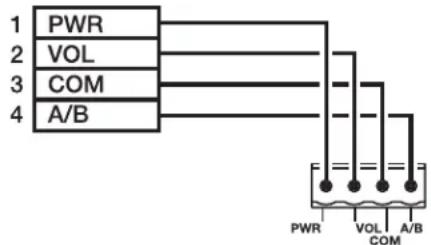
See the Bose® Volume Control with A/B Select User Interface install guide for more details.
The amplifier also can be controlled with a linear taper 10k ohm potentiometer (full CCW=0 ohm, full CW=10k ohm) and SPDT switch.
Volume Control with A/B Select
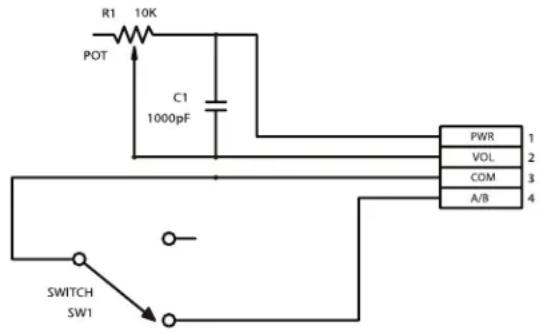
Note: The Bose Volume Control User Interface (PC 041966), not shown here, is not fully functional with the IZA 190-HZ and IZA 250-LZ amplifiers.
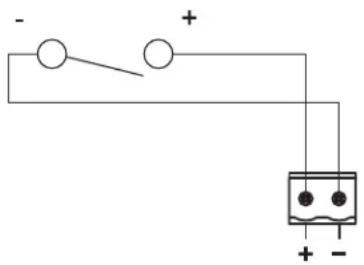
Mute with standard contact closure
The amplifier is designed to mute all outputs (including AUX OUT) when a trigger is detected via the MUTE connector. This is triggered from a standard contact closure. Use the included 2-pin Euroblock.
AC power connection
Once all the input and output connections have been made on the rear panel, connect the amplifier to AC power with included power cord.
Setup - Rear-panel controls
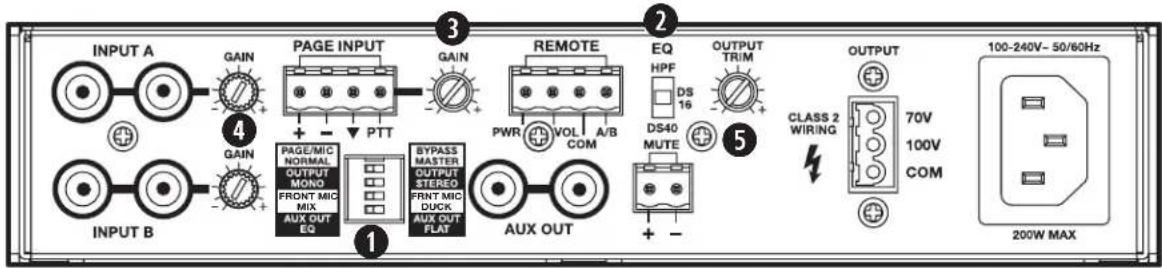
FreeSpace IZA 190-HZ
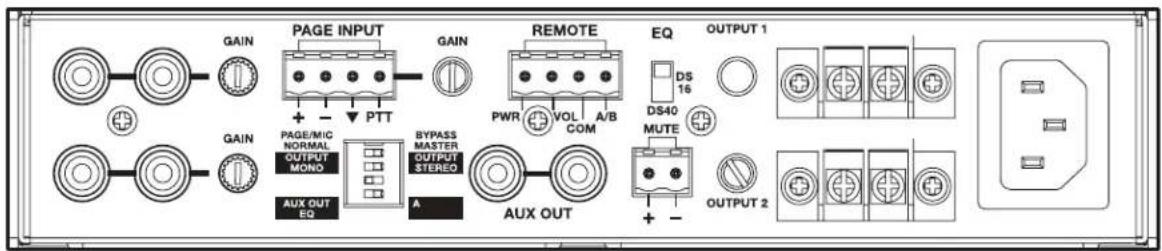
FreeSpace IZA 250-LZ
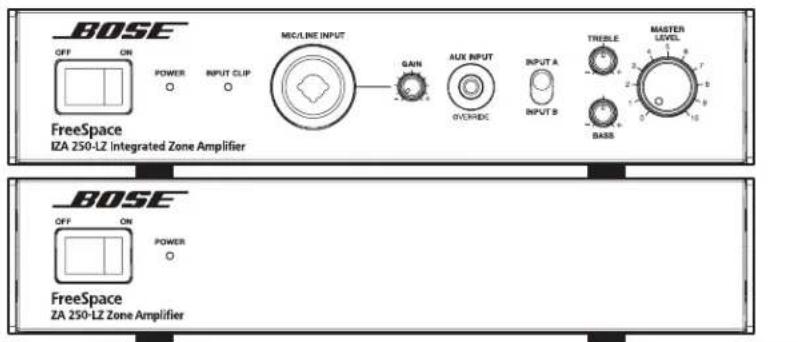
Operation - Front-panel controls and indicators
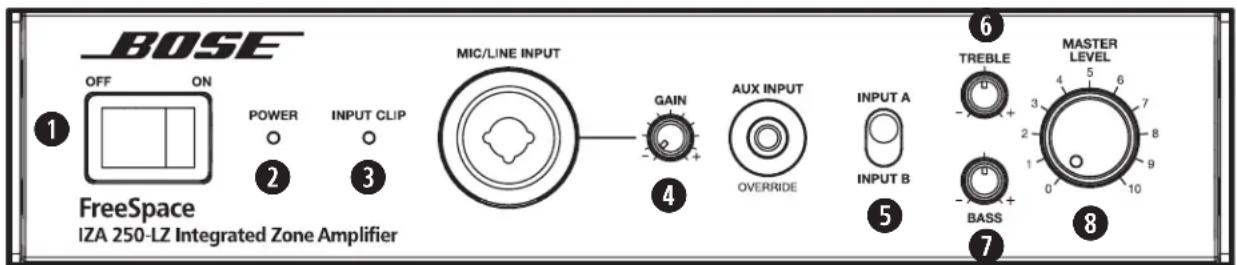
Note: Front-panel controls and indicators are identical on the FreeSpace® IZA 190-HZ amplifier.
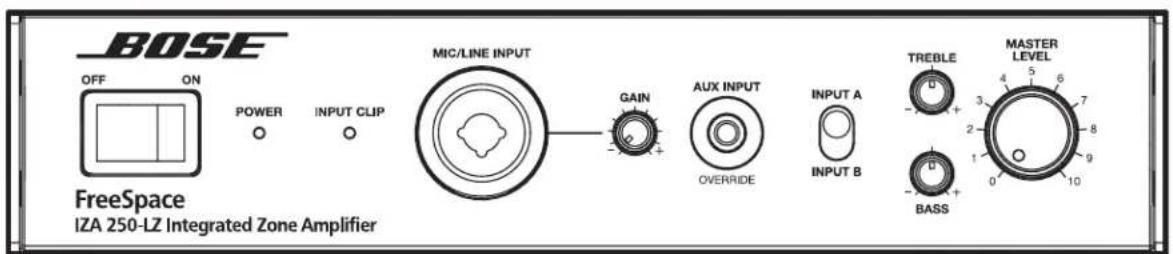
OFF/ON switch
Turns amplifier on or off.
2 POWER indicator
Illuminates blue when amplifier is on.
INPUT CLIP indicator
Illuminates red whenever input source approaches the threshold value of -3dBFS. If the indicator illuminates frequently, reduce input signal level.
MIC/LINE INPUT GAIN control
Allows for fine-tuning of the MIC/LINE input level. If the INPUT CLIP indicator is red, reduce the input gain. The adjustment range is 0 dB to +50 dB.
INPUT A/B selector switch
Allows you to choose between rear line inputs A and B from the front panel of the amplifier.
Rear line inputs A and B can also be selected remotely with the use of optional Bose Volume Control with A/B Select User Interface accessory.
Note: When the Bose Volume Control with A/B Select User Interface is connected, the source select and the MASTER LEVEL control will be overridden by the controls on the remote user interface.
6 TREBLE control
Allows adjustment of the output tone. Provides + / - 6 dB of adjustment at 7kHz
BASS control
Allows adjustment of the output tone. Provides + / - 6 dB of adjustment at 100Hz
8 MASTER LEVEL control
Controls the overall system volume for both the loudspeakers and the variable AUX OUT.
The Master Level can also be controlled remotely with the use of the optional Volume Control with A/B Select User Interface accessory.
FreeSpace® ZA 190-HZ/250-LZ zone amplifier
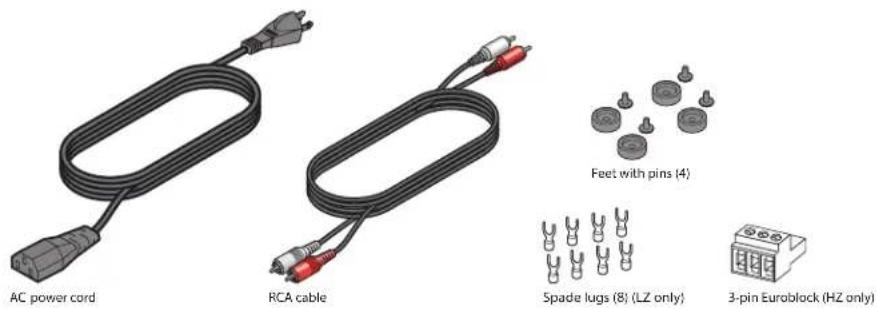
Contents
(1) Power cord
(1) RCA stereo cable
(4) Feet with pins
(8) Spade lugs (LZ only)
(1) 3-pin Euroblock (HZ only)
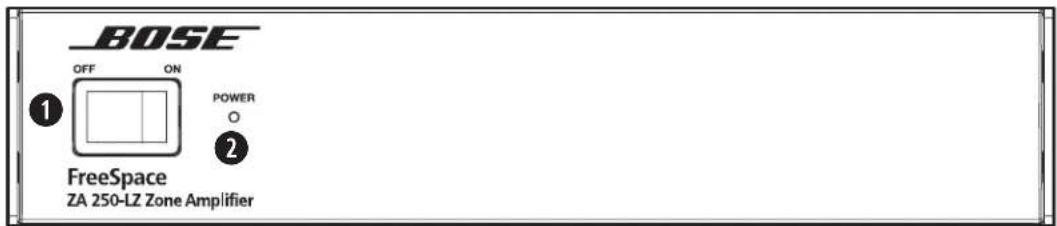
Front-panel controls and indicators
Note: Front-panel controls and indicators are identical on the FreeSpace® ZA 190-HZ amplifier.
OFF/ON switch
Turns amplifier on or off.
POWERindicator
Illuminates blue when amplifier is on.
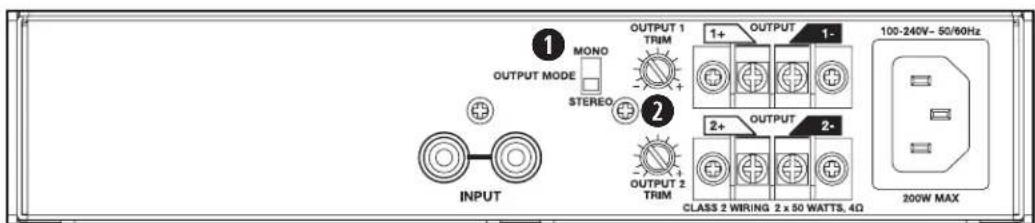
Rear-panel controls
OUTPUT MODE switch (ZA 250-LZ only)
Allows stereo input sources to be output in mono or stereo.
Note: The ZA 190-HZ is designed to sum both inputs channels to mono.
Output TRIM control
Allows for attenuating individual loudspeaker outputs relative to the Master Level of the connected IZA 190-HZ/250-LZ amplifier. The adjustment range is -20 dB to 0dB . This feature is helpful when one output is powering loudspeakers that need to be set at a lower volume level than loudspeakers on other outputs – including the outputs of an integrated zone amplifier.
Expanding an IZA system with a ZA amplifier
The Bose® FreeSpace® ZA 190-HZ/250-LZ zone amplifier makes system expansion easy. When a system design requires more loudspeakers than the FreeSpace IZA 190-HZ/250-LZ integrated zone amplifier can support, the FreeSpace ZA 190-HZ/250-LZ zone amplifier is available to provide additional output channels.
System operation
The IZA 190-HZ/250-LZ and ZA 190-HZ/250-LZ amplifiers will function together as one system - sharing the same music and paging sources. The IZA 190-HZ/250-LZ amplifier functions as the "master" of the ZA 190-HZ/250-LZ amplifier - determining which audio sources will be heard and controlling the overall Master Level volume.
Input connections
Connecting the IZA 190-HZ/250-LZ amplifier to the ZA 190-HZ/250-LZ amplifier
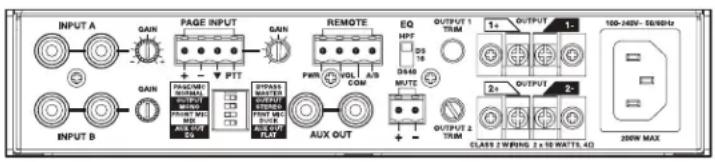
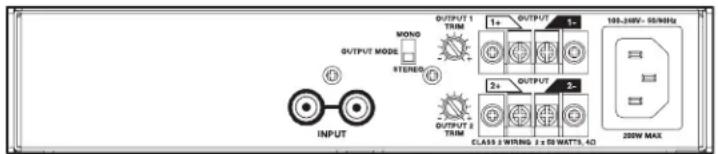
Connect the AUX OUT of the IZA 190-HZ/250-LZ amplifier to the INPUT of the ZA 190-HZ/250-LZ amplifier with the included RCA cable.
Installation and Placement
Importance of proper ventilation
For placement of the amplifier, keep the following in mind:
- Make sure that air can circulate freely around the amplifier for adequate ventilation. There are vents on the top, bottom, and sides.
- Do not cover or block amplifier vents.
- Do not enclose amplifier in a small space, such as a cabinet.
- Make sure the chassis is protected from heat and kept away from direct heat sources, such as heating vents and radiators.
Caution: Do not allow the chassis to exceed the maximum operating temperature of 40^ (104°F). Be aware of conditions in an enclosed rack that may increase the temperature above room-ambient conditions.
Note: If the amplifier becomes too hot, it will go into a thermal protection mode and mute all outputs.
Placing on a flat surface
The amplifier can be placed on a flat, stable surface like a table, counter, or shelf. Plastic feet are included with the amplifier to protect the surface area, prevent the chassis from sliding, and allow heat to escape from the bottom vent.
Note: The included feet shall always be used when placing amplifier on a flat surface to ensure proper ventilation.
Installing the feet on the amplifier
The included feet are comprised of two parts: a foot and a pin.
- Place the amplifier upside-down on a flat, level surface on a protective covering to avoid scratching the top of the chassis.
- Insert the four feet into the four holes on the bottom of the chassis.
- Insert a pin into the hole on the foot.
- Press down on the pin until the foot locks into place. Repeat for all four feet.
Stacking units
One amplifier can be stacked on top of another when there is limited space available on a table, counter, or shelf.
Note: The included feet always shall be used on both amplifiers when stacking them to ensure proper ventilation.
Mounting in standard rack with Rack Mount Kit Accessory
An accessory Rack Mount Kit is available from Bose for installing one or two FreeSpace® amplifiers in a standard 19" 1 RU electronics rack.
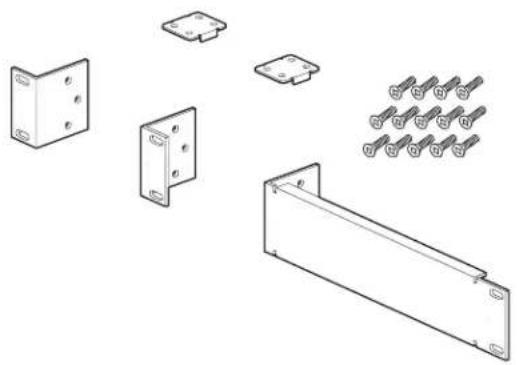
The Rack Mount Kit includes:
(2) link brackets
(2) short rack ears
(1) long rack ear
(14) M3 x 0.5, 6 mm length Phillips flat-head machine screws
Mounting a single amplifier
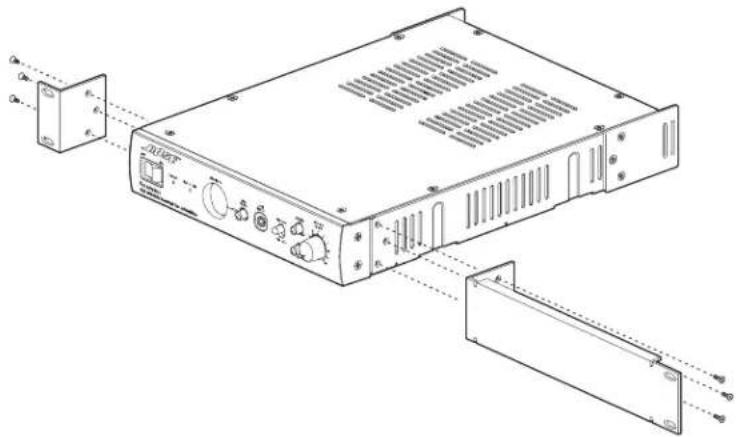
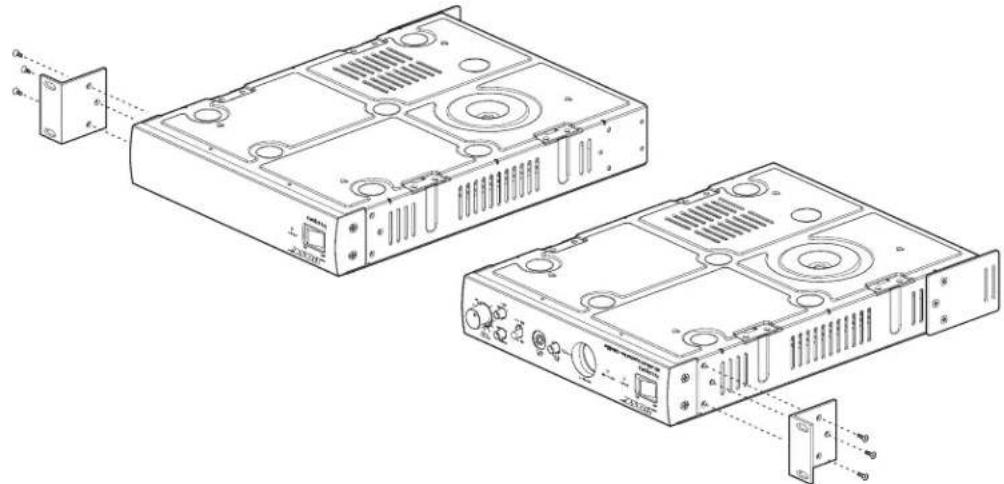
- Attach one short rack ear to one side of the amplifier chassis with three (3) of the included screws.
- Attach the long rack ear to the other side of the amplifier chassis with three (3) of the included screws.
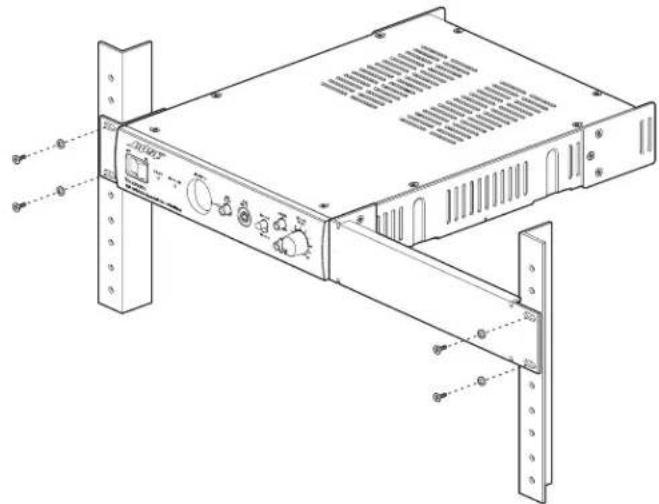
- Mount amplifier in a rack with four (4) rack screws and washers (not included).
Mounting two amplifiers
- Remove rear rack ears from both amplifiers where they will meet in the middle. Then place the amplifiers upside-down on a flat, level surface on a protective covering to avoid scratching the top of the chassis.
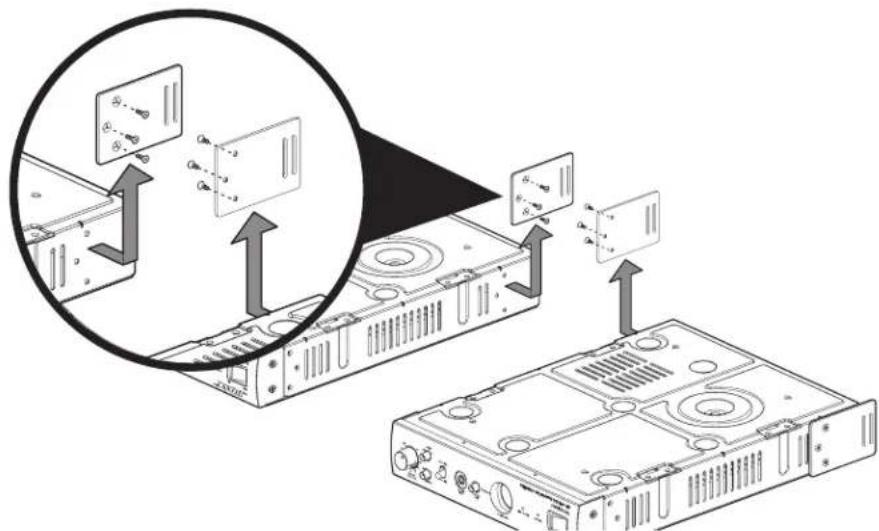
- Attach a short rack ear to one side of each amplifier chassis with three (3) included screws.
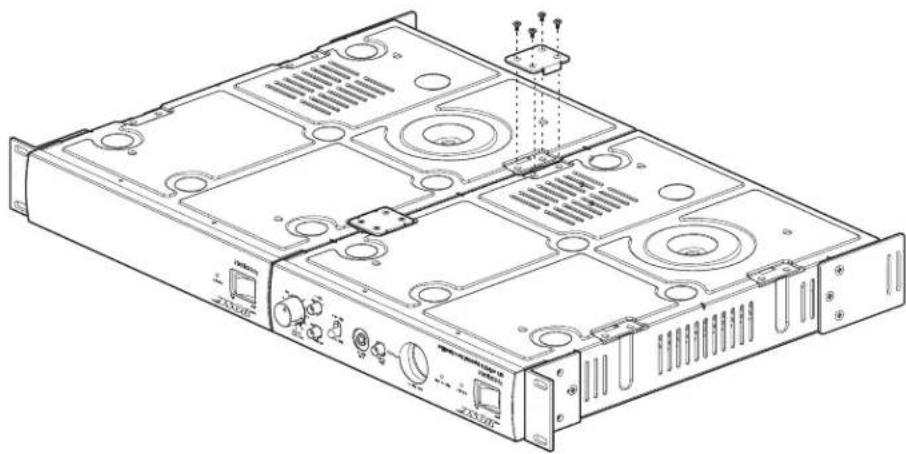
- Place the amplifiers side by side and attach the two (2) link brackets to the amplifier chassis with four (4) included screws each.
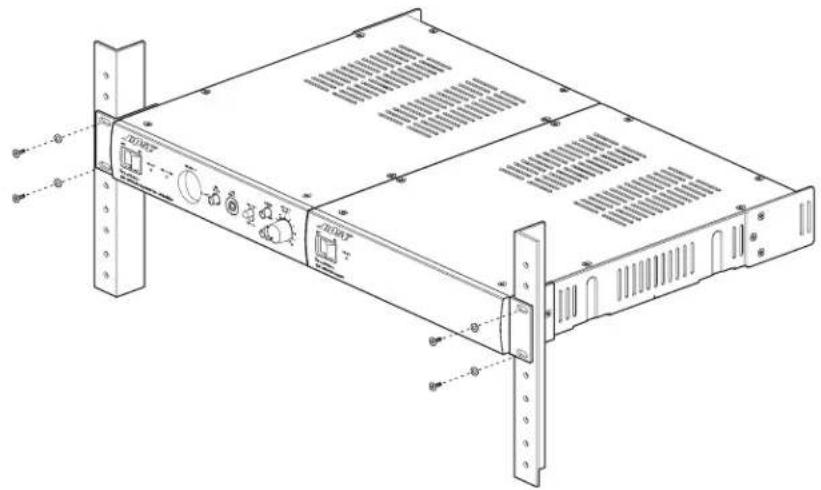
- Mount amplifier in rack with four (4) rack screws and washers (not included).
Using the rear rack ears for strain relief
The slots on the rear rack ears can be used to provide strain relief with standard wire ties.
Spacing requirements for rack-mounted amplifiers
Allow 1RU spacing above and below rack-mounted amplifiers to ensure sufficient spacing for ventilation. Additionally, the temperature of the rack should be controlled to ensure that amplifiers are not exposed to temperatures exceeding 40^ (104^) .
Troubleshooting
| Problem Solution | |
| No power • Turn on power. Blue | LED on front-panel will be visible when power is on. • Make sure the power cord is plugged in. • Try a different AC outlet that is working with another piece of equipment. |
| Power is on, but no sound • Make sure the input source is turned on. • Verify that there is an input signal from the source. • Check the cable connections from the source to the amplifier. • Ensure the desired source (A/B) is selected on the front panel. • If a user interface is connected to the Remote connector on the rear panel, make sure the desired source (A/B) is selected on user interface (user interface overrides the front-panel source select). • Make sure the Master Level control is turned up. • If a user interface is connected to the Remote connector on the rear panel, make sure the volume control on the user interface is turned up (user interface overrides the front-panel Master Level control). • Make sure a 1/8" (3.5 mm) TRS input cable is not connected to the Aux Input. The Aux Input has a mechanical override feature so if an input cable is connected to it the selected Input A/B source will be automatically overridden - even if the Aux Input audio source is not playing or connected. • If a contact closure is connected to the Mute connector on the rear panel, check the switch to ensure the mute function has not been triggered. • If a source is connected to the Page connector on the rear panel, make sure it has not been triggered. • Make sure loudspeakers are connected properly. • Check that loudspeaker taps are set correctly. • Check that the amplifier has adequate ventilation. Improper ventilation could cause the amplifier to go into protection mode and no audio will be heard. • Ensure that the output wiring is correct. A short circuit will cause the amplifier to go into protection mode and no audio will be heard. | |
| Power is on, but sound is low • Verify that the audio input source output is turned up to a nominal level. • Check the cable connections from the source to the amplifier. • Increase input level of source with Gain controls on amplifier. Turn Gain knob up until you start seeing red Input Clip LED on front-panel. Then turn Gain down until red LED Input Clip does not engage. • Make sure Output Trim controls on amplifier are not turned down too much. • If a user interface is connected to the Remote connector on the rear panel, make sure the volume control on the user interface is turned up (user interface overrides the front-panel Master Level control). | |
| Sound is distorted • Verify that the input Clip red LED on the front-panel is not lit. If LED is red, reduce the source output level or reduce the input gain. • If the input source signal is clean, verify that the loudspeakers are not overdriven or damaged. Check the loudspeaker tap setting. | |
| Unnatural sound • Verify that the proper EQ preset is selected for the loudspeakers being used. Use HPF setting when using loudspeakers other than FreeSpace® DS 16/DS 40 loudspeakers. • Check the Treble and Bass controls on the front-panels. • Verify that the loudspeakers are wired correctly (+ to + and - to -). | |
AC Current Draw and Thermal Dissipation Information
| IZA 250-LZ, AC Current Draw and Thermal Dissipation | |||||||
| Test Signal & Power Level | Load Configuration(Note: Both IZA channels driven) | Total Audio Output, W | 120VAC 60Hz.Line Current, A | 230VAC 50Hz.Line Current, A | Thermal Dissipation, Max | ||
| Watts BTU/hr. kCal/hr. | |||||||
| Power On, Idling | 0 0.23 0 | 16 37 127 32 | |||||
| 1/8th Rated PowerIEC65 Bandlimited Pink Noise | 8 Ω / Ch 6 0.40 0.23 | 5 153 39 | |||||
| 6dB Crest FactorDS 16 EQ Enabled | 4 Ω / Ch 13 0.48 0.29 | 53 181 46 | |||||
| 1/3rd Rated PowerIEC65 Bandlimited Pink Noise | 8 Ω / Ch 17 0.63 0.37 | 63 215 54 | |||||
| 6dB Crest FactorDS 16 EQ Enabled | 4 Ω / Ch 33 0.90 0.53 | 87 298 75 | |||||
| ZA 250-LZ, AC Current Draw and Thermal Dissipation | |||||||
| Test Signal & Power Level | Load Configuration(Note: Both IZA channels driven) | Total Audio Output, W | 120VAC 60Hz.Line Current, A | 230VAC 50Hz.Line Current, A | Thermal Dissipation, Max | ||
| Watts BTU/hr. kCal hr. | |||||||
| Power On, Idling | 0 0.18 0 | 14 32 110 28 | |||||
| 1/8th Rated PowerIEC65 Bandlimited Pink Noise | 8 Ω /Ch 6 0.30 0.22 | 42 143 36 | |||||
| 6dB Crest FactorDS 16 EQ Enabled | 4 Ω /Ch 13 0.15 0.25 | 45 154 39 | |||||
| 1/3rd Rated PowerIEC65 Bandlimited Pink Noise | 8 Ω /Ch 17 0.52 0.33 | 55 186 47 | |||||
| 6dB Crest FactorDS 16 EQ Enabled | 4 Ω /Ch 33 0.90 0.50 | 82 279 70 | |||||
| IZA 190-HZ, AC Current Draw and Thermal Dissipation | |||||||
| Test Signal & Power Level | Load Configuration(Note: Both IZA channels driven) | Total Audio Output, W | 120VAC 60Hz.Line Current, A | 230VAC 50Hz.Line Current, A | Thermal Dissipation, Max | ||
| Watts BTU/hr. kCal hr. | |||||||
IZA 250-LZ/190-HZ Specifications
| Power Rating | ||||
| Amplifier Power | Model IZA 250-LZ Model IZA 190-HZ | |||
| 2 x 50 W @ 4 Ω; 2 x 25 W @ 8 Ω | 1 x 90 W 70/100V | |||
| Audio Performance Specifications | ||||
| Frequency Response | Model IZA 250-LZ Model IZA 190-HZ | |||
| 40 Hz - 20 kHz(+0/-3 dB, @ 1 W reference 1 kHz) | 60 Hz - 20 kHz(+0/-3 dB, @ 1 W reference 1 kHz) | |||
| THD + N | ≤0.3% (at full rated power 4 Ω) ≤1% (at full rated power) | |||
| Channel Separation (Crosstalk) | ≤-60 dB (below rated power, 1 kHz) ≤-60 dB (below rated power, 1 kHz) | |||
| Dynamic Range | 88 dB | 88 dB | ||
| Audio Inputs | ||||
| Input Channels | Line Inputs Mic/Line Input Page Input Aux Input | |||
| 2 (unbalanced line) 1(balanced mic/line) 1 (balanced mic) 1 (unbalanced line) | ||||
| Input Connectors | Stereo RCA | Combo XLR - 1/4" (6.5mm) TRS | 4-pin Euroblock 1/8" (3.5 mm) TRS | |
| Input Range | -10 dBV - +10 dBV -60 dBV - +10 dBV -60 dBV - +10 dBV 0 dBV - +10 dBV | |||
| Adjustment Range | -20 dB - +20 dB | 0 dB - +50 dB | 0 dB - +50 dB | Fixed |
| Input Impedance | 20 kΩ | 2 kΩ | 2 kΩ | 20 kΩ |
| Max Input Level | +10 dBV | +10 dBV | +10 dBV | +10 dBV |
| Sensitivity | N/A | N/A | N/A | N/A |
| Nominal Input Level | 0 dBV | -40 dBV | -40 dBV | 0 dBV |
| Audio Outputs | ||||
| Outputs | Amplifier Outputs(IZA 250-LZ) | Amplifier Outputs(IZA 190-HZ) | Auxiliary Outputs | |
| 2 | 1 | 1 (unbalanced) | ||
| Connectors, Output | 2-terminalbarrier strip | 3-pin invertedEuroblock | Stereo RCA | |
| Output Impedance | 4 Ω | N/A | 400 Ω | |
| Nominal Output Level | 2 x 50 W @ 4 Ω;2 x 25 W @ 8 Ω | 1 x 90 W 70/100V | 0 dBV (max) | |
| Integrated DSP | ||||
| A/D and D/A Converters | 24-bit/48 kHz | |||
| Loudspeaker Presets | FreeSpace® DS 16 and DS 40 loudspeakers, High Pass Filter (HPF) | |||
| Audio Latency | 10.4 ms (Input to Speaker Output or Aux Output) | |||
| Controls and Indicators | |
| LED Status Indicators | Power - blue; Input Clip - red (-3 dBFS) |
| Controls, Front Panel | Power On/Off, Input Select (A/B), Tone Controls (Treble/Bass), Mic/Line Gain, Master Level |
| Controls, Rear Panel | Amplifier Mode DIP Switch, Loudspeaker EQ Preset Selector, Input Gain (A/B/Page Mic), Output Trim |
| Electrical Specifications | |
| Mains Voltage | 100V AC - 240V AC (+/- 10%, 50/60 Hz) |
| AC Power Consumption | 15 W (Idle), 200 W (Max) |
| AC Mains Connector | Standard IEC (C14) |
| Peak Inrush Current | 13.9 Amps (230V/50 Hz), 7.6 Amps (120V/60 Hz) |
| Overload Protection | High temperature, short |
| Physical | |
| Rack Space Units | 1 RU high, half rack wide |
| Dimensions | 12.2" L x 8.4" W x 1.8" H (310 mm x 214 mm x 45 mm) |
| Shipping Weight | 250-LZ: 6.7 lb (3.0 kg), 190-HZ: 9.0 lb (4.1 kg) |
| Product Weight | 250-LZ: 4.8 lb (2.2 kg), 190-HZ: 7.0 lb (3.2 kg) |
| Cooling System | Natural convection |
| General | |
| Inputs (Control) | Remote input for Volume Control with A/B Select User Interface, Mute input for amplifier mating via contact closure |
| Accessories | ZA 250-LZ zone amplifier, ZA 190-HZ zone amplifier, Volume Control with A/B Select User Interface, Rack Mount Kit |
ZA 250-LZ/190-HZ Specifications
| Power Rating | ||
| Amplifier Power | Model ZA 250-LZ Model ZA 190 | HZ |
| 2 x 50 W @ 4 Ω; 2 x 25 W @ 8 Ω | 1 x 90 W 70/100V | |
| Audio Performance Specifications | ||
| Frequency Response | Model ZA 250-LZ Model ZA 190 | HZ |
| 20 Hz - 20 kHz(+0/-3 dB, @ 1 W reference 1 kHz) | 60 Hz - 20 kHz(+0/-3 dB, @ 1 W reference 1 kHz) | |
| THD + N | ≤0.3% (at full rated power 4 Ω) ≤1% (at full rated power) | |
| Channel Separation (Crosstalk) | ≤-60 dB (below rated power, 1 kHz) ≤-60 dB (below rated power, 1 kHz) | |
| Dynamic Range | 88 dB | 88 dB |
| Audio Inputs | ||
| Input Channels | Line Inputs | |
| 1 unbalanced | ||
| Input Connectors | Stereo RCA | |
| Input Range | -10 dBV - +10dBV | |
| Input Impedance | 20 K Ω | |
| Max Input Level | +10 dBV | |
| Nominal Input Level | 0 dBV | |
| Audio Outputs | ||
| Outputs | Model ZA 250-LZ Model ZA 190 | HZ |
| 2 | 1 | |
| Connectors, Output | 2-terminal barrier strip 3-pin invertedEuroblock | |
| Nominal Output Level | 2 x 50 W @ 4 Ω (Min); 2 x 25 W @ 8 Ω 1 x | 90 W 70/100V |
| Controls and Indicators | ||
| LED Status Indicators | Power - blue | |
| Controls, Front Panel | Power On/Off | |
| Controls, Rear Panel | Mono/Stereo Amplifier Mode Switch (ZA 250-LZ only), Output Trim | |
| Electrical Specifications | ||
| Mains Voltage | 100V AC - 240V AC (+/- 10%, 50/60 Hz) | |
| AC Power Consumption | 15 W (Idle), 200 W (Max) | |
| AC Mains Connector | Standard IEC (C14) | |
| Peak Inrush Current | 13.9 Amps (230V/50 Hz), 7.6 Amps (120V/60 Hz) | |
| Overload Protection | High temperature, short | |
| Physical | |
| Rack Space Units | 1 RU high, half rack wide |
| Dimensions | 11.9" L x 8.4" W x 1.8" H (302 mm x 214 mm x 45 mm) |
| Shipping Weight | 250-LZ: 6.4 lb (2.9 kg), 190-HZ: 8.6 lb (3.9 kg) |
| Product Weight | 250-LZ: 4.4 lb (2.0 kg), 190-HZ: 6.7 lb (3.0 kg) |
| Cooling System | Natural convection |
| General | |
| Accessories | Rack Mount Kit |
Visit us on the web at pro.Bose.com for more information, including specifications, technical literature, product warranty, parts and accessories, and global support contact information.
Americas
(USA, Canada, Mexico, Central America, South America)
Bose Corporation
The Mountain
Framingham, MA 01701 USA
Corporate Center: 508-879-7330
Americas Professional Systems,
Technical Support: 800-994-2673
Australia
Bose Pty Limited
Unit 3/2 Holker Street
Newington NSW Australia
61287379999
Belgium
Bose N.V. / S.A
Limesweg 2,03700
Tongeren, Belgium
012-390800
China
Bose Electronics (Shanghai) Co Ltd
25F, L'Avenue
99 Xianxia Road
Shanghai, P.R.C. 200051 China
86 21 6010 3800
France
Bose S.A.S
1 Matheson Street, Causeway Bay, Hong Kong
852 2123 9000
India
Bose Corporation India Private Limited
Salcon Aurum, 3rd Floor
Plot No. 4, Jasola District Centre
New Delhi-110025,India
91 11 43080200
Italy
Bose SpA
Centro Leoni A - Via G. Spadolini
5 20122 Milano, Italy
39-02-36704500
Japan
Bose Kabushiki Kaisha
Sumitomo Fudosan Shibuya Garden Tower 5F
16-17, Nanpeidai-cho
Shibuya-Ku, Tokyo, 150-0036, Japan
TEL 81-3-5489-0955
www.bose.co.jp
The Netherlands
Bose BV
1 Ambley Green, Gillingham Business Park
KENT ME8 ONJ
Gillingham, England
0870-741-4500
See website for other countries
BOSE Better sound through research

© 2015 Bose Corporation. All rights reserved.
The Mountain, Framingham, MA 01701-9168 USA
pro.Bose.com
AM350900 Rev. 02