VVH33F3151 - Oven VIVA - Free user manual and instructions
Find the device manual for free VVH33F3151 VIVA in PDF.


| Brand | VIVA |
| Model | VVH33F3151 |
| Product type | Built-in oven |
| Dimensions (H x W x D) | Approx. 59.5 x 59.5 x 55 cm |
| Volume | Approx. 71 L |
| Net weight | Approx. 35 kg |
| Power supply | 220-240 V / 50-60 Hz / 16 A |
| Maximum power | Approx. 3.5 kW |
| Cooking modes | 3D hot air, top and bottom heat, grill with hot air, large area grill, bottom heat, lighting, pyrolysis |
| Temperature range | 30 to 270 °C |
| Grill levels | 3 levels (1=low, 2=moderate, 3=intense) |
| Self-cleaning | Pyrolysis with 3 levels (low, moderate, intense) |
| Timer functions | Timer, cooking duration, delayed end cooking, clock |
| Rapid heating | Yes (for temperatures > 100°C) |
| Provided accessories | Grid, flat enamelled baking tray, deep enamelled drip pan |
| Number of shelf levels | 5 |
| Safety | Automatic door lock (pyrolysis), automatic shut-off, child safety (supervision required) |
| Interior lighting | Bulb 25 W (socket E14, resistant to 300°C) |
| Removable and detachable door | Yes, with detachable glass panels |
| Maintenance | Pyrolysis, manual cleaning with soapy water |
| Energy class | Not specified (according to EN60350) |
| Repairability | Bulb and protective glass replaceable by user; other repairs by authorized service center |
Frequently Asked Questions - VVH33F3151 VIVA
User questions about VVH33F3151 VIVA
0 question about this device. Answer the ones you know or ask your own.
Ask a new question about this device
Download the instructions for your Oven in PDF format for free! Find your manual VVH33F3151 - VIVA and take your electronic device back in hand. On this page are published all the documents necessary for the use of your device. VVH33F3151 by VIVA.
USER MANUAL VVH33F3151 VIVA
Important safety information 26
Causes of damage 28
Your new oven. 28
Control panel 28
Function control knob. 29
Sensors and display panel 29
Sensors to change the set values. 29
Inside the oven 29
Your accessories
inserting the accessories 30
Before using the oven for the first time. 30
Setting the time 30
Heating the oven. 30
Cleaning the accessories. 30
Programming the oven 31
Type of heating and temperature 31
Rapid heating 31
Setting the time functions 31
Timer 31
Cooking time 32
End time. 32
Time 33
Changing the basic settings 33
Automatic shut off 33
Self-cleaning 34
Important notes 34
Before using the self-clean function. 34
Setting 34
After using the self-clean function 35
Care and cleaning. 35
Cleaning products 35
Light. 35
Removing and refitting the wire shelves or left and right hand
side rails 36
Unhooking and hanging the oven door 36
Fitting and removing the glass panels 37
Troubleshooting 38
Troubleshooting table 38
Changing the oven bulb. 38
Protective glass panels 38
After-sales service. 39
E number and FD number 39
Energy and environment tips 39
Saving energy. 39
Environmentally-friendly disposal of waste 39
Tested for you in our cooking studio. 39
Cakes and pastries 39
Suggestions and practical advice for baking 41
Meat, poultry, fish 42
Tips for roasting and grilling 44
Au gratin dishes, soufflés, toast 44
Ready-made products 45
Special dishes. 46
Defrosting. 46
Drying. 46
Jam making 46
Acrylamide in food 47
Test dishes 48
Baking. 48
Grilling 48
Important safety information
Read these instructions carefully. Only then will you be able to operate your appliance safely and correctly. Retain the instruction manual and installation instructions for future use or for subsequent owners.
This appliance is only intended to be fully fitted in a kitchen. Observe the special installation instructions.
Check the appliance for damage after unpacking it. Do not connect the appliance if it has been damaged in transport.
Only a licensed professional may connect appliances without plugs. Damage caused by incorrect connection is not covered under warranty.
This appliance is intended for domestic use only. The appliance must only be used for the preparation of food and drink. The
appliance must be supervised during operation. Only use this appliance indoors.
This appliance may be used by children over the age of 8 years old and by persons with reduced physical, sensory or mental capacity or by persons with a lack of experience or knowledge if they are supervised or are instructed by a person responsible for their safety how to use the appliance safely and have understood the associated hazards.
Children must not play with the appliance. Children must not clean the appliance or carry out general maintenance unless they are at least 8 years old and are being supervised.
Keep children below the age of 8 years old at a safe distance from the appliance and power cable.
Always slide accessories into the cooking compartment correctly. See "Description of accessories in the instruction manual.
Risk of fire!
- Combustible items stored in the cooking compartment may catch fire. Never store combustible items in the cooking compartment. Never open the appliance door if there is smoke inside. Switch off the appliance and unplug it from the mains or switch off the circuit breaker in the fuse box.
A draught is created when the appliance door is opened. Greaseproof paper may come into contact with the heating element and catch fire. Do not place greaseproof paper loosely over accessories during preheating. Always weight down the greaseproof paper with a dish or a baking tin. Only cover the surface required with greaseproof paper. Greaseproof paper must not protrude over the accessories.
Risk of burns!
The appliance becomes very hot. Never touch the interior surfaces of the cooking compartment or the heating elements. Always allow the appliance to cool down. Keep children at a safe distance.
- Accessories and ovenware become very hot. Always use oven gloves to remove accessories or ovenware from the cooking compartment.
- Alcoholic vapours may catch fire in the hot cooking compartment. Never prepare food containing large quantities of drinks with a high alcohol content. Only use small quantities of drinks with a high alcohol content. Open the appliance door with care.
Risk of scalding!
The accessible parts become hot during operation. Never touch the hot parts. Keep children at a safe distance.
- When you open the appliance door, hot steam may escape. Open the appliance door with care. Keep children at a safe distance.
Water in a hot cooking compartment may create hot steam. Never pour water into the hot cooking compartment.
Risk of injury!
Scratched glass in the appliance door may develop into a crack. Do not use a glass scraper, or sharp or abrasive cleaning aids or detergents.
Risk of electric shock!
Incorrect repairs are dangerous. Repairs may only be carried out by one of our trained after-sales engineers. If the appliance is faulty, unplug the mains plug or switch off the fuse in the fuse box. Contact the after-sales service.
- The cable insulation on electrical appliances may melt when touching hot parts of the appliance. Never bring electrical appliance cables into contact with hot parts of the appliance.
Penetrating moisture may cause an electric shock. Do not use any high-pressure cleaners or steam cleaners.
- When replacing the cooking compartment bulb, the bulb socket contacts are live. Before replacing the bulb, unplug the appliance from the mains or switch off the circuit breaker in the fuse box.
A defective appliance may cause electric shock. Never switch on a defective appliance. Unplug the appliance from the mains or switch off the circuit breaker in the fuse box. Contact the after-sales service.
Risk of fire!
- Loose food residues, grease and meat juices may catch fire during the Self-cleaning cycle. Remove coarse dirt from the cooking compartment and from the accessories before every Self-cleaning cycle.
The appliance will become very hot on the outside during the Self-cleaning cycle. Never hang combustible objects, e.g. tea towels, on the door handle. Do not place anything against the front of the oven. Keep children at a safe distance.
Risk of burns!
- The cooking compartment will become very hot during the Self-cleaning cycle. Never open the appliance door or move the locking latch by hand. Allow the appliance to cool down. Keep children at a safe distance.
The appliance will become very hot on the outside during the Self-cleaning cycle. Never touch the appliance door. Allow the appliance to cool down. Keep children at a safe distance.
Risk of serious damage to health!
The appliance will become very hot during the Self-cleaning cycle. The non-stick coating on baking trays and tins is destroyed and noxious gases are released. Never let non-stick baking trays and tins go through the Self-cleaning cycle. Only enamelled accessories may be cleaned at the same time.
Causes of damage
Caution!
Accessories, foil, greaseproof paper or ovenware on the cooking compartment floor: do not place accessories on the cooking compartment floor. Do not cover the cooking compartment floor with any sort of foil or greaseproof paper. Do not place ovenware on the cooking compartment floor if a temperature of over 50^ has been set. This will cause heat to accumulate. The baking and roasting times will no longer be correct and the enamel will be damaged.
Water in a hot cooking compartment: do not pour water into the cooking compartment when it is hot. This will cause steam. The temperature change can cause damage to the enamel.
Moist food: do not store moist food in the cooking compartment when it is closed for prolonged periods This will damage the enamel.
Fruit juice: when baking particularly juicy fruit pies, do not pack the baking tray too generously. Fruit juice dripping from the baking tray leaves stains that cannot be removed. If possible, use the deeper universal pan.
Cooling with the appliance door open: only allow the cooking compartment to cool when it is closed. Even if the appliance door is only open a little, front panels of adjacent units could be damaged over time.
- Very dirty door seal: If the door seal is very dirty, the appliance door will no longer close properly when the appliance is in use. The fronts of adjacent units could be damaged. Always keep the door seal clean.
- Appliance door as a seat, shelf or worktop: Do not sit on the appliance door, or place or hang anything on it. Do not place any cookware or accessories on the appliance door.
- Inserting accessories: depending on the appliance model, accessories can scratch the door panel when closing the appliance door. Always insert the accessories into the cooking compartment as far as they will go.
- Carrying the appliance: do not carry or hold the appliance by the door handle. The door handle cannot support the weight of the appliance and could break.
Your new oven
We will now describe your new oven. This chapter explains the functions of the control panel and its individual elements. Information is also provided about the oven's accessories and internal components.
Control panel
Below is a general overview of the control panel. The display panel cannot show all the symbols at the same time. Elements may vary according to the model.
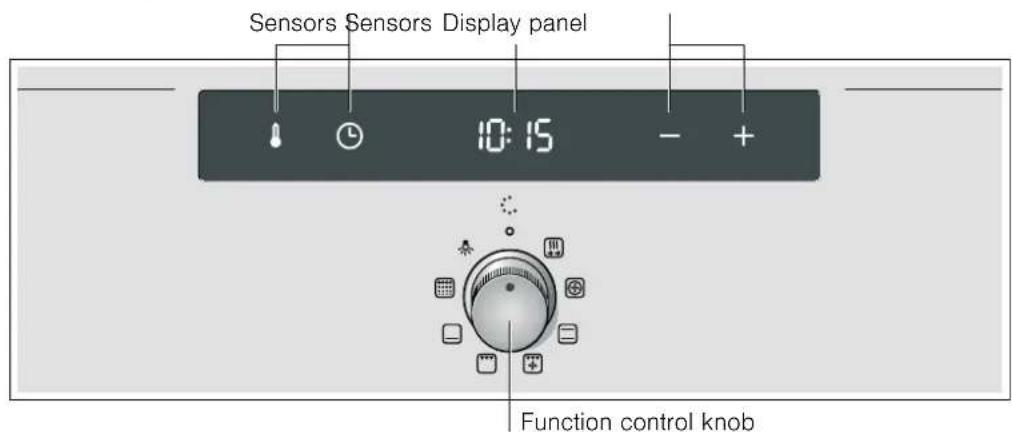
Retractable control knob
The control knob is retractable on some ovens. The control knob is retracted or returned by pressing it when at the zero setting.
Sensors
Do not press the sensors forcefully. Only press the relevant symbol.
Function control knob
The function control knob is used to select the type of heating.
| Setting Use | |
| Zero setting The oven is off. | |
| Rapid heating The oven reaches the programmed temperature very quickly. | |
| 3D hot air* For cakes and pastries. You can bake cakes and pastries on three levels. A fan located on the rear wall of the oven disperses the heat evenly. | |
| Top and bottom heating* | For cakes, gratin dishes, and lean meat roasts, e.g. veal or game, on one level. The heat is provided by the bottom and top heating elements. |
| Grill with hot air | For roasting joints of meat, poultry and fish. The grill heating element and the fan switch on and off alternately. The fan circulates the heat generated by the grill around the food. |
| Large surface grill | For grilling steaks, sausages, fish and toasting bread. The entire surface below the grill heating element is heated. |
| Bottom heating | Confits, baking and cooking au gratin. The heat comes from the bottom heating element. |
| Self-cleaning Using the self-cleaning function to clean the inside of the oven. The oven heats to clean itself. | |
Light For turning on the oven light.
* Type of heating used to determine the appliance's energy efficiency rating according to EN60350.
When a heating type is selected, the -- symbol is displayed on the display panel.
Sensors and display panel
The sensors are used to set different functions. The set values are shown on the display panel.
| Sensor Sensor function | |
| Temperature Select the temperature and grill power or cleaning level. | |
| Time functions | Select the timer ▷, the cooking time ▷l, the end time ▷l and the actual time ▷. |
| Minus Reduces programmed values. | |
| Plus Increases programmed values. | |
The symbol for the time function activated lights up on the display panel.
Sensors to change the set values
With the + or - sensors all fixed and recommended settings can be changed.
- = Increase programmed values.
- = Reduce programmed values.
| Ranges | ||
| 30-270 | Temperature range | The temperature inside the oven in °C. |
| 1-3 Grill power | The different levels for the large surface grill □. | |
| 1 = level 1, low | ||
| 2 = level 2, medium | ||
| 3 = level 3, high | ||
| Cleaning levels | Self-cleaning levels □. | |
| 1 = level 1, low | ||
| 2 = level 2, medium | ||
| 3 = level 3, high | ||
| 1 sec. - 23:59 h. | Cooking time. | |
| 1 sec. - 23:59 h. | Time set on the timer. | |
Heating symbol
While the oven is heating up, the symbol will be lit up on the display panel. When the oven is ready for your dish and maintains its temperature the symbol will switch off.
The symbol never lights up for grill power and cleaning levels.
Inside the oven
There is a light inside the oven. A fan prevents the oven from overheating.
Light
The oven light remains on while the oven is working. The light switches off at set temperatures of less than 60^ and during the clean function. This ensures optimum precision control.
However, the light can be turned on without the oven being on by setting the function control knob to
Fan
The fan can be turned on and off as necessary. The hot air escapes through the top of the door. Warning! Do not cover the vent. The oven could overheat.
The fan remains on for a certain length of time after the oven has been switched off so that it can cool down more quickly.
Your accessories
The accessories supplied with your appliance are suitable for making many meals. Ensure that you always insert the accessories into the cooking compartment the right way round.
There is also a selection of optional accessories, with which you can improve on some of your favourite dishes, or simply to make working with your oven more convenient.
inserting the accessories
The accessories can be placed inside the oven on 5 different levels. Always insert them as far as possible so that the accessories do not touch the door glass.
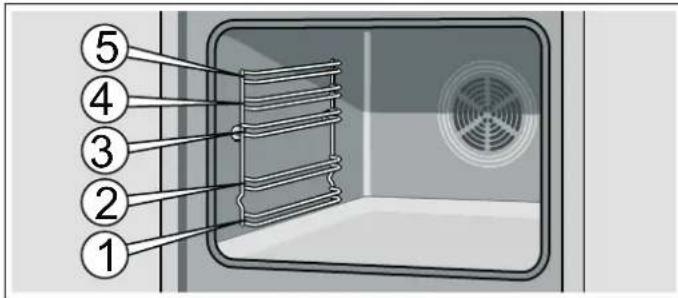
The accessories can be removed halfway until they are secured. This makes it easy to remove food.
When inserting an accessory in the oven, make sure the curvature is at the rear. This is the only way to ensure it fits perfectly.
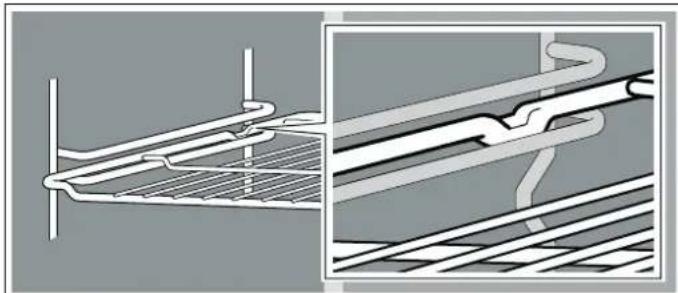
Depending on the equipment, if the appliance has guide rails, these will interlock slightly when fully removed. This means the accessory can be easily inserted. To unlock, reinsert the guide rails in the oven exerting slight pressure.
Note: Accessories may deform as they heat up. This deformation will disappear when they cool. This does not affect the normal operation.
Your oven is supplied with only some of the following accessories.
Accessories may be purchased from the Technical Assistance Service or from specialist retailers. Please refer to the sales catalogue for available accessories.
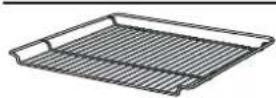
Wire shelf
For cookware, baking tins, roasts, grilled items and frozen meals.
Insert the wire shelf with the open end facing the oven door and the curvature downwards
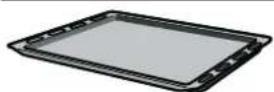
Flat enamel oven tray
For cakes, pastries and biscuits.
Place the tray in the oven with its raised lip facing the door.
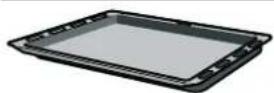
Universal deep enamel tray
For juicy cakes, pastries, frozen meals and large joints for roasting. This can also be used as a tray to collect the fat when roasting directly on the wire shelf.
Place the tray in the oven with its raised lip facing the door.
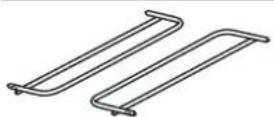
Accessory support
The universal deep tray or the flat oven tray can also be cleaned during the self-clean function.
Insert the accessory to the right and left.
Before using the oven for the first time
In this section, you can find out what you must do before using your oven to prepare food for the first time. First read the section on Safety information.
Setting the time
Once the oven has been connected, the and 0.00 symbols light up on the display panel. Set the clock to the right time.
- Press the sensor.
The display panel displays the time 12.00
-
Set the time with the + or - sensors.
-
Confirm the time with the sensor.
The programmed time is displayed after a few seconds.
Heating the oven
To remove the "new" smell, heat the oven empty with the door closed. The most effective option is to heat the oven for one hour with the top and bottom heating elements set at 240^ . Check that no packaging has been left inside the oven.
-
Select top and bottom heating using the function control knob.
-
Press the + sensor until 240^ is displayed on the display panel.
Turn the oven off after one hour. To do this, turn the function control knob to zero.
Cleaning the accessories
Before using the accessories for the first time, clean them thoroughly using a cloth, hot water and a little soap.
Programming the oven
There are different ways to programme the oven. Programming the type of heating, temperature or grill power. The oven can be programmed with the cooking time (duration) and the end time for each dish. For more information, see the chapter Setting the time functions.
Type of heating and temperature
Example in the picture: top and bottom heat at 190^
- Select the type of heating using the function control knob.
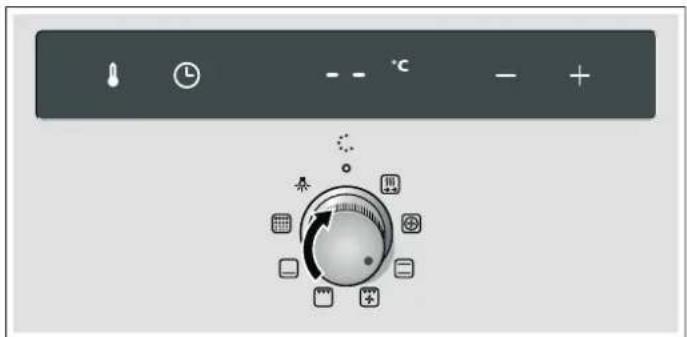
- Set the temperature or required grill power using the + or - sensors.
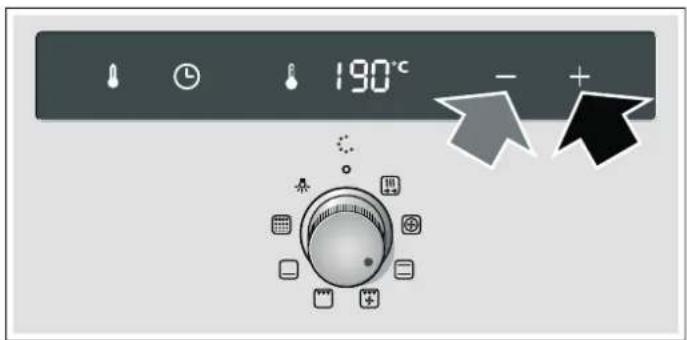
The oven will begin to heat up.
Switching the oven off
Set the function control knob to the zero setting.
Changing the settings
The type of heating and the temperature or grill power may be changed at any time.
Rapid heating
With the rapid heating setting, the oven reaches the programmed temperature very quickly.
Rapid heating must be used for temperatures of more than 100^ .
To ensure uniform cooking, the food must not be put into the oven until rapid heating has been completed.
- Select rapid heating using the function control knob.
- Select the required temperature using the + and - sensors. The 8 symbol lights up on the display panel. The oven will begin to heat up.
End of rapid heating
A signal will sound, the 号 symbol will go out. Place the food in the oven and select the required function and temperature.
Cancelling rapid heating
Set the function control knob to the zero setting. The oven switches off.
Note: With the rapid heating function you cannot programme the cooking time duration.
Setting the time functions
This oven has various time functions. The sensor activates the menu and moves through the different functions. The time symbols remain lit up while settings are programmed. A time function that has already been programmed can be modified with the + or - sensors.
Timer
The timer works independently of the oven. The timer has its own signal. You can therefore distinguish whether the time set for the timer or the automatic oven shut-off have finished (cooking time).
- Press the sensor.
The symbol lights up on the display panel.
- Programme the timer using the + or - sensors.
Sensor suggested value + = 10 minutes.
Sensor suggested value = -5 minutes.
The programmed time is shown after a few seconds. The time set for the timer starts to count down. The symbol lights up on the display panel and the time elapsed is displayed.
The time set for the timer has elapsed
A signal will sound. The display panel will show 00:00. Switch off the timer using the sensor.
Changing the time set on the timer.
Change the time set for the timer using the+ or - sensors. The altered time is shown after a few seconds.
Cancelling the timer
When the oven switches off, the timer continues working. Resetting the timer to 00:00 with the - sensor. The timer switches off.
Viewing the time settings
If several time functions are programmed, the corresponding symbols light up on the display panel.
To view the timer, the cooking time ,the end time or the time, press the sensor repeatedly until the required symbol lights up. The corresponding value will be shown for a few seconds on the display panel.
Cooking time
The oven allows you to set the cooking time for each type of food. The oven switches off automatically when the cooking time has elapsed. This avoids interrupting other tasks to switch the oven off or exceeding the cooking time by mistake.
Example in the picture: Cooking time: 45 minutes.
- Select the type of heating using the function control knob.
- Press the sensor twice.
The display panel will show 00:00 and the cooking time symbol
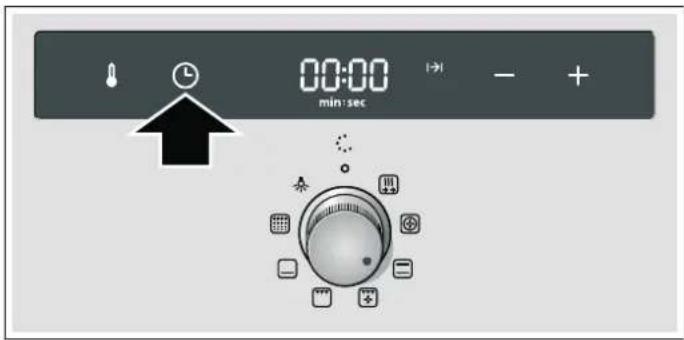
- Programme the cooking time using the ^+ or sensors. Sensor suggested value + = 30 minutes. Sensor suggested value - = 10 minutes.
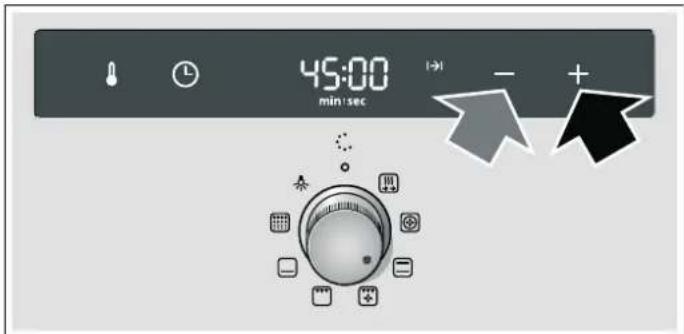
- Press the sensor.
Set the temperature or required grill power using the + or - sensors.
The oven will switch on after a few seconds. The programmed temperature will be shown on the display panel and the I→I symbol will light up.
The cooking time has finished.
A signal will sound. The oven will stop heating. The display panel will show 00:00. Press the sensor twice. A new cooking time can be set with the sensors +or -. Or pressing the sensor and turning the control knob to zero. The oven is off.
Changing the cooking time
Press the sensor twice. Change the cooking time using the + or - sensors.
Cancelling the cooking time
Press the sensor twice. Reset the cooking time to 00:00 with the sensor - . The time has been cancelled.
Viewing the time settings
If several time functions are programmed, the corresponding symbols light up on the display panel.
To view the timer, the cooking time ,the end time 1 or the time 已 press the sensor repeatedly until the required symbol lights up. The corresponding value will be shown for a few seconds on the display panel.
End time
The oven allows you to set the time when you want the food ready. In this case the oven switches on automatically and switches off at the set time. For example, the food may be placed in the oven in the morning and the oven set so that it is ready at midday.
Ensure that the food will not go off if it is in the oven for too long.
Example in the picture: It is now 10:30 AM, the cooking time is 45 minutes and the oven should switch off at 12:30 PM.
1.Set the function control knob.
2. Press the sensor twice.
3. Programme the cooking time using the + or - sensors.
4. Press the sensor.
The time when the dish will be ready and the end time symbol will be shown on the display panel.
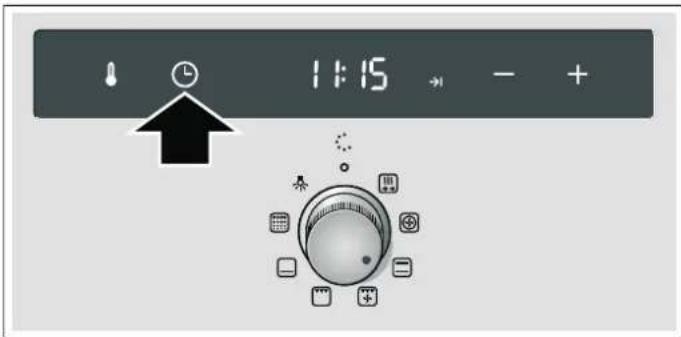
- Delay the end time using the + or - sensors.
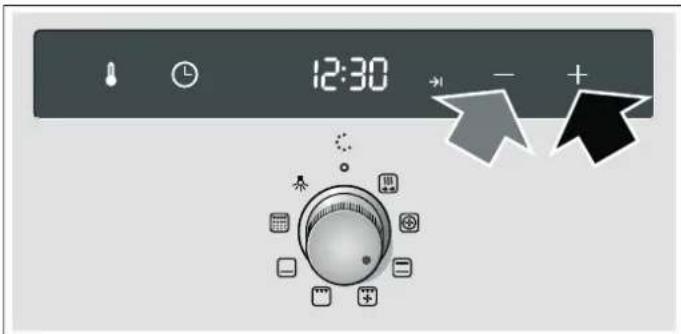
- Press the sensor.
Set the temperature or required grill power using the + or - sensors.
The programmed temperature and the symbol will be shown on the display panel, and the oven will be set to standby. When the oven turns on, the programmed temperature and the symbol will be shown. The symbol turns off.
The cooking time has finished
A signal will sound. The oven will stop heating. The display panel will show 00:00. Press the sensor twice. A new cooking time can be set with the sensors + or -. Or pressing the sensor and turning the control knob to zero. The oven is off.
Changing the end time
Press the sensor three times. Change the end time using the ^+ or-sensors. The altered time is shown after a few seconds. Do not change the end time if the cooking time has already started to count down. The final result may not be the same.
Cancelling the end time
Press the sensor three times and reset the end time to the current time with the - sensor. The oven switches on.
Viewing the time settings
If several time functions are programmed, the corresponding symbols light up on the display panel.
To view the timer, the cooking time ,the end time 1 or the time 日 press the sensor repeatedly until the required symbol lights up. The corresponding value will be shown for a few seconds on the display panel.
Time
Once the oven has been connected or after a power cut, the and 0: symbols light up on the display panel. Set the clock to the right time.
- Press the sensor.
The time is displayed 12:00. - Set the time with the+ or - sensors.
- Confirm the time with the sensor.
The programmed time is displayed after a few seconds.
Changing the time
No other time function must be programmed, the oven must be switched off.
- Press the sensor twice.
The display panel displays
- Set the time with the + or - sensors.
- Confirm the time with the sensor.
The programmed time is displayed after a few seconds.
Hiding the time
The time can be hidden. See the Modifying basic settings chapter.
Changing the basic settings
This oven has different basic settings. The settings can be adapted to the user's own needs.
| Basic setting Option 0 Option 1 Option 2 Option 3 | |||||
| c1 | Duration of signal after the cooking time or the time set on the timer has elapsed | - approx. 10 sec approx. 2 min* approx. 5 min | |||
| c2 | Time indicator no yes* | - | - | ||
| c3 | Time until a setting is applied | - | approx. 2 sec | approx. 4 sec* | approx. 10 sec |
| c5 | The shelf support rails have been refitted. | no | yes | - | - |
| c6 | Select default settings for all values. | no* | yes | - | - |
| * Default setting | |||||
The oven must be switched off.
- Press the sensor for approximately 4 seconds.
The display panel will show the current basic setting for the duration of the signal, e.g., c Option 2. -
Change the basic setting using the + or - sensors.
-
Confirm with the senso
The display panel shows the following basic setting.
The sensor allows you to run through all the settings and the +or - sensors allow you to modify them.
- Finally, press the sensor for approximately 4 seconds.
All basic settings have been applied.
The basic settings can be changed again at any time.
Automatic shut off
If the settings of the appliance are not changed for several hours it is automatically shut off. The oven will stop heating. This depends on the temperature or grill power selected.
Automatic shut off is activated
A signal will sound. The display shows F_B . The oven will stop heating.
Turn the function control knob to the zero setting. The oven switches off.
Cancelling the automatic shut off function
To avoid triggering the automatic shut off, a cooking time must be set. The oven will heat until this time is up.
Self-cleaning
During the self-cleaning function, the oven heats to about 500^ . In this way, baking and cooking remains are burned and only ash remains have to be cleaned from the oven.
There are three cleaning levels available.
Level Cleaning level Duration
| i | mild approx. 1 hour, 15 minutes |
| 2 | medium approx. 1 hour, 30 minutes |
| 3 | intense approx. 2 hours |
The more intense and old the dirt, the higher the self cleaning level used. The inside of the oven only has to be cleaned once every two or three months. Complete cleaning requires approximately 2.5 - 4.7 kilowatt-hours.
Important notes
For your safety, the oven door locks automatically. The oven door cannot be opened again until the cooking compartment has cooled slightly and the padlock symbol for the locking mechanism disappears.
The oven light in the cooking compartment does not come on during Self-cleaning.

Risk of burns!
The cooking compartment will become very hot during the Self-cleaning cycle. Never open the appliance door or move the locking latch by hand. Allow the appliance to cool down. Keep children at a safe distance.
The appliance will become very hot on the outside during the Self-cleaning cycle. Never touch the appliance door. Allow the appliance to cool down. Keep children at a safe distance.

Risk of fire!
The appliance will become very hot on the outside during the Self-cleaning cycle. Never hang flammable objects, e.g. tea towels, on the door handle. Do not place anything against the front of the appliance.
Before using the self-clean function
The oven must be empty. Remove accessories, pans, guides or left and right hand side rails. See the Cleaning and Care chapter to release the guides or left and right hand side rails.
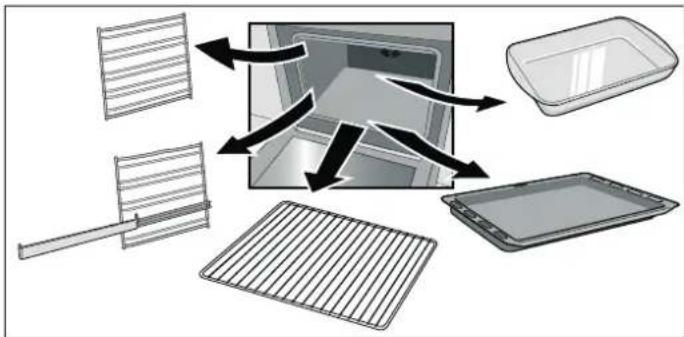
Clean the oven door and the side surfaces inside the oven around the area with seals.

Risk of fire!!
The remains of food and grease as well as roasting juices can catch fire. Use a damp cloth to clean the inside of the oven and the accessories that will be cleaned inside the oven.
Cleaning of the accessories
The wire shelves or left and right hand side rails are not suitable for self cleaning. Remove these from the oven.
For optimum cleaning of the oven interior, it is recommended that the self-clean function is not used with the trays. However, with the accessory support, the universal deep enamel tray or the flat enamel oven tray can also be cleaned using the self-clean function. Only clean one accessory at a time.
The shelf should not be cleaned using the self-clean function.
If your oven does not have this support, it can be purchased from the Technical Assistance Service or over the Internet by quoting part number 466546.
The accessory support is inserted to the right and left.
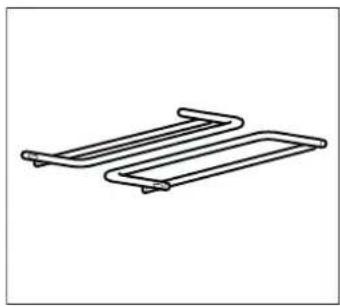
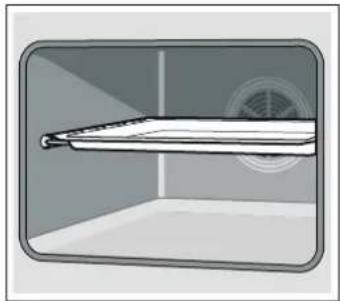
Use water to clean food remains, oil and roasting juices from the accessories.
Place the universal deep tray or the flat oven tray on the support.

Significant health risks!
Do not place non-stick baking tins or trays in the oven during self-cleaning. The intense heat removes the non-stick surface and creates toxic gases.
Setting
Once the cleaning level has been selected, set the oven.
- Select the self-cleaning function with the function control knob
2.Set the required cleaning level using the ^+ or-sensors.
The display panel will show the cleaning level and the symbol. Self-cleaning starts within a few seconds.
The oven door locks shortly after the function has started. The display panel displays 0 . Only when the 0 symbol turns off can the oven door be opened again.
Self-cleaning has ended.
The display panel will show 00:00. The oven will stop heating. Turn the function control knob to the zero setting. The oven switches off. The oven door can be opened again when the symbol on the display panel turns off.
Changing the cleaning level
The cleaning level cannot be changed once it has started.
Stopping the self-cleaning
Turn the function control knob to the zero setting. The oven switches off. The oven door can be opened again when the symbol on the display panel turns off.
Delaying the end time
The oven allows you to programme the self-cleaning end time. Self-cleaning can therefore be programmed at night for example, leaving the oven free for use during the day.
Programme as described in section 1 and 2. Before starting the self-cleaning, press the sensor three times and delay the end time with the ^+ or sensors.
The oven is set to standby. The display panel will show the cleaning level and the symbol. When self-cleaning starts, the cleaning level and the symbol are shown. The symbol switches off.
Viewing the time settings
To view the duration of the cleaning level or the end time of the self-cleaning press the sensor repeatedly until the required symbol lights up. The corresponding value will be shown for a few seconds on the display panel.
After using the self-clean function
Once the inside of the oven has cooled, clean the ash remains using a damp cloth.
Care and cleaning
If cleaned and properly cared for, your oven will keep its bright appearance and operating performance for many years to come. Advice on how to care for and clean your oven is provided below.
Notes
Different colours may be seen in your front panel due to the various materials used in its manufacture, such as glass, plastic and metal.
Dark patches in the door's glass panel may seem to be dirt but they are in fact reflections from the oven light.
Enamel burns at very high temperatures. This may cause slight discolouration. This is normal and does not affect the oven's operation. The edges of thin baking trays may not be completely enamelled. They may therefore feel slightly rough, although their corrosive protection will be unaffected.
Cleaning products
Follow the indications provided in the table to avoid damaging the various oven surfaces by using unsuitable cleaning products. Do not use
■ abrasive or acidic cleaning products
■ strong products containing alcohol
scourers or hard sponges
high-pressure or steam cleaners.
Wash new dishcloths thoroughly before use.
Zone Cleaning products
| Front panel Hot water and a little soap: Clean with a dishcloth and dry with a soft cloth. Do not use a glass cleaning product or a glass scraper. |
| Stainless steel Hot water and a little soap: Clean with a dishcloth and dry with a soft cloth. Immediately remove any water marks, grease, cornflower or egg white stains since corrosion could occur underneath these marks or stains. Special products for the care of stain- less steel which are suitable for hot sur- faces may be obtained from Technical Assistance Service centres and special- ist retail outlets. Use a very fine soft cloth to apply the cleaning product. |
| Glass panel Glass cleaning products: Clean with a soft cloth. Do not use a glass scraper. |
Zone Cleaning products
| Display Glass cleaning products:Clean with a soft cloth. Do not use alco-hol, vinegar or other abrasive or acidic cleaning products. | |
| Glass panels on oven door | Glass cleaning products:Clean with a soft cloth. Do not use aglass scraper. |
| Door covering Only use products specially for clean-ing stainless steel (these can beobtained from the Technical AssistanceService or from specialist shops). Follower the manufacturer's instructions. | |
| Inside the oven Hot water with a little soap or water andvinegar:Clean with a dishcloth.If very dirty, use a stainless steelscourer or special oven cleaning prod-ucts. These must only be used whenthe oven interior is cold.Whenever possible, use the self-clean-ing function. See the chapter on theSelf-cleaning function. | |
| Glass cover for the oven light | Hot water and a little soap:Clean with a dishcloth. |
| Guides or rails Hot water and a little soap:Soak and clean using a dishcloth orbrush. | |
| Sliding guides Hot water and a little soap:Clean with a dishcloth or a brush. Do not leave this to soak or wash in adishwasher. | |
| Accessories Hot water and a little soap:Soak and clean using a dishcloth orbrush. | |
Light
The oven light can be turned on manually to facilitate cleaning.
Connecting the oven bulb
Turn the function control knob to the position.
The light will come on.
Turning the oven light off
Turn the function control knob to the opposition.
Removing and refitting the wire shelves or left and right hand side rails
The wire shelves or left and right hand side rails can be removed for cleaning. The oven must be cold.
Release the guides or rails
1.Lift the front of the guide or rail and release it (figure A).
- Then pull the guide or rail forwards completely and remove it (figure B).
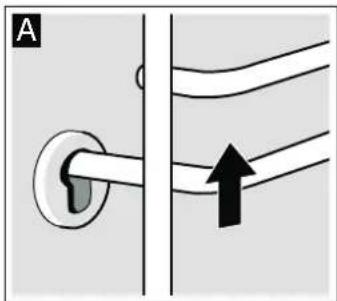
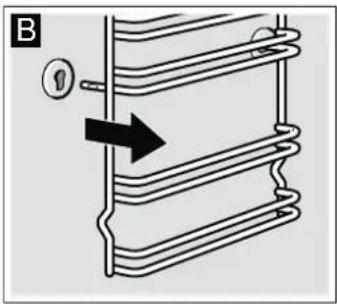
Clean the guides or rails with detergents and a sponge. The use of a brush is recommended for stubborn stains.
Install the wire shelves or rails
-
First insert the shelf or the rail in the rear groove by pushing it back slightly (figure A)
-
then insert it in the front groove (figure B).
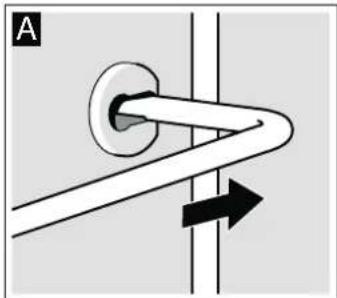
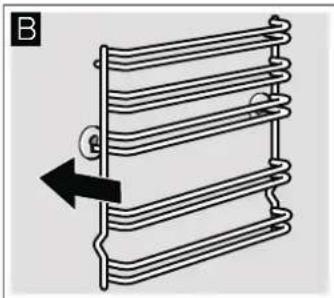
Wire shelves or rails can be adjusted on the left and right hand side. Their curvature should always be face down.
Unhooking and hanging the oven door
The front panel can be unhooked to help remove the oven door and clean the glass panels.
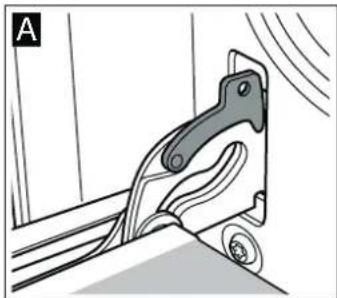
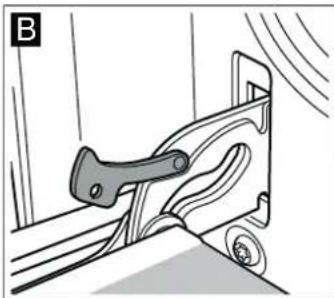
The oven door hinges are fitted with a locking lever. The door cannot be unhooked if the locking lever is closed (figure A). Once the locking lever has been opened to unhook the door (figure B), the hinges will be locked in position. This prevents the door from suddenly closing.
Risk of injuries.!.
The hinges may close suddenly if they are not locked in position by the lever. Note that the locking levers are always closed, apart from when unhooking the door, when the levers must be open.
Unhooking the door
- Fully open the oven door.
2.Remove both locking levers located on the right and left hand sides (figure A). - Fully close the oven door as far as possible (figure B). Grip the left and right hand sides of the door with both hands. Close the door slightly more and remove it.
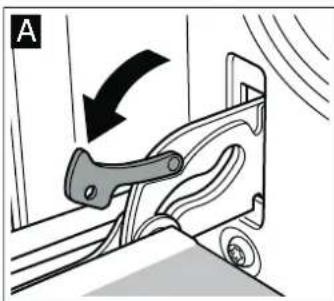
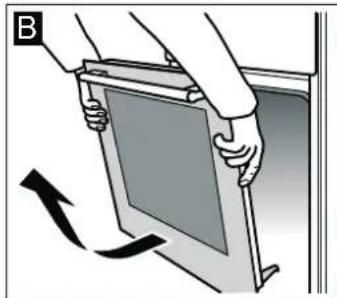
Hanging the door
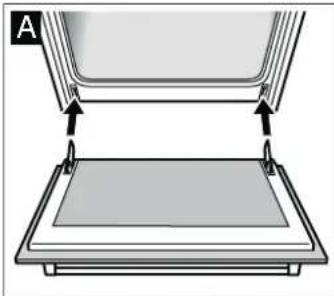
Rehang the door by following the same steps but in reverse order.
- When refitting the door, check that both hinges are positioned exactly inside their respective openings (picture A).
2.The bottom groove of the hinges must fit snugly on both sides.
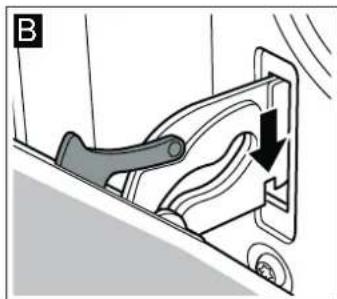
The door may be left crooked if the hinges are not mounted properly.
- Reclose the attachment levers (picture C). Close the oven door.
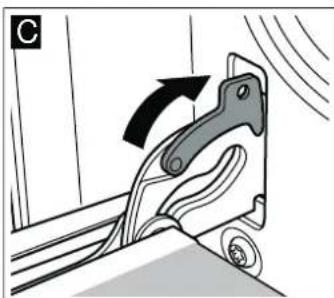
Risk of injuries.!.
Do not touch the hinges; the door might accidentally fall or a hinge might suddenly close. Notify the Technical Assistance Service.
Fitting and removing the glass panels
The glass panels of the oven door can be removed to make cleaning easier.
Removing
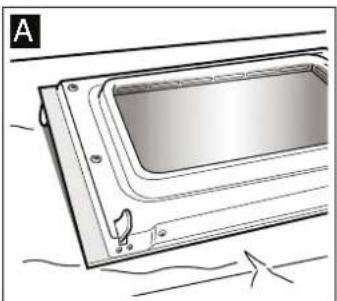
- Unhook the oven door and position it on a cloth with its handle pointing downwards (figure A).
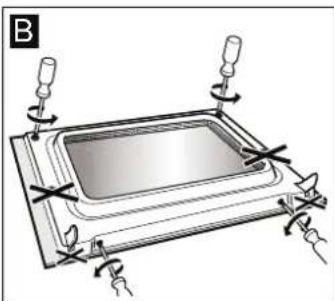
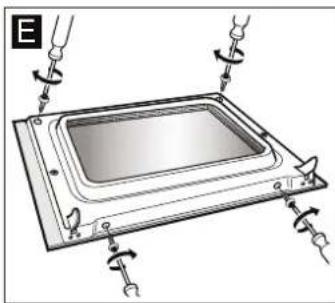
- First, unscrew the two lower bolts then the two upper bolts (figure B).
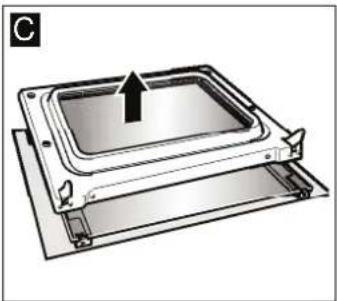
- Completely remove the door base (figure C).
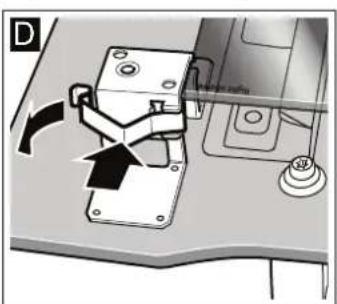
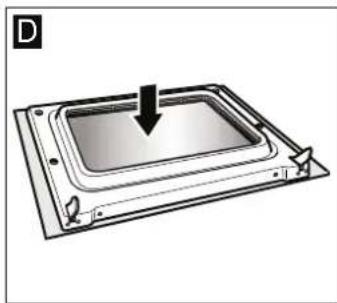
- Remove the two clips from the top of the glass (figure D). To do this, slightly press down on the clip with your thumb and pull on the tab with your index finger (figure E).

- Lift the inside glass, push it slightly upwards then remove it from below (figure F).
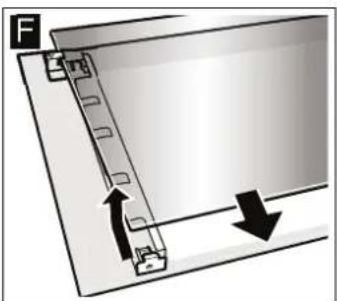
Clean the glass panels using a glass cleaning product and a soft cloth.
Do not use abrasive or corrosive cleaning products, glass scrapers or hard metal scourers as these could damage the glass.
Installing
When installing the glass, check that the phrase "right above" on the bottom left-hand side is upside down.
- Insert the interior glass, tilting it upwards and then inserting it downwards (figure A).
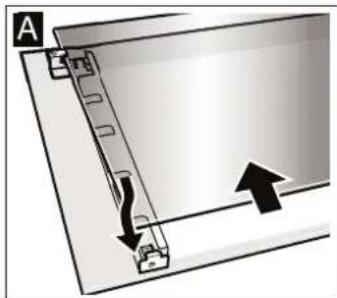
- Refit the clamps on the bottom left and right hand side (figure B). To do this, hook the clamps in the upper part of the support and press into place (figure C).
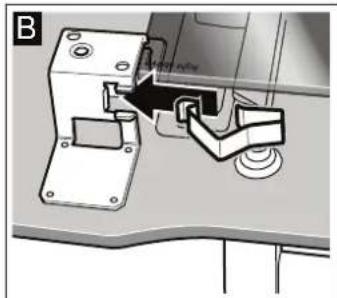
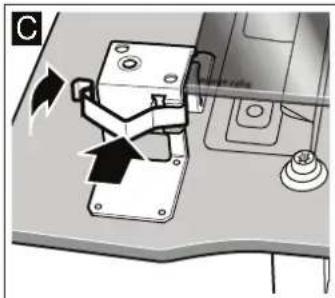
- Refit the entire door base (figure D).
- First, screw the two lower bolts into place then the two upper bolts (figure E).
- Hanging the oven door.
Once the glass panels have been correctly fitted, the oven is ready to use.
Troubleshooting
Quite often, when there is a malfunction, it is usually a small irregularity which is easy to rectify. Before contacting the Technical Assistance Service, try to determine the cause of the fault using the following table.
Troubleshooting table
Fault Possible cause Solution/advice
| The oven does not work. | The fuse has blown. | Check the condition of the fuse/circuit breaker in the fuse box. |
| Power cut Check that the light in the kitchen and other house-hold appliances are work-ing. | ||
| The ⋅ symbol lights in the display with some zeros. | Power cut Set the time once again. | |
| The oven does not work. | There is dust in the contacts. | Turn the control knob se-eral times in both direc-tions. |
| The oven door does not open. The ⋅symbol lights up on the display panel. | The oven door has been locked by the self-cleaning function ☑. | Wait until the oven has cooled and the ⋅symbol turns off. |
| The display shows F8. | The appliance has been auto-matically turned off. | Turn the function control knob to the zero setting. |
Error messages
When the indicator displays an error message with , press the sensor. The message will disappear. The set time function will be deleted. If the error message does not disappear, call the Technical Assistance Service.
The following error messages can be solved by the user.
Error mes- Possible cause Solution/advice sage
| E011 | A sensor has been pressed for too long or has got stuck. | Press all the sensors one by one. Check if a sensor is stuck, covered or dirty |
| E105 | The door lock has been activated with the door open. | Press the ⊙ sensor. You can now begin program- ming again. |
| E115 | The temperature inside the oven is too high. | The door oven is locked and heating has stopped. Wait until the oven has cooled. Press the ⊙ sensor and reset the time. |
Risk of electrical discharge and the resulting shock!
Incorrect repairs can be dangerous. Repairs can only be carried out by qualified personnel from the Technical Assistance Service.
Changing the oven bulb
If the oven light bulb is damaged it must be replaced. Special 25 W, E14, 220 V-240 V heat-resistant light bulbs (to 300^ temperature) can be obtained from the Technical Support Service or in specialist shops. Only use this type of bulb.
Risk of electrical discharge and the resulting shock!
Disconnect the appliance from the mains. Ensure that this is turned off.
- Place a dishcloth into the cold oven to avoid damage.
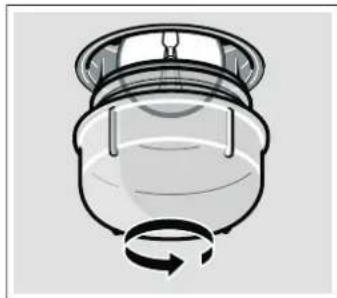
2.Remove the glass protection by unscrewing it to the left.
- Replace the bulb with a similar bulb.
4.Screw the protection glass back into place. - Remove the dishcloth and switch the oven back on at the mains.
Protective glass panels
Damaged protective glass panels must be replaced. Protective glass panels can be obtained from the Technical Assistance Service. Please quote your appliance's product number and production number.
After-sales service
Our after-sales service is there for you if your appliance needs to be repaired. We will always find the right solution in order to avoid unnecessary visits from a service technician.
E number and FD number
When calling us, please give the product number (E no.) and the production number (FD no.) so that we can provide you with the correct advice. The rating plate containing these numbers can be found on the right-hand side of the oven door. You can make a note of the numbers of your appliance and the telephone number of the after-sales service in the space below to save time should it be required.
E no.
FD no.
After-sales service
Please note that there will be a fee for a visit by a service technician in the event of a malfunction, even during the warranty period.
After-sales contact details for all countries can be found in the attached after-sales service directory.
Energy and environment tips
Here you can find tips on how to save energy when baking and roasting and how to dispose of your appliance properly.
Saving energy
Preheat the oven only if this is required by a recipe or is indicated in the tables.
Use dark, lacquered or black enamel baking tins. These are more efficient at absorbing heat.
- Keep the oven door closed during cooking, baking and roasting cycles.
- When baking several cakes, these should be preferably baked one after the other. The oven will still be hot, thereby reducing the cooking time for the second cake. Two rectangular baking tins can be placed side-by-side.
For long cooking times, the oven may be turned off 10 minutes prior to the specified time, allowing the item to continue to cook but taking advantage of the oven's residual heat.
Environmentally-friendly disposal of waste
Dispose of packaging with the environment in mind.

This appliance is identified according to the Waste Electrical and Electronic Equipment Directive WEEE 2002/96/EC. This directive defines the framework for the recycling and reuse of appliances used in EU territory.
Tested for you in our cooking studio
Here you will find a selection of dishes and the ideal settings for them. We will show you which type of heating and which temperature are best suited for your dish. You can find information about suitable accessories and the height at which they should be inserted. There are also tips about cookware and preparation methods.
Notes
The values in the table always apply to dishes placed into the cooking compartment when it is cold and empty.
Only preheat the appliance if the table specifies that you should do so. Do not line the accessories with greaseproof paper until after they have been preheated.
The times specified in the tables are guidelines only. They will depend on the quality and composition of the food.
Use the accessories supplied. Additional accessories may be obtained as special accessories from specialist retailers or from the after-sales service.
Before using the oven, remove any unnecessary accessories and ovenware from the cooking compartment.
Always use oven gloves when taking hot accessories or ovenware out of the cooking compartment.
Cakes and pastries
Baking on one level
The best method for baking a cake is to place it on one level with top and bottom heat.
When baking using the 3D Hot air function, the following levels are recommended for the accessories:
Cakes in tins: level 2
Cakes on the tray: level 3
Baking at different levels
Use the 3D Hot air function.
Baking on two levels:
Universal tray: level 3.
Oven tray: level 1.
Baking on three levels:
Universal tray: level 5.
Oven tray: level 3.
Oven tray: level 1.
Trays put in the oven at the same time are not necessarily ready at the same time.
In these tables you will find numerous tips for your dishes.
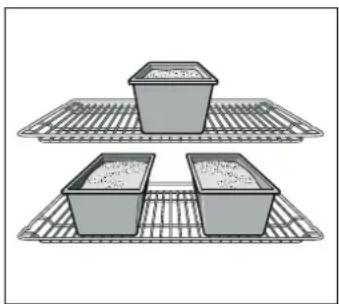
If 3 rectangular tins are used at the same time, place on the wire shelf as shown in the diagram.
Baking tins
It is best to use dark-coloured metal baking tins.
Baking times are increased when light-coloured baking tins made of thin metal or glass dishes are used, and cakes do not brown so evenly.
If you wish to use silicone baking tins, use the information and recipes provided by the manufacturer as a guide. Silicone baking tins are often smaller than normal tins. The amount of mixture and recipe instructions may differ.
Tables
The table shows the optimum heating methods for each type of cake or dessert. The temperature and cooking time will depend on the amount and the consistency of the dough. For this reason the cooking tables always provide approximate cooking times. Always begin by trying the lowest value. The items will be more evenly browned at a lower temperature. If necessary, this can be increased next time.
If the oven is preheated, cooking times are reduced by 5 to 10 minutes.
Additional information is provided in the Tips for baking section as an appendix to the tables.
To bake a cake only on one level, place the mould on the enamel tray.
When baking several cakes at the same time, the moulds can be placed together on the wire shelf.
| Cakes in tins Cake tin Level Heating | type | Temperature in °C | Time in minutes | ||
| Easy sponge cake Crown-shaped/rectangular | cake tin | 2 | ® | 160-180 60-75 | |
| 3 rectangular cake tins 3+1 | ® | 140-160 70-90 | |||
| Sponge cake, fine Crown-shaped/rectangular | cake tin | 2 | □ | 150-170 60-70 | |
| Tart base, sponge cake dough Tart tin 3 | □ | 160-180 20-30 | |||
| Fine fruitcake, sponge cake dough Round/springform tin 2 | □ | 160-180 50-60 | |||
| Sponge cake base, 2 eggs (preheat) | Tart tin 2 | □ | 150-170 20-30 | ||
| Sponge cake base, 6 eggs (preheat) | Springform tin | 2 | □ | 150-170 40-50 | |
| Shortcrust pastry base with edge | Springform tin | 1 | □ | 180-200 25-35 | |
| Cheesecake or fruit tart, shortcrust pastry base* | Springform tin | 1 | □ | 160-180 70-90 | |
| Swiss quiche | Pizza tray | 1 | □ | 220-240 35-45 | |
| Sponge in concentric cake tin | Concentric cake tin | 2 | □ | 150-170 60-70 | |
| Pizza, thin base with light topping (preheat) | Pizza tray | 1 | □ | 270 | 10-20 |
| Savoury pies* | Springform tin | 1 | □ | 170-190 45-55 |
- Let the cake cool for 20 minutes with the oven switched off and closed.
| Cakes prepared on the tray | Accessories | Level | Heating type | Temperature in °C | Time in minutes |
| Dry layer sponge cake | Universal tray | 2 | □ | 170-190 20-30 | |
| Universal tray + oven tray | 3+1 | ◎ | 160-170 30-40 | ||
| Fruit or liquid layer sponge cake | Universal tray | 2 | □ | 170-190 25-35 | |
| Universal tray + oven tray | 3+1 | ◎ | 140-160 40-50 | ||
| Dry layer yeast dough | Universal tray | 3 | □ | 170-180 25-35 | |
| Universal tray + oven tray | 3+1 | ◎ | 150-170 35-45 | ||
| Fruit or liquid layer yeast dough | Universal tray | 3 | □ | 160-180 40-50 | |
| Universal tray + oven tray | 3+1 | ◎ | 150-160 50-60 | ||
| Lattice-topped shortcrust tart with dry layer | Universal tray | 1 | □ | 180-200 20-30 | |
| Lattice-topped shortcrust tart with fruit or liquid layer | Universal tray | 2 | □ | 160-180 60-70 | |
| Swiss quiche | Universal tray | 1 | □ | 210-230 40-50 | |
| Swiss roll (preheat) | Universal tray | 2 | □ | 170-190 15-20 | |
| Yeast plait made with 500 g of flour | Universal tray | 2 | □ | 170-190 25-35 | |
| Bread roll made with 500 g of flour | Universal tray | 3 | □ | 160-180 60-70 | |
| Bread roll made with 1 kg of flour Universal tray 3 | ☐ | 150-170 90-100 | |||
| Puff pastry, sweet Universal tray 2 | ☐ | 190-210 55-65 | |||
| Pizza Universal tray 2 | ☐ | 200-220 25-35 | |||
| Universal tray + oven tray 3+1 | ® | 180-200 40-50 | |||
| Flambéed tart (preheat) Universal tray 2 | ☐ | 270 15-20 | |||
| Börek Universal tray 2 | ☐ | 190-200 40-55 | |||
| Small pastries | Accessories | Level | Heating type | Temperature in °C | Time in minutes |
| Pastries and biscuits | Universal tray | 3 | ® | 140-160 | 15-25 |
| Universal tray + oven tray | 3+1 | ® | 130-150 | 25-35 | |
| 2 oven trays + universal tray | 5+3+1 | ® | 130-150 | 25-40 | |
| Tea biscuits (preheat) | Universal tray | 3 | □ | 140-150 | 30-40 |
| Universal tray | 3 | ® | 140-150 | 20-30 | |
| Universal tray + oven tray | 3+1 | ® | 140-150 | 25-35 | |
| 2 oven trays + universal tray | 5+3+1 | ® | 140-150 | 25-35 | |
| Macaroons | Universal tray | 2 | □ | 110-130 | 30-40 |
| Universal tray + oven tray | 3+1 | ® | 110-120 | 35-45 | |
| 2 oven trays + universal tray | 5+3+1 | ® | 110-120 | 35-45 | |
| Meringues | Universal tray | 3 | ® | 80-100 | 100-150 |
| Tartlets | Wire shelf and tartlet tin | 3 | □ | 180-200 | 20-25 |
| 2 wire shelves and tartlet tin | 3+1 | ® | 160-180 | 25-30 | |
| Ensaimada | Universal tray | 2 | □ | 210-230 | 30-40 |
| Puff pastry | Universal tray | 3 | ® | 190-200 | 25-35 |
| Universal tray + oven tray | 3+1 | ® | 190-200 | 30-40 | |
| 2 oven trays + universal tray | 5+3+1 | ® | 170-180 | 35-45 | |
| Yeast dough pastry | Universal tray | 2 | □ | 190-210 | 20-30 |
| Universal tray + oven tray | 3+1 | ® | 160-180 | 25-35 |
Bread and rolls
Preheat the oven for bread-making unless otherwise instructed.
Do not spill water directly into the oven when it is hot.
| Bread and rolls | Accessories | Level | Heating type | Temperature in °C | Time in minutes |
| Yeast bread made using 1.2 kg of flour | Universal tray | 2 | □ | 270 | 8 |
| 200 | 35-45 | ||||
| Fermented dough bread made using 1.2 kg of flour | Universal tray | 2 | □ | 270 | 8 |
| 200 | 40-50 | ||||
| Bread pudding | Universal tray | 2 | □ | 270 15-20 | |
| Bread rolls (no preheat) | Universal tray | 3 | □ | 200 20-30 | |
| Sweet yeast dough bread rolls Universal tray | 3 | 180-200 | 15-20 | ||
| Universal tray + oven tray | 3+1 | ® | 150-170 | 20-30 | |
Suggestions and practical advice for baking
| If you want to use your own recipe. | You can use a similar product to the one listed in the cooking table as a guide. |
| How to check whether your sponge cake is ready. | 10 minutes before the end of the cooking time indicated in the recipe, test the thickest part of the cake with a thin wooden skewer. The cake is ready when the skewer comes out clean, with no traces of cake mix. |
| The cake is too flat. | Next time, try using less liquid or reduce the oven temperature by 10 degrees. Ensure you mix the dough according to the times given in the recipe. |
| The cake has a peaked centre, but the edges are lower. | Do not grease the cake tin. Once the cake is ready, use a knife to carefully remove it from the cake tin. |
| If the cake is too brown on top. Position the cake lower in the oven, reduce the oven temperature and bake it for longer. | |
| The cake is too dry. Use a skewer to make small holes in the finished cake. Pour a few drops of fruit juice or alcoholic drink over the cake. Next time, increase the oven temperature by 10 degrees and reduce the cooking time. | |
| The bread or cake (cheesecake, for example) looks fine on the outside but still has soft (soggy) areas inside. | Next time, use less liquid and leave the product for a little longer in the oven, at a lower temperature. The bases of cakes with juicy toppings should be baked first on their own. Then sprinkle chopped almonds or breadcrumbs on the base before adding the topping. Follow the recipe and the cooking times. |
| Pastries are not evenly browned. Select a lower temperature; the pastries will be browned more uniformly. Bake more delicate pastries with top and bottom heating on one level. Overhanging parchment paper may also affect air circulation. Always trim it to fit the baking tray. | |
| The fruit pie is not brown enough at the bottom. Next time put the pie in at a lower level. | |
| The fruit juices are spilling out. Next time use the universal tray if available. | |
| Small pastries made with yeast may stick together during baking. | Leave a space of about 2 cm between them. Then they will have enough space to rise and brown on all sides. |
| Products have been baked on different levels. Pastries on the upper tray are darker than those on the lower tray. | Always use the 3D Hot air function when baking products on different levels. Although several baking trays may be placed in the oven at the same time, this does not mean that they will necessarily all be ready at the same time. |
| Baking moist cakes produces condensation. Condensation may form when baking. Some of this moisture may evaporate via the door handle, and drops of condensation may form on the control panel or on the front of nearby kitchen units. The oven is physically designed with this in mind. | |
Meat, poultry, fish
Cookware
Any heatproof cookware can be used. For large roasts, the enamel tray can also be used.
It is best to use glass containers. Check that the lid of the cookware will fit and close properly.
If using enamel containers, add more liquid.
When using stainless steel pans, the meat does not brown well and may even be left rare. If so, lengthen the cooking time.
Data shown in tables:
Uncovered cookware - open
Covered cookware = closed
Always place cookware in the centre of the wire shelf.
Hot glass cookware should be placed on a dry dishcloth. The glass could shatter if rested on a wet or cold surface.
Roasting
Add in a little liquid if the meat is lean. Cover the base of the ovenware with approx. 12 cm of liquid.
Add liquid generously for pot roasts. Cover the base of the ovenware with approx. 1 - 2cm of liquid.
The amount of liquid depends on the type of meat and the material the ovenware is made of. If preparing meat in an enamelled roasting dish, it will need a little more liquid than if cooked in glass ovenware.
Roasting dishes made from stainless steel are not ideal. The meat cooks more slowly and browns less fully. Use a higher temperature and/or a longer cooking time.
Grilling
Always use the grill with the oven closed.
For grilling, preheat the oven for about 3 minutes before the food is placed inside the oven.
Place the pieces directly on the wire shelf. If only one piece is prepared, it is best if placed in the centre of the wire shelf.
Place the enamel tray at level 1. The tray will help keep the oven clean by catching any meat juices.
Do not place the baking tray or universal tray at level 4 or 5. Due to the extreme heat, it could be deformed and cause damage to the oven interior when it is removed.
In so far as it is possible, use pieces of the same thickness. This will help them brown evenly and remain juicy. Salt the fillets after grilling.
Turn the pieces after 2/3 the time has elapsed.
The grill resistance switches on and off automatically. This is normal. The frequency depends on the chosen power level.
Meat
Turn pieces of meat halfway through the cooking time.
When the roast is ready, turn off the oven and allow it to rest for an additional 10 minutes. This allows better distribution of the meat juices.
After cooking, wrap sirloin in aluminium foil and leave it to rest for 10 minutes in the oven.
For roast pork with a rind, score the rind in a crossways pattern, then lay the roast in the dish with the rind at the bottom.
| Meat Weight Accessories and cookware Level Heating | type | Temperature at °C, grill power | Time in minutes | |||||
| Beef | ||||||||
| Beef stew 1.0 kg covered | 2 | 2 | 200-220 | 100 | ||||
| 1.5 kg | 2 | 190-210 | 120 | |||||
| 2.0 kg | 2 | 180-200 | 140 | |||||
| Steak, medium well | 1.0 kg uncovered | 2 | 210-230 | 60 | ||||
| 1.5 kg | 2 | 200-220 | 80 | |||||
| Roast beef, medium well | 1.0 kg uncovered | 1 | 220-240 | 60 | ||||
| Meat | Weight | Accessories and cookware | Level | Heating type | Temperature at °C, grill power | Time in minutes | ||
| Beefsteak, 3 cm thick, medium well | Wire shelf + universal tray 5+1 | □ | 3 | 15 | ||||
| Veal | ||||||||
| Roast veal 1.0 kg uncovered 2 | □ | 190-210 110 | ||||||
| 1.5 kg 2 | □ | 180-200 130 | ||||||
| 2.0 kg 2 | □ | 170-190 150 | ||||||
| Leg of veal 1.5 kg uncovered 2 | □ | 210-230 140 | ||||||
| Pork | ||||||||
| Roast without bacon ( e.g. nape) 1.0 kg uncovered 1 | □ | 190-210 120 | ||||||
| 1.5 kg 1 | □ | 180-200 150 | ||||||
| 2.0 kg 1 | □ | 170-190 170 | ||||||
| Roast with bacon ( e.g. shoulder) | 1.0 kg | uncovered | 1 | □ | 190-210 130 | |||
| 1.5 kg 1 | □ | 180-200 160 | ||||||
| 2.0 kg 1 | □ | 170-190 190 | ||||||
| Pork loin 500 g Wire shelf + universal tray 3+1 | □ | 230-240 30 | ||||||
| Roast pork, lean 1.0 kg uncovered 2 | □ | 190-210 120 | ||||||
| 1.5 kg 2 | □ | 180-200 140 | ||||||
| 2.0 kg 2 | □ | 170-190 160 | ||||||
| Shoulder of pork with bone | 1.0 kg covered | 2 | □ | 210-230 70 | ||||
| Beefsteak, 2 cm thick | Wire shelf + universal tray 5+1 | □ | 3 | 15 | ||||
| Pork medallions, 3 cm thick | Wire shelf + universal tray 5+1 | □ | 3 | 10 | ||||
| Lamb | ||||||||
| Shoulder of lamb with bone | 1.5 kg uncovered 2 | □ | 190-210 60 | |||||
| Boned leg of lamb, medium well | 1.5 kg uncovered 1 | □ | 160-180 120 | |||||
| Game | ||||||||
| Sirloin of venison on the bone 1.5 kg uncovered 2 | □ | 200-220 50 | ||||||
| Boned leg of venison | 1.5 kg covered | 2 | □ | 210-230 100 | ||||
| Roast boar 1.5 kg covered | 2 | □ | 180-200 140 | |||||
| Roast venison | 1.5 kg covered | 2 | □ | 180-200 130 | ||||
| Rabbit | 2.0 kg covered | 2 | □ | 220-240 60 | ||||
| Minced meat | ||||||||
| Minced meat casserole 500 g of meat | uncovered 1 | □ | 180-200 80 | |||||
| Sausages | ||||||||
| Sausages | Wire shelf + universal tray 4+1 | □ | 3 | 15 | ||||
| Poultry | ||||||||
| The weights of the table are for unstuffed birds ready to roast. Place whole birds on the wire shelf initially with the breast side down. Turn once after ½ the estimated time. Turn pieces of meat such as turkey pieces or turkey breasts over after half the cooking time has elapsed. Turn the pieces of poultry after ¾ the time has elapsed. If cooking duck or goose, prick the skin below the wings to release the fat. The birds can be made brown and crunchy if they are smeared with butter, brine or orange juice more or less at the end of cooking time. If grilling directly on the shelf, place the enamel tray on level 1. If grilling directly on the shelf, place the enamel tray on level 1. | ||||||||
| Poultry Weight Accessories and Accessories and Cookware Level Heating type Temperature at °C, Time in minutes Chicken, whole | 1.2 kg | Wire shelf 2 | □ | 220-240 | 60-70 | |||
| Poularde, whole | 1.6 kg | Wire shelf 2 | □ | 210-230 | 80-90 | |||
| Chicken, halves | 500 g each | Wire shelf 2 | □ | 220-240 | 40-50 | |||
| Chicken pieces | 150 g each | Wire shelf 3 | □ | 210-230 | 30-40 | |||
| Poultry Weight | Accessories and cookware | Level | Heating type | Temperature at \( ^\circ \mathrm{C} \) , grill power | Time in minutes |
| Chicken pieces 300 g each Wire shelf 3 | ‡ | 210-230 35-45 | |||
| Chicken breasts 200 g each Wire shelf 3 | ‡ | 3 30-40 | |||
| Duck, whole 2.0 kg Wire shelf 2 | ‡ | 190-210 100-110 | |||
| Duck breasts 300 g each Wire shelf 3 | ‡ | 240-260 30-40 | |||
| Goose, whole 3.5-4.0 kg Wire shelf 2 | ‡ | 170-190 120-140 | |||
| Goose legs 400 g each Wire shelf 3 | ‡ | 220-240 40-50 | |||
| Small turkey, whole 3.0 kg Wire shelf 2 | ‡ | 180-200 80-100 | |||
| Turkey roll 1.5 kg | uncovered | 1 | ‡ | 200-220 110-130 | |
| Turkey breast 1.0 kg covered | 2 | ‡ | 180-200 90 | ||
| Turkey thigh 1.0 kg Wire shelf 2 | ‡ | 180-200 90-100 |
Fish
Turn the fish pieces after 3/2 the time has elapsed.
Whole fish do not need to be turned over. Bake whole fish in swimming position with the dorsal fin up. So that the fish remains stable, place a cut potato or a small container suitable for baking into the abdomen of the fish.
To cook fish fillets, add a few tablespoons of liquid when cooking.
If grilling directly on the shelf, place the enamel tray on level 1.
| Fish | Weight | Accessories and cookware | Level | Heating type | Temperature at °C, grill power | Time in minutes |
| Fish, whole | approx. 300 g | Wire shelf | 2 | □ | 2 | 20-25 |
| 1.0 kg | Wire shelf | 2 | □ | 200-220 45-55 | ||
| 1.5 kg | Wire shelf | 2 | □ | 190-210 60-70 | ||
| 2.0 kg | covered | 2 | □ | 190-210 70-80 | ||
| fish loin, 3 cm thick | Wire shelf | 3 | □ | 2 | 20-25 | |
| Fish fillet | covered | 2 | □ | 210-230 25-30 |
Tips for roasting and grilling
| The table does not contain information for the weight of the joint. | Select the next lowest weight from the instructions and extend the time. |
| How to tell when the roast is ready. | Use a meat thermometer (available from specialist shops) or carry out a "spoon test". Press down on the roast with a spoon. If it feels firm, it is ready. If the spoon can be pressed in, it needs to be cooked for a little longer. |
| The roast is too dark and the crackling is partly burnt. | Check the shelf height and temperature. |
| The roast looks good but the juices are burnt. | Next time, use a smaller roasting dish or add more liquid. |
| The roast looks good but the juices are too clear and watery. | Next time, use a larger roasting dish and use less liquid. |
| Steam rises from the roast when basted. | This is normal and due to the laws of physics. The majority of the steam escapes through the steam outlet. It may settle and form condensation on the cooler switch panel or on the fronts of adjacent units. |
Au gratin dishes, soufflés, toast
Always place the cookware on the wire shelf.
To roast directly on the wire shelf without containers, insert the enamelled tray at level 1. This will keep the oven cleaner.
The result of an au gratin dish depends on the size of the cookware and the height of the gratin. The data shown in the table are only given as a guide.
| Dish | Accessories and cookware | Level | Heating type | Temperature at °C, grill power | Time in minutes |
| Au gratin dishes | |||||
| Au gratin dishes, dessert | Tin for au gratin cooking | 2 | ☐ | 180-200 | 50-60 |
| Soufflé | Tin for au gratin cooking | 2 | ☐ | 180-200 | 35-45 |
| Ramekins | 2 | ☐ | 200-220 | 25-30 | |
| Pasta au gratin | Tin for au gratin cooking | 2 | ☐ | 200-220 | 40-50 |
| Lasagne | Tin for au gratin cooking | 2 | ☐ | 180-200 | 40-50 |
| Dish Accessories and cookware Level Heating | type | Temperature at °C, grill power | Time in minutes | |
| Au gratin dishes | ||||
| Potatoes au gratin with raw ingredients, max. 4 cm in height | 1 baking pan for au gratin cooking 2 | ‡ | 160-180 60-80 | |
| 2 two baking pans for au gratin cooking 3+1 | ◎ | 150-170 60-80 | ||
| Toast | ||||
| 4 pieces, au gratin Wire shelf + universal tray 3+1 | ‡ | 160-170 10-15 | ||
| 12 pieces, au gratin Wire shelf + universal tray 3+1 | ◎ | 160-170 15-20 | ||
Ready-made products
Read the manufacturer's instructions on the packaging.
When covering accessories with parchment paper, ensure that the paper is suitable for high temperatures. Cut the paper to the size of the dish to be prepared.
The result depends directly on the type of food. There may be irregularities and colour differences in raw products.
| Dish Accessories Level | Type of | heating | Temperature in °C | Cooking time, minutes | ||
| Pizza, deep frozen | ||||||
| Thin base pizza | Universal tray | 2 | □ | 210-230 | 15-30 | |
| Universal tray + wire shelf | 3+1 | ® | 180-200 | 25-35 | ||
| Thick base pizza | Universal tray | 2 | □ | 180-200 | 20-30 | |
| Universal tray + wire shelf | 3+1 | ® | 170-190 | 30-40 | ||
| Pizza-baguette | Universal tray | 3 | □ | 190-200 | 20-25 | |
| Mini pizza | Universal tray | 3 | □ | 190-210 | 10-20 | |
| Pizza, frozen | ||||||
| Pizza (preheat) | Universal tray | 1 | □ | 190-210 | 10-20 | |
| Potato-based products, deep frozen | ||||||
| Chips | Universal tray | 3 | □ | 190-210 | 20-30 | |
| Universal tray + oven tray | 3+1 | ® | 190-200 | 35-45 | ||
| Croquettes | Universal tray | 3 | □ | 200-220 | 25-30 | |
| Potato cakes, stuffed potatoes | Universal tray | 3 | □ | 210-230 | 15-25 | |
| Bakery products, deep frozen | ||||||
| Bread rolls and baguettes | Universal tray | 3 | □ | 180-200 | 10-20 | |
| Pretzels (bread dough) | Universal tray | 3 | □ | 210-230 | 15-25 | |
| Bakery products, pre-baked | ||||||
| Bread rolls and baguettes | Universal tray | 2 | □ | 190-210 | 10-20 | |
| Universal tray + wire shelf | 3+1 | ® | 160-180 | 20-25 | ||
| Fried foods, deep frozen | ||||||
| Fish fingers | Universal tray | 2 | □ | 220-240 | 10-20 | |
| Chicken fingers, nuggets | Universal tray | 3 | □ | 200-220 | 15-25 | |
| Puff pastry, deep frozen | ||||||
| Puff pastry | Universal tray | 3 | □ | 200-220 | 35-40 | |
Special dishes
At low temperatures, a good creamy yoghurt and a spongy yeast dough can be obtained.
First remove accessories and wire shelves or left and right-hand side rails from inside the oven.
Making yoghurt
1.Boil 1 litre of milk (3.5%) fat) and allow it to cool to about 40^
2.Mix 150g of yoghurt (at fridge temperature).
3.Pour the mixture into jars or bowls and cover them with transparent film.
4.Preheat the oven as instructed.
5.Now, place the bowls or jars on the bottom of the oven and prepare as follows.
Leaving yeast dough to rise
1.Prepare the yeast dough as usual. Pour the dough into a heat-resistant ceramic baking dish and cover it.
2.Preheat the oven as instructed.
3. Turn off the appliance and allow the dough to rise inside the oven.
| Food Cookware Level Type of | heating | Temperature Time | ||
| Yoghurt Place the bowls or jars at the bottom | of the oven | ® | Preheat to 50 °C 5 min. | |
| 50 °C 8 h | ||||
| Allow the yeast dough to rise | Place a heat-resistant baking dish | at the bottom of the oven | ® | Preheat to 50 °C 5-10 min. |
| Turn off the appliance and place the dough inside the oven | ||||
Defrosting
Defrosting time depends on the type and quantity of food.
Read the manufacturer's instructions on the packaging.
Remove frozen food from the container and place in appropriate cookware on the wire shelf.
Place the bird on a dish with the breast facing down.
Note: The oven light does not come on until reaching a temperature of 60^ . This helps achieve precise optimal control.
| Food Accessories Level Type of | heating | Temperature | |||
| Delicate frozen products E.g. cream cakes, buttercream tarts, chocolate or sugar-coated cakes, fruit pies, etc. | Wire shelf | 1 | ® | 30 °C | |
| Other frozen products Chicken, sausages and meat, bread, rolls, pies and other pastries | Wire shelf | 1 | ® | 50 °C | |
Drying
Use only fruit and vegetables that are in perfect condition and wash them thoroughly first.
Drain well and dry thoroughly.
Place the universal tray at level 3 and the wire shelf at level 1.
Cover the enamel tray and wire shelf with special baking parchment or greaseproof paper.
| Food | Level | Type of heating | Temperature in °C | Cooking time, hours |
| 600 g of sliced apples | 1+3 | ⊕ | 80 approximately 5 h | |
| 800 g of pears cut into chunks | 1+3 | ⊕ | 80 approximately 8 h | |
| 1.5 kg of plums | 1+3 | ⊕ | 80 approximately 8-10 h | |
| 200 g of washed, fresh herbs | 1+3 | ⊕ | 80 approximately 1½ h |
Note: If the fruit or vegetables contain a lot of juice or water, they will have to be turned over several times. Once dried, remove them from the paper immediately.
Jam making
For cooking, the jars and the elastic bands must be clean and in perfect condition. Whenever possible, use jars of equal sizes. The values in the tables are given for round 1-Litre jars.
Caution!
Do not use larger or taller jars. Their lids could explode.
Only use fruit and vegetables that are in good condition. Clean them well.
The times given in tables are only given as an indication. These can vary according to the outside temperature, number of jars, quantity and temperature of the jar content. Before turning off the appliance, ensure the jars have begun to bubble.
Preparation
- Tip the fruit or vegetable into the jars but do not fill them to the brim.
2.Clean the edges of the jars; these must be clean. - Place a cover and wet elastic band on each jar.
4.Close the jars with clamps.
Do not place more than six jars in the oven at the same time.
Setting
- Place the universal tray on level 2. Place the jars on the tray so that they do not touch each other.
- Pour 12 litre of water (approx. 80^ ) on the universal tray.
- Close the oven door.
-
Position the control knob to bottom heat position
-
Set the temperature between 170 and 180^
Jam making
After approximately 40 - 50 minutes, bubbles begin to form rapidly. Switch the oven off
Take the jars out of the oven after approximately 25 - 35 minutes (the residual heat is used in this time). If these are allowed to cool in the oven for more time, this could promote the formation of germs making the jam acidic.
Fruit in 1 L jars from when bubbles start to appear Residual heat
| Apples, gooseberries, strawberries To switch off approx. 25 minutes |
| Cherries, apricots, peaches, gooseberries To switch off approx. 30 minutes |
| Apple, pear or cherry puree To switch off approx. 35 minutes |
Cooking vegetables
When small bubbles begin to form in the jars, adjust the temperature to approximately 120 - 140 °C. About 35 - 70 minutes, depending on the type of vegetables. After this time, turn off the oven to use the residual heat.
| Cold cooking vegetables in 1 L jars | When bubbles start to appear 120-140 °C | Residual heat |
| Peppers - approx. 35 minutes | ||
| Beetroot approx. 35 minutes | approx. 30 minutes | |
| Brussels sprouts | approx. 45 minutes | approx. 30 minutes |
| Beans, kohlrabi, red cabbage | approx. 60 minutes | approx. 30 minutes |
| Peas | approx. 70 minutes | approx. 30 minutes |
Remove the jars from the oven
Remove the jars from inside the oven when cooking is finished.
Caution!
Do not place hot jars on a cold or wet surface. They could explode.
Acrylamide in food
Acrylamide is produced particularly in cereal and potato products prepared at high temperatures, e. g., chips, toast, rolls, bread and pastries (biscuits, spiced biscuits, Christmas biscuits).
Tips for preparing food with a low acrylamide content
| General | ■ Keep the cooking time to a minimum. |
| ■ Brown the food, making sure it is not overtoasted. | |
| ■ Large, thick pieces of food contain a low acrylamide content. | |
| Baking | With top and bottom heat max. 200 °C |
| With 3D Hot air max. 180 °C. | |
| Pastries and biscuits | With top and bottom heat max. 190 °C. |
| With 3D Hot air max. 170 °C. | |
| Eggs or egg yolks reduce the formation of acrylamide. | |
| Oven potato chips | Spread them evenly on a single layer in the baking tray. Bake at least 400 g on each baking tray so that the chips do not dry out |
Test dishes
These tables have been produced for test institutes to facilitate the inspection and testing of the various appliances.
In accordance with EN 50304/EN 60350 (2009) and IEC 60350.
Baking
Baking on 2 levels:
Always place the universal deep tray on the upper level and the flat oven tray on the lower level.
Baking on 3 levels:
Always place the universal deep tray on the upper level.
Butter cookies:
Trays put in the oven at the same time are not necessarily ready at the same time.
Covered apple pie on level 1:
Place dark springform tins with some space between them.
Covered apple pie on 2 levels:
Place dark springform tins on top of one another.
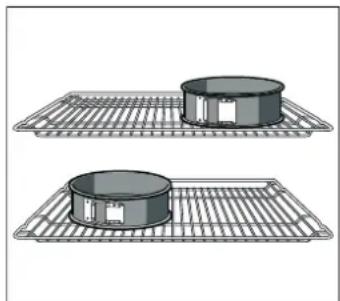
Cakes in springform tins:
Bake using top and bottom heating on level 1. Use the universal tray instead of the wire shelf and place the springform tins on it.
| Dish Accessories and tins Level Type of | heating | Temperature in °C | Time in minutes | |
| Butter cookies (preheating*) Universal tray 3 | \( \square \) | 150-160 20-30 | ||
| Universal tray 3 | \( \circledcirc \) | 140-150 20-30 | ||
| Universal tray + oven tray 3+1 | \( \circledcirc \) | 140-150 25-35 | ||
| 2 oven trays + universal tray | 5+3+1 | \( \circledcirc \) | 140-150 25-35 | |
| Small cakes (preheat*) | Universal tray 3 | \( \square \) | 150-170 20-30 | |
| Universal tray + oven tray 3+1 | \( \circledcirc \) | 140-160 25-35 | ||
| Universal tray 3 | \( \circledcirc \) | 150-160 25-30 | ||
| 2 oven trays + universal tray | 5+3+1 | \( \circledcirc \) | 140-150 25-30 | |
| Water sponge cake (preheat*) | Springform tin on the wire shelf | 2 | \( \square \) | 170-180 30-40 |
| Water sponge cake | Springform tin on the wire shelf | 2 | \( \circledcirc \) | 165-175 35-45 |
| Flat yeast cake | Universal tray 3 | \( \square \) | 160-180 30-40 | |
| Universal tray 3 | \( \circledcirc \) | 140-160 35-45 | ||
| Universal tray + oven tray 3+1 | \( \circledcirc \) | 160-170 30-40 | ||
| Covered apple pie Wire shelf + 2 springform tinsø 20 cm. | 1 | \( \square \) | 190-210 70-90 | |
- Do not use rapid heating to preheat the oven
Wire shelves and baking trays may be obtained as optional accessories from specialist retail outlets.
Grilling
If food is placed directly on the wire shelf, place the enamel tray at level 1. The tray will help keep the oven clean by catching any meat juices.
| Food | Accessories | Level | Type of heating | Grill power | Time in minutes |
| Brown toast (preheat for 10 min.) | Shelf | 5 | □ | 3 | 1/2-2 |
| 12beefburgers* (no pre-heating) | Grill + enamel tray | 4+1 | □ | 3 | 25-30 |
- Turn once after time 2%.
Recommendations important
De roosters of rails loshaken

- Important safety information
- Risk of fire!
- Risk of burns!
- Risk of scalding!
- Risk of injury!
- Risk of electric shock!
- Risk of serious damage to health!
- Causes of damage
- Caution!
- Your new oven
- Control panel
- Retractable control knob
- Sensors
- Function control knob
- Sensors and display panel
- Sensors to change the set values
- Heating symbol
- Inside the oven
- Light
- Fan
- Your accessories
- inserting the accessories
- Wire shelf
- Flat enamel oven tray
- Universal deep enamel tray
- Accessory support
- Before using the oven for the first time
- Setting the time
- Heating the oven
- Cleaning the accessories
- Programming the oven
- Type of heating and temperature
- Switching the oven off
- Changing the settings
- Rapid heating
- End of rapid heating
- Cancelling rapid heating
- Setting the time functions
- Timer
- The time set for the timer has elapsed
- Changing the time set on the timer.
- Cancelling the timer
- Viewing the time settings
- Cooking time
- The cooking time has finished.
- Changing the cooking time
- Cancelling the cooking time
- End time
- The cooking time has finished
- Changing the end time
- Cancelling the end time
- Time
- Changing the time
- Hiding the time
- Changing the basic settings
- Automatic shut off
- Automatic shut off is activated
- Cancelling the automatic shut off function
- Self-cleaning
- Important notes
- Before using the self-clean function
- Risk of fire!!
- Cleaning of the accessories
- Significant health risks!
- Setting
- Self-cleaning has ended.
- Changing the cleaning level
- Stopping the self-cleaning
- Delaying the end time
- After using the self-clean function
- Care and cleaning
- Notes
- Cleaning products
- Zone Cleaning products
- Connecting the oven bulb
- Turning the oven light off
- Removing and refitting the wire shelves or left and right hand side rails
- Release the guides or rails
- Install the wire shelves or rails
- Unhooking and hanging the oven door
- Risk of injuries.!.
- Unhooking the door
- Hanging the door
- Fitting and removing the glass panels
- Removing
- Installing
- Troubleshooting
- Troubleshooting table
- Error messages
- Risk of electrical discharge and the resulting shock!
- Changing the oven bulb
- Risk of electrical discharge and the resulting shock!
- Protective glass panels
- After-sales service
- E number and FD number
- Energy and environment tips
- Saving energy
- Environmentally-friendly disposal of waste
- Tested for you in our cooking studio
- Cakes and pastries
- Baking on one level
- Baking at different levels
- Baking tins
- Tables
- Bread and rolls
- Suggestions and practical advice for baking
- Meat, poultry, fish
- Cookware
- Roasting
- Grilling
- Meat
- Fish
- Tips for roasting and grilling
- Au gratin dishes, soufflés, toast
- Ready-made products
- Special dishes
- Making yoghurt
- Leaving yeast dough to rise
- Defrosting
- Drying
- Jam making
- Preparation
- Cooking vegetables
- Remove the jars from the oven
- Acrylamide in food
- Test dishes
- Baking
- Recommendations important
- De roosters of rails loshaken
Brand : VIVA
Model : VVH33F3151
Category : Oven