KIP711W - Cooker DE DIETRICH - Free user manual and instructions
Find the device manual for free KIP711W DE DIETRICH in PDF.



Frequently Asked Questions - KIP711W DE DIETRICH
User questions about KIP711W DE DIETRICH
0 question about this device. Answer the ones you know or ask your own.
Ask a new question about this device
Download the instructions for your Cooker in PDF format for free! Find your manual KIP711W - DE DIETRICH and take your electronic device back in hand. On this page are published all the documents necessary for the use of your device. KIP711W by DE DIETRICH.
USER MANUAL KIP711W DE DIETRICH
FR GUIDE D'INSTALLATION ET D'UTILISATION ENGUIDETO INSTALLATIONANDUSE PT MANUAL DE INSTALAÇÃO E UTILIZACAO ES MANUAL DE INSTALACIOY UTILIZATION
Table de cuisson Cooking Hob Placa de cozinha Placa de cocccion
De Dietrich

De Dietrich
Chere Cilente, Cher Client
Cuisson differee / Start Control (Selon modele)
- RELATIONS CONSOMMATEURS
You have just acquired a DE DIETRICH hob and we would like to thank you.
In order to offer you an excellent product, our research teams have created this new generation of appliances for you. Their quality, appearance, functions and technological advances make them exceptional products, showcases of our unique know-how.
In the line of DE DIETRICH products, you will also find a wide range of ovens, microwaves, ventilation hoods, hoods, dishwashers, and refrigerators, all of which can be integrated and all of which can be coordinated with your new DE DIETRICH hob.
Of course, in our ongoing desire to ensure our products satisfy your needs in the best possible way, our customer service department is always at your disposal at our site.
www.dedietrich-electromenager.com
DE DIETRICH
Setting New Values
We are constantly improving our products; for this reason we reserve the right to make all modifications to their technical, functional or aesthetic characteristics, originating from technical developments.

Warning
This product is not foreseen for sale in the USA
Before installing and using your appliance please read this installation and use the guide carefully - it will help you familiarise yourself very rapidly with its operation.
CONTENTS
EN
1 / INSTALLING YOUR APPLIANCE
Choice of location 18
Installation 18
- Connection 19
2 / USING YOUR APPLIANCE
The induction principle 21
- Description of your top 22
- Using a cooking zone 24
Additional functions 24
Preheating
MEMO-Memorisation of a cooking setting
Delayed cooking
Independent timer
Preselected power settings
Child safety
Clean lock
· Safety features when operating 26
3/MAINTAINING YOUR APPLIANCE 27
4/SPECIAL MESSAGES,DIFFICULTIES 28
5/ AFTER- SALES SERVICE 29
EN
1 / INSTALLING YOUR APPLIANCE

As shown in this logo, the materials used to package this appliance are not recyclable. Recycle them and play a role in protecting the environment by depositing them in municipal containers provided for this purpose.
Recycling of the appliances organised by your manufacturer will thus be undertaken in optimum conditions, in accordance with European directive 2002/96/CE relating to electrical and electronic equipment waste. Contact your local authority or retailer for how to have used appliances collected or collection points.
Installation
Your appliance should be positioned so that the mains switch is accessible.
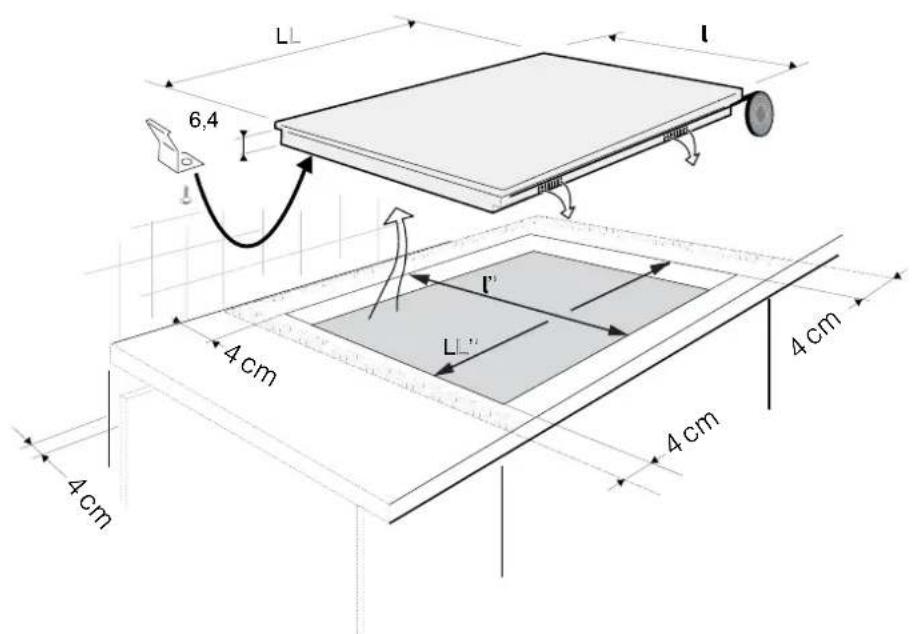
The distance between the edge of your appliance and the side and rear walls (or partitions) must be at least four centimetres (area A).
Your appliance can be easily integrated above a cabinet, an oven or a build-in household appliance. Simply verify that the air intakes and outlets are well clear.
Stick the foam gasket to the bottom of your appliance. This will allow you to achieve an airtight seal with the worktop.
Attach the clips to the hob. (See drawing)

Tip
If your hob is located above your oven, the hob's thermal safety measures forbid the simultaneous use of the hob and your oven's pyrolysis program (self-cleaning by extreme heat).
This safety feature can be activated, for example, when the hob is installed over an oven that is not sufficiently insulated. If this occurs, a series of small lines appear in the control panel. In this case, we recommend that you increase the ventilation of your hob by creating an opening in the side of your cabinet (8 cm x 5 cm) and/or that you install the oven insulation kit (reference 75X1652) that is available from the After-Sales Service Department.
1 / INSTALLING YOUR APPLIANCE
EN
Connection
These hobs must be connected to the mains using a socket in compliance with publication CEI 60083 or an all-pole circuit-breaker device in compliance with the installation rules in force.
When power is first supplied to your hob, or after an extended power cut, an indicator light will appear on the control panel. This information will disappear after 30 seconds.
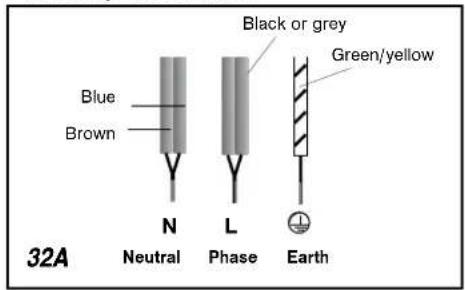
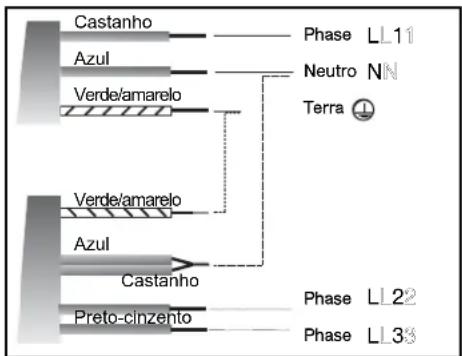
- Hook-up of 220-240V ~

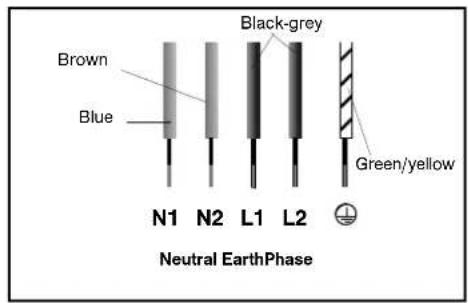
- Hook-up of 2x230V 2L+2N ~ - 16A
Separate the wires before connection.
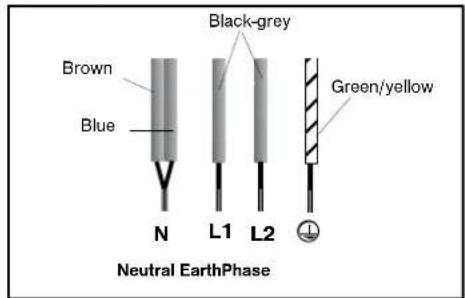
- Hook-up of 400V 2N ~ -16A
Separate the 2 phase wires (L1 and L2) before connection.
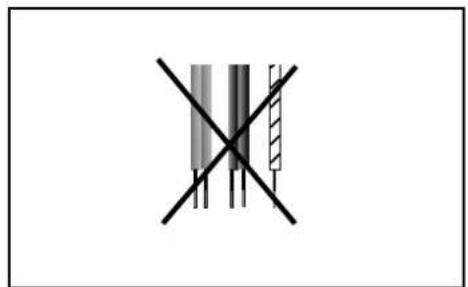
- Hook-up of 400V 3~ -16A
With hook-up of 400 V 2N three phase, verify that the neutral wire is properly connected.

Warning
If the cable is damaged it must be replaced by the manufacturer, its after-sales service or a person with a similar qualification to prevent danger.
1 / INSTALLING YOUR APPLIANCEEN
Special connection DT1709
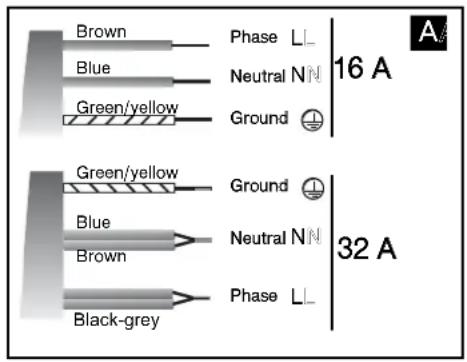
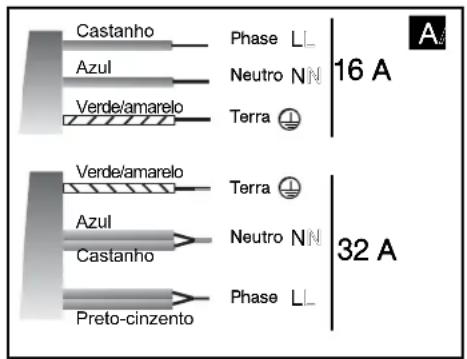
220-240 V monophase hook-up
1 and 32 amp fuses.
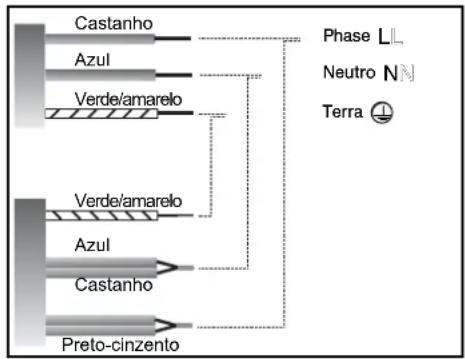
63amp fuse.
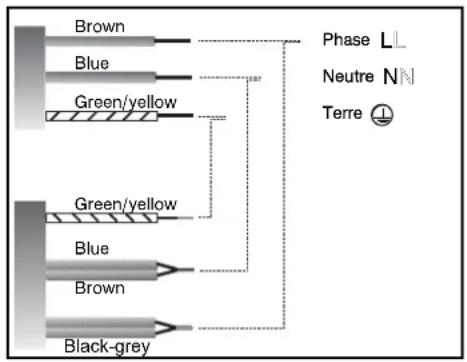
- 400 V 3N triphase hook-up
Separate the two phase wires L2, L3 before hooking up.
116amp fuse.
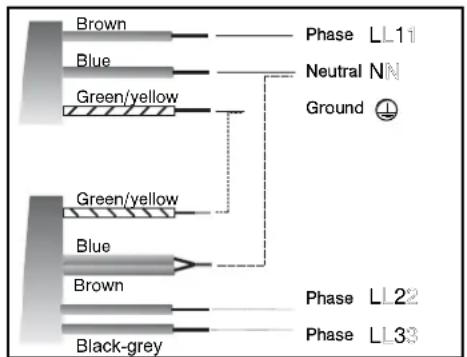
If the unit has a 3 phase 400 V3N connection, and is not working correctly, check that the neutral wire is correctly connected.
2 / USING YOUR APPLIANCE
EN
We have designed this cooking hob for use by private individuals in their homes.
These cooking hobs are intended exclusively for cooking beverages and foodstuffs and do not contain any asbestos-based materials.
The induction principle
The principle of induction is based on a magnetic effect.
When you place your cookware on a cooking zone and you turn it on, the electronic circuits in your cooking hob produce "induced" currents in the bottom of the cookware which instantly raise its temperature. This heat is then transmitted to the food
To help you choose, a list of cookware is provided with this guide.
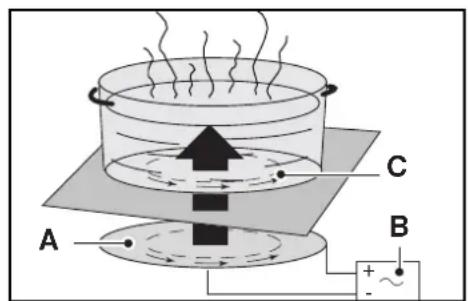
A - Induction plate
B - Electronic circuit
C - Induced currents
Cookware
Most cookware is compatible with induction. To verify that your cookware is suitable, place it on a heating area on power 4.
-
If the display remains on, your cookware is compatible.
-
If the display flashes, your cookware cannot be used with induction cooking.
You can also use a magnet to test the cookware.
If a magnet "sticks" to the bottom of the cookware, it is compatible with induction.
Only glass, terra cotta, aluminium without a special finish on the bottom, copper and some non-magnetic stainless steels do not work with induction cooking. We recommend that you select cookware with a thick, flat bottom.
When you buy your cookware, make sure that this logo is on the package; it assures you that it is compatible with induction cooking.
- Choosing a cooking area
| Cooking area | Diameter of base of cookware |
| 16 cm | 10 .... 18 cm |
| 18 cm | 12 .... 22 cm |
| 21 cm | 18 .... 24 cm |
| 12 .... 26 cm | |
| 28 cm | 12 .... 32 cm |

EN 2/USING YOUR APPLIANCE
Description of your top
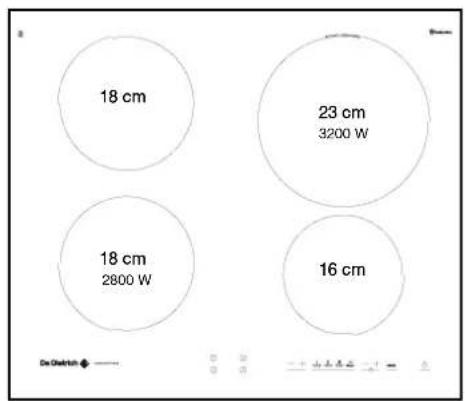
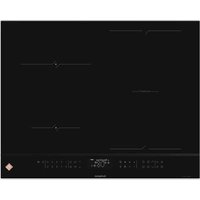
Total dimensions (L x l) - DT1705B/W/X/Z: 65 x 52 DT1705V: 63 x 51
Recess cut-out (L^ × L^) DT1705B/W/X/Z: 56 x 49
DT1705V: 56 x 49
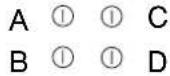
- Adjustment touch controls
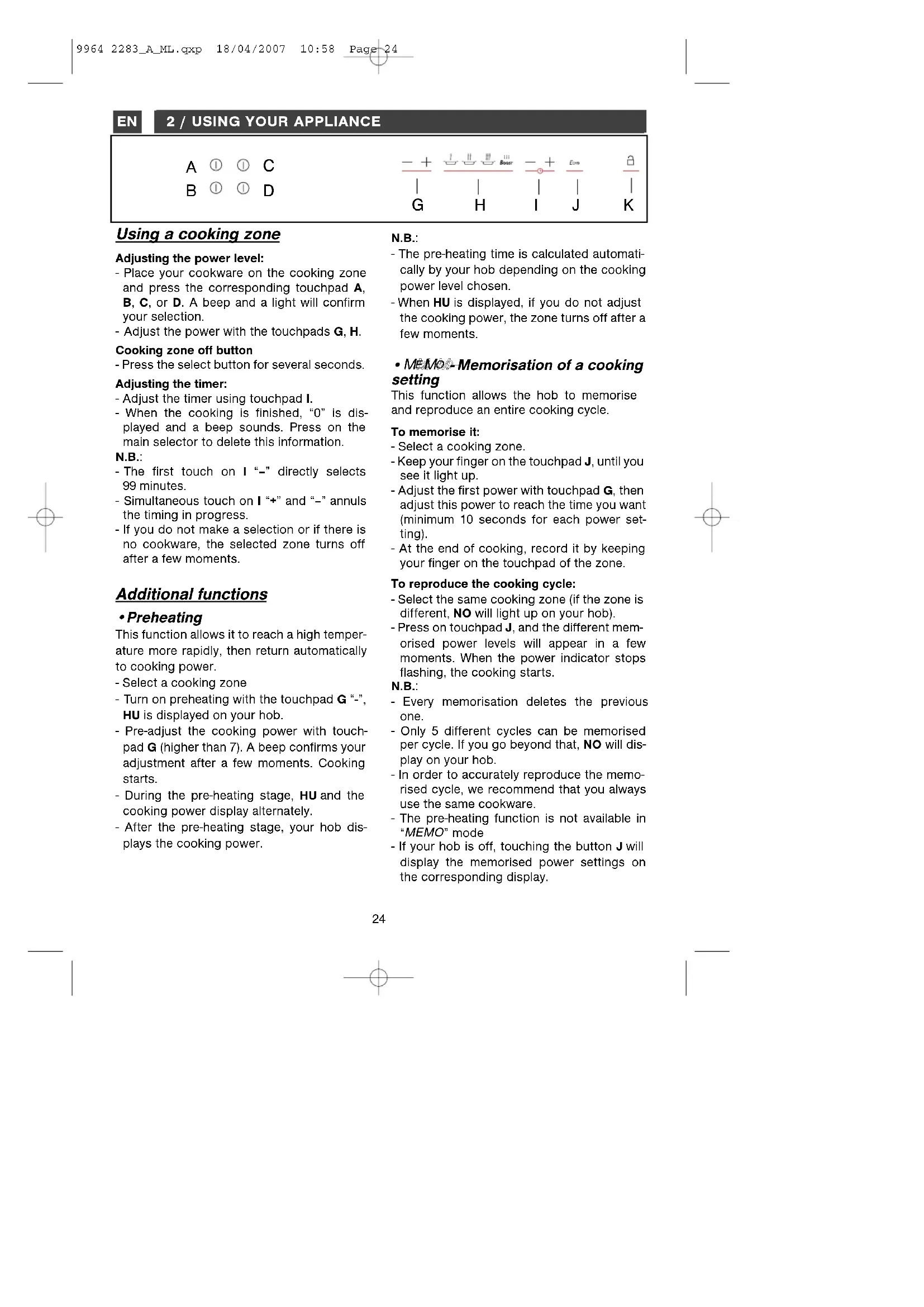
Use these touchpads A, B, C, or D to select, turn on and turn off the cooking zones. When a zone is selected, you will see it light up, and you can adjust its settings.
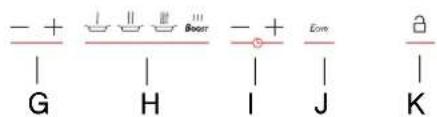
- Adjustment touch controls
These touchpads allow you to adjust power, timer, programmer... for each of the selected zones.
For a selected zone

Indicator for selected zone
Power display Timer display
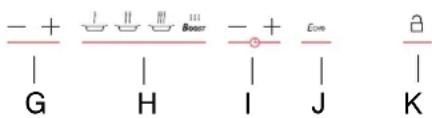
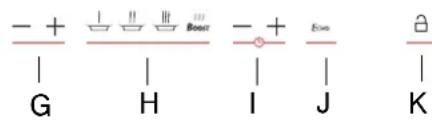
G adjusting the power
H preselecting the power
I adjusting the timer
J MEMo function
K locking - unlocking - Clean lock
If there is no cookware on the selected zone, your adjustments will delete automatically after a few moments.
USING YOUR APPLIANCE
ES
Description of your top
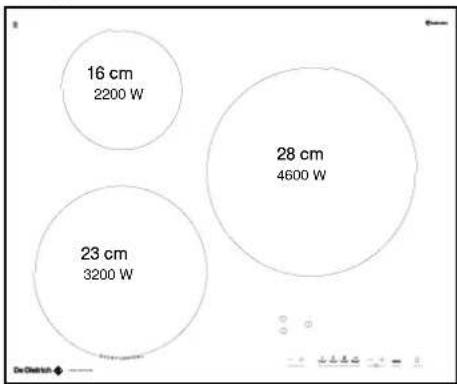
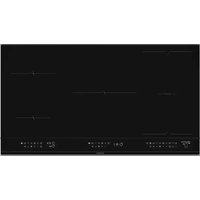
DT1706
Total dimensions(L x L) -
DT1706B/X:65×52
DT1706V:63x51
Recess cut-out (L'x I")
DTI706B/X:56X49
DT1706V:56x49
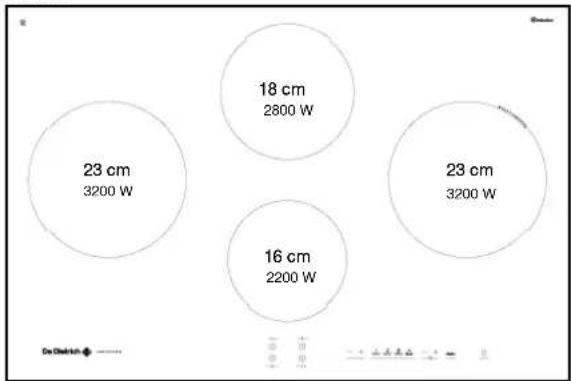
DT1708
Total dimensions(L x L) -
DT1708X:78.3x52
DT1708J:77x51
Recess cut-out (L'x I')
DT1708X:75×49
DT1708J:75×49
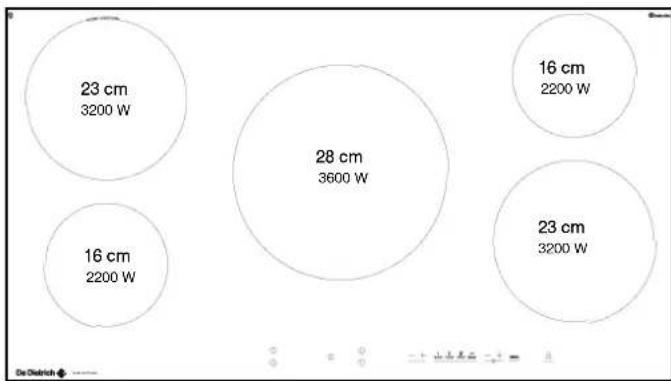
DT1709
Total dimensions(LxI)
DTI709X:78,3×52
DT1709J:78,3×52
Recess cut-out (L^ × L^ )
DT1709X:90x49
DTI709J:90x49
EN 2 / USING YOUR APPLIANCE
A ① ① C B ① ① D
Using a cooking zone
Adjusting the power level:
- Place your cookware on the cooking zone and press the corresponding touchpad A, B, C, or D. A beep and a light will confirm your selection.
- Adjust the power with the touchpads G, H.
Cooking zone off button
- Press the select button for several seconds.
Adjusting the timer:
- Adjust the timer using touchpad I.
- When the cooking is finished, "0" is displayed and a beep sounds. Press on the main selector to delete this information.
N.B.:
- The first touch on I "-" directly selects 99 minutes.
- Simultaneous touch on I “+” and “-” annuls the timing in progress.
- If you do not make a selection or if there is no cookware, the selected zone turns off after a few moments.
Additional functions
- Preheating
This function allows it to reach a high temperature more rapidly, then return automatically to cooking power.
- Select a cooking zone
- Turn on preheating with the touchpad G " -", HU is displayed on your hob.
- Pre-adjust the cooking power with touchpad G (higher than 7). A beep confirms your adjustment after a few moments. Cooking starts.
- During the pre-heating stage, HU and the cooking power display alternately.
- After the pre-heating stage, your hob displays the cooking power.
N.B.:
- The pre-heating time is calculated automatically by your hob depending on the cooking power level chosen.
- When HU is displayed, if you do not adjust the cooking power, the zone turns off after a few moments.
- MEMO-Memorisation of a cooking setting
This function allows the hob to memorise and reproduce an entire cooking cycle.
To memorise it:
- Select a cooking zone.
- Keep your finger on the touchpad J, until you see it light up.
- Adjust the first power with touchpad G, then adjust this power to reach the time you want (minimum 10 seconds for each power setting).
- At the end of cooking, record it by keeping your finger on the touchpad of the zone.
To reproduce the cooking cycle:
- Select the same cooking zone (if the zone is different, NO will light up on your hob).
- Press on touchpad J, and the different memorised power levels will appear in a few moments. When the power indicator stops flashing, the cooking starts.
N.B.:
- Every memorisation deletes the previous one.
Only 5 different cycles can be memorised per cycle. If you go beyond that, NO will display on your hob. - In order to accurately reproduce the memorised cycle, we recommend that you always use the same cookware.
- The pre-heating function is not available in "MEMO" mode
- If your hob is off, touching the button J will display the memorised power settings on the corresponding display.
A ① ① C B ① ① D
- Delayed cooking
This function allows you to delay your cooking (the cooking zone marked "Start Control").
Program delayed cooking in 6 steps:
1 - Select the cooking zone dedicated to this function.
2 - Press simultaneously on touchpads I "+" and "−" to adjust the current time of your hob. When the numbers flash, you can adjust the hour with the touchpad I, then wait a few moments. If the hour displayed is correct, wait a few moments. The display will stop flashing and a beep will confirm the setting.
3 - Set the end of cooking time by pressing on touchpad I. Wait a few moments. A beep will confirm your setting.
4 - Set the duration of cooking time by pressing on touchpad I. Wait a few moments. A beep will confirm your setting.
5 - Set the power of your cooking by pressing on touchpad G, 4 is displayed by default (maximum 6). Wait a few moments. A beep will confirm your setting and SC is displayed on your hob.
6 - After a few moments, SC goes out and a flashing point appears to indicate that delayed cooking has been engaged.
Independent timer
This function allows you to time an event, without cooking.
- Select a cooking zone you are not using.
- Set the time with touchpad I. A "t" flashes in the display.
- At the end of your adjustment "t" becomes becomes fixed and the count begins.
Note:
You can stop a count in progress by keeping your finger on the touchpad of the selection on the display.
- Preselected power settings
This function allows you to modify the power levels defined in the preselections (except for the boost).
- Your cooking hob must be turned off.
- Select the preselection H to modify, by keeping your finger on it.
- Set the new power setting by pressing on touchpad G.
- A beep will confirm your action after a few moments.
N.B.:
The power levels must be between:
- 1 and 5 for the first touch(4 by defect).
-6 and 10 for the second (8 by defect) - 11 and 15 for the third (15 by defect).
Child safety
This functioin allows you to lock your hob when it is shut off or when it is cooking.
To lock:
- Keep your finger on touchpad K. A beep sounds and an indicator appears. The indicator will go out automatically after a few moments.
To unlock:
- Keep your finger on touchpad K. A beep sounds and the indicator goes out.
Note:
- In locked mode, any action will produce a key symbol on the display. You must unlock your hob before using it.
- If you activate the lock while cooking, the stop display will be prioritised on the lock.
2 / USING YOUR APPLIANCEEN
Clean lock
This function allows you to temporarily lock your hob while cleaning.
To activate Clean lock:
- Your cooking hob must be turned off.
- Briefly press touchpad K. A beep sounds and an indicator appears.
- After a predefined time, the lock will automatically disengage. A beep sounds and the indicator goes out.
Safety when operating
- Residual heat
After a long cooking period, the zone used can remain hot for several minutes. An "H" flashes during this period. Do not put your hand on the zone.
- Temperature limiter
Each cooking zone is equipped with a safety sensor that constantly monitors the temperature of the bottom of the cookware. If you leave empty cookware on a zone which is turned on, it will automatically limit the power in order to prevent damage to the cookware or hob.
Protection against overflows
In case of overflow, or of a metallic object or wet cloth placed on the control areas, the hob turns itself off, the displays light up and a beep sounds. Clean the hob or remove the object, then begin cooking again.
- Auto-Stop system
If you forget cooking is in progress, after a predefined time, this safety function will automatically turn off your hob (from 1 to 10 hours depending on the power setting). "AAS displays and a beep sounds after about 2 minutes. Press on the main selector to delete this information. A beep will confirm your setting.
- "Small Items" safety
If you place a small object on the area (a ring, a fork, etc), the hob will detect it and not deliver any power. The power display flashes.
Note:
However, several small objects at the same time on a zone could be identified as cookware. In that case, power will be delivered by the hob.
Do not place any utensils (spoons, forks, covers, etc) on the cooking zone being used. They will heat up in the same way as cookware:
Risk of combustion.
- For users with heart pacemakers and active implants.
The functioning of the hob conforms to current electromagnetic interference standards and thus is in total compliance with legal requirements (89/336/EEC directives).
In order to avoid interference between your cooking hob and a pacemaker, your pacemaker must be designed and programmed in compliance with the regulations that apply to it.
As we can guarantee the compliance only of our own products, we strongly recommend that you refer to the maker of your device or to your doctor to avoid possible incompatibilities.
3 / MAINTAINING YOUR APPLIANCE EN
Preserve your appliance
The vitroceramic glass surface is highly resistant, but not unbreakable. Here are some recommendations for increasing its lifetime:
- Avoid banging or clattering the cookware.
- Avoid putting heating covers on the hob. A suction effect may damage the vitroceramic surface.
- Do not use cookware with bottoms that are rough or dented.
- Do not use your cooking hob as a work surface.
- Never use aluminium foil or paper or aluminium scrubber to clean it. The aluminium melts and damages the top.
-
Never use a steam cleaner to clean your hob.
-
Never directly reheat a tin can. It will have a risk of exploding.
Aesthetic faults, as a result of mistreatment of your hob and which do not entail a lack of function, are not covered by our guarantee.
And for the safety of your kitchen, do not place cleaning items or inflammable objects or products in the kitchen furniture underneath your cooking hob.
Maintaining your appliance
| TYPES OF STAINS/SPOTS | USE | WHAT TO DO? |
| Light. | Cleaning sponges | Thoroughly moisten the zone to be cleaned with hot water, then wipe off. |
| Accumulation of baked-on stains/dirt.Sugar spills, melted plas-tics. | Cleaning sponges Scraper for glass. | Thoroughly moisten the zone to be cleaned with hot water. Use a scraper for glass to remove the large bits, follow with the rough side of a disinfectant sponge, and then wipe off. |
| Rings and hard water residue. | White vinegar. | Apply warm white vinegar to the stain, let stand, then wipe with a soft cloth. |
| Shiny metal colourings.Weekly maintenance. | Special vitroceram-ic glass product. | Apply a cleaning agent for vitroceramic glass (preferable one with silicon for its protective properties) to the surface. |
| cream | cleaning sponge special for delicate crockery | powder abrasive sponge |
4 / SPECIAL MESSAGES, DIFFICULTIESEN
- On first use
| POSSIBLE CAUSES: | WHAT SHOULD YOU DO? | |
| A special lamp appears. | Working normally. | Nothing, the light disappears after 30 seconds. |
| Your installation blows a fuse. | The electrical connection of your hob is incorrect. | Check that it is set up properly. See the “Electrical Connection” section. |
| Only one side works. | ||
| The hob produces an odour dur-ing the first cooking sessions. | New appliance. | Nothing. The smell will dis-appear after several uses. |
- On switching on
| YOU OBSERVE THAT: POS | SIBLE CAUSES: | WHAT SHOULD YOU DO? |
| The hob does not operate and the indicator lights on the control panel do not light up. | The machine is not connected to the power source. The power source or connection is defective. | Inspect the electrical circuit breaker and fuses. |
| The hob is not working and another message is displayed. | The electronic board is functioning poorly. | Call the After-Sales Service Department. |
| The hob does not function, the information is displayed. | The hob is locked | See chapter on using the child safety system |
While in use
| YOU OBSERVE THAT: POSIBLE CAUSES: | WHAT SHOULD YOU DO? | |
| The hob has stopped operating and is beeping approximately every 10 seconds and a or F7 is displayed. | There was an overflow or an object is in contact with the control panel. | Clean the hob or remove the object, then begin cooking again. |
| A series of small or F7 is displayed. | The electronic circuits have overheated. | See “Inserting” section. |
| After turning on a heating zone, the indicator lights on the control panel continue to flash. | The cookware used is not suitable for induction or is less than 12 cm in diameter (10 cm on a 16 cm area). | See section on cookware for induction. |
| The saucepans make noise during cooking. Your hob makes a clicking sound during cooking. | This is normal with some types of cookware. This is caused by the transfer of energy from the hob to the cookware. | Nothing. There is no risk, neither to your hob nor to your cookware. |
| The fan continues to function a few minutes after your hob is turned off. | Cooling of the electronic components. Working normally. | Nothing. |

In case of breakage, cracks or even light fissures in the vitroceramic glass, take out the fuses or turn off the circuit breaker for your hob to avoid the risk of electrical shock.
Contact the After-Sales Service Department.
5/ AFTER-SALES SERVICE
In the unlikely event of there being a problem with your appliances please call the number below quoting the model number of your appliance - this can be found on the rating plate. Our trained staff are available to advise or book a service call with one of our authorized service agents.
De Dietrich

Distributed by MEA (A Divisions of Hagemeyer Brands Australia) FOR AUSTRALIAN CUSTOMERS ONLY
PRODUCT WARRANTY
- Subject to the "Statement of Standard Warranty Conditions" this product is covered by the following Warranty.
TWO (2) YEARS WARRANTY from date of purchase, covering all parts and labour.
2.The appliance is warranted under normal single family domestic installation and use, as set out in the user manual, against manufacturing defects for the Warranty periods shown above.
3:Should service be required under this Warranty, the purchaser should contact an approved DE DIETRICH Service Provider during their normal business hours.
-
At no time does DE DIETRICH have liability for any freight or transportation costs or for any damage during transit or for any consequence of failure of this appliance outside of the normal service area, unless such limitation of liability is prohibited by statute.
-
This Warranty excludes replacement of parts required due to normal wear and tear including light globes.
-
This Warranty only applies, provided the appliance has been used in accordance with the manufacturer's instructions and provided an accident, misuse, neglect or abuse has not damaged the appliance.
-
None of the above Warranties purport to exclude, restrict or modify either the application or the exercise of a right conferred by any applicable Statute.
8:Please complete the details below, which should be retained for future reference along with your proof of purchase:
Date of Purchase:
Model No:
Serial No:
Notice to Victorian Customers from the Victorian Plumbing Industry Commission.
This product must be installed by a licensed person as required by the Victorian Building Act 1993.
Only a licensed person will give you a Compliance Certificate, showing that the work complies with all the relevant standards. Only a licensed person will have insurance protecting their workmanship for 6 years. Make sure you use a licensed person to install this product and ask for your Compliance Certificate.
STATEMENT OF STANDARD WARRANTY CONDITIONS
- The Warranty only applies provided that the appliance has been used in accordance with the manufacturer's instructions and provided that the appliance has not been damaged by an accident, misuse, neglect or abuse of any person other than the manufacturer or MEA or from faulty installation, mis-adjustment or tampering by unauthorised persons.
22 When a service inspection reveals the alleged fault or faults are caused by incorrect operation, contrary to the instruction manual, and otherwise the appliance is in good order and working condition, the purchaser shall be liable for a service fee charged by MEA or one of its Service Providers.
-
If the appliance is used in Commercial Applications or for Rental purposes, a separate warranty of Twelve (12) months covering all parts with Three (3) months on the labour will apply.
-
Subject to the provisions of any applicable statute this Warranty applies to the original retail purchaser only and is not transferable.
-
Subject to the provisions of any applicable statute, at no time does MEA have liability for freight, transport or travel costs outside normal service areas.
-
None of the above Warranties purport to exclude, restrict or modify either the application or the exercise of a right conferred by any applicable statute.
-
Subject to any Warranties implied by statute, at no time will MEA or its Service Providers be liable for any economic loss consequent upon the failure of the appliance.
83This Warranty is only valid for De Dietrich major appliances imported and distributed by MEA, purchased and used in Australia.
m - 1 0 ;
(1)
( x - 2x) t - xy^2 = ( x - 2x) f^ t
m - 1 0 ;
公
(2)
( x - 2x) t - xy^2 = ( x - 2x) f^ t
m - 1 0 ;
1 + u1 - 1 = ( 1 + u) u1 < 1 = u
m - 1 0 ;
De Dietrich
fusivel 1-6t32mperes.
fusivel 65ampères.
400 V 3N trifasica
separate os 2 fios de fase,L1 e L2,antes defectuar a ligaçao
fusivel 1 amperes.