SE32HG - Television Seiki - Free user manual and instructions
Find the device manual for free SE32HG Seiki in PDF.



| Product Type | 31.5-inch LED TV (diagonal) |
| Display Resolution | 1366 x 768 pixels (HD Ready 720p) |
| Tuner | ATV/DTV (antenna or cable) |
| HDMI Inputs | 2 (HDMI A and B) |
| VGA Input | 1 (with PC audio input) |
| Component/Composite Input | 1 (Y/Pb/Pr + audio L/R) |
| USB Port | 1 (for multimedia playback: JPEG, MP3) |
| Optical Audio Output | 1 (SPDIF) |
| Headphone Jack | 1 (3.5mm jack) |
| VESA Wall Mount | 200 x 100 mm |
| Power Supply | 100-240 V AC, 50/60 Hz |
| Consumption (Home mode) | Less than 42.6 W |
| Consumption (standby) | Less than 0.5 W |
| Dimensions (with stand) | Approx. 73 x 48 x 18 cm |
| Net Weight | Approx. 5.5 kg |
| Viewing Angle (horizontal/vertical) | 178° / 178° |
| Dynamic Contrast Ratio | 800:1 to 1400:1 |
| Main Features | Parental control (V-Chip), timer, USB mode, closed captioning, noise reduction, DLC |
| Care and Cleaning | Soft dry cloth; do not use solvents |
| Safety | Double insulation (Class II), surge protection, moisture warning |
| Warranty | 1 year (replacement or parts) |
| Spare Parts and Repairability | No user-serviceable parts; contact a qualified technician |
| General Information | ENERGY STAR® compliant (Home mode) |
Frequently Asked Questions - SE32HG Seiki
User questions about SE32HG Seiki
0 question about this device. Answer the ones you know or ask your own.
Ask a new question about this device
Download the instructions for your Television in PDF format for free! Find your manual SE32HG - Seiki and take your electronic device back in hand. On this page are published all the documents necessary for the use of your device. SE32HG by Seiki.
USER MANUAL SE32HG Seiki
USER MANUAL MANUEL D'UTILISATION MANUAL DEL USUARIO
SE32HY
LED TV
CONTENTS
Important Safety Instructions 2
Safety Information 3
Preparation 4
What's Included 4
Front View 5
Rear View 6
Installing the Base Stand 7
Removing the Stand for Wall-Mounting 7
Remote Control 8
Connecting External Devices 9
Customizing TV Settings 10
Initial Setup 10
Navigating the On screen Display 11
Selecting Input Source 12
Picture Settings 12
Audio Settings 13
Time Settings 14
Setup Settings 15
Lock Settings 16
Channel Settings 17
USB Multimedia 18
Parental Control 19
Troubleshooting 21
Maintaining 22
Specification 23
Limited Warranty 24
IMPORTANT SAFETY INSTRUCTIONS
- Read these instructions – All the safety and operating instructions should be read before this product is operated.
- Keep these instructions – The safety and operating instructions should be retained for future reference.
- Heed all warnings – All warnings on the appliance and in the operating instructions should be adhered to.
- Follow all instructions – All operating and use instructions should be followed.
- Do not use this apparatus near water – The appliance should not be used near water or moisture – for example, in a wet basement or near a swimming pool, and the like.
• Clean only with dry cloth. - Do not block any ventilation openings. Install in accordance with the manufacturer's instructions.
- Do not install near any heat sources such as radiators, heat registers, stoves, or other apparatus (including amplifiers) that produce heat.
- Do not defeat the safety purpose of the polarized or grounding-type plug. A polarized plug has two blades with one wider than the other. A grounding-type plug has two blades and a third grounding prong. The wide blade or the third prong are provided for your safety. If the provided plug does not fit into your outlet, consult an electrician for replacement of the obsolete outlet.
- Protect the power cord from being walked on or pinched particularly at plugs, convenience receptacles, and the point where they exit from the apparatus.
- Only use attachments/accessories specified by the manufacturer.
- Use only with the cart, stand, tripod, bracket, or table specified by the manufacturer, or sold with the apparatus. When a cart is used, use caution when moving the cart/ apparatus combination to avoid injury from tip-over.

- Unplug this apparatus during lightning storms or when unused for long periods of time.
- Refer all servicing to qualified service personnel. Servicing is required when the apparatus has been damaged in any way, such as the power-supply cord or plug is damaged, liquid has been spilled or objects have fallen into the apparatus, the apparatus has been exposed to rain or moisture, does not operate normally, or has been dropped.
- Please keep the unit in a well-ventilated environment.
WARNING: To reduce the risk of fire or electric shock, do not expose this apparatus to rain or moisture. The apparatus should not be exposed to dripping or splashing. Objects filled with liquids, such as vases should not be placed on apparatus.
WARNING: The batteries shall not be exposed to excessive heat such as sunshine, fire or the like.
WARNING: The mains plug is used as disconnect device, the disconnect device shall remain readily operable.
WARNING: To reduce the risk of electric shock, do not remove cover (or back) as there are no user-serviceable parts inside. Refer servicing to qualified personnel.

This lightning flash with arrowhead symbol within an equilateral triangle is intended to alert the user to the presence of non-insulated "dangerous voltage" within the product's enclosure that may be of sufficient magnitude to constitute a risk of electric shock.
The exclamation point within an equilateral triangle is intended to alert the user to the presence of important operating and maintenance instructions in the literature accompanying the appliance.
This equipment is a Class II or double insulated electrical appliance. It has been designed in such a way that it does not require a safety connection to electrical earth.
This product contains electrical or electronic materials. The presence of these materials may, if not disposed of properly, have potential adverse effects on the environment and human health.
Presence of this label on the product means it should not be disposed of as unsorted waste and must be collected separately. As a consumer, you are responsible for ensuring that this product is disposed of properly.

This product meets ENERGY STAR ^® guidelines for energy efficiency. ENERGY STAR and the ENERGY STAR mark are registered U.S. marks. ENERGY STAR is a registered mark owned by the U.S. government.
SAFETY INFORMATION
To ensure reliable and safe operation of this equipment, please carefully read all the instructions in this user guide, especially the safety information below.
Electrical Safety
- The TV set should only be connected to a main power supply with voltage that matches the label at the rear of the product.
- To prevent overload, do not share the same power supply socket with too many other electronic components.
- Do not place any connecting wires where they may be stepped on or tripped over.
- Do not place heavy items on any connecting wire, which may damage the wire.
- Hold the main plug, not the wires, when removing from a socket.
- During a thunderstorm or when not in using the television for long periods, turn off the power switch on the back of the television.
- Do not allow water or moisture to enter the TV or power adapter. Do not use in wet, moist areas, such as bathrooms, steamy kitchens or near swimming pools.
- Pull the plug out immediately, and seek professional help if the main plug or cable is damaged, liquid is spilled onto the set, if the TV set accidentally exposed to water or moisture, if anything accidentally penetrates the ventilation slots or if the TV set does not work normally.
- Do not remove the safety covers. There are no user serviceable parts inside. Trying to service the unit yourself is dangerous and may invalidate the product's warranty. Qualified personnel must only service this apparatus.
- To avoid a battery leakage, remove batteries from the remote control, when the remote is not use for long period, or when the batteries are exhausted.
- Do not break open or throw exhausted batteries into a fire.
Physical Safety
- Do not block ventilation slots in the back cover. You may place the TV in a cabinet, but ensure at least 5cm (2") clearance all around.
- Do not tap or shake the TV screen, or you may damage the internal circuits. Take good care of the remote control.
- To clean the TV use a soft dry cloth. Do not use solvents or petroleum based fluids.
- Do not install near any heat sources such as radiators, heat registers, stoves or other apparatus (including amplifiers) that produce heat.
- Do not defeat the safety purpose of the polarized or grounding-type plug. A polarized plug has two blades with one wider than the other. A grounding plug has two blades and a third grounding prong, the wide blade, or the third prong is provided for your safety. If the provided plug does not fit into your outlet, consult an electrician for replacement of the obsolete outlet.
- Protect the power cord from being walked on or pinched particularly at plugs.
- Unplug the apparatus during lightning storms or when unused for long periods.
- Refer all servicing to a qualified service personnel. Servicing is required if the apparatus does not operate normally or if the apparatus, including the power supply cord or pulg, has been damaged in any way.
- Servicing is also required if liquid has been spilled, or objects have fallen into the apparatus; when the apparatus has been exposed to rain or moisture; or if the apparatus has been dropped.
• Always connect your television to a power outlet with protective ground connection.
PREPARATION
What's Included
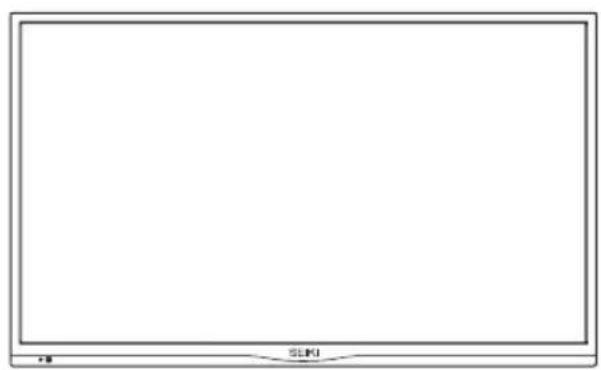
natural_image
Blank white rectangular frame with a small logo at the bottom right corner (no text or symbols on the main area)TV Set
natural_image
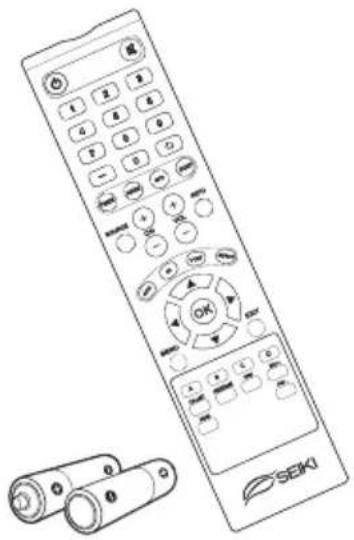
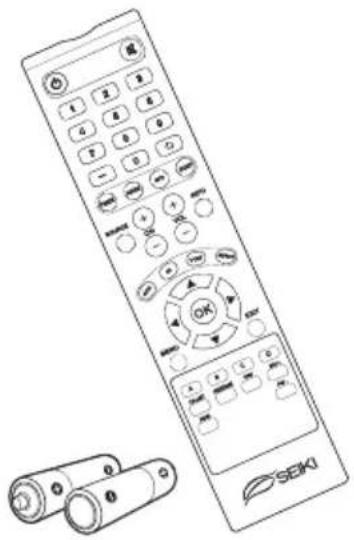
Line drawing of a SEKI remote control with keypad and scroll (no text or symbols)Remote Control with Batteries
natural_image
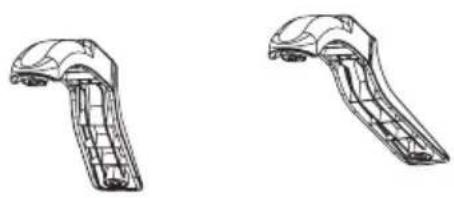
Technical line drawings of two mechanical components (no text or symbols)TV Stand Four Screws
natural_image
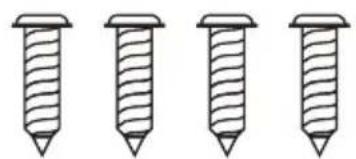
Four identical screw illustrations arranged horizontally (no text or symbols)User Manual
User Manual
Quick Start Guide
Quick Start Guide
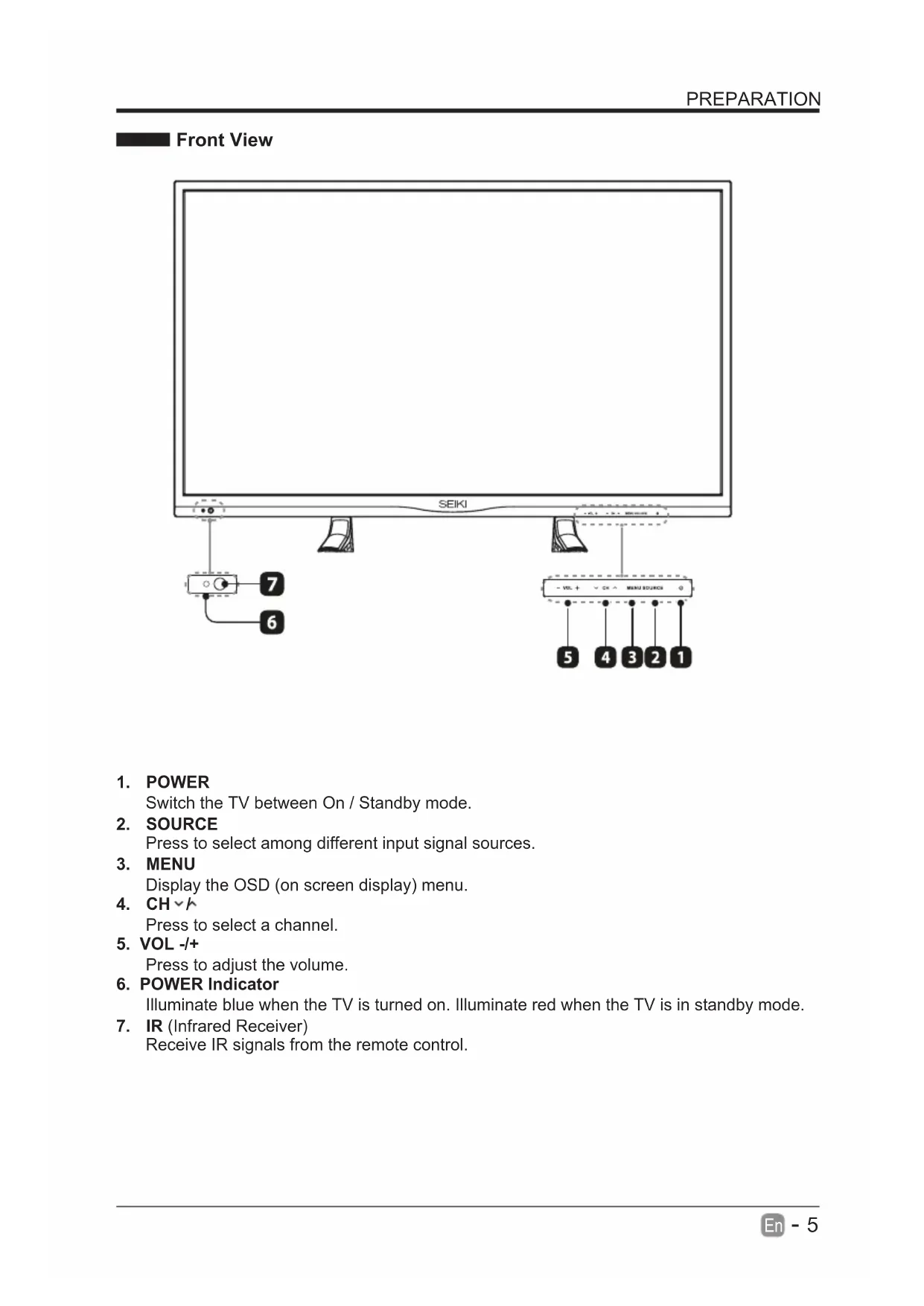
Front View
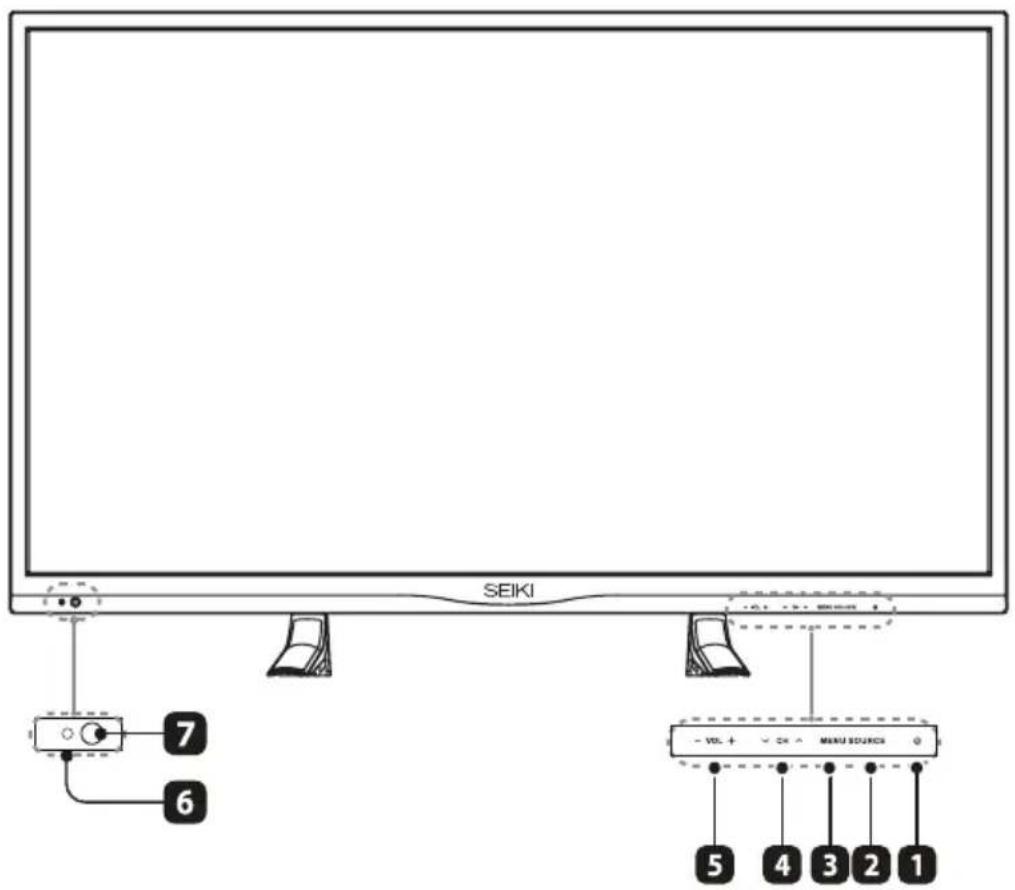
- POWER
Switch the TV between On / Standby mode.
- SOURCE
Press to select among different input signal sources.
- MENU
Display the OSD (on screen display) menu.
- CH√
Press to select a channel.
- VOL -/+
Press to adjust the volume.
- POWER Indicator
Illuminate blue when the TV is turned on. Illuminate red when the TV is in standby mode.
- IR (Infrared Receiver)
Receive IR signals from the remote control.
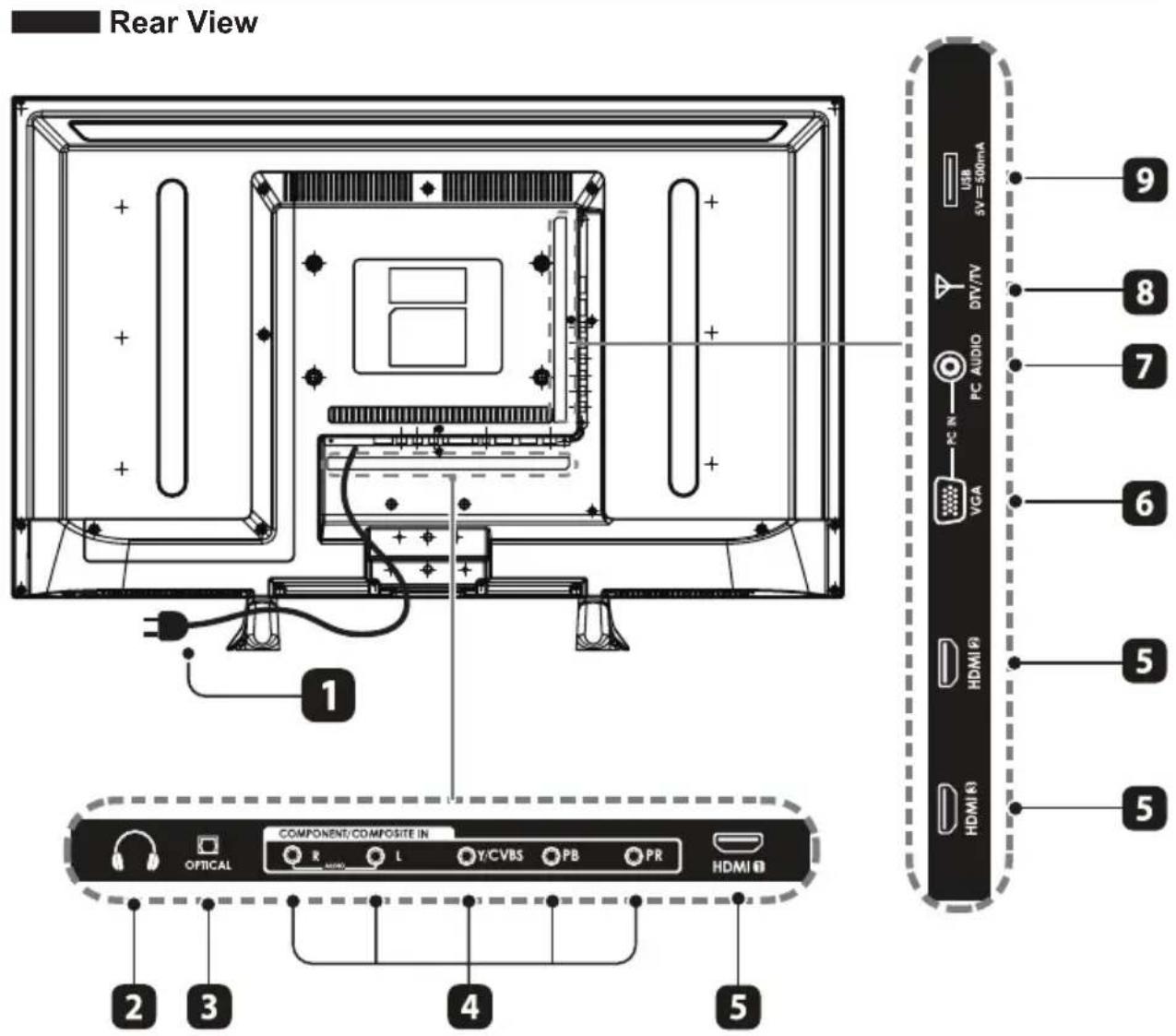
- PowerCord
Connect to AC power outlet.
- Headphone Socket
connect to the Headphones.
- OPTICAL
Connect a digital sound system to this jack.
- COMPONENT Input
Connect to AV devices with component (Y/Pb/Pr) video and audio input sockets.
- HDMI Inputs
Connect to a High-Definition (HD) signal input device.
- VGA Input
Connect to a computer or other devices with a VGA interface.
- PC AUDIO Input
Connect to a computer audio output.
- DTV/TV Input
Connect to the antenna (75Ω VHF/UHF) socket with the RF coaxial cable.
- USB Port
Connect to a USB storage device to play photo files.(USB mode).
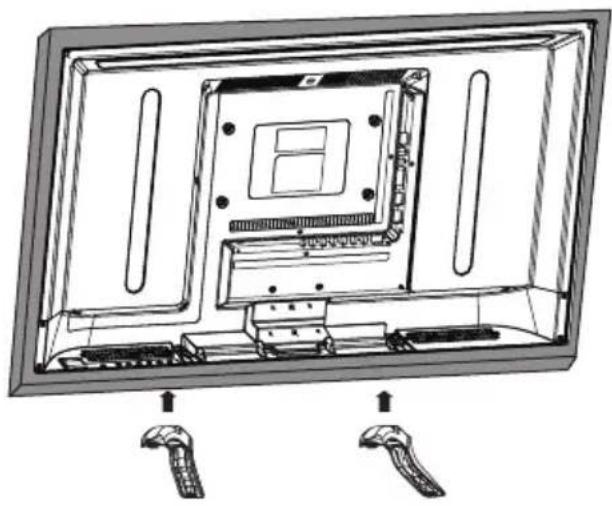
Installing the Base Stand
natural_image
Technical line drawing of an open computer monitor with internal components and two labeled connectors (no text or symbols present)• 1. Lay the TV face-down on a flat, cushioned surface to avoid damaging or scratching.
• 2.Fix the left base stand to the TV using the 2 pcs provided screws.
• 3.Fix the right base stand assembly to the TV using the 2 pcs provided screws.
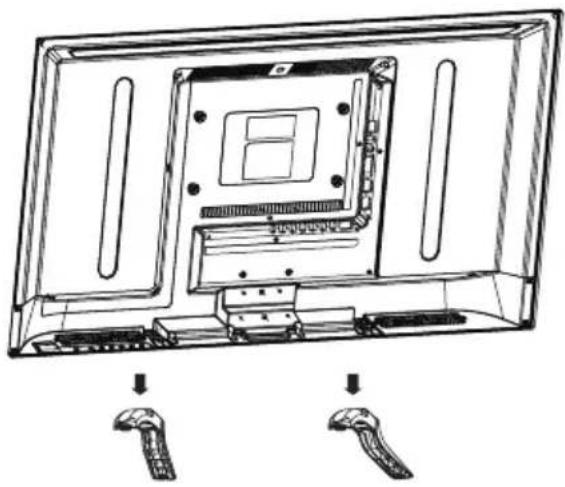
Removing the Stand for Wall-Mounting
natural_image
Technical line drawing of a computer monitor with visible internal components and two labeled connectors (no text or symbols)• 1. Lay the TV face-down on a flat, cushioned surface to avoid damaging or scratching.
• 2.Untighten the 4 pcs screws holding the stand assembly and remove them.
- 3. Attach the wall-mount bracket to the TV using the mounting holes on the back of the TV. Mount this TV according to the instructions included in the wall-mount bracket.
WARNING: This apparatus is intended to be supported by UL Listed wall mount bracket.
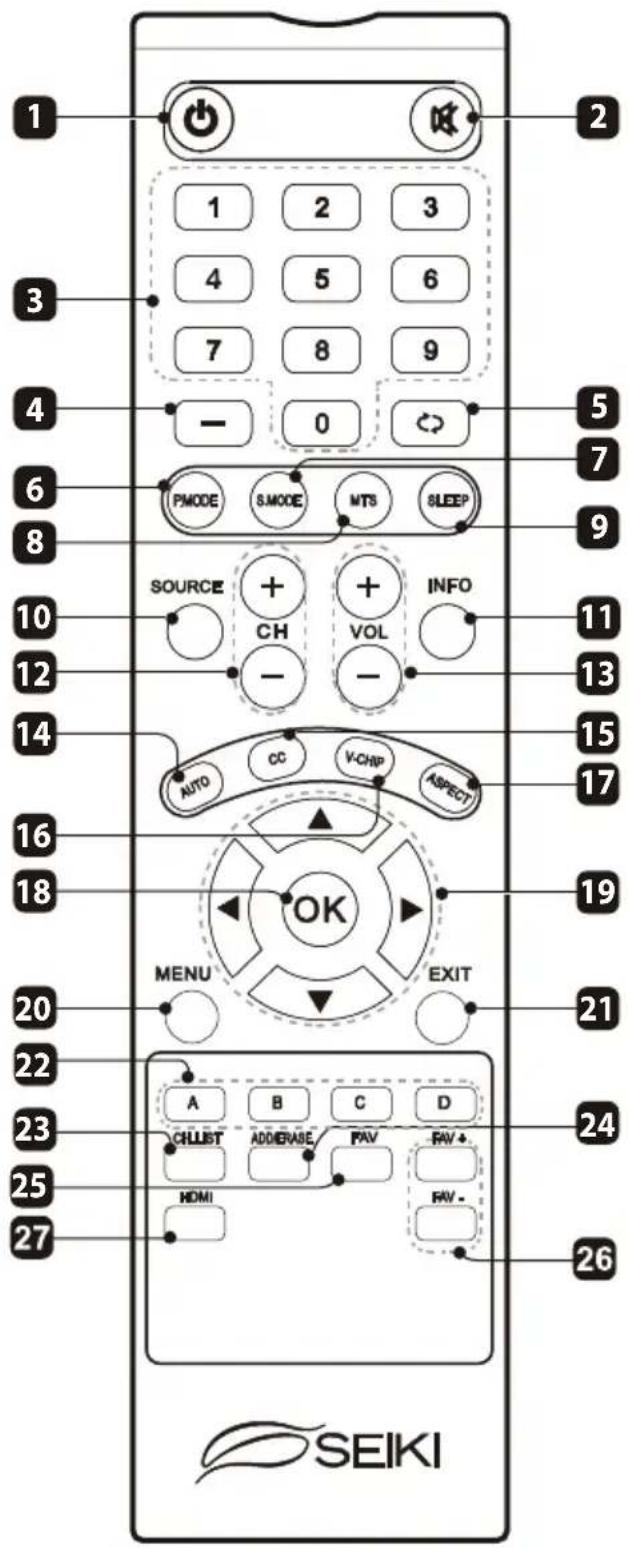
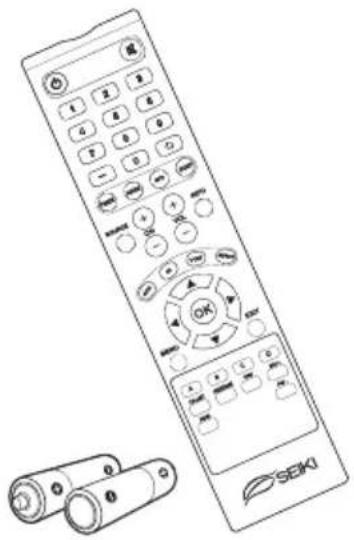
Remote Control
-
:Switch the TV between on and standby mode
-
:Mute and restore your TV sound
-
0\~9: Select a program (ATV/DTV mode)
-
—: Enter multiple program channel number such as 2-1
-
: Return to previous viewing channel
-
P.MODE: Select picture mode: dynamic/movie/energy saving/user/standard
-
S.MODE: Select sound mode: standard/music/movie/user
-
MTS: Switch among different audio channels: STEREO/MONO/SAP
-
SLEEP: Set the TV sleep timer: OFF/5/10.../180/240 min
-
SOURCE: Select among the different input signal sources: TV/AV/Component/HDMI1/HDMI2/HDMI3/VGA/USB
-
INFO: Display the present screen information such as the current channel and input source
-
CH+/-: Select a channel
-
VOL+/-: Adjust the volume
-
AUTO: Press to adjust the picture automatically in VGA source
-
CC: Closed Caption selection: ON/OFF/CC On Mute
-
V-CHIP: Set up parental control
-
ASPECT: Select the aspect ratio settings: standard/wide/wide zoom/zoom
-
OK: Confirm the selection in the OSD'on screen display' menus
-
Allows you to navigate the OSD menus and adjust the system settings to your preference.
-
MENU: Display the OSD (on screen display) menu
-
EXIT: Exit the OSD menu
-
A/B/C/D: Single push>switch to FAV channel, push and hold >store current channel
-
CH.LIST: Display program list
-
ADD/ERASE: Add or delete Favorite channels
-
FAV: Select a favorite channel
-
FAV+/-: Add or delete favorite channels
-
HDMI: Select the HDMI mode directly
CONNECTING EXTERNAL DEVICES
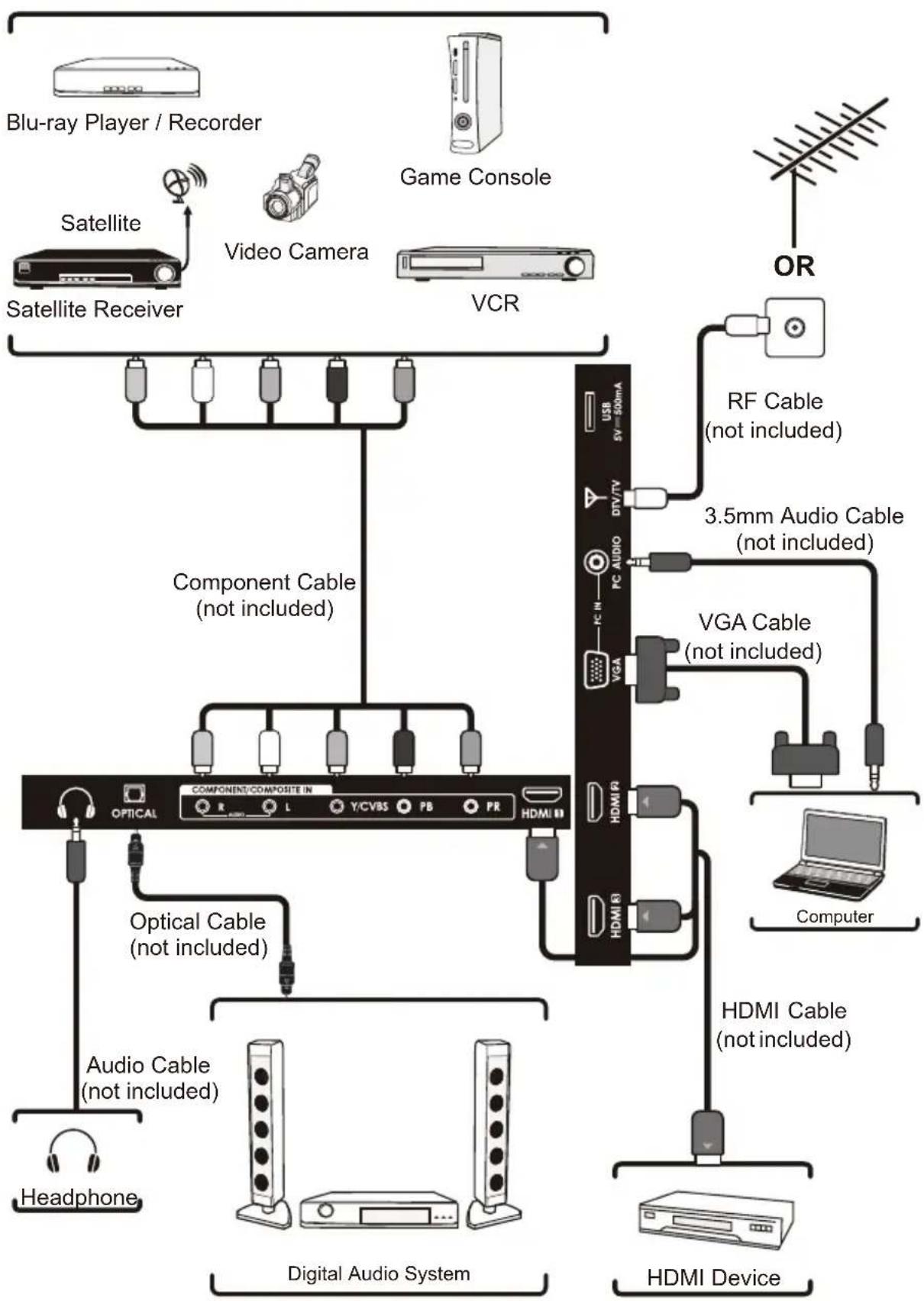
flowchart
graph TD
    A["Blu-ray Player / Recorder"] --> B["Satellite"]
    B --> C["Satellite Receiver"]
    C --> D["Component Cable (not included)"]
    D --> E["Digital Audio System"]
    E --> F["Audio Cable (not included)"]
    F --> G["Headphone"]
    E --> H["HDMI Device"]
    I["Game Console"] --> J["RF Cable (not included)"]
    J --> K["3.5mm Audio Cable (not included)"]
    K --> L["VGA Cable (not included)"]
    L --> M["HDMI R"]
    L --> N["HDMI B"]
    O["OR"] --> P["Computer"]
    P --> Q["Computer"]
    style A fill:#f9f,stroke:#333
    style I fill:#ccf,stroke:#333
    style O fill:#cfc,stroke:#333
    style P fill:#fcc,stroke:#333
    style Q fill:#cff,stroke:#333
    style_R["HDMI Device"] --> S["Computer"]
    style S --> T["Computer"]
    style_U["Video Camera"] --> V["Component Cable (not included)"]
    V --> W["Optical Cable (not included)"]
    W --> X["Audio Cable (not included)"]
    X --> Y["Headphone"]
CUSTOMIZING TV SETTINGS
Initial Setup
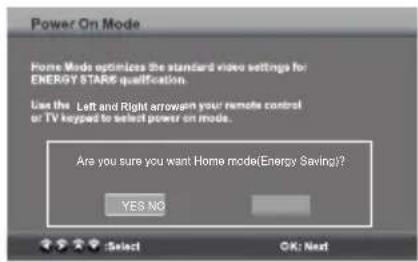
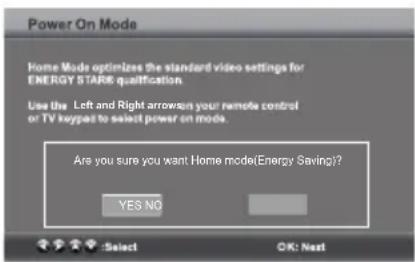
- Connect the power cord to the power socket after you have completed all the physical connections. At this stage, the TV will enter Standby Mode and the red LED indicator will illuminate.
- In Standby Mode, press the ⏻ button on the main unit or on the remote control to turn the TV on. The red LED indicator will turn blue.
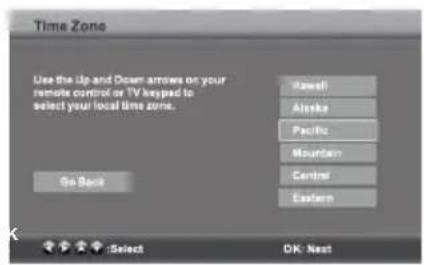
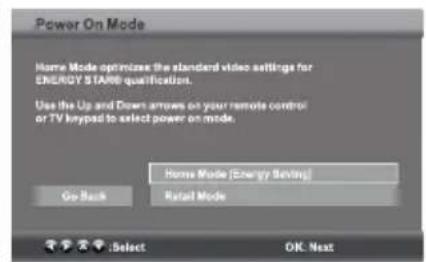
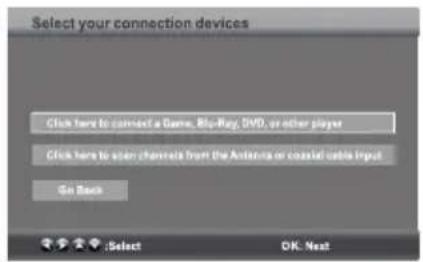
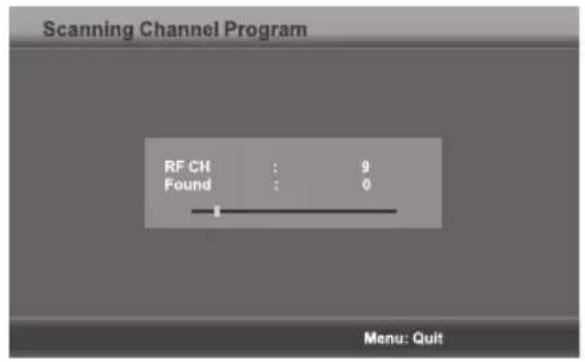
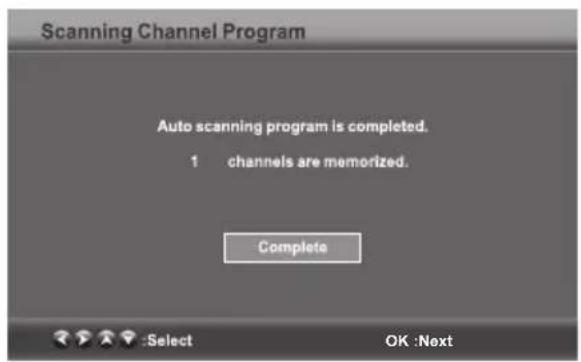
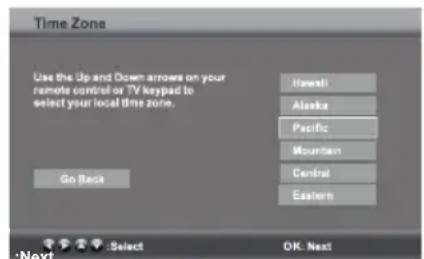
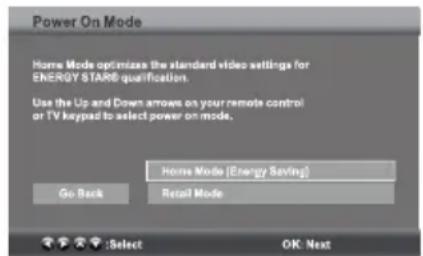
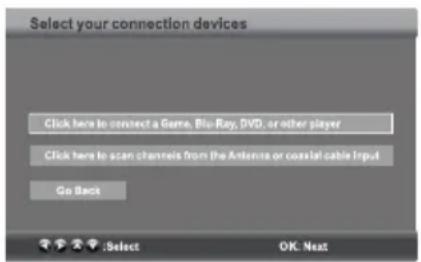
- The first time you turn the TV on, it will go into the Setup Wizard. Press ◀/▶ ▲/▼ buttons to select your desired mode and press OK to confirm.
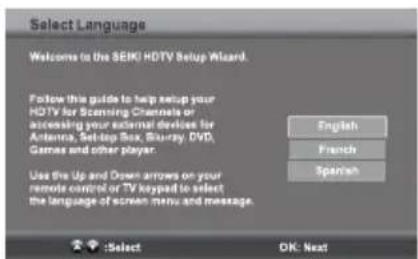
1
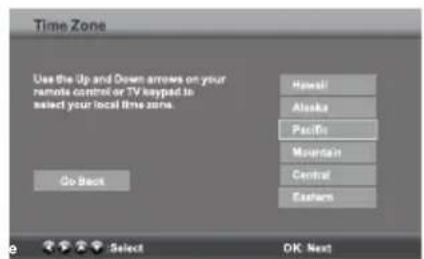
2
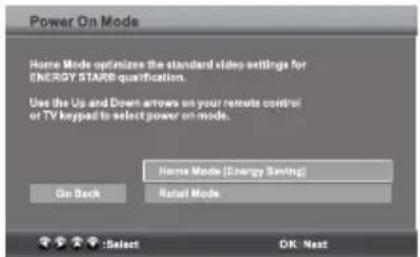
3
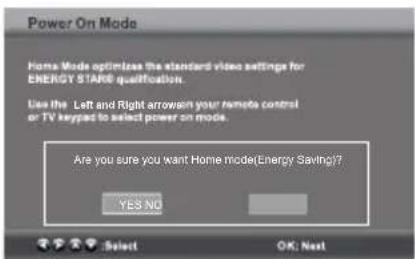
4
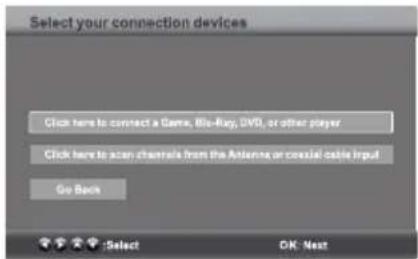
5
Home Mode (Energy Saving) is the default as-shipped television configuration and settings. And Home Mode (Energy Saving) is the setting in which the product qualifies for ENERGY STAR. Any changes to default as-shipped television configuration and settings would change the energy consumption. And enabling certain optional features and functionalities may increase energy consumption beyond the limits required for ENERGY STAR qualification, as applicable.
Retail Mode : Select Retail Mode if you would like your picture to be brighter. At times this mode may use more energy to operate the Volume/Sound Mode and the Picture Mode. In this setting, the power consumption may possibly exceed the limited requirement of the ENERGY STAR® qualification. ENERGY STAR® is a set of power-saving guidelines issued by the U.S. Environmental Protection Agency(EPA). ENERGY STAR® is a joint program of the U.S. Environmental Protection Agency and the U.S. Department of Energy helping us all save money and protect the environment through energy efficient products and practices.
• The ON-MODE Power under Home Mode should be less than 42.6 W.
• The SLEEP-MODE Power should be less than 0.5 W.
6
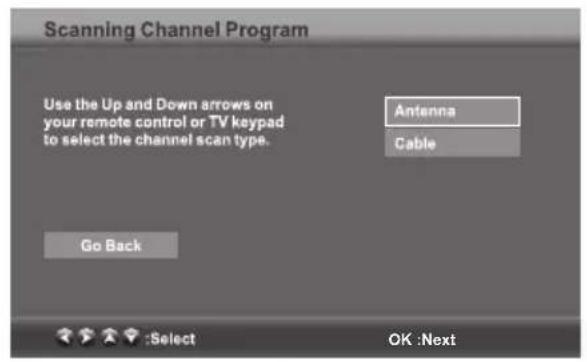
7
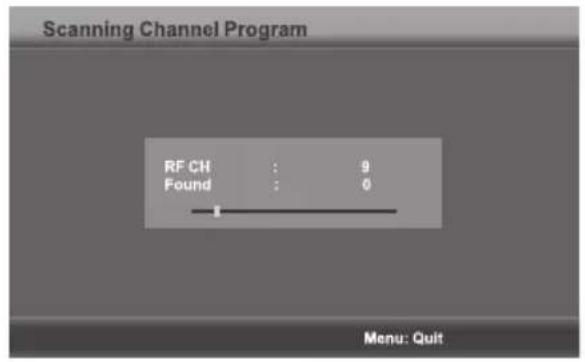
8
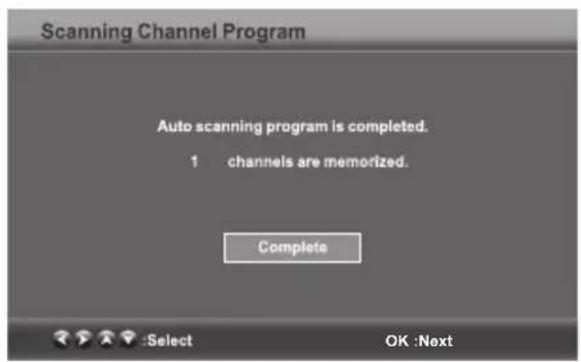
9
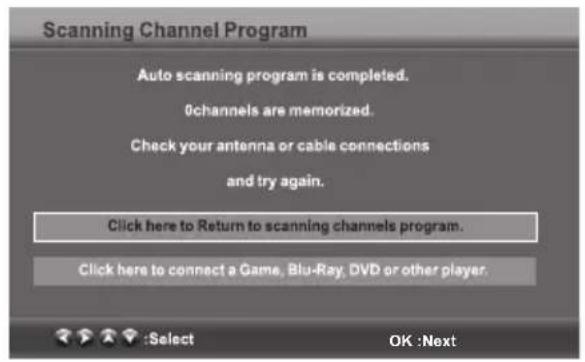
10
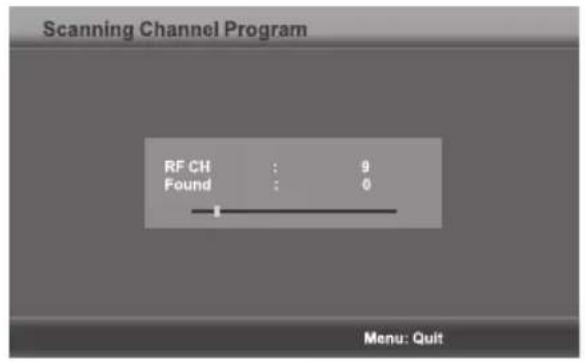
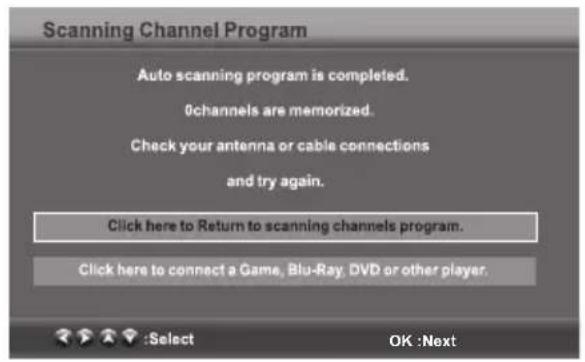
- If channels can not be found, this frame will be displayed automatically.
Navigating the On-screen Display
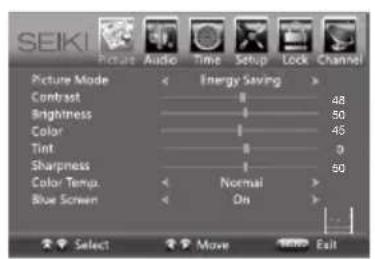
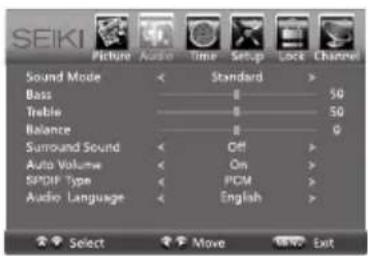
- Press the MENU button to display the main menu.
• Use /buttons to navigate and select the available menus.





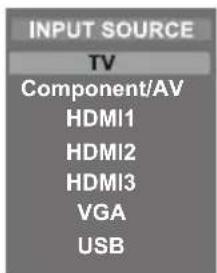
Selecting Input Source
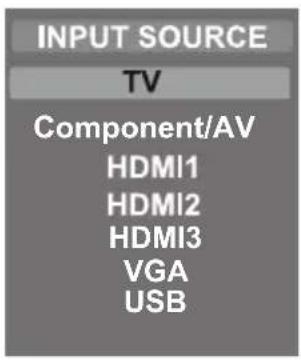
- Press the SOURCE button on the main unit or on the remote control to display the Input Source list.
- Press▲/buttons to select your desired input source among: TV/ Component /AV /HDMI1/HDMI2/ HDMI3/VGA / USB and then press OK button to confirm.
Picture Settings
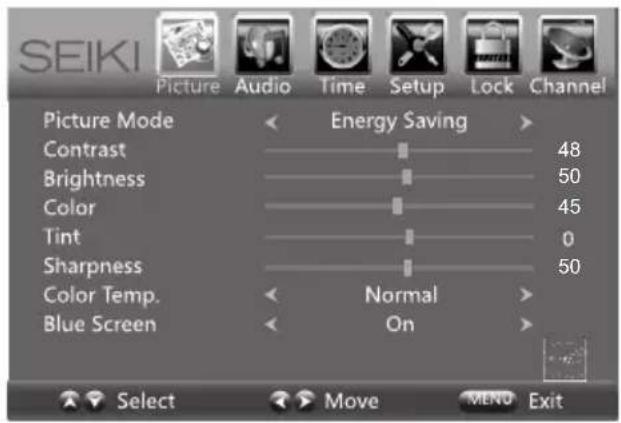
- Press the MENU button on the main unit or on the remote control and then press ◀buttons to select PICTURE menu.
- Press▲buttons to select the following picture options and then press ◀buttons to adjust each option's setting.
| Picture Mode | Cycle among picture mode: Dynamic/Movie/Energy Saving/User/Standard. Alternative: you may press the P.MODE button to select the picture mode directly. |
| Contrast | Adjust the difference between light and dark levels in the pictures. (For User mode) |
| Brightness | Increase or decrease the amount of white in the picture. (For User mode) |
| Color Control the color intensity. (For User mode) | |
| Tint | Adjust the balance between red and green levels.(For AV mode and ATV mode) |
| Sharpness | Adjust the level of crispness in the edges between light and dark areas of the picture. (For User mode) |
| Color Temperature Cycle among color temperatures: Cool/Normal/Warm. | |
| Blue Screen | Allow the blue background to turn On/Off during weak or no signal conditions. |
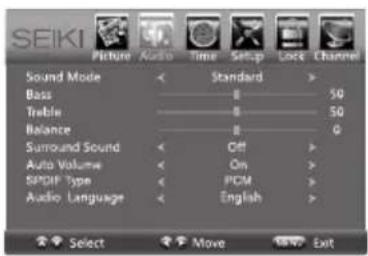
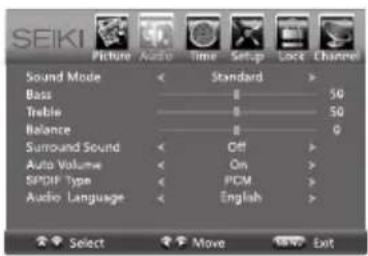
Audio Settings
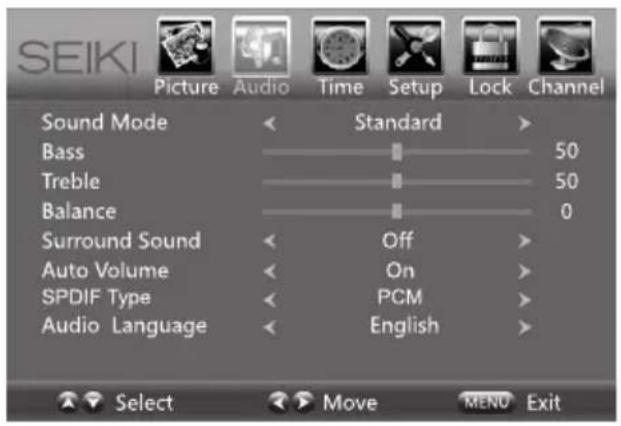
- Press the MENU button on the main unit or on the remote control and then press <buttons to select AUDIO menu.
- Press▲/buttons to select the following audio options and then press the ◀button to adjust each option's setting.
| Sound Mode | Allow the selection of an audio-enhancement technique: Standard/Music/Movie/UserAlternative: you may press the S.MODE button to select the sound mode directly. |
| Bass | Control the relative intensity of lower-pitched sounds. (For User mode) |
| Treble | Control the relative intensity of higher-pitched sounds. (For User mode) |
| Balance | Adjust the relative volume of the speaker in a multiple speaker system. |
| Surround Sound Provide an enhanced listening experience. | |
| Auto Volume Volume levels are automatically controlled. | |
| SPDIF Mode | Select the digital audio output mode between RAW/PCM/Off. |
| Audio Language | Select audio language among: English, French, Spanish |
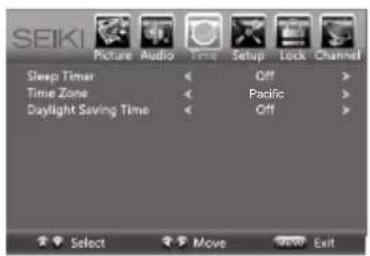
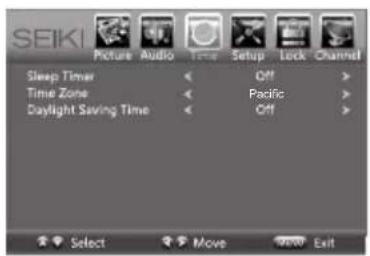
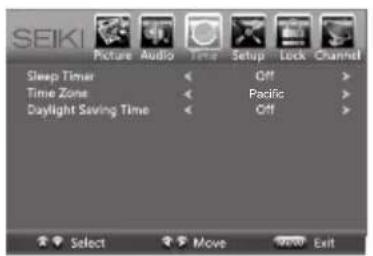
Time Settings
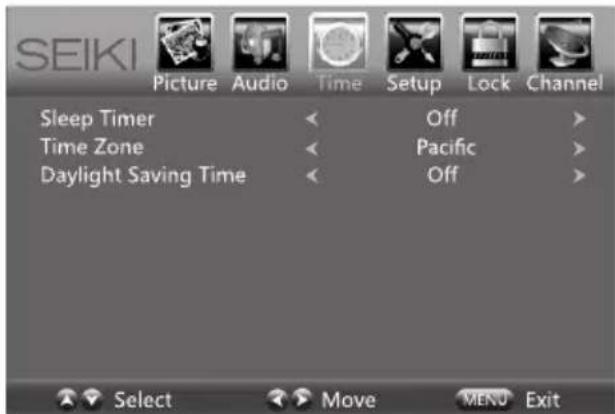
- Press the MENU button on the main unit or on the remote control and then press <buttons to select TIME menu.
- Press▲/buttons to select the following time options and then press ◀/► button to adjust each option's setting.
| Sleep Timer | Select a period of time after which the TV automatically switches to standby mode: Off/5/10/.../180/240 min. Alternative: You may press the SLEEP button repeatedly to select the number of minutes directly. |
| Time Zone | Select a Time Zone : Pacific/Alaska/Hawaii/Eastern/Central/Mountain/Atlantic/Newfoundland. |
| Daylight Saving Time | Select to turn On/Off daylight saving time. |
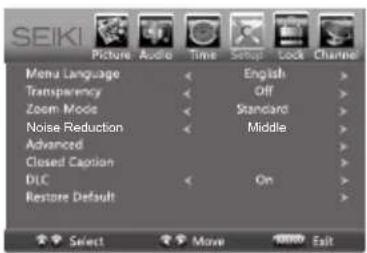
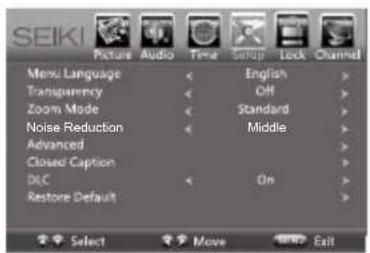
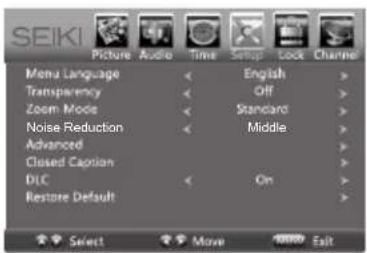
Setup
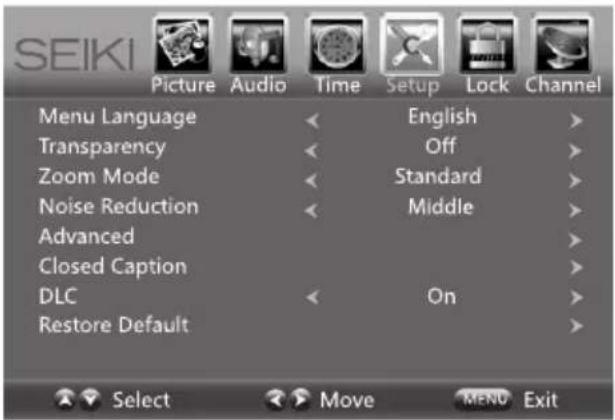
- Press the MENU button on the main unit or on the remote control and then press <buttons to select SETUP menu.
- Press▲/buttons to select the following setup options and then press the ◀button to adjust each option's setting.
| Menu Language | Select menu language : English, French or Spanish. The default on-screen menu language is English. | |
| Transparency Select to turn On/Off transparency function. | ||
| Zoom Mode | Select zoom mode :Wide/Wide Zoom/Zoom/Standard/Just Scan/Dot to Dot.Note: Different input source, the zoom mode options may differ. | |
| Noise Reduction | Reduce the noise level of the connected device: Off/Weak/Middle/Strong. | |
| Advanced | Adjust advanced option's setting: H-POS, V-POS, Clock, Phase or Auto. (VGA source mode only) | |
| Closed Caption | CC Mode Select CC mode : On, Off or CC on Mute. | |
| Basic Selection | Basic Selection: CC1, CC2, CC3, CC4, Text1, Text2, Text3, Text4. | |
| Advanced Selection | Advanced Selection: Service1, Service2, Service3, Service4, Service5, and Service6. | |
| OPTION | Options: Mode, Font Style, Font Size, Font Edge Style, Font Edge Color, FG Color, BG Color, FG Opacity and BG Opacity. | |
| DLC Select to turn On/Off the dynamic luminance control. | ||
| Restore Default | Restore the TV to factory default settings. | |
- Remarks: when select 'just scan' mode in HDMI option, the TV display as full screen, when select 'Dot to Dot' mode in VGA option, the TV display as full screen.
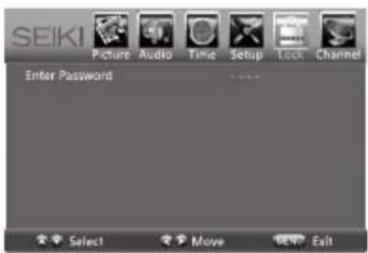
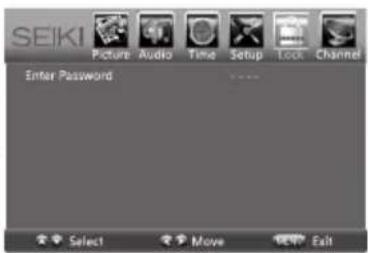
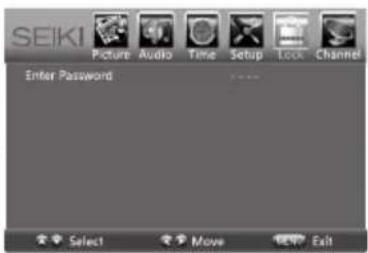
Lock Settings
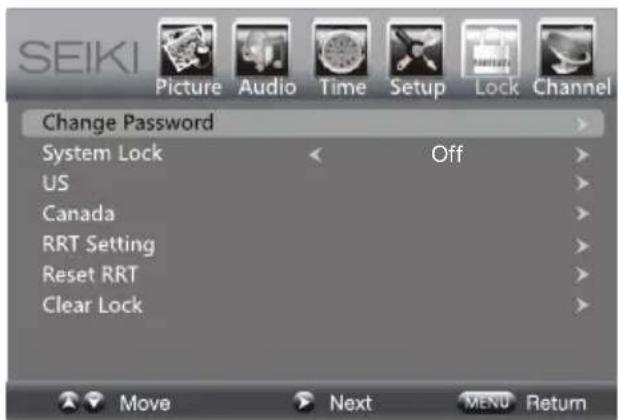
- Press the MENU button on the main unit or on the remote control and then press <buttons to select LOCK menu.
- Use the 0-9 buttons to input 4-digit password to enter the LOCK menu.
- Press▲/buttons to select the following options and then press the ◀/▶ buttons to adjust each option's setting.
Note: The default password is "0000"
| Change Password | Use 0-9 buttons to input the old password and then input the new 4-digit password. Re-enter new password for confirmation. | |
| System Lock | Select to turn On/Off system lock. The following options (US, Canada, RRT Setting and Reset RRT) will only be accessible when you turn the system lock on. | |
| US | TV | TV RATING: Press OK button to lock or unlock TV rating. |
| MPAA | Select MPAA rating : N/A,G, PG, PG-13, R, NC-17,or X. | |
| Canada | Canada English | Select MPAA rating for English-speaking Canada : E, C, C8+, G, PG, 14+, 18+. |
| Canada French | Select MPAA rating for Quebec Canada : E, G, 8 ans+, 13 ans+, 16 ans+, 18 ans+. | |
| RRT Setting Set Rating Region Table. | ||
| Reset RRT Select to reset the RRT setting. | ||
| Clear Lock Clear all lock settings. | ||
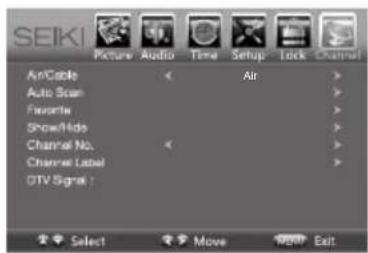
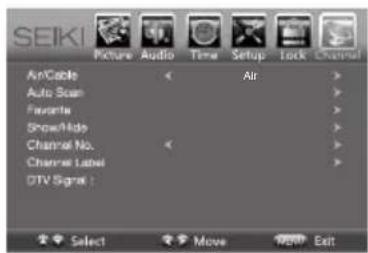
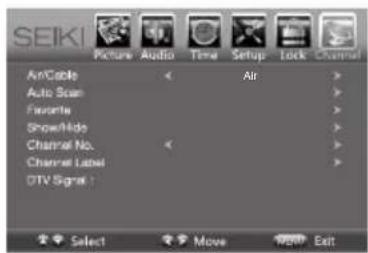
Channel Settings
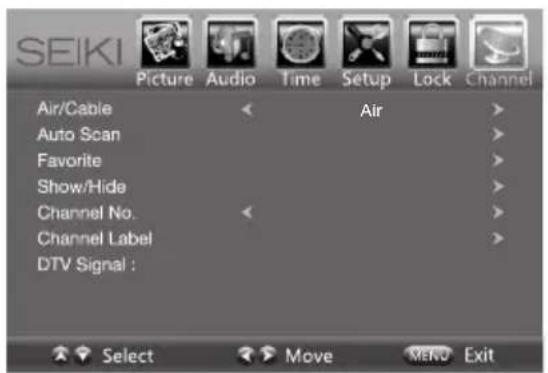
- Press the MENU button on the main unit or on the remote control and then press ◀/▶ buttons to select CHANNEL menu.
- Press▲/buttons to select the following channel options and then press the ◀button to adjust each option's setting.
| Air/Cable | Select antenna between Air and Cable. |
| Auto Scan | First, select your cable system from Auto/STD/IRC/HRC. Next, select the Auto Scan feature to scan your available cable channels. It will perform the auto scan if the Air antenna is selected. |
| Favorite Set the selected channel as favorite channels. | |
| Show/Hide Show/Hide the selected channel. | |
| Channel No. Display the current channel number. | |
| Channel Label Display the current channel label. | |
| DTV Signal | Display the quality of current DTV signal. |
USB MULTIMEDIA
Viewing Photos
- Press the SOURCE button on the main unit or on the remote control then press the ▲buttons to select the USB mode and then press OK button.
- Press the◀/▶buttons to select PHOTO and then press OK button.
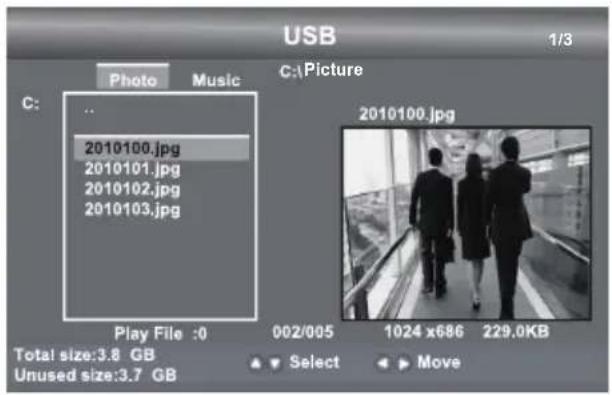
Note: File format supported: JPEG.
Listening to Music
- Press the SOURCE button on the main unit or on the remote control then press the ▲buttons to select the USB mode and then press OK button.
- Press the◀/▶buttons to select MUSIC and then press OK button.
Note: File format supported: MP3.
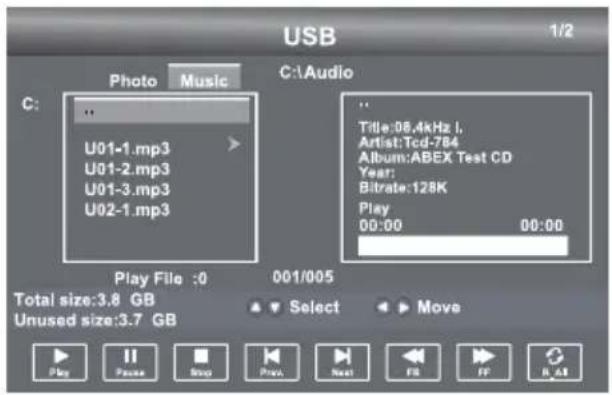
Operation Tips
| ▶ | Press to start the music or photo playback. |
| II | Press to pause the music or photo playback. |
| ■ | Press to stop music or photo playback. |
| ◀ | Press to play the previous track or view the previous photo. |
| ▶ | Press to play the next track or view the next photo. |
| ◀◀ | Press to speed up backward. |
| ▶▶ | Press to speed up forward. |
| REPEAT Press to select different repeat mode. | |
PARENTAL CONTROL
Press the MENU button on the main unit or on the remote control and then press ◀/▶ buttons to select LOCK menu. Use the 0-9 buttons to input the 4-digit password to enter the LOCK menu. If used, this option feature can "block" undesirable programming from appearing on the TV. Parental Control offers the user a wide variety of options and settings that restrict or "block" the programming that can appear on the TV. Parental Control allows the user to define which program rating they consider acceptable for younger more sensitive viewer. It can be preset and turned either on or off by the user who specifies the secret 4-number code, the password. The number of hours blocked are specified. General audiences and children blocks should be both programmed into the TV's memory. Separate different viewer ratings are specified for both TV and the motion picture Industry; both rating systems should be used and based on the ages of children.
Overview
To ensure complete coverage for all TV programs, (movies and regular TV shows) choose a rating for MPAA, from the selections below, as well as ratings from the TV Parental Guidelines Rating Systems below, using the Age Block option for General Audiences, and for children. In addition, you may wish to add additional restrictions from the content block menu, and submenus examples below.
Things to Consider before Setting up Parental Control
Determine which rating you consider acceptable to the viewer. (For example, if you choose TV-PG, more restrictive ratings will be automatically blocked; the viewer will not be able to see: TV-PG, TV-14, or TV-MA rated programming.) You may block the auxiliary video source entirely. (Blocks the signal sent by the equipment, such as VCR, connected to the TV Audio/Video Input Jacks) or remain unblocked, then choose acceptable ratings. Block program "Content" based on individual parameters such as: Strong Dialog, Bad Language, Sex Scenes, Violence Scenes or Fantasy. Violent Scenes; in Content Blk option. Select a secret password, in the Set Password option, using the numbers keys on the remote control. Save the password, it is the only way to access the Parental Control menu and change rating setting, or turn off Parental Control.
- You can set different Parental Control viewing restrictions for general audiences and for children, both can be active at the same time.
- Simply specifying one content block such as Sex Scenes, will not automatically restrict the programming that appears from the video sources.
- Even If you choose to leave the AUX Inputs unblocked, the ratings you specify will automatically restrict the programming that appears from the video sources.
- You cannot disable Parental Control by disconnecting the TV from power. Block hours will be automatically reset to the original block time setting specified if power is disconnected.
• Motion Picture Association of America (MPAA) Rating System
| Grade Meaning | ||
| G General A | Audiences Content not offensive to most viewers. | |
| PG | Parental Guidance Suggested | Content is such that parents may not want their children to view the program. |
| PG-13 | Parents Strongly Cautioned | Program is inappropriate for preteens, with a greater degree of offensive material suggested than a PG rated program. |
| R Restricted | Not for children under 17-contains strong element of sex and/or violence. | |
| NC-17 | No children under age 17 | Not for children under 17-under any circumstances. Contains strong sexual content. |
| X Hard Core | Films Same as NC-17 rating. | |
| No Rating N | No Rating MPAA did not rate | |
• TV Parental Guideline Rating System
| Grade Meaning | ||
| TV-Y All Children Content not offensive to most viewers. | ||
| TV-Y7 | Directed to Older Children | Considered suitable for children over 7- may contain fantasy violence scenes. |
| TV-G General Audience | Considered suitable for all audience; children may watch unattended. | |
| TV-PG | Parental Guidance Suggested | Suggested unsuitable for younger children-may contain suggestive language, bad language, sex and violence scenes. |
| TV-14 | Parents Strongly Cautioned | unsuitable for children under 14 - may contain strong language, bad language, sex, and violence scenes. |
| TV-MA | Mature Audience Only | Adults only- may contain strong language, bad language, sex, and violence scenes. |
Canadian Rating:
Canadian English is used throughout all English-speaking Canada (C, C8+, G, PG, 14+, 18+). Canadian French is used in Quebec (G, 8 ans+, 13 ans+, 16 ans+, 18 ans+)
Note: The V-Chlp will automatically block certain categories that are "more restrictive". If you block TV-Y category, then TV-Y7 will be automatically blocked. Similarly, if you block TV-G category, then all the categories in the "young adult" will be blocked (TV-G, TV-PG, TV-14, and TV-MA).
TROUBLESHOOTING
If your TV does not operate normally or cannot be turned on, please check the following troubleshooting questions. Remember also to check any other connected electronic device, such as DVD or Blu-ray player to pinpoint the problem. If the TV still fails to operate normally, please contact technical support.
| The TV does not operate properly | |
| The TV does not respond when pressing any buttons | The TV may freeze up during use. Disconnect the power cord from the power socket for a few minutes. Reconnect the power cord and try to operate it again as usual. |
| TV cannot be switched on | Check that the TV is connected to the power supply.Make sure all connected AV devices are switched off before switching on your TV. |
| The remote control does not work | Check to see if there are any objects between the TV and the remote control causing an obstruction. Ensure that you are pointing the remote control directly at the TV.Ensure that the batteries are installed with the correct polarity (+ to +, - to -).Install new batteries. |
| Power is suddenly turned off | Check the power of the TV. The power supply maybe interrupted.Check if the sleep timer is set.Check whether the Auto Standby is activated. |
| The video function does not work | |
| No picture & No Sound | Check whether the TV is switched on.Try another channel. The problem may be caused by the broadcaster. |
| Picture appears slowly after switching on | This is normal; the image is muted during the TV startup process. Please contact your service centre if the picture has not appeared after five minutes. |
| No or poor color or poor picture | Adjust the settings in the PICTURE menu.Try another channel. The problem may be caused by the broadcaster.Check if video cables are connected properly. |
| Horizontal/Vertical bar or picture shaking | Check for local interference such as an electrical appliance or power tool. |
| Poor reception on some channels | The station or cable channel may be experiencing problems; tune to another station.Station signal may be weak, reposition the antenna for better reception.Check for sources of possible interference. |
| Lines or streaks in pictures | Check antenna (change the position of the antenna.) |
| No pictures when connecting HDMI | Check if the input source is HDMI1/HDMI2/HDMI3. |
| Pictures appear in wrong ratio | Adjust the Aspect Ratio settings in the SETUP menu or press the ASPECT button on the remote control. |
| The audio function does not work | |
| Picture OK but no sound | Press the VOL +/- buttons.Sound muted? Press the MUTE button.Try another channel. The problem may be caused by the broadcaster. |
| No output from one of the speakers | Adjust the Balance settings in the AUDIO menu. |
| Unusual sound from inside the TV | A change in ambient humidity or temperature may result in an unusual noise when the TV is switched on or off and does not indicate a fault with the TV. |
| No sound when connecting HDMI | Check if the input source is HDMI1/HDMI2/HDMI3. |
| Audio noise | Keep the RF coaxial cable away from the other connected cables. |
| Password | |
| Lost password | Select the SET Password setting in the LOCK menu, then enter the following master password “8899”. The master password clears your previous password and allows you to enter a new password. |
| There is a problem in PC mode | |
| The signal is out of range (invalid format) | Adjust the resolution, horizontal frequency, or vertical frequency. |
| Vertical bar or stripe on background & Horizontal Noise & Incorrect position | Use Auto configures or adjust clock, phase, or H/V position. |
| Screen color is unstable or show a single color | Check the signal cable.Reinstall the PC video card. |
Maintaining
- Do not use your TV in areas that are too hot or too cold, because the cabinet may warp or the screen may malfunction. Your TV works best in temperatures that are comfortable to you.
- Storage temperatures are 32^ to 122^(0^ to 50^)
- Working temperatures are 32^ to 95^(0^ to 35^)
- Do not place your TV in direct sunlight or near a heat source
SPECIFICATION
| Panel Size 31.5 inch diagonally | |
| Display Type DLED | |
| Panel Technology TFT | |
| Panel 60 Hz Vs. 120 Hz 60 Hz | |
| Display Resolution 720P | |
| HDMI Support Up to 1080P | |
| Panel Resolution 1366 x 768 | |
| Aspect Ratio 16:9 | |
| Dynamic Contrast Ratio-Panel 800~1400:1 | |
| Brightness (Centre Typ.) Cd/M ^2 180~200 | |
| Response Time (G To G) | 14 ms |
| Lamp Life (Typ. Hours) | 30,000 hours |
| Horizontal Viewing Angle (At CR>10) | 178 |
| Vertical Viewing Angle (At CR>10) | 178 |
| Wall-mount(LxW-mm) | 200*100 VESA(mm) |
The FCC Wants You to Know

This equipment has been tested and found to comply with the limits for a Class B digital device, pursuant to Part 15 of the FCC Rules. These limits are designed to provide reasonable protection against harmful interference in a residential installation.
This equipment generates, uses, and can radiate radio frequency energy and, if not installed or used in accordance with the instructions, may cause harmful interference to radio communications. However, there is no guarantee that interference will not occur in a particular installation.
If this equipment does cause harmful interference to radio or television reception, which can be determined by turning the equipment off and on, the user is encouraged to try to correct the interference by one or more of the following measures: 1) reorient or relocate the receiving antenna; 2) increase the separation between the equipment and the receiver; 3) connect the equipment to an outlet on a circuit different from that to which the receiver is connected; 4) consult the dealer or an experienced radio/TV technician for additional suggestions.
Any changes or modifications not expressly approved by the party responsible for compliance could void the user's authority to operate the equipment. Where shielded interface cables have been provided with the product or specified additional components or accessories elsewhere defined to be used with the installation of the product, they must be used in order to ensure compliance with FCC regulation.
SEIKI LED TV's LIMITED WARRANTY TO ORIGINAL CONSUMER
52 inches and Under Screen Size Models (the "Product")
This Product (including any accessories included in the original packaging) as supplied and distributed in new condition, is warranted by SEIKI LLC (SEIKI) to the original consumer purchaser against defects in material and workmanship ("Warranty") as follows:
- REPLACEMENT: For a period of one (1) year from date of original consumer purchase, if this Product or any part is determined by SEIKI, or a SEIKI authorized service provider, to be defective, SEIKI will replace the Product with new or re-certified product of similar or better specification, at SEIKI's option, at no charge to the original consumer. After the one (1) year Warranty period, you must pay for all cost of Product replacement charges.
Once the Product is replaced, the warranty resume one (1) year period from the date of original consumer purchase; and will not be extended for the replacement process. Advanced Replacement option is available only with a valid US credit card for guarantee purpose. - PARTS: For a period of one (1) year from the date of original consumer purchase, SEIKI will supply, at no charge to the original consumer, new, rebuilt or refurbished replacement parts in exchange for defective parts. After the one (1) year Warranty period, you must pay for the costs of all parts.
- SHIPPING COSTS: Notwithstanding the foregoing, the original consumer is responsible for any shipping charges incurred to ship the Product or part(s) to SEIKI or to an SEIKI authorized customer service provider, for diagnosis, repair or replacement. The consumer is responsible for securely packing the Product and utilizing a reliable carrier to transport to SEIKI authorized service provider.
To obtain Warranty Service and Troubleshooting information call our toll free customer service line at:
1-855-MY-SEIKI (1-855-697-3454)
Please have your model and serial number available along with your date of purchase.
You can also visit us online and REGISTER your SEIKI product at:
www.SEIKI.com
To receive Warranty service, the original consumer purchaser must contact SEIKI for problem determination and service procedures. Proof of purchase in the form of a bill of sale or receipted invoice, evidencing that the Product is within the applicable Warranty period(s), MUST be presented to SEIKI, or an authorized customer service provider, in order to obtain the requested service.
Exclusions and Limitations
This Warranty covers manufacturing defects in materials and workmanship encountered in the normal, non-commercial use of the Product, and does not cover (a) damage or failure caused by or attributable to abuse, misuse, failure to follow instructions, improper installation or maintenance, alteration, accident, or excess voltage or current; (b) improper or incorrectly performed repairs by non-authorized service facilities; (c) onsite consumer instruction or adjustments; (d) transportation, shipping, delivery, insurance, installation or set-up costs; (e) costs of product removal, transportation or reinstallation costs; (f) ordinary wear and tear, cosmetic damage or damage due to acts of nature, accident; (g) commercial use of the Product; (h) modification of, or to any part of the Product. In addition, this Warranty does not cover images "burnt" into the screen. This Warranty applies to the original consumer only and does not cover products sold AS IS or WITH ALL FAULTS, or consumables (e.g., fuses, batteries, bulbs etc.), and the Warranty is invalid if the factory-applied serial number has been altered or removed from the Product. This Warranty is valid only in the United States and Canada, and only applies to products purchased and serviced in the United States and Canada. All replaced parts and products, and products on which a refund is made, become the property of the Warrantor.
NO WARRANTIES, WHETHER EXPRESS OR IMPLIED, INCLUDING, BUT NOT LIMITED TO, ANY IMPLIED WARRANTIES OF MERCHANTABILITY OR FITNESS FOR A PARTICULAR PURPOSE, OTHER THAN THOSE EXPRESSLY DESCRIBED ABOVE SHALL APPLY. THE WARRANTOR FURTHER DISCLAIMS ALL WARRANTIES AFTER THE EXPRESS WARRANTY PERIOD STATED ABOVE. NO OTHER EXPRESS WARRANTY OR GUARANTY GIVEN BY ANY PERSON, FIRM OR ENTITY WITH RESPECT TO THE PRODUCT SHALL BE BINDING ON THE WARRANTOR. REPAIR, REPLACEMENT, OR REFUND OF THE ORIGINAL PURCHASE PRICE - AT THE WARRANTOR'S SOLE DISCRETION - ARE THE EXCLUSIVE REMEDIES OF THE CONSUMER. THE WARRANTOR SHALL NOT BE LIABLE FOR ANY INCIDENTAL OR CONSEQUENTIAL DAMAGES CAUSED BY THE USE, MISUSE OR INABILITY TO USE THE PRODUCT. NOTWITHSTANDING THE FOREGOING, CONSUMER'S RECOVERY SHALL NOT EXCEED THE PURCHASE PRICE OF THE PRODUCT SOLD BY SEIKI. THIS WARRANTY SHALL NOT EXTEND TO ANYONE OTHER THAN THE ORIGINAL CONSUMER WHO PURCHASED THE PRODUCT AND IS NOT TRANSFERABLE.
Some states do not allow the exclusion or limitation of incidental or consequential damages, or allow limitations on warranties, so the above limitations or exclusions may not apply to you. This Warranty gives you specific rights, and you may have other rights, which vary from state to state.
SEIKI LLC
c/o SEIKI Digital Customer Service
6880 Commerce Blvd., Canton, MI 48187 USA
customerservice@seikidigital.com
DO NOT SHIP PRODUCT TO THIS ADDRESS. PLEASE CONTACT CUSTOMER SERVICE TO OBTAIN SHIPPING ADDRESSES FOR SERVICE.
CONTENU
natural_image
Blank white rectangular image with a thin border and a small 'SEKI' watermark at the bottom (no other text or symbols)Poste de télévision
natural_image
Line drawing of a SEKI remote control with keypad and scroll (no text or symbols)natural_image
Four identical screw illustrations arranged horizontally (no text or symbols)User Manual
1. MISE SOUS TENSION
natural_image
Technical line drawing of an open computer monitor with internal components and two labeled connectors (no text or symbols present)natural_image
Technical line drawing of an open computer monitor with labeled ports and connectors (no text or symbols present)1
2
3
4
5
7
8
9

10





natural_image
Blank white rectangular image with a thin border and a small 'SEKI' watermark at the bottom (no other text or symbols)Televisor
natural_image
Line drawing of a SEKI remote control with keypad, function buttons, and scroll (no text or symbols on main device)natural_image
Four identical screw illustrations arranged horizontally (no text or symbols)User Manual
Manual del usuario
Quick Start Guide
natural_image
Technical line drawing of a computer monitor with visible internal components and two labeled connectors (no text or symbols)natural_image
Technical line drawing of an open computer monitor with visible internal components and two labeled connectors (no text or symbols)1
2
3
4
5
7
8

9
10





- Press the MENU button on the main unit or on the remote control and then press ◀/▶ buttons to select CHANNEL menu.
- Press ▲buttons to select the following channel options and then press the ◀button to adjust each option's setting.


- USER MANUAL MANUEL D'UTILISATION MANUAL DEL USUARIO
- CONTENTS
- Important Safety Instructions 2
- Safety Information 3
- Preparation 4
- Connecting External Devices 9
- Customizing TV Settings 10
- Parental Control 19
- Troubleshooting 21
- Maintaining 22
- Specification 23
- Limited Warranty 24
- IMPORTANT SAFETY INSTRUCTIONS
- SAFETY INFORMATION
- Electrical Safety
- Physical Safety
- PREPARATION
- What's Included
- User Manual
- Quick Start Guide
- Front View
- Installing the Base Stand
- Removing the Stand for Wall-Mounting
- CONNECTING EXTERNAL DEVICES
- CUSTOMIZING TV SETTINGS
- Initial Setup
- Navigating the On-screen Display
- Selecting Input Source
- Picture Settings
- Audio Settings
- Time Settings
- Setup
- Lock Settings
- Channel Settings
- USB MULTIMEDIA
- Viewing Photos
- Listening to Music
- Operation Tips
- PARENTAL CONTROL
- Overview
- Things to Consider before Setting up Parental Control
- Canadian Rating:
- TROUBLESHOOTING
- Maintaining
- SPECIFICATION
- The FCC Wants You to Know
- SEIKI LED TV's LIMITED WARRANTY TO ORIGINAL CONSUMER
- inches and Under Screen Size Models (the "Product")
- Exclusions and Limitations
- CONTENU
- MISE SOUS TENSION
Brand : Seiki
Model : SE32HG
Category : Television