
TLPA8010 KIT - Powerline Adapter TP-LINK - Free user manual and instructions
Find the device manual for free TLPA8010 KIT TP-LINK in PDF.
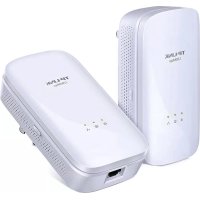


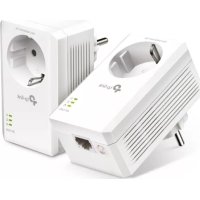
| Product type | Powerline adapter kit |
| Brand | TP-Link |
| Model | TL-PA8010 KIT |
| Standard | HomePlug AV |
| Maximum data rate | 500 Mbps |
| Interface | Ethernet RJ45 port 10/100 Mbps |
| Function button | Pair button for secure pairing |
| LED indicators | Power, Powerline, Ethernet |
| Security | 128-bit AES encryption (via Pair button) |
| Power supply | Mains power socket 230 V / 50 Hz |
| Power consumption | Less than 3 W (standby) |
| Dimensions (W x D x H) | 95 x 55 x 35 mm (per adapter) |
| Weight | 150 g (per adapter) |
| Operating temperature | 0 °C to 40 °C |
| Operating humidity | 10 % to 90 % RH (non-condensing) |
| Kit contents | 2 Powerline adapters, 2 Ethernet cables, quick installation guide |
| Manufacturer warranty | 3 years |
| Maintenance and cleaning | Unplug before cleaning; use a dry, soft cloth |
| Electrical safety | Do not plug into a power strip; plug directly into a wall outlet |
Frequently Asked Questions - TLPA8010 KIT TP-LINK
User questions about TLPA8010 KIT TP-LINK
0 question about this device. Answer the ones you know or ask your own.
Ask a new question about this device
Download the instructions for your Powerline Adapter in PDF format for free! Find your manual TLPA8010 KIT - TP-LINK and take your electronic device back in hand. On this page are published all the documents necessary for the use of your device. TLPA8010 KIT by TP-LINK.
USER MANUAL TLPA8010 KIT TP-LINK
TP-Link Technologies Co., Ltd. South Building(floors 1,3,4,5) and 28(floors 1-4), Central Science
& Technology Park, Shennan Rd, Nanshan, Shenzhen, China
(2-144),Cardiff Road,Reading,RG1 8EW.
mursi 151,24, Greece
Specifications are subject to change without notice. TP-Link is a registered trademark of TP-Link Technologies Co., Ltd. Other brands and product names are trademarks or registered trademarks of their respective holders.
No part of the specifications may be reproduced in any form or by any means or used to make any use of this technology. The use of any other products, services, or information on the Technologies Co., Ltd. Copyright © 2018 IP-Link Technologies Co., Ltd. All rights reserved.
MADE IN CHINA
7106507904REV2.1.1

tp-link
Quick Installation Guide
Powerline Adapter
CONTENTS
01 / Deutsch
05 / English
09 / Espanol
13 / Eλληνικα
17 / Français
21 / Italiano
25 / Portugues
29 / Suomi
33 /Nederlands
37 / Svenska
41 / Norsk
45 / Dansk
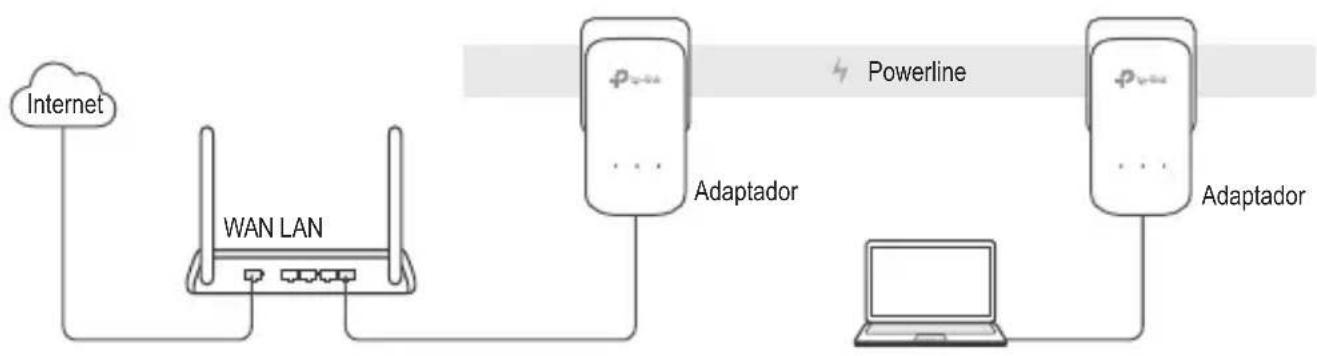
Plug and Play
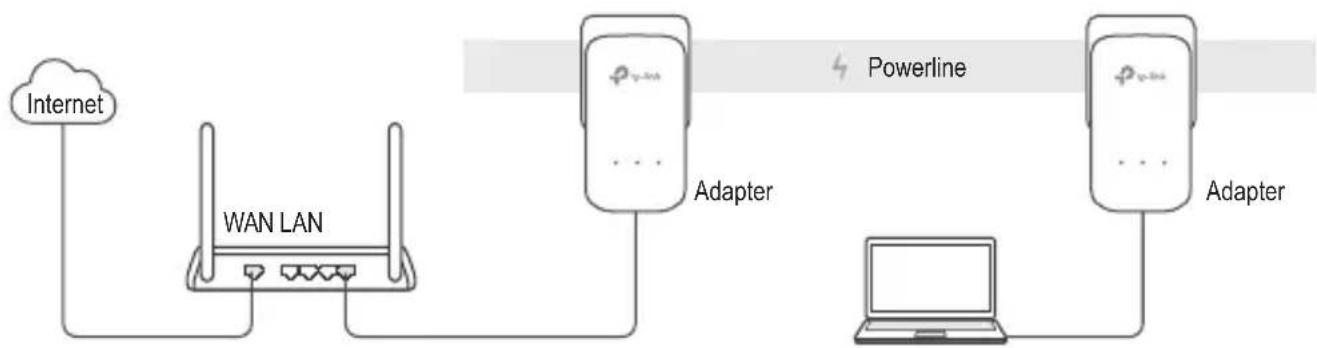
- Connect one adapter to a LAN port of your router using an Ethernet cable.
- Plug the other adapter into the wall outlets on the same electrical circuit.
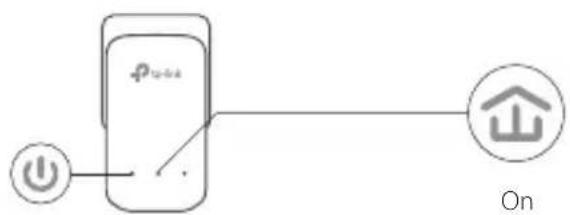
- Wait until the Powerline LED on any adapter turns on.
- Connect your computer to the adapter using an Ethernet cable.
- Enjoy!
More: To add additional Powerline adapters and extenders with the default settings, simply plug them into the wall outlets on the same electrical circuit.
English
Attention
- Plug the powerline devices directly into the wall outlets but not the power strips.
- For passthrough powerline devices, plug the power strips into the integrated electrical sockets of the powerline devices.
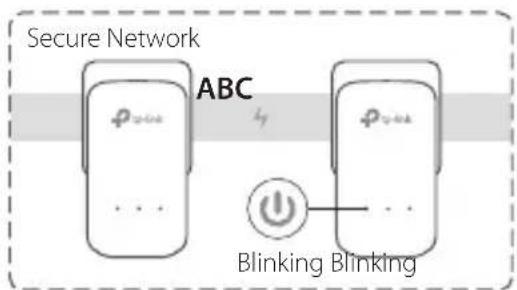
Secure the Powerline Network with the Pair Button
Tips: We recommend that you plug in the powerline devices near each other when pairing.
Set up a secure network:
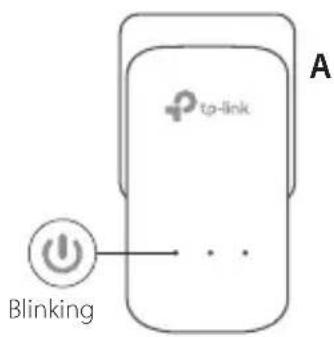
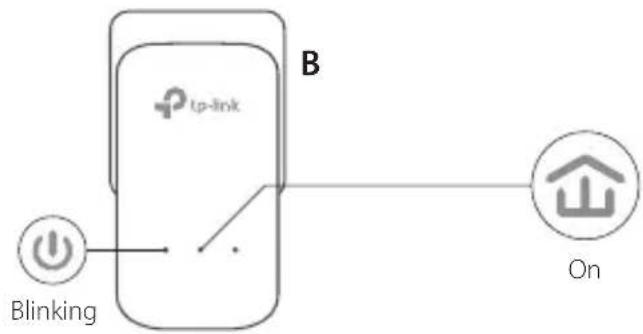
1 Press the Pair button for 1 second on one adapter.
2 Within 2 minutes, press the Pair button for 1 second on another adapter.
3 Done.
English
If you have more than 2 powerline devices, repeat the steps below on each additional devices to be configured:
1 Press the Pair button for 1 second on any powerline device in the secure network.
2 Within 2 minutes, press the Pair button for 1 second on the additional powerline device.
3 Done.
FAQ (Frequently Asked Questions)
Q1. How do I reset my powerline adapter?
A1. With the powerline adapter plugged into to the electrical outlet, press and hold the Pair button until the Power LED goes off momentarily and comes back on.
A2. Use the tpPLC Utility to reset the powerline adapter.
English
Q2. How to troubleshoot if there is no internet connection in my powerline network?
A1. Make sure all powerline devices are on the same electrical circuit.
A2. Make sure all Powerline LEDs are on. If not, pair your adapters and extenders again.
A3. Make sure all hardware connections are correctly and securely connected.
A4. Check if you have an internet connection by connecting the computer directly to the modem or router.
A5. Make sure your computer's IP address is in the same segment as your router's.
Q3. What can I do if a successfully-paired powerline device does not reconnect after it has been moved to a new location?
A1. Try another socket and make sure it is on the same electrical circuit.
A2. Try to pair it again, and make sure the Powerline LED is on.
A3. Check for possible interference, such as a washer, air conditioner or other household appliances that may be too close to one of the powerline devices. Plug the appliance into the integrated electrical socket (if the powerline device has one) to remove some electrical noise.
More advanced configurations, such as firmware upgrade and QoS configuration, can be accessed through the tpPLC Utility. You can install the tpPLC Utility from the TP-Link official website.
Plug and Play
TP-Link hereby declares that this device is in compliance with the essential requirements and other relevant provisions of directives 2014/30/EU, 2014/35/EU, 2009/125/EC and 2011/65/EU.
The original EU declaration of conformity may be found at http://www.tp-link.com/en/ce.
Espanol
- Keep the device away from water, fire, humidity or hot environments.
- Do not attempt to disassemble, repair, or modify the device.
- The socket-outlet shall be installed near the equipment and shall be easily accessible.
- For passthrough devices, plug the power strips into the integrated electrical sockets of the devices, but devices of the same or another type not be stacked in normal use.
- Plug the powerline devices directly into the wall outlets but not the power strips.
Please read and follow the above safety information when operating the device. We cannot guarantee that no accidents or damage will occur due to improper use of the device. Please use this product with care and operate at your own risk.
TP-Link Three Years Limited Product Warranty
For TP-Link Branded Products Only.
THIS WARRANTY GIVES YOU SPECIFIC LEGAL RIGHTS, AND YOU MAY HAVE OTHER RIGHTS THAT VARY FROM STATE TO STATE (OR BY COUNTRY OR PROVINCE).
TO THE EXTENT ALLOWED BY LOCAL LAW, THIS WARRANTY AND THE REMEDIES SET FORTH ARE EXCLUSIVE AND IN LIEU OF ALL OTHER WARRANTYES, REMEDIES AND CONDITIONS.
TP-Link warrants the TP-Link branded hardware product contained in the original packaging against defects in materials and workmanship when used normally in according with TP-Link's guidelines for a period of THREE YEARS from the date of original retail purchase by the end-user purchaser.

Espanol
- QUICK INSTALLATION GUIDE
- CONTENTS
- PLUG AND PLAY
- ENGLISH
- ATTENTION
- SECURE THE POWERLINE NETWORK WITH THE PAIR BUTTON
- SET UP A SECURE NETWORK
- FAQ (FREQUENTLY ASKED QUESTIONS)
- Q1. HOW DO I RESET MY POWERLINE ADAPTER
- Q2. HOW TO TROUBLESHOOT IF THERE IS NO INTERNET CONNECTION IN MY POWERLINE NETWORK
- Q3. WHAT CAN I DO IF A SUCCESSFULLY-PAIRED POWERLINE DEVICE DOES NOT RECONNECT AFTER IT HAS BEEN MOVED TO A NEW LOCATION
- ESPANOL
- TP-LINK THREE YEARS LIMITED PRODUCT WARRANTY
Brand : TP-LINK
Model : TLPA8010 KIT
Category : Powerline Adapter