
Miracle Mop 9 in 1 - Steam cleaner BEEM - Free user manual and instructions
Find the device manual for free Miracle Mop 9 in 1 BEEM in PDF.


| Brand | BEEM |
| Model | Miracle Mop 9 in 1 |
| Product Type | Steam cleaner (steam mop) |
| Voltage | 220 - 240 V~ |
| Frequency | 50/60 Hz |
| Power consumption | 1400 - 1600 W |
| Dimensions (H x W x D) | 252 x 197 x 313 mm |
| Net weight | 1.65 kg |
| Water tank capacity | 0.4 liters |
| Cord length | 5 m |
| Protection class | I |
| Ingress protection | IPX4 |
| Included accessories | Floor brush, table brush, round brush, clothes brush, grout brush, window applicator, angled piece, flat squeegee, spot jet adapter/nozzle, shoulder strap, extension hose, cloth kit (coral and microfiber) |
| Main functions | Steam cleaning for floors, windows, clothes, grout, various surfaces; floor or hand mode use |
| Maintenance and cleaning | Descale regularly with vinegar or citric acid; cloths machine washable at 60°C, without fabric softener |
| Safety | Do not immerse; do not direct steam at people or animals; use only water; do not use on heat-sensitive surfaces |
| Warranty | Legal warranty + extended manufacturer warranty on certain products (see BEEM website) |
| Repairability | Repairs only by an approved service; spare parts available (brush kit, tank cap, cloth kit) |
Frequently Asked Questions - Miracle Mop 9 in 1 BEEM
User questions about Miracle Mop 9 in 1 BEEM
0 question about this device. Answer the ones you know or ask your own.
Ask a new question about this device
Download the instructions for your Steam cleaner in PDF format for free! Find your manual Miracle Mop 9 in 1 - BEEM and take your electronic device back in hand. On this page are published all the documents necessary for the use of your device. Miracle Mop 9 in 1 by BEEM.
USER MANUAL Miracle Mop 9 in 1 BEEM
Elements of Lifestyle
Bedienungsanleitung
Operating instructions
Open the fold-out page at the beginning and end of the user manual in order to view the illustrations during reading.
Inhalt
Safety instructions .... 16
Appliance description 18
Before using for the first time ..... 18
Preparations.... 19
Operating 20
Using the accessories....21
Cleaning and care 22
Storage 23
Troubleshooting 23
Technical data 24
Spare parts and other accessories .. 24
Dear Customer,
before using the appliance, please read the instructions contained in this user manual on startup, safety, intended use as well as cleaning and care.
Open the fold-out page at the beginning and end of the user manual in order to view the illustrations during reading.
Keep this user manual for future reference and pass it on to any future owner.
General notes
Copyright
This document is copyrighted. Any duplication, reprinting or reproduction of the illustrations either wholly, partially or in modified form is only permitted with the written approval of the manufacturer.
Notes on environmental protection

The packaging materials used can be recycled. When no longer re-d, dispose of the packaging materials rding to local environmental regula-

This product may not be disposed of in the domestic refuse within the European Union. Dispose of the appli-via communal collection points.
Warranty/Guarantee
In addition to the statutory warranty obligation, BEEM also grants an extended manufacturer's guarantee for some products.
Provided this is granted, the corresponding details for each product can be found either on the product-specific packaging, advertising material or on the BEEM website.
Please visit our website to obtain more information on comprehensive guarantee conditions, available accessories and spare parts as well as user manuals in various languages.
Symbols used

DANGER
This indicates an imminent hazardous situation, which could lead to severe physical injury or death.
Follow these instructions to avoid ▶ danger.

WARNING
This indicates a possible hazardous situation, which could lead to severe physical injury or death.
Follow these instructions to avoid danger.
CAUTION
This indicates a potentially hazardous situation, which could lead to minor injuries or material damage.
Follow these instructions to avoid danger.
NOTE
A note contains additional information to simplify the use of the appliance.
Symbols on the appliance
Symbol Meaning

Warning for hot discharging steam
Intended use
This appliance is intended primarily for non-commercial use in closed rooms for steam cleaning of suitable surfaces.
Any use other than previously stated is considered as improper use.

WARNING
If not used for its intended purpose and/or used in any other way, the appliance may be or become a source of danger.
Only use the appliance for its intended purpose.
Observe the procedures described in this user manual.
No claims of any kind will be accepted for damage resulting from use of the appliance for other than its intended purpose.
The risk must be borne solely by the user.
Limitation of liability
We assume no reliability for damage or follow-up damage in the case of:
failure to observe the instructions in ■ the user manual,
use for other than the intended pur- pose,
improper or unsuitable handling, ■
incorrectly performed repairs, ■
unauthorised modifications, ■
use of non-approved parts or spare ■ parts,
use of unsuitable supplementary or accessory parts.
Declaration of Conformity
BEEM hereby declares that this appliance complies with the fundamental requirements and other relevant provisions of 2006/95/EC, 2009/125/EC and 2004/108/EC directives.
Safety instructions
Inspect the appliance for visible signs of damage or leaks before use. Do not use a damaged or leaking appliance.
Do not use the appliance if it was ■ dropped.
Do not remove the rating plate or any warning signs on the appliance.
Keep the appliance out of the reach of children.
Do not leave the appliance unattended during use.
Pull the plug out of the mains socket if the appliance is not under supervision.
Persons who are unable to operate the appliance due to their physical, mental or motor response abilities may only use the appliance under supervision or instruction by a responsible person.
Never immerse the appliance, the mains cable or the plug in water or other liquids.
Only allow repairs to the appliance ■ to be carried out by an authorised specialist or by the works customer service; this particularly applies to replacing a damaged connecting cable or steam hose. Unqualified repairs can lead to considerable danger for the user. They will also invalidate the Warranty/guarantee.
Repairs to the appliance during the ■ warranty/guarantee period may only be carried out by service centres authorised by the manufacturer as the warranty/guarantee will otherwise be invalidated in the event of damage or subsequent damage.

DANGER
Danger from electric current!
Do not use the appliance if the connecting cable, plug or housing is damaged.
Do not open the housing of the appliance. Danger from electric current if live connections are touched or the electrical and mechanical configuration is changed.
Never immerse the appliance or the mains plug in water or other liquids.
In wet areas, use only approved extension leads or multiple mains sockets.
▶Disconnect the plug from the mains socket before cleaning the appliance.
Never use the appliance to clean electrical appliances, switches, mains sockets and other electrical equipment or components.

DANGER
Danger of suffocation!
Never play with packaging material. Risk of suffocation.

WARNING
Before use, check that the appliance and/or attached accessories are not damaged.
Do not allow the connecting cable to hang over edges (trip wire effect).
Danger of burns!
Never direct the steam jet towards yourself or other persons or animals.
Allow the appliance to cool down ▶ before storing it or carrying out work on the appliance.
Do not clean heat-sensitive materials with the appliance.
The mains socket must be easily accessible to enable quick disconnection of the appliance from the electric circuit in the event of an emergency.
CAUTION
Before connecting the appliance, ■ compare the connection data (voltage and frequency) on the rating plate with those of your mains power supply. The data must correspond in order to avoid damage to the appliance. If in doubt, ask your electrical appliance retailer.
Always carry the appliance with the handle and not the connecting cable.
Do not pull the connecting cable ▶ to remove the plug from the mains socket.
CAUTION
Do not crush the connecting cable. (e.g., under doors).
Do not expose the connecting cable or the appliance to heat or chemical liquids.
Do not pull the connecting lead ▶ across sharp edges or hot surfaces.
Operate the appliance only when the tank is filled.
Only pour water into the tank and no other fluids or additives.
Observe the maximum filling level of the tank.
Do not leave the appliance outside and do not expose it to direct sunlight or humidity. Do not store the appliance in the immediate vicinity of heat sources (such as fire, radiators, fan heaters or other heat radiating appliances).
Appliance description
(refer to the left fold-out page for illustration)
Floor brushes1
Connecting cable2
Power indicator light3
Water tank4
Tank cover5
Hook for cable winder6
Release lever7
Hook for cable winder8
Handle9
Steam switch10
Hand-held steam cleaner11
Tank release button12
Main body13
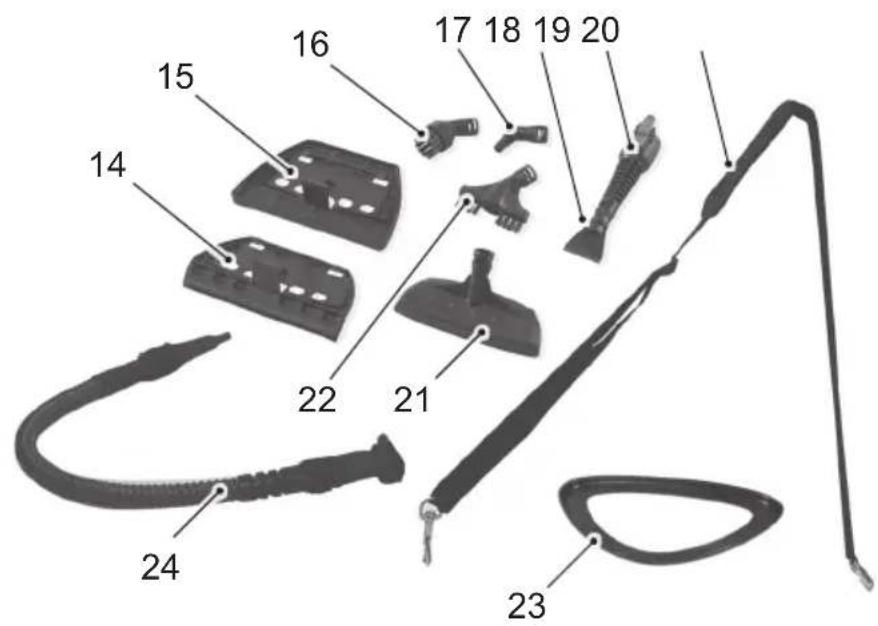
Window attachment14
15 Table brush
16 Round brush
17 Angled adapter
18 Flat scraper
19 Adapter/spot spray nozzle
20 Carrying strap
21 Fabric brush
22 Joint brush
23 Carpet casters
24 Extension hose
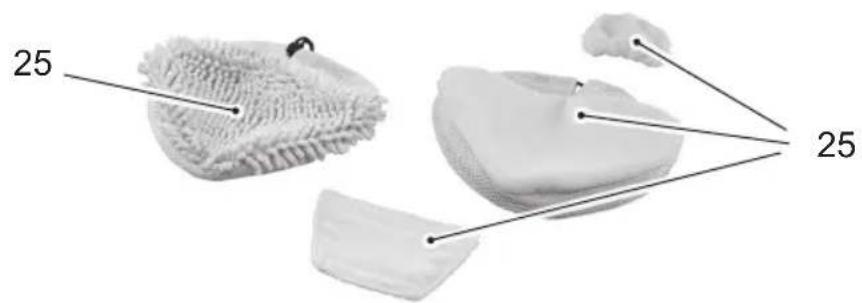
Cloth set: 25
coral cloth for floor brush
microfibre cloth for floor brush
microfibre cloth for table brush
microfibre brush for fabric brush
26 User manual (not illustrated)
Before using for the first time
Unpacking
◆ Remove the appliance, all accessory parts and the user manual from the box.
◆ Remove all packaging materials and protective foils from the appliance and the accessories before using it for the first time.
NOTE
▶ Do not remove the rating plate or any warning signs on the appliance.
If possible, keep the original packaging during the warranty/guarantee period in order to pack the appliance properly in the event of a guarantee claim. Transport damage will invalidate the warranty/guarantee.
Check the delivery contents
Check for visible signs of damage or missing items.
Report incomplete or damaged contents to your supplier immediately.
Attaching
Insert the handle into the extension.
Insert the fixing screw into the hole in the handle and turn the screw tightly with a suitable Phillips screwdriver (see image A1).
Attach the extension to the main body
Insert the fixing screw into the hole in the extension and turn the screw tightly with a suitable Phillips screwdriver (see image A2).
Align the guide on the main body with the recess in the floor brush and push the lower end of the main body into the floor brush until it snaps in.
to remove the floor brush, press the release lever on the back of the floor brush and pull the floor brush out of the main body (see image B).
Preparations
Filling the water tank
◆press both tank release buttons (12) und remove the water tank (see image C1).
◆urn the tank cover (5) 45° clockwise to open it.
◆fill with a maximum of 400 ml of water.
Close the water tank by turning the cap 45° clockwise (see image C2).
◆ush the water tank onto the appliance until it audibly snaps in.
NOTE
A metal ball is situated in the water tank that is used as a weight for the suction hose. Make sure that this metal ball is always covered with water so that steam can flow evenly (see image C3).
Hand-held steam cleaner
Inserting
Remove all attached nozzles and loosen the carrying strap.
Insert the lower end of the hand-held steam cleaner (11) into the main body (13) and subsequently push the upper end until it audibly snaps in.
Removing (see image D1)
Press the release lever (7) and remove the hand-held steam cleaner (11) from the main body (13).
To simplify cleaning with the hand-held steam cleaner, you can fix the carrying strap (20) to the handle of the hand-held steam cleaner and the extension hose (see image D2).
Attaching accessories
Attaching/removing the adapter
Remove the hand-held steam cleaner (11) from the main body (13).
Align the guide on the hand-held steam cleaner and the recess on the adapter with each other.
Push the adapter into the hand-held steam cleaner until it snaps in (in the same way as the extension hose as illustrated in image F1).
To remove the adapter, press the re-♦ lease lever on the bottom of the adapter and pull the adapter from the handheld steam cleaner (see image F2).
Fix the cloth to the floor brush (see images E1 and E2)
Position the floor brush (1) in the middle of the cloth.
Fix the cloth to the floor brush with the Velcro fasteners.
Press the cord clip together and simultaneously lash the cover to the cord.
To remove the cloth, loosen the cord clip and the Velcro fasteners.
Attach/removing the extension hose
Remove the hand-held steam cleaner (11) from the main body (13).
Align the guide on the hand-held steam cleaner and the recess on the extension hose with each other.
Push the extension hose onto the hand-held cleaner until it snaps in (see image F1).
To remove the extension hose, press the release lever on the underneath of the extension hose and pull the extension hose off the hand-held steam cleaner (see image F3).
Attaching the additional nozzle (see image F4)
Attach the desired nozzle (16, 17, 18, 21, 22) to the adapter or the extension hose and turn the nozzle clockwise to lock it.
The nozzle can be removed again by turning anti-clockwise and pulling.
NOTE
The fabric brush (21) can also be used with the microfibre cloth (see image F7).
Attach window attachment and table brush (see images F5 and F6)
Attach the fabric brush without micro-fibre cloth.
To attach the window attachment (14) or the table brush (15), hook the fabric brush (21) into the attachment and fold down until it snaps in.
◆ Fix the corresponding microfibre cloth to the table brush (15).
◆to remove, release the locking tab and pull off the attachment.
Operating
Instructions
General
Before beginning with cleaning, read the instructions on caring for the material to be cleaned.
Use an unexposed area to check for tolerance of the material against steam.
Cleaning coated or painted surfaces
Prolonged exposure to steam can cause wax, furniture polish, plastic coatings or paint to flake off and cause staining. Clean
kitchen and living room furniture, doors, parquet, coated or plastic coated surfaces only with the microfibre cloth and do not wipe an area too long, otherwise damage can occur, particularly on natural parquet and similar sensitive surfaces.
Cleaning glass
Do not clean glass at low outdoor temperatures. The hot steam can tension the glass surface and shatter the glass.
Using the appliance
Using as a floor cleaner
Insert the hand-held steam cleaner ◆ into the main body.
Using as a hand-held steam cleaner
Remove the hand-held steam cleaner from the main body and attach the desired nozzle.
Using the appliance
Insert the plug into the mains socket. The power indicator (3) lights up.
Hold down the steam switch (10).
To clean carpets, put the appliance onto the carpet coasters (see image E3).
Slowly push the appliance over the surface to be cleaned.
After using
Pull the plug out of the mains socket.
Allow the appliance and the used accessory parts to cool down completely.
Remove the cloth from the nozzle.
Empty the water tank.
Using the accessories
Adapter/spot spray nozzle
The closer you hold the nozzle to the dirty surface, the better the cleaning effect since the temperature and steam pressure are at their highest directly at the nozzle outlet.
The adapter can also be used as a spot spray nozzle or with the following attachments:
Joint brush (22), ■
Round brush (22) ■
Fabric brush (21) ■
■Angled adapter (17)
Flat scraper (18)
Joint brush
Use the joint brush for cleaning joints, floor tiles or edges.
Round brush
Use the round brush for cleaning hotplates and benches.
Steam very dirty areas thoroughly and allow them to soak for a while. This removes dirt more easily.
Fabric brush
The fabric brush is suitable for cleaning windows, mirrors, ceramic tiles and other smooth surfaces.
Rinse the microfibre cloth at regular intervals to improve absorption of dirt.
Angled adapter
Use the angled adapter to clean corners and locations that are difficult to access.
Flat scraper
Use the flat scraper for cleaning hard surfaces.
Window attachment
Wipe the glass surface from top to bottom with the rubber lip.
Wipe the rubber lip and the lower edge of the window dry with a cloth after each row.
Floor brushes
The floor brush is suitable for cleaning large washable wall and floor coverings. It can be used with or without a cloth.
Move the floor brush rapidly back and forth after discharging the steam. To clean joints properly, move the floor brush diagonally to the joint.
Rinse the microfibre cloth or the coral cloth at regular intervals to improve absorption of dirt.
Cleaning and care
Before beginning, pay attention to the safety instructions in the section safety instruktions!
Use a slightly moist cloth to wipe off the outside of the appliance housing and the accessory parts.
The microfibre cloths can be washed at 60^ C in the washing machine. In order to allow the cloths to properly absorb the dirt, do not use fabric softeners. Do not dry the microfibre cloths in the tumble drier.
Descaling
In order to increase the service life of the appliance, it must be descaled at regular intervals. The descaling intervals depend on the water hardness and frequency of use. We recommend descaling every three months.
Fill the tank with a mixture of 2/3 water and 1/3 vinegar or citric acid (approximately 5 % acidic solution).
NOTE
When using descaling agents, pay attention to the instructions on use from the manufacturer.
Put the water tank into the appliance. ◆
Insert the plug into the mains socket ◆ and press the steam switch for a few minutes. Make sure that discharging steam does not damage any surfaces.
Allow the appliance to stand for 10 ◆ minutes so that the descaling solution can start to work.
Press the steam trigger until there is no more water.
Rinse the water tank with fresh water. ◆
Fill with fresh water and operate the appliance with clean water for a few minutes.
Storage
If you do not intend to use the appliance for a longer period of time, clean it as described in the section Cleaning and care.
Store the appliance and all accessory parts at a dry, clean and frost-free location, which is protected against direct sunlight.
You can wind the cable around the hook (6) and (8) around the appliance.
Position the appliance upright until the floor brush audibly snaps in (see images G1 and G2).
Troubleshooting
The following table helps in localising and remedying minor faults:
| Fault Possible cause | Remedy | |
| Plug not inserted into socket. | Insert plug. | |
| The power indicator(8) does not light up. | No mains power. | Check the mains socket or automatic circuit breaker. |
| Power indicator defective. Contact customer service. | ||
| The automatic circuit breaker in the electrical distribution board trips. | Too many appliances connected to the same power circuit. | Reduce the number of appliances on the power circuit. |
| Appliance is defective. Contact customer service. | ||
| No steam. | Appliance not switched on. Switch on the appliance. | |
| Not enough water in the tank. | Fill the tank, see section Filling the tank. | |
NOTE
▶ If you cannot resolve the problem with the steps described above, please contact customer service.
Technical data
| Model Miracle Mop 9 in 1 steam brush | |
| Type number Z6.001 | |
| Operating voltage 220 - 240 V AC | |
| Mains frequency 50/60 Hz | |
| Maximum power consumption 1400 - 1600 W | |
| Dimensions (W x H x D) | 252 x 197 x 313 mm |
| Net weight 1.65 kg | |
| Protection class I | |
| Type of protection IPX4 | |
| Water tank capacity 0.4 litre | |
| Connecting cable length 5 meter | |
Spare parts and other accessories
| Item* Article | No. Designation | |
| 16 - 19, 21 | 900646006 | Brush set:■ Fabric brush■ Angled adapter■ Adapter/spot spray nozzle■ Flat scraper■ Joint brush■ Round brush |
| 5 | 900646011 | Tank cap |
| 25 | D1000422 | Cloth set:■ Coral cloth for floor brushes■ Microfibre cloth for floor brush■ Microfibre cloth for table brush■ Microfibre cloth for fabric brush |
* numbering according to the description of the appliance
Table des matières
Enlever (cf. illustration D1)
natural_image
Close-up of a hand holding a screwdriver over a black mechanical component (no visible text or symbols)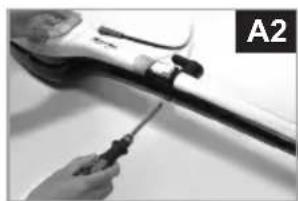
natural_image
Close-up of a hand using a screwdriver to adjust or repair a mechanical component (no visible text or symbols)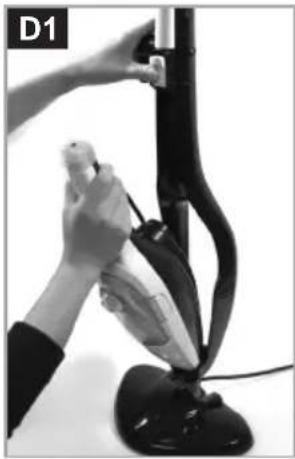
natural_image
Close-up of a person using a vacuum cleaner to lift a curved black device (no visible text or symbols)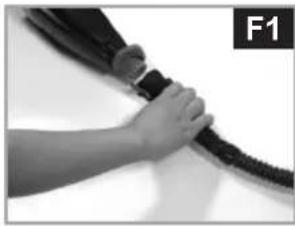
natural_image
Close-up of a hand holding a black cable with a strap, labeled F1 in the corner (no text or symbols on the cable itself)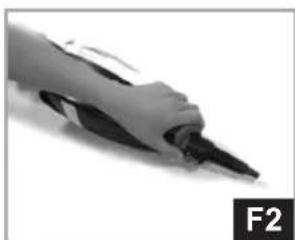
natural_image
Close-up of a pen tip with a black handle, labeled F2 in the corner (no other text or symbols visible)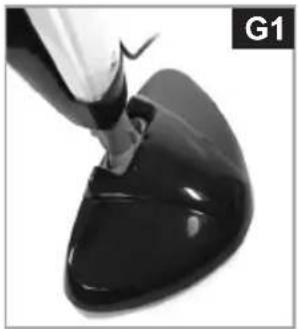
natural_image
Close-up of a black, glossy, sculpted object being pointed into the surface by a tool (no text or symbols visible)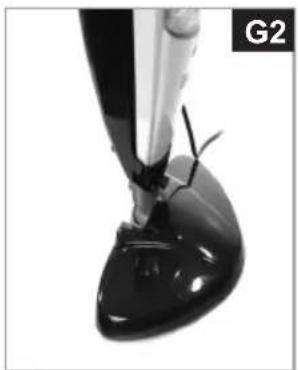
natural_image
Close-up of a black, glossy, sculpted object with a tool inserted, possibly a brush or pen tip (no visible text or symbols)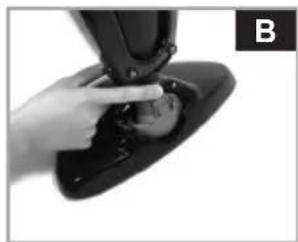
natural_image
Close-up of a hand adjusting a black mechanical component with a small inset image (no visible text or symbols)
natural_image
Simple line drawing of a triangular object with a curved base and a small rectangular object inside (no text or symbols)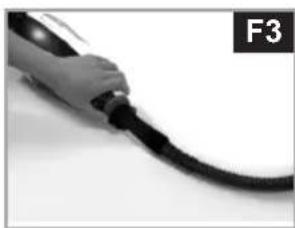
natural_image
Close-up of a black cable with a hand holding it, labeled F3 in the corner (no other text or symbols visible)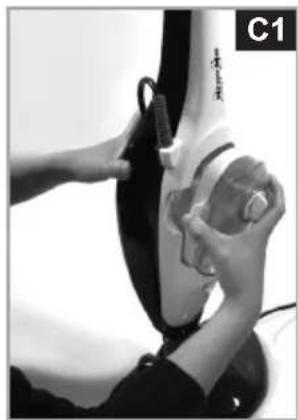
natural_image
Close-up of hands cleaning a car tire with a tool (no visible text or symbols)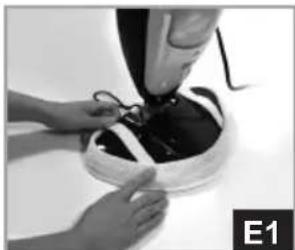
natural_image
Close-up of hands assembling a dark, curved object with wires (no visible text or symbols)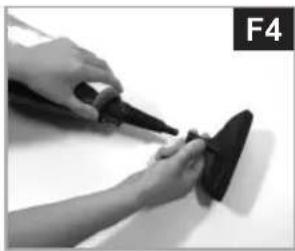
natural_image
Close-up of hands using a tool to apply material on a surface, no visible text or symbols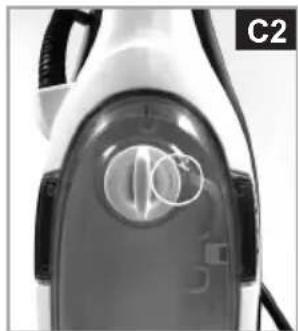
natural_image
Close-up of a white electric shaver with visible internal components and a circular mark on the lid (no text or symbols)
natural_image
Close-up of hands using a tool to adjust or install a black object on a white surface, labeled E2 in the corner (no text or symbols on the object itself)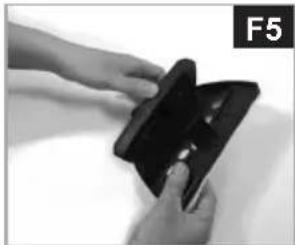
natural_image
Close-up of hands holding a black plastic object with a small inset showing internal features (no text or symbols visible)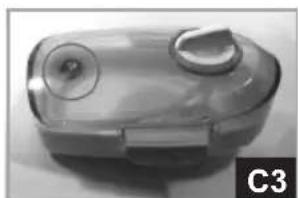
natural_image
Close-up of a transparent plastic device with circular ports and a circular lid, labeled C3 (no visible text or symbols on the device itself)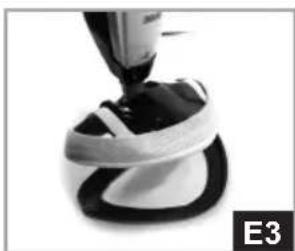
natural_image
Close-up of a mechanical component with a black and white bandage, labeled E3 (no text or symbols on the object itself)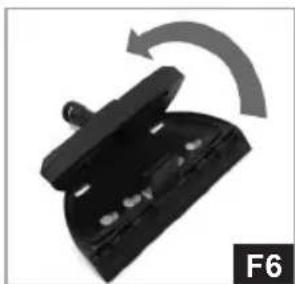
natural_image
Close-up of a black plastic clip with a curved arrow indicating rotation (no text or symbols)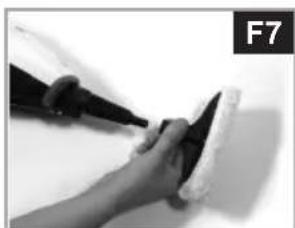
natural_image
Close-up of a hand holding a tool near a white object, no visible text or symbolsCustomer service points:
Bureaux de service après-vente:
Klantenservice:

Elements of Lifestyle
BEEM
Subject to printing error.
For customer service in other countries, please contact your local retailer.



- Bedienungsanleitung
- Inhalt
- General notes
- Copyright
- Notes on environmental protection
- Warranty/Guarantee
- Symbols used
- DANGER
- WARNING
- CAUTION
- NOTE
- Symbols on the appliance
- Symbol Meaning
- Intended use
- Limitation of liability
- Declaration of Conformity
- Safety instructions
- Appliance description
- Before using for the first time
- Unpacking
- Check the delivery contents
- Attaching
- Preparations
- Filling the water tank
- Hand-held steam cleaner
- Inserting
- Removing (see image D1)
- Attaching accessories
- Attaching/removing the adapter
- Fix the cloth to the floor brush (see images E1 and E2)
- Attach/removing the extension hose
- Attaching the additional nozzle (see image F4)
- Attach window attachment and table brush (see images F5 and F6)
- Operating
- Instructions
- General
- Cleaning coated or painted surfaces
- Cleaning glass
- Using the appliance
- Using as a floor cleaner
- Using as a hand-held steam cleaner
- After using
- Using the accessories
- Adapter/spot spray nozzle
- Joint brush
- Round brush
- Fabric brush
- Angled adapter
- Flat scraper
- Window attachment
- Floor brushes
- Cleaning and care
- Descaling
- Storage
- Troubleshooting
- Table des matières
- Enlever (cf. illustration D1)
- BEEM
Brand : BEEM
Model : Miracle Mop 9 in 1
Category : Steam cleaner