Cucinetta Fire & Sun - Oven BEEM - Free user manual and instructions
Find the device manual for free Cucinetta Fire & Sun BEEM in PDF.



| Product type | Infrared oven |
| Brand | BEEM |
| Model | Cucinetta Fire & Sun |
| Dimensions (W x D x H) | 450 x 380 x 270 mm |
| Weight | Approx. 8.77 kg |
| Power supply | 220-240 V~, 50 Hz |
| Rated power | 1300 W |
| Protection class | I |
| Functions | Toast, Rotisserie, Air fry, Defrost, Roast |
| Temperature range | 100 °C – 230 °C (depending on function) |
| Timer | Up to 3 hours, adjustable in steps |
| Included accessories | Grill rack, drip tray/baking pan, rotisserie rod with forks, rotisserie handle, grill and drip tray handle, shashlik skewers (8 pcs), skewer support, vegetable basket, pizza stone |
| Cleaning and maintenance | Casing: damp cloth. Removable accessories: dishwasher safe (except pizza stone). Pizza stone: damp cloth, scraper if necessary. |
| Safety | Hot surface (symbol), automatic shut-off after 1 minute of inactivity, overheat protection (via thermostat), power cord with grounding plug. |
| Spare parts and repairability | Spare parts available (grill rack, drip tray, rotisserie rod, handles, pizza stone, etc.) from manufacturer. Repairs by authorized professional. |
| Warranty | Extended manufacturer warranty per product; detailed conditions at www.beem.de |
| Intended use | Household use for grilling, baking, roasting, defrosting |
Frequently Asked Questions - Cucinetta Fire & Sun BEEM
User questions about Cucinetta Fire & Sun BEEM
0 question about this device. Answer the ones you know or ask your own.
Ask a new question about this device
Download the instructions for your Oven in PDF format for free! Find your manual Cucinetta Fire & Sun - BEEM and take your electronic device back in hand. On this page are published all the documents necessary for the use of your device. Cucinetta Fire & Sun by BEEM.
USER MANUAL Cucinetta Fire & Sun BEEM
Elements of Lifestyle
Bedienungsanleitung
User Manual
Mode d'emploi
Open the fold-out page at the beginning and end of the user manual in order to view the illustrations during reading.
General instructions ..... 21
Safety instructions 23
Appliance description 26
Operating panel 26
Oven functions 27
Startup 28
Preparations....29
Operation and use 29
Cleaning and care 35
Storage 35
Spare parts and accessories ..... 36
Troubleshooting 37
Technical data 38
Dear Customer,
Before using the appliance, please read the instructions contained in this user manual on startup, safety, intended use as well as cleaning and care.
Open the fold-out page at the beginning and end of the user manual in order to view the illustrations during reading.
Keep this user manual in a safe place and pass it on to any future owners together with the appliance.
General instructions
Copyright
This document is copyrighted. Any duplication or reprinting, in whole or in part, and the reproduction of the illustrations, even in modified form, is only permitted with the written approval of the manufacturer.
Notes on environmental protection

The packaging materials used can be recycled. When no longer re-d, dispose of the packaging materials rding to local environmental regula-

This product may not be disposed of in the domestic refuse within the European Union. Dispose of the appli-via communal collection points.
Warranty/Guarantee
In addition to the statutory warranty obligation, BEEM also grants an extended manufacturer's guarantee for some products.
Provided this is granted, the corresponding details for each product can be found either on the product-specific packaging, advertising material or on the BEEM website.
Please visit our website to obtain more information on comprehensive guarantee conditions, available accessories and spare parts as well as user manuals in various languages.
Symbols used
DANGER
This indicates an imminent hazardous situation, which could lead to severe physical injury or death.
Follow these instructions to avoid danger.
WARNING
This indicates a possible hazardous situation, which could lead to severe physical injury or death.
Follow these instructions to avoid danger.
ATTENTION
This indicates a potentially hazardous situation, which could lead to minor injuries or material damage.
Follow these instructions to avoid ▶ danger.
NOTE
A note contains additional information to simplify the use of the appliance.
Symbols on the appliance
Symbol Meaning

Warning of hot surfaces
Intended use
This appliance is intended for predominantly non-commercial use in closed rooms for toasting, grilling, roasting and defrosting food.
Any use other than previously stated is considered as improper use.
WARNING
If not used for its intended purpose and/or used in any other way, the appliance may be or become a source of danger.
Only use the appliance for its intended purpose.
Observe the procedures described ▶ in this user manual.
No claims of any kind will be accepted for damage resulting from use of the appliance for other than its intended purpose.
The risk must be borne solely by the user.
Declaration of Conformity
BEEM hereby declares that this appliance complies with the fundamental requirements and other relevant provisions of 2006/95/EC, 2009/125/EC and 2004/108/EC directives.
Limitation of liability
We assume no reliability for damage or follow-up damage in the case of:
failure to observe the instructions in ■ the user manual,
use for other than the intended purpose,
improper or unsuitable handling, ■
incorrectly performed repairs, ■
unauthorised modifications, ■
use of non-approved parts or spare ■ parts,
use of unsuitable supplementary or accessory parts.
Safety instructions
This appliance is not intended for use by persons (including children) with restricted physical, sensory or mental capabilities or with insufficient experience and/or knowledge unless they are supervised by a person responsible for their safety or have received instructions on the use of the appliance from such a person.
Children must be supervised to ensure that they do not play with the appli- ance.
Inspect the appliance for visible signs of damage before use. Do not use a damaged device.
Do not leave the appliance unattended during operation.
Only allow repairs to the appliance ■ to be carried out by an authorised specialist or by the works customer service; this particularly applies to replacing a damaged connecting cable. Unqualified repairs can lead to considerable danger for the user. They will also invalidate the warranty/guarantee.
Repairs to the appliance during the ■ warranty/guarantee period may only be carried out by service centres authorised by the manufacturer, otherwise the warranty/guarantee will become invalid in the event of damage or subsequent damage.
Defective parts may only be replaced with original spare parts. Only original spare parts guarantee that the safety requirements are met.
Only use spare parts from the manufacturer or spare parts that are specifically recommended by the manufacturer. The warranty/guarantee will otherwise be invalidated.
■Store the appliance and accessory parts out of the reach of children.
- Do not use this appliance together with an external timer or a separate remote control system.

DANGER
Danger from electric current!
Do not use the appliance if the ▶ mains cable or mains plug is damaged.
Do not open the housing of the appliance. Danger from electric current if live connections are touched and/or the electrical and mechanical configuration is changed.
Never immerse the appliance or the mains plug in water or other liquids.
Pull the plug out of the mains socket, if you are not using the appliance, if a malfunction occurs during operation,
before you clean the appliance. -
Risk of suffocation!
Never play with packaging material. Risk of suffocation.

WARNING
Danger of burns
Do not touch the hot surfaces during operation.
During operation, only touch the ▶ handles or control elements of the appliance.
Use pot holders or kitchen gloves for removing the food.
Use the tools supplied to remove the food.
Before cleaning, allow the appliance to cool down.

WARNING
Fire risk
Never use the appliance in the ▶ vicinity of or underneath flammable materials such as curtains.
Only use heat-resistant moulds and containers made of glass, ceramic or metal for preparing the food.
Always put the moulds and containers onto the grill, never directly onto the heating element.
Do not cover the moulds and containers when preparing food.
Do not use an oven bag.
Do not put or lay anything on the appliance.
Do not cover the appliance during operation.
ATTENTION
Do not pull the connecting cable to remove the plug from the mains socket.
Never lift or move the appliance with the mains cable.
Keep a distance of at least 3 cm between heating elements, food and the accessory parts.
Requirements for the place of use
For safe and trouble-free operation of the appliance, the place of operation must satisfy the following requirements:
Place the appliance on a dry, flat and heat-resistant surface.
The surface finishes on furniture may contain substances that can be detrimental to the feet of the appliance. If necessary, place a mat under the feet of the appliance.
Do not place the appliance in a hot, ■ wet or very humid environment or in the vicinity of inflammable materials. There must be a gap of at least 15 cm between the appliance and any walls, furniture or other objects.
Select a location that does not allow ■ children to reach the hot surfaces of the appliance.
The mains socket must be easily accessible and allow fast disconnection in the event of an emergency.
Electrical connection
For safe and trouble-free operation of the appliance, the following instructions on the electrical connection must be observed:
Before connecting the appliance, ■ compare the connection data (voltage and frequency) on the rating plate with those of your mains power supply. The data must correspond in order to avoid damage to the appliance. If in doubt, ask your electrical appliance retailer.
The mains socket must be protected by at least a 10 A automatic circuit breaker.
Ensure that the mains lead is undamaged and is not laid over sharp edges.
The mains cable must not be pulled ■ tightly, bent or come into contact with hot surfaces.
If the appliance is to be connected ■ to the power supply via an extension lead, the cable cross-section must be at least 1.5 mm 4 .
Route the cable to prevent risk of tripping.
The electrical safety of the appliance is only assured when it is connected to a properly installed protective earth (PE) conductor system. Connection to a mains socket without PE conductor is forbidden. If in doubt, the electrical system must be checked by a qualified electrician. The manufacturer assumes no liability for injury or damage caused by a missing or interrupted protective earth conductor.
Appliance description
(see illustration on the left fold-out)
Housing1
Door handle2
Display3
Function display4
MODE function button

Temperature setting button

Timer setting button

Buttons


Pause/Cancel button

Start button

11 Feet
12 Oven door
13 Spacer rear side
(not illustrated)
14 Grill grate
15 Drip pan/baking tray
16 Rotary spit grip
17 Grill grate grip and drip pan/baking tray
18 Rotary spit
19 Rotary spit retaining clips
20 Shish kebab skewers (8 pcs.)
21 Shish kebab skewer holders
22 Vegetable basket
23 Pizza stone
24 User manual
(not illustrated)
Operating panel
The display (3) shows which cooking time, temperature and function is set. The selected function is indicated by a red triangle. The corresponding cooking time and temperature digits flash during setting.
NOTE
▶ Each push of a button is acknowledged by a signal tone.
Switching on and off
To switch on the appliance press the ⏻ button (10). The functions light up on the display. Press the MODE button ⚙ (5) to select the desired function. Press the ⏻ button again to start the selected function.
NOTE
Before starting the function, set the temperature and cooking time as described in the sections Setting the temperature (page 27) and Setting the cooking time (page 27).
Pressing the 1/x button (9) stops the activated function. You can check the cooking process or change settings. Pressing the 1/x (9) button twice exits all functions and resets the settings. The appliance switches itself off automatically after approx. one minute.
Oven functions
First press the ⏻ button to activate the MODE 🔔. Press the MODE button 🔔 (5) to set the operating mode of the appliance. Pressing more than once runs through all functions.
The available functions are:
- Toasting
- Rotary spit
- Convector
- Defrosting
- Roasting
See table Oven functions (page 27).
NOTE
It is only possible to change a function when no function is in operation.
Oven functions
| Function | Upper heat | Lower heat | Air circulating fan | Rotation | Basic setting |
| Toasting | √ | √ | - | - | The last-used setting is flashing |
| Rotary spit | √ | - | - | √ | Temperature flashes at 200 C°. |
| Convector | √ | √ | √ | - | Temperature flashes at 215 C°. |
| Defrosting | - | (approx. 50 °C) | √ | - | Timer display flashes at 1 min 00 sec. |
| Roasting | √ | - | - | - | Temperature flashes at 175 C°. |
Setting the temperature
Proceed as follows to set the temperature:

°C button (6).
Press the ▲ and ▼ (8) to select the desired temperature.
The temperature setting is indicated in the display (3).
The temperature can be changed at any time during the cooking process.
| Function Temperature range | |
| Toasting | Basic setting cannot be changed |
| Rotary spit 100 °C – 230 °C | |
| Convector 100 °C – 230 °C | |
| Defrosting 50 °C | |
| Roasting 100 °C – 230 °C | |
NOTE
The variable temperature ranges ▶ can be increased or decreased with the ▲ and buttons in 5 °C steps.
Setting the cooking time
After pressing the Mode button (3) to select an operating mode, proceed as follows to set the cooking time:
◆ Press the timer setting button ⏻ (7).
◆ Press the ▲ and ▼ buttons (8) to select the desired cooking time.
The set cooking time is indicated in the display (3).
The cooking time can also be changed during the cooking process.
An acoustic signal is emitted after the cooking time has elapsed. END flashes in the display and the appliance switches itself off automatically after approx. one minute.
| Function | Timer setting |
| Toasting | Continuous from light brown ("light" 2 min 30 sec) to dark ("dark" 6 min 10 sec.) in 30-second steps. |
| Rotary spit | 1 min to 30 min in 1-minute steps.30 min to 3 h in 5-minute steps. |
| Convec-tor | 1 min to 30 min in 1-minute steps.30 min to 3 h in 5-minute steps. |
| Defrost-ing | 1 min to 30 min in 1-minute steps.30 min to 3 h in 5-minute steps. |
| Roasting | 1 min to 30 min in 1-minute steps.30 min to 3 h in 5-minute steps. |
When making toast, the time is influenced indirectly. Selecting the browning level automatically specifies the time for the "Toasting" programme. See section Preparation - Toasting (page 31).
Startup
Unpacking
Remove the appliance, all accessory parts and the user manual from the box.
Remove all packaging materials and protective foils from the product and the accessories before using it for the first time.
NOTE
Do not remove the rating plate or any warning signs on the appliance. If possible, keep the original packaging during the warranty period in order to pack the device properly in the event of a warranty claim. Transport damage will invalidate the warranty/guarantee.
Check the delivery contents
Check for visible signs of damage or missing items.
Report incomplete or damaged contents to your supplier immediately.
Before using for the first time
Clean the appliance as described in the section Cleaning and care (page 35).
Before using the appliance for the first time, heat it up once for approx. 10 minutes to remove any production residue (grease): Proceed as follows:
Select the convector setting and - set the maximum temperature as described in the section Setting the temperature (page 27).
Set the cooking time to 10 min as – described in the section Setting the cooking time (page 27).
Press the ⏻ button (10).
After the function has completed, – open the oven door and allow the appliance to air.
NOTE
Due to the materials used, a new appliance can produce light odour or smoke when it is used for the first time. This will diminish after a short period of time. Ensure sufficient ventilation.
Allow the appliance to cool down completely.
Pull the plug out of the mains socket.
Clean the appliance as described in the section Cleaning and care (page 35).
Preparations
Inserting the drip pan/baking tray
The baking tray (15) can also be used as a drip pan.
Push the baking tray (15) forwards onto the desired support rail.
When barbecuing on the grill grate, use the baking tray as a drip pan. To do this, insert it onto the lowest position.
Operation and use
Using the grip (images A1-A3)
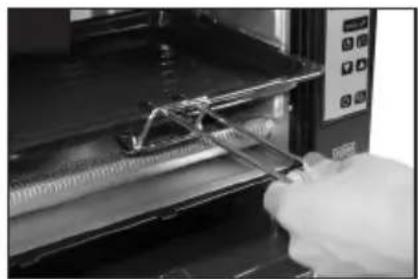
The rotary spit (18) and the drip pan each have a grip for removing them from the oven when hot.
To remove the rotary spit, proceed as follows:
◆ Push the grip for the rotary spit (16) into the appliance so that the retaining hooks of the grip are situated under the respective recesses of the grill skewer (image A1).
Take the rotary spit out by lifting it ◆ slightly on the left side.
◆ Pull out the rotary spit carefully so that the end inserted in the turning gear is released.
◆Remove the entire rotary spit.
To remove the drip pan, proceed as follows:
◆ Move the grip (17) for the drip pan (15) at a slight angle towards the drip pan (image A2) from above.
Insert the grip so that the larger hooks are above the support beneath the drip pan.
Bring the grip to an horizontal position.
While pulling out, lift the drip pan ◆ slightly in order to avoid loosening the grip.
Remove the drip pan. ◆
To remove the grill grate, proceed as with the drip pan. However, make sure that the smaller hooks of the grip are hung into the grill grate (image A3).
NOTE
If possible, place the rotary spit onto the drip pan after removal in order to collect fat dripping from the cooked food.
Keep the drip pan level to prevent ▶ hot fat from running off.
Use kitchen gloves to prevent burning with hot fat.
Lay out a heat-resistant pad ready ▶ for placing hot parts.
General instructions
The food should be at room temperature since frozen food requires longer to cook and can also dry out.
Do not cover the food (e. g., with alu-minium foil).

To achieve particularly good results, preheat the appliance briefly. Pay good attention to the cooking process and regulate the temperature – if necessary.
■You can use the appliance to prepare various different food, e. g., sausages, steaks, roasts, poultry, roast pork, vegetables, casseroles, toast, pizza, cakes etc.
NOTE
The "Roasting" function only uses ▶ upper heat and the setting is therefore particularly suitable for barbecuing and gratinating food.
▶Turn over the food when using the "Roasting" function to ensure even cooking.
The "Convector" function uses upper and lower heat to cook the food.
Condensation can occur on the oven door during the cooking process.
The appliance is particularly suitable for quick and fat-free preparation of food. The cooking time in the infrared oven is shorter than in conventional ovens.
Using the appliance
If required, insert the drip pan (15) as described in the section Inserting the drip pan/baking tray (page 29).
Press the Start button ⏻, to activate the functions of the oven.
Select the suitable function, see table Oven functions (page 27).
Set the cooking temperature as described in the section Setting the temperature (page 27).
Set the cooking time as described in the section Setting the cooking time (page 27).
Press the Start button ⏻ (10).
NOTE
The temperature and cooking time settings can be changed at any time during cooking.
The appliance acknowledges every input with a tone signal.
Preparation
Toasting
This function allows you to make toast as well as bake rolls, baguettes and pretzels.
Push the grill grate onto the middle rail.
Press the Mode button to select the "Toasting" function.
Set the desired browning level using ◆ the ▲ and (8) buttons:
"light" is lightly browned,
- "dark" is strongly browned.
◆ The specified time for each programme is indicated in the display.
◆ Press the ⏻ button (10).
NOTE
if necessary, correct the setting if you wish to successively toast several portions.
Before toasting, remove the drip pan to allow the toast to brown on the underside.
It is not necessary to preheat the oven.
Rotary spit (image B1–B4)
This function (upper heat) allows you to grill a whole chicken or roast pork. The function is also suitable for preparing shish kebab skewers as well as cooking vegetables or chips in the vegetable basket.
Chicken
◆ Wash a fresh or defrosted whole chicken and remove the innards.
◆ush a retaining clip (19) onto the tip of the rotary spit and secure it with the help of the wing screw (image B1).
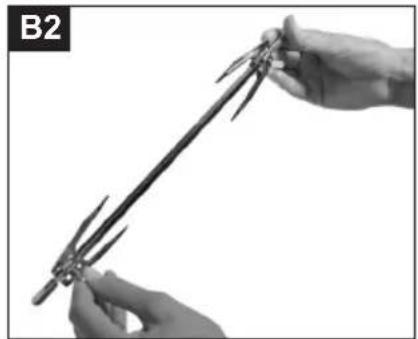
◆ush the chicken onto the rotary spit and secure with the second retaining clip (image B2).
- Season the chicken to taste (e. g. salt, ground red pepper, pepper and curry) and sprinkle with oil.
◆Secure the legs and wings with rou-lade pins or roast string.
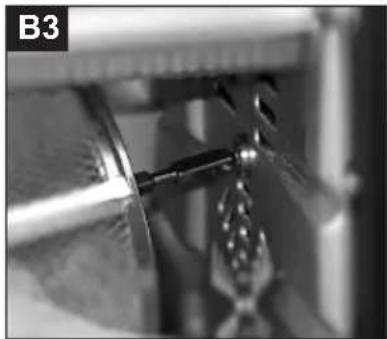
Put the rotary spit with the chicken ◆ into the appliance by inserting the pointed end into the rotary drive (image B3). Then put the stud on the other side of the rotary spit into the mounting on the left side of the appliance (image B4).
Push the drip pan onto the lowest rail of the appliance.
Press the Mode button to select the
"rotary spit" function.
Set the cooking time and temperature.
Press the 🔊 button (10).
Remove the cooked chicken using the rotary spit grip as described in the section Using the grip (page 29).
NOTE
Only use chickens with a weight up to max. 1000 g.
Secure the chicken on the middle of the rotary spit.
Remove the innards before grilling.
Secure the legs and wings of the ▶ chicken to prevent contact with the heating elements.
Before grilling, insert the drip pan to catch dripping fat.
It is not necessary to preheat the ▶ oven.
Shish kebab skewers (images C1-C3)
Put the desired meat pieces (approx.
1.5 x 1.5 cm) pieces of sausage, strips of pepper, onions, bacon etc. onto the shish kebab skewers (20).
Season the skewers to taste and ◆ sprinkle them with oil.
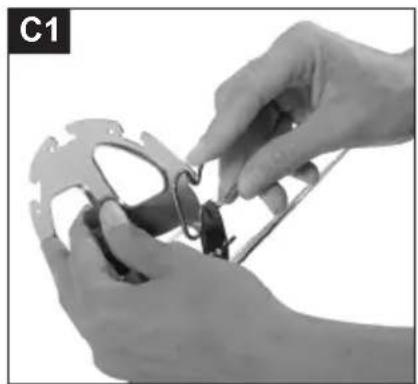
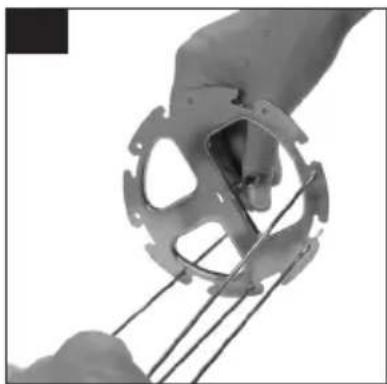
Put the individual skewers (20) onto the holder (21). The curved end of the skewer is clamped into the recess on the holder (21) (image C1) on the one side and the pointed end on the other side is inserted into the hole on the holder (image C2). Push the rotary spit (18) into the middle of the shish kebab holder (21) and secure on the left and right with the retaining clips (19) (image C3).
Insert the rotary spit into the appliance as described in the section Rotary spit chicken (page 31).
Set the cooking time and temperature as described in the section Setting the cooking temperature and time (page 27).
Press the 🔊 button (10).
Remove the skewers using the skewer grip (16).
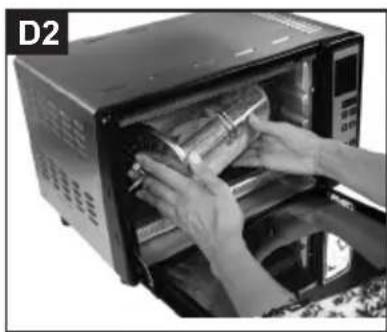
Vegetable basket (images D1-D2)
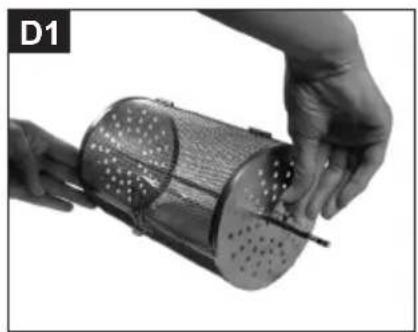
◆ush the rotary spit (18) into the middle of the vegetable basket (22) and secure on the left and right with the retaining clips (19) (image D1).
Open the vegetable basket and fill it with chips, croquettes, potato wedges, chicken nuggets, shrimps, etc. Sprinkle a little oil over the food.
Do not overfill the basket so that the food can be turned in the wire basket.
Insert the rotary spit into the appliance as described in the section Rotary spit chicken (page 31) (image D2).
Set the cooking time and temperature as described in the section Setting the cooking temperature and time (page 27).
Press the 🔊 button (10).
Remove the hot vegetable basket using the rotary spit grip.
Convector
This function starts upper and lower heating as well as the convector fan. This achieves an intensive and even heat distribution within the appliance so that the cooking temperature and time can be decreased. The convector function is suitable for various different applications such as roasting and stewing meat, baking bread, cake, pizza and biscuits, preparing fish dishes, casseroles and gratin. Use this function as follows:
Push the grill grate onto the lowest rail in the appliance. Fill a fire-proof mould made of glass, ceramic or metal with food and put this on the grill grate.
Do not cover the food, for example not even with aluminium foil.
Press the ⏻ button (10).
Press the Mode button to select the ◆
"Convector" function.
Set the cooking time and temperature as described in the section Setting the cooking temperature and time (page 27).
Press the 🔊 button (10).
Remove the food with the help of ◆ kitchen gloves or pot holders and the grill grate with the grip.
NOTE
Check that your cake/baking mould fits into the appliance.
Make sure that the dough for the cake or bread does not brim over when rising during baking and come into contact with the inner walls and heating elements of the appliance.
Preheat the oven for approx. 4-5 min.
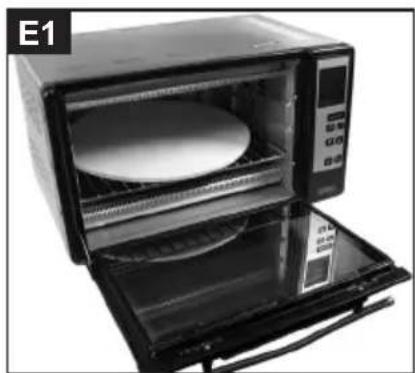
Pizza (image E1)
Push the grill grate onto the lowest rail.
◆ay the pizza stone onto the grill grate.
◆ut the pizza onto the pizza stone.
◆ Bake the pizza using the "Convector" function.
Defrosting
The "Defrost" function does not allow changes of temperature. The defrost temperature is preset to approx. 50 °C. To use this function, proceed as follows:
Put the frozen food onto the drip pan. ◆
Push the drip pan into the desired position of the oven.
Press the Mode button to select the ◆
"Defrost" function.
Set the defrost time as described in the section Setting the cooking time (page 27).
Press the 🔊 button (10).
Remove the defrosted food with the help of kitchen gloves or pot holders and the grill grate with the grip.
NOTE
Be aware that defrosting times depend on the product.
Roasting
This function (upper heat) is ideal for grilling steaks, fish, sausages, hamburgers etc.
To use this function, proceed as follows:
Push the drip pan into the lowest rail of the appliance to catch dripping fat. Season the food to taste and place it onto the grill grate.
Push the grill grate – depending on the thickness of the food – onto the middle or highest rail in the appliance.
Press the Mode button to select the "Roasting" function.
Set the cooking time and temperature as described in the section Setting the cooking temperature and time (page 27).
Press the 🎨 button (10).
Remove the hot grill grate using the grip.
NOTE
When using this function, make sure that you turn the food because only the upper heat function is used.
After using
Pressing the 1/2 (9) temporarily stops the running function, pressing twice stops completely and resets the settings.
◆pull the plug out of the mains socket.
Allow the appliance to cool down and clean it as described in the section Cleaning and care (page 35).
Cleaning and care
Before beginning work, pay attention to the safety instructions in the section Safety instructions (page 23)!
The appliance must be cleaned after ■ each use.
Clean the appliance as soon as it has cooled down. Waiting too long makes cleaning unnecessarily difficult.
ATTENTION
Do not insert any objects into the heating elements. They could be damaged.
Housing
Wipe the inside and outside of the housing with a damp cloth.
If necessary, use commercially-available washing-up liquid.
Accessory parts
Take out the accessory parts and clean them with warm dishwasher or in the dish-water.
In the case of stubborn stains, soak ■ the accessory parts in warm dishwater for 10 minutes before cleaning.
Dry the parts thoroughly before rein-■serting.
NOTE
Do not use metal/scouring pads to clean the appliance.
Do not use oven spray to clean the inside.
All removable parts except the pizza stone can be cleaned in the dish-washer.
Pizza stone
Allow the pizza stone to cool down.
Remove light soiling with a damp cloth.
■Stubborn stains can be scoured with a scouring pad. Wipe down afterwards with a damp cloth.
NOTE
The pizza stone is not suitable for dishwashers.
Storage
If you do not intend to use the appliance for a longer period of time, clean it as described in the section Cleaning and care (page 35).
Store the appliance and all accessory parts at a dry, clean and frost-free location which is protected against direct sunlight.
Spare parts and accessories
| Item* Article number Designation | |
| 22.18 900815021 Vegetable basket with rotary spit | |
| 14 900815001 Grill grate | |
| 20, 21.18 900815016 Shish kebab skewer, holder, rotary spit | |
| 18 ,19 900815026 Rotary spit, retaining clips | |
| 15 900815006 Drip pan/baking tray | |
| 16 900815031 Rotary spit grip | |
| 17 900815036 Grill grate grip and drip pan/baking tray | |
| 23 900815011 Pizza stone | |
* numbering according to the description of the appliance
Troubleshooting
The following table helps in localising and remedying minor faults:
| Fault Possible cause Remedy | ||
| Display does not switch on | Automatic circuit breaker in fuse box tripped. | Switch on the automatic circuit breaker again. |
| Control indicator defective. | Contact customer service. | |
| The automatic circuit breaker in the fuse box trips. | Too many appliances connected to the same power circuit. | Reduce the number of appliances on the power circuit. |
| No fault detected. Contact customer service. | ||
| Oil leaks from underneath the appliance. | Drip pan not inserted. Insert drip pan. | |
| Drip pan is full. Empty drip pan. | ||
NOTE
If you cannot resolve the problem with the steps described above, please contact customer service.
Technical data
| Model | CucinettaInfrared oven |
| Type number B25,001 | |
| Dimensions | 450 x 380 x 270 mm(W x D x H) |
| Approximate weight 8.77 kg | |
| Operating voltage 220 - 240 V~ | |
| Mains frequency 50 Hz | |
| Power consumption 1300 W | |
| Protection class I |
Sommaire




Elements of Lifestyle
BEEM GmbH
Subject to printing error.
For service in other countries contact your local dealer.



- BEDIENUNGSANLEITUNG
- GENERAL INSTRUCTIONS
- COPYRIGHT
- NOTES ON ENVIRONMENTAL PROTECTION
- WARRANTY/GUARANTEE
- SYMBOLS USED
- DANGER
- WARNING
- ATTENTION
- NOTE
- SYMBOLS ON THE APPLIANCE
- SYMBOL MEANING
- INTENDED USE
- DECLARATION OF CONFORMITY
- LIMITATION OF LIABILITY
- SAFETY INSTRUCTIONS
- REQUIREMENTS FOR THE PLACE OF USE
- ELECTRICAL CONNECTION
- APPLIANCE DESCRIPTION
- OPERATING PANEL
- SWITCHING ON AND OFF
- OVEN FUNCTIONS
- SETTING THE TEMPERATURE
- SETTING THE COOKING TIME
- STARTUP
- UNPACKING
- CHECK THE DELIVERY CONTENTS
- BEFORE USING FOR THE FIRST TIME
- PREPARATIONS
- INSERTING THE DRIP PAN/BAKING TRAY
- OPERATION AND USE
- USING THE GRIP (IMAGES A1-A3)
- USING THE APPLIANCE
- PREPARATION
- TOASTING
- ROTARY SPIT (IMAGE B1–B4)
- CHICKEN
- SHISH KEBAB SKEWERS (IMAGES C1-C3)
- VEGETABLE BASKET (IMAGES D1-D2)
- CONVECTOR
- PIZZA (IMAGE E1)
- DEFROSTING
- ROASTING
- AFTER USING
- CLEANING AND CARE
- HOUSING
- ACCESSORY PARTS
- PIZZA STONE
- STORAGE
- TROUBLESHOOTING
- SOMMAIRE
Brand : BEEM
Model : Cucinetta Fire & Sun
Category : Oven