ST 4 C - Vacuum Cleaner TEAM - Free user manual and instructions
Find the device manual for free ST 4 C TEAM in PDF.



| Product type | Canister vacuum cleaner |
| Brand | TEAM |
| Model | ST 4 C |
| Power supply | Mains (220-240 V ~ 50 Hz) |
| Suction power | Electronically adjustable from MIN to MAX |
| Dust container capacity | Approximately 2 liters |
| Filtration | 4 levels: centrifugal, nylon filter, accordion filter, air outlet filter |
| Included accessories | 2-position combination nozzle, small brush, flat nozzle, telescopic tube, hose |
| Power cord | With automatic cord rewinder (yellow and red marks indicating length) |
| Switch | On/off on the device |
| Power adjustment | Electronic slide control |
| Transport and storage | Carrying handle, vertical tube storage under the device |
| Filter maintenance | Clean with warm water, dry completely before reinstalling |
| Container cleaning | Empty after use, clean with warm water |
| Weight | Approximately 4.5 kg |
Frequently Asked Questions - ST 4 C TEAM
User questions about ST 4 C TEAM
0 question about this device. Answer the ones you know or ask your own.
Ask a new question about this device
Download the instructions for your Vacuum Cleaner in PDF format for free! Find your manual ST 4 C - TEAM and take your electronic device back in hand. On this page are published all the documents necessary for the use of your device. ST 4 C by TEAM.
USER MANUAL ST 4 C TEAM
Bagless vacuum cleaner
Aspirateur sans sac
- Floor brush
- Telescopic tube
- Handle
- Flexible hose
- Dust container
- Automatic cord rewind
- Power regulator MIN...MAX
- Carrying handle
- ON/OFF switch
- Rear wheel
- Body
- Hose connector
- Release button of dust container
- Release of the lid of the dust container
- Release of the bottom of the dust container
FR
Please read these instructions carefully before using the appliance.
Check that your mains voltage corresponds to that stated on the appliance.
Never leave the appliance unsupervised when in use. Keep out of reach of children or incompetent persons.
From time to time check the cord for damages. Never use the appliance if cord or appliance shows any signs of damage.
Only use the appliance for domestic purposes and in the way indicated in these instructions.
Never immerse the appliance in water or any other liquid for any reason whatsoever.
Never use the appliance near hot surfaces.
Should the cord be damaged, it must be replaced by a competent qualified electrician.
Before cleaning, always unplug the appliance from the power supply.
All repairs should be made by a competent qualified electrician (1).
Never use the appliance outside and always place it in a dry environment.
Never use accessories which are not recommended by the producer. They could constitute a danger to the user and risk to damage the appliance.
Never move the appliance by pulling the cord. Make sure the cord cannot get caught in any way. Do not wind the cord around the appliance and do not bend it.
Before plugging in the cord, make sure the switch is set to the off position.
Unplug the appliance when not in use or when emptying the dust container or cleaning or replacing the filters.
This appliance is not a toy, it is not supposed to be sat on.
Never use the appliance to vacuum matches, pointed objects, cigarettes, butts or other glowing things. Do not use it on wet surfaces or surfaces covered with cement or other substances that are too fine or even toxic when inhaled. Never vacuum any kind of liquid with this appliance.
Do not try to repair the winding-on spool yourself. Make sure it is repaired by a competent qualified electrician.
Do not block the vacuum passage. If this should happen by accident, unplug the appliance before unblocking it.
Never operate the appliance without dust bag!
Make sure not to point the vacuum cleaner at persons or animals, and especially stay clear of eyes and ears.
If you use the appliance with a damaged air filter the appliance might get damaged. Make sure to check the good quality and placement of the dust container and/or filter.
If your appliance no longer vacuums correctly or if the maximum indication is reached in the dust container, clean the filter and empty the dust container. Otherwise the appliance might overheat. Guarantee claims will not be accepted if this occurs.
Competent qualified electrician: after sales department of the producer or importer or any person who is qualified, approved and competent to perform this kind of repairs in order to avoid all danger. In any case you should return the appliance to this electrician.
Using the appliance when not all the filters are installed properly and in good shape might damage the appliance. No guarantee claims will be accepted for damages due to that reason.
ASSEMBLING THE VACUUM CLEANER
- Unpack the appliance and its accessories.
- Insert the connection piece of the flexible hose into hose connection inlet on the front part of the appliance. Press until it clicks.

- To remove the hose, unplug the appliance first. Press the release button on top of the hose connection piece and pull the hose out of the connection inlet.
- Fit the handle to the telescopic tube
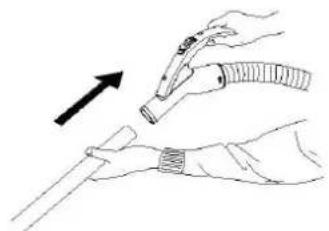
- Fit the floor brush to the other end of the telescopic tube.

The floor brush possesses two positions. It is ideal for the daily cleaning of carpets and hard floors.
- The vacuum cleaner is delivered with the following accessories:

1 small brush
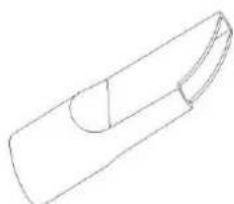
1 crevice tool
USE
Pull out a sufficient length of power cord. A yellow mark on the power cord shows the ideal cable length. Do not extend the cable beyond the red mark. Insert the plug into the power socket and switch on the appliance by pressing the ON/OFF switch.
- The suction power can be adjusted steplessly by sliding the power regulator (7). Use a low suction power for furniture and other delicate surfaces and use high suction power for fitted carpet and other floors.
AFTER USE
- Stop the vacuum cleaner by pressing the ON/OFF switch (9).
- Unplug the appliance from the power supply and press the cable rewind button (6) to rewind the cable automatically. Should the cable block, pull it out 50~cm and try again.
- For hygienic reasons, empty the dust container after each use if possible (see cleaning section)
If you do not use the appliance any longer, place it vertically. You can park the telescopic tube thanks to its bracket (which must be attached to the groove situated at the bottom of the appliance).
CLEANING THE DUST CONTAINER AND THE FILTERS
The filters guarantee you fresh air when vacuum cleaning. Filters that are maintained properly will allow your appliance to keep its maximum suction power. The dirtier the filters, the weaker the suction power will be. It is necessary to clean the filters regularly to avoid operation problems. The vacuum cleaner has a quadruple filtration system, which allows a filtration rate of more than 99% . The filtration system consists of the following elements:
A centrifugal filtration generated by the movement of the air in the dust container. Therefore it is necessary to empty the dust container regularly.
- A nylon filter (16) that filters the bigger dust particles
- An accordion filter (17) that filters the smaller dust particles
A supplementary air filter that filters the dust particles coming from the motor.
Each filter should be checked, cleaned or replaced respecting the following instructions:
- Take the dust container out of the appliance by pressing the upper release button (13).
- Open the bottom of the container by pressing the lower release button (15) and empty the container.
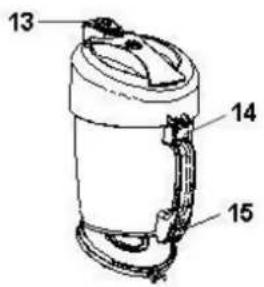
- Separate the cover from the dust container by pressing the release button (14), remove the nylon filter (16) and the filter assembly (17) by turning and pulling at them.
- You can clean the dust container and the filter under lukewarm running water.

- Dry all the parts thoroughly and reassemble them.
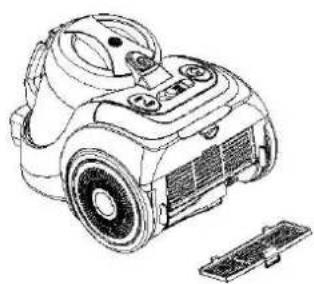
- From time to time also clean the air filter situated in the back of the appliance. To do so, open the grid and remove the filter, clean it and reinsert it with the grid. Only reassemble the filter when it is fully dry.

After a certain number of cleanings the filters will be damaged or impossible to get back in their initial shape. In such case, please contact the nearest customer service to obtain new filters.
FR MODE D'EMPLOI
POUR VOTRE SECURITE

Brand : TEAM
Model : ST 4 C
Category : Vacuum Cleaner