USB 7325 - DJ Equipment US Blaster - Free user manual and instructions
Find the device manual for free USB 7325 US Blaster in PDF.


| Product Type | Professional CD player for DJs |
| Brand | US Blaster |
| Model | USB 7325 |
| Power Supply | Mains via power cord, on/off switch |
| Connectivity | Line output (LINE OUT) on RCA plugs |
| Display | Liquid crystal display (LCD): track numbers, duration (minutes, seconds, frames), pitch speed, modes |
| Main Functions | Play/Pause, Cue, Track skip, Frame search, Pitch (variation ±16%), Pitch Bend, Time/Outro, Single/Autocue and Continuous mode |
| CD Compartment | Tray loader with OPEN button, manual close |
| Disc Compatibility | Compact audio CDs (12 cm) |
| Operating temperature | 5 °C to 35 °C |
| Maintenance | Clean with a dry or slightly damp cloth; do not use chemicals |
| Safety | Do not open the casing, unplug if problems occur, avoid moisture and heat sources |
| General Information | User manual available in PDF on notice-facile.com |
Frequently Asked Questions - USB 7325 US Blaster
User questions about USB 7325 US Blaster
0 question about this device. Answer the ones you know or ask your own.
Ask a new question about this device
Download the instructions for your DJ Equipment in PDF format for free! Find your manual USB 7325 - US Blaster and take your electronic device back in hand. On this page are published all the documents necessary for the use of your device. USB 7325 by US Blaster.
USER MANUAL USB 7325 US Blaster
- Be careful with heat and extreme temperature
Avoid exposing it to direct sunlight or near a heating appliance. Not pu a temperature below 5 °C, or exceeding 35 °C.
- Keep away from humidity, water and dust.
Do not place the set in a location with high humidity or lots of dust. Containers with liquid should not be placed on the set.
- Keep away from sources of hum and noise
Such as a transformer motor, tuner, TV set or amplifier.
- To avoid placing on unstable location.
Select a level and stable location to avoid vibration.
- Do not use chemicals or volatile liquids for cleaning.
Use a clean dry cloth to wipe off dust, or a moist soft cloth for stubborn dirt.
- If out of order, contact sales agency immediately.
If any trouble arise, remove the power plug immediately, and contact an engineer for repairing, do not open the cabinet yourself, it may result in an electric shock.
6-1. Be careful with the power cable.
Never pull the power cable to remove the plug from the outlet, be sure to hold the plug. When not using the player for an extended period of time be sure to disconnect the plug from the outlet.
- Handle the compact disc Carefully
Always keep the disc clean; do not use cracked discs, it will damage the player.
Do not carry out any repairs on the equipment yourself; doing so will invalidate the guarantee. The equipment may also not be modified; doing so will also invalidate the guarantee. The guarantee is also invalidated if accidents and damage of any form are caused as a result of improper use and/or not heeding the warnings in general as laid out in this user guide. US Blaster Europe accepts no responsibility for any personal accidents as a consequence of not following the safety instructions and warnings. This is also the case for consequential loss in any form.
Keep the packaging safe so that, if the equipment is defective, you can send it back in its original packaging and so avoid any damage.
text_image
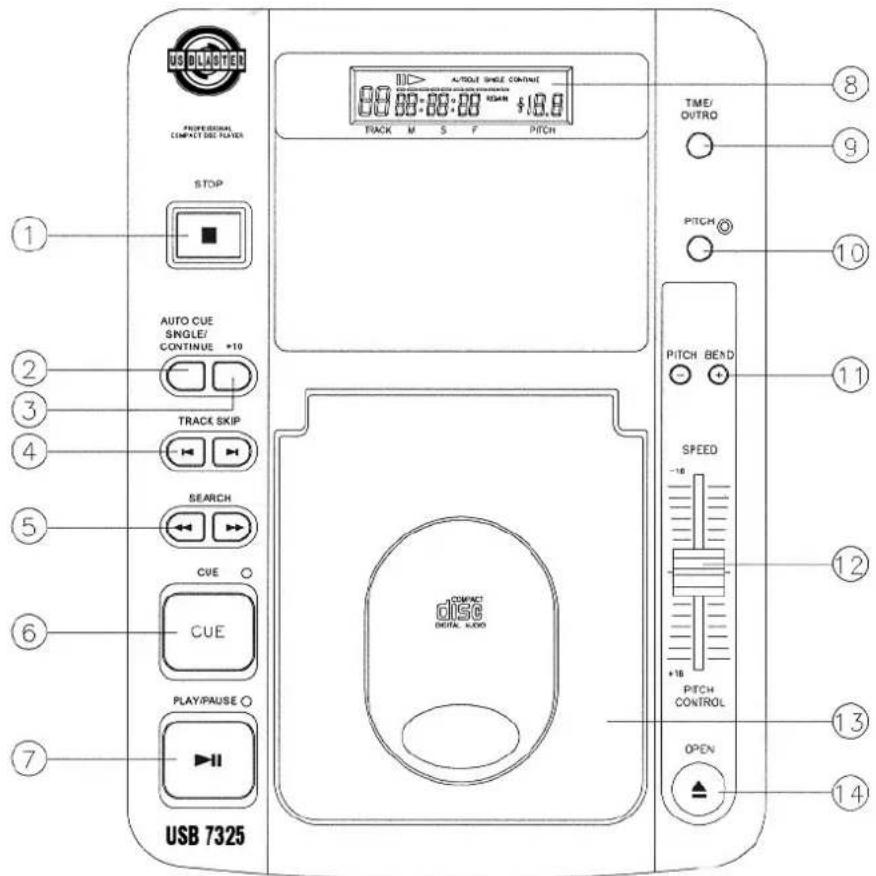
USB DIUOTEN PROFESSIONAL COMPACTO DOS PLATERS STOP AUTO CUE SINGLE/ CONTINUE +10 TRACK SKIP SEARCH CUE CUE PLAY/PAUSE USB 7325 AUTO SINGLE CONTINUE 8.00:00:00:00 $10.0 PACK M S F PITCH TIME/ OUTRO PITCH PITCH BEND SPEED -10 +16 PITCH CONTROL OPEN ⑧ ⑨ ⑩ ⑪ ⑫ ⑫ ⑬ ⑬ ⑭ ⑭ ⑮ ⑯ ⑰ ⑱ ⑲ ⑳ ⑭ ⑮ ⑯ ⑰- STOP
Press this button to stop the operation of the unit.
- CONTINUE/SINGLE (AUTO CUE)
Press this button to switch between the SINGLE and CONTINUE play modes. When SINGLE/AUTOCUE mode is selected, it indicates as PLAY 1 on the LCD. After each track, it enables the unit to pause at the beginning sound of the next track.
- +10
Each press of this button allows the unit to advance 10 tracks.
- TRACK SKIP
This button selects a specific track to be played.
- SEARCH
Use this button to quickly forward or reverse to change the start position of a playing. It also can be used for changing the sound speed.
- CUE
The CUE function allows the CD to be played from a setup point any number of times.
Press the PLAY/PAUSE button to pause a playing song, then press the CUE button to set up a position where the play can be returned after the CUE button is hit again.
The CUE LED will stop flashing from the time the CUE button is pressed.
7. PLAY/PAUSE
Each press of this button cause the operation to change between PLAY and PAUSE modes.
8. L.C.D.
This liquid crystal displays (L.C.D.) indicates the track numbers, time (minutes, seconds, frames), pitch speed, also other modes as Single/Autocue and Continue.
9. TIME/OUTRO
This button switches the time display between each Remaining time, Elapsed playing time, and Total remaining time; it also switches on and off the OUTRO function. When the display shows OUTRO, the player only plays the last 30 seconds of each track.
10. PITCH
This button changes the play speed.
Press PITCH button (the PITCH LED is lit) to enable the PITCH CONTROL SLIDER to increase or decrease the playing speed. When the PITCH is off, the speed automatically back to normal.
The pitch can be changed up to ±16% by moving the slider up and down.
NOTE: (1) The pitch slider will not function if the PITCH LED is off.
(2) This pitch button will not have effects on PITCH bend.
11. PITCH BEND
Press the button for quick speed up and slow down..
12. PITCH CONTROL SLIDER
By moving the pitch control slider, you can achieve the playback speed you want between MINMUN (up side) & MAXMUN (down side).
13. DISC COMPARTMENT
For placing the CD disc inside on the tray.
14. OPEN
Press this button to open the disc compartment door, push the door in to close.
CONNECTION
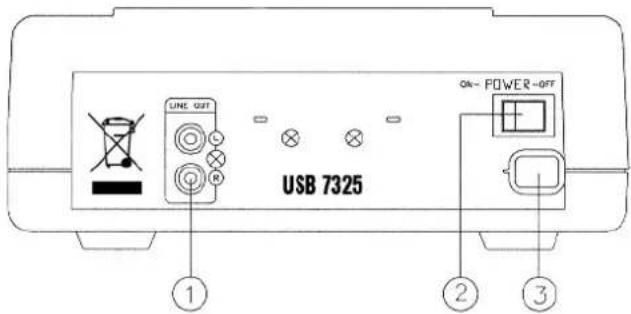
1. LINE OUT
Output connector, connected to the input terminals on amplifier or console.
2. POWER SWITCH
3. AC POWER CORD
Connect it to a power outlet.
text_image
USB 7325 LINE QUT ON- POWER-OFF ① ② ③BASIC OPERATION
- Loading and ejecting the disc
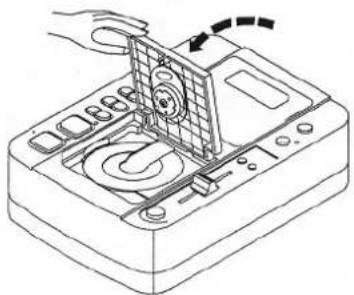
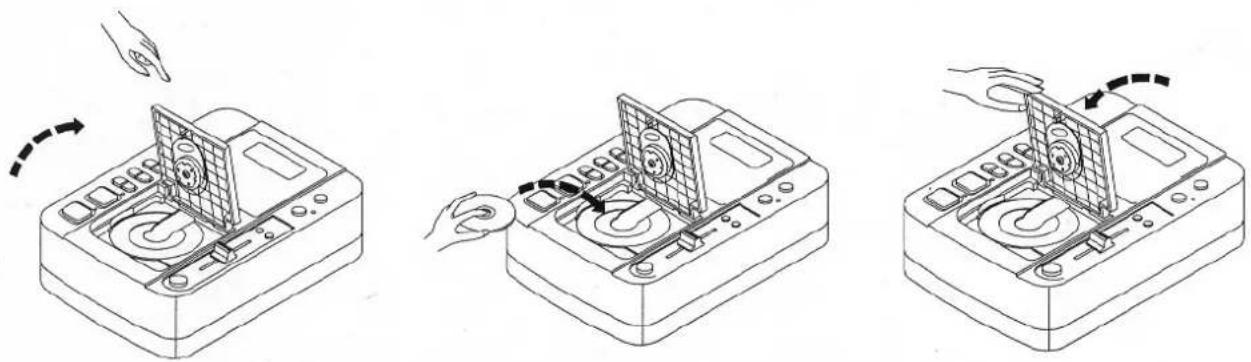
* Press the "OPEN" knob to open the disc compartment door.
* Load disc Correctly place a disc in the center of disc compartment with the label side up not to place more than one disc.
* Push the door in to close it.
* Press the PLAY/PAUSE button to start the playback.
2. Track skip
Use the TRACK SKIP control to advance (▶ I) or reverse (I◀) to a desired track.
3. FRAME SEARCH
Press the search control (◀◀ or ▶▶) in pause mode to move by one frame per press; keep pressing the control, it will move rapidly with sound.
4. PITCH CONTROL KNOB
Move the knob toward +16 direction, the playback become fast; move it toward -16 direction, the playback become slow.
TROUBLESHOOTING
| Symptom | Cause | Remedy |
| Door can not be opened when the OPEN button is pressed. | Power plug is not connected properly. | Correctly connect the plug. |
| When playback is started, stops or pauses immediately. | * Disc is loaded upside down.* Dust or dirt on the disc. | * Load the disc with label side up.* Clean the disc and load it again. |
| No sound | * Output cables connected improperly.* Audio mixer operated improperly.* Pin plugs or amplifier terminals are dirty.* Player is in pause mode. | * Connect the cable properly.* Check the setting of audio mixer.* Press the PLAY/PAUSE button. |
| Sound is distorted | * Incorrect connection.* Pin plugs or amplifier terminals are dirty | * Connection with audio mixer to the LINE INPUT terminals.* Clean away the dirt. |
| Hum | Cable connected improperly. | * Firmly connect all audio plugs. |
FONCTIONNEMENT
FAITES ATTENTION AUX TEMPERATURES ELEVEES, ÉVITEZ LES POUSSIÈRES & L'HUMIDITÉ, GARDEZ À DISTANCE DES TELEVISIONS & DES MAGNETISMES, ÉVITEZ DE PLACER L'UNITÉ À UN EMPLACEMENT INSTABLE, N'UTILISEZ PAS DE PRODUITS CHIMIQUES, SI L'UNITÉ TOMBE EN PANNE, CONTACTEZ IMMÉDIATEMENT LE VENDEUR, N'OUVREZ PAS LE BOITIER, PRENEZ SOIN DU CORDON D'ALIMENTATION
POUR UN FONCTIONNEMENT SECURISE ET EFFICACE
natural_image
Line drawing of a hand pressing down on a CD or DVD disc with an arrow indicating rotation (no text or symbols)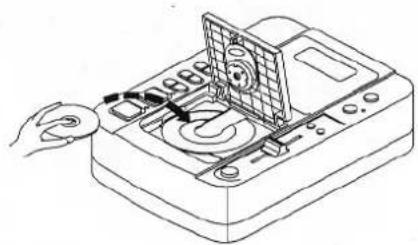
natural_image
Line drawing of a handheld electronic device with a screen and control panel (no text or symbols)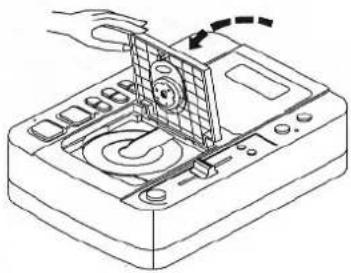
natural_image
Line drawing of a hand operating a CD or DVD disc with a screen and control panel (no text or symbols)2. Track skip
natural_image
Line drawing of a handheld electronic device with a hand pointing to the screen (no text or symbols)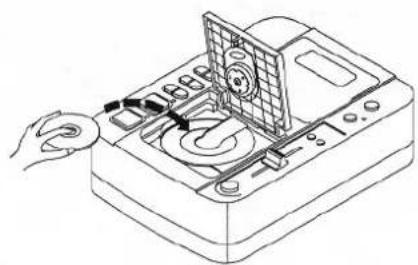
natural_image
Line drawing of a CD-ROM drive with a hand operating the top panel (no text or symbols visible)