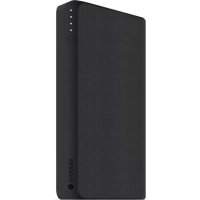
Juice Pack Air - Power bank Mophie - Free user manual and instructions
Find the device manual for free Juice Pack Air Mophie in PDF.



| Product Type | Portable battery case for iPhone 6 |
| Brand | Mophie |
| Model | Juice Pack Air |
| Compatibility | iPhone 6 (only) |
| Battery Type | Lithium-polymer |
| Battery Capacity | Approximately 2500 mAh (estimated) |
| Charge Input | Micro-USB, 5V 1A |
| Charge Output | 5V 1A (via built-in Lightning connector) |
| LED Indicators | 4 LEDs for charge level |
| Standby Switch | Yes (green = charging, red = standby) |
| Protection | High impact protection with rubber bumpers; built-in protection against short circuits, overcharge, and overheating |
| Material | Polycarbonate and rubber |
| Dimensions (approx.) | 14.2 x 7.0 x 1.8 cm |
| Weight (approx.) | 80 g |
| Included Accessories | Micro-USB cable, headphone adapter, quick start guide |
| Recharge Cycles | More than 500 full cycles |
| Warranty | 1 year (subject to registration and proof of purchase) |
| Care | Wipe with a soft, damp cloth; no detergents |
| Recycling | Do not dispose of in trash; return to a battery recycling center |
| Customer Service | Tel: 1-888-8MOPHIE (USA); International: +1 (269) 743-1340; Web: www.mophie.com/cs |
Frequently Asked Questions - Juice Pack Air Mophie
User questions about Juice Pack Air Mophie
0 question about this device. Answer the ones you know or ask your own.
Ask a new question about this device
Download the instructions for your Power bank in PDF format for free! Find your manual Juice Pack Air - Mophie and take your electronic device back in hand. On this page are published all the documents necessary for the use of your device. Juice Pack Air by Mophie.
USER MANUAL Juice Pack Air Mophie
Simplified Chinese 132
Traditional Chinese 163
EN
Welcome
Thank you for purchasing the mophie juice pack air or juice pack plus battery case made for iPhone 6, or mophie juice pack battery case for iPhone 6 Plus. Your juice pack case gives your phone everyday protection and enough power to go all day without your needing to find a power outlet.
Package Contains
- morphie juice pack air or juice pack plus battery case made for iPhone 6, or morphie juice pack battery case for iPhone 6 Plus
- Micro USB Cable
- Pass-through Headphone Adapter
- Quick-Start Guide
Features
Your mophie juice pack battery case's lithium-polymer battery extends the battery life of your iPhone for hours with more power to rock, talk, surf and send, all while providing a comfortable ergonomic design with the complete protection of a hard-shell case.
Here are just some of the reasons why your juice pack case is so great:
- Impact-Isolation System (juice pack plus case for iPhone 6) has internal bumpers that add
extra cushion to the edges and corners of the protective case for unrivaled support.
-
High-impact Protection (juice pack air case for iPhone 6 and juice pack case for iPhone 6 Plus) has rubberized support pads inside of full-case protection to guard your phone from drops and hard falls.
-
(Take a breath) Ergonomic, form-fitting, fully protective impact-resistant case-and-battery-in-one made for iPhone 6 or iPhone 6 Plus.
-
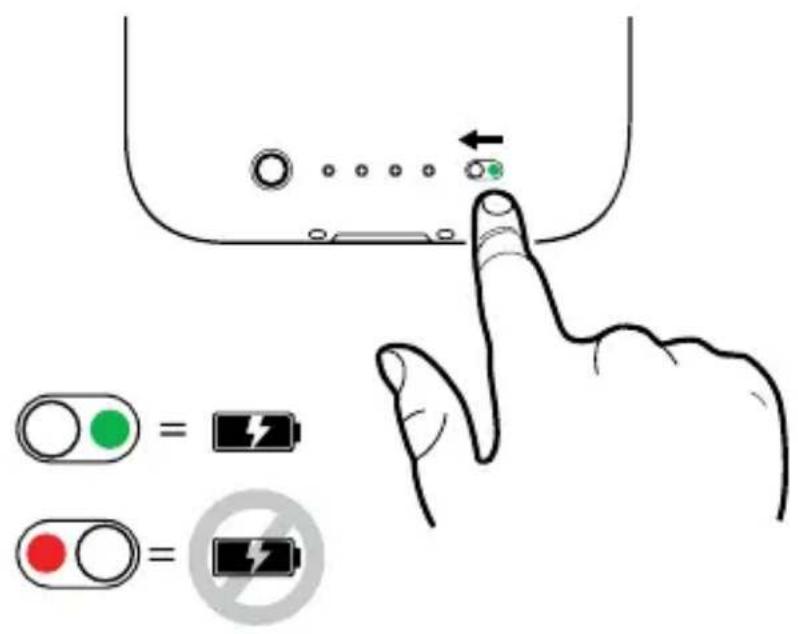
An integrated standby switch allows you to charge your iPhone (green) whenever it needs it. However, even in standby mode (red), your phone still has full-case protection.
-
The included pass-through headphone adapter allows you to use any style headphones while your iPhone is in the juice pack case.
-
Track battery power at a glance with the integrated four-light LED status indicator. You can keep tabs on charging status and current battery life. Know before you go!
-
The included micro-USB cable allows you to charge and sync your phone while refilling your juice pack case at the same time. (Really, you'll never need to remove your phone from the juice pack case.)
-
Rechargeable for over 500 full cycles. Our case is built to last, letting you do more, longer.
-
Smart battery technology actually instructs the iPhone to drain power out of the juice pack case first. When your juice pack case's battery is empty, you can still have a fully-charged iPhone.
- The juice pack case offers complete protection from top to bottom. No more choosing between protection and power.
Built-in short circuit, over-charge, and temperature protection, so you can charge with confidence. Safety First!
Compatibility
- The mophie juice pack air and juice pack plus battery cases made for iPhone 6 are designed and intended solely for the Apple iPhone 6. Please do not attempt to use them with any other device.
- The mophie juice pack battery case made for iPhone 6 Plus is designed and intended solely for the Apple iPhone 6 Plus. Please do not attempt to use it with any other device.
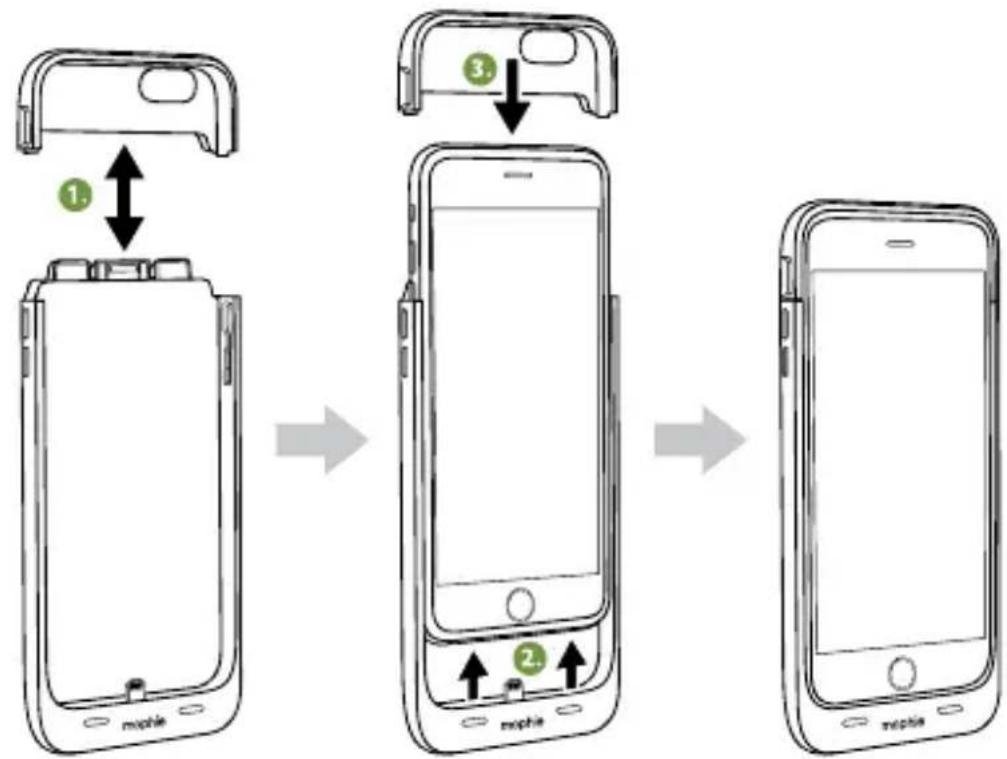
Installing your juice pack case
- Separate the juice pack case's top cap.
-
Slide your iPhone all the way into the bottom section of the juice pack case so that the juice pack case's Lightning connector is fully inserted into the phone.
-
Slide the top cap of the juice pack case all the way over the exposed top of the iPhone so that it snaps into the bottom section of the case.
Charging your iPhone using your juice pack case
To charge your iPhone from your juice pack case, flip the case's standby switch from red to green.
Charging your juice pack case
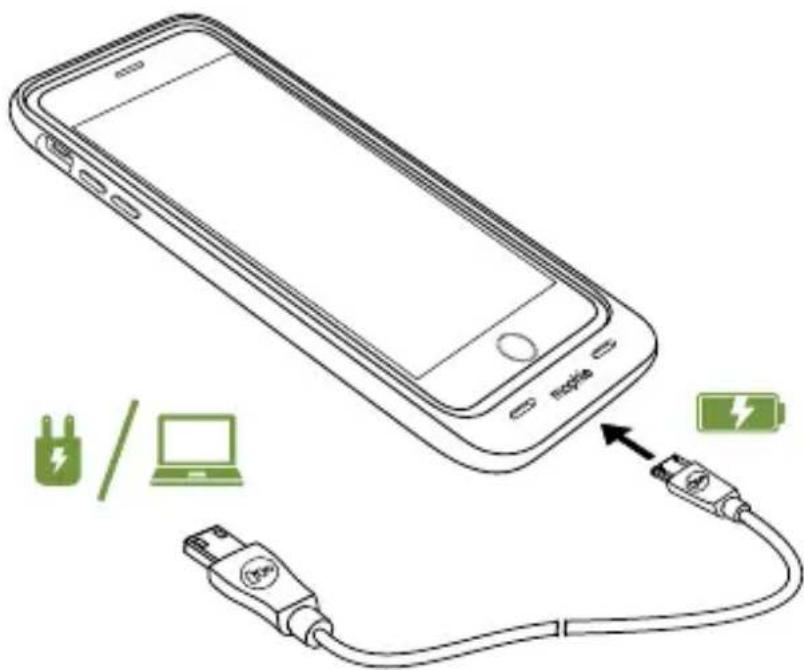
Your juice pack case comes charged and ready to go. When it does need charging, use the supplied micro USB cable to connect it to your computer or any power source with a USB out, like the USB wall adapter included with your iPhone. Normal charging should take only two or three hours for maximum power.
Checking your juice pack case's charging status
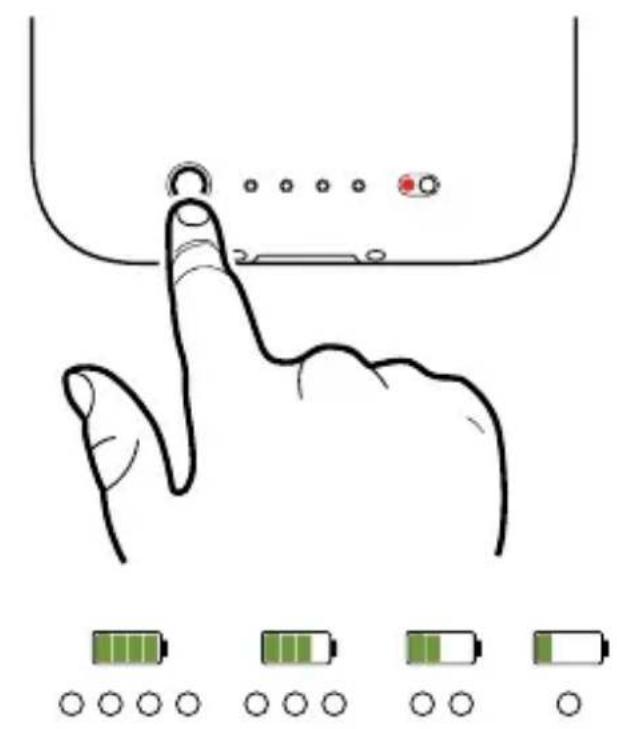
Press the status button on your juice pack case and the status LEDs will indicate its charge level. Four LEDs means that the juice pack case is fully charged, while one LED means that it's almost empty. Know before you go!
Taking care of your juice pack battery case
-
Keep your juice pack case dry and away from moisture and corrosive materials.
-
Do not clean your juice pack case with harsh chemicals, soaps or detergents. Just wipe the case with a soft, water-dampened cloth.
-
Recharge your juice pack battery case once every three months when not in use. If you plan on putting it away, charge it for one hour first.
Warranty
At mophie, we are dedicated to making the best quality products we can. To back this up, this product is warranted for 1 full year from date of purchase. This warranty does not affect any statutory rights that you may be entitled to. Keep a copy of your purchase receipt as proof of purchase. Be sure to register your product at mophie.com. Failure to register your product and/or provide proof of purchase may void the warranty.
Exclusions & Limitations
Except for the limited warranty expressly set forth or to the extent restricted or prohibited by applicable law, mophie expressly disclaims any and all other warranties express or implied, including any warranty of quality, merchantability, or fitness for a particular purpose, and you specifically agree that mophie shall not be liable for any special, incidental, indirect, punitive, or consequential damages for breach of any warranty of any type on any mophie product. In addition to and without limiting the generality of the foregoing disclaimers, the limited warranty does not, under any circumstances, cover the replacement or cost of any electronic device or personal property inside or outside of the mophie product.
Customer Service
Telephone: 1-888-8mophie
International: +1 (269) 743-1340
Web: www.mophie.com/cs
Warning
Read all instructions and warnings prior to using this product. Improper use of this product may result in product damage, excess heat, toxic fumes, fire or explosion, for which damages you ("Purchaser"), and not mophie, LLC ("Manufacturer") are responsible.
Do not store device in high-temperature environment, including heat caused by intense sunlight or other forms of heat. Do not place device in fire or other excessively hot environments.
Be cautious of excessive drops, bumps, abrasions, or other impacts to this device. If there is any damage to the device such as dents, punctures, tears, deformities, or corrosion due to any cause, discontinue use. Contact Manufacturer or dispose of it in an appropriate manner at your local battery-recycling center.
Do not disassemble this device or attempt to re-purpose or modify it in any manner.
Do not attempt to charge this device using any method, apparatus, or connection other than the device's USB connector. For questions or
instructions for the various ways to charge the device refer to the Charging your juice pack case section of this manual.
Do not attempt to replace any part of this device.
If this device is intended by Purchaser to be used by a minor, purchasing adult agrees to provide detailed instructions and warnings to any minor prior to use. Failure to do so is sole responsibility of purchaser, who agrees to indemnify Manufacturer for any unintended use/misuse by a minor.
All products have gone through a thorough quality assurance inspection. If you find that your device is excessively hot, is emitting odor, is deformed, abraded, cut or is experiencing or demonstrating an abnormal phenomenon, immediately stop all product use and contact Manufacturer.
Before storing your battery for an extended period of time, charge it for one hour.
Never dispose of batteries in the garbage. Disposal of batteries in the garbage is unlawful under state and federal environmental laws and regulations. Always take used batteries to your local battery-recycling center.
This product contains chemicals known to the state of California to cause cancer and birth defects or other reproductive harm.
Legal
This product is meant for use only in conjunction with the appropriate device. Please consult your device packaging to determine whether this product is compatible with your particular device.
Manufacturer is not responsible for any damages to any device incurred through the use of this product. Manufacturer shall not in any way be liable to you or to any third party for any damages you or any third party may suffer as a result of use, intended or unintended, or misuse of this product in conjunction with any device or accessory other than the appropriate device for which this product is designed. Manufacturer will not be responsible for any damages you or any third party may suffer as a result of misuse of this product as outlined above. If you are responsible for product use with an unintended device and damages result from such use, you agree to indemnify Manufacturer for any resulting injuries to any third part(ies).
mophie, mophie juice pack, juice pack, mophie juice pack air, juice pack air, mophie juice pack plus, juice pack plus, Do more, mophie loves you, "more time to rock, talk, surf, and send," the "rock/talk/surf/ send" icons and the mophie logo are trademarks of mophie, Inc. Apple and iPhone are trademarks of Apple Inc., registered in the U.S. and other countries. Lightning is a trademark of Apple Inc. The trademark
"iPhone" is used with a license from Aiphone K.K. "Made for iPhone" means that an electronic accessory has been designed to connect specifically to iPhone, and has been certified by the developer to meet Apple performance standards. Apple is not responsible for the operation of this device or its compliance with safety and regulatory standards. Please note that the use of this accessory with iPhone may affect wireless performance. All rights reserved. Patents: mophie.com/patents.
This device complies with part 15 of the FCC Rules and RSS-Gen of IC Rules. Operation is subject to the following two conditions: (1) This device may not cause harmful interference, and (2) this device must accept any interference received, including interference that may cause undesired operation.
NOTE: This equipment has been tested and found to comply with the limits for a Class B digital device, pursuant to part 15 of the FCC Rules. These limits are designed to provide reasonable protection against harmful interference in a residential installation. This equipment generates, uses, and can radiate radio frequency energy and, if not installed and used in accordance with the instructions, may cause harmful interference to radio communications. However, there is no guarantee that interference will not occur in a particular installation.
If this equipment does cause harmful interference to radio or television reception, which can be determined by turning the equipment off and on, the user is encouraged to try to correct the interference by one or more of the following measures:
- Reorient or relocate the receiving antenna.
- Increase the separation between the equipment and receiver.
- Connect the equipment into an outlet on a circuit different from that to which the receiver is connected.
- Consult the dealer or an experienced technician for help.
CAUTION: To comply with the limits of the Class B digital device, pursuant to Part 15 of the FCC Rules, this device must be used with certified peripherals and shielded cables. All peripherals must be shielded and grounded. Operation with non-certified peripherals or non-shielded cables may result in interference to radio or reception.
MODIFICATION: Any changes or modifications of this device could void the warranty.
FAQ
How does the extra battery work?
When you slide your phone into the juice pack case, a connector at the base of the case plugs into the port at the bottom of the phone. Flip the standby switch on the back of the case from red to green to start charging your phone. After using up all the power in the juice pack case, just recharge it with the included micro USB cable for more on-the-go power.
Why aren't the LEDs blinking while my juice pack case is charging?
After connecting the juice pack case to a power source, the LED status indicators will start blinking to indicate charging. The lights will turn off after 30 seconds allowing for a good night's rest. Remember to check the status indicator before you disconnect. When all four LEDs are lit, your juice pack case is fully charged.
What is the best method for charging my iPhone using the juice pack case?
Assuming that your iPhone and juice pack case are both fully charged, we recommend waiting until your iPhone has 20 % battery left. When the phone’s in the red, flip the juice pack case’s standby switch to green and let the case to do the heavy lifting. The phone requires more power to charge past 80 % , so if you want to get the greatest battery boost from the
juice pack case, we suggest flipping back to standby mode until your phone battery is low again. This isn't the end-all-be-all, but we like it.
What is the best method for charging my juice pack case?
Connect your juice pack case to a power source using the included micro USB cable. You can plug the cable into your computer or any power source with a USB out, like the USB wall adapter included with your iPhone. You do not need to remove your phone from the juice pack case to charge. In fact, leaving your phone in the juice pack case while charging will actually charge both your phone and the case together!
How many charge cycles can I get out of my juice pack case? Or, in other words, how long will the juice pack case last?
Your juice pack case is rechargeable for over 500 full cycles. A full cycle is when the case is charged from 0% to 100% . Partial cycles, like charging from 25% to 100% , will not count as a full cycle until all of the partials equal 100% . After 500 cycles, the battery in the juice pack case may provide less than 75% of its original capacity. This is normal for any product with a lithium polymer battery.
What are the benefits of switching the juice pack case to standby mode?
Using the standby switch will give you the biggest battery boost from your juice pack case. The iPhone uses additional power to be on a constant charge, so charging when your phone battery is low will let you get the most from your juice pack case.
Does the juice pack case block the speaker, microphone, camera, or any other ports?
Of course not. In fact, the juice pack case is designed to act as a virtual speaker box! Sound is redirected from the bottom of the phone to the front, resulting in a richer, fuller sound quality.
Does the juice pack case interfere with antenna reception?
Not a chance.
What is mophie's return policy?
mophie reserves the right to claim a 20 % restocking fee upon return. Visit mophie.com for our full “Return Policy.”
FR
Bienvenue
mophie, mophie juice pack, juice pack, mophie juice packair,juicepackair,mophiejuicepackplus,juicepack plus, Do more, mophie loves you, "more time to rock, talk, surf, and send", los iconos "rock/talk/surf/send"
He pa36npaIte yCTpoIcTBO n He nbITaITeCb IcNoIb3OBaTb erO He nO Ha3NaUeHnIO nII BHOcNTb I3MeHEny B erO KOHCTpyKciu.
He nbitaTecb 3apjKatb daHHOe yctpoIcTBO IIO6bIM cnoCo6om n C NOMOuI IOIO6oRO yCTPOIcTBA nn pa3beMa, OTINuHOrO OT pa3beMa USB daHoro yctpoIcTba. BOpocbl INHCTpyKcuN no pa3nUHbIM cnoCo6am 3apJKn qexna juice pack cm. B pa3dene3apJka qexna juice pack hactoJero pyKOBoDcTba.
He nbItaTeCb BbINOJHHTb 3aMeHy KaKnx-Jn6o YacTei DaHHoro yCTpOiCTBa.
EcnIOnkynatelbnpednoIaraeTncNoB3OBaHne 3TOrO yCTpoiCTBa HeCOBepseHHoJIeTHnIMN, B3pocbl, npno6peTaIOUsn aKKymyIaTOp, coIaShaTeCn nepei nCNOJb3OBaHNem aKKymyIaTopa HeCOBepseHHoJIeTHnIMN IOBeCTn Do CBeJeHnI PocJIeHNx IopRo6HbIe INCTpyKcNn N ppeIOCTepeJXeHn. OTBETCTBeHHOCtB 3a HeBbINOJIHHe HcTOrO Tpe6OBaHnI POJIHOCTbU JLOKNTcHa NOKyNaTeJI, KOToPbI COIaShaEtCra OCBO6OJITb N3rOTOBHTeJI ON OTBETCTBeHHOCtN 3a IIO6oe HeHaJIeJaUee IIN HeBepHoe NCPOJb3OBaHnE aKKymyIaTOpA HeCOBepseHHoJIeTHmN.
Bce n3delen npoIIN pONHbIKOHpOJIb KaueCTBa.EcIIBIO6hApJxNII,HTOyCTPOICTBO nepeerpEnocb, BblJeIeT KaKoI-Jn60 3aIax, DeΦopMnpoBaIocb, NCTepIocb, IMeET cKoJIbI,
IODBepraetc aHOMaIbHOMy BO3dIeCTBnIO nI IeMOHCTpnpuyET aHOMaIbHOe IOBeJeHne, HeMeJleHNO IpeKpaTnte NcNoJIb3OBaHne yCTpoiCTBa n 6paTntecb K I3rOToBNTeJIIO.
ПередnomeшенимakkymлараHaДЛNTьhoeхраненеЗapядte erOB TeueHne OdHoro yaca.
He BbI6paCbIBaIte aKKymyJIaTOp BMeCTe C 6bITOBbIM MycOpom. 3To npOTnBopeuHT 3aKoHaM n npaBnlaM 7TaTOB, a TaKJKe 6epeaJIbHbIM 3aKoHaM n npaBnlaM NO 3aUNTe OKpykaIOUSei cpebl. NcNoIb3OBAHHbIe aKKymyJIaTOpbl CJeDyeT CdaBaTb B MeCThBiN UeHTp yTnIN3aUIN aKKymyJIaTOPOB.
ДанhoeиЗдение соржNTхIMNUeCKNe BeшесТВа,КOTOPoeВштATEKaINΦOpHnA (США) CHTaETcЯ KaHцepOReHHbIM N Bbl3bIBaIOUm BPOЖdeHьIE NOpOKn pa3BnTnI IN pOчne ONaCHOCTN ДЯ рe npOdyKTHBHO 3ДОрOBьЯ.
PpaBOBbie BOnpocbl
YacTo 3aJaBaemble BOpocbl
Kakpa6oTaETdoNoJIHnTeIbHbIaKKymyIaTOp?
Помecтinte смарфон В чexолjuice pack Так immобразим,чTOбы pa3beM,pacnoLOJOKeHHbI B HIXHeJчacterи чexla,6bl IOdKJIIOUeH K NOpTu B OCHOBaHHIMсмарфоHa.YCTaHOBInTe NepeKJIIOUaTeIb pexImaOЖиДанЯ,paCNoLOJOKeHHbI Ha 3aДнeI PaHelenчexla,BpexIM 3apAdkn (3eJIeHbI ZBeT INHdNKaTopa).
I3pacxoOIOBaB BeCb 3apRd yexla juice pack, npocTo nepe3apRdnte yCTpOiCTBO C NOMOu BKJIUoyEHNO B KOMnKeT NoCTaBkn Ka6eJia micro USB n noIb3yITecb DOIPOJIHNTeJIbHbIM ICTOCHIKOM 3HeprN IN CHOBa.
This is the first time I see you.
This is my first time seeing you.
where 器 is the second order of the second derivative.
mophie, mophie juice pack, juice pack, mophie juice packair,juicepackair,mophiejuicepackplus,juicepack plus, Do more, mophie loves you, "more time to rock, talk, surf, and send", "rock/talk/surf/send" 問I'Ko
mophie.
Apple iPhone.
Lightning.
Apple Inc.
Lightning.
Apple Inc.
iPhone.
Aiphone K.K
for iPhone"
Apple iPhone.
iPhone.
iPhone.
iPhone.
iPhone.
iPhone.
iPhone.
iPhone.
iPhone.
iPhone.
iPhone.
iPhone.
iPhone.
iPhone.
iPhone.
iPhone.
iPhone.
iPhone.
iPhone.
iPhone.
iPhone.
iPhone.
iPhone.
iPhone.
iPhone.
iPhone.
iPhone.
iPhone.
iPhone.
iPhone.
iPhone.
iPhone.
iPhone.
iPhone.
iJ 15Ht iC Ht Rss-Gen
e. iJ 1000
: (1) iJ 1000
h t J.
t J.
juice pack [-k] [ɪn]
more time to rock, talk, surf and send