CB 956 - Vacuum Cleaner BOMANN - Free user manual and instructions
Find the device manual for free CB 956 BOMANN in PDF.


| Product type | Bagless vacuum cleaner |
| Brand | Bomann |
| Model | CB 956 |
| Power supply | 230 V, 50 Hz |
| Suction power | Variable (low, medium, high) |
| Dust collection type | Transparent bagless container |
| Number of filters | 3 systems: container, motor filter, outlet filter |
| Included accessories | Suction tube, crevice nozzle, brush, cleaning brush |
| Cable length | Not specified (automatic rewinder) |
| Warranty | 24 months |
| Safety instructions | Do not vacuum liquids, hot ashes, sharp objects |
Frequently Asked Questions - CB 956 BOMANN
User questions about CB 956 BOMANN
0 question about this device. Answer the ones you know or ask your own.
Ask a new question about this device
Download the instructions for your Vacuum Cleaner in PDF format for free! Find your manual CB 956 - BOMANN and take your electronic device back in hand. On this page are published all the documents necessary for the use of your device. CB 956 by BOMANN.
USER MANUAL CB 956 BOMANN
natural_image
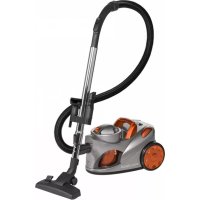
Exterior view of a silver vacuum cleaner (no text or symbols visible)CB 956
CE
Inhalt
Inhoud • Sommaire • Indice • Índice • Indice • Innhold
Contents • Spis treści • Obsah • Tartalom • Содержание
D Übersicht Bedienelemente . . . . . . . . . . . . . . . . . . . . . . . . . . . . . . . . . . . . . . . . . . . . . . . . . . . . . . . . . . . . . . . . . . . . . . . . . . . . . . . . .
Bedienungsanleitung . . . . . . . . . . . . . . . . . . . . . . . . . . . . . . . . . . . . . . . . . . . . . . . . . . . . . . . . . . . . . . . . . . . . . . . . . . . . . . . . . . . . . . . . . .
Garantie . . . . . . . . . . . . . . . . . . . . . . . . . . . . . . . . . . . . . . . . . . . . . . . . . . . . . . . . . . . . . . . . . . . . . . . . . . . . . . . . . . . .
NL Overzicht bedieningselementen....Pagina 3
natural_image
Technical diagram of a mechanical assembly with no visible text or symbols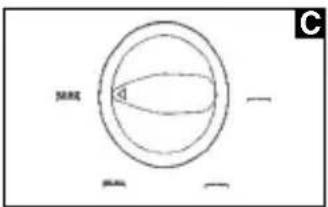
natural_image
Line drawing of a three-blade folding tool with curved blades (no text or symbols)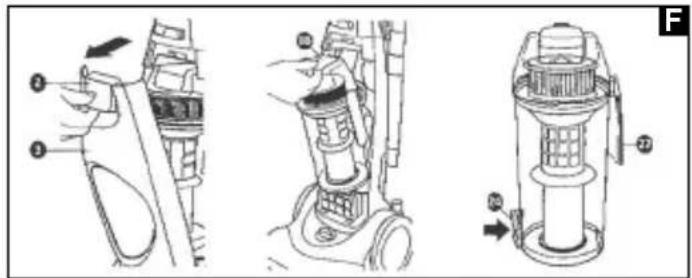
natural_image
Exploded view diagram of a mechanical device showing internal components and motion indicators (no text or labels)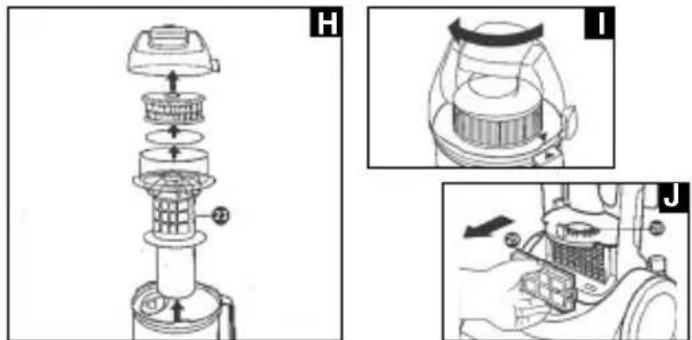
natural_image
Line drawing of a mechanical device with a cylindrical component and a curved handle (no text or symbols)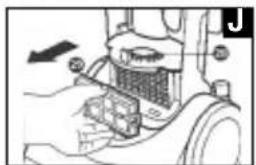
natural_image
Mechanical assembly diagram showing a gear or cam mechanism with no visible text or symbolsD
Velg en innstilling (se ill. C):
Langhåret teppe

General Safety Instructions
GB
- Read the operating instructions carefully before putting the appliance into operation and keep the instructions including the warranty, the receipt and, if possible, the box with the internal packing.
- The appliance is designed exclusively for private use and for the envisaged purpose. This appliance is not fit for commercial use. Do not use it outdoors (except if it is designed to be used outdoors). Keep it away from sources of heat, direct sunlight, humidity (never dip it into any liquid) and sharp edges. Do not use the appliance with wet hands. If the appliance is humid or wet, unplug it immediately. Do not put it in water.
- When cleaning or putting it away, switch off the appliance and always pull out the plug from the socket (pull on the plug, not the cable) if the appliance is not being used and remove the attached accessories.
- Do not operate the machine without supervision. If you should leave the workplace, always switch the machine off or remove the plug from the socket (pull the plug itself, not the lead).
- To protect children from the dangers posed by electrical appliances, make sure that the cable is hanging low and that children do not have access to the appliance.
- Check the appliance and the cable for damage on a regular basis. Do not use the appliance if it is damaged.
- Do not try to repair the appliance on your own. Always contact an authorized technician. To avoid the exposure to danger, always have a faulty cable be replaced only by the manufacturer, by our customer service or by a qualified person and with a cable of the same type.
- Use only original spare parts.
- Pay careful attention to the following "Special Safety Instructions".
Special Safety Instructions
- Do not suck up liquids!
- Do not suck up hot ashes or pointed or sharp objects!
- Do not use the appliance in humid rooms!
- Never use without the filter. Check that the filter is inserted correctly!
- hair, clothing and body parts away from the vacuum nozzle during use!
- Keep the vacuum cleaner away from sources of heat like radiators, ovens, etc.!
GB
Overview of the Components
1 Suction power regula11 Carrying handle 20 Motor protection filter
tor 12 Suction tubes (acces- 21 Foam material filter
2 Opener for front panel sories) 22 Dust container
3 Front panel 13 Crevice nozzle (acces- 23 Pre-filter
4 Ventilation slits sory) 24 Button fo
5 Floor brush height 14 Brush nozzle (accessory) ner 25 Safety filter catch adjustment
6 Floor brush 15 Main device 26 Cleaning brush
7 Handle 16 Unlocking button 27 Handle of dust
8 Suction hose 17 Hose connection ner
9 Cable take-up 18 Opener 28+29 Exhaust filters (see
10 On/off switch 19 Lid of dust container illustration J)
Assembly
- Remove the motor and the accessories from the box. Take off any packaging materials that may be present.
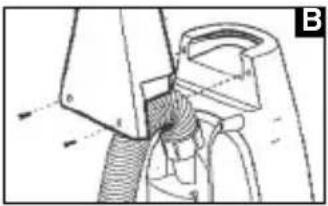
- Assemble the handle. See illustration B.
- Attach the hose and the accessories to the device. See illustration A.
Initial and General Use of the Device
Adjusting the Height of the Floor Nozzle
Select a setting (see illustration C):

Carpet with high pile

Carpet with medium pile

Carpet with low pile

Smooth floor
- Unwind the required cable length and insert the mains plug into a standard 230 Volt, 50 Hertz wall socket.
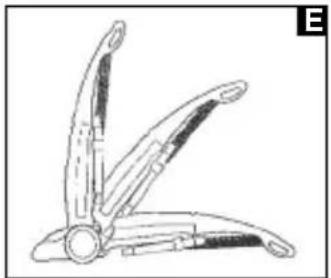
- Place your foot on the unlocking button (16) to move the handle into the required position (b or c). See illustration E.
- Switch the device on with the on/off switch (10).
- Adjust the suction power with the suction power regulator (1).
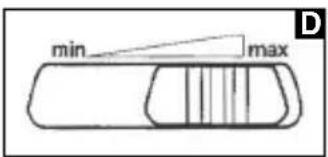
Vacuum power regulator (see illustration D)
Low vacuum power: For curtains and delicate fabrics
Medium vacuum power: For long-pile velour carpets and textile flooring
High vacuum power: For sturdy rugs and floors
Instructions for Use
- Now you should vacuum at an even speed. Pressing hard is not necessary.
- Note: Pay attention to the restricted range due to the length of the cable!
- Avoid damaging the surface being cleaned:
- Do not set the brushes too low!
- Do not allow the machine to remain stationary when switched on!
Using the Accessories
The accessories should only be replaced when the machine is switched off.
- Release the suction hose (8) from the hose connection (17).
- Select the desired accessory and place it on the end of the suction hose.
- If the hose is too short, attach the suction tubes beforehand as an extension.
Switching off
- Move the handle to a vertical position (a). See illustration E.
- Switch the device off using the on/off switch.
- Use the cable take-up to stow away the cable.
Filter
Your machine has three filter systems.
-
Transparent dust collection container
-
The traditional dust bag system has been replaced by a transparent dust collection container in which coarse dirt particles and tiny particles floating in the air are swirled out of the suction air by the high speed of the air current.
- The quantity of dust can be easily read off at any time on the container, which is also very easy to empty.
-
The purchase of dust bags is no longer necessary.
-
Pre-filter, Foam Filter, Motor Protection Filter (in the Dust Container)
- Once the dust level has reached the FULL mark of the dust container, please proceed as follows:
- Open the front panel (3) by pulling the opener (2).
- Remove the dust container. See illustration F.
- Empty the contents of the dust container into a suitable receptacle by pressing button 24 on the dust container. See illustration F.
GB
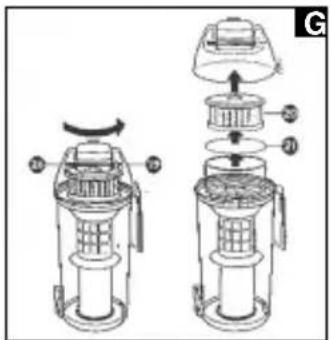
- Remove the filter inserts (see illustrations G and H) and clean the filters by tapping and brushing out gently. You can use the cleaning brush (26) to help you.
-
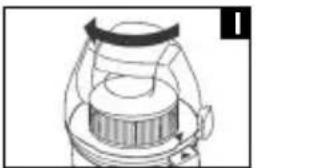
Re-insert the components. Lock the lid of the dust container again. See illustration I.
-
Every third time that the filters are emptied, or in the case of severe soiling, clean the filters by allowing water to flow through them against the direction in which the air blows.
- The filters should only be re-inserted when they are completely dry!
3. Outlet filter:
- The device also has two exhaust filters.
- We recommend cleaning these filters every fifth time they are emptied.
- These filters are to be found behind the ventilation grid (4) of the front panel (3). See illustration J.
- Remove the filters and clean them as described above.
Replacement exhaust filters and motor protection filters can be obtained from our hotline.
Cleaning and storage
Cleaning
- Pull the plug out of the socket before cleaning!
- Clean the casing with a dry cloth.
- Clean the motor protection filter approximately every 3. time the vacuum cleaner is emptied. Clean the filter in hot water without additives. Put it back into place only once it is completely dry.
Storage
- Move the handle to a vertical position (a). See illustration E.
- Wind the cable completely.
This device has been tested according to all relevant current CE guidelines, such as electromagnetic compatibility and low voltage directives, and has been constructed in accordance with the latest safety regulations.
Subject to technical changes without prior notice!
Guarantee
The device supplied by our Company is covered by a 24 month guarantee starting on the date of purchase (receipt).
During the life of the guarantee any fault of the device or its accessories *) ascribable to material or manufacturing defects will be eliminated free of charge by repairing or, at our discretion, by replacing it. The guarantee services do not entail an extension of the life of the guarantee nor do they give rise to any right to a new guarantee!
Proof of the guarantee is provided by the proof of purchase. Without proof of purchase no free replacement or repair will be carried out.
If you wish to make a claim under the guarantee please return the entire machine in the original packaging to your dealer together with the receipt.
*) Damage to accessories does not mean automatic free replacement of the whole machine. In such cases please contact our hotline. Broken glass or breakage of plastic parts are always subject to a charge.
Defects to consumables or parts subject to wearing (e.g. motor pistons, kneading blades, drive shafts, spare remote control, spare toothbrushes, saw blades, etc.) as well as cleaning, maintenance or the replacement of said parts are not covered by the guarantee and hence are to be paid!
The guarantee lapses in case of unauthorized tampering.
After the expiry of the guarantee
After the expiry of the guarantee repairs can be carried by the competent dealer or repair service against the payment of the ensuing costs.
PL
natural_image
Four horizontal line segments with vertical tick marks, no text or symbols present

- Inhalt
- D
- General Safety Instructions
- Special Safety Instructions
- GB
- Overview of the Components
- Assembly
- Initial and General Use of the Device
- Adjusting the Height of the Floor Nozzle
- Vacuum power regulator (see illustration D)
- Instructions for Use
- Using the Accessories
- Switching off
- Filter
- Outlet filter:
- Cleaning and storage
- Cleaning
- Storage
- Guarantee
- After the expiry of the guarantee
- PL
Brand : BOMANN
Model : CB 956
Category : Vacuum Cleaner