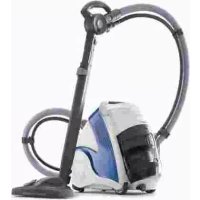
Unico MCV80 Total Clean & Turbo - Steam cleaner POLTI - Free user manual and instructions
Find the device manual for free Unico MCV80 Total Clean & Turbo POLTI in PDF.



| Product type | Steam cleaner with suction |
| Brand | Polti |
| Model | Unico MCV80 Total Clean & Turbo |
| Use | Indoor domestic use |
| Main functions | Dry and wet suction, steam, combined suction+steam, automatic programs (P1 hard floors, P2 carpets/rugs, P3 windows) |
| Power consumption | 1800 W (estimated) |
| Power supply | 220-240 V ~ 50/60 Hz |
| Water tank capacity | Approx. 1 L (not specified) |
| Dirt recovery tank capacity | 0.8 L (MAX level) |
| Boiler type | Integrated, self-filling |
| Heat-up time | Approx. 5 minutes |
| Steam adjustment | Minimum, medium, maximum levels (+/- buttons) |
| Suction adjustment | Slider on the handle |
| Filter type | Washable HEPA filter, mesh filter, multicyclonic group |
| Included accessories | Multibrush brush, 2-in-1 squeegee for windows/upholstery, turbo brush, 2-in-1 crevice tool, concentrator, mini turbo brush, 2 microfiber cloths, cloth holder, brush |
| Cable length | Approx. 6 m (estimated) |
| Weight | 5.5 kg (estimated) |
| Dimensions (L×W×H) | 30 × 30 × 100 cm (estimated) |
| Maintenance and cleaning | Empty tank after each use, clean filters 2 times/year, descale boiler 1 time/year or every 50 uses |
| Safety | Steam lock on handle, automatic shut-off in case of water shortage (light+alarm), overheat protection |
| Spare parts and repairability | Replacement squeegees, sealing gaskets, HEPA filters, accessories available at www.polti.fr |
| Warranty | 2 years for conformity defects, domestic use |
| General information | CE certification, WEEE standard, separate disposal at end of life |
Frequently Asked Questions - Unico MCV80 Total Clean & Turbo POLTI
User questions about Unico MCV80 Total Clean & Turbo POLTI
0 question about this device. Answer the ones you know or ask your own.
Ask a new question about this device
Download the instructions for your Steam cleaner in PDF format for free! Find your manual Unico MCV80 Total Clean & Turbo - POLTI and take your electronic device back in hand. On this page are published all the documents necessary for the use of your device. Unico MCV80 Total Clean & Turbo by POLTI.
USER MANUAL Unico MCV80 Total Clean & Turbo POLTI
MANUEL D'INSTRUCTIONS
SET 2 UNIVERSALTÜCHER DAMPFER
KIT 2 PANOS UNIVERSAIS BUMPER
PAEU0287
KIT 2 PANNI PARQUET BUMPER
2 BUMPER PARQUET CLOTHS KIT
KT 2 LINGETTES DE PARQUET BUMPER
KIT 2 PANOS DE PARQUE BUMPER
SET 2 PARKETTTUCHER DAMPFER
KT 2 PANOS PARQUETEBUMPER
PAEU0289
KIT 2 CUFFIE PER SPAZZOLA 2in1
2 CAPS FOR 2in1 BRUSH KIT
KIT 2 BONNETTES POUR BROSSE 2 en 1
KIT 2 FUNDAS PARA CEPILLO 2en1
SET 2 HAUBEN FÜR 2-in-1-BÜRSTE
KIT 2 PROTEÇÉS POR ESCOVA 2em1
PAEU0292
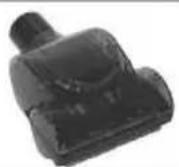
MINI TURBO SPAZZOLA
MINI TURBO BRUSH
MINI TURBO BROSSE
MINI CEPILLO TURBO
MINITURBOBÜRSTE
MINITURBO ESCOVA
PAEU0293
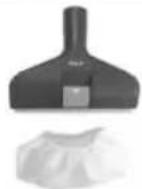
SPAZZOLA 2in1 + CUFFIA
2in1 BRUSH + CAP
BROSSE 2 en 1 + BONNETTE
CEPILLO 2en1 + FUNDA
2-in-1-BÜRSTE + HAUBE
ESCOVA 2em1 + PROTECAO
PAEU0294
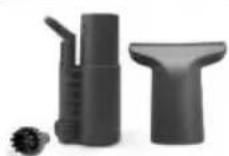
KIT PULIZIA
CLEANING KIT
KIT DE NETTOYAGE
KIT LIMPIEZA
REINIGUNGSSSET
KIT DE LIMPEZA
PAEU0298
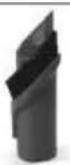
LANCIA 2in1
2in1 LANCE
SUCEUR 2 en 1
LANZA 2
2-in-1-DUSE
LANCA 2em1
PAEU0291
INTEGRATED ACCESSORY HOLDER
RANGE-ACCESSOIRES INTEGRE
PORTA ACCESORIOS INTEGRADO
INTEGRIERTES ZUBEHORFACH
PORTA-ACESSORIOS INTEGRADO
PAEU0295
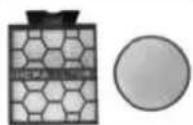
KIT FILTRI
FILTERS KIT
KIT DE FILTRES
KIT Filtros
FILTERSET
KIT FILTROS
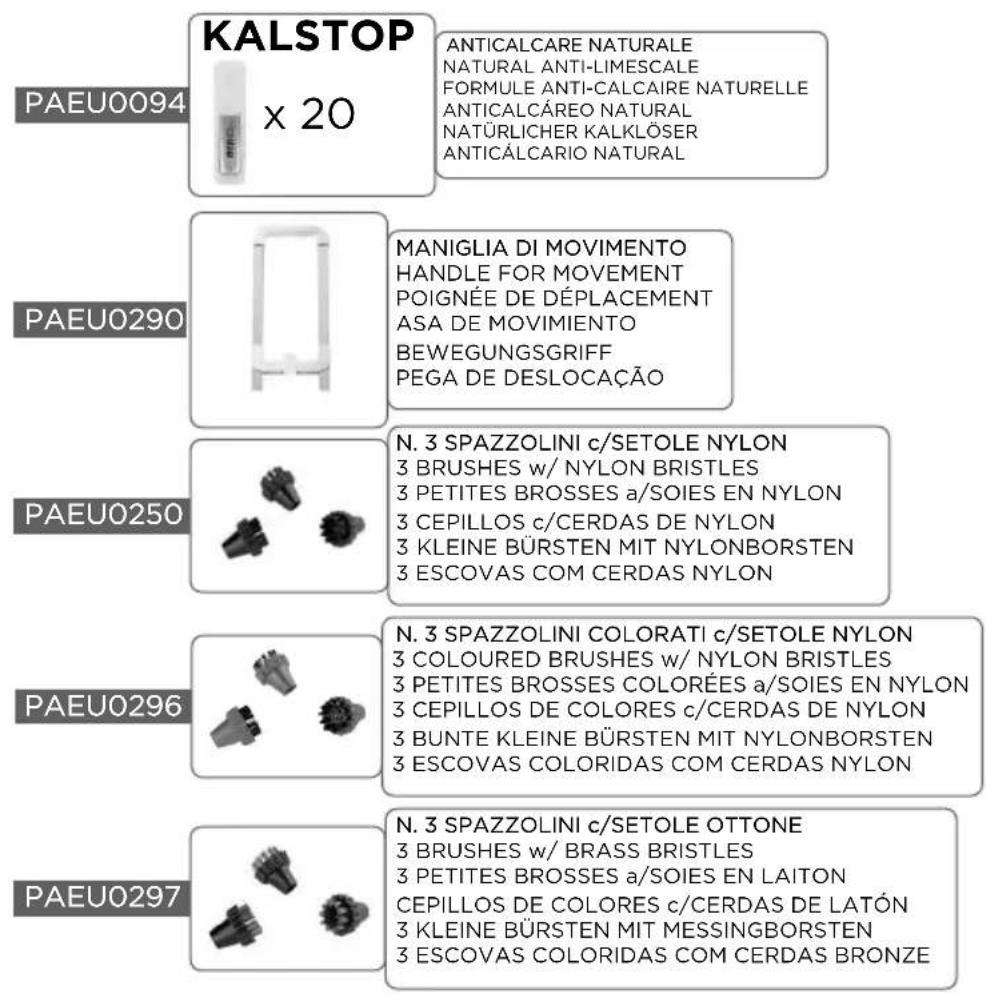
The optional accessories are on sale at all the best domestic appliance retailers, an Authorised Polti Service Centre or online at www.polti.com.

ACCESSIONS FOR ALL NEEDS
On our web site www.polti.com and in good appliance shops you will find a wide range of accessories to increase the performance and the practical applications of your appliances to make home cleaning even easier.
To check the compatibility of an accessory with your appliance, search the code PAEUXXXX listed next to each accessory on page 7-8.
If the accessory code you wish to buy is not listed in this manual, please contact our Customer Service team for more information.

REGISTER YOUR PRODUCT
Visit our website www.polti.com or call our Customer Services department to register your product.
You can benefit from a special welcome offer, in participating countries, and keep up to date on all the latest Polti news, as well as buy accessories and consumables.
To register your product, in addition to your personal information, you must enter the serial number (SN) which you will find on the silver label, located on the box and underneath the appliance.
To save time and have your serial number to hand, write it in the space provided on the back cover of this manual.
Want to know more? Visit our official channel:
www.youtube.com/poltispa. Search the illustrative video of Polti Unico in order to see a quick and easy overview of all the features of this amazing appliance.
In addition, the video guide will lead you through use of the Polti Unico from preparation for use to simple maintenance operations.
Sign up to the official channel to keep yourself updated about our video contents!
ATTENTION: The safety warnings are only indicated on this manual.
SAFETYWARNINGS
IMPORTANT PRECAUTIONS FOR USE

WARNING! BEFORE USING THE APPLIANCE, CAREFULLY READ ALL THE INSTRUCTIONS AND WARNINGS IN THIS MANUAL, AND ON THE APPLIANCE ITSELF.
Polti S.p.A. declines all liability for any accident deriving from any improper use of this appliance.
Correct use of the product is only as detailed in this instruction manual.
Any use which does not comply with these instructions will invalidate the warranty.
SAFETY SYMBOLS:
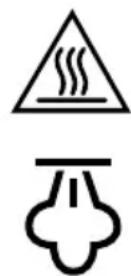
WARNING: High temperature. Risk of scalding! If shown on the product, do not touch as parts may be very hot.
WARNING: Steam. Risk of scalding!
This appliance reaches very high temperatures. Incorrect use of the device can cause scalding.
- Never disassemble or carry out maintenance on the appliance apart from that indicated in this manual. In the event of a fault or malfunction, do not try and repair the appliance yourself. In the event of a heavy knock, fall, damage or fall into water, the appliance may no longer be safe to use. Incorrect use or a lack of respect for the instructions herein may lead to serious accidents. Always contact Authorised Service Centres.
- This appliance must not be used if it has been dropped, if there are visible signs of damage or if it leaks.
- The plug must be removed from the socket before the tank/boiler is filled with water.
- To carry out any maintenance or cleaning requiring access to
the boiler, ensure that the appliance is switched using the power switches and disconnected from the mains for at least two hours.
- This appliance can be used by persons with reduced physical, sensory or mental capabilities or lack of experience and knowledge if they have been given supervision or instruction concerning use of the appliance in a safe way and understand the hazards involved. Children must be supervised to ensure they do not play with the appliance.
- Keep the appliance out of reach of children when it is plugged in or cooling down.
- Keep all the parts of the packaging out of the reach of children; they are not toys. Keep the plastic bag out of the reach of children: danger of suffocation.
- The appliance must not be left unattended if plugged in to the mains.
- Steam must not be directed towards equipment containing electrical components, such as the interior of ovens.
- This appliance is destined exclusively for indoor domestic use.
In order to reduce the risk of accidents, including: fires, electrocution, personal injury and scalding, both during use and during preparation, maintenance and storage, always take the fundamental precautions listed in this manual.
RISKS CONNECTED TO THE POWER SUPPLY - ELECTROCUTION
- The earthing system and highly sensitive residual-current circuit breaker, complete with magnetothermic cut-out for your domestic system, guarantee safe use of electrical appliances.
Therefore, for your own safety, check that the electrical system to which the appliance is connected complies with current laws.
- Do not connect the appliance to the mains if the voltage does not correspond with that of the domestic electrical circuit in use.
- Do not overload the sockets with adaptors and/or
transformers. Only connect the product to a single socket with current that is compatible with the supplied plug.
- Electrical extension leads that are unsuitable for the power rating or which are not compliant with law may overheat and possibly lead to short circuiting, fire, power outage or damage to the equipment. Only use extension leads which are certified, suitable for the power rating, supporting 16A and earthed.
- Always turn the appliance off at the ON/OFF switch before unplugging it.
- To remove the plug from the socket, do not pull the power cable, but hold the plug itself to avoid damage to the plug and the cable.
- Always unplug the appliance if it is not in use and before any preparation, maintenance or cleaning operation.
- Fully unwind the cable from the cable winder before connecting the appliance to the mains and before use. Always use the product with the cable completely unwound.
- Do not pull or jerk the cable or expose it to tensions (twisting, crushing or stretching). Keep the cable away from hot and/or sharp surfaces and elements. Avoid crushing the cables in doors and windows. Do not pull the cable tight around corners. Avoid treading on the cable. Do not wind the power cable around the appliance, especially if the appliance is hot. Do not place the appliance on top of the power cable, this can be dangerous.
- Do not substitute the plug on the power cable.
- If the power cable is damaged, it must be replaced by the manufacturer, its service agent or similarly qualified persons in order to avoid all possible hazards. Do not use the product if the power cable is damaged.
- Do not touch or use the appliance barefoot and/or with wet body or feet.
- Do not use the appliance near containers full of water, e.g. sinks, baths and swimming pools.
- Do not immerse the appliance, including the power cable and plug, in water or other liquids.
RISKS DURING USE OF THE PRODUCT -
INJURIES/SCALDING
- The product should not be used in areas where there is a danger of explosions or in the presence of toxic substances.
- Do not pour toxic substances, acids, solvents, detergents, corrosive substances and/or explosives or perfumes into the boiler.
- Only pour water or the water mix indicated in the section "WHICH WATER TO USE" into the boiler.
- Do not vacuum or direct the steam jet onto toxic substances, acids, solvents, detergents or corrosive substances. The handling and removal of dangerous substances must be carried out according to the indications of the manufacturers of these substances.
- Do not vacuum or direct the steam jet onto explosive powders or liquids, hydrocarbons, open flames and or extremely hot objects.
- Keep all parts of your body away from the suction nozzle and from any moving or rotating parts.
- Do not use the vacuum function on people and/or animals.
- Use the specific handle for transport. Do not pull the power cable. Do not use the power cable as a handle. Do not lift the appliance using the power cable or the steam hoses/vacuum tubes. Do not lift the product by the dirt collector handle.
- Do not position the product near sources of heat such as fireplaces, stoves and ovens.
- Do not position the product near electromagnetic fields such as induction plates.
- Re-wind the cable when the appliance is not in use.
- Do not obstruct the openings and grills on the product.
- When cleaning stairs, the appliance should be positioned on steps below the level of the user.
- Do not direct the steam jet on any part of the body of people or animals.
- Do not direct the steam jet on clothes while they are being worn.
- Cloths and rags and fabrics which have been subjected to a deep steam reach very high temperatures, above 100°C . Wait
a few minutes and check that they have cooled before handling them. Therefore, avoid contact with the skin if they have just been steamed.
- During use, keep the product in a horizontal position on stable surfaces.
- The steam lock on the handle guarantees greater safety, as it prevents the accidental activation of steam delivery by children or people who are unaware of the function of the appliance. When steam is not being used, apply the steam lock.
To continue steam delivery, return the switch to its original position.
CORRECT USE OF THE PRODUCT
Polti Unico MCV85_Total Clean & Turbo and MCV80_Total Clean & Turbo are designed for indoor domestic use for vacuuming up liquids and dust, removing both dry and/or wet materials (dirt) from surfaces with the use of steam as per the descriptions and instructions given in this manual. Please read these instructions carefully and keep them. If this manual is lost, it can be consulted and/or downloaded from the website www.polti.com. Only vacuum domestic dirt.
Do not vacuum directly from containers full of water or other liquids unless carrying out extraordinary cleaning operations as detailed in Chapter 22. Only vacuum small quantities of water spread over surfaces, respecting the maximum quantity specified in these instructions for use.
Regularly check the fill level of the dry and damp dirt collector, ensuring that the maximum levels are not exceeded (0.8L MAX level on collector).
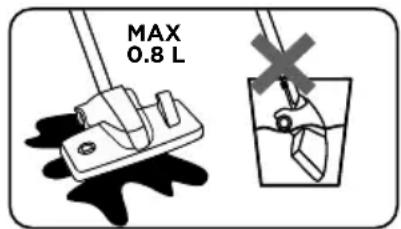
Do not use on debris or chalk, cement or residues from building sites or brick laying. Do not use on earth and sand/soil, etc.
Do not use on ash, soot and combustion residues (fireplaces, barbecues, etc.).
Do not use on printer, photocopier or fax toner and ink powder.
Do not vacuum pointed, sharp or stiff objects.
The steam power of the Polti Unico appliance gives optimum results right from the first application. Avoid, therefore, excessive rubbing of surfaces.
The appliance only functions correctly if the dirt collector is inserted and complete with all its parts.
Do not lift the appliance with the telescopic tube and the brush in the parking position.
- Do not lift the product by the dirt collector handle.
Never leave the appliance exposed to weathering.
Correct use of the product is only as detailed in this instruction manual. Any other use may damage the appliance and invalidate the warranty.
*Tests carried out by third party and independent laboratories attest that the Polti
Unico kills and removes 99.99% of virus, germs and bacteria if used based on the instructions included in this manual with the microfiber cloth mounted and for a continuous operating time of 15 seconds on the potentially contaminated area.
POLTI S.p.A. reserves the right to make the aesthetic, technical and construction changes it deems necessary, without prior notice.
Before leaving our factory all our products are rigorously tested. Therefore Unico may contain some residual water in the boiler and in the tank.
INFORMATION FOR USERS
Pursuant to European Directive 2012/19/EU, regarding electric and electronic appliances, this appliance must not be disposed of with domestic waste, but sent to an official collection facility. This appliance complies with EU Directive 2011/65/EU.
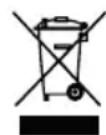
The crossed-out bin symbol on the appliance indicates that, at the end of its useful lifespan, the product must be disposed of separately
from other waste. Therefore, at the end of its life, the user must hand over the appliance to an appropriate collection centre for electric and electronic waste or, according to the legislation in force in the country, leave the used appliance with the distributor when buying a new product to replace it. Proper separate waste collection to facilitate the subsequent recycling, treatment and environmentally compatible disposal of the appliance helps to prevent negative effects on the environment and human health, and promotes recycling of the materials the product is made of. Unlawful disposal by the owner involves the application of the administrative sanctions envisaged by current legislation.
WHICH WATER TO USE
Polti Unico MCV85_Total Clean & Turbo and MCV80TPL Total Clean & Turbo have been designed to operate with normal tap water with an average hardness of between 8° and 20° f. If the tap water contains a lot of calcium carbonate, do not use demineralised pure water, but use a mix composed of 50% tap water and 50% demineralised water available on the market.
Warning: check the hardness of the water at
the technical office at your local council or the local water supplier.
If you only use tap water, you can reduce the formation of limescale by using the special Polti Kalstop (PAEU0094) anti-limescale product, distributed by Polti, and available for sale at all major domestic-appliance stores or online at www.polti.com.
Do not use distilled water, undiluted demineralised water, rain water or water containing additives (e.g. starch, perfumes), scented water or water produced by other domestic appliances, by water softeners and filter jugs.
- Do not add chemical, natural, detergent, or limescale removing substances, etc.
Clean the boiler as per the instructions in Chapter 19.
THE UNICO MULTIFUNCTION TRIPLY VACUUM CLEANER
Polti Unico is a powerful multifunction vacuum cleaner that combines multi-cyclonic suction technology with the sanitising power of steam. A single multitasking appliance that vacuums, sanitises and dries every surface in the house: floors, carpets, sofas and cushions, mattresses, mirrors and windows, bathroom fixtures and hobs. Designed for daily cleaning, use it as a vacuum cleaner every day, and as a steam cleaner when you want to wash and sanitise the entire house.
1. PREPARATION FOR SUCTION FUNCTION USE (Chart Page 2)
1.1 Insert the vacuum tube into the body of the appliance.
1.2 Lock the telescopic tube to the handle and adjust to the desired height.
1.3 Connect the Multibrush brush to the telescopic tube.
Tips: To facilitate the following operations, lock the brush to the parking system.
1.4 Completely unwind the power cable and connect it to an appropriate mains socket (1).
Always use the product with the cable completely unwound.
1.5 Switch on the appliance by pressing the power switch. The indicator light next to it will come on. The appliance is ready for use.
To start the suction, press the vacuum button on the control panel (3).
1.6 It is possible to adjust the suction power by moving the cursor on the handle (4).
We recommend using the special push/pull handle to move the appliance more easily during cleaning operations (5-6). Do not use the push/pull handle to lift the appliance.
We recommend using the accessories holder, to be attached to the appliance (7) or directly to the push/pull handle (8), to have the accessories close at hand during the cleaning operations.
WARNING: The level of dirt vacuumed should not exceed the MAX indicator on the dirt collector; this indicator refers to both solid and damp dirt (9). Upon reaching the maximum level, see Chapter 17.
2. PREPARATION FOR STEAM USE (Chart Page 2)
2.1 Lock the steam hose to the vacuum tube, then insert them to the body of the appliance, making sure that the two connectors at the ends of the vacuum tube are connected.
Without the steam hose, it is impossible to activate the steam, even with the boiler switched on.
2.2 To connect the machine side steam hose, lower the steam attachment door and insert the steam connectors, sliding it into position until you hear a click as it locks into place (diagram page 2 - F).
2.3 Open the door of the tank and fill it with water, taking care that it does not overflow (10). Close the door.
This operation must always be carried out with the power cable disconnected from the mains.
Thanks to the self-filling system, it is not necessary to wait for the appliance to cool before refilling the boiler with water.
When the water in the water tank runs out, the "Out of water" indicator light will light up on the control panel (tap symbol) and you will hear a beep.
To continue use, it is sufficient to refill the tank.
2.4 Completely unwind the power cable and connect it to an appropriate mains socket. Always use the product with the cable completely unwound.
2.5 Switch on the appliance by pressing the power switch (2). The indicator light next to it will come on. The appliance is ready for use.
To use steam, switch on the boiler by pressing the ON (12) button and adjust the steam depending on the surface to be treated as detailed in Chapter 4.
2.6 When the boiler is turned on, the steam you want to use (suction, steam, steam and indicator light flashes: the boiler is heating suction at the same time) with or without the up. When the indicator light is constant, after cloth holder, select the most suitable position around 5 minutes (13) the appliance is ready (A-B-C) based on the type of cleaning, by for steam function use. pressing the appropriate pedal:
2.7 The handle has a safety button which prevents involuntary activation and accidental steam delivery (14). Should the appliance be left momentarily unguarded when the appliance is activated, move the safety button to the "steam lock" position (14-A). To resume delivery, move the button to the initial position (14-B) and press the steam trigger on the handle (15).
you want to use (suction, steam, steam and suction at the same time) with or without the cloth holder, select the most suitable position (A-B-C) based on the type of cleaning, by pressing the appropriate pedal:
A - no insert
B - rubber inserts
C - bristle inserts
The specific label present on the appliance and shown below indicates how best to use the Multibrush brush based on the type of surface and cleaning function.
We recommend using the special push/pull handle to move the appliance more easily during cleaning operations. Do not use the push/pull handle to lift the appliance.
We recommend using the accessories holder, to be attached to the appliance (7) directly to the push/pull handle (8), to have the accessories close at hand during the cleaning operations.
WARNING: When first operating steam, there may be some drops of water mixed with the steam due to temperature imbalances. Direct the first jet of steam onto a rag.
3. PREPARATION FOR USE OF COMBINED STEAM / SUCTION FUNCTION
The steam and suction functions can be used at the same time to wash and sanitise the surfaces and then dry them. For the combined function, prepare the product as described in Chapters 1 and 2.
4. STEAM ADJUSTMENT
It is possible to adjust the intensity of the steam using the + / buttons. (16). Here are some tips for regulating it:
- Maximum level: for resistant floors and surfaces, to remove limescale, stains and grease;
- Medium level: to clean windows, floors and clean and brighten rugs and carpet;
- Minimum level: to clean parquet and laminate, delicate fabrics, upholstery, sofas and mattresses, etc. and to steam plants.
5. MULTIBRUSH
Depending on the surface to be cleaned (rugs/carpet, parquet and delicate floors, hard floors and tiles) and the function that
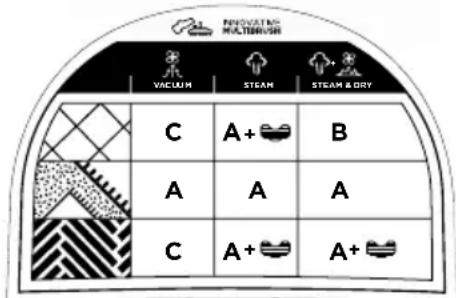
KEY:
SURFACES
HARD FLOORS

RUGS CARPET

DELICATE FLOORS
CLEANING FUNCTION
VACUUM

STEAM

STEAM / DRYING
During cleaning operations, we recommend the use of the cloth when you want to wash and sanitise the floors so that the dirt loosened by the steam is collected by the cloth.
The cloth can also be used with the combine steam / suction function.
In particular for cleaning delicate floors, such as parquet, the cloth ensures no damage is made to the surface being treated. If it does not dry completely because the cloth has been soaked by the steam, we recommend going back over the surface with a dry cloth.
Only use the cloth and special holder with the brush in position A.
2 washable microfibre cloths are included:
Polti Unico MCV85: 1 cloth with bumpers for delicate floors (beige colour) and 1 cloth with bumpers (white with red stripes) for all types of floors.
Polti Unico MCV80: 1 cloth with bumpers and 1 universal cloth for hard to reach places, both suitable for all types of floors.
6. AUTOMATIC CLEANING PROGRAMS
Polti Unico is equipped with pre-set programs to automatically regulate the steam pressure and the duration of suction based on the surface in question. The surfaces are washed and sanitised with the steam and, when the suction is activated, drying begins by removing the humidity left previously by the steam.
To activate the programs, make sure that Chapter 1 and 2 have been carried out and begin the cleaning operations. Then select the program by pressing the PROGRAM button on the control panel (17) until the corresponding indicator light for the desired program lights up.
| P1 | HARD FLOORING - Press and hold the steam trigger on the handle for the desired length of time, up to a maximum of 30 seconds. On release of the button, vacuuming will begin automatically for the required time to dry the surface. Repeat the operation until cleaning is complete. |
| P2 | BATHROOM - Press and hold the steam trigger on the handle for the desired length of time. On release of the button, vacuuming will begin automatically for the required time to dry the surface. Repeat the operation until cleaning is complete. |
| P3 | UPHOLSTERY - By pressing and holding the trigger on the handle both the steam and suction functions will be activated. Steam will be dispens- sed intermittently to preserve the delicate surface. |
6.2 Polti Unico MCV80
| P1 | HARD FLOORING - Press and hold the steam trigger on the handle for the desired length of time, up to a maximum of 30 seconds. On release of the button, vacuuming will begin automatically for the required time to dry the surface. Repeat the operation until cleaning is complete. |
| P2 | RUGS / CARPETS - By pressing and holding the trigger on the handle both the steam and suction functions will be activated. Steam will be dispersed intermittently to preserve the delicate surface. |
| P3 | GLASS - Press and hold the steam trigger on the handle for the desired length of time, up to a maximum of 30 seconds. On release of the button, vacuuming will begin automatically for the required time to dry the surface. Repeat the operation until cleaning is complete. |
6.3 In pre-set-program mode, it is possible to
activate suction by pressing the suction button (3).
To stop the program being used, press and quickly release the steam delivery button.
To restart the program press the steam delivery button for at least one second.
To deactivate the program press the PROGRAM button repeatedly until the indicator light goes off.
7. CLEANING HARD FLOORS
(tiles, ceramic surfaces, stoneware, ...) SUCTION ONLY FUNCTION
7.1 For suction alone, set the Multibrush brush to position C (bristle inserts) pressing the pedal (which ensures that the holder with cloth is not attached to the brush).
For safety reasons, apply the steam lock on the handle during vacuuming.
Make sure that Chapter 1 has been carried out and begin the cleaning operations.
It is possible to adjust the suction power by moving the cursor on the handle (4).
STEAM ONLY FUNCTION
To clean using steam alone, it is possible to use the abrasive action of the cloths supplied, attaching them to the special holder (18).
Position the holder with the cloth on the floor and position the multibrush above it in position A (no insert), apply slight pressure until it clicks, locking into place (19).
Make sure that Chapter 2 has been carried out and begin the cleaning operations.
It is possible to adjust the intensity of the steam by using the + / - buttons (see Chapter 4); for this type of surface we recommend the maximum level of steam.
Before removing the holder with cloth from the brush, wait a few minutes to allow the cloth to cool. Never use the holder without a cloth.
STEAM - VACUUM COMBINED FUNCTION to sanitise and dry the surface
For steam cleaning and suction, set the Multibrush in position B (rubber inserts) and ensure that the holder with cloth is not attached to the brush. Make sure that Chapters 1 and 2 have been performed and proceed with the cleaning operations: first by steaming and then vacuuming to dry. It is possible to adjust the intensity of the steam by using the +/- buttons (see Chapter 4); for this type of surface we recommend the maximum level of steam.
It is possible to adjust the suction power by
moving the cursor on the handle.
The combined use of steam and suction allows the most efficient sanitising of the surface, dissolving dirt, eliminating grease, germs and mites, and above all makes it possible to remove excess humidity and reduce the cleaning operations time.
PROGRAMMED MODE
For this type of surface there is a pre-set cleaning program, see Chapter 6.
To avoid any dirt in the dirt collector causing bad smells (especially where liquids and/or steam humidity are vacuumed), we recommend emptying and cleaning after every use according to the methods described in Chapter 17.
8. CLEANING DELICATE FLOORS (wooden, stone, waxed surfaces, etc.
Before using the appliance on delicate surfaces, ensure that the part in contact with the surface is free from foreign bodies that could cause scratches.
SUCTION ONLY FUNCTION
For suction alone, set the Multibrush to position C (bristle inserts) pressing the pedal (make sure that the holder with cloth is not attached to the brush).
For safety reasons, apply the steam lock on the handle during vacuuming.
Make sure that Chapter 1 has been carried out and begin the cleaning operations. It is possible to adjust the suction power by moving the cursor on the handle (4).
STEAM ONLY FUNCTION
For cleaning only with steam, set the Multibrush to position A (no insert). Attach the cloth supplied to the relative holder; place the holder with cloth on the ground and position the brush above, applying slight pressure until a click is heard as it locks into place (19).
Make sure that Chapter 2 has been carried out and begin the cleaning operations. It is possible to adjust the intensity of the steam by using the + / - buttons (see Chapter 4); for this type of surface we recommend the minimum level of steam.
Before removing the holder with cloth from the brush, wait a few minutes to allow the cloth to cool. Never use the holder without a cloth.
STEAM - VACUUM COMBINED FUNCTION to sanitise and dry the surface
For cleaning with steam and suction, set the Multibrush to position A (no insert). Attach the cloth supplied to the relative holder (18); place the holder with cloth on the ground and position the brush above, applying slight pressure until a click is heard as it locks into place (19).
Make sure that Chapters 1 and 2 have been performed and proceed with the cleaning operations: steaming with suction on at the same time to gently treat the surface.
It is possible to adjust the intensity of the steam by using the + / - buttons (see Chapter 4); for this type of surface we recommend the minimum level of steam.
It is possible to adjust the suction power by moving the cursor on the handle.
The combined use of steam and suction allows the most efficient sanitising of the surface, dissolving dirt, eliminating grease, germs and mites, and above all makes it possible to remove excess humidity left by the steam and reduce the cleaning operations time.
WARNING: For additional safety, before using the appliance on delicate surfaces and those treated with with special oil, wax, etc. test steam delivery on a hidden part and leave the steamed part to dry to ensure that no changes in colour or deformation have occurred.
To avoid any dirt in the dirt collector causing bad smells (especially where liquids and/or steam humidity are vacuumed), we recommend emptying and cleaning after every use according to the methods described in Chapter 17.
9. CLEANING RUGS AND CARPETS SUCTION ONLY FUNCTION
For suction alone, set the Multibrush to position A (no insert) by pressing the pedal.
For safety reasons, apply the steam lock on the handle during vacuuming.
Make sure that Chapter 1 has been carried out and begin the cleaning operations.
It is possible to adjust the suction power by moving the cursor on the handle (4).
For suction only, in addition to the multibrush, it is possible to use the floor Turbo brush The Turbo brush thanks to a turbo system, increased the effectiveness and efficiency of the suction operations of
textile surfaces, recommended for removing hair and animal fur from rugs and carpet.
STEAM ONLY FUNCTION
WARNING: Before cleaning leather or fabrics with steam, consult the manufacturer's instructions and always carry out a test on a hidden part or on a sample of the material. Allow the steamed part to dry to make sure that no changes in colour or deformations have occurred.
For cleaning only with steam, set the Multibrush to position A (no insert) by pressing the pedal. Make sure that Chapter 2 has been carried out and begin the cleaning operations.
It is possible to adjust the intensity of the steam by using the + / - buttons (see Chapter 4); for this type of surface we recommend the medium level of steam.
STEAM - VACUUM COMBINED FUNCTION to refresh and dry the surface
For steam cleaning and vacuuming, set the multibrush to position A (no insert) by pressing the pedal.
Make sure that Chapters 1 and 2 have been carried out and begin the cleaning operations.
It is possible to adjust the intensity of the steam by using the + / - buttons (see Chapter 4); for this type of surface we recommend the medium level of steam.
It is possible to adjust the suction power by moving the cursor on the handle.
Combined use of steam and suction allows the most efficient cleaning of the surface, dissolving dirt and removing grease, germs and mites; it also brightens the colour of fibres and dries surfaces more quickly.
To avoid any dirt in the dirt collector causing bad smells (especially where liquids are vacuumed and/or steam is used), we recommend emptying and cleaning after every use according to the methods described in Chapter 17.
PROGRAMMED MODE
only for Polti Unico MCV80
For this type of surface there is a pre-set cleaning program, see Chapter 6.2.
10. CLEANING GLASS, WINDOWS AND TILES
WARNING: To clean glass surfaces in partic- ularly cold seasons, preheat the windows starting from a distance of about 50 cm
STEAM ONLY FUNCTION
Ensure that the points in Chapters 1 and 2 have been performed.
10.1 Connect the 2-in-1 windows and upholstery brush to the handle or the telescopic tube. Press the cursor and slide it forward on the accessory in order to remove the rubber frame (20).
10.2 It is possible to adjust the intensity of the steam by using the + / - buttons (see Chapter 4); for this type of surface we recommend the medium level of steam.
10.3 Press and hold the steam trigger on the handle (15) and steam the surface abundantly to dissolve the dirt.
10.4 Activate suction and run the brush over the surface to then begin drying.
The 2-in-1 windows and upholstery brush allows cleaning to be completed quickly and simply, without any marks or smears.
The combined use of steam and suction allows the most efficient sanitising of the surface, dissolving dirt, and eliminating grease and germs, and above all makes it possible to quickly dry the surface reducing cleaning time.
PROGRAMMED MODE
only for Polti Unico MCV80
For this type of surface there is a pre-set cleaning program, see Chapter 6.2.
11. CLEANING UPHOLSTERY
(mattresses, sofas, car interiors, etc.)
SUCTION ONLY FUNCTION
For suction alone and depending on the surface to be treated, connect one of the following accessories to the handle:
The 2-in-1 windows and upholstery brush without removing the rubber insert, makes it possible to vacuum all types of fabric practically and quickly.
The 2-in-1 suction lance (in position 2) (23) to vacuum the tightest and hardest to reach spaces.
The Mini Turbo Brush to deep clean the fibres of the fabrics by also removing fur and hair. Suction nozzle to remove dust and surface dirt.
Make sure that Chapter 1 has been carried out
and begin the cleaning operations. It is possible to adjust the suction power by moving the cursor on the handle (4).
STEAM ONLY FUNCTION
WARNING: Before cleaning leather or fabrics with steam, consult the manufacturer's instructions and always carry out a test on a hidden part or on a sample of the material. Allow the steamed part to dry to make sure that no changes in colour or deformation have occurred.
For steam cleaning only, attached the2-in-1 windows and upholstery brush with the sponge cap attached (21), then connect the 2-in-1 brush to the handle or the telescopic tube.
Ensure that the rubber frame is inside the accessory.
Make sure that Chapter 2 has been carried out and begin the cleaning operations. It is possible to adjust the intensity of the steam by using the + / - buttons (see Chapter 4); for this type of surface we recommend the minimum level of steam.
STEAM - VACUUM COMBINED FUNCTION to sanitise and dry the surface
WARNING: Before cleaning leather or fabrics with steam, consult the manufacturer's instructions and always carry out a test on a hidden part or on a sample of the material. Allow the steamed part to dry to make sure that no changes in colour or deformations have occurred.
For steam cleaning and vacuuming, use the 2-in-1 windows and upholstery brush with the sponge cap attached (21), then connect the 2-in-1 brush to the handle or the telescopic tube.
Ensure that the rubber frame is inside the accessory.
Make sure that Chapters 1 and 2 have been carried out and begin the cleaning operations.
It is possible to adjust the intensity of the steam by using the + / - buttons (see Chapter 4); for this type of surface we recommend the minimum level of steam.
The steam and vacuum functions can be used either at the same time or by alternating them.
Combined use of steam and suction allows the most efficient sanitising of the surface, dissolving dirt and removing germs and mites; it also brightens the colour of fibres
and dries surfaces more quickly.
PROGRAMMED MODE
only for Polti Unico MCV85
For this type of surface there is a pre-set cleaning program, see Chapter 6.1.
12. CLEANING BATHROOM FIXTURES, GROUTING AND KITCHEN WORKTOPS
STEAM ONLY FUNCTION
Ensure that Chapter 2 has been followed.
12.1 Connect the concentrator accessory to the handle. For greater abrasive action, a bristly round brush can be attached to the concentrator.
12.2 It is possible to adjust the intensity of the steam by using the + / - buttons (see Chapter 4); for this type of surface we recommend the maximum level of steam.
STEAM - VACUUM COMBINED FUNCTION to sanitise and dry the surface
12.3 Connect the suction nozzle to the concentrator accessory (22) and activate the suction function to begin vacuuming immediately, removing dirt thanks to the concentrated steam jet.
For the MCV85 model, the different coloured brushes allow for a different colour for each surface or environment.
PROGRAMMED MODE
only for Polti Unico MCV85
For this type of surface there is a pre-set cleaning program, see Chapter 6.1.
13. CLEANING FURNITURE AND DELICATE
SUCTION ONLY FUNCTION
For suction only, connect the 2-in-1 suction lance to the handle in position 1 (with bristles) (23), thereby making it possible to remove the dust from the surfaces.
Make sure that Chapter 1 has been carried out and begin the cleaning operations.
It is possible to adjust the suction power by moving the cursor on the handle.
STEAM ONLY FUNCTION
For steam cleaning only, make sure that Chapter 2 has been performed.
It is possible to adjust the intensity of the steam by using the + / - buttons (see Chapter 4); for this type of surface we recommend the minimum level of steam.
Press and hold the steam trigger on the
handle and direct the jet onto a cloth.
Use the steamed cloth to clean the surface, avoiding prolonged use on the same spot.
WARNING: Do not direct the steam jet directly onto surfaces.
WARNING: Before cleaning the surface, always do a test on a hidden part and see how it reacts to the application of steam.
14. OTHER GENERAL USES
WARNING: Before cleaning the surface, always do a test on a hidden part and so how it reacts to the application of steam.
14.1 BRIGHTENING UP CURTAINS AND DRAPES
Mites and dust can be removed from curtains and drapes by steaming the fabric directly from the handle. The steam is able to remove odours and brighten up colours, allowing the fabric to be washed less frequently.
For this surface, set the steam to the minimum level.
14.2 REMOVING STAINS FROM CARPETS AND UPHOLSTERY

WARNING: Steam.
Risk of scalding!
Connect the concentrator accessory without the bristly round brush; direct the steam directly onto the stain with the greatest angle possible (never vertically to the surface to be cleaned) and place a cloth beyond the stain to collect the dirt that has been "blown" away by the steam pressure.
For this surface, set the steam to the minimum level.
Connect the suction nozzle to the concentrator accessory and activate the suction function to vacuum the removed dirt remained on the floor.
14.3 TAKING CARE OF PLANTS AND HUMIDIFYING ROOMS
To care for your house plants, remove the dust from the leaves by steaming them directly from the handle. Adjust the steam to the minimum level and vacuum at a distance of 50 cm . Plants breathe better and will be cleaner and brighter. Furthermore, you can also use the steam to refresh spaces, especially those frequented by smokers.
15. OUT OF WATER
When the tank is out of water, the indicator light on the control panel (tap symbol) will turn on and you will hear a beep. To continue with steam cleaning, simply open the tank door and add water (10).
To vacuum surfaces it is not necessary to fill the tank, simply turn the boiler off.
16. GENERAL MAINTENANCE
Ensure that the appliance is switched off and disconnected from the mains (24).
To clean the outside of the appliance, only use a damp cloth and tap water.
All accessories can be cleaned using running water, ensuring they are completely dry before the next use.
Do not use detergents of any type.
The cloths provided can be washed by following the instructions included on the label.
17. CLEANING THE DIRT COLLECTOR
(ordinary maintenance)
17.1 Ensure that the appliance is switched off and disconnected from the mains (24).
17.2 Disconnect the dirt collector and remove it (25).
17.3 Hold the upper handle and turn clockwise (26).
17.4 Slowly remove the filter unit, pulling upwards and empty the collector into an appropriate container (26-27).
17.5 Wash the collector and the filter unit using running water only (26-27). Shake to remove excess water. This operation is recommended in particular if liquids are vacuumed and/or the appliance has been used in combined steam / vacuum mode to dry the surfaces.
17.6 Reassemble all the parts following the procedure in reverse order (30). The UNICO filter unit does not need to be dried; it is ready for use immediately, avoiding unnecessary waiting time. However, before replacing, we advise quickly drying the filter and the collector with a cloth to avoid unpleasant odours forming.
Empty the dirt collector each time the MAX level is reached and after every use.
We recommend emptying the collector after every use, before storing the appliance to avoid unpleasant odours forming.
WARNING: Should foam form inside the di collector (usually due to detergent being present on the surface), immediately empty and clean fully as detailed in Chapters 17, 18 and 2
18. CLEANING THE FILTERS (extraordinary maintenance)
18.1 Ensure that the appliance is switched off and disconnected from the mains 24.
18.2 Release and remove the dirt collector (25).
18.3 Lower the handle of the filter unit (31) and turn the cap until (32) the two triangles coincide (33).
18.4 Lift the cap pulling upwards (34) and remove the mesh filter (35).
18.5 Hold the handle of the multi-cyclonic unit and pull upwards (36).
18.6 Wash the mesh filter (37) and the multicyclonic unit using running water only (38).
18.7 Wring out the filter (37) and reassemble all the parts, following the procedure in reverse order, ensuring that the mesh part of the filter is facing upwards.
18.8 Remove the HEPA filter from the body of the appliance, disconnecting it from the appropriate lever (39).
18.9 Rinse the HEPA filter using running water only and shake gently to remove any excess dirt or water residue; before replacing the filter in the appliance, leave to dry naturally away from direct light and heat for at least 24 hours (40).
WARNING: Check the filters during cleaning. Replace the filters when visibly damaged.
The filters should be fully cleaned approximately twice per year.
Should the appliance be used frequently for vacuuming liquid dirt, repeat the operation more frequently.
19. CLEANING THE BOILER (extraordinary maintenance)

WARNING: Steam. Risk of scalding!
WARNING: Risk of scalding! When accessing the boiler (removing the cap, filling up, emptying), ensure that the appliance is switched off at the power switch and disconnected from the mains for at least two hours.
Use Allen key no. 6.
To maintain maximum performance, clean the boiler once per year and/or every 50
intense uses.
19.1 Fully empty the tank and remove the dirt collector.
19.2 Put the appliance on its side and remove the lid using a coin (41).
19.3 Unscrew the boiler cap using Allen key no. 6 (42).
19.4 Pour 200 ml of tap water into the boiler.
WARNING: Do not exceed the quantity of water indicated and pour it slowly into the boiler, making sure not to let it overflow.
19.5 Rinse the boiler and pour the water into the sink or into a special container for dirty water. If the water is very dirty, repeat the operation until the water is clean (43).
19.6 Insert 200 ml of water in the boiler and screw on the cap, ensuring the seal is present and that it is correctly screwed on. Replace the lid.
19.7 Fill the water tank again and close the door.
19.8 Turn the appliance back on. Before using steam to clean, direct the jet into a sink or other container until the steam is completely clean.
20. CLEANING THE MINI TURBO BRUSH
(Extraordinary maintenance)
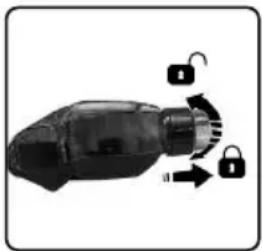
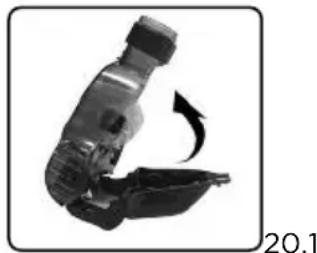
Rotate the locknut and remove the upper part of the mini turbo brush.
20.2 Clean the inside of the brush and reclose following the procedure in reverse order.
21. CLEANING THE FLOOR TURBO BRUSH
(Extraordinary maintenance)
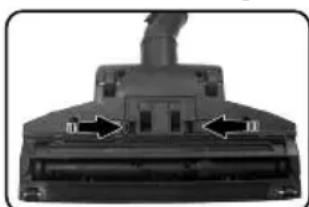
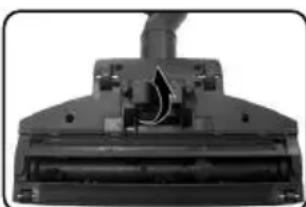
21.1 Remove the door and clean the inside of the brush.
21.2 Close the brush following the procedure in reverse order.
22. CLEANING THE VACUUM TUBES
(Extraordinary maintenance)
22.1 Switch on the appliance by pressing the power switch.
22.2 Vacuum 0.5l of clean water from a container (44) and empty the dirt collector.
22.3 Repeat the operation until the water the dirt collector is sufficiently clean.
22.4 With the dirt collector clean and dry, vacuum air for at least 5 minutes to completely dry the tubes.
22.5 Ensure that the dirt collector and filters are completely dry.
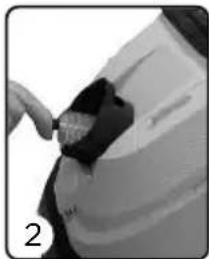
22.6 Make sure that the tubes are not clogged using the cleaning brush:
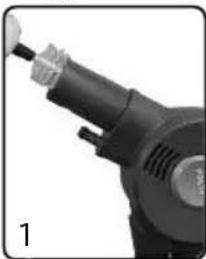
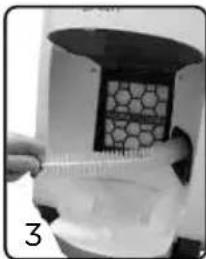
1 - Cleaning the handle-side tube:insert the cleaning brush to the end of the handle making sure that there are not blockages and/or foreign bodies which could block suction.
2 - Cleaning the tube between collector and hose adapter: insert the cleaning brush into the tube making sure that there are no blockages and/or foreign bodies which could block the suction flow. Perform the operation also on the side of the HEPA filter.
3 - Cleaning the tube between collector and machine body (HEPA filter side): Perform the cleaning operation by inserting the brush into the tube making sure that there are no blockages.
It is recommended that the tubes be cleaned every time the filters are cleaned and after every intensive use of the product.
23. REPLACEMENT MULTIBRUSH RUBBER INSERTS
(Extraordinary maintenance)
The rubber strips of the Multibrush, when worn down, can be replaced with spare parts. There are two rubber inserts:
-
one marked with the letter (F), to be inserted in the front part of the brush.
-
one marked with the letter (R), to be inserted in the rear part of the brush.
To replace it, proceed as follows:
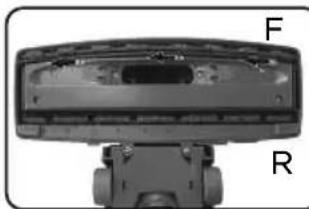
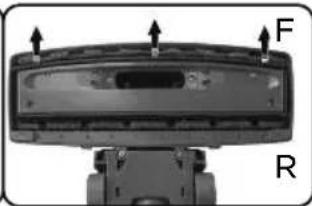
23.1 Put the Multibrush in position B and turn it upside down.
23.2 Move the rubber insert to the left, then lift it upwards.
23.3 Insert the new rubber insert performing the procedure in reverse.
WARNING: The rubber inserts must be inserted with the finely-ridged part facing the outside of the brush.
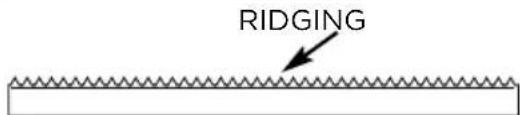
The rubber inserts are sold at Polti Authorised Service Centres.
24. SPARE SEALS
Periodically check the condition of the seal on the handle of the hose and the telescopic tube. If necessary, replace with the corresponding spare part, as described below.
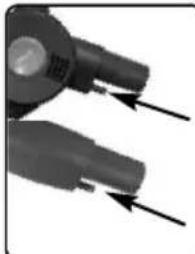
- Remove the damaged washer.
- Insert the new washer, applying it on the steam nozzle and pushing it into place.
- Lubricate the gasket with silicone grease or Vaseline, or alternatively with small quantities of vegetable oil.
25. STORAGE
25.1 Turn off the appliance and disconnect from the mains electricity.
25.2 Pull the power cable gently towards you to activate the automatic winder, guiding it gently back into the appliance.
25.3 The hose and flexible hose can be housed on the body of the appliance, sliding the universal brush into the parking system on the appliance.
WARNING: Do not lift the appliance with the telescopic tube and the brush in the parking position.
Before storage, we advise quickly drying the filter and the collector with a cloth to avoid unpleasant odours forming.
- TROUBLESHOOTING
| PROBLEM CAUSE SOLUTION | |||
| Polti Unico does not turn on. No power. Check the cable, plug and socket. | |||
| The motor revs/has little suction. Tubes or accessories blocked Turn the | appliance off, unplug, remove any blockages in the tubes and accessories. | ||
| Polti Unico has no/reduced suction. Dirt collector full or not correctly inserted.Suction adjustment set at the minimum level.Dirt collector or vacuum tube not correctly inserted.Clogged filters.Clogged suction tubes. | Empty the dirt collector and insert correctly.Adjust suction using the cursor on the handle.Correctly insert the dirt collector tank and/or check that the flexible vacuum tube has been correctly inserted.Proceed with filter cleaning as described in chapter 18 Clean the tubes, as described in Chapter 22. | ||
| Water collects under the appliance during vacuuming of liquids and/or damp dirt. | Liquid in dirt collector has exceeded the MAX level.Foam in the dirt collector. | Empty the dirt collector.Follow the cleaning instructions in Chapters 17 - 18 - 22. | |
| Polti Unico does not dispense steam. Boiler switched off.Boiler out of water.Steam hose not inserted.Steam lock activated.The boiler is not yet pressurised. | Turn on the boiler button.Add water to the tank as described in Chapter 15.Connection the steam hose to the flexible vacuum tube, locking the automatic buttons; connect the steam hose to the appliance and the handle (as described in Chapter 1 and shown on page 2).Deactivate the steam lock on the handle.Wait for the steam indicator light to stop flashing. | ||
| The universal brush selector does not work. The holder with cloth for steam cleaning is mounted on the brush. | Remove the holder with cloth from the brush. | ||
| In preset-program mode, at the end of suction, there was no time to finish drying. | Vacuuming too slowly over the surfaces. | In preset-program mode, it is still possible to activate suction by pressing the suction button. | |
| During cleaning operations, lines or traces of dirt remain. | The Multibrush is dirty. | Clean the Multibrush by washing it under running water and wait for it to dry completely before using it again. | |
| Non-uniform drying of the hard floor. | The rubber inserts are worn. | Replace the inserts, as described in Chapter 23. | |
| PROBLEM CAUSE SOLUTION | |||
| The appliance is pressurised but re-leases little steam. | The steam is set to themini-mum level. | Press the steam adjustment button (+) to increase the steam being di-spensed. | |
| There is a bad smell when turning on suction. | Dirt collector is dirty or too wet. | Clean the dirt collector as described in Chapter 13 or simply dry it out If the smell persists, carry out a full clean as described in Chapters 13, 14, and 17. | |
| Steam is dispensed mixed with dro-ps of water. | The steam hose and/or the te-lescopic tube are cold. | Direct the steam jet onto a cloth to heat up the tubes. | |
| The holder with cloth for steam cle-ning does not lock onto the brush. | The brush is in position B or C. Set the universal brush to position A. | ||
| Accessories are difficult to asse-ble. | The seals produce friction. Lubr cate the gasket with silicone grease or Vaseline, or alternatively with a small amount of vegetable oil. | ||
| Steam or condensation leaks out between the handle and the telesco-pic tube. | Seals worn, cut or missing. Replace the seals, as indicated in Chapter 24. | ||
| The filling pump of the boiler continu-ues to operate. | There is air in the boiler circuit. Turn off the appliance and leave it to cool, then repeat the operations de-scribed in Chapter 1. | ||
| After vacuuming, traces of liquid re-main on the flooring. | Liquid remains inside the tu-bes.Floor not yet dry | Suck in air for a few seconds to allow the transfer of the liquid to the tank.Repeat the vacuuming. | |
| ALARMS CAUSE SOLUTION | |||
| - "Out of water" indicator light flashing.- Prolonged beeping sound.- LED programs flashing.- 1st steam adjustment LED fla-shing. | Boiler fault. | Turn the appliance off for a few minutes and then start it again.Should the problem occur again, contact an Authorised Service Centre. | |
| - "Out of water" indicator light fla-shing.- Prolonged beeping sound.- LED programs flashing.- 2nd steam adjustment LED fla-shing. | The boiler does notreach the desired tem-perature. | Turn the appliance off for a few minutes and then start it again.Should the problem occur again, contact an Authorised Service Centre. | |
| - "Out of water" indicator light flashing.- Prolonged beeping sound.- LED programs flashing.- 3rd steam adjustment LED fla-shing. | The pump continues to take in wa-ter. | Turn the appliance off for a few minutes and then start it again.Should the problem occur again, contact an Authorised Service Centre. | |
Should the problems persist, contact an Authorised Polti Service Centre (see www.polti.com for the up-to-date list) or Customer Services.
WARRANTY
This appliance is for domestic use only and is guaranteed for two years from the date of purchase against any defects present at the time the goods are handed over; the date of purchase must be proven via a proof of purchase document valid for tax purposes and issued by the seller.
For repairs, the appliance must be accompanied by proof of purchase.
This warranty does not affect the consumer rights deriving from European Directive 99/44/EC as regards some aspects of sale and warranty of consumer goods, rights which the consumer should uphold with respect to the seller.
This warranty is valid in the countries which adhere to European Directive 99/44/EC. For other countries, local regulations on warranties apply.
WHAT THE WARRANTY COVERS
During the warranty, Polti guarantees free repair of a product with a manufacturing or factory defect and, therefore, the client is not liable to pay for any work or materials. In case of irreparable defects, Polti may replace the product free of charge.
To avail of the warranty, the customer should visit one of the Polti Authorised Service Centres with proof of purchase from the seller valid for tax purposes and bearing the date of purchase of the product. Without proof of purchase and the relative date of purchase, the work will be charged for. Store the proof of purchase document safely for the whole duration of the warranty.
WHAT THE WARRANTY DOES NOT COVER
- Any fault or damage not deriving from a manufacturing defect.
- Any fault due to improper use or use other than that indicated in the instruction booklet, an integral part of the product sales contract.
- Any defect resulting from force majeure (fires, short circuits) or caused by third parties (tampering).
- Damage caused by the use of non-original Polti parts, and repairs or modifications performed by staff or service centres not authorised by Polti.
- Damage caused by the customer.
- Parts (filter, brush, hose, battery, etc.) damaged by use (consumable goods) or normal wear and tear.
- Any damage caused by limescale.
- Defects resulting from lack of maintenance/cleaning according to the manufacturer's instructions.
Assembly of non-original Polti accessories or those that have been modified or which are not suitable for the appliance.
Inappropriate use and/or use not compliant with the instructions for use and any other warnings or indications contained in this manual invalidates the warranty.
Polti accepts no responsibility for any direct or indirect damage to people, objects or animals caused by non-compliance with the instructions indicated in this instruction booklet, regarding warnings for use and product maintenance.
To see the up-to-date list of the Polti Authorised Service Centres, visit the website www.polti.com
BIENVENUE DANS LE MONDE DE POLTI UNICO,
L'ASPIRATEUR MULTIFONCTION QUI ASPIRE, DÉSINFECTE À LA VAPEUR ET SÉCHE EN ÉLIMINANT L'HUMIDITE EN EXCÉS DE TOUTES LES SURFACES.
POLTI UNICO TUE JUSQUÀ 99,99%* DE VIRUS, GERMES ET BACTÉRIES ET LES ÉLIMINE
SANS L'EMPLOI DE DÉTERGENTS CHIMIQUEES

DES ACCESSOIRESPOUR TOUS LES BESOINS
UTILISATION CORRECTE DU PRODUIT
USO CORRECTO DEL PRODUCTO
Ensure that the rubber frame is inside the accessory.
Ensure that the rubber frame is inside the accessory.
USO CORRETO DO PRODUCTO
Discover the world and the complete offering of Polti on polti.co.uk, sign up for the newsletter to stay up to date on all the news and offers.


- PAEU0287
- PAEU0289
- PAEU0292
- PAEU0293
- PAEU0294
- PAEU0298
- PAEU0291
- PAEU0295
- SAFETYWARNINGS
- IMPORTANT PRECAUTIONS FOR USE
- SAFETY SYMBOLS
- RISKS CONNECTED TO THE POWER SUPPLY - ELECTROCUTION
- RISKS DURING USE OF THE PRODUCT
- INJURIES/SCALDING
- CORRECT USE OF THE PRODUCT
- INFORMATION FOR USERS
- WHICH WATER TO USE
- THE UNICO MULTIFUNCTION TRIPLY VACUUM CLEANER
- PREPARATION FOR SUCTION FUNCTION USE (CHART PAGE 2)
- PREPARATION FOR STEAM USE (CHART PAGE 2)
- PREPARATION FOR USE OF COMBINED STEAM / SUCTION FUNCTION
- STEAM ADJUSTMENT
- MULTIBRUSH
- CLEANING FUNCTION
- AUTOMATIC CLEANING PROGRAMS
- CLEANING HARD FLOORS
- STEAM ONLY FUNCTION
- STEAM - VACUUM COMBINED FUNCTION TO SANITISE AND DRY THE SURFACE
- PROGRAMMED MODE
- CLEANING DELICATE FLOORS (WOODEN, STONE, WAXED SURFACES, ETC
- SUCTION ONLY FUNCTION
- CLEANING RUGS AND CARPETS SUCTION ONLY FUNCTION
- STEAM - VACUUM COMBINED FUNCTION TO REFRESH AND DRY THE SURFACE
- CLEANING GLASS, WINDOWS AND TILES
- CLEANING UPHOLSTERY
- (MATTRESSES, SOFAS, CAR INTERIORS, ETC.)
- CLEANING BATHROOM FIXTURES, GROUTING AND KITCHEN WORKTOPS
- CLEANING FURNITURE AND DELICATE
- OTHER GENERAL USES
- 14.1 BRIGHTENING UP CURTAINS AND DRAPES
- 14.2 REMOVING STAINS FROM CARPETS AND UPHOLSTERY
- 14.3 TAKING CARE OF PLANTS AND HUMIDIFYING ROOMS
- OUT OF WATER
- GENERAL MAINTENANCE
- CLEANING THE DIRT COLLECTOR
- (ORDINARY MAINTENANCE)
- CLEANING THE FILTERS (EXTRAORDINARY MAINTENANCE)
- WARNING: CHECK THE FILTERS DURING CLEANING. REPLACE THE FILTERS WHEN VISIBLY DAMAGED
- CLEANING THE BOILER (EXTRAORDINARY MAINTENANCE)
- CLEANING THE MINI TURBO BRUSH
- (EXTRAORDINARY MAINTENANCE)
- CLEANING THE FLOOR TURBO BRUSH
- CLEANING THE VACUUM TUBES
- REPLACEMENT MULTIBRUSH RUBBER INSERTS
- SPARE SEALS
- STORAGE
- WARRANTY
- WHAT THE WARRANTY COVERS
- WHAT THE WARRANTY DOES NOT COVER
- BIENVENUE DANS LE MONDE DE POLTI UNICO
- UTILISATION CORRECTE DU PRODUIT
- USO CORRECTO DEL PRODUCTO
- ENSURE THAT THE RUBBER FRAME IS INSIDE THE ACCESSORY
- USO CORRETO DO PRODUCTO
Brand : POLTI
Model : Unico MCV80 Total Clean & Turbo
Category : Steam cleaner