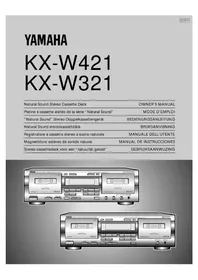
KXW321 - Cassette player YAMAHA - Free user manual and instructions
Find the device manual for free KXW321 YAMAHA in PDF.



| Product Type | Double stereo cassette deck with auto reverse |
| Brand | YAMAHA |
| Model | KXW321 |
| Dimensions (W x H x D) | 435 x 146 x 279 mm |
| Weight | 5.0 kg |
| Power Supply | 110/120/220/240 V, 50/60 Hz (general model) |
| Power Consumption | 12 W (standby 7 W) |
| Heads | Record/playback: Hard Permalloy; Erase: Double gap ferrite; Playback: Hard Permalloy |
| Motor | DC servo motor x 2 (main motors) |
| Noise Reduction | Dolby B / C |
| Automatic Tape Selector | Normal (Type I), Chrome (Type II), Metal (Type IV) |
| Main Functions | Playback, recording, normal/high speed dubbing, music search, silent recording, auto return after recording, relay playback |
| Line Input | 100 mV / 43 kΩ |
| Line Output | 570 mV / 1.4 kΩ |
| Headphone Output | 0.25 mV / 8 Ω |
| Signal-to-Noise Ratio | 58 dB (without Dolby), 66 dB (Dolby B), 74 dB (Dolby C) |
| Frequency Response | 20 Hz - 17 kHz (Type I), 20 Hz - 18 kHz (Type II), 20 Hz - 20 kHz (Type IV) |
| Wow and Flutter | 0.08% (WRMS) |
| Harmonic Distortion | Less than 1.0% |
| Maintenance and Cleaning | Periodic cleaning of heads, capstan and pinch roller with cleaning cassette; demagnetization after 20-30 hours of use |
| Safety | Do not open the cabinet, avoid exposure to rain or moisture, disconnect before moving |
| Included Accessories | Audio cables (1 pair) |
| Optional Remote Control | RKX1 (range 7 m, angle 30°) |
Frequently Asked Questions - KXW321 YAMAHA
User questions about KXW321 YAMAHA
0 question about this device. Answer the ones you know or ask your own.
Ask a new question about this device
Download the instructions for your Cassette player in PDF format for free! Find your manual KXW321 - YAMAHA and take your electronic device back in hand. On this page are published all the documents necessary for the use of your device. KXW321 by YAMAHA.
USER MANUAL KXW321 YAMAHA
- This unit is a sophisticated stereo cassette deck. To ensure proper operation for the best possible performance, please read this manual carefully.
- Choose the installation location of your unit carefully. Avoid placing it in direct sunlight or close to source of heat. Also avoid locations subject to vibration and excessive dust, heat, cold or moisture. Keep it away from sources of hum such as transformers or motors.
- Do not open the cabinet as this may result in damage to the deck or electrical shock. If a foreign object should get into the deck, contact your local dealer.
- When removing the power plug from the wall outlet, always pull directly on the plug; never pull the cord itself.
- Do not apply excessive force when operating switches and knobs.
- When moving the deck, be sure to first pull out the power plug and remove all cords connecting the deck to other equipments.
- Do not attempt to clean this unit with chemical solvents as this may damage the finish. Use a clean, dry cloth.
- Never allow metallic items (e.g. screwdrivers, tools, etc.) to come near the record/playback head assembly. Doing so may not only scratch or damage the head's mirror-smooth finish, but also change the magnetic characteristics of the heads, causing a deterioration in reproduction quality.
- Although the record/playback head used in this unit is a high quality head with outstanding reproduction characteristics, it can become dirty through the use of old tapes or from dust accumulation over time. This can have a serious effect on reproduction quality. Clean the heads regularly with one of the commonly available head cleaners or with cleaning solutions as explained later in this manual.
- Be sure to read the "TROUBLESHOOTING" section of this manual for advice on common operating errors before concluding that your unit is faulty.
- Keep this manual in a safe place for future reference.
- Voltage Selector (General and China Model only) The voltage selector on the rear panel of this unit must be set for your local mains voltage BEFORE plugging in the AC mains supply. (Voltage selector adjustable between 110/120/220/240 V AC.)
NOTE:
Please check the copyright laws in your country to record from records, compact discs, radio, etc. Recording of copyright material may infringe copyright laws.
WARNING
TO REDUCE THE RISK OF FIRE OR ELECTRIC SHOCK, DO NOT EXPOSE THIS APPLIANCE TO RAIN OR MOISTURE.
This unit is not disconnected from the AC power source as long as it is connected to the wall outlet, even if this unit itself is turned off. This state is called the standby mode. In this state, this unit is designed to consume a very small quantity of power.
For U.K. customers
If the socket outlets in the home are not suitable for the plug supplied with this appliance, it should be cut off and an appropriate 3 pin plug fitted. For details, refer to the instructions described below.
Note: The plug severed from the mains lead must be destroyed, as a plug with bared flexible cord is hazardous if engaged in a live socket outlet.
IMPORTANT
THE WIRES IN MAINS LEAD ARE COLOURED IN ACCORDANCE WITH THE FOLLOWING CODE:
Blue: NEUTRAL
Brown: LIVE
As the colours of the wires in the mains lead of this apparatus may not correspond with the coloured markings identifying the terminals in your plug, proceed as follows: The wire which is coloured BLUE must be connected to the terminal which is marked with the letter N or coloured BLACK. The wire which is coloured BROWN must be connected to the terminal which is marked with the letter L or coloured RED. Making sure that neither core is connected to the earth terminal of the three pin plug.
FOR CANADIAN CUSTOMERS
TO PREVENT ELECTRIC SHOCK, MATCH WIDE BLADE OF PLUG TO WIDE SLOT AND FULLY INSERT.
THIS CLASS B DIGITAL APPARATUS MEETS ALL REQUIREMENTS OF THE CANADIAN INTERFERENCE-CAUSING EQUIPMENT REGULATIONS.
TABLE OF CONTENTS
FEATURES 3
CONNECTIONS....4
NOTES ON THIS MANUAL 4
PLAYBACK (Common to DECKs A and B).... 5
BASIC OPERATION....5
SELECTION SEARCH 7
RELAY PLAYBACK 8
PLAY TRIM CONTROL ADJUSTMENT (KX-W421 only) 8
RECORDING 9
BASIC OPERATION....9
REC MUTE OPERATION.... 11
DUBBING (From DECK A to DECK B) 12
CASSETTE TAPES 13
MAINTENANCE 14
OPTIONAL REMOTE CONTROL TRANSMITTER ..... 14
TROUBLESHOOTING 15
SPECIFICATIONS 16
FEATURES
●High Quality Hard Permalloy Recording/Playback Head in Deck B and Playback Head in Deck A
●Dolby B/C Noise Reduction
●Play Trim Control for improved playback compatibility with other decks (KX-W421 only)
●Auto Tape Selector
●Dolby HX Pro Dynamic Bias Servo (KX-W421 only)
●Relay Playback from DECK A to DECK B
-Selection Search
●Recording Mute Function
●Rec Return Operation
●Easy Dubbing Operation at Selectable Speed (Normal/High)
●Peak Level Meters with Peak Hold Function
●Remote Control Capability with Optional Remote Control Transmitter
Dolby noise reduction and HX Pro headroom extension manufactured under license from Dolby Laboratories Licensing Corporation. HX Pro originated by Bang & Olufsen.
"DOLBY", the double-D symbol ☐ and "HX PRO" are trademarks of Dolby Laboratories Licensing Corporation.
CONNECTIONS
REAR PANEL CONNECTIONS
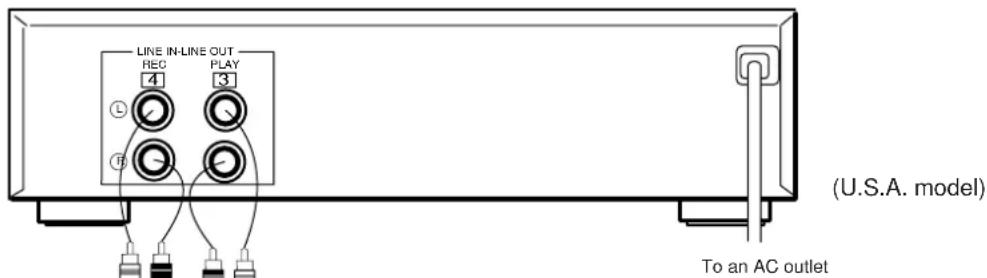
Make sure that power to both the deck and your amplifier/receiver is turned off before making any connections.
- The White plug on the paired connecting cables corresponds to the Left channel and the Red plug corresponds to the Right channel. Make sure that the left and right channel connections are properly made, and that the plugs are inserted firmly.
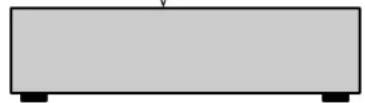
- The LINE OUT/PLAY jacks on the deck should be connected to the TAPE PB (Playback/Input) jacks on your amplifier/receiver, and the LINE IN/REC jacks on the deck should be connected to the REC OUT (Recording/Output) jacks on your amplifier/receiver.
- The LINE OUT terminals on this unit are numbered 3 and the LINE IN jacks are numbered 4. When connecting this unit to a YAMAHA amplifier or receiver whose terminals are numbered 1, 2, 3, 4 ... (etc.), connect this unit's LINE OUT terminals to the input terminals numbered 3 and connect this unit's LINE IN terminals to the output terminals numbered 4 on the rear panel of the amplifier or receiver.
- Connect the power cord to an AC wall outlet or to an AC outlet on the rear panel of your amplifier/receiver (if provided).
Amplifier or receiver
NOTES ON THIS MANUAL
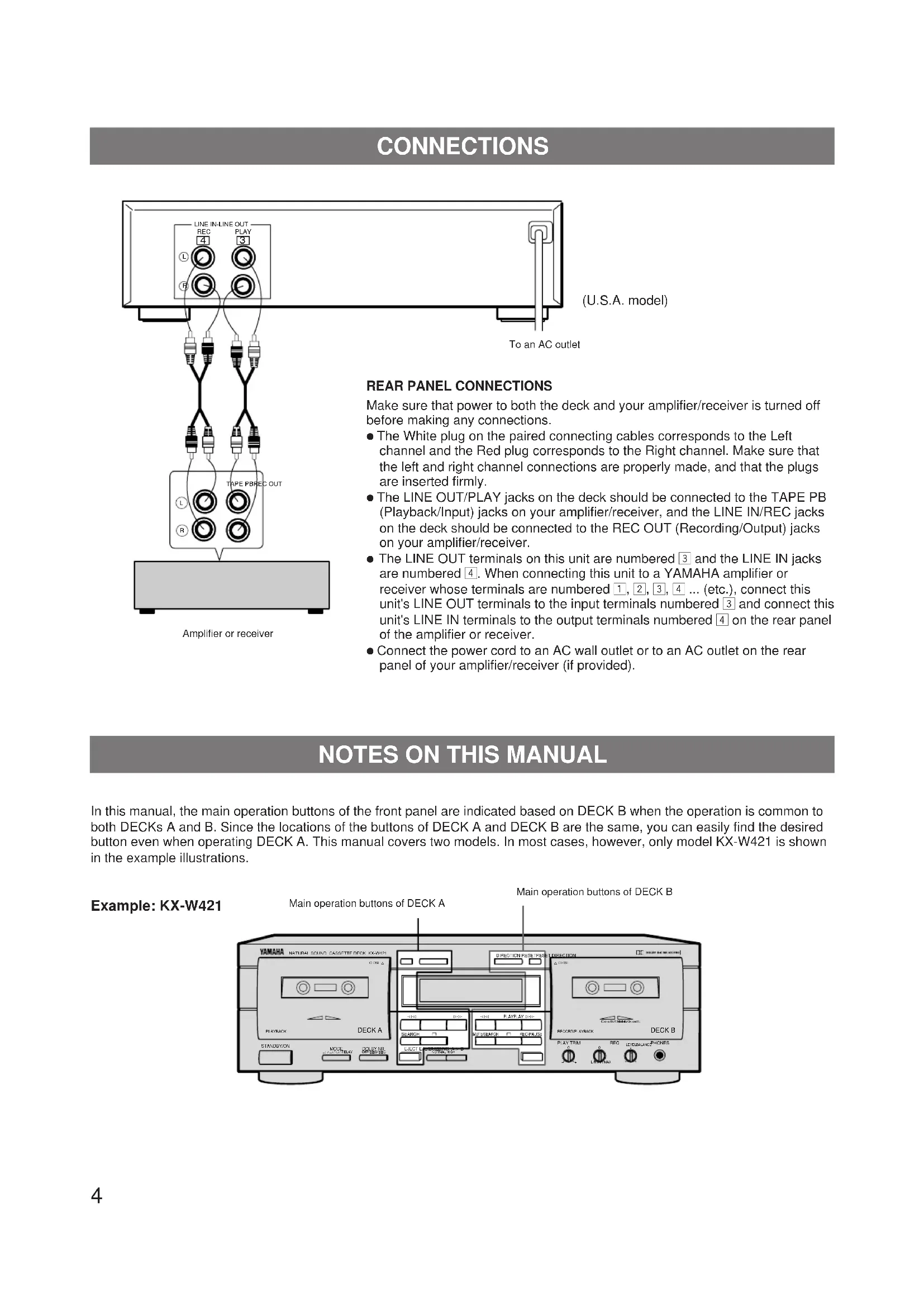
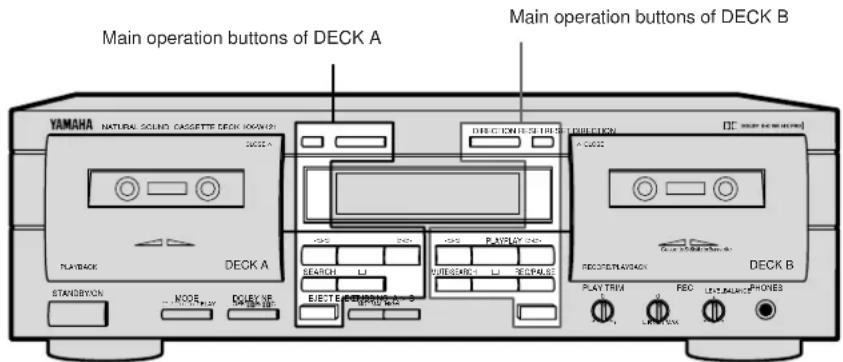
In this manual, the main operation buttons of the front panel are indicated based on DECK B when the operation is common to both DECKs A and B. Since the locations of the buttons of DECK A and DECK B are the same, you can easily find the desired button even when operating DECK A. This manual covers two models. In most cases, however, only model KX-W421 is shown in the example illustrations.
Example: KX-W421
PLAYBACK (Common to DECKs A and B)
Preparation for playback
- Turn on the STANDBY/ON switch.
- Set your amplifier or receiver to cassette deck function mode.
BASIC OPERATION - To play back a cassette tape
Example: KX-W421
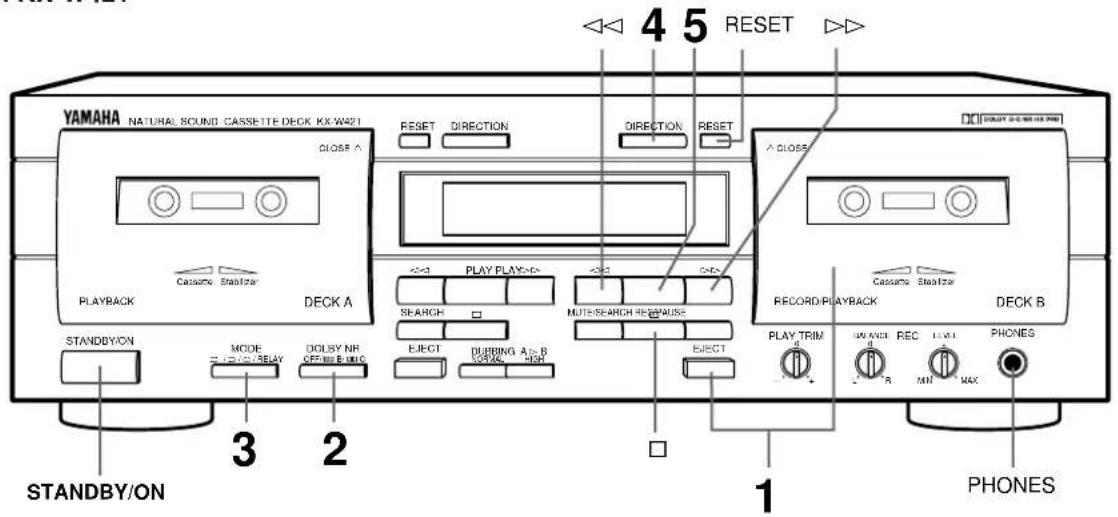
1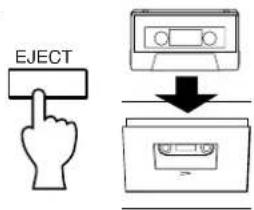 | Insert the cassette with the exposed tape side facing down. (The side facing you is called the forward side and the opposite side is called the reverse side.) To close the compartment, push the section of the compartment door marked △ CLOSE until it locks shut. | 2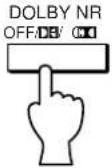 Refer to the following description. Refer to the following description. | ||
3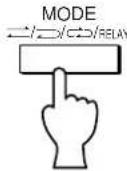 | Refer to the following description. | 4 | Select the tape running direction for DECK A or B. Each time this button is pressed, the tape running direction changes between forward (▷) and reverse (◀), and the corresponding indicator lights on the display. | 5 |
To fast forward or rewind the tape
When the tape running indicator ▷ is lit:
Pressing the ▷▶ button fast forwards the tape while pressing the ◀◀ button rewinds the tape.
When the tape running indicator ◀ is lit:
Pressing the ◀ button fast forwards the tape while pressing the ▷ button rewinds the tape.
To stop playback
Press the □ button. To remove the cassette tape, press the EJECT button. The cassette compartment door opens. To set the unit to standby mode, press the STANDBY/ON button.
To set the counter reading to "0000"
Press the RESET button. Use the tape counter to aid in locating a point on a tape (0000 to 9999).
DOLBY NR selector setting (in step 2)
Be sure to set the DOLBY NR selector according to the system used for recording.
OFF: For a tape recorded with DOLBY NR OFF.
☐ B: For a tape recorded with DOLBY B NR.
☐☐ C: For a tape recorded with DOLBY C NR.
REVERSE MODE selector setting (in step 3)
The auto reverse function allows the tape running direction be reversed automatically. Select an auto reverse mode


(二).
When playback or fast forwarding (or rewinding) of one side of a tape is finished, the deck stops at the end of the tape.
Both sides of the tape are played back. After playing, the deck stops at the end of the tape. (When the tape running direction is set to , only the reverse side is played.)
(2): Both sides of the tape are repeatedly played back (up to 8 times).
RELAY : Cassette tapes loaded in DECKs A and B are played back sequentially. (See "RELAY PLAYBACK" on page 8.)
Display during playback
The A or B indicator shown in the display represents the last deck operated.
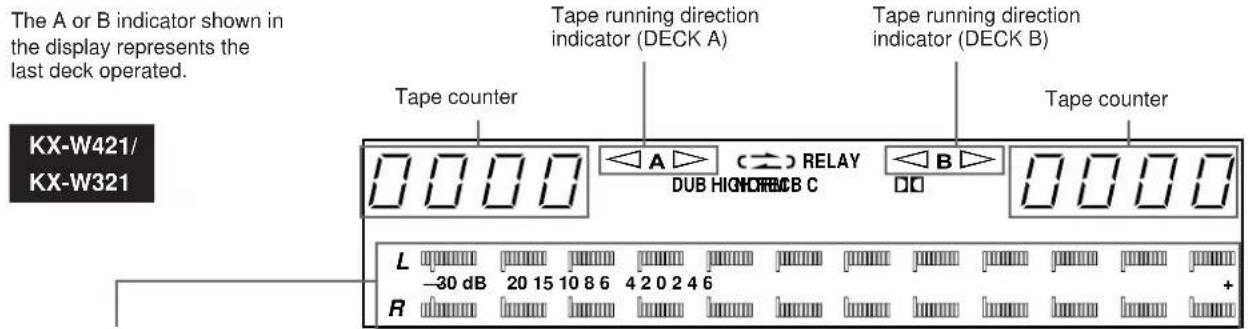
Peak level meters
Indicate the peaks of the signal levels during recording and playback over a -30 dB to +6 dB range. There are separate meters for each left and right channel. These level meters have a peak hold function which holds the peak level for about 1.5 seconds.
To adjust the volume level
Use the volume control of the amplifier or receiver.
Note
Never press the EJECT button when the tape is in motion.
To use headphones
Insert the headphones plug into the PHONES jack. Since the sound is also heard from the speakers, operate the amplifier to cut off the sound from the speakers for private listening.
Example: KX-W421
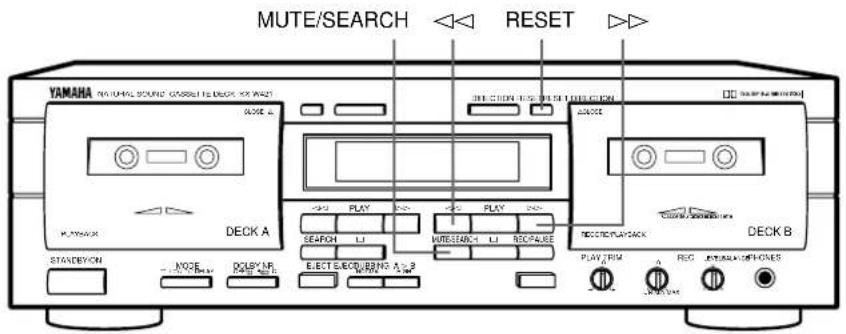
SELECTION SEARCH - To play back a desired selection by searching for the beginning of the selection
To search for the next selection
When the ▷ tape running indicator is lit:
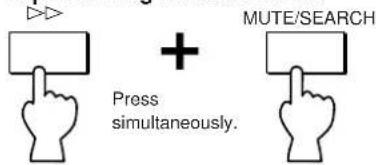
When the tape running indicator is lit:
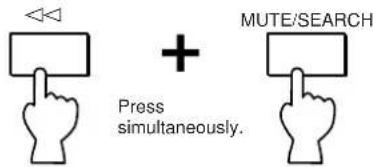
To search for the beginning of the current selection
When the ▷ tape running indicator is lit:
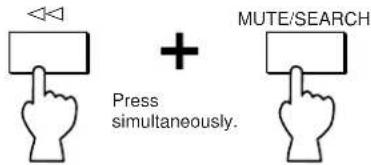
When the ◀ tape running indicator is lit:
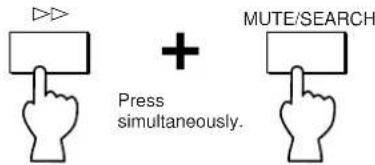
To search for the selection located before the current selection
- Operate the following buttons when the beginning of the current selection is being played.
When the ▷ tape running indicator is lit:
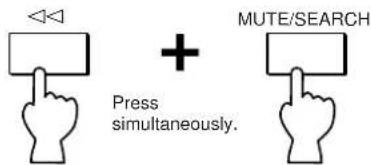
When the tape running indicator is lit:
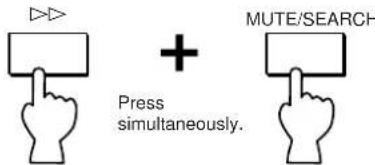
Notes
● The blank interval between selections must be at least 4 seconds long.
- Selection search may not operate properly with tapes recorded at a low recording level or which have excessive noise.
Example: KX-W421
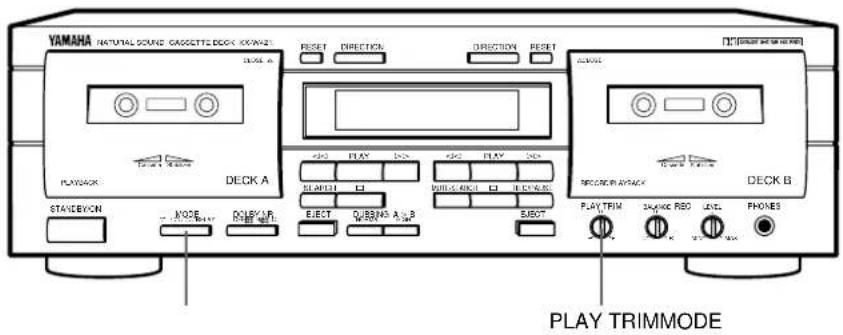
RELAY PLAYBACK - To play DECK A and DECK B sequentially
Load the cassette tapes into DECKs A and B, start playback from DECK A.
The playback patterns differ according to the setting of the MODE button. Refer to the following.
When the MODE button is set to (≡) RELAY :

flowchart
graph LR
    A["DECK A (forward side"] --> B["reverse side"]
    B --> C["DECK B (forward side"] --> D["reverse side"]
    D --> E["Up to 8 times"]
Display

When the MODE button is set to (→):

flowchart
graph LR
    A["DECK A (forward side → reverse side)"] --> B["Up to 8 times"]
    C["DECK B (forward side → reverse side)"] --> D["Up to 8 times"]

When the MODE button is set to ☑:


When the MODE button is set to ☑:
DECK A (forward side or reverse side) DECK B (forward side or reverse side)

PLAY TRIM CONTROL ADJUSTMENT (KX-W421 only)
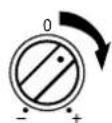
When the level of high frequencies is either over emphasized or absent while playing a tape recorded on another cassette deck, adjust the high frequency response with the PLAY TRIM control.
When high frequencies are too loud, attenuate the high frequencies.
When high frequencies are too soft, boost the high frequencies.
PLAY TRIM
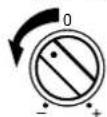
PLAY TRIM
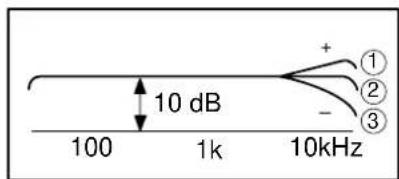
①High frequency sound is too loud.
②Flat
③High-frequency sound is too soft.
RECORDING
Preparation for recording
- Turn on the STANDBY/ON switch.
- Set your amplifier or receiver to cassette deck function mode.
BASIC OPERATION - To record a program source
Example: KX-W421
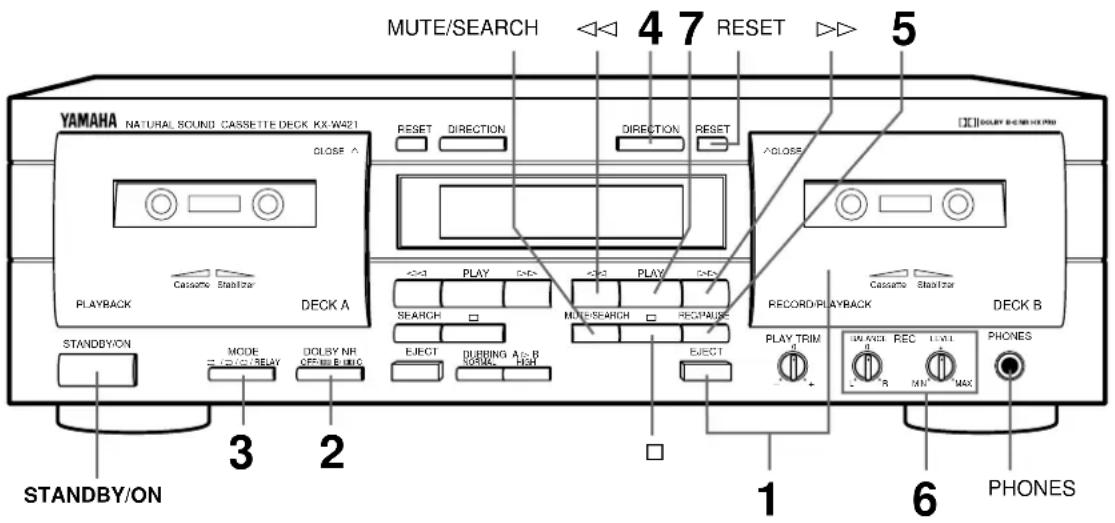
1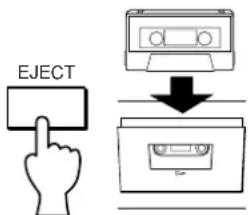 Insert the cassette into DECK B with the exposed tape side facing down. (The side facing you is called the forward side and the opposite side is called the reverse side.)To close the compartment, push the section of the compartment door marked △ CLOSE until it locks shut. Insert the cassette into DECK B with the exposed tape side facing down. (The side facing you is called the forward side and the opposite side is called the reverse side.)To close the compartment, push the section of the compartment door marked △ CLOSE until it locks shut. | 2[IMAGE]Refer to the following description. | 3[IMAGE]Refer to the following description. | ||
4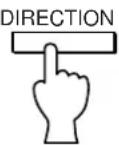 Select the tape running direction.(Press the DIRECTION button for DECK B.) Each time the button is pressed, the tape running direction changes between forward (>) and reverse (<), and the indicator lights on the display. Select the tape running direction.(Press the DIRECTION button for DECK B.) Each time the button is pressed, the tape running direction changes between forward (>) and reverse (<), and the indicator lights on the display. | 5[RECAUSE] The REC indicator lights on the display.The deck enters the Rec/Pause mode. The REC indicator lights on the display.The deck enters the Rec/Pause mode. | 6[RECELLEVELBALANCE]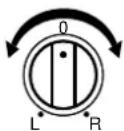  Play the program source to be recorded and adjust the recording level and balance.(KX-W321 does not have a REC BALANCE control.) Play the program source to be recorded and adjust the recording level and balance.(KX-W321 does not have a REC BALANCE control.) | 7[PLAY] Recording starts. Recording starts. | |
DOLBY NR selector setting (in step 2)
Set the DOLBY NR selector according to your purpose.
OFF: No noise reduction.
B: For recording the sources with Dolby B NR.
☐☐ C: For recording the sources with Dolby C NR.
●Dolby noise reduction is an extremely effective method of reducing undesirable background hiss on tapes. This unit incorporates both Dolby B NR and the newer Dolby C NR system. Dolby C NR is approximately twice as effective as the earlier Dolby B NR.
REVERSE MODE selector setting (in step 3)
The auto reverse function allows the tape running direction to be reversed automatically. Select the auto reverse mode
(→) or manual reverse mode (≠)
- When recording on one side of a tape is finished, the deck stops at the end of the tape.
⇒: Both sides of a tape are recorded. After recording, the deck stops at the end of the tape.
- When the tape running direction is set to , only the reverse side is recorded.
- If you select (→) or (→) RELAY, the reverse mode automatically switches to (→) in step 5.
Setting the recording level (in step 6)
Play the loudest passage of the source to be recorded and watch the meter readings.
Adjust the REC LEVEL control so that the highest peak reaches +4 of the optimum recording level. Normally, it is best to adjust the REC BALANCE control (KX-W421 only) such that the left and right meter readings are even.
Display during recording
The A or B indicator shown in the display represents the last deck operated.

Peak level meters
Indicate the peaks of the signal levels during recording and playback over a -30dB to +6dB range. There are separate meters for each left and right channel. These level meters have a peak hold function which holds the peak level for about 1.5 seconds.
To stop recording:
Press the □ button.
To stop recording temporarily:
Press the REC/PAUSE button. To resume recording, press the PLAY button.
Example: KX-W421
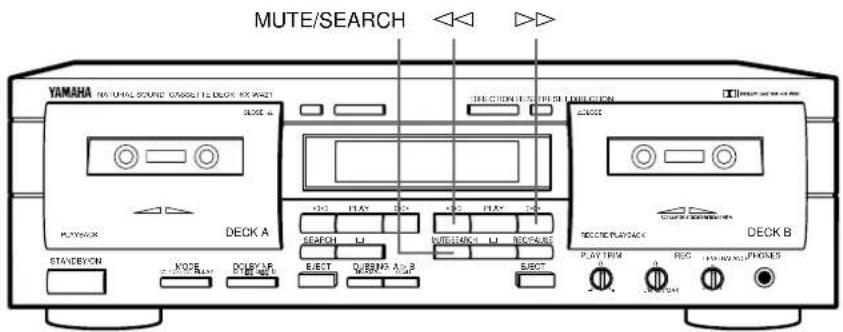
REC MUTE OPERATION - Inserting a blank space during recording
During recording:
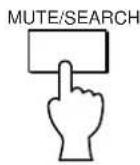
During Rec mute operation, the REC indicator blinks.
A 4-second blank interval is automatically recorded on the tape and then the deck enters Rec/Pause mode. If a blank interval longer than 4 seconds is desired, keep pressing for as long as you want. When the MUTE/SEARCH button is released, the deck enters Rec/Pause mode after making a 4-second blank interval. To resume recording, press the PLAY button.
- If a blank interval shorter than 4 seconds is desired, press the PLAY button at the desired point during Rec mute mode. Recording will be resumed from that point.
REC RETURN OPERATION - To return to the point at which the recording started
During recording:
When the ▷ indicator is lit:
When the indicator is lit:
DOLBY HX PRO DYNAMIC BIAS SERVO SYSTEM (KX-W421 only)
This unit incorporates the Dolby HX Pro system which automatically controls the effective bias to reduce distortion and noise, improving high frequency response during recording. Tapes recorded with this system retain the same high quality even when played back on any other cassette deck.
- If you press the PLAY button during recording, Rec Return automatically rewinds the tape to the point where the PLAY button was pressed.* If you reset the tape counter to "0000" during recording, Rec Return automatically rewinds the tape to the "0000" point. Rec Return functions according to the most recent operation. For example, if you reset the tape counter to "0000" and then press the PLAY button later, Rec Return rewinds to the point where the PLAY button was pressed.
* The PLAY button cannot be used to mark a return point while dubbing.
Synchronized recording function
When operating this unit in combination with the YAMAHA CD Player which has SYNCHRO button on its remote control transmitter, CD Synchronized recording function can be utilized. This function is operated with the remote control transmitter of the CD Player. (Regarding the operation, refer to the manual of the CD Player.)
DUBBING (From DECK A to DECK B)
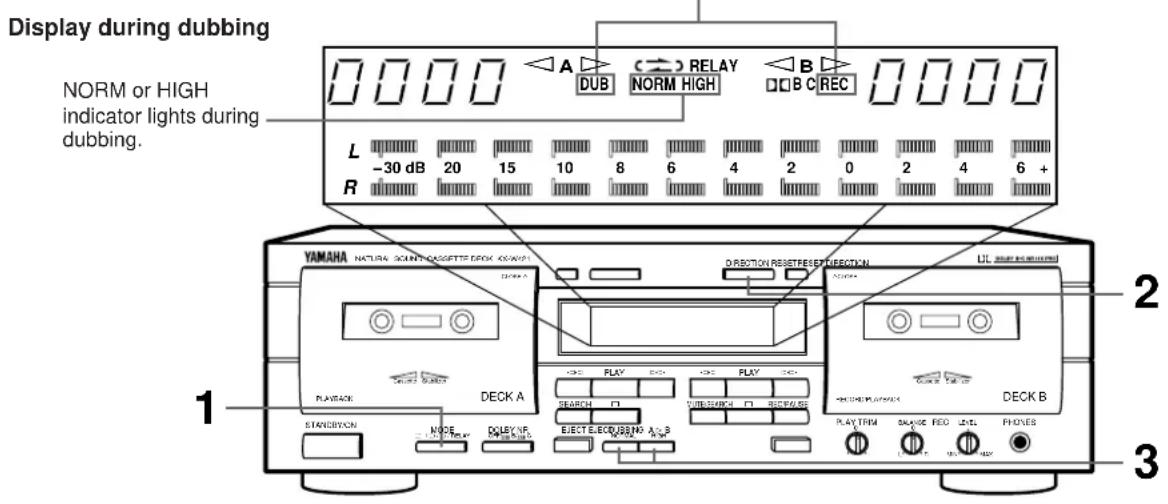
You can make dubbing from DECK A to DECK B. Open the cassette compartments by pressing the EJECT buttons and load a blank cassette tape in DECK B and the original cassette tape in DECK A.
Example: KX-W421
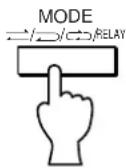
1
Set the MODE selector to or position.
If you select (or)
(→) RELAY, the reverse mode automatically switches to →).
2
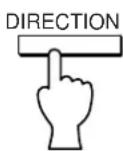
Set the DIRECTION buttons for DECKs A and B.
3
Set the dubbing speed to either NORMAL (normal speed) or HIGH (twice the normal speed) with the DUBBING buttons*. Dubbing starts automatically.
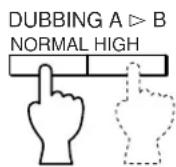
The corresponding NORM or HIGH indicator lights on the display.
* Higher quality sound will be obtained with the NORMAL setting.
To stop dubbing
Press the □ button. (If you press the □ button on DECK B, both decks stop simultaneously and the dubbing mode is cancelled. If you press the □ button on DECK A, DECK A stops immediately and then DECK B stops after recording a 4-second blank section.)
When the tape in DECK B reaches its end, DECK B stops and then DECK A stops.
When the tape in DECK A reaches its end, DECK A stops and DECK B stops after providing a blank section of about 4 seconds.
Available operations while dubbing
The Rec Return function can be carried out on DECK B. Refer to "REC RETURN OPERATION" on the previous page.
Note
During dubbing, Dolby NR is automatically set to off and the recorded tape can be dubbed as is. (When the tape to be dubbed is recorded with Dolby NR, this effect is also dubbed.)
PLAY TRIM control adjustment (KX-W421 only)
For normal use, set the PLAY TRIM control to the center position.
When the high frequencies sound is too noticeable or too weak while monitoring the sound of DECK B, compensate the high frequency response with the PLAY TRIM control before dubbing. The compensated sound can be dubbed onto DECK B.
As the compensation result depends on the quality of the tape loaded in DECK A, the monitored sound cannot be recorded as it is.
Refer to "PLAY TRIM CONTROL ADJUSTMENT" on page 8.
CASSETTE TAPES
CASSETTE TAPES
There are many different types of cassette tapes available. However, they all conform to standard specifications so any brand may be used with the deck.
- Classification of Cassette Tapes by Formulation: Cassette tapes are available in four basic types depending on their formulation, or type of magnetic material and manufacturing process. These four types are commonly known as Normal (Type I/NORM), Chrome (Type II/HIGH
), Ferrichrome (Type III/FeCr), and Metal (Type IV/METAL), and they each require specific tape deck adjustments for optimum performance.
* YAMAHA does not recommend the use of 120 minute length cassettes since the extreme thinness of the tape makes them susceptible to mechanical and recording problems.
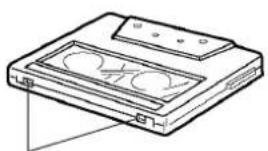
AUTO TAPE SELECTOR DETECTION SLOTS
The deck has a built-in Auto Tape Selector which automatically adjusts for the proper bias, level and equalization according to the tape formulation — all you have to do is to load a cassette and the Auto Tape Selector does the rest.
The Auto Tape Selector determines which type of tape is loaded by sensing detector slots in the top of the tape shell. Each tape formulation has its own characteristic hole markings standardized by the tape industry.
- Early model Metal (Type IV/Metal) tape formulation cassette shells do not have the slots for Auto Tape Selector operation. As a result, early model Metal type tapes recorded on another deck will be played back with the deck at the Chrome (Type II/HIGH
) settings. YAMAHA does not recommend using this kind of tape.
●The deck does not have the required setting for Ferrichrome (Type III/FeCr) tape, since this tape formulation is not widely used. Should you use a Ferrichrome tape, it will be recorded and played back at the Normal (Type I/NORM) settings, which will result in an unnatural high frequency emphasis. This effect may be compensated for somewhat by adjusting the PLAY TRIM control and/or the tone controls of your amplifier/receiver during playback.
TYPE II TYPE IV
natural_image
Line drawing of a CD-ROM drive with two buttons and a front panel (no text or symbols)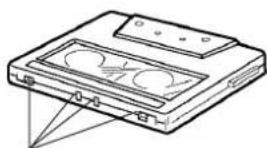
natural_image
Line drawing of a CD-ROM drive with a screen and indicator lights (no text or symbols)Detector slots Detector slots
PROTECTING YOUR RECORDINGS
All cassette tapes are provided with erasure protection holes to prevent accidental erasure of recorded contents. There is a small tab covering the hole on each side of the cassette, and it should be broken off after recording the tape. Without this tab covering the hole, it is impossible to record onto that tape. Thus, you can safely protect a recording for as long as you wish without fear of accidental erasure. Should you wish to use a cassette tape protected in this way for recording, simply covering the hole with adhesive tape will permit erasure and re-recording.
- When using Chrome (Type II/HIGH
natural_image
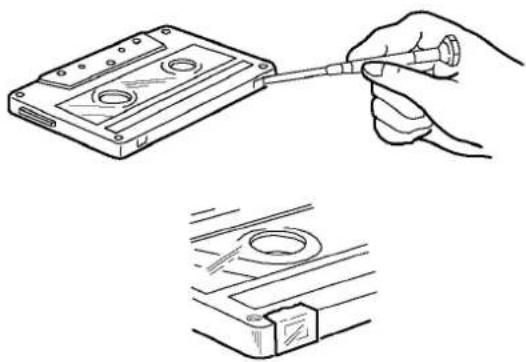
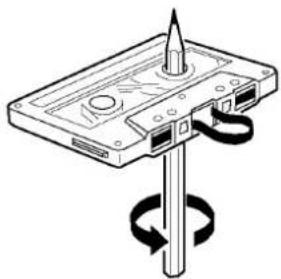
Illustration of a hand connecting a cable to a compact drive case (no text or symbols present)As a precaution against tape entanglement and damage, remove any slack in the tape before inserting cassettes into the deck. This is accomplished by inserting a pencil, pen or similar object into one of the spools and gently winding it until all the slack is removed. You do not have to wind it too tightly.
Be careful not to touch the tape part itself. It is very delicate and touching it may damage the tape and its recorded contents.
natural_image
Diagram of a computer flash drive with a rotating shaft and screwdriver (no text or symbols)STORING CASSETTES
After putting a cassette tape back into its case, store it in a location away from exposure to direct sunlight, humidity, high temperatures, and magnetic fields (away from television sets, speakers, etc.). High temperatures and humidity will damage the tape itself, while exposure to magnetic fields may cause a loss of recorded material. Avoid touching the tape surface with your fingers, since dirt or finger oil will contaminate the deck's heads.
MAINTENANCE
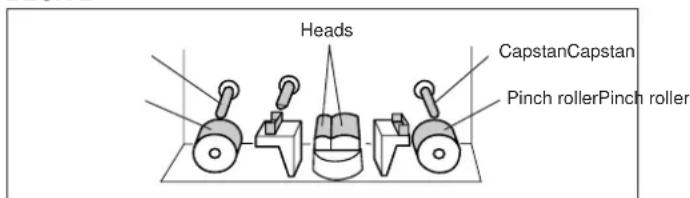
CLEANING OF THE TAPE PATH
Continued high quality performance of your deck is dependent upon periodic cleaning of the heads, capstan, pinch roller, and all surfaces over which the tape travels. Normal use will cause an accumulation of dirt and dust on the heads, capstans, and pinch rollers. This can lead to poor sound quality, drop outs (intervals with no sound), unsteady tape speed, loss of high frequency response, etc. Thus, clean the heads and all surfaces over which the tape travels with a commercially available cleaning cassette and fluid type cleaner.
DECK B
DEMAGNETIZATION
After 20-30 hours of use, enough residual magnetism will build up on the heads to cause poor high frequency reproduction. At this time you should use a commercially available cassette tape-type head demagnetizer.
- When cleaning the tape path or demagnetizing the heads, be sure to follow carefully the instructions of the concerning materials such as cleaning fluid or head demagnetizer.
OPTIONAL REMOTE CONTROL TRANSMITTER
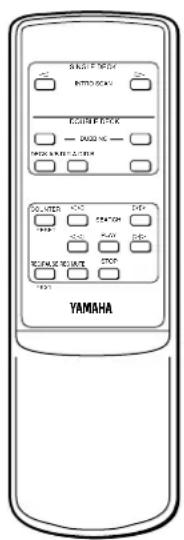
With the optional remote control transmitter RKX1, you can operate this unit at your listening position. For details, refer to the instruction manual supplied with the remote control transmitter.
TROUBLESHOOTING
If your cassette deck fails to operate normally, check the following table. It lists common operating errors and simple measures which you can take to correct the problem. If it cannot be corrected, or the symptom is not listed, disconnect the deck's power cord and contact your authorized YAMAHA dealer or authorized service center for help.
| Fault | Cause | Cure |
| Tape doesn't move in recording or playback. | ●Power plug is not properly plugged in. ●Cassette shell is warped or damaged. | ●Reinsert plug properly. ●Do not play damaged tapes. |
| If it happens that this unit does not work normally. | ●There is an influence of strong external noise (lightning, excessive static electricity, etc.) or a misoperation was performed while using this unit. | ●Turn the unit off and disconnect the AC power from the AC outlet. After about 30 seconds have passed, connect the power and try again. |
| REC/PAUSE button fails to function. | ●No cassette tape loaded. ●Protective tabs are broken off. | ●Load a cassette tape. ●Change tape or cover protective hole with adhesive tape. |
| Sounds become faint and sometimes inaudible. | ●Head is dirty. ●Head is magnetized. ●Tape is damaged or of poor quality. | ●Clean head. ●Demagnetize head using head demagnetizer. ●Change to a different tape. |
| Recorded sound is distorted. | ●Tape is bad (stretched, deformed, etc.). ●Cassette shell is warped. ●Recording level is too high. | ●Replace with a fresh tape. ●A warped cassette shell cannot be fixed. Replace with another tape and test. ●Check input level with signal level meter and use lower rec level when recording. |
| Tape is playing back, but no sound is heard. | ●Faulty connection between deck and stereo amplifier/receiver. | ●Check and secure connections. |
| Excessive noise. | ●Head is dirty. ●Head is magnetized. ●Worn out or poor quality tape. ●Connection(s) improperly made. ●Affected by external electrical noise. | ●Clean head. ●Demagnetize head with head demagnetizer. ●Change to better tape. ●Check input and output connections and reinsert properly. ●Move deck away from electrical appliances (TV, fluorescent light, electric blanket, etc.). |
| Excessive wow (wavering of the sound). | ●Dirty capstan, pinch roller, etc., or poor tape. ●Tape is wound unevenly. | ●Clean capstan and pinch roller, or change to better tape. ●Rewind tape. |
| Tape stops in the middle of recording or playback. | ●Slack tape, or tape spillage wound around capstan. | ●Insert pencil in hole in cassette shell and turn to take up slack. |
| Fails to record. | ●REC LEVEL control is set to too low. ●Protective tabs are broken off. | ●Adjust REC LEVEL control. ●Change tape or cover protective hole with adhesive tape. |
| Search does not operate correctly. | ●Blank section is too short. ●Recorded section has low-level portions. ●Conversation, etc. has been recorded. | ●Blank sections must be at least 4 seconds long. ●No remedy ●No remedy |
| High frequencies in the playback sound are emphasized and unpleasant to listen to, and noise level (hiss) is also high. | ●Dolby NR-recorded tape is played back in OFF position. | ●Play back in appropriate Dolby NR position. |
| Playback sound is muffled and high frequencies are inaudible. | ●Normally-recorded tape is played back in Dolby NR.●Heads are dirty.●Heads are magnetized. | ●Play back in OFF position.●Clean heads and carry out demagnetization with head demagnetizer. |
| When playing back tapes recorded on other decks, meter deflections are greater (smaller) than when recorded. | ●Basic levels are different for different cassette decks. | ●This is not a fault. |
| The remote control transmitter cannot be operated. | ●The batteries are exhausted.●The remote control transmitter is operated from an incorrect distance or angle.●The remote control sensor is lighted strongly. | ●Replace batteries.●Operate it from less than 7 meters (about 23 ft.) and 30°.●Place the unit away from the strong light. |
SPECIFICATIONS
Type.... Auto reverse 4-track, 2-channel recording and playback stereo double cassette deck
Motors ...... DC servo motor x 2 (main)
Heads ...... Recording/playback: Hard Permalloy x 1
Erase: Double-gap Ferrite x 1
Playback: Hard Permalloy x 1
Rapid Transport 100 sec. (C-60)
Wow and Flutter
WRMS 0.08%
W.Peak ±0.15%
Signal-to-Noise Ratio
(Dolby NR off)....58 dB
(Dolby B NR on) 66 dB
(Dolby C NR on) 74 dB
Frequency Response (-20 dB)
Type I/Normal.... 20 \~ 17,000 Hz ±3 dB
Type II/High (CrO2) 20 \~ 18,000 Hz ±3 dB
Type IV/Metal 20 \~ 20,000 Hz ±3 dB
Type I/Normal.... 20 \~ 16,000 Hz ±3 dB
Type II/High (CrO2) 20 \~ 17,000 Hz ±3 dB
Type IV/Metal 20 \~ 19,000 Hz ±3 dB
Harmonic Distortion
KX-W421 ....less than 0.8%
KX-W321 ....less than 1.0%
Input Sensitivity/Impedance
Line 100 mV/43 k-ohms
Output Level
Line 570 mV/1.4 k-ohms
Phones.... 0.25 mV/8 ohms
Channel Separation (1 kHz)..... more than 40 dB
Crosstalk (125 Hz) more than 55 dB
GENERAL
Power Supply
U.S.A. and Canada model 120 V, 60 Hz
Europe and U.K. model 230 V, 50 Hz
Australia model.... 240 V, 50 Hz
General and China model. 110/120/220/240 V, 50/60 Hz
Power Consumption
KX-W421 14 W/7 W (Standby)
KX-W321
U.S.A. and Canada model....11 W/7 W (Standby)
Other models 12 W/7 W (Standby)
Dimensions (W x H x D).... 435 x 146 x 279 mm
(17-1/8" × 5-3/4" × 11")
Weight 5.0 kg (11 lbs.)
Accessory
Audio cord 1 pair
* Specifications subject to change without notice.
ATTENTION: LIRE CECI AVANT DE FAIRE FONCTIONNER VOTRE APPAREIL.
natural_image
Line drawing of a rectangular electronic device with internal components and mounting holes (no text or symbols)natural_image
Illustration of a hand holding a screwdriver next to a cassette tape and a mechanical component (no text or symbols)ELIMINATION DU RELACHEMENT DE LA BANDE
natural_image
Diagram of a CD-ROM drive with a screw and rotating shaft (no text or symbols)ENTREPOSAGE DES CASSETTES
natural_image
Line drawing of a rectangular electronic device with internal components and mounting tabs (no text or symbols)natural_image
Illustration of a hand connecting a cable to a compact electronic device (no text or symbols present)STRAFFEN DES BANDES
natural_image
Diagram of a CD-ROM drive with a screw and rotating shaft (no text or symbols)INNEHÅLLSFÖRTECKNING
EGENSKAPER 48
ANSLUTNINGAR....49
ANGÅENDE DENNA BRUKSANVISNING 49
natural_image
Illustration of a hand connecting a cable to a compact drive (no text or symbols present)SPÄNN BANDET
natural_image
Diagram of a hard disk drive with a screw and rotating coil (no text or symbols)FÖRVARING AV KASSETTERNA
natural_image
Simple black horizontal line with an upward arrow at the top-left corner (no text or symbols)Fino ad 8 volte

natural_image
Line drawing of a rectangular electronic device with internal components and mounting holes (no text or symbols)natural_image
Illustration of a hand connecting a cable to a compact electronic device (no text or symbols present)ELIMINATE GLI ALLENTAMENTI DEL NASTRO
natural_image
Diagram of a flatbed hard drive with a screw and rotating coil, no text or symbols presentCOME CONSERVARE LE CASSETTE
(Dolby NR off) 58 dB
(Dolby B NR on)....66 dB
(Dolby C NR on)....74 dB
natural_image
Simple black horizontal line with an upward arrow at the top (no text or symbols)Hasta 8 veces
natural_image
Line drawing of a rectangular electronic device with internal components and mounting holes (no text or symbols)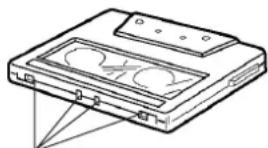
natural_image
Line drawing of a CD or DVD drive case with no visible text or symbolsnatural_image
Illustration of a hand holding a cable inserted into a compact drive case, with no text or symbols present.natural_image
Diagram of a CD-ROM drive with a rotating shaft and screwdriver, showing no text or symbolsPARA GUARDAR SUS CASETES
KX-W421 14 W/7 W (Espera)
KX-W321
OPNAMEDEMPING (REC MUTE) 101
BEGINPUNT VAN DE OPNAME (REC RETURN)..... 101
DOLBY NR keuzetoets (in stap 2)
natural_image
Simple horizontal line with an upward arrow at the top (no text or symbols)Maximaal 8 keer
natural_image
Line drawing of a rectangular electronic device with internal components and mounting holes (no text or symbols)natural_image
Line drawing showing a hand inserting a cable into a compact drive case (no text or symbols)EEN LUS IN DE CASSETTEBAND
natural_image
Diagram of a CD-ROM drive with a screw and rotating coil (no text or symbols)OPBERGEN VAN CASSETTES
- NOTE:
- WARNING
- For U.K. customers
- IMPORTANT
- FOR CANADIAN CUSTOMERS
- TABLE OF CONTENTS
- FEATURES
- CONNECTIONS
- REAR PANEL CONNECTIONS
- NOTES ON THIS MANUAL
- PLAYBACK (Common to DECKs A and B)
- Preparation for playback
- To fast forward or rewind the tape
- To stop playback
- To set the counter reading to "0000"
- DOLBY NR selector setting (in step 2)
- REVERSE MODE selector setting (in step 3)
- Display during playback
- To adjust the volume level
- Note
- To use headphones
- SELECTION SEARCH - To play back a desired selection by searching for the beginning of the selection
- Notes
- RELAY PLAYBACK - To play DECK A and DECK B sequentially
- PLAY TRIM CONTROL ADJUSTMENT (KX-W421 only)
- RECORDING
- Preparation for recording
- Setting the recording level (in step 6)
- Display during recording
- To stop recording:
- To stop recording temporarily:
- REC MUTE OPERATION - Inserting a blank space during recording
- REC RETURN OPERATION - To return to the point at which the recording started
- DOLBY HX PRO DYNAMIC BIAS SERVO SYSTEM (KX-W421 only)
- Synchronized recording function
- DUBBING (From DECK A to DECK B)
- To stop dubbing
- Available operations while dubbing
- CASSETTE TAPES
- AUTO TAPE SELECTOR DETECTION SLOTS
- PROTECTING YOUR RECORDINGS
- STORING CASSETTES
- MAINTENANCE
- CLEANING OF THE TAPE PATH
- DEMAGNETIZATION
- OPTIONAL REMOTE CONTROL TRANSMITTER
- TROUBLESHOOTING
- SPECIFICATIONS
- GENERAL
- ATTENTION: LIRE CECI AVANT DE FAIRE FONCTIONNER VOTRE APPAREIL.
- ELIMINATION DU RELACHEMENT DE LA BANDE
- ENTREPOSAGE DES CASSETTES
- STRAFFEN DES BANDES
- INNEHÅLLSFÖRTECKNING
- SPÄNN BANDET
- FÖRVARING AV KASSETTERNA
- ELIMINATE GLI ALLENTAMENTI DEL NASTRO
- COME CONSERVARE LE CASSETTE
- PARA GUARDAR SUS CASETES
- DOLBY NR keuzetoets (in stap 2)
- EEN LUS IN DE CASSETTEBAND
- OPBERGEN VAN CASSETTES
Brand : YAMAHA
Model : KXW321
Category : Cassette player