T.16000M FCS SPACE SIM DUO - Controller THRUSTMASTER - Free user manual and instructions
Find the device manual for free T.16000M FCS SPACE SIM DUO THRUSTMASTER in PDF.



| Product type | Ambidextrous joystick for space and flight simulation |
| Brand | Thrustmaster |
| Model | T.16000M FCS SPACE SIM DUO |
| Connectivity | USB (plug-and-play, compatible with PC Windows 10/11) |
| Precision technology | H.E.A.R.T™ (HallEffect AccuRate Technology) with 3D magnetic sensor |
| X/Y axis resolution | Over 268 million values (16384 x 16364) |
| Number of action buttons | 15 (configurable for right-handed or left-handed) |
| Digital trigger | Yes, on the stick |
| Directional pad | Point of view (POV) for instant views |
| Throttle control | Yes, for acceleration control |
| Rudder | By rotating the stick (yaw axes) |
| Central backlight | Green, activates at the slightest movement, turns off after 3 seconds of inactivity |
| Ambidextrous | Yes, adjustable handrest, thumb rest, and button layout |
| Power supply | Via computer USB port |
| Weight | Approximately 600 g (estimate) |
| Dimensions (L x W x H) | Approximately 20 x 20 x 25 cm (estimate) |
| Installation | Automatic on Windows 10/11, integrated drivers |
| Maintenance | Clean with a soft, dry cloth |
| Warranty | 2 years in the European Union (in accordance with legal rights) |
| General information | Made in China, © 2022 Guillemot Corporation |
| Recycling | Do not dispose of with household waste, drop off at a WEEE collection point |
Frequently Asked Questions - T.16000M FCS SPACE SIM DUO THRUSTMASTER
User questions about T.16000M FCS SPACE SIM DUO THRUSTMASTER
0 question about this device. Answer the ones you know or ask your own.
Ask a new question about this device
Download the instructions for your Controller in PDF format for free! Find your manual T.16000M FCS SPACE SIM DUO - THRUSTMASTER and take your electronic device back in hand. On this page are published all the documents necessary for the use of your device. T.16000M FCS SPACE SIM DUO by THRUSTMASTER.
USER MANUAL T.16000M FCS SPACE SIM DUO THRUSTMASTER
Most Accurate Ever : 16000 x 16000 dots stick resolution
natural_image
Technical line drawing of a joystick controller with two views (top and side), no text or symbols present.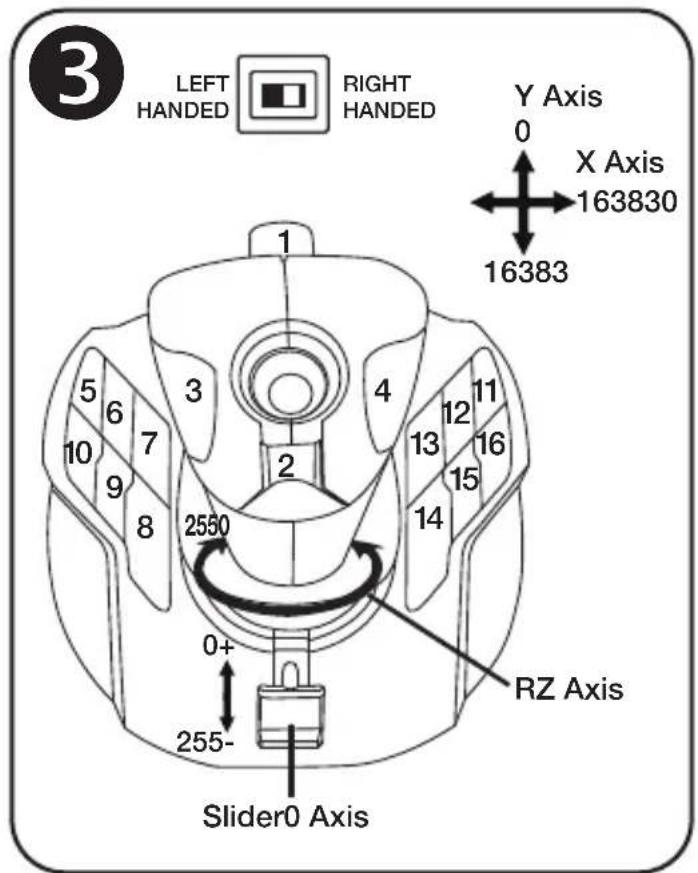
Compatible: PC User Manual
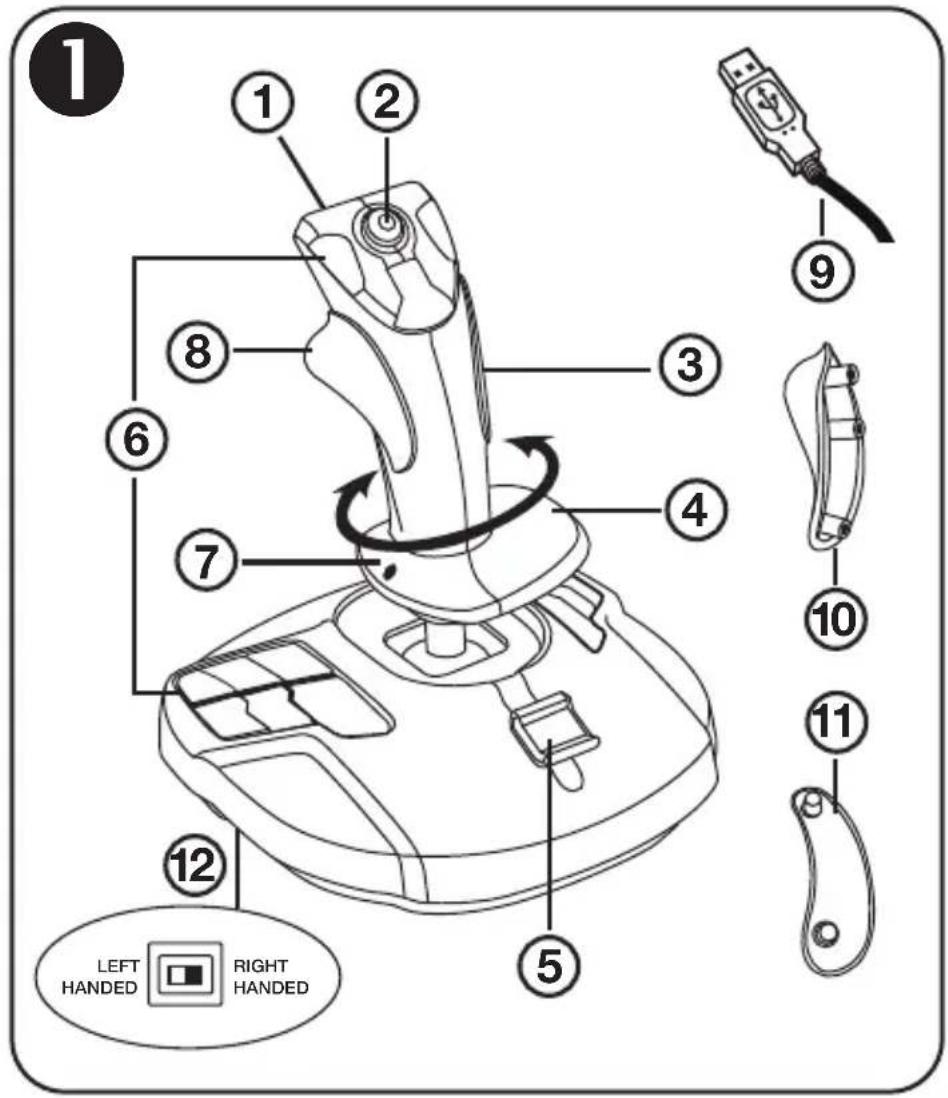
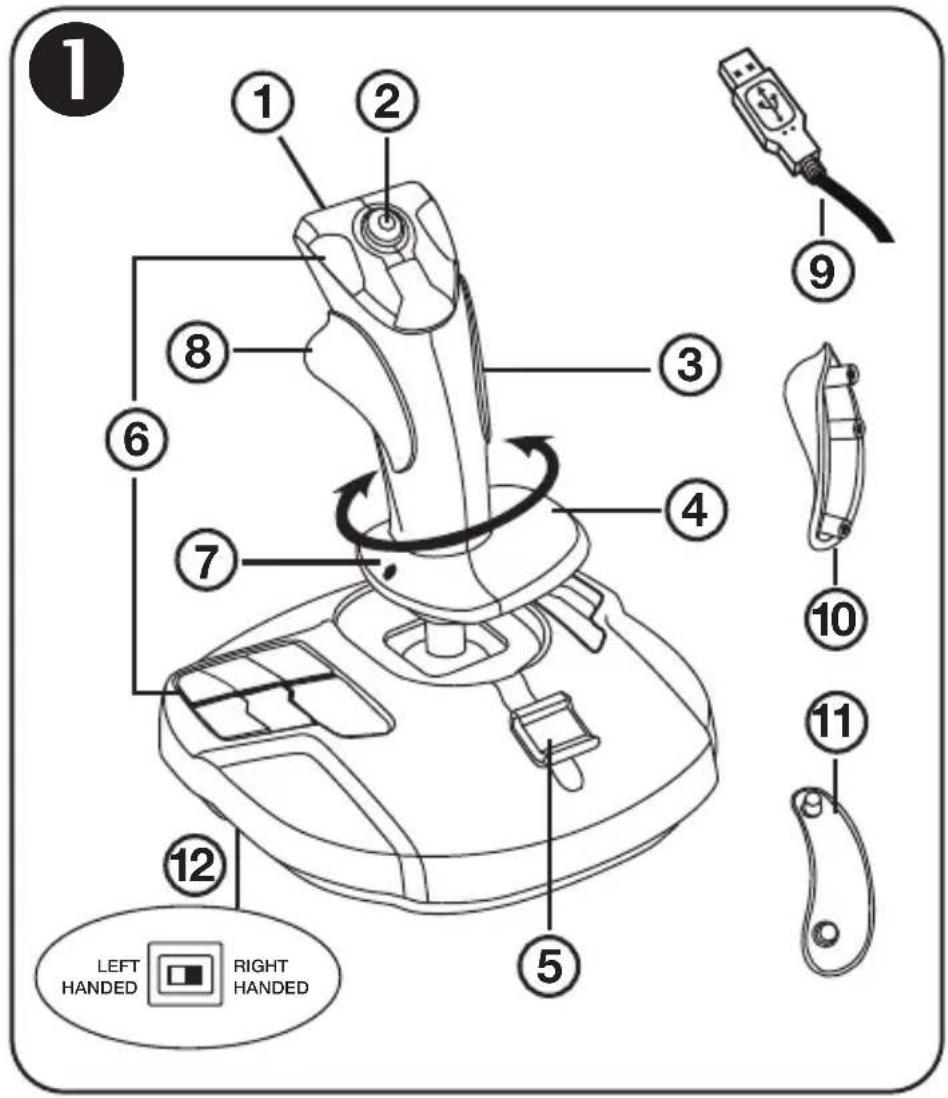
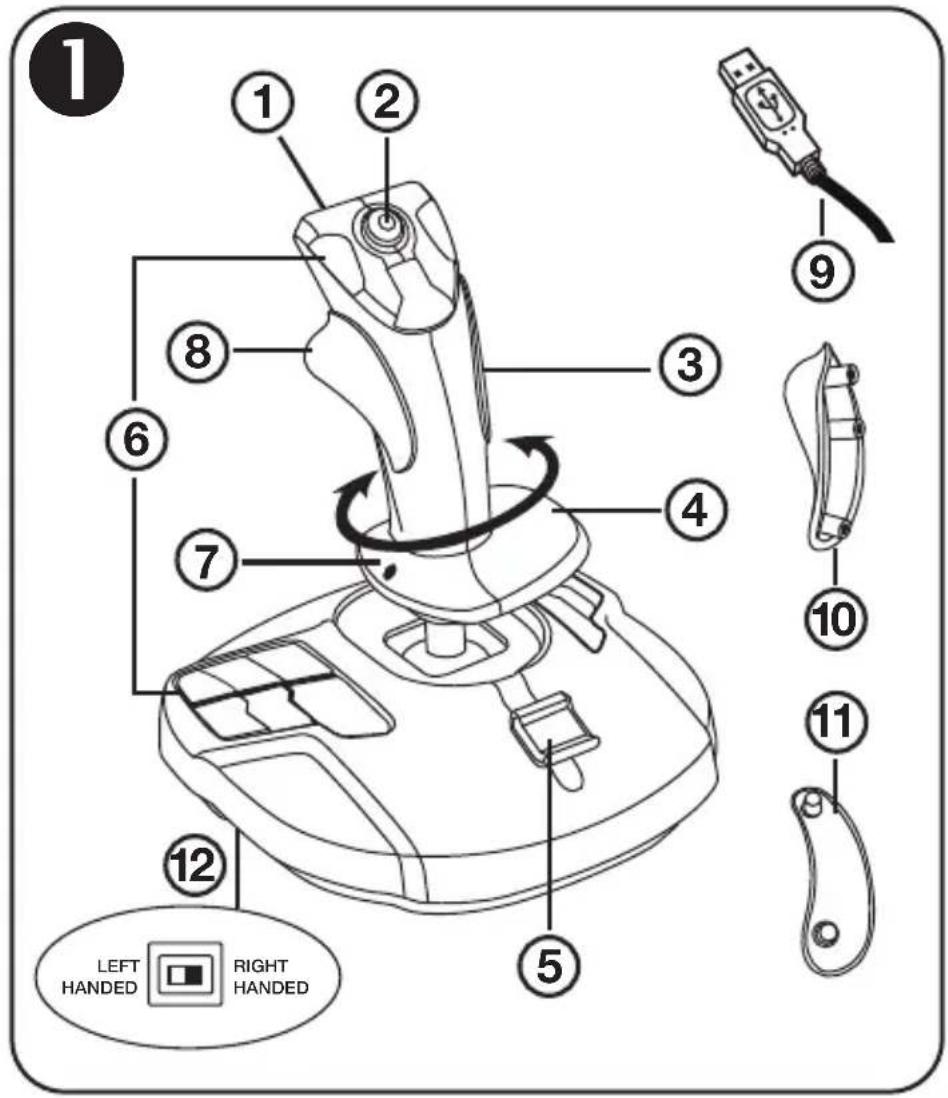
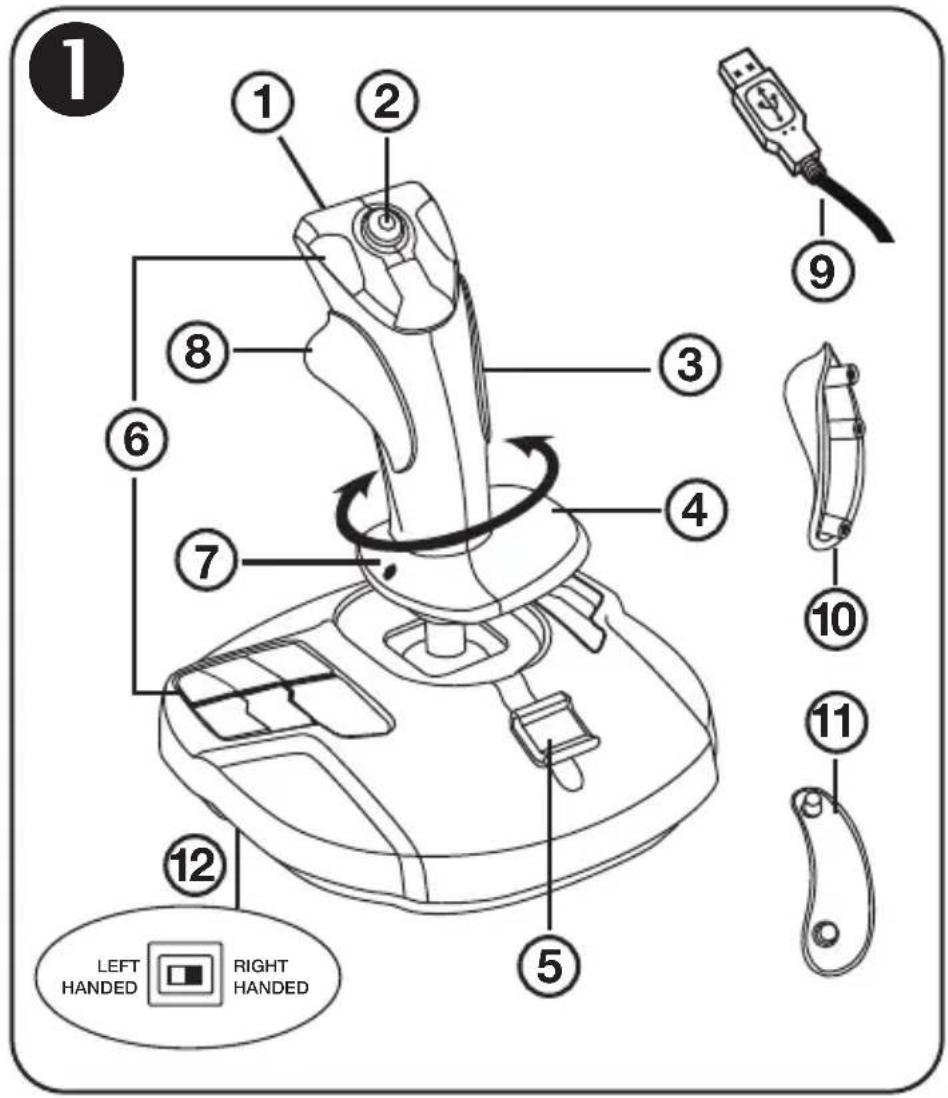
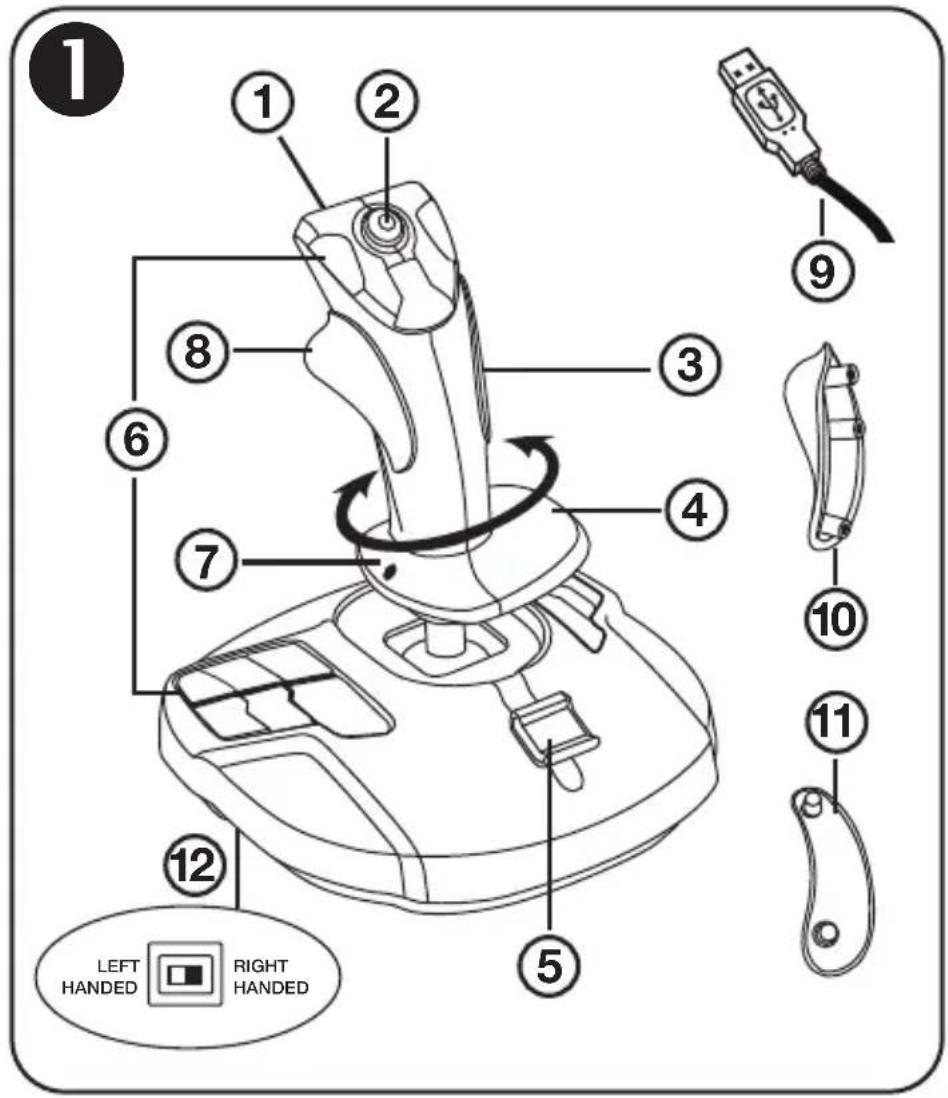
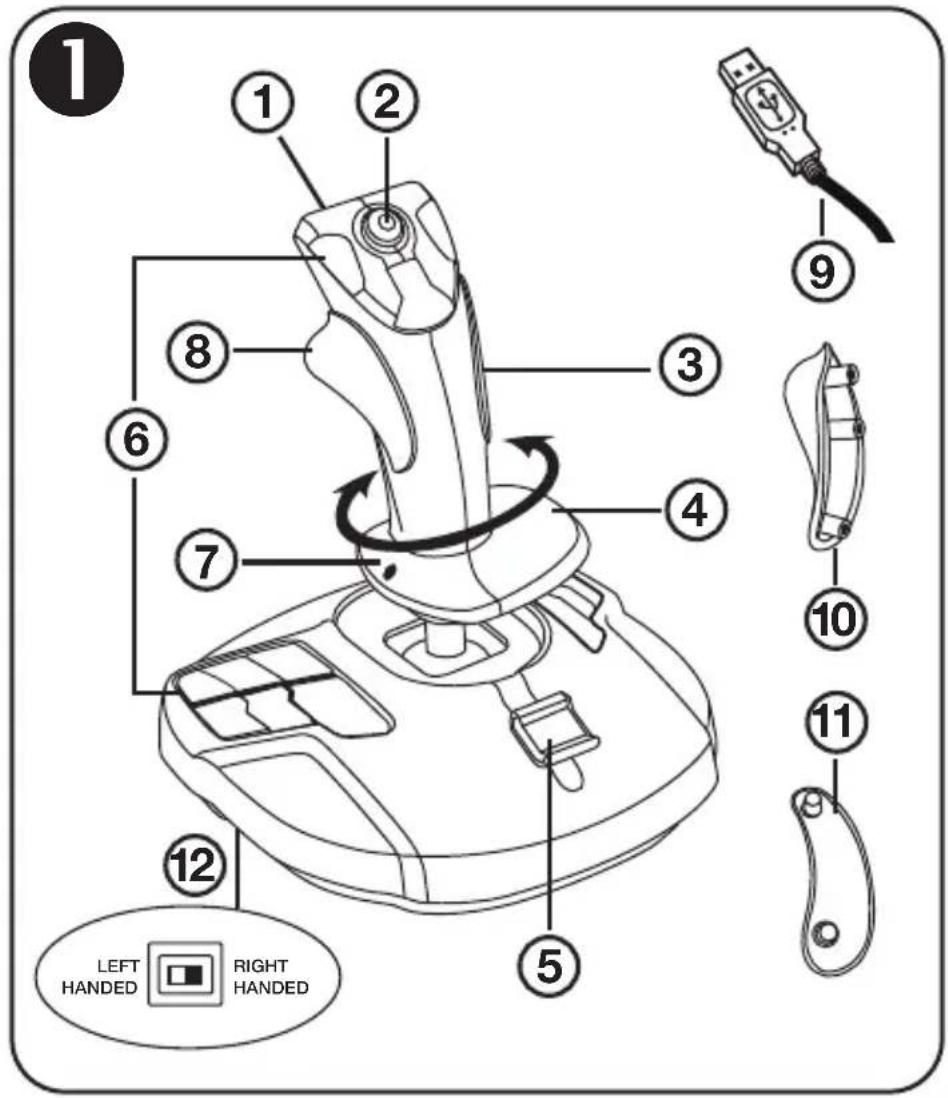
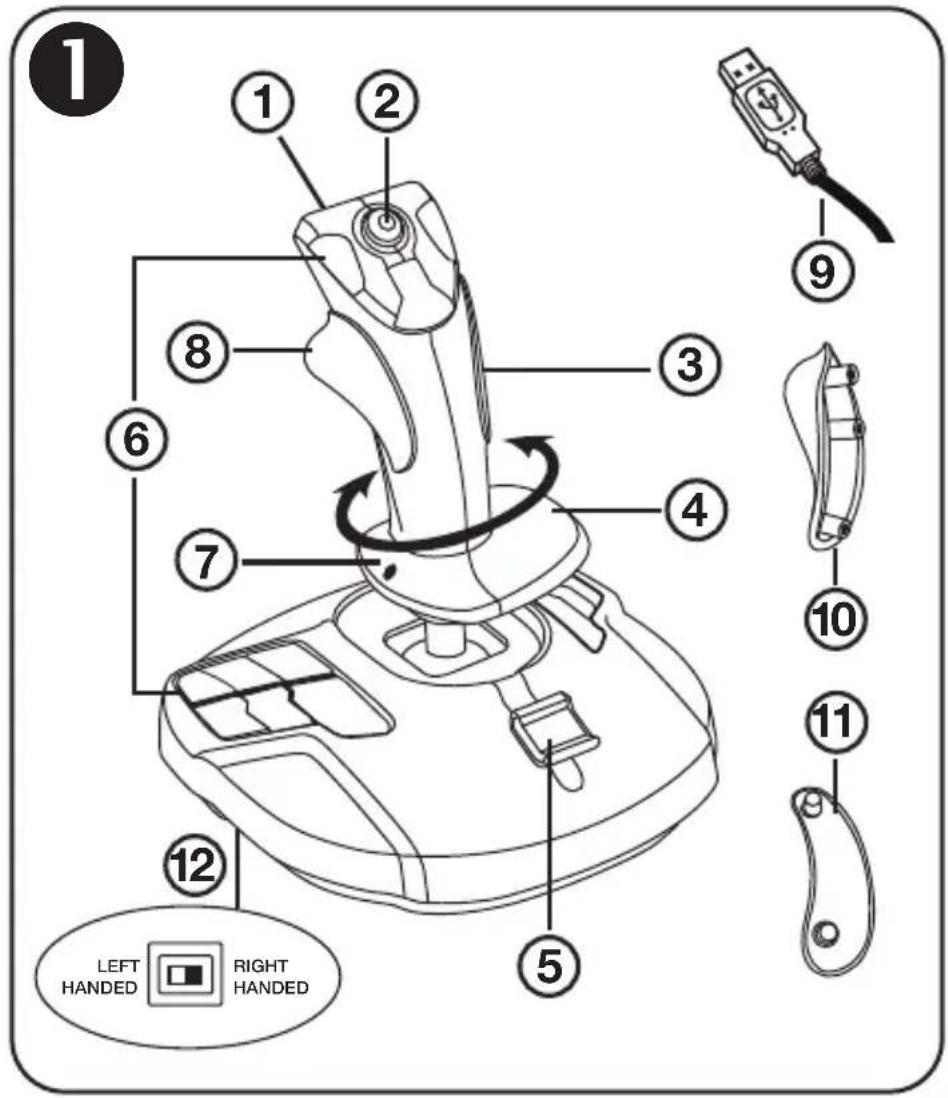
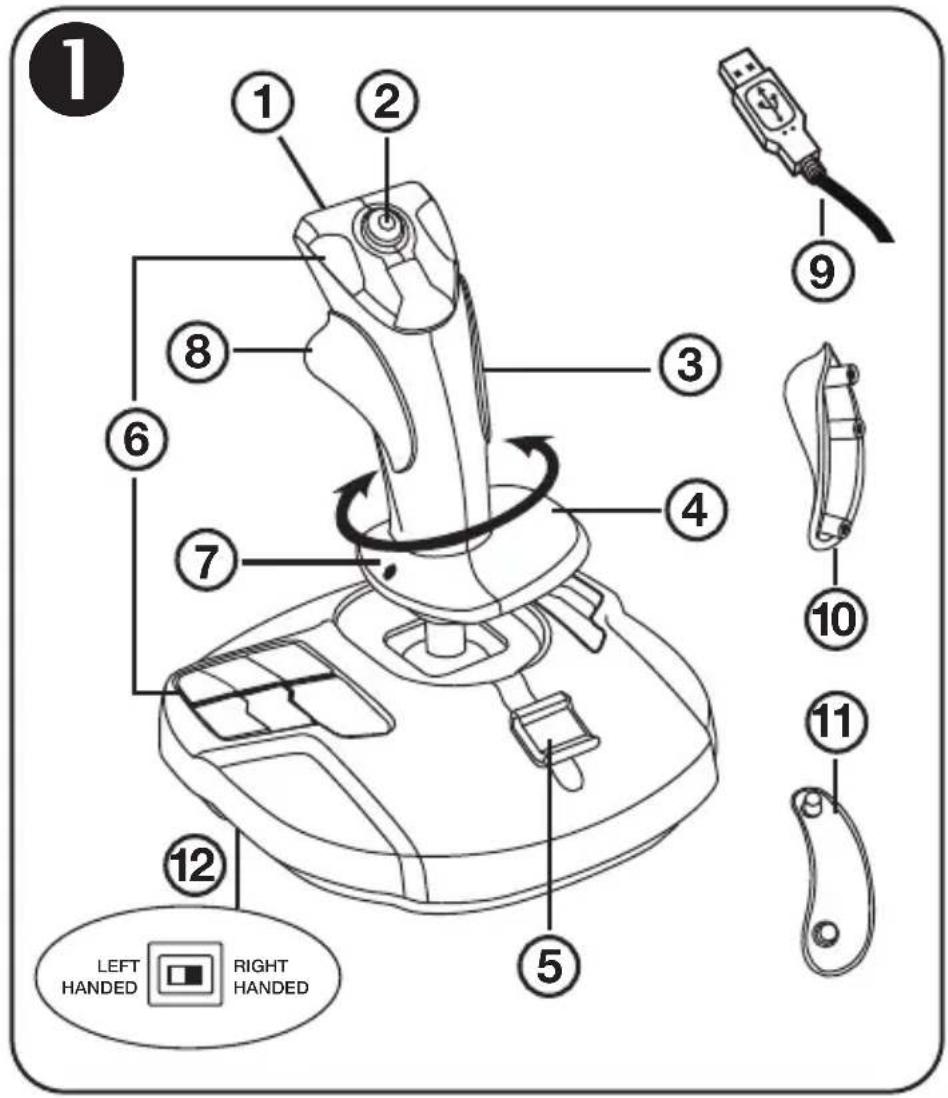
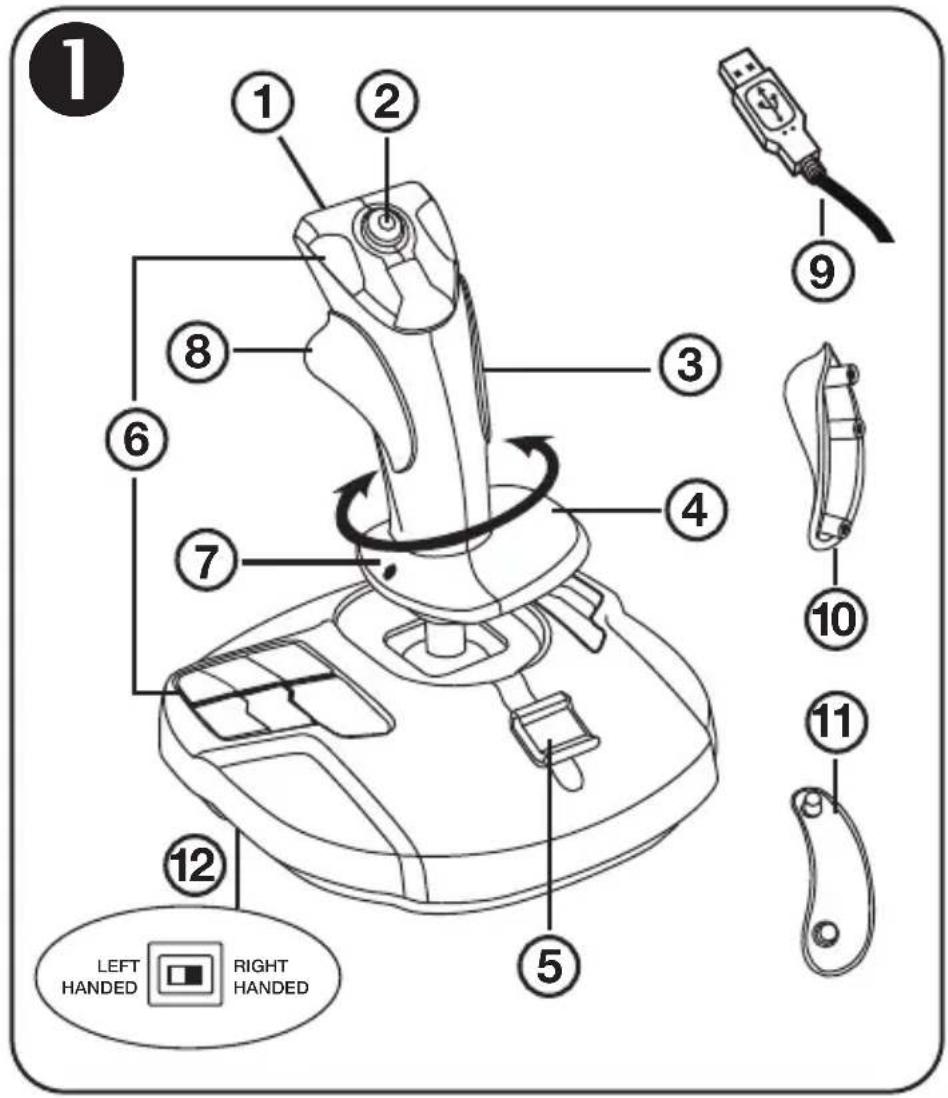
TECHNICAL FEATURES 1
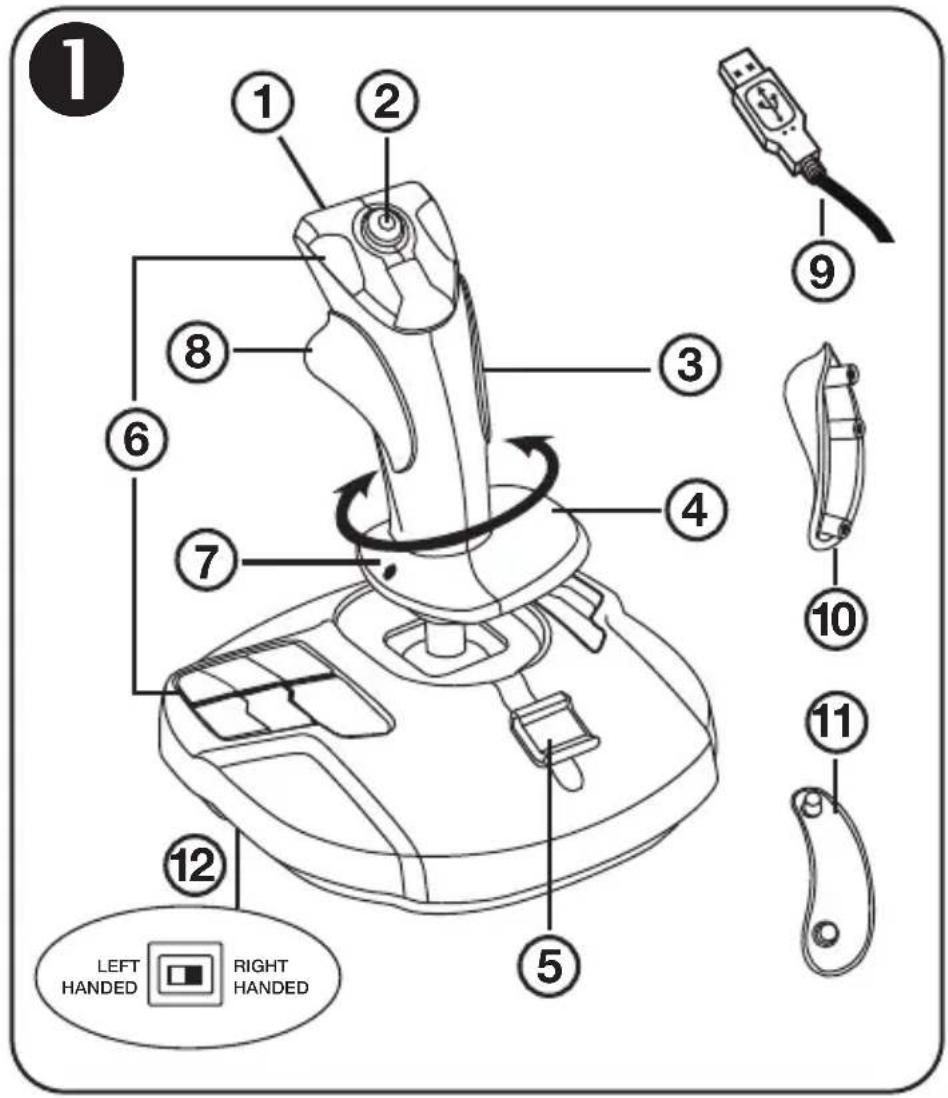
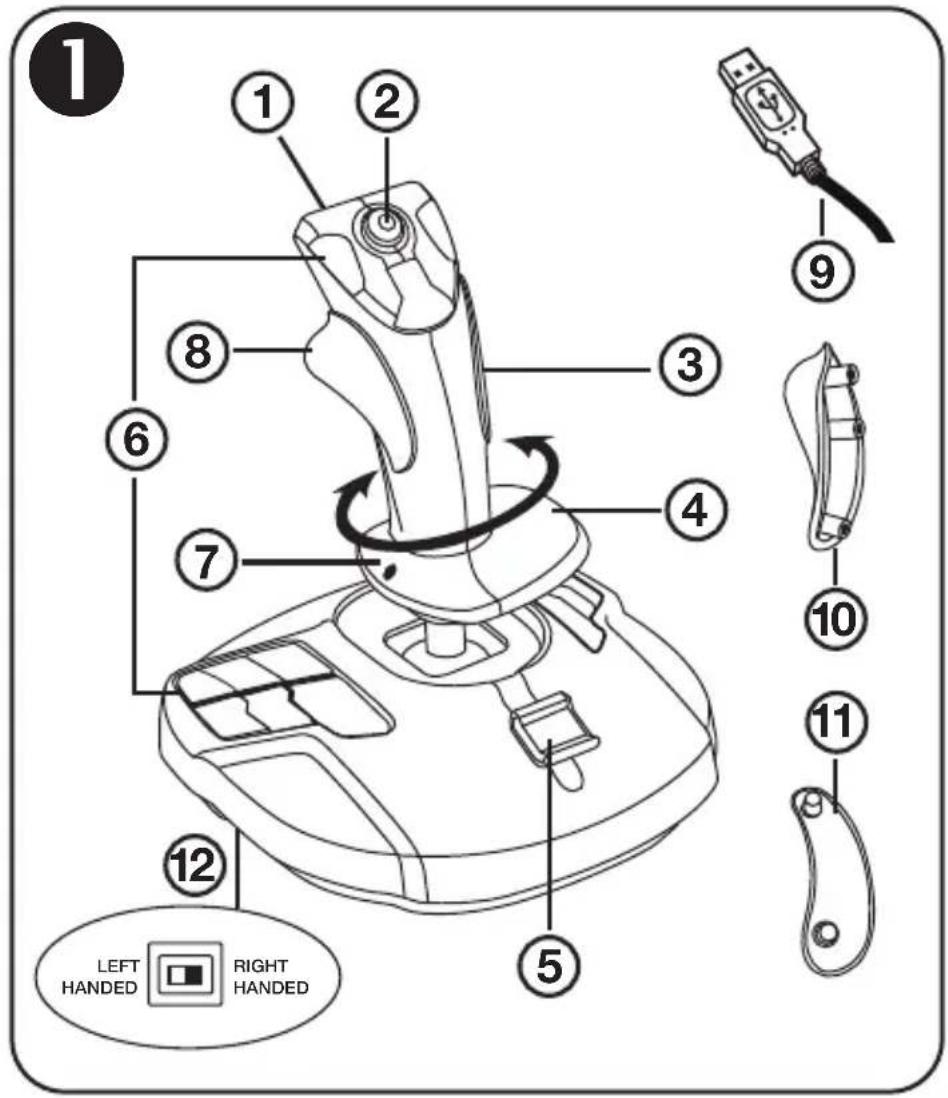
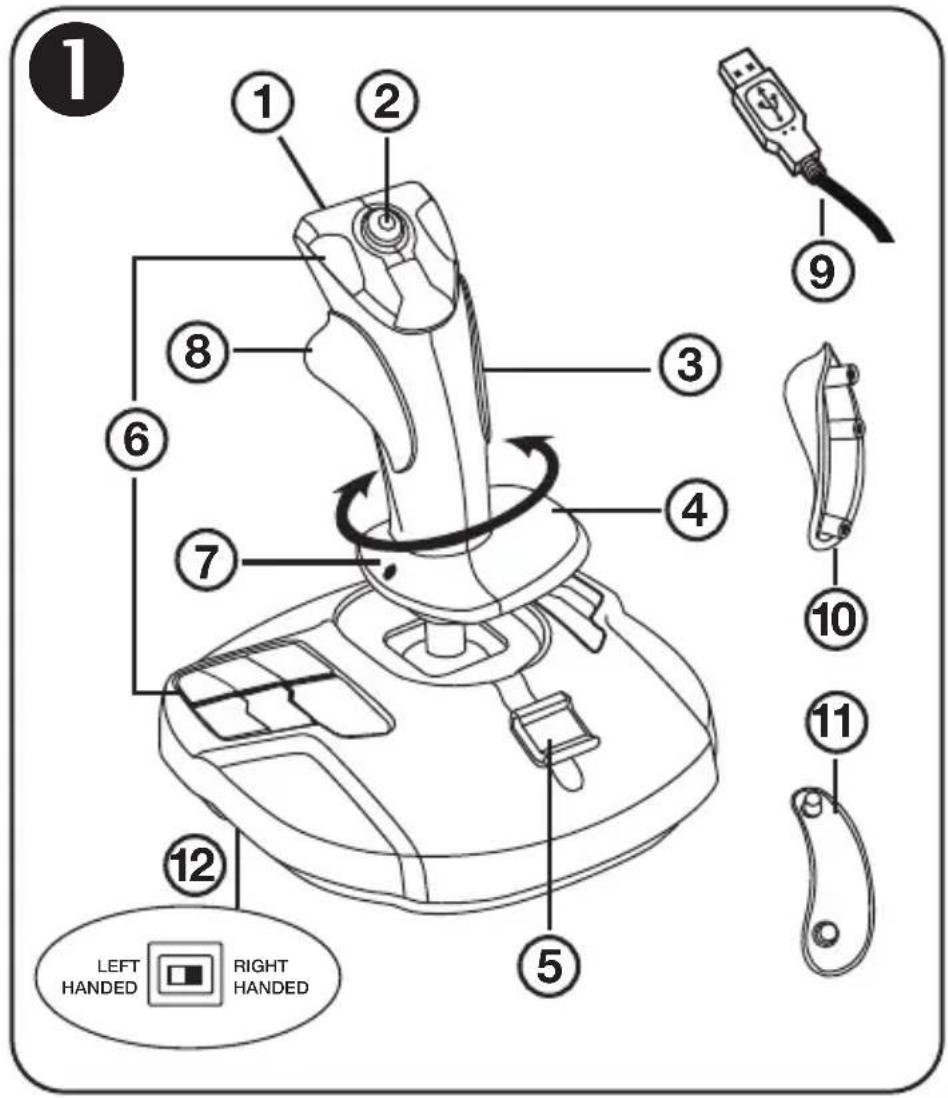
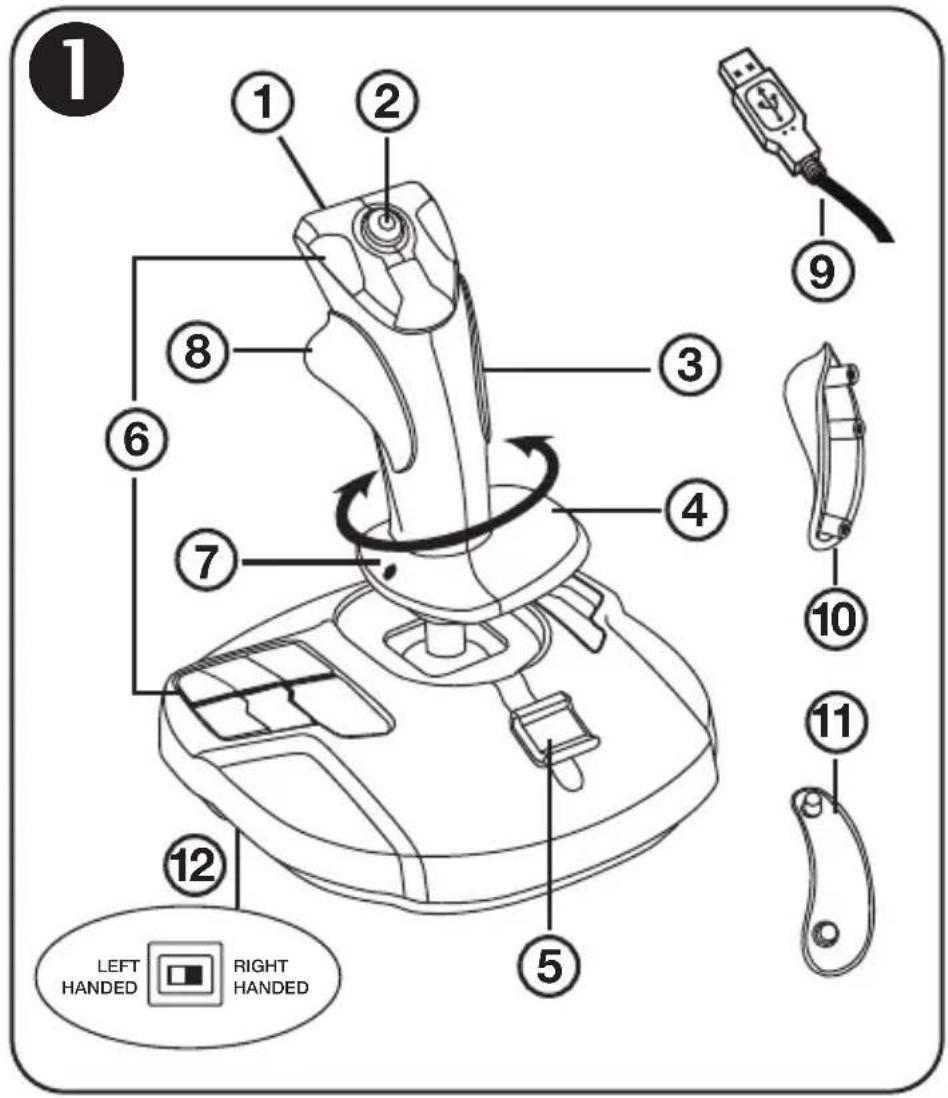
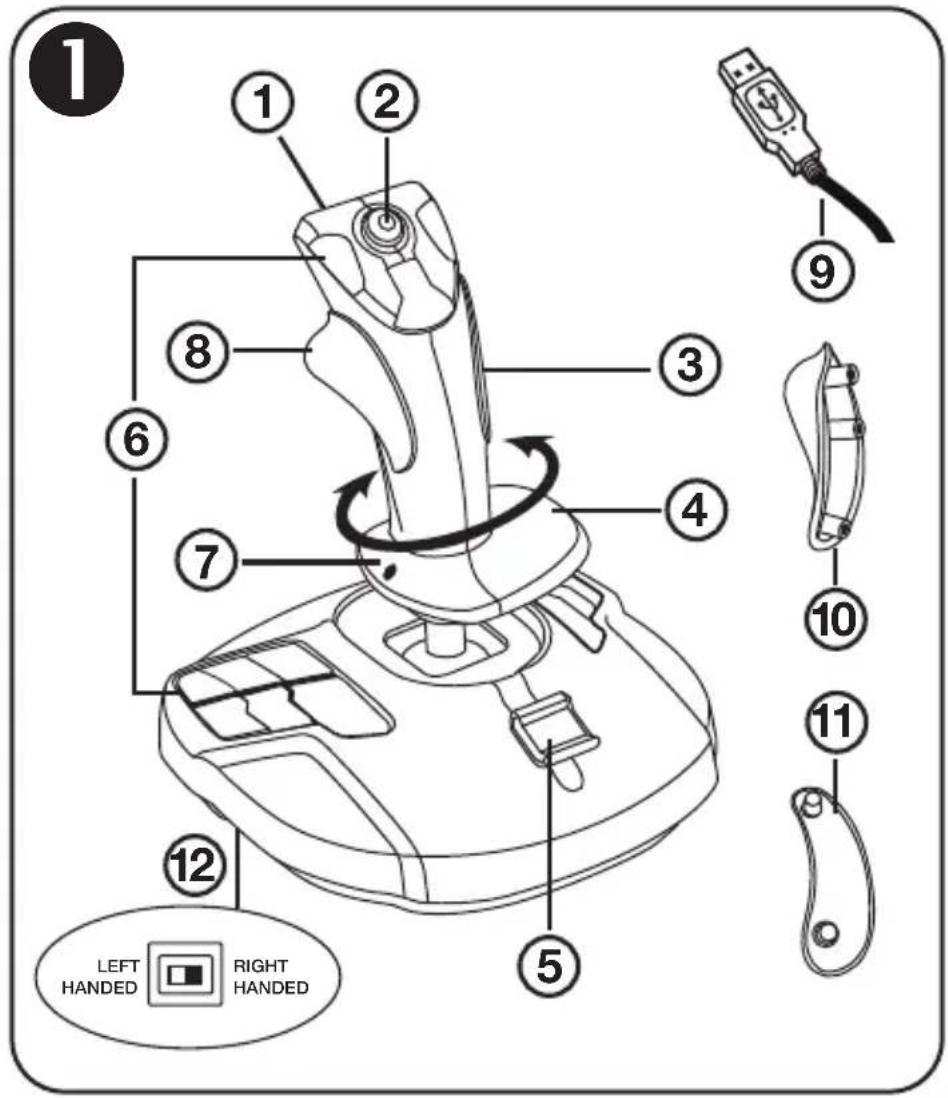
- Digital trigger
- Multidirectional "Point of View" hat switch
- Right-handed screw cover
- Rudder control via rotating handle with hand rest
- Throttle
-
15 action buttons
-
Hand rest rotation screw, with right-handed or left-handed positions
- Right-handed thumb rest
- PC USB connector
- Left-handed thumb rest
- Left-handed screw cover
- Right-handed or left-handed buttons selector switch
GETTING TO KNOW YOUR JOYSTICK
EXCLUSIVE PRECISION TECHNOLOGY:
"H.E.A.R.T™: HallEffect AccuRate Technology"
Your T-16000M joystick features technology providing it with a level of precision currently unequaled in the world of gaming joysticks, including:
- A 3D (Hall Effect) magnetic sensor on the stick, with a resolution of more than 268 million values over the X and Y axes (16384 x 16384 values), whereas current competing systems (even high-end systems) provide resolutions in the neighborhood of only one million values (1024 x 1024 values).
- A magnet: no friction, for unlimited precision and incredible responsiveness.
- Coil spring on stick (2.8mm): for firm, linear and ultra-fluid tension.
BACKLIGHTING
For even greater precision, there is no dead zone in the central position of the T-16000M's stick. To symbolize this, the center is backlit in green as soon as you move the stick (even very slightly); the backlighting switches off after 3 seconds of inactivity, once you have brought the stick back to dead center.
THROTTLE
Your joystick features a throttle (5), which you can use to easily control your acceleration in games.
RUDDER FUNCTION
Your joystick features a rudder function (4), which in an airplane corresponds to the pedals used by the pilot to move the rudder, thereby allowing the plane to pivot around its vertical axis (making the plane turn to the left or to the right).
This rudder function is available on your joystick by rotating the stick to the left or right.
MULTIDIRECTIONAL "POINT OF VIEW" HAT SWITCH
Your joystick features a "Point of View" hat switch (2) which, as its name indicates, allows you to instantly view everything that is going on around your aircraft (in games where this feature is enabled). To use this feature, simply go into your game's setup menu, and program the different views (rear view, view to the left, view to the right, and also external views) onto the directions of the "Point of View" hat switch.
If you wish, you can also reserve the "Point of View" hat switch for other uses instead (firing, etc.).
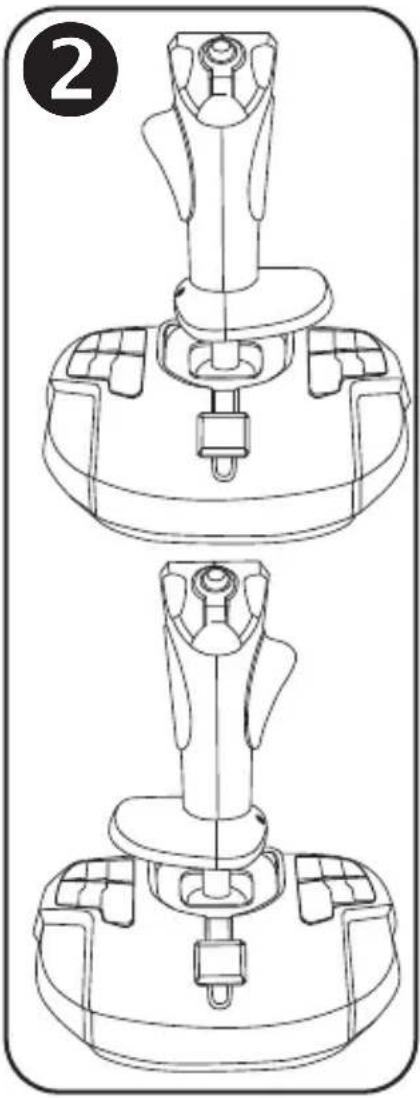
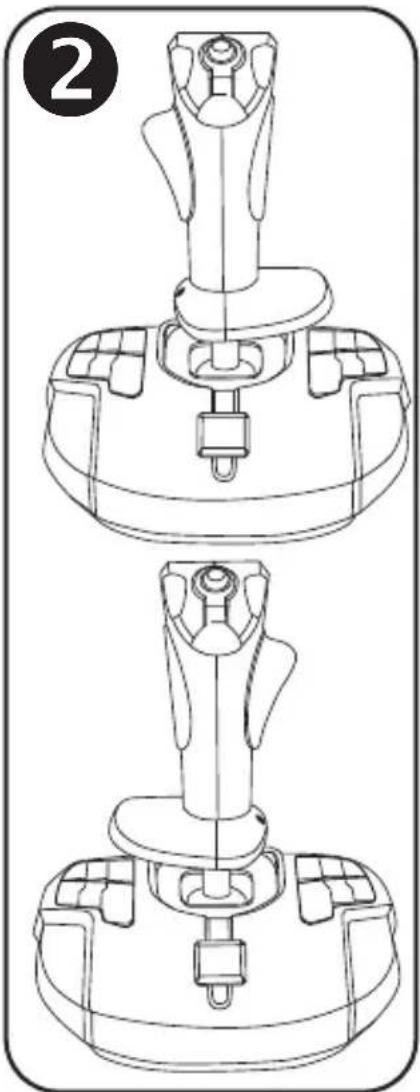
Your T-16000M joystick has the advantage of being fully ambidextrous, allowing it to perfectly adapt to all players, whether they are right-handed or left-handed.
To do so, 3 elements can be adjusted: the configuration of the buttons on the base, the hand rest, and the thumb rest.
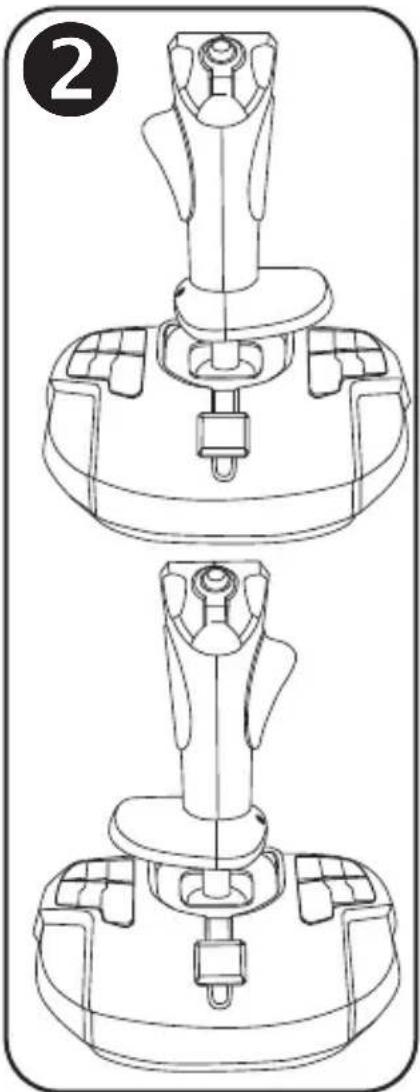
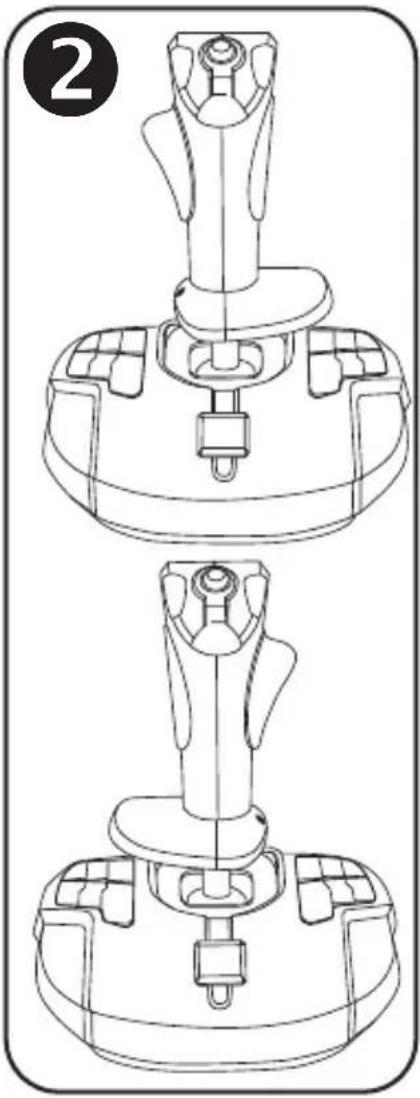
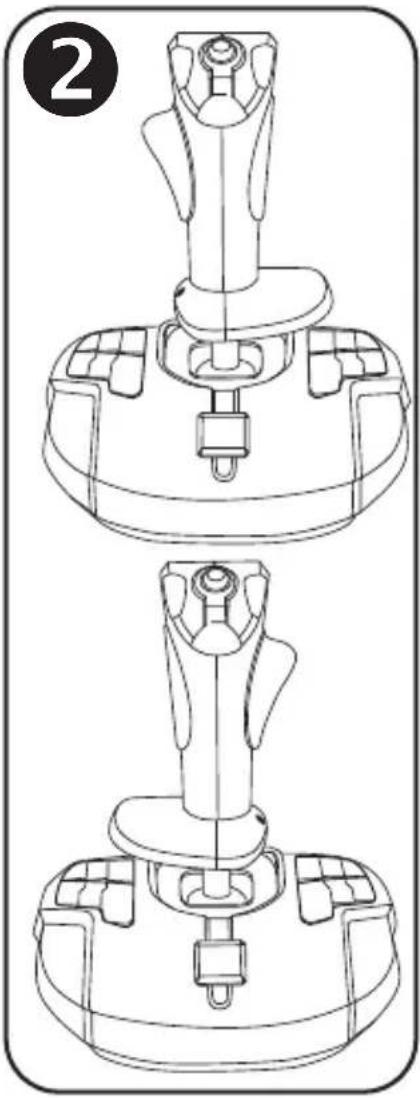
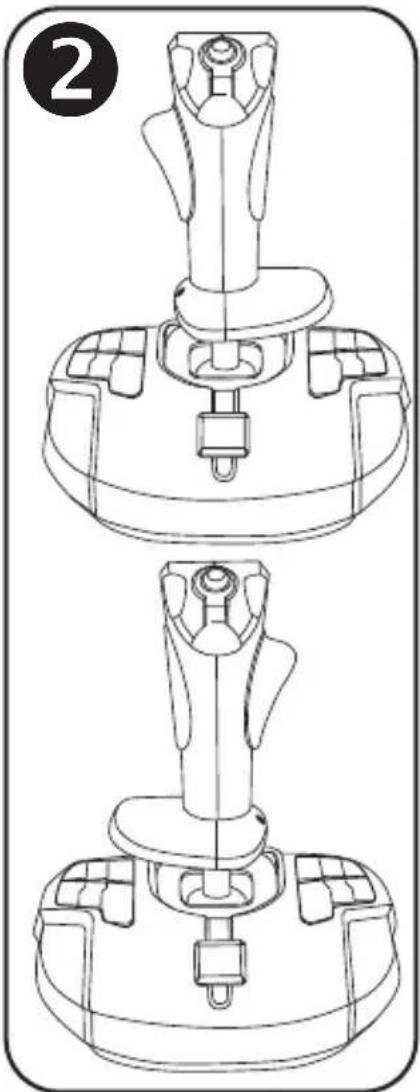
CONFIGURATION OF BUTTONS IN RIGHT-HANDED MODE ③
To set the positions of the 12 buttons located on the base to right-handed mode, set the selector switch (12) located under the joystick's base to "RIGHT HANDED":
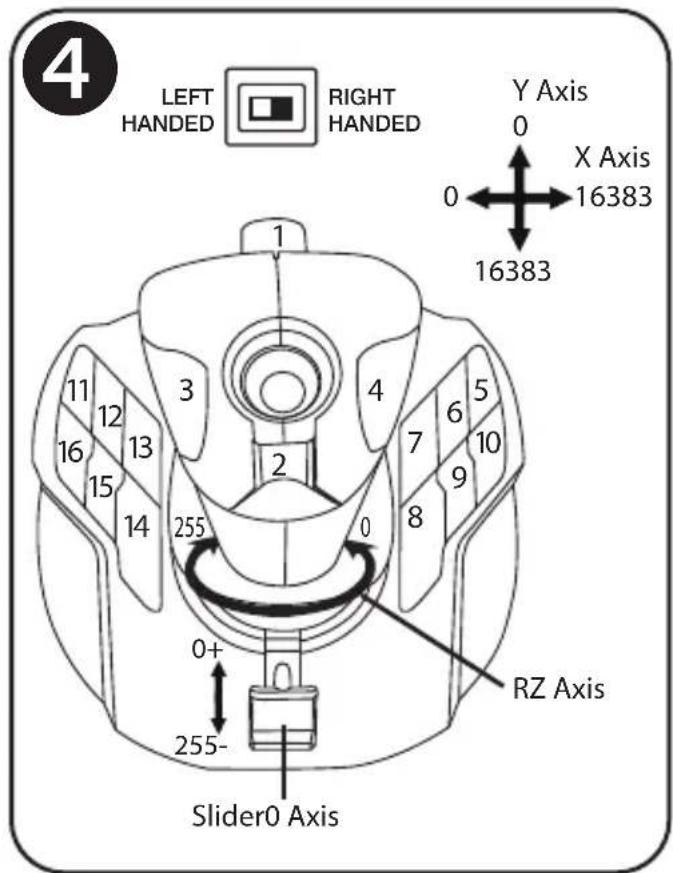
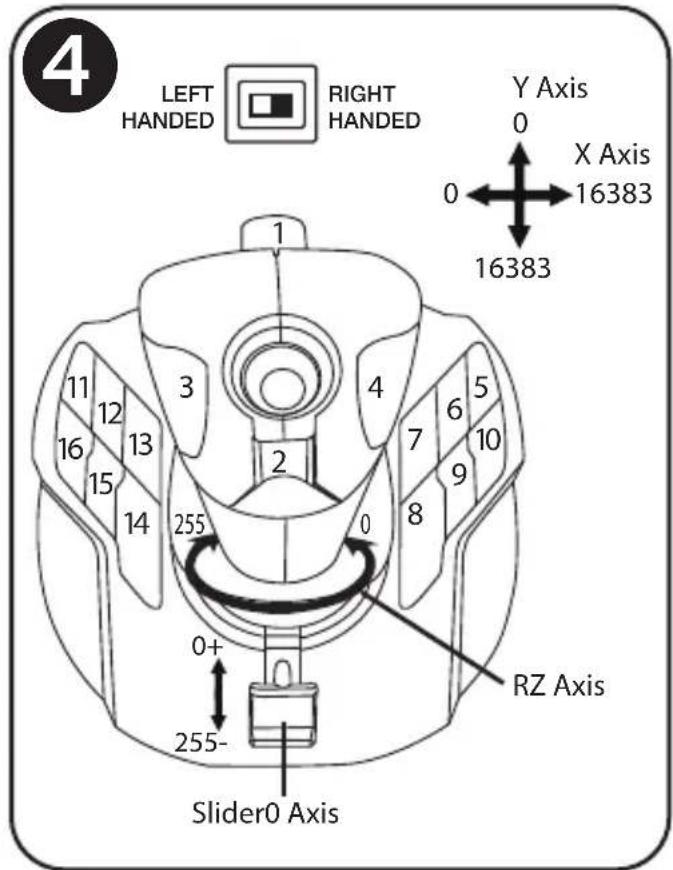
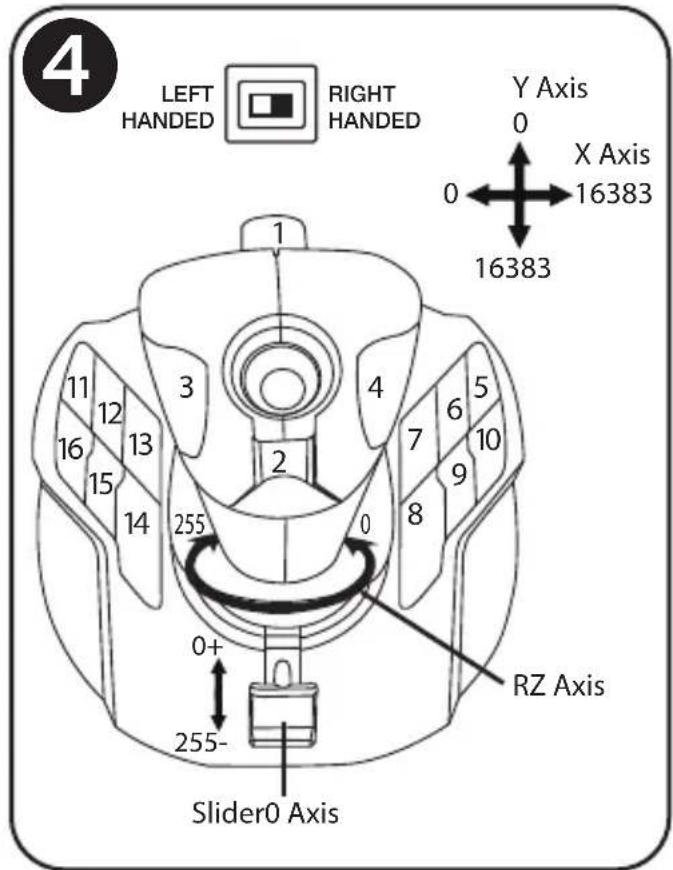
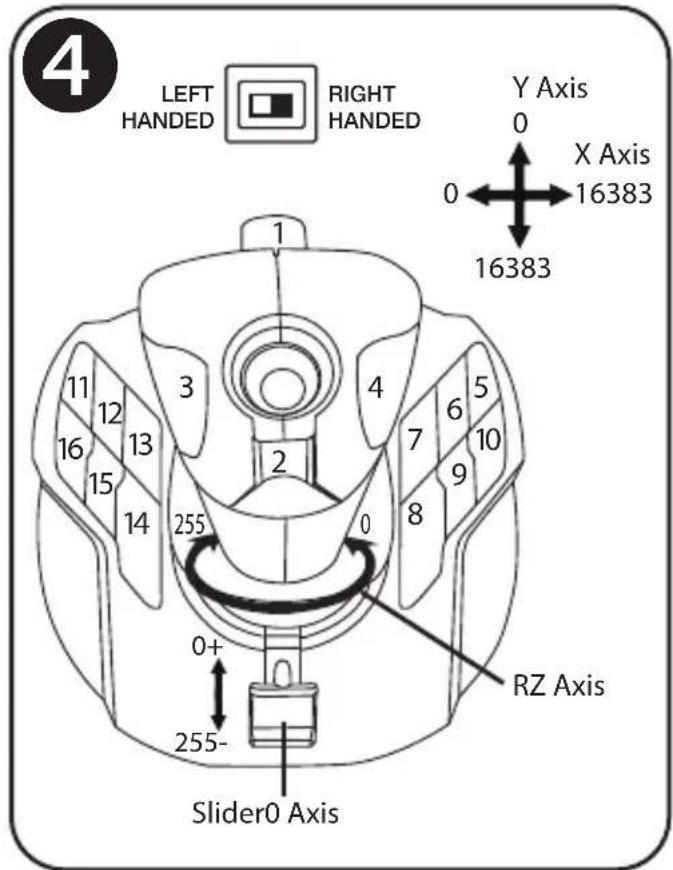
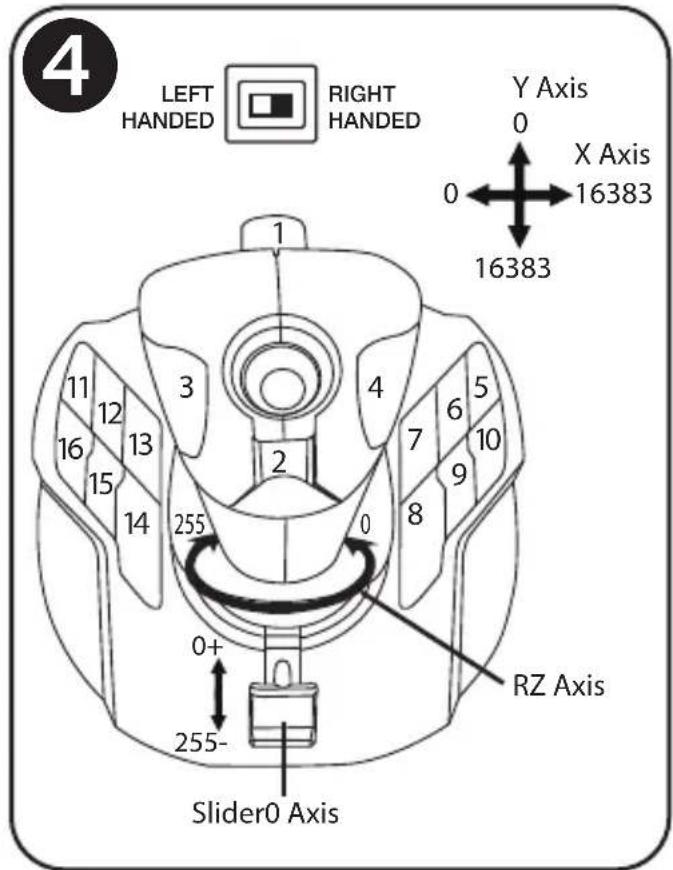
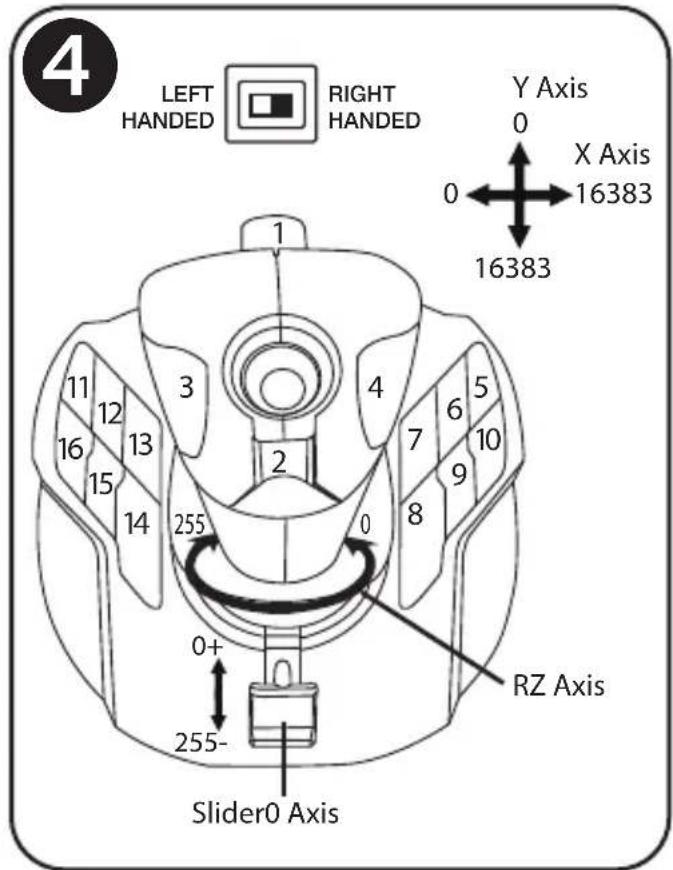
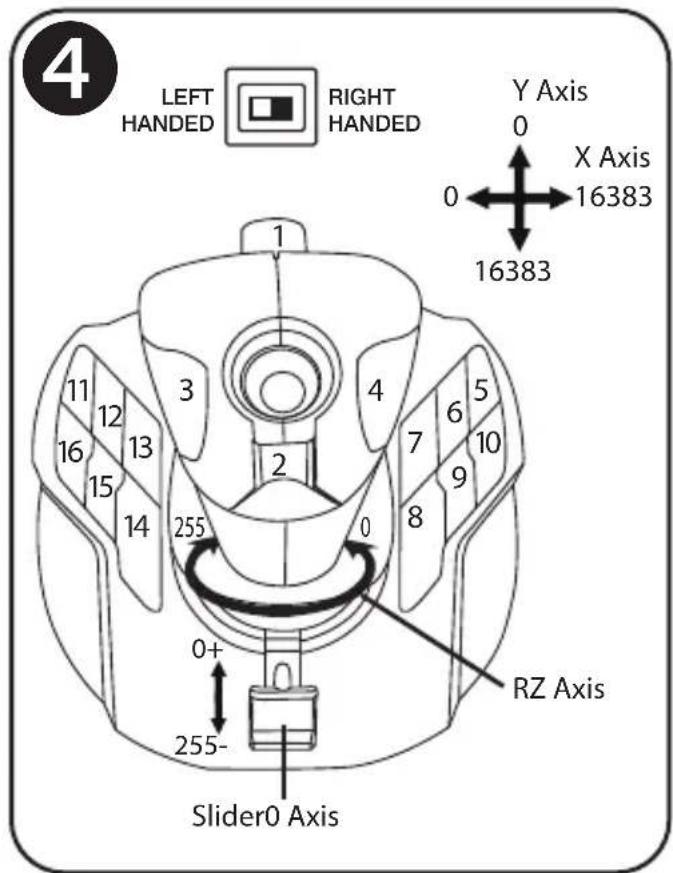
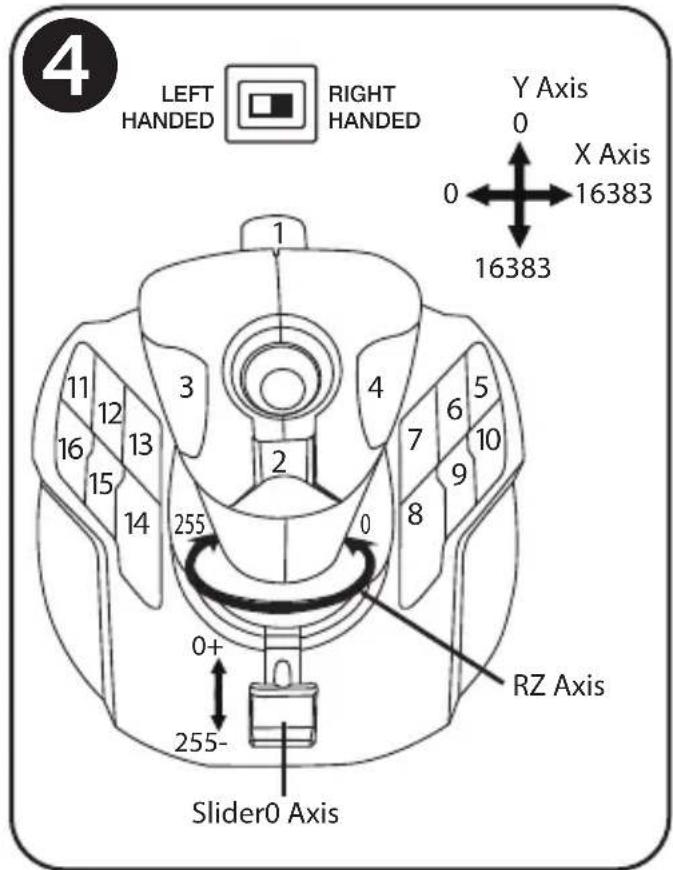
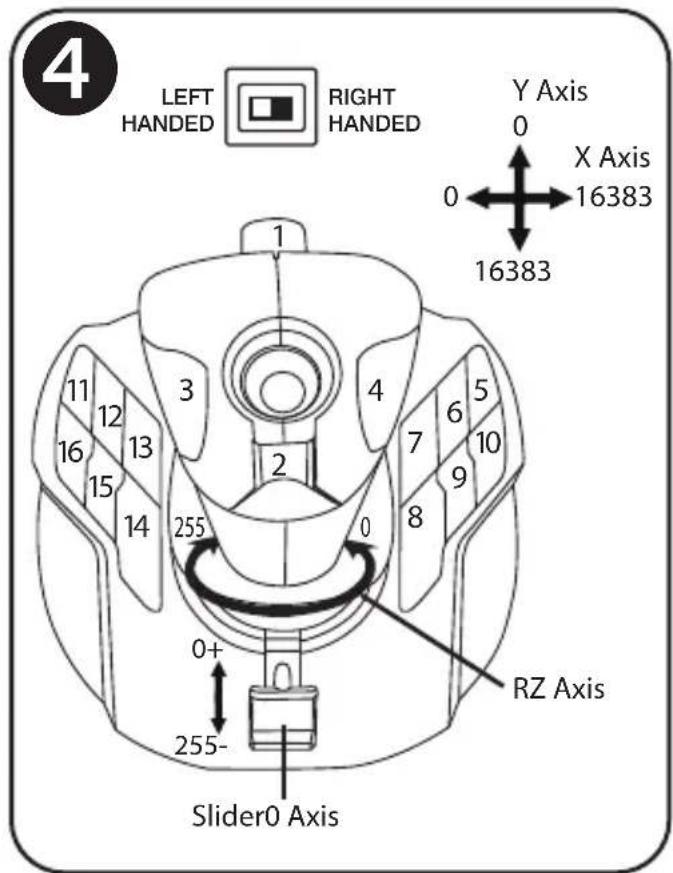
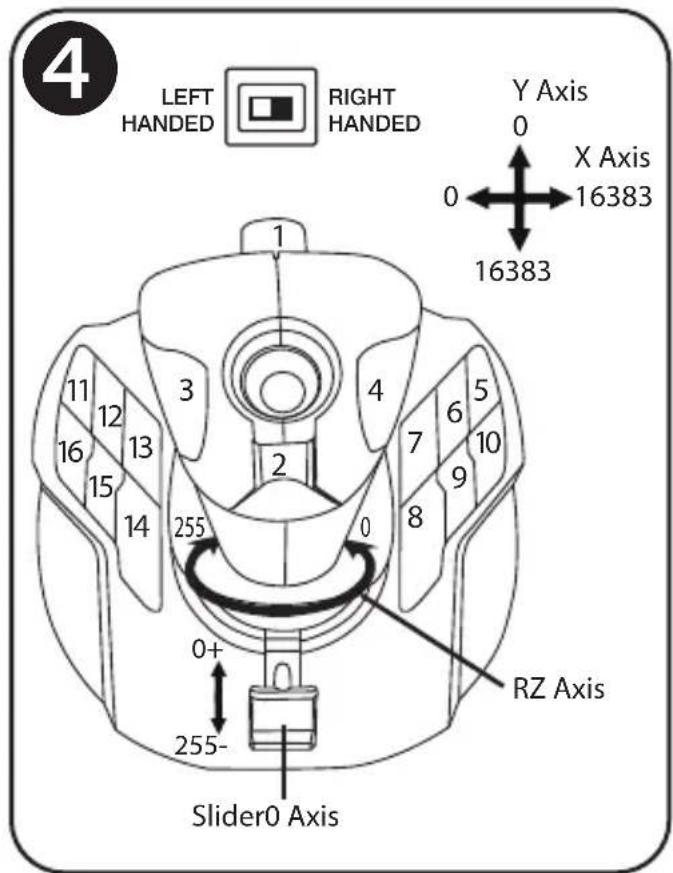
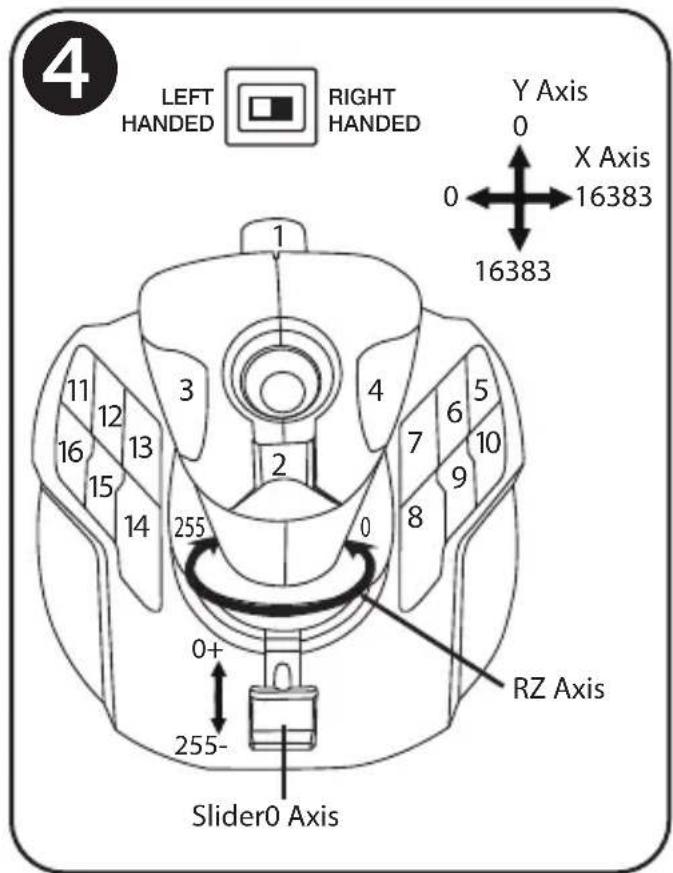
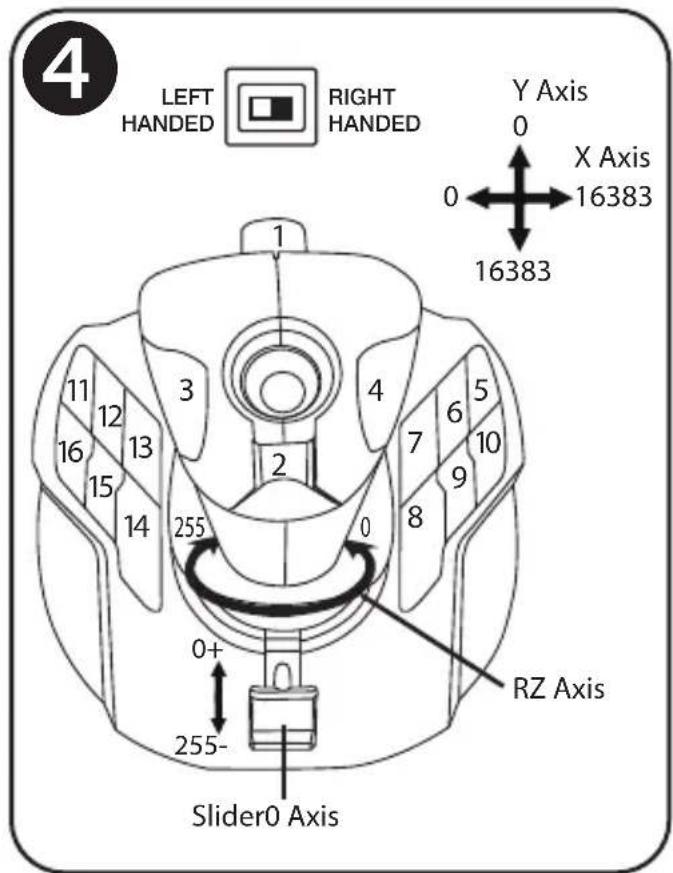
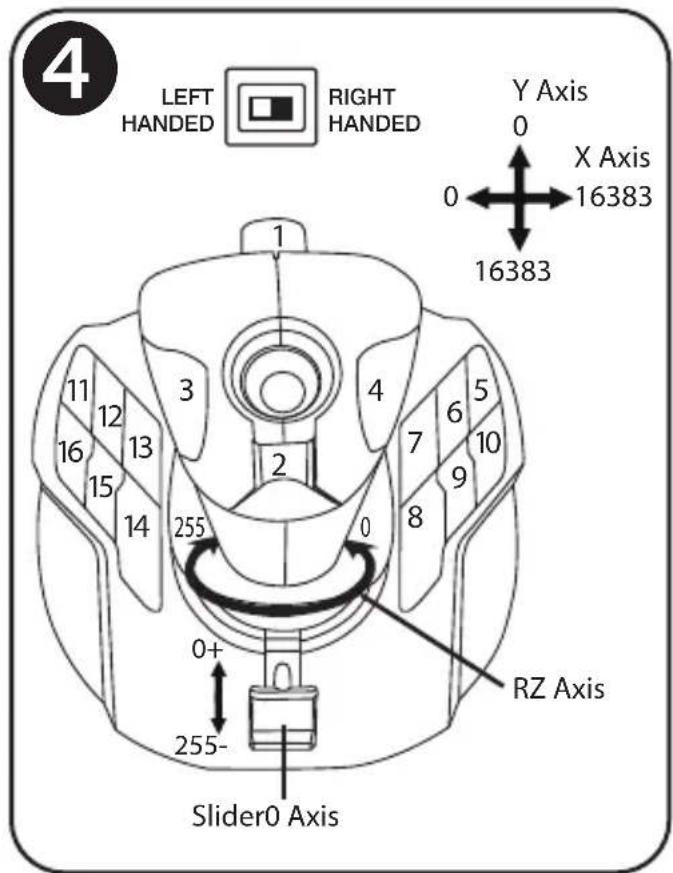
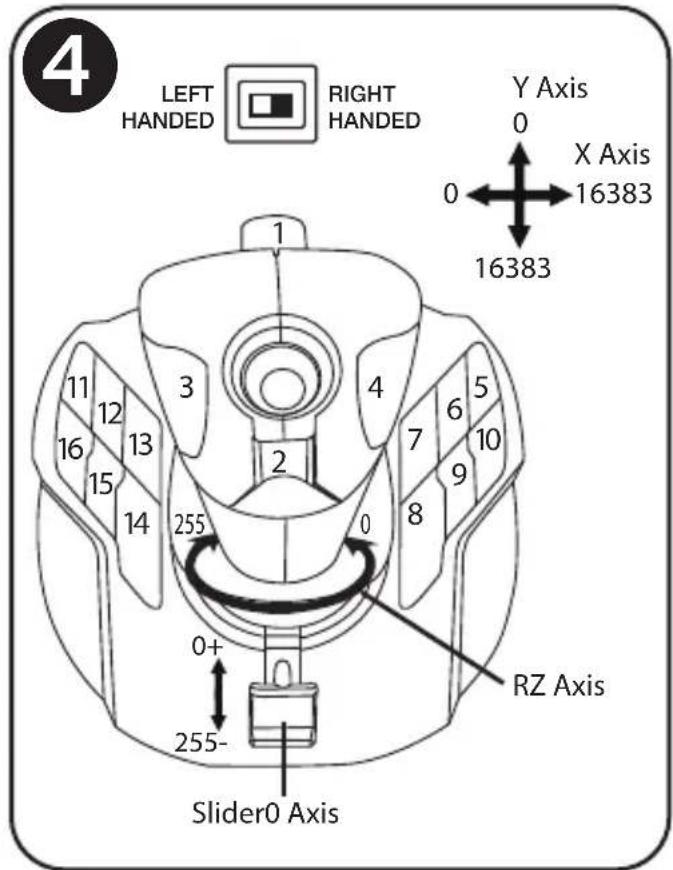
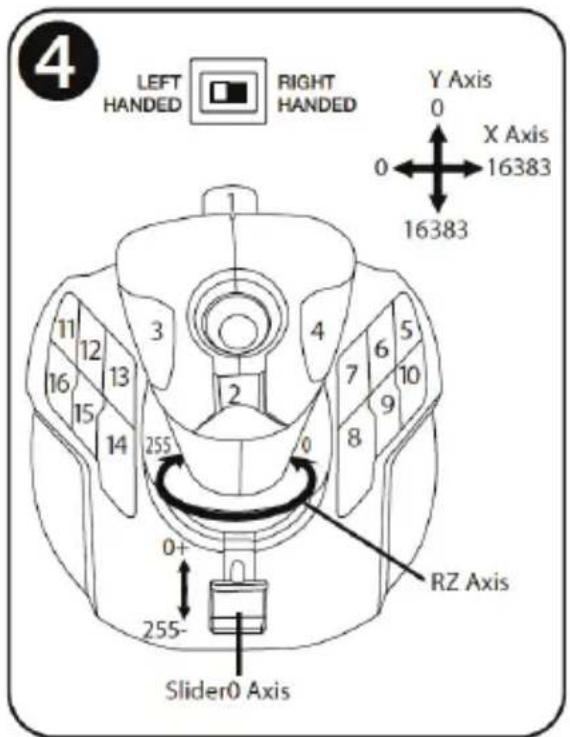
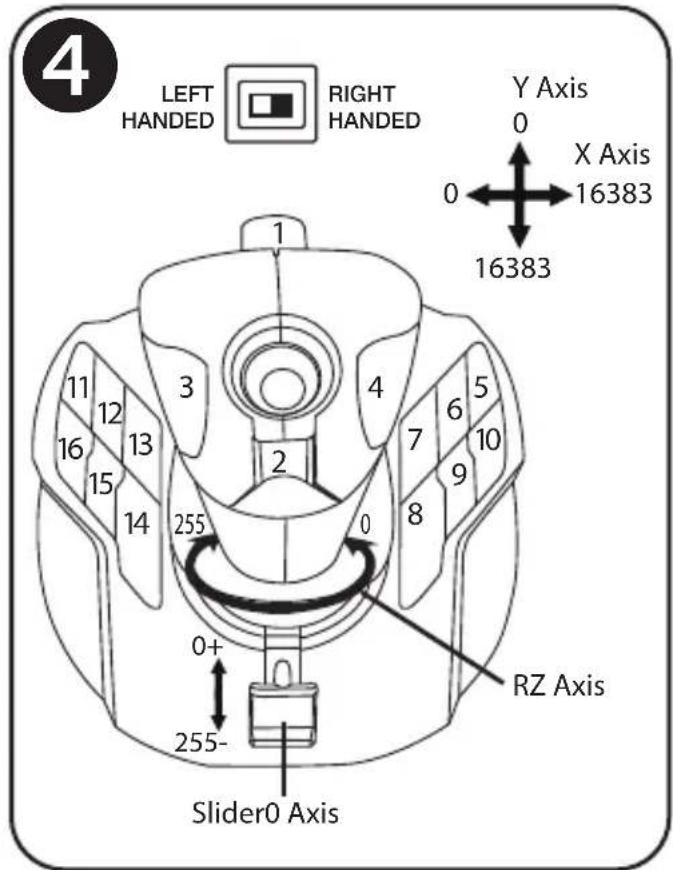
CONFIGURATION OF BUTTONS IN LEFT-HANDED MODE 4
To set the positions of the 12 buttons located on the base to left-handed mode, set the selector switch (12) located under the joystick's base to "LEFT HANDED":
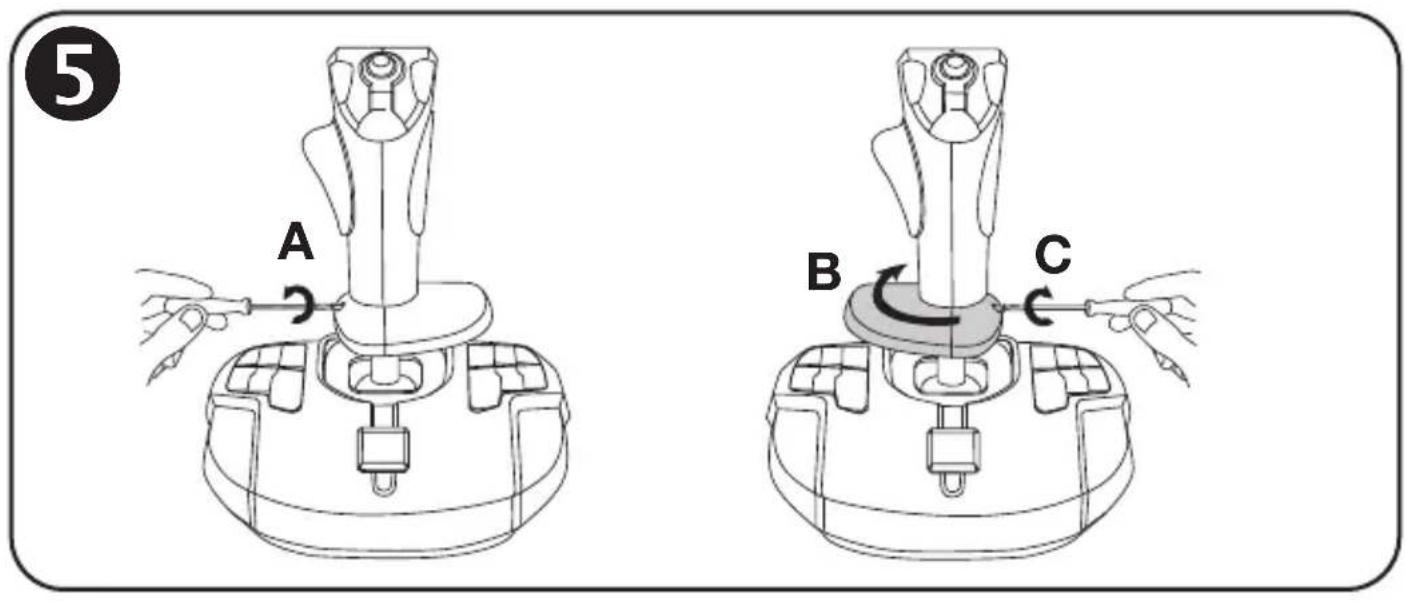
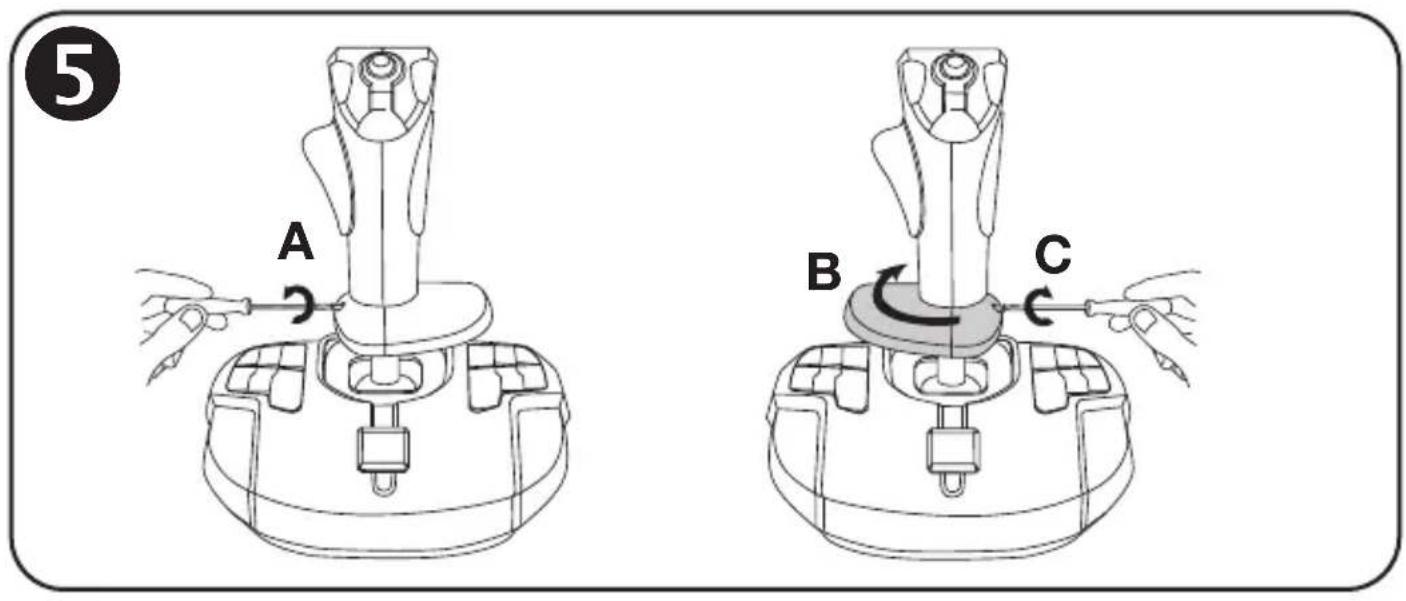
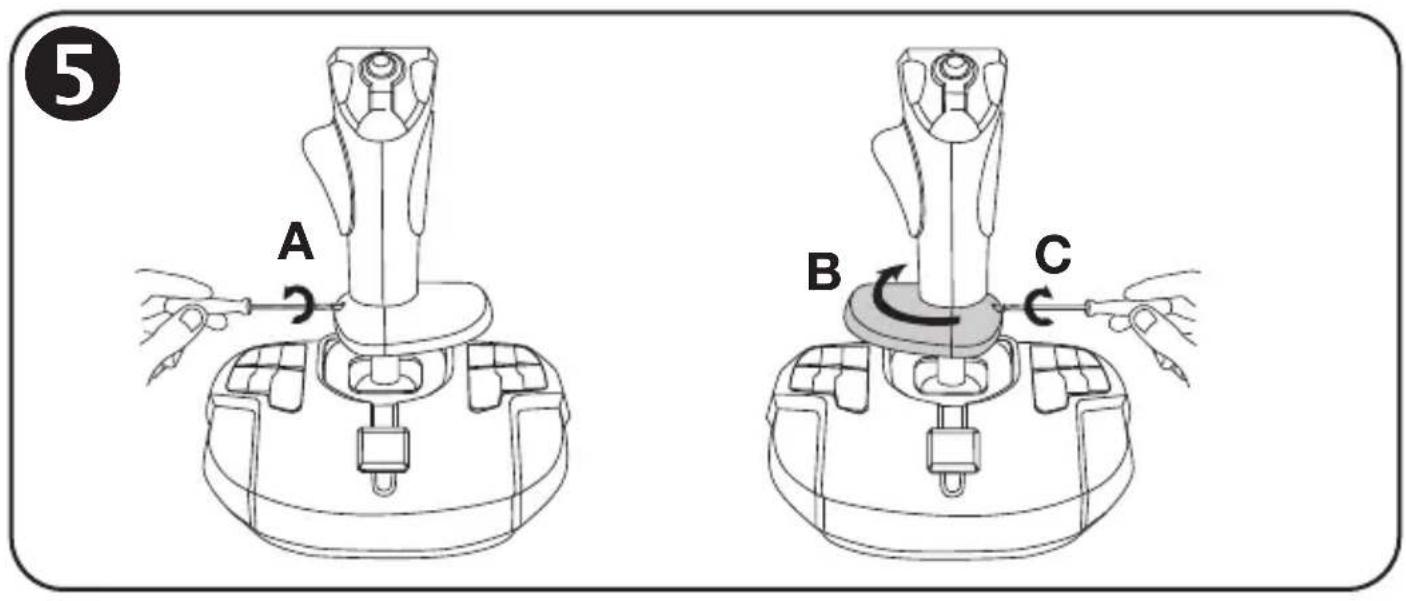
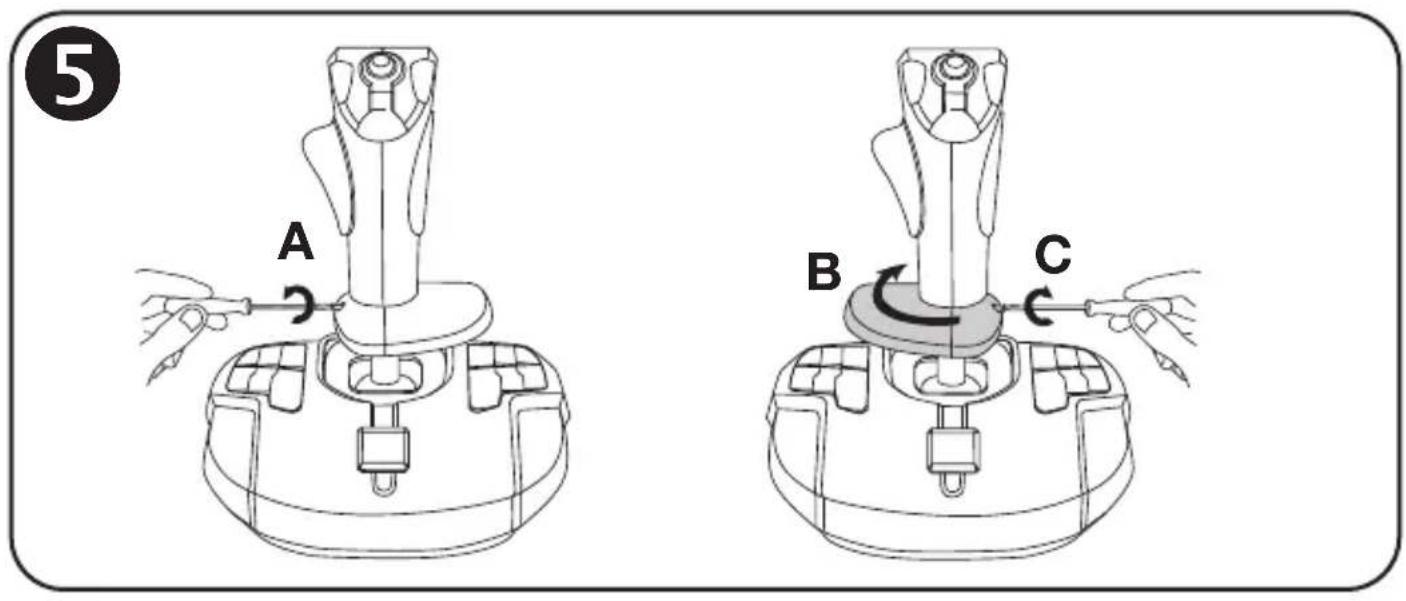
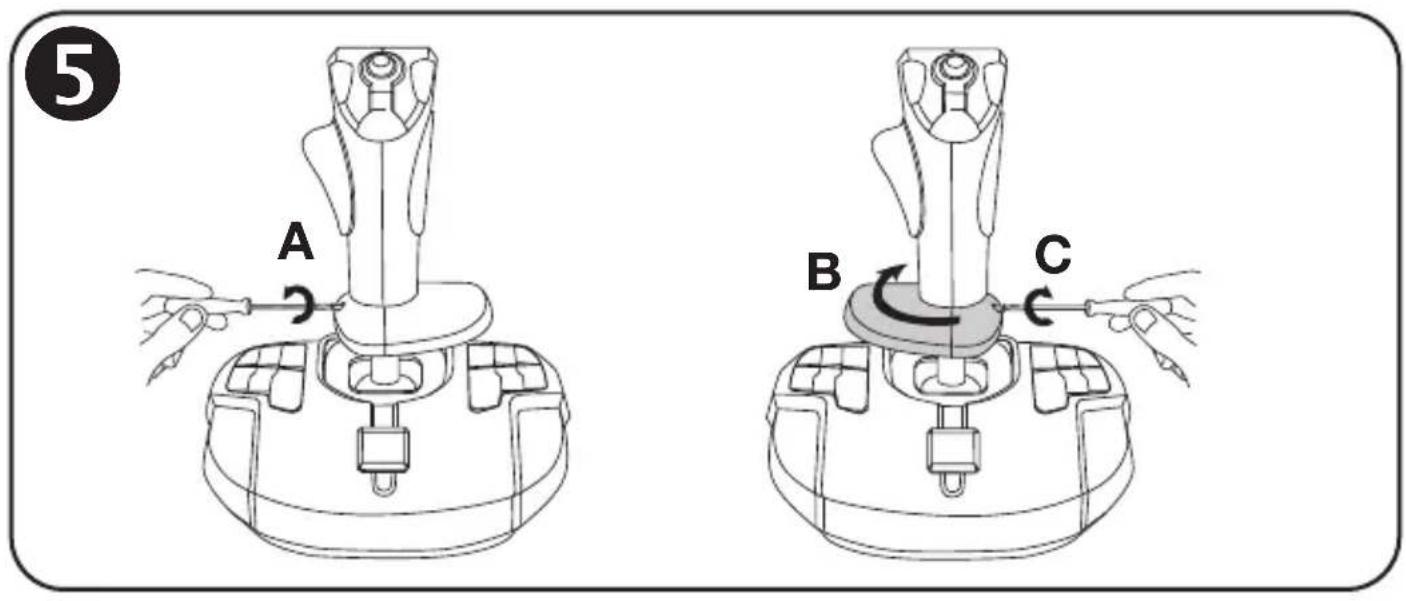
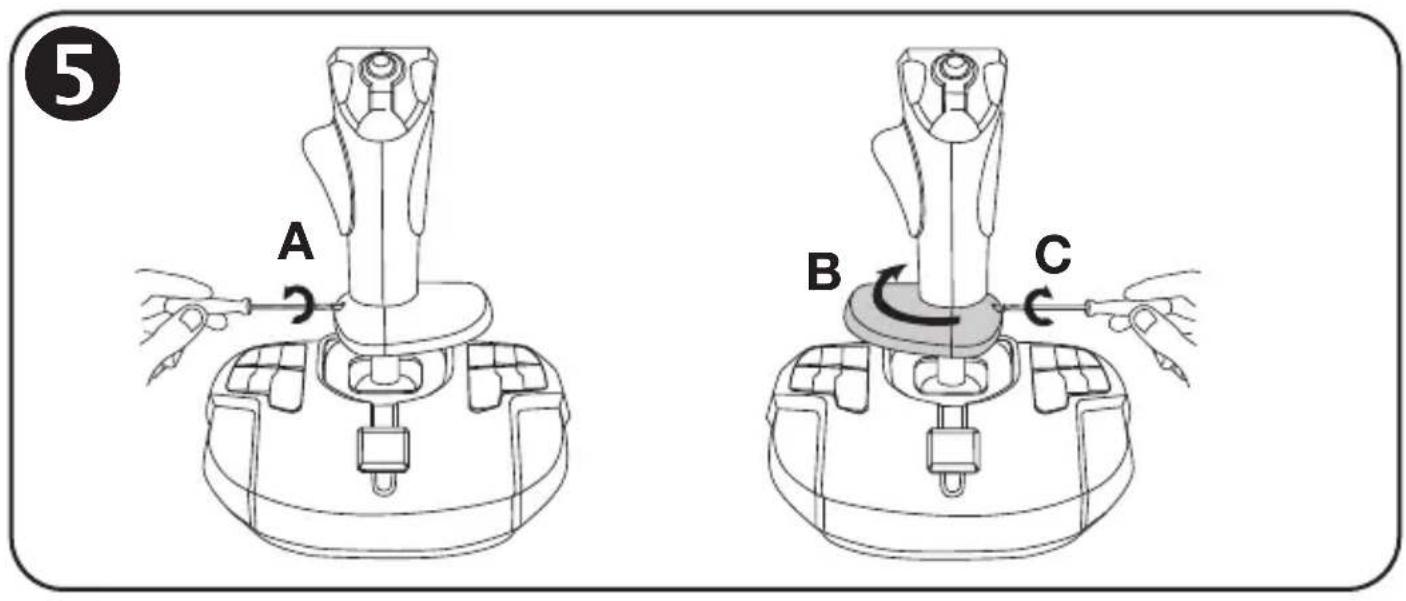
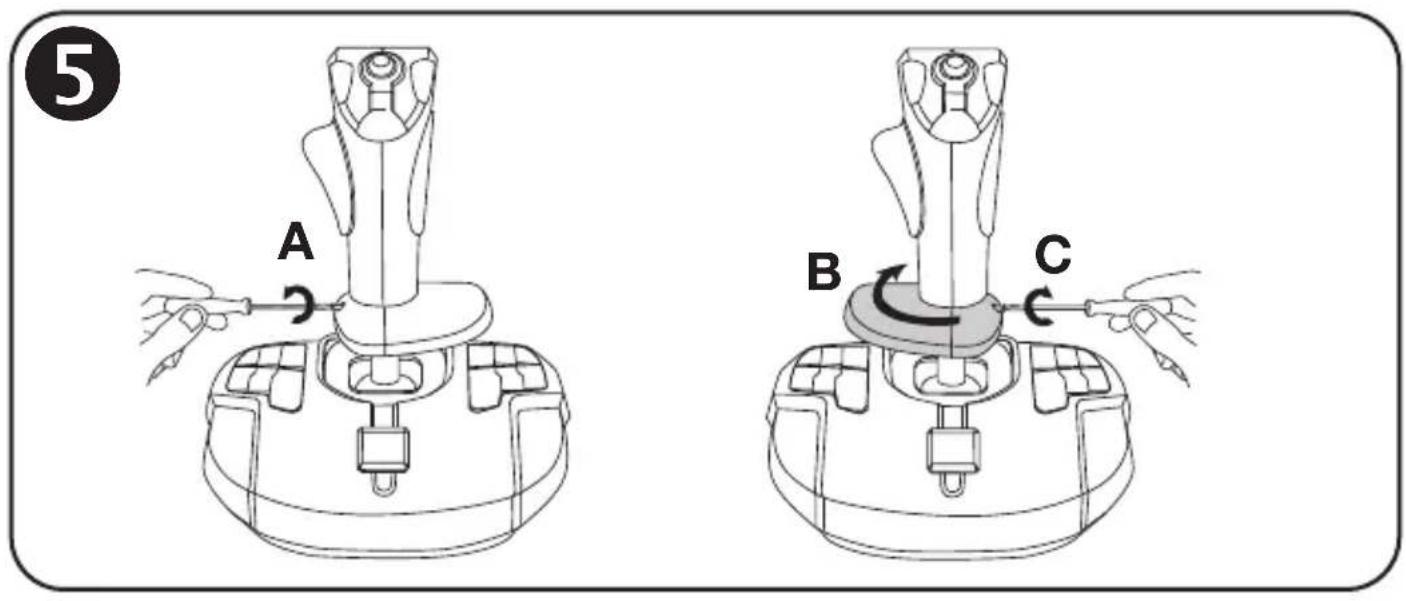
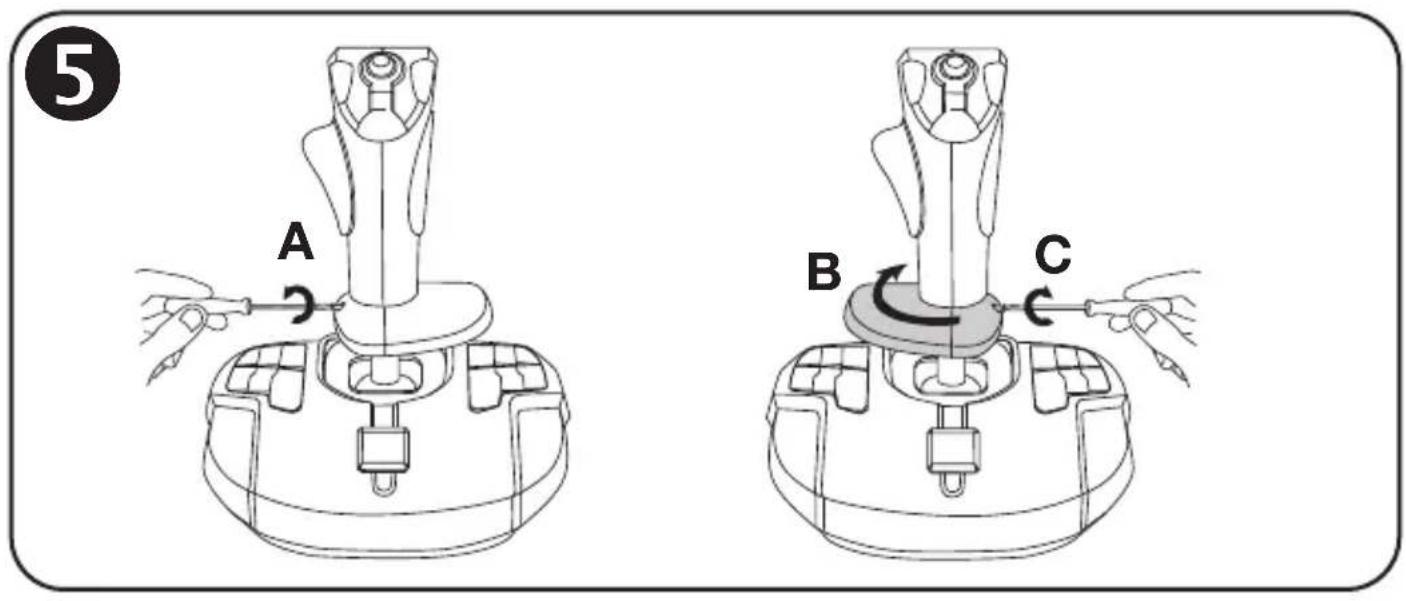
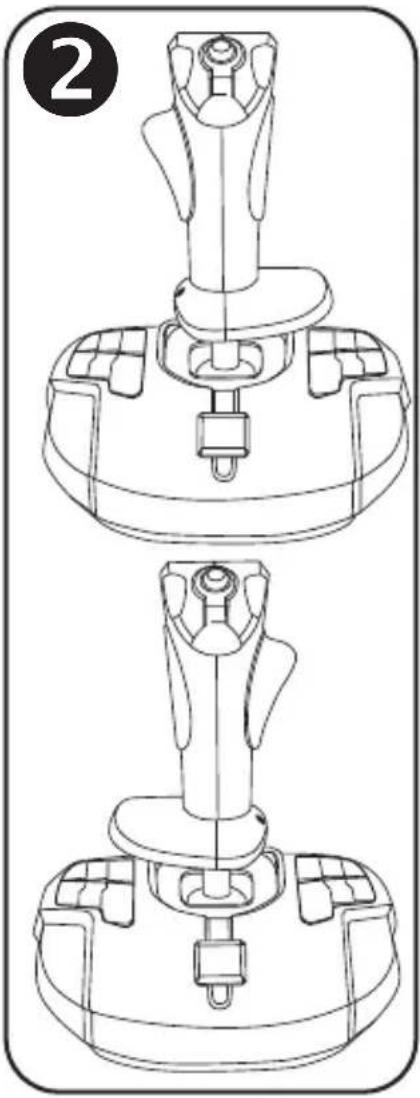
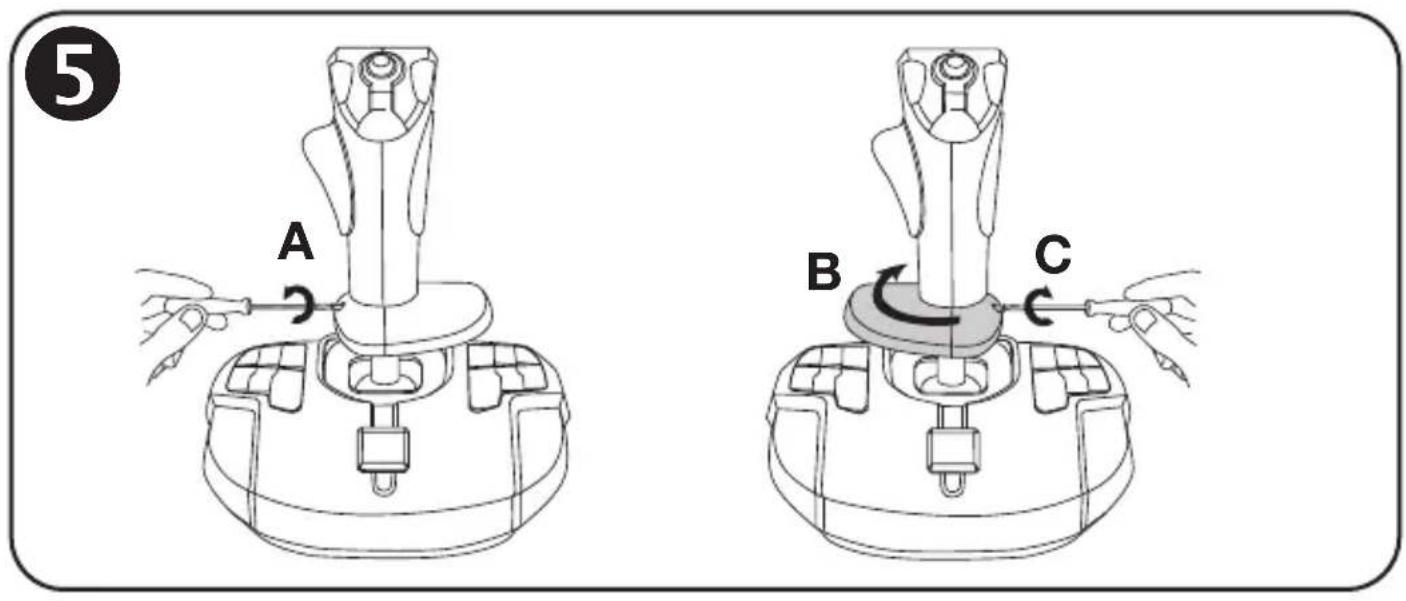
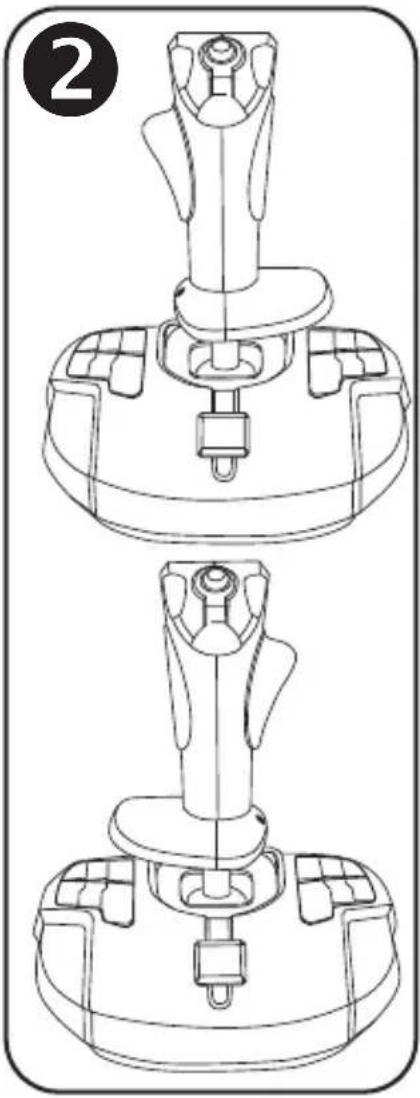
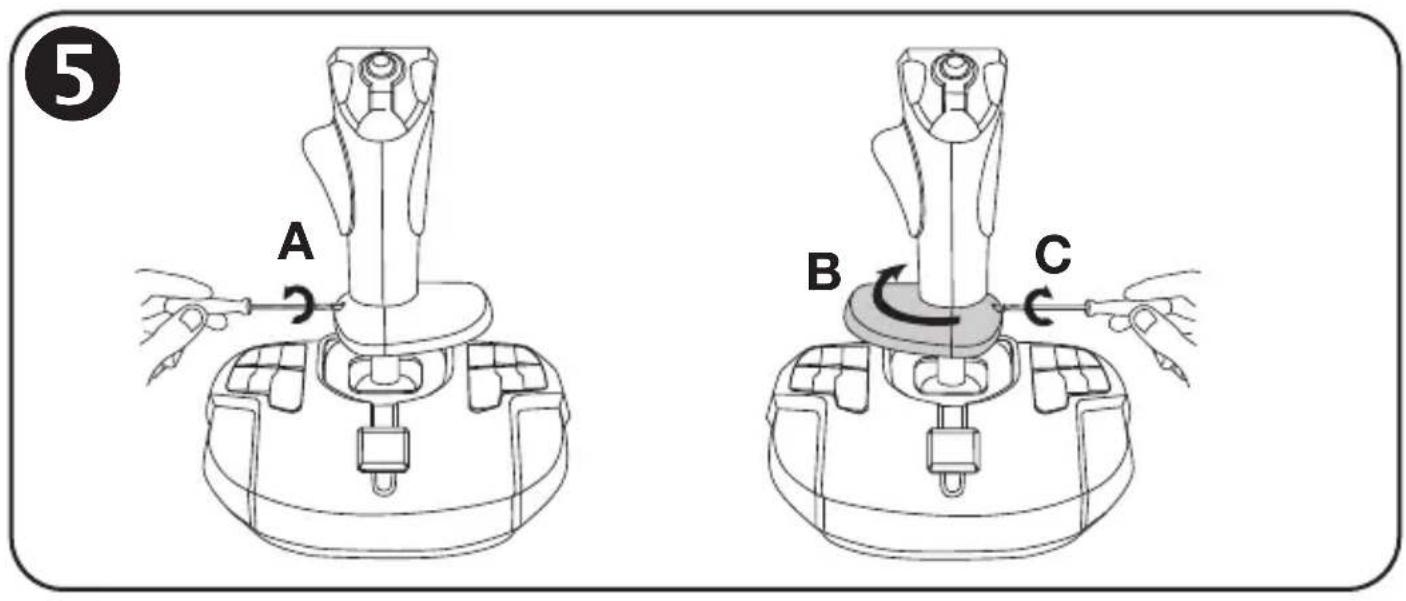
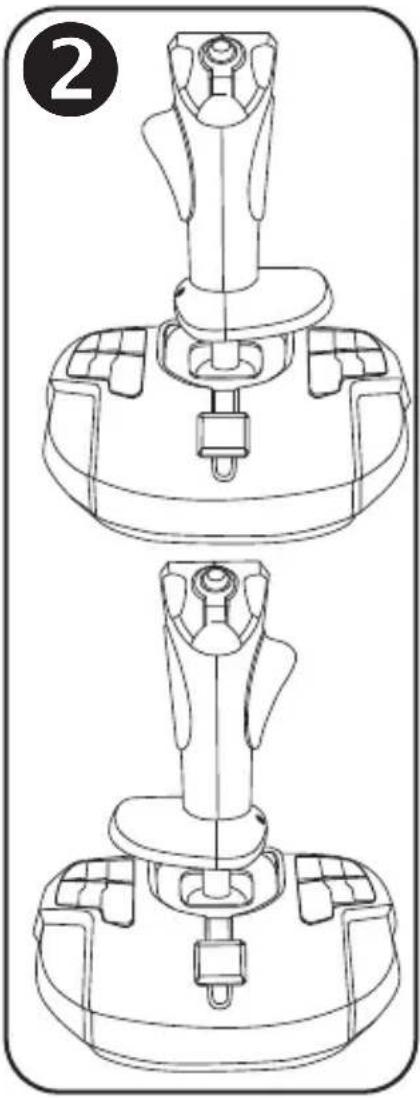
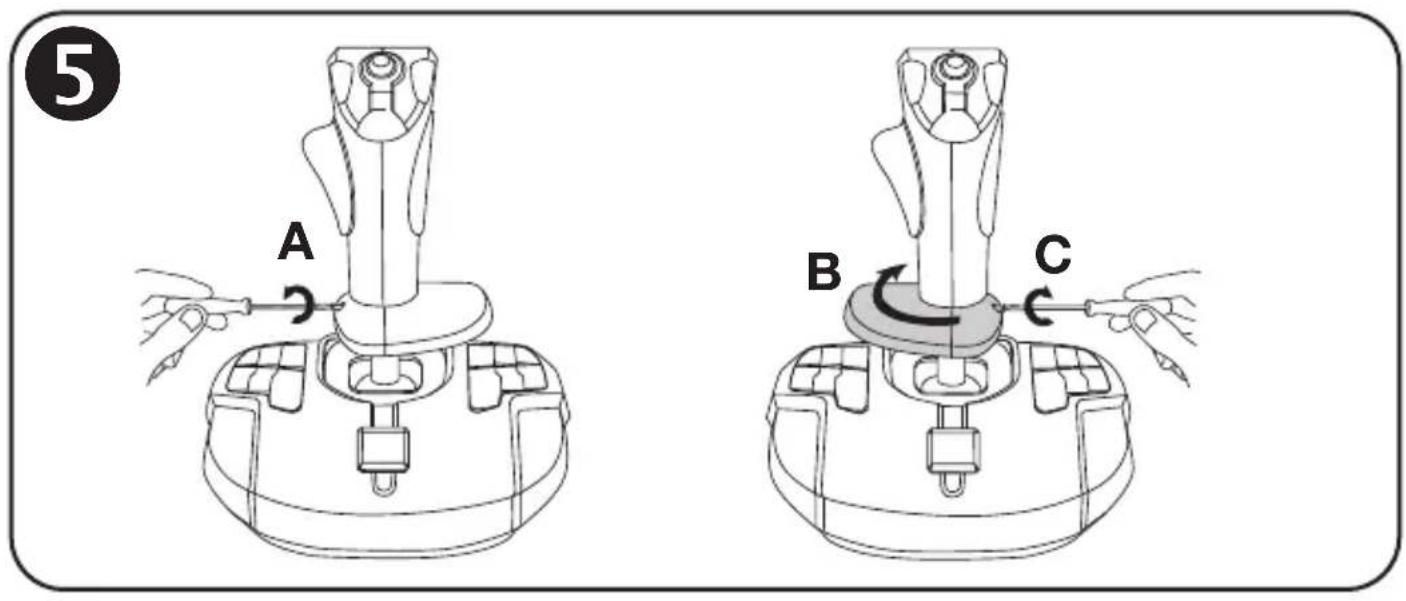
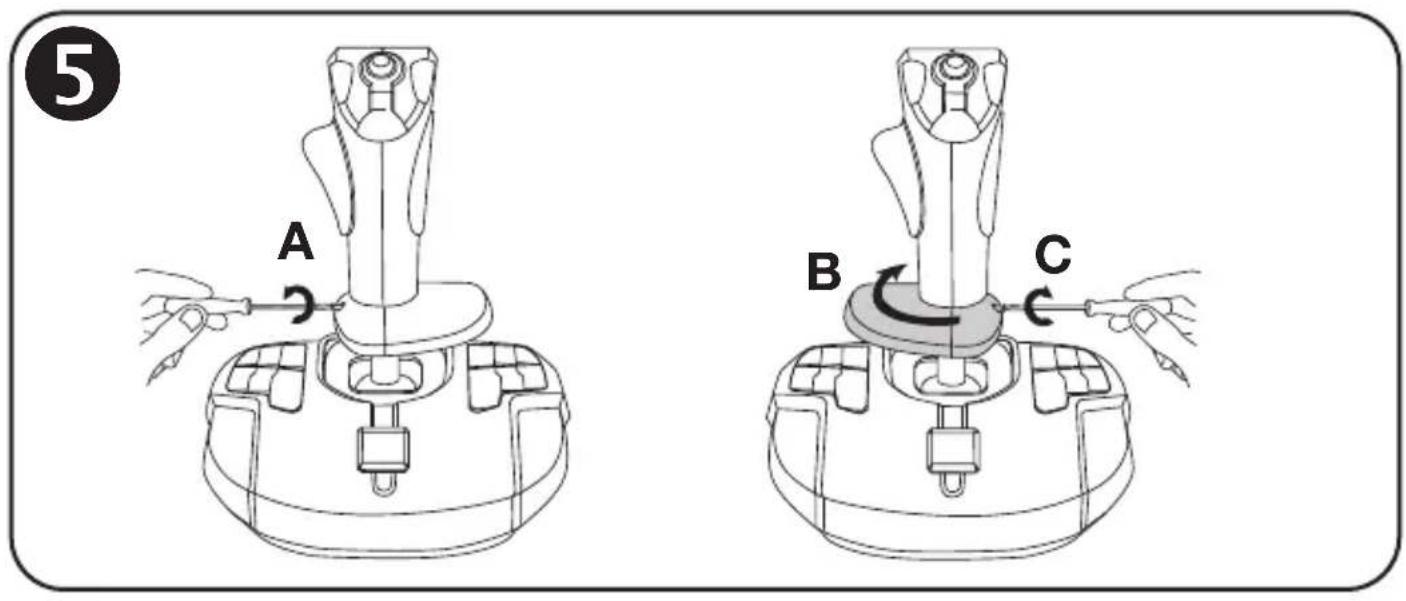
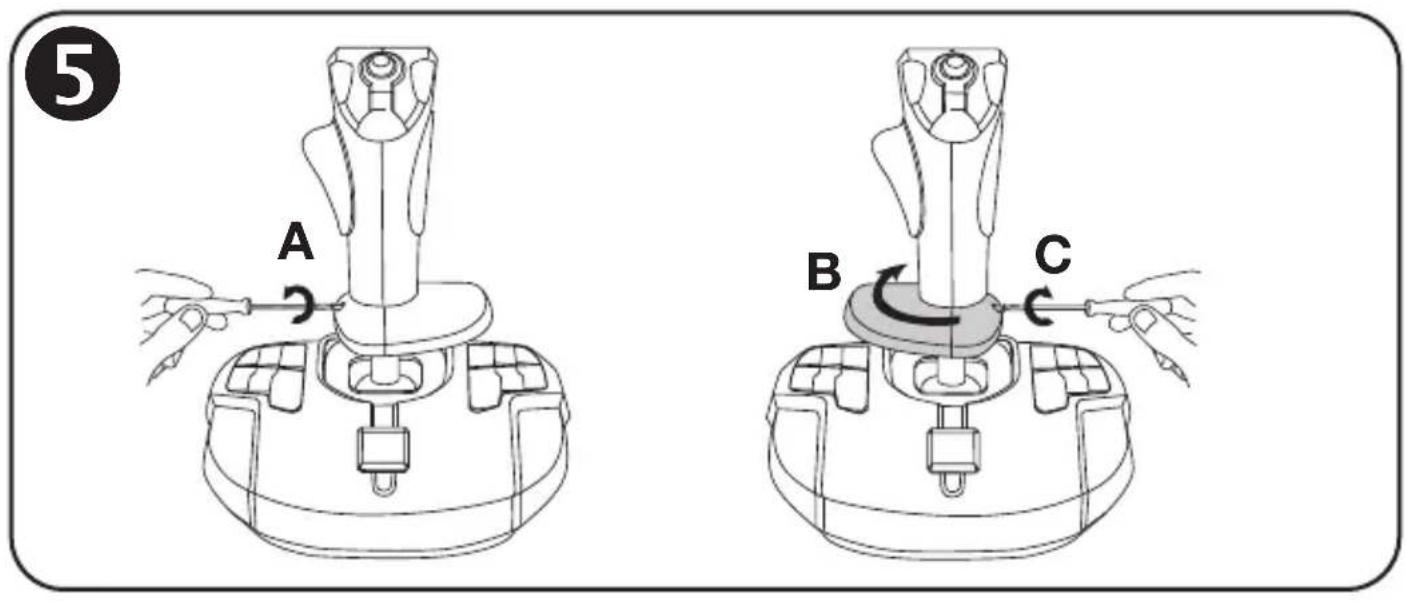
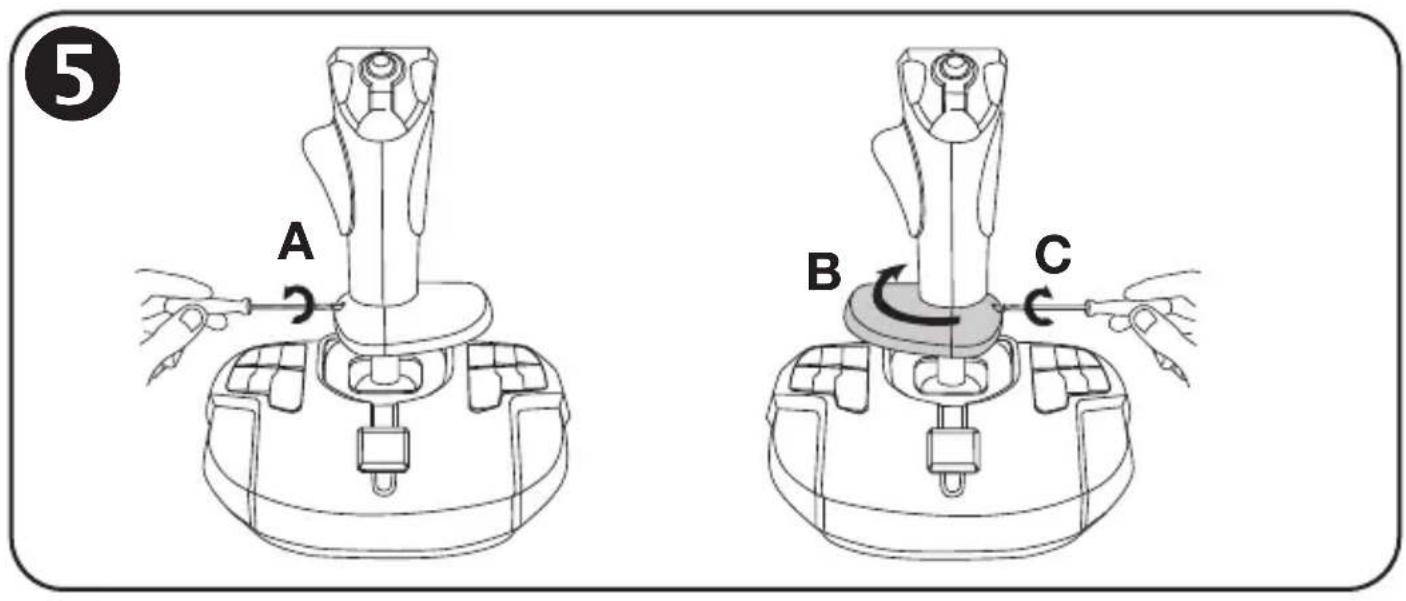
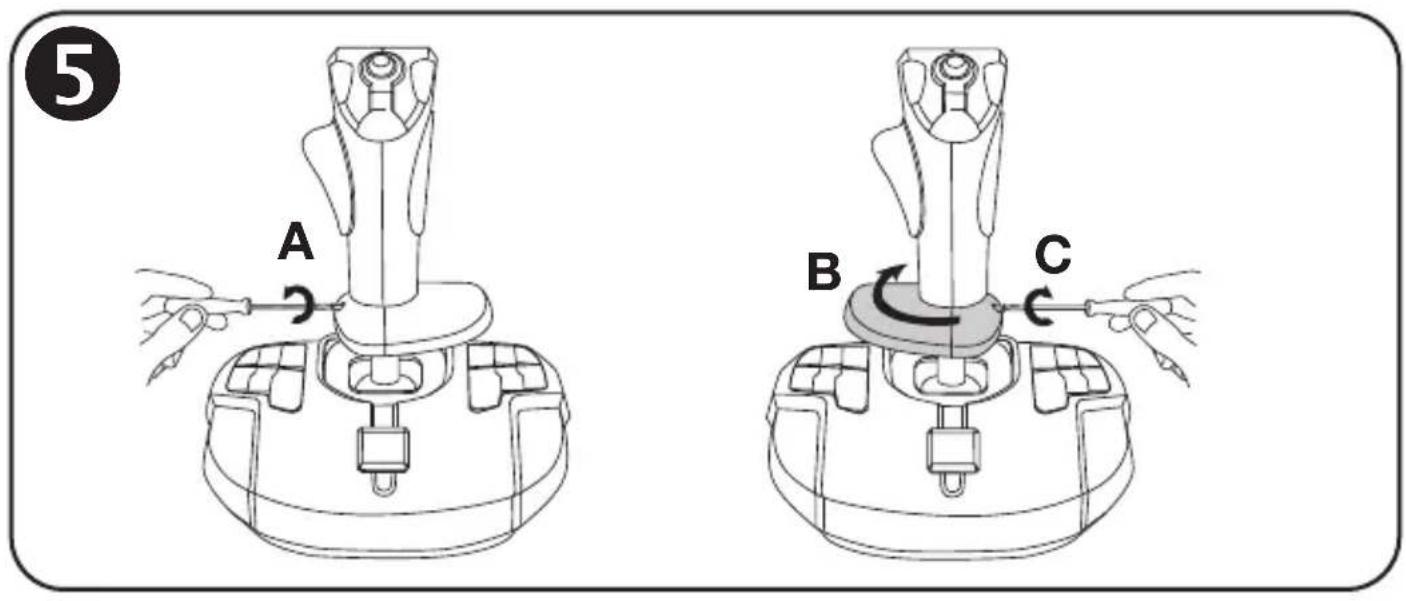
ADJUSTING THE HAND REST FOR RIGHT- OR LEFT-HANDED MODE 5
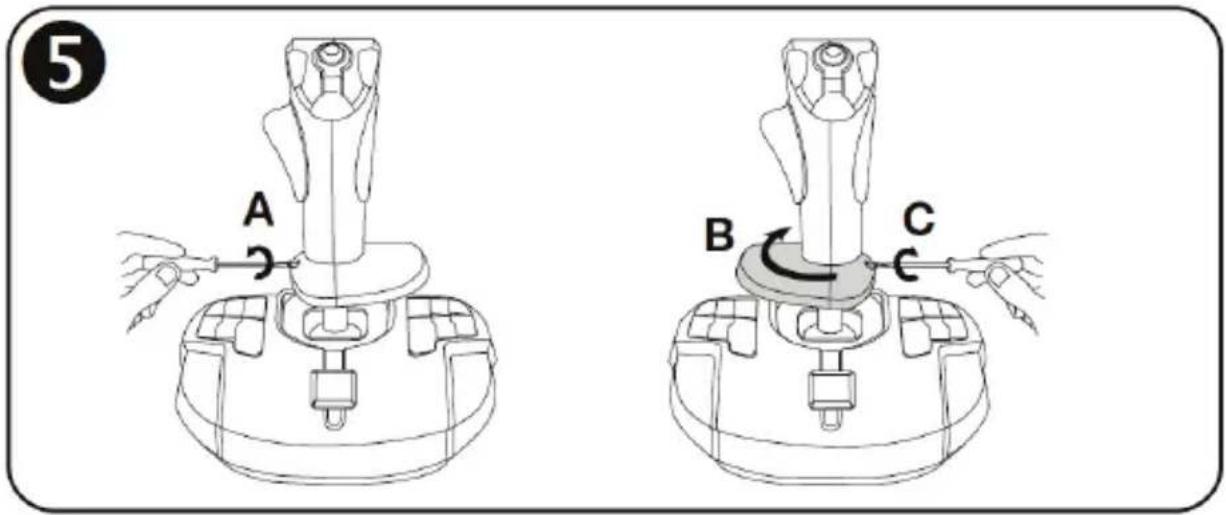
By default, the hand rest is configured in RIGHT-HANDED MODE.
To adjust it to LEFT-HANDED MODE:
A) Using a small screwdriver, carefully loosen (without actually removing) the small hand rest rotation screw (7), located on the left of the hand rest.
B) Turn the hand rest 180°.
C) Completely tighten the screw on the hand rest again (now located on the right).
Note: Carry out this procedure in reverse to return to right-handed mode.
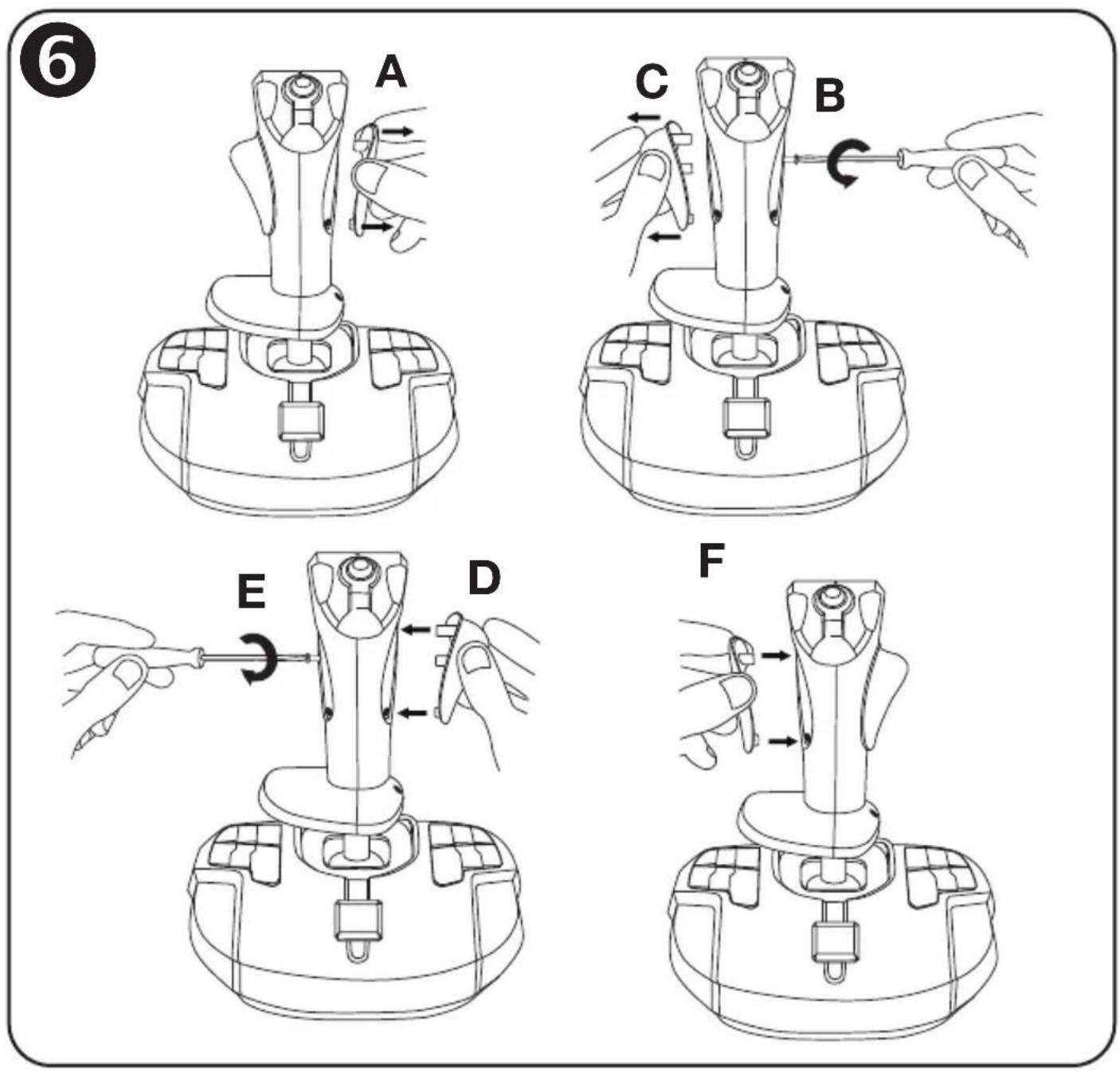
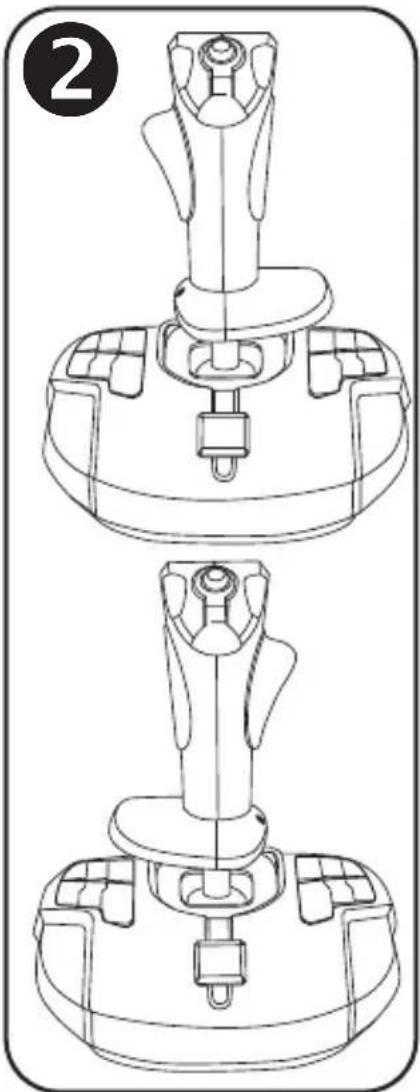
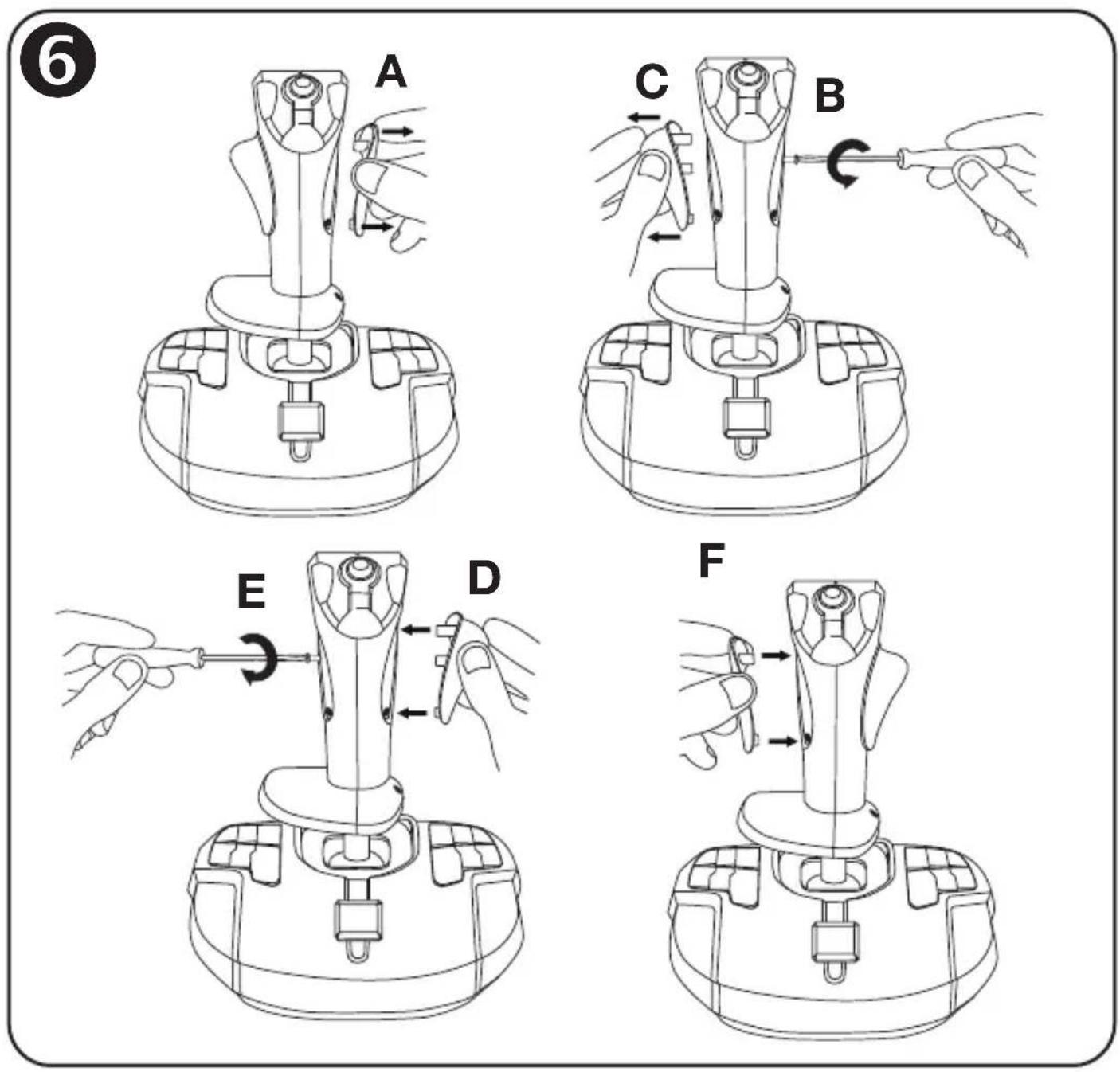
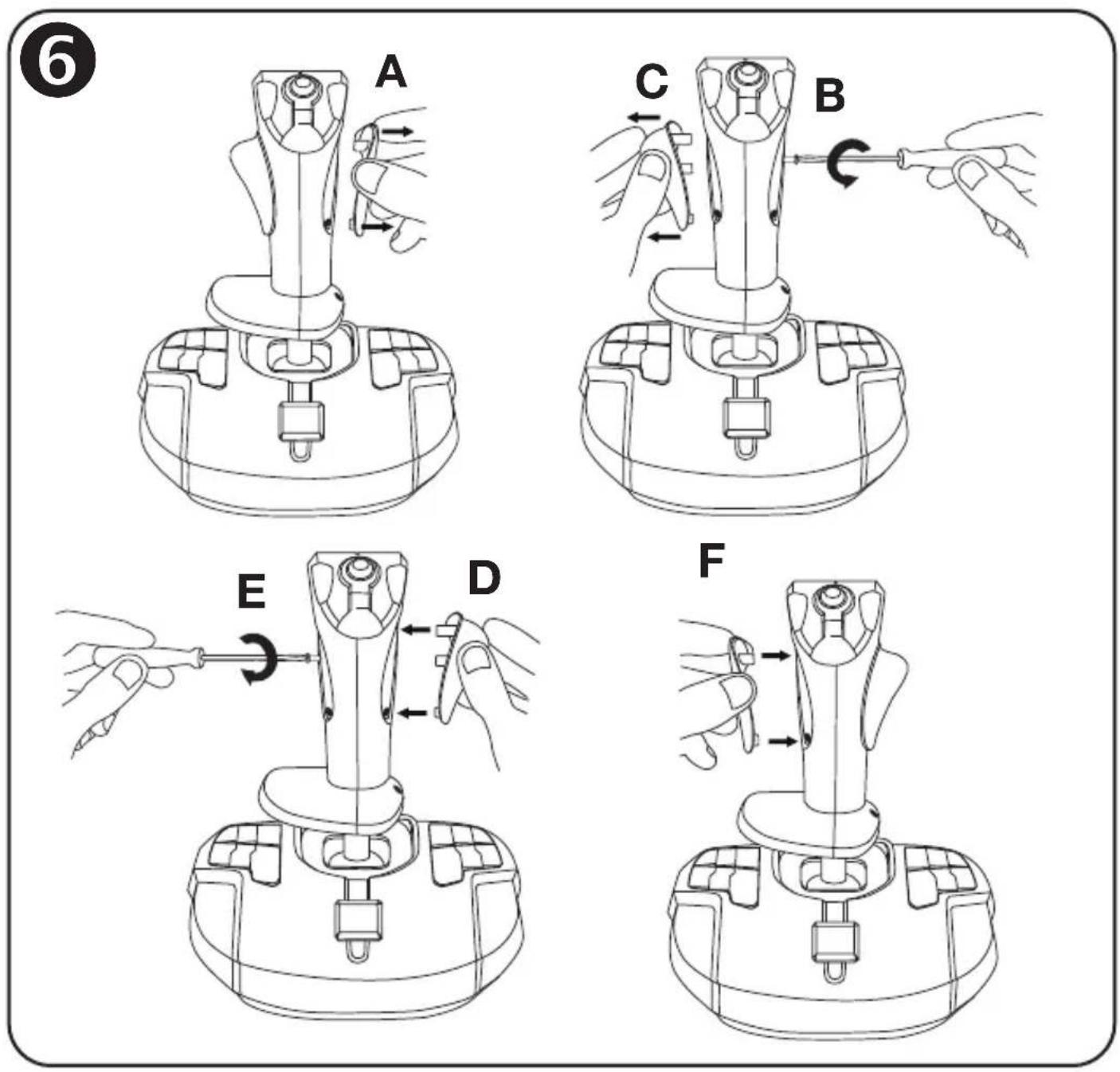
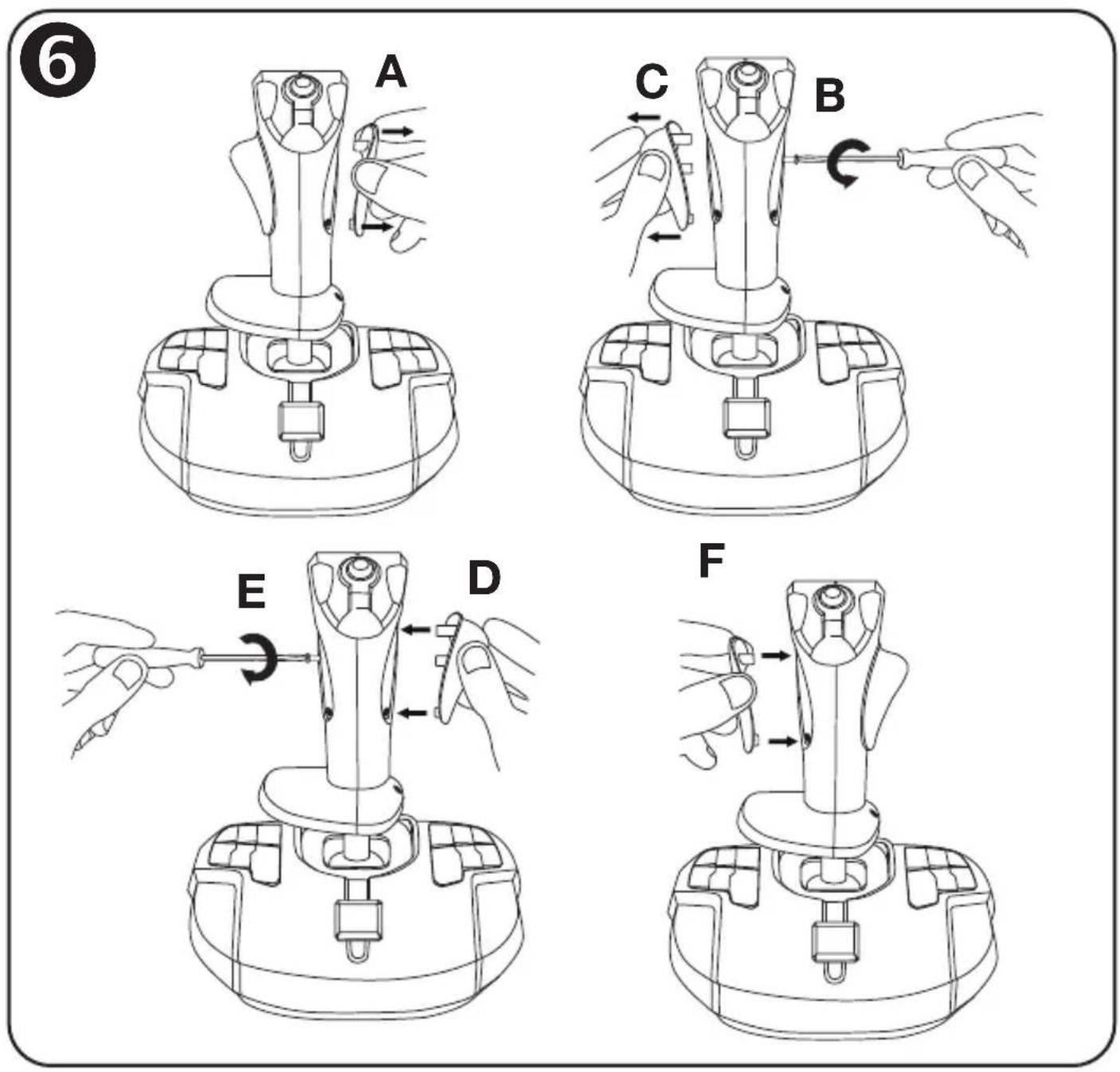
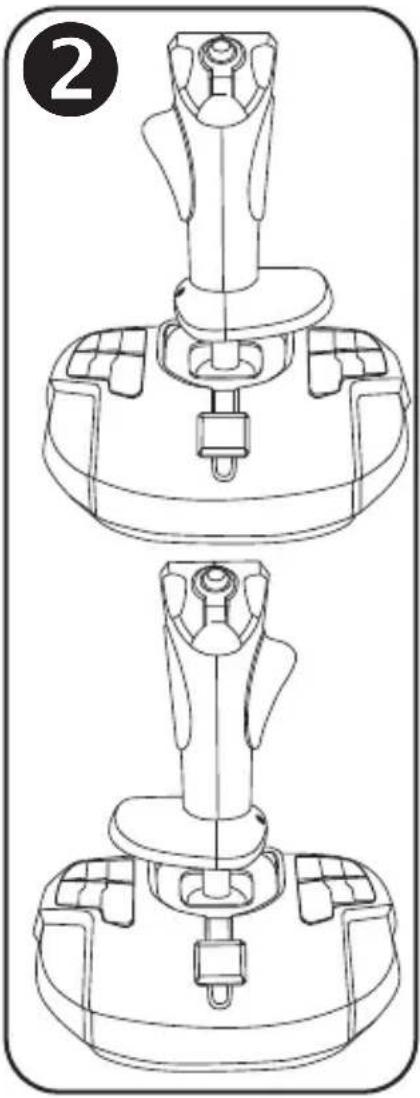
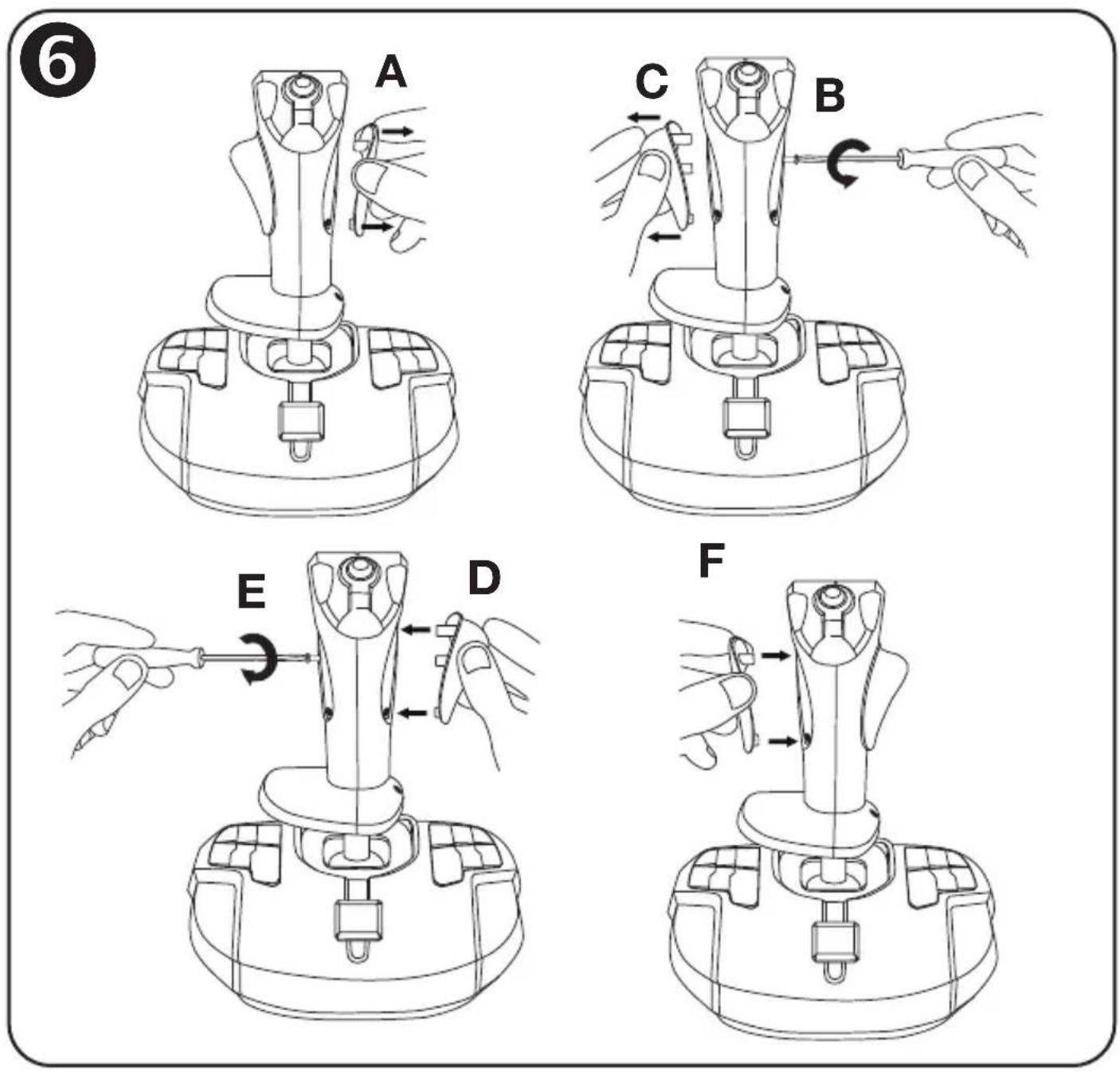
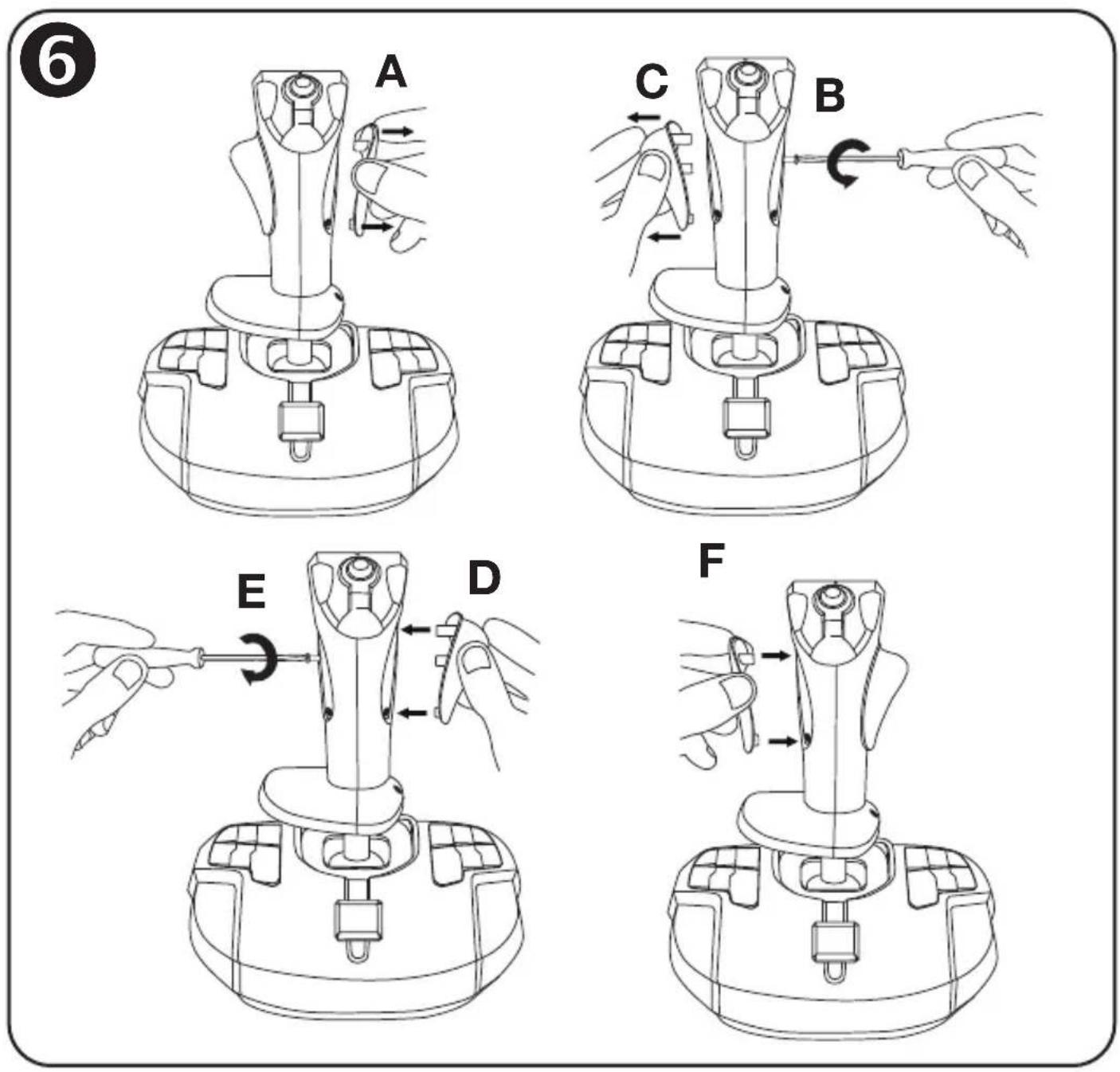
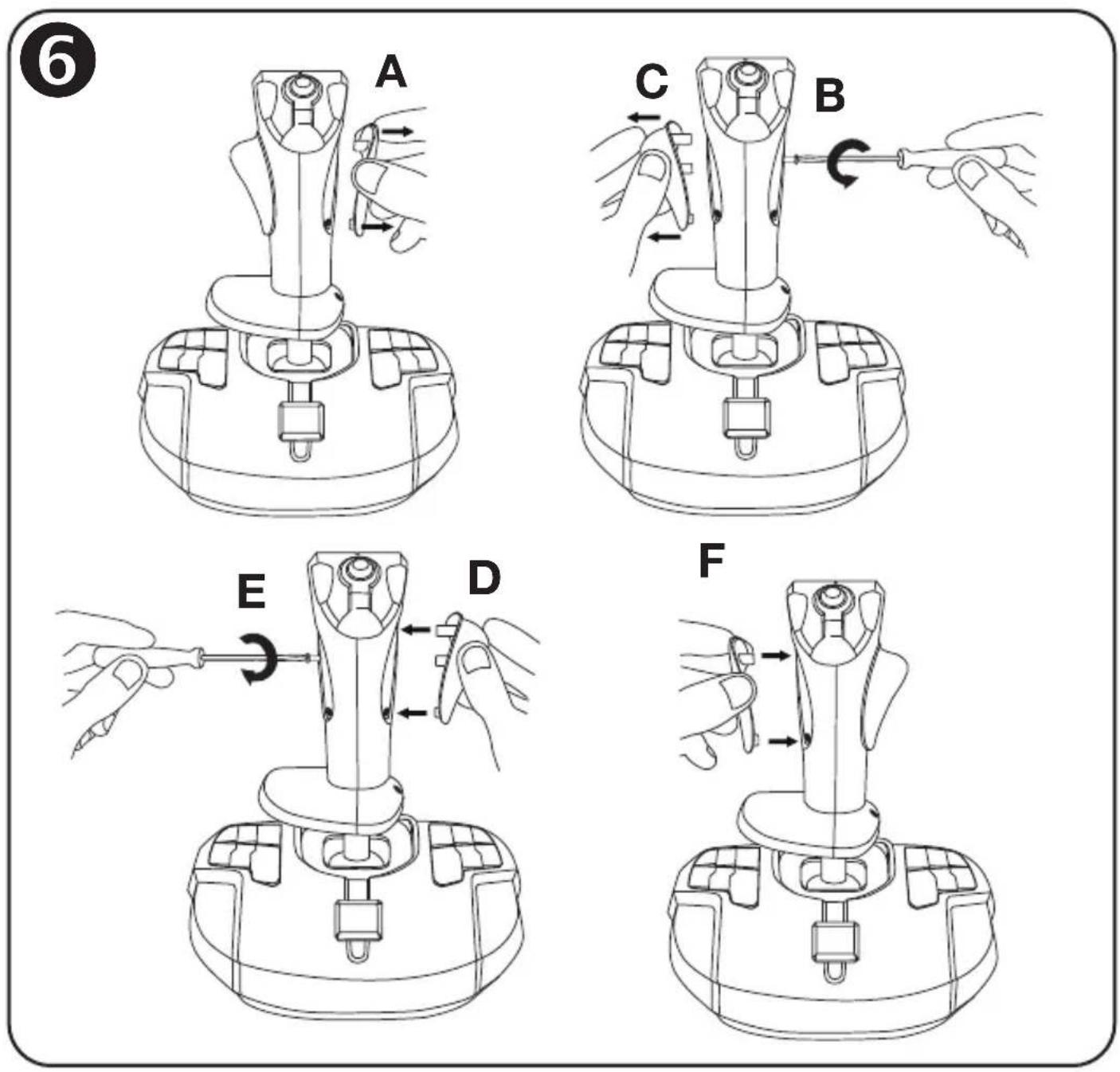
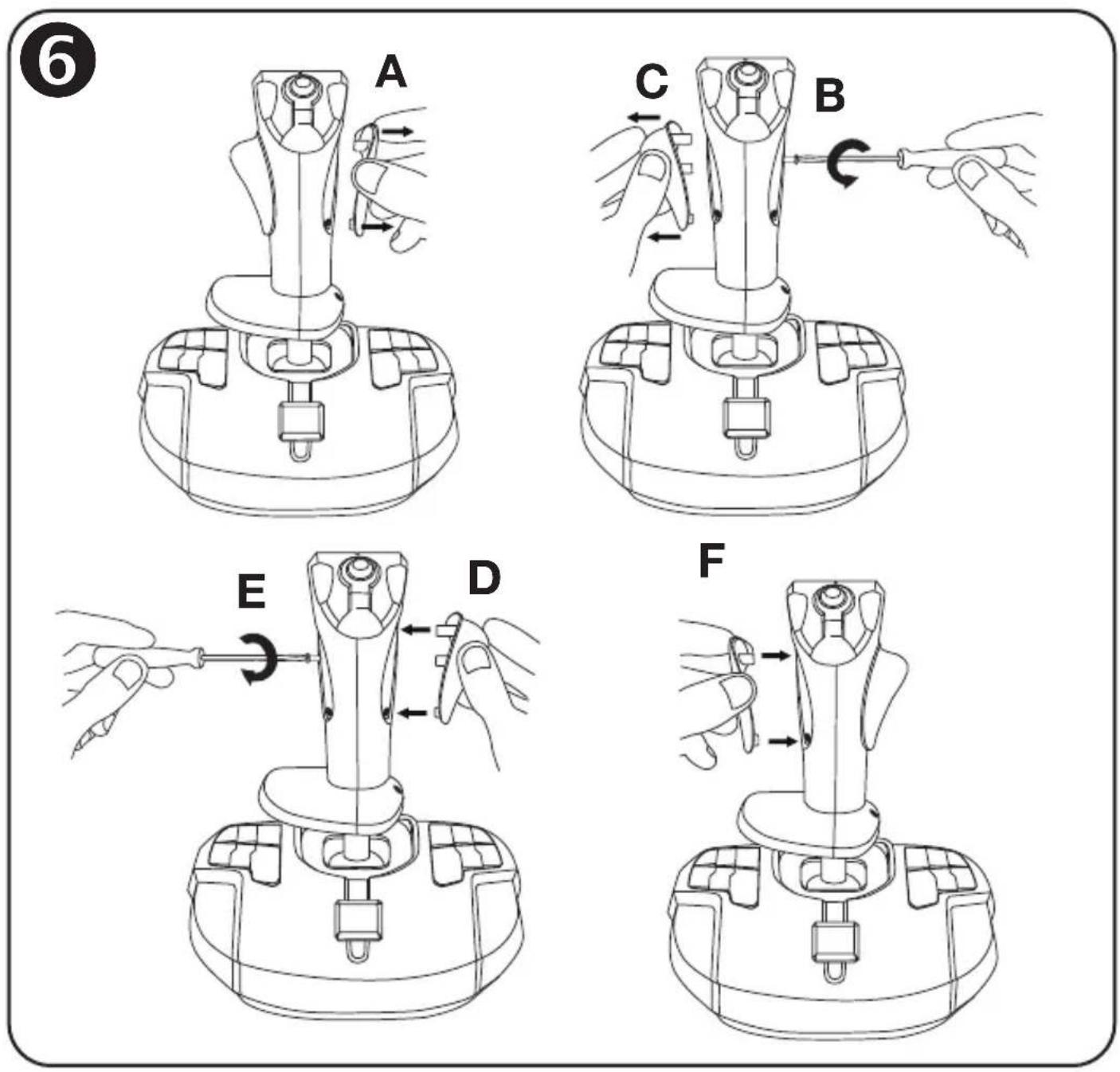
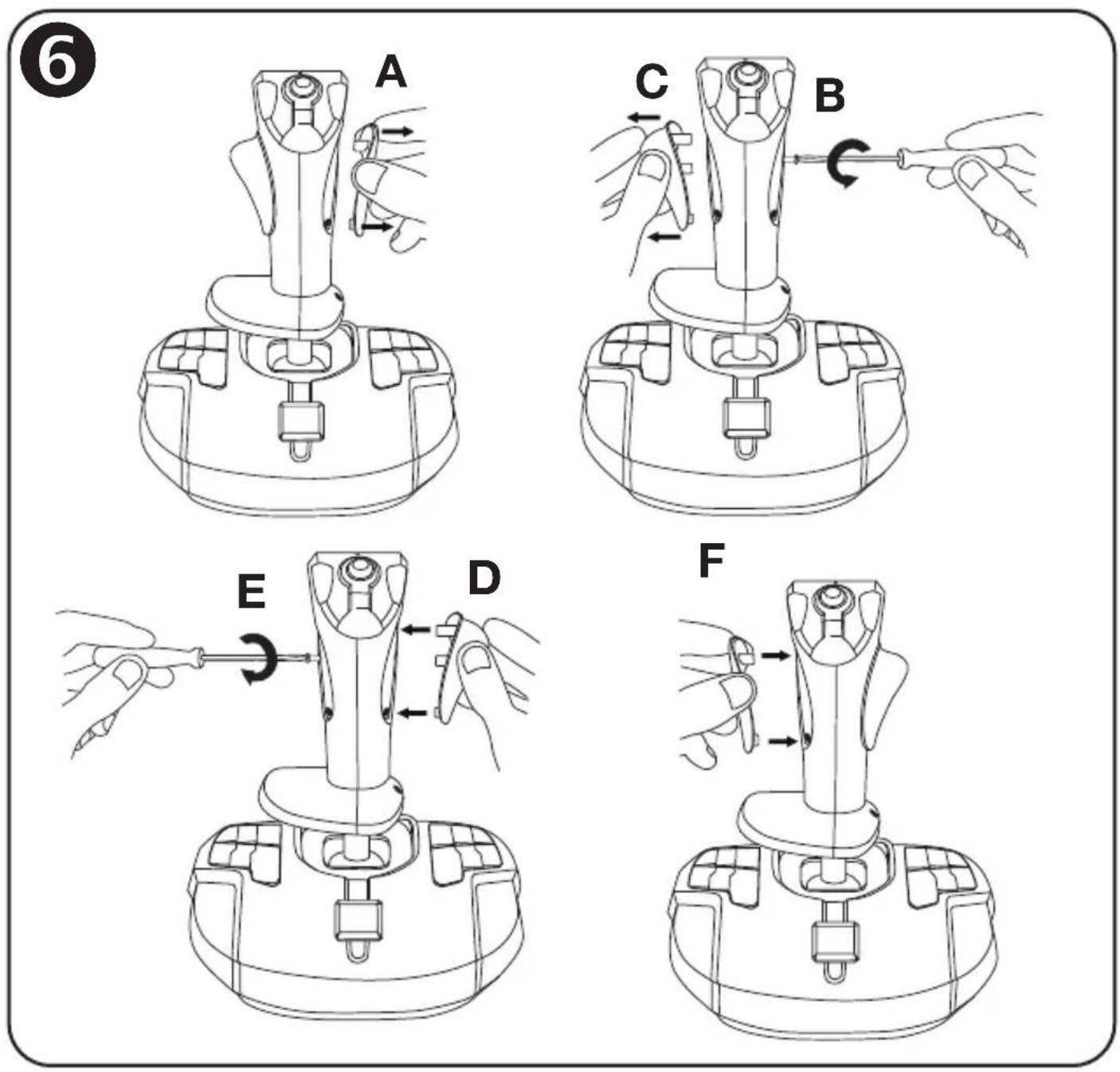
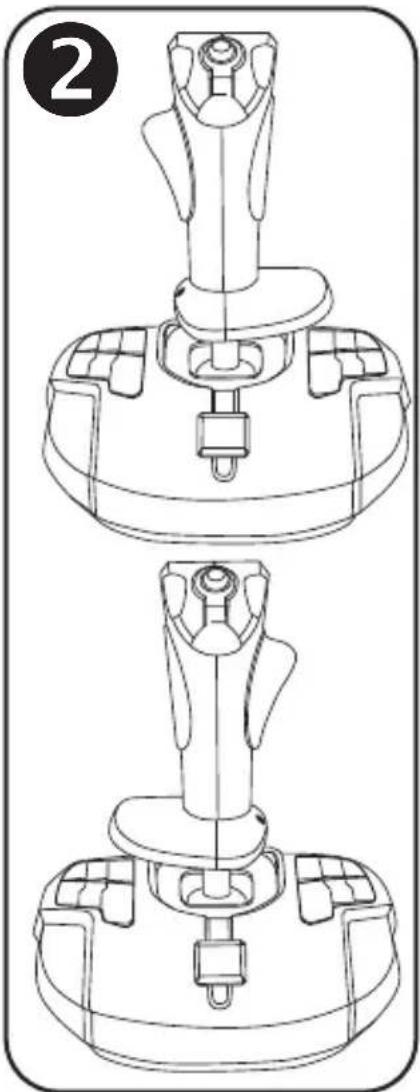
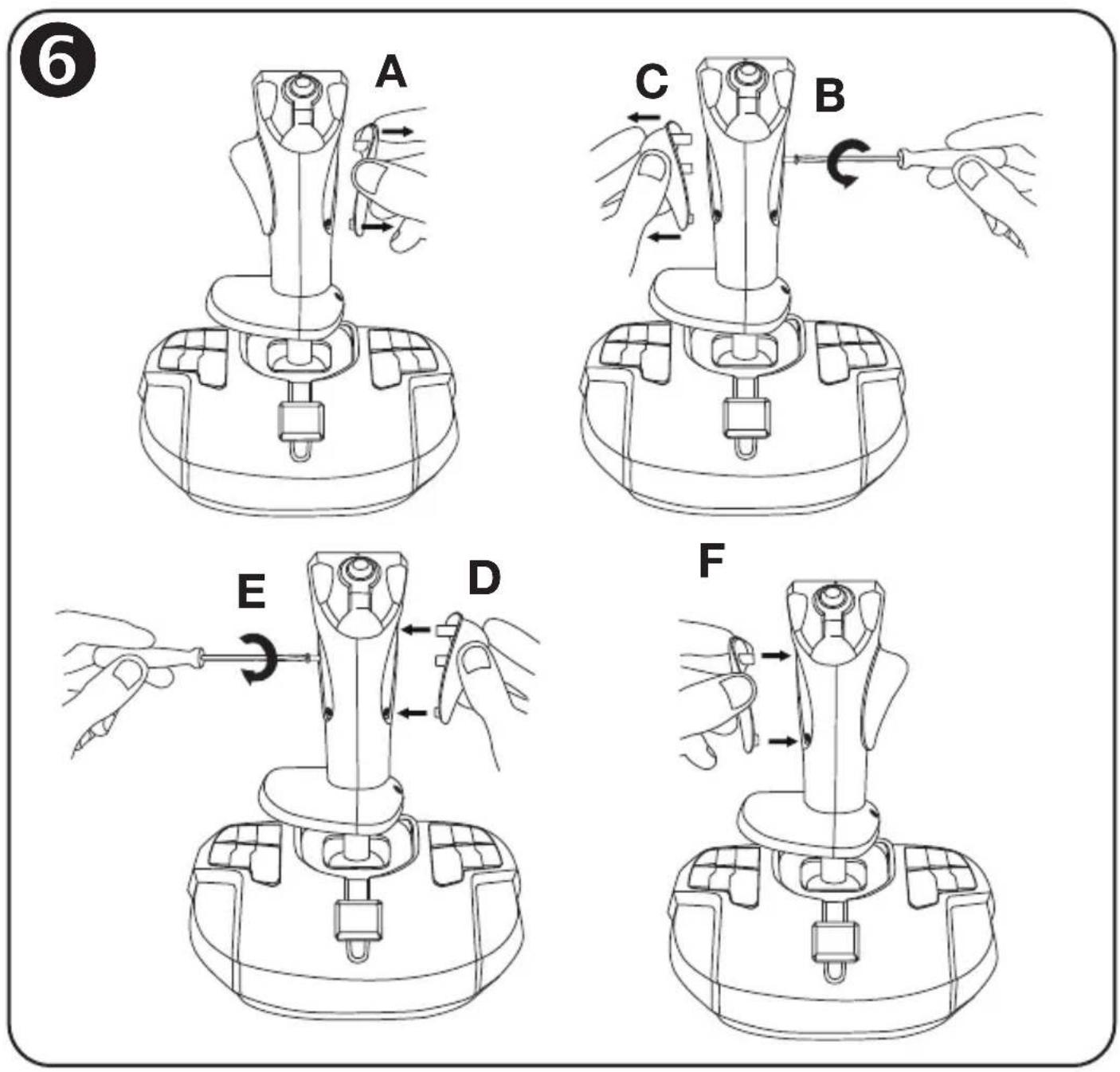
ADJUSTING THE THUMB REST FOR RIGHT- OR LEFT-HANDED
MODE 6
By default, the stick's thumb rest is configured in RIGHT-HANDED MODE.
To adjust it to LEFT-HANDED MODE:
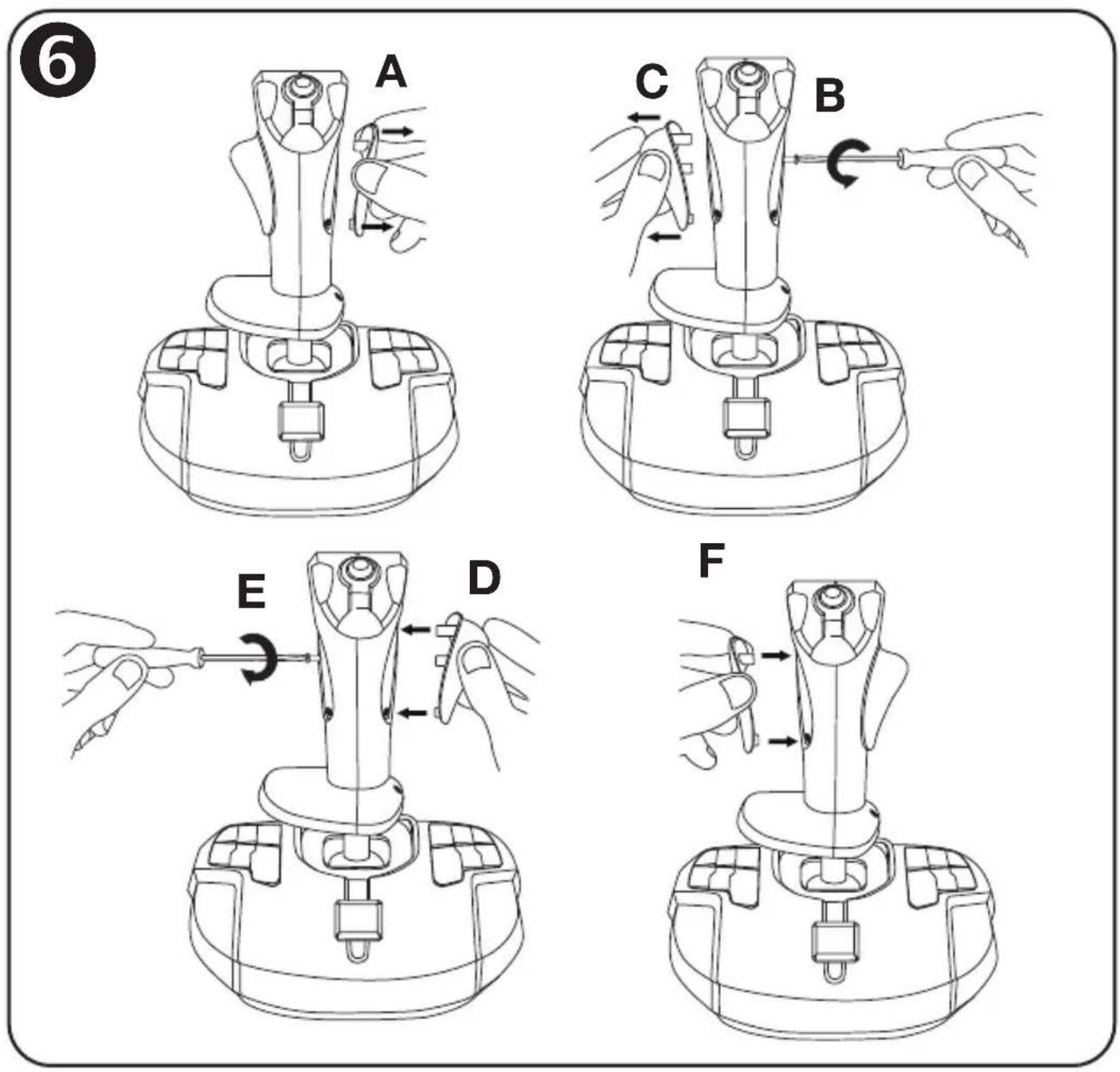
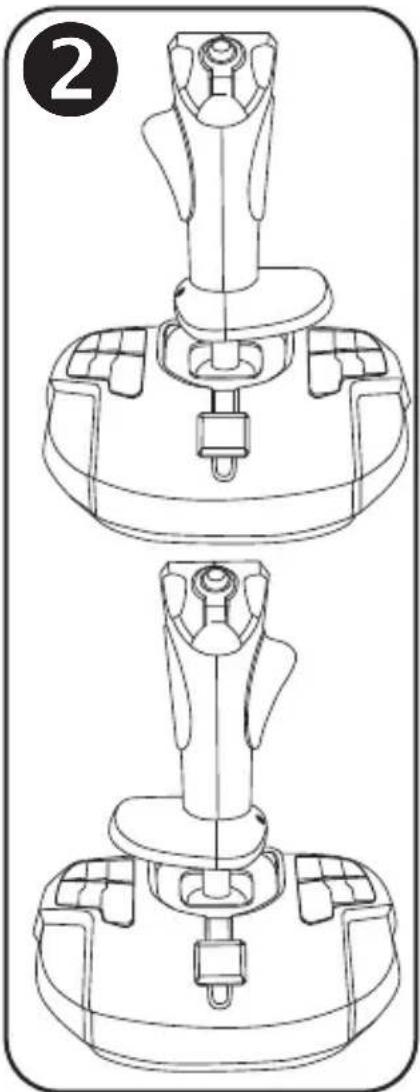
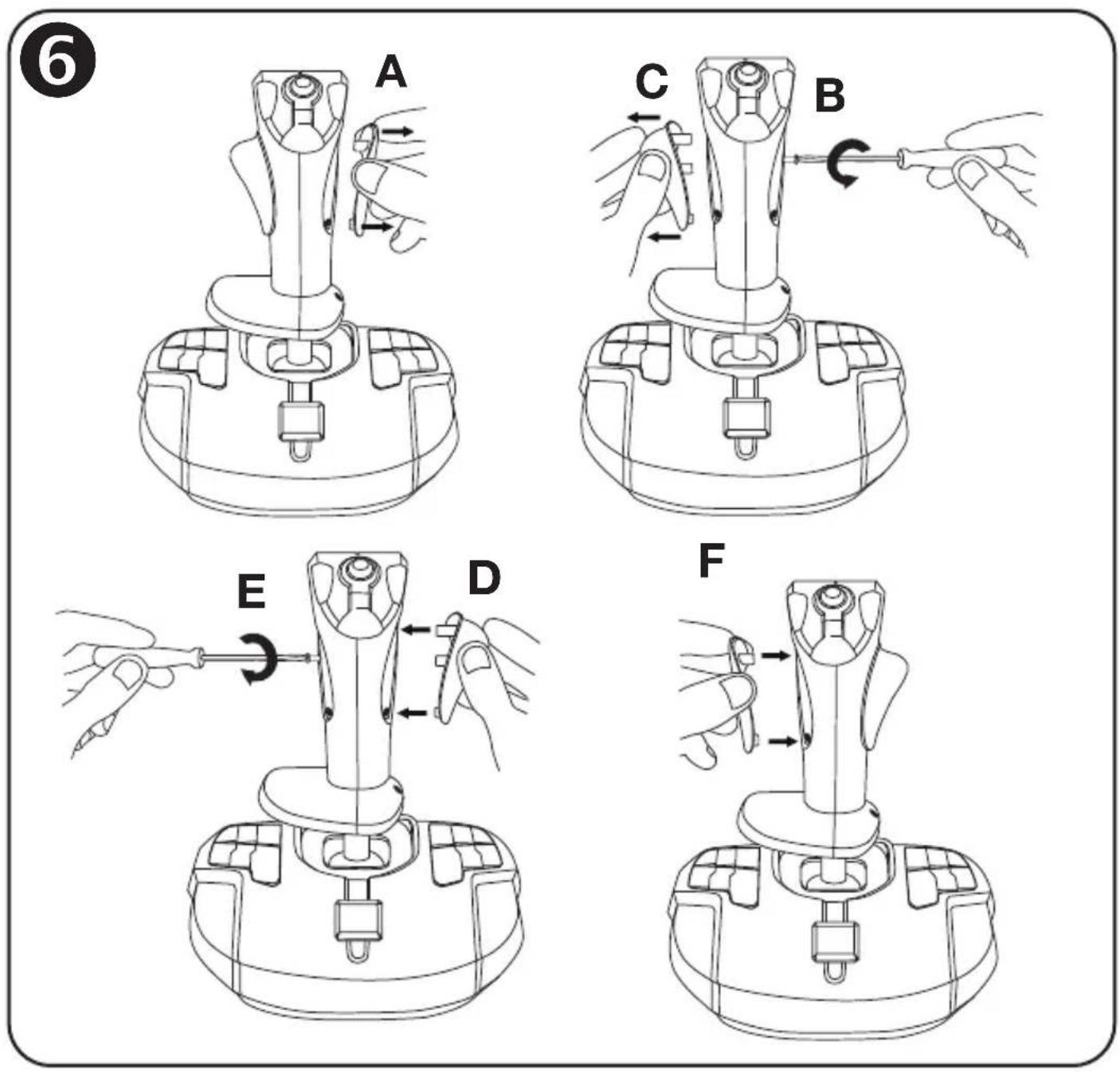
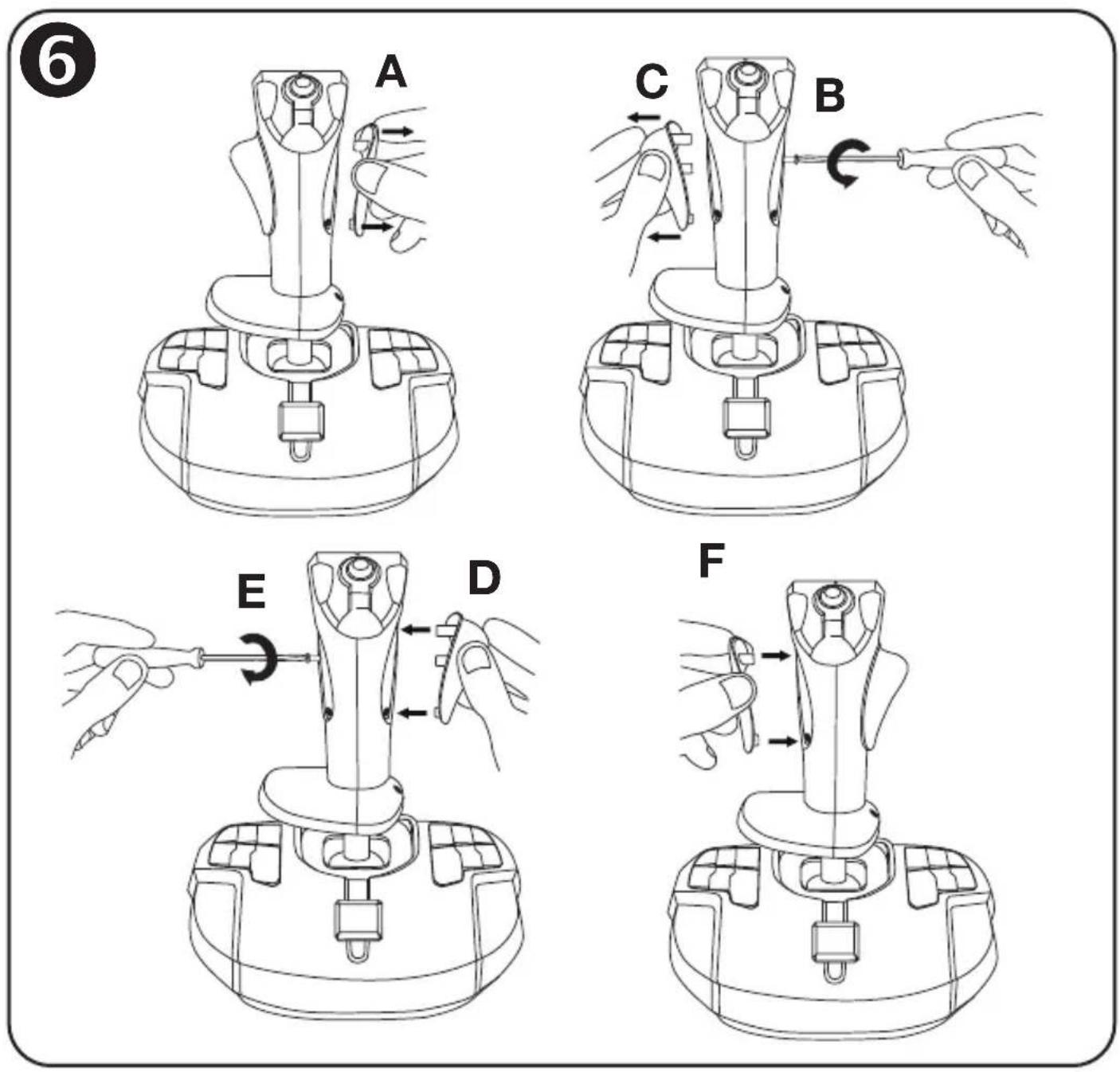
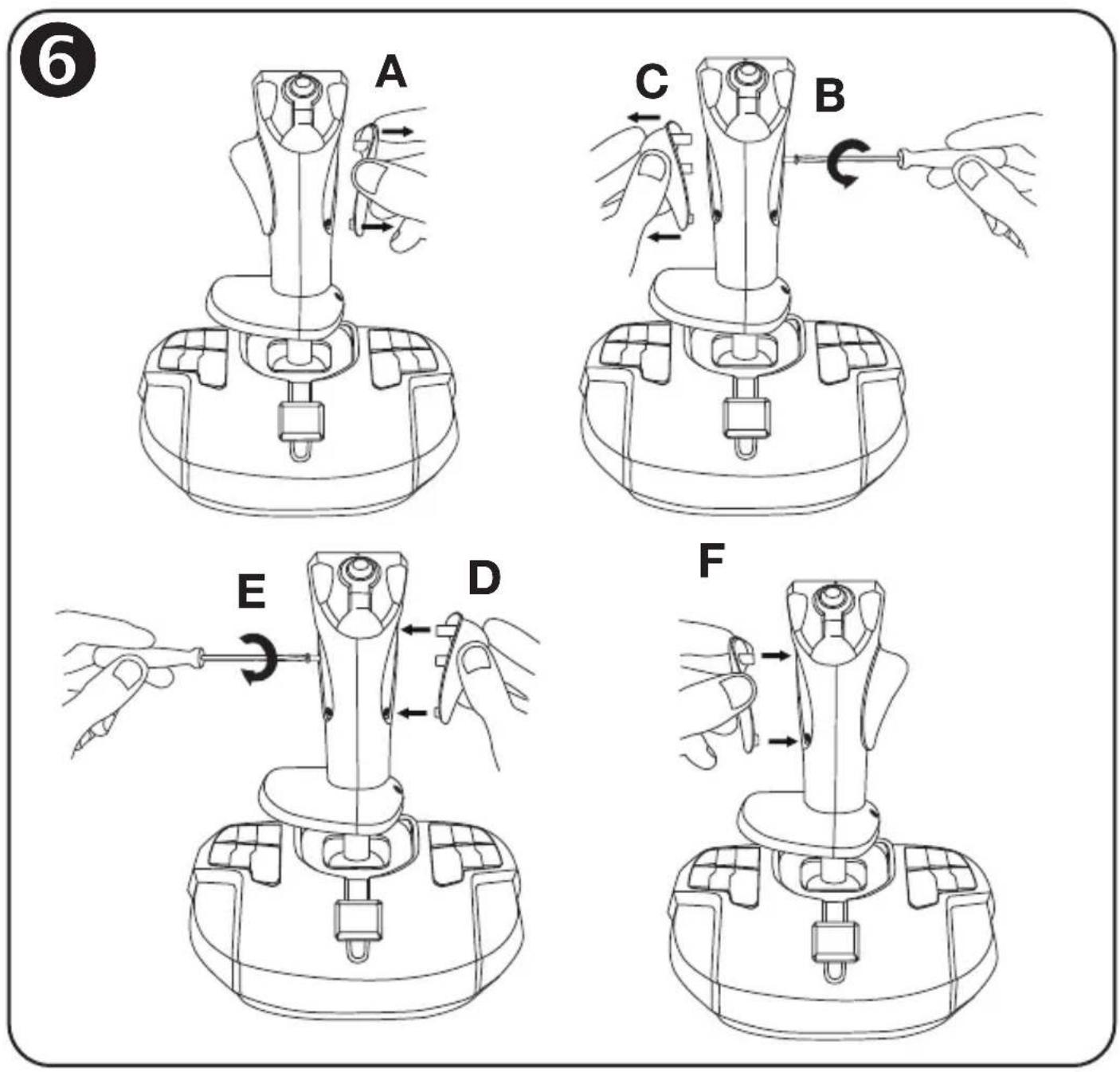
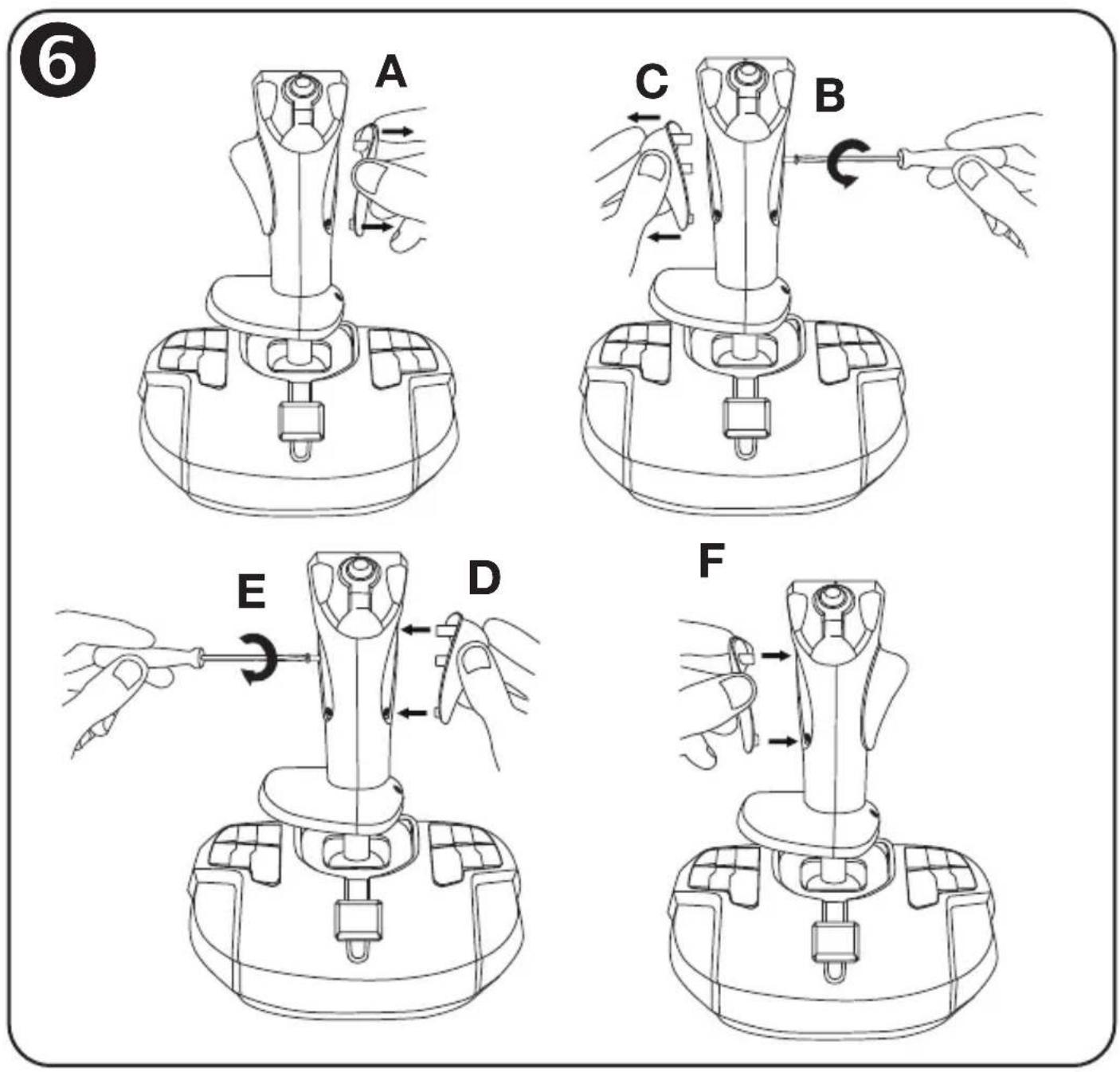
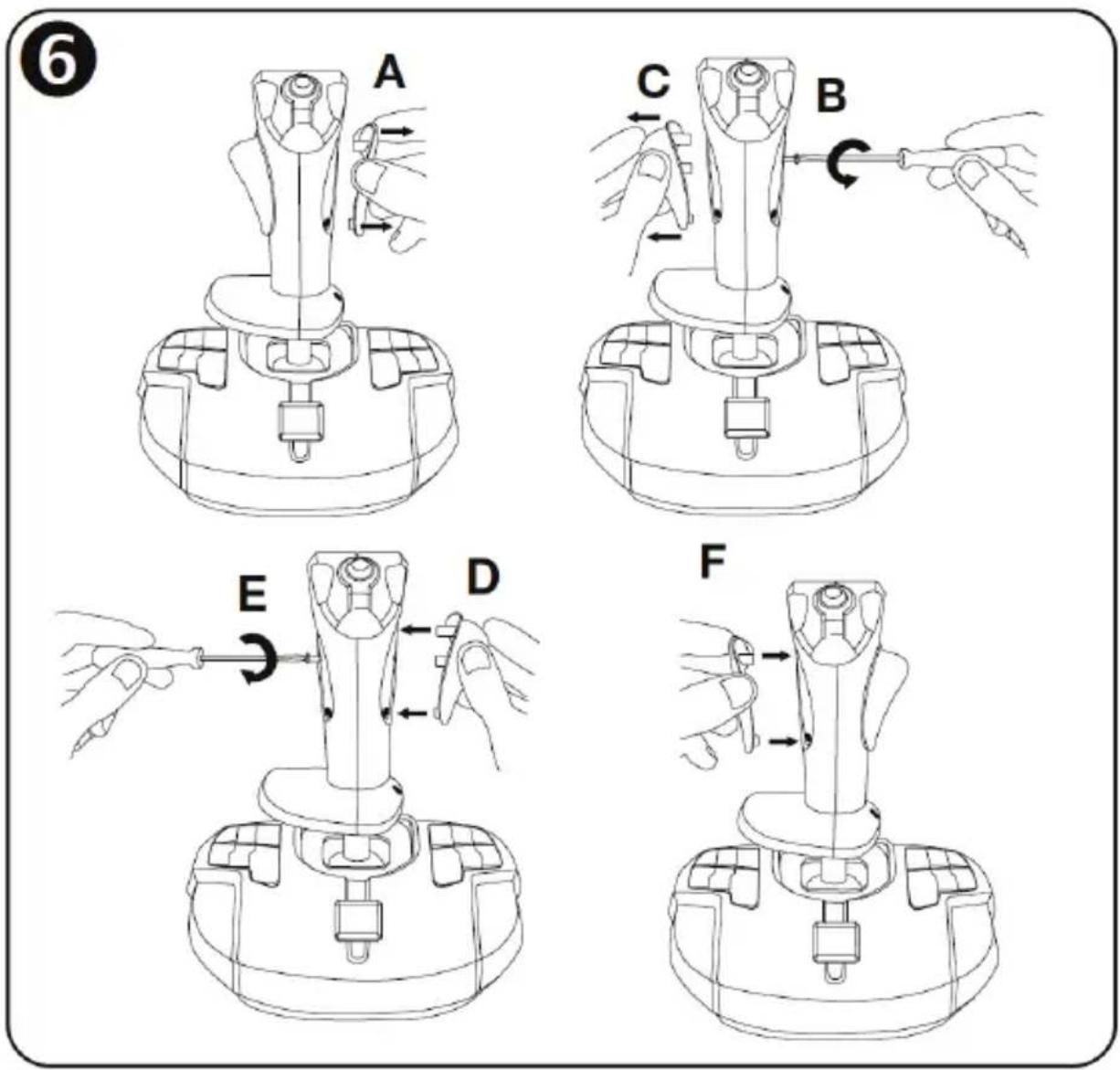
A) Remove the right-handed screw cover (3) located on the right of the stick.
B) Using a small screwdriver, unscrew and completely remove the long screw now accessible (on the right of the stick).
C) Remove the right-handed thumb rest (8) located on the left of the stick.
D) Position the left-handed thumb rest (10) (included separately in the joystick's box) on the right of the stick.
E) Position the long screw in the opening on the left of the stick and completely tighten the screw in order to fasten the left-handed thumb rest in place.
F) Position the left-handed screw cover (11) (included separately in the joystick's box) on the left of the stick.
Note: Carry out this procedure in reverse to return to right-handed mode.
PC
INSTALLATION ON PC
-
Connect the PC USB connector (9) to one of your computer's USB ports. Windows 10/11 will automatically detect the new device.
-
The drivers are installed automatically. Follow the on-screen instructions to complete the installation.
-
Click Start/Settings/Control Panel and double-click Game Controllers. The Game Controllers dialog box displays the joystick's name with OK status.
-
In the Control Panel, click Properties to test and view all of your joystick's functions.
You are now ready to play!
IMPORTANT NOTE
When connecting your joystick: always set the stick and the rudder to their central positions, and avoid moving them (to avoid any calibration problems).
TROUBLESHOOTING AND WARNING
- My joystick isn't functioning properly or seems to be improperly calibrated:
- Power off your computer and disconnect your joystick; then, turn your computer back on, reconnect your joystick and restart your game.
- When connecting your joystick: always set the stick and the rudder to their central positions, and avoid moving them (to avoid any calibration problems).
• I can't configure my joystick:
- In your game's "Options/Controller/Gamepad or Joystick" menu: select the appropriate configuration, or completely reconfigure the controller options.
- Please refer to your game's user manual or online help utility for more information.
- My joystick is too sensitive or not sensitive enough:
- Your joystick self-calibrates independently once you have made some movements along the different axes.
- In your game's "Options/Controller/Gamepad or Joystick" menu: adjust the sensitivity and dead zones for your joystick (if these options are available).
- The joystick's central backlighting doesn't turn off automatically:
- Move the stick very slightly so that it is set to the absolute central value; the backlighting will then switch off after 3 seconds of inactivity.
CONSUMER WARRANTY INFORMATION
Worldwide, Guillemot Corporation S.A., whose registered office is located at Place du Granier, B.P. 97143, 35571 Chantepie, France (hereinafter “Guillemot”) warrants to the consumer that this Thrustmaster product shall be free from defects in materials and workmanship, for a warranty period which corresponds to the time limit to bring an action for conformity with respect to this product. In the countries of the European Union, this corresponds to a period of two (2) years from delivery of the Thrustmaster product. In other countries, the warranty period corresponds to the time limit to bring an action for conformity with respect to the Thrustmaster product according to applicable laws of the country in which the consumer was domiciled on the date of purchase of the Thrustmaster product (if no such action exists in the corresponding country, then the warranty period shall be one (1) year from the original date of purchase of the Thrustmaster product).
Notwithstanding the above, rechargeable batteries are covered by a warranty period of six (6) months from the date of original purchase.
Should the product appear to be defective during the warranty period, immediately contact Technical Support, who will indicate the procedure to follow. If the defect is confirmed, the product must be returned to its place of purchase (or any other location indicated by Technical Support).
Within the context of this warranty, the consumer's defective product shall, at Technical Support's option, be either replaced or returned to working order. If, during the warranty period, the Thrustmaster product is subject to such reconditioning, any period of at least seven (7) days during which the product is out of use shall be added to the remaining warranty period (this period runs from the date of the consumer's request for intervention or from the date on which the product in question is made available for reconditioning, if the date on which the product is made available for reconditioning is subsequent to the date of the request for intervention). If permitted under applicable law, the full liability of Guillemot and its subsidiaries (including for consequential damages) is limited to the return to working order or the replacement of the Thrustmaster product. If permitted under applicable law, Guillemot disclaims all warranties of merchantability or fitness for a particular purpose.
This warranty shall not apply: (1) if the product has been modified, opened, altered, or has suffered damage as a result of inappropriate or abusive use, negligence, an accident, normal wear, or any other cause unrelated to a material or manufacturing defect (including, but not limited to, combining the Thrustmaster product with any unsuitable element, including in particular power supplies, rechargeable batteries, chargers, or any other elements not supplied by Guillemot for this product); (2) if the product has been used for any use other than home use, including for professional or commercial purposes (game rooms, training, competitions, for example); (3) in the event of failure to comply with the instructions provided by Technical Support; (4) to software, said software being subject to a specific warranty; (5) to consumables (elements to be replaced over the product's lifespan: disposable batteries, audio headset or headphone ear pads, for example); (6) to accessories (cables, cases, pouches, bags, wrist-straps, for example); (7) if the product was sold at public auction.
This warranty is nontransferable.
The consumer's legal rights with respect to laws applicable to the sale of consumer goods in his or her country are not affected by this warranty.
Additional warranty provisions
During the warranty period, Guillemot shall not provide, in principle, any spare parts, as Technical Support is the only party authorized to open and/or recondition any Thrustmaster product (with the exception of any reconditioning procedures which Technical Support may request that the consumer carry out, by way of written instructions – for example, due to the simplicity and the lack of confidentiality of the reconditioning process – and by providing the consumer with the required spare part(s), where applicable).
Given its innovation cycles and in order to protect its know-how and trade secrets, Guillemot shall not provide, in principle, any reconditioning notification or spare parts for any Thrustmaster product whose warranty period has expired.
In the United States of America and in Canada, this warranty is limited to the product's internal mechanism and external housing. In no event shall Guillemot or its affiliates be held liable to any third party for any consequential or incidental damages resulting from the breach of any express or implied warranties. Some States/Provinces do not allow limitation on how long an implied warranty lasts or exclusion or limitation of liability for consequential or incidental damages, so the above limitations or exclusions may not apply to you. This warranty gives you specific legal rights, and you may also have other rights which vary from State to State or Province to Province.
Liability
If permitted under applicable law, Guillemot Corporation S.A. (hereinafter "Guillemot") and its subsidiaries disclaim all liability for any damages caused by one or more of the following: (1) the product has been modified, opened or altered; (2) failure to comply with assembly instructions; (3) inappropriate or abusive use, negligence, an accident (an impact, for example); (4) normal wear; (5) the use of the product for any use other than home use, including for professional or commercial purposes (game rooms, training, competitions, for example). If permitted under applicable law, Guillemot and its subsidiaries disclaim all liability for any damages unrelated to a material or manufacturing defect with respect to the product (including, but not limited to, any damages caused directly or indirectly by any software, or by combining the Thrustmaster product with any unsuitable element, including in particular power supplies, rechargeable batteries, chargers, or any other elements not supplied by Guillemot for this product).
FCC STATEMENT
- This device complies with Part 15 of the FCC Rules. Operation is subject to the following two conditions:
(1) This device may not cause harmful interference, and
(2) This device must accept any interference received, including interference that may cause undesired operation. - Changes or modifications not expressly approved by the party responsible for compliance could void the user's authority to operate the equipment.

WARNING: This product can expose you to chemicals including Bisphenol A (BPA) which is known to the State of California to cause birth defects or other reproductive harm. For more information go to http://www.p65warnings.ca.gov/
COPYRIGHT
© 2022 Guillemot Corporation S.A. All rights reserved. Thrustmaster® is a registered trademark of Guillemot Corporation S.A. Windows® is a registered trademark of Microsoft Corporation in the United States and/or other countries. All other trademarks are the property of their respective owners. Illustrations not binding. Contents, designs and specifications are subject to change without notice and may vary from one country to another. Made in China.
ENVIRONMENTAL PROTECTION RECOMMENDATION
natural_image
Simple line drawing of a trash bin with crossed lines indicating no waste or discharge (no text or symbols)In the European Union: At the end of its working life, this product should not be disposed of with standard household waste, but rather dropped off at a collection point for the disposal of Waste Electrical and Electronic Equipment (WEEE) for recycling.
This is confirmed by the symbol found on the product, user manual or packaging.
Depending on their characteristics, the materials may be recycled. Through recycling and other forms of processing Waste Electrical and Electronic Equipment, you can make a significant contribution towards helping to protect the environment.
Please contact your local authorities for information on the collection point nearest you.
For all other countries: Please adhere to local recycling laws for electrical and electronic equipment.
Retain this information. Colours and decorations may vary.
Plastic fasteners and adhesives should be removed from the product before it is used.
www.thrustmaster.com
*Applicable to EU, UK and Turkey only
CE*
FC
UK CA
THRUSTMASTER®
TECHNICAL SUPPORT
https://support.thrustmaster.com


natural_image
Technical line drawing of a mechanical device with two views (top and side), no text or symbols present.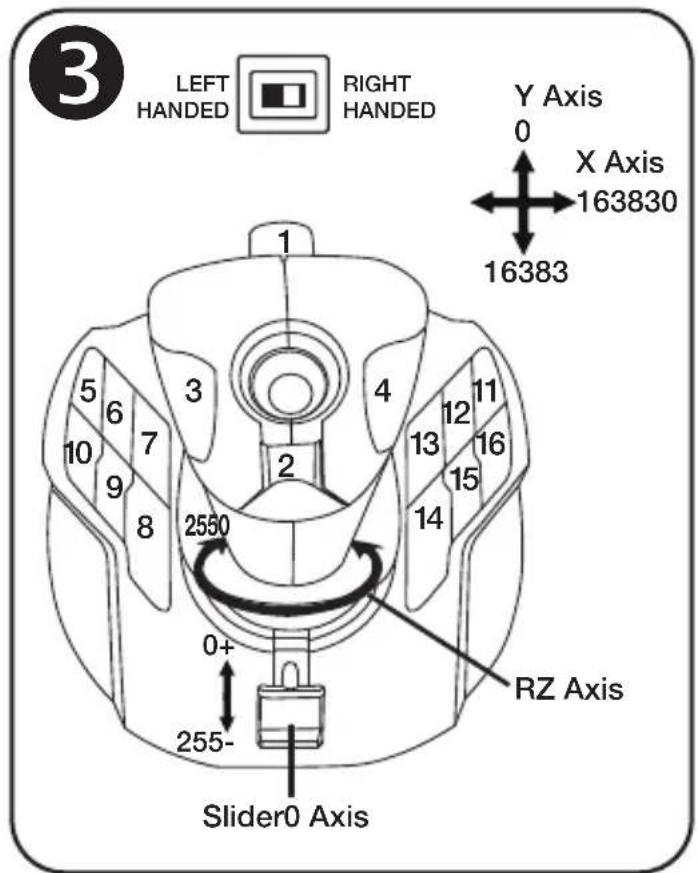
Compatible : PC
natural_image
Symbol of a trash bin with crossed lines and a blank rectangular base (no text or labels)www.thrustmaster.com
https://support.thrustmaster.com


natural_image
Technical line drawing of a mechanical device with two views (top and side), no text or symbols present.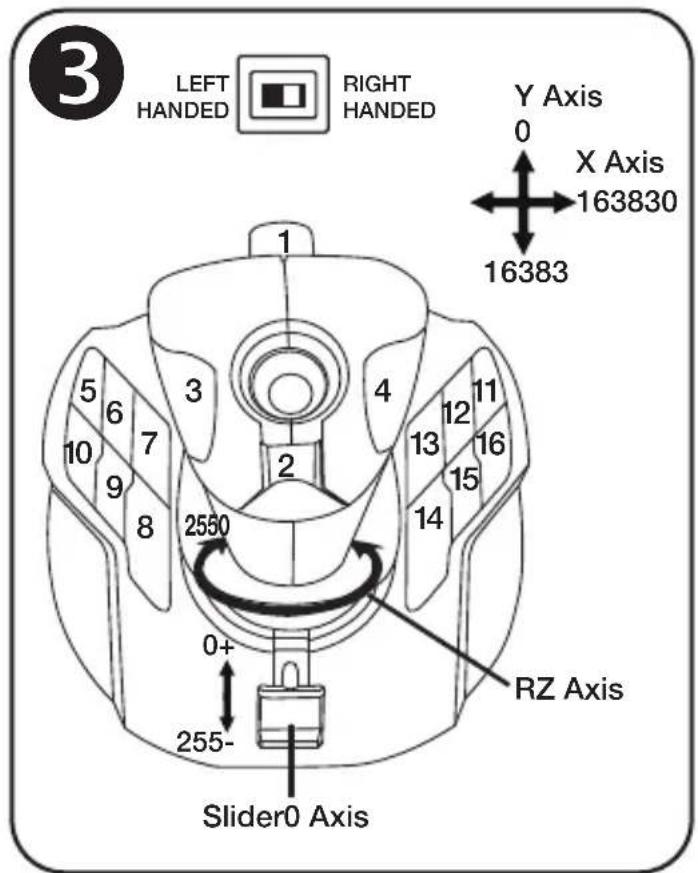
Kompatibel: PC
Benutzerhandbuch
www.thrustmaster.com
https://support.thrustmaster.com
natural_image
Technical line drawing of a mechanical device with two views (top and side), no text or symbols present.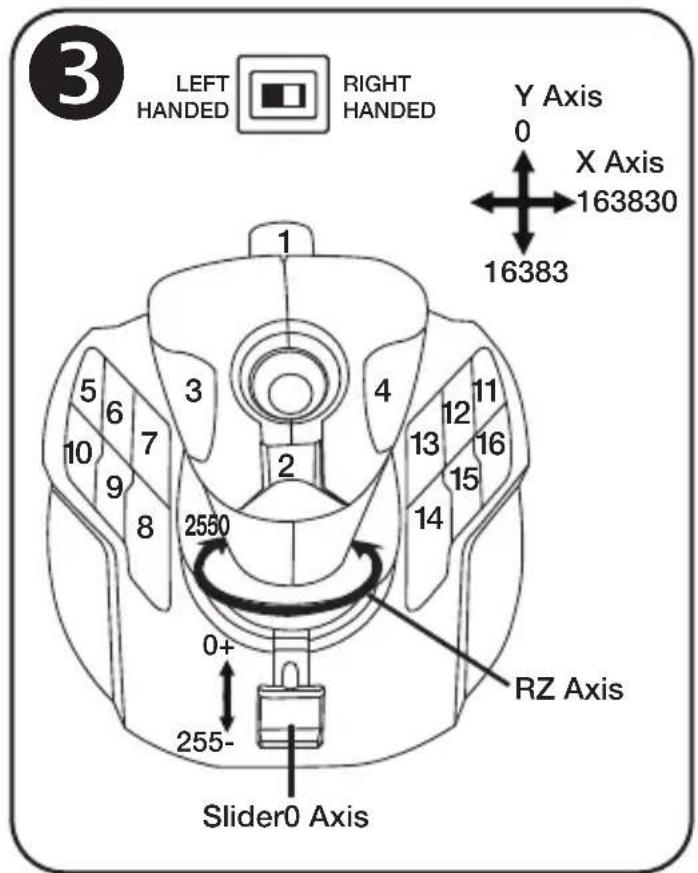
Compatibel met: pc Handleiding
natural_image
Symbol of a trash bin with crossed lines and a black rectangle below (no text or labels)www.thrustmaster.com
natural_image
Technical line drawing of a mechanical device with two views (top and side), no text or symbols present.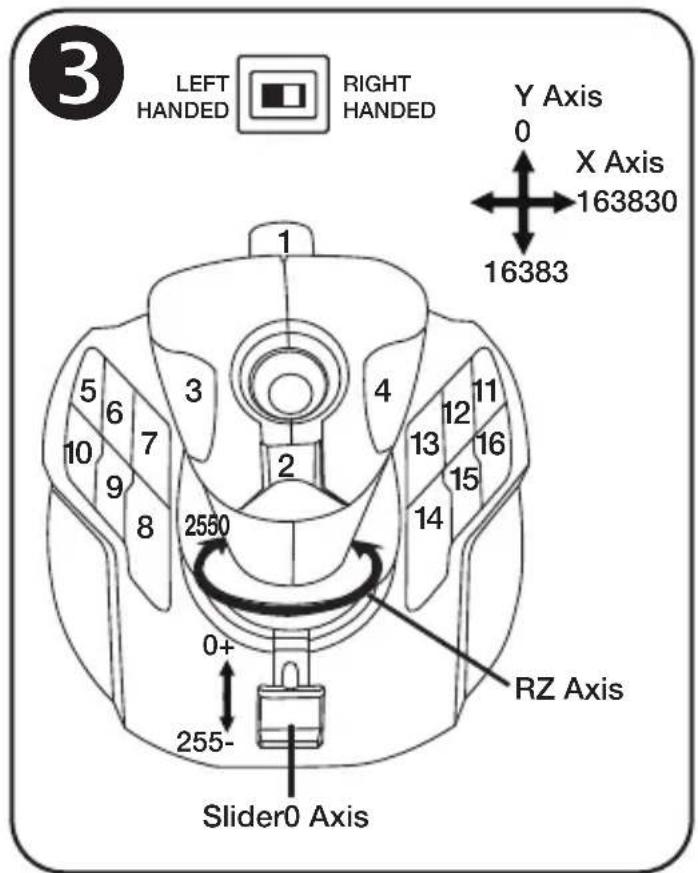
PC compatibile Manuale d'uso
CARATTERISTICHE TECNICHE 1
www.thrustmaster.com
https://support.thrustmaster.com


natural_image
Technical line drawing of a mechanical device with two views (top and side), no text or symbols present.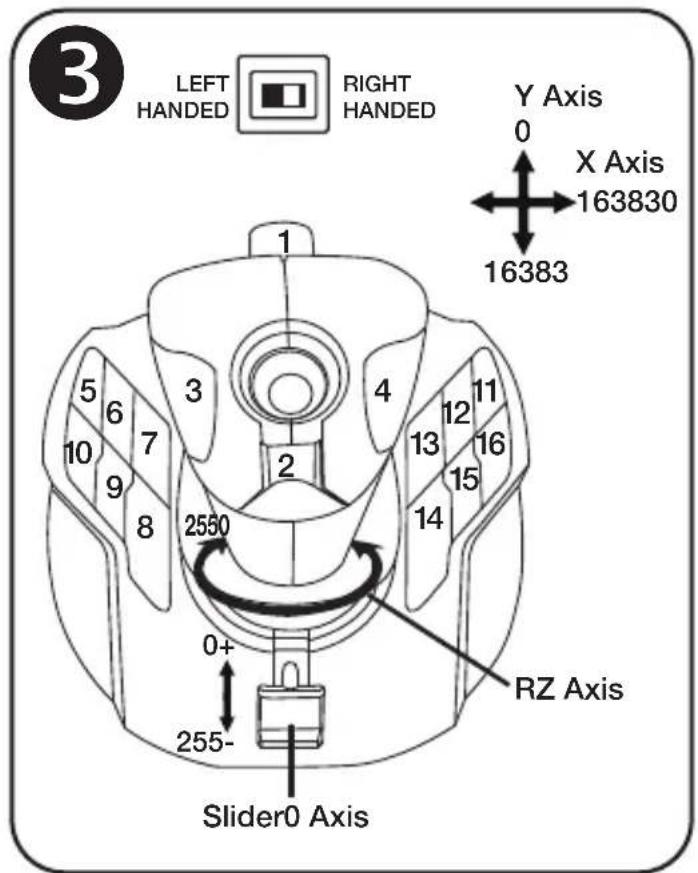
Compatible: PC
Manual del usuario
CARACTERÍSTICAS TÉCNICAS 1
natural_image
Symbol of a trash bin crossed with two crossed arms, no text or labels presentwww.thrustmaster.com
https://support.thrustmaster.com

natural_image
Technical line drawing of a joystick controller with two views (top and side), no text or symbols present.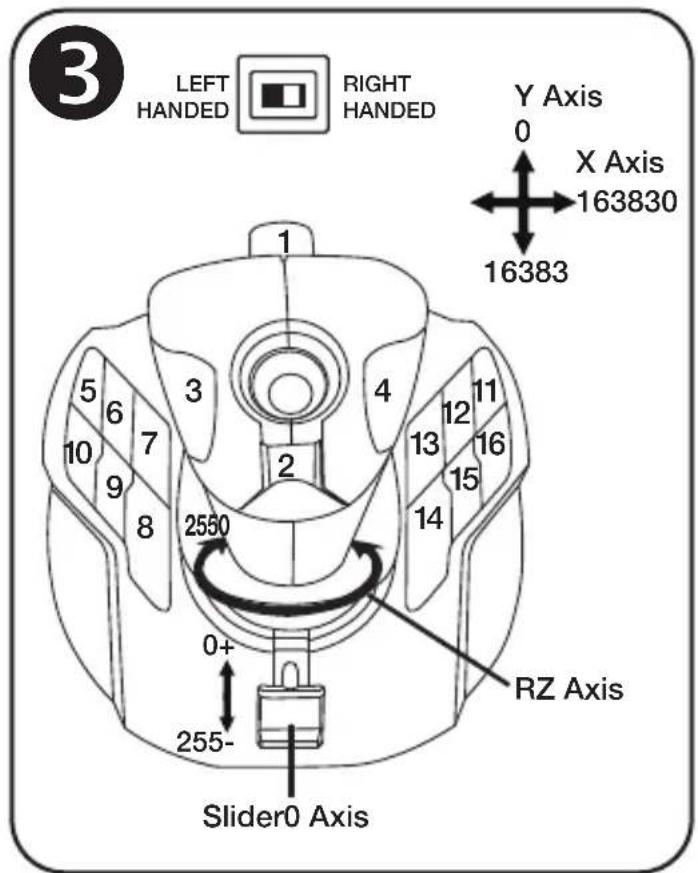
Compatível: PC
Manual do Utilizador
CARACTERÍSTICAS TÉCNICAS 1
"H.E.A.R.T™: Hall Effect AccuRate Technology"
www.thrustmaster.com
https://support.thrustmaster.com


natural_image
Technical line drawing of a joystick controller with two views (top and side), no text or symbols present.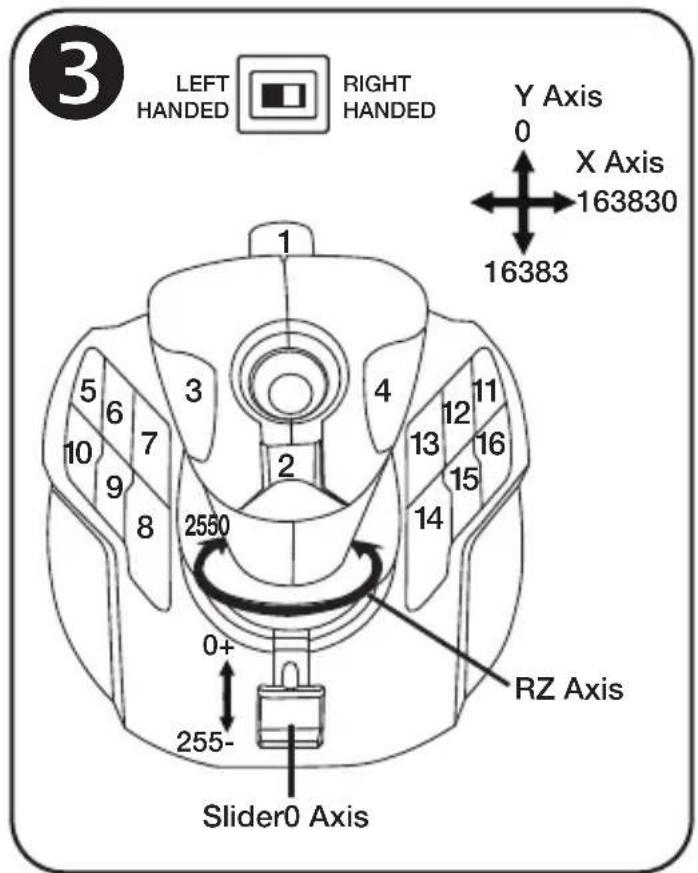
Совместим с ПК
www.thrustmaster.com
EAC
THRUSTMASTER®
ТЕХНИЧЕСКОЙ ПОДДЕРЖКИ https://support.thrustmaster.com


natural_image
Technical line drawing of a joystick controller with two views (top and side), no text or symbols present.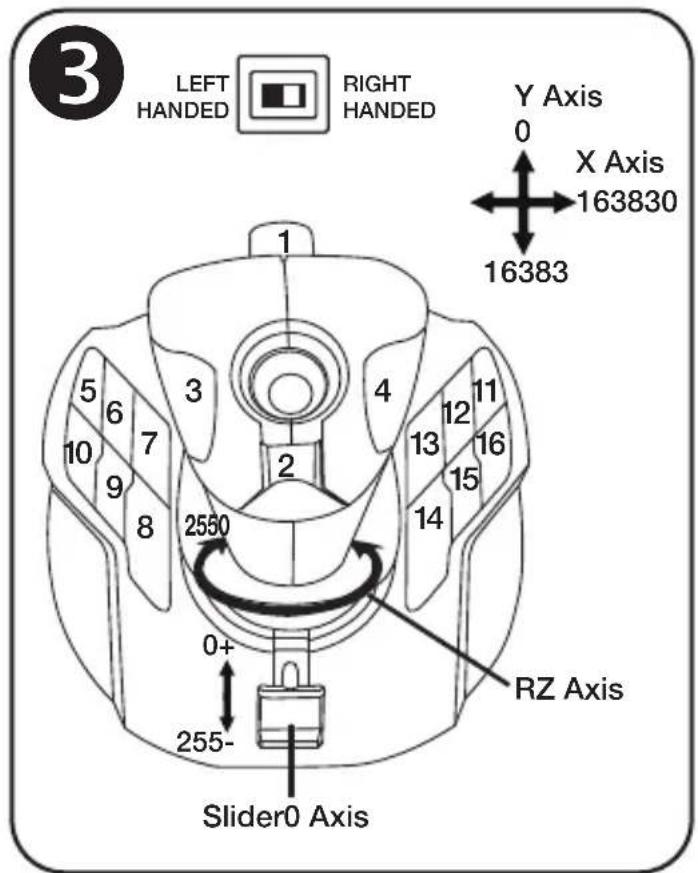
natural_image
Symbol of a trash bin crossed with no text or labels, accompanied by a black rectangular block below (no text or symbols present)www.thrustmaster.com
https://support.thrustmaster.com


natural_image
Technical line drawing of a joystick controller with two views (top and side), no text or symbols present.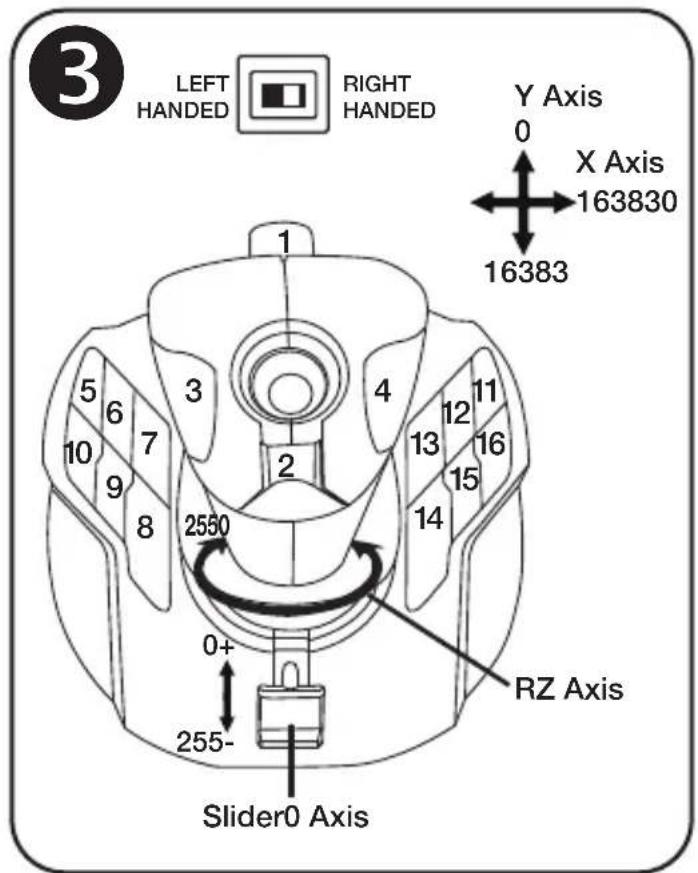
www.thrustmaster.com
https://support.thrustmaster.com


natural_image
Technical line drawing of a joystick controller with two views (top and side), no text or symbols present.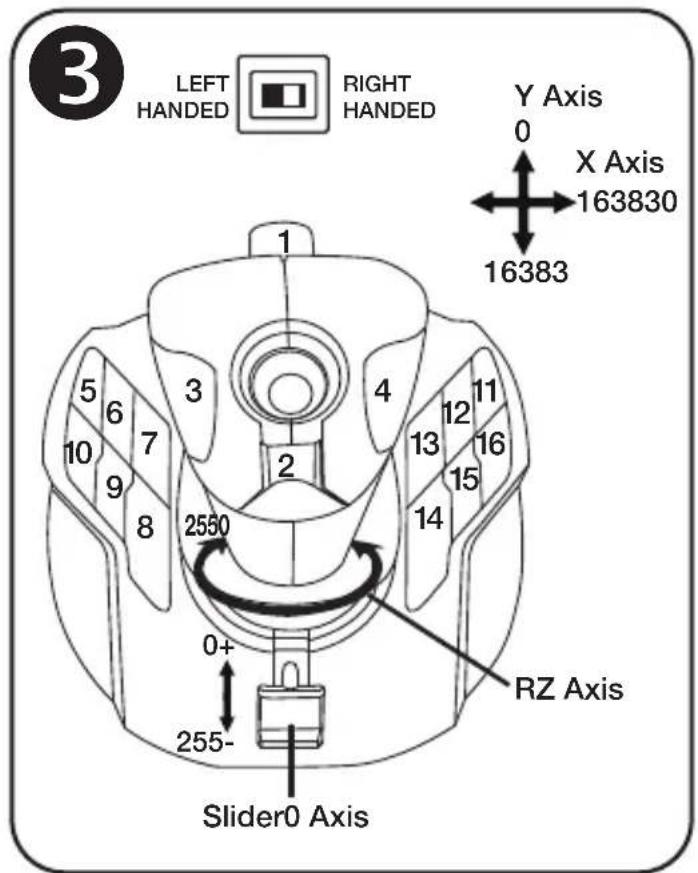
natural_image
Simple line drawing of a trash bin with diagonal lines crossing it, no text or symbols present.www.thrustmaster.com
https://support.thrustmaster.com


natural_image
Technical line drawing of a joystick controller with two views (top and side), no text or symbols present.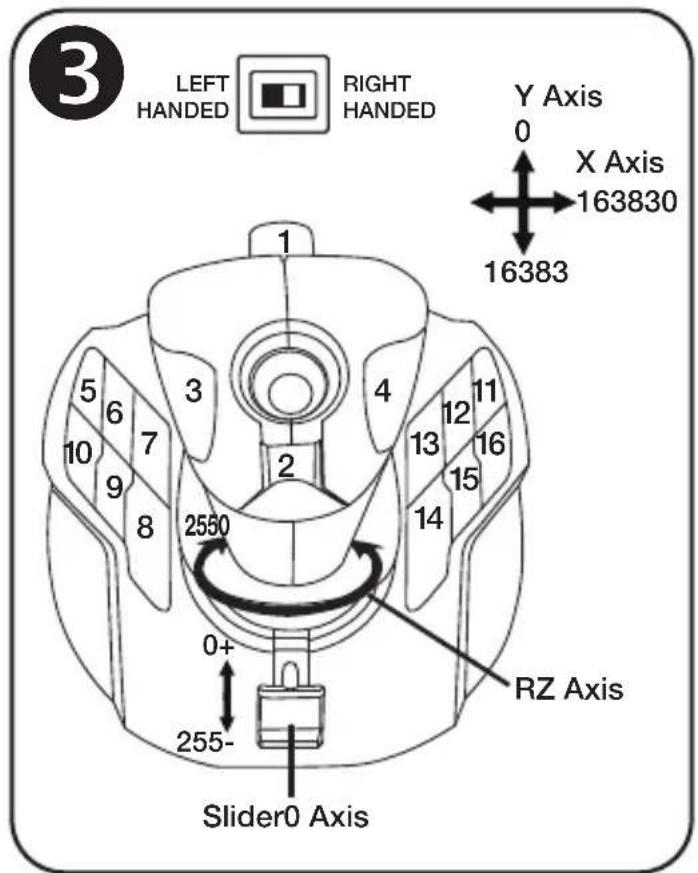
www.thrustmaster.com
https://support.thrustmaster.com



natural_image
Technical line drawing of a joystick controller with two views (top and side), no text or symbols present.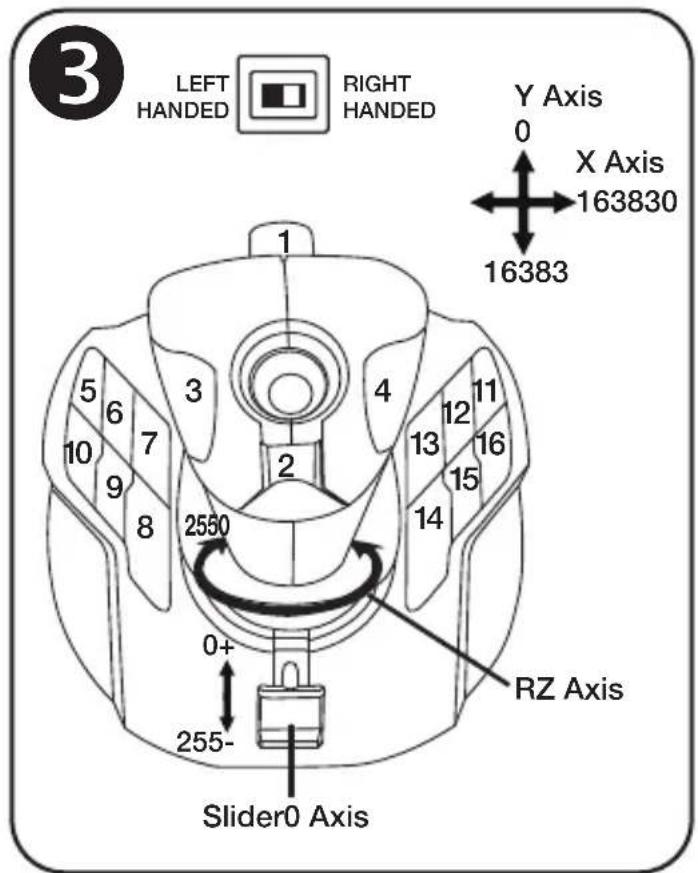
保証規定
www.thrustmaster.com
:外箱

natural_image
Technical line drawing of a mechanical device with two views (top and side), no text or symbols present.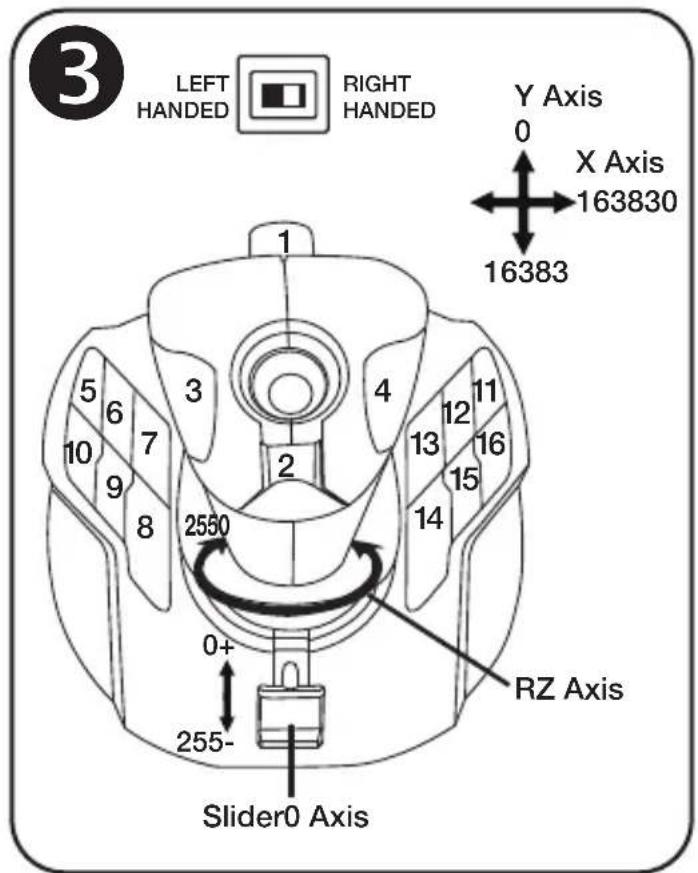
兼容:PC
用户手册
技术特性 ①
natural_image
Technical line drawing of a mechanical device with two views (top and side), no text or symbols present.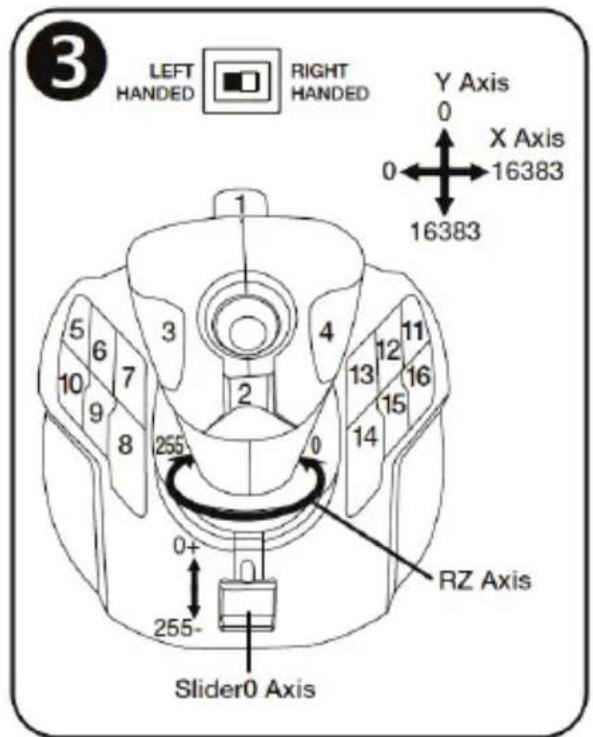
("Point of View") POV כרל.2
ת-ת-ת
הכלה,הכלה (2), "Point of View" is, POV gives me that it is. (הכלה is not to be a person who is not to be a person who is not to be a person who is not to be a person who is not to be a person who is not to be a person who is not to be a person who is not to be a person who is not to be a person who is not to be a person who is not to be a person who is not to be a person who is not to be a person who is not to be a person who is not to be a person who is
.(הכלה (הכלה)
②תְרָה-שְׁבַעֹ
תְבָרִי, בְּרַעֹן, אַלְאָהִי, אַלְאָהִי, אַלְאָהִי, אַלְאָהִי, אַלְאָהִי, אַלְאָהִי, אַלְאָהִי, אַלְאָהִי, הֶתְבֵרִי, אַלְאָהִי, אַלְאָהִי, אַלְאָהִי, אַלְאָהִי, אַלְאָהִי, אַלְאָהִי, אַלְאָהָה, אַלְאָהָה, אַלְאָהָה, אַלְאָהָה, אַלְאָהָה, אַלְאָהָה, אַלְאָהָה, אַלְאָהָה, הֶתְבֵרִי, אַלְאָהָה, הֶתְבֵרִי, הֶתְבֵרִי, הֶתְבֵרִי, הֶת .
③
"RIGHT HANDED" (12)
4
"LEFT HANDED" (12)
.הכלההוּרָהוּרָהוּרָהוּרָהוּרָהוּרָהוּרָהוּרָהוּרָהוּרָהוּרָהוּרָהוּרָהוּרָהוּרָה
הכלה. Among all the states that they are in the United States. Among all the states that they are in the United States.
www.thrustmaster.com
https://support.thrustmaster.com


natural_image
Technical line drawing of a mechanical device with two views (top and side), no text or symbols present.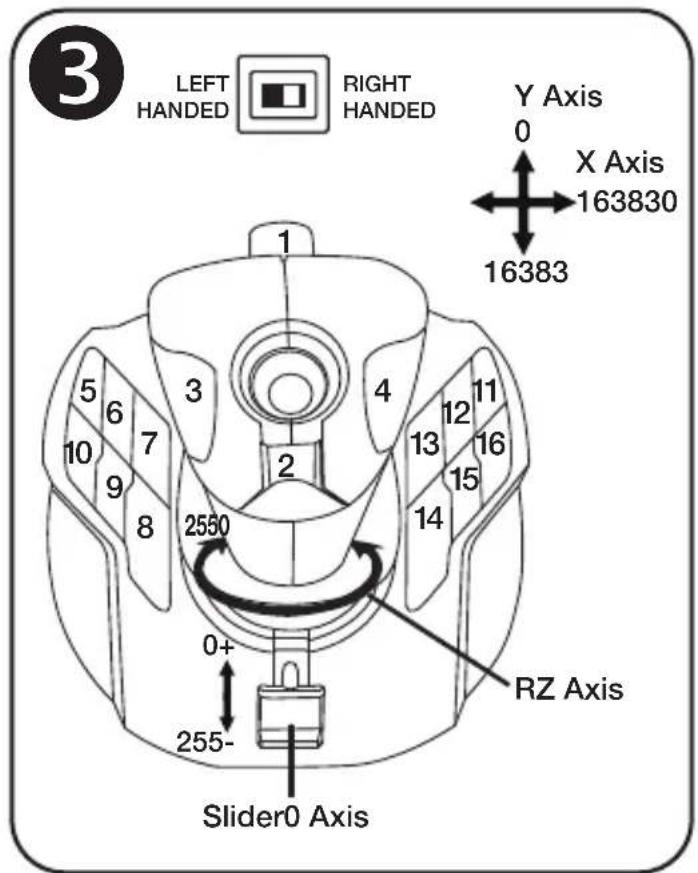
www.thrustmaster.com
https://support.thrustmaster.com



- Compatible: PC User Manual
- TECHNICAL FEATURES 1
- GETTING TO KNOW YOUR JOYSTICK
- BACKLIGHTING
- THROTTLE
- RUDDER FUNCTION
- MULTIDIRECTIONAL "POINT OF VIEW" HAT SWITCH
- CONFIGURATION OF BUTTONS IN RIGHT-HANDED MODE ③
- CONFIGURATION OF BUTTONS IN LEFT-HANDED MODE 4
- ADJUSTING THE HAND REST FOR RIGHT- OR LEFT-HANDED MODE 5
- ADJUSTING THE THUMB REST FOR RIGHT- OR LEFT-HANDED
- MODE 6
- PC
- INSTALLATION ON PC
- IMPORTANT NOTE
- TROUBLESHOOTING AND WARNING
- CONSUMER WARRANTY INFORMATION
- Additional warranty provisions
- Liability
- FCC STATEMENT
- COPYRIGHT
- ENVIRONMENTAL PROTECTION RECOMMENDATION
- Compatible : PC
- Kompatibel: PC
- Benutzerhandbuch
- Compatibel met: pc Handleiding
- PC compatibile Manuale d'uso
- CARATTERISTICHE TECNICHE 1
- Compatible: PC
- Manual del usuario
- CARACTERÍSTICAS TÉCNICAS 1
- Compatível: PC
- Manual do Utilizador
- Совместим с ПК
- 保証規定
- 兼容:PC
- 用户手册
- 技术特性 ①
- ②תְרָה-שְׁבַעֹ
- ③
- 4
Brand : THRUSTMASTER
Model : T.16000M FCS SPACE SIM DUO
Category : Controller