FC 97 P - Oven Ariston Thermo - Free user manual and instructions
Find the device manual for free FC 97 P Ariston Thermo in PDF.



| Product type | Built-in oven |
| Brand | Ariston Thermo |
| Model | FC 97 P |
| Useful dimensions (W x D x H) | 43.5 cm x 40.0 cm x 32.0 cm |
| Useful volume | 54 liters |
| Power supply | 230 V ~ 50 Hz (2800 W) / 240 V ~ 50 Hz (3050 W) |
| Cooking functions | Conventional, Pastry, Rapid cooking, Multi-cooking, Pizza, Grill, Gratin, Rotisserie |
| Cleaning | Pyrolysis (Fast Clean) up to 500 °C |
| Programmer | Immediate or delayed start, timer, digital display |
| Safety | Automatic door lock during pyrolysis, cooling ventilation |
| Interior lighting | Lamp 15 W, E14 socket |
| Included accessories | Enameled tray, large grid, rotisserie |
| Installation | Standard built-in, electrical connection via terminal block |
| Energy class | Not specified in the manual |
Frequently Asked Questions - FC 97 P Ariston Thermo
User questions about FC 97 P Ariston Thermo
0 question about this device. Answer the ones you know or ask your own.
Ask a new question about this device
Download the instructions for your Oven in PDF format for free! Find your manual FC 97 P - Ariston Thermo and take your electronic device back in hand. On this page are published all the documents necessary for the use of your device. FC 97 P by Ariston Thermo.
USER MANUAL FC 97 P Ariston Thermo
Encastrement FO 97 P - FD 96 P - FD 97 P - FB 86 P
Incasso FO 97 P - FD 97 P - FD 96 P - FB 86 P
Safety is a good habit to get into
Before using your appliance, read the instructions in this owner's manual carefully since it contains all the instructions you require to ensure safe installation, use and maintenance. Always keep this owner's manual close to hand as you may need to refer to it in the future.
- This appliance is designed for non-professional, household use.
- When you have removed the packing, check whether the appliance is intact. If you have any doubts, contact a qualified professional before using the appliance. Never leave the packing components (plastic bags, polystyrene foam, nails, etc.) within the reach of children since these are a source of potential danger.
- The appliance must only be installed by a qualified person in compliance with the instructions provided by the manufacturer. The latter denies all responsibility for improper installation which may harm persons and animals and damage property.
- The electrical safety of this appliance can only be guaranteed if the latter is correctly and efficiently earthed, in compliance with regulations on electrical safety. Always ensure that the earthing is efficient; if you have any doubts, call in a qualified technician to check the electrical system thoroughly. The manufacturer denies all responsibility for damage resulting from a system which has not been earthed.
- The openings used for ventilation and dispersion of heat must never be obstructed.
- The user must not replace the power supply cable of this appliance. Always call an after-sales servicing centre authorised by the manufacturer in the event of cable damage or replacement.
- This appliance must only be used for the purpose for which it was expressly designed. Any other use (such as heating a room) is considered to be improper and consequently dangerous. The manufacturer denies all responsibility for damage resulting from improper use of the appliance.
- A number of fundamental rules must be followed when using electrical appliances. The following are of particular importance:
-
do not touch the appliance when your hands or feet are wet
-
never use the appliance barefoot, do not use extensions, but if these are necessary caution must be exercised.
- never pull on the power supply cable or the appliance itself to unplug it from the mains socket.
- never leave the appliance exposed to atmospheric agents (rain, sun, etc.).
-
do not allow children or persons who are not familiar with the appliance to use it, without supervision.
-
Always unplug the appliance from the mains or switch off the main switch before cleaning or performing any maintenance operations.
- If the appliance malfunctions and/or breaks down, turn it off. For all repairs, call only an authorised after-sales service centre and demand the use of original spare parts only. Failure to comply with the above may compromise the safety of the appliance.
- Cut the power supply cable after disconnecting it from the power mains when you decide not to use the appliance any longer. Also make all potentially dangerous parts of the appliance safe, above all for children who could play with the appliance.
- Remember to keep children away from the appliance when you use the grill or oven, since these parts become very hot.
- When the appliance is in use, it becomes quite hot. Take care not to touch the heating elements inside the oven.
- Make sure the knobs are in the "●"/"○"position when the appliance is not in use.
- Use oven gloves to place cookware in the oven or when removing it;
- Never use the oven to store inflammable material.
- Never use flammable liquids such as alcohol or petrol, etc. near the appliance when it is in use.
First use
The first time you use your appliance, we recommend that you set the thermostat to the highest setting (250^) and leave the oven on for about half an hour with nothing in it.
Then let the room air. The odour that is often detected during this initial use is due to the evaporation of substances used to protect the oven during storage and until it is installed.
Front view
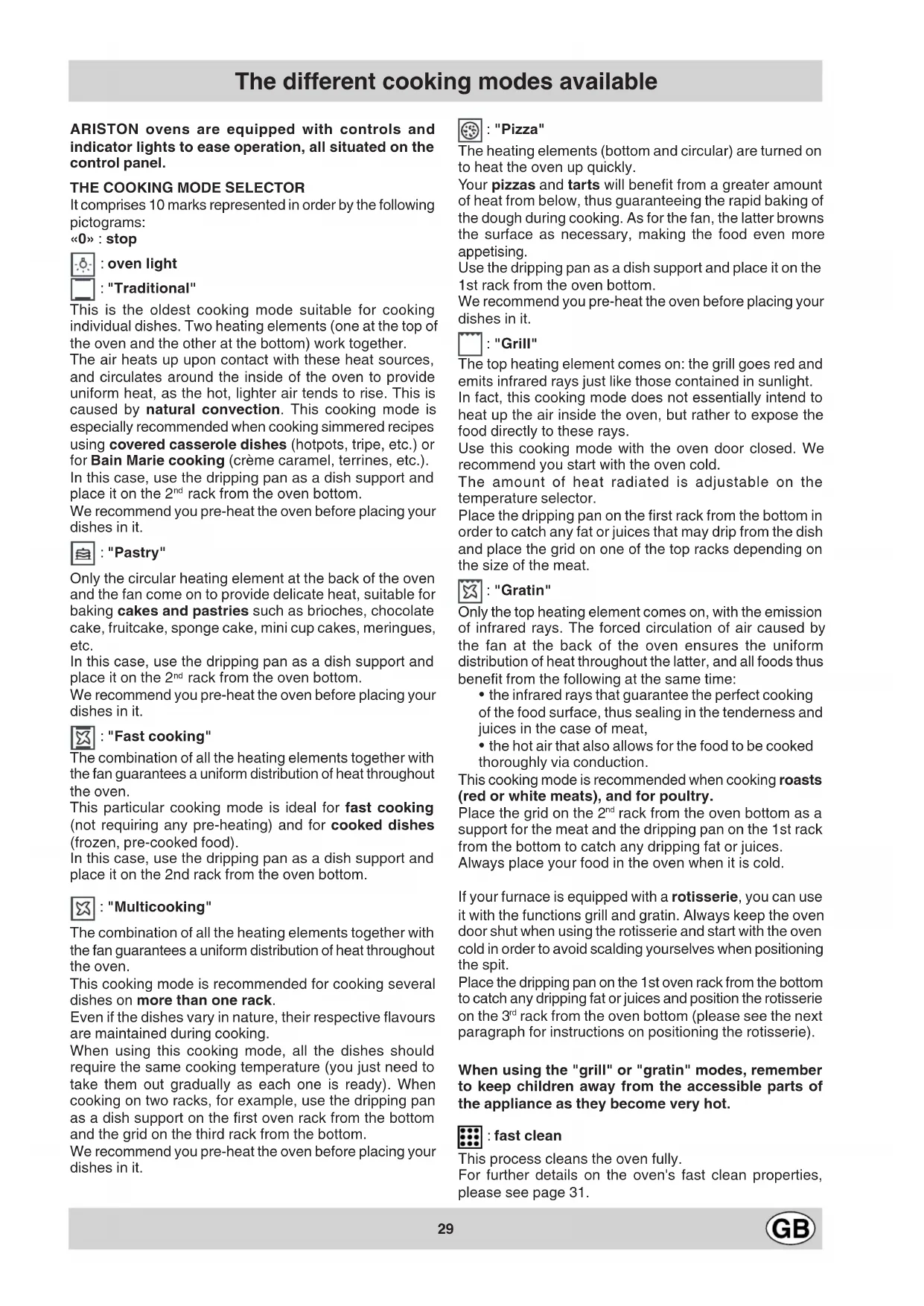
A. The mode selector
B. The temperature selector
C. The programmer
The different cooking modes available
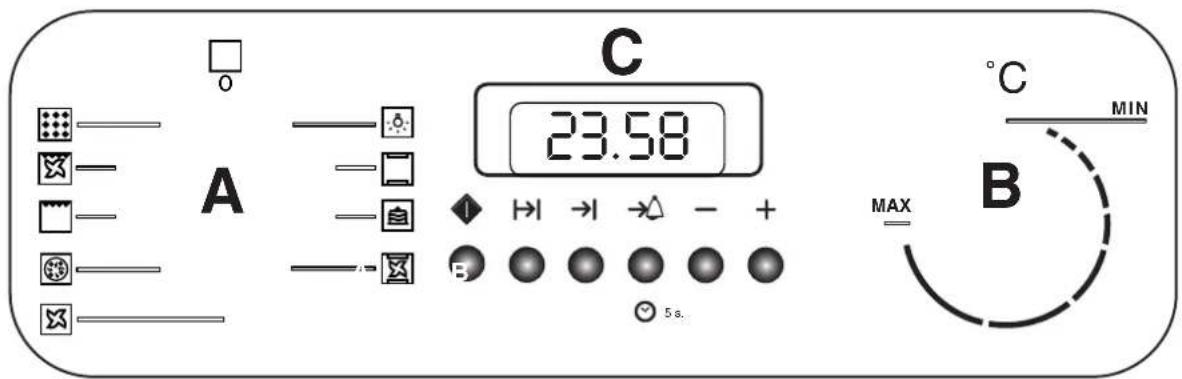
ARISTON ovens are equipped with controls and indicator lights to ease operation, all situated on the control panel.
THE COOKING MODE SELECTOR
It comprises 10 marks represented in order by the following pictograms:
“0”:stop

oven light
: "Traditional"
This is the oldest cooking mode suitable for cooking individual dishes. Two heating elements (one at the top of the oven and the other at the bottom) work together.
The air heats up upon contact with these heat sources, and circulates around the inside of the oven to provide uniform heat, as the hot, lighter air tends to rise. This is caused by natural convection. This cooking mode is especially recommended when cooking simmered recipes using covered casserole dishes (hotpots, tripe, etc.) or for Bain Marie cooking (crème caramel, terrines, etc.).
In this case, use the dripping pan as a dish support and place it on the 2^nd rack from the oven bottom.
We recommend you pre-heat the oven before placing your dishes in it.

: "Pastry"
Only the circular heating element at the back of the oven and the fan come on to provide delicate heat, suitable for baking cakes and pastries such as brioches, chocolate cake, fruitcake, sponge cake, mini cup cakes, meringues, etc.
In this case, use the dripping pan as a dish support and place it on the 2^nd rack from the oven bottom.
We recommend you pre-heat the oven before placing your dishes in it.

: "Fast cooking"
The combination of all the heating elements together with the fan guarantees a uniform distribution of heat throughout the oven.
This particular cooking mode is ideal for fast cooking (not requiring any pre-heating) and for cooked dishes (frozen, pre-cooked food).
In this case, use the dripping pan as a dish support and place it on the 2nd rack from the oven bottom.

: "Multicooking"
The combination of all the heating elements together with the fan guarantees a uniform distribution of heat throughout the oven.
This cooking mode is recommended for cooking several dishes on more than one rack.
Even if the dishes vary in nature, their respective flavours are maintained during cooking.
When using this cooking mode, all the dishes should require the same cooking temperature (you just need to take them out gradually as each one is ready). When cooking on two racks, for example, use the dripping pan as a dish support on the first oven rack from the bottom and the grid on the third rack from the bottom.
We recommend you pre-heat the oven before placing your dishes in it.

:"Pizza"
The heating elements (bottom and circular) are turned on to heat the oven up quickly.
Your pizzas and tarts will benefit from a greater amount of heat from below, thus guaranteeing the rapid baking of the dough during cooking. As for the fan, the latter browns the surface as necessary, making the food even more appetising.
Use the dripping pan as a dish support and place it on the 1st rack from the oven bottom.
We recommend you pre-heat the oven before placing your dishes in it.

: "Grill"
The top heating element comes on: the grill goes red and emits infrared rays just like those contained in sunlight.
In fact, this cooking mode does not essentially intend to heat up the air inside the oven, but rather to expose the food directly to these rays.
Use this cooking mode with the oven door closed. We recommend you start with the oven cold.
The amount of heat radiated is adjustable on the temperature selector.
Place the dripping pan on the first rack from the bottom in order to catch any fat or juices that may drip from the dish and place the grid on one of the top racks depending on the size of the meat.

:"Gratin"
Only the top heating element comes on, with the emission of infrared rays. The forced circulation of air caused by the fan at the back of the oven ensures the uniform distribution of heat throughout the latter, and all foods thus benefit from the following at the same time:
-
the infrared rays that guarantee the perfect cooking of the food surface, thus sealing in the tenderness and juices in the case of meat,
-
the hot air that also allows for the food to be cooked thoroughly via conduction.
This cooking mode is recommended when cooking roasts (red or white meats), and for poultry.
Place the grid on the 2^nd rack from the oven bottom as a support for the meat and the dripping pan on the 1st rack from the bottom to catch any dripping fat or juices.
Always place your food in the oven when it is cold.
If your furnace is equipped with a rotisserie, you can use it with the functions grill and gratin. Always keep the oven door shut when using the rotisserie and start with the oven cold in order to avoid scalding yourselves when positioning the spit.
Place the dripping pan on the 1st oven rack from the bottom to catch any dripping fat or juices and position the rotisserie on the 3^rd rack from the oven bottom (please see the next paragraph for instructions on positioning the rotisserie).
When using the "grill" or "gratin" modes, remember to keep children away from the accessible parts of the appliance as they become very hot.

:fast clean
This process cleans the oven fully.
For further details on the oven's fast clean properties, please see page 31.
Your oven offers you many differing cooking modes. These can only be achieved thanks to a certain number of accessories which we have chosen for you.
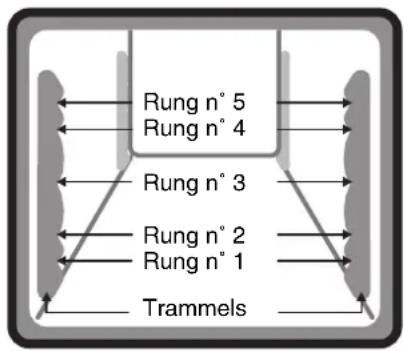
These accessories slide in and out of the different oven racks inside your oven and can thus be positioned in accordance with the individual cooking requirements of differing foods and dishes.
For each cooking mode and each example suggested, we specify the oven rack to use (from the oven bottom up).
The dripping pan
Use it:
- as a dish support for all dishes when cooking on one rack only and in Bain Marie cooking,
- as a support for food (mini cup cakes, etc.),
- as a dripping pan to catch juices and fat dripping from food situated on the large grid.
We advise against using the dripping pan on the 4th and 5th racks from the oven bottom.
The large grid
Always use the large grid with the edges upwards and together with the dripping pan.
- When it is positioned on the 2nd rack from the oven bottom, it acts as a meat support, with the dripping pan placed on the 1st rack from the bottom to catch any dripping fat or juices.
- When it is positioned on the top rack (depending on the size of the foodstuff) for grilled food, the dripping pan is to be placed on the 1st rack from the oven bottom to catch any dripping fat or juices.
- When it is positioned on the top rack for cooking on more than one rack.
We advise against placing meat directly onto the dripping pan when using the "gratin" mode as the fat and juices heated from below in this particular cooking mode could in fact char and splash onto the oven inside panels and create smoke.
The rotisserie
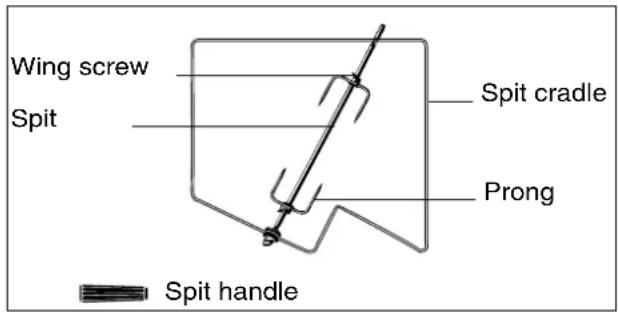
This specific accessory is ideal for roasting meats, as the latter rotate slowly and are browned uniformly until cooking is done. It is comprised of the following:
- a support situated on the 3 ^rd oven rack from the oven bottom so the rotisserie fits into the hollow shaft of the rotisserie motor located at the back of the oven, behind the perforated oven back panel.
- a spit that passes through the roast, which is kept firmly in place on both ends by two adjustable sliding forks each fastened onto the spit by means of a wing nut.
Warning: when positioning the rotisserie assembly, ensure the spit fits firmly into the hollow shaft connected to the motor. Make sure you position the following correctly:
- the spit in the centre of the roast
- the roast at an equal distance from both ends of the spit.
-
a removable handle made of insulating material to screw onto the front of the spit allows you:
-
to have a rotisserie which is long enough for even the largest of roasts
- to avoid scalding yourself when removing the roast at the end of cooking.
Screw on the handle tightly to take out the spit (the handle should be removed from the spit during cooking).
Rotisserie timer
ARISTON ovens are fitted with a rotisserie timing device. When cooking is done, the rotisserie motor continues to turn the spit and only comes to a stop when the temperature inside the oven has dropped sufficiently: this prevents the surface of the meat from burning.
When cooking is done, leave the mode selector set to the cooking mode under way and set the temperature selector back to the minimum setting.
Continued ventilation
The fan stays on when cooking is done in order to cool the oven down. So do not worry if you hear the fan going even after you have turned the oven off: the ventilation will come to a stop when the temperature has dropped below 120^ .
Oven light
To turn the oven light on, set the mode selector knob to the symbol.
The oven light stays on during cooking, whatever the cooking mode (with the exception of the self-cleaning mode).
If you decide to delay the cooking start, the oven light comes on as soon as you programme the start and stays on until cooking is done.
Fast clean
Safety devices
In fast clean mode, the temperature inside the oven reaches 500^ , which is necessary for the destruction of food and fat residue, as illustrated below.
Given this high temperature, your oven is fitted with some safety devices:
the oven door is locked automatically as soon as the temperature is high in order to avoid all risks of bums.
the heating elements are no longer powered if an anomaly occurs.
Notes:
1- Despite the high temperature inside the oven during the pyrolytic self-cleaning process, the external surfaces of the appliance remain lukewarm, thanks to:
a reinforced insulation of the oven compartment
- a fan that ensures the circulation of air to cool down the oven wall panels.
2- When looking through the oven door, you may notice some particles that light up when they are destroyed by pyrolysis upon contact with the heating elements: this is simply spontaneous combustion, it is extremely normal and without danger.
Precautions to be taken before performing the fast clean process
1- Try to remove the larger food residue from inside the oven using a wet sponge. We highly advise against the use of detergents or all other products recommended for cleaning ovens.
2- Remove all the accessories from the oven: they are not designed to withstand such high temperatures. What's more, some of these accessories would alter the result of the pyrolytic self-cleaning process and obstruct the circulation of heat inside the oven. The accessories can easily be cleaned like everyday crockery and are dishwasher-proof.
3- Don't leave any tea towels on the oven door handle.
Warning: the oven surfaces may get hot during the fast clean process: keep children well away.
How to set the cleaning process in motion
Take all the accessories out of the oven. Remove the toughest grease and food spots and especially all substantial overflows in order to avoid the creation of flames or smoke.
- Shut the oven door.
- Set the mode selector to
-Programme it.You can choose between
- an immediate start: same procedure as for cooking,
-
a delayed start: same procedure as for cooking,
-
The pyrolytic self-cleaning process takes approximately 90 minutes.
What happens during the fast clean process?
When the temperature reaches 325^ , the oven door is automatically locked: the letter "P" comes up on the display, along with the remaining process time, as it decreases.
The oven door stays locked for as long as the temperature inside the oven remains high.
What happens at the end of the fast clean process?
When the process is over, "P.0.00"orBop on the display. To be able to open the oven door, you will have to:
- wait for the temperature inside it to have dropped back to an acceptable level,
have set the mode selector knob back to 0.
You will notice some white dust deposits on the bottom and sides of the oven, remove them with a damp sponge when the oven has cooled down completely.
If on the other hand you want to take advantage of the heat accumulated during the process to start cooking, the dust can stay where it is: it does not form a source of danger to your food.
Troubleshooting
DO NOT WORRY IF.
Some operating anomalies may arise. These are generally due to incorrect handling or to the erroneous valuation of a phenomenon.
If your oven releases a lot of smoke during cooking:
- Make sure you have selected the correct cooking mode for the type of dish you want to prepare and that you have selected the right accessories and put the dish in the oven at the recommended rack height.
- Check the temperature selected: it is no doubt too high for the type of cooking required.
- Check the degree of soil of the oven, and whether the latter needs to be cleaned. Food residue encrusted onto the enamel coating inside the oven becomes charred and creates both smoke and pungent smells.
- Splashes of grease or overflows onto very hot surfaces could crate smoke.
Display for all functions : clock, timer, cooking duration and end-of-cooking/fast-cleaning time

Timer indicator light

Button to start cooking

Button to set the cooking duration

Button to set the end-of-cooking time

Button to set the timer
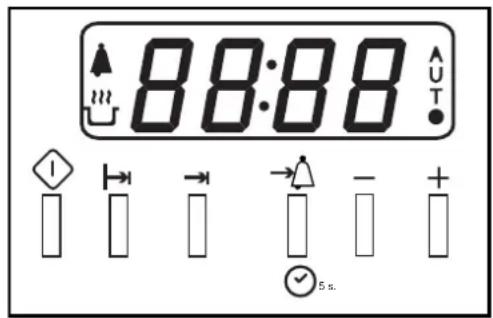

Indicator light for a programmed operation:
- lit : operation underway
- off: operation finished
- flashing: programmed operation has finished
Letter A:
- off: manual mode
- lit: an operation has been programmed
Buttons + and - to set the clock, timer, cooking duration and end-of-operation time, press on:
- to increase the time
- to reduce the time
Setting the time
You can only set the time if the mode selector is set to "0". After the appliance has been connected to the power supply (or following a power failure), a flashing "0.00" is displayed. Press keys "+" and/or "-" to set the time.
The time set is memorised, but you still have another 3 seconds to modify it, as all the other buttons remain disabled for that time.
Setting the timer
The timer only works when the oven is switched off (mode selector set to 0).
Press key -fly and set the time using keys "+" and/or "-". As soon as you release the keys, the selected duration is memorised and can still be modified for 3 seconds, indicator light comes on and the countdown begins.
When the end of the time set is reached, an acoustic signal sounds for 1 minute; to turn it off, just press any of the keys; indicator light comes off.
The timer operation is independent from that of the oven.
Acoustic signal volume
You can adjust the volume of the acoustic signal by pressing button " - " (when the signal sounds) until you attain the required volume.
Cooking without the programmer
When the oven is switched off (mode selector set to 0), all the keys (except for "-") to adjust the volume of the acoustic signal) are disabled.
Select a cooking mode by turning the mode selector knob clockwise. Each function has a predefined cooking time
that you can visualise by pressing. You can modify the cooking time according to the recipes you use. Simply press and choose the cooking time you require using the " - " and/or "+"
The display indicates a recommended temperature, which is independent from that indicated on the temperature selector: you can change it by turning the temperature selector knob.
The grill display indicates a power level between 1 and 5 (1 for minimum power and 5 for maximum power).
Your oven is now ready to start cooking: press the key. The oven begins the pre-heating phase, during which symbol links. It stops blinking when pre-heating is done (after approximately 10 minutes).
If you fail to press the cooking start key one minute after having selected a mode, the word "OFF" comes up on the display and the keys are disabled. In this case, set the mode selector back to "0" and proceed with the various adjustments.
WARNING
Your appliance is fitted with a diagnosis system which detects any malfunctions and displays "FnFm" on the programmer (n and m are numbers).
In this case, please contact your nearest after-sales service centre for assistance.
Programmed cooking with immediate start
Cooking starts immediately and comes to an automatic stop when the end cooking time is reached.
Proceed as follows:
- set the mode selector to the selected mode,
- set the temperature using the temperature selector knob (in steps of 10^ at a time) if the recommended one is not to your liking,
The grill display indicates a power level between 1 and 5 (1 for minimum power and 5 for maximum power).
- a recommended cooking time is associated with each cooking mode. You may change the recommended cooking time by pressing and keys
" ^+ " and/or "-" (cooking time must include approximately 10 minutes for the oven to pre-heat). The cooking time is memorised, but you still have another 3 seconds to modify it.
During the pre-heating phase, symbol 串 links and the cooking time is displayed. When pre-heating is done, symbol stops blinking and the oven emits 3 acoustic beeps.
There is no pre-heating phase when using the "fast cooking" and "grill" modes.
The amount of time left until cooking is done is displayed during cooking. To see the temperature, press key "+"
The minimum programmable cooking time is 2 minutes. The maximum programmable cooking time is 10 hours.
- press key to start cooking.
If you fail to press the cooking start key one minute after having selected a mode, the word "END" comes up on the display and the keys are disabled. In this case, set the mode selector back to "0" and proceed with the various adjustments.
When cooking is done, an acoustic signal sounds for one minute and the word "END" comes up on the display; you can stop this acoustic signal by pressing any of the keys.
- Set the mode selector knob back to "0": the word "END" disappears and "OFF" comes up for 3 seconds.
During cooking, you can change the cooking mode (without affecting the cooking time or temperature), the temperature (without affecting the cooking time) and the cooking time.
You can bring the cooking to a stop and turn the oven off just by setting the mode selector knob to "0". In this case, the word "OFF" is displayed for 3 seconds before it comes off.
Programmed cooking with delayed start
The programmer automatically selects the cooking start time according to the parameters you have set: cooking time and end cooking time.
Proceed as follows:
- set the mode selector to the selected mode,
- set the temperature using the temperature selector knob if the recommended one is not to your liking,
The grill display indicates a power level between 1 and 5 (1 for minimum power and 5 for maximum power).
- press key to set the cooking time,
- set the cooking time by pressing keys "+" and/or -
(cooking time should include the pre-heating time): the cooking time is memorised, but you still have another 3 seconds to modify it.
- to delay cooking, you need to set the end cooking
time by pressing and then "+" and/or "-" repeatedly:
the end cooking time is memorised, but you still have another 3 seconds to modify it.
The minimum programmable cooking time is 2 minutes. The maximum programmable cooking time is 10 hours.
- press key 1 , symbol "A" comes on.
From the time of your programming to the start of cooking, only the temperature and the mode can be modified.
When the cooking start time has been reached, the oven is turned on and pre-heating begins, during which symbol blinks; the cooking time is displayed.
When pre-heating is done, cooking starts, symbol stops blinking and the oven emits 3 acoustic beeps.
There is no pre-heating phase when using the "fast cooking" and "grill" modes.
- Set the mode selector knob back to "0".
| A FEW EXAMPLES OF COOKING ON ONE LEVEL | ||||||
| Dish | Cooking mode | Temperature | Time | Shelf level | Remarks | Preheat |
| Bread (1 kg loaf) | Multicooking 210°C | 30-35' 2 On enamelled tray Yes | ||||
| Savoury pastries | Multicooking 200°C | 20-25' Depending on thickness | 2 On enamelled tray Yes | |||
| Pizza (bread dough) | Pizza 240°C 10' 15' 1 On enamelled tray Yes | |||||
| Quiche | Pizza | 220°C | 30' | 1 | Tin on enamelled tray | Yes |
| Cheese soufflé | Multicooking 200°C | 30-40' 2 | Tin diam. 20 cm on enamelled tray | Yes | ||
| Pâté | Traditional 180°C 50-60' 2 | Bain-marie on enamelled tray (start with hot water) | Yes | |||
| Leg of lamb | Gratin | 210°C | 1 hour for 1,5 à 2 kg | 2-1* | Meat on shelf | No |
| Potatoes au gratin cooked with cream | Gratin | 200°C | 40-45' Depending on thickness | 2 | Tin on enamelled tray | Yes |
| Fish | Traditional Gratin Grill | 200°C 240°C 250°C | Depending on type and thickness of fish | 2 2-1* 2-1* | Filletts + liquid, enamelled tray Whole on shelf Fish on shelf for grilling | Yes |
| Chicken | Gratin Rotisserie grill | 210°C 250°C | 1 hour for 1,2 à 1,5 kg | 2-1* 3-1* | Meat on shelf Rotisserie,oven door shut | No |
| Roast beef | Gratin | 210°C | Depends on how well cooked required | 2-1* | Meat on shelf | No |
| Roast pork | Gratin | 210°C | 1 hour for 1kg | 2-1* | Meat on shelf | No |
| Roast veal | Gratin | 210°C | 1 hour for 1kg | 2-1* | Meat on shelf | No |
| Stuffed tomatoes | Multicooking | 200°C | 20-25' | 2 | Tin on enamelled tray | Yes |
| Frozen meals | Fast cooking | Follow instructions on packet | Follow instructions on packet | 2 | Tin on enamelled tray | No |
| Lasagne | Fast cooking 200°C | Depending on thickness | 2 | Tin on enamelled tray | No | |
| Moussaka | Fast cooking 200°C | Depending on thickness | 2 | Tin on enamelled tray | No | |
| Buns | Pastry | 160°C | 35-45' | 2 | Aluminium tin on enamelled tray | Yes |
| Cake | Pastry | 160°C | 60' | 2 | Aluminium tin on enamelled tray | Yes |
| Profiteroles | Pastry | 200°C 20-25' 2 | Small savoury profiteroles on enamelled tray | Yes | ||
| Crème caramel | Traditional 180°C 30' | 2 | Individual ramekins in bain-marie (start with hot water) | Yes | ||
| Sponge cake | Pastry | 190°C | 30' | 2 | Aluminium tin on enamelled tray | Yes |
| Macaroons | Pastry | 180°C | 15-20' Depending on thickness | 2 On enamelled tray Yes | ||
| White meringues | Pastry | 70-80°C | 3 hour Depending on thickness | 2 | Drying small meringues | Yes |
| Blond meringues | Pastry | 110°C | 2 hour Depending on thickness | 2 | Drying small meringues | Yes |
| Baked apples | Multicooking 210°C | 20-25' Depending on thickness | 2 | Tin on enamelled tray | Yes | |
| Shortbread biscuits | Pastry | 190°C | 10-15' | 2 | Dripping pan | Yes |
| Apple tart | Pizza | 220°C | 30' | 1 | Cake tin on the dripping pans | Yes |
| X - Y" in the "Shelf level" column X = shelf or spit rod at level X Y = enamelled tray at level Y to catch the roasting juices Reminder: always place the shelf with the indentations facing downwards | ||||||
Cooking advice
Cooking is by definition the passage from a raw state to a cooked one.
The consequent result is appreciated according to different criteria: the colouring, any development in the dish, its smoothness or tenderness, how cooked you want it to be, etc..
The oven settings (temperatures and cooking time) obviously depend on two important parameters:
- the size of the food or dish,
- the ability of the food to brown (quantity of sugar and eggs in the recipe).
The cooking settings contained in our table were calculated according to precise parameters and you may feel the need to make slight changes to the same in order to adapt them to your own dish and your desired degree of cooking.
Maintenance
Inside the oven
We recommend you clean your oven each time you use it, especially after cooking roasts. In fact, it is advisable to prevent food residue from building up during cooking: the residue would be re-cooked each time the oven is used and would char and release smoke and unpleasant odours.
Oven exterior
Clean the enamelled or stainless steel exterior surfaces of your oven using a sponge soaked in soapy water, making sure you rinse and dry these thoroughly, without using abrasive or corrosive products which could damage them.
Stainless steel
Rinse stainless steel parts and dry them thoroughly using a soft cloth. Use a specific non-abrasive product to remove tougher stains,
Using aluminium foil
To avoid having to clean the bottom of the oven, you may be tempted to line the same with some aluminium foil. We strongly advise against this. The aluminium foil sheet in direct contact with the heated enamel coating could melt and damage the enamel coating inside the oven irreversibly.
Cleaning the rotisserie and other accessories
The rotisserie can be removed completely thanks to the 2 wing nuts. The elements comprising the rotisserie assembly should be cleaned together with the other accessories (dripping pan, grid) in the sink using a damp sponge and ordinary detergent or even in your dishwasher.
Disassembling the oven door
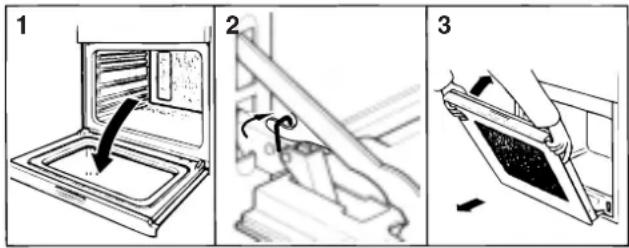
The oven door can easily be removed to clean the space between the bottom of the door and the front of the oven. To disassemble the door, proceed as follows:
open the oven door fully,
- lift up and turn the small levers situated on the two hinges,
- shut the door, but not completely,
- grip the door on the two external sides and pull it towards you, pulling it out of its seat.
Disassembling oven door FO 97 P - FD 97 P - FD 96 P
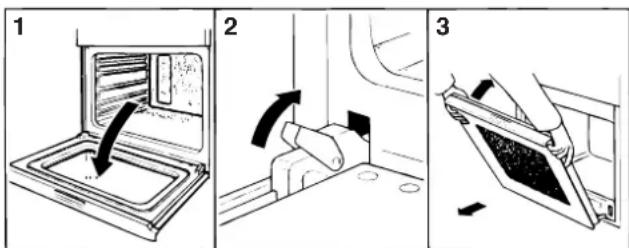
Disassembling oven door FC 97 P - FB 86 P
Re-assemble the door by following the above procedures backwards.
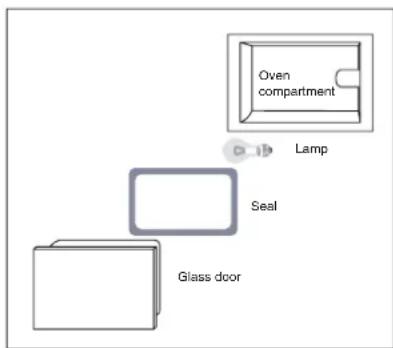
Replacing the oven lamp
- Always unplug the appliance from the mains or switch off the main switch before all operations.
- With the aid of a narrow, flat item (such as a screwdriver or a spoon handle, etc...), remove the glass cover.
-
Unscrew the lamp and replace it with another featuring the same characteristics:
-
voltage 230/240 W
-
wattage 15 W
-type E 14 -
Replace the glass cover and ensure you reposition the seal correctly.
Installation
Built-in installation
This oven can be built into all standard furniture cabinet units featuring dimensions conforming to European standards.No particular precautions need to be taken when performing the built-in installation of the oven, thanks to:
- its reinforced insulation that limits the heat exchanges
- its frontal cooling ventilation requiring no air inlet.
Installation must be performed by a qualified professional and in all cases in compliance with the safety norms in force, failing which the appliance guarantee will not be valid in the event of an accident caused by incorrect installation.
This is also important for the safety of the user and the long life of your appliance.
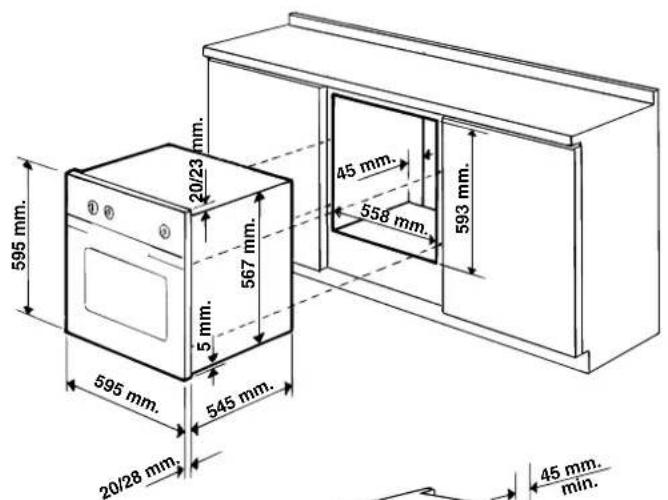
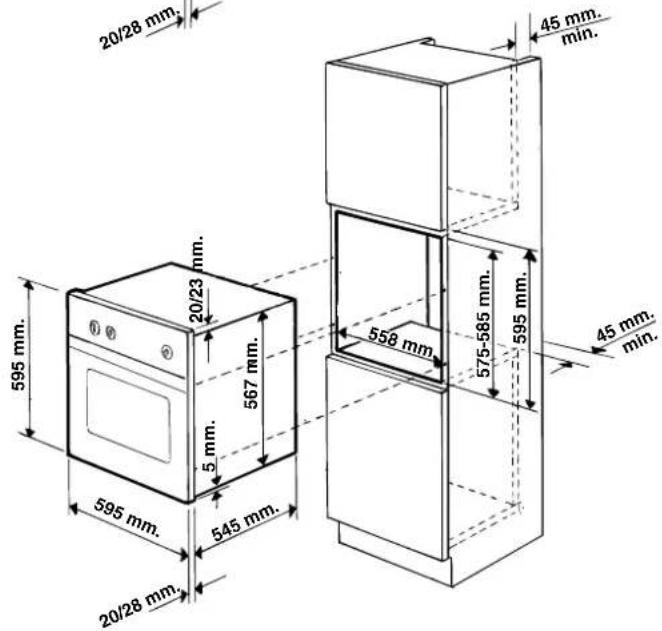
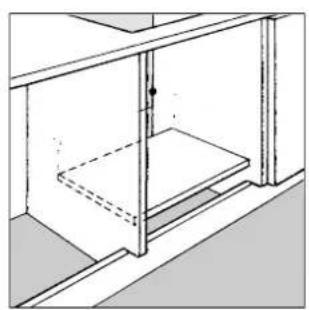
The panels of the adjacent cabinets must be made of heat-resistant material. In particular, cabinets with a veneer exterior must be assembled with glues which can withstand temperatures of up to 100^ .
In compliance with current safety standards, contact with the electrical parts of the appliance must not be possible once it has been installed.
All protective parts which ensure the safe operation of the appliance must be removable only with the aid of a tool.
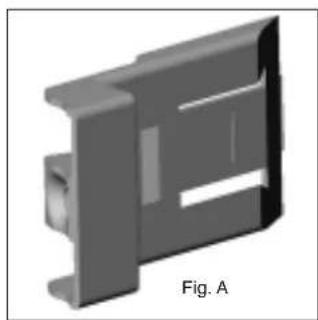
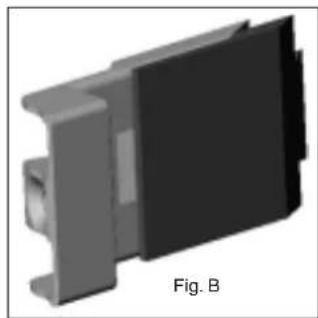
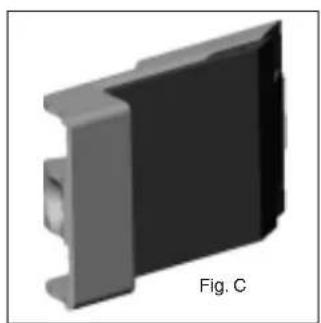
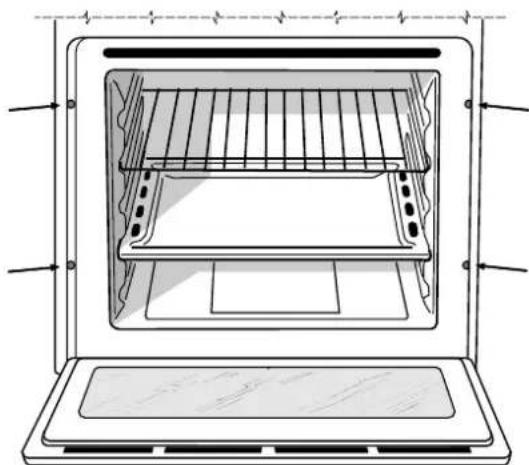
Built-in installation of FO97 P - FD97 P - FD96 P - FB86 P Position the 4 tabs on the sides of the oven in correspondence with the 4 holes on the perimeter of the frame. In particular, if the cabinet side panel:
- is 20mm thick: the removable part of the tab must be removed (Fig. A);
- is 18mm thick: use the first groove, which is factory-set (Fig. B);
- is 16mm thick: use the second groove (Fig. C).
To fasten the oven to the cabinet, open the oven door and screw the 4 screws (supplied with the appliance) into the 4 holes located on the perimeter of the frame.
Installation
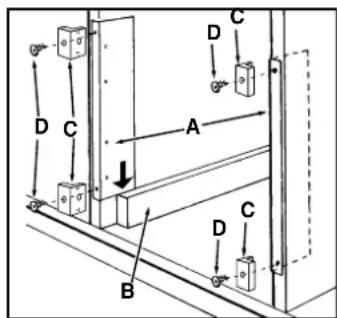
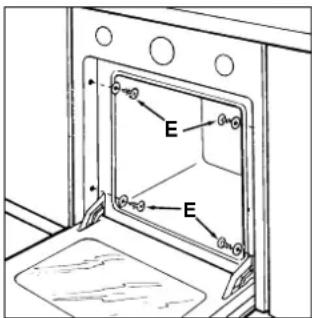
Built-in installation of FC 97 P (see figure on the right)
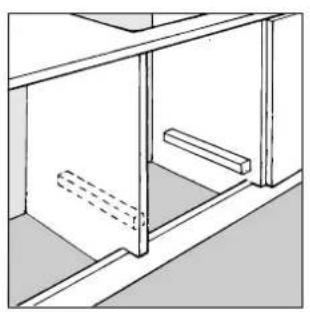
- Place brackets "A" well against the oven support blocks "B".
- Place the tabs "C" well against brackets "A". In particular, if the cabinet side panel:
- is 16mm thick: mount the tab so that the number 16 it features is facing you;
- is 18mm thick: mount the tab so that the part without any wording is facing you;
- is 20 ~mm thick: do not mount the tab.
- Fasten the brackets and tabs on the oven cabinet side panel using screws "D".
- Fasten the oven to the cabinet using the screws and plastic washers "E".
Electrical connection
Connection
First check the mains electricity supply available (number of phases - voltage - maximum power necessary) to ensure these are compatible with the requirements of the Ariston appliance to be connected.
Ariston ovens can adapt to the following electrical systems:
Using the appliance without correct earthing is highly dangerous.
Important: After connecting the appliance to the flexible cable, tighten all the screws on the terminal board.
| Electrical connections | Voltage Frequency | Fuse Section |
| N L | FR-AT-BE-DE-GP-ES-IE-IL-IS-IT-DK LU-RE-FI-GB-GR-PT-SE-MA-NZ-NL 230 V-1+N ~ 50 Hz CY-MT-AU-NZ-KW 240 V-1+N ~ 50 Hz | 16 A 1,5 mm² |
| L.2 L.1 | FR-BE-NO 230 V-2 ~ 50 Hz | 16 A 1,5 mm² |
You can connect your furnace to the electric installation by means of a case of connection. You defer to the table for the minimal wire sections and the calibration of the protection measures according to the branch.
If the appliance is installed with a junction box, an omnipolar circuit breaker - with a minimum contact opening of 3mm should be installed between the appliance and the mains.
We recommend you use a power supply cable which is long enough to allow you to take the oven out of its recess in the event of maintenance operations (only use HAR - H 05 - RRF quality cables fitted with a plug conforming to the regulations in force in the country where the appliance is fitted).
The plug must be accessible at all times.
Unplug the appliance before all operations, even when replacing the oven lamp.
C E
This appliance conforms with the following European Community directives:
DBT 73/23 EEC modified by 93/68/EEC directive CEM 89/336/EEC modified by 92/31/EEC and 93/68/EEC directives
Inner dimensions of the oven:
width 43.5cm
depth 40.0 cm
height 32.0cm
Inner volume of the oven:
54 litres
Voltage and frequency of power supply:
230V~50Hz:2800W
240V~50Hz : 3050 W
to the recipes you use. Simply press and choose the cooking time you require using the “-” and/or “+”.
The grill display indicates a power level between 1 and 5 (1 for minimum power and 5 for maximum power).
The grill display indicates a power level between 1 and 5 (1 for minimum power and 5 for maximum power).
The grill display indicates a power level between 1 and 5 (1 for minimum power and 5 for maximum power).

- Encastrement FO 97 P - FD 96 P - FD 97 P - FB 86 P
- Incasso FO 97 P - FD 97 P - FD 96 P - FB 86 P
- Safety is a good habit to get into
- First use
- Front view
- The different cooking modes available
- THE COOKING MODE SELECTOR
- The dripping pan
- The large grid
- Rotisserie timer
- Continued ventilation
- Oven light
- Fast clean
- Safety devices
- Notes:
- Precautions to be taken before performing the fast clean process
- How to set the cleaning process in motion
- What happens during the fast clean process?
- What happens at the end of the fast clean process?
- Troubleshooting
- DO NOT WORRY IF.
- If your oven releases a lot of smoke during cooking:
- Letter A:
- Setting the time
- Setting the timer
- Acoustic signal volume
- Cooking without the programmer
- WARNING
- Programmed cooking with immediate start
- Programmed cooking with delayed start
- Cooking advice
- Maintenance
- Inside the oven
- Oven exterior
- Stainless steel
- Using aluminium foil
- Cleaning the rotisserie and other accessories
- Disassembling the oven door
- Disassembling oven door FO 97 P - FD 97 P - FD 96 P
- Replacing the oven lamp
- Installation
- Built-in installation
- Electrical connection
- Connection
- C E
Brand : Ariston Thermo
Model : FC 97 P
Category : Oven