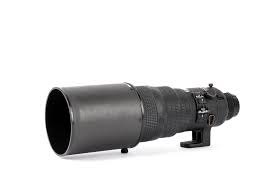
AF-S NIKKOR ED 300MM F/2.8D IF - Camera lens NIKON - Free user manual and instructions
Find the device manual for free AF-S NIKKOR ED 300MM F/2.8D IF NIKON in PDF.


User questions about AF-S NIKKOR ED 300MM F/2.8D IF NIKON
0 question about this device. Answer the ones you know or ask your own.
Ask a new question about this device
Download the instructions for your Camera lens in PDF format for free! Find your manual AF-S NIKKOR ED 300MM F/2.8D IF - NIKON and take your electronic device back in hand. On this page are published all the documents necessary for the use of your device. AF-S NIKKOR ED 300MM F/2.8D IF by NIKON.
USER MANUAL AF-S NIKKOR ED 300MM F/2.8D IF NIKON
SPECIAL FEATURES (WITH NIKON, F5-SERIES, F4-SERIES, F100, F90X/N90s\*, F90-SERIES/N90\*, F80-SERIES/N80-SERIES\*, F70-SERIES/N70\*, PRONEA 600i/PRONEA 6i\* OR PRONEA S CAMERA)
Thank you for purchasing the Nikon AF-S Nikkor ED 300mm f/2.8 D IF. When used with a Nikon F5-Series, F4-Series, F100, F90X/N90s, F90-Series/N90, F70-Series/N70, PRONEA 600i/PRONEA 6i or PRONEA S camera this lens provides the following advanced capabilities:
- Rapid and quiet autofocus operation thanks to Nikon's Silent Wave Motor that dramatically reduces focusing time. The Silent Wave Motor consists of both a stator and a rotor. The stator surface generates traveling waves when a high-frequency voltage is applied to a voltage component attached to the stator. This causes the rotor that floats on the waves to rotate.
- Instant switching from autofocus to manual focus by presetting the focus mode switch to M/A position.
- Distance information used for 3D Matrix Metering (except F4-Series) or the 3D Multi-Sensor Balanced Fill-Flash (except F4-Series, PRONEA 600i/PRONEA 6i and PRONEA S) will be transmitted instantly from the lens to the camera body.
* The Nikon N90s, N90, N80-SERIES, N70 or PRONEA 6i is sold exclusively in the U.S.A.
BESONDERE MERKMALE (MIT NIKON-KAMERAS DER SERIE F5, SERIE F4, F100, F90X, F90, SERIE F80, F70, PRONEA 600i ODER PRONEA S)
natural_image
Diagram showing a mechanical or architectural component with directional arrows and labeled section A (no text or symbols present)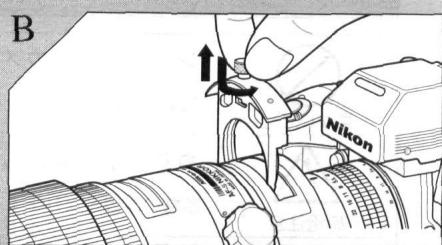
text_image
B Nikon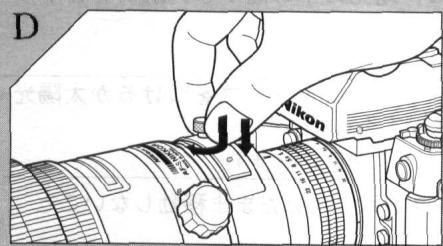
text_image
D Nikon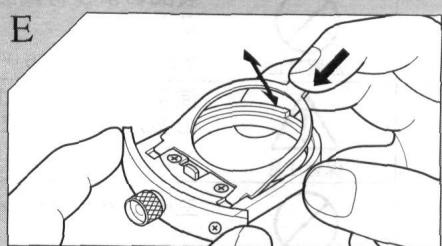
natural_image
Illustration of hands assembling a mechanical component with a tool (no text or symbols visible)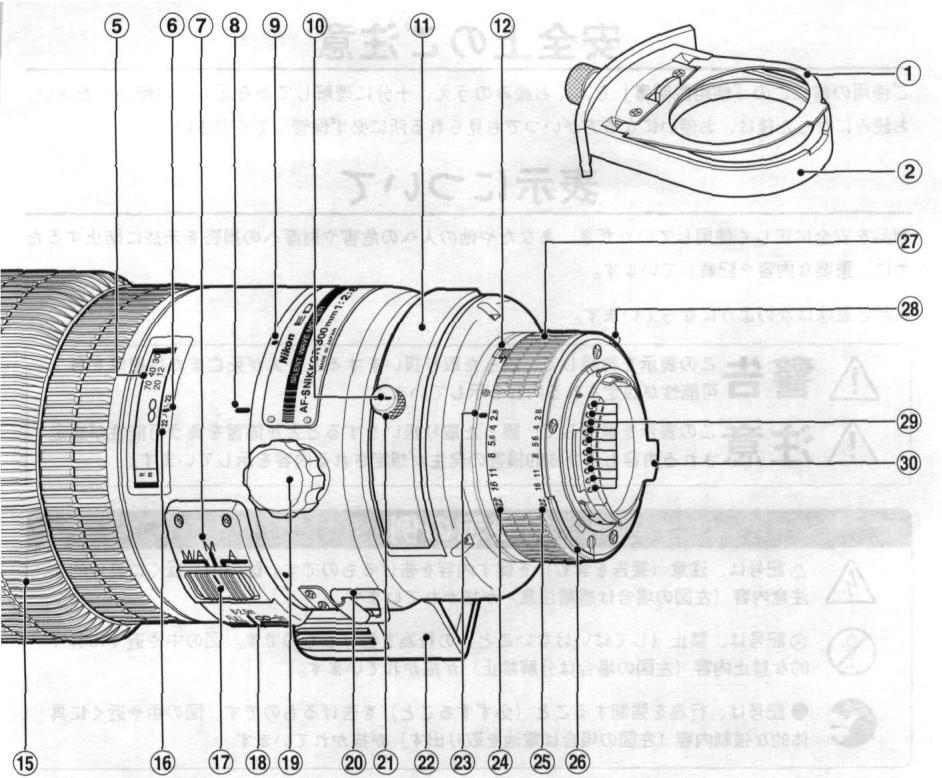
text_image
⑤ ⑥ ⑦ ⑧ ⑨ ⑩ ⑪ ⑫ ⑫ ⑫ ⑫ ⑫ ⑫ ⑫ ⑫ ⑫ ⑫ ⑫ ⑫ ⑫ ⑫ ⑫ ⑫ ⑫ ⑫ ⑫ ⑫ ⑫ ⑫ ⑫ ⑫ ⑫ ⑫ ⑫ ⑫ ⑫ ⑫ ⑫ ⑫ ⑫ ⑫
text_image
C Nikon F Nikon 106.22 24/20安全上のご注意
| English | Page 14 |
| PHOTOGRAPHIC RANGE WITH CLOSE-UP ATTACHMENT | Page 49 |
| DEPTH-OF-FIELD TABLE | Page 51 |
① Gelatine filter holder plate
② Gelatine filter holder
③ Lens hood screw
④ Rubber grip
⑤ Distance scale
⑥ Distance index
⑦ Focus mode index
⑧ Tripod collar alignment scale
⑨ Tripod collar alignment index
⑩ Filter holder mounting index
⑪ Glass filter holder
⑫ Minimum aperture lock lever
⑬ Lens hood HK-22 (made of extra-light-weight Carbon Fiber Reinforced Plastics)
⑭ Focus lock buttons (four buttons provided)
⑮ Focusing ring
⑯ Depth-of-field indicators
⑰ Focus mode switch
⑱ Focusing limit switch
⑲ Tripod collar lock screw
⑳ Strap eyelets
②1 Filter holder knob
②2 Built-in rotating tripod collar
②3 Aperture index
② Aperture scale
⑲ Aperture-direct-readout scale
②6 Meter coupling ridge
⑳ Aperture ring
⑳ Minimum aperture signal post (EE servo coupling post)
⑲ CPU contacts
③0 Aperture indexing post
Before using your new lens, read the following carefully so you get the most out of your lens now and for years to come.
IMPORTANT!
- Be careful not to soil or damage the CPU contacts.
- Do not attach the following accessories to the lens, as they might damage the lens' CPU contacts:
Auto Extension Ring PK-1, Auto Extension Ring PK-11/PK-11A, K1 Ring, Auto Ring BR-2/BR-2A/BR-4. - This lens cannot be used with the AF Finder DX-1 attached to the Nikon F3AF camera.
MOUNTING THE LENS
To mount, position the lens on the camera's bayonet mount, lining up the aperture index on the lens with the lens mounting index on the camera. Twist the camera body clockwise until it clicks into place.
To remove, press the lens' release button on the camera and turn the camera body counterclockwise. For details, refer to the camera's instruction manual.
FOCUSING
When used with a Nikon F5-Series, F4-Series, F100, F90X/N90s, F90-Series/N90, F80-Series/N80-Series, F70-Series/N70, PRONEA 600i/PRONEA 6i or PRONEA S camera, this lens not only lets you choose between autofocus or manual focusing, but also enables quick switching between autofocus and manual (autofocus with manual priority) by presetting the focus mode switch to the M/A position. With other cameras, only manual focusing is available. See the chart to determine appropriate focus mode.
| Camera's focus modeCameras | Lens' focus mode | |||
| M/A | M | A | ||
| F5-Series/F4-SeriesF100/N90X/N90sF90-Series/N90F80-Series/N80-SeriesF70-Series/N70PRONEA 600i/PRONEA 6iPRONEA S | C | Autofocus withmanual priority | Manual focus(Focus assist is available) | Autofocus |
| S | ||||
| M | Manual focus(Focus assist is available) | — | ||
| Nikon AF (autofocus)cameras (except for F3AF) | C | Manual focus(Focus assist is available) | Manual focus(Focus assist is available) | — |
| S | ||||
| M | ||||
| Other Nikon cameras | Manual focus | Manual focus | — | |
For use with a Nikon F5-Series, F4-Series, F100, F90X/N90s, F90-Series/N90, F80-Series/N80-Series, F70-Series/N70, PRONEA 600i/PRONEA 6i or PRONEA S Camera
To select autofocus mode, slide the focus mode switch to A. Be sure camera's focusing mode is set at C or S. In autofocus mode, you can use either "Focus lock" or "Preset focusing" (with focusing limit switch). For details, see the following page.
To select autofocus mode with manual priority, slide the focus mode switch to M/A. To focus manually, while lightly pressing the shutter release button, rotate the focusing ring until the viewfinder image appears sharp and crisp. Removing your finger from the shutter release button cancels manual focus mode to resume autofocus. Be sure the camera's focusing mode is set at C or S to activate autofocus operation.
To select manual mode, slide the focus mode switch to M. Rotate focusing ring until the viewfinder image appears sharp and crisp. The electronic rangefinder can be used as a focusing assist.
For Other Nikon Autofocus Cameras (except the F3AF)
Only manual focusing operation is available.
Slide the focus mode switch to M (or M/A). Rotate the focusing ring until the viewfinder image appears sharp and crisp. The electronic rangefinder can be used as a focusing assist.
For a Nikon Non-Autofocus Camera
Only manual focusing operation is available.
Slide the focus mode switch to M (or M/A). Rotate focusing ring until the viewfinder image appears sharp and crisp.
FOCUS LOCK (WITH AN F5-SERIES, F4-SERIES, F100, F90X/N90s, F90-SERIES/N90, F80-SERIES/N80-SERIES, F70-SERIES/N70, PRONEA 600i/PRONEA 6i OR PRONEA S CAMERA)
When shooting a subject that is off-center or moving in Continuous Servo Autofocus mode, press this button to lock focus. To cancel focus lock and reactivate autofocus, remove your finger from the focus lock button. Although AF-Lock function can be set on both camera and lens, priority is given to whichever is set first.
- Position of the focus lock buttons of this lens can be adjusted by modification. For modification, contact an authorized Nikon dealer or service center.
FOCUSING LIMIT SWITCH (WITH AN F5-SERIES, F4-SERIES, F100, F90X/N90s, F90-SERIES/N90, F80-SERIES/N80-SERIES, F70-SERIES/N70, PRONEA 600i/PRONEA 6i OR PRONEA S CAMERA)
With autofocus operation, you can reduce focusing time by setting the focusing limit switch according to the pre-determined distance range for the subject(s). There are three focusing limit zones provided:
Close distance — infinity (∞) Set switch to front setting (FULL)
Close distance — 8m Set switch to middle setting (8 — 2.5m)
6m — infinity (∞) Set switch to rear setting (∞ — 6m)
RECOMMENDED FOCUSING SCREEN
Various interchangeable focusing screens are available for Nikon cameras to suit any type of lens or picture-taking situation. Those which are recommended for use with your lens are listed.
| Camera\Screen | EC-B/EC-E | A/L | B | C | D | E | G1 | G2 | G3 | G4 | H1 | H2 | H3 | H4 | J | K | P | M | R | T | U | F |
| F5 (with DP-30) | ◎ | ◎ | ◎ | ○ | ◎ | ○(+0.5) | ◎ | ◎ | ||||||||||||||
| F5 (with DA-30) | ◎ | ◎(+0.5) | ◎ | ○ | ◎ | ○(+0.5) | ◎(+0.5) | ◎(+0.5) | ||||||||||||||
| F4 (with DP-20) | ◎ | ○ | ◎ | ○(-1) | ◎ | ◎ | ◎ | ◎ | ○ | |||||||||||||
| F4 (with DA-20) | ◎ | ○ | ◎ | ○(-1) | ◎ | ◎ | ◎ | ◎ | ○ | |||||||||||||
| F3 | ◎ | ◎ | ○ | ○ | ◎ | ○ | ○ | ○ | ○ | ◎ | ◎ | ◎ | ◎ | ◎ | ◎ |
◎=Excellent focusing
= Acceptable focusing
Slight vignetting or moire phenomenon affects screen image, but film image shows no traces of this.
( )=Indicates degree of exposure compensation needed for F5-series or F4-series cameras (Center-Weighted metering only). For F5 camera, compensate using the Custom Setting #18 on the camera body. See instruction manual of the camera body for more details. For F4-series cameras, compensate using the Exposure Compensation Dial for the focusing screen. (See the F4/F4s instruction manual, page 78).
Blank box means not applicable. Since type M screen can be used for both macrophotography at a 1:1 magnification ratio and for photomicrography, it has different applications than other screens.
For the K2, B2 and E2 focusing screens, refer to the columns on the K, B and E screens, respectively. For details, also refer to the specific camera's instruction manual.
MINIMUM APERTURE LOCK—Illust. A
For programmed auto or shutter-priority auto shooting, use the minimum aperture lock lever to lock the lens aperture at f/22.
- Set the lens to its minimum aperture (f/22).
2.Slide lock lever in the direction of the aperture ring, and the white dot on the lever aligns with the orange dot. (See illust.)
To release the lock, slide the lever in reverse direction.
DEPTH OF FIELD
Depth of field can be checked with the white indicator engraved on the lens barrel.
If your camera has a depth-of-field preview function, it is possible to check the depth of field in the viewfinder. (For details, see camera instruction manual.)
Depth of field can also be checked by referring to the table on pages 50-51.
USING FILTERS
Always use a filter with the lens. The slip-in glass filter holder comes mounted with a Nikon NC filter. A slip-in gelatine filter holder is also supplied with the lens. Use L37C filter to cut ultraviolet rays and slip-in circular polarizing filter C-PL1L to cut unwanted reflections of non-metallic surface such as glass or water.
Replacing glass filters \_\_\_\_ Illust. B, C, D
- Press down on the glass filter holder knob, and turn counterclockwise until the white line on the knob is at a right angle to the axis of the lens.
- Pull the holder out.
- Unscrew the mounted filter and replace with the filter you want to use.
- Put the holder back, push down on the knob, and turn clockwise to lock.
Using gelatine filter \_\_\_\_ Illust. E
- Cut the gelatine filter into a circle of approx. 55mm (2.2 in.) in diameter.
- Open the gelatine filter holder plate by pushing on the latch and lifting up.
- Insert the gelatine filter into the holder and close the plate. Make sure the filter is unscratched and free of dust and take care that it stays flat.
- Remove the glass filter holder from the lens and insert the gelatine filter holder.
USING THE LENS HOOD HK-22 ———— Illust. F
When shooting in bright sunlight, use the lens hood to prevent stray light from entering your lens.
- Loosen lock screw on the HK-22.
- Slip the HK-22 onto the front of the lens.
- Tighten lock screw.
To Store the Lens Hood
Loosen lock screw on the HK-22. Reverse the HK-22, then slide back onto the lens and tighten the HK-22 lock screw.
| Standard Accessories | |
| Slip-on leatherette front lens cap | Strap |
| Rear lens cap LF-1 | Lens hood HK-22 |
| 52mm screw-in filter NC | Hard case CL-300 |
| Holder for gelatine filters | |
Optional Accessories
Heavy duty case CT-305
Other 52mm screw-in filters
52mm slip-in circular polarizing
filter C-PL1L
Teleconverter TC-14B
Teleconverter TC-301
AF-I Teleconverter TC-14E
AF-I Teleconverter TC-20E
SPECIFICATIONS
Focal length: 300mm
Maximum aperture: f/2.8
Lens construction: 11 elements in 8 groups (plus dustproof glass plate built into front)
Picture angle: 8°20' (6°40' with IX240 camera)
Distance scale: Graduated in meters and feet from 2.5m (10 ft.) to infinity ( )
Distance information: Output into camera body
Aperture scale: f/2.8—f/22 on both standard and aperture-direct-readout scales
Minimum aperture lock: Provided
Diaphragm: Fully automatic
Exposure measurement: Via full-aperture method with AI cameras or cameras with CPU interface system; via stop-down method for other cameras
Focusing: Nikon Internal Focusing (IF) system
Tripod mounting: Built-in tripod mounting collar rotatable through 360°
Lens hood: Provided
Filters: Slip-in glass filter holder accepts 52mm screw-in filters; gelatin filter holder accepts gelatin filters
Mount: Nikon bayonet mount
Dimensions: Approx. 124mm (4.9 in.) dia. x 269mm (10.6 in.) extension from flange; approx. 277mm (10.9 in.) long (overall)
Weight: Approx. 3,100g (109 oz.)
LENS CARE
- Clean lens surface with a blower brush. To remove dirt and smudges, use a soft, clean cotton cloth or lens tissue moistened with lens cleaner. Wipe in a circular motion from center to outer edge, taking care not to leave traces and not to touch the other lens parts. If you use ether in cleaning the lens, a smudge sometimes appears on the surface of a multi-coated lens. If this happens, wipe it again with a cotton cloth moistened with alcohol.
• Always protect the lens surface from dirt or damage. The lens hood also helps to protect the lens. - Keep the lens cap in place whenever the lens is not in use.
- If you will not use the lens for a long time, protect it from rust and mold by storing it in a cool, dry place. Also, do not store in direct sunlight, and keep it away from naphthalene or camphor.
- Be careful not to get the lens wet or drop it in water. Water on the lens may cause malfunction.
NOMENKLATUR
Accessoires standards
| 相机\对焦屏 | EC-B/EC-E | A/L | B | C | D | E | G1 | G2 | G3 | G4 | H1 | H2 | H3 | H4 | J | K | P | M | R | T | U | F |
| F5(DP-30付带) | ◎ | ◎ | ◎ | ○ | ◎ | ○(+0.5) | ◎ | ◎ | ||||||||||||||
| F5(DP-30付带) | ◎ | ◎(-0.5) | ◎ | ○ | ◎ | ○(+0.5) | ◎(+0.5) | ◎(+0.5) | ||||||||||||||
| F4(DP-20付带) | ◎ | ○ | ◎ | ○(-1) | ◎ | ◎ | ◎ | ◎ | ○ | |||||||||||||
| F4(DP-20付带) | ◎ | ○ | ◎ | ○(-1) | ◎ | ◎ | ◎ | ◎ | ○ | |||||||||||||
| F3 | ◎ | ◎ | ○ | ○ | ◎ | ○ | ○ | ○ | ○ | ◎ | ◎ | ◎ | ◎ | ◎ | ◎ |
◎ 最佳对焦
○ 可接受的对焦
| Close-up attachment | Lens in normal position | ||
| Reproduction ratio | Subject field | Focused distance | |
| PK-series ring(s)* | 1/21.0 — 1/3.4 | 19.8 x 29.8 — 3.2 x 4.9 | 262.6 — 60.4 |
| PN-series ring | 1/5.6 — 1/3.0 | 5.3 x 7.9 — 2.9 x 4.3 | 85.9 — 56.4 |
* The first values are for the PK-12 ring used alone and the other ones for the PK-12\~PK-13 rings used together.
被写界深度表/DEPTH-OF-FIELD TABLE/SCHARFENTIEFE-TABELLE/PROFONDEUR DE CHAMP/PROFUNDIDAD DE CAMPO/PROFONDITA DI CAMPO/景深表/景深表 (m
| 摄影距离Focused distanceEingestellte DistanzDistance de mise au pointDistancia en focadaDistanza di messa a fuoco摄影距离摄影距离 | 被写界深度Depth of fieldSchärfentiefe bei BlendeProfondeur de champProfundidad de campoProfondità di campo景深景深 | 摄影倍率AbbildungsmaßstabRapport de reproductionRelación de reproducciónRapporto di riproduzione摄影倍率摄影倍率 | ||||||
| f/2.8 | f/4 | f/5.6 | f/8 | f/11 | f/16 | f/22 | ||
| 2.5 | 2.50—2.50 | 2.49—2.51 | 2.49—2.51 | 2.49—2.51 | 2.48—2.52 | 2.47—2.53 | 2.46—2.54 | 1/7.0 |
| 3 | 2.99—3.01 | 2.99—3.01 | 2.99—3.02 | 2.98—3.02 | 2.97—3.03 | 2.96—3.04 | 2.94—3.06 | 1/8.7 |
| 3.5 | 3.49—3.51 | 3.48—3.52 | 3.48—3.52 | 3.47—3.53 | 3.46—3.54 | 3.44—3.56 | 3.42—3.59 | 1/10.4 |
| 4 | 3.99—4.01 | 3.98—4.02 | 3.97—4.03 | 3.96—4.04 | 3.94—4.06 | 3.92—4.08 | 3.89—4.12 | 1/12.1 |
| 5 | 4.98—5.02 | 4.97—5.03 | 4.95—5.05 | 4.93—5.07 | 4.91—5.09 | 4.87—5.14 | 4.83—5.19 | 1/15.6 |
| 6 | 5.97—6.03 | 5.95—6.05 | 5.93—6.07 | 5.90—6.10 | 5.87—6.14 | 5.81—6.20 | 5.74—6.28 | 1/19.0 |
| 7 | 6.95—7.05 | 6.93—7.07 | 6.91—7.10 | 6.87—7.14 | 6.82—7.19 | 6.74—7.28 | 6.65—7.40 | 1/22.4 |
| 8 | 7.94—8.06 | 7.91—8.09 | 7.88—8.13 | 7.82—8.18 | 7.76—8.26 | 7.66—8.38 | 7.54—8.53 | 1/25.8 |
| 12 | 11.9—12.1 | 11.8—12.2 | 11.7—12.3 | 11.6—12.4 | 11.5—12.6 | 11.2—12.9 | 11.0—13.3 | 1/39.4 |
| 20 | 19.6—20.4 | 19.4—20.6 | 19.2—20.9 | 18.9—21.3 | 18.5—21.8 | 17.9—22.7 | 17.2—23.9 | 1/66.6 |
| ∞ | 928—∞ | 649—∞ | 464—∞ | 325—∞ | 236—∞ | 163—∞ | 118—∞ | 1/∞ |
- ニコン内焦方式は、通常のレンズと異なるため、至近距離になると焦点距離が若干短くなります。
- By using Internal Focusing (IF), the closest focusing distance of this lens is shorter than previous models at the same focal length, which utilized traditional helicoid focusing.
- Durch Verwendung der Innenfokussierung (IF) ist die kleinste Fokussierentfernung dieses Objektivs bei derselben Brennweite kürzer als bei früheren Modellen mit herkömmlicher Schraubenfokussierung.
- Grâce à un système de mise au point interne (IF), la distance de mise au point de cet objectif est plus courte que celle des modèles antérieurs à mise au point hélicoïdale, pour une distance focale identique.
- Gracias al uso del sistema de enfoque interno (IF), la distancia de enfoque más cercana de est objetivo es más corta que la de modelos anteriores, las cuales utilizan el tradicional enfoque helicoidal, empleando la misma distancia focal.
- Quando si utilizza la messa a fuoco interna (IF), la distanza di messa a fuoco di questo obiettivo è più corta di quella dei modelli precedenti con la stessa lunghezza focale, i quali usavano la messa a fuoco elicoidale del tipo tradizionale.
● 在同樣焦距的情況下,通過內部調焦(IF)本鏡頭的最近調焦距離要短於以往各型號的螺旋式調焦。 - 在同样焦距的情况下,通过内部调焦(IF)本镜头的最近调焦距离要短于以往各型号的螺旋式调焦。
DEPTH-OF-FIELD TABLE
(ft.)
| Focused distance | Depth of field | Reproduction ratio | ||||||
| f/2.8 | f/4 | f/5.6 | f/8 | f/11 | f/16 | f/22 | ||
| 10 | 9' 11"—10' 0" | 9' 11"—10' 0" | 9' 11"—10' 0" | 9' 11"—10' 0" | 9' 10"—10' 1" | 9' 10"—10' 1" | 9' 9"—10' 2" | 1/8.9 |
| 12 | 11' 11"—12' 0" | 11' 11"—12' 0" | 11' 11"—12' 0" | 11' 10"—12' 1" | 11' 10"—12' 1" | 11' 9"—12' 2" | 11' 8"—12' 3" | 1/11.0 |
| 15 | 14' 11"—15' 0" | 14' 10"—15' 1" | 14' 10"—15' 1" | 14' 9"—15' 2" | 14' 9"—15' 3" | 14' 7"—15' 4" | 14' 6"—15' 6" | 1/14.1 |
| 20 | 19' 10"—20' 1" | 19' 10"—20' 2" | 19' 9"—20' 2" | 19' 8"—20' 4" | 19' 6"—20' 5" | 19' 4"—20' 8" | 19' 1"—20' 11" | 1/19.3 |
| 25 | 24' 9"—25' 2" | 24' 8"—25' 3" | 24' 7"—25' 4" | 24' 5"—25' 6" | 24' 3"—25' 9" | 23' 11"—26' 1" | 23' 7"—26' 6" | 1/24.5 |
| 30 | 29' 8"—30' 3" | 29' 7"—30' 4" | 29' 5"—30' 6" | 29' 2"—30' 9" | 28' 11"—31' 1" | 28' 6"—31' 7" | 28' 0"—32' 3" | 1/29.6 |
| 40 | 39' 6"—40' 6" | 39' 3"—40' 8" | 39' 0"—41' 0" | 38' 7"—41' 5" | 38' 1"—42' 0" | 37' 4"—43' 0" | 36' 5"—44' 3" | 1/40.0 |
| 70 | 68' 5"—71' 7" | 67' 10"—72' 3" | 67' 0"—73' 3" | 65' 9"—74' 9" | 64' 4"—76' 8" | 62' 1"—80' 2" | 59' 7"—84' 10" | 1/71.1 |
| ∞ | 3043'—∞ | 2130'—∞ | 1522'—∞ | 1066'—∞ | 775'—∞ | 533'—∞ | 388'—∞ | 1/∞ |
- By using Internal Focusing (IF), the closest focusing distance of this lens is shorter than previous models at the same focal length, which utilized traditional helicoid focusing.
No reproduction in any form of this manual, in whole or in part (except for brief quotation in critical articles or reviews), may be made without written authorization from NIKON CORPORATION.