PE603 - Pedometer OREGON SCIENTIFIC - Free user manual and instructions
Find the device manual for free PE603 OREGON SCIENTIFIC in PDF.



User questions about PE603 OREGON SCIENTIFIC
0 question about this device. Answer the ones you know or ask your own.
Ask a new question about this device
Download the instructions for your Pedometer in PDF format for free! Find your manual PE603 - OREGON SCIENTIFIC and take your electronic device back in hand. On this page are published all the documents necessary for the use of your device. PE603 by OREGON SCIENTIFIC.
USER MANUAL PE603 OREGON SCIENTIFIC
About The Pedometer Watch 3
Using The Pedometer 3
Getting Started. 3
Turn On Watch (First-time Use Only) 3
Getting Started 3
Use In The Water 4
Operation 4
Backlight And Keypad Lock 4
Display Modes 4
Setting Mode 4
Memory Mode 5
Specification: 5
Precautions 5
About Oregon Scientific 6
EU-Declaration Of Conformity. 6
INTRODUCTION
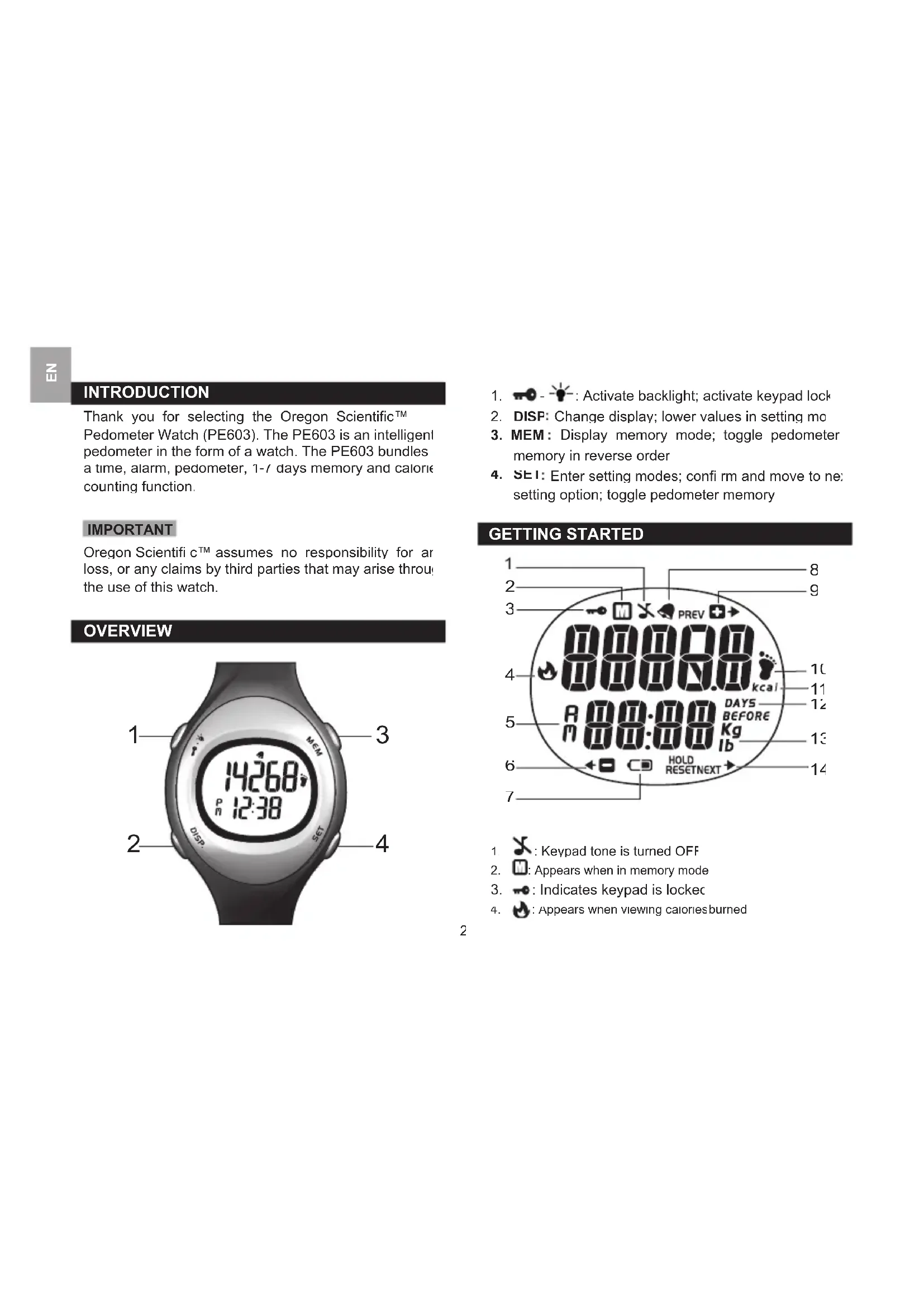
Thank you for selecting the Oregon ScientificTM Pedometer Watch (PE603). The PE603 is an intelligent pedometer in the form of a watch. The PE603 bundles a time, alarm, pedometer, 1-/7 days memory and calorie counting function.
IMPORTANT
Oregon Scientific c^TM assumes no responsibility for any loss, or any claims by third parties that may arise through the use of this watch.
OVERVIEW
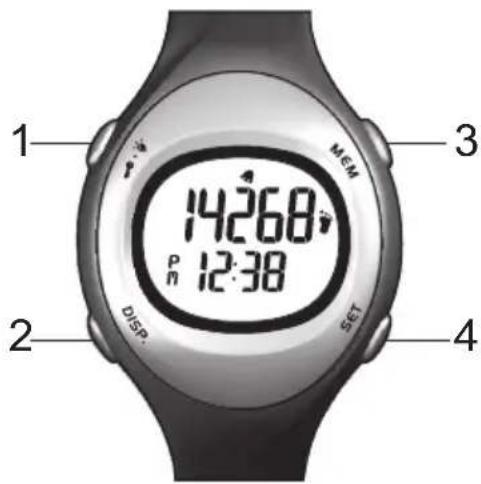
- -: Activate backlight; activate keypad lock
- DISP: Change display; lower values in setting mo
- MEM: Display memory mode; toggle pedometer memory in reverse order
- SE1: Enter setting modes; confirm and move to next setting option; toggle pedometer memory
GETTING STARTED
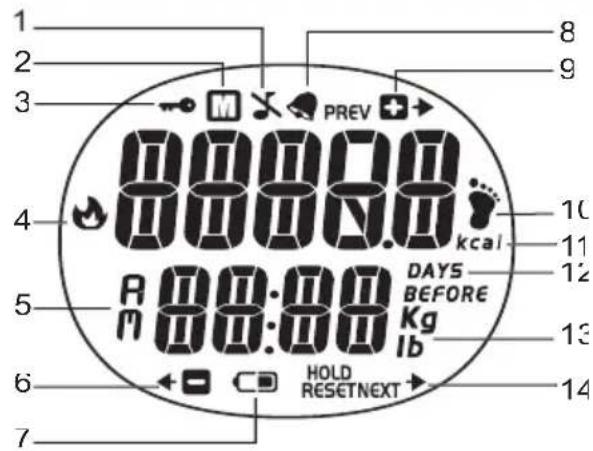
1:Keypad tone is turned OFF
2. :Appears when in memory mode
3. : Indicates keypad is locked
4. :Appears when viewing calories burned
- : Indicates morning or afternoon when clock is s in 12HR mode
- : Smart indicator; Lower values
- Indicates battery is running low
- : Alarm is set; will flash when activate
- : Smart indicator; Increase values
- : Appears in pedometer mode (main mode)
- kcal: Appears when viewing calories burned
- DAYS: Indicates pedometer memory from 1-7 days before
- aI b : Weight unit
- Next: Smart indicator when in setting mode
ABOUT THE PEDOMETER WATCH
The pedometer watch is able to measure steps taken when walking or running. It begins counting after the first 16 steps are taken consecutively.
USING THE PEDOMETER
In order to record accurate readings the following guidelines should be adhered:
- The pedometer watch should be worn on the lewrist only.
This pedometer measures steps for both walking and running. Sudden movements perform continuously, such as playing the piano or typing, result in false readings. To limit these false readings
you should keep your left arm steady for approxima 2-3 seconds
GETTING STARTED
TURN ON WATCH (FIRST-TIME USE ONLY)
Press and hold any key for 2 seconds to activate the LCD display
GETTING STARTED
The watch uses a 1 x CR2032 lithium battery, which has already been installed. See below for battery warnings.
| LOW BATTERY ICON | DESCRIPTION |
| The watch battery is low. |
To replace battery:
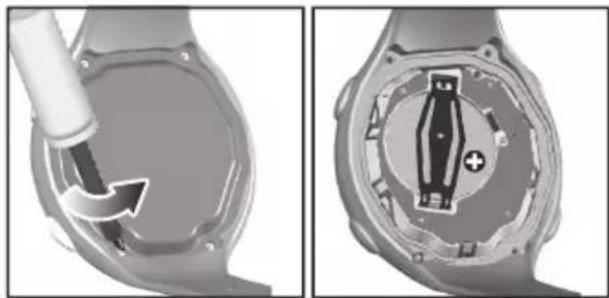
- Using a small Phillips screwdriver to remove battery compartment lid. Once opened, please keep the screws in a safe place to avoid losing them.
- Remove the old batteries and insert the new matching polarities.
- Replace the lid by screwing it back into place using a Phillips screwdriver.
USE IN THE WATER
The PE603 is water-resistant up to 50 meters (164 feet).
| RAIN SPLASHES ETC | SHowering (WARM COOL WATER ONLY) | LIGHT SWIMMING SHALLOW WATER | SHALLOW DIVING, SURFING, WATER SPORTS | SNORKELING/ DEEP WATER DIVING | |
| 50M / 164 FEET | OK | OK | OK | OK | NO |
NOTE Set the unit before exposing it to excessive water Pressing the keys while in the water or during heavy rainstorms may cause water to enter the unit.
OPERATION
Press to turn backlight ON for 5 seconds.
NOTE The backlight function will not operate while the low battery icon is displayed and it will return to normal once batteries have been replaced
To toggle keypad lock ON / OFF:
Press and hold - - - - - indicates keypad is locked.
DISPLAY MODES
Press DISP to switch between Pedometer with Time display and Calories burned with Date display
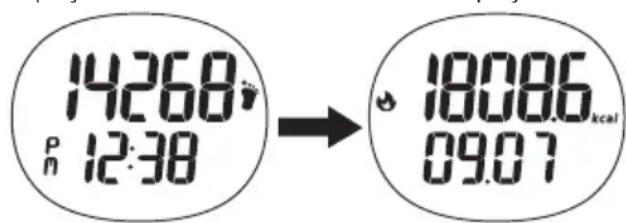
NOTE Calories Burned and date will appear for up to 5 seconds at a time before reverting back to Time and Pedometer display
SETTING MODE
Press SET to enter the setting mode.
Press SET continuously to scroll through setting modes. The setting modes are as follows
Alarm
Date
Time
Weight
- Beep ON / OFF
To set setting modes:
- Press and hold SET to enter new settings.
- Press MEM to increase values and DISF to lower values
- Press SEI to confirm
MEMORY MODE
The pedometer watch can store your steps taken for up to 7 days. At the end of each day the pedometer watch will automatically record steps taken.
To view records:
- Press MEM to enter memory mode.
- Press MEM again to view steps taken, in reverse order, 7-1 days memory before present day.
- Press SE1 to view steps taken, in successive order 1-7 days memory before present day
To erase all records:
In memory mode, press and holSET until a confirmatic sound is heard.
SPECIFICATIONS
| Real time clock | 12/24 hour with hour / minute / second |
| Power | 1 x CR 2032 li t hi un battery |
| Operating temperature | 0°C to 40°C (32°F to 104°F) |
| Storage temperature | -20°C to 60°C (-4°F tc 140°F) |
| Water resistant | Up to 50 meters (164 feet without pressing keys |
PRECAUTIONS
To ensure you use your product correctly and safe read these warnings and the entire user manual before using the product
Use a soft, slightly moistened cloth. Do not use abrasive or corrosive cleaning agents, as these may cause damage. Use luke warm water and mild soap to clean the watch and chest belt thoroughly after each training session. Never use the products in hot water or store them when wet.
- Do not bend or stretch the transmitter part of the ch belt
- Do not subject the product to excessive force, shock, dust, temperature changes, or humidity. Never
expose the product to direct sunlight for extended periods. Such treatment may result in malfunction.
- Do not tamper with the internal components. Doing so will terminate the product warranty and may cause damage. The main unit contains no user-serviceable parts.
- Do not scratch hard objects against the LCD display as this may cause damage.
Take precautions when handling all battery types. - Remove the batteries whenever you are planning to store the product for a long period of time.
- When replacing batteries, use new batteries as specified in this user manual
- The product is a precision instrument. Never attempt to take this device apart. Contact the retailer or our customer service department if the product requires servicing
- Do not touch the exposed electronic circuitry, as there is a danger of electric shock.
- Check all major functions if the device has not been used for a long time. Maintain regular internal testing and cleaning of your device. Have your watch serviced by an approved service centre annually.
- When disposing of this product, do so in accordance with your local waste disposal regulations.
-
Due to printing limitations, the displays shown in this manual may differ from the actual display.
-
The contents of this manual may not be reproduced without the permission of the manufacturer
NOTE The technical specifications for this product and the contents of the user manual are subject to change without notice.
ABOUT OREGON SCIENTIFIC
Visit our website (www.oregonscientific.com) to learn more about Oregon Scientific products
If you're in the US and would like to contact our Custom Care department directly, please visit:
www2.oregonscientific.com/service/support.asp
OR
Call 1-800-853-8883.
For international inquiries, please visit: www2. oregonscientific.com/about/international.asj.
EU-DECLARATION OF CONFORMITY
Hereby, Oregon Scientific c, declares that this Pedometer Watch (model:PE603) is in compliance with EMC directive 89/336/CE. A copy of the signed and date Declaration of Conformity is available on request via our Oregon Scientific Customer Service

PEDOMETER-UHR
MODELL:PE603
ACCENSIONE DELL'OROLOGIO (SOLO LA PRIMA VOLTA)
A Oregon Scientific declares that the Relógio Pedometro (Model: PE603) is already conforming to the requirements of the US. The company has recently been awarded a patent for its technology, which will be used in the US market.
C
STEGRÄKNARE MED KLOCKA
MODELL:PE603
BRUKSANVISNING
INNEHÄLL
HANDHAVANDE
BAKGRUNDSBELYSNING & KNAPPLAS
| REGN, STÄNK, MM | DUSCF (ENDAST VARMT KALLT VÄTTEN | LÄTT SIMNING/ GRUNT VATTEN | YTDYKNING / SURFING / VATTENSPORT | SNORKLING / DJUPVATTENDYKNING | |
| 5CM/164 FOT | OK | Ok | Ok | OK | NEJ |