
SEMR 850 A1 - Coffee machine SILVERCREST - Free user manual and instructions
Find the device manual for free SEMR 850 A1 SILVERCREST in PDF.
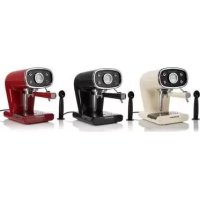



| Product type | Espresso coffee machine |
| Brand | SilverCrest |
| Model | SEMR 850 A1 |
| Power supply | 220-240 V ~ 50/60 Hz |
| Power | 850 W |
| Water tank capacity | 1 liter (maximum) |
| Boiler pressure | Not specified in the manual, but standard espresso type |
| Main functions | Coffee and cappuccino preparation, hot water for tea/infusions, steam function |
| Automatic shut-off | Yes, after 30 minutes of inactivity |
| Filter holder | For ground coffee, with tamper |
| Filter | Powder coffee filter, with silicone perforated disc (Thermocream®) |
| Steam device | Steam pipe with removable frothing device |
| Drip tray | Yes, removable with grid |
| Cleaning and maintenance | Regular cleaning of filter, silicone disc, tank, tray; periodic descaling |
| Descaling | Recommended with descaling product |
| Safety | Child safety, automatic shut-off, electrical safety (unplug before cleaning) |
| Warranty | 3 years (standard warranty) from date of purchase |
| Manufacturer / Importer | De'Longhi Appliances S.r.l. |
| After-sales service | FR: 0892 707110 (€0.45/min), BE: +32 (0)15 280840 |
Frequently Asked Questions - SEMR 850 A1 SILVERCREST
User questions about SEMR 850 A1 SILVERCREST
0 question about this device. Answer the ones you know or ask your own.
Ask a new question about this device
Download the instructions for your Coffee machine in PDF format for free! Find your manual SEMR 850 A1 - SILVERCREST and take your electronic device back in hand. On this page are published all the documents necessary for the use of your device. SEMR 850 A1 by SILVERCREST.
USER MANUAL SEMR 850 A1 SILVERCREST
ESPRESSO MACHINE
OPTIONAL AFFILIANCE S.r.l
9:1.2pm, 7
Tel: +39012241
7.6+39012241
MACHINE A E SEMR 850 AI
JEMK 050 AT
GB IE SE NL BI
FR DE AT CH
OB IE
Before reading, open the page with the icon and been closed for different functions of the appliances.
•
58
DESCRIPTION OF THE APPLIANCE 7
INTENDED USE 7
PRELIMINARY PHASES FOR USE 7
HOW TO MAKE COFFEE 8
HOW TO MAKE CAPPUCCINO 9
MAKING FURTHER CUPS OF COFFEE 9
USEFUL TIPS FOR OBTAINING A GOOD ITALIAN ESPRESSO 9
CLEANING THE APPLIANCE 10
DECALCIFICATION 11
PUTTING OUT OF SERVICE 11
DISPOSAL 12
TECHNICAL DATA 12
TROUBLESHOOTING 13
WARRANTY 14
SYMBOLS
The information in this manual is labelled as follows:

DANGER for children

DANGER from electricity

DANGER from other causes

WARNING: risk of burns from high temperature steam

IMPORTANT possible damage to materials
IMPORTANT SAFEGUARDS
READ THESE INSTRUCTIONS BEFORE USE. ALWAYS KEEP THESE INSTRUCTIONS.
In case of transfer of the appliance, also hand this manual.
- This appliance is designed only for private use, and is therefore to be considered unsuitable for commercial or industrial purposes.
- We decline any responsibility resulting from misuse or any use other than those covered in this booklet.
- We suggest you keep the original box and packaging, as our free-of-charge service does not cover any damage resulting from inadequate packaging of the product when this is sent back to an Authorised Service Centre.

DANGER for children

- The appliance can be used by children aged 8 years and up only if they are monitored by a responsible person or if they have received instructions regarding the appliance safe use and if they have understood the dangers which may arise during the appliance use.
- Cleaning and maintenance by the user must not be carried out by children unless they are older than 8 years and are monitored during the operation. Children must be supervised at all times to ensure they do not play with the appliance.
- Do not leave the packaging near children because it is potentially dangerous.
- In the event that this appliance is to be disposed of, it is suggested that the power chord is cut off. It is also recommended that all potentially dangerous components are rendered harmless to prevent children hurting themselves when playing with the apparatus.

DANGER from electricity

This appliance can be used by persons with reduced physical, sensory, or mental capabilities, or lack of experience and knowledge, only if they are supervised by a responsible person or have received and understood instructions on the safe use of the appliance.
They must also understand the dangers that may arise during use.
- Before connecting the appliance to the power supply, ensure that the voltage indicated on the plate on the bottom of the machine matches the local mains voltage.
- The use of extension leads not authorized by the appliance manufacturer may cause damage and accidents.
- If the electric cable is damaged, it must be replaced by the manufacturer, its Technical Assistance Service, or a similarly qualified person to avoid any risk.
- Never let live parts come into contact with water: this may cause a short circuit.
- Unplug before any cleaning or maintenance operations.
- Do not immerse the appliance in water or other liquids.
- Always turn off the appliance and remove the power cable plug from the socket-outlet before filling the tank with water.

DANGER from other causes

- Do not lift the appliance by grasping its water tank or tray, but only by its body.
- Choose a well-lit and clean environment with an easily accessible electric socket.
- Avoid putting excessive quantities of water into the tank.
- Never leave the appliance unattended when it is connected to the power supply.
- The appliance must be used and rested on a stable surface.
- The appliance is not to be used if it has been dropped, if there are visible signs of damage, or if it is leaking. Do not use the appliance if the power cord or the plug are damaged, or if the appliance is faulty. To prevent any accident, all repairs, including the replacement of the power cord, must be carried out by an Authorised Service Centre or, in any case, by qualified personnel.
WARNING: risk of burns

from high temperature steam

- Never direct the steam or hot water jet towards parts of the body; handle the steam/hot water spout with care: risk of scalding!
- The outer metallic parts of the appliance and of the filter holder must not be touched with the appliance in operation, because it could cause burns.
- If water does not come out of the filter holder, it may be because the filter is clogged. Stop the brewing and wait ten seconds. Remove and disconnect the filter holder because any remaining pressure could cause splashes or squirts. Then clean as explained in the relevant paragraph.

IMPORTANT possible damage to materials

- Place the machine on a stable surface where it cannot be knocked over.
- Never use the machine without water because the pump will burn out.
- Never fill the water tank with hot or boiling water.
- Do not place the machine on very hot surfaces or near open flames in order to prevent damage to the body.
- The cable must not touch any hot parts of the machine.
- Do not use sparkling (carbonated) water.
- Never put in the filter substances other than coffee powder. They could cause serious damage to the appliance.
- Do not leave the machine at a room temperature below 0°C because the water remaining in the boiler could freeze and cause damage.
- Never use the appliance outdoors.
- Do not expose the appliance to atmospheric agents (rain, sun, etc...).
- Before cleaning the appliance always unplug it and allow it to cool down. Clean only with a non-abrasive cloth that has been slightly dampened with water, adding a few drops of mild, non-aggressive detergent (never use solvents that damage plastic).
DESCRIPTION OF THE APPLIANCE
| A | Filter holder for ground coffee | I | Removable cup grille |
| B | Coffee measure/presser | J | ON/OFF switch |
| C | Perforated silicone disc (Thermocream®) | K | Steam dispensing knob |
| D | Filter for ground coffee | L | Boiler temperature indicator lamp |
| E | Removable water tank | M | Steam function switch |
| F | Power cord + Plug | N | Boiler temperature thermometer (C° and F°) |
| G | Cappuccino maker | O | Coffee brewing switch |
| G1 | Steam tube | P | “ON” indicator light |
| H | Drip tray |
INTENDED USE
- You can use your appliance to prepare coffee and cappuccino; and thanks to the possibility of dispensing hot water, you can also prepare tea and tisanes. This appliance is designed only and solely for private use, and is therefore to be considered unsuitable for industrial or professional purposes.
- No other use of the machine is contemplated by the manufacturer, which is exempt from any liability for all types of damages caused by improper use of the machine. Improper use also results in any form of warranty being forfeited.
PRELIMINARY PHASES FOR USE
Using the appliance for the first time
Check that the voltage of the domestic network is the same as that indicated on the technical information plate of the appliance. Place the appliance on a stable surface. When using it the first time, wash the tank and fill it with cool tap water – (1 liter MAX) – and then carefully fit it firmly into its seat (Fig. 3).
Check that the tank is properly inserted; otherwise, the machine may not dispense coffee.
Insert the plug into the socket, which must be earthed.
Starting the first time
After having filled the tank with cool tap water, start the machine. Press the on/off switch (J) (Fig. 1) for a few seconds. The indicator light (P) will turn on to indicate that the machine is on.
If you are starting the machine for the first time or after a period of time during which it has not been used, it is recommended that at least one cup of water be allowed to pass through the boiler's hydraulic circuit.
Place a container with a capacity of at least half a litre under the coffee spout and cappuccino maker (Fig. 5). Put the coffee brewing switch (O) on the coffee position. Wait until water comes out from the coupling seat of the filter holder. Open the steam dispensing knob (K) and make water come out of the cappuccino maker.
Stop dispensing by putting the coffee brewing switch (O) in the high position. Close the steam knob. Wait for the boiler temperature indicator lamp (L) to turn on. At this point the coffee maker is ready to brew coffee.
HOW TO MAKE COFFEE
Put the perforated silicone disc (C) and the filter for ground coffee (D) into the filter holder (A) in the order indicated (Fig. 6). Measure out the coffee in the filter and lightly press with the specially provided presser: completely fill two measures for two cups of coffee, and fill only one for one cup. Insert the filter holder into its seat.
Tighten well by turning it from left to right while making sure you have hooked it properly onto the flange (Fig. 7).

Warning!
If too much ground coffee is put inside the filter, turning the filter holder may prove difficult and/or you may get leaks from the filter holder when the coffee is being dispensed.
The filter ring should be preheated for a few minutes to ensure a nice, hot cup of coffee. This will not be necessary for the cups of coffee that follow.
Wait for the boiler temperature indicator lamp (L) to turn on. Position the coffee brewing switch (O) to coffee brewing. The coffee will start coming out of the spouts of the filter holder. To stop the flow, move the coffee brewing switch (O) to the high position. The minimum serving of coffee is 50 ml.

Warning!
Like professional coffee makers, do not remove the filter ring when the coffee brewing switch is turned on (in coffee brewing position).

Warning!
Wait about ten seconds after the coffee has been dispensed before removing the filter holder. To remove it, turn it slowly from right to left so as to prevent splashes or spurts of water or coffee.
When warming up, your appliance may release small puffs of steam from the filter holder; this is perfectly normal.
The boiler temperature indicator lamp (L) will go on and off at regular intervals, indicating that the boiler's thermostat is keeping the water at the right temperature. When using the coffee maker for the first time and thereafter, it is best to begin brewing coffee only when the boiler temperature indicator lamp (L) is on.
Auto-off function
If the machine is turned on but not in use, the auto-off function operates after 30 minutes. This function puts the machine in standby. The ON indicator light (P) is off. To restart the machine, press again the on/off switch (J).
Filling the water tank during use
No special operation is necessary when the water in the tank runs out as the machine is equipped with a special self-priming device. Just unplug the machine, pull out the tank and fill it with fresh cool water again.
HOW TO MAKE CAPPUCCINO
To make cappuccino, hot chocolate or heat any beverage, move the steam function switch (M) to the steam position (♣) and wait until the boiler temperature indicator lamp (L) goes on, which indicates that the heating unit has reached the right temperature to produce steam.
When warming up, your appliance may release small puffs of steam from the filter holder; this is perfectly normal.
Turn the steam dispensing knob (K), having the foresight to position a cup underneath the cappuccino maker (G): at first a little water will come out, immediately followed by a strong jet of steam.
Close the steam dispensing knob (K) to stop the jet of steam and put the pot of milk to be whipped under the cappuccino maker (Fig. 10). Plunge the wand all the way into the pot of milk and again open the steam dispensing knob (K) until you get the result you want. During these operations you may notice that the boiler temperature indicator lamp (L) goes on and off from time to time, indicating that the boiler thermostat is keeping the water required for the steam supply at the right temperature.
It is opportune you start dispensing the steam only when the lamp is on. Dispense the steam for a few seconds after every use in order to free the hole of any milk residue.
Close the steam dispensing knob (K). After the cappuccino is prepared, move the steam function switch (M) to the high position to cut out the steam function.
MAKING FURTHER CUPS OF COFFEE
To prepare a cup of coffee right after making cappuccino, it is necessary to bring the boiler back to the coffee preparation temperature by performing these operations: put the steam function switch (M) in the high position to cool down the boiler, wait for the boiler temperature indicator lamp (L) to turn off and then turn on again. To cool the heating unit more quickly, proceed as follows: after having placed a container underneath the cappuccino maker (G), put the coffee brewing switch (O) in position (☐); turn the steam dispensing knob (K): this will cause water to flow out, until the boiler temperature indicator lamp (L) turns back off. Now close the steam dispensing knob (K) and put the coffee brewing switch (O) in the high position. Wait until the boiler temperature indicator lamp (L) turns back on. The coffee maker is now ready to brew coffee again.
USEFUL TIPS FOR OBTAINING A GOOD ITALIAN ESPRESSO
The ground coffee in the filter holder has to be pressed lightly. Whether the coffee is stronger or weaker depends on the degree the coffee is ground, the quantity put into the filter holder and the pressing. Just a few seconds are needed for the coffee to flow down into the cups. If the dispensing time is longer, this means that the coffee is ground too fine or that the coffee put into the filter holder has been pressed too much.
CLEANING THE APPLIANCE

Warning!
All cleaning operations described below must be performed with the machine off and with the electric plug disconnected from the socket-outlet.

Warning!
Regular maintenance and cleaning preserve and keep the machine efficient for a longer amount of time. Never wash machine components in the dishwasher. Do not use direct jets of water.

Warning!
All operations must be performed when the machine is cold.
Cleaning the filter containing the grounds
Check that the holes are not clogged and if so, clean them with a small brush (Fig. 11). Dispense boiling water from the filter holder with the filter inside, without coffee grounds, after placing a glass underneath the dispenser in order to dissolve or remove any coffee residue or impurities.

Warning!
Slowly remove and disconnect the filter holder because any remaining pressure could cause splashes or squirts.
It is advisable to thoroughly clean the filter about every 3 months using detergent tabs, which can be found at retail stores and the Authorised Service Centres, following the instructions inside the package. As an alternative, you can use a simple dishwasher detergent tab (without added rinse aid or other chemical additives) as follows:
- Put a dishwasher detergent tab into the filter (without coffee) when the machine is hot (after heating for at least five minutes).
- Couple the filter holder to the machine and put a container underneath the filter holder.
- Put the coffee brewing switch (O) in the coffee position (☐) to start dispensing water, then dispense water for 15-20 seconds.
- Stop the water supply and let the tab act for at least 15 minutes while keeping the filter holder coupled on the machine.
- Repeat the water dispensing operation by operating the pump for about 15-20 seconds, and then letting it rest for another 15-20 seconds, until two tanks of water are used up.
- Remove the filter holder from the machine, remove the filter and rinse it well under running tap water.
- Turn off the machine, disconnect the power cable from the socket-outlet and clean the coupling seat of the filter holder with a sponge in order to remove any detergent residue from the shower disc.
- Turn the machine back on, couple the filter holder once again and dispense at least 2 cups of water again to complete the rinsing.
If the coffee machine is used daily, it is advisable to carry out the cleaning operation at least every three months.
Cleaning the silicone disc
Wash the silicone disc (C) under running water, bending it slightly on the sides in order to
free the centre hole of any residue of coffee grounds that could clog it (Fig. 12).
Cleaning the filter holder seat
With time, coffee residue may accumulate on the filter holder seat. It can be removed with a toothpick, a sponge (Fig. 13), or by letting water run through without fitting the filter holder (Fig. 4).
Cleaning the cappuccino maker

Warning!
Perform this operation when the chrome-plated pipe is cold so as to prevent burns.
Unscrew the cappuccino maker (G) from the steam tube (G1) (Fig. 14) and wash it with running water. The steam tube (G1) can be cleaned with a non-abrasive cloth. If necessary, clean the small steam outlet hole again with a pin (Fig. 14). Screw the cappuccino maker back on as far as it will go. After use, always let the steam nozzle run for a few seconds to free the outlet from any possible residue.
Cleaning the tank
Periodically clean the inside of the tank with a sponge or damp cloth.
Cleaning the grill and the drip tray
Remember to empty the drip tray from time to time (H).
Remove the grill (I) and wash it under running water; remove the drip tray (H) from the machine, empty it and wash it under running water.
Cleaning the machine body

Warning!
Clean the fixed parts of the machine using only a damp, non-abrasive cloth so as to not damage the body.
DECALCIFICATION
Good maintenance and regular cleaning preserve and keep the machine efficient for a longer amount of time, considerably limiting the risks of lime deposits forming inside the appliance. However, should your coffee machine fail to work properly as a result of the frequent use of hard, high calcium content water, you may perform a decalcification procedure to restore its operational efficiency. Should you need to decalcify your appliance, please follow the instructions which come with the decalcifying product.
PUTTING OUT OF SERVICE
If you want to put the machine out of service, you must disconnect it electrically, empty the water tank and drip tray and clean it (see the paragraph on "Cleaning the appliance"). In the case of scrapping, you must separate the various materials used in making the machine and dispose of them based on their composition and on the legal provisions in force in the country of use.
DISPOSAL
Packaging
The product is packaged using recyclable materials, which must be disposed of in the proper containers.
Electronic equipment
Do not dispose of electronic equipment in normal household waste.
Compliant with EU directive 2012/19/EC, at the end of its useful life, the appliance must be disposed of in a suitable manner. This will make it possible to re-use recyclable material, limiting the impact on the environment.
Dispose of the appliance at a collection centre for electrical waste or a recycling centre. For more information, please contact your local disposal company or local authority.
TECHNICAL DATA
Mains Power: 220-240 V ~ 50/60 Hz
Power: 850 Watt
TROUBLESHOOTING
If there are problems with operation, immediately turn off the machine and unplug it from the socket-outlet.
| PROBLEMS CAUSES SOLUTIONS | ||
| The coffee maker does not supply steam. | There is little water and the pump does not suck it up. | Check that the water level in the tank is correct. If necessary, fill it with cool tap water. |
| The steam exit hole on the dispenser wand is clogged. | Unclog any deposits that may have formed in the hole of the steam tube with a pin (Fig. 14). | |
| Coffee over-flowing from the edges of the filter ring. | Probably an excess amount of ground coffee has been placed in the filter ring preventing the filter ring from being correctly tightened into its housing. | Slowly remove and disconnect the filter holder because any remaining pressure could cause splashes or squirts. Clean the coupling seat with a sponge (Fig. 13). Repeat the operation placing the correct quantity of coffee in the filter. |
| Residues of ground coffee have remained on the gasket of the filter holder coupling seat. | Clean the seal with a toothpick or a sponge (Fig. 13). | |
| The exit holes of the filter containing coffee grounds are clogged. | Slowly remove and disconnect the filter holder because any remaining pressure could cause splashes or squirts. Clean the clogged filter holes with a small brush or a pin. | |
| The coffee is not supplied or flows too slowly. | The holes of the perforated disc in the filter holder coupling seat are clogged. | Turn on the machine without the filter holder, making the water run. Turn on the machine without the filter holder, making the water run. If the water still does not come out from all the holes evenly, carry out the descaling cleaning operation, following the instructions provided in the package. |
| The exit holes of the filter containing coffee grounds are clogged. | Slowly remove and disconnect the filter holder because any remaining pressure could cause splashes or squirts. Clean the clogged filter holes with a small brush or a pin. | |
| The coffee blend is ground too fine. | Try using coarser coffee blends. | |
| The coffee blend is pressed down too much. | amper coffee inside the filter using less pressure. | |
| The tanks is not inserted well. Fit | the tank securely by pushing it as far as it will go. | |
| There is little water and the pump does not suck it up. | Check that the water level in the tank is correct. If necessary, fill it with cool tap water. | |
| The coffee is too watery and cold. | The blend has been ground too coarsely. | A more finely ground blend must be used to obtain a more concentrated and hotter coffee. |
WARRANTY
Dear Customer,
This appliance is provided with a 3-year warranty (statutory warranty) from the date of purchase. In case of a faulty product, the purchaser is covered by statutory consumer rights, which are not limited by the following warranty.
Warranty conditions
The warranty period commences at the date of purchase. Keep the original receipt as proof of purchase.
In case of defects in material or workmanship found within three years (statutory warranty) from the date of purchase of the product, we will, at our discretion, repair or replace the appliance free of charge. This intervention under warranty requires that within the period of three years (statutory warranty), the faulty appliance and proof of purchase (receipt) be presented together with a short description of the fault, including the date on which the problem was found.
In the event that the fault is covered by warranty, the appliance will be repaired or replaced. The repair or replacement of the product does not imply the start of a new warranty period.
Warranty period and legal right to complaint due to fault
The warranty period is not extended by the legal warranty. The above also refers to parts that are replaced or repaired. Report damage or any faults found at the time of purchase immediately after unpacking. Repairs requested after the warranty period has expired will be charged.
Warranty application
This product has been made with care and according to strict quality standards; it is also scrupulously inspected before delivery.
The warranty applies to defects in material and workmanship. The warranty does not extend to parts of the product that are subject to normal wear and tear and which, as a result, can be considered wear parts; it also does not cover fragile parts such as switches, breakers and accumulators in glass, or damage caused during transport.
This warranty will become null and void in the event that the product is damaged or not used or subjected to maintenance as appropriate. For suitable product use, abide by the guidelines in the instructions for use. Avoid all use or operations that are advised against in the instructions for use or which are the subject of warnings.
This product is destined exclusively for private use and not for business purposes. The warranty will become null and void in the event of abuse, improper use, use of force or interventions carried out by persons other than our authorised assistance services.
Warranty procedures
To allow rapid processing of the problem, please proceed as follows:
- Any request must be accompanied by a receipt and by the code no. (IAN 106103) as proof of purchase
- The code number is shown on the rating plate or front of the instructions for use (bottom left).
- In case of operating errors or other faults, contact the following assistance service by telephone or email.
- If the product is found to be faulty, it can be sent, carriage paid, to the address provided by the assistance centre, attaching proof of purchase (receipt), a description of the fault and the date on which the problem was found.
- Package the faulty appliance with care before sending it to the assistance service.
Warranty card
Company and seller's headquarters:
LIDL
Service address:
GB
Jaleno Europe Limited
Roe Head House
Far Common Road
Mirfield
West Yorkshire
WF14 0DQ
England
IE
Kenilworth Electrical
Electrolux Complex
Longmile Road
Dublin 12
Phone hotline:
01924 481053 (GB)
014508703 / 014508705 (IE)
E-mail:
Name of manufacturer/importer:
De'Longhi Appliances S.r.l.
Via L. Seitz, 47
31100 Treviso - Italy
Tel. +39-0422-4131
Fax +39-0422-413736
Product name:
Espresso Machine IAN 106103
Product/manufacturer ID no.:
SEMR 850 A1
Buyer's name:
Postal Code/City:
Street:
Phone/E-mail:
Signature:
Fault description:
......
CONTENTS
SYMBOLS 16
IMPORTANT INSTRUCTIONS 17
DESCRIPTION OF THE APPLIANCE 20
AVSEDD ANVÄNDNING 20
INLEDANDE STEG FÖR ANVÄNDNING 20
KAFFEBRYGGNING 21
31100 Treviso - Italy
Tel. +39-0422-4131
Fax +39-0422-413736
Produktens namn:
Espressomaskin IAN 106103
BESCHRIJVING VAN HET APPARAAT 33
BEDOELD GEBRUIK 33
VOORBEREIDING OP HET GEBRUIK 34
KOFFIE MAKEN 34
CAPPUCCINO MAKEN 35
DE MACHINE WEER GEBRUIKEN VOOR KOFFIE 36
HANDIGE TIPS OM EEN GOEDE ITALIAANSE ESPRESSO TE ZETTEN 36
CLEANING THE APPLIANCE 36
DESCALING 38
PUTTING OUT OF SERVICE 38
DISPOSAL 38
DESCRIPTION OF THE APPLIANCE
De'Longhi Group Service
31100 Treviso - Italy
Tel. +39-0422-4131
Fax +39-0422-413736
Product name:
Espresso machine IAN 106103
Product / manufacturer identification number:
SEMR 850 A1
Name of the purchaser:
Postal code / city:
Street:
Phone no. / e-mail:
Signature:
Error description:
......
TABLE OF CONTENTS
| SYMBOLES | 42 |
| REMARQUES IMPORTANTES 43 | |
| DESCRIPTION DE L’APPAREIL 46 | |
| USAGE PRÉVU 46 | |
| OPERATIONS AVANT L’EMPLOI 46 | |
| COMMENT FAIRE LE CAFÉ 47 | |
| COMMENT FAIRE LE CAPPUCCINO 48 | |
| REUTILISATION DU CAFE 48 | |
| CONSEILS UTILES POUR OBTENIR UN BON CAFE ESPRESSO A L’ITALIENNE 49 | |
| NETTOYAGE DE L’APPAREIL 49 | |
| DÉCALCIFICATION | 50 |
| MISE HORS SERVICE 51 | |
| ELIMINATION DU PRODUIT 51 | |
| DONNEES TECHNIQUES 51 | |
| COMMENT REMEDIER AUX INCONVENIENTS SUIVANTS 52 | |
| GARANTIE | 53 |
SYMBOLS
PRODUCT DISPOSAL
Packaging
De'Longhi Group Service
31100 Treviso - Italy
Phone +39-0422-4131
Fax +39-0422-413736
31100 Treviso - Italy
Tel. +39-0422-4131
Fax +39-0422-413736
Product name:
Espresso machine IAN 106103
Product /


- ESPRESSO MACHINE
- SYMBOLS
- IMPORTANT SAFEGUARDS
- READ THESE INSTRUCTIONS BEFORE USE. ALWAYS KEEP THESE INSTRUCTIONS
- DANGER FOR CHILDREN
- DANGER FROM ELECTRICITY
- DANGER FROM OTHER CAUSES
- WARNING: RISK OF BURNS
- FROM HIGH TEMPERATURE STEAM
- IMPORTANT POSSIBLE DAMAGE TO MATERIALS
- INTENDED USE
- PRELIMINARY PHASES FOR USE
- USING THE APPLIANCE FOR THE FIRST TIME
- STARTING THE FIRST TIME
- HOW TO MAKE COFFEE
- WARNING
- AUTO-OFF FUNCTION
- FILLING THE WATER TANK DURING USE
- HOW TO MAKE CAPPUCCINO
- WHEN WARMING UP, YOUR APPLIANCE MAY RELEASE SMALL PUFFS OF STEAM FROM THE FILTER HOLDER; THIS IS PERFECTLY NORMAL
- MAKING FURTHER CUPS OF COFFEE
- USEFUL TIPS FOR OBTAINING A GOOD ITALIAN ESPRESSO
- CLEANING THE APPLIANCE
- CLEANING THE FILTER CONTAINING THE GROUNDS
- CLEANING THE SILICONE DISC
- CLEANING THE FILTER HOLDER SEAT
- CLEANING THE CAPPUCCINO MAKER
- CLEANING THE TANK
- CLEANING THE GRILL AND THE DRIP TRAY
- CLEANING THE MACHINE BODY
- DECALCIFICATION
- PUTTING OUT OF SERVICE
- DISPOSAL
- PACKAGING
- ELECTRONIC EQUIPMENT
- TECHNICAL DATA
- TROUBLESHOOTING
- WARRANTY
- WARRANTY CONDITIONS
- WARRANTY PERIOD AND LEGAL RIGHT TO COMPLAINT DUE TO FAULT
- WARRANTY APPLICATION
- WARRANTY PROCEDURES
- WARRANTY CARD
- COMPANY AND SELLER'S HEADQUARTERS
- SERVICE ADDRESS
- PHONE HOTLINE
- NAME OF MANUFACTURER/IMPORTER
- PRODUCT NAME
- PRODUCT/MANUFACTURER ID NO
- BUYER'S NAME
- POSTAL CODE/CITY
- STREET
- PHONE/E-MAIL
- SIGNATURE
- FAULT DESCRIPTION
- CONTENTS
- PRODUKTENS NAMN
- PRODUCT / MANUFACTURER IDENTIFICATION NUMBER
- NAME OF THE PURCHASER
- POSTAL CODE / CITY
- PHONE NO. / E-MAIL
- ERROR DESCRIPTION
- PRODUCT DISPOSAL
Brand : SILVERCREST
Model : SEMR 850 A1
Category : Coffee machine