
CV 7760 N - Coffee machine NEFF - Free user manual and instructions
Find the device manual for free CV 7760 N NEFF in PDF.



| Product type | Built-in fully automatic coffee machine |
| Brand | Neff |
| Model | CV 7760 N |
| Power supply | 220-240 V ~ 50/60 Hz |
| Coffee type | Whole beans and ground coffee |
| Main functions | Espresso, Coffee, Cappuccino, Latte macchiato, Café au lait, Milk foam, Hot milk, Hot water, My coffee, 2 cups |
| Extraction system | Built-in automatic (2 positions) |
| Display | Display with navigation and menu |
| Adjustments | Grind fineness, water hardness, temperature, aroma, quantity, contrast, lighting |
| Milk frother | Removable, produces milk foam and hot milk |
| Maintenance programs | Descaling, cleaning, Calc'nClean |
| Brew unit cleaning | Removable, clean with water |
| Safety | Automatic shut-off (Eco mode), anti-burn protection |
| Included accessories | Measuring spoon, milk flexible hose |
Frequently Asked Questions - CV 7760 N NEFF
User questions about CV 7760 N NEFF
0 question about this device. Answer the ones you know or ask your own.
Ask a new question about this device
Download the instructions for your Coffee machine in PDF format for free! Find your manual CV 7760 N - NEFF and take your electronic device back in hand. On this page are published all the documents necessary for the use of your device. CV 7760 N by NEFF.
USER MANUAL CV 7760 N NEFF
Safety instructions
... on purchasing this product. With this deployable fully automatic espresso machine you have acquired a high-quality modern kitchen appliance of innovative design which combines a multitude of functions with easy operation.
It will enable you to prepare a variety of delicious hot drinks quickly and simply – whether you're in the mood for a traditional cup of coffee, a smooth milk coffee or latte macchiato, a creamy cappuccino or an invigorating espresso. At the same time the appliance offers you a wide range of options for adapting it to your individual taste. To ensure that you can use this fully automatic espresso machine with all its functions and features reliably and safely, we would like you to familiarize yourself with its components, functions, displays and controls. These instructions are designed to help you. So please take the time to read them before you switch on the appliance.
How to use these instructions
If you unfold the front cover of these instructions you will find illustrations of the appliance with numbered parts. These numbers are referred to throughout the text, e.g. "Water tank (8)".

Tip: If you leave the cover page unfolded, you can always refer back to it quickly, wherever you are in the instructions.
Displays and lettering on buttons are always shown in a different font from the text of the instructions so that you can easily recognize what is displayed or printed on the appliance. Example: Espresso
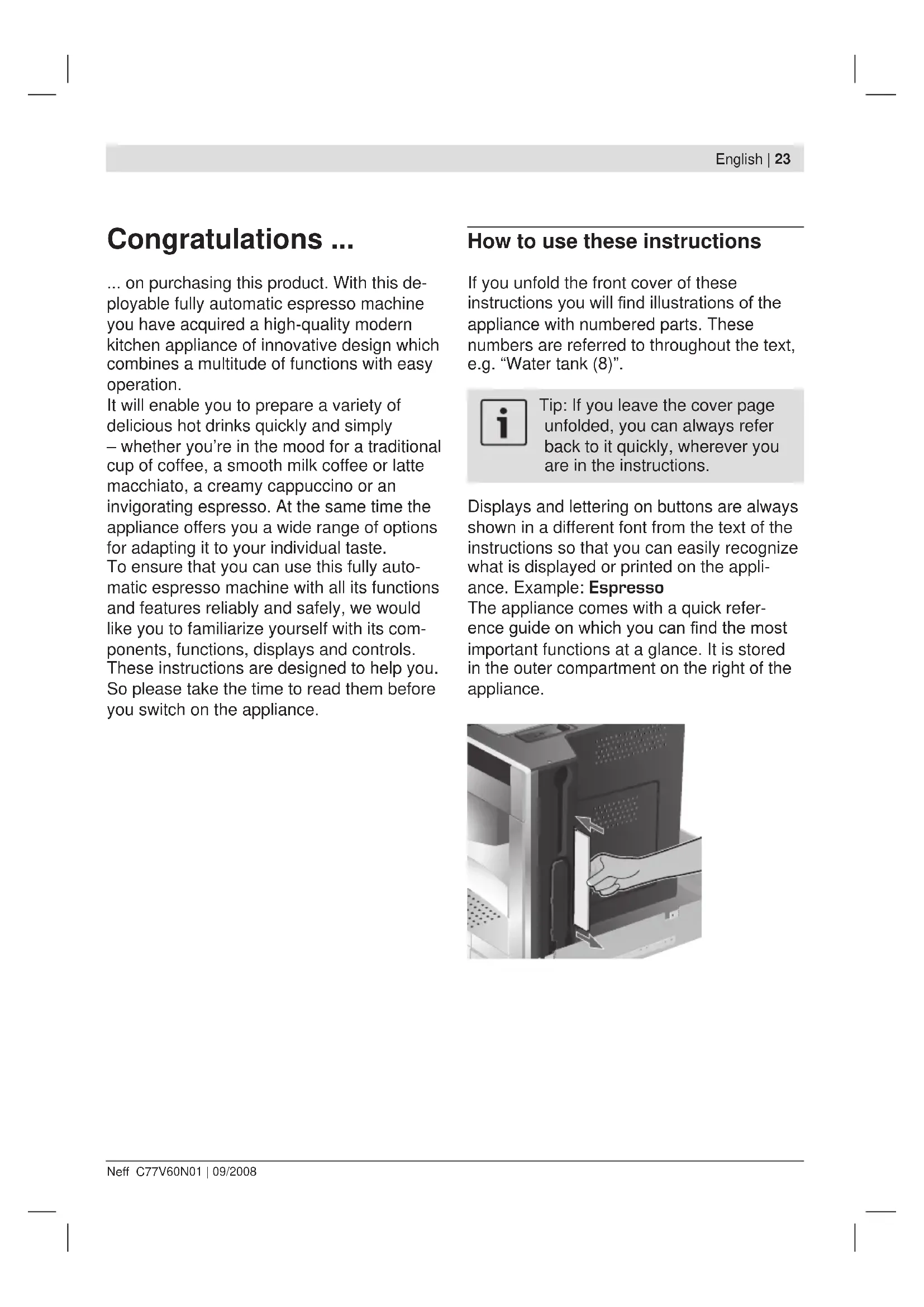
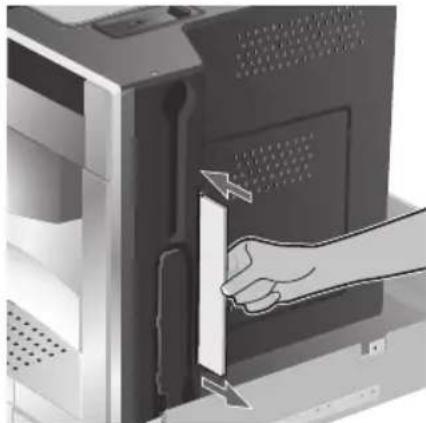
The appliance comes with a quick reference guide on which you can find the most important functions at a glance. It is stored in the outer compartment on the right of the appliance.
Contents
25 Safety instructions
25 The appliance and its parts
26 Controls and display
26 Power switch O/I 26 Menu and display 27 Deployment system 27 Accessories 27 Display messages
28 Operation
28 General 29 Setting up the appliance
30 Preparing drinks
30 Drink selection 30 Example 31 Preparation using pre-ground coffee 31 Preparation using milk 32 Two cups at once 32 My coffee 33 Preparing milk froth and hot milk 33 Dispensing hot water
34 Information and settings
34 Displaying information 34 Displaying settings 35 Adjusting the grinding unit 36 Checking and setting the water hardness 36 Tips on energy saving
36 Daily maintenance and cleaning
36 Daily maintenance 37 Cleaning the milk system 38 Cleaning the brewing unit
39 Service programmes
39 Descaling 40 Cleaning 41 Calc'nClean
42 Simple troubleshooting
43 Accessories, storage, disposal, guarantee
43 Accessories 43 Storage 43 Disposal 43 Guarantee
Safety instructions
Please read the operating instructions carefully before using the appliance and keep them for future reference. You should also note the enclosed quick reference guide, which is stored in a special outer compartment on the right of the appliance.
This fully automatic espresso machine is designed for domestic use and not commercial use. It should only be filled with fresh water and the substances described in these instructions (coffee, cleaning/descaling agents).
Use indoors and at room temperature only. Do not allow persons (including children) with reduced physical, sensory or mental capabilities, or lack of experience and knowledge, to use this appliance, unless they are being supervised or have been given instruction concerning use of the appliance by a person responsible for their safety. Keep children away from the appliance. Children should be supervised to ensure that they do not play with the appliance.

Risk of electric shock! Connect and operate the appliance only in accordance with the
specifications on the rating label. Do not use if either the power cord or the appliance is damaged. In the event of a malfunction, switch off the appliance immediately by the power on/off switch. Then pull out the power plug. Do not open the appliance or dismantle it. Never immerse the power cord in water. To avoid potential hazards, repairs such as replacing a damaged power cord should only be performed by our service personnel.

Risk of injury! Do not reach into the grinding unit.

Risk of burns! The milk frother for milk and hot water gets very hot.
After use, allow to cool down first before touching.
Risk of injury! Be careful when pulling the appliance out of the built-in unit and it back in, so that fingers are not
The appliance and its parts
(See illustration on the fold-out front cover of these instructions)
1 Button i (information/settings) 2 Selection button (up) 3 Display 4 Retractable navigation button 5 Selection button (down) 6 Start/Stop button 7 Power switch 0/I 8 Removable water tank 9 Bean container with aroma cover 10.7.2.3.4.5.6.7.8.9.10.11.12.13.14.15.16.17.18.19.20.21.22.23.24.25.26.27.28.29.30.31.32.33.34.35.36.37.38.39.40.41.42.43.44.45.46.47.48.49.50.51.52.53.54.55.56.57.58.59.60.61.62.63.64.65.66.67.68.69.70.71.72.73.74.75.76.77.78.79.80.81.82.83.84.85.86.87.88.89.90.91.92.93.94.95.96.97.98.99. 11 Selector for adjusting the grind 12 Milk tube 13 Measuring spoon 14 Door to brewing unit 15 Door opener to brewing unit 16 Deployment button 17 Milk container 18 Drip tray unit 19 Removable milk frother (for milk/hot water) 20 Height-adjustable coffee outlet
Controls and display
Power switch O/I
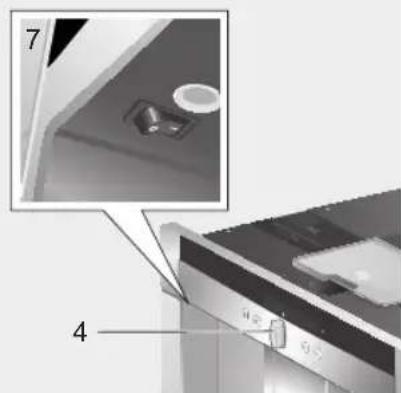
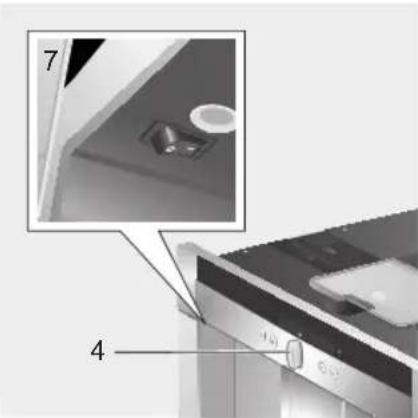
The power switch 0/1 (7) is used to switch the appliance on or to switch it off fully (power supply off).

Important:
Do not press the power switch while the appliance is operating. You should only switch off the appliance after putting it into "energy saving mode" by retracting the navigation button. This initiates automatic rinsing of the appliance.
Menu and display
The appliance features user-friendly menu navigation to ensure that operation is as easy as possible while at the same time offering a wide range of functions. It allows you to select from a multitude of options in only a few steps once you know how. The display shows which programme you have selected and lets you know when you need to top up the appliance with water or coffee, or run one of the service programmes.
Basic menu operation is described in the following pages.
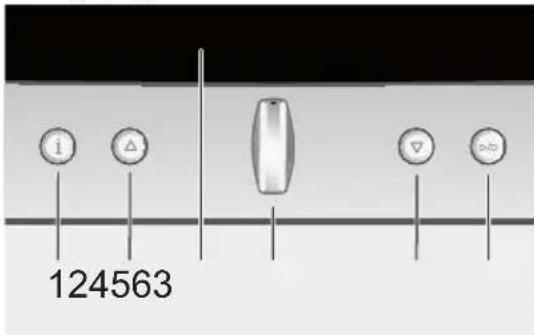
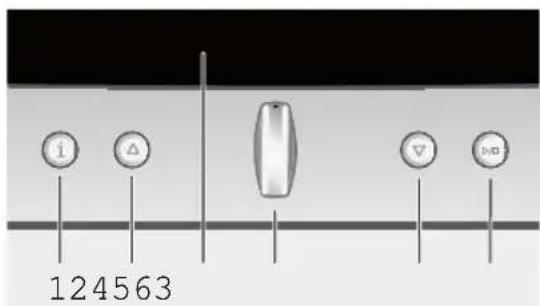
1 i: If you press i briefly, information is shown on the display (see "Displaying information"). If you keep i pressed for at least three seconds, you open the settings menu (see "Displaying settings").
2: This button is used to navigate upwards in the display (3). The currently active menu item is shown in a larger font.
3 Display: The display uses symbols and texts to indicate settings, ongoing processes and messages.
4 Retractable navigation button: Not retracted: The appliance is switched on. After it is switched on the appliance rinses, unless it is still warm from its last use. Retracted: The appliance is in "energy saving mode". After the appliance has been switched to "energy saving mode" it rinses, unless coffee has not been dispensed.
The appliance is ready for use when the drink selection menu is shown in the display (3). Press the navigation button in the required direction to enter or change settings (e.g. coffee strength or per-cup quantity).
5: This button is used to navigate downwards in the display (3). The currently active menu item is shown in a larger font.
6 Start/Stop ▸: This button is used to start drink preparation or to start a service programme.
Press ▸/■ (6) again during drink preparation to stop the dispensing process.
Deployment system
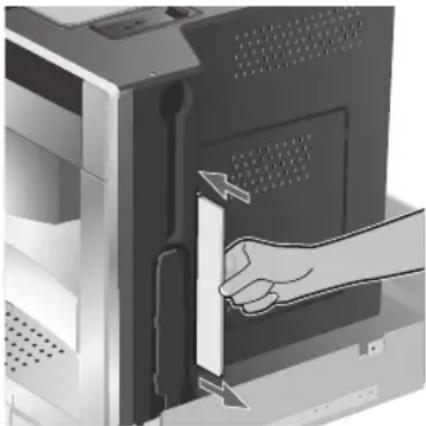
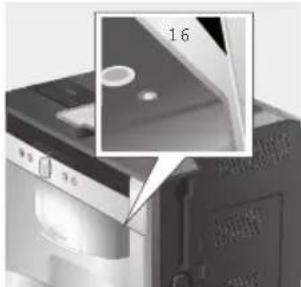
The appliance can be pulled out of the built-in unit automatically. To do this,
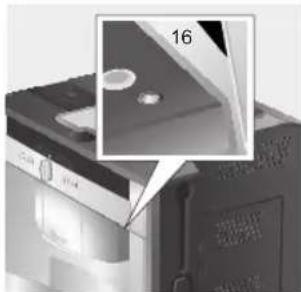
press deployment button (16) (appliance must be switched on for this) or remove grate and pull on the handle underneath which is now accessible:
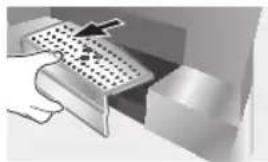
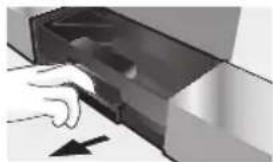
The appliance now moves automatically into deployment position 1. In this position it can be filled with water, coffee beans, ground coffee and cleaning/descaling tablets, and the accessories on the right of the appliance can be removed.
To pull the appliance out fully,
press deployment button (16) again and pull the appliance out by hand into position 2 or pull the appliance out fully by the handle. In deployment position 2 the brewing unit can be removed and the grinding unit adjusted.
Deployment position 1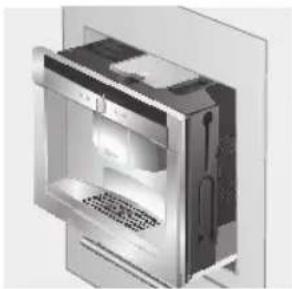
Deployment position 2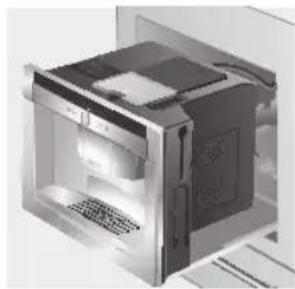
Then push the appliance back fully into the built-in unit.

During the brewing process, automatic deployment is prevented.
Accessories
The fully automatic espresso machine has special compartments for storing the accessories (12, 13) and quick reference guide with the appliance. These are located on the right side and are accessible when the appliance is pulled out into deployment position 1.
Display messages
The display shows not only the current operating status, but also various messages that give you status information or let you know when you need to take action. As soon as you have taken the necessary action, the message disappears and the menu for drink selection is displayed again.
Information:
| Display message Meaning | |
| Water tank almost empty | Water tank must be refilled soon |
| Bean container almost empty | Bean container must be refilled soon |
| Please wait | Appliance is working; please wait a moment |
Prompts:
| Display message What you need to do | |
| Refill water tank | Refill water tank |
| Replace water tank | Replace water tank |
| Check water tank | Remove water tank and replace correctly |
| Replace drip tray | Replace drip tray |
| Empty drip tray | Empty drip tray and clean |
| Refill bean container | Refill bean container |
| Set up milk frother | Set up milk frother |
| Replace brewing group unitClose door | Replace brewing unit and close door |
| Check brewing group unit | Remove brewing unit and replace correctly |
| Service - change filter | Change water filter |
| Service - descale | Run “Descaling” service programme |
| Service - clean | Run “Cleaning” service programme |
| Display message What you need to do | |
| Service - Calc'n'Clean | Run "Calc'n'clean" service programme |
Operation
General
Fill the water tank with fresh, uncarbonated water only, and preferably use only beans for fully automatic coffee and espresso machines. Do not use coffee beans that have been glazed, caramelised or treated with other additives containing sugar, since they will block the brewing unit.
If the appliance is being used for the first time or has not been operated for a long period, the first cup of coffee will not have the full aroma.
The factory settings of the fully automatic espresso machine are programmed for optimal performance. The appliance switches to "energy saving mode" automatically after one hour. This setting, like many others, can be changed (see "Auto off after" under "Displaying settings").
Do not press the power switch while the appliance is operating. The appliance should only be switched off when it is in "energy saving mode", so that it can rinse automatically.
Setting up the appliance
- Press the power switch (7).
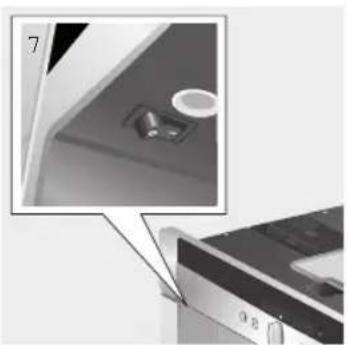
- The language selection is shown in the display:
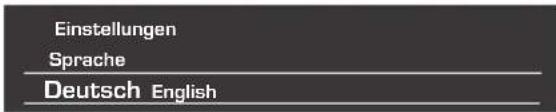
- Use the navigation button (4) to select the language in which you want the display texts to appear. The following languages can be selected:
German
English
Russian
Dutch
French
Italian
Spanish
Polish
- Press Start/Stop (6). The language you selected is saved and the appliance is in "energy saving mode". You can change the language setting at any time (see "Displaying settings").
- Deploy the appliance (see "Deployment system").
- Remove the water tank (8) by pulling it upward, rinse and fill it with fresh cold water. Do not fill above the "max" mark.
- Replace the water tank and push it firmly downward into place.
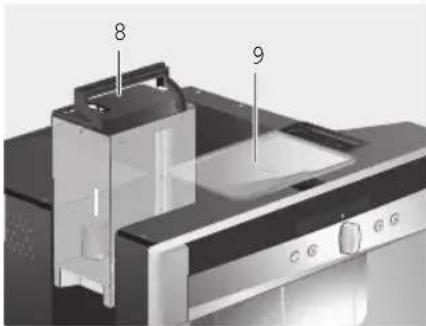

Fill the water tank with fresh water every day. The tank should always contain sufficient water for operating the appliance.
Fill the bean container (9) with coffee beans (for preparation using ground coffee, see page 31).
- Push the appliance back into the built-in unit.
- Press Start/Stop (6). The company logo lights up in the display. The appliance now heats up and rinses. Some water will run out of the coffee outlet. The menu for drink selection is shown in the display:
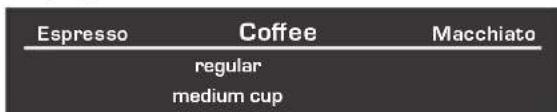
- Set the water hardness.
Preparing drinks
Drink selection
You can use the navigation button (4) to select your drink in the drink selection menu.
| Espresso Coffee |
| regular |
| medium cup |
Espresso
Coffee
Macchiato
Cappuccino
White coffee
My coffee
Milk froth
Hot milk
Hot water
Short rinse
For most types of drink you can use buttons (2) and 5 to select further options, e.g. coffee strength and per-cup quantity. The available options are always shown under the type of drink. Among the options you select with (2) and 6 you can then change other settings using the navigation button (4). Under coffee preparation you have the following options:
Strength
mild regular strong
Size
small medium large
Example
Let's assume you would like a large cup of mild coffee made from coffee beans.
- Place the cup under the coffee outlet (20):
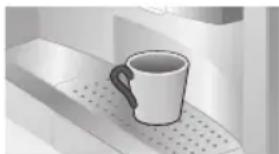
- Keep pressing the navigation button (4) until Coffee is displayed in the centre of the top line (the currently active setting is shown in a larger font):
| Espresso | Coffee | Macchiato |
| regular | ||
| medium cup |
- Now press ∇(5) once to get to the strength setting. The strength setting is highlighted:
| Coffee | ||
| mild | regular | strong |
| medium cup | ||
- Press the navigation button (4) to the left until "mild" appears in large letters in the centre.
| Coffee | |
| mild | regular |
| medium cup | |
- Press ∇(5) again to get to the per-cup quantity setting. The per-cup quantity setting is now highlighted:
| Coffee mild | |
| small cup | medium cup large cup |
- Press the navigation button (4) to the right until "large cup" appears in the centre:
| Coffee | ||
| mild | ||
| medium cup | large cup | 2 small cups |
- Press ▸ (6).
The coffee you have selected is prepared. Proceed in the same way to prepare other types of coffee in different strengths and per-cup quantities.
Preparation using pre-ground coffee
This fully automatic espresso machine also offers the option of making coffee with pre-ground coffee. A measuring spoon is included with the appliance (on delivery it is stowed in the outer compartment on the right of the appliance, [13]).
- Deploy the appliance and remove the measuring spoon.
- Open the drawer (10).
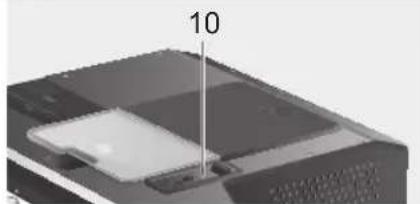
- Pour in no more than two level spoons of ground coffee.

Do not use whole beans or instant coffee.
- Close the drawer again.
- Push the appliance back in.
- Select the required drink and per-cup quantity with the navigation button (4):

- Place a cup under the coffee outlet (20):
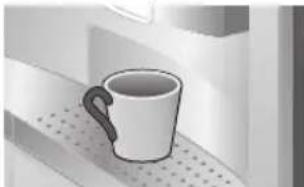
- Press
The coffee is brewed and then dispensed into the cup(s). For another cup of coffee, pour in more ground coffee and repeat the procedure. If no coffee is taken within 90
seconds, the brewing chamber empties automatically to avoid overfilling. The appliance rinses.
Preparation using milk

For optimal milk froth, use cold low-fat milk (1.5% fat) if possible.
- Slide the coffee outlet (20) downwards. Remove the cover and pull out the milk frother (19):
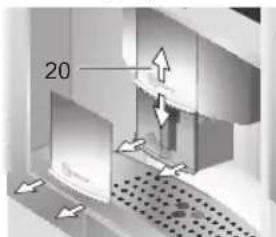

- Deploy the appliance (see "Deployment system").
- Take the milk tube supplied with the appliance (on delivery it is stowed in the outer compartment on the right of the appliance [12]) and connect it to the attachment point on the milk frother (19). Close the cover again.
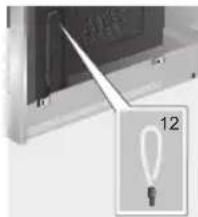
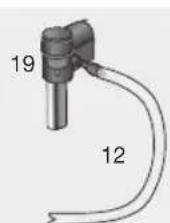
- Attach the milk frother (19) and push the milk tube (12) into the indentation.
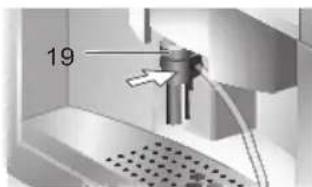
- Close the cover.
- Place container with milk next to the milk frother. Introduce the milk tube into the container. The notched end of the tube should be fully immersed in the milk.

- Place a cup or glass under the coffee outlet.
- Use the navigation button to select Macchiato, Cappuccino, White coffee, or My coffee (your own special coffee/milk mix). The display shows the selected drink along with the settings for coffee strength and per-cup quantity for this drink:
- Choose your settings for strength and per-cup quantity.
- Press
First, milk is drawn in, prepared, and dispensed into the cup or glass. Immediately after that, the coffee is brewed and then runs into the cup or glass.
Two cups at once
- Place two cups under the two coffee outlets, left and right:
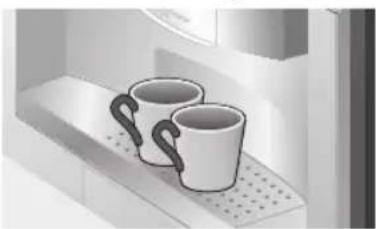
- Select Espresso or Coffee with the navigation button (4). Press button 5 and the navigation button to set the required strength.
- Press button 5 to switch to the per-cup quantity menu. In the per-cup quantity menu, keep pressing the navigation button (4) to the right until the display shows "2 small cups".
Coffee
mild
large cup
2 small cups
2 medium cups
- Set the required quantity for the two cups by turning the navigation button (4) (small, medium, large).
- Press the button. Coffee is dispensed into the two cups.

The appliance brews twice in succession; wait for the complete process to finish.
My coffee
The My coffee setting allows you to define the exact mix of coffee and frothed milk that suits your own individual taste.
- Connect the milk tube (12) to the milk frother (19) (see "Preparation using milk").
- Place container with milk on the grate. Introduce the milk tube (12) into the container.
The notched end of the tube should be fully immersed in the milk.
- Place a cup under the coffee outlet.
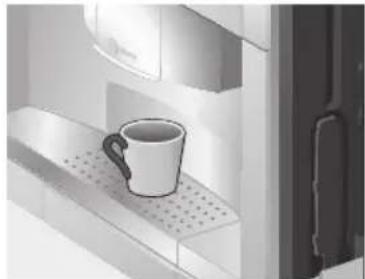
- Select My coffee with the navigation button (4).

- Press the button (5) to switch to the coffee strength selection. Set the required strength with the navigation button (4).

- Press the button (5) to go on to the per-cup quantity selection. Set the required per-cup quantity with the navigation button (4).

- Press the button (5) to switch to selection of the coffee/milk ratio. Set the required mix in 20% steps with the navigation button (4).

- Press the button (6); the drink is prepared in the required coffee/milk ratio.
Preparing milk froth and hot milk

Risk of burns! The milk frother (19) gets very hot. After use, allow to cool
down first before touching.

For optimal milk froth quality, use cold low-fat milk (1.5% fat) if possible.
- Take the milk tube (12) and connect it to the milk frother (19) (see "Preparation using milk").
- Place a cup or glass under the outlet of the milk frother.
- Select the required setting for Milk froth or Hot milk with the navigation button 0 (4):
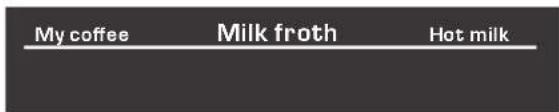
- Press ▸ / □ (6); milk froth or hot milk runs out of the milk frother outlet for about 60 seconds.
Press ▸ / □ (6) again to cut the process short.

Dried milk residue is difficult to remove, so clean the milk frother immediately after use (see "Cleaning the milk system").
Dispensing hot water

Risk of burns! The milk frother (19), from which the hot water flows, gets
very hot. After use, allow to cool down first before touching.
The appliance can also be used to dispense hot water, e.g. for tea.
- Place a cup or glass under the coffee outlet.
- Select Hot water with the navigation button (4):
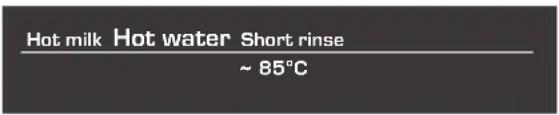
- Press ∇(5) to switch to the temperature selection. Set the required temperature with the navigation button (4):
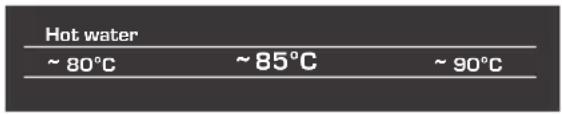
- Press hot water runs out of the milk frother outlet for about 40 seconds. Press again to cut the process short.
Information and settings
Use i (1) to display information (press briefly) and adjust settings (hold down for at least three seconds).
Displaying information
In the Info menu (press i (1) briefly) you can call up the following information:
when it is necessary to descale the appliance when it is necessary to clean the appliance when it is necessary to change the filter how much coffee has been dispensed since the appliance was first put into operation how many milk drinks have been dispensed how much hot water has been prepared
Displaying settings
Hold down i (1) for at least 3 seconds; the different setting options are then displayed:
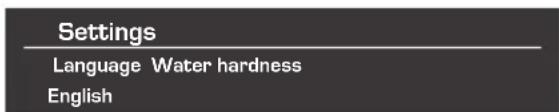
Use Δ (2) and 5) to switch between the different setting options. The currently active setting is always shown in a larger font. You can change the setting that is currently displayed using the navigation button ()4). To exit the menu, press i (1) again.

The changes you have made are saved automatically. It is not necessary to confirm them additionally.
The following setting options are available to you:
Language: Press the navigation button to select the display language.
Water hardness: Press the navigation button to select the required water hardness (1, 2, 3 or 4) (refer also to "Checking and setting the water hardness").
Coffee temperature: Press the navigation button to set the coffee temperature.
Auto off after: Press the navigation button to enter the time span after which the appliance should automatically switch to "energy saving mode" following the last drink preparation. A time between 5 minutes and 8 hours can be set. The default time is one hour, but this can be shortened to save energy.
Contrast: The display contrast can be set from -20 to +20 with the navigation button (4). The default setting is 0.
Illumination: The lighting can be set to on, off or off after 10 minutes (factory setting).
Water filter: Each time a new water filter is inserted in the water tank (8), it must be rinsed:
- Place the water filter in the water tank (8) and fill the tank with water up to the "max" mark.
- Use the navigation button to select START and press ▸
- Place a container with a capacity of 0.5 litres under the milk frother (19).
- Press Water will now run first through the filter to rinse it and then into the container.
Empty the container. The appliance is ready to use once more.
The filter is no longer effective when the Change filter display appears, or at the latest after two months. It needs to be replaced for reasons of hygiene and so that there is no build-up of limescale (this could damage the appliance). Replacement filters can be obtained from retailers or customer service (see "Accessories").
After every filter change the filter must first be rinsed. Proceed as described at the beginning of this section.
If no new filter is used, turn the water filter setting to Off.

If the appliance has not been used for a prolonged period (e.g. during your vacation) the filter should be rinsed before the appliance is used again. To do this, simply dispense a cup of hot water.
Further entries in the Settings menu:
Service - descale: If you want to descale the appliance, press ▸ and run the descending programme (see "Dscaling").
Service - clean: If you want to clean the appliance, press ▶ 6 and run the cleaning programme (see "Cleaning").
Service - Calc'nClean: If you want to descale and clean the appliance at the same time, press ▶ and run the Calc'nClean programme (see "Calc'nClean").
Factory settings: You can cancel your own settings and reset the factory settings. To activate the factory settings, press ▶

The appliance can also be reset to the factory settings as follows:
- Switch the appliance off fully at the power switch 0/1 (7).
- Press 4 (2) and (5) at the same time, hold them down, and switch the appliance on again at the power switch 0/1 (7).
The factory settings are reactivated.
Adjusting the grinding unit
The rotary selector (11) on the top of the appliance adjusts the degree of grinding from coarse to fine as required.
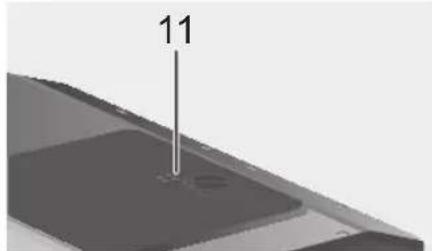

Warning:
Adjust the grinding unit only while it is running. Otherwise the appliance may be damaged.
- Deploy the appliance fully (see "Deployment system").
- In the drink selection menu, select Espresso.
- Press ▶ (6).
- While the grinding unit is running, adjust the rotary selector (11) from fine to coarse or back as required.

The new setting will not become apparent until after the second cup of coffee.
Tip: For dark roast coffee beans, choose a finer grind, for lighter beans a coarser grind.
Checking and setting the water hardness
The water hardness setting can be adjusted on this appliance. It is important to set the water hardness correctly, so that the appliance indicates accurately when the descaling programme should be run. The factory setting for the water hardness is 4. You can check the water hardness using the enclosed test strip or by asking your local water supplier.
Dip the test strip briefly in water, gently shake off any drips, and check the result after one minute.
Water hardness levels and settings:
Level Water hardness
| German (°dH) | French (°fH) | |
| 1 | 1-7 | 1-13 |
| 2 | 8-14 | 14-25 |
| 3 | 15-21 | 26-38 |
| 4 | 22-30 | 39-54 |
Tips on energy saving
The fully automatic espresso machine switches to "energy saving mode" automatically after one hour (factory setting). The appliance uses very little power in "energy saving mode". The default time of one hour can be shortened (see "Auto off after" under "Displaying settings"). The appliance then uses even less power. The appliance is put into "energy saving mode" by retracting the navigation button. If the appliance is not being used, switch it off at the power switch. If possible, do not interrupt coffee or milk froth dispensing. Stopping a process prematurely results in higher energy consumption and the drip tray fills up more quickly. Always descale the appliance when Service -descale is displayed (see "Descaling") to avoid a build-up of limescale. Limescale residue results in higher energy consumption.
Daily maintenance and cleaning

Risk of electric shock! Before cleaning the appliance, switch it off at the power switch.
Do not use a steam cleaner.
Daily maintenance
- Wipe the outside of the appliance with a damp cloth. Do not use scouring agents.
- Do not use alcohol-based or spirit-based cleaning agents on the high-gloss surfaces.
- Rinse out the water tank (8) with water only.
- Take off the grate (18 a). Pull out the drip tray (18 c). Take off the drip tray panel (18 b). Empty out any water and coffee grinds (18 d). Clean the drip tray or put it in the dishwasher. Do not put the grate (18 a) or the drip tray panel (18 b) in the dishwasher.
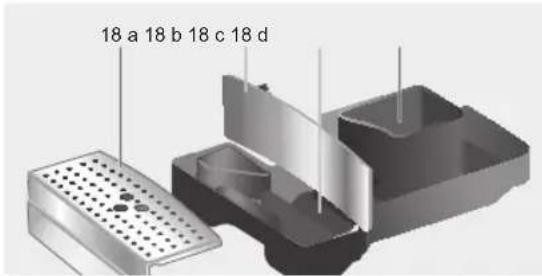
- Wipe out the inside of the tray holders.
- Clean the milk system (procedure described below).
- Replace all the parts again.

If the appliance is cold when switched on, or if it is set to "energy saving mode" after dispensing coffee, it rinses automatically. In other words the pipework inside the appliance is cleaned by the machine itself.
Cleaning the milk system

Risk of burns! The milk frother (19) gets very hot. After use, allow to cool down
first before touching.
Clean the milk system immediately after use.

All the parts can also be put in the dishwasher.
Short rinse:
- In the menu for drink selection, select Short rinse and press
- Place a cup under the milk frother (19) and the end of the milk tube in the cup.
- Press the button. The appliance now fills the cup automatically with water and draws it in again through the milk tube for rinsing. The rinse procedure takes about 1 minute.
- Empty the cup and clean the milk tube.
Cleaning the milk system:
- Dismantle the milk frother for cleaning. Slide the coffee outlet (20) downwards. Remove the cover and take out the milk frother (19):
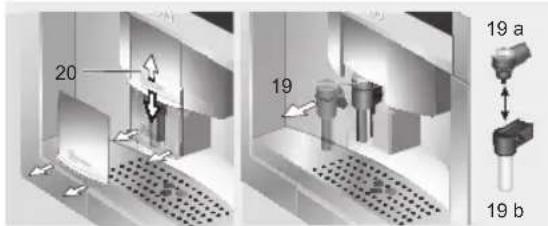
- Clean the holder of the milk frother (19) with a soft cloth.
- Dismantle the milk frother (19a and 19b).
- Clean the components either by hand or in the dishwasher (put them in the cutlery basket).
- Reassemble the individual parts and replace them in the appliance. Press back in fully.
Cleaning the brewing unit
In addition to the automatic cleaning programme, the machine offers the option of removing the brewing unit for cleaning.

Warning: Clean the brewing unit without detergent and do not put it in the dishwasher.
- Deploy the appliance fully (see "Deployment system").
- Switch the appliance to "energy saving mode" with (14).
- Switch the appliance off completely at the power switch 0/1 (7); there should no longer be any buttons lit.
- Slide the door opener (15) back and open the door (14) to the brewing unit:
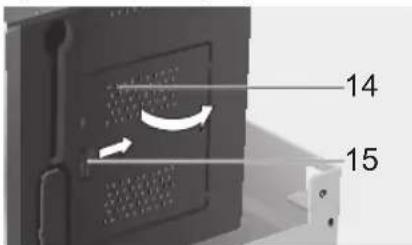
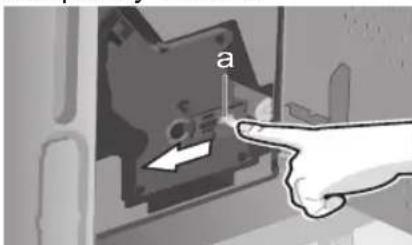
- Slide the red lock (a) on the brewing unit completely forward:
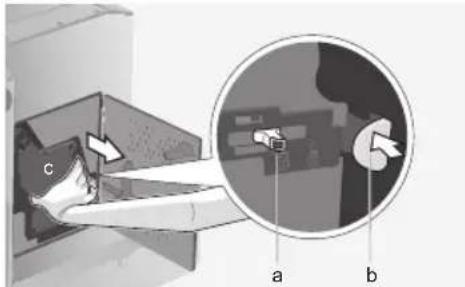
- Press the red button (b), grasp the brewing unit (c) by the recessed grips and remove carefully.
- Rinse the brewing unit under running water.
- Wipe out the inside of the appliance with a damp cloth.
- Allow the brewing unit and the inside of the appliance to dry.
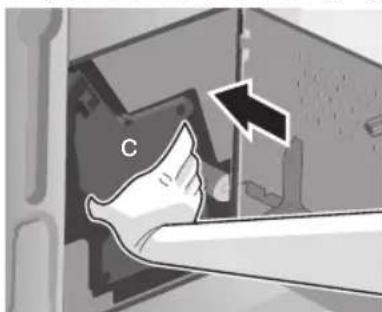
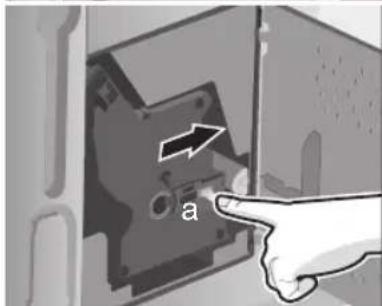
- Reinsert the brewing unit (c) fully into the appliance. Slide the red lock (a) back fully and close the door (14).
Service programmes
At certain intervals, depending on how the appliance is used, the display will show one of the following texts instead of the coffee selection:
Service - change filter i - button 3 sec.
Service - clean i - button 3 sec
Service - descale i - button 3 sec.
Service - Calc'nClean i - button 3 sec.
Then the water filter should be changed immediately or the appliance cleaned or descaled using the corresponding programme (described on the next pages). Otherwise the appliance may be damaged.

The service programmes can also be started manually in the settings menu (see "Displaying settings").
Do not drink the liquids. Never use vinegar, vinegar-based products, citric acid, or citric acid-based products for descaling. For cleaning and descaling, use only the tablets included with the appliance. They were specially developed for this fully automatic espresso machine, and replacements are available from retailers or customer service (see "Accessories").
Never put descaling tablets or any other descaling agents in the drawer for ground coffee.
Important: If there is a filter in the water tank (8), it needs to be removed before the service programme is run.
Never interrupt the service programme. If one of the service programmes is interrupted, e.g. by a power outage, proceed as follows:
- Rinse the water tank (8) and refill it with fresh water up to the "max" mark.
- Press ▸ (6). The descaling programme now runs for about 1 minute, followed by the cleaning programme for about seven minutes, and rinses the appliance:
Descaling
Cleaning
Empty drip tray
Empty the drip tray (18).
Replace drip tray
Replace the drip tray.
The appliance is ready for use again.
Descaling
If the prompt Service - descale is displayed or if you have selected Service - descale in the settings menu, press and hold down i (1) for at least three seconds.
The display shows:
Descale > Start
Press ▶ 6. The display will guide you through the programme.
Empty drip tray
Empty the drip tray (18).
Replace drip tray
Replace the drip tray.
Place container under milk frother >
Start
Place a container with a capacity of 0.5 litres under the milk frother (19). Press ▶/■ (6).

If the water filter is activated, the following message is displayed:
Remove water filter > Start Remove the water filter and press ▶ 6
Add 0.5 l water + descaler > Start
Pour lukewarm water into the empty water tank (8) up to the 0.5 litre mark and dissolve two descaling tablets in it. Press ■/■ (6). The descaling programme now runs for about 20 minutes:
Descaling

If there is not enough descending fluid in the water tank, the following message is displayed:
Not enough descending fluid. Refill fluid.
Pour lukewarm water into the empty water tank (8) up to the 0.5 litre mark and dissolve two descending tablets in it. Press ▶ (6). The descending programme will continue.
Clean and refill water tank > Start
Rinse the water tank and refill it with fresh water up to the "max" mark. Press ▶ (6). The descending programme will now run for about 1 minute:
Descaling
Empty drip tray
Empty the drip tray.
Replace drip tray
Replace the drip tray.
The appliance is ready for use again.
Cleaning
If the prompt "Service - clean" is displayed or if you have selected "Service - clean" in the settings menu, press and hold down i (1) for at least three seconds. The display shows:
Clean > Start
Press ▶. The display will guide you through the programme.
Empty drip tray
Empty the drip tray (18).
Replace drip tray
Replace the drip tray.
Open drawer
Deploy the appliance and open the drawer (10).
Insert cleaning tablet and close drawer
Drop a cleaning tablet in the drawer and close the drawer again.
Press start
Press ▸ 6. The cleaning programme will now run for about seven minutes.
Cleaning
Empty drip tray
Empty the drip tray (18).
Replace drip tray
Replace the drip tray.
The appliance is ready for use again.
Calc'n'Clean
Calc'n'Clean combines the separate functions of descaling and cleaning. If both programmes are due to run soon, the fully automatic espresso machine automatically suggests this service programme. If the prompt Service - Calc'n'Clean is displayed or if you have selected Service - Calc'n'Clean in the settings menu, press and hold down i (1) for at least three seconds. The display shows:
Calc'n'Clean > Start
Press ▸ (6). The display will guide you through the programme.
Empty drip tray
Empty the drip tray (18).
Replace drip tray
Replace the drip tray.
Place container under milk frother >
Start
Place a container with a capacity of at least one litre under the milk frother (19).
Press ▸ (6). The appliance rinses twice:
Cleaning
Open drawer
Deploy the appliance and open the drawer (10).
Insert cleaning tablet and close drawer.
Drop a cleaning tablet in the drawer and close the drawer again.

If the water filter is activated, the following message is displayed:
Remove water filter > Start
Remove the water filter and press ▸
Add 0.5 l water + descaler > Start
Pour lukewarm water into the empty water tank (8) up to the 0.5 litre mark and dissolve two descaling tablets in it. Press □ (6). The descaling programme now runs for about 20 minutes:
Descaling

If there is not enough descaling fluid in the water tank, the following message is displayed:
Not enough descaling fluid. Refill fluid.
Pour lukewarm water into the empty water tank (8) up to the 0.5 litre mark and dissolve two descaling tablets in it. Press ▸ (6). The descaling programme will continue.
Clean and refill water tank > Start
Rinse the water tank and refill it with fresh water up to the "max" mark. Press ▸
The descaling programme will now run for about 1 minute:
Descaling
The cleaning programme then runs for about seven minutes and rinses the appliance:
Cleaning
Empty drip tray
Empty the drip tray.
Replace drip tray
Replace the drip tray.
The appliance is ready for use again.
Simple troubleshooting
| Problem Cause Solution | ||
| Display shows Refill bean container. Although the bean container is full, the appliance does not grind the coffee beans. | Beans are not falling into the grinding unit (beans too oily). | Change the type of coffee if necessary. Wipe out the empty bean container with a dry cloth. |
| No hot water dispensed. The milk frother or its holder is blocked. | Clean the milk frother or its holder. | |
| Milk froth insufficient or too runny. The milk frother does not draw the milk in. | The milk frother or its holder is blocked. | Clean the milk frother or its holder. |
| Milk unsuitable for frothing. Use low-fat milk (1.5% fat). | ||
| Coffee dispensing slows to a trickle. | Coffee is ground too finely. Pre-ground coffee is too fine. | Adjust the grinding unit to a coarser setting. Use coarser pre-ground coffee. |
| Build-up of limescale in the appliance. | Descale the appliance. | |
| Coffee has no "crema" (creamy foam). | Unsuitable type of coffee. Change the type of coffee. | |
| The beans are no longer fresh. | Use fresh beans. | |
| The grinding setting is not suitable for the beans. | Adjust the grinding setting to fine. | |
| Grinding unit makes a loud noise. | A foreign object in the grinding unit (e.g. grit, which can be found even in superior types of coffee). | Call the hotline; do not prepare any more coffee from beans. Pre-ground coffee can still be used. |
| Coffee is too "acidic". The grinding setting is too coarse or the pre-ground coffee is too coarse. | Adjust the grinding unit to a finer setting or use finer pre-ground coffee. | |
| Coffee is too "bitter". The grinding setting is too fine or the pre-ground coffee is too fine. | Adjust the grinding unit to a coarser setting or use coarser pre-ground coffee. | |
| Unsuitable type of coffee. Change the type of coffee. | ||
| Display shows Error Please call the hotline | The appliance has a fault. Call the hotline (see rear cover). |
If you are unable to solve the problem, do not try to find the fault yourself or dismantle the appliance or repair it yourself. Call the hotline (see rear cover).
Accessories, storage, disposal, guarantee
Accessories
The following accessories are available from retailers or customer service:
| Accessories | Ordering number | |
| Retail | Customer service | |
| Cleaning tablets | TZ60001 | 310575 |
| Descaling tablets | TZ60002 | 310967 |
| Water filter TZ70003 | 467873 | |
Storage
To avoid frost damage during transport and storage, the appliance must be completely emptied first.

Before emptying it as follows, the appliance must be ready for use and the water tank (8) filled.
- Place a large, narrow receptacle under the milk frother (19).
- Select the Milk froth setting on the display, press ▸ and release steam for about 15 seconds.
My Coffee Milk froth Hot milk
- Switch the appliance off at the power switch 0/1 (7).
- Empty the water tank (8) and the drip tray (18).
Disposal

This appliance is labelled in accordance with the European Directive 2002/96/EG relating to waste electrical and electronic equipment - WEEE. The directive provides the framework for the EU-wide take-back and disposal of end-of-life appliances.
Please ask your specialist retailer about current disposal facilities.
Guarantee
The guarantee conditions for this appliance are as defined by our representative in the country in which it is sold. Details regarding these conditions can be obtained from the dealer from whom the appliance was purchased. The bill of sale or receipt must be produced when making any claim under the terms of this guarantee.
Right of modification reserved.
Subject to modifications.
Congratulations...
Keep this page unfolded so that you can use it at any time, regardless of where you are in the instructions.
The icons and captions for the buttons are selected from these instructions in a font different from the rest of the text. Therefore, it is easy to determine that we are talking about the text that is selected in the icons or printed on the device:
Example: Espresso
A short instruction is attached to the device, which allows you to quickly find out about the most important functions. It is located in the compartment on the right side of the device.
Contents
110 Safety instructions
111 Design and components
111 Control elements and indicators
111 Power switch O/ 111 Menu and display 112 Extraction system 113 Accessories 113 Display messages
114 Operation
114 General information 114 Starting to work with the device
Design and components
(See the figures on the fold-out front cover at the beginning of these instructions)
1 Power button (on/off) 2 Up button 3 Display 4 Rotary dial 5 Down button 6 Start/Stop button 7 Mains switch 0/I 8 Removable water container 9 Coffee bean container with aroma-preserving lid 10 Ground coffee compartment (for pre-ground coffee/cleaning tablet) 11 Grind size dial 12 Milk spout 13 Measuring spoon for ground coffee 14 Brewing unit door 15 Brewing unit door opener 16 Release button 17 Milk container 18 Drip tray 19 Removable nozzle for milk frothing (milk/hot water) 20 Height-adjustable coffee outlet
Control panel elements
Mains switch 0/I
The mains switch 0/I (7) is used to turn the appliance on or completely off (disconnecting it from the power supply).

Important: Do not use the mains switch during operation of the coffee machine. The appliance should only be switched off after it has been put into standby mode by turning the rotary dial. The automatic rinse cycle will then be performed.
Menu navigation
To make operation of the appliance as simple as possible while still offering a wide range of functions, the coffee machine is equipped with a menu-based control system. After a brief introduction, you will be able to use all the available functions in just a few steps. The display shows the current program and also indicates when certain steps are required, such as filling the water tank, adding coffee beans, or running a maintenance program.
Below is a description of the basic controls using the menu.
1 Display: When briefly pressed, various information is shown on the display (see "Information on the display"). If you keep it pressed for more than three seconds, the settings menu opens (see "Settings via the display"). 2 Up button: Scrolls up through the menu items on the display (3). The currently selected menu item is shown in larger font. 3 Display: Symbols and text on the display show the menu items, as well as current processes and messages. 4 Rotary dial:
Not in use: The appliance is switched on. After switching on, the rinse cycle is performed, except in cases where it has not yet cooled down after the last use. In use: The appliance is in standby mode. When the appliance switches to standby mode, the rinse cycle starts, except in cases where coffee has not been brewed.
The appliance is ready for operation when the drink selection menu is shown on the display (3). By turning the rotary dial, you can make settings and changes (e.g., adjust the strength or amount of coffee).
5: When browsing through the menu items on the display (3), the current menu item is shown in larger font. The Start/Stop button starts the coffee preparation process or any service program. Pressing it again during coffee preparation can prematurely interrupt the process and cancel the coffee preparation.
Extraction system
The appliance can be automatically extracted from the kitchen unit. To do this:
Press the extraction button (16) (the appliance must be switched on), or
Remove the work surface and pull it by the handle located underneath it.
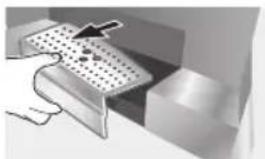
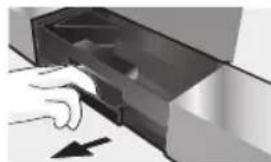
The appliance automatically moves to the extraction position 1. In this position, you can fill water, add ground coffee, ground coffee beans, place a tablet for descaling, and also remove
the accessories on the right side of the appliance.
To fully extract the appliance, press the extraction button (16) again and pull the appliance out by the handle to position 2. In extraction position 2, you can remove the brewing unit. The display shows various messages indicating the current status or prompting you to perform certain actions. After performing the required actions, the message disappears and the menu for selecting the coffee type is displayed again.
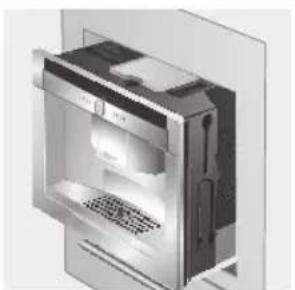
Position 1 Position 2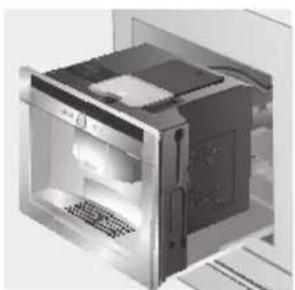
After that, push the appliance back into the kitchen unit until it stops.

During the brewing process, the automatic extraction function is blocked.
Accessories
A U T O M A T I C C O F F E E M A C H I N E E S P R E S S O C O M P L E T E W I T H A C C E S S O R I E S (12, 13) A N D S H O R T I N S T R U C T I O N S. T H E Y A R E L O C A T E D O N T H E R I G H T S I D E A N D A R E A C C E S S I B L E W H E N T H E A P P L I A N C E I S I N E X T R A C T I O N P O S I T I O N 1.
Display messages
Depending on the current status, the display shows various messages providing information about the status or indicating the need to perform certain actions. After performing the required actions, the message disappears and the menu for selecting the coffee type is displayed again.
The display will be used to show texts on the screen. You can select one of the following languages:
Deutsch
English
Русский
Nederlands
Français
Italiano
Español
Polski
- Press the button; the selected language will be saved, and the device will be in "Economy mode". Later, you can change the language at any time (see "Settings and Help on the display").
- Turn on the device (see "Power system").
- Remove the water container (8) by pulling it upwards, empty it, and fill it with fresh, cold water. Observe the "max" fill level mark.
- Place the water container back into position, pressing it down until it clicks into place.
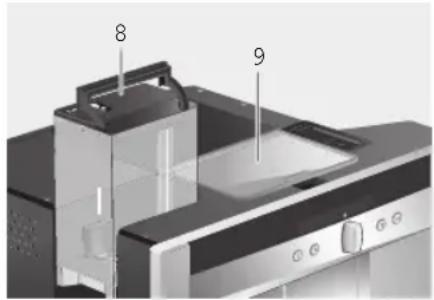

It is necessary to fill the container with fresh water daily. The container must always have a certain amount of water, sufficient for the operation of the device.
Pour the grains into the container for whole beans (9) (for preparing a drink from ground coffee: see p. 116).
- Fill the appliance with water up to the MAX mark.
- Press button 6). The display will show the company logo. The appliance will heat water in the system, and a small amount of water will flow out of the coffee dispensing unit. The drink selection menu will appear on the display:
Espresso
Macchiato
Normal
Cappuccino
- Set the water hardness.
Preparing a drink from ground coffee
With this automatic espresso machine, you can also prepare a drink from ground coffee. A measuring spoon is provided for dosing ground coffee (it is placed on the right side of the appliance during delivery, [13]).
- Turn on the appliance and take out the measuring spoon.
- Open the compartment for ground coffee (10).
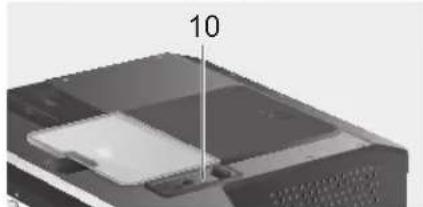
- Add no more than two heaped spoons of ground coffee.

Never fill the coffee bean container with ground coffee or soluble coffee.
- Close the outlet compartment for ground coffee.
- Fill the appliance with water in the water tank.
- Using the rotary regulator (4), select the drink and its quantity:

Preparation of hot water

Danger of burns! The nozzle for preparing milk foam (19), from
which hot water comes out, heats up strongly. After use, first let the nozzle cool down before touching it.
The coffee machine can also be used to prepare hot water, for example for tea.
- Place a cup or glass under the coffee dispensing unit.
- Using the rotary regulator (4), select the hot water value.
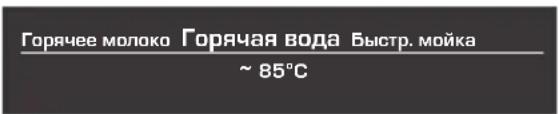
- Using (5), switch to the temperature adjustment window. Using the rotary regulator (4), set the lower temperature:

- Press button D; within approximately 40 seconds, hot water will come out of the outlet opening of the nozzle for preparing milk foam.
By pressing 6 again, you can prematurely interrupt this process.
Information and settings
Using (1), you can call up various information (press) and perform settings (press and hold for at least 3 seconds).
Display information
The information menu (opened by pressing button [1]) can display the following information:
Required calibrations, required filter replacement, number of coffees prepared since first switch-on, number of milk drinks prepared, number of hot water portions dispensed
Settings using the display
Press and hold button i (1) for at least 3 seconds; the following settings menu will open:
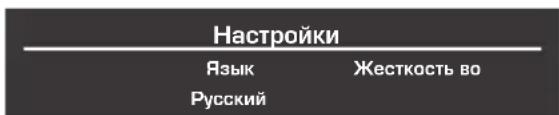
Using buttons Δ (2) and 75) you can scroll through the various setting options; the currently active option will be shown on the display in larger font. The setting of the current option can be changed using the rotary knob (4).
To exit the menu, press i (1) again.

The changes made are saved automatically. No additional confirmation is required.
The appliance has the following setting options:
Language: Turn the rotary knob to select the desired language.
Water hardness: Turn the rotary knob to select the desired water hardness (1, 2, 3 and 4) (see also “Determining and setting water hardness”).
Coffee temperature: Turn the rotary knob to adjust the coffee temperature.
Auto-off: Turn the rotary knob to set the time interval after which the appliance automatically switches to energy-saving mode after the last drink preparation. You can set a time from 5 minutes to 8 hours. The default setting is one hour. To save energy, you can reduce it.
Contrast: Using the rotary knob you can adjust the display contrast in the range from -20 to +20; the default setting is 0.
Lighting: The following lighting settings are possible: on, off.
Beep. After 10 min. (standard line).
In this device, you can set the water hardness. Correct adjustment of the water hardness is important to ensure timely reminders about the need to remove scale. The factory has set the water hardness level to 4.4. You can determine the water hardness using the included test strip or find out locally at the water supply station.
Briefly dip the test strip into the water, then shake it slightly, and after a minute you will be able to see the test result.
Water hardness degrees and adjustment levels:
Lift the dispenser cover, insert a cleaning tablet, and close the compartment again.
Press Start
Press the button; the cleaning program runs for about 7 minutes:
Cleaning program is running
Empty the drip tray
Empty the drip tray (18).
Install the drip tray
Install the drip tray in place.
The device is ready for use again.
Calc'n'Clean
In the Calc'n'Clean program, the Calc'n'Clean functions for descaling and cleaning are combined. If the time for these programs is very close to each other, the automatic information system automatically suggests this service program.
To display the indicator, start
Calc'n'Clean after selecting one
To start Calc'n'Clean from the settings menu, hold down the i button (1) for three seconds.
The indicator appears.
Calc'n'Clean > Start
Press the button >6; the messages displayed on the display will guide you through the program.
Empty the milk container. Empty the milk container (18).
Install the milk container. Install the milk container in place.
Install the container for milk frothing > Start
Install the container with at least 1 liter of milk for preparing milk foam (19). Press the button; the appliance will be rinsed twice.
Cleaning program
Open the milk spout. Tilt the appliance and open the milk spout cover (10).
Add cleaning tablet. Close the spout.
Place a cleaning tablet in the milk spout compartment, then close the compartment.

If the water filter is activated, the following message appears:
Fill the water tank and press button 6
Pour 0.5 L of water + descaling agent > Start
Fill the water container (8) with warm water up to the 0.5 L mark and dissolve two descaling tablets in it. Press button 6; the descaling program will run for about 20 minutes.
Descaling program running
When the water in the container is completely empty of descaling solution, a message appears:
Empty descaling solution container
Fill the empty water container (8) with warm water up to the 0.5 L mark and dissolve two descaling tablets in it. Press button 6.
The descaling program will run.
Rinse and fill the water container > Start
Rinse the water container and fill it with fresh water up to the mark (max). Press button 6; the descaling program will run. Approximately 1 minute:
Descaling program running, then the rinse program will run (approx. 7 minutes), after which the appliance will be rinsed.
Rinse program running
Empty the drip tray. Empty the drip tray.
Install the drip tray. Install the drip tray in place.
The device is ready for operation again.
Self-repair of minor problems

- SAFETY INSTRUCTIONS
- HOW TO USE THESE INSTRUCTIONS
- CONTENTS
- THE APPLIANCE AND ITS PARTS
- CONTROLS AND DISPLAY
- OPERATION
- PREPARING DRINKS
- INFORMATION AND SETTINGS
- DAILY MAINTENANCE AND CLEANING
- SERVICE PROGRAMMES
- SIMPLE TROUBLESHOOTING
- ACCESSORIES, STORAGE, DISPOSAL, GUARANTEE
- POWER SWITCH O/I
- IMPORTANT
- MENU AND DISPLAY
- DEPLOYMENT SYSTEM
- ACCESSORIES
- DISPLAY MESSAGES
- GENERAL
- SETTING UP THE APPLIANCE
- DRINK SELECTION
- EXAMPLE
- PREPARATION USING PRE-GROUND COFFEE
- PREPARATION USING MILK
- TWO CUPS AT ONCE
- MY COFFEE
- PREPARING MILK FROTH AND HOT MILK
- DISPENSING HOT WATER
- DISPLAYING INFORMATION
- DISPLAYING SETTINGS
- ADJUSTING THE GRINDING UNIT
- WARNING
- CHECKING AND SETTING THE WATER HARDNESS
- TIPS ON ENERGY SAVING
- DAILY MAINTENANCE
- CLEANING THE MILK SYSTEM
- SHORT RINSE
- CLEANING THE BREWING UNIT
- DESCALING
- CLEANING
- DESCALE > START
- START
- ADD 0.5 L WATER + DESCALER > START
- NOT ENOUGH DESCENDING FLUID. REFILL FLUID
- CLEAN AND REFILL WATER TANK > START
- EMPTY DRIP TRAY
- REPLACE DRIP TRAY
- CLEAN > START
- OPEN DRAWER
- INSERT CLEANING TABLET AND CLOSE DRAWER
- PRESS START
- CALC'N'CLEAN
- STORAGE
- DISPOSAL
- GUARANTEE
- CONGRATULATIONS
- EXAMPLE: ESPRESSO
- DESIGN AND COMPONENTS
- CONTROL ELEMENTS AND INDICATORS
- CONTROL PANEL ELEMENTS
- MAINS SWITCH 0/I
- MENU NAVIGATION
- EXTRACTION SYSTEM
- PREPARING A DRINK FROM GROUND COFFEE
- PREPARATION OF HOT WATER
- DISPLAY INFORMATION
- SETTINGS USING THE DISPLAY
- CLEANING PROGRAM IS RUNNING
- EMPTY THE DRIP TRAY
- INSTALL THE DRIP TRAY
- TO DISPLAY THE INDICATOR, START
- CALC'N'CLEAN AFTER SELECTING ONE
- THE INDICATOR APPEARS
- SELF-REPAIR OF MINOR PROBLEMS
Brand : NEFF
Model : CV 7760 N
Category : Coffee machine