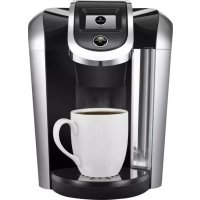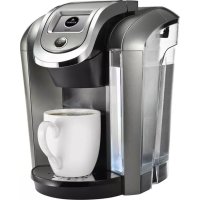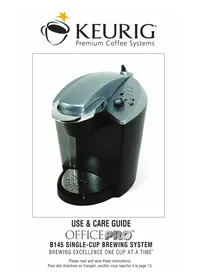
OfficePRO Premier B155 - Coffee machine Keurig - Free user manual and instructions
Find the device manual for free OfficePRO Premier B155 Keurig in PDF.


User questions about OfficePRO Premier B155 Keurig
0 question about this device. Answer the ones you know or ask your own.
Ask a new question about this device
Download the instructions for your Coffee machine in PDF format for free! Find your manual OfficePRO Premier B155 - Keurig and take your electronic device back in hand. On this page are published all the documents necessary for the use of your device. OfficePRO Premier B155 by Keurig.
USER MANUAL OfficePRO Premier B155 Keurig
DTP1201-006030 B155 ENG FRCH UCG REV E 2012 Size:215.9X139.7MM Color:CMYK+PMS8480C+PMS130C

text_image
KEURIG®OWNER'S MANUAL OfficePRO® Premier B155 Keurig® Brewer
MANUEL D'UTILISATION Cafetière OfficePRO® Premier B155
IMPORTANT SAFEGUARDS Safe Operation & Use

When using electrical appliances, basic safety precautions should be followed, including the following:
- Read all instructions before using.
- Do not touch hot surfaces. Use handles and knobs when available.
- This appliance must be properly installed and located in accordance with these instructions before it is used.
- The use of accessory attachments not recommended by the appliance manufacturer may result in fire, electrical shock or injury to persons.
- Do not place on or near a hot gas or electric burner, or in a heated oven.
- Do not use outdoors.
- To protect against fire, electric shock and injury do not immerse cords, plugs, or the appliance in water or any other liquid.
- Do not overfill the Water Reservoir.
- Use only water in this appliance! Do not put any other liquids or foods in the Water Reservoir except as directed in the Cleaning Instructions.
- Turn off and unplug the Brewer before cleaning or maintenance. Allow to cool before putting on or taking off parts and
before cleaning the appliance.
- For best operation, plug the appliance into its own electrical outlet on a dedicated circuit to prevent flickering of lights, blowing of fuses or tripping a circuit breaker.
- Do not operate any appliance with a damaged cord or plug or after the appliance malfunctions or is damaged in any manner. Contact Keurig Customer Service to report any malfunction of or damage to the Brewer.
- Do not let the cord hang over the edge of the table or counter, or touch hot surfaces.
- To disconnect, turn Power Button to 'OFF' status and then remove the plug from the wall outlet.
- Close supervision is necessary when any appliance is used by or near children.
- Do not lift the Handle to open the Lid of the Brewer while brewing is in progress.
- Always keep the Water Reservoir Lid on unless you are refilling it.
- This appliance is equipped with a power cord having a grounding wire with a grounding plug. The appliance must be grounded using a 3-hole properly
grounded outlet. In the event of an electrical short circuit, grounding reduces the risk of electrical shock.
- If the outlet is a standard 2-prong wall outlet, it is your personal responsibility and obligation to have it replaced with a properly grounded 3-prong wall outlet.
- Do not, under any circumstances, cut or remove the third (ground) prong from the power cord or use an adapter.
- Consult a qualified electrician if the grounding instructions are not completely understood, or if doubt exists as to whether the appliance is properly grounded.
- Do not use the appliance for other purposes than its intended use.
SAVE THESE INSTRUCTIONS.
WARNING TO USERS AND PARENTS
-
DO NOT permit children to use brewer unless there is adult supervision. Brewer dispenses very hot water.
-
SPECIAL NOTICE FOR HOT COCOA USERS: IMMEDIATELY AFTER USING A HOT COCOA K-CUP ^® PACK, RUN a Hot Water Brew Cycle without a K-Cup ^® pack to avoid the possibility of clogging the exit needle. DO NOT assume the next user will do this.
CAUTION: There are two sharp needles that puncture the K-Cup ^® pack, one above the K-Cup ^® Pack Holder and the other in the bottom of the K-Cup ^® Pack Holder. To avoid risk of injury, do not put your fingers in the K-Cup ^® Pack Assembly Housing.
CAUTION: There is extremely hot water in the K-Cup® Pack Holder during the brewing process. To avoid risk of injury, do not lift the Handle or open the K-Cup® Pack Assembly Housing during the brewing process.
If an extension cord is used, (1) the marked electrical rating of the cord set or extension cord should be at least as great as the electrical rating of the appliance; (2) the cord should be arranged so that it will not drape over the countertop or tabletop where it can be pulled on by children or tripped over unintentionally; and (3) the extension cord must include a 3-prong grounding plug.
THIS PRODUCT IS FOR
HOUSEHOLD USE & COMMERCIAL USE
WARNING THIS PRODUCT CONTAINS CHEMICALS, INCLUDING LEAD, WHICH IS KNOWN TO THE STATE OF CALIFORNIA TO CAUSE CANCER, BIRTH DEFECTS OR OTHER REPRODUCTIVE HARM.
text_image
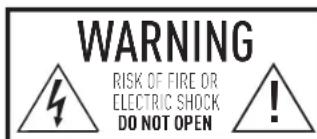
WARNING RISK OF FIRE OR ELECTRIC SHOCK DO NOT OPENWARNING: TO REDUCE THE RISK OF FIRE OR ELECTRIC SHOCK, DO NOT REMOVE THE BOTTOM COVER. NO USER SERVICEABLE PARTS ARE INSIDE. REPAIR SHOULD BE DONE BY AUTHORIZED SERVICE PERSONNEL ONLY.
TABLE OF CONTENTS
KEURIG ^® GOURMET SINGLE CUP BREWING SYSTEM OfficePRO ^® Premier B155 — Using Your Brewer
SET-UP
Helpful Hints 4
Unpacking 4
Features 5
SECTION 1 — SET-UP & FIRST BREW
Set-Up & First Brew....6
SECTION 2—MENU CONTROLS & INDICATORS
Setting the Clock....12
Programming Brew Temperature 12
Programming Brew Size 13
Programming On/Off Features 13
SECTION 3 — CLEANING & MAINTENANCE
Cleaning....15
De-Scaling....16
Storage 17
SECTION 4 — TROUBLESHOOTING....18
SECTION 5 — WARRANTY 19
Record your Brewer Serial Number here.
Removing the serial number label from the Brewer will void warranty.
Set-up
Helpful Hints
-
Keep your Brewer turned "ON" at all times. To brew a fresh cup of coffee, tea or hot cocoa anytime you want, we suggest you keep your Brewer turned "ON" all the time. However, the Brewer is fully programmable so you can set it to turn on and off automatically to match your schedule. Or, if you prefer, set the Brewer to automatically turn off after a period of time. Follow the simple instructions on pages 13–14 to make using the Brewer convenient for you.
-
For the best tasting gourmet coffee, tea or hot cocoa, Keurig recommends using bottled water or the Keurig "Water Filter Starter Kit [available at www.keurig.com]. Water quality varies from place to place. If you notice an undesirable taste in your cup of coffee, such as chlorine or other mineral tastes, we recommend you consider using bottled water or water from a filtration system.
-
Customize the Size, Flavor & Brew That's Perfect for You. ^TM With the choice of over 200 varieties of K-Cup packs and 4 brew sizes (Small Cup-4 oz., Small Mug-6 oz., Medium Mug-8 oz., and Large Mug-10 oz.) your Keurig ^® Brewer gives you endless.
options to customize the size, flavor and brew that's perfect for you. For a strong, intense cup, select an Extra Bold K-Cup ^® pack (with up to 30% more ground coffee than regular varieties) and brew the size that's right for you. The smaller the brew size, the more intense flavor in your cup. The larger the brew size, the less intense flavor in your cup.
-
Plug Brewer into its own grounded outlet. If the electric circuit is overloaded with other appliances, your Brewer may not function properly. The Brewer should be operated on its own circuit, separate from other appliances.
-
Brewing into a travel mug. To brew into a travel mug, simply remove the Drip Tray Assembly and place the travel mug on the Drip Tray Base.
-
De-scale Brewer regularly. Please see pages 16 and 17 for instructions.
Unpacking Instructions
- Place Brewer box on a large steady surface (such as a table or countertop) or on the floor. Open the box.
-
Remove enclosed literature and K-Cup ^® variety pack.
-
Turn the box on its side with the front of the box face down.
- Reach into the box and grasp the foam insert that contains the Brewer.
- Carefully pull the foam insert toward you and out of the box. The Brewer will still be encased in the polyfoam and be on its side.
- Remove the top polyfoam packaging material.
- Carefully lift Brewer off of the bottom polyfoam and place it upright on a flat, steady surface.
- Lift plastic bag off of Brewer.
- Record the serial number for this Brewer on page 3 of this guide. The serial number can be found on the side of the Brewer box or on the bottom of the Brewer.
- Place the Brewer upright on a flat, steady surface. Remove tape holding Water Reservoir in place.
We recommend you save all packing materials in case future shipping of the product is necessary.
WARNING: Keep all plastic bags away from children.
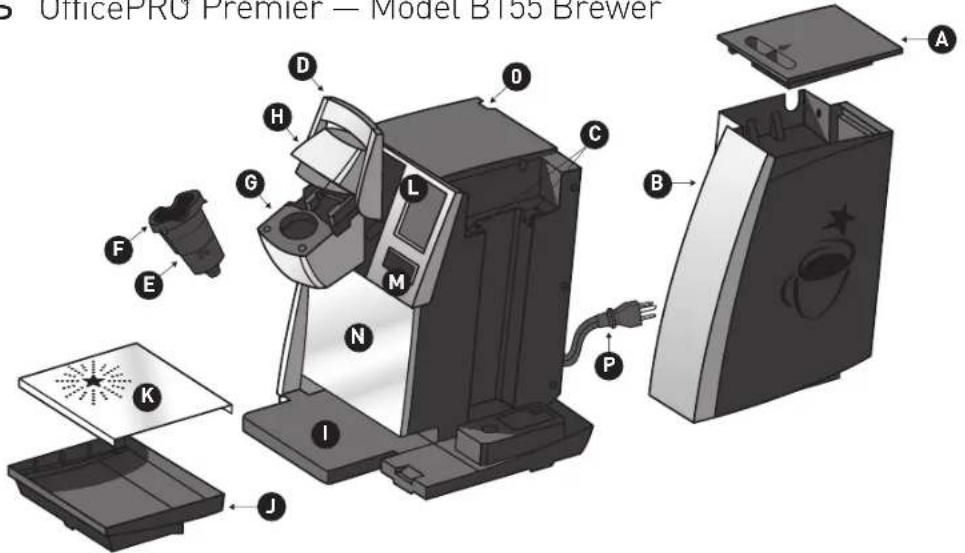
Features OfficePRO Premier — Model B155 Brewer
text_image
OfficePRO Premier — Model B155 Brewer A B C D E F G H I J K L M N POfficePRO® Premier B155 Brewer
A. Water Reservoir Lid
B. Water Reservoir
C. Water Reservoir Lock Tab Slots
D. Handle
E. K-Cup® Pack Holder Funnel
F. K-Cup® Pack Holder (E and F are the K-Cup® Pack Holder Assembly)
G. K-Cup® Pack
Assembly Housing
H.Lid
I. Drip Tray Base
J. Drip Tray
K. Drip Tray Plate
L. LCD Screen
M. BREW Button
N. Housing
0. Power Switch
P. Power Cord
SECTION 1 Set-Up & First Brew
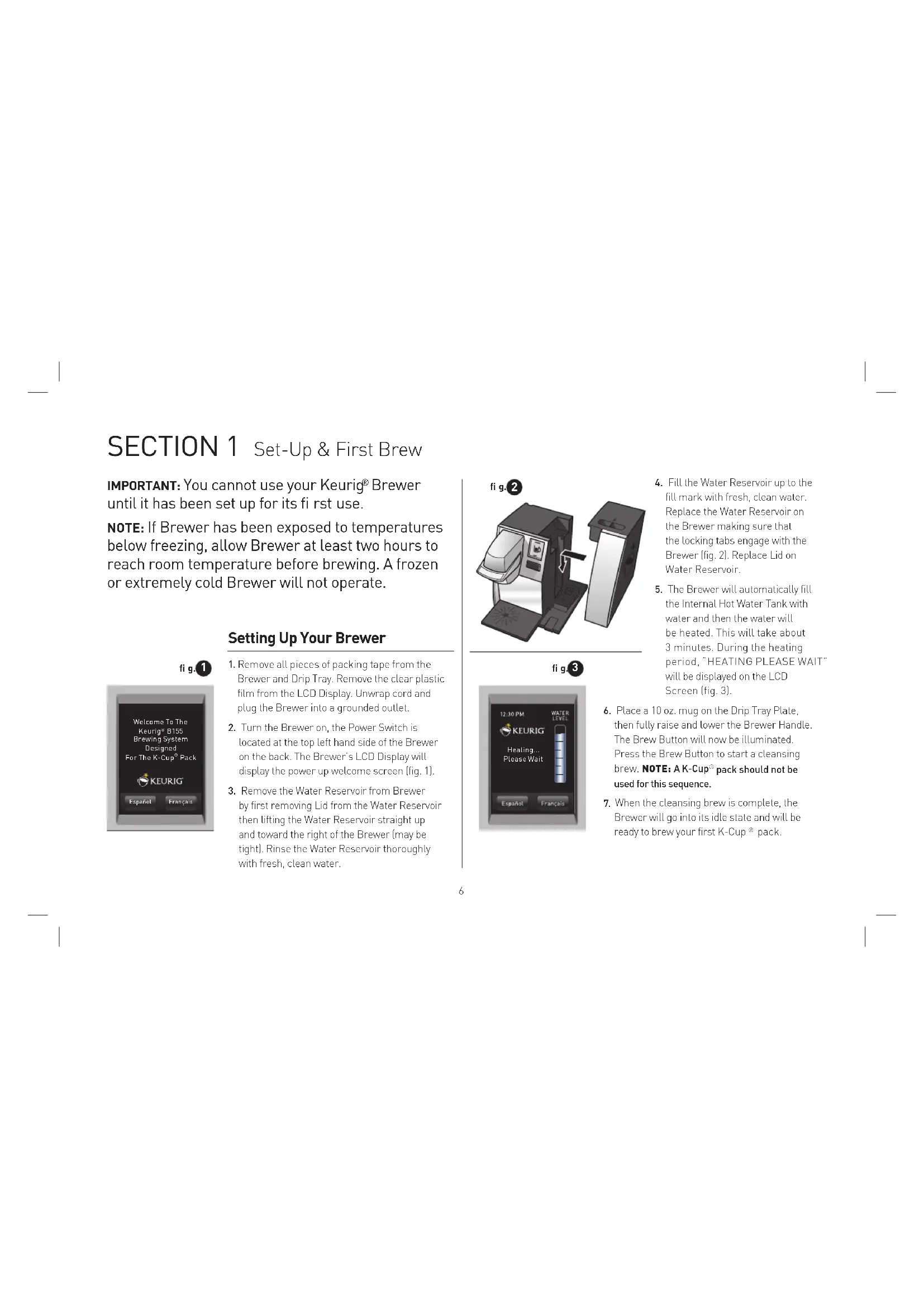
IMPORTANT: You cannot use your Keurig® Brewer until it has been set up for its first use.
NOTE: If Brewer has been exposed to temperatures below freezing, allow Brewer at least two hours to reach room temperature before brewing. A frozen or extremely cold Brewer will not operate.
Setting Up Your Brewer
fi g.1
text_image
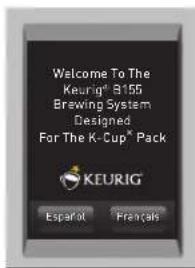
Welcome To The Keurig® B155 Brewing System Designed For The K-Cup® Pack KEURIG® Español Frénzals- Remove all pieces of packing tape from the Brewer and Drip Tray. Remove the clear plastic film from the LCD Display. Unwrap cord and plug the Brewer into a grounded outlet.
- Turn the Brewer on, the Power Switch is located at the top left hand side of the Brewer on the back. The Brewer's LCD Display will display the power up welcome screen (fig. 1).
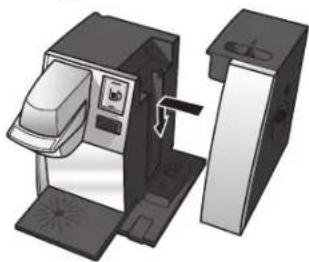
- Remove the Water Reservoir from Brewer by first removing Lid from the Water Reservoir then lifting the Water Reservoir straight up and toward the right of the Brewer (may be light). Rinse the Water Reservoir thoroughly with fresh, clean water.
fi g.2
natural_image
Illustration of a coffee machine with a side panel and lid, showing internal components without any text or symbols.fig.3
text_image
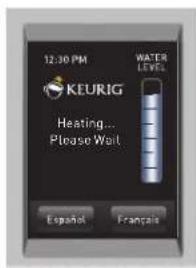
12:30 PM KEURIG WATER LEVEL Heating... Please Wait Español Français- Fill the Water Reservoir up to the fill mark with fresh, clean water. Replace the Water Reservoir on the Brewer making sure that the locking tabs engage with the Brewer (fig. 2). Replace Lid on Water Reservoir.
-
The Brewer will automatically fill the Internal Hot Water Tank with water and then the water will be heated. This will take about 3 minutes. During the heating period, "HEATING PLEASE WAIT" will be displayed on the LCD Screen (fig. 3).
-
Place a 10 oz. mug on the Drip Tray Plate, then fully raise and lower the Brewer Handle. The Brew Button will now be illuminated. Press the Brew Button to start a cleansing brew. NOTE: A K-Cup® pack should not be used for this sequence.
- When the cleansing brew is complete, the Brewer will go into its idle state and will be ready to brew your first K-Cup® pack.
fi g.4
text_image
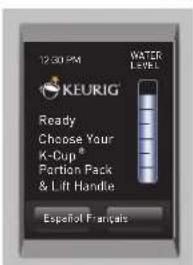
12:30 PM WATER LEVEL KEURIG Ready Choose Your K-Cup® Portion Pack & Lift Handle Español FrancaisReady to Brew Your First Cup
- The LCD Display will be in its idle state (fig. 4).
- Lift the Handle. The K-Cup ^® Pack Holder will open toward you (fig. 5).
- Select a K-Cup ^® pack. NOTE: Do not remove the foil lid or puncture the K-Cup ^® pack.
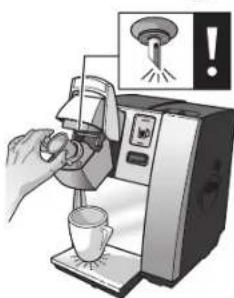
- Place a K-Cup® pack in the K-Cup® Pack holder (fig. 6). CAUTION: There are two sharp needles that puncture the K-Cup® pack, one above the K-Cup® Pack Holder and the other in the bottom of the K-Cup® Pack Holder. To avoid risk of injury, do not put your fingers in the K-Cup® Pack Assembly Housing.
- Lower the Handle to close the Lid over the K-Cup® Pack Holder. (When it is closed completely, the BREW Button will flash up to 60 seconds.)
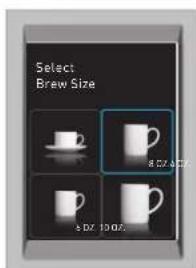
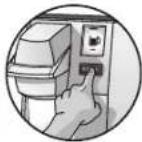
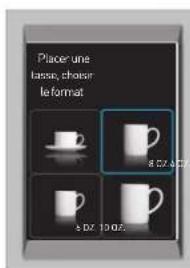
- Place a mug on the drip tray and select your brew size (fig. 7), then press BREW (fig. 8). NOTE: If you do not press BREW within 60 seconds the Brewer will return to its idle state and the Brew Button will cease to flash to prevent accidental activation. Re-activate by raising the handle fully and then closing it.

fig.6
natural_image
Illustration of a hand using a coffee machine to press coffee into a cup, with a warning symbol above (no text or labels)fi g.7
text_image
Select Brew Size 8.0X-8.0X 8.0X 10.0X- There may be a short pause prior to coffee being dispensed. The entire brew process lasts for approximately 1 minute and ends with a burst of air to remove all liquid from the K-Cup® pack.
CAUTION: There is extremely hot water in the K-Cup® Pack Holder during the brew process. To avoid risk of injury, do not lift the Handle or open the K-Cup® Pack Assembly Housing during the brew process. - The end of brew is indicated by "KEURIG BREWED ENJOY".
- Lift the Handle, remove and dispose of the used K-Cup® pack. CAUTION: K-Cup®pack will be hot.
- Enjoy your first cup of Keurig Brewed * gourmet coffee, tea or hot cocoa!
- Your Brewer may display "HEATING PLEASE WAIT" as it heats water for the next brew cycle.
fi g.8
SECTION 1 Set-Up & First Brew (continued)
Stopping the Brew Process
If you need to stop the brewing after the process has started, press and release the Power Switch to turn the Brewer 'OFF'. The flow of coffee, tea or hot cocoa will stop and the heating element and the LCD Screen will shut off.
NOTE: You may get more coffee, tea or hot cocoa in your cup during your next brew. We recommend that you perform a cleansing brew with water only after a terminated brew. Then your next brew will be the volume you have selected.
fig. 9
text_image
Fill Water ReservoirAdding Water
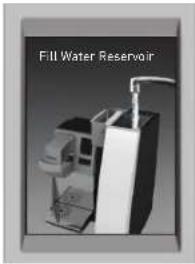
The LCD Display of your Brewer will indicate when the water level in the Reservoir is low or if the Water Reservoir has been removed by displaying the words "FILL WATER RESERVOIR" (fig. 9). The Brewer will not allow you to brew when "FILL WATER RESERVOIR" is displayed (fig. 9).
The Water Reservoir can be filled in two ways.
- Remove the Water Reservoir from Brewer by first removing Lid from the Water Reservoir, then lifting the Water Reservoir straight up and toward the right of the Brewer. Fill with water. Place the Water Reservoir back on the Brewer and replace the Lid.
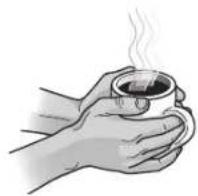
IMPORTANT: Do not remove the Water Reservoir during the brewing process.
- Lift off the Water Reservoir Lid and pour water directly into the Water Reservoir while it is still attached to the Brewer, then replace the Lid.
Brewing Hot Water
Your Brewer is able to produce hot water for making hot cocoa from a packet, or for use in cooking, etc. Simply follow the instructions on page 7, "Ready To Brew Your First Cup" without adding a K-Cup ^® pack.
NOTE: After brewing a hot cocoa K-Cup ^® pack, we recommend running a hot water brew cycle without a K-Cup ^® pack.
Purging the Brewer
If your Brewer has not been used for more than one week, you should purge the water from the internal water tank.
- If there is water in the Water Reservoir, remove the Lid, then lift the Water Reservoir straight up and away from Brewer. Discard water, rinse and refill with water. Place the Water Reservoir back on the Brewer and replace the Lid. If there is no water in the Water Reservoir, simply refill[J].
- Be sure the Brewer is turned 'ON'. Raise and lower the Handle on the Brewer without inserting a K-Cup ^® pack.
- The LCD Display will be in its idle state (fig. 4).
fig.10
text_image
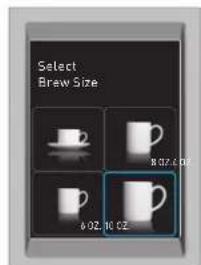
Select Brew Size 6.02.10.02- Place a large mug on the drip tray and select Large Mug (10 oz. serving) brew size from the Select Brew Size Menu (fig. 10).
- Discard water.
- Repeat steps 2 - 5 two more times to completely purge water from the Internal Hot Water Tank.
SECTION 2 Menu Controls & Indicators
Menu Mode
To enter the MENU MODE the Brewer's power must be off.
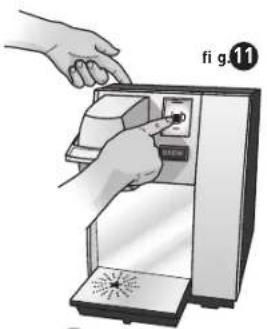
Press and hold your finger on the display while pressing and releasing
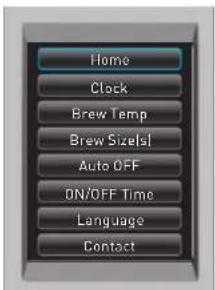
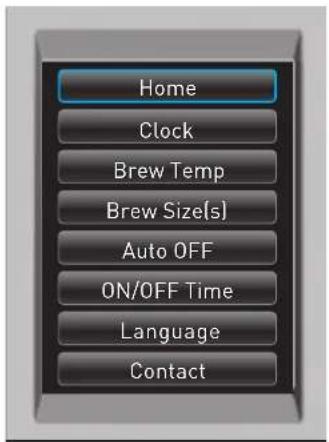
the power switch. Continue pressure on the display for 5 seconds (fig. 11). The MENU screen will appear. (fig. 12).
Press any line item to enter the set up for that particular feature.
Please reference the Menu navigation on page 11.
If you are experiencing any problems with your Brewer, please contact
Customer Service at 1.866.901.BREW (2739).
natural_image
Illustration of hands operating a device with a switch, no text or symbols present
5 seconds.
fi g.12
text_image
Home Clock Brew Temp Brew Sizelsl Auto OFF ON/OFF Time Language ContactMenu Key Navigation
Home
Press HOME at any time to return to your Brewer to an idle state.
Clock
Setting the clock is optional. To program the clock, follow the instructions on page 12.
Brew Temp
The brew temperature is pre-set at 193^ F. You do not have to set the brew temperature but you can adjust it up or down by 5^ . Simply follow the instructions on page 12.
Brew Size(s)
Four brew sizes are available: 4 oz., 6 oz., 8 oz., and 10 oz. To program the brew sizes see page 13.
Auto OFF
Auto Off allows you to program your Brewer to automatically turn off two hours after the last brew. See page 14 for programming instructions.
ON/OFF Time
You can leave your Brewer on all the time and use the Power button to turn it off. Or you can program the Brewer to brew at a specific time as shown on page 13.
Language
This Brewer is shipped with English as the default language. To change the language, follow the instructions on page 14.
Contact
The contact setting features allows you to program the contact information you need for Brewer support and help. To program, follow the instructions on page 14.
text_image
Home Clock Brew Temp Brew Size(s) Auto OFF ON/OFF Time Language ContactSECTION 2 Menu Controls & Indicators (continued)
Setting the Clock
Setting the clock is optional. When the clock is set, the time will appear in the LCD Control Center. NOTE: You must set the clock if you will be programming the Auto On/Off Time feature.
fig. 13
text_image
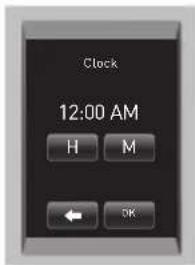
Clock 12:00 AM H M ← OK- From the Menu Mode, press "CLOCK".
- The set clock screen will display "DISABLED" if the Brewer is new or if electrical power has been interrupted. Press "DISABLED" to set a time. Press H repeatedly to advance the hour in steps or hold it down to scroll through the hours quickly. When you have set the hour then press the M to set the minutes, press repeatedly to advance by a minute each time or keep it pressed to scroll quickly (fig. 13).
- Press "OK" when you are finished. The Clock is now set.
- The correct time should now be displayed in the LCD Home Screen.
NOTE: If power is interrupted to the Brewer, follow the procedure above to reset the time as the clock will not be visible. Brew size and brew temperature menu settings will be restored automatically. All other settings will be restored automatically after clock is set.
NOTE: To disable the clock, press the time. However, the 'On/Off' time setting will also be disabled.
Programming Brew Temperature (188° - 198° F)
The Brewer brews at a preset temperature of 193^ F. You can adjust this temperature up or down by 5^ . Simply follow the instructions below.
fig. 14
text_image
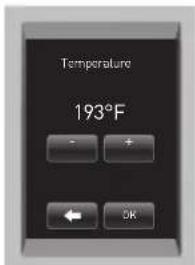
Temperature 193°F - + ← OK- From the Menu Mode, press "BREW TEMP".
- The LCD Display will now display the Brew Temperature programming options (fig. 14). The temperature 193^ F (initial setting) will be displayed at the top of the LCD Display to indicate the current temperature setting.
- Press the + symbol to increase the temperature and the - symbol to lower the temperature one degree at a time.
- Once you have reached your desired brew temperature, press "OK". The Brew Temperature is now set.
- To change the brew temperature, repeat steps 1 through 4.
NOTE: At high altitudes (over 5,000 feet) if boiling occurs, use the temperature adjustment (-5°) to lower the temperature.
Programming Your Brew Size
All brew sizes are enabled in the default setting. If you want to disable any brew size, just press on the appropriate icon(s). Please follow instructions outlined below.
fig. 15
text_image
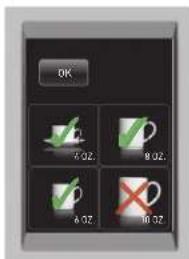
OK 7.0Z. 8.0Z. A.0Z. 10.0Z.- From the Menu Mode, press "SET BREW SIZE(S)".
- The LCD will display all enabled brew sizes. To disable a brew size press the icon. The check mark will change to an "X" indicating that the brew size is disabled (fig. 15).
- Once you have selected your desired brew size(s), press "OK". The brew size(s) are now set.
NOTE: You can not delete all brew sizes.
To enable a brew size you have already disabled, just press its icon and then press "OK". The default brew size is always 8 oz. This brew size cannot be changed or disabled.
Programming On/Off Features
The Brewer provides three modes so that you can enjoy gourmet coffee, tea or hot cocoa on your own schedule.
fig. 16
text_image
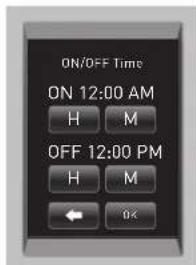
ON/OFF Time ON 12:00 AM H M OFF 12:00 PM H M OK- Leave it ON all the time. The Brewer can be left on all the time so that it is always ready to brew a fresh cup of gourmet coffee, tea or hot cocoa. To turn the Brewer off at any time, simply press and release the Power Switch. Press and release the Power Switch again to restore power to the Brewer. You will have to wait for the water to heat up before the Brewer is ready to brew.
- Program the Brewer for a specific On/Off Time. NOTE: To use this programming feature, the clock must be set to the correct time.
a. After setting the correct time (see "Setting The Clock" page 12), return to the Menu Mode and press "ON/OFF TIME".
b. To set the ON time, press "DISABLED". The display will change to a time of day. Press "H" to set the hours and "M" to set the minutes. Once the desired time is set, press "OK" to accept this time.
c. To set the OFF time, press "DISABLED". The display will change to a time of day. Press "H" to set the hours and "M" to set the minutes. Once the desired time is set, press "OK" to accept this time [fig. 16].
SECTION 2 Menu Controls & Indicators (continued)
fig.17
text_image
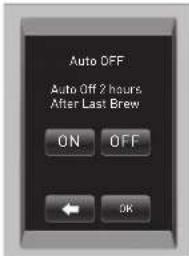
Auto OFF Auto Off 2 hours After Last Brew ON OFF ← OK- Set the Brewer to "AUTO OFF" to automatically turn off 2 hours after the last brew.
a. From the Menu Mode, press "AUTO OFF". The LCD Display will now display the "AUTO OFF" programming option (fig. 17).
b. To enable the "AUTO OFF" feature, press "ON". "ENABLED" will appear on the screen and press "OK". To disable the "AUTO OFF" feature, press "OFF". "DISABLED" will appear on the screen and press "OK".
Language Settings
fig.18
text_image
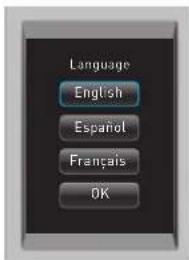
Language English Español Français OKThe Brewer is shipped with English as the default language. To change the default to Francais or Espanol, follow the instructions outlined below.
Set Language
- From the Menu Mode, press "LANGUAGE".
- The LCD Display will now display the Language programming options (fig. 18).
- Press the desired Language button, then press OK to confirm your selection.
fig. 19
text_image
Contact KEURIG, INCORPORATED PHONE # WWW. KEURIG.COM OKfig. 20
text_image
KEURIG, INCORPORATED ABC CEF OH I JKL MNO PQRS TUV WXYZ Delete Space ← OK OKSetting Contact Screen
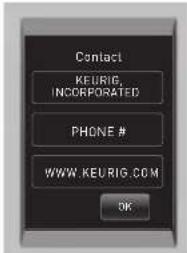
The contact screen is pre-programmed with the following information: Keurig, Incorporated. and www.keurig.com.
You can reprogram the brewer with your contact information. The contact screen will appear in the screen saver.
- From the Menu Mode, press "CONTACT". The LCD screen will display the Keurig default contact information (fig. 19).
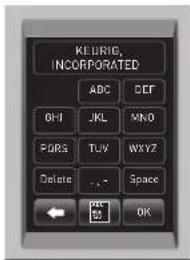
- Press the Upper [Company Name] Box. The Keypad will appear along with the current information (fig. 20). NOTE: Unless changed by the user, Keurig contact information will be present on the display.
a. Press Delete Key repeatedly to remove current information. Enter new information using the Keypad.
NOTE: To select Upper Case, Lower Case, Numerals, Upper Case Accents, Lower Case Accents, press the Keypad Change Key located at the bottom center of the screen.
text_image
FIG. 21 PHONE # 1 2 3 4 5 6 7 8 9 Do else 0 Space ← OK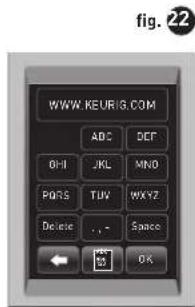
text_image
WWW KEURIG.COM ADC DEF OHI JKL MNO PORS TUV MXYZ Delete ... Space ← OK fig. 22b. Press "OK" to save your changes and return to the Main Contact Screen. NOTE: Pressing the Back Arrow Key will return to the Main Contact Screen without saving changes.
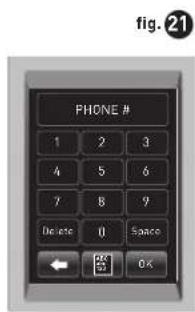
- Press the Middle (Phone Number) Box. The Numeral Keypad Mode will appear along with the current information [fig. 21].
a. Delete current phone number and enter new information using the Keypad.
b. Press "OK" to save your changes and return to the Main Contact Screen.
- Press the Lower Box. This box can be customized to contain any information such as web/email address, contact name, etc (fig. 22).
a. Enter new information using the Keypad.
b. Press "OK" to save your changes and return to the Main Contact Screen.
c. In Main Contact Screen (fig. 19), press "OK" to save the updated screen as the default and return to the Menu Screen.
SECTION 3 Cleaning & Maintenance
Cleaning External Parts
Regular cleaning of the Brewer's external components is recommended.
- Never immerse the Brewer in water or other liquids. The Housing and other external components may be cleaned with a soapy, damp, non-abrasive cloth.
- The Drip Tray can accumulate up to 12 ounces of overflow. The Drip Tray and Drip Tray Plate should be periodically inspected and rinsed clean. To remove the Drip Tray Assembly, simply slide it toward you, keeping it level at all times to avoid spilling. The Drip Tray and Drip Tray Plate should not be placed in the dishwasher. They should be cleaned with a damp, soapy, non-abrasive cloth and rinsed thoroughly.
natural_image
Illustration of hands using a digital scanner to interact with a machine (no text or symbols visible)Cleaning the K-Cup® Pack Holder Assembly
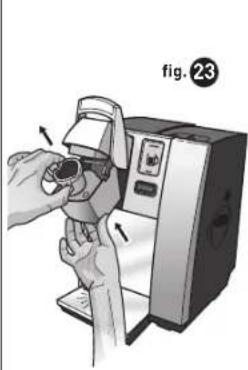
- Cleaning the Parts—The K-Cup® Pack Holder Assembly can be placed onto the top shelf of a dishwasher. NOTE: Use low temperature cycles in the dishwasher. To remove the K-Cup® Pack Holder Assembly from the Brewer, open the cover by lifting the Handle. Grasp the top of the K-Cup® Pack Holder with one hand while pushing up on the bottom of the K-Cup® Pack Holder from underneath with the other until it releases (fig. 23). After cleaning, align the K-Cup® Pack Holder with the opening
SECTION 3 Cleaning & Maintenance (continued)
text_image
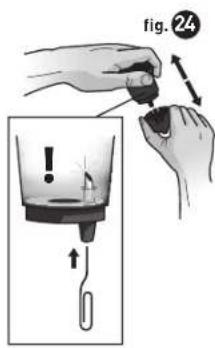
fig. 24using the two front ribs as a guide, and snap them into place from the top.
-
Cleaning the Funnel – The Funnel can be removed from the K-Cup® Pack Holder by pulling on it until it pops off (fig. 24). The Funnel is dishwasher safe. To replace it, just snap it back onto the K-Cup® Pack Holder.
-
Cleaning the Exit Needle—The Exit Needle is located on the inside bottom of the K-Cup ^® Pack Holder. Should a clog arise due to coffee grinds, it can be cleaned using a paper clip or similar tool. Remove the K-Cup ^® Pack Holder Assembly and detach Funnel. Insert the paper clip (as shown in fig. 24) into the Needle to loosen the clog, then flush with water. The K-Cup ^® Pack Holder Assembly can be placed onto the top shelf of a dishwasher.
NOTE: Use low temperature cycles in the dishwasher.
CAUTION: There are sharp needles that puncture the K-Cup ^® pack above the K-Cup ^® Pack Holder and in the bottom of the K-Cup ^® Pack Holder. To avoid risk of injury, do not put your fingers in the K-Cup ^® Pack Assembly Housing.
Cleaning the Water Reservoir & Water Reservoir Lid
The Water Reservoir Lid or Water Reservoir should not be put into the dishwasher. They should be cleaned with a damp, soapy, non-abrasive cloth and rinsed thoroughly. Do not dry the inside of the Water Reservoir with a cloth as lint may remain. CAUTION: Please rinse the Water Reservoir thoroughly after cleaning to ensure that no cleaners or cleaning solutions remain in this area as they may contaminate the water supply in the Brewer.
De-Scaling Your Brewer
Mineral content in water varies from place to place. Depending on the mineral content of the water in your area, calcium deposits or scale may build up in your Brewer. Scale is non-toxic, but left unattended, it can hinder Brewer performance. De-scaling your Brewer helps maintain the heating element and other internal parts of the Brewer that come in contact with water.
The Brewer should be de-scaled every 3-6 months to ensure optimal performance. It is possible for calcium deposits to build up faster, making it necessary to de-scale more often.
De-Scaling Instructions
A. PREPARE
Step 1: Make sure you have at least 90 oz. of undiluted white vinegar on hand. You will also need an empty sink and a large ceramic mug [do not use a paper cup].
Step 2: Empty the water in the Water Reservoir.
Step 3: Disable "Auto Off" and programmed "On Off" time (pages 13-14).
B. FILL AND CLEAN
Step 1: Pour the vinegar into the Water Reservoir to fill it.
Step 2: Place a large mug on the Drip Tray Plate and run a water brew cycle. DO NOT USE A K-CUP® PACK, just select the Large Mug brew size. Pour the contents of the large mug into the sink.
Step 3: Repeat the brew process 3 times.
Step 4: Let the Brewer stand for at least 4 hours while still on.
C. RINSE
Step 1: Ensure the Water Reservoir is filled with fresh water.
Step 2: Place a large mug on the Drip Tray Plate and run a water brew cycle. Pour the contents of the large mug into the sink.
Step 3: Repeat brew process until the Water Reservoir is empty.
Step 4: You may need to perform additional water brew cycles if you notice any residual taste or odor.
Service
Beyond these recommended cleaning and maintenance procedures this Brewer is not user serviceable. For service, please refer to the Warranty section of this guide.
Storage
Draining the Brewer
- Turn off the Brewer, unplug it, and allow the Brewer to cool approximately 30 minutes.
- Empty the Water Reservoir by first removing the Lid from the Water Reservoir then lifting the Water Reservoir straight up and toward the right of the Brewer (may be tight). Rinse and Empty the Water Reservoir.
natural_image
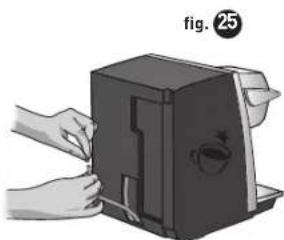
Illustration of hands using a portable device to press or install a device, no text or symbols visible- Turn the Brewer around so the back is facing out. Unscrew the small knob to release the back panel, remove the panel from the Brewer, and set it aside. If the screw is tight, you may need to use a flathead screw driver. Pull the tube downward until the end is free (fig25). Over a large pitcher, remove the plug and drain the water from the Internal Hot Water Tank into the pitcher. CAUTION: If the Brewer was not allowed to cool sufficiently, the water draining from the tube may be very hot. Re-cap the tube. NOTE: To avoid losing parts, when finished, re-insert the tube and screw the panel back onto the Brewer.
SECTION 4 Troubleshooting
Situation Solution
Brewer does not have power
• Plug Brewer into an independent outlet.
- Check to be sure that it is plugged in securely.
• Plug into a different outlet.
- Reset your home's circuit breaker if necessary.
- Make sure that the Power Switch has been turned on and LCD Display is illuminated.
Brewer will not brew
- After placing the K-Cup® pack in the K-Cup® Pack Holder, make sure the Handle is pushed down securely and the LCD Control Center reads "READY TO BREW" with the BREW Button flashing, then press the BREW Button.
- The Exit Needle may be clogged (refer to page 16).
LCD Messages
- If the water reservoir is empty and needs to be refilled, the LCD Screen will direct you to "Lift Water Reservoir, Fill Water Reservoir, Replace Water Reservoir" with slideshow of images. Follow these instructions.
- In pour-over mode, if the water flow has been interrupted, the LCD screen will state "Water Flow Interrupted. To Reset, Please Lift and Remove Water Reservoir". When reservoir has been removed screen states "If necessary, please fill water reservoir to Max Fill line. Then replace". Follow these instructions.
- If the messages persist after following these instructions, contact Customer Service at 1,866.901.BREW (2739).
Situation Solution
Chlorine or mineral taste in coffee
- Consider using bottled water, filtered water, or the Keurig™ Water Filter Starter Kit (available at www.keurig.com).
Brewing a partial cup
- The Exit Needle may be clogged (refer to page 16).
- Clean the K-Cup® Pack Holder assembly if necessary and rinse under faucet (refer to pages 15-16).
- The Water Reservoir may have been removed during brewing. Replace the Water Reservoir and perform a water brew without a K-Cup ^® pack.
- "De-Scale" the Brewer (refer to pages 16-17).
- If you have repeated the de-scale procedure on your Brewer two times and it is still only brewing a partial cup, contact Customer Service at 1.866.901.BREW (2739).
The time is not displayed on the LCD Message Center
- The time will not be displayed on the LCD unless you have set it. To set the clock, follow the procedure on page 12.
- If power is interrupted to the Brewer, you will need to set the clock again using the procedure on page 12.
Brewer shuts off or turns on automatically
- Check to make sure that the Auto Off timer and/or On/Off time features have not been set. To do this, press the MENU Button below "MENU" and scroll through the programming options. "OFF" should be displayed for Auto Off timer and On/Off. If "OFF" is not displayed, follow directions on pages 13-14 to reset.
If any problems persist, contact Customer Service at 1.866.901.BREW [2739]
SECTION 5 Warranty
Limited One Year Warranty
Keurig warrants that your Brewer will be free of defects in materials or workmanship under normal use for one year from the date of purchase. It is recommended that you fill out and return the warranty card enclosed with your Brewer so that your purchase information will be stored in our system. Keurig will, at its option, repair or replace the Brewer without charge upon its receipt of proof of the date of purchase. If a replacement Brewer is necessary to service this warranty, the replacement Brewer may be new or reconditioned. If a replacement Brewer is sent, a new limited one year warranty will be applied to the replacement Brewer.
This warranty only applies to Brewers operated in the United States and Canada. This warranty gives you specific legal rights, and you may also have other rights that vary from state to state and, in the case of Canada, from province to province.
What is not covered by the Limited Warranty?
THIS WARRANTY DOES NOT COVER CONSEQUENTIAL OR INCIDENTAL DAMAGES SUCH AS PROPERTY DAMAGE AND DOES NOT COVER INCIDENTAL COSTS AND EXPENSES RESULTING FROM ANY BREACH OF THIS WARRANTY, EVEN IF FORESEEABLE. Some states or provinces do not allow the exclusion or limitations of incidental or consequential damages, so the above limitation or exclusion may not apply to you depending on the state or province of purchase.
Nor does this warranty cover damages caused by services performed by anyone other than Keurig or its authorized service providers, use of parts other than genuine Keurig parts, or external causes such as abuse, misuse, inappropriate power supply or acts of God.
Other Limitations
THIS WARRANTY IS EXCLUSIVE AND IS IN LIEU OF ANY OTHER EXPRESS WARRANTY, WHETHER WRITTEN OR ORAL. IN ADDITION, KEURIG HEREBY SPECIFICALLY DISCLAIMS ALL OTHER WARRANTIES WITH RESPECT TO YOUR PROFESSIONAL SERIES B155 BREWER, INCLUDING ANY IMPLIED WARRANTY OF MERCHANTABILITY OR FITNESS FOR ANY PARTICULAR PURPOSE. Some states or provinces do not allow disclaimers of such implied warranties or limitations on how long an implied warranty lasts, so the above limitation may not apply to you depending on the state or the province of purchase.
How do you obtain warranty service?
Keurig ^® Brewers are high-quality appliances and, with proper care, are intended to provide years of satisfying performance. However, should the need arise for warranty servicing, simply call Keurig Customer Service at our toll free phone number 1.866.901.BREW (2739). Please do not return your Brewer for servicing without first speaking to Keurig Customer Service to obtain an Authorization to Return number (ATR). Keurig ^® Brewers returned without an ATR number will be returned to the sender without servicing.
Keurig, Incorporated
55 Walkers Brook Drive
Reading, MA 01867
1.866.901.BREW (2739)
RÈGLES DE SÉCURITÉ IMPORTANTES
CE PRODUIT CONTIENT DES PRODUITS
CHIMIQUES, NOTAMMENT DU PLOMB, UN MÉTAL QUI, SELON L'ÉTAT DE LA CALIFORNIE, CAUSE LE CANCER, DES ANOMALIES CONGENITALES OU D'AUTRES MALFORMATIONS GENETIQUES.
text_image
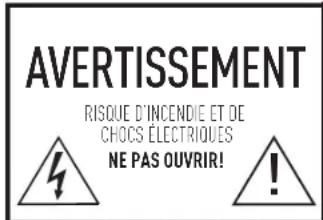
AVERTISSEMENT RISQUE D'INCENDIE ET DE CHOCS ÉLECTRIQUES NE PAS OUVIR!AVERTISSEMENT : POUR RÉDUIRE LES RISQUES D'INCENDIE ET DE CHOCS ELECTRIQUES, NE PAS RETIRER LE COUVERQLE INFERIEUR. CET APPAREIL NE CONTIENT AUCONE PIÈCE RÉPARABLE PAR L'UTILISATEUR. LES RÉPARATIONS NE DEVRAENT ÊTRE EFFECTUÉES QUE PAR UN TECHNICIEN DE SERVICE AGREÉ.
TABLE DES MATIÈRES
SYSTÈME D'INFUSION GOURMET UNE TASSE À LA FOIS DE KEURIG ③
text_image
Exploded view diagram of a coffee maker with labeled parts including tray, printer, and door panelnatural_image
Illustration of a coffee machine with a side panel and lid, showing internal components (no text or symbols)fig.3
text_image
12.30 PM KEURIG N vou d'ou Chauffage... Attendre English Es qu'aonatural_image
Illustration of a hand using a coffee machine to press coffee into a cup, with an alert icon above (no text or symbols present)fi g.7
text_image
Placer une lasse, choisir leformat 8.0X 4.0X 8.0X 100%natural_image
Illustration of hands operating a device with a switch, no text or symbols present
5 secondes.
fi g.12

text_image
Temperature 193°Ftext_image
Heure ON/OFF auto ON 12:00 AM H M OFF 12:00 PM H M OKtext_image
KEURIG, INCORPORATED ABC DEF OH I JKL MNO PORS TUV WXY2 Delete Space OKtext_image
WWW KEURIG.COM ADC DEF OHJ JKL MNO PORTS TUV WXYZ Delete Space ← OKnatural_image
Illustration of hands using a digital scanner to interact with a device (no text or symbols visible)natural_image
Illustration of hands using a device to press or install a device, no text or symbols visibleSECTION 4 Dépannage
Problème Solution
La cafetière ne
s'allume pas
55 Walkers Brook Drive
Reading, MA 01867
1.866.901.2739
P/N 60-20119-000 Rev E 01/12
CLICK, CALL OR SHOP | www.keurig.com | 1.866.901.BREW | At over 18,000 stores in the U.S. and Canada CLIQUEZ, APPELEZ OU MAGASINEZ | www.keurig.com | 1.866.901.2739 | Dans plus de 18 000 magasins aux États-Unis et au Canada
Keurig, Incorporated 55 Walkers Brook Drive Reading, MA 01867 U.S.A.
Keurig, Incorporated is a wholly-owned subsidiary of Green Mountain Coffee Roasters, Inc.
THIS PRODUCT IS FOR HOUSEHOLD AND COMMERCIAL USE
Covered by U.S. Patent Numbers 7,165,488, 7,347,138; and D544,299 and other U.S. and foreign patents pending. KEURIG INCORPORATED
Made in China. Printed in China.
CE PRODUIT EST DESTINÉ À UNE UTILISATION DOMESTIQUE ET COMMERCIALE