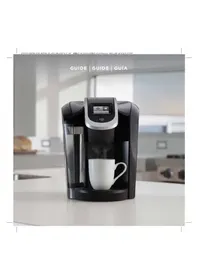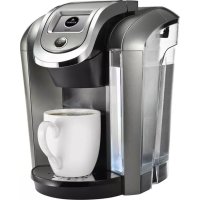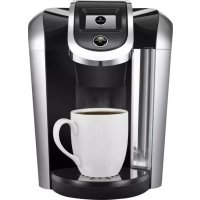
KCup 2.0 Brewer K450 - Coffee machine Keurig - Free user manual and instructions
Find the device manual for free KCup 2.0 Brewer K450 Keurig in PDF.



User questions about KCup 2.0 Brewer K450 Keurig
0 question about this device. Answer the ones you know or ask your own.
Ask a new question about this device
Download the instructions for your Coffee machine in PDF format for free! Find your manual KCup 2.0 Brewer K450 - Keurig and take your electronic device back in hand. On this page are published all the documents necessary for the use of your device. KCup 2.0 Brewer K450 by Keurig.
USER MANUAL KCup 2.0 Brewer K450 Keurig
text_image
GUIDE | GUIDE | GUÍAIMPORTANT SAFEGUARDS
When using electrical appliances, basic safety precautions should be followed, including the following:
- Read all instructions before using.
- Do not touch hot surfaces. Use handles and knobs when available.
- This appliance must be properly installed and located in accordance with these instructions before it is used.
- The use of accessory attachments not recommended by the appliance manufacturer may result in fire, electrical shock or injury to persons.
- Do not place on or near a hot gas or electric burner, or in a heated oven.
- Do not use outdoors.
- To protect against fire, electric shock and injury do not immerse cords, plugs or the appliance in water or any other liquid.
- Do not fill the Water Reservoir above the MAX FILL line.
-
Use only water in this appliance! Do not put any other liquids or foods in the Water Reservoir except as instructed in the cleaning instructions in this guide.
-
Turn off and unplug the brewer before cleaning or maintenance. Allow to cool before putting on or taking off parts and before cleaning the appliance.
- For best operation, plug the appliance into its own electrical outlet on a dedicated circuit to prevent flickering of lights, blowing of fuses or tripping a circuit breaker.
- Do not operate any appliance with a damaged Power Cord or plug or after the appliance malfunctions or is damaged in any manner. Contact Keurig Customer Service to report any malfunction of or damage to the brewer.
- Do not let the Power Cord hang over the edge of the table or counter, or touch hot surfaces.
- To disconnect, press the Power Button on the brewer to "OFF" status and then remove the plug from the wall outlet.
- Close supervision is necessary when any appliance is used by or near children.
-
Do not lift the brewer Handle while brewing is in progress.
-
Always keep the Flip-Top Reservoir Lid on the Water Reservoir unless you are refilling it.
- This appliance is equipped with a Power Cord having a grounding wire with a grounding plug. The appliance must be grounded using a 3-hole properly grounded outlet. In the event of an electrical short circuit, grounding reduces the risk of electrical shock.
- If the outlet is a standard 2-prong wall outlet, it is your personal responsibility and obligation to have it replaced with a properly grounded 3-prong wall outlet.
- Do not, under any circumstances, cut or remove the third (ground) prong from the Power Cord or use an adapter.
- Consult a qualified electrician if the grounding instructions are not completely understood, or if doubt exists as to whether the appliance is properly grounded.
- Do not use the appliance for other than its intended use.
- Remove the shipping disk before brewing.
SAVE THESE INSTRUCTIONS.
WARNING TO USERS AND PARENTS:
- DO NOT permit children to use the brewer unless there is adult supervision. Brewer dispenses very hot water.
- SPECIAL NOTICE FOR HOT COCOA/OTHER USERS: IMMEDIATELY AFTER USING A HOT COCOA/OTHER PACK, RUN A HOT WATER BREW CYCLE
without a pack to avoid the possibility of clogging the exit needle. DO NOT assume the next user will do this.
WARNING
WARNING: TO REDUCE THE RISK OF FIRE OR ELECTRIC SHOCK, DO NOT REMOVE THE BOTTOM COVER. NO USER SERVICEABLE PARTS ARE INSIDE. REPAIR SHOULD BE DONE BY AUTHORIZED SERVICE PERSONNEL ONLY.
CAUTION: There are three sharp needles that puncture packs, two above the Pack Holder and the other in the bottom of the Pack Holder. To avoid risk of injury, do not put your fingers in the Pack Holder Assembly.
CAUTION: There is extremely hot water in the Pack Holder during the brew process. To avoid risk of injury, do not lift the Handle or open the Pack Holder Assembly during the brewing process.
CAUTION: Do not fill above the MAX FILL line. If you fill the Water Reservoir above this point, you may occasionally get a larger brew than you selected for your first brew of the day. If you prefer to have your Water Reservoir filled to the top, we recommend you use a large mug for your first brew of the day to avoid any risk of overflow.
CAUTION: Please always keep the brewer in its upright position to avoid potential injury and/or damage to your brewer.
CAUTION: Very hot liquid. Adult supervision required.
SHORT CORD INSTRUCTIONS:
A short power supply cord is provided to reduce the risk of becoming entangled in or tripping over a longer cord.
Longer detachable power-supply cords or extension cords are available and may be used if care is exercised in their use. If an extension cord is used, (1) the marked electrical rating of the cord set or extension cord should be at least as great as the electrical rating of the appliance; (2) the cord should be arranged so that it will not drape over the countertop or tabletop where it can be pulled on by children or tripped over unintentionally; and (3) the extension cord must include a 3-prong grounding plug.
Your Keurig ^® 2.0 brewer will not work with packs that do not have the Keurig ^® logo on them.
Keurig ^® 2.0 brewers are not compatible with the My K-Cup ^® reusable filter accessory.
THIS PRODUCT IS FOR HOUSEHOLD USE ONLY.
WARNING
THIS PRODUCT CONTAINS CHEMICALS, INCLUDING LEAD, WHICH IS KNOWN TO THE STATE OF CALIFORNIA TO CAUSE CANCER, BIRTH DEFECTS OR OTHER REPRODUCTIVE HARM.
TABLE OF CONTENTS
KEURIG® 2.0 BREWING SYSTEM | K2.0-400 SERIES BREWER
Features 6
Touchscreen Controls 7
SECTION 1
Set-Up & Cleansing Brew 8
Brew Your First K-Cup ^® Pack 10
Brew Your First K-Carafe™ Pack 11
Set Carafe Auto Brew Mode 12
SECTION 2
Stopping the Brew Process 14
Adding Water 14
Dispensing Hot Water into a Mug 15
Adding a Favorite 16
Editing a Favorite 17
Using a Favorite 17
Settings Menu 18
Caring For Your Brewer 22
Maintenance Alerts 28
Recycling K-Carafe™ Packs 31
SECTION 3
Troubleshooting 32
SECTION 4
Warranty 34
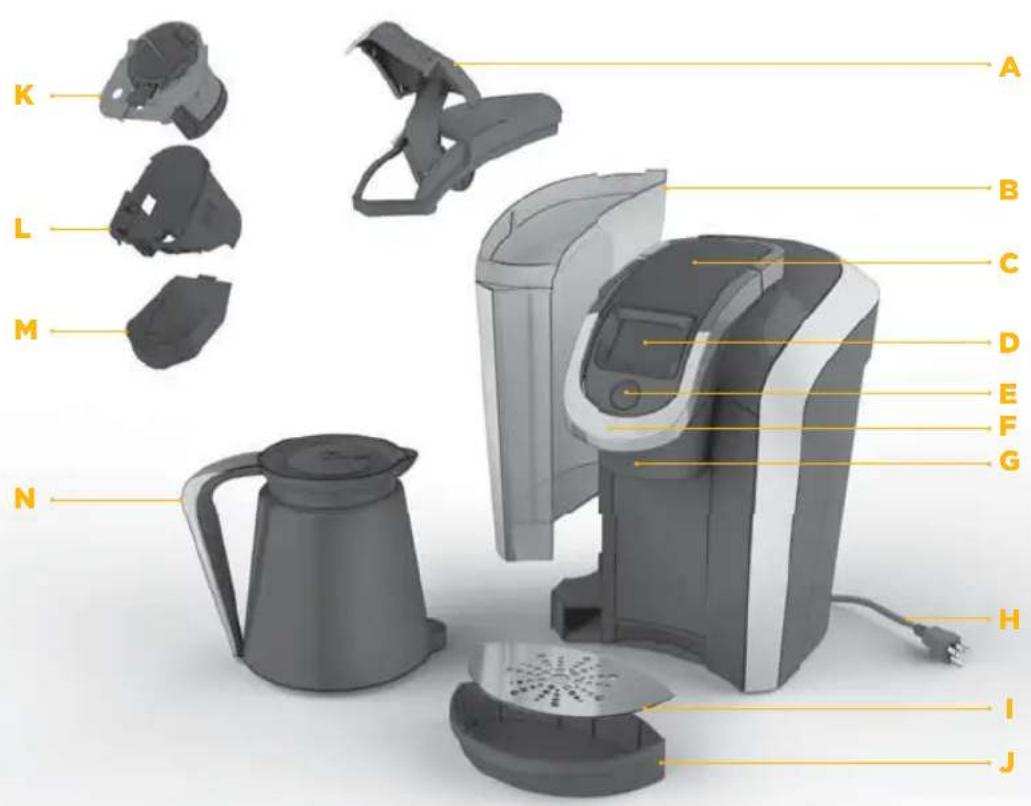
FEATURES
text_image
K L M N A B C D E F G H I JK2.0-400 SERIES BREWER
A. Flip-Top Reservoir Lid
B. Water Reservoir
C. Top Housing
D. Touchscreen/Power Button
E. Brew Button
F. Handle
G. Brew Head
H. Power Cord
I. Drip Tray Plate
J. Drip Tray
K. Pack Holder
L. Housing (K and L are the Pack Holder Assembly)
M. Base
N. Keurig™ Carafe
text_image
12:00 AM Lift to Begin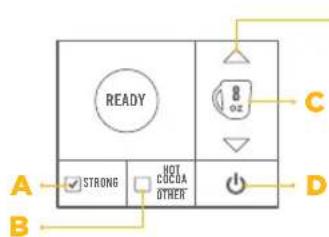
text_image
READY 8 oz C STRONG NOT CUCDA OTHER A B D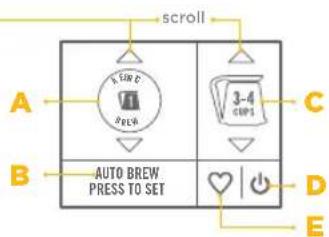
text_image
scroll A B AUTO BREW. PRESS TO SET C D EHOME SCREEN
A. Clock
B. Settings Button
C. Power Button
A. STRONG
(only available for coffee)
B. HOT COCOA/OTHER (for select non-coffee beverages)
C. Brew Size
D. Power Button
A. KEURIG BREW®
Setting 1
B. AUTO BREW (only available for K-Carafe™ packs)
C. Brew Size
D. Power Button
E. Favorites Button
BREW SETTINGS (OUTLINE INDICATES DEFAULT SIZE)
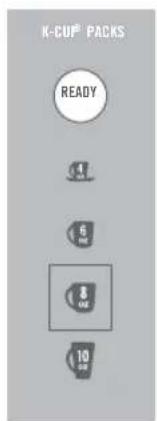
text_image
K-CU® PACKS READY 4 6 8 10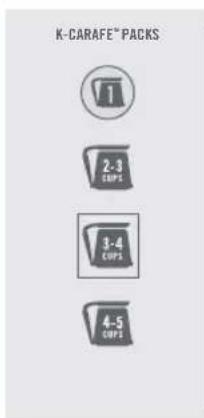
text_image
K-CARAFE™ PACKS 2-3 CUPS 3-4 CUPS 4-5 CUPS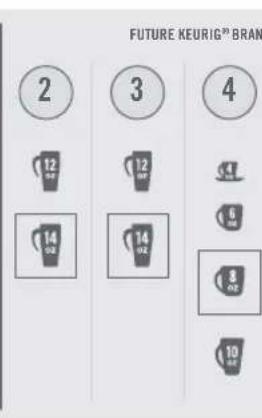
bar
FUTURE KEURIG® BRAN | Category | Value | |---|---| | 2 | 12 (oz) | | 3 | 12 (oz) | | 4 | 14 (oz) | | 5 | 6 (oz) | | 6 | 8 (oz) | | 7 | 10 (oz) |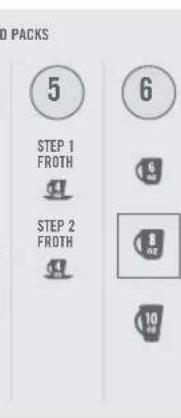
text_image
5 STEP 1 FROTH STEP 2 FROTH 6 9 10 100% PACKS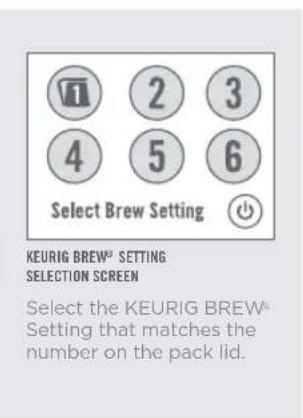
text_image
Select Brew Setting KEURIG BREW® SETTING SELECTION SCREEN Select the KEURIG BREW® Setting that matches the number on the pack lid.
text_image
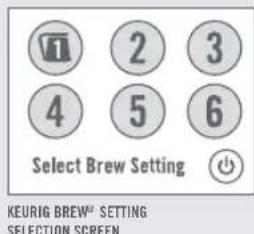
1 2 3 4 5 6 Select Brew Setting KEURIG BREW® SETTING SELECTION SCREENSelect the KEURIG BREW Setting that matches the number on the pack lid.
SET-UP & CLEANSING BREW
SET-UP
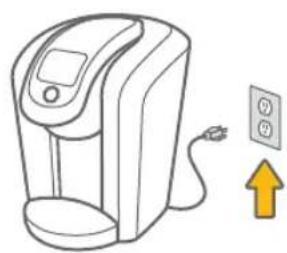
- Place the brewer on a counter and plug into a grounded outlet.
natural_image
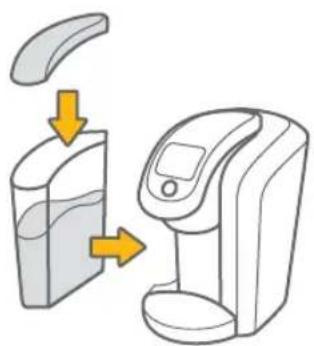
Illustration of a digital water heater connected to an electrical outlet with a yellow upward arrow (no text or symbols)- Rinse the Water Reservoir, fill with bottled or filtered water, and return it to the brewer.
natural_image
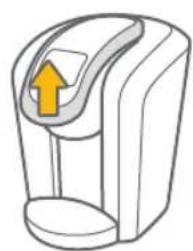
Illustration of a device being processed from a container, showing fluid flow and control panel (no text or symbols)- Lift the Handle, remove and discard the shipping disk.
natural_image
Simple line drawing of a device with an arrow indicating upward motion (no text or symbols)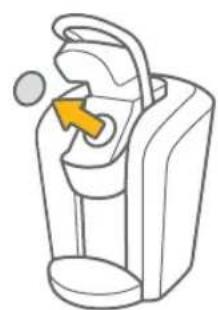
natural_image
Line drawing of a device with an orange arrow pointing to the interior (no text or symbols)- Press the Power Button and wait for preheating to complete, about three minutes.
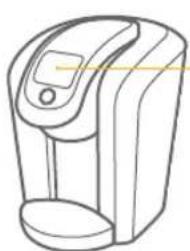
natural_image
Line drawing of a modern water dispenser device (no text or symbols)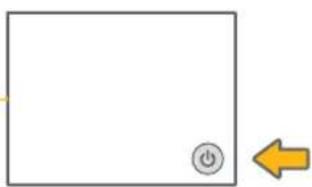
natural_image
Simple diagram with a square, a power button icon, and a yellow left-pointing arrow (no text or symbols)SECTION 1
CLEANSING BREW
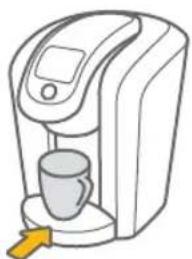
- To begin a cleansing brew, place a 12 ounce mug on the Drip Tray.
natural_image
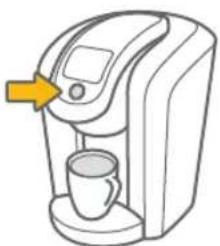
Line drawing of a coffee maker with a cup and digital display (no text or symbols)- Select a 6 ounce Brew Size and press the Brew Button.
natural_image
Line drawing of a coffee maker with a cup and a yellow arrow pointing to the top device (no text or symbols)- Lift and lower the Handle. Do not place a Keurig® brand pack in the Pack Holder.
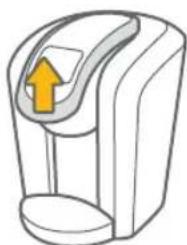
natural_image
Illustration of a stylized device with an orange arrow pointing upward (no text or symbols)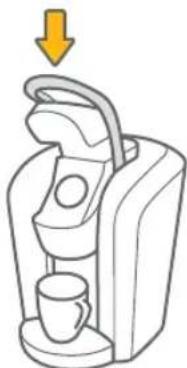
natural_image
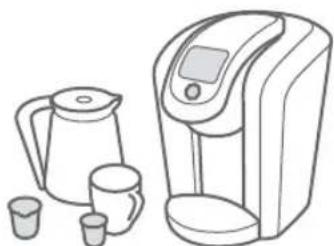
Illustration of a coffee maker with a cup and handle, showing a yellow downward arrow (no text or symbols)- You are now ready to use your brewer!
natural_image
Line drawing of a kettle and water dispenser with cups (no text or symbols)1. Place a mug on the Drip Tray.
Select a K-Cup ^® pack, place firmly in the Pack Holder.
NOTE: Do not remove the foil lid or puncture the K-Cup ^™ pack.
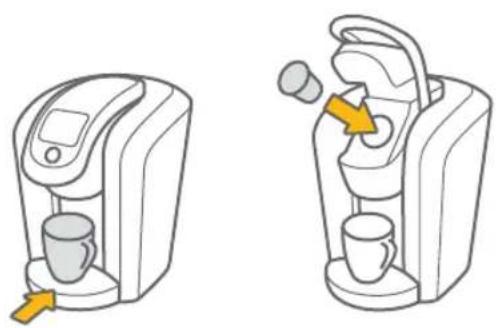
3. Select a Brew Size. Select STRONG if desired. (STRONG setting is for coffee.)
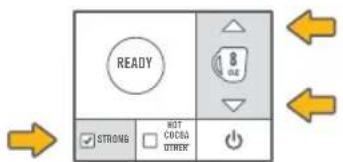
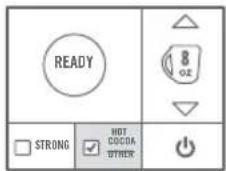
Press HOT COCOA/OTHER for select non-coffee beverages.
NOTE: Make sure to check instructions on portion pack packaging.

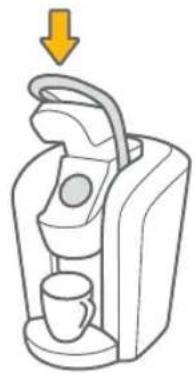
2. Lower the Handle.
CAUTION: There are sharp needles that puncture the K-Cup® pack above and below the Pack Holder. To avoid injury, do not put your fingers in the Pack Holder.
NOTE: Your Keurlg ^® 2.0 brewer will not work with packs that do not have a Keurlg ^® logo on them.
natural_image
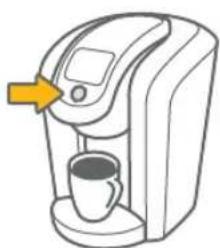
Illustration of a coffee machine with a coffee cup and a handle, showing a yellow downward arrow (no text or symbols)4. Press the Brew Button and enjoy your first cup!
CAUTION: There is extremely hot water in the K-Cup® pack during the brew process. To avoid injury, do not lift the Handle during the brew process.
natural_image
Line drawing of a coffee maker with a cup and a yellow arrow pointing to the top device (no text or symbols)BREW YOUR FIRST K-CARAFE™ PACK
SECTION 1
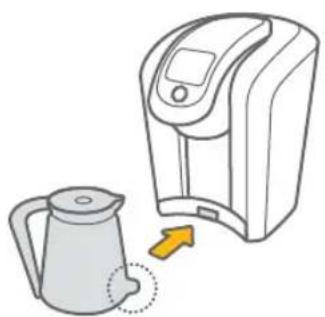
- Make sure the Keurig™ Carafe is empty. Remove the Drip Tray and insert the Keurig™ Carafe securely in its place.
NOTE: Do not remove the foil lid or puncture the K-Carafe™ pack.
NOTE: Refer to page 27 for Keurig™ Carafe operation.
natural_image
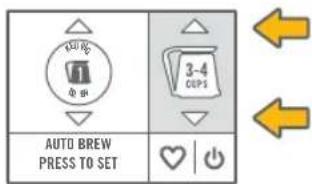
Illustration of a kettle and a digital kitchen device with an arrow indicating sound pressure (no text or symbols)- Select a Brew Size.
NOTE: Make sure the number on the Touchscreen matches the number of the K-Carafe™ pack you're brewing in the Pack Holder.
text_image
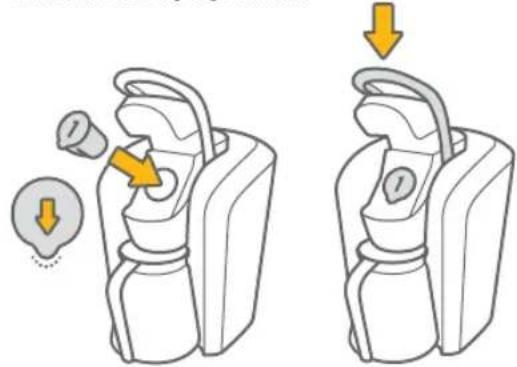
AUTO BREW PRESS TO SET 3-4 DUPS- Select a K-Carafe™ pack, place firmly in the Pack Holder and lower the Handle.
CAUTION: There are sharp needles that puncture the K-Carafe™ pack above and below the Pack Holder. To avoid injury, do not put your fingers in the Pack Holder. NOTE: Your Keurig® 2.0 brewer will not work with packs that do not have a Keurig® logo on them.
natural_image
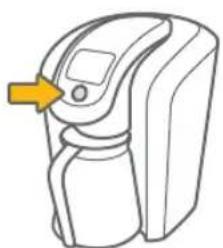
Illustration of two mechanical devices with arrows indicating motion or change, no text or symbols present- Press the Brew Button and enjoy your first carafe of coffee!
CAUTION: There is extremely hot water in the K-Carafe ^™ pack during the brew process. To avoid injury, do not lift the Handle during the brew process.
natural_image
Line drawing of a device resembling a washing machine with a yellow arrow pointing to the handle (no text or symbols)SET CARAFE AUTO BREW MODE
- Make sure the Keurig™ Carafe is empty. Remove the Drip Tray and insert the Keurig™ Carafe securely in its place.
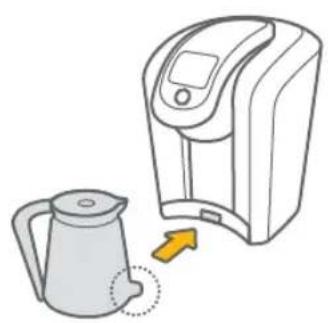
natural_image
Illustration of a kettle being placed next to a digital water heater (no text or symbols)- Select AUTO BREW PRESS TO SET.
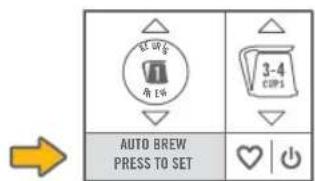
text_image
3-4 CUPS AUTO BREW PRESS TO SET- Select a K-Carafe™ pack, place firmly in the Pack Holder and lower the Handle. NOTE: Ensure the current time is accurate. Refer to page 19 to adjust.
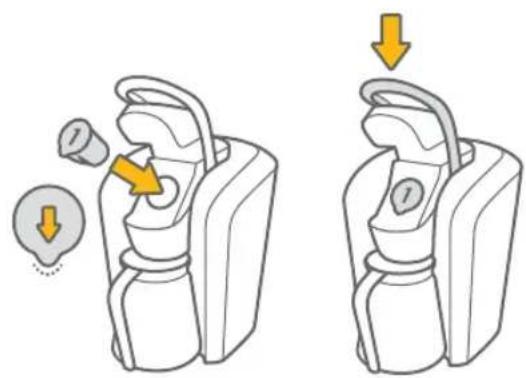
natural_image
Illustration of two types of backpacks with arrows indicating movement or change, no text or symbols present.- Select the time you want to begin brewing, then press the right arrow.

text_image
AUTO BREW CARAFE AT: 6:00 CANCEL AM ○ PM ▶SECTION 1
- Select a Brew Size, then press SET.
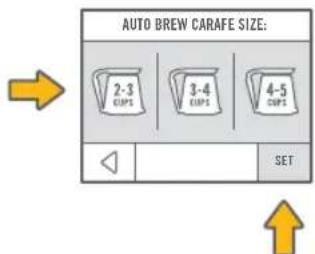
text_image
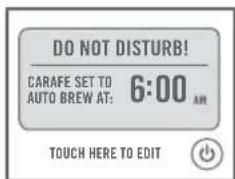
AUTO BREW CARAFE SIZE: 2-3 CUPS 3-4 CUPS 4-5 CUPS SET- To edit any options, select TOUCH HERE TO EDIT.

text_image
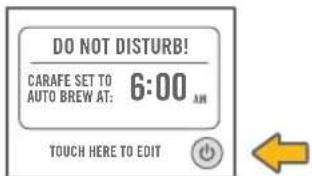
DO NOT DISTURB! CARAFE SET TO AUTO BREW AT: 6:00 AM TOUCH HERE TO EDIT- The Touchscreen will indicate DO NOT DISTURB!
text_image
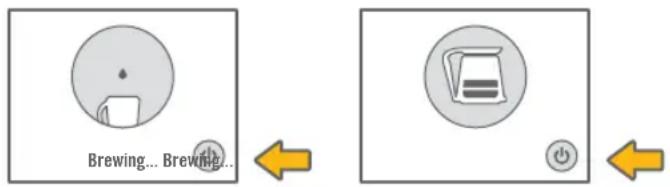
DO NOT DISTURB! CARAFE SET TO AUTO BREW AT: 6:00 AM TOUCH HERE TO EDIT- To put the brewer in sleep mode, quickly press and release the Power Button. Removing the Keurig™ Carafe or lifting the Handle will cancel the CARAFE AUTO BREW MODE.
text_image
DO NOT DISTURB! CARAFE SET TO 6:00 AM AUTO BREW AT: TOUCH HERE TO EDITSTOPPING THE BREW PROCESS
FOR K-CUP® PACKS AND K-CARAFE™ PACKS (KEURIG BREW® SETTING 1)
To stop the brewing process, press and hold the Power Button for one second or slowly lift the Handle. Remove and dispose of any used pack. Brewing a used pack is not recommended.
ADDING WATER
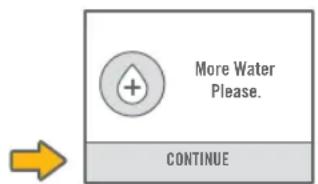
Your Keurig ^® 2.0 brewer will indicate when the water level in the Water Reservoir is low and you will not be able to brew. The brewer will only indicate “More Water Please.” if there is not enough to complete your brew.
For example: A Keurig™ Carafe will require more water than a 10 ounce mug.
text_image
More Water Please. CONTINUEDISPENSING HOT WATER INTO A MUG
SECTION 2
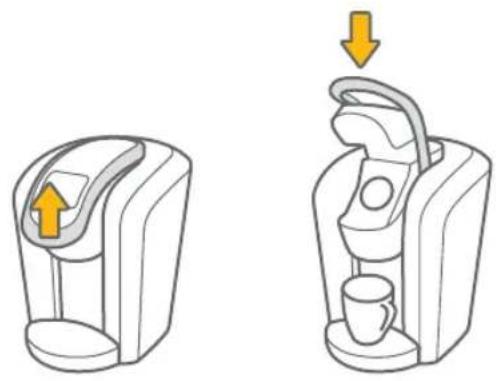
- Place a mug on the Drip Tray. Lift and lower the Handle without a pack.
natural_image
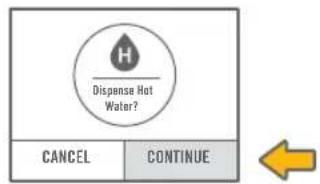
Two line drawings of a coffee maker device, one showing the front view and the other the side view with arrows indicating motion (no text or symbols)- Press CONTINUE to dispense hot water.
text_image
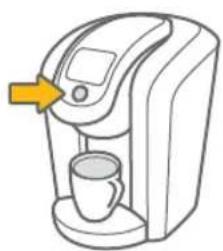
Dispense Hot Water? CANCEL CONTINUE- Select your Brew Size and press the Brew Button.
natural_image
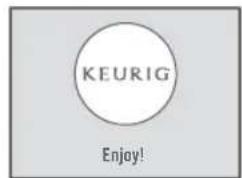
Line drawing of a coffee maker with a cup and a yellow arrow pointing to the top device (no text or symbols)- When the brew process is complete, the Touchscreen will indicate Enjoy!
text_image
KEURIG Enjoy!ADDING A FAVORITE
The Favorites Button is like a little shortcut to perfection. Just save the settings you use most often and make each day that much easier. You can save your preferred settings for K-Carafe™ packs and future Keurig® brand innovations (except K-Cup® packs).
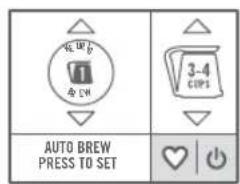
- To set, first match the KEURIG BREW ^® Setting to the number on the pack you inserted. Then select your favorite options for size and strength (not available for all KEURIG BREW ^® Settings). Do not press the Brew Button, press the Favorites Button.
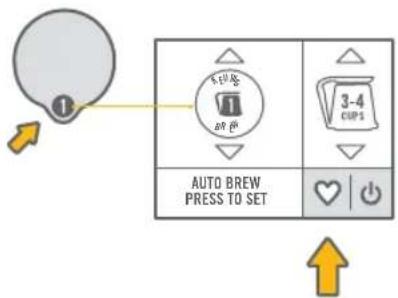
text_image
1 AUTO BREW PRESS TO SET 3-4 CUPS- Choose one of the three FAVORITES icons to save your favorite.
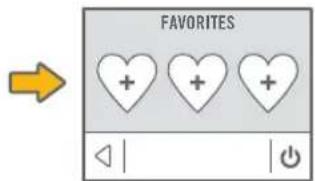
text_image
FAVORITES + + + ◀ | | ⓍPress YES to confirm.
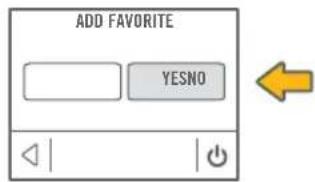
text_image
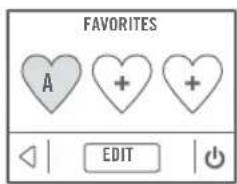
ADD FAVORITE YESNO- Press a FAVORITES icon and the Touchscreen will indicate the settings for this favorite.
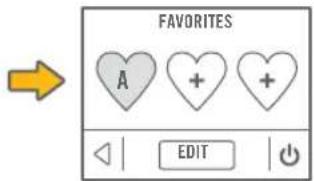
text_image
FAVORITES A + + EDITEDITING A FAVORITE
SECTION 2
- Press the Favorites Button and select EDIT.
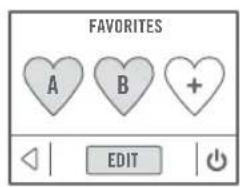
text_image
FAVORITES A B + EDIT↑
- Select the FAVORITES icon that you wish to change. Edit the settings and press CONFIRM. Your settings are now changed.
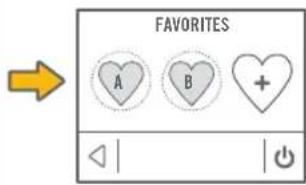
text_image
FAVORITES A B + ◀ | | Ⓧ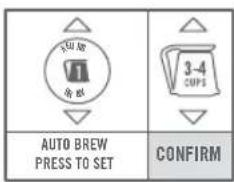
text_image
AUTO BREW PRESS TO SET CONFIRM←
USING A FAVORITE
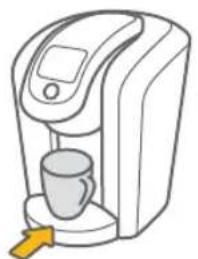
- Place a mug on the Drip Tray. Place a Keurig® brand pack in the Pack Holder and lower the Handle.
NOTE: Favorites are only available for KEURIG BREW Settings 1 through 6.
NOTE: If using KEURIG BREW "Setting 1, insert the empty Keurig™ Carafe.
natural_image
Line drawing of a digital water dispenser with a cup and speaker (no text or symbols)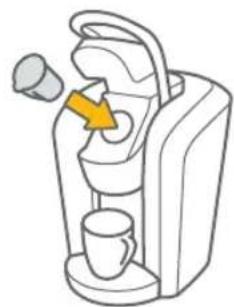
natural_image
Illustration of a portable coffee machine with a yellow arrow pointing to the handle (no text or symbols)- Press the Favorites Button and choose the FAVORITES icon you would like to brew.
text_image
AUTO BREW PRESS TO SET→
text_image
FAVORITES A + + EDIT
Press the Brew Button.
NOTE: Make sure the selected favorite matches KEURIG BREW® Settings 1 through 6 for the pack you're brewing in the Pack Holder.
SETTINGS MENU
text_image
12:00 AM Lift to Begin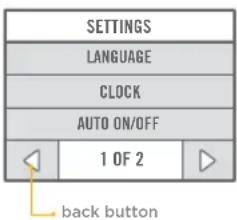
text_image
SETTINGS LANGUAGE CLOCK AUTO ON/OFF 1 OF 2 back buttonACCESS SETTINGS
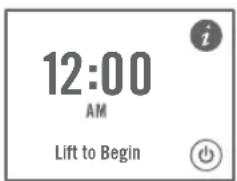
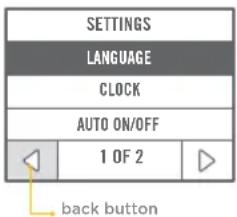
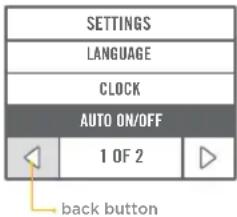
Explore everything your Keurig® 2.0 brewer has to offer by accessing the SETTINGS menu. From the home screen, select the Settings Button.
Use the arrows to scroll through the menu. To exit, press the back button.
text_image
SETTINGS LANGUAGE CLOCK AUTO ON/OFF 1 OF 2 back button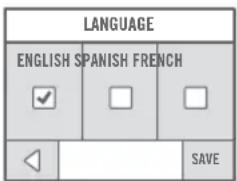
text_image
LANGUAGE ENGLISH SPANISH FRENCH ✓ □ □ ◀ SAVECHOOSE LANGUAGE
Press English, Spanish or French to select the LANGUAGE.
Press SAVE to confirm or use the back button to return to the SETTINGS menu.
SECTION 2
text_image
SETTINGS LANGUAGE CLOCK AUTO ON/OFF 1 OF 2back button
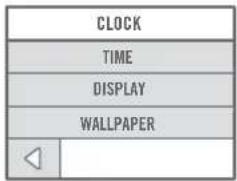
text_image
CLOCK TIME DISPLAY WALLPAPER ◀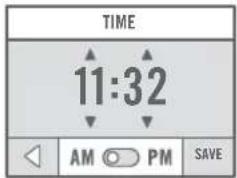
text_image
TIME 11:32 AM PM SAVE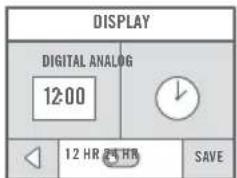
text_image
DISPLAY DIGITAL ANALOG 12:00 12 HR 24 HR SAVE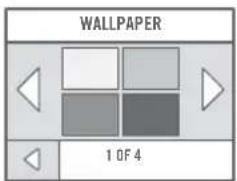
text_image
WALLPAPER 1 OF 4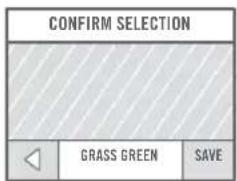
text_image
CONFIRM SELECTION GRASS GREEN SAVESET CLOCK
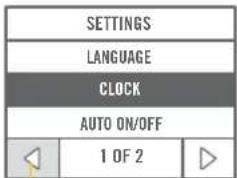
The CLOCK menu gives you the following three settings.
Use the back button to return to the SETTINGS menu.
Time: Set the current time using the arrows, then choose AM or PM.
Press SAVE to confirm or use the back button to return to the SETTINGS menu.
Display: Choose DIGITAL or ANALOG DISPLAY. For DIGITAL DISPLAY only, use the toggle to select 12 HR or 24 HR (military).
Press SAVE to confirm or use the back button to return to the SETTINGS menu.
Wallpaper: You can customize your Touchscreen color. Simply press a color window to select a WALLPAPER for the home screen.
Press SAVE to CONFIRM SELECTION or use the back button to return to the WALLPAPER menu.
SETTINGS MENU
text_image
SETTINGS LANGUAGE CLOCK AUTO ON/OFF 1 OF 2 back button| AUTO ON/OFF | |
| AUTO ON | |
| AUTO OFF | |
| ENERGY SAVER | |
ENABLE AUTO ON/OFF
You can leave your brewer on at all times so it's ready to make your perfect cup any time of day, or you can set the AUTO ON, AUTO OFF or ENERGY SAVER mode.
Use the back button to return to the SETTINGS menu.
text_image
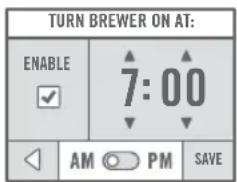
TURN BREWER ON AT: ENABLE 7:00 AM PM SAVEAuto On: Select ENABLE to activate AUTO ON. Use the arrows to set the time for the brewer to automatically turn on.
Press SAVE to confirm or use the back button to return to the SETTINGS menu.
text_image
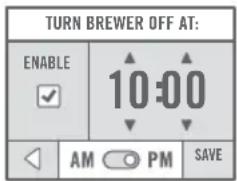
TURN BREWER OFF AT: ENABLE 10:00 AM PM SAVEAuto Off: Select ENABLE to activate AUTO OFF. Use the arrows to set the time for the brewer to automatically turn off.
Press SAVE to confirm or use the back button to return to the SETTINGS menu.
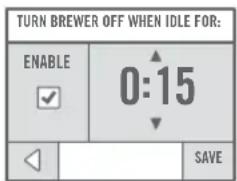
text_image
TURN BREWER OFF WHEN IDLE FOR: ENABLE 0:15 SAVEEnergy Saver: Select ENABLE to activate ENERGY SAVER mode. In increments of 15 minutes, set the brewer to turn off after a set length of time after the last brew.
Press SAVE to confirm or use the back button to return to the SETTINGS menu.
SECTION 2
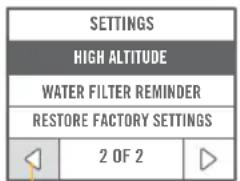
text_image
SETTINGS HIGH ALTITUDE WATER FILTER REMINDER RESTORE FACTORY SETTINGS 2 OF 2back button
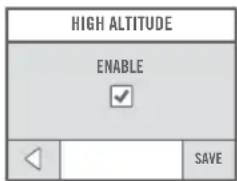
text_image
HIGH ALTITUDE ENABLE ✓ ◀ SAVE[Non-Text]
ENABLE HIGH ALTITUDE
To ensure your brewer works properly at higher altitudes (5,000 feet), ENABLE the HIGH ALTITUDE mode.
Press SAVE to confirm or use the back button to return to the SETTINGS menu.
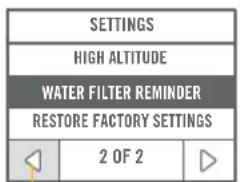
text_image
SETTINGS HIGH ALTITUDE WATER FILTER REMINDER RESTORE FACTORY SETTINGS 2 OF 2back button
text_image
WATER FILTER REMINDER ENABLE ✓ ◀ | SAVE广力云智慧零售收银系统
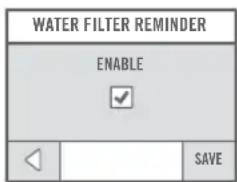
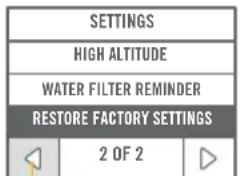
ENABLE WATER FILTER REMINDER
If you are using a Keurig™ Water Filter, select ENABLE to activate the WATER FILTER REMINDER notices.
Press SAVE to confirm or use the back button to return to the SETTINGS menu.
Refer to page 28 for more information.
text_image
SETTINGS HIGH ALTITUDE WATER FILTER REMINDER RESTORE FACTORY SETTINGS 2 OF 2back button
| RESTORE FACTORY SETTINGS | |
| ARE YOU SURE YOU WANT TO RESTORE SETTINGS TO FACTORY DEFAULTS? | |
| YESNO | |
(1)
RESTORE FACTORY SETTINGS
Press YES to restore your brewer to the default settings. (Restoring defaults erases any saved FAVORITES and AUTO ON/OFF. The clock will be set to 12:00 AM.)
Press NO to return to the SETTINGS menu.
CARING FOR YOUR BREWER
natural_image
Line drawing of a digital water dispenser device (no text or symbols)CLEANING THE BREWER EXTERIOR
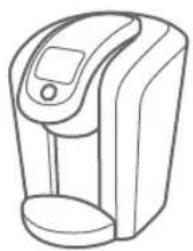
Keep your Keurig® 2.0 brewer looking its best by cleaning the exterior from time to time. Just clean with a damp, soapy, lint-free, non-abrasive cloth. Never immerse the brewer in water or other liquids.
CLEANING THE DRIP TRAY
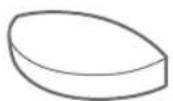
The Drip Tray can accumulate up to 8 ounces of overflow. The Drip Tray and the Drip Tray Plate should occasionally be rinsed clean. To remove the Drip Tray, simply slide it toward you, keeping it level at all times to avoid spilling. Clean with a damp, soapy, lint-free, non-abrasive cloth.
SECTION 2
natural_image
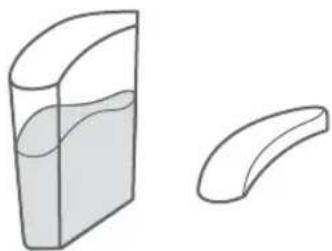
Two abstract curved shapes: a rectangular container filled with liquid and a curved shape with a flat top (no text or symbols)CLEANING THE WATER RESERVOIR AND THE FLIP-TOP RESERVOIR LID
Clean the Water Reservoir and the Flip-Top Reservoir Lid with a damp, soapy, lint-free, non-abrasive cloth and rinse thoroughly.
Do not dry the inside of the Water Reservoir with a cloth as lint may remain. Be sure to rinse the Water Reservoir thoroughly after cleaning to ensure that no cleaning solutions remain as they may contaminate the water supply in the brewer.
DO NOT PLACE THESE ITEMS IN THE DISHWASHER.
CARING FOR YOUR BREWER
CLEANING THE PACK HOLDER
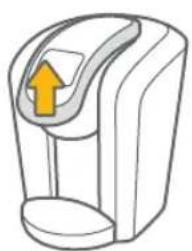
- Lift the Handle.
natural_image
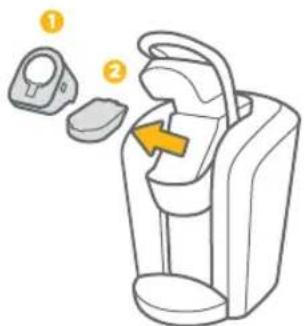
Illustration of a stylized device with an arrow pointing upward (no text or symbols)- Pull out the Pack Holder Assembly (1) and Base (2).
text_image
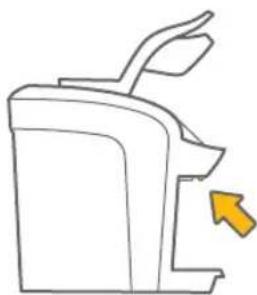
Diagram of a car interior showing two labeled compartments with an arrow indicating movement or change.- Push up while grabbing the sides of the Pack Holder Assembly. Pull away from the brewer.
CAUTION: Sharp needles. Do not put fingers in chamber.
natural_image
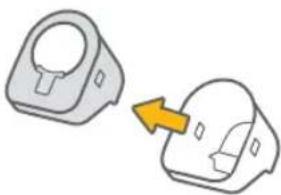
Simple line drawing of a mechanical device with an arrow pointing to a component (no text or symbols)- Press the release buttons on both sides of the Pack Holder Assembly.
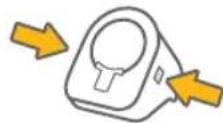
Separate the Pack Holder from the Housing.
natural_image
Two identical mechanical components with a yellow arrow pointing to one (no text or symbols)SECTION 2
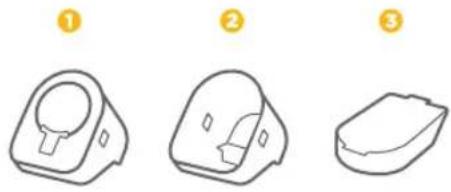
- Clean the Pack Holder (1), Housing (2) and Base (3) with a damp, soapy, lint-free, non-abrasive cloth and rinse thoroughly.
natural_image
Three line drawings of different plastic or mechanical components with no text or symbolsCLEANING THE EXIT NEEDLE
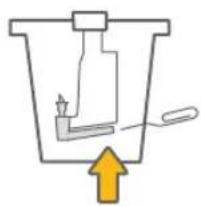
- If a clog arises in the exit needle, push the lever of the Pack Holder to reveal the exit needle.
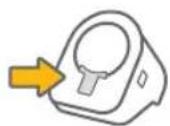
- Use a paper clip or similar tool to loosen the clog. Rinse thoroughly with hot water.
natural_image
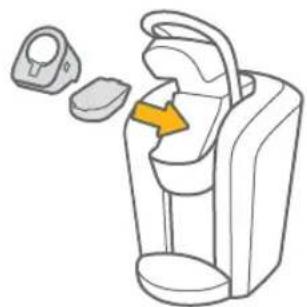
Simple line drawing of a mechanical component with an upward arrow, no text or symbols present.- After all pieces are cleaned, place the Base then the Pack Holder Assembly into the Brew Head. Lower the Handle. CAUTION: Sharp needles. Do not put fingers in chamber.
natural_image
Illustration of a portable device with a yellow arrow pointing to its interior space (no text or symbols)CARING FOR YOUR BREWER
CLEANING THE KEURIG™ CARAFE
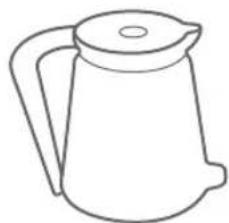
- Carefully empty the Keurig™ Carafe.
natural_image
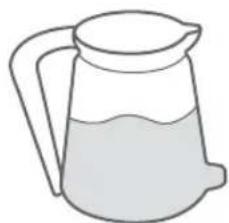
Line drawing of a kettle with handle and lid (no text or symbols)- Wipe the inside of the Keurig™ Carafe and the lid with a damp, soapy, lint-free, non-abrasive cloth. Rinse thoroughly with hot water. The Keurig™ Carafe should not be placed in the dishwasher or submerged.
natural_image
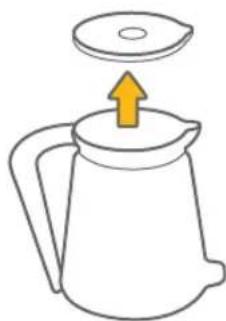
Simple line drawing of a pitcher with liquid inside (no text or symbols)- Remove the lid.
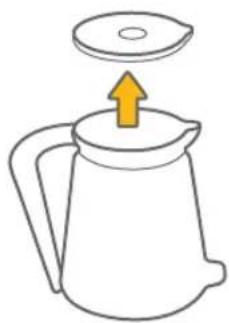
natural_image
Simple line drawing of a kettle with an arrow pointing upward (no text or symbols)- Replace the lid. Ensure that the lid is securely in place prior to brewing your next carafe of coffee.
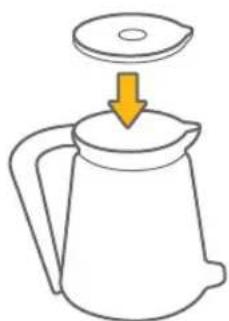
natural_image
Simple line drawing of a kettle with a lid and arrow indicating downward motion (no text or symbols)SECTION 2
This unique Keurig™ Carafe was specifically designed for use with the Keurig® 2.0 brewer. To connect the Keurig™ Carafe to the brewer, make sure the Keurig™ Carafe is securely inserted into the brewer. The Keurig® 2.0 brewer contains a sensory system that determines when the Keurig™ Carafe is in place and it is safe to begin brewing. If the Keurig™ Carafe is not in place or incorrectly inserted, the brewing process will not begin. If the Keurig™ Carafe is removed during brewing, brewing will stop.
CAUTION: Make sure the Keurig™ Carafe is empty before each use.
CAUTION: After brewing, the Keurig™ Carafe will contain extremely hot liquid. Take care when pouring from the Keurig™ Carafe. Never place your hand over the Keurig™ Carafe where hot steam is venting. Never allow children to use the Keurig™ Carafe or operate the brewer without adult supervision. Press the Power Button to terminate the brew process. Follow the instructions on the Touchscreen before removing the Keurig™ Carafe. The brewer will return to the home screen. Remove and discard the used K-Carafe™ pack.
CAUTION: There is extremely hot water in the Pack Holder during the brew process. To avoid risk of injury, do not lift the Handle during the brewing process.
To maintain the ideal combination of taste, freshness and temperature, we recommend preheating the Keurig™ Carafe. To preheat the Keurig™ Carafe, fill it with hot water for approximately 30 seconds and then pour out entirely prior to placing the Keurig™ Carafe into the brewer.
CAUTION: HAND WASH ONLY. DO NOT SUBMERGE. DO NOT MICROWAVE.
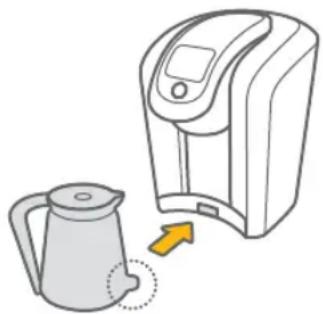
natural_image
Illustration of a kettle connected to a digital kitchen device with an arrow indicating motion (no text or symbols)MAINTENANCE ALERTS
Your brewer is designed to deliver the perfect cup time after time, year after year. To keep it working at peak performance, your Keurig ^® 2.0 brewer will let you know when it needs a little attention.
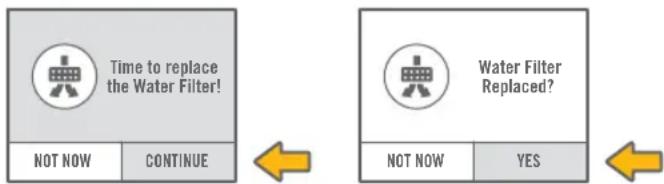
TIME TO REPLACE THE KEURIG™ WATER FILTER (VISIT KEURIG.COM TO PURCHASE)
Your brewer will indicate "Time to replace the Water Filter!" after every 1,000 ounces or two months. Once you've replaced the Keurig™ Water Filter, press YES to re-set the WATER FILTER REMINDER notices.
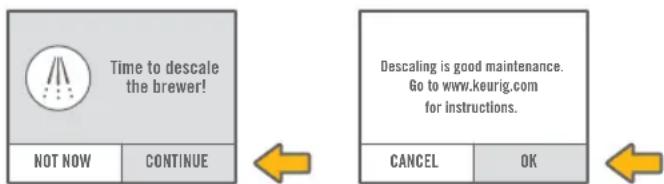
TIME TO DESCALE THE BREWER
Depending on the mineral content of your water, calcium deposits or scale may build up in your brewer, this is why we recommend using bottled or filtered water. Scale is non-toxic but if left unattended can hinder brewer performance. Regularly descaling your brewer every three to six months helps maintain the heating element, and other internal parts that come in contact with water. Calcium deposits may build up faster, making it necessary to descale more often.
You should promptly descale when the Touchscreen indicates “Time to descale the brewer!” However, even if this is not indicated, you should continue to descale your brewer every three to six months.
SECTION 2
DESCALING YOUR BREWER
Before you begin, you will need a large mug, fresh water, Keurig ^4 Descaling Solution and access to a sink. Do not use a paper cup.
- Empty the water from the Water Reservoir. If there is a Keurig™ Water Filter, remove and set aside. Disable AUTO OFF features, if necessary (refer to page 20).
STEP 1: FIRST DESCALING SOLUTION RINSE
- Press and hold the Power Button to power the brewer off.
- Pour the entire bottle of Keurig™ Descaling Solution into the Water Reservoir. Then fill the empty bottle with water and pour into the Water Reservoir. Press and hold the Power Button to turn the brewer back on.
- Place a large mug on the Drip Tray and run a cleansing brew by pressing and holding the Brew Button until 6 ounces of water has been dispensed. The brewer will automatically stop dispensing after 6 ounces. Do not use a Keurig® brand pack. Pour the contents of the mug into the sink.
STEP 2: SECOND DESCALING SOLUTION RINSE
- Repeat the cleansing brew process until the Touchscreen indicates “More Water Please.” Let the brewer stand for at least 30 minutes while still on.
• After 30 minutes, discard any residual solution and rinse the Water Reservoir thoroughly.
STEP 3: FRESH WATER RINSE
- Ensure the Water Reservoir is filled with fresh water to and not beyond the MAX FILL line.
- Place a large mug on the Drip Tray and run a cleansing brew. Pour the contents of the mug into the sink.
- Repeat the cleansing brew process at least 12 times. You may need to refill the Water Reservoir at least one time during this process.
NOTE: If "Time to descale the brewer!" is still indicated after completing the procedure, repeat the descaling procedure above.
MAINTENANCE ALERTS
DESCALING YOUR BREWER (CONTINUED)
The cleaning action of Keurig™ Descaling Solution may result in a foam dispensed from the brewer. This is natural, as the solution is reacting with the scale inside. For a brewer that is heavily scaled, the brewer may not fill properly after the descaler is added. If this occurs, you may see only a small or no output dispensed followed by the sound of air blowing out. If this occurs:
- Turn off and unplug the brewer.
- If there is Keurig™ Descaling Solution in the Water Reservoir, discard the contents, rinse the Water Reservoir thoroughly and refill with bottled or filtered water.
- Plug the brewer back in, power on, and repeat STEP 3: FRESH WATER RINSE (refer to page 29). The brewer should begin to function normally as the solution is rinsed out and the scale is removed. If the problem persists, allow the brewer to sit unplugged for at least 30 minutes then continue with the fresh water rinse.
Scan this QR code with your smartphone for step-by-step videos on cleaning, descaling and more. Or if you prefer, you can watch the videos online at Keurig.com

text_image
QR code image containing encoded data, no visible human-readable textRECYCLING K-CARAFE™ PACKS
SECTION 2
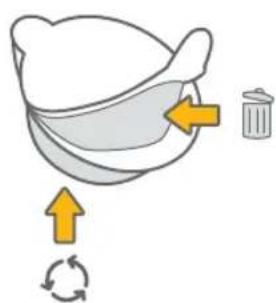
The plastic cups of K-Carafe™ packs can be recycled wherever #5 plastic is accepted. #5 plastic may not be recyclable in your community today, so please check locally with your municipality or waste hauler, or visit Keurigrecycling.com for more information. #5 plastic is recyclable everywhere in Canada.
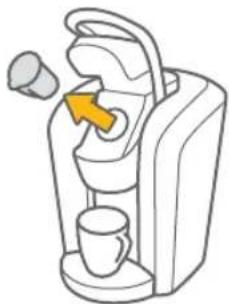
- Once brewing is complete, lift the Handle and carefully remove the K-Carafe™ pack by holding the outer rim.
CAUTION: The K-Carafe™ pack will be hot after brewing. Use caution when removing. Allow it to cool completely before handling.
natural_image
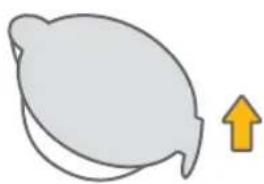
Line drawing of a coffee machine with a yellow arrow pointing to the cup (no text or symbols)- Once cool, separate the lid and filter from the cup. The filter will adhere to the lid.
natural_image
Simple line drawing of a leaf with an upward arrow, no text or symbols present- Once separated, discard the lid and the attached filter. Recycle your K-Carafe® pack's plastic cup wherever #5 plastic is accepted.
text_image
Diagram illustrating a recycling process with arrows indicating steps to recycle and reuseTROUBLESHOOTING
BREWER DOES NOT HAVE POWER
- Plug the brewer into an independent outlet without dimmer control.
- Check to be sure that the brewer is plugged in securely.
- Plug the brewer into a different outlet.
- Reset your home's circuit breaker if necessary.
- Press and hold the Power Button and ensure the Touchscreen is illuminated.
BREWER WILL NOT BREW
- After placing a pack in the Pack Holder, make sure the Handle is lowered completely and the Touchscreen displays the appropriate brew screen. Follow the brewing instructions in SECTION 1 (refer to pages 10 - 11).
- If the Touchscreen indicates “More Water Please.” add water to the Water Reservoir or make sure the Water Reservoir is seated properly in its base.
- If the Touchscreen indicates “More Water Please.” even after refilling, remove the Water Reservoir and empty the water. Then thoroughly clean (refer to page 23). Fill the Water Reservoir to the MAX FILL line, return it to the brewer and ensure it is seated properly in its base.
- The Pack Holder may need to be cleaned (refer to pages 24 - 25) or the brewer may need to be descaled (refer to pages 28 - 30).
- If you have completed the above procedure two times and this situation persists, contact Customer Service at 1.866.901.BREW (2739).
BREWER BREWS ONLY A PARTIAL CUP
- Clean the Pack Holder if necessary (refer to pages 24 - 25).
- The Water Reservoir may have been removed during brewing. Replace the Water Reservoir and perform a cleansing brew (refer to page 9) without a pack.
- Descale the brewer (refer to pages 28 - 30).
- If you have repeated the descale procedure on your brewer two times and it is still only brewing a partial cup, contact Customer Service at 1.866.901.BREW (2739).
SECTION 3
BREWER SHUTS OFF OR TURNS ON AUTOMATICALLY
- Check to make sure that the AUTO ON/OFF settings have not been set (refer to page 20).
- The water level is low and a full cup cannot be brewed. Add water to the Water Reservoir.
THE TOUCHSCREEN INDICATES "MORE WATER PLEASE."
- If the water level is not low, remove the Water Reservoir and empty the water. Then thoroughly clean (refer to page 23). Fill the Water Reservoir to the MAX FILL line, return it to the brewer and ensure it is seated properly in its base.

THE TIME IS NOT DISPLAYED ON THE TOUCHSCREEN
- If power is interrupted to the brewer by unplugging it, or if power is lost, follow the procedure on page 19 to set the CLOCK.
THE K-CUP® PACK HAS A KEURIG® LOGO, BUT TOUCHSCREEN INDICATES "OOPS!"
- Your Keurig® 2.0 brewer will not work with packs that don't have the Keurig® logo on them. Some Keurig® brand packs produced prior to January 2014 may not be enabled to work with the Keurig® 2.0 brewer. Please contact Customer Service at 1.866.901.BREW (2739) for a solution.
STILL HAVING TROUBLE? VISIT KEURIG.COM FOR MORE INFORMATION.
WARRANTY
LIMITED ONE YEAR WARRANTY
Keurig warrants that your brewer will be free of defects in materials or workmanship under normal home use for one year from the date of purchase. It is recommended that you fill out and return the warranty card enclosed with your brewer so that your purchase information will be stored in our system. Keurig will, at its option, repair or replace a defective brewer without charge upon its receipt of proof of the date of purchase. If a replacement brewer is necessary to service this warranty, the replacement brewer may be new or reconditioned. If a replacement brewer is sent, a new limited one year warranty will be applied to the replacement brewer.
This warranty only applies to brewers operated in the United States and Canada. This warranty gives you specific legal rights, and you may also have other rights that vary from state to state and, in the case of Canada, from province to province.
The Keurig ^® 2.0 brewer is designed to only work with Keurig ^® brand packs. Any damage to or malfunction of your brewer resulting from the use of non-Keurig ^® brand packs and accessories may not be covered by this warranty or may result in a service fee if the damage or malfunction is determined to be caused by such use.
WHAT IS NOT COVERED BY THE LIMITED WARRANTY?
THIS WARRANTY DOES NOT COVER CONSEQUENTIAL OR INCIDENTAL DAMAGES SUCH AS PROPERTY DAMAGE AND DOES NOT COVER INCIDENTAL COSTS AND EXPENSES RESULTING FROM ANY BREACH OF THIS WARRANTY, EVEN IF FORESEEABLE. Some states or provinces do not allow the exclusion or limitations of incidental or consequential damages, so the above limitation or exclusion may not apply to you depending on the state or province of purchase.
Nor does this warranty cover damages caused by use of non-Keurig ^® brand packs or accessories, services performed by anyone other than Keurig or its authorized service providers, use of parts other than genuine Keurig parts, or external causes such as abuse, misuse, inappropriate power supply or acts of God.
SECTION 4
OTHER LIMITATIONS
THIS WARRANTY IS EXCLUSIVE AND IS IN LIEU OF ANY OTHER EXPRESS WARRANTY, WHETHER WRITTEN OR ORAL. IN ADDITION, KEURIG HEREBY SPECIFICALLY DISCLAIMS ALL OTHER WARRANTIES WITH RESPECT TO YOUR K2.0-400 BREWER, INCLUDING ANY IMPLIED WARRANTY OF MERCHANTABILITY OR FITNESS FOR ANY PARTICULAR PURPOSE. Some states or provinces do not allow disclaimers of such implied warranties or limitations on how long an implied warranty lasts, so the above limitation may not apply to you depending on the state or the province of purchase.
HOW DO YOU OBTAIN WARRANTY SERVICE?
Keurig ^® brewers are high-quality appliances and, with proper care, are intended to provide years of satisfying performance. However, should the need arise for warranty servicing, simply call Keurig Customer Service at our toll free phone number 1.866.901.BREW (2739). Please do not return your brewer for servicing without first speaking to Keurig Customer Service to obtain an Authorization to Return number (ATR). Keurig ^® brewers returned without an ATR number will be returned to the sender without servicing.
Keurig, Incorporated 33 Coffee Lane Waterbury, VT 05676 1.866.901.BREW (2739)
GUIDE
FRANÇAIS
RÈGLES DE SÉCURITÉ IMPORTANTES
text_image
A B C D E F G H I J N M L KSYSTÈME D'INFUSION K2.0-400
text_image
DOSETTES K-CARAFE® 2-3 TASSIS 4-4 TASSIS 4-5 TASSIS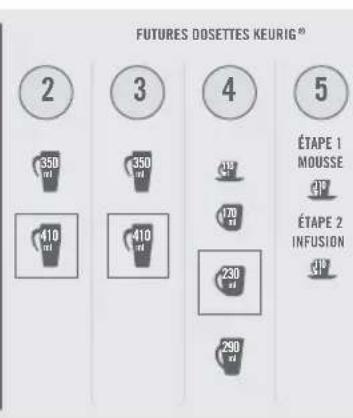
bar
FUTURES DOSETTES KEURIG® | Category | Volume (ml) | |---|---| | 2 | 350 | | 3 | 350 | | 4 | 170 | | 5 | ÉTAPE 1 MOUSSE ÉTAPE 2 INFUSION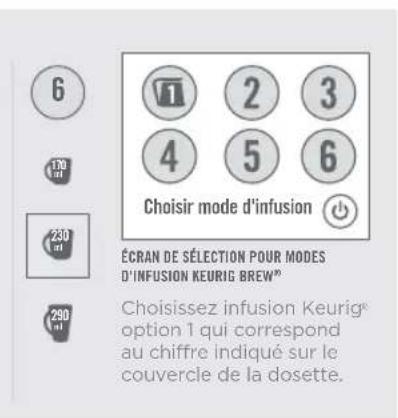
natural_image
Illustration of a digital water heater connected to an electrical outlet with a yellow upward arrow (no text or symbols)natural_image
Illustration of a device being processed from a container, showing airflow direction (no text or symbols)natural_image
Simple line drawing of a device with an arrow pointing upward (no text or symbols)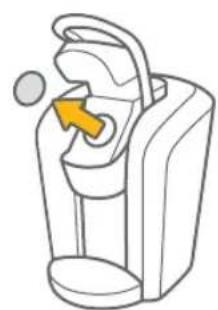
natural_image
Line drawing of a device with an orange arrow pointing to the interior (no text or symbols)natural_image
Line drawing of a modern water dispenser device (no text or symbols)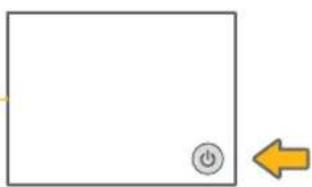
natural_image
Simple diagram with a square, a power button icon, and a yellow left-pointing arrow (no text or symbols)SECTION 1
INFUSION DE NETTOYAGE
natural_image
Line drawing of a digital coffee maker with a cup and a digital display (no text or symbols)natural_image
Line drawing of a coffee maker with a cup and a yellow arrow pointing to the top device (no text or symbols)natural_image
Illustration of a stylized water dispenser with an orange arrow indicating upward motion (no text or symbols)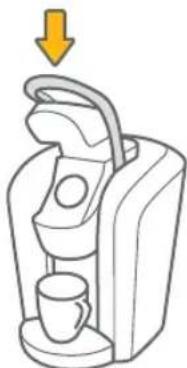
natural_image
Illustration of a coffee maker with a cup and handle, showing a yellow arrow pointing downward (no text or symbols)natural_image
Line drawing of a kettle and water dispenser with cups (no text or symbols)INFUSION DE DOSETTE K-CUP®
natural_image
Two line drawings of a coffee maker device with cups and a tray, showing internal components (no text or symbols)natural_image
Illustration of a coffee machine with a coffee cup and a handle, showing a yellow downward arrow (no text or symbols)natural_image
Line drawing of a coffee maker with a cup and a yellow arrow pointing to the top device (no text or symbols)INFUSION D'UNE DOSETTE K-CARAFE ^MC
SECTION 1
natural_image
Illustration of a kettle connected to a digital kitchen device (no text or symbols)natural_image
Illustration of two different types of backpacks with a light bulb and arrow indicating direction (no text or symbols)natural_image
Line drawing of a medical device with a yellow arrow pointing to the top part of its side (no text or symbols present)RÉGLAGE D'INFUSION AUTOMATIQUE DE CARAFE
natural_image
Illustration of a kettle being placed next to a digital water heater (no text or symbols)natural_image
Illustration of two types of electronic devices with arrows indicating process flow (no text or symbols)natural_image
Diagram showing two views of a coffee maker device with arrows indicating movement or change (no text or symbols present)natural_image
Line drawing of a coffee maker with a cup and a yellow arrow pointing to the top device (no text or symbols)natural_image
Line drawing of a digital water dispenser with a cup and digital display (no text or symbols)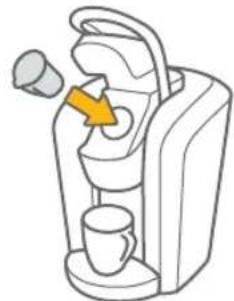
natural_image
Diagram of a portable coffee machine with a yellow arrow indicating the handle (no text or symbols present)53
text_image
HEURE 11:32 AM PM OKRÉGLAGE DE L'HORLOGE
natural_image
Line drawing of a digital water dispenser device (no text or symbols)NETTOYAGE DE L'EXTÉRIEUR DU SYSTÈME D'INFUSION
natural_image
Simple line drawing of a container with liquid and a curved shape (no text or symbols)NETTOYAGE DU RÉSERVOIR D'EAU ET DE SON COUVERCLE
natural_image
Illustration of a stylized device with an arrow pointing upward (no text or symbols)text_image
Diagram of a car interior showing two labeled compartments with an arrow indicating movement or change.natural_image
Simple line drawing of a mechanical device with an arrow pointing to a component (no text or symbols)natural_image
Two 3D-rendered mechanical parts with a yellow arrow pointing to one (no text or symbols)SECTION 2
natural_image
Three line drawings of different plastic containers or compartments, labeled 1, 2, and 3 (no text or symbols on the diagrams themselves)NETTOYAGE DE L'AIGUILLE DE SORTIE
natural_image
Simple line drawing of a mechanical component with an upward arrow, no text or symbols present.natural_image
Illustration of a portable device with a yellow arrow indicating the interior space (no text or symbols)ENTRETIEN DE VOTRE SYSTÈME D'INFUSION
NETTOYAGE DE LA CARAFE KEURIG ^4c
natural_image
Line drawing of a kettle with handle and lid (no text or symbols)natural_image
Simple line drawing of a pitcher with liquid inside (no text or symbols)natural_image
Simple line drawing of a kettle with an arrow pointing upward (no text or symbols)natural_image
Simple line drawing of a kettle with a lid and arrow indicating compression or lifting (no text or symbols)SECTION 2
FONCTIONNEMENT DE LA CARAFE KEURIG ^MC
natural_image
Illustration of a kettle next to a digital water heater with an arrow indicating rotation (no text or symbols)ALERTES D'ENTRETIEN
text_image
QR code image containing encoded data, no visible human-readable textRECYCLAGE DES DOSETTES K-CARAFE ^MC
SECTION 2
natural_image
Line drawing of a coffee machine with a yellow arrow indicating the coffee cup (no text or symbols)natural_image
Simple line drawing of a leaf with an upward arrow, no text or symbols presentnatural_image
Illustration of a bag with arrows indicating rotation and cycle (no text or symbols)DÉPANNAGE
LE SYSTÈME D'INFUSION NE S'ALLUME PAS
GARANTIE LIMITÉE D'UN AN
text_image
K L M N A B C D E F G H I JCAFETERAS SERIES K2.0-400
natural_image
Illustration of a digital water heater connected to an electrical outlet with a yellow upward arrow (no text or symbols)natural_image
Illustration of a device being processed from a container, showing airflow direction (no text or symbols)natural_image
Simple line drawing of a device with an arrow indicating upward motion (no text or symbols)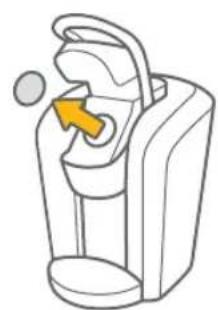
natural_image
Line drawing of a device with an orange arrow pointing to the interior (no text or symbols)natural_image
Line drawing of a modern water dispenser device (no text or symbols)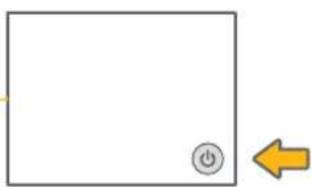
natural_image
Simple diagram with a square, a power button icon, and a yellow left-pointing arrow (no text or symbols)SECCIÓN 1
natural_image
Line drawing of a coffee maker with a cup and digital display (no text or symbols)natural_image
Line drawing of a coffee maker with a cup, no text or symbols presentnatural_image
Illustration of a stylized coffee maker with a yellow arrow indicating upward motion (no text or symbols)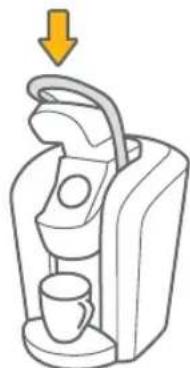
natural_image
Illustration of a coffee maker with a cup and handle, showing a yellow downward arrow (no text or symbols)natural_image
Line drawing of a kettle and water dispenser with cups (no text or symbols)PREPARAR SU PRIMERA DOSIS K-CUP®
natural_image
Two line drawings of a coffee maker with cups and a handle, showing the interior and side views (no text or symbols)natural_image
Illustration of a coffee machine with a coffee cup and a handle, showing a yellow downward arrow (no text or symbols)natural_image
Line drawing of a coffee maker with a cup and a yellow arrow pointing to the top device (no text or symbols)PREPARAR SU PRIMERA DOSIS K-CARAFE™
SECCIÓN 1
natural_image
Illustration of a kettle being placed next to a digital kitchen appliance (no text or symbols)natural_image
Line drawing of a device resembling a pump or scanner with a yellow arrow pointing to the handle (no text or symbols present)natural_image
Illustration of a kettle being placed next to a digital kitchen device (no text or symbols)natural_image
Two-step illustration of a device with a light bulb and arrow indicating motion (no text or symbols)natural_image
Two line drawings of a coffee maker device, one showing the open lid and arrow indicating rotation, the other showing the back cover and cup with an arrow pointing to the lid (no text or symbols)natural_image
Line drawing of a coffee maker with a cup and a yellow arrow pointing to the top device (no text or symbols)natural_image
Illustration of a digital water dispenser with a cup and mouse (no text or symbols)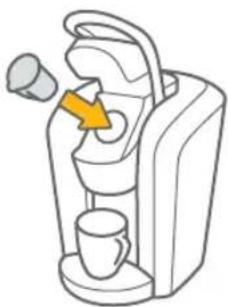
natural_image
Line drawing of a coffee machine with a yellow arrow pointing to the cup (no text or symbols)natural_image
Line drawing of a digital water dispenser device (no text or symbols)LIMPIAR EL EXTERIOR DE SU CAFETERA
natural_image
Two abstract curved shapes: a rectangular container filled with liquid and a curved shape with a flat top (no text or symbols)LIMPIAR EL TANQUE DE AGUA Y SU TAPA ABATIBLE
natural_image
Illustration of a stylized device with an arrow pointing upward (no text or symbols)text_image
Diagram of a car interior showing two labeled compartments with an arrow indicating movement or change.natural_image
Simple line drawing of a mechanical device with an arrow pointing to a component (no text or symbols)natural_image
Two identical mechanical components with a yellow arrow pointing to one (no text or symbols)SECCIÓN 2
natural_image
Three line drawings of different plastic or mechanical components with no text or symbolsnatural_image
Simple line drawing of a mechanical component with an upward arrow, no text or symbols present.natural_image
Illustration of a portable device with a yellow arrow pointing to the interior (no text or symbols)CUIDAR SU CAFETERA
LIMPIAR LA KEURIG™ CARAFE
natural_image
Line drawing of a simple kettle with handle and lid (no text or symbols)natural_image
Simple line drawing of a pitcher with liquid inside (no text or symbols)- Retire la tapa.
natural_image
Simple line drawing of a kettle with an arrow indicating upward motion (no text or symbols)natural_image
Simple line drawing of a kettle with a lid and arrow indicating compression or lifting (no text or symbols)SECCIÓN 2
USAR LA JARRA KEURIG™
natural_image
Illustration of a kettle connected to a digital kitchen device (no text or symbols)99 99